TL;DR
Agentic AI in supply chain pays off on frequent, repeatable problems like late shipments, but not on processes that keep changing. An AI agent spots a problem, fixes it within limits you set and passes everything else to a person. Seven jobs suit agents well, from restocking to shipment delays and freight invoices. Safety comes from limited access, approval rules, an audit trail and an off switch. Start with one workflow and let the agent draft changes for a person to approve. Give it more freedom only when the results hold.
Key Takeaways
- A supply chain agent senses an exception, decides within delegated limits, acts in your systems and then escalates whatever falls outside them.
- Gartner, quoted by Deloitte, expects half of cross-functional supply chain management solutions to use intelligent agents for autonomous decisions by 2030.
- The best first use cases are frequent, measurable exceptions with a clear system of record, such as PO changes and late shipments.
- Autonomy is set per action on a ladder from recommend to fully autonomous, while most first agents belong at draft-for-approval or act-within-limits.
- Controls belong in the design before launch: least-privilege access, screened supplier inputs, approval thresholds, audit trails and a tested kill switch.
- ROI depends on more than labor savings, so baseline expedite spend, stockouts and cycle time before the agent goes live.
The 2 a.m. Ship-Date Change
At 2:07 a.m., a contract supplier emails a revised ship date for a resin order. The new date is nine days later than the purchase order promised.
No planner sees it overnight, but an agent does. It reads the email, matches it to the open PO and checks stock cover at the two plants that use the resin. One plant runs out in six days.
By the 9 a.m. stand-up, the agent has drafted a split order with a second approved supplier. The draft stays inside the buyer’s spend limit and waits in a queue for one-click approval. The buyer reads the reasoning, approves it and moves on to the next problem.
That is the practical shape of agentic AI in supply chain. The software does the sensing and the legwork, while people keep the decisions that carry real money or risk. The rest of this guide covers where that works, how much freedom to give an agent and which controls keep it safe.
What Is Agentic AI in Supply Chain?
Agentic AI in supply chain means AI agents that spot exceptions, decide within limits the business sets and act in ERP, WMS or TMS systems. Anything outside those limits goes to a person with the evidence attached. The agent handles the routine cases, and people handle the judgment calls.
The word that matters most is exception. A supply chain runs on plans. Those plans break daily, for example when a truck runs late, a supplier shorts an order or demand jumps in one region. Each break creates a small decision that someone has to research, make and record.
That research is slow, manual work. Microsoft notes that purchasing staff can spend a large part of their day on manual tasks tied to vendor communication. An agent takes over the gathering and the first draft of the decision, so the planner reviews a recommendation instead of building one from scratch. Once there is enough evidence that the agent gets a case type right, the business can let it act alone on the smallest, safest cases.
Agentic AI vs Traditional Automation vs Generative AI
These three terms get mixed up, and the difference decides what you can safely hand over. Traditional automation, such as RPA or a workflow rule, follows a fixed path that someone scripted in advance. It is fast and predictable, but it stops when the input does not match the script.
Generative AI writes and summarizes. It can draft a supplier email or explain a forecast, yet it does not take action in your systems on its own. Kanerika’s guide to generative AI in supply chain covers those content and analysis jobs in depth.
An agent combines the two ideas. It uses a language model to read messy inputs and then calls tools to look up data or make changes. After each step, it picks the next one based on what it found. Our comparison of agentic AI vs generative AI goes deeper on that split.
Rules-based tools still have their place, and our post on intelligent automation in supply chain explains where RPA and document processing still win. The broader difference between AI and automation is covered separately.
AI Assessment
Is Your Supply Chain Ready for AI Agents?
Score your data, governance, skills and use cases in a short self-assessment, and see which gaps to close before an agent goes live.
Start Your AI Assessment →| Approach | Trigger | Decides? | Acts in systems? | Supply chain example |
|---|---|---|---|---|
| Traditional automation (RPA, workflow rules) | A schedule or a fixed event | No, it follows the script | Yes, on a scripted path | Posting goods receipts from a standard ASN file |
| Generative AI assistant | A user prompt | It suggests, but a person decides | No, a person acts on the output instead | Drafting a delay notice for a customer |
| Agentic AI | An exception signal in data or email | Yes, within delegated limits | Yes, through approved tools and APIs | Re-sourcing a late PO line within spend limits |
Why Supply Chain Teams Are Testing Agents Now
Analysts expect agents to move from pilots into standard planning and procurement software within a few years. Gartner made a May 2025 prediction that Deloitte quotes in its agentic supply chain report. It said that “by 2030, 50% of cross-functional supply chain management solutions will use intelligent agents to autonomously execute decisions in the ecosystem.”
The same Deloitte report quotes a broader Gartner forecast as well. It says “40% of enterprise applications will be integrated with task-specific AI agents by the end of 2026, up from less than 5%.” Money is following the prediction too. Gartner forecasts, as reported by MHL News, that spend on supply chain software with agentic AI will reach $53 billion by 2030, up from under $2 billion in 2025.
The same forecast expects 60% of enterprises using supply chain management software to adopt agentic AI features by 2030, compared with 5% in 2025.
Adoption is real but early. A study cited by Deloitte found that more than half of surveyed supply chain executives report deploying AI agents to automate workflows. Deloitte also describes those agents working “within defined guardrails.” That is the honest picture, since many deployments still cover narrow tasks with people close by.
For manufacturers, agents sit alongside other manufacturing industry trends such as regional sourcing and tighter inventory targets. Each of those shifts adds exceptions to manage. More exceptions with the same headcount is the plain business case for agents. Our post on agentic AI in manufacturing covers the plant-floor side of the same shift.
How an Agentic Supply Chain Workflow Runs
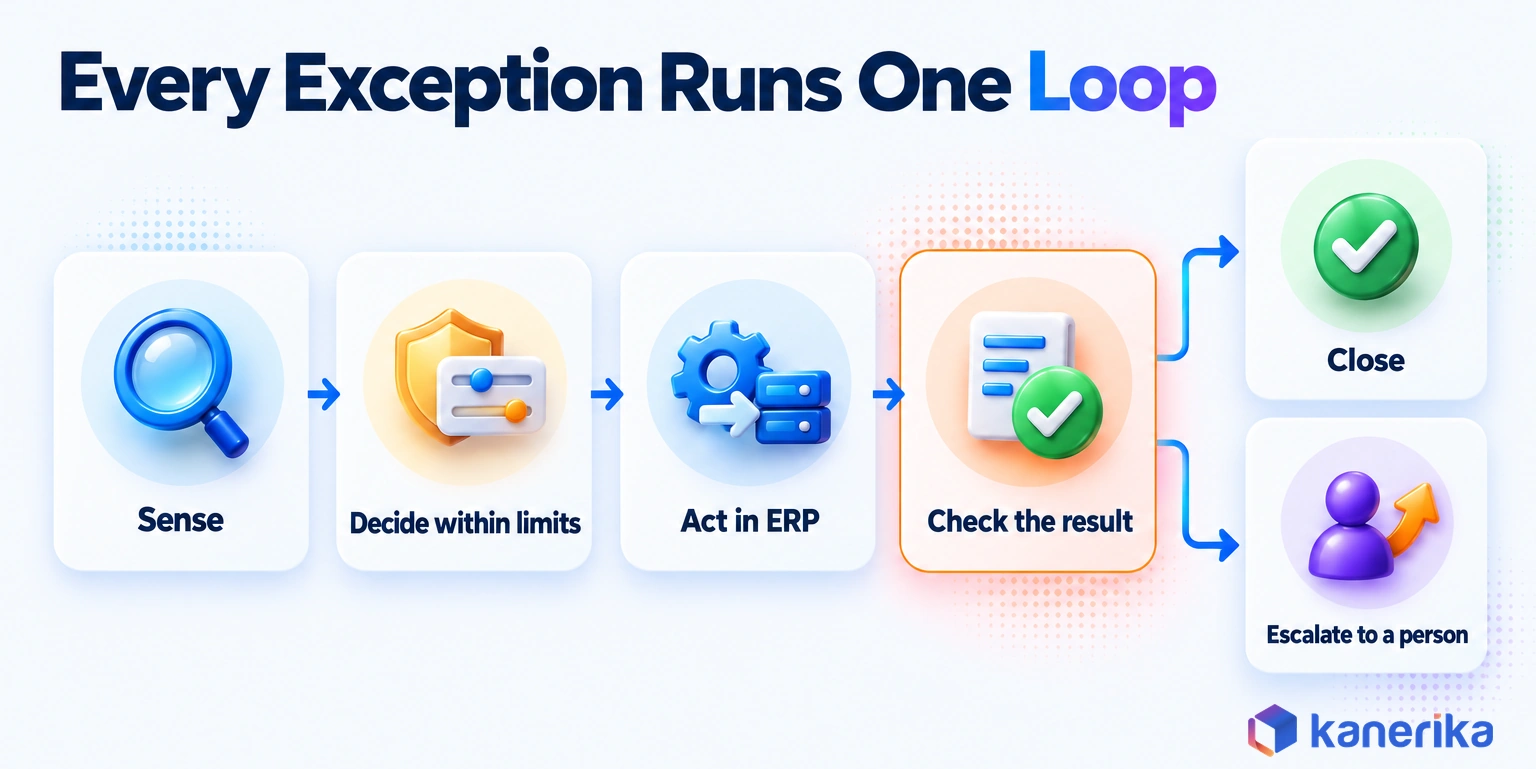
Every supply chain agent runs the same basic loop, whatever the use case. It senses a signal, decides what to do within its limits, acts, checks the result and escalates anything it cannot settle. Then it records what happened, so the next decision starts from better evidence.
Take a late inbound container as an example. The agent senses the delay from a carrier status feed, then works out which sales orders depend on that stock. It proposes a transfer from another warehouse, checks that the transfer posted correctly and escalates if no stock is free anywhere.
- Sense: watch event feeds, inboxes and system alerts, so the agent knows when something changed.
- Decide: pull the related orders, stock and business rules, then choose an option within the agent’s limits.
- Act: take the chosen step through an approved tool, or draft it for approval instead.
- Check: confirm the change posted and the numbers still add up.
- Escalate: hand anything outside its limits to a named person, together with the evidence.
- Learn: log the outcome so reviewers can tune rules, prompts and thresholds.
The check step carries more weight than it looks. A model can sound confident and still be wrong. So the agent should rely on a rule-based check to decide whether a step counts as done.
Systems and Data the Agent Needs
An agent is only as good as the systems it can read and the few it may change. A typical supply chain agent touches five or six systems, and each one needs its own read and write rules.
| System | What the agent reads | What it may write |
|---|---|---|
| ERP | Purchase orders, sales orders, item master, supplier terms | Draft PO changes and notes on order lines |
| WMS | On-hand stock, bin locations, pick status | Transfer requests and wave priorities within limits |
| TMS | Shipment status, carrier rates, appointments | Rebooking requests and customer delay notices |
| EDI and supplier portal | ASNs, order acknowledgments, ship-date changes | Acknowledgment replies and follow-up requests |
| Master data | Lead times, safety stock, approved suppliers | Nothing; it flags errors for a data owner |
| Email and collaboration tools | Supplier and carrier messages | Drafted replies held for approval |
Master data decides whether any of this works. If lead times in the item master are a year out of date, the agent will draft confident orders on wrong numbers.
Clean the fields the agent depends on before launch. Give master data a human owner too, because an agent should flag a bad record, not rewrite it.
Narrow Tools with Strict Input Schemas
Each write the agent may make should be a narrow tool with a strict input schema. The Model Context Protocol tools specification (version 2025-06-18) describes every tool by name, description and a JSON Schema for its inputs. It also says servers must validate all tool inputs, and our guide to MCP for context-aware AI agents explains the protocol itself.
The example below is an illustrative tool for use case 2. It can only draft a date change on one PO line, and the schema rejects any field it does not list.
{
  "name": "draft_po_date_change",
  "title": "Draft PO ship-date change",
  "description": "Draft a ship-date change on one open PO line for buyer approval. Never posts to the ERP.",
  "inputSchema": {
    "type": "object",
    "properties": {
      "po_number": { "type": "string", "pattern": "^PO-[0-9]{6}$" },
      "line": { "type": "integer", "minimum": 1 },
      "new_ship_date": { "type": "string", "format": "date" },
      "reason_code": {
        "type": "string",
        "enum": ["SUPPLIER_DELAY", "CAPACITY", "QUALITY_HOLD"]
      }
    },
    "required": ["po_number", "line", "new_ship_date", "reason_code"],
    "additionalProperties": false
  }
}
Because the tool only drafts, a wrong call costs the buyer one rejected draft rather than a changed order. A separate posting tool, held by a different identity, makes the real write after approval.
Single Agent or Multi-Agent?
Start with one agent and one job. A single agent with a clear scope is easier to test, easier to audit and easier to switch off. Add a second agent only when two jobs need different permissions or different owners. At that point you also need AI agent orchestration to route work between them.
A common split pairs a planning agent that recommends with a procurement agent that writes to the ERP. Keeping them apart limits what any one agent can break. It also lets each owner approve changes to their own agent without a joint review. Our guide to multi-agent AI systems covers the wider design patterns.
Deloitte’s report proposes “agent resumes,” a written profile for each agent that works within set guardrails. In practice, that profile can list the agent’s job, its data access and its limits, which makes reviews faster. Interoperability is still maturing. Open protocols like Agent2Agent (A2A), hosted by the Linux Foundation since June 2025, aim to let agents from different vendors pass work along. Test that hand-off before you rely on it.
7 Use Cases of Agentic AI in Supply Chain
The seven use cases below share three traits. Each has frequent exceptions, a clear system of record and a KPI you can measure before and after. Every entry then covers the trigger, what the agent does, what stays with people and the number to watch.
Read them as candidates, not a ranking. The right first one depends on where your exceptions pile up today and how clean the data behind them is.
1. Inventory Replenishment and Rebalancing
Replenishment is a familiar agent job because the rules already exist. Planners set reorder points and safety stock, then spend hours on the items that fall outside them. An agent can work that list all day instead of once a week.
When stock cover drops below target, the agent checks open orders, in-transit stock and stock at sister sites. It then proposes a transfer or a reorder inside the quantity and value limits it has been given. Our post on predictive analytics in supply chain covers the forecasting that feeds those targets.
- Trigger: when projected stock cover falls below target at a site.
- Human keeps: new items and large orders, as well as anything under supplier allocation.
- KPI: stockout rate and planner hours per week on replenishment.
2. Supplier Risk and Purchase Order Exceptions
Purchase order changes arrive by email, portal and phone, and each one needs a buyer to check the impact before replying. This is one of the clearest early use cases, and software vendors already ship agents for it.
Microsoft’s Procurement Agent for Dynamics 365 Supply Chain Management is a production-ready preview that sends follow-up emails to vendors on purchase orders. It also speeds up PO updates from incoming vendor emails and reviews the impact of vendor PO changes.
A custom agent can add supplier risk signals to the same flow. When a supplier misses two ship dates in a row, the agent flags the vendor for review and suggests a backup source. The buyer still makes the switch.
- Trigger: when a vendor email, portal update or missing acknowledgment touches an open PO.
- Human keeps: price changes and supplier switches, together with anything over the spend limit.
- KPI: PO exception cycle time and on-time confirmation rate.
3. Shipment Tracking and Delivery Exceptions
Logistics teams spend much of the day chasing status. Carrier portals, EDI messages, emails and IoT trackers in logistics report the same shipment in different formats. A late load sometimes surfaces only when a customer calls.
An agent can read those feeds, match each event to its order and spot a delay early. It then drafts a customer notice, requests a rebooking or proposes a faster lane within a cost cap. Our guide to data analytics in logistics covers the tracking data this depends on.
- Trigger: when a milestone is missed or a revised ETA passes the promise date.
- Human keeps: premium freight above the cap, as well as any message to a strategic account.
- KPI: on-time-in-full rate and expedite spend.
4. Demand Sensing and Production Re-Planning
AI forecasting models predict demand, and an agent acts on the prediction. That split matters, because a forecast that nobody acts on changes nothing. The modeling itself is covered in our roundup of AI in supply chain use cases, so this section stays with the action.
When short-term demand moves well outside the plan, the agent checks capacity, materials and open orders. It drafts a revised production sequence or a material pull-in for the planner to approve. Automotive plants are a good example of this pattern, and our guide to data analytics in the automotive industry covers the data side.
- Trigger: when demand moves outside a set band compared with the plan.
- Human keeps: schedule changes inside the frozen window, together with any overtime decision.
- KPI: schedule adherence and the lag from demand signal to approved plan.
Kanerika Service
AI and Analytics for Logistics and Supply Chain
Kanerika builds data platforms, analytics and AI agents for carrier, warehouse and order operations, from shipment visibility to exception handling.
Explore Logistics Solutions5. Warehouse Order Fulfillment and Slotting
Inside the warehouse, exceptions show up as short picks, late waves and congested zones, especially at peak. A WMS handles the standard flow well, while supervisors still juggle the exceptions by radio and spreadsheet.
An agent can watch pick progress and re-prioritize waves when a carrier cutoff is at risk. It can also propose slotting changes when fast movers sit far from the dock. Physical moves stay with people, so the agent’s output is a ranked task list for the shift lead. Our post on AI in warehouse management covers the wider warehouse picture.
- Trigger: when a wave falls behind a carrier cutoff, or a pick comes up short.
- Human keeps: labor moves and physical slotting work, as well as every safety call.
- KPI: orders shipped by cutoff and picks per labor hour.
6. Disruption Response and Recovery
Disruptions are where agents promise the most but also need the tightest limits. A port closure or a plant fire touches hundreds of orders at once, and the first hours decide how much service you keep.
An agent can map the affected orders, suppliers and lanes quickly, then rank recovery options by cost and service impact. If you run an AI-powered digital twin of the network, that mapping gets faster because the dependencies are already modeled. It should draft those options, not execute them, because one wrong mass change spreads across partners fast. People choose the plan, and the agent then carries out the approved steps.
- Trigger: when a major supplier, site or lane event affects many orders.
- Human keeps: the choice of recovery plan, together with every customer commitment.
- KPI: time from event to approved recovery plan.
7. Freight Audit, Invoice Matching and Trade Compliance
Back-office logistics work is rule-heavy, document-heavy and, above all, easy to measure. That makes it a strong place to let an agent act on its own for small amounts.
The agent matches carrier invoices to rates, shipments and accessorial rules, then approves clean matches below a set value. It holds disputes with a drafted claim. It also flags shipments whose classification or documents look incomplete, so a trained person can make the compliance call.
- Trigger: when a carrier invoice arrives or a shipment needs trade documents.
- Human keeps: disputes above the threshold, as well as every classification decision.
- KPI: touchless invoice rate and overbilling recovered.
Use Cases Compared
Seen side by side, the seven use cases differ most in how much autonomy they can carry. The ratings below are relative design guidance rather than benchmarks, and your own data quality will move them.
| Use case | Typical autonomy level | Data needed | Time to value | Main risk |
|---|---|---|---|---|
| 1. Inventory replenishment | L2, act within limits | Stock, open orders, lead times | Short | Bad lead-time data drives wrong orders |
| 2. Supplier and PO exceptions | L1, draft for approval | PO lines, vendor email, terms | Short | Accepting a change that breaks a commitment |
| 3. Shipment exceptions | L2 to L3 | Carrier feeds, order promises | Short | Notices sent on a false delay |
| 4. Demand-driven re-planning | L1 | Forecast, capacity, materials | Medium | Plan churn on a noisy signal |
| 5. Fulfillment and slotting | L1 to L2 | WMS tasks, cutoffs, labor | Medium | Waves re-sequenced into a jam |
| 6. Disruption recovery | L0 to L1 | Network map, orders, suppliers | Long | One mass change cascades to partners |
| 7. Freight audit and compliance | L3 for small amounts | Invoices, rates, shipment documents | Short | A wrong classification on a filing |
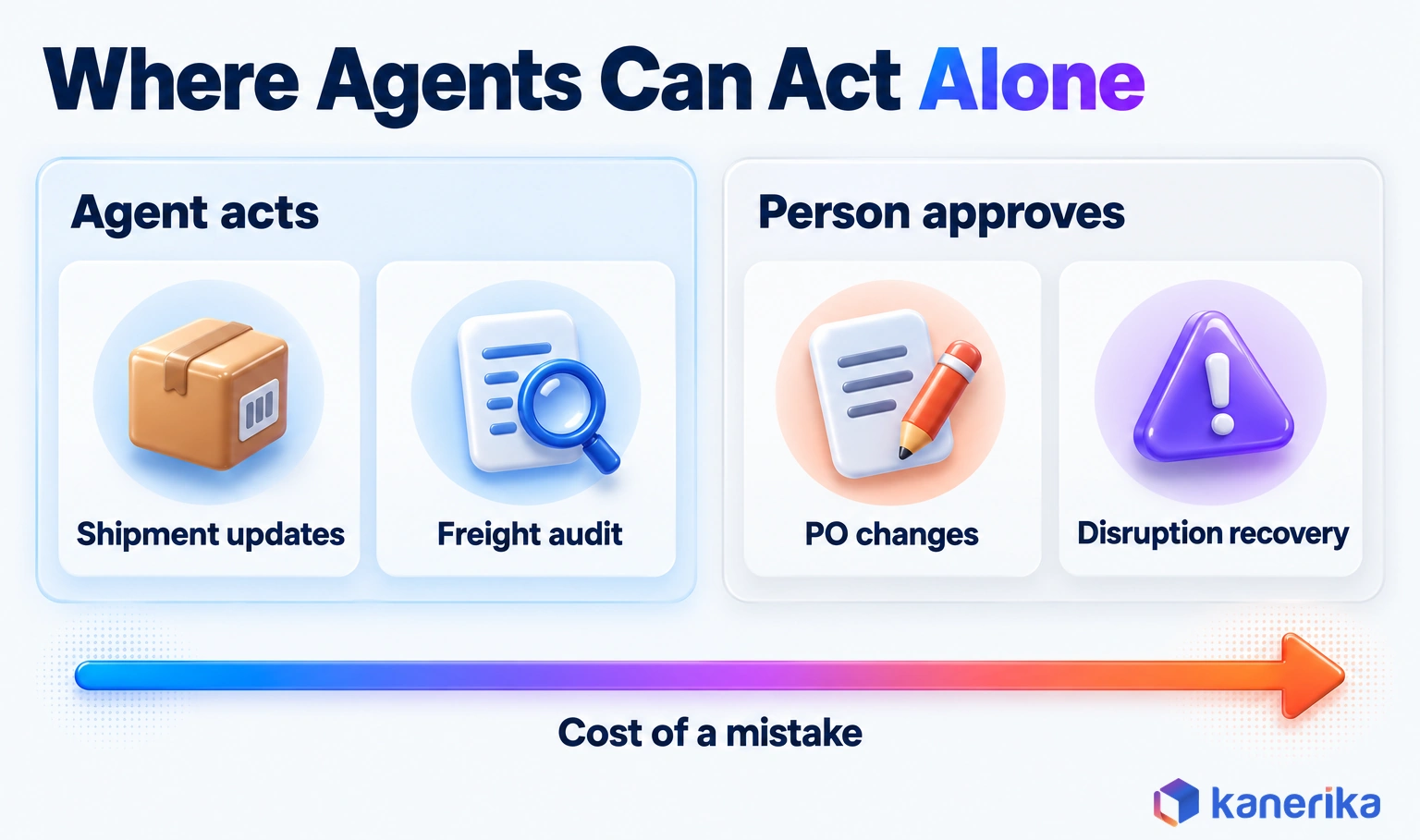
The pattern is simple. When a mistake is cheap and easy to reverse, the agent can act. But when it is costly or touches a customer, the agent drafts and a person decides.
How Much Autonomy Should a Supply Chain Agent Have?
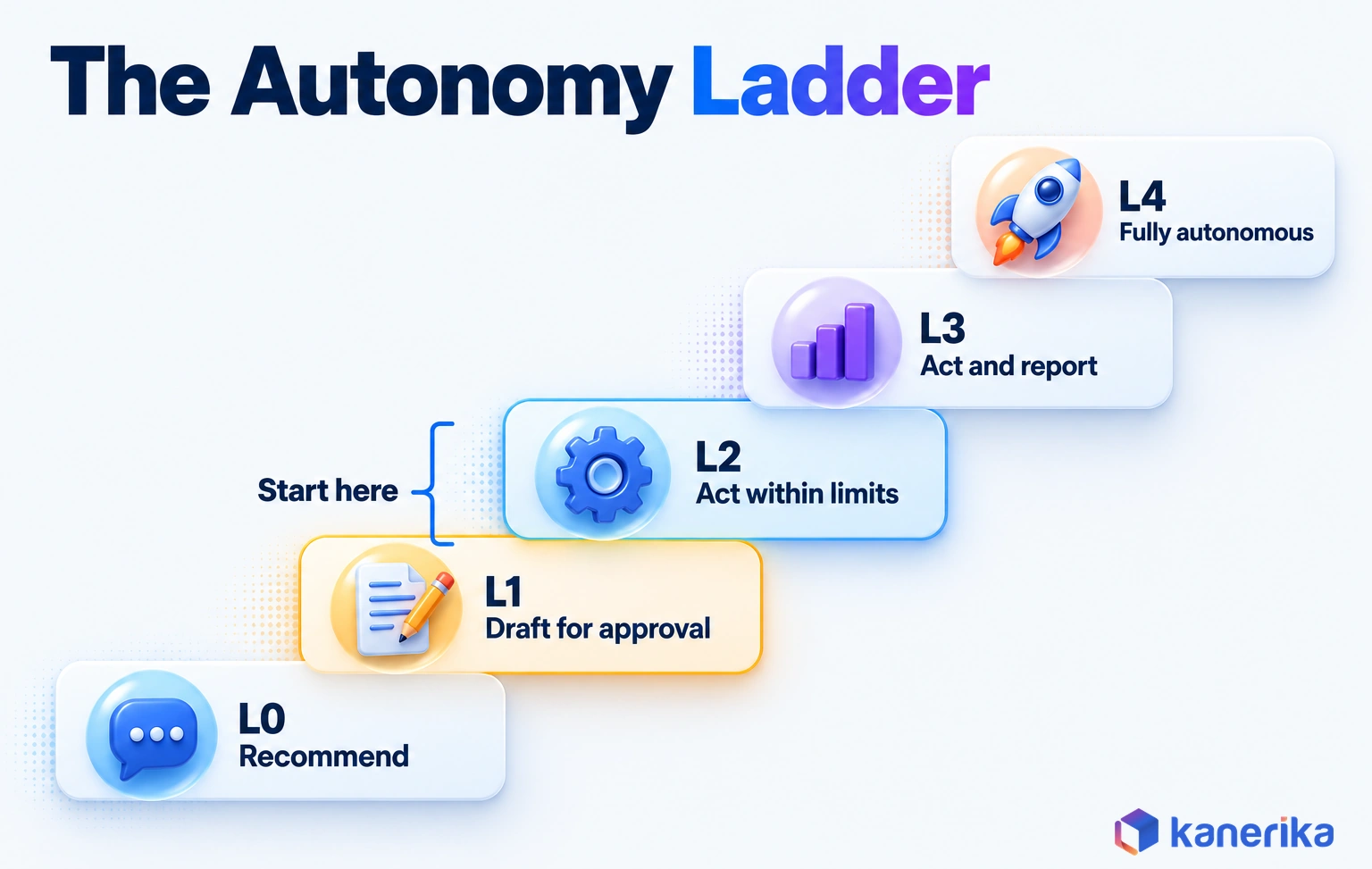
Autonomy works best as a setting for each action, chosen by what a mistake would cost and how easily you can undo it. One agent can send status updates on its own while it waits for approval on every PO change.
Two questions set the level for any action. How much would a wrong decision cost, and how quickly could someone reverse it? A wrong status update costs little and takes seconds to fix, while a wrong supplier switch can take weeks to unwind.
A five-level ladder makes those choices explicit. Each step up removes a human checkpoint, so each step needs evidence that the agent gets that action right.
| Level | What the agent does | Example threshold (illustrative) |
|---|---|---|
| L0 Recommend | Suggests an action, then a person carries it out | Selecting a new supplier |
| L1 Draft for approval | Prepares the change for one-click approval | PO date changes of more than three days |
| L2 Act within limits | Acts alone inside set value and quantity limits | Stock transfers under $25,000 between own sites |
| L3 Act and report | Acts, then reports in a daily digest | Carrier rebooking under $2,000 per load |
| L4 Fully autonomous | Acts with periodic audit only | Writing shipment status updates to the order record |
The thresholds in the table are illustrative design choices, not industry standards. Set yours from your own exception data, starting with the value at which a wrong decision would really hurt.
Writing the ladder down as a policy file keeps those settings reviewable. The illustrative file below encodes the table’s thresholds for one agent, so any change to a limit shows up in version control.
# Illustrative autonomy policy for one agent (not a vendor format)
agent: po-exception-agent
business_owner: procurement-ops-lead
kill_switch_owner: supply-chain-director
default: deny            # any action not listed here is refused
actions:
  update_shipment_status:
    level: L4            # periodic audit only
  rebook_carrier:
    level: L3            # act, then report in the daily digest
    max_value_usd: 2000
  transfer_stock:
    level: L2            # act alone inside limits
    max_value_usd: 25000
    own_sites_only: true
  change_po_date:
    level: L1            # draft for one-click approval
    draft_if_days_over: 3
  select_new_supplier:
    level: L0            # recommend only
review:
  log_review: weekly
  autonomy_review: quarterly
  drop_one_level_on: [erp_upgrade, new_carrier_feed]
Have the agent runtime read this file before every action and refuse anything it does not list. That default-deny rule matters more than any single threshold.
Moving an Agent Up or Down the Ladder
First agents should usually sit at L1 or L2. Raise a level only after a few weeks of logs show that its drafts match what people approved. Then lower it again the moment quality slips.
Autonomy can move down as well as up. When an upstream system changes, such as a new carrier feed or an ERP upgrade, drop the affected actions one level. Keep them there until the agent has been retested on the new inputs and its drafts match approvals again.
The ladder also gives auditors and business owners a shared language. Instead of debating whether the agent is “autonomous,” they can agree that it acts at L2 for transfers and L1 for PO changes. Then they review that setting every quarter.
When to Avoid Agents
Some workflows are poor candidates, and saying so early saves a failed pilot. Skip agents, or wait, in three situations.
- The process changes every month, so there is no stable rule set to delegate.
- There is no system of record, so decisions live in spreadsheets and inboxes.
- Exception volume is low, so a person clears the cases faster than an agent can be built and tested.
In those cases, fix the process or the data first. A simple workflow rule may also do the job at a fraction of the cost, and it is easier to maintain.
Build, Buy or Extend Existing Supply Chain Agents?
Once a use case is chosen, the next question is where the agent comes from. You can switch on agents embedded in your ERP or planning suite, build custom ones, or combine both. Our guide to SAP AI agents shows what the agents embedded in SAP cover.
Embedded agents are the quickest start when your process matches the vendor’s design. Microsoft’s Procurement Agent inside Dynamics 365 is one example, reading vendor emails and proposing PO updates for a buyer to review. Custom agents cost more to build, but they can span several systems and follow your own rules. An AI agent builder platform can cut part of that build effort.
| Option | Best when | Trade-off | Lock-in |
|---|---|---|---|
| Embedded agent in an ERP or planning suite | Your process is close to the vendor’s standard flow | Fast start, limited to that suite’s data and actions | High, tied to the suite |
| Custom agent | The exception spans ERP, WMS, TMS and email | Full control, more build and run effort | Low to medium, depending on the framework |
| Hybrid | You run an embedded agent and need cross-system steps around it | Two sets of controls to keep aligned | Medium |
A simple rule helps with the choice. If every step of the exception lives inside one suite, start with that suite’s embedded agent. If the exception crosses three or more systems, such as ERP, TMS and email, plan for a custom or hybrid agent from the start.
Whatever you choose, the ERP stays the system of record. The agent should write its changes back there through approved APIs, with its own identity on every transaction.
If an agent keeps its decisions in a side database, auditors and planners lose the single version of the truth. That is also why a hybrid setup needs one owner for the controls on both sides. Otherwise the two agents may disagree about what was approved.
Kanerika Service
Agentic AI Services
Kanerika designs, builds and runs custom and hybrid AI agents with scoped access, approval thresholds and audit trails, starting from one exception workflow.
Explore Agentic AI ServicesWhat Agentic AI Costs and How to Measure ROI
The business case for an agent rests on a few measurable changes, especially in how exceptions get handled. Cycle time drops, more cases close without a touch, expedite spend falls and stockouts get rarer. Measure those before you build, or you will have nothing to compare against.
A Worked Example for PO Exceptions
Here is the arithmetic for one workflow. Every input is a hypothetical assumption, so swap in your own numbers.
- 1,200 PO exceptions a month, each taking a buyer 20 minutes today.
- The agent prepares 70% of them well enough that review then takes 5 minutes.
- The other 30% still take the full 20 minutes each.
- A loaded buyer cost of $50 an hour.
- Run costs of $4,000 a month for platform, usage and monitoring, plus a one-time build of $90,000.
Today the work takes 400 hours a month, since 1,200 exceptions at 20 minutes each is 24,000 minutes. With the agent, 840 reviewed cases take 70 hours and 360 manual cases take 120 hours, so the total falls to 190. The 210 hours saved are worth $10,500 a month.
Net of the $4,000 run cost, that leaves $6,500 a month, so the $90,000 build pays back in about 14 months. Now add one more assumed benefit: the agent catches four late orders a month early enough to avoid a $1,500 expedite each. That adds $6,000 a month, and payback shortens to about 7 months.
The lesson is that labor savings alone can make a slow case. The service and spend effects often decide it, so baseline them too.
Talk to Kanerika
Model the Business Case for Your First Agent
Bring one exception workflow and its volumes. Kanerika will walk through the baseline, the autonomy level and the controls a first agent would need.
Schedule a Demo →KPIs to Track
Pick a small set of numbers and record their baseline from the systems that already hold them. Six measures cover most agent business cases.
| KPI | Baseline source | Target direction |
|---|---|---|
| Exception cycle time | ERP change logs and ticket timestamps | Down |
| Touchless rate | Share of exceptions closed without edits | Up |
| Expedite spend | Freight invoices tagged as premium | Down |
| Stockout rate | WMS and order fill data | Down |
| Agent override rate | Agent action log compared with approvals | Down, then stable |
| Cost per resolved exception | Run cost divided by cases closed | Down |
Dashboards for these numbers often exist already. Our review of supply chain analytics tools covers the reporting layer that most teams use.
Cost Drivers
Model usage is only one line, and often not the biggest. Much of the cost sits around the agent, in the work to connect systems and keep their data clean.
- Integration: APIs, event feeds and identities for each system the agent touches.
- Data cleanup: lead times, supplier records and units of measure fixed before launch.
- Model and runtime usage: usage-based charges, which also apply to embedded vendor agents.
- Monitoring: logs, evaluation runs and an owner who reviews them every week.
- Change management: training buyers and planners so they can review and approve agent work.
Budget the first workflow in full. The second one usually costs less, because the connections and controls already exist.
Risks and Governance Controls for Supply Chain Agents
An agent that can change orders can also change the wrong ones. Supply chain agents face familiar IT risks plus a few new ones, because they read untrusted inputs from suppliers and act across company boundaries.
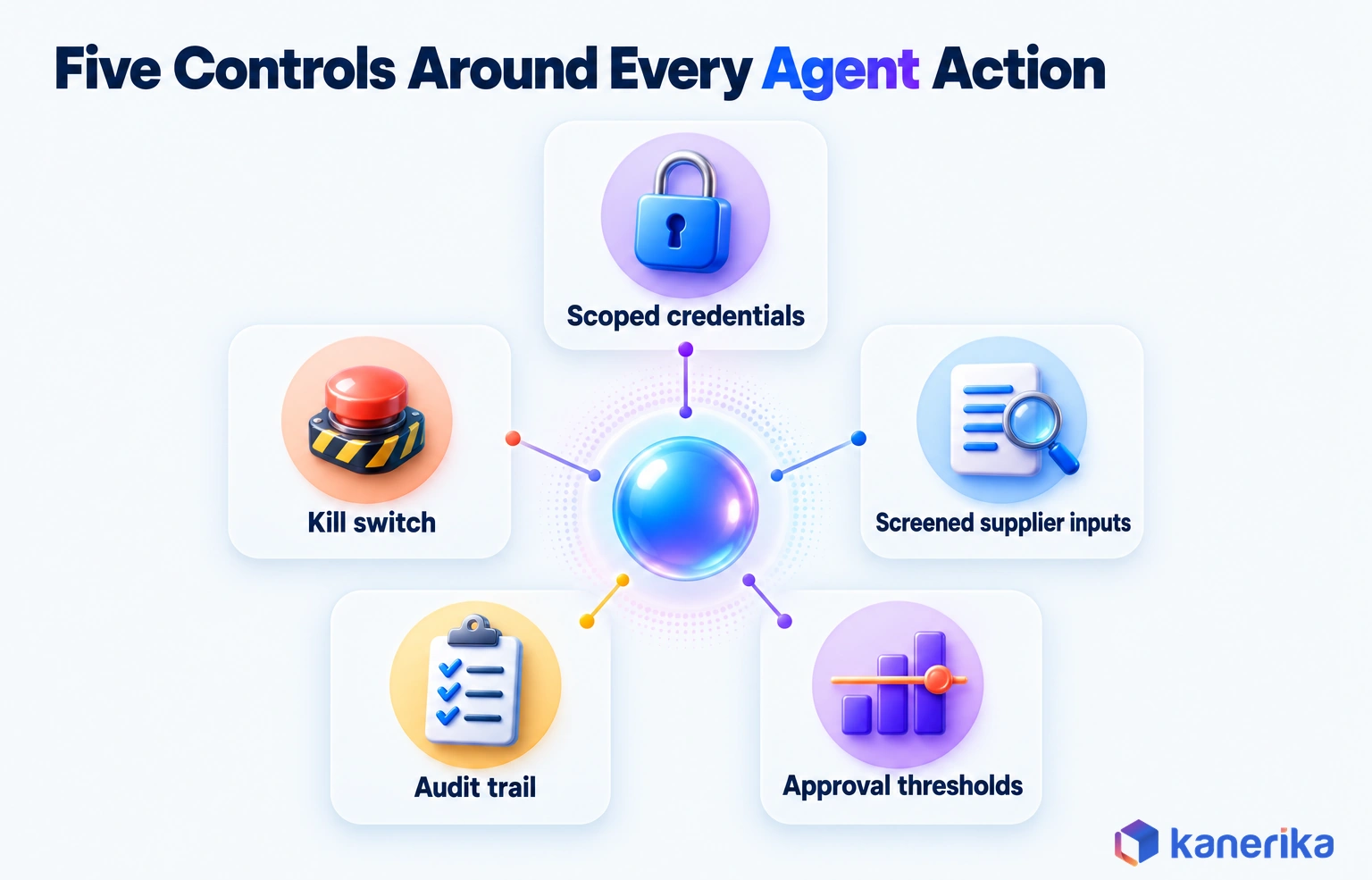
Prompt injection is the clearest new risk. A supplier email or PDF can carry hidden instructions, such as a line telling the agent to raise a price or change bank details. If the agent treats document text as instructions, anyone who can send it a file can steer it.
OWASP ranks prompt injection first in its 2025 Top 10 for LLM applications. It recommends least-privilege access and human approval for privileged operations, and our guide to agentic AI security covers the wider attack surface.
Frameworks That Shape the Controls
Two references help structure the controls. The OWASP Top 10 for Agentic Applications for 2026, published December 9, 2025, is a peer-reviewed list of critical risks for autonomous agentic systems. Teams that already run an AI TRiSM program can map these controls into it rather than start a separate list.
The NIST AI Risk Management Framework gives the governance frame. AI RMF 1.0 was released on January 26, 2023, and its Generative AI Profile, NIST-AI-600-1, followed on July 26, 2024. NIST notes that AI RMF 1.0 “is being revised,” so check the page before you map controls to it.
| Risk | What goes wrong | Control |
|---|---|---|
| Conflicting records | ERP and WMS disagree, so the agent acts on the wrong one | Name one system of record per field, then stop on conflicts |
| Prompt injection via supplier content | A document tells the agent to change terms | Treat inputs as data, screen them, and never let content grant permissions |
| Tool misuse | The agent calls a write tool when a read would do | Separate read and write tools, and validate every parameter |
| Over-broad credentials | One identity can edit every order and vendor | A dedicated agent identity with least-privilege, short-lived access |
| Cascading errors across partners | One bad change triggers a wave of partner EDI updates | Rate limits, batch caps and approval for multi-order changes |
| Missing audit trail | Nobody can explain why an order changed | Log inputs, a reasoning summary, tool calls and the approver for every action |
Most of these controls are ordinary engineering. The difference is that they must be designed in before launch, since an agent acts faster than a person can notice a problem.
Common Mistakes
The same few errors show up in early agent projects again and again. Each one is cheap to avoid at design time but expensive to fix after go-live.
Checklist
Agentic AI Checklist
Check use-case fit, data readiness, guardrails and rollout steps before a supply chain agent takes its first live action, so these mistakes never reach production.
Get the Checklist →- Giving the agent a shared service account with admin rights because setup is faster.
- Letting supplier emails trigger write actions without a check, even though anyone can send one.
- Skipping a tested kill switch because the pilot looks fine.
- Measuring model accuracy instead of resolved exceptions.
- Expanding to new workflows before the first one is stable.
Access control deserves the most attention of the five. An agent with more permissions than its job needs turns every other mistake into a bigger one. NIST’s Zero Trust Architecture (SP 800-207, August 2020) is a useful model, because it authorizes each session before any access to a resource.
A 90-Day Rollout Plan for a First Supply Chain Agent
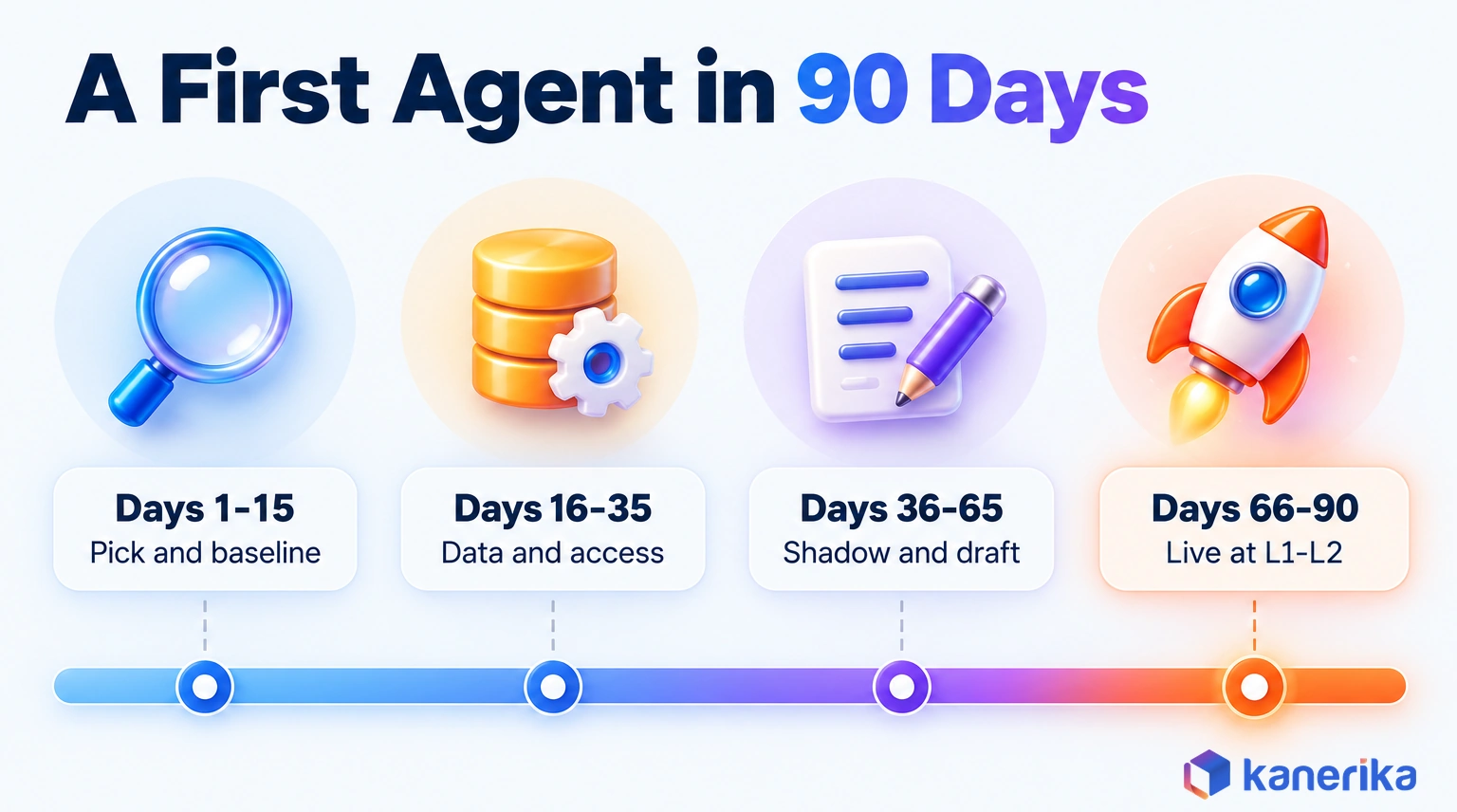
A first agent should prove its value on one workflow in about a quarter. The plan below splits that quarter into four stages, and each stage ends with an exit test you can check.
- Days 1 to 15, pick and baseline: choose one exception workflow with steady volume and a clear owner, then record its cycle time, touch count and cost per case. Exit test: a signed baseline and a named business owner.
- Days 16 to 35, data and access: connect the systems the agent reads, fix the master data it depends on and create a dedicated identity with least-privilege access. Exit test: the agent can read every field it needs and write nothing yet.
- Days 36 to 65, shadow and draft mode: run the agent on live exceptions while people work as before, then move to drafts that a person approves. Exit test: drafts match approved decisions on an agreed share of cases.
- Days 66 to 90, go live at L1 to L2: switch on approved actions inside limits, review the logs weekly and compare results with the baseline. Exit test: the KPI moves the right way with no open incidents.
The Kill Switch and Life After Day 90
Name the kill switch before go-live. It is one documented action, owned by a named person, that stops the agent’s write access and routes every case back to the manual queue. Test it once in shadow mode, so nobody learns how it works during an incident.
After day 90, scale in one direction at a time. Either raise autonomy on the same workflow or add a second workflow at L1, but not both at once. That way you can still tell what caused any change in results.
Keep the weekly log review going after launch as well. Drift tends to show up slowly, as a rising override rate or a new kind of supplier message the agent was never tested on.
How Kanerika Builds Supply Chain AI Agents
Kanerika starts every supply chain agent with one exception workflow and a data readiness check. We map the systems involved, confirm which fields can be trusted and agree on the KPI with the business owner before the build starts. Our agentic AI services team then builds, tests and monitors the agent.
First agents go live at L1 or L2 on the autonomy ladder. Each one gets a dedicated identity, approval thresholds and an audit trail that records every input, tool call and approver. Our logistics and supply chain practice applies the same pattern to carrier, warehouse and order data.
Scoping ends with a one-page agent profile. It names the workflow, the systems the agent reads and writes, the autonomy level for each action and the person who owns the kill switch. That profile then doubles as the test plan for shadow mode and the record that auditors review later.
Case Study: 30% Faster Inventory Reconciliation with KARL
A UK building-products manufacturer and distributor ran its inventory on Microsoft Navision. The ERP stored items, locations and adjustments as codes, so variance analysis was slow and depended on a few SQL experts.
Kanerika deployed KARL, its data insights agent, with a data dictionary that maps the coded ERP fields to business terms. Business users could then ask about variances in plain language and get clear, explainable answers. KARL analyzes and explains the variances, while people decide what to correct.
The results were measurable. Weekly reconciliation time fell by 20 to 30%, time-to-insight dropped by 50%, and the agent detected more than 10 recurring variance patterns automatically. The full story is in the KARL inventory analysis case study.
The same approach carries over to exception agents. Clean definitions for coded ERP data come first, then narrow scope and human decisions on anything that changes stock or money.
Case Study
30% Faster Inventory Reconciliation with AI
A UK building-products manufacturer used KARL, Kanerika’s data insights agent, on Navision data to cut weekly reconciliation time by up to 30% and time-to-insight by 50%.
Read the Case Study →Is Agentic AI in Supply Chain Worth It in 2026?
Agents are worth it when three things are true. You need a steady volume of exceptions in one workflow, data clean enough to trust, and a named KPI that should move. If any of the three is missing, fix that first, because an agent will only automate the gap.
The next step is small. Pick the workflow from the seven use cases where your exceptions pile up, set its autonomy level and controls, and run the 90-day plan. Used together, those use cases and guardrails are what turn agentic AI in supply chain from a pilot into daily operations.
Frequently Asked Questions
What is agentic AI in supply chain?
Agentic AI in supply chain uses AI agents that watch operations for exceptions, such as late shipments or purchase order changes, and act on them within limits the business sets. They read data from ERP, WMS and TMS systems, take approved steps or draft them for review, and send anything outside their limits to a person.
How is agentic AI different from traditional supply chain automation?
Traditional automation such as RPA follows a fixed script and stops when an input does not match it. Agentic AI reads messy inputs like supplier emails, decides which step to take next and calls tools to act, all within delegated limits. Rules-based automation still suits stable, repetitive tasks, while agents suit exceptions that need judgment.
How much autonomy should a supply chain AI agent have?
Set autonomy per action, based on what a mistake would cost and how easily it can be undone. A five-level ladder runs from recommend, through draft for approval, act within limits and act and report, to fully autonomous. Most first agents belong at draft for approval or act within limits until their logs prove reliable over several weeks.
How do you measure the ROI of agentic AI in supply chain?
Baseline the workflow before building, then compare. Track exception cycle time, touchless rate, expedite spend, stockout rate, override rate and cost per resolved exception. Count the full cost too, including integration, data cleanup, usage charges, monitoring and training. Labor savings alone can mean a slow payback, so include service and spend effects in the case.
What are the main risks of AI agents in supply chain operations?
The main risks are acting on conflicting records, prompt injection through supplier emails or documents, misuse of write tools, over-broad credentials, errors that cascade to partners and a missing audit trail. Controls include one system of record per field, screened inputs, separate read and write tools, least-privilege identities, batch caps and full action logs.
What data does a supply chain AI agent need?
It needs open purchase and sales orders, on-hand and in-transit stock, shipment status, supplier terms and messages, and master data such as lead times, safety stock and approved suppliers. Master data quality matters most, because an agent will act confidently on wrong lead times. Give each critical field an owner and fix errors before launch.
What are the main benefits of agentic AI in supply chain management?
The benefits show up as measurable changes in exception handling. Cycle times fall, more cases close without a person touching them, expedite spend drops and stockouts become rarer. Planners and buyers also spend less time gathering data and more time on decisions, because the agent prepares the evidence and a draft action for each case.
Can agentic AI help with supply chain disruptions?
Yes, mainly by speeding up the first hours of a response. An agent can map the orders, suppliers and lanes a disruption affects and rank recovery options by cost and service impact. People should still choose the recovery plan, because one wrong mass change can spread across partners quickly. The agent then carries out the approved steps.
Is agentic AI suitable for every type of supply chain?
No. Agents work best where exceptions are frequent, the process is stable and a system of record holds the data. They struggle when the process changes every month, when decisions live in spreadsheets and inboxes, or when exception volume is so low that a person clears the cases faster than an agent can be built and tested.
What technologies does agentic AI in supply chain rely on?
It relies on a language model to read inputs and plan steps, tool connections to systems such as ERP, WMS, TMS and EDI, and event feeds that signal exceptions. It also needs clean master data, a dedicated agent identity with scoped access, an audit log of every action, and monitoring that tracks quality and override rates.
What is an example of agentic AI in supply chain?
Microsoft’s Procurement Agent for Dynamics 365 Supply Chain Management is one example. It is a production-ready preview that sends follow-up emails to vendors on purchase orders, speeds up PO updates from incoming vendor emails and reviews the impact of vendor PO changes. It shows how an agent can take over routine follow-up work on open orders.
Does agentic AI require replacing existing ERP or supply chain systems?
No. Agents work on top of existing ERP, WMS and TMS systems through APIs, event feeds and email. The ERP should remain the system of record, with the agent writing its approved changes back there under its own identity. Many teams start with an agent embedded in their current suite, then add custom agents for cross-system steps.
Will AI agents replace supply chain planners?
Agents take over the research and first drafts behind routine exceptions, not the planner’s judgment. Planners still own new items, large orders, supplier switches, schedule changes and customer commitments. The role shifts toward reviewing agent recommendations, setting thresholds and handling complex cases, which means fewer hours spent chasing status updates and pulling data together.
How is agentic AI used in logistics and transportation?
In logistics, agents read carrier feeds, EDI messages and emails, match each event to its order and spot delays early. They can draft customer notices, request rebookings or propose faster lanes within a cost cap. In freight audit, they match invoices to rates and shipments, approve clean matches below a set value and draft disputes for review.