
Clear Shipments Faster With Automated Custom Document Processing
Brokers, compliance teams, and freight operators spend hours on paperwork. FLIP reads, validates, and routes customs and trade documents automatically, so entries clear faster and compliance holds fewer people hostage.
Reduced Entry Rejections Rate
Less Time Per Shipment Processing
Higher Straight-Through Rate
Higher Broker Capacity Per Team
Shipment Screening Coverage
Faster CBP Inquiry Response
Get Started with Trade Document Processing Solutions












Manual Trade Document Processing Costs More Than Time
Every stage of manually processed trade documentation carries compounding risk. Delays, misroutes, and failed entries are rarely isolated incidents.

Brokers Buried in Document Sorting
Sorting and routing shipment documents manually consumes hours before classification begins.

Errors Compound at the Border
Missing fields, misread HS codes, and mismatched values send entire entries back for correction.

Compliance Exposure Grows with Volume
Scaling shipment volumes without oversight widens the gap between requirements and reviewer capacity.
Speed Up Trade Document Validation and Processing with FLIP
FLIP addresses each stage of the trade document lifecycle where manual processing generates delays, errors, and compliance exposure.
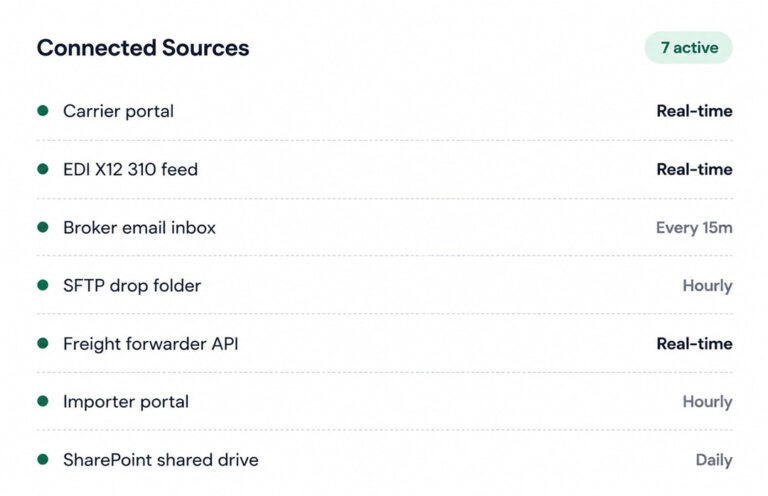
Capture agent
Multi-Channel Trade Document Ingestion
Consolidates trade documents arriving across email, FTP, SFTP, EDI, and carrier portals into a single processing pipeline from point of receipt.
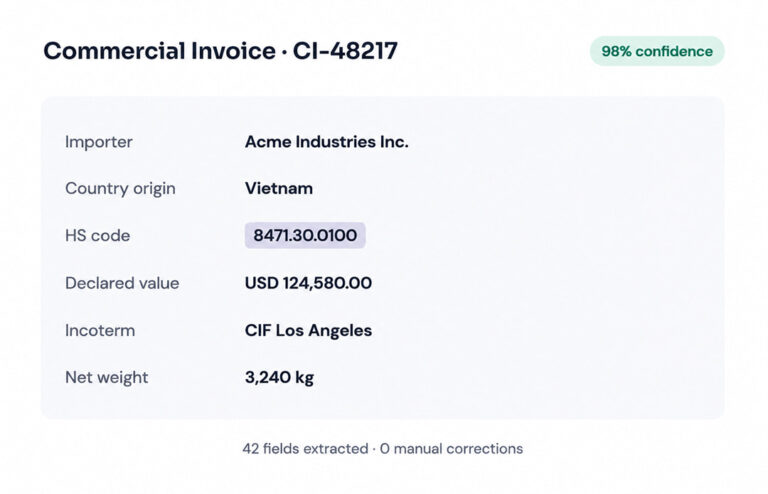
Extraction agent
Automated Trade Data Extraction
Pulls structured data from commercial invoices, bills of lading, and customs declarations across formats without manual field mapping.
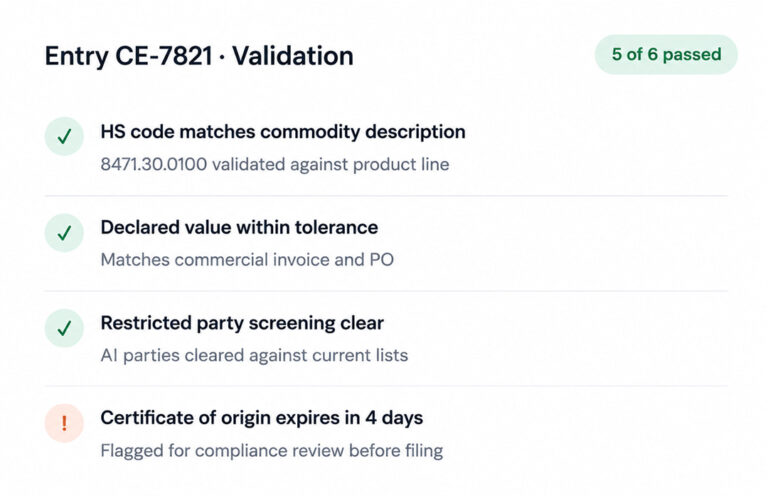
Matching agent
Pre-Submission Entry Validation
Flags missing fields and mismatched values before documents reach the broker or filing system, reducing post-submission corrections.
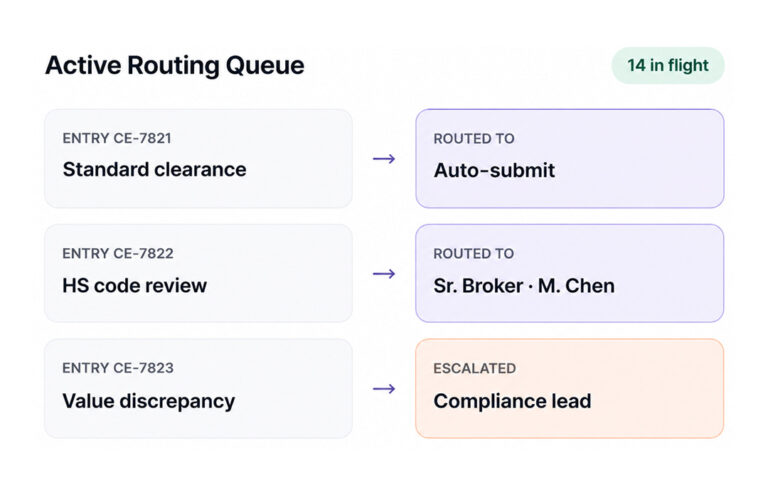
Exception agent
Smart Exception Routing
Routes documents requiring review based on complexity and urgency, with automatic escalation before processing timelines are breached.
Posting & Governance
Straight-Through Entry Processing
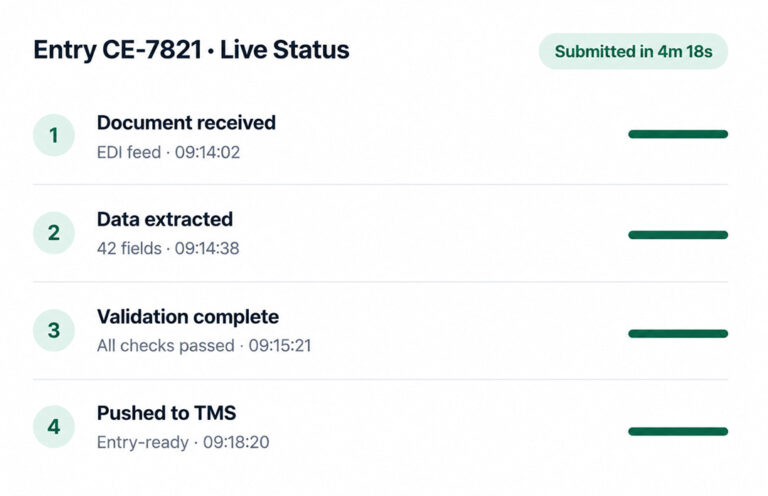
Moves compliant documents from receipt to entry-ready status without manual intervention, reserving human review for genuine exceptions only.
What FLIP Delivers to AP Teams
Five core capabilities covering the full invoice lifecycle, from first capture to ERP posting and audit sign-off.
Less manual effort
Frees AP teams for higher-value work, boosting accuracy, speed, and invoice throughput
Extraction accuracy
OCR + LLM capture mixed invoices types with accuracy
Faster cycle time
Invoice processing cycle compressed from days to hours
Touchless processing
Most invoices auto-extracted, matched, and posted with zero human review
Audit-ready by default
Line-item audit trails ensure SOX, GDPR, and internal compliance without extra reporting
Fast time to value
Production deployment in under a month, with parallel run against existing AP process
Fewer Entry Rejections
Pre-submission validation catches field errors and mismatches early.
Less Time Per Shipment
Document intake, extraction, and validation now run automatically in minutes.
Straight-Through Entry Rate
Compliant entries move from document receipt to submission automatically.
Broker Capacity Per Team
Entry teams process higher shipment volumes without extra headcount.
Shipment Screening Coverage
Screens every shipment against sanctions and restricted party lists.
Faster CBP Inquiry Response
Every extraction and validation action logged and retrievable for CBP inquiries.
What Sets FLIP Apart in Trade Document Processing
Most trade document tools solve one part of the problem. FLIP addresses the full lifecycle, from ingestion through compliance validation and entry generation, within a single connected workflow.
Title
Others
FLIP
01
Proactive Validation, Zero Rework
Others
Errors surface after submission, when holds and amendments are already in play.
FLIP
Validates documents before submission, so errors get fixed internally.
02
Unified Processing Pipeline
Others
Most tools handle one stage, leaving teams to manually connect the rest.
FLIP
Manages the full lifecycle, from ingestion to entry generation, in one pipeline.
03
Native System Integration
Others
Tools validate data but leave teams to manually transfer it into TMS or ERP systems.
FLIP
Pushes entry-ready data directly into filing systems via pre-built connectors.
04
Flexible Compliance Coverage
Others
Volume spikes force a choice: slower processing or more headcount.
FLIP
Handles any volume across every trade lane without adding staff.
Who Benefits from Automated Customs Document Processing
From compliance officers managing regulatory exposure to finance leaders tracking trade costs, FLIP delivers outcomes across every function.
Trade Cost Control
Clear visibility into customs penalties, rework costs, and processing overhead.
Full Trade Lane Visibility
Clearance rates, processing status, and compliance flags across every shipment.
Classification Over Admin
Standard entries move automatically. Complex cases get flagged for review.
Audit Evidence, Always Ready
Every decision logged with full context. Regulatory inquiries resolved automatically.




Predictable Pricing Across Every Level of Trade Complexity
From single-lane importers to multi-entity freight operations, FLIP scales to the complexity and volume your trade environment actually demands.
Pay-as-you-go
Volume-based
- Document ingestion and AI extraction
- Pre-submission validation
- Audit trail generation
Monthly
- Restricted party screening
- Intelligent routing
- Native TMS and ERP connectors
Annual
- Full automation across unlimited lanes
- Multi-entity support and compliance monitoring
- SLA-backed dedicated service
FLIP Results Across Trade Operations
Freight operators, importers, and compliance teams have cut entry rework, reduced customs holds, and scaled trade volume without growing their processing teams.
90% Less Data Lag with Databricks and Airflow
Impact:
- 90% Reduction in data lag
- 96% Reduction in reporting latency
- 100% Increase in BI adoption
Zero-Downtime Databricks Migration for Retail Analytics
Impact:
- Zero Downtime, no production interruption
- 100% Legacy Infrastructure Decommissioned
- 100% Centralized governance, lineage, and data access
71% Higher Reporting Accuracy with Informatica to Databricks
Impact:
- 71% Higher Reporting Accuracy
- 38% Reduction in Data Handling Costs
- 64% Faster Decision-Making
Questions about Customs and Trade Document Processing
01What is customs document automation?
Customs document automation uses software to handle the full lifecycle of trade documents without manual intervention. It covers intake from multiple sources, data extraction from commercial invoices, bills of lading, and certificates of origin, compliance validation against entry requirements, and routing to brokers or filing systems. Operations using customs clearance software in this way process higher shipment volumes with fewer staff, fewer errors, and shorter time between receipt and customs submission.
02What is customs entry automation and how does it differ from document management?
Document management stores files. Customs entry automation goes further by extracting the data inside those documents, validating it, and converting it into submission-ready entry formats. The distinction matters because manual document management still requires entry processors to re-read and re-key data. Customs entry automation removes that step entirely, pushing validated data directly into trade management or ERP systems through pre-built connectors.
03How does FLIP handle compliance validation before customs submission?
Before any document advances to broker review or customs filing, FLIP validates extracted data against entry requirements, checks declared values and HS codes for consistency, and screens parties against restricted and denied lists in real time. Errors and flags surface internally before submission, which means customs holds, entry amendments, and penalty exposure from post-submission errors decrease substantially.
04How long does implementation take for trade document automation?
Most trade operations teams reach production within three to four weeks. Deployment includes a parallel run period where FLIP processes documents alongside the existing workflow, so accuracy can be validated before full cutover. Pre-built connectors to common TMS and ERP platforms remove the lengthy integration work that delays most trade compliance automation projects.
05What's the difference between trade compliance automation and traditional compliance software?
Traditional customs compliance software applies fixed rules and requires manual document review to catch exceptions. Trade compliance automation applies AI to extract and validate data continuously, surfaces exceptions before submission, and scales with shipment volume without adding headcount. The practical difference is that rule-based systems still rely on people to do the checking. Automated systems do the checking and only surface cases that genuinely require human judgment.
06How does AI trade compliance work in practice?
AI trade compliance applies machine learning to extract and validate trade document data in real time. Rather than waiting for a compliance reviewer to check each shipment manually, the system pulls field-level data from documents, cross-references it against customs entry rules, trade agreement conditions, and denied party lists, then flags exceptions automatically. FLIP applies this logic consistently across every shipment, regardless of volume spikes or staff availability.
07What trade document types does FLIP support?
FLIP processes commercial invoices, packing lists, bills of lading, airway bills, certificates of origin, customs declarations, and supplementary regulatory documents within a single pipeline. It handles these across formats, scanned PDFs, structured EDI files, email attachments, and portal downloads, without requiring separate tools or manual pre-processing for each document type.
08Can FLIP replace our existing customs broker software?
FLIP is designed to work alongside existing trade management systems, not replace them. It handles the document-heavy front end of the process, ingestion, extraction, and validation, and pushes clean, entry-ready data into the systems your team already uses. The result is a significant reduction in manual effort without requiring a platform change. For operations that need end-to-end customs clearance software, FLIP can serve as the automation layer across the entire entry lifecycle.
09How does FLIP support post-entry audit requirements?
Every extraction, validation decision, and routing action is logged with full timestamps and decision context. When CBP issues a post-entry inquiry or internal audit teams need documentation of compliance processes, the complete record is available immediately without manual reconstruction. This audit trail covers the full chain of custody for each document from first receipt through final submission.
10How does restricted party screening work inside FLIP?
Every shipment document processed by FLIP is automatically screened against current denied party, sanctions, and restricted entity lists. Screening runs at extraction time, not as a separate downstream step, so flagged parties are identified before documents advance in the workflow. Match alerts include the relevant list, the matched entity, and a recommended next action, giving compliance officers what they need to make a fast, documented decision.
Looking for more details?
Talk to our experts for a complete walkthrough of FLIP’s capabilities.

