TL;DR
Agentic AI in manufacturing works in 2026 for bounded jobs that a person approves, not for autonomous control of machines. An AI agent reads plant data, plans the next steps and acts in plant software within set limits. The use cases that work end in a record someone can check, such as a repair order or a held batch.
Good first picks are maintenance, quality holds, schedule changes and inventory checks. Anything that changes machine settings or touches safety should wait for a person to sign off. Start with one high-value, low-risk case, and prove it against a measured baseline before you scale.
Key Takeaways
- An AI agent in a plant pursues a goal across systems: it reads signals, plans steps, calls tools and acts within set permissions.
- Use cases that work in 2026 end in a record a person can check, such as a work order or a lot hold.
- Rule-based automation follows fixed steps and generative AI drafts content, while an agent completes a multi-step task.
- Autonomy should climb in four levels, but anything touching setpoints or safety stays at “act with approval.”
- Score candidate use cases on value, data readiness, reversibility, risk and system access before you build.
- Measure OEE, MTTR, downtime, yield and schedule adherence before the pilot, or you cannot prove the result.
Watch on YouTube
AI-Powered Digital Twins: From Predictive to Agentic Maintenance
Kanerika shows how maintenance moves from predicting failures to agentic maintenance, where software acts on the prediction and people approve the work.
The Alarm That Waits Until Morning
It is 2:07 a.m. on a machining line. Vibration on a CNC spindle starts to climb, slowly at first and then faster.
The plant historian records every reading, so an alarm fires on the HMI. A night shift lead sees it, but the alarm sits among dozens of others. Meanwhile, the maintenance planner does not start until 7 a.m.
By the time three teams meet to decide what to do, the spindle has run for five more hours. Nobody did anything wrong. The data was there all along, yet no system was allowed to act on it.
What Happens When a Machine Starts Failing at 2 A.M.?
The answer depends on whether software only reports the problem or also starts the response. Many plants still run the first model, and that gap is where AI agents earn their place.
In the dashboard model, each of those morning steps is a hand-off: CMMS history, the storeroom, planning.
An AI agent handles the same signal differently. It checks the historian for the trend and pulls the asset’s failure history from the CMMS. It also confirms the bearing is in stock in the ERP. Then it opens a draft work order and proposes a maintenance window that fits the production schedule.
When the supervisor arrives at 7 a.m., she reads one summary and approves it with a click.
That is the core idea of agentic AI in manufacturing. The agent does the legwork across systems, while a person still owns the decision to stop a machine. This guide shows how such agents work and which eight use cases hold up in real plants. It also covers how much autonomy to grant and how to prove the return.
Kanerika Service
Agentic AI Services
Kanerika designs and builds AI agents that read plant data, act in your MES, ERP and CMMS within scoped permissions and log every action, with approval gates from day one.
Explore Agentic AI Services
What Is Agentic AI in Manufacturing?
Agentic AI in manufacturing means software agents that pursue a goal across plant systems. They plan their own steps, call tools such as an MES query or a CMMS update and act within permissions the plant sets.
The goal might be to keep line 3 inside its schedule, or to contain any lot that fails inspection. Instead of following one fixed script, the agent decides which data to read and which action to take next. It then checks whether that action worked, so a failed step leads to a new plan rather than a silent stop.
This is different from the copilots in our guide to generative AI in manufacturing, which mostly write, summarize and answer questions. An agent may use a language model to reason, but its output is a completed task in a plant system.
Agentic AI vs Rule-Based Automation vs Generative AI
All three appear on the same shop floor, so it helps to see where each one stops. The table compares them on the questions a plant manager actually asks.
| Question | Rule-based automation | Generative AI | Agentic AI |
|---|
| What triggers it? | Fixed condition or schedule | Someone types a prompt | A goal plus an event, such as an alert |
| Does it handle exceptions? | No, it stops or escalates | It can describe them | Yes, it re-plans within limits |
| Does it act in systems? | Yes, but on one fixed path | No, a person acts instead | Yes, across several systems |
| Example on the line | PLC interlock or RPA bot | Drafts a shift report | Opens a work order, then reschedules |
| Who approves? | Engineers, once at design time | Whoever reads the output | A person at set approval gates |
A chat tool that answers an operator’s questions is not an agent either. Our comparison of conversational AI assistants covers that line. For the paradigm itself, see the full guide to agentic AI vs generative AI. Plants that already run bots can also read how agents relate to RPA in manufacturing.
Datasheet
Manufacturing AI Readiness: Critical Gaps and a Path Forward
A Kanerika datasheet on the readiness gaps manufacturers face before putting AI into production, and a practical path to close them.
View the Datasheet →
Why Manufacturers Are Turning to AI Agents in 2026
Three pressures push plants toward agents at once: too few people, bigger digital budgets and growing interest in AI that acts. Each one also shows up in recent industry research.
The first is labor. Deloitte and the Manufacturing Institute estimate that US manufacturers will need 3.8 million workers between 2024 and 2033. They also warn that around 1.9 million of those jobs could go unfilled if the skills gap persists. When planners and engineers are scarce, routine coordination work is the first thing that slips.
The second is money. Deloitte’s 2026 manufacturing industry outlook cites a 2025 survey of 600 executives. In it, 80% planned to put 20% or more of their improvement budgets into smart manufacturing. That spend builds the connected data that agents need, so it lowers the cost of the first project.
The third is intent. Deloitte also cites an early-2025 Manufacturing Leadership Council survey on physical AI. There, 22% of manufacturers planned to use it within two years, up from 9%. The same outlook says agentic AI adoption in the industry “is likely to grow considerably in the next few years.”
None of these figures proves that agents pay off. Still, they explain why plant leaders want software that handles coordination work, because the people who did it are harder to hire.
How an AI Agent Works Inside a Manufacturing Plant
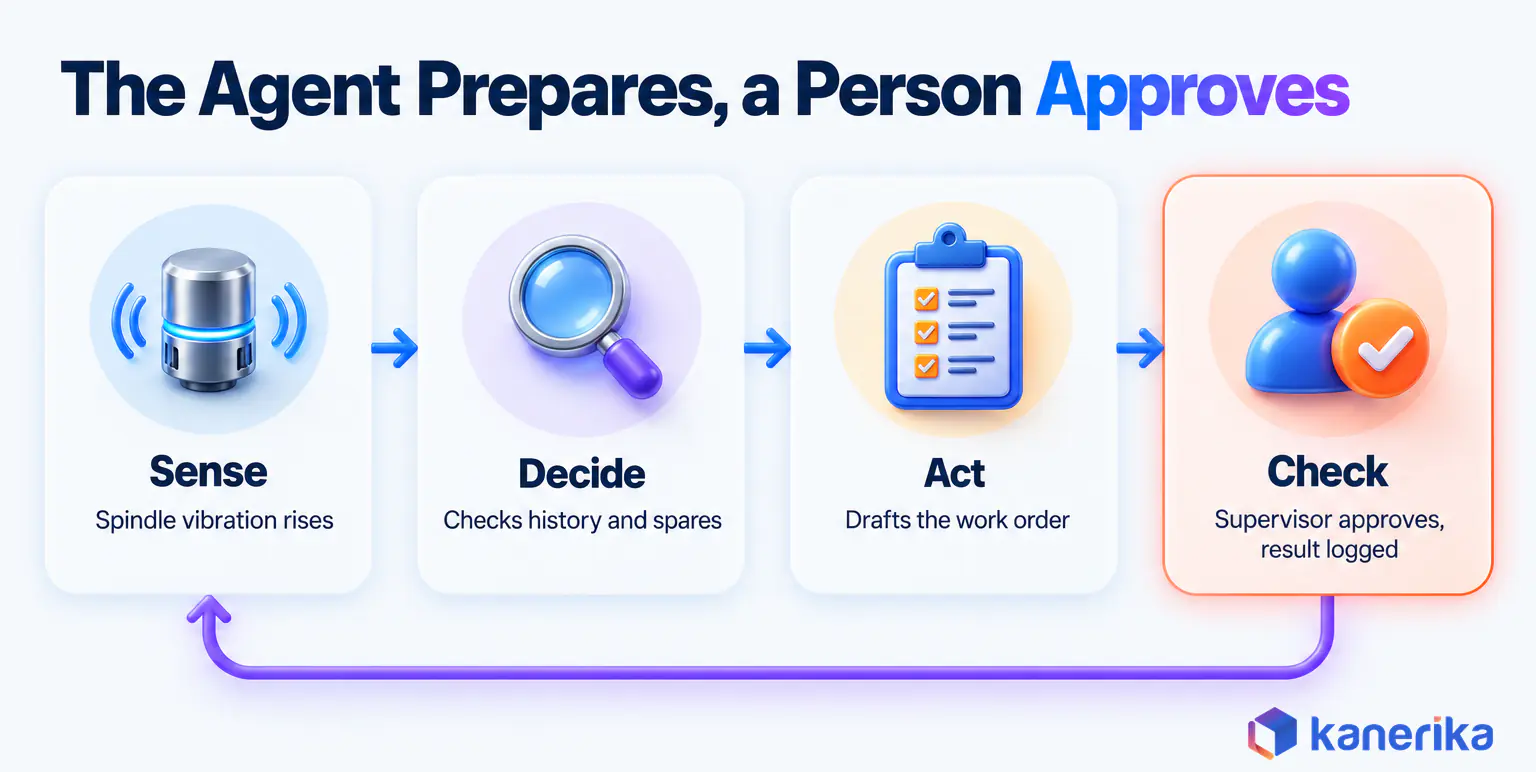
An agent is easiest to understand when you follow one event from start to finish. Under the hood it runs a loop: it senses a change, decides what to do, acts through a tool and then checks the result.
The Sense, Decide, Act, Check Loop
Take a quality signal on a packaging line. A vision system flags seal defects on three cartons in a row, so the reading lands in the MES as an event.
Sense. The agent picks up the event and gathers context. It reads the last hour of seal temperature from the historian as well as the current lot number from the MES. It also pulls the specification for that product.
Decide. A language model reasons over that context and the plant’s rules. Because the temperature has drifted below specification, the likely cause is the sealing jaw rather than the film. The agent’s policy says a suspect lot must be held.
Act. The agent calls two tools. First it places the lot on hold in the MES, and then it drafts a nonconformance report in the QMS with the evidence attached.
Check. It confirms the hold took effect before notifying the quality engineer, who reviews the report. Every read, decision and action also goes into a log that the plant can audit later.
Notice what the agent did not do. It never touched the jaw temperature setpoint, because that change belongs to a person.
Which Plant Systems an Agent Must Connect To
An agent is only as useful as the systems it can reach, so integration is most of the work. The table shows what a typical agent reads and writes in each system, along with the usual approval rule.
| System | What the agent reads | What it may write | Typical approval |
|---|
| MES | Orders, lots, routing, line status | Lot holds, schedule proposals | Supervisor approves holds and changes |
| ERP such as SAP | Inventory, purchase orders, BOMs | Draft transfers, reservations | Planner approves before posting |
| SCADA and historian | Sensor trends, alarms | Nothing at first (read-only) | Setpoint changes stay with engineers |
| CMMS | Asset history, spares, crews | Draft work orders | Maintenance planner approves |
| QMS | Specifications, past deviations | Draft NCRs, CAPA tasks | Quality engineer signs off |
| PLM | Drawings, change notices | Draft work instruction updates | Engineering approves release |
Most plants map these layers with ISA-95, also published as IEC 62264. It separates business planning from manufacturing operations and control. An agent fits best at the operations layer, where it reads from control systems and writes to planning systems. Pulling those sources into one manufacturing data lakehouse also makes that reading much easier.
Where the agent runs matters too. A cloud deployment is simpler to manage, while an edge deployment keeps sensor data on site and cuts latency. Many plants therefore choose a hybrid design, with reasoning in the cloud and a small gateway inside the segmented OT network. That way the agent never needs a direct path to the control layer.
One Agent or a Team of Agents?
A single agent can handle a narrow job well, yet plant problems rarely stay inside one department. A machine fault becomes a maintenance job, then a schedule problem and finally a parts question.
So larger deployments split the work across specialist agents that an orchestrator coordinates. In the spindle example, the hand-offs look like this:
- A maintenance agent confirms the fault pattern and drafts the work order.
- Next, a scheduling agent finds the least costly window to take the machine down.
- Meanwhile, a materials agent checks spares and reserves the bearing.
- Finally, the orchestrator assembles one proposal for the supervisor to approve.
Each agent keeps narrow permissions, which limits the damage any one of them can do. Our guide to AI agent architecture covers the orchestration patterns in more detail. Start with one agent, though, and split it only when a real bottleneck appears.
8 Agentic AI Use Cases in Manufacturing That Work
The use cases that work share a clear pattern. Each has a trigger, data already in MES, ERP or CMMS, an action a person can check and a KPI that moves. Each one below also names the approval point, because that is what makes it safe to run.
1. Predictive Maintenance That Ends in a Work Order
Plenty of plants already predict failures, but the prediction often ends in a chart nobody acts on. Here, the trigger is an anomaly in vibration, temperature or current, as our anomaly detection glossary entry describes.
The agent then checks the asset history, confirms spares and drafts a work order with a proposed window. Once the maintenance planner approves it, MTTR and unplanned downtime are the KPIs to watch. Our guide to AI in predictive maintenance covers the models behind the alert. A digital twin can add a simulated view of the asset, although the agent works without one.
2. Quality Deviation Detection and Containment
When inspection data drifts out of specification, speed matters more than anything else. Say a molding cell starts producing short shots on one numbered lot. The agent holds that lot in the MES, traces the other lots that drew on the same resin batch and drafts the NCR. A quality engineer approves the hold and the disposition, while first-pass yield and escaped defects show whether it works.
3. Production Schedule Exception Handling
Schedules break many times a shift, for example when a machine goes down or a rush order lands. The agent reads the change and tests a few resequencing options against due dates and changeover times. Then it proposes the best one, and a planner or supervisor accepts it. Schedule adherence and on-time delivery are the measures.
Say a rush order lands mid-shift on a line with a 40-minute changeover. The agent might slot it right after the current run of the same product family, so the line changes over once instead of twice.
4. Material Shortage and Supplier Delay Response
A late inbound truck can idle a line unless someone reacts early. On the plant side, the agent compares the delivery date with the MES schedule. If a gap appears, it swaps in work orders that have materials on hand and alerts the buyer. The buyer approves any order change.
5. Inventory Reconciliation and Variance Analysis
Physical counts and ERP balances rarely match, so explaining the gap takes analysts hours of SQL. An agent reads the transaction ledger, groups the variances by cause and drafts adjustments for a controller to approve. Kanerika’s Karl case, covered later in this guide, shows what that looks like in a real building-products business.
Case Study
30% Faster Inventory Reconciliation with Karl
Kanerika deployed Karl, its own data insights agent, on a UK building-products client’s Navision inventory data: reconciliation ran 30% faster, time to insight fell by over 50% and 10+ recurring variance patterns surfaced.
Read the Case Study →
6. Energy and Utility Load Management
Energy tariffs often change by the hour, yet production plans rarely account for that. The agent compares the next day’s schedule with tariff windows and suggests moving flexible loads, such as compressors or batch ovens. It can also flag equipment drawing more power than its baseline. The energy manager approves any shift, and energy per unit is the KPI.
7. Engineering Change and Work Instruction Updates
An engineering change in PLM has to reach the shop floor before the next shift starts. So the agent finds every routing, work instruction and inspection plan the change affects and drafts the updates. An engineer reviews and releases them. Fewer build errors after changes, as well as a shorter path from release to the line, show the value.
8. Compliance Records and Audit Preparation
Audits eat engineering time because evidence sits in five systems. The agent assembles batch records, deviation histories and training records into an audit pack, and it also flags gaps such as a missing signature.
In FDA-regulated plants, electronic records also have to meet 21 CFR Part 11, so a quality lead signs off on every pack. Preparation hours per audit is the measure.
Use Cases Compared: Trigger, Action, Approval, KPI
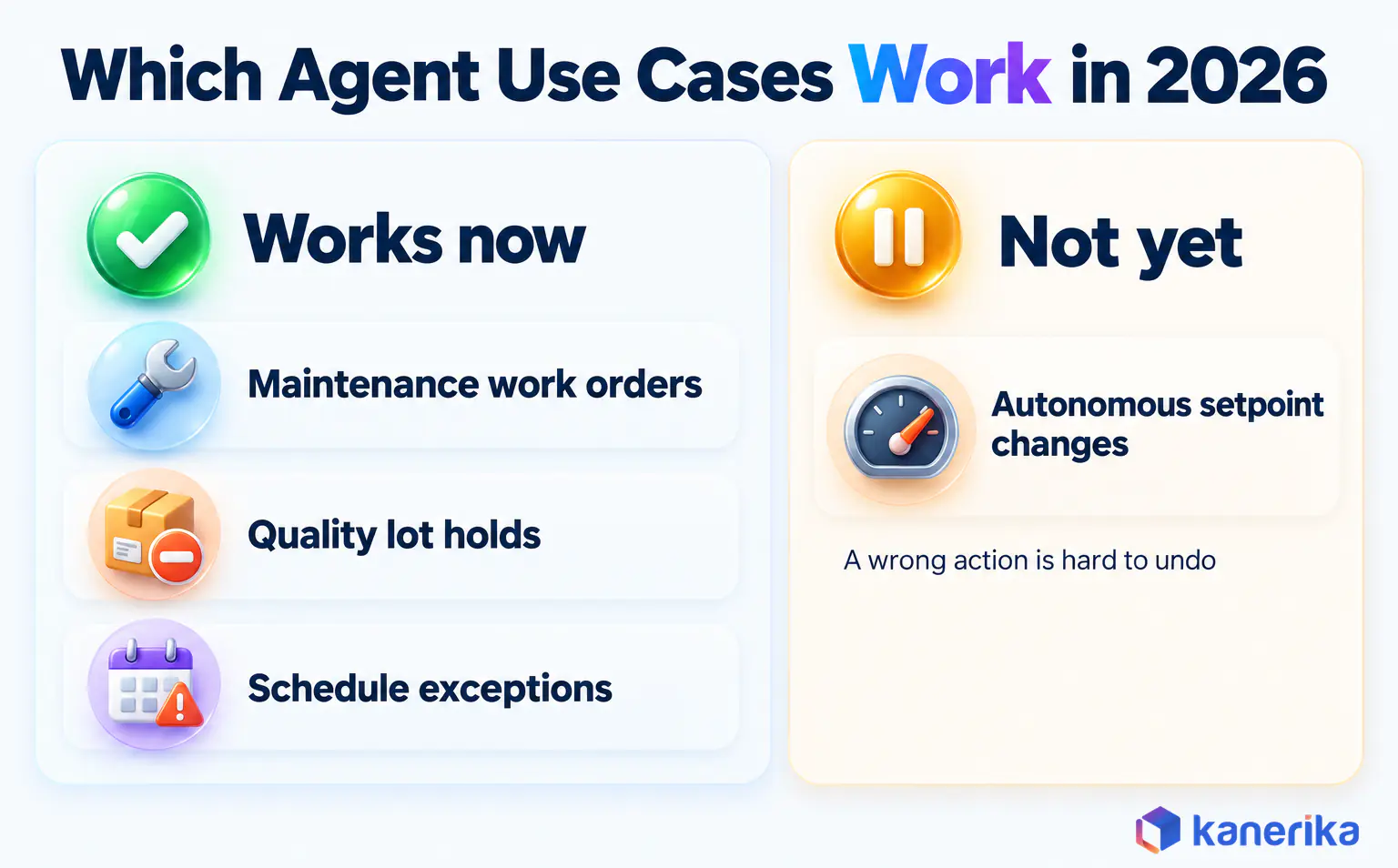
Seen side by side, the pattern is clear. Every use case ends with a person approving a record, and none of them changes equipment settings on its own.
| Use case | Trigger | Agent action | Human approval | KPI moved |
|---|
| Predictive maintenance | Sensor anomaly | Drafts work order, checks spares | Maintenance planner | MTTR, downtime hours |
| Quality containment | Out-of-spec reading | Holds lot, drafts NCR | Quality engineer | First-pass yield |
| Schedule exceptions | Machine down, rush order | Proposes new sequence | Planner | Schedule adherence |
| Material shortage | Late delivery | Swaps work orders, alerts buyer | Buyer | Line idle time |
| Inventory reconciliation | Count variance | Explains gaps, drafts adjustments | Controller | Inventory accuracy |
| Energy load | Tariff window | Proposes load shifts | Energy manager | Energy per unit |
| Engineering change | PLM release | Drafts instruction updates | Engineer | Post-change errors |
| Audit preparation | Audit date | Builds evidence pack | Quality lead | Prep hours per audit |
The first four use cases are where most plants should start. They run on data that is already structured, so a wrong draft costs minutes to fix rather than a scrapped batch.
How Much Should an AI Agent Decide on Its Own?
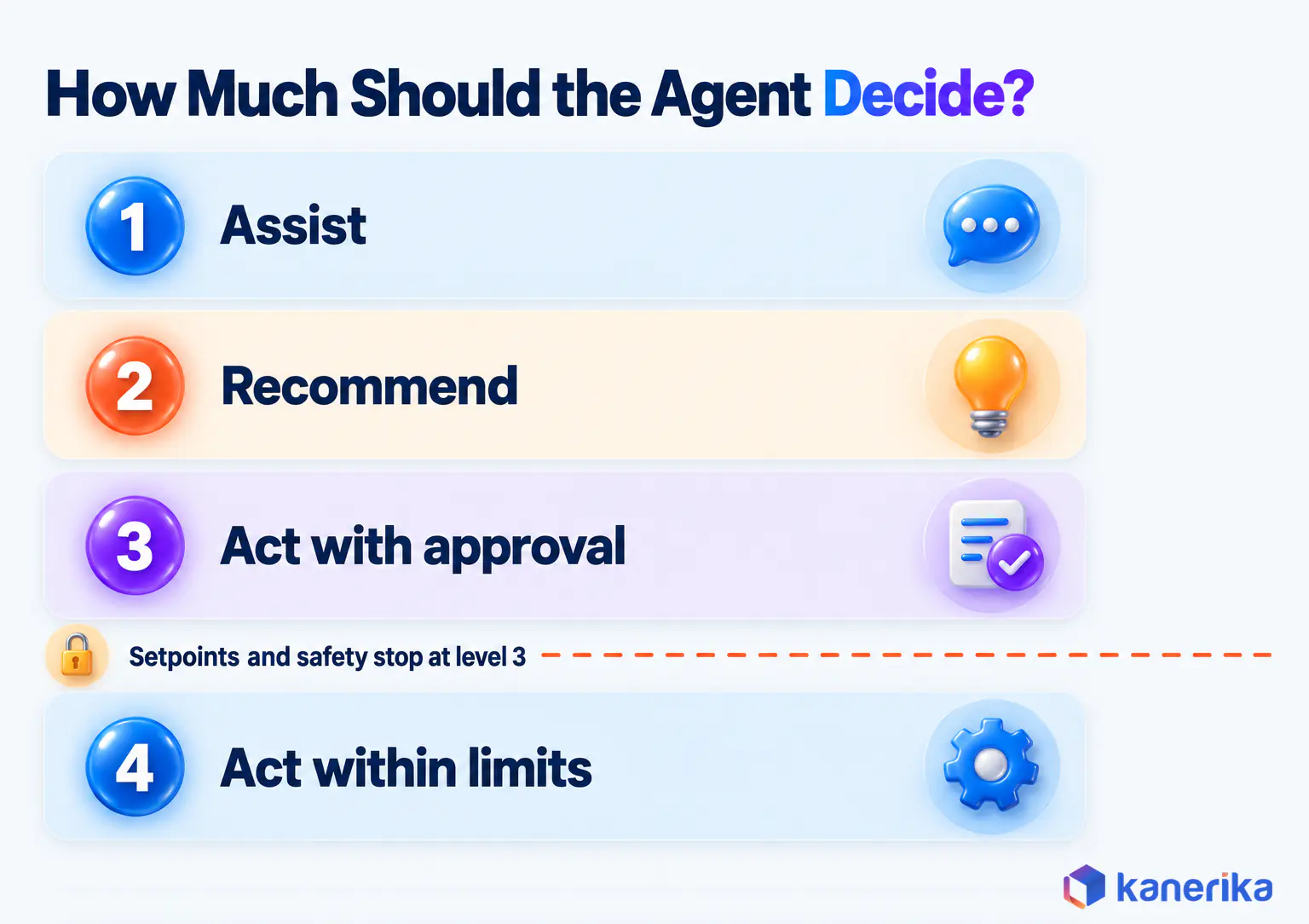
Autonomy is not a yes-or-no switch. Instead, it works better as a ladder, and each use case should sit on the lowest rung that still delivers the value.
- Assist. The agent gathers data and summarizes it, such as a shift handover note built from MES events.
- Recommend. It proposes an action and explains why, but a person carries it out.
- Act with approval. Here the agent prepares the action in the system, and it runs only after a person approves.
- Act within limits. Only low-cost actions that can be undone, such as reserving a spare part, run without approval.
One rule keeps this safe. Anything that touches setpoints, safety systems or product release stays at level 3 or below. A wrong action there costs scrap, damage or injury, whereas a reservation can be undone in seconds.
Agents should also earn each step up the ladder. A quality agent might spend its first month at level 2, proposing lot holds that an engineer places by hand. If the engineer agrees with nearly every proposal, the agent moves to level 3 and prepares the holds itself. Level 4 suits only capped actions, such as reserving spares below a set value.
The ladder also answers the workforce question. In the plants where agents work, people approve while agents prepare. Since the planner no longer spends the morning collecting data, the job shifts toward judgment and exceptions.
How to Pick the First Agentic AI Use Case
The first use case decides whether the program survives, so choose it on evidence rather than enthusiasm. A simple scoring sheet keeps the choice honest.
Score each candidate from 1 to 5 on five criteria. The two columns below are an illustrative example, not benchmarks. For risk, a higher score means a lower risk, so every criterion points the same way and the best total is 25.
| Criterion | What a 5 looks like | Maintenance work orders | Autonomous setpoint tuning |
|---|
| Value | Clear cost of delay or failure | 4 | 4 |
| Data readiness | Clean history already in a system | 5 | 3 |
| Reversibility | A wrong action is easy to undo | 5 | 1 |
| Risk (5 = low) | No safety or quality exposure | 4 | 1 |
| System access | APIs exist and owners agree | 4 | 2 |
| Total (out of 25) | Sum of the five scores | 22 | 11 |
Run the scoring as a short workshop rather than a desk exercise. Invite the plant manager, a maintenance lead, a quality engineer and someone from IT or OT security. Each person scores alone first, and then the group discusses any criterion where scores differ by two or more.
Those disagreements usually reveal a data gap or an access problem that would have stalled the pilot later.
Illustrative Example: Maintenance Agent vs Setpoint Tuning
Take a plant with five years of CMMS history and a working vibration feed. A maintenance agent that drafts work orders scores 22, because the data exists and a bad draft simply gets rejected. An agent that tunes machine setpoints on its own may promise similar value, yet it scores 11 because one bad change can scrap a batch.
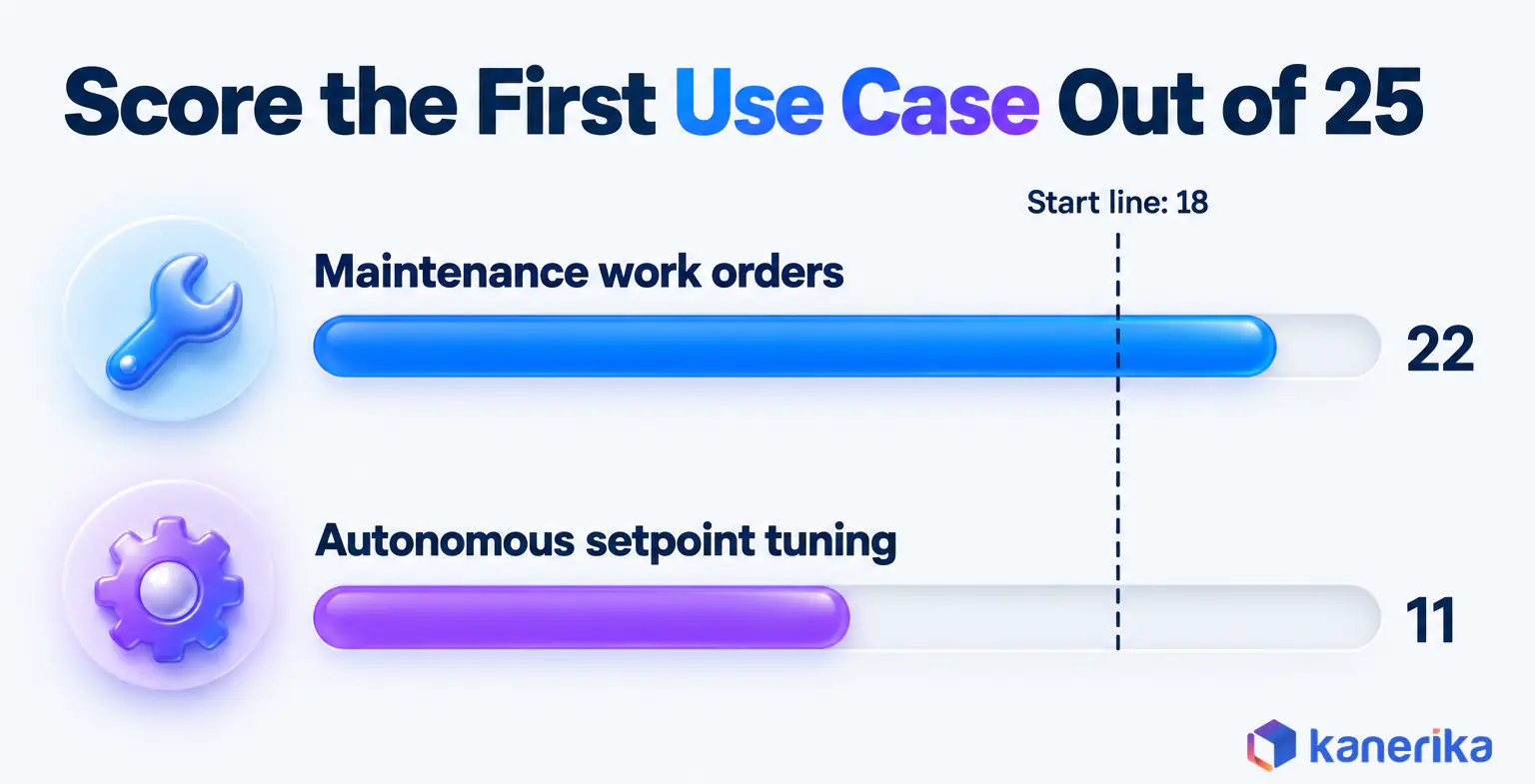
These scores are illustrative, so your own will differ. As a working rule, start with a use case that scores 18 or more and has no criterion below 3. That line is a rule of thumb, not an industry standard. The rest then go on the roadmap until the first agent has earned trust.
The choice should also fit a wider AI adoption roadmap, so the first agent builds data and integration that the next one can reuse.
Costs and ROI of Manufacturing AI Agents
An agent’s cost sits mostly outside the model. Most of the budget goes to connecting systems and cleaning data, so plan for those before anything else.
Five components make up the bill: integration, data preparation, model and runtime usage, monitoring, and change management. Their weight depends on the use case, so it helps to price one concrete agent.
Take the spindle maintenance agent from the opening. Most of its spend goes to the CMMS and ERP connectors and to cleaning the asset hierarchy, so each alert maps to the right machine. Model calls stay a small line, because the agent only fires when a trend turns abnormal.
Monitoring and change management are smaller but steady costs. Monitoring covers logs, alerts and evaluation runs, while change management teaches planners to approve, reject and give feedback.
Value shows up in three places. Faster response cuts downtime and scrap, while fewer manual hand-offs free planners and engineers. Better records also make audits and root-cause work quicker, but each gain only counts if you measured the starting point.
The KPIs That Prove It
Pick KPIs that match the use case, so the result speaks to the people who approve the budget. The table maps each one to the use case it proves.
| KPI | What it shows | Use case it proves |
|---|
| OEE | Overall availability, performance and quality | Maintenance, scheduling |
| MTTR | How fast failures get fixed | Maintenance |
| Unplanned downtime hours | Lost production time | Maintenance, materials |
| First-pass yield | Share of units right the first time | Quality containment |
| Schedule adherence | Plan versus actual output | Schedule exceptions |
| Inventory accuracy | System balance versus physical count | Reconciliation |
| Time to decision | Alert to approved action | All use cases |
Record each KPI for several weeks before the pilot starts. Then compare the same line or asset group after go-live, so seasonal swings do not distort the result.
AI Assessment
Is Your Plant Ready for AI Agents?
Take Kanerika’s AI maturity assessment to see where your data, systems and governance stand before you pick a first agent use case.
Start Your AI Assessment →
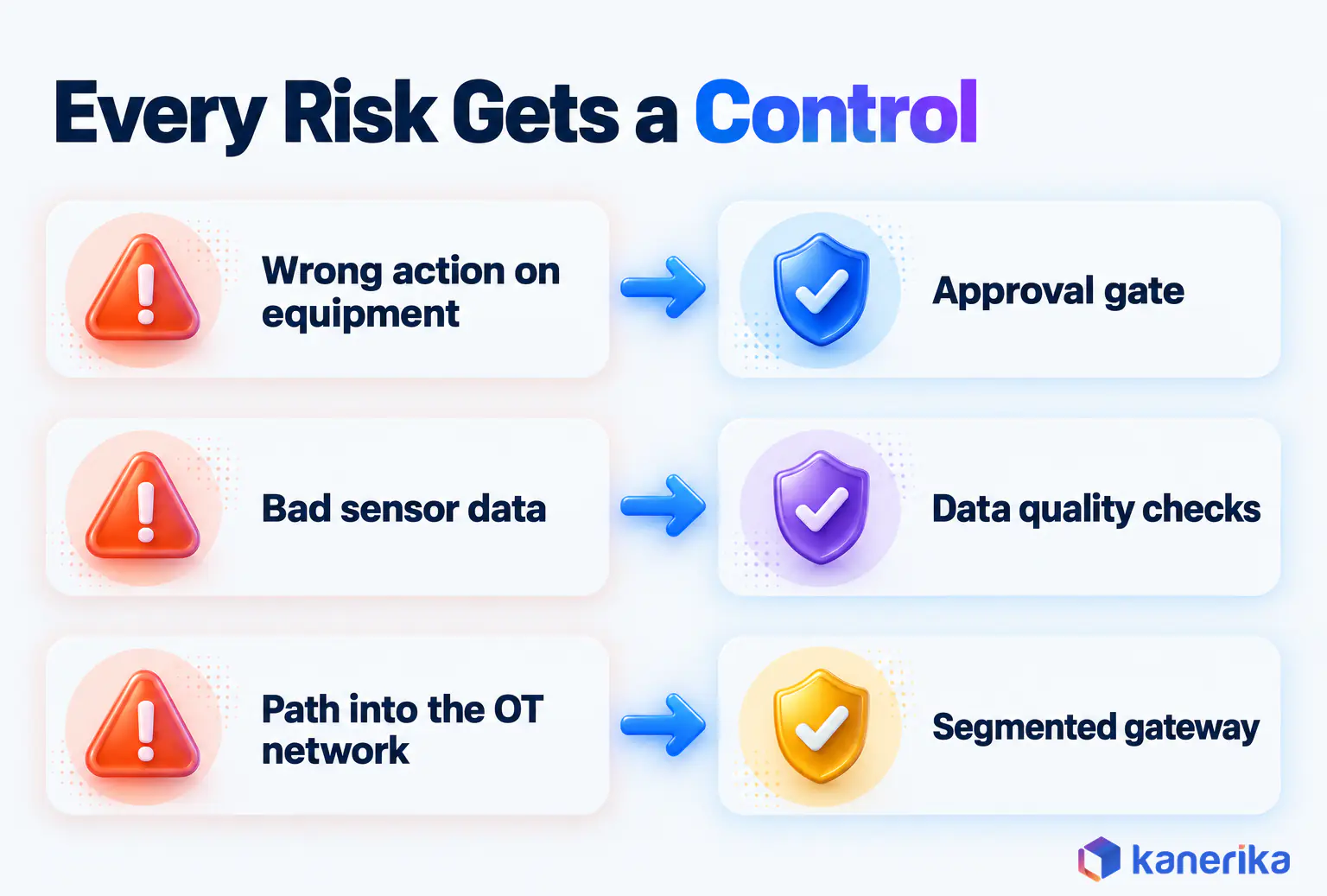
Risks of Agentic AI in Manufacturing and the Controls That Contain Them
An agent that can act can also act wrongly, so every risk needs a named control before go-live. Fortunately, most controls are familiar plant disciplines applied to software.
Six Risks and the Control for Each
The six risks below cover most of what goes wrong in early deployments. Each one pairs with a control you can test before launch.
| Risk | What it looks like | Control |
|---|
| Wrong action on equipment | Agent changes a setting it should not | Read-only access first, approval gates on physical actions |
| Bad input data | A faulty sensor triggers a false work order | Data quality checks and sanity limits before any action |
| Prompt or tool abuse | Hidden text in a document steers the agent | Least-privilege service accounts and red-team testing |
| OT security exposure | Agent opens a path into the control network | Network segmentation and a one-way data gateway |
| Drift over time | Recommendations degrade as processes change | Ongoing evaluation against approved outcomes |
| Unclear accountability | Nobody owns the approvals queue | A named owner per agent and full audit logs |
Before go-live, run an agentic AI vulnerability assessment that tries to push the agent outside its permissions. Keep a rollback path for every action type too, so a bad hold or a wrong reservation can be reversed quickly.
Standards That Apply
No single standard governs plant AI agents yet, but four documents cover most of the ground. Two are voluntary NIST guidance, while two are ISA/IEC technical standards.
| Standard | What it covers | Status |
|---|
| NIST AI RMF 1.0 | Managing AI risk across the lifecycle | Voluntary guidance from January 2023, now under revision; a critical-infrastructure profile concept note followed in April 2026 |
| NIST SP 800-82 Rev. 3 | Security for operational technology | Voluntary guidance, published September 2023 |
| ISA/IEC 62443 | Security of industrial automation and control systems | Technical standards series |
| ISA-95 / IEC 62264 | Integration of enterprise and control systems | Technical standard; Part 1 is ANSI/ISA-95.00.01-2025 |
In practice, ISA/IEC 62443 and SP 800-82 shape how the agent connects to OT. The AI RMF, on the other hand, shapes how you test and govern its decisions.
Common Mistakes That Stall Manufacturing Agents
Stalled projects usually fail for organizational reasons rather than technical ones. These six mistakes come up again and again:
- Starting a pilot without a KPI baseline, so nobody can prove the result.
- Granting write access on day one instead of earning it after a read-only phase.
- Ignoring MES and master data quality until the agent acts on bad records.
- Leaving the approvals queue without an owner, so proposals pile up unread.
- Agent-washing a chatbot that answers questions but never completes a task.
- Scaling to ten plants before one plant shows a measured gain.
The last point deserves extra care. Our guide to scaling agentic AI across the enterprise covers the governance a multi-plant rollout needs.
Checklist
Enterprise Agentic AI Checklist
Check permissions, data access, observability and evaluation before an agent touches a live plant system, with a step-by-step readiness list.
Get the Checklist →
How Kanerika Builds Agentic AI for Manufacturers
Kanerika starts every agent project with one workflow and its baseline, not with a platform. Through our agentic AI services and manufacturing technology consulting, the work runs in five stages.
To begin, we pick the workflow with the plant team and record its current KPIs. Then we build the data and integration layer, connecting ERP, MES or CMMS and fixing the master data the agent depends on.
After that comes a bounded agent with approval gates, least-privilege access and full action logs. We measure the result against the baseline for several weeks. Only then do we extend the agent to more lines or plants.
Case Study: Karl and Inventory Reconciliation
One client project shows the approach on real inventory data. A UK-based manufacturer and distributor of building products, including windows, doors and cladding, runs several production facilities and distribution centres. Its inventory lived in Microsoft Navision Item Ledger Entries, full of coded fields. As a result, teams needed SQL help just to explain why counts and balances disagreed.
Kanerika deployed Karl, Kanerika’s data insights agent, trained on the company’s transaction data and business logic. A data dictionary translated ERP codes into business terms, so planners could ask about variances in plain English. You can also read how Karl answers data questions in our product guide.
The results were measurable. Inventory reconciliation ran 30% faster, with weekly reconciliation time down 20% to 30%. Time to insight fell by more than 50%. Karl also detected more than 10 recurring variance patterns, so the team could act on the top 5 to 10 mismatch drivers early.
That project matches use case 5 above. The agent reads, explains and drafts, while people approve every adjustment, and the same pattern carries over to maintenance, quality and scheduling. Teams that report on these results often pair them with business intelligence for manufacturing.
Kanerika Service
Manufacturing Technology Consulting
Kanerika helps manufacturers connect ERP, MES and plant data, then build analytics and AI agents that move OEE, downtime and inventory KPIs.
Explore Manufacturing Solutions
Which Agentic AI Use Cases Work in Manufacturing in 2026?
The use cases that work in 2026 are the bounded ones. Maintenance that ends in a work order, quality containment, schedule exception handling and inventory reconciliation all succeed for the same reasons. They use data already in MES, ERP or CMMS, their actions can be reversed and a person approves anything physical.
Autonomous control of equipment does not work yet, because a wrong setpoint costs too much and standards for it are still forming. That may change as physical AI matures, and the physical AI intent cited earlier shows plants are preparing for it. Our guide to AI in robotics follows that side of the story, while NIST’s planned critical-infrastructure profile should add guidance.
So which agentic AI use cases work in manufacturing in 2026? The ones where an agent prepares the work across plant systems and a person approves the action, starting with maintenance work orders and quality holds.
Frequently Asked Questions
What is agentic AI in manufacturing?
Agentic AI in manufacturing refers to software agents that pursue a goal across plant systems such as MES, ERP and CMMS. They read signals, plan steps, call tools and act within permissions the plant sets. Typical agents draft maintenance work orders, hold suspect lots or propose schedule changes, while a person approves any physical action.
How is agentic AI different from traditional AI and automation?
Rule-based automation follows fixed steps and stops at exceptions. Traditional AI predicts or classifies, such as flagging a likely failure, but leaves the action to people. Agentic AI combines prediction with planning and tool use, so it can open a work order, check spares and propose a maintenance window. It also re-plans when a step fails.
How much does agentic AI cost for a manufacturer?
Costs depend on scope rather than a fixed price. The largest share usually goes to integration with MES, ERP and CMMS and to data preparation. Model and runtime usage grows with the number of events the agent handles. Monitoring, evaluation and change management add ongoing cost, so a narrow first use case keeps spending small and measurable.
How do manufacturers measure agentic AI ROI?
Record a baseline before the pilot, then compare the same line or asset group afterward. Useful KPIs include OEE, MTTR, unplanned downtime hours, first-pass yield, schedule adherence, inventory accuracy and time from alert to approved action. Set those gains against integration, runtime and monitoring costs to see whether the agent pays for itself.
How long does it take to implement agentic AI in a factory?
Timing depends mostly on data and integration readiness. A plant with clean CMMS history and working APIs can pilot one bounded agent much sooner than a plant that must first fix master data. Plan for phases, from workflow selection and baseline to integration, a read-only run, approval-gated actions and a measured review before you expand.
Which manufacturing processes benefit most from agentic AI?
Processes with clear triggers, structured data and reversible actions benefit most. Strong examples include predictive maintenance that ends in a work order, quality containment, production schedule exceptions, material shortage response and inventory reconciliation. Energy load management, engineering change updates and audit preparation also fit well. Direct control of equipment setpoints remains the weakest fit in 2026.
Does agentic AI replace human workers in factories?
No. In the plants where agents work, they prepare the work and people approve it. A planner stops spending hours collecting data and focuses on judgment and exceptions instead. Deloitte and the Manufacturing Institute warn that 1.9 million US manufacturing jobs could go unfilled through 2033, so agents mostly help stretch scarce teams rather than replace them.
Is agentic AI safe to use on the factory floor?
It can be, as long as autonomy stays limited. Start agents with read-only access, require human approval for physical actions and keep setpoint and safety changes with engineers. Use least-privilege service accounts, segment the OT network and log every action. NIST SP 800-82 and the ISA/IEC 62443 series guide the security side of these controls.
Can agentic AI integrate with SAP, MES and SCADA?
Yes. Agents usually connect through APIs or middleware. They read orders and inventory from ERP systems such as SAP, lots and line status from the MES, and sensor trends from SCADA historians. Their writes stay narrow, such as draft work orders or lot holds. SCADA access normally stays read-only, often through a one-way data gateway.
What are the main challenges in deploying agentic AI in manufacturing?
The main hurdles are data quality, integration and governance. Master data, asset hierarchies and sensor tags often need cleanup first, and legacy MES or ERP systems may lack clean APIs. Plants also need owners for approval queues, audit logs, clear access rules and a KPI baseline. Without these, pilots stall before anyone can prove their value.
How does agentic AI improve predictive maintenance?
Predictive models flag a likely failure, but the alert often goes unread until the next shift. An agent turns that alert into action. It checks the asset history in the CMMS, confirms spare parts in the ERP and drafts a work order with a proposed maintenance window. The planner approves it, which shortens the time from alert to repair.
Can agentic AI automate quality control?
It can automate much of the containment work. When inspection data falls out of specification, an agent can hold the affected lot in the MES, trace related lots and draft a nonconformance report with the evidence attached. A quality engineer still approves the hold and the disposition, because release decisions should stay with a qualified person.
What is the difference between an AI agent and a multi-agent system?
An AI agent is a single worker with one goal, a reasoning model and a set of tools. A multi-agent system splits a larger job across specialists, such as maintenance, scheduling and materials agents, coordinated by an orchestrator. Multi-agent designs suit problems that cross departments, but they add testing work, so start with one agent.




