

Alteryx to Databricks Migration, Automated by FLIP
Move Alteryx workflows to Databricks for scalable data processing and modern analytics. FLIP accelerator automates workflow conversion, generates PySpark notebooks, validates migrated logic, and deploys outputs directly into Databricks.
The Challenge
The Alteryx Workflow Challenge

51%
Cite data complexity as their biggest challenge

55%
Find combining multiple datasets difficult

38%
Struggle to merge data from different sources

10 Hours
Spent per week gathering and preparing data
Migrate from Alteryx to Databricks with Our Accelerator
Use Your Azure Committed Spend (MACC)

See FLIP Execute the Alteryx Migration Process
See how FLIP connects to a Databricks workspace, receives an Alteryx workflow, maps its tools and dependencies, converts supported components into PySpark, validates the output, and publishes the resulting notebook to Databricks.
Migration ROI Calculator
Kanerika’s IP-led accelerator, FLIP, automates your migration with major resource savings, ensuring a faster, lower-risk move to your target platform.
FLIP is Kanerika's proprietary migration accelerator. Here's exactly where the savings come from:
The Alteryx to Databricks Advantage
What Enterprises Gain by Moving Alteryx to Databricks
Enterprise-Scale Processing
- Run large workflows on distributed Spark compute
- Scale processing as data volumes increase
- Support complex analytics workloads on Databricks

Unified Data Platform
- Bring data engineering, analytics, and AI together
- Reuse data across enterprise workloads
- Reduce movement between separate platforms

Modern Analytics Foundation
- Build workflows using Databricks-native PySpark
- Support batch and advanced data processing
- Prepare workflows for modern analytics and AI

Lower Platform Overhead
- Reduce dependence on separate workflow environments
- Automate repetitive migration redevelopment
- Focus engineering resources on higher-value work
When Moving Off Alteryx Makes Sense
Four situations often prompt teams to move their Alteryx workflows onto Databricks. FLIP fits each one, and our Alteryx vs Databricks comparison covers the trade-offs.

License Renewal Approaching
Convert workflows to PySpark before the Alteryx renewal and avoid paying for another license term.

Increasing Data Volumes
Large datasets slow desktop workflows. Converted notebooks run on Databricks clusters that scale.

Consolidating on Databricks
Logic split across tools is hard to audit. Converted notebooks bring every pipeline onto one Databricks platform.

Modernization Already Underway
Already moving pipelines to Databricks, for example from Informatica? Include Alteryx workflows in the same migration plan.
The Migration Process
How FLIP Migrates Alteryx to Databricks
Workflow Discovery and Analysis
FLIP parses Alteryx workflows and identifies tools, configurations, connections, dependencies, and workflow structure before conversion begins.


Automated Workflow Conversion
FLIP maps supported Alteryx tools and transformations to Databricks-ready PySpark, preserving workflow logic while reducing manual redevelopment.

Output Validation and Testing
Generated notebooks are checked through syntax, metadata, data-contract, and execution validation before deployment.

Deployment and Databricks Readiness
FLIP publishes validated notebooks to the target Databricks workspace and provides migration outputs and flagged items for review.

ROI YOU CAN EXPECT
Real Impact from Automated Alteryx to Databricks Migration
Our accelerator cuts migration effort across every complexity level. The numbers below show estimated time and effort savings based on your workflow type, so you know what to expect before the project starts.
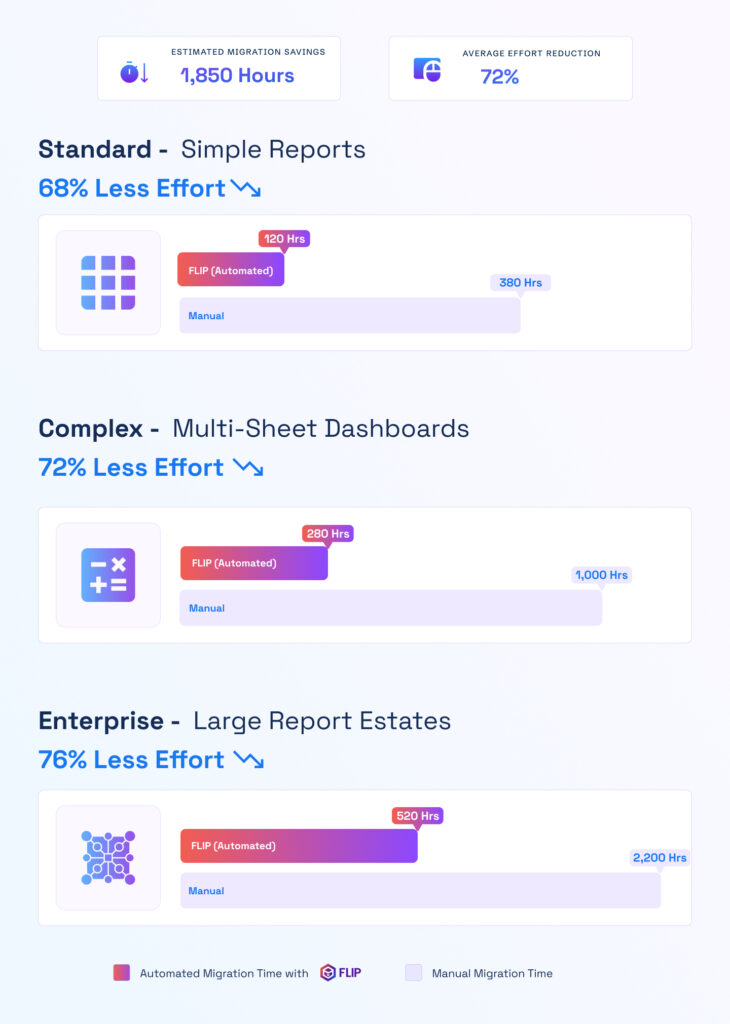

ESTIMATED TIME SAVINGS

Average effort reduction
Standard - Data Preparation Workflows
Less Effort

Complex - Multi-Step Analytics Workflows
Less Effort
Enterprise - Large Workflow Estates
Less Effort

Case studies
What Enterprises Get with Automated Migrations
Case studies showing measurable outcomes from Kanerika’s migration work.
60% Faster Migration: Crystal Reports to Power BI
Impact:
- 60% Faster Migration
- 10x Data Scale
- 99.5% Refresh Success Rate
60% Faster Analytics with Informatica to Alteryx
Impact:
- 45% Faster Reporting Cycles
- 38% Reduction in Maintenance Costs
- 60% Improved Analytics Turnaround
74% Faster Retail Reporting with Microsoft Fabric
Impact:
- 74% Faster Reporting Cycles
- 65% Increase in Reporting Stability
- 72% Faster Access to Current Metrics
Frequently Asked Questions (FAQs)
What is Alteryx to Databricks migration?
Alteryx to Databricks migration involves converting existing Alteryx workflows into Databricks-compatible data processing workflows. The process typically covers workflow discovery, tool and dependency mapping, PySpark conversion, data-source configuration, validation, and deployment. With FLIP, supported Alteryx tools are automatically translated into Databricks-ready PySpark notebooks, while unsupported components are flagged for targeted engineering review.
Why migrate Alteryx workflows to Databricks?
Organizations may migrate Alteryx workflows to Databricks when they need scalable data processing, centralized data engineering, and a common foundation for analytics and AI. Databricks provides distributed Spark compute and supports batch and advanced data workloads. Moving suitable workflows also brings processing closer to enterprise data and can reduce the need to maintain separate workflow environments. Teams standardizing on Microsoft can move Alteryx to Microsoft Fabric instead.
How do you migrate Alteryx workflows to Databricks?
A typical migration starts by inventorying Alteryx workflows and understanding their tools, dependencies, connections, and business logic. The workflows are then converted into Databricks-ready PySpark, validated against expected behavior, and deployed to the target workspace. FLIP automates much of this workflow, while unsupported or partially supported components are identified for engineering review.
Can Alteryx workflows be converted to PySpark?
Yes. Many common Alteryx transformations have corresponding PySpark implementations, including filtering, formulas, joins, unions, aggregation, parsing, and data preparation. FLIP translates supported components into Databricks-ready PySpark notebooks. Components without a direct conversion path are flagged rather than silently changed. This allows teams to focus engineering effort on exceptions while automating repeatable workflow conversion.
What Alteryx files are required for migration?
The primary workflow file is the Alteryx .yxmd file, which contains the workflow structure, tools, configurations, and connections. Referenced .yxmc macros may also need to be included when they are part of the workflow. Data sources, connection details, credentials, and environment-specific paths should also be identified during discovery so the migrated Databricks workflow can be configured correctly.
How does FLIP validate Alteryx to Databricks migrations?
FLIP applies multiple validation checks to generated migration outputs. These include syntax, code, metadata, data-contract, and execution checks. The platform also tracks translated tools and identifies components that require additional review. This gives engineering teams visibility into automated conversion results and exceptions before notebooks are deployed and used in Databricks production workloads.
How long does an Alteryx to Databricks migration take?
Migration timelines depend on workflow volume, tool complexity, dependencies, data sources, and the amount of manual remediation required. FLIP’s measured results show a median of about 2.7 minutes from parsing to deployed notebook across completed workflows. That metric covers automated processing, not the full enterprise project timeline, which also includes discovery, validation, remediation, testing, and production rollout.
What happens to Alteryx macros during migration?
Macros require assessment because their conversion depends on the macro type and the tools contained within them. FLIP can resolve and expand supported standard macros referenced by workflows. Batch, iterative, control-flow, and other specialized macros may require engineering review. During migration, these components are identified so teams can address exceptions without affecting the automatically converted portions of the workflow.
Can Alteryx and Databricks run in parallel during migration?
Yes. Running existing Alteryx workflows alongside migrated Databricks workflows can provide a controlled way to validate outputs before cutover. Teams can compare results, address conversion differences, and confirm production readiness while the current workflows continue operating. This approach is particularly useful for critical analytics workflows where migration needs to be phased rather than completed in a single cutover.
How much of an Alteryx workflow can FLIP automate?
FLIP’s October 2026 results show a median automation rate of 91.9% per workflow across 277 completed migrations. It automatically translated 85.1% of workflow logic tools and 92.7% of core data-preparation tools. Actual automation varies by workflow and tool mix. Reporting, email, and some macro or embedded-code components may require additional engineering review.
How much does Alteryx to Databricks migration cost?
Cost depends on the number of Alteryx workflows, how complex the logic is, and how many macros or custom tools need rework. FLIP automates most of the PySpark conversion, which cuts developer hours compared with a manual rebuild. Kanerika scopes a fixed estimate after assessing your workflows.













