

SSRS to Power BI Migration Services
Faster, Lower-Cost Migration with the FLIP Accelerator
SSRS migration stalls when teams rely on manual conversion. Kanerika's FLIP accelerator reads your RDL files, converts SSRS to Power BI dashboards automatically, and preserves parameters, data connections, and report logic. Available on Azure Marketplace. Eligible for your existing Azure Committed Spend.
Get Started with SSRS to Power BI Migration
The Real Cost of Running SSRS
What Legacy SSRS Costs Your Business

IT budgets are spent on legacy system maintenance

CIOs see legacy systems as growth barriers

Developer productivity is lost due to outdated tools

SSRS reports are unused, adding cost without value

Use Your Azure Committed Spend (MACC)


Watch SSRS Reports
Convert to Power BI Automatically
Watch how the accelerator reads an SSRS RDL file, converts report parameters to Power BI slicers, maps visuals to their Power BI counterparts, and generates a ready-to-import report file.
SSRS to Power BI Migration: What FLIP Converts
A migration is only as safe as its coverage. This view shows how each SSRS component lands in Power BI and where FLIP automates the work, so your technology leaders can scope risk, effort and ownership before work begins.
| SSRS component | Power BI equivalent | How FLIP handles it |
|---|---|---|
| RDL paginated reports | Power BI paginated reports (Power BI Report Builder) | RDL files are parsed and published to Power BI Service workspaces in bulk, with pixel-perfect layouts preserved. |
| Interactive reports, charts, tables and matrices | Power BI reports (PBIX) with native visuals | Visuals map to Power BI equivalents automatically and generate as PBIX files ready to import. |
| Report parameters | Slicers, filters and cross-filtering | Parameters convert to slicers and filters, so users keep the same selections without re-entering values. |
| VB.NET expressions | DAX measures and Power Query M | Common expression patterns convert automatically. Custom code with no direct equivalent is flagged in discovery for manual conversion. |
| Shared datasets and data sources | Semantic models and gateway-backed connections | Dataset metadata is extracted and data source connections are updated during bulk publishing. |
| Subscriptions and scheduled delivery | Power BI subscriptions and Power Automate flows | Every subscription is catalogued in discovery. Data-driven subscriptions are rebuilt in Power Automate. |
| Folder permissions and roles | Workspace roles and row-level security | Your SSRS permission structure maps to Power BI roles, with Azure AD sign-in carried over. |
SSRS Migration Paths: Power BI Service, Report Server or Open Source
SQL Server 2025 does not include a new version of SSRS, and SSRS 2022 is the last release. Power BI Report Server now covers on-premises reporting, and the Power BI service runs the same RDL files as paginated reports. Where your reports must run decides the path. Our SSRS to Power BI migration guide covers the steps, and Power BI paginated reports explains the target format.
Moving other reporting tools as well? We also run Cognos to Power BI, Crystal Reports to Power BI and Tableau to Power BI migrations. Our Microsoft Power BI services and Microsoft Fabric consulting cover what comes after the move.
| Migration target | Best for | What changes |
|---|---|---|
| Power BI service (paginated reports) | Cloud delivery, with paginated and interactive reports under one governance model | Each RDL report becomes a paginated report. Shared data sources and datasets convert to embedded ones. Subscriptions are rebuilt, including dynamic per-recipient subscriptions. |
| Power BI Report Server | Reports that must stay on-premises | A superset of SSRS that hosts RDL, paginated and Power BI (.pbix) reports. RDL files move over with little change. SSRS itself cannot host .pbix files. |
| Stay on SSRS 2022 | A short-term hold | Supported with security updates until January 11, 2033. No new SSRS versions will ship, so new features go to Power BI Report Server. |
| Open source (JasperReports, BIRT) | Teams leaving the Microsoft stack | Reports are usually rebuilt, because these tools do not open RDL files natively. Plan a redesign of layouts, expressions and schedules. |
Migration ROI Calculator
Kanerika’s IP-led accelerator, FLIP, automates your migration with major resource savings, ensuring a faster, lower-risk move to your target platform.
FLIP is Kanerika's proprietary migration accelerator. Here's exactly where the savings come from:
SSRS vs Power BI Migration: What Actually Changes
Understanding how to migrate from SSRS to Power BI starts with what actually shifts, not just platform names, but architecture, user experience, and infrastructure cost.

Interactive Self-Service Analytics
- Replace scheduled SSRS report runs with filterable Power BI dashboards
- Users explore and slice data independently without raising IT requests
- Drill-downs, cross-filtering, and bookmarks replace static report variants

Cloud-Native Scalability for Reporting
- Eliminate on-premises SQL Server Reporting Services infrastructure and licensing
- Unlike SSRS, Power BI scales automatically as data volumes grow
- DirectQuery mode delivers live data access without full imports

Enhanced Data Visualization
- Replace basic SSRS tables and charts with interactive Power BI visuals
- Access mobile-responsive dashboards on any device, anywhere
- Power BI excels with custom visuals, AI-powered insights, and natural language Q&A

Lower Infrastructure and Licensing Costs
- Remove SQL Server Reporting Services licensing and maintenance costs
- Power BI Pro at $14 per user per month replaces SQL Server CAL requirements
- Microsoft 365 E5 and E3 licenses often include Power BI at no additional cost
How FLIP Migrates SSRS Reports to Power BI
File Extraction and Report Inventory
The accelerator reads your SSRS RDL files, extracts metadata including visual elements, shared datasets, and parameters, and produces a structured migration inventory by report complexity.


Visual Mapping and Expression Conversion
SSRS charts, tables, matrices, and conditional formatting map to Power BI equivalents automatically. VB.NET expressions convert to DAX measures, and report parameters become Power BI slicers and filter

SSRS Reports to Interactive Power BI Dashboards
Paginated SSRS reports migrate to Power BI paginated reports via Power BI Report Builder, preserving pixel-perfect layouts. Interactive reports generate as PBIX files ready for direct import into Power BI Service.

Validation, Security Migration, and Fabric Readiness
Every migrated report validates side-by-side against the SSRS original for data accuracy and visual consistency. Row-level security, workspace permissions, and Azure AD integration configure as part of delivery.

ROI YOU CAN EXPECT
Real Savings from SSRS to Power BI Migration
Every SSRS to Power BI migration is different. The numbers below show estimated effort savings across Simple, Medium, and Complex report types, calculated based on accelerator-led conversion.
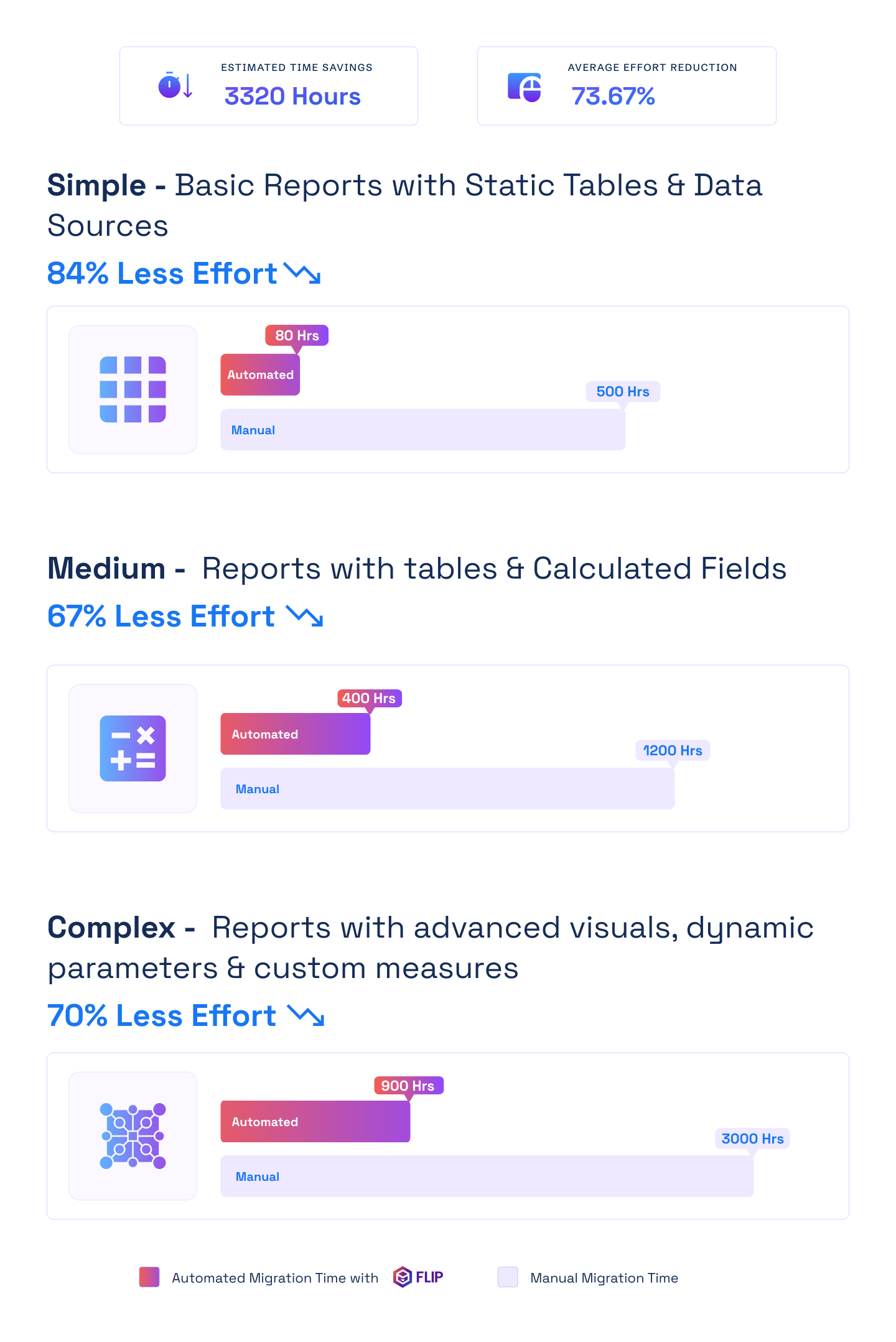

ESTIMATED TIME SAVINGS

Average effort reduction
Simple - Basic Reports with Static Tables & Data Sources
Less Effort

Medium - Reports with tables & Calculated Fields
Less Effort
Complex - Reports with advanced visuals, dynamic parameters & custom measures
Less Effort

SSRS Migration Services: Tool, Delivery and Support
From assessment to go-live, FLIP covers the full scope of your SSRS reporting modernization.

SSRS Migration Tool (RDL Converter)
FLIP automates RDL parsing, DAX conversion, and bulk publishing across your full report estate.

End-to-End Services
Estate assessment, report classification, parallel validation, and cutover, fully managed by Kanerika.

A Proven Approach
Phased delivery with SSRS running live throughout. No forced cutover until your team signs off.

Post Migration Support
Optimization, training, and issue resolution covered after go-live. Your team is fully set up before we step back.
Case studies
Delivering Measurable Outcomes with Automated Migrations
Real results from Kanerika’s SSRS to Power BI migration tool deployments across industries.
Migration
60% Faster Migration: Crystal Reports to Power BI
Impact:
- 60% Faster Migration
- 10x Data Scale
- 99.5% Refresh Success Rate
Migration
65% Performance Gain with Cognos to Power BI
Impact:
- 65% Increase in Operational Performance
- 27% Overall Reduction in BI-Related Costs
- 2X Scalable Data and BI Capabilities
Migration
40% Lower Operational Costs with SSRS to Power BI
Impact:
- 30% Improvement in Data Processing Speeds
- 40% Reduction in Operational Costs
- 25% Decrease in Manual Maintenance Efforts
Frequently Asked Questions (FAQs)
How long does an SSRS to Power BI migration take?
Simple SSRS reports with static tables migrate in a few days. Mid-size environments with calculated fields, shared datasets, and parameters run 4 to 8 weeks. Complex environments with subreports, dynamic parameters, and custom VB.NET expressions take 2 to 4 months. Kanerika’s accelerator compresses the highest-effort tasks significantly versus manual approaches. A full report inventory during discovery gives you a precise timeline before work begins.
What is the cost of SSRS to Power BI migration?
SSRS to Power BI migration cost depends on report count and complexity. Most projects range from $10,000 to $100,000. Organizations typically recover costs within 12 months through savings on SQL Server Reporting Services licensing, on-premises server infrastructure, and IT maintenance overhead. Power BI Pro costs around $14 per user per month. Many Microsoft 365 customers find Power BI is already included in their existing license tier.
What is the difference between SSRS and Power BI when migrating?
SSRS is a server-based, paginated reporting tool tied to SQL Server infrastructure. Power BI is a cloud-native BI platform that supports both interactive dashboards and paginated reports through Power BI Report Builder. In an SSRS vs Power BI migration, the key architectural shift is moving from scheduled, static report delivery to live dashboards users can filter and explore. SSRS shared datasets become embedded Power BI datasets, and RDL files become paginated Power BI reports.
How do SSRS reports convert to Power BI paginated reports?
Paginated SSRS reports in RDL format migrate to Power BI paginated reports using Power BI Report Builder, which reads the RDL file directly. The accelerator automates this for large report volumes by extracting RDL metadata, updating data source connections, and publishing to Power BI Service workspaces in bulk. Pixel-perfect layouts, grouping structures, and conditional formatting all carry over, making this the most straightforward part of the SSRS to Power BI migration for most organizations.
Can interactive SSRS reports become Power BI dashboards?
Yes. Interactive SSRS reports rebuild as Power BI dashboards in PBIX format. Charts, tables, and matrices map to Power BI visual equivalents. SSRS parameters become slicers and cross-filters. Drill-through and linked reports become Power BI drill-through pages and bookmarks, which offer better interactivity than the original SSRS versions. Each rebuilt report validates against the SSRS original before sign-off.
What happens to SSRS expressions and VB.NET code during migration?
SSRS uses VB.NET for expressions, running totals, and conditional formatting logic. Power BI uses DAX for calculations and Power Query M for data transformation. Kanerika’s accelerator maps common VB.NET expression patterns to their DAX equivalents automatically. Complex custom code that has no direct equivalent is flagged during discovery and scoped for manual conversion. All converted expressions validate against SSRS source output before delivery.
What is the recommended approach for SSRS to Power BI migration?
The most effective SSRS Power BI migration approach is report classification first. Kanerika inventories your full SSRS estate, classifies reports by complexity and usage frequency, and retires inactive reports before migration starts. Typically 20 to 30 percent of SSRS environments have unused reports that add scope without value. Active reports migrate in priority waves with the accelerator handling paginated reports and interactive dashboards in parallel.
What SSRS migration consulting does Kanerika provide?
Kanerika’s SSRS migration consulting covers estate assessment, report classification, migration planning, accelerator-led conversion, validation, and post-migration optimization. The consulting engagement starts with a discovery phase that produces a full inventory of your SSRS reports, a complexity breakdown by tier, and a fixed-scope project plan. End-to-end project management runs from planning through production deployment, with no open-ended retainers.
Will there be any data loss or downtime during SSRS migration?
No. Migration runs in parallel with your existing SSRS environment. Reports continue operating in SSRS throughout the migration. The accelerator converts the reporting layer only and does not alter your source databases. A phased cutover approach lets your team validate Power BI reports against live SSRS data before switching. SSRS is only decommissioned after formal sign-off on the Power BI environment.
How do SSRS subscriptions and scheduled deliveries migrate to Power BI?
SSRS data-driven subscriptions and file share deliveries do not have a direct equivalent in Power BI. Kanerika rebuilds these using Power Automate, which replicates scheduled email delivery, file export, and conditional distribution logic. Power BI subscriptions handle standard scheduled report delivery. The migration plan catalogues all SSRS subscriptions during discovery so nothing is missed in the rebuild.
Can Power BI replicate SSRS row-level security and access controls?
Yes. Power BI supports row-level security using DAX filter rules and the built-in UserID field in paginated reports. Workspace roles replace SSRS folder-level permissions. Azure Active Directory integration provides single sign-on consistent with existing SSRS security models. Kanerika maps your existing SSRS permission structure to Power BI roles during migration so access controls carry over accurately.
Can I run SSRS and Power BI in parallel during migration?
Yes, and this is standard practice. SSRS reports remain live throughout the migration with no changes. Power BI reports build and validate in parallel. Teams compare outputs side by side before switching. Different departments or report categories can migrate at different speeds. SSRS is switched off only after your team has signed off on the Power BI environment, with no forced cutover date.
How does Power BI connect to the same data sources as SSRS?
Power BI supports 500-plus data sources including SQL Server, Oracle, MySQL, Azure Synapse, Snowflake, and SAP HANA — covering all major sources used in SSRS environments. For on-premises databases, the Power BI on-premises data gateway maintains connectivity from Power BI Service to local SQL Server instances. DirectQuery and Direct Lake modes replace SSRS’s dataset refresh model with near-real-time query performance.
What certifications does Kanerika hold for SSRS to Power BI migration services?
Kanerika holds ISO 27001, ISO 27701, SOC 2, ISO 9001, and CMMI Level 3 certifications. As a certified Microsoft Solutions Partner for Data and AI, the SSRS to Power BI migration accelerator is listed on Azure Marketplace and has passed Microsoft’s technical and compliance validation. For regulated industries — healthcare, financial services, pharma — these certifications meet standard vendor selection requirements.
What is the best SSRS migration tool for converting reports to Power BI?
The most effective SSRS migration tool for converting reports to Power BI is an accelerator that handles both paginated and interactive output in a single pipeline. Kanerika’s FLIP accelerator automates RDL parsing, DAX expression conversion, visual mapping, and bulk publishing to Power BI Service, reducing manual conversion effort by up to 80%. It’s available on Azure Marketplace, MACC-eligible, and validated by Microsoft’s technical review process. For organizations with fewer than 20 reports, Power BI Report Builder handles paginated SSRS reports directly. For larger estates, an automated SSRS migration tool like FLIP is significantly faster and less error-prone than manual rebuilds.
What does it mean to convert SSRS to Power BI, technically?
To convert SSRS to Power BI, your RDL report definitions go through three conversion steps. First, the report schema parses visual elements, shared datasets, query definitions, and parameters. Second, VB.NET expressions that drive calculations and conditional formatting translate to DAX measures in Power BI’s data model. Third, the output publishes either as a paginated Power BI report (for pixel-perfect layouts) or a PBIX file (for interactive dashboards). Kanerika’s accelerator handles all three steps automatically. The result is a Power BI migration from SSRS that preserves business logic without requiring developers to rebuild reports from scratch.
How does Microsoft Power BI migration from legacy reporting tools like SSRS differ from other BI migrations?
Microsoft Power BI migration from legacy reporting tools like SSRS, Crystal Reports, and Cognos all share the same core challenge: translating proprietary report definitions and expression languages into Power BI’s data model and DAX. What makes SSRS migration to Power BI distinct is the RDL format, a structured XML schema that automation tools can parse reliably. This makes SSRS one of the more predictable legacy tools to migrate from. Crystal Reports uses a closed binary format, and Cognos uses proprietary query models; both require more pre-processing before automated conversion is possible. Kanerika’s FLIP accelerator supports all three, with SSRS being the fastest path due to RDL’s open format.
What should I look for in SSRS to Power BI migration services?
Good SSRS to Power BI migration services cover four things that basic conversion tools skip. First, an estate assessment that retires unused reports before migration starts; most SSRS environments carry 20–30% dormant reports that inflate project scope. Second, expression-level conversion of VB.NET to DAX, not just visual remapping. Third, parallel operation: your SSRS environment stays live until Power BI output is validated and signed off. Fourth, security migration: row-level security rules, folder permissions, and Azure AD integration must carry over accurately. Kanerika’s SSRS migration services include all four, with ISO 27001 and SOC 2 compliance covering regulated-industry requirements.
What do I need to prepare before starting an SSRS to Power BI migration?
A few inputs get an SSRS to Power BI migration moving quickly. You need read access to the SSRS report server or an export of the RDL files, a list of data sources with gateway and credential details for on-premises databases, a Power BI or Fabric workspace on a capacity that supports paginated reports, and named business owners who can validate migrated reports. Kanerika’s discovery phase collects the rest, including subscriptions, security roles, and report usage, so your team does not have to compile a full inventory beforehand.
What does the SSRS migration assessment include?
We inventory your SSRS estate: reports, data sources, subscriptions and security settings. We flag dormant reports, which make up 20–30% of most estates, so you don’t pay to migrate them. Each remaining report gets a complexity score, and you receive a timeline and cost range before any commitment.
Can I deploy a Power BI report to SSRS?
No. SSRS cannot host Power BI (.pbix) reports. It only runs RDL paginated reports. Publish Power BI reports to Power BI Report Server if they must stay on-premises, or to the Power BI service.
Can I migrate SSRS to Power BI Report Server instead of the Power BI service?
Yes. Power BI Report Server is a superset of SSRS, so RDL reports move over with little change, and it also hosts Power BI reports. From SQL Server 2025, Microsoft consolidates on-premises reporting under it and ships no new SSRS versions. Choose it when reports must stay on-premises. Choose the Power BI service for cloud delivery and one platform for paginated and interactive reports.
What are the open source alternatives to SSRS?
JasperReports and BIRT are common open source reporting tools. Neither opens RDL files natively, so every report is rebuilt, including layouts, expressions and schedules. Migrating to Power BI paginated reports reuses your RDL files, so the rework is smaller.
Can I create paginated reports in Power BI Desktop?
No. Power BI Desktop builds interactive reports. Paginated reports are authored in Power BI Report Builder, a free desktop app, or in the Power BI service in the browser. During an SSRS migration your existing RDL files open in Report Builder, so you do not rebuild them from scratch.
Do Power BI paginated reports support data-driven subscriptions?
Power BI has dynamic per-recipient subscriptions for paginated reports. They read recipient data from a Power BI semantic model and email each person a personalized copy on a schedule. This is the closest match to SSRS data-driven subscriptions. During migration, each SSRS subscription is reviewed and mapped to the matching Power BI option.
What is the RDL migration tool, and how do I convert an SSRS report to Power BI with it?
Microsoft’s RDL Migration Tool publishes .rdl reports from SSRS to a Power BI workspace as paginated reports. It converts shared data sources and datasets to embedded ones and checks each report for unsupported features. SSRS 2017 and later, and Power BI Report Server, also have a built-in publish option for the same job. These tools move the files. They do not rebuild report features that Power BI does not support, and they do not turn reports into interactive Power BI dashboards. FLIP adds expression conversion and visual mapping, and flags what needs a developer’s review.
Is SSRS being discontinued or reaching end of life, and what replaces it?
Microsoft will not release a new version of SSRS. Starting with SQL Server 2025, on-premises reporting is consolidated under Power BI Report Server. SSRS 2022 continues to receive security updates and support through January 11, 2033. Plan the move to Power BI before then. Source: Microsoft Learn, Reporting Services consolidation FAQ.
Do Power BI paginated reports need a Premium license?
No. Paginated reports are available with a Power BI Pro license without buying Premium capacity. You need a Pro or Premium Per User license to publish to any workspace other than My Workspace. Users with a free license can view paginated reports only in workspaces on Fabric capacity F64 or higher or Premium capacity P1 or higher. Source: Microsoft Learn, Paginated reports in Power BI FAQ.
Which SSRS features are not supported in Power BI paginated reports?
SSRS-style shared datasets (.rsd files) are not supported. The RDL Migration Tool converts shared datasets and data sources to embedded ones when they use supported sources. Microsoft publishes the full list of unsupported features in its paginated reports FAQ. Reports that depend on them need redevelopment, and FLIP flags them during assessment so you know the scope before migration starts. Source: Microsoft Learn, Paginated reports in Power BI FAQ.
What is an RDL file, and can Power BI open it?
An RDL file is the Report Definition Language file SSRS uses to store a paginated report as XML: its data sources, datasets, parameters, layout and expressions. Power BI uses the same format for paginated reports, so you can open an RDL file in Power BI Report Builder and publish it to a Power BI workspace. Each migrated RDL report becomes a Power BI paginated report.
What is Power BI Report Builder, and do I need it to migrate SSRS reports?
Power BI Report Builder is the free Microsoft app for authoring and editing paginated reports, and it opens SSRS .rdl files. You do not need it to migrate, because migration tools publish RDL reports straight to a Power BI workspace. You use it afterward to edit a migrated report or build a new one. Simple single-table paginated reports can also be created in the browser in the Power BI service.