

Informatica to Databricks Migration, Automated by FLIP
Moving from Informatica to Databricks unlocks Lakehouse architecture, Spark-native processing, and a platform built for AI workloads without the per-processor licensing. Kanerika's FLIP Migration Accelerator automates the Informatica migration process, converting PowerCenter mappings and workflows into Databricks-native pipelines.FLIP accelerators are listed on the Azure Marketplace and are eligible for your Azure Committed Spend (MACC). Our Informatica to Databricks migration consulting covers the full path: repository audit, automated conversion, validation and deployment.
Get Started with Informatica to Databricks Migration
The Informatica Modernization Gap
What Running Informatica Is Costing Organizations

80%
IT budgets are spent on legacy system maintenance.

44%
CIOs see legacy systems as growth barriers.

50%
Developer productivity is lost due to outdated tools

70%
Digital transformation efforts fail due to legacy systems
Migrate from

with Our Accelerator
Use Your Azure Committed Spend (MACC)

Watch FLIP Execute the
Informatica Migration Process
See how FLIP connects to your Informatica repository, exports mappings and workflows, and converts them into Databricks-native pipelines while preserving transformation logic and source-target connections throughout.
Migration ROI Calculator
Kanerika’s IP-led accelerator, FLIP, automates your migration with major resource savings, ensuring a faster, lower-risk move to your target platform.
FLIP is Kanerika's proprietary migration accelerator. Here's exactly where the savings come from:
The Informatica to Databricks Advantage
Business Benefits of Switching to Databricks from Informatica

Unified Lakehouse Architecture
- Run data analytics, and ML on one Databricks Lakehouse platform
- Replace Informatica's siloed ETL with Delta Lake storage layer
- Reuse data across teams without duplication

Spark-Native Performance
- Run batch & streaming jobs with Spark-native compute
- Scale compute without managing Informatica server infrastructure
- Cut pipeline latency across your full data integration environment

Native AI and ML Readiness
- Train and deploy ML models directly on Delta Lake data
- Use Databricks AutoML and MLflow for faster model development
- Build AI pipelines on the same platform that runs your ETL

Predictable, Lower Migration Cost
- Pay for compute consumed, not per-processor licensing
- Reduce infrastructure complexity with a single cloud platform
- Apply MACC credits to cut informatica migration cost
The Migration Process
Our Informatica to Databricks Migration Process
Repository Audit and Pipeline Discovery
FLIP connects to your Informatica PowerCenter repository, catalogues all mappings, workflows, and linked services, and packages selected assets with complete dependencies for conversion.


Automated ETL Conversion to Databricks
FLIP ingests exported Informatica assets, analyzes transformation logic, and converts each mapping into a Databricks-native ETL pipeline, preserving business rules, source-target connections, and scheduling automatically.

Output Validation and Parity Testing
Converted Databricks pipelines are validated against original Informatica mappings, confirming functional parity across transformation logic, trigger behavior, and data output before any production cutover.

Deployment and Lakehouse Readiness
FLIP flags conversion edge cases, decommissions redundant Informatica workflows, and connects your Databricks environment to Delta Lake, Unity Catalog governance, and downstream BI reporting from day one.

ROI YOU CAN EXPECT
What You Save with Informatica to Databricks Migration </span
Informatica to Databricks migration services with FLIP reduce effort at every complexity level. FLIP handles conversion so your engineers focus on validation, not manual rebuilding. FLIP’s Informatica code migration automation converts PowerCenter mappings, workflows, sessions and mapplets into Databricks-native ETL pipelines.
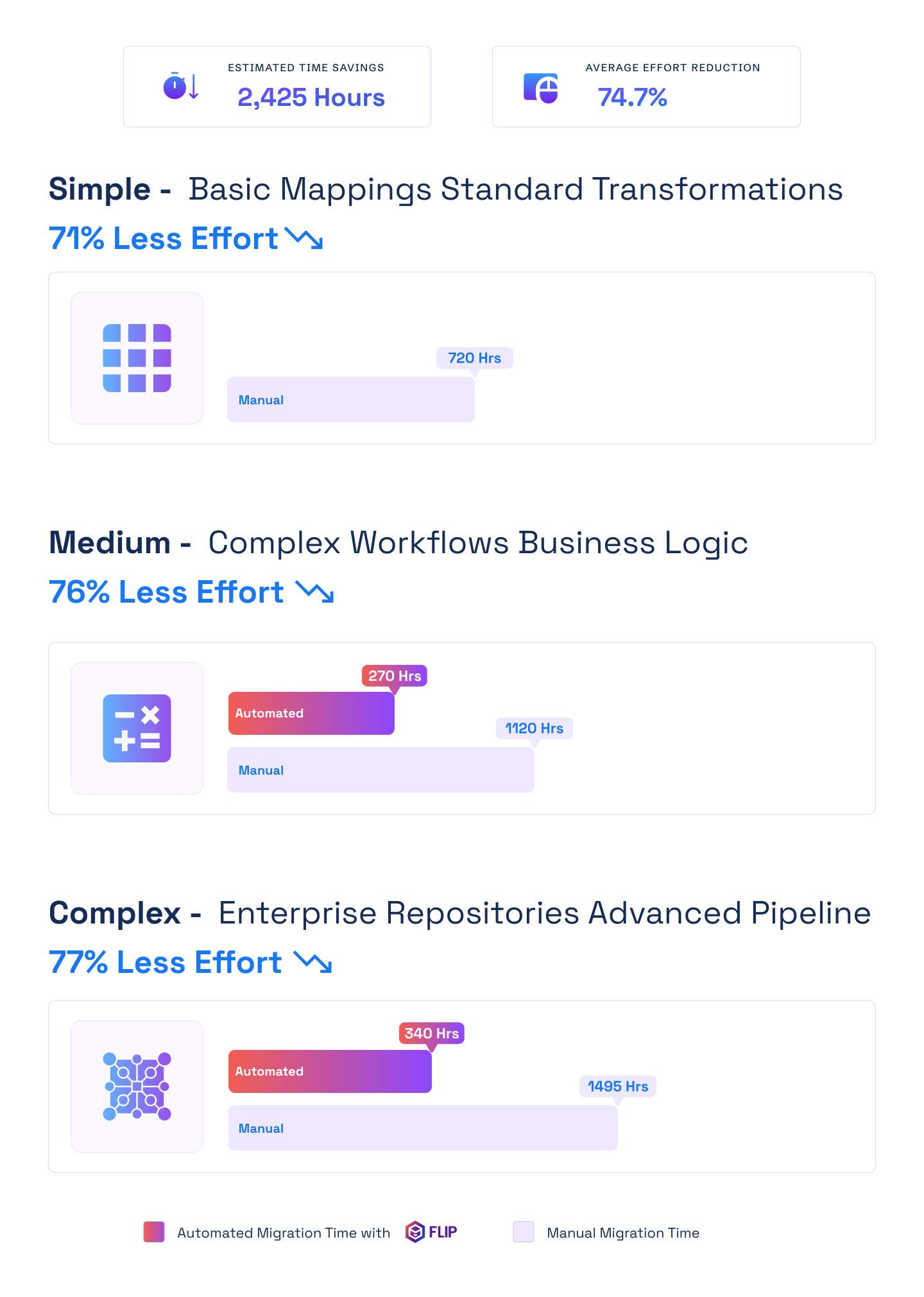

ESTIMATED TIME SAVINGS

Average effort reduction
Simple - Basic Mappings Standard Transformations
Less Effort

Medium - Complex Workflows Business Logic
Less Effort
Complex - Enterprise Repositories Advanced Pipelines
Less Effort

Case studies
What Enterprises Get with Automated Migrations
Kanerika has delivered data platform migrations for manufacturing, retail, financial services, and logistics enterprises, using FLIP as the conversion engine for Informatica, legacy ETL, and custom pipeline workloads.
Migration
Logistics Data Modernization with Microsoft Fabric
Impact:
- Enhanced Data Efficiency
- Improved Decision-Making
- Scalable Data Infrastructure
Migration
80% Faster Document Processing with Databricks Workflows
Impact:
- 80% Faster Document Processing
- 95% Improved Metadata Accuracy
- 45% Accelerated Time-to-Insight
Migration
70% Less Migration Effort: Informatica to Talend
Impact:
- 70% Reduction in Manual Migration Effort
- 60% Faster Time-to-Delivery
- 45% Lower Total Migration Cost
Frequently Asked Questions (FAQs)
What does the Informatica migration process look like with Kanerika?
Kanerika’s Informatica migration process runs in four stages: repository audit and pipeline discovery, automated conversion with FLIP, validation against original Informatica mappings, and deployment with Databricks readiness setup. FLIP handles the first two stages automatically for most pipeline types, cutting manual effort by up to 83%. Engineers review converted pipelines, validate outputs, and sign off before any Informatica workflow is decommissioned. The process runs in parallel with your live environment, so production is never at risk during migration.
What do Informatica to Databricks migration services include?
Kanerika’s Informatica to Databricks migration services cover the full lifecycle: pipeline discovery, automated ETL conversion with FLIP, parity validation against source outputs, and deployment with Databricks Lakehouse configuration. FLIP automates conversion for standard Informatica mapping types. Kanerika engineers handle edge cases, Unity Catalog governance setup, and team enablement post-migration. Engagements include a pre-migration audit and a signed-off scope before any work begins, so cost and timeline are defined upfront.
What is the best approach to migrate Informatica to Databricks?
The most reliable approach to migrate Informatica to Databricks is automated pipeline conversion using FLIP, run in parallel with your live Informatica environment. FLIP exports PowerCenter mappings, converts them to Databricks-native ETL pipelines, and validates each output before cutover. Kanerika recommends a phased migration by domain or business unit, so teams validate incrementally rather than cutting over all at once. Informatica workflows are decommissioned only after your team formally signs off on Databricks pipeline parity.
How much does Informatica to Databricks migration cost?
Informatica to Databricks migration cost depends on pipeline volume, complexity, and migration approach. Automated migration with FLIP reduces total effort by 70 to 83% compared to a manual rebuild, which translates directly to lower labor costs. On average, enterprises save 2,485 engineering hours per engagement. Databricks uses compute-based pricing versus Informatica’s per-processor licensing, lowering ongoing costs after migration. FLIP is available on Azure Marketplace and eligible for MACC credits, which can offset upfront migration investment for Azure-committed customers.
Can we run Informatica and Databricks in parallel during migration?
Yes, and Kanerika recommends it for every engagement. All Informatica migration projects run Databricks pipelines in parallel with the live Informatica environment. Converted pipelines are validated while Informatica continues handling production workloads, so there is no forced cutover. Different business units or pipeline domains can migrate at different speeds. Informatica is decommissioned only after your team formally signs off on each Databricks pipeline group. You retain full control over pace and sequencing throughout.
Which Informatica pipeline types does FLIP support for Databricks migration?
FLIP supports Informatica PowerCenter mappings, workflows, sessions, and mapplets for conversion to Databricks-native ETL pipelines. Source qualifiers, transformation logic, and target definitions are converted automatically. Scheduling and trigger configurations translate to Databricks job orchestration. Custom transformations and parameterized mappings are analyzed during discovery and flagged for engineer review if they fall outside automated conversion scope. Kanerika’s Informatica to Databricks migration services include a full pipeline inventory before conversion begins so scope is clear upfront.
What Databricks capabilities become available after migrating from Informatica?
After you migrate Informatica to Databricks, your team gains access to Delta Lake as a unified storage layer, Spark-native compute for batch and streaming, Databricks AutoML and MLflow for AI workloads, and Unity Catalog for centralized governance. These capabilities are not available natively in Informatica and require separate tools to replicate. Kanerika configures Unity Catalog and Delta Lake as part of the deployment stage, so your Databricks environment is production-ready from the first pipeline cutover.
How much effort does the Informatica migration process take?
Timeline depends on pipeline volume and complexity. Simple Informatica migrations take around 120 hours with FLIP versus 720 hours manually. Mid-scale projects with custom logic run approximately 480 hours automated. Complex enterprise environments with extensive dependencies take around 940 hours with FLIP compared to 3,365 hours by hand. Kanerika runs a full pipeline audit before work begins, so you receive a precise scope, timeline, and cost estimate before any commitment is made.
Is Kanerika's Informatica to Databricks migration tool on Azure Marketplace?
Yes. Kanerika’s FLIP Migration Accelerator is listed on the Azure Marketplace and eligible for the Microsoft Azure Consumption Commitment (MACC). Organizations with committed Azure spend can apply it toward their Informatica to Databricks migration cost, reducing or eliminating out-of-pocket tooling fees. Kanerika holds Microsoft’s Data Warehouse Migration to Azure Specialization and is a certified Microsoft Solutions Partner for Data and AI. FLIP has passed Microsoft’s technical and compliance requirements. Kanerika also holds ISO 27001, SOC 2, ISO 9001, and CMMI Level 3 certifications.
Which enterprises should consider Informatica to Databricks migration services?
Informatica to Databricks migration services are best suited for enterprises running large Informatica PowerCenter environments, facing rising per-processor licensing costs, or building toward AI and Lakehouse architecture. Organizations investing in Databricks for ML or analytics workloads benefit most from consolidating Informatica ETL onto the same platform. Kanerika works with clients across manufacturing, financial services, retail, logistics, and pharma. A migration assessment helps determine whether a phased or full migration is the right approach for your environment.
Informatica vs Databricks: what changes when you migrate?
Informatica PowerCenter runs ETL under per-processor licensing, while Databricks uses compute-based pricing on a Lakehouse built for AI workloads. After the move, your team gains Delta Lake as a unified storage layer, Spark-native compute for batch and streaming, and Unity Catalog for centralized governance. FLIP converts PowerCenter mappings and workflows into Databricks-native pipelines and validates them before cutover.













