

Qlik Sense to Power BI Migration, Automated by FLIP
The Challenge
The Growing Complexity of Qlik Sense Reporting

49%
Firms need AI-driven productivity

48%
Business leaders struggle with data quality

39%
Firms seek stronger cloud BI capabilities

35%
CXOs demand higher-quality insights
Migrate from Qlik Sense to Power BI with Our Accelerator
Use Your Azure Committed Spend (MACC)


See Qlik Sense Reports Migrate to Power BI
Watch how FLIP receives Qlik Sense QVF files, analyzes report metadata and components, converts supported report elements into Power BI-ready outputs, and prepares reports for data connection, refresh, and validation.
Migration ROI Calculator
Kanerika’s IP-led accelerator, FLIP, automates your migration with major resource savings, ensuring a faster, lower-risk move to your target platform.
FLIP is Kanerika's proprietary migration accelerator. Here's exactly where the savings come from:
The Qlik Sense to Power BI Advantage
The Business Impact of Qlik Sense to Power BI Migration
Unified BI Environment
- Consolidate enterprise reporting on Power BI
- Standardize reporting across business functions
- Connect analytics with the Microsoft ecosystem

Faster Report Modernization
- Automate repetitive report conversion
- Reduce manual dashboard redevelopment
- Accelerate migration across report estates

Consistent Reporting Experience
- Preserve supported report structures and visuals
- Carry forward measures and reporting logic
- Reduce disruption for report users

Lower BI Overhead
- Reduce separate platform maintenance
- Simplify enterprise report management
- Redirect resources toward higher-value analytics
When Moving Off Qlik Sense Makes Sense
Four situations often prompt teams to move their Qlik Sense apps onto Power BI. FLIP fits each one, and our Qlik Sense vs Power BI comparison covers the pricing and feature trade-offs.

License Renewal Approaching
Convert Qlik Sense apps to Power BI before the renewal and avoid another license term.

Microsoft 365 Standardization
Power BI reports run inside Teams, Excel, and SharePoint, where Microsoft 365 users already work.

Consolidating on Power BI
Teams running both tools duplicate reports. Converting Qlik Sense apps leaves one governed platform.

Modernization Already Started
Already moving data to Microsoft Fabric? Include Qlik Sense reports in the same migration plan.
The Migration Process
From Qlik Sense Reports to Power BI with FLIP
Report Discovery and Analysis
FLIP processes Qlik Sense QVF files and identifies report structures, sheets, visuals, formulas, measures, and data details.


Automated Report Conversion
FLIP converts supported Qlik Sense components into Power BI-ready report structures, reducing manual redevelopment.

Data Connection and Validation
Teams configure required data sources, refresh migrated reports, and validate the converted dashboards against expected results.

Power BI Deployment
FLIP delivers transformed report outputs for opening, review, data refresh, and final deployment in Power BI.

ROI YOU CAN EXPECT
Real Impact from Automated Qlik Sense Reports to Power BI with FLIP
Our accelerator cuts migration effort across every complexity level. The numbers below show estimated time and effort savings based on your dashboard type, so you know what to expect before the project starts.
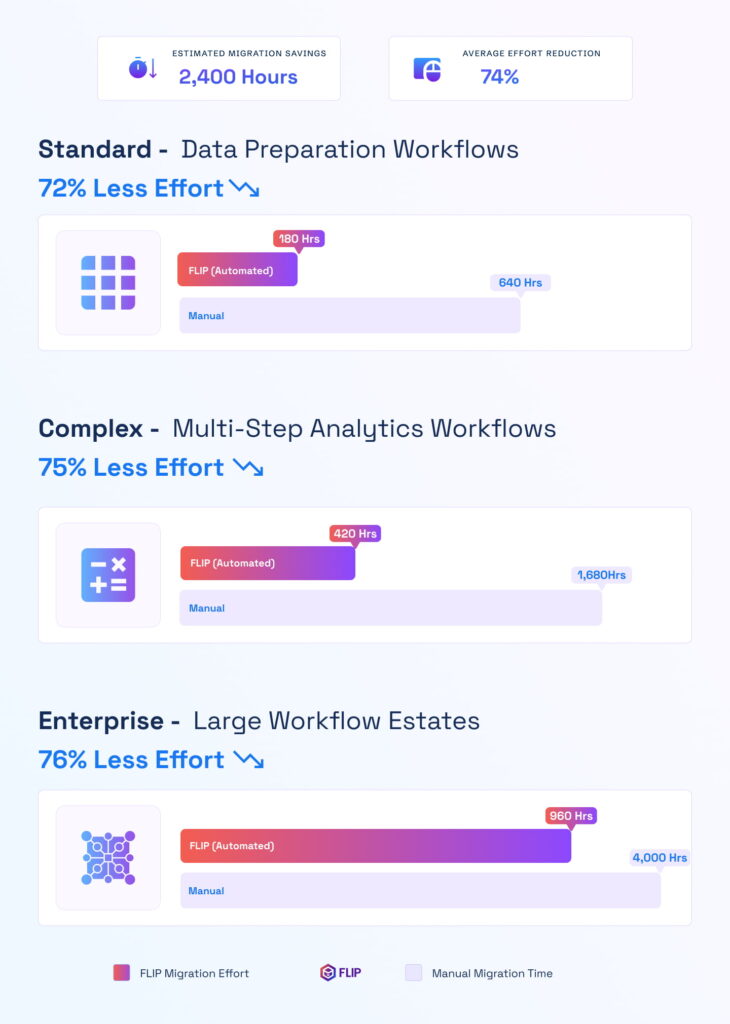

ESTIMATED TIME SAVINGS

Average effort reduction
Standard - Simple Reports
Less Effort

Complex - Multi-Sheet Dashboards
Less Effort
Enterprise - Large Report Estates
Less Effort

Case studies
Qlik to Power BI Migration Outcomes
Case studies showing measurable outcomes from Kanerika’s Qlik Sense to Power BI migration work.
Migration
60% Faster Migration: Crystal Reports to Power BI
Impact:
- 60% Faster Migration
- 10x Data Scale
- 99.5% Refresh Success Rate
Migration
60% Faster Analytics with Informatica to Alteryx
Impact:
- 45% Faster Reporting Cycles
- 38% Reduction in Maintenance Costs
- 60% Improved Analytics Turnaround
Migration
74% Faster Retail Reporting with Microsoft Fabric
Impact:
- 74% Faster Reporting Cycles
- 65% Increase in Reporting Stability
- 72% Faster Access to Current Metrics
Frequently Asked Questions (FAQs)
What is Qlik Sense to Power BI migration?
Qlik Sense to Power BI migration involves moving existing Qlik Sense reports, dashboards, visuals, measures, and reporting logic into Microsoft Power BI. The work can include QVF analysis, report conversion, data-source configuration, validation, and deployment. FLIP automates supported report conversion and produces Power BI-ready outputs, reducing the amount of manual rebuilding required across an enterprise reporting environment.
Why migrate Qlik Sense reports to Power BI?
Organizations may move Qlik Sense reporting to Power BI to standardize business intelligence on Microsoft’s broader data and analytics ecosystem. The decision can also support platform consolidation, reporting governance, and integration with existing Microsoft investments. Migration planning should assess report usage, data models, business logic, security, and visual requirements before determining which reports should be converted, redesigned, or retired.
How do you migrate Qlik Sense reports to Power BI?
A Qlik Sense migration typically begins by assessing applications, QVF files, data sources, expressions, visuals, and dependencies. Report components are then mapped to Power BI equivalents and converted into the target structure. Data connections are configured, reports are refreshed, and outputs are validated. FLIP automates key conversion activities while allowing teams to review components that need additional work.
Can Qlik Sense reports be converted automatically to Power BI?
Supported Qlik Sense report components can be converted automatically, but a complete one-to-one conversion is not always possible because the platforms use different data models, expression languages, and visual behaviors. FLIP analyzes QVF metadata and converts supported visuals, measures, formulas, and report structures into Power BI-ready output. Components requiring additional configuration can then be reviewed during validation.
What Qlik Sense files are required for migration?
QVF files are commonly used as the primary migration input because they contain information about Qlik Sense applications, including report metadata and components. Depending on the migration approach, teams may also need access to the underlying data sources and connection details. These are important when configuring the migrated Power BI reports, refreshing data, and validating that the final outputs match expected business results.
How does FLIP handle Qlik Sense formulas and measures?
FLIP analyzes formulas and measures contained within supported Qlik Sense reports and converts them into Power BI-ready representations where a suitable mapping exists. Qlik expressions can use concepts such as Set Analysis that differ from Power BI’s DAX calculation model, so complex expressions may require additional review. The goal is to automate repeatable conversion while clearly identifying logic that needs engineering attention.
How does Qlik Sense data modeling differ from Power BI?
Qlik Sense uses an associative data model, while Power BI uses a tabular model with defined relationships between tables. This difference means that some Qlik data structures and behaviors cannot simply be copied into Power BI. A successful migration should assess data relationships, transformation logic, calculations, and performance requirements, then map them to an appropriate Power BI semantic model and reporting structure.
Can Qlik Sense reports and dashboards keep their existing visuals?
FLIP can carry supported Qlik Sense visual components and report structures into Power BI-ready outputs, reducing the need to rebuild every dashboard manually. However, Qlik-specific extensions, interactions, and visual behaviors may not have direct Power BI equivalents. These cases should be reviewed during migration so teams can use suitable Power BI visuals while maintaining the required reporting experience.
How long does Qlik Sense to Power BI migration take?
Migration duration depends on the number of reports, application complexity, visuals, formulas, data sources, custom extensions, and validation requirements. A small report estate can require considerably less work than a large enterprise environment with complex data models and Qlik-specific functionality. Automation can reduce repetitive redevelopment, while discovery, data connection changes, testing, user validation, and deployment remain part of the migration.
How much does Qlik to Power BI migration cost, and how much effort can FLIP reduce?
Cost depends on report count, application complexity, formulas, data sources, and validation scope. Kanerika estimates the work after reviewing your Qlik Sense apps. FLIP reduces manual effort by automating key stages of Qlik Sense report conversion instead of requiring teams to rebuild every report component individually. The exact reduction depends on report structure, visual complexity, formulas, data sources, and unsupported functionality. For enterprise migrations, FLIP provides a repeatable conversion framework while allowing teams to focus their effort on exceptions, data configuration, validation, and final deployment.
How is Qlik Section Access migrated to Power BI?
Section Access is how Qlik Sense restricts which rows each user can see. Power BI handles the same requirement with row-level security, defined as roles and DAX filter rules in the semantic model. The two models work differently, so Section Access tables are reviewed during discovery and rebuilt as Power BI roles, then tested user by user before cutover.













