FLIP vs Ispirer Toolkit Migration automation and capabilities compared
FLIP vs Ispirer Toolkit: compare automation claims, platform coverage, validation, deployment and licensing, and see how FLIP automates up to 80% of a migration with proof built in.
See FLIP Convert an ETL Workload
A FLIP demo from Kanerika’s YouTube channel shows ETL assets converted into a target platform.
What Reviewers Say About FLIP
Reviews quoted as published on G2, Capterra and Gartner Peer Insights.

★4.9/531 reviews on G2
Moved Our Entire SSIS Environment to Fabric Without Losing a Single Record
“The 99.9% data integrity during migration was the number that mattered most to us. We also saw a 30% improvement in processing speeds after going live.”
Conor L.Founder, Manufacturing · May 2026

★5.0/5FLIP · 5 reviews on Capterra
Real Time Dashboards with great value and support
“Since we started using Flip, our managers save hours every week on reporting and we make faster decisions on real-time data we trust.”
Ryan A. M.Owner, Computer Software · Sep 2025

★4.7/53 reviews on Gartner
Business logic well validated, with strong communication and clear documentation
“The Kanerika team was very responsive and motivated. We are preparing to move into a second phase with them to operationalize the solution.”
Director of Data and AnalyticsReal Estate, 50M-1B USD · Sep 2026
Two Tools. Different Migration Scopes.
Ispirer converts database and application code. FLIP automates ETL, BI and RPA migration with reconciliation built in.
Kanerika FLIP
A migration platform for ETL, BI and RPA
FLIP pairs assessment-first planning with automated conversion and data reconciliation, supported by Kanerika engineers. It runs in Docker inside your infrastructure, reads metadata only, and automates up to 80% of migration work.
Choose FLIP when
- Your program spans ETL pipelines, BI reports and RPA bots together.
- Conversion must stay inside your own network, on metadata only.
- You need reconciliation and parallel runs before any production cutover.
Ispirer Toolkit
Database and application code conversion tools
Ispirer Toolkit includes SQLWays for database code, CodeWays for application code and IDM for data, backed by professional services. It states up to 95% automatic conversion and 15K+ conversion patterns.
Choose Ispirer when
- Your migration is mainly database-to-database or application code conversion.
- You want entry licences from $45 for one month of data migration.
- You want an AI assistant that checks and fixes converted code.
FLIP and Ispirer Toolkit at a Glance
Published capabilities and claims, side by side.
| Consideration | FLIP | Ispirer Toolkit |
|---|---|---|
| Migration scope | ETL, BI and RPA migration paths, with reconciliation, orchestration and data quality after cutover. | SQLWays for database code, CodeWays for application code and IDM for data, plus professional services. |
| Automation | Up to 80% of a data platform migration automated; Kanerika engineers handle the remaining 20 to 30%. | States up to 95% automatic conversion, about 70 to 80% out of the box, and 95%+ through tailored customizations. |
| Stated gains | Client results are published per migration, such as 70% less manual effort and 80% faster data refresh. | 15K+ conversion patterns, and up to 50% less post-migration optimization effort with the SQLWays AI assistant. |
| Where conversion runs | Runs in Docker inside your own network and processes metadata only, with Kanerika engineers supporting. | Runs on Windows, Linux or Unix in your environment; the AI assistant connects to a chosen provider or local model. |
| Validation | Row-count reconciliation, hash-based checksums and parallel runs compare migrated output with the original. | Checksum and record count checks during data transfer; converted code gets AI checks and a user-set Validated status. |
| Licensing and start | Migration ROI calculator, a demo, or FLIP plans on Microsoft Marketplace, which is MACC-eligible. | Licences from $45 for one month of data migration or $395 for SQL conversion, with a free trial. |
| Certifications | Holds ISO 27001, ISO 27701, SOC 2 Type II and CMMI Level 3 credentials. | States an information security management system in accordance with ISO/IEC 27001:2022. |
Why FLIP Wins on Automation and Capabilities
Where FLIP stands apart on migration automation and platform capabilities.
Delivery backed by evidence
Available direct or on Microsoft Marketplace with MACC eligibility, FLIP is backed by ISO 27001, SOC 2 Type II, CMMI Level 3 and client results.
Conversion stays in your network
FLIP runs in Docker inside your infrastructure and processes metadata only, which shortens security reviews and keeps sensitive business logic under your own control.
Proof the output matches
Row-count reconciliation, hash-based checksums and parallel runs compare converted output with the original data, so production cutover waits until the results fully match.
ETL, BI and RPA in one program
Published paths cover ETL platforms, six BI tools moving to Power BI, and UiPath moving to Power Automate, so a single program covers the whole estate.
Automation scoped before you commit
Up to 80% of migration work is automated, and the first assessment shows the manual remainder, so budgets and timelines start from facts, not estimates.
Capabilities that continue after cutover
The same platform reconciles data, orchestrates pipelines, runs data quality checks, automates documents and applies governance with lineage, audit trails and role-based access.
Put FLIP Through Your Hardest Workloads.
Pick the pipelines and code that broke your last conversion. We will assess them, show what converts and what stays manual, and run the work inside your network.
Key Considerations When Comparing Migration Tools
Ispirer and FLIP compared on the criteria that decide a migration.
How much of the migration is automated?
IspirerIspirer states up to 95% automatic conversion, about 70 to 80% out of the box, and 95%+ through tailored customizations.
FLIPUp to 80% of migration work is automated, and the assessment shows the manual remainder before you commit.
Where does the conversion run?
IspirerIspirer’s AI assistant connects to a chosen AI provider or local model, and shares only chat prompts when file access is disabled.
FLIPFLIP runs in Docker inside your network and processes metadata only, with Kanerika engineers supporting the work.
How is the converted output proven?
IspirerIspirer cites checksum verification and record count reconciliation for data, and AI checks plus a user-set status for code.
FLIPRow-count reconciliation, hash-based checksums and parallel runs compare converted output with the original before cutover.
What else does the platform cover?
IspirerIspirer covers database code, application code and data migration, and describes its database software as not an ETL tool.
FLIPFLIP covers ETL, six BI tools and UiPath RPA migration, then reconciles, orchestrates and governs data on one platform.
Ispirer Claims Worth Validating
Public statements to confirm in writing before you decide.
Several automation figures
Ispirer cites up to 95% automatic conversion, 70 to 80% out of the box and 95%+ through tailored customizations.
How FLIP approaches itFLIP states up to 80% and shows your own automated share in the assessment before work begins.
AI assistant and data sharing
SQLWays connects to your preferred AI provider or a local model, and shares only chat prompts when file access is disabled.
How FLIP approaches itFLIP runs inside your network and processes metadata only, with Kanerika engineers handling exceptions.
Licences by migration direction
Each licence is chosen per migration direction, with data volume limits per run and plans limited by the number of machines.
How FLIP approaches itModel your own scope with the FLIP migration ROI calculator and review FLIP plans published on Microsoft Marketplace.
Code validated by status
In web-based SQLWays, converted objects carry per-object statuses, including a Validated status that the user marks by hand.
How FLIP approaches itReconciliation by row count and checksum, plus parallel runs, is part of every FLIP migration.
How FLIP Automates a Migration, Start to Cutover
FLIP links every stage, and Kanerika engineers handle exceptions, approvals and production readiness.
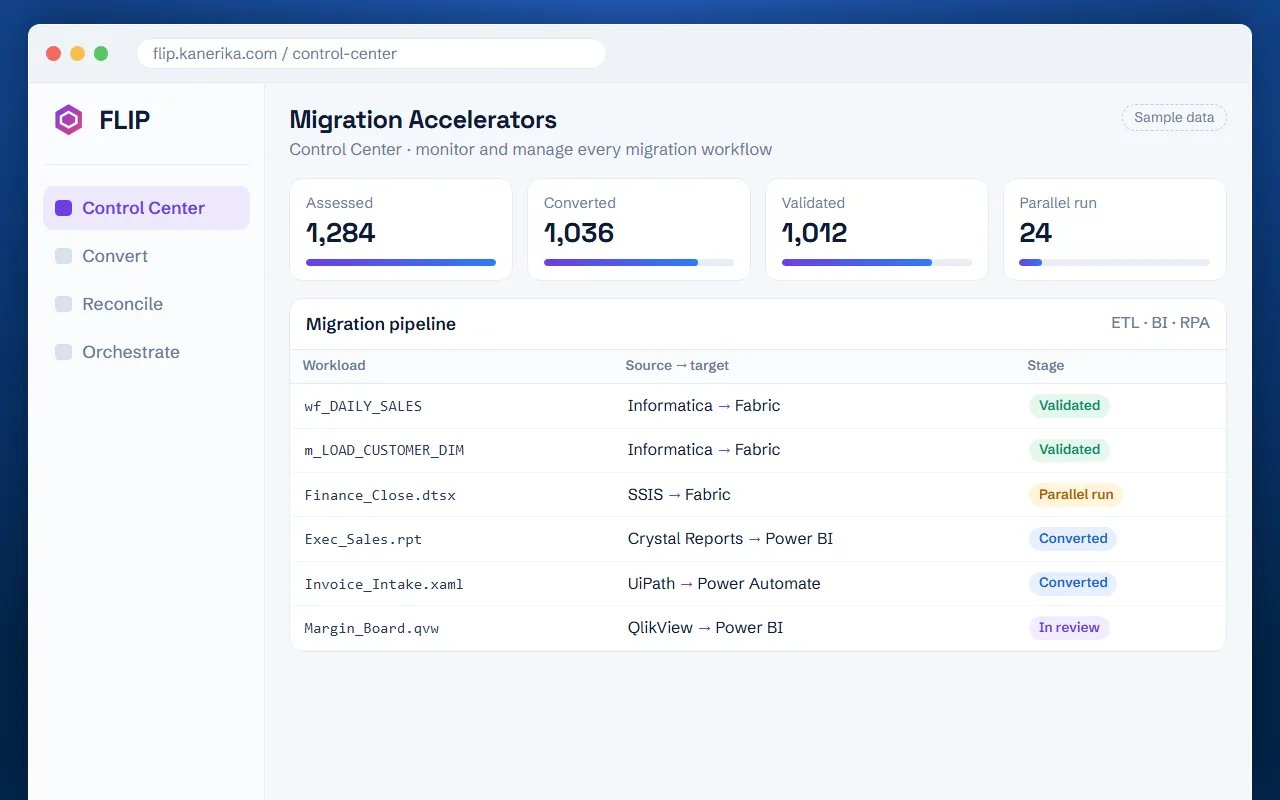
Assess your estate before you commit
FLIP scans legacy repositories, inventories every asset, maps dependencies and flags conversion gaps, so scope and migration waves are planned from facts, not estimates.
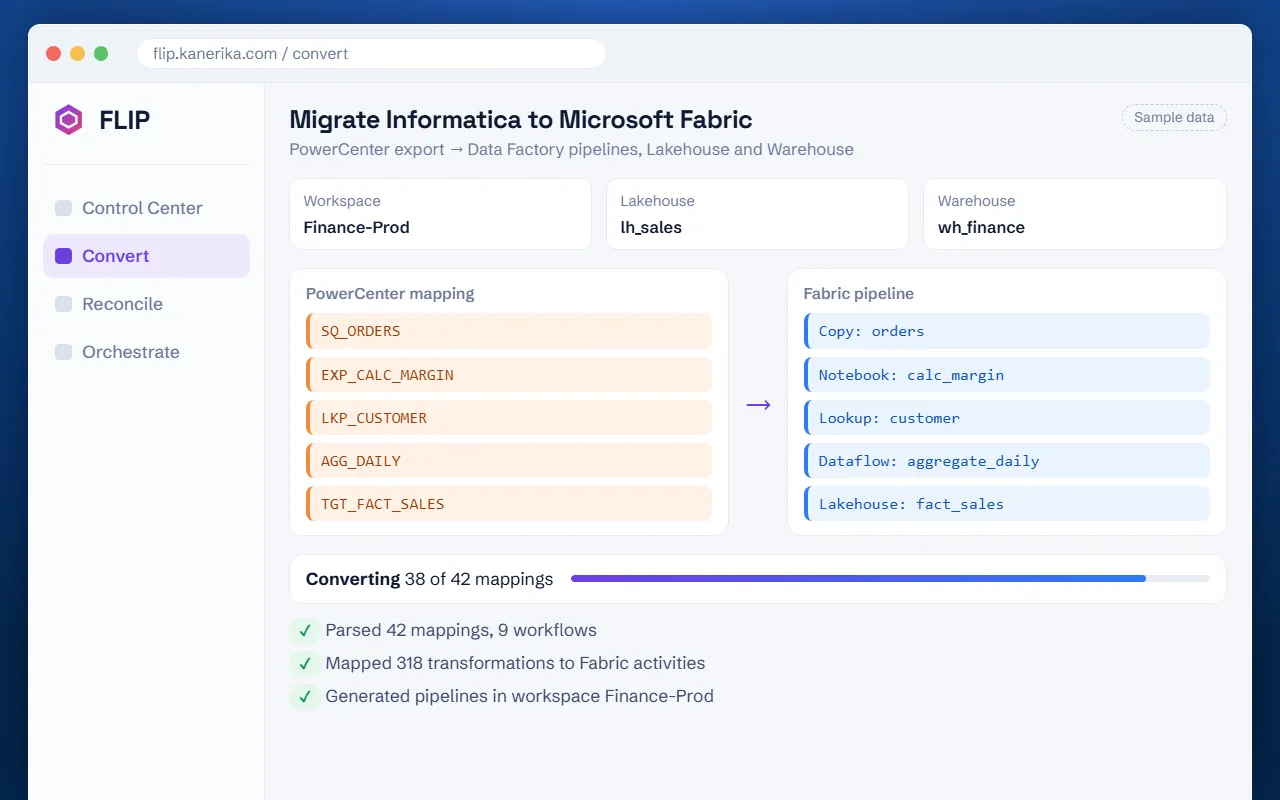
Convert workloads automatically
Supported workloads are converted into target-platform assets automatically, while complex logic and unsupported patterns are routed to Kanerika engineers for review and redesign.
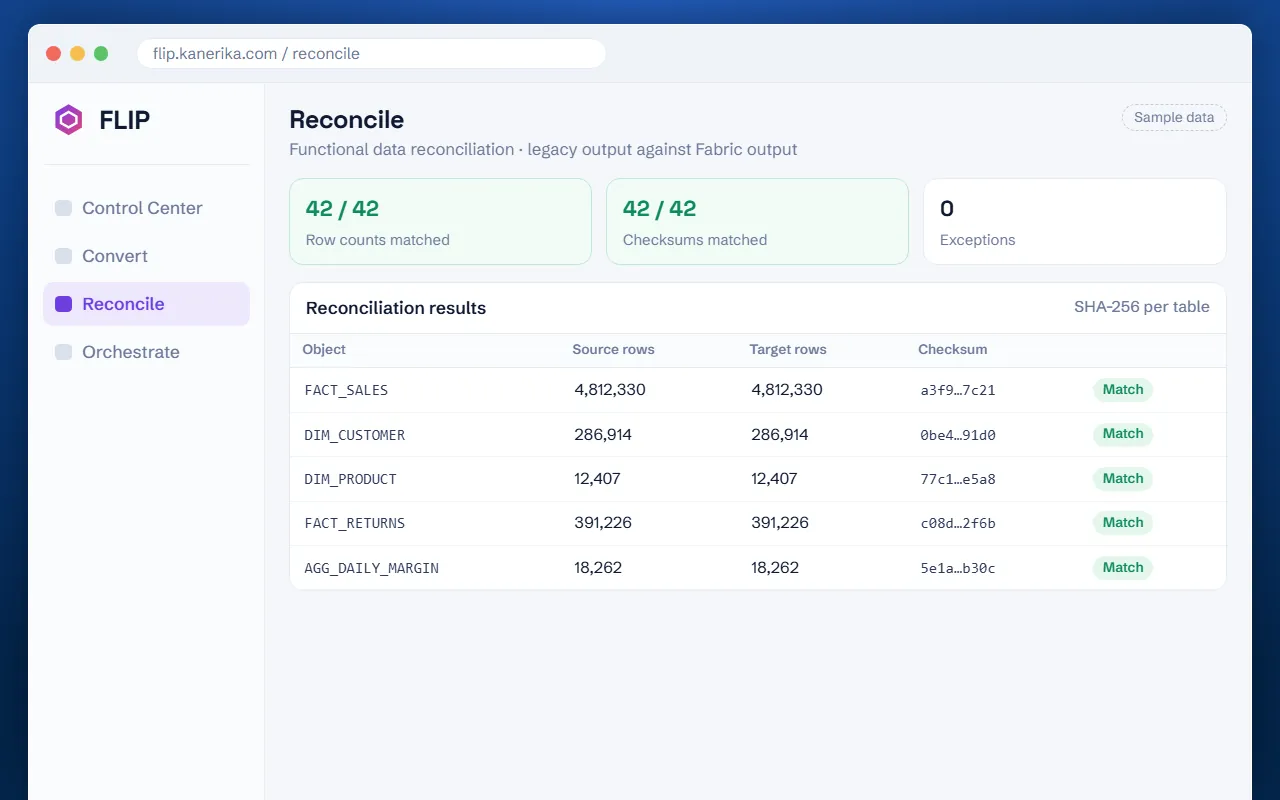
Validate against the source
Row-count and checksum reconciliation compares migrated data with source outputs, and parallel runs surface any differences long before the production cutover is scheduled.
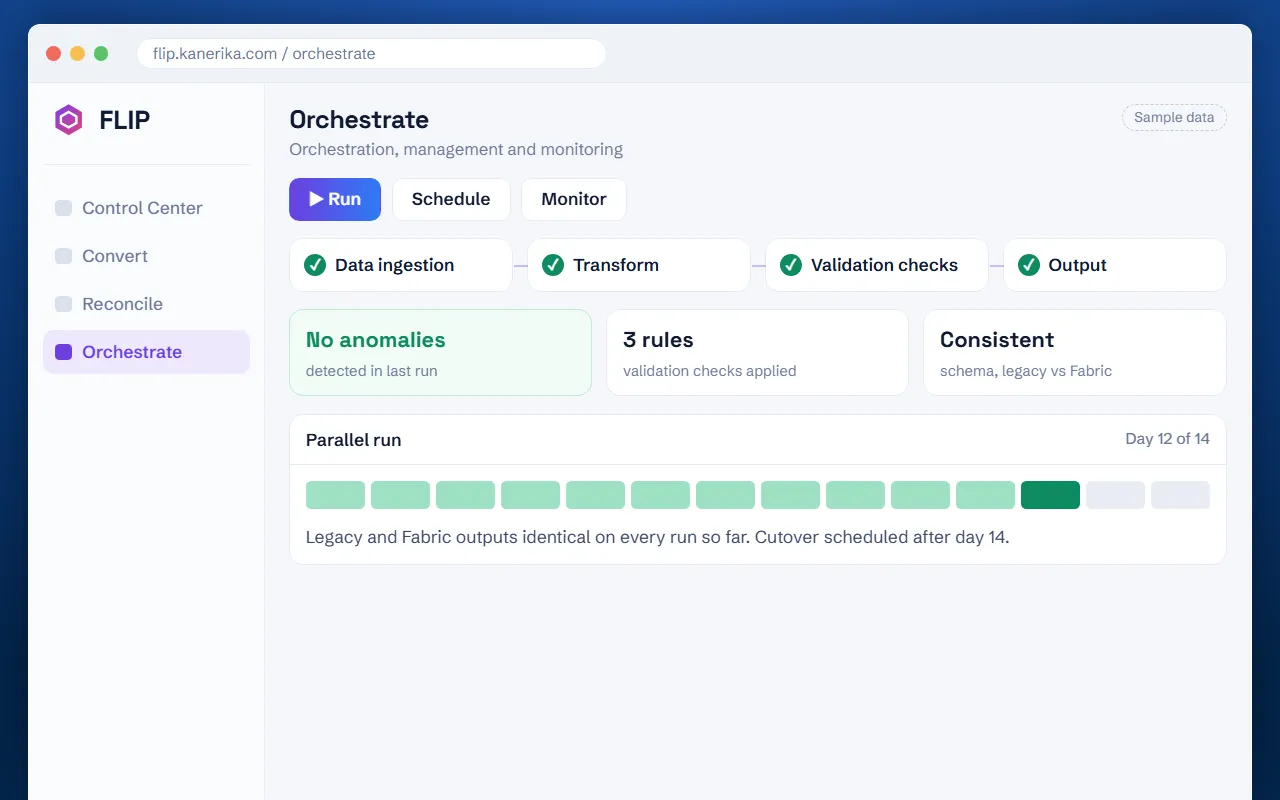
Deploy with a rollback plan
Deployment support, user acceptance testing, rollback planning and post-migration monitoring close out the program, with one accountable team from the first scan to go-live.
FLIP Results Across ETL, BI and RPA
Published Kanerika case studies where FLIP did the conversion.
ETL migration
70%
less manual migration effort
- 60% faster time-to-delivery
- 45% lower total migration cost
Global building-materials manufacturer
ETL migration
45%
faster reporting cycles
- 38% lower maintenance costs
- 60% faster analytics turnaround
Global fintech firm
BI migration
80%
faster data refresh and reporting
- 70% less reporting maintenance
- 40% lower infrastructure and licensing costs
Global interconnect-solutions maker
RPA migration
90 days
to move a codebase built over two years
- 75% lower annual licensing costs
- 50% less effort with automated migration
Trax
Test FLIP on Your Own Estate Before You Decide
Review your workloads with Kanerika to define migration scope, automation coverage and validation needs before you commit to a tool.
FLIP vs Ispirer Toolkit: Frequently Asked Questions
What is the difference between FLIP and Ispirer Toolkit?
Ispirer Toolkit converts database code, application code and data, and is licensed per migration direction. FLIP migrates ETL, BI and RPA on one platform, runs inside your network and reconciles output against the original.
Is Ispirer an ETL migration tool?
Ispirer describes its database migration software as not an ETL tool. Its toolkit covers database code through SQLWays, application code through CodeWays and data through IDM. FLIP migrates ETL, BI and RPA workloads.
Which automates more of the migration, FLIP or Ispirer?
Kanerika states up to 80% automation for FLIP. Ispirer states up to 95% automatic conversion, about 70 to 80% out of the box, and 95%+ through customizations. Neither is a guarantee, so run a pilot on your own code.
Where does Ispirer's AI assistant send our code?
Ispirer says SQLWays connects to your preferred AI provider or a local model, and that only chat prompts are shared when source and target file access is disabled. FLIP processes metadata only inside your network.
How much does Ispirer Toolkit cost?
Ispirer lists data migration licences from $45 for one month and SQL conversion licences from $395, chosen per migration direction, with data volume limits per run and larger plans by quote. Size FLIP with the migration ROI calculator.
Does Ispirer offer a free trial?
Ispirer offers a free trial, which it says is for testing, and a free self-assessment tool. Kanerika offers a FLIP demo, a migration ROI calculator and an assessment-first start on your own workloads.
Is FLIP secure enough to run on sensitive code and data?
Yes. FLIP runs in Docker inside your infrastructure and processes metadata only, so source code and business data stay in your network. Kanerika holds ISO 27001, SOC 2 Type II and CMMI Level 3. The platform applies lineage, audit trails and role-based access.
What results has Kanerika reported from FLIP migrations?
Kanerika publishes four FLIP case studies. An ETL migration for a building-materials manufacturer cut manual effort by 70%, delivered 60% faster and lowered total cost by 45%. A BI migration for an interconnect-solutions maker gave 80% faster data refresh and 40% lower infrastructure and licensing costs. An RPA migration for Trax moved a two-year codebase in 90 days and cut annual licensing costs by 75%.
What are the best alternatives to Ispirer Toolkit?
Kanerika FLIP is an alternative when the program goes beyond database code to ETL, BI and RPA, when conversion must stay inside your network, and when you want output reconciled against the original.
Which is better, FLIP or Ispirer Toolkit?
Choose FLIP for ETL, BI and RPA coverage, in-network processing and reconciliation with parallel runs. Choose Ispirer when the work is mainly database or application code conversion with per-direction licences. Settle it with a pilot.
Sources and disclaimer
Ispirer Toolkit
Kanerika
- Migration services and supported FLIP paths
- FLIP product page
- Case study: Informatica to Talend migration
- Case study: Informatica to Alteryx migration
- Case study: QlikView to Power BI
- Case study: UiPath to Power Automate for Trax
- Case study: Informatica to Microsoft Fabric (also lists certifications)
- YouTube: IBM DataStage to Databricks Migration with FLIP (Demo)
Disclaimer: This comparison is based on publicly available information from the linked sources, accessed November 10, 2026. It was prepared by Kanerika, the provider of FLIP, and is not an independent benchmark or an exhaustive product review. Product features, availability, pricing and terms may change. Selection guidance reflects Kanerika’s assessment of the cited information. Vendor statements and client results have not been independently tested; case-study results reflect individual engagements, not head-to-head benchmarks, and no performance, cost or migration outcome is guaranteed. Reviews are quoted as published on third-party platforms and may be out of date. All product names and trademarks belong to their respective owners. References to Ispirer do not imply affiliation, sponsorship or endorsement. If anything here is inaccurate or out of date, tell us and we will correct it.