
Automate EDI Integration and Onboard Partners Faster
Manual EDI mapping, validation, and exception handling slow down every trading partner relationship. FLIP automates the full EDI integration lifecycle, so your team onboards partners quicker and resolves errors sooner.
Reduced manual mapping effort
Document validation accuracy
Touchless EDI processing rate
Faster partner onboarding cycle
Reduction in transaction errors
Higher partner SLA compliance
Get Started with EDI Integration Solutions












The Real Cost of Manual Manual EDI Integration
Manual mapping, failed transactions, and slow compliance reporting turn EDI integration from a connector into a bottleneck.

Slow Partner Onboarding
New trading partners take weeks to map and certify, delaying revenue and straining account management bandwidth.

Manual Exception Handling
Failed transactions queue in error folders, requiring analyst review before reaching downstream ERP, WMS, or TMS systems.

Format Translation Overhead
X12, EDIFACT, XML, and flat files demand custom parsers that break whenever a partner updates a single segment.
FLIP Runs Your EDI Integration End-to-End
From document ingestion to system delivery, FLIP automates the steps your EDI team handles manually today, with no custom code and no separate translator product.
Capture agent
Multi-Format Document Parsing
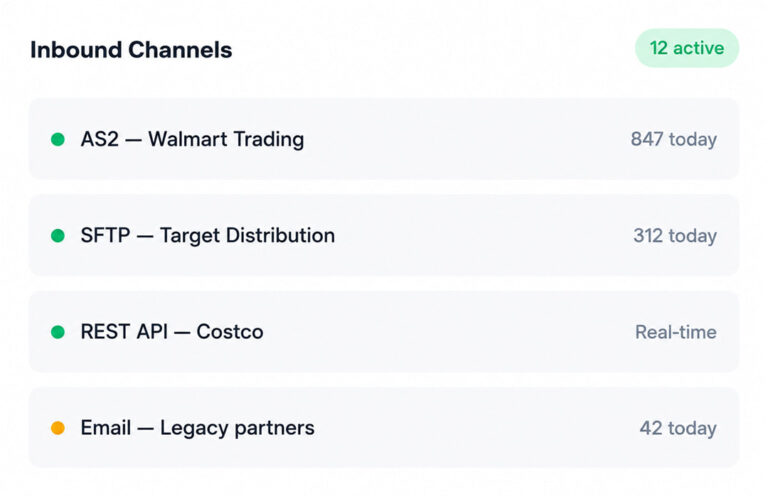
FLIP ingests X12, EDIFACT, XML, JSON, and flat files from any trading partner, converting them into structured data your downstream systems can consume.
Extraction agent
Pre-Built Mapping Templates
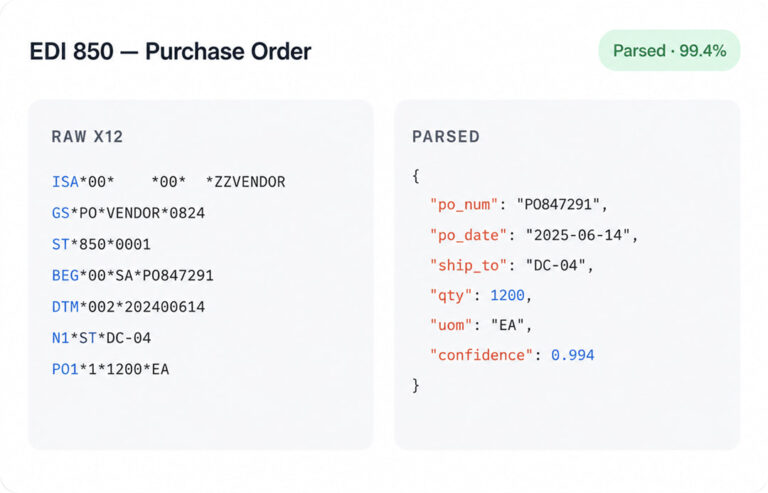
Reusable mapping libraries for common transaction sets cut partner onboarding from weeks to days, with custom rules added through a visual interface.
Matching agent
Rule-Based Validation Engine
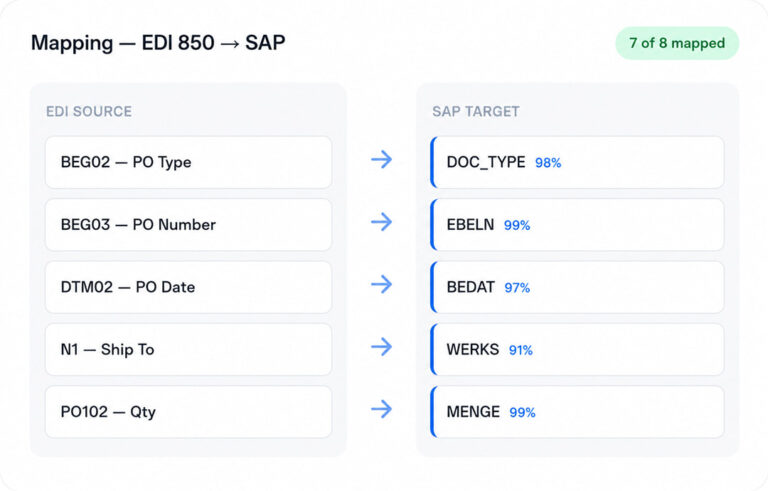
Every transaction runs through structural checks, segment-level logic, and partner-specific business rules before reaching your ERP, WMS, or finance platform.
Exception agent
Exception Routing and Resolution
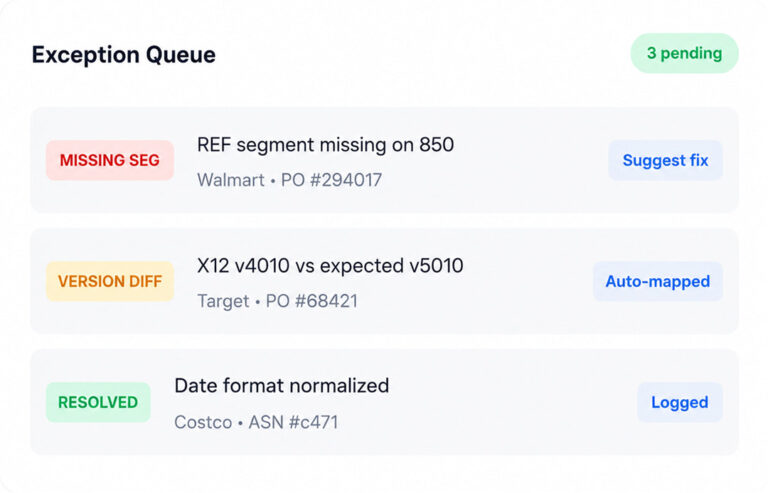
Failed transactions route automatically to the right analyst with full context, tracked against SLA windows until resolved and resubmitted.
Posting & Governance
Native Connectors to Enterprise Systems
Direct integration with SAP, Dynamics 365, Salesforce, and Microsoft Fabric removes custom middleware and keeps EDI data flowing into systems of record.
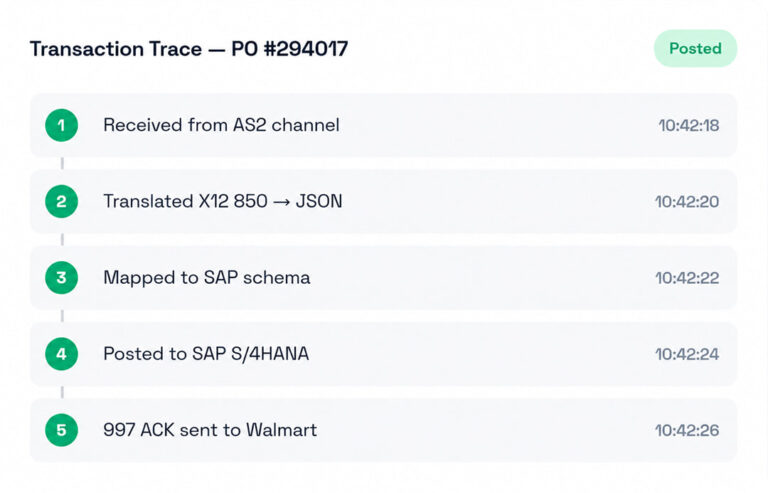
Why FLIP Outperforms Traditional EDI Software
Most EDI tools translate documents. FLIP automates the full integration workflow, with intelligence that adapts to new partners, formats, and exceptions without rework.
Title
Others
FLIP
01
Partner Onboarding Speed
Others
Hand-coded maps drag onboarding into multi-week certification cycles.
FLIP
Reusable templates compress partner onboarding into days, not weeks.
02
Format Coverage
Others
Separate parsers required for X12, EDIFACT, and flat files.
FLIP
One platform handles X12, EDIFACT, XML, JSON, and flat files.
03
Exception Handling
Others
Failed transactions sit in queues waiting for analyst review.
FLIP
Routes exceptions automatically to the right analyst with full context.
04
System Integration
Others
Custom middleware needed to push data into ERP and WMS.
FLIP
Native connectors deliver validated transactions to enterprise systems.
Where FLIP Delivers Value Across EDI Operations
Claims automation only works when every role gets value from it. FLIP is built for the teams that run claims and the leaders who answer for them.
Unified Integration Stack
FLIP replaces translators, middleware, and custom integration scripts.
Trading Partner Reliability
Real-time visibility into partner SLA performance and transaction status.
Lower Manual Workload
Automated mapping and exception routing save analysts’ time.
Cost-Per-Transaction Visibility
Clear view of EDI operating cost and error-driven rework spend.




EDI Pricing Built Around Your Transaction Volume
Every enterprise runs EDI differently. FLIP pricing adapts to your transaction volume, trading partner count, and integration scope without forcing you into a fixed plan.
Pay-as-you-go
Volume-based
- Pay per transaction processed.
- No minimum commitment.
- Best for variable or seasonal EDI volumes.
Monthly
- Unlimited transaction volume.
- No lock-in and consistent operations.
- Best for high-volume EDI operations.
Annual
- Dedicated CSM.
- Enterprise SLA
- Volume pricing for multi-partner rollouts.
Common Questions About Claims Automation
01What is EDI integration?
EDI integration is the connection between an electronic data interchange system and your internal applications, such as ERP, WMS, or finance platforms. It enables automatic exchange of structured business documents with trading partners, eliminating manual data entry and re-keying. A modern EDI integration platform handles parsing, mapping, validation, and posting into systems of record, completing the data pipeline from trading partner inbox to system delivery.
02How does EDI ERP integration work?
EDI ERP integration translates inbound documents from trading partners into formats your ERP can consume, validates them against business rules, and posts the data directly into the system. Outbound documents run the same flow in reverse. EDI integration software handles parsing, mapping, and acknowledgement generation, so your ERP receives clean, structured data ready for order, inventory, or finance workflows without manual handling.
03What is the difference between an EDI platform and EDI integration software?
An EDI platform manages document translation, partner connectivity, and message exchange. EDI integration software extends that by connecting the EDI layer to internal systems like ERP, WMS, and finance applications. Most enterprises need both. A unified EDI integration platform combines translation, mapping, validation, and downstream system delivery into one workflow, removing the gaps that fragmented tool stacks create.
04What is EDI mapping software and why does it matter?
EDI mapping software defines how data fields in an inbound or outbound document align with fields in your internal system. It converts segments and elements in X12 or EDIFACT files into structured records your ERP or WMS understands. Strong EDI mapping software uses reusable templates rather than custom maps per partner, which is the difference between weeks-long onboarding and same-week partner go-live.
05What is EDI automation and how is it different from traditional EDI?
EDI automation applies workflow logic, validation rules, and exception routing across every transaction, not just format translation. Failed documents resolve without analyst intervention. Partner onboarding compresses from weeks to days. Traditional EDI stops at format conversion, leaving mapping updates, error reconciliation, and ERP posting as manual work. EDI automation closes those gaps and makes the integration layer self-running at enterprise volume.
06How does FLIP work as an EDI integration platform?
FLIP runs as a unified EDI integration platform that ingests documents over AS2, SFTP, VAN, API, and email gateways, transforms them across X12, EDIFACT, XML, JSON, and flat files, validates against partner-specific rules, and posts data directly into enterprise systems. The platform combines EDI mapping software, exception routing, and downstream connectors in one workflow, replacing the need for separate translators and middleware.
07Does FLIP support full EDI ERP integration with SAP, Oracle, and Dynamics 365?
Yes. FLIP includes native connectors to SAP, Oracle, Microsoft Dynamics 365, Salesforce, NetSuite, and Microsoft Fabric for direct EDI ERP integration. Validated transactions move from trading partner inbox into your system of record without custom middleware or intermediate staging tables. API-based connectivity is available for systems outside that list, so the EDI integration platform fits the enterprise stack you already operate.
08Does Kanerika offer EDI managed services alongside the FLIP platform?
Yes. Kanerika operates as an EDI service provider and EDI managed services partner for enterprises running FLIP. Customers choose the operating model. Teams that want full control run FLIP independently. Teams that prefer managed services hand off mapping, partner onboarding, exception monitoring, and SLA reporting to Kanerika’s operations team, with full transaction visibility retained on the customer side.

