
Bank Statement Automation for Faster Reconciliation
FLIP extracts transactions from any bank statement, validates them against business rules, and feeds clean, reconciled data into ERP and finance systems automatically.
Higher statement throughput
Faster Processing Across Workflows
Data extraction accuracy
Lower Operational Processing Costs
Complete Audit Trail Coverage
Less reconciliation errors
Get Started with Bank Statement Automation Solutions












The Cost of Sticking With Manual Bank Statement Processing
Manual re-keying, fragmented bank formats, and spreadsheet reconciliation delay close cycles and increase audit risk.

Manual Data Entry
Finance teams spend days re-keying transactions from PDF statements into spreadsheets and ERP systems.

Format Mismatches
Every bank uses different layouts. Teams build fragile templates and rework them with every change.

Errors Surface Too Late
Typos, missed entries, and duplicates slip through manual workflows. Finance catches them at close, when it is already too late.
FLIP Automates Bank Statement Processing from Ingestion to ERP
FLIP extracts, validates, and routes bank statement data into ERP, reconciliation, and treasury systems.
Extraction Agent
Multi-Format Statement Ingestion
Pulls bank statements from email, SFTP, cloud storage, and bank portals. Handles PDF, scanned images, CSV, Excel, and MT940 formats automatically.
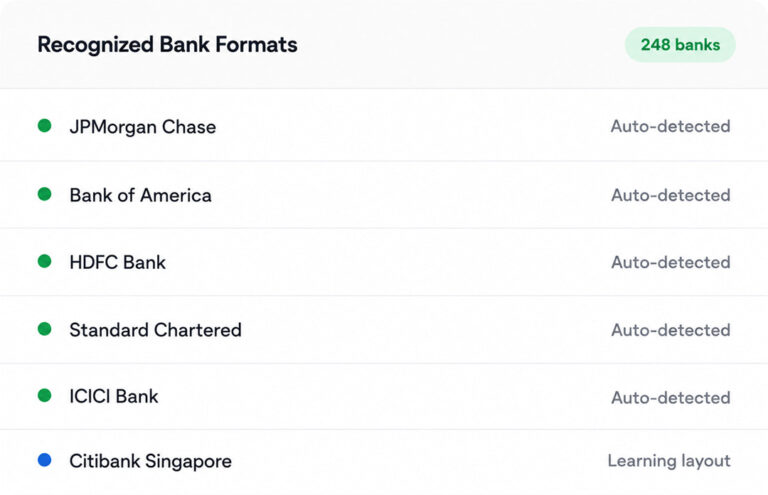
Parsing Agent
Bank Statement OCR and Extraction
Reads scanned PDFs, image statements, and digital files with high accuracy. Extracts transaction dates, descriptions, amounts, and balances across formats.
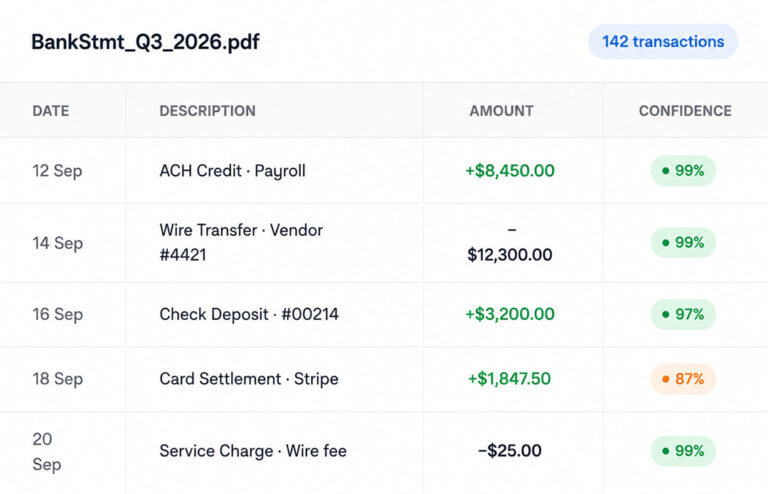
Validation Agent
Real-Time Transaction Validation
Cross-checks extracted transactions against business rules, master data, and prior statements in real time. Flags duplicates, missing fields, and amount mismatches.
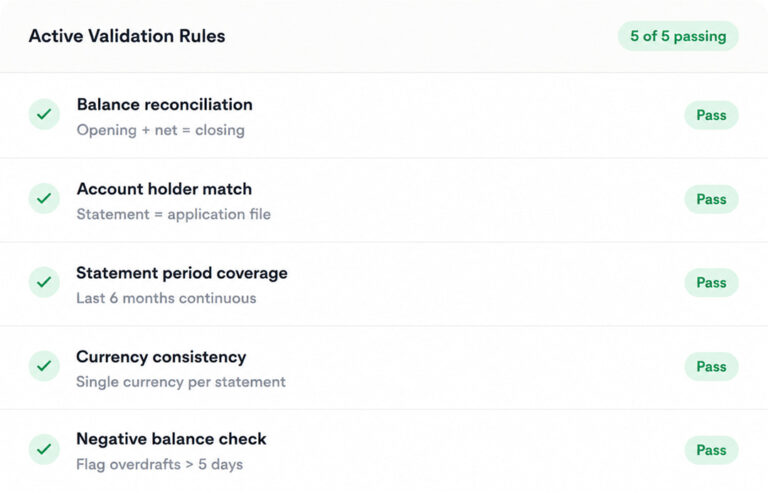
Routing Agent
Automated Statement Reconciliation
Matches every transaction against, vendor records, and customer ledgers. Flags unmatched items for review and posts clean reconciliation data into ERP
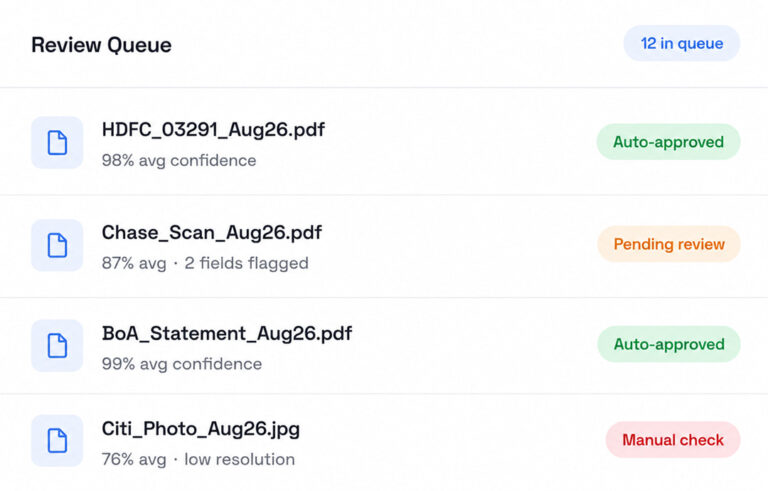
Integration Agent
ERP Sync and Audit Trail
Syncs validated data into SAP, Oracle, Dynamics, and NetSuite with pre-built connectors. Every action logged for audit, SOX, and compliance.
Why FLIP Outperforms Generic Bank Statement Tools
Standalone tools solve fragments. FLIP delivers ingestion, extraction, validation, and reconciliation in one platform.
Title
Others
FLIP
01
Format coverage
Others
Handle one or two statement formats only
FLIP
Reads PDF, scanned, CSV, Excel files and other formats
02
Extraction accuracy
Others
Generic OCR with template-based field mapping
FLIP
High-accuracy extraction across formats, no templates
03
Reconciliation
Others
Separate tool with manual export and import
FLIP
Built-in matching against GL and vendor ledgers
04
Audit trail
Others
Partial logs with line-level history missing
FLIP
Immutable logs for SOX and regulatory review
Who Benefits from FLIP Bank Statement Automation
Bank statement automation only works when every role gets value from it. FLIP is built for the teams handling statements and the leaders accountable for them.
Clean Books
Reconciled bank data flows into ERP daily, not at month-end scramble.
Real-Time Cash
Multi-bank cash position updated continuously, with validated transactions
Exceptions Only
Matched transactions post automatically. Only flagged exceptions need human review.
Evidence Ready
Immutable, timestamped trail of every extraction, validation, and posting




Pricing Tailored to Your Bank Statement Volume
Every finance team handles bank statements differently. FLIP pricing adapts to your volume, bank count, and integration scope without locking you into a fixed structure.
Pay-as-you-go
Volume-based
- Pay per statement processed
- No minimum commitment
- Best for variable volumes
Monthly
- Unlimited statement processing
- No lock-in, consistent operations
- Best for high-volume finance teams
Annual
- Dedicated CSM
- Enterprise SLA
- Volume pricing across entities
Common Questions About Claims Automation
01What is bank statement automation?
Bank statement automation uses AI and intelligent document processing to extract, validate, and reconcile transaction data from bank statements without manual entry. Instead of finance teams copying data from PDFs into spreadsheets, automated bank statement processing pulls transactions from any format, applies validation rules, and posts clean records into ERP, reconciliation, and treasury systems. FLIP handles this end to end across multiple banks and statement formats.
02How does FLIP handle different bank statement formats?
FLIP reads PDF, scanned image, CSV, and Excel bank statements out of the box, with extraction logic that adapts to layouts across different banks. Bank statement OCR converts scanned documents into structured data, while AI-powered extraction handles digital files without templates. Format mismatches no longer break the workflow, so finance teams onboard new banks without rebuilding extraction logic every time a layout changes.
03Can FLIP convert PDF bank statements to Excel or CSV?
Traditional claims management systems store and track claims but rely on manual steps for intake, validation, and routing. Modern claims processing software automates those steps end to end. The key difference is straight-through processing capability. Platforms like FLIP handle the full lifecycle automatically, from first notice of loss to settlement posting, while legacy systems still depend on adjusters to move claims through each stage.
04How accurate is automated bank statement extraction?
FLIP delivers high field-level extraction accuracy across digital PDFs, scanned statements, and CSV files. AI models combine OCR with context-aware field recognition, so transaction dates, amounts, and descriptions are extracted accurately even when bank layouts vary. Real-time validation against business rules catches errors before data lands in downstream systems. Accuracy holds across enterprise volumes, not just clean sample documents from a single source bank.
05How does bank reconciliation automation work in FLIP?
FLIP matches extracted transactions against GL entries, vendor records, and customer ledgers using configurable matching rules. Matched transactions post automatically into ERP. Unmatched items get flagged for human review with full context attached. Bank reconciliation automation replaces line-by-line spreadsheet matching and eliminates the manual export-and-import cycle that finance teams run every month between their bank statement software and accounting system.
06Is FLIP secure enough for enterprise banking data?
FLIP serves as a bank statement analyzer with transaction categorization, duplicate detection, balance validation, and pattern flagging across multiple statements. It cross-references data against prior periods and master records to identify anomalies in real time. Bank statement analysis software outputs feed directly into reconciliation, lending decisions, or cash visibility reporting. Finance and credit teams get analyzed data, not just extracted data, ready for downstream use.
07 Which ERP and accounting systems does FLIP integrate with?
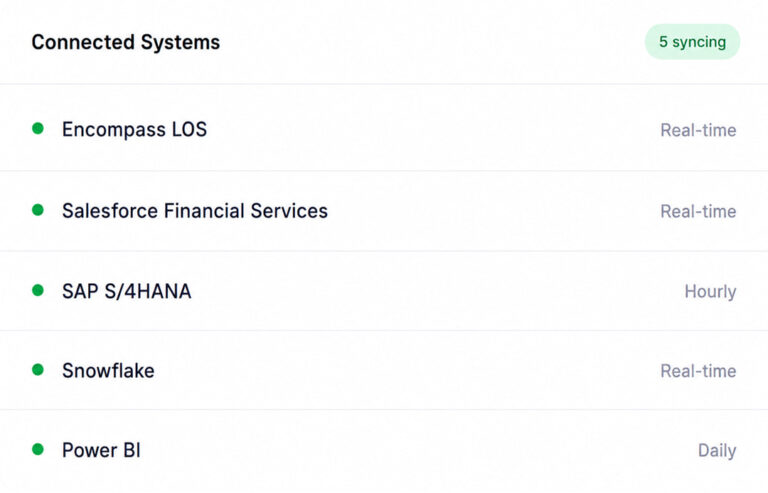
FLIP includes pre-built connectors for SAP, Oracle, Microsoft Dynamics, NetSuite, and Pulse. It also writes to data warehouses including Snowflake, Databricks, Azure Synapse, and Redshift, and feeds BI tools like Power BI and Tableau. Automated bank statement processing data flows directly into the systems finance teams already use, so reconciliation, treasury, and reporting work runs on validated transaction records without manual handoffs.
08Can insurance fraud detection be fully automated?
Yes. FLIP processes bank statement data with enterprise-grade encryption, role-based access controls, and immutable audit logging for every action. Every extraction, validation, and posting event is timestamped and traceable for SOX, internal audit, and regulatory review. Bank statement automation does not weaken security posture, it strengthens it by removing the manual touchpoints where errors and data exposure typically happen in spreadsheet-based workflows.

