TL;DR
Intelligent automation in supply chain pays off first in busy jobs where the same problems keep coming up. It adds a judgment step to simple bots, so software can read a document or spot a risk first. The ten use cases run from stock and orders to invoices, returns, quality checks and customs paperwork.
Simple bots are enough for clean data entry, but intelligent automation wins when exceptions eat the team’s day. Start with one or two jobs where volume is high, data is ready and mistakes are cheap to fix. Keep people in charge of costly calls, such as switching suppliers, and measure results against a baseline.
Key Takeaways
- Intelligent automation pairs rules-based bots with AI that makes a call, such as which supplier delay matters, before the bot acts.
- The ten use cases run from inventory replenishment to trade compliance, and each has a trigger, an AI decision, a human checkpoint and a KPI.
- Good first projects have high volume, frequent but patterned exceptions, data already in the ERP or WMS, and a low cost of a wrong call.
- People stay on approval for supplier switches, price changes and other calls where a mistake is expensive or hard to undo.
- Gartner lists agentic AI and decision governance among its 2026 supply chain technology trends, so guardrails belong in the design from day one.
- Prove results against a baseline of hours, error rates and cycle time taken before go-live, not against vendor benchmarks.
Watch on YouTube
How Are AI Agents Solving Real Business Problems in Logistics?
A Kanerika discussion of how AI agents take on real logistics problems, a useful companion to the late-shipment scenario that opens this guide.
Forty Late-Shipment Alerts Before 9 A.M.
It is 7:40 on a Monday when a supply planner opens an inbox holding 40 late-shipment alerts. Thirty-odd of them will never touch a customer order. Still, a handful threaten orders due out this week, and she has to find those before the 9 a.m. call.
So she does what planners everywhere do. She opens the ERP, then checks each purchase order against open sales orders and emails buyers about the few that count. By the time the list is clean, the morning is gone.
That sorting job is exactly what intelligent automation in supply chain work is built for. A bot can read the alerts, but deciding which ones matter and what to do next takes judgment. This guide walks through ten use cases where that judgment step pays off, as well as how to pick your first one.
Why Intelligent Automation Is Moving Into Daily Supply Chain Work in 2026
Supply chain teams have automated fixed, repeatable tasks for years. What changed by 2026 is that AI can also handle the messy middle. That means the late notice, the scanned invoice or the order that arrives as a PDF. As a result, automation is moving out of back-office scripts and into the planner’s daily queue.
Survey data shows the change in priorities. The 2026 MHI and Deloitte Annual Industry Report found that 24% of supply chain leaders call AI transformational. Nearly half (48%) rate its disruptive impact as significant or greater, up 25 percentage points since 2025.
Robotics and automation came second in the same survey, with 39% rating their impact significant or greater, up 16 points. Budgets are following too, since 56% of organizations expect to raise supply chain innovation spending and 52% plan to spend over $1 million.
Analysts point the same way. Gartner’s top supply chain technology trends for 2026 group eight trends under three themes: autonomy and agency, specialization and intelligence, and trust and governance. Software is starting to take actions on its own, so someone has to govern those actions.
This guide stays with automation that takes action. For the wider picture of forecasting and planning models, see our guide to AI in supply chain. Our piece on generative AI in supply chain also covers language models for planners.
What Is Intelligent Automation in Supply Chain?
Intelligent automation in supply chain is software that combines rules-based bots with AI that makes a judgment, then takes an action in a business system. The judgment might be a demand forecast or a reading of a scanned document. It might also be a defect spotted in a camera image, or a call on which exception needs a person.
The action lands where the work lives. That could be the ERP for orders, the warehouse management system (WMS) for tasks or the transportation management system (TMS) for loads. Without that action, you have analytics. Without the judgment, by contrast, you have plain robotic process automation (RPA).
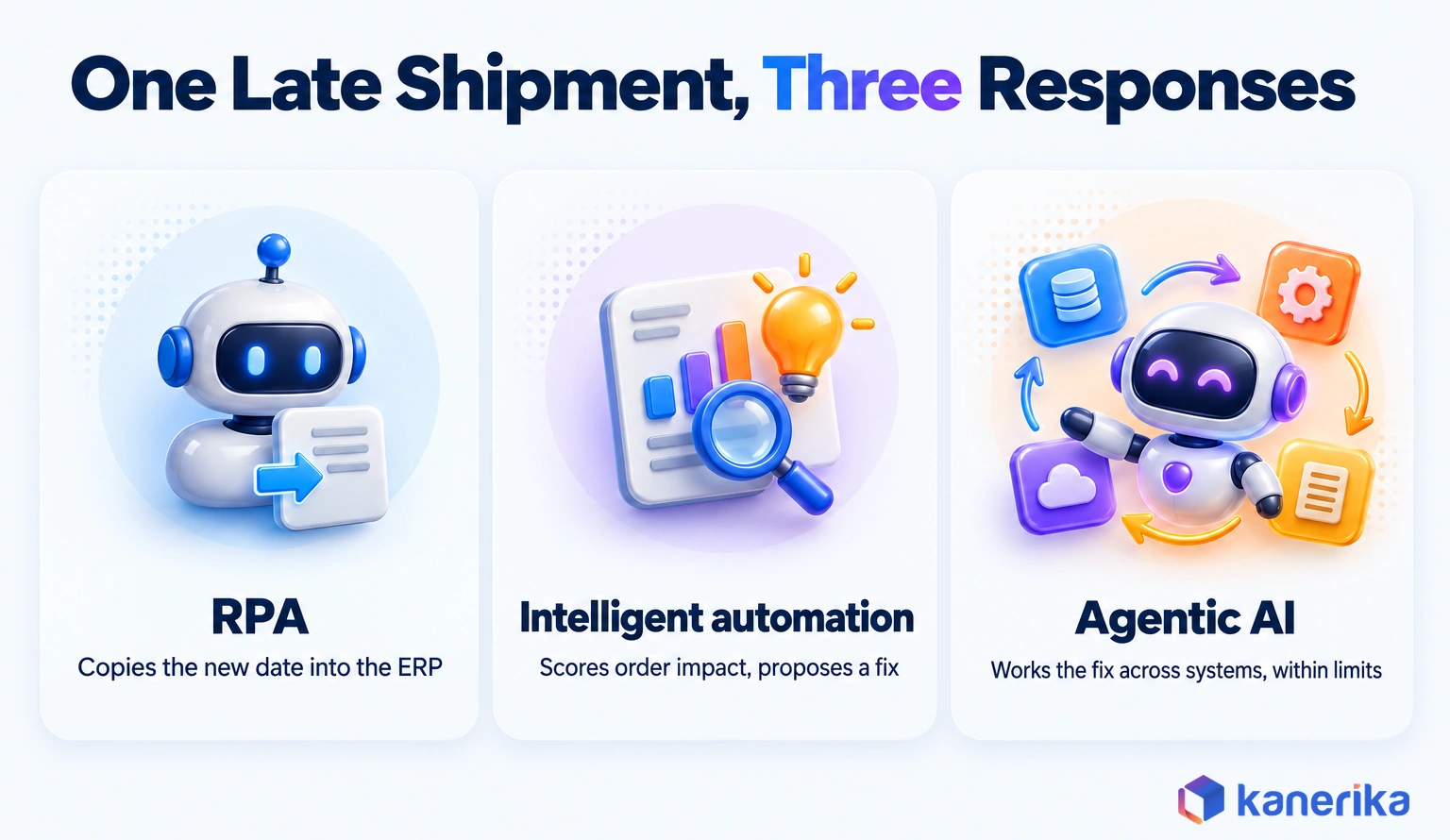
Take a supplier’s advance shipping notice (ASN) that arrives three days late. RPA can copy the new date into the ERP, but that is where it stops. Intelligent automation also checks which customer orders depend on that shipment, ranks the options and proposes a fix to the buyer.
IBM describes intelligent automation in similar terms, as the combination of AI and automation technologies. The pattern also travels well beyond logistics, since intelligent automation in healthcare applies the same loop to referrals and claims instead of ASNs and invoices. To see how it relates to the wider movement, read intelligent automation vs hyperautomation.
Intelligent Automation vs RPA vs Agentic AI
The three terms overlap, so it helps to compare them by what each one decides. RPA decides nothing, because it follows a script. Intelligent automation makes one bounded decision per task, while an AI agent plans several steps toward a goal. Our AI vs automation intelligence comparison goes further.
| Question | RPA | Intelligent automation | Agentic AI |
|---|
| What it decides | Nothing, since it follows fixed rules | One bounded call per task, such as classify, score or forecast | A multi-step plan toward a goal |
| How it handles exceptions | Stops and hands over to a person | Resolves known patterns, then routes the rest | Tries alternatives, then escalates past set limits |
| What it needs | Stable screens and structured data | Labeled history as well as clean master data | Tool access, guardrails and audit logs |
| Best fit | Clean, repetitive keying | High-volume work with patterned exceptions | Exceptions that span several systems, when limits are clear |
Most supply chain teams end up using all three at different points. A team that already runs RPA at enterprise scale has the bots and the system access. For that team, adding AI judgment is the next layer rather than a rebuild.
Agentic AI in supply chain work earns its place when one exception touches the ERP, the TMS and a supplier portal at once. The AI agent examples in our separate guide show what that looks like across functions.
Checklist
Agentic AI Readiness Checklist
Check whether your data, guardrails and approval rules are ready before AI agents start acting on supply chain systems.
Get the Checklist →
The Technologies Behind It
Intelligent automation is a stack, and each layer does one job: sensing, reading, deciding or acting. The table maps each technology to the numbered use cases later in this guide.
| Technology | What it does in a supply chain | Use cases it powers |
|---|
| AI and machine learning | Forecasts demand, scores risk and ranks options | 1, 2, 4, 5 |
| Robotic process automation (RPA) | Keys data and moves it between ERP, WMS, TMS and portals | 3, 7, 10 |
| Document AI (intelligent document processing) | Reads documents such as orders, invoices, ASNs and customs papers | 3, 7, 10 |
| IoT sensors and scanners | Report stock levels, location and condition as goods move | 1, 5, 6 |
| Computer vision | Spots defects, damage and label errors in images | 6, 8, 9 |
| Process mining | Shows from system logs where work actually waits | Choosing a first use case before any build starts |
| AI agents | Plan multi-step fixes across systems within set limits | 4, 5, 8 |
Mapping it this way keeps the buying decision tied to a use case rather than a category. Our review of intelligent automation tools compares the platforms that run these layers. Process mining belongs before any build, as the roadmap below shows.
Teams that build the whole stack at once usually call it hyperautomation. In that case, the benefits of hyperautomation come from shared data and governance across bots, not from any one tool.
Kanerika Service
RPA and Intelligent Automation Services
Kanerika builds bots that read, check and route supply chain documents across ERP, WMS and TMS, then adds AI where a process needs a judgment step.
Explore RPA Services
How Intelligent Automation in Supply Chain Works: Sense, Decide, Act, Learn
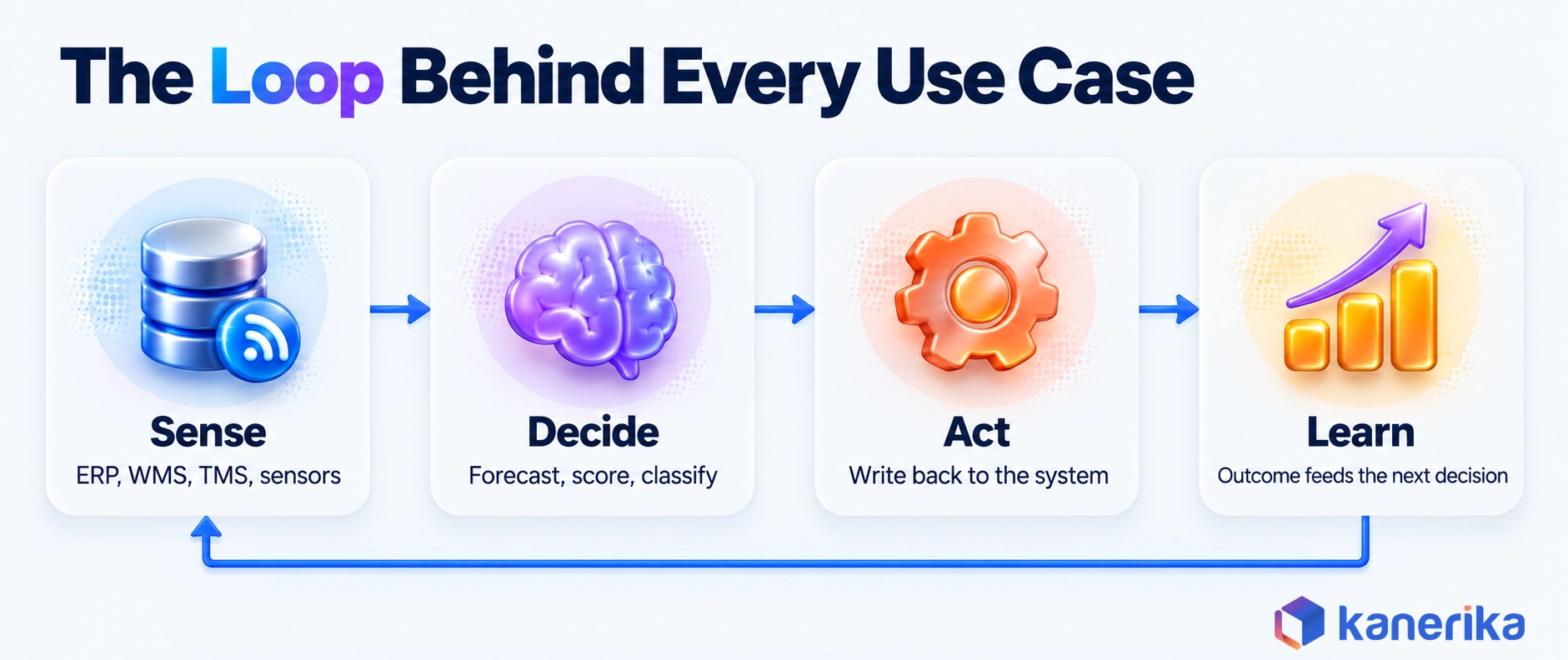
Every use case in this guide runs the same four-step loop. First the system senses a signal, then it decides what it means, acts in a business system and learns from the outcome. Once you can see the loop, you can spot where one of your own processes breaks.
Sensing pulls from the ERP, the WMS, the TMS, supplier portals, EDI messages and sensors. Standards such as GS1 EDI make orders and despatch advice machine-readable, so EDI-heavy flows are easier to automate than email and PDF. Deciding is where the AI sits, whether that is a forecast, a classification or a risk score.
Acting means writing back to a system of record, for example with a purchase order change, a carrier booking or a hold on a lot. Learning then closes the loop by comparing what happened with what the model expected, and machine learning operations keeps retraining on schedule. Much of the forecasting in the decide step comes from predictive analytics in supply chain models.
Worked Example: A Late Supplier Shipment, Step by Step
Here is the loop applied to the planner’s problem from the opening. A supplier’s ASN shows that a pallet of components will arrive three days late, so the system starts working the exception.
- Sense: the late ASN lands through EDI, and the system matches it to the purchase order lines it affects.
- Score: AI checks which open sales orders need those components, then ranks them by ship date and customer priority.
- Options: it lists possible fixes, such as stock from another site, a partial shipment or expediting with the supplier.
- Approve: the buyer sees the top option with its evidence before approving or overriding it.
- Act: once approved, the system updates the purchase order and moves the affected customer delivery dates.
- Learn: when the pallet lands, the actual date is logged against the estimate to sharpen the next score.
Out of 40 alerts, the planner sees only the few that change a customer promise, each with a proposed fix. The rest are still logged, but nobody has to read them.
What Should Stay Under Human Control
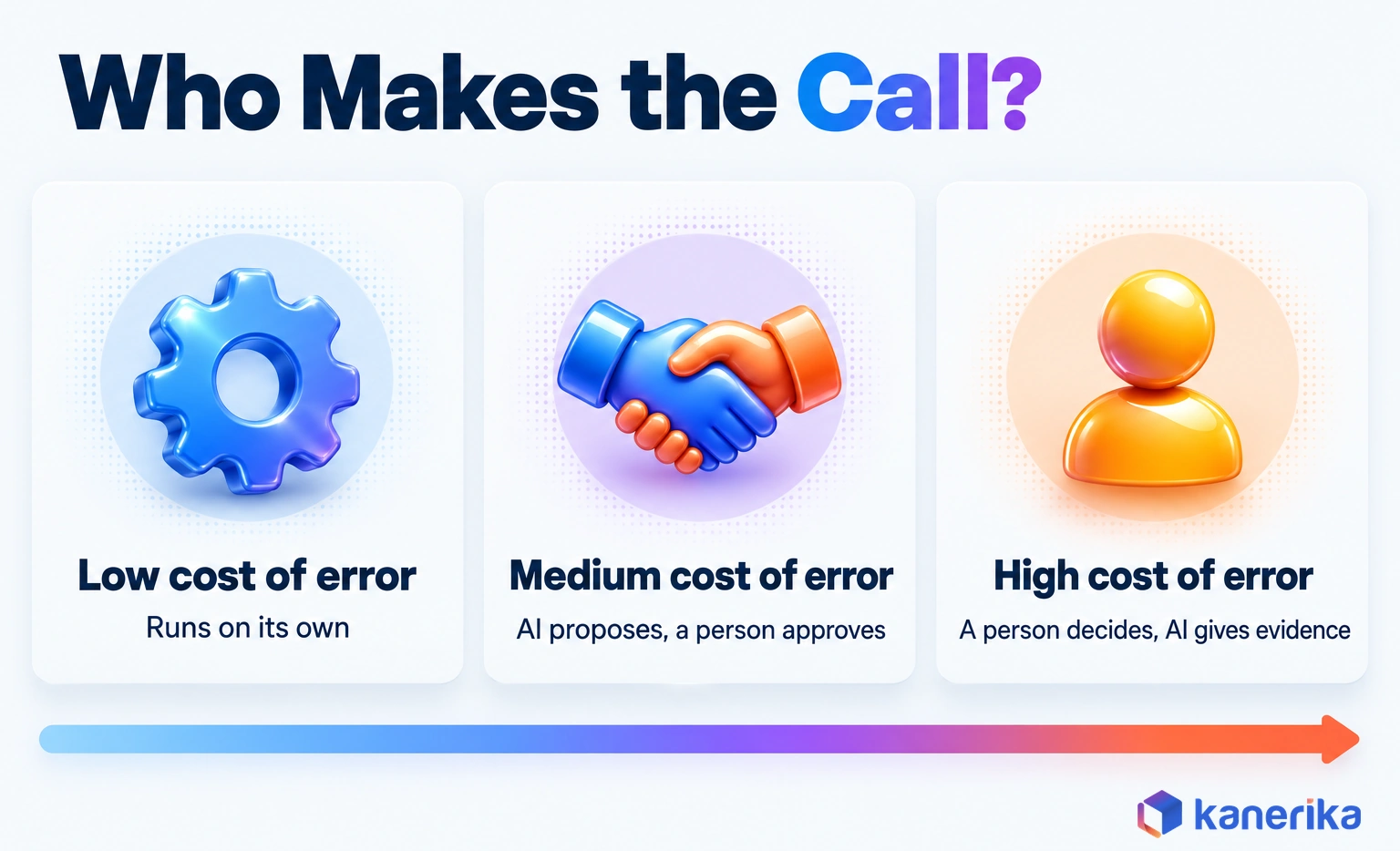
Automation that acts needs written limits before go-live. The rule of thumb is simple: the higher the cost of a wrong call, the closer a person stays to it. A reorder of a cheap, fast-moving part can run on its own, while a supplier switch should not.
- Approval thresholds: set a value or quantity limit so that a person signs off above it.
- Supplier switches and new vendors: always a buyer’s decision, with the AI’s evidence attached.
- Price and contract changes: owned by people, because they carry legal and commercial weight.
- Audit trail: log every automated decision with its inputs so that anyone can explain it later.
Gartner calls this discipline decision governance and lists it among its 2026 trends. Its description stresses frameworks and guardrails that keep AI-enabled decisions transparent, accountable and compliant. In practice, that means an approval matrix, a decision log and a named owner for each automated action.
10 Intelligent Automation Use Cases in Supply Chain
The ten use cases below span a supply chain from planning and sourcing to delivery and returns. Because each follows the same loop, the summary table lines up the trigger, the AI decision, the human checkpoint and the KPI side by side.
| Use case | Trigger | What AI decides | Human checkpoint | KPI |
|---|
| 1. Inventory replenishment | Stock falls toward its reorder point | New reorder point and quantity | Orders above a value limit | Stockouts, inventory turns |
| 2. Demand forecasting tied to planning | New sales or market signal | Revised forecast and plan | Plan changes above a threshold | Forecast accuracy |
| 3. Order processing | Order arrives by email, EDI or PDF | Read and validate, then book or route | Orders that fail checks | Order cycle time, touchless rate |
| 4. Supplier risk | Late ASN or outside risk signal | Impact score as well as alternate options | Any supplier switch | Supplier on-time in-full (OTIF) |
| 5. Transport and routing | New load, delay or traffic event | Route, carrier and revised ETA | Premium freight spend | On-time delivery, cost per shipment |
| 6. Warehouse tasks | Order wave released | Slotting, pick paths and robot tasks | Layout changes | Picks per hour, pick accuracy |
| 7. Invoice matching | Invoice received | Match result, or the reason it failed | Unmatched invoices | Touchless match rate, cost per invoice |
| 8. Returns | Return request | Reason code and disposition | High-value items | Return cycle time, recovery value |
| 9. Quality inspection | Image from line or dock | Defect or pass | Releasing a hold | Defect escape rate |
| 10. Trade compliance | Shipment created | Product code, document and party checks | Final sign-off before shipping | Customs holds, clearance time |
1. Inventory Tracking and Replenishment
Classic replenishment uses a fixed reorder point that someone set months ago. Intelligent replenishment instead recalculates that point as demand and lead times move. It draws on warehouse scan data and, where installed, sensor readings on bins or tanks.
Picture a distributor whose fastest-moving item sells far faster in the two weeks before a holiday. A fixed reorder point runs dry mid-peak, while a moving one raises the order early and lowers it again afterward. Buyers only review the orders that cross a value limit.
On-Demand Webinar
Optimizing Supply Chain with AI and Analytics
Practical techniques to optimize inventory, reduce disruptions and gain an edge with AI and analytics, built for business leaders.
Watch the Webinar →
2. Demand Forecasting Connected to Planning
A forecast that sits in a spreadsheet changes nothing until someone acts on it. The intelligent version feeds the forecast straight into the replenishment and production plan, so planners review only the changes that cross a set threshold.
Suppose a retailer moves a big promotion forward by a week. The model picks up the new date, revises the forecast for the affected items and then proposes earlier purchase orders. Our guide to AI in demand forecasting covers the models themselves.
3. Order Processing and Fulfillment
Orders still arrive in every format, from EDI and email bodies to PDF attachments and portal downloads. Intelligent document processing reads each one and checks it against the customer master, prices and stock before booking it in the ERP. Orders that fail a check go to a queue with the reason attached.
The gain shows up in the exceptions more than in the clean orders. A rep who used to key every order instead handles only the problem ones. Those include a wrong price, an unknown ship-to address or a credit hold.
Checklist
Robotic Process Automation Checklist
Assess automation readiness, prioritize processes such as order entry and reduce implementation risk before you build your first bots.
Get the Checklist →
4. Supplier Risk Detection and Response
A run of late ASNs or a spike in quality rejects is often the first sign that a supplier is in trouble. Intelligent automation watches these signals daily, together with outside ones such as financial or news alerts. When a risk score crosses a limit, it raises alternates for the buyer to approve.
This is the planner’s story from the opening, turned into a standing process. The system never switches a supplier on its own, so it shortlists, explains and waits for the buyer. Our guide to AI for procurement covers the sourcing side of the same decisions.
5. Transportation and Route Optimization
A carrier misses its pickup window, and the load still has to arrive on time. The intelligent version of route planning rebooks it with the next-best carrier and sends the customer a new delivery estimate. It also replans the day’s routes as delays, traffic and new orders arrive, rather than fixing them the night before.
Location data from telematics feeds this loop, which our guide to IoT in logistics and supply chain explains in depth. Premium freight is the checkpoint, since spending above a set amount still needs a person’s approval.
The same replanning logic appears across AI in logistics more broadly, from yard scheduling to last-mile delivery.
6. Warehouse Tasks and Robotics Coordination
Inside the warehouse, the judgment calls are about where items sit and who or what picks them. AI suggests slotting changes from order patterns and also sequences pick paths. Then it splits tasks between people and robots as the order wave changes. Our AI in warehouse management guide goes deeper.
Automated guided vehicles (AGVs) and robotic arms work alongside warehouse management systems to handle picking, packing, and sorting tasks at scale. Scan accuracy drives much of the gain, which is why teams building their own warehouse apps invest in barcode SDK integration for handheld and mobile readers. This reduces the physical labor burden and significantly improves order accuracy rates in high-throughput fulfillment centers.
Scanning also feeds the learn step. Pick confirmations, short picks and mis-scans tell the model which slots and paths cause errors. Teams that handle worn or partial labels sometimes add so that scanners can still read them.
7. Invoice Matching and Payment Reconciliation
Three-way matching compares the invoice, the purchase order and the goods receipt. Rules handle exact matches, so the hard part is everything else, such as price variances, partial deliveries and invoices that quote a different unit.
In Microsoft Dynamics 365 Finance, the Line matching policy field on the Accounts payable parameters page turns on three-way matching. The Price tolerances page then holds net unit price limits by item, vendor or legal entity. In Microsoft’s own example, a 5% tolerance passes a 1.05 invoice price against a 1.00 order price but flags 1.10.
Accounts payable automation uses AI to extract data from invoices, match them against purchase orders, and flag discrepancies before payment is processed. With proper invoicing system, finance teams can follow each invoice from approval to payment without chasing spreadsheets, checking records manually, or losing track of supplier details.This removes one of the most manual and error-prone steps in supply chain finance.
AI classifies each mismatch by reason and sends it to the right owner with the documents attached. Approvers then work a short queue of real disputes instead of the full invoice pile.
Watch on YouTube
AP Copilot: Automate Invoice Processing with FLIP
See how Kanerika’s FLIP platform reads invoices, matches them and routes exceptions, the same pattern as use case 7 above.
8. Returns and Reverse Logistics
Returns cost money mostly because each one needs a decision. The system reads the return reason from the request, photos or notes, then classifies it. After that, it recommends a disposition: restock, refurbish, return to vendor or scrap.
Take a returned power tool that arrives with a photo of a cracked case and a note saying the box was crushed. The system reads both, codes the return as damaged in transit and routes it to refurbish rather than scrap. It also opens a claim with the carrier, with the photo attached.
High-value items keep a person in the loop, because a wrong scrap call writes off real money. For everything else, faster disposition gets stock back on the shelf while it can still sell.
9. Quality Inspection and Defect Response
Computer vision checks parts on the line or cartons at the receiving dock and flags defects a tired eye would miss. When it finds one, the system places the lot on hold. It also opens a corrective action request with the supplier and attaches the images.
Picture an inbound pallet at the receiving dock. The camera catches two crushed cartons and a label that does not match the ASN, so the lot is held before anyone puts it away. The supplier gets the corrective action request with the images, and the buyer sees the hold before the stock is promised to a customer.
Releasing a hold remains a quality engineer’s call, because deciding whether a lot is fit to ship stays with people.
10. Trade Compliance and Shipment Documentation
Cross-border shipments need product codes, documents and party checks that are easy to get wrong. For each product, AI suggests a code under the World Customs Organization’s Harmonized System from its description. Document AI then checks invoices and packing lists for gaps.
Parties are screened against lists such as the U.S. Consolidated Screening List, which combines export screening lists from several federal departments. A broker or compliance lead still signs off before anything ships, because the legal responsibility stays with people.
Benefits of Intelligent Automation in Supply Chain
The payoff from intelligent automation in supply chain work lands in four places. IBM’s overview names the same four in general terms: cost, accuracy, customer experience and compliance.
- Lower cost per transaction: people stop keying clean orders and invoices, so the same team absorbs more volume.
- Fewer errors: the same check runs on every document, so a wrong unit or a duplicate invoice is caught before payment.
- Steadier service: late shipments are sorted as the alert lands, and customers get revised dates before they ask.
- Cleaner compliance: every screening check and approval is logged, giving auditors one record to review.
The Offen Petroleum results further down show these gains in one distributor’s numbers.
Which Use Case Should You Automate First?
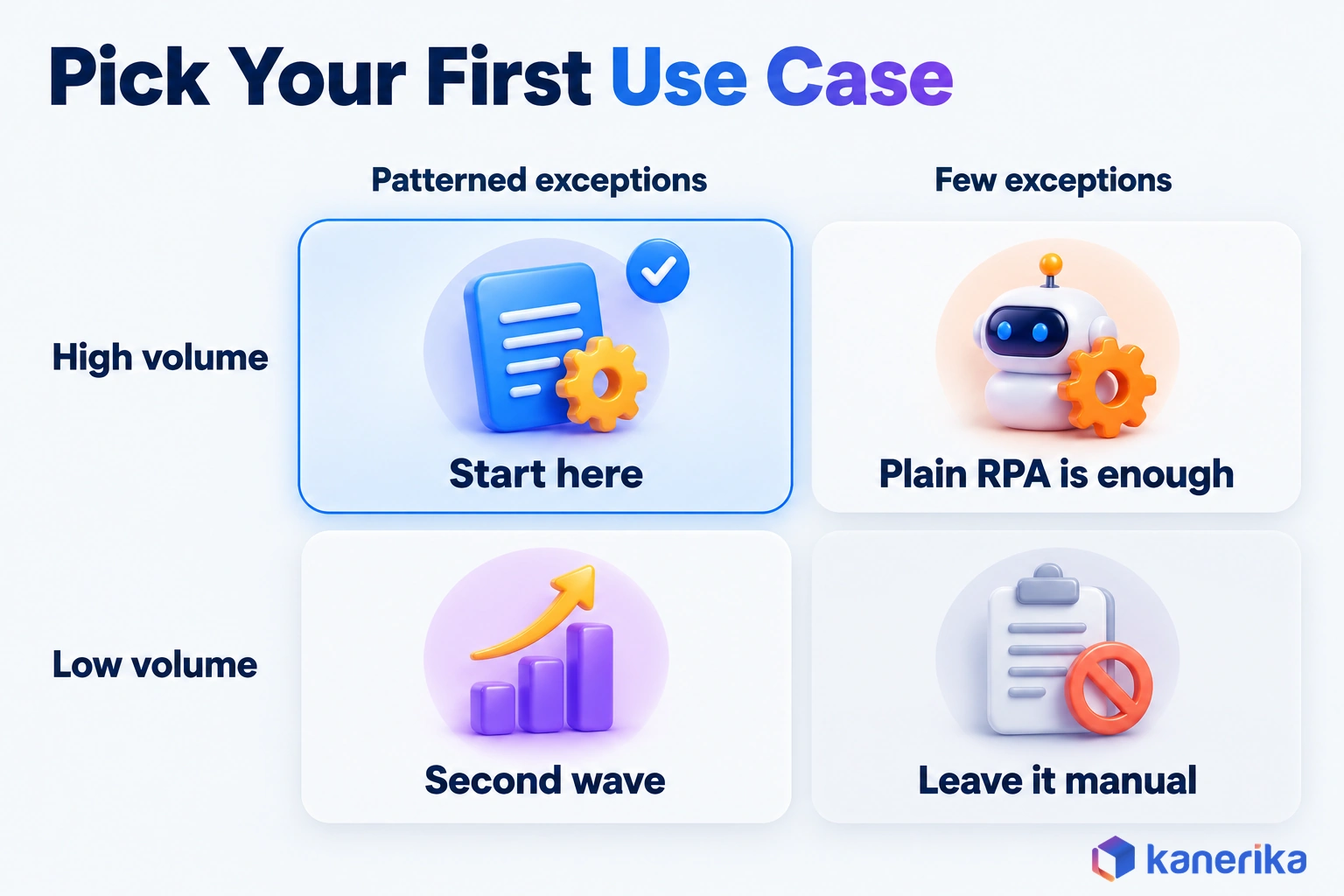
The best first use case is the one where the work is frequent, the data already exists and a mistake is cheap to fix. Five signals tell you whether a process is ready.
| Signal | Good sign | Warning sign |
|---|
| Volume | Hundreds of transactions a week | Only a handful a month |
| Exception rate | Frequent, but exceptions follow patterns | Rare, or different every time |
| Data already captured | Lives in the ERP, WMS or EDI feeds | Sits in inboxes and spreadsheets instead |
| Rule clarity | People can explain how they decide | “It depends who you ask” |
| Cost of error | Easy to reverse when wrong | Legal, safety or large financial impact |
Invoice matching, order intake and supplier delay triage often pass all five tests, which is why they are common starting points. Quality inspection and trade compliance score well on volume, but they carry a higher cost of error. So they work better as second-wave projects with tighter checkpoints.
A Step-by-Step Implementation Roadmap
Once a use case passes those tests, most rollouts follow the same six steps. Each one ends with something you can check.
- Map the process: use process intelligence on ERP logs to see where work waits and which exceptions repeat.
- Set the baseline: record weekly hours, error rate and cycle time for several weeks.
- Connect and clean: link the ERP, WMS or TMS through an enterprise data integration layer, then fix the records the use case reads.
- Run suggest-only: the system proposes, people decide, and you track how often they accept.
- Act within limits: automate the cheap calls and keep approval thresholds on the rest.
- Measure and expand: compare results with the baseline, then pick the next use case.
Cost Drivers and Sizing the Business Case
Integration and data preparation usually cost more than licenses, and exception handling still needs people after go-live. Budget for five cost drivers:
- Integration with the ERP, WMS, TMS and supplier portals, including test environments.
- Data preparation, such as cleaning master data, labeling history and removing duplicate records.
- Models, platform and bot licenses, priced per bot, per document or per use.
- Exception handling staff who work the queue the automation creates.
- Change management, covering training, new approval rules as well as updated roles.
To size the case, start from your own numbers rather than vendor benchmarks. The business case is the gap between those numbers and what the pilot delivers.
Assume, as an illustration, 40 hours a week of invoice exception work at a loaded $45 an hour. That is $93,600 over 52 weeks, so a pilot that halves those hours is worth $46,800 a year before license and integration costs.
Results to Expect and the KPIs That Prove Them
Results depend on the starting point, so each use case should be judged by its own KPI. The table pairs every use case with the measure it should move and a simple way to baseline it.
| Use case | KPI | How to baseline it |
|---|
| Inventory replenishment | Stockout rate, inventory turns | Stockout days per item from ERP history |
| Demand forecasting | Forecast accuracy and bias | Forecast compared to actuals by item and week |
| Order processing | Touchless order rate, order cycle time | Share of orders booked with no manual edit |
| Supplier risk | Supplier OTIF | Receipts on time and in full against PO lines |
| Transport and routing | On-time delivery, cost per shipment | TMS delivery events as well as freight invoices |
| Warehouse tasks | Picks per hour, pick accuracy | WMS task logs and short-pick records |
| Invoice matching | Touchless match rate, cost per invoice | AP match logs and team hours |
| Returns | Return cycle time, recovery value | Days from request until disposition |
| Quality inspection | Defect escape rate | Defects found downstream compared to those caught at inspection |
| Trade compliance | Customs holds, clearance time | Broker and carrier records per shipment |
Keep the KPIs in the reporting tool the operations team already uses. Our roundup of supply chain analytics tools covers the options for tracking them. Count hours saved from system logs rather than estimates.
For invoice matching, say 600 of 1,000 weekly invoices match with no manual edit, a 60% touchless rate. If 800 match untouched after the pilot, the rate is 80%, and those 200 extra invoices are the saving to price.
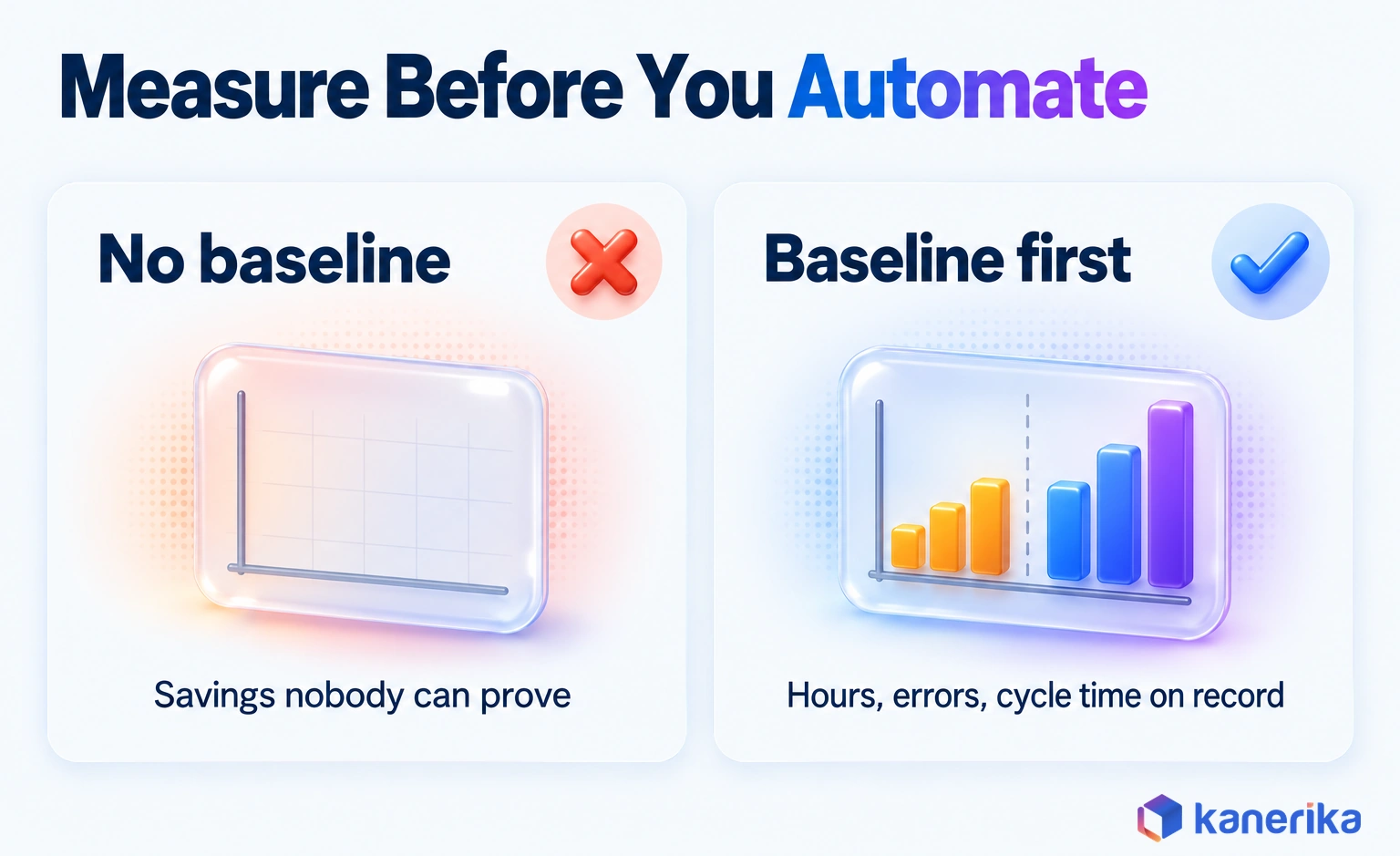
A pilot without a baseline can still feel like a success. It just cannot prove it when the budget review comes around.
Challenges and How Teams Handle Them
The hard parts of intelligent automation are rarely the AI models. Instead, they are old systems, messy master data and the trust of the people who work the exceptions. The table lists the five that come up most often.
| Challenge | Why it bites | How teams fix it |
|---|
| Legacy ERP and WMS integration | Older systems lack APIs, so screen-based bots break when a screen changes | Use APIs or EDI where they exist, then monitor screen bots for the rest |
| Data quality | Duplicate items and wrong units feed bad decisions | Clean master data first, then add checks at the point of entry |
| Exception trust | Planners override suggestions when they cannot see the reasoning | Show the evidence with every proposal and start in suggest-only mode |
| Governance and audit trail | Nobody can explain an automated decision after the fact | Log inputs, decisions and approvals, with a named owner per automation |
| Skills and change | Teams fear for their jobs or keep old workarounds | Involve users in design and rebuild roles around exception work |
Where to Focus First: Integration, Data and Governance
Integration usually sets the pace, so pick connectors before bots. Our guide to data integration tools compares the options for linking an older ERP or WMS. Data quality also deserves its own plan, because every use case above reads from the same item, supplier and customer records. Our guide to supply chain master data management covers how to fix them.
Governance is the other area to settle early. Autonomous agents that act across systems need written limits, a decision log and a way back to suggest-only mode. Where several agents share one process, AI agent orchestration decides which one acts. Watching the data behind those decisions is part of data observability, since it catches drift before a bad forecast turns into a bad order.
How Kanerika Delivers Intelligent Automation for Supply Chains
Kanerika builds intelligent automation for logistics and distribution teams, starting from the process rather than the tool. Each engagement begins by mapping where work waits and where exceptions pile up. Only then do we add bots, document AI or agents to the steps that pass the readiness tests above.
One example is Offen Petroleum, one of the largest fuel distributors in the U.S., with operations across logistics, warehousing and distribution. Its teams faced manual data entry and repetitive work in NetSuite, while data errors were delaying operations.
Kanerika automated data entry, navigation, validation and transactions, together with workflows for order processing, inventory management and reporting. The team also mapped the accounts payable workflow end to end, from draft to refund handling. As a result, operational efficiency rose 54%, operational costs fell 52%, and return on investment came in 48% higher.
Case Study
54% Higher Operational Efficiency for a U.S. Fuel Distributor
Offen Petroleum automated NetSuite data entry, validation, order processing, inventory and reporting workflows with Kanerika, cutting operational costs by 52% and delivering 48% higher ROI.
Read the Case Study →
For document-heavy use cases such as order intake, invoice matching and trade paperwork, we build and run the workflows on FLIP, Kanerika’s low-code automation platform. In accounts payable, FLIP runs three-way matching and validation, flagging duplicates and discrepancies before payment goes out. Its EDI integration and trade document processing workflows reach the ERP through pre-built and custom connectors.
Our AI services supply the forecasting and classification models. Meanwhile, the logistics and supply chain practice brings the domain context, so automation fits how each team actually ships.
Wrapping Up: Which Use Cases Come First
Intelligent automation earns its place wherever a supply chain team spends its day sorting exceptions. The ten use cases here share one loop of sense, decide, act and learn. What separates them is how much volume they carry and how costly a wrong call would be.
For most teams, the strongest first moves are invoice matching, order intake and supplier delay triage. They are frequent, their data already sits in the ERP or EDI feeds, and their mistakes are easy to reverse. Inventory replenishment and transport replanning usually come next, once the data and approval rules have proven themselves.
Quality inspection, returns and trade compliance then follow with tighter human checkpoints, and every high-stakes call keeps a person on it. Pick the use case where exceptions are frequent, the data is ready and mistakes are cheap, set its baseline, and start there.
Frequently Asked Questions
What is intelligent automation in supply chain?
Intelligent automation in supply chain combines rules-based bots with AI that makes a judgment before acting. The AI might forecast demand, read an invoice, spot a defect or decide which supplier delay matters. The bot then updates the ERP, WMS or TMS, while people approve costly or unusual calls and the system learns from each outcome.
Is intelligent automation expensive to implement in supply chains?
Cost depends more on integration and data than on licenses. The main drivers are connecting ERP and WMS systems, cleaning master data, platform fees, staff to work exception queues, and training. Starting with one high-volume use case keeps spending contained. Measuring hours, errors and cycle time beforehand then shows whether the return justifies the next project.
How can businesses start adopting intelligent automation in their supply chain?
Start by mapping where work waits and exceptions pile up, ideally with process mining or system logs. Pick one or two use cases with high volume, captured data and a low cost of error. Baseline hours, errors and cycle time, run a pilot in suggest-only mode, then widen automation once people trust the results.
Can intelligent automation work with legacy ERP and WMS systems?
Yes, though the integration method matters. Where a legacy ERP or WMS has APIs or EDI, automation should use them because they are stable. Where it does not, screen-based RPA bots can read and enter data through the existing interface. Those bots need monitoring, since a changed screen can break them, so plan support time.
What data is needed for intelligent supply chain automation?
Most use cases need clean master data for items, suppliers, customers and locations, plus transaction history such as orders, receipts, invoices and shipments. Forecasting needs several seasons of sales data, while document use cases need sample documents to train and test on. Sensor or scan data helps inventory and warehouse use cases but is rarely required to start.
Can AI agents automate supply chain decisions?
AI agents can plan and carry out multi-step fixes, such as rebooking a missed pickup and updating the customer delivery date. They work best inside written limits, with approval thresholds, a decision log and a named owner. Gartner lists both agentic AI and decision governance among its 2026 supply chain technology trends for that reason.
How long does it take to implement intelligent automation in a supply chain?
Timelines depend on the use case, the state of the data and how many systems are involved. Most projects move through discovery, data preparation, a pilot in suggest-only mode and a gradual rollout. A single document-heavy use case on clean data moves fastest, while multi-system agent work needs more testing and governance before going live.
What are the 4 pillars of automation?
The four pillars are process discovery, workflow orchestration, intelligent decision-making and continuous optimization. Discovery finds the work worth automating, often with process mining. Orchestration coordinates bots and systems so tasks hand off cleanly. Decision-making adds AI for documents, forecasts and exceptions, and optimization uses outcome data to keep improving each automated process over time.
What is the difference between RPA and intelligent automation?
RPA follows fixed rules and stops when something unexpected happens, such as a scanned invoice or a missing field. Intelligent automation adds AI that can read unstructured documents, score risks and forecast demand, so it resolves common exceptions instead of handing every one to a person. Many supply chain teams run both, with RPA as the base layer.
What are the three types of automation in supply chain?
The three types are process automation, physical automation and intelligent automation. Process automation handles digital tasks such as order entry and invoice matching with RPA. Physical automation uses robots, conveyors and guided vehicles in warehouses. Intelligent automation adds AI judgment on top of both, for example adjusting reorder points or rerouting loads when delays appear.
What is an example of intelligent automation?
A late supplier shipment is a good example. The system reads the delayed shipping notice, checks which customer orders depend on those parts and ranks the possible fixes. A buyer approves the best option, the purchase order and customer delivery dates update automatically, and the actual arrival date is logged to improve the next estimate.
How does intelligent automation improve supply chain efficiency?
It removes the manual sorting that eats planners’ and clerks’ time. Clean transactions flow through untouched, while exceptions arrive already classified with a suggested fix. That shortens order and invoice cycle times, reduces keying errors and lets teams react to delays sooner. The gains are easiest to prove when hours, error rates and cycle times are baselined first.
Which supply chain processes benefit most from intelligent automation?
Processes with high volume and frequent but patterned exceptions benefit most. Invoice matching, order intake, supplier delay triage and inventory replenishment usually lead the list because their data already sits in ERP or EDI feeds. Quality inspection and trade compliance also benefit, though their higher cost of error calls for tighter human checkpoints from the start.
What's the difference between intelligent automation and AI?
AI is the set of techniques that learn from data, such as forecasting, language understanding and image recognition. Intelligent automation puts those techniques inside a workflow that takes action in business systems. Predictive analytics might forecast a stockout, for example, while intelligent automation uses that forecast to raise the purchase order and route it for approval.
Which three elements are needed to manage an intelligent automation program?
A program needs governance, technology infrastructure and change management. Governance sets approval limits, owners, security rules and an audit trail for automated decisions. Infrastructure covers integration with ERP, WMS and TMS systems, data pipelines and the AI tools. Change management trains people, redefines roles around exception work and keeps the program improving after the first pilot.














