

Cognos to Power BI Migration Services, Powered by FLIP
IBM Cognos is built on a legacy, IT-centric model with complex licensing and a steep learning curve that limits self-service analytics. Power BI offers a more advanced and cost-effective alternative. Kanerika's FLIP accelerator automates up to 80% of your Cognos to Power BI migration, preserving every report accurately.
Get Started with Cognos to Power BI Migration
The Real Cost of Staying on Cognos
What Moving from Cognos to Power BI Actually Saves You

IT budgets are spent on legacy system maintenance.

CIOs see legacy systems as growth barriers.

Developer productivity is lost due to outdated tools

Digital transformation efforts fail due to legacy systems
Use Your Azure Committed Spend (MACC)


Watch the Cognos to Power BI Migration in Action
See FLIP connect to Cognos, extract report structure and Framework Manager logic, convert prompt pages to Power BI slicers and DAX measures, and rebuild every dashboard with filters and layouts intact.
How FLIP Maps Cognos Objects to Power BI
FLIP automates up to 80% of a Cognos to Power BI migration. It connects to your Cognos environment, extracts report structure and Framework Manager logic, and converts report layouts, prompt pages and models into Power BI reports, semantic models and DAX measures. If you’re still deciding whether to leave Cognos, start with our full Cognos vs Power BI comparison. For the technical walkthrough, read the Cognos migration guide.
| Cognos object | Power BI equivalent | How FLIP handles it |
|---|---|---|
| Framework Manager packages and models | Power BI semantic models | FLIP extracts dimensions, measures and relationships automatically. Query subjects become tables and calculated members become DAX measures. |
| Report Studio and Cognos Analytics reports | Paginated or interactive Power BI reports | Automated for most report types. FLIP converts layouts and custom SQL, then validates output against live Cognos data. Edge cases are flagged in discovery. |
| Prompt pages | Report parameters and slicers | Prompt pages convert to Power BI slicers and DAX measures automatically. |
| Calculated fields and members | DAX measures | Automated for most report types. Highly customized logic is flagged during discovery so effort is clear from the start. |
| Dashboards | Power BI reports and dashboards | Dashboards are rebuilt with filters and layouts intact. |
| Namespaces, groups and capabilities | Microsoft Entra ID (Azure AD) groups, workspace roles and row-level security | FLIP maps Cognos security groups to workspace roles and row-level security, then tests access with real user scenarios before cutover. |
Migration ROI Calculator
Kanerika’s IP-led accelerator, FLIP, automates your migration with major resource savings, ensuring a faster, lower-risk move to your target platform.
FLIP is Kanerika's proprietary migration accelerator. Here's exactly where the savings come from:
The Cognos to Power BI Advantage
Why Organizations are Replacing Cognos with Power BI

Reduce Cognos Licensing Complexity and Total Cost
- Cognos licensing spans multiple tiers and deployment models,
- Power BI integrates with Microsoft 365 licenses many organizations already own
- Most organizations reduce total BI ownership costs within the first year

Connect Cognos Reports to the Full Microsoft Stack
- Embed Power BI dashboards directly in Teams, SharePoint, and Excel
- Power BI is the native reporting layer of Microsoft Fabric
- Azure Active Directory manages access across the environment

Move from IT-Gated Reporting to Business-Led Analytics
- Cognos requires developer involvement for most report changes and updates
- Power BI puts report creation directly in business users' hands
- Self-service analytics reduce IT backlog and shorten time to insight

Access Cloud AI That IBM Cognos Cannot Match
- Power BI connects to Azure Machine Learning for custom predictive models
- Copilot and AI-powered insights surface trends and anomalies automatically
- Cognos AI is IT-governed; Power BI opens AI to every business user
Business Benefits of Automated Cognos Migration
Automation changes the economics of a Cognos migration. This is what it delivers for your business.
Lower Migration Cost
FLIP automates up to 80% of conversion effort, cutting the manual rebuild work that drives most migration cost.
Faster Time to Value
Automation compresses timelines from months to weeks, so your business teams reach Power BI sooner.
Accurate, Consistent Output
Every report is validated against its Cognos original, and one central semantic model keeps business logic defined once.
Lower Business Risk
Cognos stays live while Power BI is validated in parallel. Nothing is decommissioned until your team signs off.
The Migration Process
How FLIP Handles Every Stage of Your Cognos Migration
Cognos Environment Discovery and Report Cataloging
FLIP connects to your Cognos environment, catalogs all reports and Framework Manager models automatically, and maps dependencies before any conversion begins.


Automated Cognos to Power BI Report Conversion
FLIP converts report layouts, prompt pages, and custom SQL to Power BI dashboards and Power Query connections, then validates outputs against your live Cognos data.

Side-by-Side Validation Before Business Cutover
Every migrated report is confirmed against its Cognos original for filter behavior, calculated outputs, and visual accuracy before your team signs off.

Microsoft Fabric Readiness and AI Enablement
FLIP retires unused Cognos reports and connects your Power BI environment to Microsoft Fabric via Direct Lake for real-time analytics and Copilot readiness.

ROI YOU CAN EXPECT
Cognos to Power BI Migration, Faster and Cost-Effective
FLIP cuts Cognos migration effort at every complexity level. Enter your report count to see estimated savings. The accelerator handles conversion. Your team focuses on validation and sign-off.
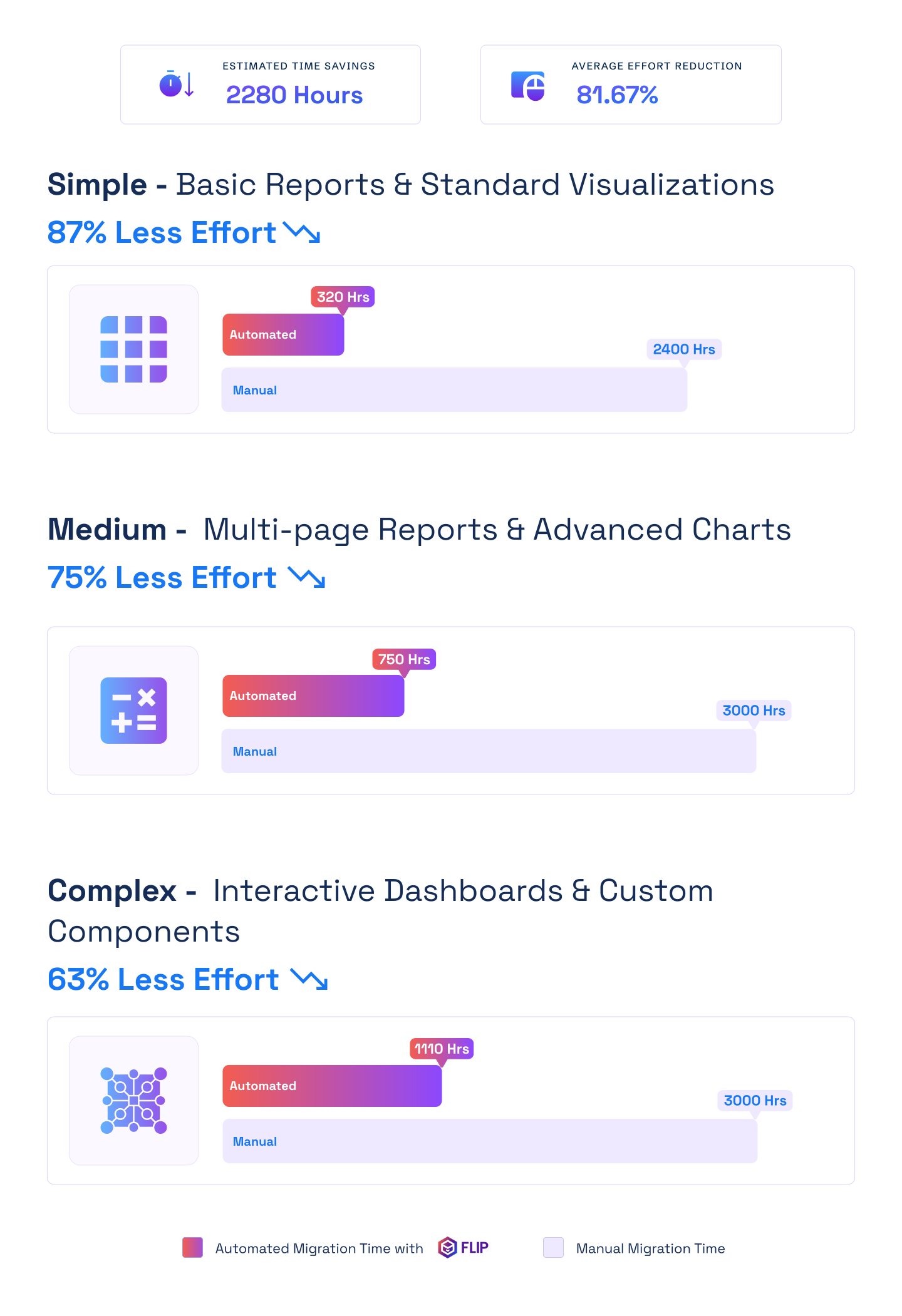

ESTIMATED TIME SAVINGS

Average effort reduction
Simple - Basic Reports & Standard Visualizations
Less Effort

Medium - Multi-page Reports & Advanced Charts
Less Effort
Complex - Interactive Dashboards & Custom Components
Less Effort

What Drives the Cost
How Cognos to Power BI Migration Is Priced
Price depends on what is in your Cognos estate, not on a fixed package. The assessment turns these four drivers into a precise scope, timeline and effort estimate before you commit.
Active Report Volume
- FLIP catalogs every Cognos report, so you start from an accurate count
- Dormant reports are retired before migration starts
- Only active reports are scoped and priced
Report Complexity
- Simple, medium and complex reports need different effort
- FLIP cuts effort by 63 to 87% depending on complexity
- Edge cases are flagged in discovery, so effort is clear upfront
Semantic Model Rebuilds
- Framework Manager packages become Power BI semantic models
- Query subjects become tables and calculated members become DAX measures
- Multi-package reports consolidate into unified datasets
Data Sources and Security
- Each data source is validated against live Cognos output
- Security groups map to workspace roles and row-level security
- Access is tested with real user scenarios before cutover
Case studies
Proven Outcomes Across Our BI Migration Engagements
Across manufacturing, financial services, and retail, Kanerika’s FLIP accelerator drives consistent migration outcomes. Every Cognos to Power BI engagement follows the same proven approach.”
Migration
65% Performance Gain with Cognos to Power BI
Impact:
- 65% Increase in Operational Performance
- 27% Overall Reduction in BI-Related Costs
- 2X Scalable Data and BI Capabilities
Migration
30% Lower BI Costs for Pharma with Tableau to Power BI
Impact:
- 45% Increase in Operational Performance
- 30% Reduction in BI-Related Costs
- 100% Scalable Data & BI Capabilities
Migration
95% Less Reporting Time: Crystal Reports to Power BI
Impact:
- 100% Logic Accuracy in Migration
- 80% Faster Insight Delivery
- 95% Reduction in Reporting Time
Frequently Asked Questions (FAQs)
How long does a Cognos to Power BI migration take?
Timeline depends on report volume and complexity. Small Cognos environments with 20 to 50 reports finish in 4 to 8 weeks. Projects covering 50 to 150 reports run 8 to 14 weeks. Large deployments with complex Framework Manager models and custom SQL take 3 to 5 months. Kanerika’s FLIP migration accelerator reduces total effort by up to 80% across all tiers. An upfront Cognos estate audit gives you a precise scope before any commitment.
What does a Cognos to Power BI conversion actually involve?
A Cognos to Power BI conversion covers four areas: Framework Manager model migration, report layout and prompt page conversion, calculated field translation to DAX, and post-migration validation. FLIP automates the first three for most report types. Your team validates outputs against live Cognos data and signs off before cutover. Highly customized edge cases are flagged during discovery so scope and effort are clear from the start of the cognos migration.
What is the best approach for Cognos migration consulting?
Semantic-model-first migration delivers the strongest outcomes for Cognos migration consulting engagements. Kanerika establishes a centralized Power BI semantic model where all business logic, measures, and relationships live before any reports are built. This eliminates duplicated calculations common in legacy Cognos environments and positions your analytics stack for Microsoft Fabric and Copilot from day one. Engagements include assessment, FLIP-powered pilot, phased migration, and post-migration hypercare.
How do I migrate Cognos reports to Power BI without disrupting the business?
FLIP migrates the reporting and semantic model layer only, leaving source data untouched. Cognos and Power BI run in parallel, both connected to the same underlying databases, making side-by-side validation simple. Nothing is decommissioned until your team signs off on migrated reports. A phased cutover lets different business units move at their own pace, removing the risk of a hard switchover across a large Cognos report estate.
What makes FLIP better than manual Cognos to Power BI migration?
Manual Cognos to Power BI migration rebuilds reports from scratch, taking weeks per report with high error risk. FLIP automates discovery, conversion, and validation, reducing effort by up to 80% and compressing timelines from months to weeks. As a purpose-built Cognos to Power BI conversion tool, FLIP handles Framework Manager models, prompt pages, and custom SQL automatically, then flags the small percentage of edge cases that need manual review.
Is there a Cognos to Power BI conversion tool available on Azure Marketplace?
Yes. Kanerika’s FLIP migration accelerators are available on Azure Marketplace with Microsoft Solutions Partner validation. Organizations can apply existing Azure Committed Spend toward the engagement, reducing tooling costs. FLIP deploys as SaaS or within your own environment via VM or Docker, giving regulated industries flexibility to meet internal security and compliance requirements while running a fast, automated Cognos to Power BI migration.
How are Cognos Framework Manager models migrated to Power BI?
FLIP reads Framework Manager packages and extracts dimensions, measures, and relationships automatically. Query subjects become Power BI tables. Calculated members convert to DAX measures. Relationships map to Power BI’s tabular model using star schema best practices. Multi-package Cognos reports consolidate into unified Power BI datasets. The converted model is validated against Cognos source outputs before handoff, confirming all business logic is preserved accurately across every migrated report type.
Why are organizations moving from Cognos to Power BI now?
Organizations move from Cognos to Power BI because Cognos’s IT-centric model, multi-tier licensing complexity, and steep learning curve limit scalable self-service analytics. Power BI delivers business-user-driven reporting, native Microsoft 365 integration, and direct connectivity to Azure AI, Machine Learning, and Copilot. The shift aligns BI investment with cloud-first data strategies, Microsoft Fabric adoption, and modern AI-powered analytics that Cognos’s governed framework cannot support at the same pace.
Can Power BI replicate complex Cognos reporting environments?
Yes. Power BI handles complex enterprise reporting including multi-page dashboards, parameterized reports, row-level security, and large-scale data model governance. For pixel-perfect regulatory output similar to Cognos, Power BI Premium supports paginated reports with equivalent formatting and scheduled delivery. Kanerika’s Cognos migration consulting includes a complexity audit that identifies which reports automate fully and which need targeted adjustments, giving you full visibility before migration begins.
Can we run Cognos and Power BI in parallel during migration?
Yes, and Kanerika recommends it for every Cognos to Power BI migration engagement. Cognos stays in production while Power BI versions are built and validated alongside it. Both environments connect to the same data sources, making output comparison accurate. Business units move at their own pace. Cognos is only decommissioned after your team formally confirms the Power BI environment, eliminating cutover risk across large Cognos report estates with hundreds of active reports.
How does Power BI integrate with Microsoft Fabric after Cognos migration?
Power BI is the native reporting layer of Microsoft Fabric. After Cognos migration, reports use Direct Lake mode to query data in OneLake in real time, removing the batch and scheduled-refresh constraints common in Cognos extract-based environments. Kanerika configures Fabric workspace governance, data lineage through Microsoft Purview, and sensitivity labels as part of every Cognos to Power BI migration delivery, giving you enterprise governance from day one.
What Cognos to Power BI migration services does Kanerika provide?
Kanerika’s Cognos to Power BI migration services cover the full engagement: environment assessment, Framework Manager analysis, complexity scoring, FLIP-powered pilot, phased migration planning, security and RLS mapping, data source validation, user acceptance testing, and 30 to 90 day post-migration hypercare. Most pilots complete in 2 to 3 weeks and deliver a precise scope, timeline, and effort estimate before your organization commits to a full Cognos migration rollout. Moving other reporting tools as well? We also run SSRS to Power BI, Crystal Reports to Power BI and Tableau to Power BI migrations.
How are security and permissions handled during Cognos to Power BI migration?
FLIP maps Cognos security groups to Power BI workspace roles and row-level security rules. Cognos user groups convert to Azure Active Directory groups. Framework-level security policies translate to DAX-based RLS expressions. Post-migration validation tests access controls with actual user scenarios before any cutover, ensuring the same governance that existed in Cognos carries through to Power BI. This applies to all regulated industries including healthcare, finance, and pharma.
What certifications does Kanerika hold for Cognos migration engagements?
Kanerika holds ISO 27001, ISO 27701, SOC 2, ISO 9001, and CMMI Level 3 certifications. For healthcare, financial services, and pharma clients, these meet standard vendor security and quality requirements for Cognos migration consulting engagements. Microsoft Purview, configured during every Cognos to Power BI migration, adds data lineage, audit trails, and sensitivity labels natively, supporting HIPAA, GDPR, and SOC 2 requirements without separate compliance tooling.
How do Kanerika's Cognos to Power BI migration services compare to other vendors?
Most Cognos to Power BI migration services are either purely manual consulting engagements or point tools with no delivery support. Kanerika combines FLIP, a purpose-built migration accelerator, with full-engagement consulting from assessment through hypercare. FLIP automates up to 80% of conversion effort, which manual-only vendors cannot match on timeline or cost. As a Microsoft Solutions Partner for Data and AI, Kanerika also configures Fabric governance and Purview lineage as standard delivery items, not optional add-ons that appear in a change order later.
What is the most common mistake teams make when they migrate Cognos reports to Power BI?
The most common mistake when you migrate Cognos reports to Power BI is skipping the semantic model. Teams try to recreate each Cognos report as an isolated Power BI report with its own logic and data connections. This reproduces the fragmented, duplicated calculation problem that made Cognos painful in the first place — just in a different tool. Building a centralized Power BI dataset first, with all measures and relationships defined once, is what separates a clean migration from a migration that causes three years of report inconsistency problems. FLIP enforces this order by design: dataset before dashboards, always.
How do end users experience the Cognos to Power BI transition?
The Cognos to Power BI transition is one of the few BI migrations where end users typically report a better experience after go-live — not just equivalent. Cognos requires users to request report changes from IT. Power BI puts drag-and-drop report editing directly in their hands. Copilot in Power BI lets users ask questions in plain language and get chart responses in seconds, something no Cognos user has ever had access to. Kanerika includes user adoption training in every post-migration hypercare package specifically because user behavior after go-live is what determines whether the migration ROI is realized in year one or year three.
How much does a Cognos to Power BI migration cost?
Cost depends on the number of active reports, report complexity, the number of Framework Manager models, and the data sources and security groups to map. A Cognos estate audit or FLIP-powered pilot gives you a precise scope, timeline and effort estimate before any commitment. FLIP automates up to 80% of conversion effort, which reduces the manual rebuild work that drives most of the cost.
Is IBM Cognos reaching end of life, and which versions are out of support?
It depends on your version. IBM’s standard support for Cognos Analytics 11.1.x ended on April 30, 2024, and paid Extended Support runs to April 30, 2028. IBM also ended Continuing Support for Cognos Analytics 11.0.x and Cognos BI 10.2.x on April 30, 2024. Query Studio, Analysis Studio and Cognos Workspace were dropped after version 11.2.4, so reports built in them need to be converted before you move past that release. Check your version on IBM’s lifecycle page, then plan the move to Power BI before support runs out. Source: IBM Support, Cognos Analytics lifecycle and upgrade guidance.