

Databricks to Microsoft Fabric Migration, Automated by FLIP
Many enterprises run Databricks beside Power BI, Purview, and other Azure services, paying for each separately and maintaining duplicate data copies. Kanerika's FLIP migration accelerator automatically converts notebooks, jobs, and Delta tables into Fabric lakehouses and pipelines, keeping logic, parameters, and lineage intact from day one.
The Cost Gap
The Cost of Running Databricks and Fabric Separately

29%
Cloud spend is estimated wasted, Flexera 2026 finds.

~41%
Saved by reserving Fabric capacity over pay-as-you-go.

30-50%
Databricks spend sits on a separate cloud-provider bill.

379%
Three-year ROI in Forrester’s Microsoft Fabric TEI study.
Migrate from

with Our Accelerator
Built for Azure Databricks and Fabric


See the Databricks to Fabric Notebook Conversion in Action
Watch how FLIP reads your Databricks workspace, converts notebooks, jobs, and Delta tables into Fabric-native items, and preserves transformation logic, parameters, and schedules from start to finish.
When Moving Databricks to Fabric Makes Sense
Most Databricks estates don't move because of one problem; they move because several small ones start to compound. Kanerika's assessment looks for four common signals, from Power BI dependency to separate invoices, so you can see whether the case to migrate Databricks to Fabric holds up before any workload moves or any commitment is made.
Power BI Heavy
Most Databricks output ends up in Power BI, so reports wait on exports and refreshes.
Rising Bills
DBU charges and cloud costs arrive on separate invoices and are hard to forecast together.
Azure Spend
Fabric capacity is an Azure resource, so existing Azure commitments can often apply.
Data Copies
The same tables are exported, copied, and secured separately in the lakehouse and in BI.
The Migration Roadmap
How Our Databricks to Fabric Migration Process Works
Databricks Workspace Assessment and Discovery
FLIP connects to your Databricks workspace, catalogs notebooks, jobs, clusters, Unity Catalog objects, and Delta tables, and packages selected assets with full dependencies for conversion.


Automated Databricks Notebook and Job Conversion to Fabric
FLIP ingests exported assets, analyzes transformation logic, and converts each notebook and job into Fabric notebooks and pipelines, mapping dbutils calls and keeping business rules and schedules.

Validation Against Original Databricks Notebooks and Jobs
Converted Fabric items are validated against original Databricks outputs, confirming functional parity across transformation logic, schedule behavior, and Delta table results before production deployment.

Cutover, Tuning and Fabric Readiness
FLIP flags edge cases such as Delta Live Tables, retires redundant workflows, and connects Fabric to OneLake, Microsoft Purview governance, and Power BI reporting immediately after cutover.

The Databricks to Fabric Advantage
Business Benefits of Migrating from Databricks to Microsoft Fabric

Unified Data and BI
- Replace split Databricks and Power BI stacks with one platform
- Keep Delta Lake tables as the open format across OneLake
- Share one copy of data across teams through OneLake shortcuts

Cost Predictability
- Run Spark on one shared Fabric capacity, not separate clusters
- Smooth demand spikes across the day with capacity smoothing
- Reserve capacity for steady workloads and pay less per hour

BI, Governance and AI
- Read lakehouse tables in Power BI via Direct Lake, no imports
- Govern data in every Fabric workload with Microsoft Purview
- Use Copilot and Fabric AI directly on governed OneLake data

Lower Platform Cost
- Pay for one Fabric capacity rather than DBUs and infrastructure
- Cut duplicate storage and pipelines across two platforms
- Pause idle dev and test capacity so you stop paying for it
WHAT FLIP SAVES YOU
Move to Fabric Faster with a Cost-Effective Databricks Migration
Databricks to Fabric migration services with FLIP reduce effort at every scale, from one workload to an enterprise estate. FLIP converts the code so engineers validate instead of rebuild. In Kanerika’s estimates, FLIP cuts effort by about 65% for a single workload (160 hours versus 460 manually), 78% for multi-workload projects (360 versus 1,640 hours), and 82% for enterprise estates (720 versus 4,000 hours).
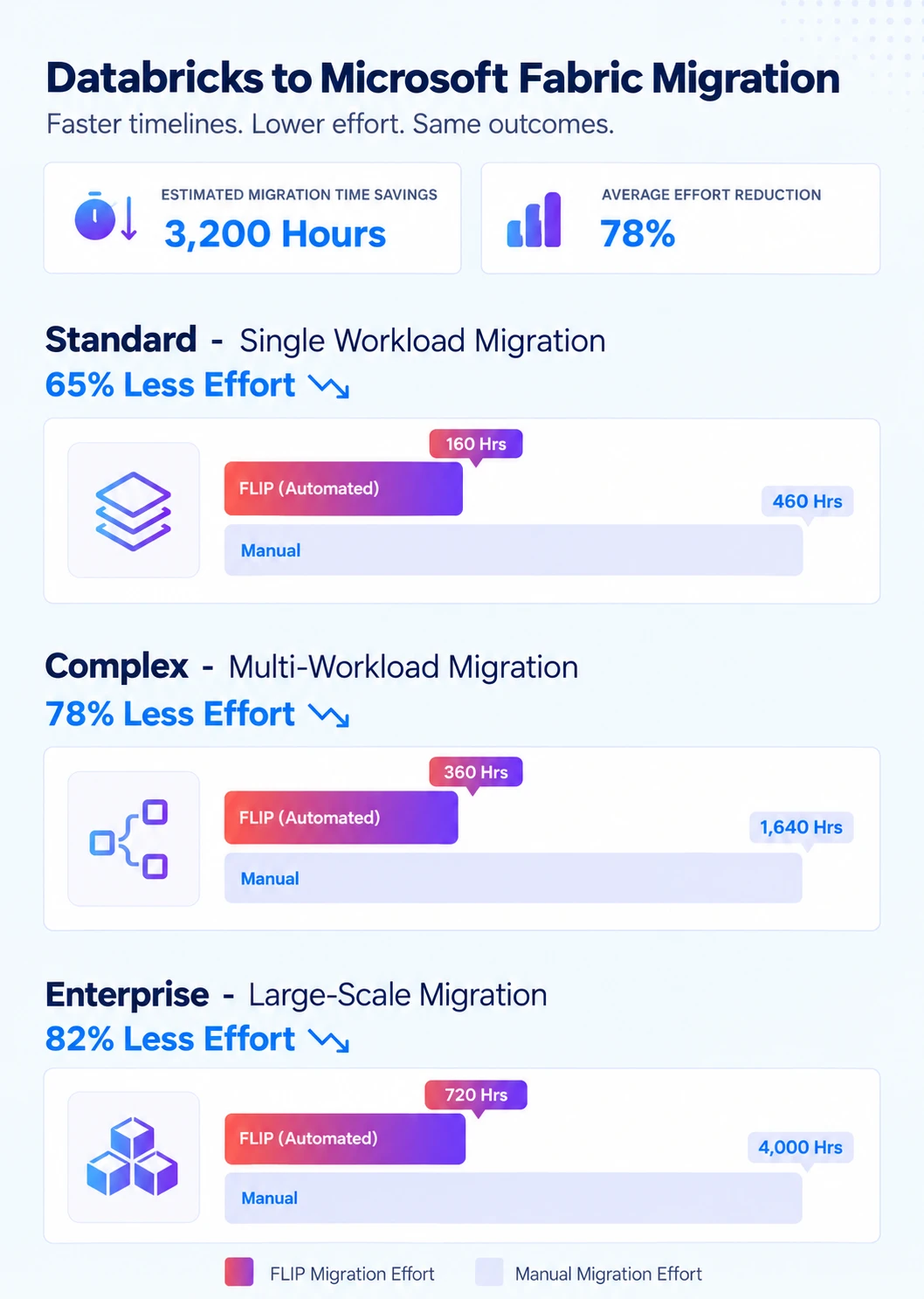

ESTIMATED TIME SAVINGS

Average effort reduction
Standard - Single Workload, Notebooks and Jobs
Less Effort

Complex - Multi-Workload Migration, Pipelines and Orchestration
Less Effort
Enterprise - Large-Scale Lakehouse, Unity Catalog and ML
Less Effort

Case studies
Proven Results From FLIP-Led Fabric Migrations
These case studies show FLIP-led migrations to Power BI, Alteryx, and Microsoft Fabric. Databricks projects follow the same assessment, automated conversion, and validation approach, and our Databricks to Fabric migration guide covers the technical detail. Moving from another Azure platform? See our Azure to Fabric migration service.
Migration
60% Faster Migration: Crystal Reports to Power BI
Impact:
- 60% Faster Migration
- 10x Data Scale
- 99.5% Refresh Success Rate
Migration
60% Faster Analytics with Informatica to Alteryx
Impact:
- 45% Faster Reporting Cycles
- 38% Reduction in Maintenance Costs
- 60% Improved Analytics Turnaround
Migration
74% Faster Retail Reporting with Microsoft Fabric
Impact:
- 74% Faster Reporting Cycles
- 65% Increase in Reporting Stability
- 72% Faster Access to Current Metrics
Frequently Asked Questions (FAQs)
How long does a Databricks to Microsoft Fabric migration take?
What do Databricks to Fabric migration services include?
Kanerika’s migration covers four stages: workspace discovery, automated conversion with FLIP, validation against original Databricks outputs, and deployment with Fabric optimization. FLIP handles the first two stages automatically for most workloads. Your team reviews converted items, checks them against source results, and signs off before any Databricks job is retired. Manual work is limited to edge cases FLIP flags during discovery, such as custom libraries. Teams on other platforms can also see our Azure to Fabric and Informatica to Fabric migration services.
How do Unity Catalog and Delta tables move into OneLake?
Delta Lake is the table format in both platforms, so tables need no format conversion. Kanerika lands Delta tables in Fabric lakehouses through OneLake shortcuts or copies, depending on whether data stays in Databricks during coexistence. Unity Catalog’s three-level namespace becomes lakehouse schemas, and permissions map to Fabric roles. FLIP inventories every catalog, schema, and table before anything moves, then reconciles row counts after each load.
Can we run Databricks and Microsoft Fabric in parallel during migration?
Yes, and Kanerika recommends it. Databricks stays live while Fabric items are built and validated, and OneLake shortcuts or the mirrored Azure Databricks catalog let Fabric read Unity Catalog data in place. Business units and workload groups can move at different speeds. Databricks workloads are retired only after your team formally signs off on the Fabric equivalent. There is no forced cutover, and you control the pace throughout.
What does Databricks to Fabric migration consulting involve?
Databricks to Fabric migration consulting with Kanerika covers three phases: assessment, execution, and enablement. Assessment inventories notebooks, jobs, clusters, and tables, tiers them by complexity, and produces a plan with effort estimates. Execution uses FLIP to automate conversion, with Kanerika engineers handling edge cases and validation. Enablement covers Purview governance, Power BI integration, capacity sizing, and team training. Kanerika holds Microsoft’s Data Warehouse Migration to Azure Specialization.
Can Fabric run our existing Databricks notebooks as they are?
Not directly. Fabric runs Spark natively, so PySpark and Spark SQL logic carries over, but Databricks-specific calls need rework. The migration maps dbutils calls to notebookutils, widgets to parameter cells, secret scopes to Azure Key Vault references, and library installs to Fabric Environments. Anything not safely convertible is flagged for an engineer instead of being guessed, and converted notebooks are rerun against source data.
Is Microsoft Fabric better than Databricks for our workloads?
It depends on the workload. Fabric suits Microsoft-centred estates with heavy Power BI use, steady reporting demand, and a wish for one governed platform. Databricks remains strong for multi-cloud estates, open-source flexibility, and ML-heavy engineering. Kanerika scores each workload during assessment and often recommends moving analytics and pipelines first while leaving specialised ML on Databricks, with OneLake shortcuts connecting the two. You decide how far the consolidation goes. Our Microsoft Fabric vs Databricks comparison covers the trade-offs in more depth.
Why should enterprises migrate from Databricks to Microsoft Fabric?
Many enterprises pay for Databricks, Power BI, and separate governance tools side by side. Fabric consolidates engineering, warehousing, real-time analytics, and BI on OneLake, with one capacity model and Microsoft Purview governance. Databricks bills DBUs plus cloud infrastructure separately, while Fabric charges for capacity, and reserved capacity can save about 41% against pay-as-you-go. Direct Lake also lets Power BI read lakehouse tables without import copies, which shortens the path from data to dashboard.
What happens to existing Databricks jobs and Delta Live Tables during migration?
Databricks Workflows are rebuilt as Fabric Data Factory pipelines and Spark job definitions, with task dependencies, parameters, retries, and schedules mapped across. Streaming workloads move to Fabric Eventstreams or Spark Structured Streaming where suitable. Delta Live Tables has no direct equivalent, so those pipelines are rewritten as notebooks plus pipelines by Kanerika engineers. Each rebuilt item is validated against Databricks output and run in parallel with Databricks before cutover, so production reporting never depends on an untested pipeline.
How much does a Databricks to Fabric migration cost?
Cost depends on workload count, complexity, and how much of your estate moves. Automated migration with FLIP cuts effort by about 65% for standard single-workload projects, 78% for complex multi-workload projects, and 82% for enterprise estates compared with manual rebuilding. Platform cost also changes, since Fabric charges for capacity rather than DBUs plus cloud infrastructure. Kanerika models both billing approaches on your actual usage, including Power BI licensing, before you commit to a scope or a Fabric capacity size.
How are Unity Catalog permissions and governance handled in Fabric?
Kanerika maps Unity Catalog catalogs, schemas, and grants to Fabric workspaces, lakehouse permissions, and OneLake security roles, with Entra groups carrying identity across. Microsoft Purview adds lineage, sensitivity labels, and cataloging across Fabric items. During coexistence, Databricks access stays governed by Unity Catalog, and both permission sets are kept aligned until cutover is signed off. Row-level and column-level rules are reviewed separately, because they do not transfer automatically.
Can you migrate large Databricks environments with hundreds of notebooks?
Yes. The approach scales from a single workspace to estates with hundreds of notebooks and jobs. Migration runs in parallel, so Databricks keeps serving workloads until cutover is confirmed. Large environments move in waves by domain, and each wave is validated before the next one begins. Every item is tracked.













