

Informatica to Alteryx Migration, Automated by FLIP
Moving from Informatica to Alteryx gives enterprises faster workflow delivery, lower integration costs, and analytics capabilities their business users can actually operate. Kanerika's FLIP Migration Accelerator automates the Informatica to Alteryx conversion, carrying over existing business logic so nothing gets rebuilt from scratch. FLIP accelerators are available on the Azure Marketplace and are eligible for your Azure Committed Spend (MACC).
Get Started with Informatica to Alteryx Migration
The Informatica Overhead Problem
The Hidden Cost of Running Informatica at Enterprise Scale

80%
IT budgets are spent on legacy system maintenance.

44%
CIOs see legacy systems as growth barriers.

50%
Developer productivity is lost due to outdated tools

70%
Digital transformation efforts fail due to legacy systems
Migrate from

with Our Accelerator
Use Your Azure Committed Spend (MACC)

See FLIP Convert
Informatica Workflows to Alteryx
Watch how FLIP scans your Informatica PowerCenter repository, exports mappings and sessions, and converts them into ready-to-run Alteryx workflows, retaining transformation logic, scheduling rules, and source-target connections throughout.
Migration ROI Calculator
Kanerika’s IP-led accelerator, FLIP, automates your migration with major resource savings, ensuring a faster, lower-risk move to your target platform.
FLIP is Kanerika's proprietary migration accelerator. Here's exactly where the savings come from:
The Informatica to Alteryx Advantage
What Enterprises Gain by Switching from Informatica to Alteryx

Self-Service by Default
- Build data workflows without writing code or waiting on IT
- Replace Informatica's specialist-gated ETL with Alteryx Designer
- Put business users in control of data prep and workflow execution

Faster Pipeline Delivery
- Cut pipeline build time with a visual, drag-and-drop workflow canvas
- Reduce reliance on Informatica PowerCenter developers
- Ship production-ready workflows weeks faster than with PowerCenter

Predictive Analytics Built In
- Run predictive models, geospatial analysis, and data blending natively
- Extend pipelines beyond ETL without separate analytics tools
- Access capabilities Informatica does not include

Measurable Cost Reduction
- Eliminate per-processor Informatica licensing fees
- Reduce IT overhead with simpler Alteryx workflow management
- Apply MACC credits to offset informatica to alteryx migration cost
The Migration Process
Automated Informatica to Alteryx Migration Process
Workflow Discovery and Analysis
FLIP connects to your Informatica PowerCenter repository, inventories all mappings, workflows, and sessions, and identifies dependencies and conversion scope before any migration work begins.


Automated ETL Conversion to Alteryx
FLIP analyzes each Informatica mapping, converts transformation logic into Alteryx-native workflows, and preserves business rules, source-target connections, and scheduling configurations automatically

Parity Validation and Output Testing
Converted Alteryx workflows are validated against original Informatica mappings to confirm functional parity across transformation logic, data volumes, and trigger behavior before any production cutover.

Deployment and Enterprise Onboarding
FLIP flags conversion edge cases for engineer review, decommissions validated Informatica workflows on formal sign-off, and configures your Alteryx environment for production use with enterprise onboarding included.

ROI YOU CAN EXPECT
Informatica to Alteryx Migration ROI
Automated Informatica to Alteryx migration with FLIP cuts effort, resources, and costs significantly.
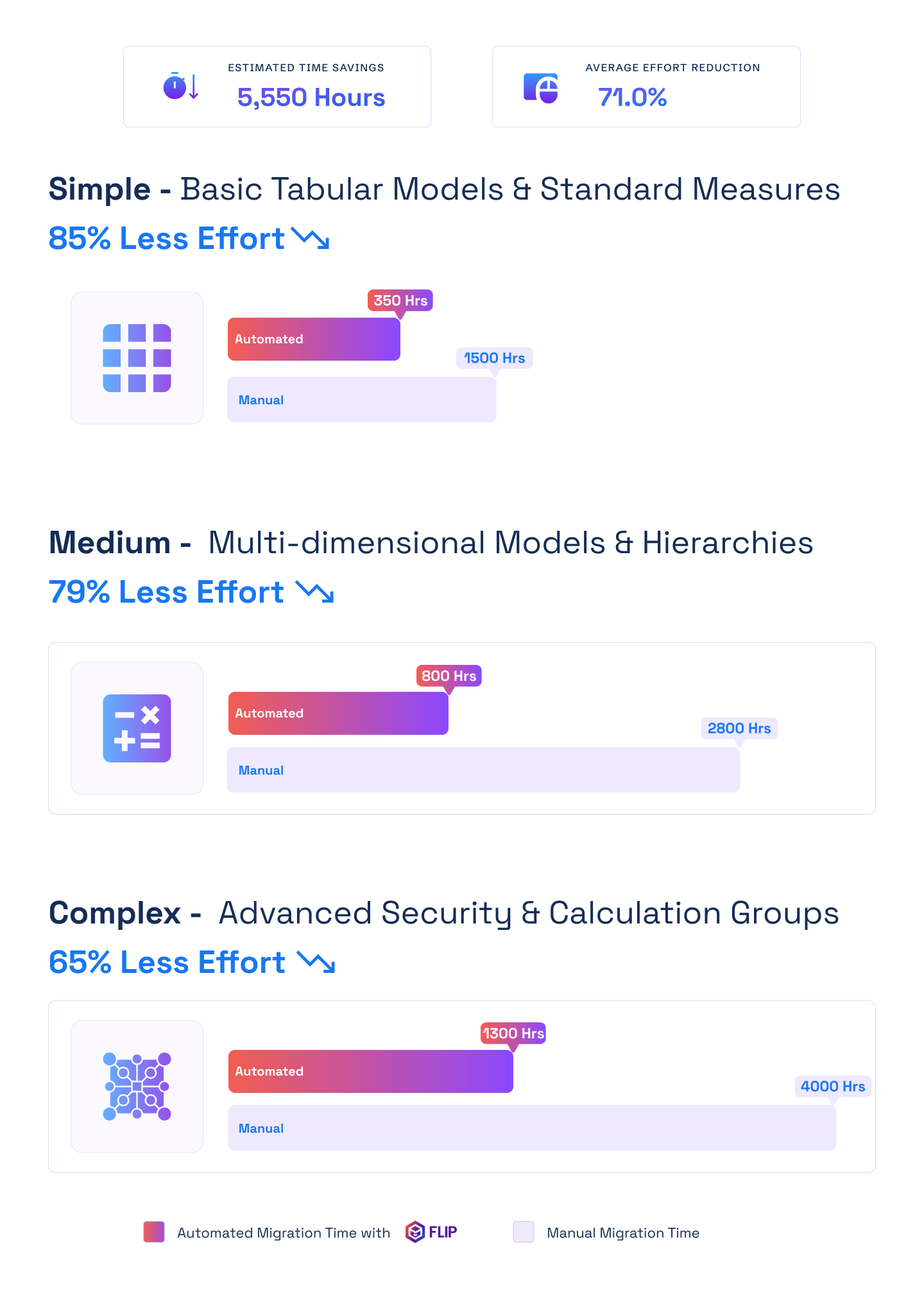

ESTIMATED TIME SAVINGS

Average effort reduction
Simple - Basic Tabular Models & Standard Measures
Less Effort

Medium - Multi-dimensional Models & Hierarchies
Less Effort
Complex - Advanced Security & Calculation Groups
Less Effort

Case studies
Enterprise Migration Outcomes Achieved with FLIP
Across manufacturing, retail, financial services, and logistics, Kanerika has delivered data platform migrations using FLIP as the conversion engine for Informatica PowerCenter, legacy ETL, and custom pipeline environments.
Migration
60% Faster Migration: Crystal Reports to Power BI
Impact:
- 60% Faster Migration
- 10x Data Scale
- 99.5% Refresh Success Rate
Migration
60% Faster Analytics with Informatica to Alteryx
Impact:
- 45% Faster Reporting Cycles
- 38% Reduction in Maintenance Costs
- 60% Improved Analytics Turnaround
Migration
74% Faster Retail Reporting with Microsoft Fabric
Impact:
- 74% Faster Reporting Cycles
- 65% Increase in Reporting Stability
- 72% Faster Access to Current Metrics
Frequently Asked Questions (FAQs)
01What does an Informatica to Alteryx migration involve?
An Informatica to Alteryx migration covers four stages: workflow discovery and audit, automated ETL conversion with FLIP, parity validation against Informatica source outputs, and deployment with Alteryx environment configuration. FLIP automates the first two stages for the majority of PowerCenter mapping types, reducing manual effort by up to 83%. Engineers review converted workflows, validate data outputs, and sign off before any Informatica asset is decommissioned. The entire informatica to alteryx migration runs in parallel with your live Informatica environment so production workloads are never at risk.
02What do Informatica to Alteryx migration services typically include?
Kanerika’s Informatica to Alteryx migration services cover the full project lifecycle: pipeline discovery, automated workflow conversion with FLIP, functional parity testing against original Informatica outputs, and deployment with Alteryx configuration and team onboarding. FLIP handles standard PowerCenter mapping types automatically. Kanerika engineers manage edge cases, parameterized mappings, and post-migration enablement. Every engagement begins with a pre-migration audit and a defined scope document, so timeline and cost are locked before any conversion begins. Informatica to Alteryx migration services are scoped for both phased and full migration approaches.
03What is the most reliable way to migrate Informatica workflows to Alteryx?
The most reliable approach to migrate Informatica workflows to Alteryx is automated conversion using FLIP, running in parallel with your live Informatica environment. FLIP exports PowerCenter mappings and sessions, converts them to Alteryx-native workflows, and validates each output before cutover. Kanerika recommends a phased migration by business domain so each business unit validates incrementally rather than cutting over all at once. Informatica workflows are decommissioned only after formal sign-off on Alteryx workflow parity. This approach eliminates the risk of forced cutover and maintains production continuity throughout.
04How is Informatica to Alteryx migration cost calculated?
Informatica to Alteryx migration cost depends on workflow volume, transformation complexity, and migration approach. Automated conversion with FLIP reduces total effort by 70 to 83% compared to a manual rebuild, which translates directly into lower labor costs. On average, enterprises save over 2,000 engineering hours per engagement. Alteryx uses role-based and consumption licensing versus Informatica’s per-processor model, reducing ongoing platform costs after migration. FLIP is available on the Azure Marketplace and eligible for MACC credits, which can offset upfront informatica to alteryx migration cost for Azure-committed organizations.
05Does FLIP support Informatica PowerCenter to Alteryx migration specifically?
Yes. FLIP is purpose-built for Informatica PowerCenter to Alteryx migration. It connects directly to the PowerCenter repository, exports mappings, workflows, sessions, and mapplets, and converts them into Alteryx-native Designer workflows automatically. Source qualifiers, transformation logic, and target definitions are analyzed and converted. Scheduling configurations translate to Alteryx scheduler or orchestration equivalents. Kanerika’s Informatica PowerCenter to Alteryx migration engagements include a full inventory of your PowerCenter environment before any conversion begins, so scope, timeline, and edge cases are identified upfront before work starts.
06How do enterprises switch from Informatica to Alteryx without disrupting production?
Kanerika recommends a parallel migration approach for every engagement when organizations switch from Informatica to Alteryx. Converted Alteryx workflows run in parallel with the live Informatica environment while outputs are validated against Informatica benchmarks. Different business units or pipeline domains can migrate at different speeds. Informatica is decommissioned only after formal sign-off on each Alteryx workflow group. You retain full control over migration pace and sequencing throughout. Enterprises that switch from Informatica to Alteryx using FLIP typically reach production cutover in weeks rather than months compared to a manual rebuild.
07Which Informatica ETL types does FLIP convert for an Alteryx migration?
FLIP supports Informatica to Alteryx ETL migration for PowerCenter mappings, workflows, sessions, and mapplets. Source qualifiers, transformation logic, and target definitions are converted automatically. Scheduling and trigger configurations are translated to Alteryx equivalents. Custom transformations and parameterized mappings are analyzed during discovery and flagged for engineer review if they fall outside automated conversion scope. Kanerika’s Informatica to Alteryx ETL migration engagements include a complete pipeline inventory before conversion begins, so every asset is classified and scoped before any commitment is made.
08How accurate is FLIP's Informatica to Alteryx conversion?
FLIP’s Informatica to Alteryx conversion process preserves transformation logic, source-target connections, and scheduling configurations for standard PowerCenter mapping types. Converted Alteryx workflows are validated against original Informatica outputs to confirm functional parity before any production cutover. Kanerika engineers review all flagged edge cases that fall outside automated conversion scope. The Informatica to Alteryx conversion is validated at the data output level, not just the structural level, so enterprises sign off on business results rather than just code equivalence. Parity testing is included in every migration engagement.
09Is FLIP available on Azure Marketplace for Alteryx migration projects?
Yes. Kanerika’s FLIP Migration Accelerator is available on the Azure Marketplace and eligible for Azure Committed Spend (MACC). Organizations with committed Azure spend can apply MACC credits toward their Informatica to Alteryx migration cost, reducing or eliminating out-of-pocket tooling fees. Kanerika holds Microsoft’s Data Warehouse Migration to Azure Specialization and is a certified Microsoft Solutions Partner for Data and AI. FLIP has passed Microsoft’s technical and compliance requirements. Kanerika also holds ISO 27001, SOC 2, ISO 9001, and CMMI Level 3 certifications.
10Which organizations benefit most from Informatica to Alteryx migration services?
Informatica to Alteryx migration services are best suited for organizations running large Informatica PowerCenter environments, facing rising per-processor licensing costs, or building toward self-service analytics and faster pipeline delivery. Enterprises investing in Alteryx Designer or Alteryx Analytics Cloud for business-user-led data prep benefit most from consolidating Informatica ETL onto the same platform. Kanerika works with clients across manufacturing, financial services, retail, logistics, and pharma. A migration assessment identifies whether a phased or full migration is the right approach for your environment and pipeline volume.