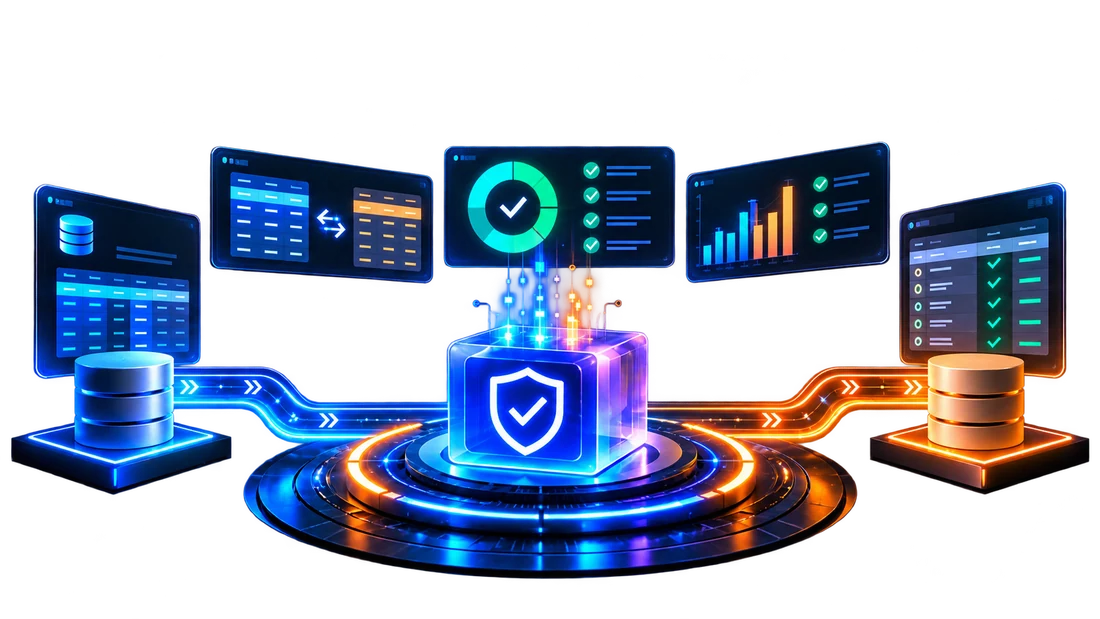







Klarity360 compares source and target data, applies business rules written in simple, natural language, and produces a traceable record of every match and mismatch for sign-off owners and auditors alike.
Faster Data Reconciliation
Faster Migration Sign-Off
Fewer Engineering Hours
Klarity360 is data validation software for reconciling source and target systems. It connects to each system, compares the data row by row, and then reports where the two datasets differ.
Compares source and target data row by row
Converts simple, natural-language business rules into validation queries
Runs on demand or on a recurring schedule
Delivers downloadable, audit-ready reconciliation reports for stakeholder sign-off
Every migration needs proof that the data arrived intact before go-live. Spreadsheet comparisons and hand-written SQL checks consume engineering hours and scatter the resulting evidence across personal files and inboxes.
Spot checks review a slice of the data, so missing rows and drifting values can reach production unnoticed.
Business owners wait while engineers write queries and compare outputs by hand, delaying the approval go-live depends on.
Results sit in personal spreadsheets and email threads, so showing auditors how the data was checked takes effort.
Defects found after cutover send teams back to rebuild pipelines and repeat every check while stakeholders wait longer.
Klarity360 brings data validation automation to the full cycle, from connecting your systems and mapping tables to defining rules, running comparisons, and reviewing results, with no SQL or code required.
Auto-Discover reads your schemas and suggests table and column matches from names and metadata, giving teams a first draft that people review and adjust.

Describe a check in simple, natural-language business terms and Klarity360 converts it into the query that runs against both the source and target systems.

Apply one rule across several source and target table pairs, with composite keys and a separate result for each pair, showing where mismatches sit.

Set an acceptable variance percentage, limit checks to numeric or date ranges, and choose how nulls, letter case, and whitespace are treated in matches.

Confirm columns, data types, and precision line up, then compare values row by row, including numbers up to 38 decimal places without silent rounding.

Review generated queries and sample results, edit them if needed, then run the full comparison once the logic looks right to your QA team.


Watch a short walkthrough of Klarity360 reconciling a source system against a target, from initial connection setup and rule creation through to the final reconciliation report and the dashboard summary.
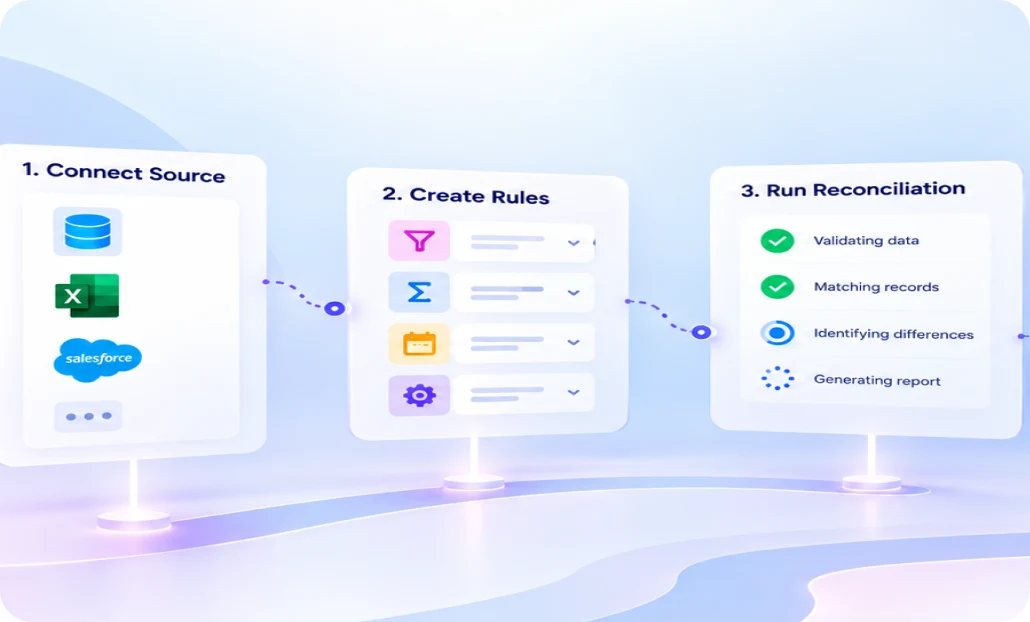
A guided workflow takes a validation from first connection to final report. Teams configure a process once, then run it on demand or on a schedule as often as needed.
Add source and target links to your databases, cloud platforms, or files.
Let AI suggest matches, upload an ETL export, or map tables manually.
Write each rule in simple, natural language and preview the generated query.
Run now or schedule hourly, daily, weekly, monthly, or custom CRON runs.
Open dashboard results, download the Excel Recon Report, or email a summary.
Automating data validation shifts team effort from manual checking to exception review. The value shows up in engineering hours, migration timelines, audit readiness, and the cost of defects found late.
Klarity360 generates the comparison queries, so QA analysts and data engineers spend their hours on exceptions.
Every completed run offers a detailed report of rule outcomes and mismatched rows, ready for audits.
Saved processes run the same way every time, from a one-time migration to a nightly load.
Owners see pass or fail status and a report after each run, shortening the go-live path.
Missing rows, duplicates, and value mismatches surface during migration testing, so teams fix them before cutover.
Many-to-many mapping, scheduling, and bulk report downloads let one team cover many table pairs across waves.
Klarity360 reads relational databases, cloud data platforms, and files, so one data validation process can compare a legacy source against a modern target platform such as Microsoft Fabric or Snowflake.
Oracle
Microsoft SQL Server
Azure SQL
PostgreSQL
IBM Db2
Microsoft Fabric
Snowflake
CSV
Excel
Microsoft Access
Alteryx data files
OneDrive CSV and Excel
Informatica PowerCenter XML
Microsoft Fabric JSON
Alteryx .yxmd and .yxzp
Klarity360 supports migration teams and data engineering teams alike. The same rules, mappings, and reports apply whether a validation runs once after cutover or every night in live production environments.
Reconcile legacy ETL output against migrated pipelines, confirm each in-scope table landed on the new target platform with matching values.

Schedule recurring checks on production pipeline outputs so drift, missing rows, and duplicates get flagged on the next scheduled run.

Validate Oracle to Fabric, SQL Server to Snowflake, and similar moves table by table, with one report for every process.

Compare an uploaded file against a database table, or two operational systems against each other, to confirm that they agree.


Klarity360 is designed to shorten migration sign-off and cut manual validation effort.
Kanerika used AI to help a U.S. insurer reduce risks by 25%, cut losses by 33%, and boost customers by 37%
See how Klarity360 fits your migration or pipeline data validation needs. Book a short walkthrough with the team and bring a sample source and target scenario to review together live.
Automated data validation uses software to compare datasets against defined rules without manual checking. In a migration, it matches source and target records, flags missing rows, duplicates, and mismatched values, and records the outcome. Klarity360 applies this through simple, natural-language rules, scheduled runs, and downloadable reconciliation reports for business stakeholders.
Map each source table to its target, choose key columns, then compare row counts, values, and schemas against agreed rules and tolerances. Review every mismatch with the data owners before final sign-off. Klarity360 automates these post-migration data validation steps and produces a report that teams use as the sign-off record.
Data validation checks whether data meets defined rules for format, range, and accuracy. Data reconciliation compares two datasets to confirm they agree. Migration programs need both checks before approving a go-live. Klarity360 applies business rules during a source-to-target comparison and reports matched, missing, duplicate, and mismatched records per table pair.
Yes. Data validation automation runs the comparison and reporting once mappings and rules exist. People still define the business rules and review AI-suggested mappings. Klarity360 turns simple, natural-language rules into queries, runs them on demand or on a schedule, and flags exceptions, which reduces manual validation effort for QA teams.
Migrated data feeds reporting, analytics, and operations, so silent errors spread quickly. Validation confirms completeness and accuracy before go-live, protects downstream data integrity, and gives owners evidence for approval. Regulated industries also need proof of how data was checked. Automated data validation covers the entire dataset and shortens migration sign-off.
Common checks include schema validation for columns and data types, row-level comparison, business rule validation, and tolerance checks for acceptable numeric variance limits. Klarity360 runs all four stages in sequence for every validation process, with filters, null handling, and string comparison options, and reports missing rows, duplicates, and value mismatches.
ETL validation checks that a pipeline loads data correctly, often on an ongoing, scheduled basis. Data migration testing proves that data moved intact between two platforms. Klarity360 supports both with the same rules and reports, reconciling legacy ETL output against migrated pipelines and checking production pipeline outputs on a schedule.
Klarity360 does not require SQL. Users describe each validation in simple, natural language and the platform generates the query for every system. Teams can preview the query and a sample of results before the full comparison, and edit the query when needed. Setup follows a guided workflow without writing code.
Klarity360 connects to Oracle, Microsoft SQL Server, Azure SQL, PostgreSQL, IBM Db2, Snowflake, and Microsoft Fabric. It also compares CSV, Excel, Microsoft Access, and Alteryx files by upload and reads CSV and Excel files from OneDrive. ETL exports from Informatica PowerCenter, Microsoft Fabric, and Alteryx pre-fill table and column mappings.
Each run feeds an in-app dashboard showing rules passed, rules failed, and rows compared. Teams can download a detailed Excel Recon Report with summary, missing source, missing target, and duplicate tabs, or email a summary to stakeholders. The Excel report serves as the audit and sign-off record for each run.
We use cookies to give you the best experience. Cookies help to provide a more personalized experience and relevant advertising for you, and web analytics for us.
Average Annual Cost Savings in Logistics Operations
Faster Time-to-market for Fintech and Healthtech products
Boost in Customer Retention in Retail and E-commerce
Reduction in Project Timelines for Pharmaceutical Firms
AI-Powered Asset Intelligence
Limited seats available! Register Now
Your Free Resource is Just a Click Away!