

Tableau to Power BI Migration, Accelerated by FLIP
Migrating from Tableau to Power BI is a real cost decision for most organizations. Kanerika's FLIP migration accelerator automates 80% of the conversion work. Your dashboards, data models, and calculated fields move accurately without months of manual rebuilding. We have our accelerators listed on Azure Marketplace and eligible for your Azure Committed Spend.
Get Started with Tableau to Power BI Migration
The Real Cost of Staying on Tableau
What Moving from Tableau to Power BI Actually Saves You

80%
IT budgets are spent on legacy system maintenance

44%
CIOs see legacy systems as growth barriers

50%
Developer productivity is lost due to legacy tools

70%
Digital transformation efforts fail due to outdated systems
Migrate from

with Our Accelerator
Use Your Azure Committed Spend (MACC)


See How
Tableau to Power BI Conversion Works
Watch how the accelerator parses a Tableau workbook, converts calculated fields to DAX measures, and rebuilds the dashboard in Power BI
Migration ROI Calculator
Kanerika’s IP-led accelerator, FLIP, automates your migration with major resource savings, ensuring a faster, lower-risk move to your target platform.
FLIP is Kanerika's proprietary migration accelerator. Here's exactly where the savings come from:
The Tableau to Power BI Advantage
The Business Case for Migrating from Tableau to Power BI
Lower Licensing Costs, Immediate ROI
- Power BI Pro costs $14 per user per month versus Tableau Creator at $75
- Many Microsoft 365 E5 licenses already include Power BI at no added cost
- Businesses recover migration costs within the first year through licensing savings

Native Integration with the Microsoft Stack
- Embed Power BI reports directly in Microsoft Teams, SharePoint, and Excel
- Power BI is the reporting layer of Microsoft Fabric, a unified analytics platform
- Use Azure Active Directory for access control, no separate user management

Centralized Business Logic with DAX
- Define measures once in a semantic model and apply them across every report
- DAX replaces duplicated Tableau calculated fields with reusable, governed measures
- Tableau LOD expressions convert to equivalent DAX patterns accurately

Enterprise Governance Without Add-On Tools
- Data lineage, sensitivity labels, and impact analysis built into Microsoft Purview
- Row-level security and Azure AD integration support HIPAA, GDPR, and SOC 2
- Manage workspace permissions from a single Fabric admin portal
FLIP: The Tableau to Power BI Converter Built for Enterprise Scale
Kanerika’s proprietary Tableau to Power BI conversion tool automates the migration from workbook parsing to validated dashboard delivery, listed on Azure Marketplace.

80% Automated Conversion
FLIP handles the conversion work automatically, so your team reviews outputs instead of building from scratch.

Listed on Azure Marketplace
Eligible for Azure Spend. Apply your existing MACC credits toward the migration without procurement process.

Parallel Validation Built In
Every migrated asset is tested against the Tableau source. Discrepancies are flagged before you see the output.

No Hard Cutover Required
Tableau stays live throughout. Teams switch to Power BI only after their reports pass validation and sign-off.
The Migration Process
Our Tableau to Power BI Migration Approach
Data Model and Relationship Replication
The accelerator reads your Tableau data connections and table relationships, then rebuilds them as a governed Power BI semantic model.


Automated DAX Conversion, Validated Before Delivery
Tableau LOD expressions and calculated fields convert to DAX measures automatically, then get validated against source outputs before taken live.

Dashboard Rebuild, Validated Against Tableau Original
Each dashboard rebuilds in Power BI with matching charts, filters, and drill-throughs, validated against the Tableau original before sign-off.

AI-Powered Optimization & Microsoft Fabric Readiness
The accelerator flags conversion edge cases, retires unused reports, and connects your Power BI environment to Microsoft Fabric via Direct Lake.

ROI YOU CAN EXPECT
Real Impact from Automated Tableau to Power BI Migration
Our accelerator cuts migration effort across every complexity level. The numbers below show estimated time and effort savings based on your dashboard type, so you know what to expect before the project starts.
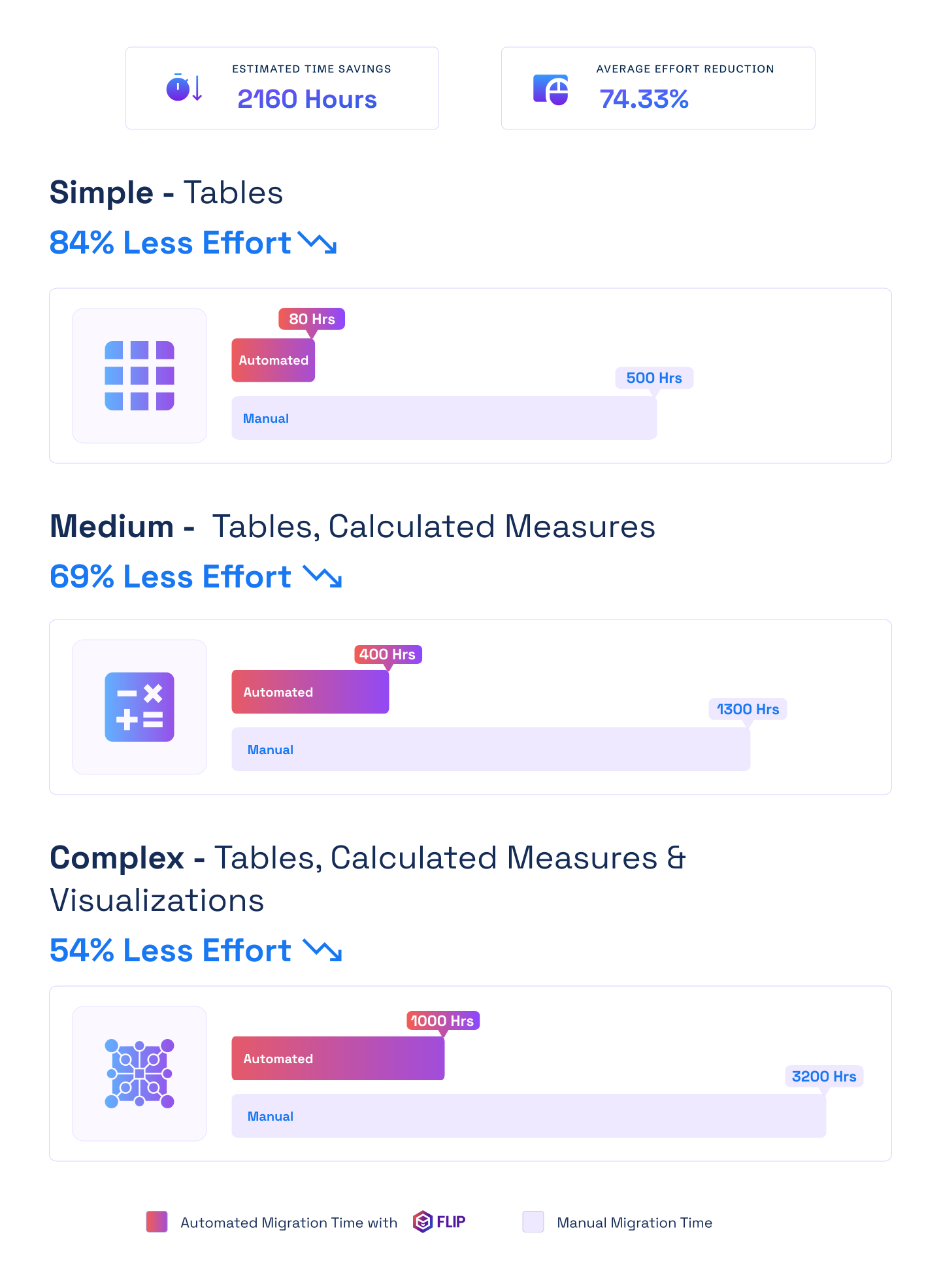

ESTIMATED TIME SAVINGS

Average effort reduction
Simple - Tables
Less Effort

Medium - Tables, Calculated Measures
Less Effort
Complex - Tables, Calculated Measures & Visualizations
Less Effort

Case studies
What Automated BI Migrations Deliver in Practice
Every Tableau to Power BI migration we run follows the same accelerator-led process. The results speak for themselves across manufacturing, retail, and financial services clients.
Migration
60% Faster Migration: Crystal Reports to Power BI
Impact:
- 60% Faster Migration
- 10x Data Scale
- 99.5% Refresh Success Rate
Migration
60% Faster Analytics with Informatica to Alteryx
Impact:
- 45% Faster Reporting Cycles
- 38% Reduction in Maintenance Costs
- 60% Improved Analytics Turnaround
Migration
74% Faster Retail Reporting with Microsoft Fabric
Impact:
- 74% Faster Reporting Cycles
- 65% Increase in Reporting Stability
- 72% Faster Access to Current Metrics
Frequently Asked Questions (FAQs)
01How long does a Tableau to Power BI migration take?
It depends on how many dashboards you have and how complex they are. Small migrations with 20 to 50 dashboards typically finish in 4 to 8 weeks. Mid-size projects with 50 to 150 dashboards run 8 to 14 weeks. Large enterprise environments with complex calculated fields and custom extensions can take 3 to 5 months. Kanerika runs an estate audit before work starts, so you get a precise timeline and scope before any commitment.
02What does a Tableau to Power BI conversion actually involve?
A Tableau to Power BI conversion covers four things: data model and relationship migration, calculated field translation to DAX, dashboard and visual rebuild, and post-migration validation. The accelerator handles the first three automatically for most report types. Your team reviews outputs, runs validation against the Tableau originals, and signs off before the switch. Manual work is limited to edge cases — custom Tableau extensions and highly specialised visualisations that the accelerator flags during discovery.
03What is the recommended approach for Tableau to Power BI migration?
The approach that works best for most organisations is semantic-model-first migration. Rather than rebuilding Tableau dashboards one to one, Kanerika first establishes a centralized Power BI semantic model where all business logic, measures, and relationships live. Reports are then built on top of that model. This avoids the technical debt that comes from duplicating calculated fields across dozens of reports, and it sets you up for Microsoft Fabric and Copilot from the start.
04How do I connect Tableau to Power BI during the transition?
During migration, you don’t connect the two platforms directly. Kanerika runs Power BI in parallel with your Tableau environment while migration is underway. Your source data systems stay the same — the accelerator builds new Power BI data connections pointing to the same databases and cloud services your Tableau reports already use. This means both environments read from the same data, which makes side-by-side validation straightforward before you cut over.
05What is the cost difference between Tableau and Power BI?
Power BI Pro costs around $14 per user per month. Tableau Creator runs around $75 per user per month. For a 100-user team, that is over $73,000 in annual savings on licensing alone. Power BI Desktop is also free for report authors who don’t need sharing features. Most organisations recover their migration investment within 12 months, with savings compounding as teams grow and Tableau’s per-seat costs would have increased.
06Will my Tableau dashboards be rebuilt accurately in Power BI?
Yes. The accelerator reconstructs dashboards in Power BI with matching chart types, filters, drill-through paths, and layouts. Every migrated report is validated against its Tableau original before handoff — visual accuracy, filter behaviour, and calculation output are all confirmed. Highly customised Tableau extensions built with proprietary JavaScript may need manual rebuilding. These are identified during the discovery audit and scoped separately so there are no surprises.
07How are Tableau LOD expressions converted to DAX?
Tableau’s Level of Detail expressions and calculated fields use a different syntax from Power BI’s DAX. The accelerator maps each Tableau calculation to its DAX equivalent using pattern-matching and machine learning. Fixed LODs become CALCULATE functions with explicit filters. Include LODs translate to DAX iterator functions. All converted measures are centralised in the semantic model and validated against source data before delivery.
08Will there be data loss or downtime during migration?
No. Migration runs in parallel with your existing Tableau environment. Nothing is decommissioned until Power BI reports are fully validated and your team has signed off. The accelerator converts the reporting and semantic model layer only — it does not touch your source data. A phased cutover approach lets you run both platforms simultaneously and switch only when you are ready.
09Can Power BI support the same data sources I use in Tableau?
Power BI connects to 500+ data sources including SQL Server, MySQL, Oracle, Snowflake, Azure Synapse, BigQuery, and Salesforce — everything Tableau supports, with stronger native connectivity for Microsoft platforms. For organisations on Microsoft 365 and Azure, connections to SharePoint, Teams, and Azure Data Lake work without custom connectors. DirectQuery, Import, and Direct Lake modes are all available depending on your data volume and refresh requirements.
10What happens to Tableau Prep workflows during migration?
Tableau Prep workflows don’t auto-convert to Power BI equivalents. Kanerika rebuilds them using Power Query for simpler transformations and Microsoft Fabric Dataflows Gen2 for complex, orchestrated pipelines. The outputs deliver the same business logic using Microsoft-native tooling that connects directly to the Power BI semantic model. Prep workflows are catalogued during the discovery audit, so scope and effort are clear before migration starts.
11Can I run Tableau and Power BI at the same time during migration?
Yes, and this is the recommended approach. Kanerika plans migrations in phases to allow parallel operation. Teams validate Power BI reports against live Tableau data before switching over. Different business units can move at different speeds. Tableau is only switched off after your team has formally signed off on the Power BI environment. There is no forced hard cutover.
12How does Power BI integrate with Microsoft Fabric after migration?
Power BI is the native reporting layer of Microsoft Fabric. Post-migration, reports can use Direct Lake mode — querying data stored in OneLake in real time without importing or moving it. This removes the scheduled-refresh limitations of Tableau’s data extract approach and supports real-time analytics at scale. Kanerika configures Fabric workspace governance, data lineage through Microsoft Purview, and sensitivity labels as part of delivery.
13Is Kanerika's migration tool available on Azure Marketplace?
Yes. The Tableau to Power BI migration accelerator is listed on Azure Marketplace and can be purchased using your Azure Committed Spend (MACC). If your organisation has committed Azure spend, you can apply it toward the migration — reducing or eliminating out-of-pocket cost for the tooling. Kanerika is a certified Microsoft Solutions Partner for Data and AI, and the listing has passed Microsoft’s technical and compliance requirements.
14What certifications does Kanerika hold?
Kanerika holds ISO 27001, ISO 27701, SOC 2, ISO 9001, and CMMI Level 3 certifications. For regulated industries — healthcare, financial services, pharma — these are standard vendor requirements. Power BI itself carries Microsoft’s enterprise compliance certifications including ISO 27001, SOC 2, and HIPAA eligibility. Microsoft Purview, configured during migration, adds data governance and audit trails without requiring separate third-party tools.
15How do I convert a Tableau workbook to Power BI?
To convert a Tableau workbook to Power BI, you need a tool that reads the .twb or .twbx file and handles structural conversion programmatically: data connections, calculated fields, and dashboard layouts. FLIP does this automatically for standard workbooks. Manual work is scoped to custom Tableau extensions flagged during discovery, which are typically a small share of a full migration estate. The approach avoids rebuilding each workbook from scratch and keeps the process auditable at every step.
16What tools are available for Tableau to Power BI migration automation?
A handful of migration tools address parts of the process: visual rebuild, DAX conversion, or data source remapping. Few cover the full stack. FLIP is Kanerika’s proprietary Tableau to Power BI migration automation platform. It handles workbook parsing, calculated field conversion, dashboard rebuild, and data source remapping in one process. All outputs go through automated validation before delivery. It is listed on Azure Marketplace and eligible for Azure Committed Spend, which reduces out-of-pocket cost for organizations with MACC agreements.
17Which firms provide Tableau to Power BI migration services for enterprise clients?
Look for Microsoft Solutions Partners with Data and AI specializations. That designation confirms Microsoft has validated the firm’s technical depth and client success on the platform. Relevant specializations include Analytics on Azure and Data Warehouse Modernization to Azure. Beyond credentials, a credible firm brings a migration accelerator, published case studies with verifiable outcomes, and governance experience for regulated industries. Kanerika is a Microsoft Solutions Partner for Data and AI, holds ISO 27001, SOC 2 Type II, and CMMI Level 3, and has delivered migrations across financial services, healthcare, and manufacturing.
18How are Tableau users and permissions handled when moving to Power BI?
Tableau sites, projects, groups, and row-level security filters are inventoried during the discovery audit and mapped to Power BI workspaces, Microsoft Entra ID security groups, and row-level security roles in the semantic model. FLIP carries user filters and data-level permissions across with the reports, and Kanerika validates that each role sees exactly the same data it saw in Tableau before sign-off. Workspace roles, app audiences, and sensitivity labels are configured so access stays governed from day one, not patched after go-live.
19What is the difference between migrating and converting from Tableau to Power BI?
Conversion covers the technical transformation of individual assets (dashboards, data models, calculated fields) from Tableau format to Power BI. Migration is the broader programme: discovery, scoping, conversion, validation, governance configuration, user enablement, and cutover. Most engagements need both. The conversion is what the accelerator handles programmatically. The migration is the end-to-end project that ensures converted assets land correctly in your production environment and your team can operate them. Kanerika delivers both under a single engagement.