

Crystal Reports to Power BI Migration, Automated with FLIP
SAP Crystal Reports is approaching end of mainstream support, and licensing costs keep rising. Kanerika's FLIP accelerator converts Crystal Reports to Power BI automatically, reading your RPT files and generating interactive dashboards with formulas, formatting, and data connections intact. Available on Azure Marketplace and eligible for Azure Committed Spend.
Get Started with Crystal Reports to Power BI Migration
The Real Cost of Staying on Crystal Reports
What Sticking with Crystal Reports Actually Costs You

80%
IT budgets are spent on legacy system maintenance

44%
CIOs see legacy systems as growth barriers

50%
Developer productivity is lost due to outdated tools

70%
Digital transformation efforts fail due to legacy systems
Migrate from

with Our Accelerator
Use Your Azure Committed Spend (MACC)


See Crystal Reports to Power BI Conversion in Action
Watch how the accelerator reads a Crystal Reports RPT file, converts formulas and conditional formatting, and generates a Power BI dashboard, with every table, chart, and layout preserved.
Migration ROI Calculator
Kanerika’s IP-led accelerator, FLIP, automates your migration with major resource savings, ensuring a faster, lower-risk move to your target platform.
FLIP is Kanerika's proprietary migration accelerator. Here's exactly where the savings come from:
What a Crystal Report to Power BI Migration Actually Covers
Most teams underestimate scope when they plan to migrate from Crystal Reports. A migration isn’t just converting files, it covers formulas, data connections, visuals, and parameters. Here’s what the process accounts for.

RPT Files and Subreports
Every Crystal Report, including sub reports and embedded components, is catalogued, converted, and rebuilt as a Power BI dashboard or paginated report.

Formulas and Calculated Fields
SAP Crystal Reports formulas map to DAX measures in Power BI. Conditional formatting, running totals, and grouping logic all carry over with validated accuracy.

Data Connections and Sources
Existing database connections, SQL Server, Oracle, SAP HANA, and others, remap to Power BI’s native connectors. On-premises sources connect via the Power BI data gateway.

Parameters and Filters
Crystal Reports parameters convert to Power BI slicers and cascading filters. Dynamic parameters with dataset dependencies translate to filter relationships.
The Crystal Reports to Power BI Advantage
Benefits of Crystal Reports Replacement with Power BI

Interactive Dashboards, Not Static Reports
- Static Crystal Report pages become live, filterable Power BI dashboards
- Users explore data without waiting for scheduled report runs
- Drill-downs, slicers, and cross-filtering replace manual report variations

Cloud-Native Performance at Scale
- Move off on-premises Crystal Server to cloud-native Power BI infrastructure
- Direct Lake mode in Microsoft Fabric handles even large datasets
- Reports load faster and scale as data volumes grow, no server upgrades needed

Richer Visualizations, Faster to Build
- Replace basic Crystal tables with interactive charts, maps, and custom visuals
- Drag-and-drop report building reduces dependency on specialized developers
- Mobile-optimized dashboards give teams access on any device

Lower Licensing and Maintenance Costs
- Power BI Pro costs $14 per user per month versus SAP Crystal Server pricing
- Eliminate per-server Crystal Reports infrastructure and maintenance overhead
- Microsoft 365 E5 licenses often include Power BI at no additional cost
The Migration Process
Migrate Crystal Reports to Power BI in Four Automated Steps
RPT File Extraction and Metadata Mapping
The accelerator reads your Crystal Reports RPT files and extracts datasets, visual elements, formulas, and parameters into a structured migration map for Power BI.


Formula and Expression Conversion to DAX
Crystal Reports formula language converts to Power BI DAX measures automatically. Conditional formatting rules, calculated fields, and grouping logic all transfer with validated accuracy.

Visual Mapping and PBIX File Generation
Tables, charts, crosstabs, and subreports map to their Power BI equivalents. The accelerator generates ready-to-import PBIX files with visuals pre-populated from your source data.

Validation, Fabric Readiness, and Sign-Off
Every migrated report validates against the Crystal original across data accuracy, visual consistency, and formula output. Post-migration, your environment connects to Microsoft Fabric via Direct Lake.

ROI YOU CAN EXPECT
Real ROI from Crystal Reports to Power BI Migration
Crystal Reports to Power BI migration saves time at every complexity level. The numbers below show estimated effort reduction based on your report type. The accelerator handles conversion while your team focuses on validation and sign-off.
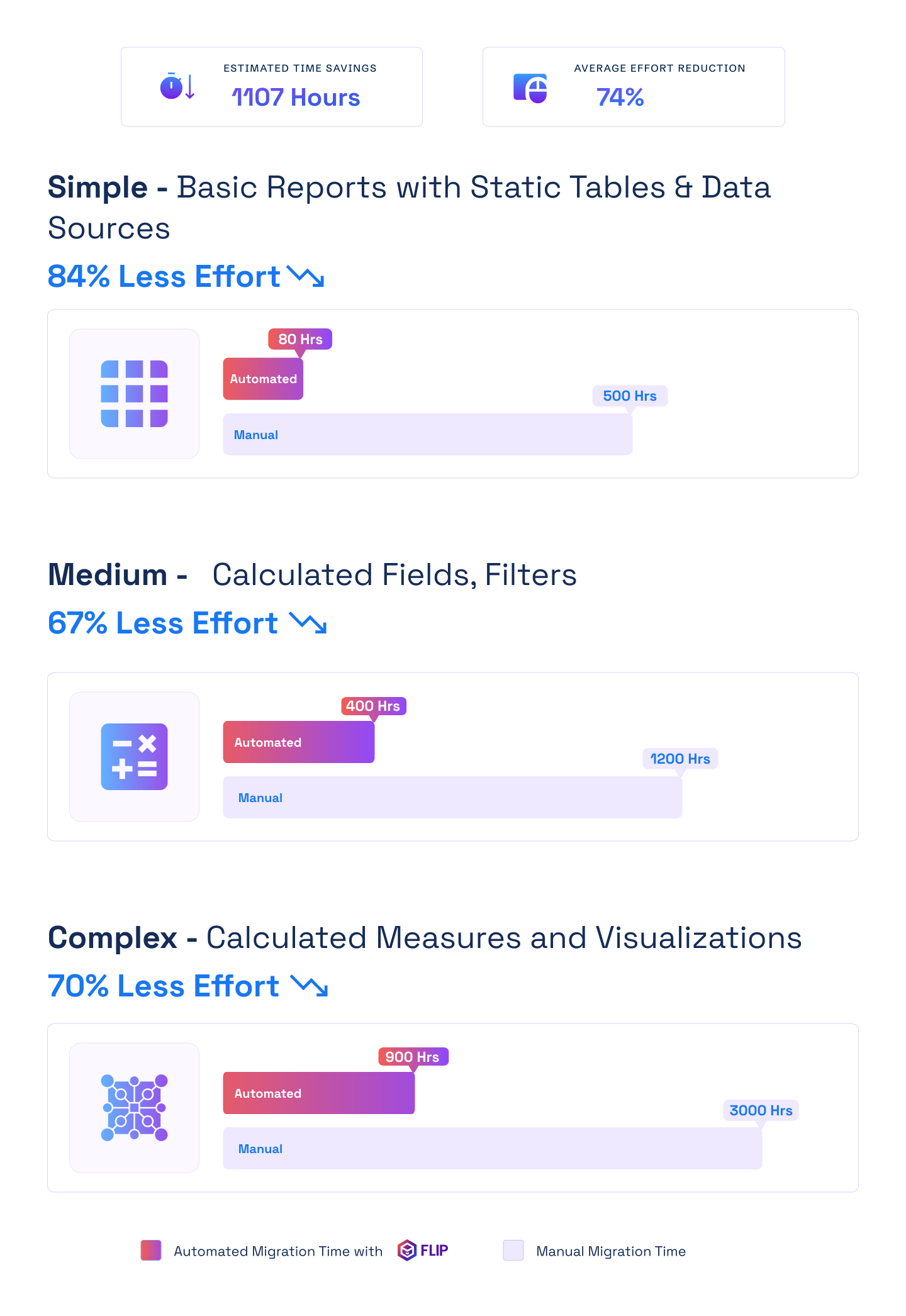

ESTIMATED TIME SAVINGS

Average effort reduction
Simple - Basic Reports with Static Tables & Data Sources
Less Effort

Medium - Calculated Fields, Filters
Less Effort
Complex - Calculated Measures and Visualizations
Less Effort

Case studies
Proven Outcomes from Crystal Reports to Power BI Migrations
Accelerator-led migrations across manufacturing, retail, and financial services consistently deliver faster timelines and lower effort. The same approach powers every Crystal Reports to Power BI migration we run.
Migration
60% Faster Migration: Crystal Reports to Power BI
Impact:
- 60% Faster Migration
- 10x Data Scale
- 99.5% Refresh Success Rate
Migration
60% Faster Analytics with Informatica to Alteryx
Impact:
- 45% Faster Reporting Cycles
- 38% Reduction in Maintenance Costs
- 60% Improved Analytics Turnaround
Migration
74% Faster Retail Reporting with Microsoft Fabric
Impact:
- 74% Faster Reporting Cycles
- 65% Increase in Reporting Stability
- 72% Faster Access to Current Metrics
Frequently Asked Questions (FAQs)
01What does a Crystal Reports to Power BI migration involve?
A Crystal Reports to Power BI migration covers four steps: extracting metadata from RPT files, converting Crystal formula language to DAX, rebuilding visuals and reports as Power BI dashboards, and validating outputs against the originals. Kanerika’s accelerator automates the first three steps for most report types. Your team handles validation and sign-off. The result is production-ready PBIX files that replicate your Crystal Reports logic in Power BI’s interactive environment.
02How long does Crystal Reports to Power BI migration take?
Simple reports with static tables migrate in days. Mid-size environments with calculated fields and filters take 4 to 8 weeks. Complex environments with subreports, crosstabs, and embedded SQL can take 2 to 4 months. Kanerika runs a full RPT file inventory during discovery to give you a precise timeline before work starts. The accelerator compresses effort significantly compared to manual rebuilding approaches.
03What is the cost of migrating from Crystal Reports to Power BI?
Crystal Reports to Power BI migration cost varies by report count and complexity. Most projects run between $10,000 and $100,000 depending on environment size. The investment typically pays back within 12 months through licensing savings alone. Power BI Pro costs around $14 per user per month. SAP Crystal Server and SAP BusinessObjects licensing runs significantly higher, especially as user counts grow. Many Microsoft 365 customers find Power BI is already included in their existing licenses.
04Why is Power BI a better Crystal Reports replacement?
Crystal Reports produces static, paginated output designed for print. Power BI delivers interactive dashboards where users filter, drill, and explore data without waiting for a new report run. Power BI connects directly to live data sources, supports cloud-native deployment, and integrates natively with Microsoft Teams, Excel, and Azure. For organizations already on Microsoft 365, Power BI as a Crystal Reports replacement eliminates a standalone tool with no native Microsoft integration.
05Can Power BI replicate Crystal Reports layouts and formatting?
Most Crystal Reports layouts rebuild accurately in Power BI. Tables, charts, crosstabs, grouping, and conditional formatting all have Power BI equivalents. For pixel-perfect paginated output — invoices, regulatory reports, print-formatted documents — Power BI Report Builder handles these through paginated report files (.rdl). Kanerika maps each Crystal report to the right Power BI format during the discovery audit, so nothing is forced into an incompatible template.
06How do Crystal Reports formulas convert to Power BI DAX?
Crystal Reports uses its own formula language for calculated fields, running totals, and conditional logic. Power BI uses DAX for calculations and Power Query M for data transformation. Kanerika’s accelerator maps Crystal formulas to DAX equivalents automatically using pattern-matching algorithms. Complex calculations break into structured DAX measures and are validated against Crystal source output before delivery. Your business logic carries over accurately.
07What happens to subreports and parameters during migration?
Crystal Reports subreports become Power BI drill-through pages or bookmarks, which provide equivalent navigation with better interactivity. Parameters convert to Power BI slicers and cascading filters. Dynamic parameters with dataset dependencies translate to filter relationships in the Power BI data model. Kanerika’s accelerator catalogues all subreports and parameters during the discovery phase so scope is clear before migration starts.
08Will there be data loss during Crystal Reports to Power BI migration?
No. Migration runs in parallel with your existing Crystal Reports environment. Nothing is decommissioned until Power BI reports are validated and signed off. The accelerator converts the reporting layer only and does not touch your source databases. Every migrated report runs a side-by-side data accuracy check against the Crystal original before handoff. A phased approach lets you run both systems simultaneously until your team is ready to switch.
09Can Power BI connect to the same data sources as Crystal Reports?
Power BI connects to 500+ data sources including SQL Server, Oracle, MySQL, SAP HANA, Snowflake, and Azure Synapse — covering everything Crystal Reports supports. For on-premises databases behind a corporate firewall, Power BI uses an on-premises data gateway to maintain connectivity. Direct Lake mode in Microsoft Fabric supports real-time queries on large datasets without scheduled refresh, which is a significant improvement over Crystal’s report scheduling model.
10Is there a tool to automate Crystal Reports to Power BI conversion?
Yes. Kanerika’s migration accelerator automates Crystal Reports to Power BI conversion using a Java-based metadata extractor that reads RPT files and a Python transformation layer that generates Power BI-compatible PBIX files. The tool handles data connections, formula mapping, visual conversion, and conditional formatting automatically. It is listed on Azure Marketplace and can be funded against your Azure Committed Spend, which means no additional budget for many Microsoft customers.
11Can I run Crystal Reports and Power BI in parallel during migration?
Yes. Kanerika plans all migrations in phases to allow parallel operation. Crystal Reports remain live and unchanged while Power BI reports are built and validated. Teams compare outputs side-by-side before switching. Different departments can move at different speeds. Crystal Reports are only decommissioned after formal sign-off on the Power BI environment. There is no forced cutover.
12How does Power BI integrate with Microsoft Fabric after migration?
Power BI is the native reporting layer of Microsoft Fabric. Post-migration, reports use Direct Lake mode to query data in OneLake in real time without importing or scheduling refresh. This replaces Crystal Reports’ static export and email delivery model with live, always-current dashboards. Kanerika configures Fabric workspace governance, data lineage through Microsoft Purview, and sensitivity labels as part of migration delivery.
13What Power BI license do I need after migrating from Crystal Reports?
Power BI Pro at around $14 per user per month covers most migration scenarios — report authoring, workspace sharing, and scheduled refresh. Power BI Premium Per User is needed for paginated reports, larger dataset capacity, and advanced AI features. Many Microsoft 365 E5 subscribers already have Power BI Pro included. Kanerika recommends the right license tier during the discovery assessment based on your sharing model and report types.
14What certifications does Kanerika hold for BI migration projects?
Kanerika holds ISO 27001, ISO 27701, SOC 2, ISO 9001, and CMMI Level 3 certifications. As a certified Microsoft Solutions Partner for Data and AI, the Crystal Reports to Power BI migration accelerator has passed Microsoft’s technical and compliance validation for Azure Marketplace listing. For regulated industries — healthcare, financial services, pharma — these certifications meet standard vendor requirements without additional documentation.
15Is there a Crystal Reports migrator tool that handles conversion automatically?
Yes. Kanerika’s FLIP is a purpose-built Crystal Reports migrator that reads RPT files directly using a Java-based metadata extractor and generates Power BI-compatible PBIX files via a Python transformation layer. It handles data connection remapping, formula-to-DAX conversion, visual reconstruction, and conditional formatting automatically. FLIP is listed on Azure Marketplace and eligible for Azure Committed Spend, so most Microsoft customers can fund the migration without a separate procurement process. Your team handles validation and sign-off; FLIP handles the conversion.
16How do I convert a Crystal Report to Power BI without rebuilding from scratch?
Kanerika’s accelerator automates the conversion so you’re not manually recreating each Crystal Report in Power BI from a blank canvas. The tool extracts your RPT file’s structure — datasets, parameters, formulas, and visuals — and maps each element to its Power BI equivalent. Tables become Power BI tables, crosstabs become matrix visuals, Crystal formulas become DAX measures, and parameters become slicers. The output is a PBIX file ready to import. For most standard reports, this eliminates the rebuild entirely. Complex custom reports with embedded SQL or specialized formatting get flagged for manual review during the discovery phase.