

SQL Server to Microsoft Fabric Migration, Automated by FLIP
On-premises SQL Server locks your data behind hardware refresh cycles, manual SSIS maintenance, and a fragmented BI stack. Kanerika's FLIP Migration Accelerator moves your SQL Server databases, SSIS packages, and reporting workloads to Microsoft Fabric end to end, preserving business logic without rebuilding from scratch. FLIP accelerators are available on the Azure Marketplace and are eligible for your Azure Committed Spend (MACC).
Get Started with SQL Services to Microsoft Fabric Migration
THE SQL SERVER SCALABILITY PROBLEM
The Business Cost of Staying on SQL Server

80%
IT budgets are spent on legacy system maintenance.

44%
CIOs see legacy systems as growth barriers.

50%
Developer productivity is lost due to outdated tools

70%
Digital transformation efforts fail due to legacy systems
Migrate from

with Our Accelerator
Use Your Azure Committed Spend (MACC)

Watch SQL Server to Fabric Migration in Action
See FLIP scan your SQL Server environment, convert SSIS packages to Fabric data pipelines, and move your full data estate to Microsoft Fabric while preserving transformation logic and business rules at every step of the migration.
Migration ROI Calculator
Kanerika’s IP-led accelerator, FLIP, automates your migration with major resource savings, ensuring a faster, lower-risk move to your target platform.
FLIP is Kanerika's proprietary migration accelerator. Here's exactly where the savings come from:
The SQL Services to Microsoft Fabric Advantage
Benefits of Microsoft Fabric Migration from SQL Server

One Platform for All Data Workloads
- Run data engineering, warehousing, and BI under a Fabric license
- Retire the separate tools required to operate SSIS and SSRS
- Manage governance and security from one place

Lower Infrastructure Spend
- End hardware refresh cycles tied to on-premises SQL Server
- Replace SSIS infrastructure with Fabric data pipelines
- Apply MACC credits toward your SQL to Fabric migration costs

Elastic Cloud-Scale Performance
- Scale Fabric compute wiithout SQL Server licensing constraints
- Scale data volumes SQL Server cannot handle affordably
- Replace SSIS batch jobs with event-driven Fabric pipelines

AI and Analytics Built In
- Connect Power BI and Microsoft Copilot directly to Fabric
- Access AI-ready data architecture that SQL server cannot provide
- Move SSRS reporting to Fabric-native BI without additional licensing
The Migration Process
Automated SQL Server to Microsoft Fabric Migration Process
Environment Discovery and Inventory
FLIP scans your SQL Server databases, SSIS packages, SSRS reports, and SSAS models before any migration starts, producing a full inventory of schemas, dependencies, and complexity so scope and effort are confirmed upfront.


Automated Schema and Pipeline Conversion
FLIP converts SQL Server schemas to Fabric Lakehouse or Warehouse and migrates SSIS packages to Fabric data pipelines automatically, preserving transformation logic through every stage of the SSIS to Fabric migration.

Parallel Validation and Parity Testing
Converted Fabric workloads run in parallel with your live SQL Server environment, validating data outputs and pipeline results against SQL Server benchmarks before any production cutover takes place.

Production Cutover and Team Onboarding
FLIP flags complex schemas and SSIS packages for engineer review, completes production deployment after sign-off, and configures your Microsoft Fabric environment with full enterprise onboarding for your data team.

ROI YOU CAN EXPECT
Unlock Significant Gains with SQL to Fabric Migration
The Microsoft Fabric migration from SQL server benefits your business at every workload scale. FLIP handles the conversion. Your team validates and signs off.
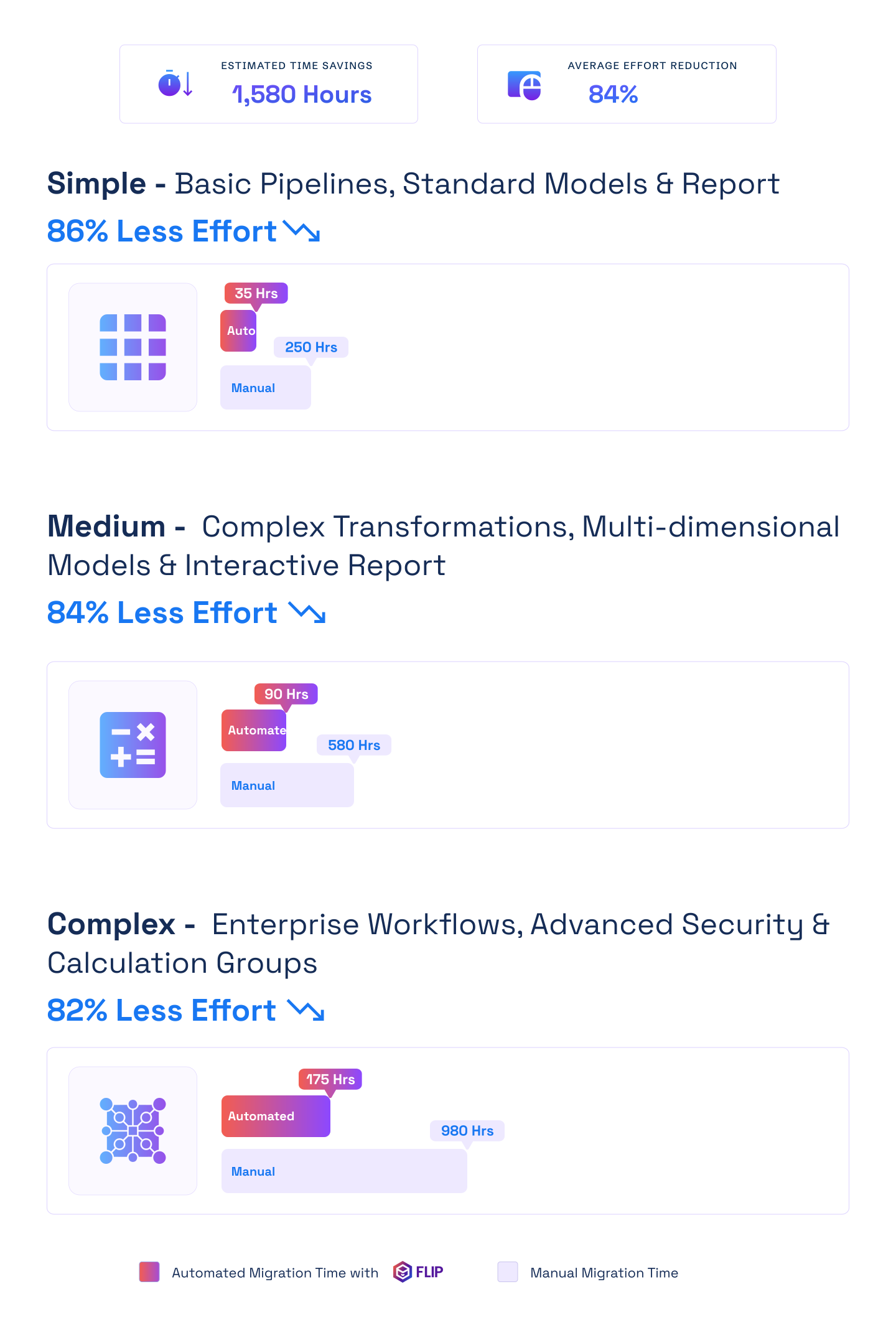

ESTIMATED TIME SAVINGS

Average effort reduction
Simple - Basic Pipelines, Standard Models & Report
Less Effort

Medium - Complex Transformations, Multi-dimensional Models & Interactive Report
Less Effort
Complex - Enterprise Workflows, Advanced Security & Calculation Groups
Less Effort

Case studies
Delivering Analytics Excellence with Automated Migrations
Migration
74% Faster Retail Reporting with Microsoft Fabric
Impact:
- 74% Faster Reporting Cycles
- 65% Increase in Reporting Stability
- 72% Faster Access to Current Metrics
Migration
40% Lower Costs: SSIS to Microsoft Fabric Migration
Impact:
- 30% Improvement in Data Processing Speeds
- 40% Reduction in Operational Costs
- 25% Decrease in Manual Maintenance Efforts
Migration
40% Less Maintenance: SSAS to Fabric Migration
Impact:
- 25% Increase in real-time analytics capabilities
- 40% Reduction in manual maintenance efforts
- 20% Improvement in data integration efficiency
Frequently Asked Questions (FAQs)
01What does a SQL Server to Microsoft Fabric migration involve?
A SQL Server to Microsoft Fabric migration covers four stages: full environment discovery across databases and SSIS packages, automated schema and pipeline conversion using FLIP, parallel parity testing against SQL Server outputs, and production deployment with Fabric environment configuration. FLIP automates discovery and conversion for the majority of standard SQL Server workload types, cutting manual effort significantly. Engineers review complex schemas, custom SSIS logic, and edge cases before sign-off. The SQL Server to Microsoft Fabric migration runs alongside your live environment, so production operations remain unaffected throughout the transition.
02What are the Microsoft Fabric benefits when migrating from SQL Server?
The core Microsoft Fabric benefits migrating from SQL Server include eliminating on-premises infrastructure costs, consolidating data engineering and BI workloads under one platform, and gaining cloud-native scalability without SQL Server licensing constraints. Fabric replaces SSIS, SSRS, and SSAS with integrated services, reducing the number of separate tools your data team manages. Built-in Power BI and Copilot integration delivers AI-ready analytics without middleware. Microsoft Fabric migration from SQL Server benefits also extend to governance: one security model replaces the fragmented approach required across SQL Server, SSIS, and separate reporting tools.
03What do SSIS to Microsoft Fabric migration services include?
Kanerika’s SSIS to Microsoft Fabric migration services cover the full project scope: SSIS package discovery and inventory, automated conversion to Fabric data pipelines using FLIP, output parity testing against live SSIS pipelines, and production deployment with team onboarding. FLIP handles standard SSIS package types automatically. Kanerika engineers manage complex packages, custom scripts, and third-party connector dependencies. Every engagement starts with a pre-migration assessment that confirms scope and timeline before conversion begins. SSIS to Microsoft Fabric migration services are structured for both phased and full migration approaches, depending on your environment.
04What is the difference between SSIS migration to Azure Data Factory and Fabric?
SSIS migration to Azure Data Factory moves your SSIS packages to a managed cloud ETL service within Azure. Migrating SSIS to Microsoft Fabric takes a broader approach, converting SSIS to Fabric-native data pipelines fully integrated with Lakehouse, Warehouse, and Power BI in one platform. Organizations already invested in Microsoft Fabric should consider migrating SSIS packages to Fabric rather than Azure Data Factory alone, as it removes the need to maintain a separate ETL service. FLIP supports both paths. Kanerika advises on the right approach based on your Azure footprint and data strategy.
05Can Kanerika migrate SSIS packages to Fabric without manual rebuilds?
Yes. FLIP automates conversion of SSIS packages to Fabric data pipelines for standard package types, preserving transformation logic, dependencies, and scheduling without manual reconstruction. The process to migrate SSIS packages to Fabric runs in parallel with live SSIS environments, so pipelines are validated before any cutover. FLIP flags complex packages and custom scripts for Kanerika engineer review. This approach eliminates manual rebuild risk and cuts the effort needed to replace SSIS with Microsoft Fabric significantly. Most standard SSIS package migrations complete without rebuilding any transformation logic from scratch.
06How does Kanerika replace SSIS with Microsoft Fabric pipelines?
Kanerika uses FLIP to replace SSIS with Microsoft Fabric by scanning your SSIS environment, converting packages to Fabric-native data pipelines, and validating outputs before decommissioning SSIS infrastructure. Engineers manage complex packages, third-party connectors, and edge cases that fall outside automated conversion scope. The SSIS to Fabric data pipeline conversion includes output parity testing to confirm equivalent results in Fabric. Organizations that replace SSIS with Microsoft Fabric gain serverless scalability, native integration with Fabric Lakehouse and Warehouse, and lower infrastructure overhead than maintaining on-premises SSIS.
07Does SQL Server to Fabric migration cover SSAS and SSRS workloads?
Yes. Kanerika’s SQL Server to Fabric migration covers SSAS to Fabric and SSRS to Fabric transitions alongside core database and SSIS workloads. SSAS tabular models are assessed for conversion to Power BI semantic models in Fabric, and multidimensional cubes are scoped for redesign as tabular models. SSRS reports are evaluated for migration to Power BI paginated reports or interactive Power BI reports. Both SSAS to Fabric and SSRS to Fabric paths are scoped during the initial assessment so complexity and effort are defined before migration starts. Kanerika recommends consolidating these workloads in a single SQL Server to Fabric migration engagement to reduce cost and transition risk.
08How long does a SQL Server to Microsoft Fabric migration take?
Timeline depends on the volume and complexity of your SQL Server databases, SSIS packages, SSRS reports, and SSAS models. Simple SQL Server environments with standard SSIS pipelines typically complete a Fabric migration in four to eight weeks using FLIP. Medium-complexity environments with custom SSIS logic and multiple source systems take eight to fourteen weeks. Large enterprise SQL Server to Microsoft Fabric migration projects with extensive SSIS estates may extend to four to six months. FLIP reduces effort at every scale by automating discovery and conversion. Kanerika confirms scope, timeline, and cost before any migration work begins.
09Is FLIP available on Azure Marketplace for SQL Server to Fabric migrations?
Yes. Kanerika’s FLIP Migration Accelerator is available on the Azure Marketplace and eligible for the Microsoft Azure Consumption Commitment (MACC). Organizations with committed Azure spend can apply MACC credits toward SQL Server to Fabric migration project costs, reducing out-of-pocket expenses. Kanerika holds Microsoft’s Data Warehouse Migration to Azure Specialization and is a certified Microsoft Solutions Partner for Data and AI. FLIP has passed Microsoft’s technical and compliance requirements. Kanerika also holds ISO 27001, SOC 2, ISO 9001, and CMMI Level 3 certifications.
10Which organizations get the most value from migrating SQL Server to Fabric?
Organizations running on-premises SQL Server with growing infrastructure costs, aging SSIS pipelines, and fragmented BI environments built on SSRS and SSAS benefit most from migrating to Microsoft Fabric. Enterprises already invested in Microsoft 365, Azure, or Power BI gain immediate value from Fabric’s native integration. Companies looking to consolidate data engineering, warehousing, and analytics onto one platform find the move from SQL Server to Fabric especially valuable. Kanerika works with clients across financial services, manufacturing, healthcare, logistics, and retail. A migration assessment confirms whether a phased or full migration fits your environment.