
TL;DR
Customer data integration is the process of connecting, matching and governing customer records from CRM, marketing, commerce, billing and support systems into one accurate, permitted view. Analytics-first teams should consolidate into a warehouse or lakehouse, while marketing teams add a CDP or reverse ETL on top. Regulated or account-heavy B2B teams also need MDM-style matching with human stewards. Copying records into one table is the easy part. The hard part is deciding who each customer is, which value wins and what each team may do with the data. Start with one use case, test with real messy records, and expand only when matches and opt-outs hold up downstream.
Key Takeaways
- Customer data integration connects, matches and governs customer records so each team sees the right customer with the right permissions.
- A single customer view is a set of linked records with provenance, not one physical database that every system must copy.
- Choose the architecture by your hardest requirement, whether that is analytics, activation speed or identity depth.
- Identity resolution and field-level survivorship decide whether people trust the result, and a false merge costs more than a missed match.
- Consent, opt-outs and deletions must travel with the record to every downstream copy, including AI indexes.
- Start with one use case, measure match precision and freshness, then add sources one at a time.
The Unsubscribe That Never Reached the CRM
Dana clicked unsubscribe on a Tuesday. She is an illustrative customer, although every CRM team will recognize her. The marketing platform logged the opt-out against her personal email. Two weeks later, however, a sales sequence emailed her work address with the same promotion. She wrote back to complain, and the rep could find no record of her choice.
Her company’s billing account listed a third address, while her two support tickets came from a shared help-desk login. So four systems held four versions of Dana, and none of them agreed on who she was or whether anyone could contact her.
Even a nightly copy into one big table would not have stopped that email. Customer data integration has to settle identity, authority and permission first. Then it has to push the answer back to every tool that acts on it.
What Is Customer Data Integration?
Customer data integration (CDI) is the work of connecting customer records across systems and matching the ones that describe the same person or company. It also governs how the combined data is used, so analytics, service, marketing and AI can all rely on the same customer view.
A Working Definition
In practice, CDI has three jobs. First, it moves data from sources such as CRM, ecommerce, billing and the help desk into a shared layer. Then it resolves identities so each customer appears once, and finally it applies rules for quality, ownership and consent.
General data integration moves any data between systems, as Kanerika’s guide to enterprise data integration explains. CDI is the customer-specific version, and it is harder because people change emails, share devices and appear under different names in every tool.
What a Single Customer View Really Means
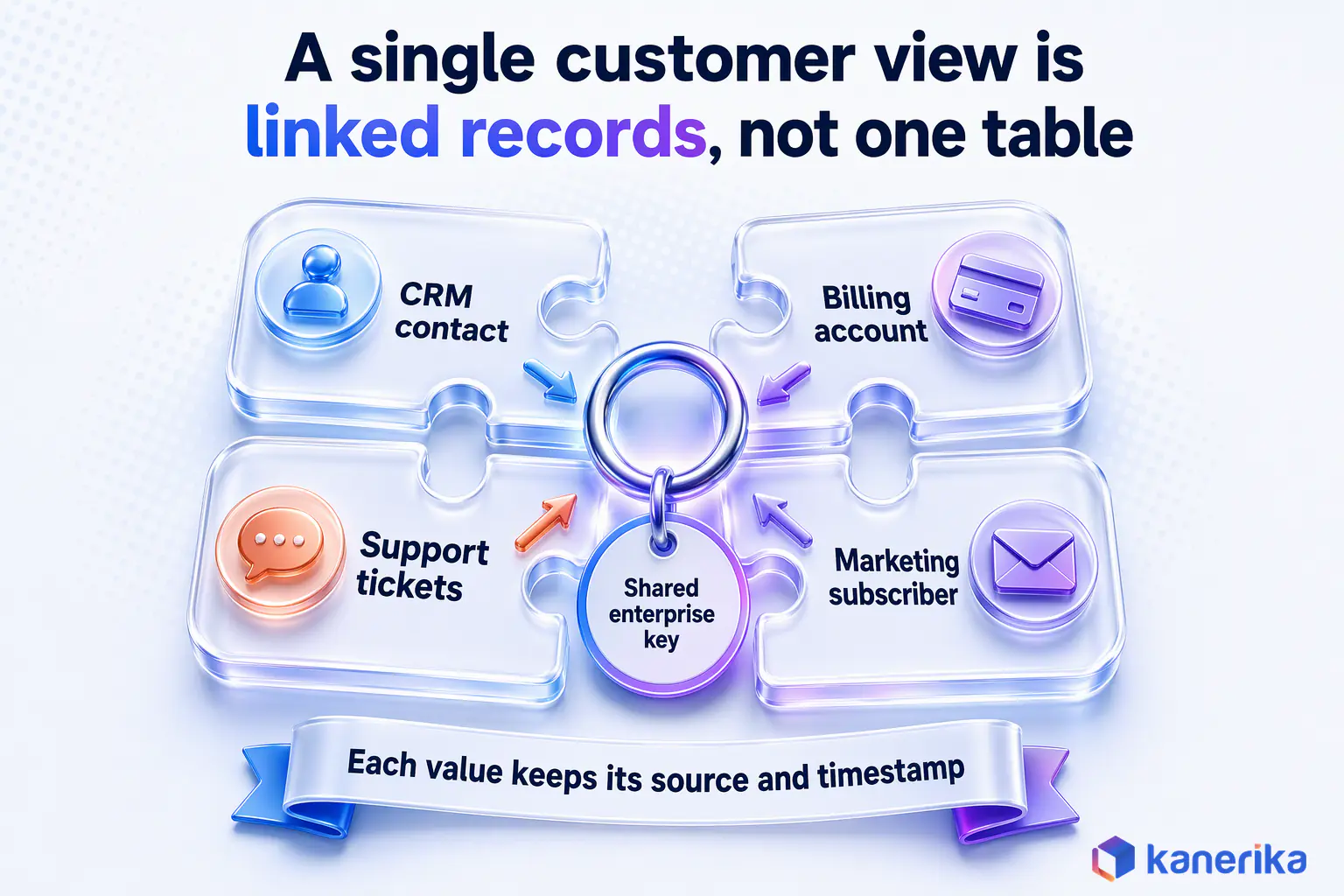
At first glance, a single customer view sounds like one master table. In most enterprises, though, it is a logical view built from linked records that each keep their source, timestamp and owner.
That provenance matters when values conflict. When billing and the CRM disagree on an address, the view should show which system supplied each value and when. A service agent can then trust the value, or flag it for a data steward to check before acting on it. Each system can keep its own copy, as long as all of them share identifiers and follow the same rules.
Customer Data Integration vs CDP, MDM, CRM Integration and ETL
These terms overlap, so buyers often compare tools that solve different problems. The table below sets the boundaries before any tool enters the conversation.
| Concept | What it does | How it relates to CDI |
|---|---|---|
| Customer data integration (CDI) | Connects, matches and governs customer data across systems | The overall discipline and the outcome |
| Customer data platform (CDP) | Builds marketing profiles from behavioral and campaign data, then sends audiences to channels | One way to deliver CDI for marketing use cases |
| Master data management (MDM) | Maintains governed golden records with match rules and stewardship | The identity and survivorship engine for regulated or B2B data |
| CRM integration | Syncs records between the CRM and other applications | One source connection inside a wider CDI program |
| ETL and ELT | Extracts, transforms and loads data into a warehouse or lakehouse | The pipeline mechanics that CDI often runs on |
Pipelines and integration are easy to confuse, and Kanerika’s comparison of data integration vs ETL separates the two. A CDP can be part of the answer too, but it rarely governs finance, support and contract data on its own.
Why Customer Data Integration Matters
Integrated customer data pays off because it changes decisions people make every day. A service agent sees the open invoice before promising a refund, and a marketer stops paying to target customers who already bought.
- One answer for service, because agents see orders, tickets and contracts together and customers stop repeating themselves.
- Personalization on current data, so offers reflect what the customer did this week instead of what a stale export said last quarter.
- Reporting without reconciliation, since finance and sales count customers the same way and revenue per customer no longer depends on who ran the query.
- Cleaner inputs for AI, because models and agents read one resolved customer rather than three conflicting ones.
- Privacy requests you can fulfil, so when someone asks to see or delete their data, you can actually find every copy.
The competitive advantage comes from speed and trust. Trax, a logistics company, shows the speed side: its invoice data arrived from many carriers in many file formats. After Kanerika standardized that exchange on Informatica B2B, manual errors fell 54%. Customer data is also the base for customer retention analytics, since churn signals sit across support, usage and billing.
What the Payoff and the Cost Look Like
Kanerika’s work for a CRM software provider shows the payoff in numbers. After its users got one dashboard over unified sales data, the provider recorded a 10% rise in customer retention. Sales and revenue also grew 14%, as the CRM dashboard case study reports.
Bad customer data has a price, too, and Gartner now measures it in AI terms. In a July 2024 Gartner survey, 63% of organizations lacked, or were unsure they had, the data management practices AI needs.
In February 2025, Gartner added a forecast: through 2026, organizations will abandon 60% of AI projects unsupported by AI-ready data. Poor quality has many shapes in customer data, and duplicate or conflicting customer records are among its most familiar forms.
Case Study
22% Better KPI Accuracy with a Unified CRM Dashboard
A CRM software provider gave its users one generative AI dashboard over unified sales data and recorded a 22% uptick in KPI identification accuracy, alongside higher retention and revenue.
Read the Case Study →Types of Customer Data and Where Each One Lives
Customer data comes in four broad types, and each one lives in different systems with a different update rhythm. So knowing which is which tells you how often to sync it and who should own it.
Identity, Engagement, Transactional and Attitudinal Data
- Identity data covers names, emails, phone numbers, addresses, account IDs and company relationships. It is also the data you match on.
- Engagement data includes web visits, email clicks, app sessions and support chats. It changes by the minute, so it also ages quickly.
- Transactional data means orders, invoices, subscriptions, returns and payments. Finance usually owns it, so it is the most trusted source for customer value.
- Attitudinal data holds survey scores, reviews, preferences and stated interests. It is sparse, yet it explains behavior that the other types only record.
Map Your Sources Before You Connect Them
A source map is the first real deliverable of any CDI program. It shows where each entity lives, how you can recognize it and which fields need extra care.
| Source | Main entities | Identifiers | Update rhythm | Sensitive fields |
|---|---|---|---|---|
| CRM | Contacts, accounts, opportunities | Contact ID, account ID, work email | Near real time | Phone numbers, call notes |
| Marketing automation | Subscribers, campaigns, consent | Email, cookie or device ID | Minutes | Consent status, preferences |
| Commerce and POS | Orders, carts, loyalty members | Order ID, loyalty ID, card token | Real time to daily | Payment tokens, addresses |
| Billing and ERP | Billing accounts, invoices, contracts | Customer number, tax ID | Daily | Bank details, credit terms |
| Support | Tickets, cases, chats | Case ID, requester email | Real time | Free-text complaints |
| Product usage | Users, sessions, events | User ID, tenant ID | Streaming | Location, device data |
People, Accounts and Households Are Different Entities
Dana is a person. Her employer is an account, her billing record belongs to that account, and in a consumer business she might also belong to a household. So merging all of these into one row throws away the relationships that sales and support depend on.
The same structure answers a common question, which is how to integrate customer support data with sales data. First, link each support case to a contact, and then link the contact to an account. Sales can then see open tickets on every opportunity for that account. A shared help-desk login breaks this chain, so treat it as a separate requester rather than as Dana.
Kanerika Service
Data Integration Services
Kanerika’s data integration services cover change data capture, API connectivity, master data management and data lineage tracking across multiple source systems, delivered through its IMPACT framework.
Explore Data Integration ServicesJoining Online and In-Store Customer Data
Online and in-store data rarely share an identifier. Shoppers browse with a cookie, buy online with an email and pay in store with a card or a loyalty number.
The bridge is usually a loyalty ID, an e-receipt email or a login at checkout, each captured with consent. Without one of those, store purchases should stay anonymous, because no amount of fuzzy matching should guess them onto a profile.
Customer Data Integration Methods
A method describes how data moves. Architecture, covered in the next section, describes where the data ends up and who owns it. Teams that blur the two often buy the wrong tool, so keep them apart.
Consolidation, Propagation and Federation
- Consolidation copies data from every source into one central store, such as a warehouse or lakehouse, which makes it the natural fit for analytics, history and AI training data.
- Propagation copies data between applications when something changes, for example when a new CRM customer creates a billing account. Because it reacts to events, it suits operational sync.
- Federation leaves data where it is and builds a virtual view that queries each source on demand. It suits sensitive or fast-changing data that you would rather not copy.
Federation also answers how to build ERP integrations without storing customer data. The integration reads the ERP at query time through a virtual view, so no stored second copy of the customer record is created. Kanerika also weighs the trade-offs in its post on data fabric vs data virtualization.
Real-Time vs Batch Customer Data Integration: CDC, APIs and Streaming
Within any of those approaches, you still choose how often data moves. The right rhythm depends on how quickly a stale value causes harm, so a stale opt-out and a stale job title deserve different schedules.
| Ingestion method | Freshness | Best for | Watch out for |
|---|---|---|---|
| Scheduled batch | Hours to a day | Reporting, history, finance data | Stale opt-outs between runs |
| Change data capture and mirroring | Near real time | Keeping a lakehouse current with CRM and ERP | Deletes and schema changes |
| APIs | On request | Lookups and writes into SaaS apps | Rate limits and partial failures |
| Event streaming | Seconds | Web and app behavior, real-time triggers | Duplicate and out-of-order events |
Mirroring is a useful middle ground for customer records, especially CRM and ERP tables. Microsoft Fabric mirroring continuously replicates source databases into OneLake in the open Delta Lake format, in near real time.
Kanerika used Open Mirroring to bring a manufacturer’s QAD ERP into Fabric, connecting more than 200 tables. Each QAD site got its own space in Fabric, so every location’s records stay traceable. When a load looked wrong, the team reloaded only the affected part of one table.
In the QAD mirroring project, the connection picks up new, changed and deleted records, so rows deleted at the source are removed downstream too. Deletes are the detail many batch pipelines miss, yet in customer data they decide whether a deletion request actually lands.
Customer Data Integration Tools: Point-to-Point Connectors vs a Platform
At first, a connector between two apps is quick to build. But ten systems wired in pairs can need up to 45 connections, and each one breaks in its own way when a field changes.
An integration platform or a central lakehouse cuts those 45 connections to 10, one per source. Each new system then adds one connection instead of one per partner. Kanerika’s guide to enterprise application integration compares the two patterns in more depth.
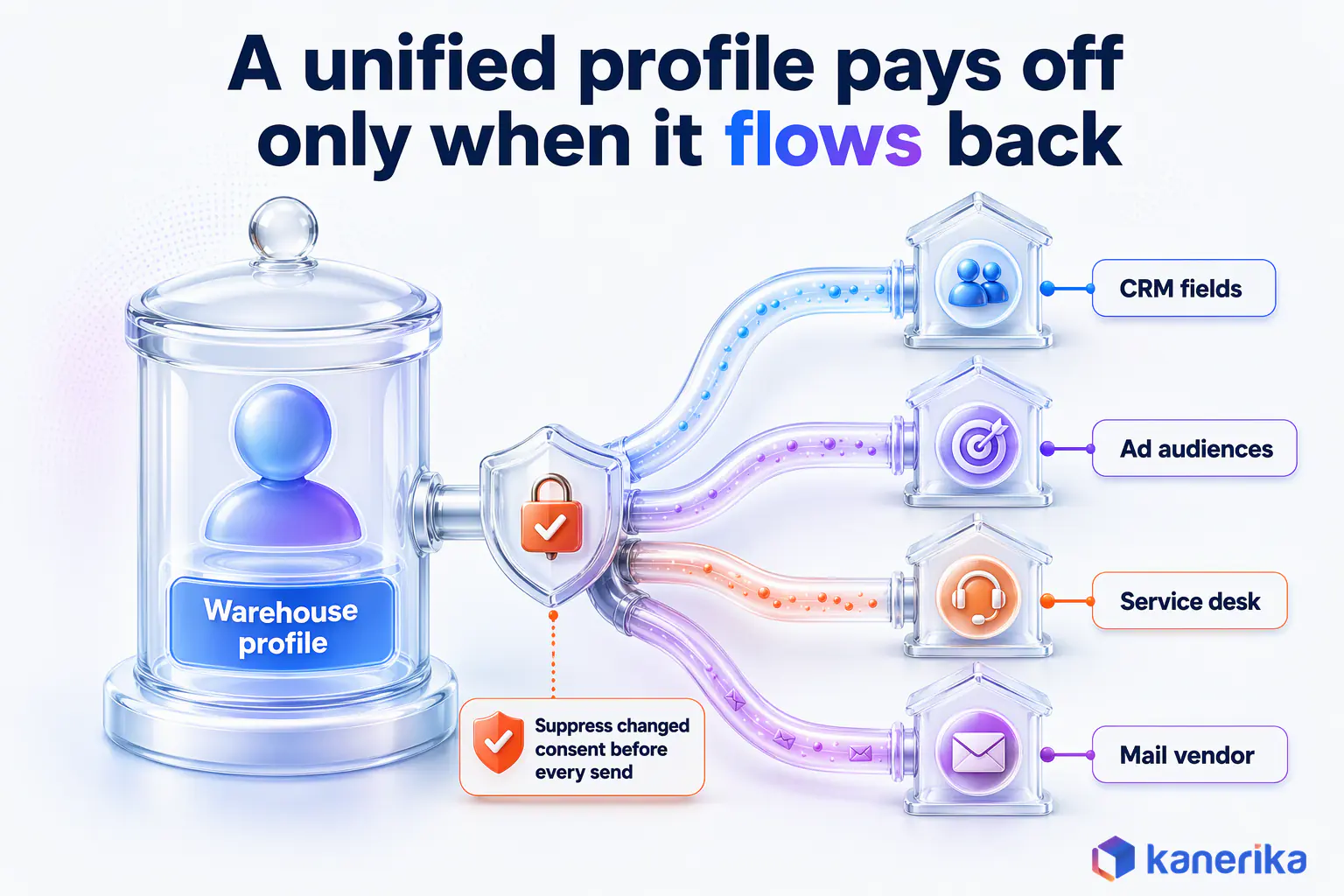
Reverse ETL: Sending the Unified Profile Back to Operational Tools
Integration is only half done when the profile lands in the warehouse. Reverse ETL sends resolved segments and attributes back to the CRM, ad platforms and service tools. As a result, the people acting on customers see the same answer as the dashboards.
The same route also answers how to feed customer segmentation data into direct mail triggers. Build the segment in the warehouse and sync it to the mail vendor on a schedule. Before each send, suppress anyone whose consent or address status changed since the last run.
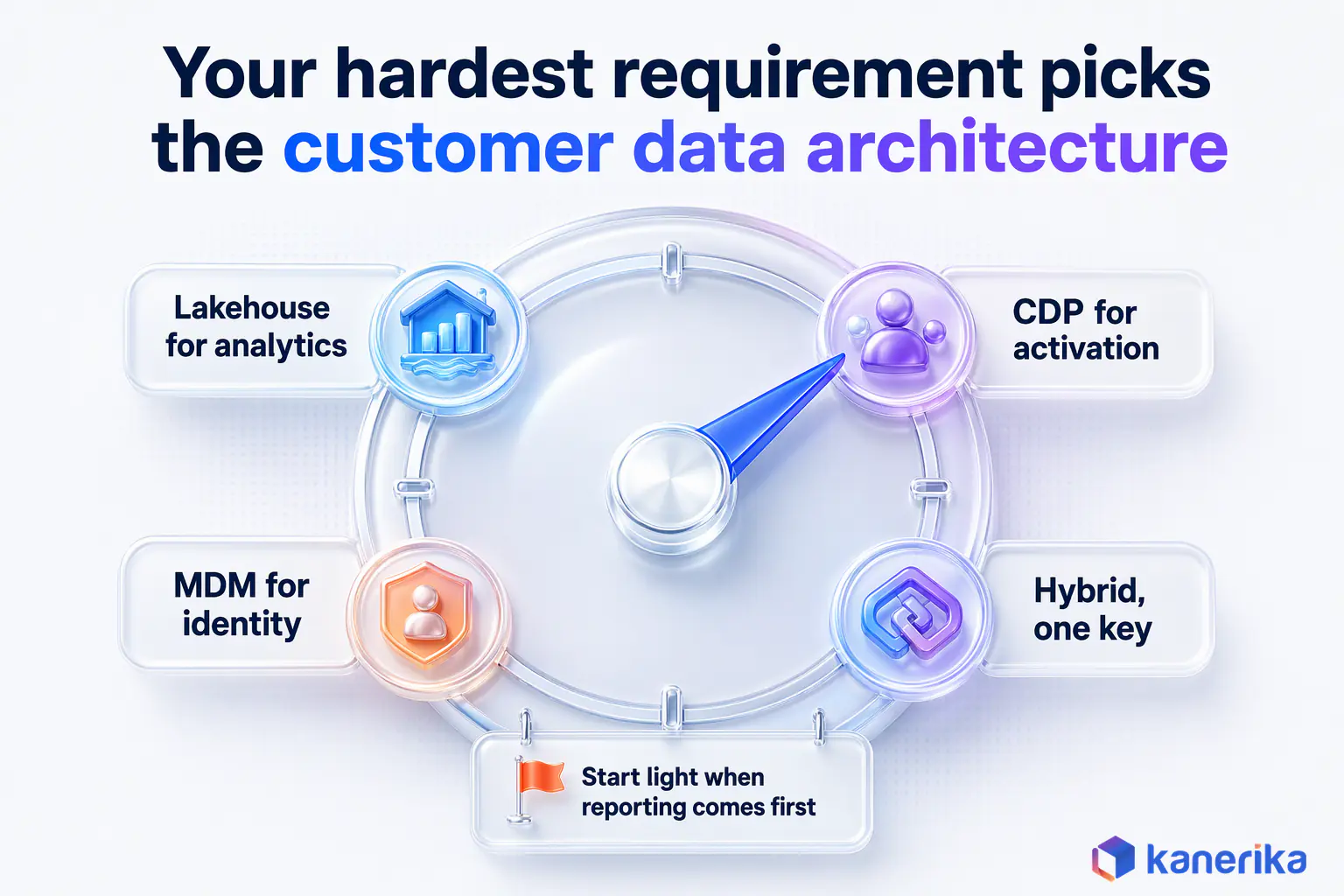
Choosing a Customer Data Integration Architecture
The right architecture follows your hardest requirement. When analytics is the goal, a warehouse or lakehouse leads. When marketing speed matters most, a CDP takes the front seat, and when identity disputes carry legal or financial weight, MDM does.
Warehouse- or Lakehouse-Led
Data lands in a central store, gets cleaned in layers and then serves BI, data science and reverse ETL. Many teams use the medallion architecture, with raw, cleaned and business-ready layers, so lineage stays clear from source to report.
An edible oil manufacturer shows the pattern at work. Its production, distribution and sales data sat across SAP and non-SAP systems, and finance and HR data were synchronized by hand. After Kanerika consolidated and centralized those sources and automated the integration, the SAP data integration case study records 60% less data integration time.
The same build gave the security team data lineage in Power BI, so it could trace sensitive data through every system. That was operational and finance data, not a CDP project. Still, when the first use case is reporting, a lighter warehouse-led build like this one is often enough.
CDP-Led
A customer data platform collects behavioral events, builds profiles and pushes audiences to marketing channels quickly. It suits consumer brands with heavy digital engagement. Its limits show up with contracts, invoices and complex account hierarchies, which most CDPs were never built to govern.
MDM-Led
Master data management keeps governed golden records with explicit match rules, survivorship and human stewardship. It fits banks, insurers and B2B firms, where a wrong merge has financial or legal weight. The trade-off is time, because MDM needs stewards and agreed rules before it pays back.
Hybrid
Large enterprises often end up hybrid. The lakehouse holds history and analytics, an MDM or identity service resolves who is who, and a CDP or reverse ETL activates segments.
The risk, however, is three competing customer IDs. So pick one system to issue the enterprise customer key, and make every other system carry it.
Architecture Decision Matrix
| Pattern | Best fit | Identity depth | Latency | Who owns it | Main limit |
|---|---|---|---|---|---|
| Warehouse- or lakehouse-led | Analytics, reporting, AI features | Rules you build in SQL or Spark | Minutes to hours | Data engineering | Activation needs reverse ETL |
| CDP-led | Consumer marketing and journeys | Mostly deterministic, device-level | Seconds to minutes | Marketing operations | Weak on contracts and B2B hierarchies |
| MDM-led | Regulated and B2B data | Deep, with stewardship and unmerge | Minutes | Data governance | Slower to stand up, needs stewards |
| Hybrid | Enterprises with all three needs | Deep where it matters | Mixed | Shared, with one ID issuer | Coordination cost |
Readers shopping for software can also compare options in Kanerika’s roundup of data integration tools. Still, settle the architecture first, because it decides which tools are even relevant.
How to Choose Customer Data Integration Software or a Vendor
Feature grids make most customer data integration solutions look alike, so judge each vendor on your own records instead. Hand every shortlisted tool the same labeled sample, for example 1,000 known pairs from your CRM and billing system, and compare match precision on it.
Then push one opt-out and one deletion through the trial and time how long each takes to reach every downstream copy. Ask three plain questions too. Can it unmerge a wrong match? Does it capture deletes at the source? And can a steward change a survivorship rule without a developer? A tool that scores well on demo data but cannot unmerge will cost you more later.
Identity Resolution: Matching Customers Without False Merges
Identity resolution decides which records describe the same customer. Much of the trust in a customer view is won or lost here, because every report and campaign downstream inherits its mistakes.
Deterministic and Probabilistic Matching
Deterministic matching links records that share an exact identifier, such as a customer number or a verified email. It is precise, but it misses people who used different details. Probabilistic matching scores similarity across name, address, phone and behavior, so it finds more matches while also making more mistakes.
Even so, a shared value is not proof of one person. Families share addresses, teams share a help-desk login, and one company card pays for many employees. That is why Dana’s support tickets should never merge into her profile just because they came from the same login.
Build an Identifier Crosswalk Across Systems
A crosswalk is a table that maps every system’s ID for a customer to one enterprise key. Each system keeps its own IDs, while analytics and activation join on the shared one.
Kanerika built this kind of bridge for a manufacturer whose order journey ran across SAP Cloud for Customer, CPQ and S/4HANA with no shared record. In the order lifecycle project, a dedicated bridge on Fabric linked Opportunities, Quotes and Orders. The lead-to-delivery journey then read as one continuous record. A self-updating Power BI report on top of it means every team now works from the same numbers.
Survivorship: Decide Which Source Wins, Field by Field
Once records match, survivorship rules decide which value goes into the unified view. Set them per field instead of per system, because no single system is right about everything.
| Field | Authoritative source | Conflict rule |
|---|---|---|
| Legal name and tax ID | Billing or ERP | ERP wins, and changes need finance approval |
| Work email and job title | CRM | Most recent verified value |
| Marketing consent | Consent or preference store | Most recent explicit choice, never inferred |
| Shipping address | Commerce | Most recent order, unless returned as undeliverable |
| Support tier | Support platform | Contract value from billing overrides manual edits |
Unmerge, Review Queues and Measuring Match Quality
Every merge should also be reversible. Keep the source records and the match decision, so a steward can split a false merge without rebuilding the profile from scratch.
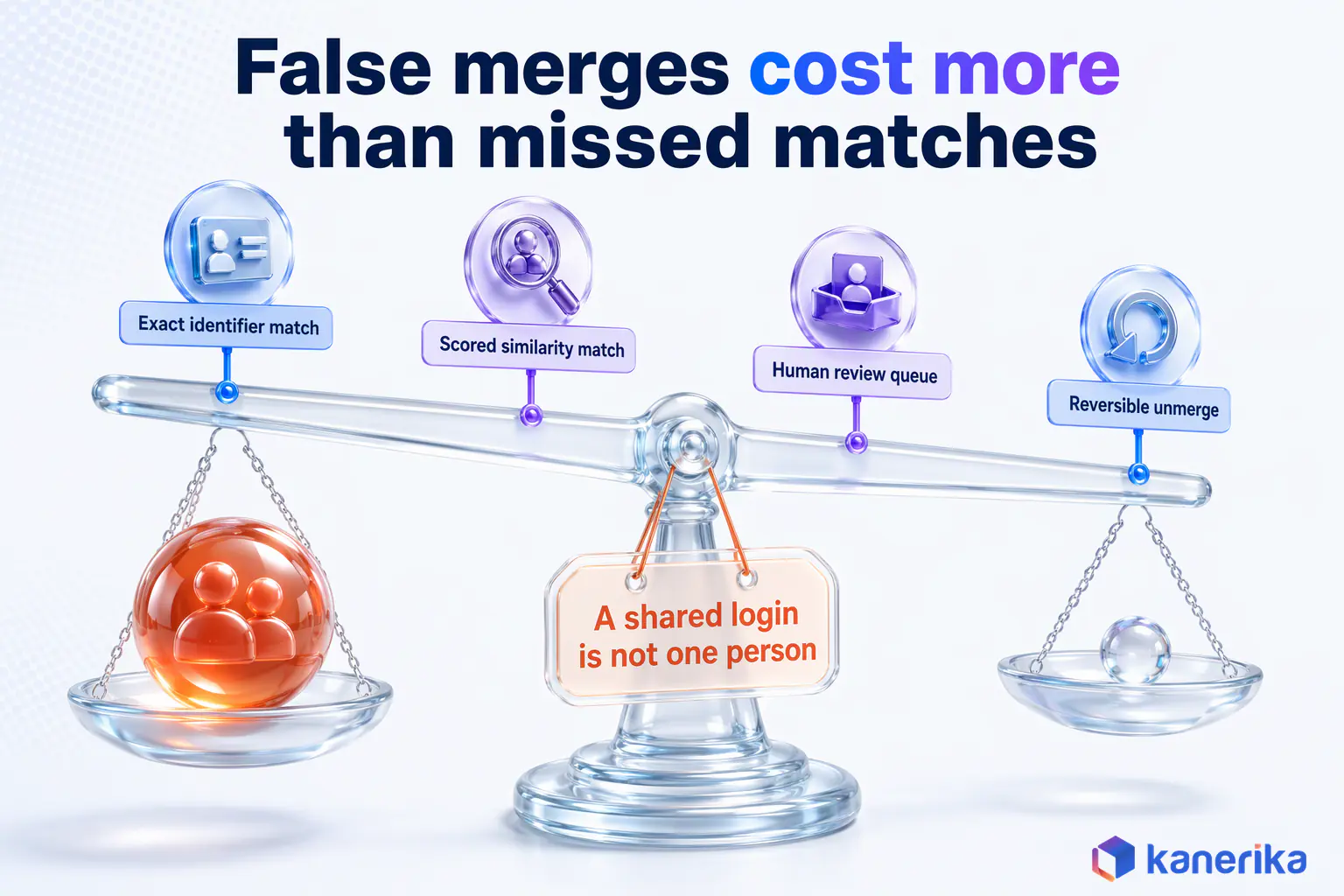
Send low-confidence matches to a review queue instead of merging them automatically. Then measure precision on a labeled sample, meaning the share of merged pairs that truly belong together, along with the unresolved-identity rate. Kanerika’s guide to master data governance covers who should own and approve those match rules.
Worked Example: Matching 1.8 Million Records From Three Sources
Here is how the numbers can play out. The figures are illustrative, not from a client project. Say the CRM holds 600,000 contacts, marketing automation 900,000 subscribers and billing 300,000 account contacts, for 1.8 million records in all.
- Deterministic pass: an exact match on customer number or verified email collapses the 1.8 million records into 1.25 million candidate customers.
- Probabilistic pass: scoring name, address and phone flags 90,000 further pairs, and the 60,000 scoring 0.92 or above merge automatically.
- Review queue: the 30,000 pairs between 0.75 and 0.92 go to stewards, who accept about half of them, or 15,000.
- Result: 1.25 million candidates minus 75,000 merges leaves 1,175,000 golden records, so about 35% of source records were absorbed by a match.
Then check precision. If a labeled sample of 1,000 automatic merges holds 6 false ones, precision is 99.4%. That sounds high, yet across 60,000 automatic merges it means about 360 customers who may see a stranger’s orders. A 0.95 auto-merge threshold sends more pairs to the queue, costing steward hours but cutting the false merges that hurt most.
Consent, Privacy and Security in Customer Data Integration
Integration multiplies copies of personal data, so it multiplies privacy risk too. The fix is to store permissions as data that moves with the record, instead of leaving them as a setting inside one marketing tool. Dana’s case shows the failure in miniature, because one opt-out was recorded in one tool and ignored by the other three.
Store Permissions as Data That Travels With the Record
Each consent record should carry the purpose, the channel, the source system, a timestamp and the policy version the customer saw. Downstream tools can then check a permission instead of guessing it from an old export.
Consent is only one lawful basis, and not every use relies on it. Your privacy and legal teams decide which rules apply, while the pipeline’s job is to enforce what they decide.
Deadlines Your Pipeline Has to Meet
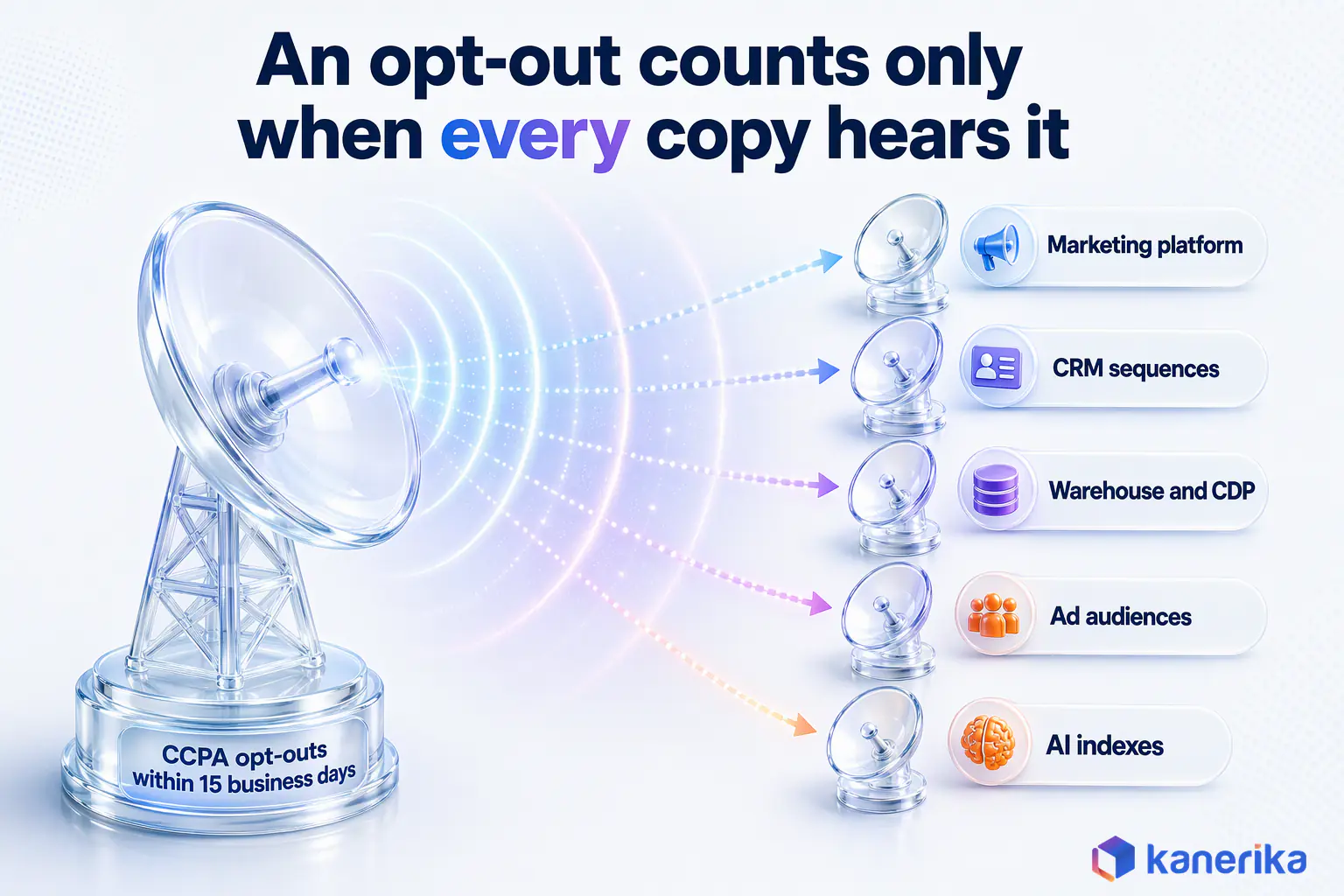
For US customers, the California Consumer Privacy Act gives a business 45 calendar days to answer a request to know, delete or correct. That deadline can also be extended once by another 45 days, for 90 in total. An opt-out of sale or sharing must be honored within 15 business days at most.
EU customers fall under GDPR, where Article 12 gives a company one month to act on access, correction or erasure requests. That window can also stretch by two further months, to three in total, for complex cases. GDPR also says withdrawing consent must be as easy as giving it.
Kanerika’s guide to GDPR and CCPA compliance covers the wider program. None of this is legal advice, so confirm the rules for your markets with counsel.
Propagate Corrections, Deletions and Opt-Outs Downstream
GDPR Article 19 requires a company to pass a correction or erasure on to each recipient it shared the data with. In practice, that means every downstream system the integration feeds, including the warehouse, the CDP, ad audiences and search indexes. This is where Dana’s opt-out failed, since it never left the marketing platform.
Least Privilege and Data Minimization
Kanerika’s work for a global bank shows what classification at scale looks like. Its customer data sat across SAP, Dynamics 365, CRM, Oracle and Netezza. As the bank’s governance program describes, the team set Microsoft Purview policies to classify and handle PII, PCI and PHI. Automated lineage then traced each source into the lakehouse.
That project ran on Purview’s data governance tools, which Microsoft is retiring in favor of Microsoft Fabric, with support ending November 12, 2027. Purview’s data security and compliance features, such as sensitivity labels and data loss prevention, are not affected.
Beyond classification, give each tool only the fields it needs. A marketing platform rarely needs a tax ID, and a support agent rarely needs full payment details, so mask or drop them at the edge. Kanerika’s guide to data access governance covers the role-based controls behind this.
How to Implement Customer Data Integration in 7 Steps
A customer data integration process works best as a short sequence with a clear finish line for each step. The steps also double as a requirements list, because each one names what the program needs before the next can start.
1. Pick One Business Use Case
Choose a decision that integrated data will change, such as service agents seeing open invoices or suppressing opted-out customers across every channel. The step is done when there is a named business owner and one measurable outcome.
2. Inventory and Profile the Sources
List every system that holds customer data, then profile each one for completeness, duplicates and formats. Bring governance in at this point too, rather than after the build.
Kanerika’s State of Enterprise Data Platform Migrations 2026 report makes the case for doing so. It found that bringing governance in at the assessment phase, not at project end, is the single strongest predictor of post-go-live outcomes. This step is done when you have a source map like the one above, with owners and quality scores.
3. Define the Customer Model and Data Contracts
Decide which entities exist, such as person, account and household, and which attributes each one carries. Then agree data contracts with source teams that fix field names, formats and notice periods for changes. The step is done when the business signs off the model and every source in scope has a contract.
4. Set Identity, Survivorship and Permission Rules
Write the match rules, the survivorship table and the consent model before anyone builds a pipeline. It is done when a steward can read the rules in plain language and a labeled sample exists to test them.
5. Build Ingestion and Reconciliation Pipelines
Choose batch, change capture or streaming per source, and land data in layers so raw records stay available for audit. Add reconciliation checks that compare record counts and totals between source and target. Done means pipelines that fail loudly instead of silently dropping rows.
6. Test With Real, Messy Records
Clean test data hides the problems that matter. So test with shared emails, maiden names, merged companies, opt-outs and deletion requests, then check every downstream copy. Testing is done when precision and freshness on the labeled sample meet the agreed bar.
7. Pilot, Activate, Then Expand
First, run the use case with one team, watch the metrics for a few cycles and fix what breaks. After that, add sources one at a time and retest identity each time, because every new source changes the match results.
Checklist
Data Integration Checklist for Enterprise Teams
A practical checklist for planning and running enterprise data integration, from source inventory and data contracts to pipeline testing and monitoring, so each step of your customer data program has a clear finish line.
Get the Checklist →Customer Data Integration Challenges and How to Fix Them
CDI problems tend to repeat from one company to the next. That is good news, because a problem you can name before go-live is far cheaper to design around.
| Problem | Symptom | Fix |
|---|---|---|
| False merges | Two customers see each other’s orders | Raise match thresholds, add review queues and an unmerge path |
| Duplicates | The same customer is counted twice in revenue | Deterministic keys first, then scored matching with stewardship |
| Inconsistent formats | Phone numbers and addresses fail to match | Standardize at ingestion with shared validation rules |
| Schema drift | A source renames a field and a pipeline breaks | Data contracts plus schema checks that alert before load |
| Stale permissions | Opted-out customers still get campaigns | Propagate consent events instead of nightly snapshots |
| Writeback loops | Two systems keep overwriting each other | One owner per field, synced in one direction |
| Out-of-order events | An old address replaces a new one | Use source timestamps and sequence numbers, not arrival time |
Many sources in many formats is the most common starting problem. Trax, for example, received invoice data from many carriers in many file formats. After Kanerika standardized the exchange on Informatica B2B, manual errors fell 54% in the Trax integration project.
Customer records behave the same way, since standardizing at the edge costs less than cleaning in every report. Kanerika’s guide to data quality tools compares options for profiling and validating those records.
Case Study
39% Less Invoice Processing Time with Standardized Data Exchange
Trax received invoice data from many carriers in many file formats. Kanerika standardized the exchange on Informatica B2B, cutting invoice processing time by 39% and lifting spend efficiency by 25%.
Read the Case Study →Customer Data Integration Best Practices
Steps get a program live, while habits keep it trustworthy a year later. Six habits do most of that work.
- Give every field one owner, because when two teams can edit the same value, nobody is accountable for it.
- Issue one enterprise customer key that every system carries, even when it also keeps its own IDs.
- Fund the stewards, since data stewardship needs time set aside for the review queue rather than goodwill.
- Keep data contracts current, so source teams announce changes before they ship them.
- Monitor every day, because freshness and match quality drift after launch.
- Plan for new sources, since acquisitions and new apps keep adding customer data.
Tools come after the habits, not before. Five worth testing against your own records, each with one fact taken from the vendor’s own page in November 2026:
- Microsoft Fabric Mirroring replicates databases into OneLake in the open Delta Lake format, with near real-time replication that Microsoft says depends on region and data volume.
- Fivetran says it moves data from 750+ sources and activates it back into 200+ destinations.
- Airbyte lists 700+ open-source connectors, with incremental sync and built-in schema change handling.
- Informatica joined Salesforce in November 2025, bringing its MDM, data quality and privacy services to the Salesforce platform.
- Splink, an MIT-licensed record linkage library, says it can link a million records on a laptop in around a minute.
These habits sit on top of general pipeline discipline, which Kanerika’s list of data integration best practices covers in more depth.
How to Measure Customer Data Integration Success
Measure the integration itself first, then the business result it was meant to change. Set a baseline before launch, because a number without one cannot show progress.
| Metric | How to calculate it | Owner |
|---|---|---|
| Match precision | Correct merges divided by all merges in a labeled sample | Data stewardship |
| Unresolved-identity rate | Records with no enterprise key divided by all records | Data engineering |
| Required-field completeness | Records with every required field divided by all records | Data owners |
| Freshness | Time from a source change to the unified view | Data engineering |
| Permission propagation time | Time from an opt-out to its arrival in every downstream system | Privacy and marketing operations |
| Reconciliation failures | Runs where source and target totals differ | Data engineering |
| Business outcome | The use case metric, such as repeat contacts or wasted campaign spend | Business owner |
Each metric also needs a shared definition and a lineage trail back to the source. Kanerika’s guide to metadata management explains how teams keep those definitions and lineage current.
Is Your Customer Data Ready for AI?
AI agents and copilots read customer data faster than any analyst, so they repeat its errors faster too. A model answering a service question will happily blend two customers if the integration already did.
Kanerika’s State of Enterprise AI & Data Modernization 2026 report draws on 161 client engagements and 414 measured outcomes. It found that most stalled AI initiatives fail on the data beneath the model, not on the model itself. Gartner’s 2025 forecast of 60% of AI projects abandoned for want of AI-ready data, covered above, points the same way.
Customer data is ready for AI when three conditions hold. Retrieval respects permissions, so an agent only sees what the asking user may see. Deletions reach caches, embeddings and vector indexes as well as source tables, and every answer traces back to a resolved customer record.
Picture a support copilot pulling up Dana’s history. It should see her withdrawn consent and her own tickets, but nothing from a stranger who was wrongly merged into her profile.
Kanerika’s guide to building a RAG pipeline covers the retrieval side, including how to filter results by the asking user’s permissions. For the controls around it, Kanerika’s guide to AI data governance sets out who may let a model read which data.
Customer Data Integration Services: How Kanerika Helps
So what does working with Kanerika actually look like? Its data integration consultancy work follows the IMPACT framework. As the data integration services page puts it, the framework guides each engagement from initial discovery through go-live. In practice, that keeps the project tied to business outcomes, not technical milestones alone.
The same methodology runs through Kanerika’s data governance services, with measurable outcomes at each phase from assessment to deployment. Target designs come from the data architecture practice. That’s what makes Kanerika your trusted partner here: integration, governance and architecture sit with one team.
In the SAP order lifecycle project above, Kanerika built a bridge on Microsoft Fabric that links opportunities, quotes and orders into one continuous record. The QAD mirroring project brought live ERP data into Fabric, so rows deleted at the source disappear downstream too.
The bank project above covers the classification and lineage side, with Purview policies for personal data and lineage traced into the lakehouse. On the privacy side, Kanerika’s data governance services include DSAR workflows for GDPR and CCPA, PII discovery and consent management.
The good news? A first release needs only one use case on a handful of sources to prove match quality and opt-out propagation before the next wave arrives. Here is the thing, though: there are three pitfalls to plan for. Loose match rules create false merges that take months to unwind, and consent added at the end forces a rebuild. Programs without an unmerge path also lose their stewards’ trust quickly, so it pays to plan for all three during assessment.
Talk to Kanerika
Plan Your Customer Data Integration
Bring one use case and the systems that hold your customer data, and talk through sources, identity matching and consent rules with Kanerika’s data integration team.
Book a Working Session →Start Your Customer Data Integration With One Use Case
If you’ve read this far, you probably have a Dana of your own: one customer, four records, one opt-out that never traveled. The most useful thing to take away is simple. Before anyone builds a pipeline, decide who each customer is, which value wins and what each team may do with it.
And if that sounds like a big rebuild, it usually isn’t. Many teams assume they need a new platform and a year of work first. But one use case on real, messy records shows within a few cycles whether matching and opt-outs hold up, which is why starting small works.
Kanerika can help here, as a Microsoft Solutions Partner for Data & AI and a Featured Fabric Migration Partner, with 250+ certifications across the team. It has done this work on SAP, QAD and CRM estates, including the edible oil manufacturer whose integration time fell 60%. So bring one use case and the systems behind it to a working session with Kanerika’s data integration team.
If you’d rather read first, the State of Enterprise AI & Data Modernization 2026 report shows why the data under the model stalls most AI plans. Either way, Kanerika’s team would be glad to hear about your Dana.
Frequently Asked Questions
What is customer data integration?
Customer data integration is the process of connecting, matching and governing customer records from systems such as CRM, marketing, commerce, billing and support. The goal is one accurate, permitted view of each customer, so service agents, marketers, analysts and AI tools all work from the same identity, the same trusted values and the same consent status.
What do customer data integration services include?
Customer data integration services usually cover a source inventory and profiling, a customer model with match and survivorship rules, a consent map, ingestion and reconciliation pipelines, and activation through BI, reverse ETL or AI tools. Kanerika’s data integration services follow its IMPACT framework from initial discovery through go-live, keeping each phase tied to business outcomes.
Customer data integration vs a CDP: what is the difference?
Customer data integration is the overall discipline of connecting, matching and governing customer data across all systems. A customer data platform is one tool that delivers part of it, mainly marketing profiles and audience activation. A CDP rarely governs contracts, invoices or complex B2B account hierarchies, so many enterprises pair it with a lakehouse or MDM.
How do you integrate customer data from multiple systems?
Start with one business use case and map every source that holds customer data. Define a customer model and data contracts, then set match, survivorship and consent rules. Build ingestion and reconciliation pipelines, test with real messy records, pilot with one team and add further sources one at a time, retesting identity each time.
Does customer data integration need to be real time?
Not always. Reporting and finance data usually work fine with daily batch loads, while opt-outs, fraud signals and service lookups need near real-time updates. Choose the rhythm per source by asking how quickly a stale value causes harm, then use change data capture, mirroring or streaming only where that harm is real.
How do you protect customer privacy during integration?
Store consent as data that travels with each record, including purpose, channel, source and timestamp. Give every downstream tool only the fields it needs, mask sensitive values at the edge and classify personal data. Make corrections, deletions and opt-outs propagate to every copy, including CDP audiences, search indexes and AI embeddings, within legal deadlines.
How do you integrate customer support data with sales data?
Link each support case to a contact, then link that contact to its account in the CRM. Sales can then see open tickets and satisfaction scores on every opportunity for the account. Treat shared help-desk logins as separate requesters rather than merging them into one person, or the support history will attach to the wrong customer.
What are the main customer data integration challenges?
The most common challenges are false merges, duplicate records, inconsistent formats, schema drift in source systems, stale consent status, writeback loops between applications and events that arrive out of order. Each has a known fix, such as review queues, data contracts, standardization at ingestion, one owner per field and source timestamps instead of arrival time.
How do you integrate online and in-store customer data?
Online and in-store data rarely share an identifier, so you need a bridge such as a loyalty ID, an e-receipt email or a login at checkout, each captured with consent. Link store transactions to a profile only through one of those identifiers, and leave purchases anonymous when no reliable bridge exists rather than guessing a match.
What is identity resolution in customer data integration?
Identity resolution decides which records from different systems describe the same customer. Deterministic matching links exact identifiers such as a customer number, while probabilistic matching scores similarity across names, addresses and behavior. Good programs send low-confidence matches to human review, keep every merge reversible and measure precision on a labeled sample of records.
What are the best customer data integration tools?
The best tool depends on your hardest requirement. Lakehouse platforms such as Microsoft Fabric suit analytics-led teams, CDPs suit consumer marketing activation and MDM tools suit regulated or B2B identity. Pick the architecture first, then test each shortlisted tool on your own labeled sample for match precision, unmerge support and how fast opt-outs reach downstream systems.
How do I choose a customer data integration vendor?
Test vendors on your data, not their demo. Give each the same labeled sample of known matches and compare precision, then time how long an opt-out and a deletion take to reach every downstream copy. Also check that the tool can unmerge a wrong match, captures deletes at the source and lets stewards edit survivorship rules.