
TL;DR
Data cleansing tools are software that fix records rather than flag them, by standardizing formats, correcting values, removing duplicates, verifying addresses and merging copies into one trusted record. For spreadsheets and analyst files, start with OpenRefine, Power Query or Alteryx, and for customer, CRM and address records, test Data Ladder, WinPure, Melissa or DemandTools. Enterprise pipelines are better served by Informatica, Qlik Talend Cloud, Precisely Trillium or IBM QualityStage, which apply the same rules on every load. Engineering teams on a lakehouse can build the fixes in code with pandas and RapidFuzz, Splink, or SQL expectations. Fuzzy matching only finds candidate duplicates, so a person should still approve the merges a rule cannot prove. Shortlist from the group that fits your records, then pilot each tool on your own data and count the false merges before you buy.
Key Takeaways
- Data cleansing tools change records, while data quality tools detect and score the problems.
- The kind of data you need to fix decides the tool group before any feature list does.
- Fuzzy matching finds candidate duplicates, but it cannot prove two records describe the same customer.
- Talend Open Studio retired on January 31, 2024, and Salesforce now owns Informatica, so check product status first.
- Free options such as OpenRefine, Splink, dedupe and RapidFuzz are real, yet each still costs setup and review time.
- Test every shortlisted tool on your own records and count false merges before you sign a contract.
Three Customer Records Before Cleansing, One After
Before cleansing, one customer sits in the CRM three times. “Acme Inc” came in through a web form, “ACME” through a trade-show scan and “Acme Incorporated” through billing. One copy also carries a mistyped ZIP code, so the spring campaign mails all three and the revenue report counts three accounts.
After cleansing, there is one Acme record with a verified address and a note of which values won and why. The mailing goes out once, and the pipeline report finally matches what the sales team sees.
That repair is the work data cleansing tools do. They change records, which is a different job from scoring them.
So the tools that measure quality belong on a separate shortlist, covered in Kanerika’s guide to data quality tools. The fourteen tools below are grouped by the data they fix best. Pick the wrong group, and you get a tidy spreadsheet while the duplicate customers stay in the CRM.
What Data Cleansing Tools Actually Fix
Data cleansing tools take a record that is wrong, inconsistent or duplicated and turn it into one the business can trust. The change itself is the point. A report that flags thousands of bad phone numbers has not fixed a single one.
Skipping that step is also expensive. Back in 2021, Gartner’s widely quoted estimate was that poor data quality cost an average organization about $12.9 million a year. The figure is now five years old, yet Kanerika’s State of Enterprise AI & Data Modernization 2026 report still cites it.
Fixing a record once, at the source, is cheaper than correcting the same error in every report that reads it.
Five Repair Jobs Every Cleansing Tool Performs
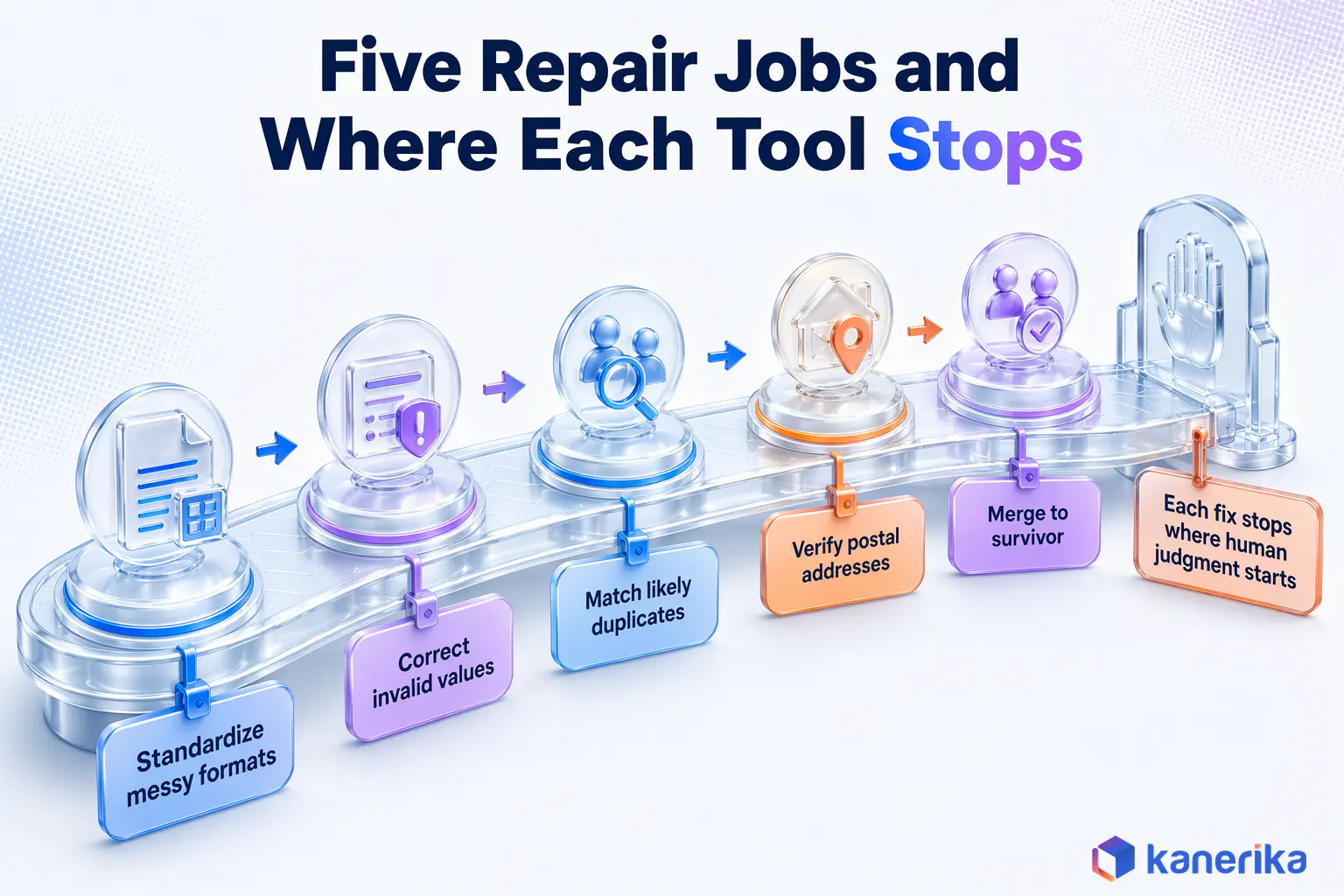
In practice, almost every data problem a cleansing tool touches falls into one of five repair jobs. Each job also has a point where the software has to stop and let a rule or a person decide.
| Common problem | Repair job | Example | Where the tool stops |
|---|---|---|---|
| Inconsistent formats | Standardize and parse | “(555) 010-2299” and “555.010.2299” become one phone format | It waits until you set the format downstream systems expect |
| Invalid or wrong values | Correct against a rule or reference list | “Calfornia” becomes “CA” | A real but outdated value still passes, so add recency checks |
| Duplicates | Match and deduplicate | Three Acme records flagged as one company | Matching proposes pairs, but a rule or reviewer decides |
| Bad addresses and contacts | Verify and enrich | An address checked against postal data and given a ZIP+4 | The address is real, but the customer may have moved |
| Conflicting duplicates | Merge to a surviving record | The newest phone and the billing address survive into one golden record | Survivorship rules need an owner, otherwise nobody can explain a merge later |
Standardization usually comes first, because matching works far better once names, phones and dates share one format. Kanerika’s guide to data standardization covers how to design those format rules.
Why Cleansing Matters Before Reports and AI
Dirty records do their damage downstream. A duplicated customer inflates the account count, and a wrong ZIP code sends an order to the wrong depot. Then an AI model trained on both learns the noise as if it were signal.
Bad data quality also wears down trust, so analysts start keeping private spreadsheets that drift further from the source.
Data Cleansing vs Data Quality vs Data Wrangling
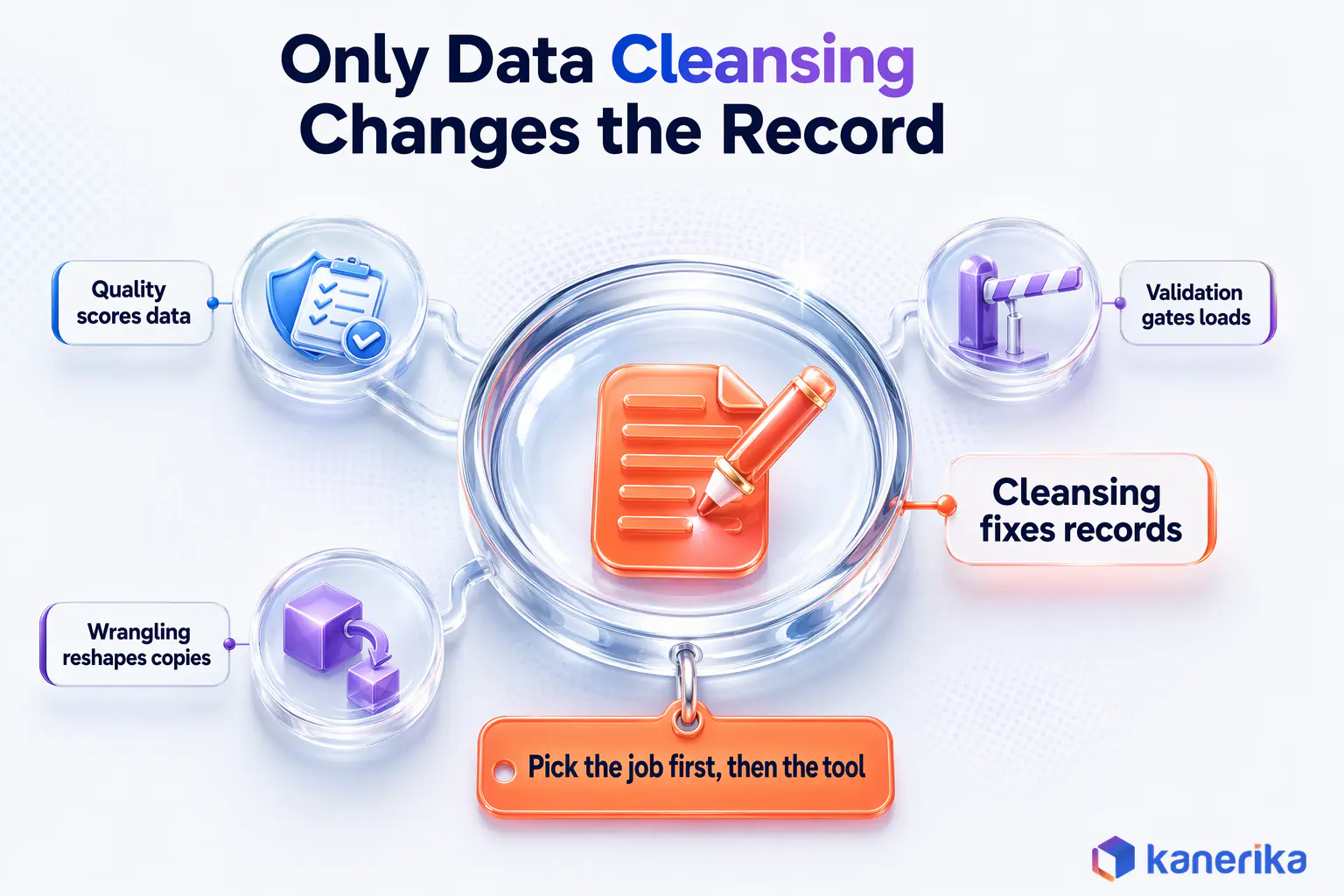
Data cleaning, data cleansing and data scrubbing are three names for the same work, as Kanerika’s glossary entry on data cleaning notes. The more useful line, though, runs between cleansing and its neighbors.
| Term | What it does | What you get |
|---|---|---|
| Data cleansing | Changes records by standardizing, correcting, deduplicating, verifying and merging them | Fixed records as well as a log of every change |
| Data quality | Profiles, tests, monitors and scores data, but leaves records as they are | Scores, alerts and lists of failed checks |
| Data validation | Checks data at a gate, such as a load or a migration cutover | A pass or fail result for each rule |
| Data wrangling | Reshapes data for one analysis, such as a join or a pivot | A dataset fit for one question |
Validation sits close to quality, since both check data without changing it. Kanerika’s guide to automated data validation covers that gate in depth, while this post stays with the tools that do the repair.
Data Cleansing Tools at a Glance: 14 Tools Compared
The table puts all fourteen tools side by side, grouped by the data each one fixes best. Licence status stands in for price, because enterprise pricing usually depends on volume and edition and changes often.
Read the watch-out column before anything else. It names the one limit most likely to surprise a team after purchase, from a desktop-only install to a free edition that no longer exists.
Self-Service and Customer Record Tools
The first seven tools fix data where people work with it directly, in spreadsheets, CRMs and contact files.
| Tool | Group | Fixes best | Licence and deployment | Watch-out |
|---|---|---|---|---|
| 1. OpenRefine | Self-service | Messy text values in CSV files and spreadsheets | Free, open source (BSD-3), runs on your machine | Runs only when a person opens it |
| 2. Microsoft Power Query | Self-service | Repeatable cleanup in Excel, Power BI and Fabric | Included in Microsoft products | Cluster values works only when you use Power Query Online |
| 3. Alteryx Designer and Designer Cloud | Self-service | Visual prep, standardization and fuzzy matching | Commercial, free trial | Rules spread across many workflows unless someone owns them |
| 4. Data Ladder DataMatch Enterprise | Customer records | Cross-source matching and merge purge to a golden record | Commercial | Tune match settings before the first merge purge |
| 5. WinPure Clean & Match | Customer records | No-code matching that stays inside your network | Commercial, desktop, 30-day trial | Desktop-first, so sharing rules takes a process |
| 6. Melissa | Customer records | Address, email and contact verification | Commercial | Address checks pass even when the customer has moved |
| 7. Validity DemandTools | Customer records | Deduplication and mass updates inside Salesforce | Commercial | Salesforce only, so set native duplicate rules first |
Enterprise Suites and Code-First Tools
The other seven fix data in motion, either inside integration jobs or in code that runs on every load.
Talk to Kanerika
Shortlisting Data Cleansing Tools?
Bring a sample of your messiest records and talk through which tool group fits your error types and how to pilot a shortlist.
Book a Working Session →| Tool | Group | Fixes best | Licence and deployment | Watch-out |
|---|---|---|---|---|
| 8. Informatica Cloud Data Quality | Enterprise suite | Cleansing and standardization rules across pipelines | Commercial, cloud (IDMC) | Now owned by Salesforce, while MDM is a separate product |
| 9. Qlik Talend Cloud | Enterprise suite | Cleansing inside integration jobs | Commercial, cloud | Talend Open Studio retired on January 31, 2024, so skip old guides |
| 10. Precisely Trillium Quality | Enterprise suite | Global name and address standardization | Commercial, cloud option | Pays off most when many countries are involved |
| 11. IBM InfoSphere QualityStage | Enterprise suite | Standardization and record matching at scale | Commercial, on premises or cloud | Match tuning still needs specialist time |
| 12. pandas with RapidFuzz | Code-first | Custom rules and string similarity in Python | Free, open source (RapidFuzz is MIT) | Slows down as files grow, since it compares pairs |
| 13. Splink and dedupe | Code-first | Probabilistic entity resolution at scale | Free, open source (MIT) | Test the projects’ speed claims before you rely on them |
| 14. SQL in the lakehouse | Code-first | Rules that run on every load in Databricks or Fabric | Included in the platform | Dropped rows vanish unless you quarantine them |
What the Two Tables Show
Two patterns stand out once you read across the rows.
The self-service and code-first groups include free options. Address and matching work, by comparison, is mostly commercial because it relies on reference data such as postal files. Enterprise suites cost the most to adopt, but they are also the group that runs the same cleansing rules inside every integration job.
Self-Service Cleansing Tools for Spreadsheets and Analyst Data
Analysts, data stewards and BI teams fix a large share of bad data by hand, one file at a time. The three tools in this group make that work repeatable, so a fix done once runs again next month. Two of them also answer the common question of how to clean data in Excel and the rest of the Microsoft stack.
The payoff grows once cleanup moves out of personal workbooks. Allen Distribution, a U.S. logistics company, had warehouse and HR data spread across on-premises SQL servers and handled much of it by hand. Kanerika centralized that data on Microsoft Fabric with Power BI. After that, Allen Distribution reported 61% growth in data-driven decisions after the data sat in one place.
Kanerika Service
Microsoft Fabric Consulting Services
Kanerika’s Fabric services build dataflows, pipelines and notebook tasks in OneLake and apply rules that improve data freshness and accuracy.
Explore Microsoft Fabric Services1. OpenRefine: Free Clustering and Reconciliation for Messy CSVs
OpenRefine is a free, open-source tool for working with messy data, released under the BSD-3-Clause license. It suits the analyst who receives a CSV where “New York”, “new york” and “NY” all sit in one column. Its clustering feature groups those variants so you can merge them in one step, and reconciliation matches values against outside databases.
The OpenRefine manual lists six key-collision methods and two nearest-neighbor methods for clustering. It also says fingerprinting is the least likely to produce false positives, so it makes a sensible first pass. Every change lands in an undo history, which means a bad merge can be rolled back.
Even so, OpenRefine stops at one person and one machine. Data is cleaned locally, which helps with privacy, but nothing re-runs your fixes on next month’s file unless you export and replay the steps yourself.
2. Microsoft Power Query: Repeatable Cleanup in Excel, Power BI and Fabric
Power Query is the cleansing engine inside Excel, Power BI and Microsoft Fabric, so many teams already have it. It records each step, such as trimming spaces, splitting columns or replacing values, and replays those steps whenever the source refreshes. That makes it the practical answer for data cleansing in Excel, and Kanerika’s Power Query guide walks through the basics.
Fuzzy merge, by comparison, handles near-duplicates across two tables. Microsoft’s documentation says it works only on text columns and uses the Jaccard similarity algorithm.
The similarity threshold in its Fuzzy matching options runs from 0.00 to 1.00 and defaults to 0.80, a sensible starting point. In Microsoft’s own example, “Grapes” matches “Graes” only when the threshold sits below 0.90.
Ignore case and Match by combining text parts (so “Micro soft” meets “Microsoft”) absorb formatting noise. A transformation table maps known aliases that no threshold would pair, such as “apls” to “Apple”. Turn on Show similarity scores during a pilot to see where the threshold should move.
Two limits matter in practice. The Cluster values feature, which groups similar entries, is available only in Power Query Online and not in desktop Excel. Dates need care too, because 03/04/2026 means March 4 in one locale and April 3 in another. So set the locale when you change the column type.
When a workbook outgrows one analyst, Dataflow Gen2 in Microsoft Fabric runs the same Power Query experience with more than 300 transformations. It then loads the results into a lakehouse, a warehouse or another destination.
3. Alteryx Designer and Designer Cloud: Visual Workflows With Trifacta’s Lineage
Alteryx Designer and Designer Cloud are drag-and-drop tools for preparing and blending data. Trifacta was folded into the company in 2022. Alteryx closed the deal on February 7 that year, and Trifacta’s cloud data preparation now lives on in Designer Cloud. That history is why Alteryx comes up whenever someone asks which tool can discover, cleanse and transform data in one place.
A typical job standardizes supplier names, strips punctuation and legal suffixes, and then passes the results to a fuzzy match step that proposes candidate pairs. Designer Cloud adds AI and machine-learning suggestions for the next transformation, a data quality bar, visual profiling and a free trial.
Still, Alteryx stops where ownership starts. Workflows are easy to build, so they multiply, and each one carries its own copy of the cleansing rules unless someone maintains a shared library.
Matching, Deduplication and Address Tools for Customer Records
Customer data breaks in its own ways. The same buyer appears under a maiden name, a new email or a different branch office. A CRM full of those near-duplicates is what most people mean by CRM or B2B data cleansing. The four tools in this group match, verify and merge customer and company records.
Before picking a tool, know that matching comes in three strengths. Exact matching compares values character by character, while fuzzy matching scores how similar two strings are. Probabilistic matching also weighs several fields together to judge whether two records describe one entity. Survivorship then decides which value wins in the merged record, such as the newest phone number or the billing address.
Matching work is not limited to contact lists. For the insurer Fortegra, bank statements arrived by email as CSV and Excel files. Staff then had to pull policy numbers out of free-text comments and match them to insurance records by hand. Kanerika automated that parsing and matching with UiPath, which brought 99% accuracy in data extraction and an 85% reduction in reconciliation time.
When the goal is one view of each customer across many systems, these matching rules join a wider program. Kanerika’s guide to customer data integration explains it. That is also why the tool you pick here often outlives the first cleanup project.
4. Data Ladder DataMatch Enterprise: Cross-Source Matching to a Golden Record
DataMatch Enterprise covers the full cleanse-and-match sequence in one tool. It runs from import and profiling through cleansing, matching, deduplication, merge purge and address verification with CASS validation. The workflow ends by merging and purging data into a golden record and exporting the cleaned data back to the source.
It especially suits a team reconciling a CRM against a billing system. A good test is a set of contacts whose name and company match while the email differs. Those are exactly the pairs a reviewer should confirm before any merge runs. Treat the default match settings as a starting point, and tune them on hard cases such as two people at one address.
5. WinPure Clean & Match: No-Code Matching That Stays on Your Desktop
WinPure Clean & Match describes itself as a no-code platform for large-scale data transformation that runs on the desktop with no cloud dependency. Its 30-day trial runs inside your own infrastructure as well. A separate API edition runs on Windows, Linux and macOS and reads SQL Server, PostgreSQL, MySQL, Oracle, CSV, Excel and JSON.
That design matters when customer files hold personal data that cannot leave the network. Each match group also carries the scores behind it, so a reviewer can see why two records were grouped before accepting the merge. The trade-off is sharing, since rules and results built on one desktop need a deliberate process to reach the rest of the team.
6. Melissa: Address and Contact Verification
Melissa concentrates on the contact fields that go stale fastest. Its list covers CASS and DPV address verification for U.S. mail, NCOALink for people who have moved, international address validation, email verification, deduplication and geocoding. Clean Suite brings those checks into Salesforce and Microsoft Dynamics CRM, where sales teams actually work.
Verification has one limit, though, and it is worth stating plainly. A valid postal address proves the address exists and can receive mail, but it does not prove the customer still lives there. So pair address checks with move updates and with recency rules in your survivorship logic.
7. Validity DemandTools: Deduplication Inside Salesforce
Start with what Salesforce already includes. Its native duplicate management uses matching rules, with standard rules for business accounts, contacts and leads. Duplicate rules then either alert a rep or block the record, which stops new duplicates at the point of entry.
DemandTools handles the cleanup that native rules leave behind. Validity calls it the platform that keeps Salesforce data clean. It merges existing duplicates, loads data without creating new ones and runs bulk standardization without exporting. It also validates email addresses and tracks the history of each change.
DemandTools, though, works only in Salesforce. When customer data also lives in an ERP or a billing system, match across those sources with a cross-system tool first. Then push the surviving records back into the CRM.
Enterprise Cleansing Suites Inside Integration Pipelines
Enterprise suites fix data while it moves. Their cleansing rules sit inside integration jobs, so they run on every load instead of once a quarter. They are also where master data cleansing usually happens, because a golden record needs the same rules applied to every source that feeds it.
Catching problems before go-live is where this group earns its cost. Kanerika’s State of Enterprise Data Platform Migrations 2026 report notes that data quality issues missed during assessment require remediation later. Kanerika’s own delivery data in that report puts post-go-live issues needing remediation at 10% of its projects, against an industry average of 65%.
8. Informatica Cloud Data Quality (Informatica From Salesforce)
Salesforce completed its acquisition of Informatica on November 18, 2025. Informatica’s data quality, integration, catalog and MDM services now sit inside Salesforce. For cleansing, the product that matters is Informatica Data Quality on the IDMC cloud platform.
Informatica says its Data Quality Agents automate cleansing, standardization and validation across enterprise data, while AI-powered accelerators generate common rules. That suits large teams that want a rule defined once and reused across many pipelines.
Master data management, however, is a separate Informatica product. If the real goal is a governed golden record, treat cleansing as one input rather than the whole program. Kanerika’s guide to master data governance sets out the rest. Also ask how contracts, bundling and roadmaps may change under the new owner.
9. Qlik Talend Cloud: Cleansing Inside the Integration Job
Talend’s cleansing now ships as Qlik Talend Cloud. Qlik retired Talend Open Studio, the free open-source edition, on January 31, 2024, and it is no longer hosted or updated. Older comparison pages that still list a free Talend edition are out of date, so do not plan a project around one.
Qlik describes its data quality and governance capability as a way to discover, remediate and share trusted data. It includes agentic data stewardship, in which AI agents identify quality issues. Qlik also describes master data as relying on matching, linking and merging to reconcile duplicates and conflicting records.
So this option fits teams that already build pipelines in Qlik. The cleansing then lives in the same job that moves the data, which removes a hand-off.
10. Precisely Trillium Quality: Global Name and Address Standardization
Trillium Quality has built-in cleansing and standardization for customer, product and financial data. Its global verification rules come from country-by-country databases that apply each country’s postal rules to names and addresses.
Trillium also integrates with SAP and Microsoft Dynamics, which puts it on the list for teams looking for data cleansing tools in SAP, and it has a cloud deployment option. It suits multinational customer files where a German address and a Japanese address need different rules.
11. IBM InfoSphere QualityStage: Standardization and Matching at Scale
QualityStage is IBM’s tool to investigate, cleanse and manage data. It standardizes records into a common format and then matches them. It also ships more than 200 built-in data quality rules and more than 250 built-in data classes that help detect personal data. Deployment runs on premises or in the cloud under subscription pricing.
QualityStage fits large estates, especially those with heavy matching volumes. Its rule library speeds up the start, but tuning match weights for your own records still takes specialist time.
Kanerika Service
Data Governance Consulting Services
Kanerika designs governance frameworks and stewardship models, so every data domain has clear ownership and stewardship roles.
Explore Data Governance ServicesCode-First Cleansing Tools for Engineering Teams
Engineering teams often prefer cleansing as code. Rules live in version control, run in the same pipeline as the data and get reviewed like any other change. This group covers data cleaning tools in Python, open-source matching libraries and cleansing with SQL.
Code-first cleansing pays off when loads repeat. In a Kanerika project that brought live QAD ERP data into Microsoft Fabric, the team fixed seven QAD data issues before rollout. Records deleted in QAD were also removed in Fabric, so the lakehouse never kept rows the source had already thrown away.
12. Python With pandas and RapidFuzz: Custom Rules and String Similarity
pandas handles the structural fixes, such as trimming text, splitting columns, casting types and dropping exact duplicates. RapidFuzz adds fast fuzzy string matching with Levenshtein and other metrics under the MIT license. It also implements the similarity calculations of the older FuzzyWuzzy library.
Together they cover a lot of ground when a team already writes Python. But a pairwise similarity score is not entity resolution. Comparing every record with every other gets slow as files grow, and a high score says nothing about whether two companies share a tax ID.
13. Splink and dedupe: Open-Source Entity Resolution
Splink, built by the UK Ministry of Justice’s analytical services team, does probabilistic record linkage with the Fellegi-Sunter model. It is MIT-licensed, needs no training data and runs on DuckDB in Python or on Spark and other SQL back ends. The project says it can link a million records on a laptop in around a minute. Still, test that claim on your own data.
The match cut-off is a setting you choose, not a fixed rule. Splink’s predict() returns every scored pair by default, because threshold_match_probability defaults to None. The documentation’s own example keeps only pairs above 0.95.
# Keep only the pairs Splink scores above a 0.95 match probability
pairs = linker.inference.predict(threshold_match_probability=0.95)
Review the pairs that land just under the cut-off before you raise or lower it.
dedupe takes a different route instead. The library uses machine learning that learns from pairs you label as match or non-match. It then applies that model to fuzzy matching, deduplication and entity resolution on structured data. It is also MIT-licensed.
Both suit teams with engineers who can read and adjust match weights. But neither replaces the steward who knows that two similar company names belong to separate firms.
14. SQL in the Lakehouse: Databricks Expectations, Fabric Notebooks and Dataflow Gen2
SQL is a data cleansing tool too, and for lakehouse teams it is often the main one. Databricks pipeline expectations attach rules to a table with three outcomes. Warn is the default and keeps invalid records, drop removes and counts them, and fail stops the update.
Databricks also documents a quarantine pattern, and it is the safer default for cleansing. Bad rows go to a review table instead of vanishing, as in this sketch.
-- 1. Standardize the raw customer feed
CREATE OR REFRESH MATERIALIZED VIEW customers_standardized AS
SELECT customer_id,
       initcap(trim(full_name))             AS full_name,
       lower(trim(email))                   AS email,
       regexp_replace(phone, '[^0-9]', '')  AS phone_digits,
       upper(trim(country_code))            AS country_code
FROM raw.customers;

-- 2. Keep clean rows; a missing ID stops the update
CREATE OR REFRESH MATERIALIZED VIEW customers_clean (
  CONSTRAINT has_id      EXPECT (customer_id IS NOT NULL) ON VIOLATION FAIL UPDATE,
  CONSTRAINT valid_email EXPECT (email IS NOT NULL AND email LIKE '%_@_%._%') ON VIOLATION DROP ROW
) AS SELECT * FROM customers_standardized;

-- 3. Send rows that break the email rule to review, not to the bin
CREATE OR REFRESH MATERIALIZED VIEW customers_quarantine AS
SELECT * FROM customers_standardized
WHERE email IS NULL OR NOT (email LIKE '%_@_%._%');
On Microsoft Fabric, the same logic runs in notebooks with Spark SQL or PySpark, or in Dataflow Gen2 for teams that prefer Power Query steps. Kanerika’s data engineering services list data quality and observability frameworks next to pipeline work. That layer keeps rules like these running on every load, not only when someone remembers.
Kanerika Service
Data Engineering Services
Kanerika delivers tested, production-ready pipelines on Databricks, Snowflake or Fabric, with data quality and observability frameworks.
Explore Data Engineering ServicesData Cleansing Process Steps Where AI Tools Can Be Used
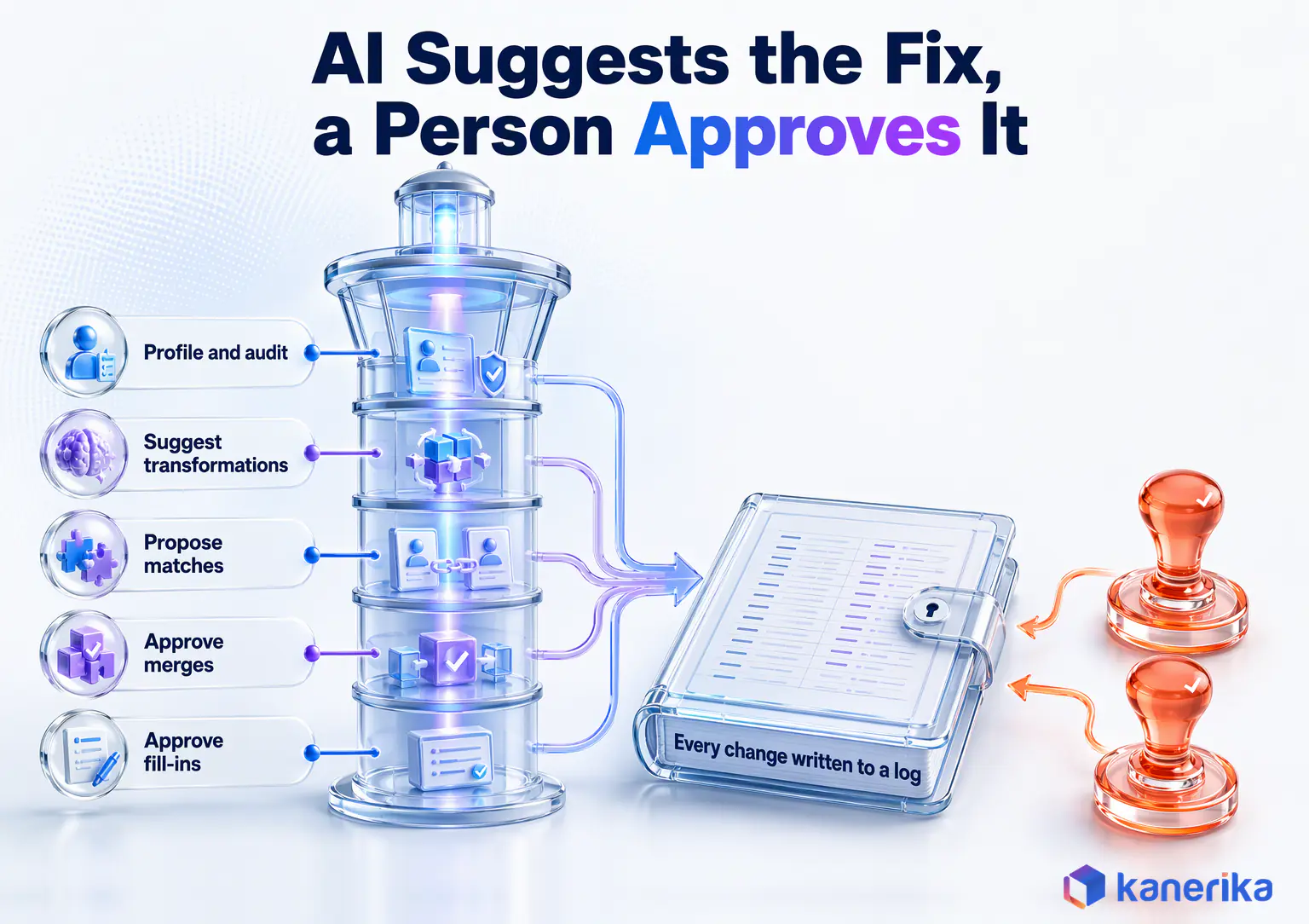
The data cleansing process steps where AI tools can be used are mostly the tedious ones, such as spotting patterns, suggesting fixes and proposing matches. But decisions that change records for good still need a person or a reviewed rule. The table below then maps all seven steps.
The Seven Steps and Who Acts at Each
| Step | What happens | Where AI helps | Where a person decides |
|---|---|---|---|
| 1. Profile and audit | Scan columns for patterns, blanks and outliers before any fix | Flags unusual values and suggests rules | Which issues matter to the business |
| 2. Standardize and parse | Split, trim and reformat values | Suggests the next transformation (Alteryx Designer Cloud) | The format downstream systems need |
| 3. Fix structural errors and validate ranges | Correct types, codes and out-of-range values | Generates common rules (Informatica Data Quality Agents) | The edge cases a rule should allow |
| 4. Handle missing values | Fill, flag or leave blanks | Proposes likely values, but only as suggestions | Whether a guess is allowed at all |
| 5. Match and deduplicate | Find records that describe one entity | Estimates match weights without labels (Splink) | Merges below a reviewed threshold |
| 6. Merge and apply survivorship | Pick the values that survive once records merge | Ranks candidate values by recency or source | The survivorship policy itself |
| 7. Verify, log and monitor | Re-check results while keeping the history | Spots new error patterns (Qlik agentic stewardship) | Sign-off, then rollback if needed |
Step one is profiling, which Kanerika’s data profiling guide covers in detail. Preparing features for a machine learning model is a related but separate job, and it belongs to data preprocessing.
Where AI Pays Off Most
AI helps most when it works during a change rather than after it. Kanerika’s State of Enterprise Data Platform Migrations 2026 report describes how the agents in FLIP, its migration platform, work. They identify data quality issues, referential integrity problems and transformation errors during the migration rather than after it. That timing matters, because a fix made in flight never reaches a production report.
What AI Should Never Decide Alone
Some calls, however, should stay with people. AI should not fill a missing value with a guess unless the field allows it. It also should not merge records below a threshold that someone has reviewed. It should also never write a change without a log, and Kanerika’s guide to AI data governance covers the controls behind those limits.
How to Choose a Data Cleansing Tool for Your Data
Choose by the data first and by features second. A tool that excels at spreadsheet cleanup will not fix duplicate customers in Salesforce. An enterprise suite, on the other hand, is far too heavy for one analyst’s monthly file.
Knowing the data up front also prevents expensive surprises. Kanerika’s State of Enterprise Data Platform Migrations 2026 report compiles industry research on this. It names inadequate technical discovery as a factor in 68% of failed migration projects. Its partner checklist also asks whether data quality issues are quantified rather than described in general terms, and that test fits cleansing too.
Start With the Data Type
Use the table to pick the first two or three tools before a pilot. The deciding question in the last column usually settles the choice faster than a feature grid.
| Your data | First tools to test | The deciding question |
|---|---|---|
| Spreadsheets and analyst files | OpenRefine, Power Query, Alteryx | Will the same cleanup repeat once a month or more? |
| Customer and CRM records | Data Ladder, WinPure, DemandTools | Can a reviewer see why two records matched before a merge? |
| Addresses and contact details | Melissa, Precisely Trillium | Do you need postal rules for more than one country? |
| Enterprise integration pipelines | Informatica, Qlik Talend Cloud, IBM QualityStage | Must the rules run during every load? |
| Lakehouse tables | SQL expectations, Splink, pandas with RapidFuzz | Does the team want rules in version control so changes get reviewed? |
Features That Matter
Six capabilities separate a cleansing tool from a formatting utility. Look for tunable matching methods, reusable standardization rules and survivorship settings. Also check for connectors to your real sources and an audit trail that records every change. Scheduling matters as well, since a fix that runs once starts to decay as soon as new records arrive.
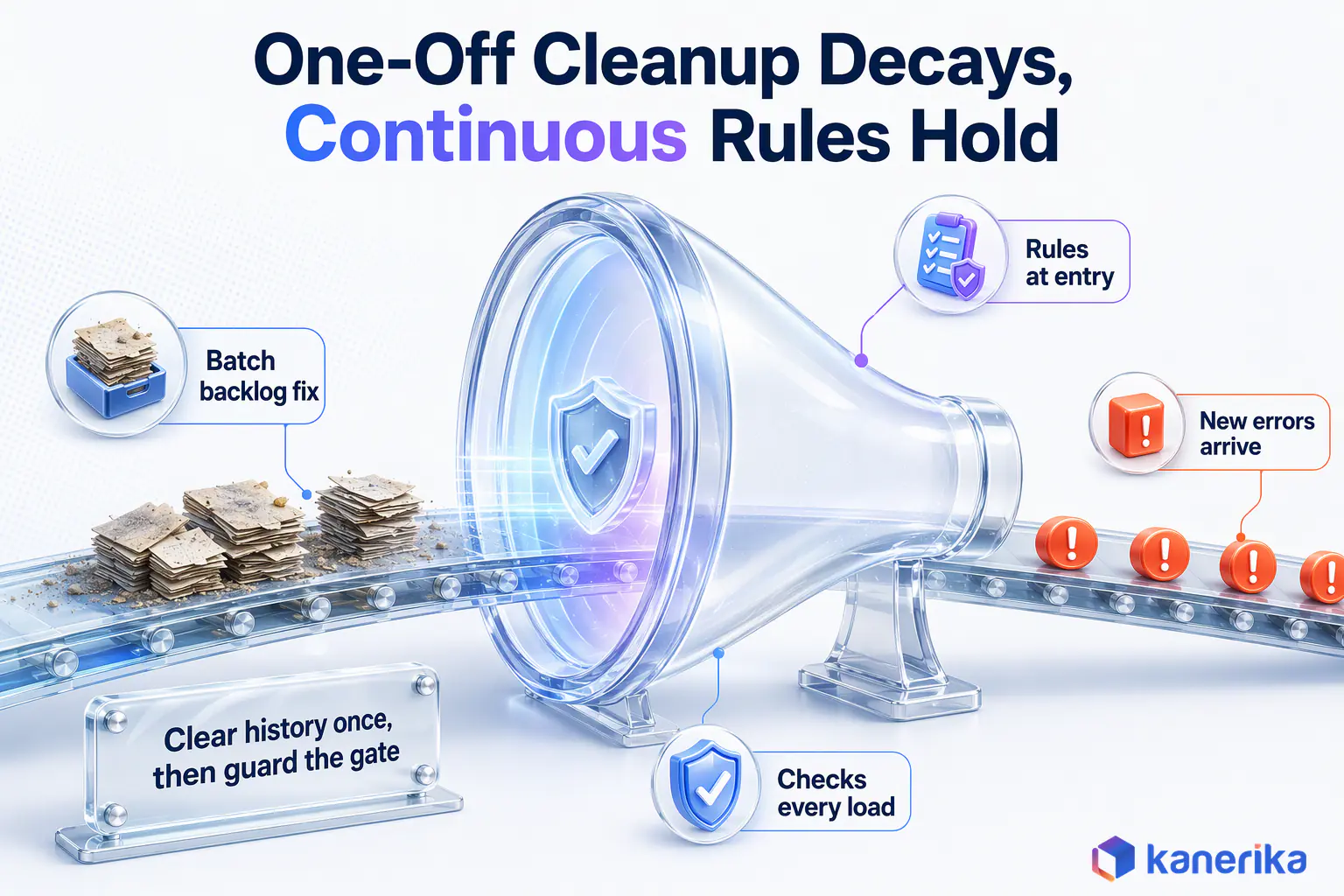
Batch Cleanup or Continuous Cleansing
A one-off cleanup clears the backlog, but new errors start arriving the next morning. Continuous cleansing puts rules at the point of entry, such as Salesforce duplicate rules, and inside every pipeline load, such as Databricks expectations. So plan for both, a batch project to clear history and standing rules to keep it clear.
Hard Constraints to Check First
- Where personal data is processed, whether on a desktop, in your own cloud or in the vendor’s cloud.
- Ownership and licence changes, such as Salesforce owning Informatica and the retirement of Talend Open Studio.
- Whether the tool can write fixes back to the source, or only to a copy that drifts away from it.
Microsoft shops should also note that Purview is a governance tool, not a cleansing tool. Microsoft is retiring Purview data governance, which takes no new accounts and loses support on November 12, 2027.
The successor path is the Fabric OneLake catalog, and Microsoft’s migration guide notes that its Governance Health view is not a rules, profiling and scoring engine. So cleansing still belongs in Power Query, Dataflow Gen2 or notebooks. Kanerika’s Microsoft Purview guide covers the wider product.
Test Data Cleansing Tools on Your Own Data Before You Buy
Vendor demos run on vendor data, so they hide your hardest cases. A short pilot on your own records shows which tool fixes your errors and, just as important, which one breaks records that were already fine.
Build a Representative Test Set
- Pull a sample that carries your real error patterns, such as mixed phone formats, partial addresses and known duplicates.
- Mask personal data wherever your policy requires it.
- Add hard non-matches, such as two people at one address and two firms with similar names but different registration numbers.
- Keep the raw value next to every field, so each change can be compared with the original.
- Label the expected outcome for each record before the pilot starts, so nobody grades a tool on its own answers.
Measure Repair Quality, Not Errors Found
A tool that finds more errors is not automatically better, because finding is not fixing. The scorecard below measures what the tool changed and whether those changes were right.
| Measure | What it tells you |
|---|---|
| Correction accuracy | How many changed values are actually right |
| Match precision | Of the pairs the tool merged, how many were truly one entity |
| Match recall | Of the known duplicates, how many the tool found |
| False-merge rate | How often two distinct entities were combined |
| Review workload | How many records still needed a human decision |
| Runtime | How long a full run takes when volume is realistic |
| Reversibility | Whether every change can be traced and then undone |
| Setup effort | Hours spent before go-live on rules, connectors and labeling |
Set targets from business risk rather than from a vendor benchmark. A false merge in a marketing list is a nuisance, while the same mistake in policy or patient records is a serious error.
Validation at scale shows what a rigorous test looks like. A global digital infrastructure company moved from Informatica PowerCenter and Oracle to Microsoft Fabric. During that move, Kanerika’s Klarity 360 validated more than 400 million rows across 350+ tables.
The mismatches came from differences in data types, precision, NULL values and formats between Oracle and Fabric. In the end, the project cut manual validation effort by 60% and shortened validation cycles from 175 to 70 days.
Worked Example: Scoring Two Tools on One Pilot (Illustrative)
The numbers here are assumptions for illustration, not results from a real pilot. Suppose the test set holds 2,000 customer records, and the labels mark 150 pairs as true duplicates.
Tool A merges 140 pairs, and 126 of them are real duplicates. That gives a match precision of 126 / 140, or 90%, and a recall of 126 / 150, or 84%. Its 14 false merges each fused two separate customers into one.
Tool B is more cautious. It merges 110 pairs, and 108 are correct, so precision rises to about 98% while recall falls to 72%. Only 2 false merges slip through, but 42 real duplicates stay unmerged for a steward to find.
For a marketing list, Tool A’s wider reach may be worth 14 wrong merges. For policy or patient records, Tool B is the safer pick, because a missed duplicate costs a review while a false merge corrupts a record.
Count the Whole Cost
The licence is often the smallest line in the budget, so plan for the rest. Add API calls for verification, reference data subscriptions, compute, steward review time and the hours needed to keep rules current as sources change.
Where Data Cleansing Goes Wrong: False Merges, Guessed Values and Lost History
Cleansing can damage data as easily as it repairs it. The harm usually comes from false merges, guessed values or lost history, and each one has a simple guard.
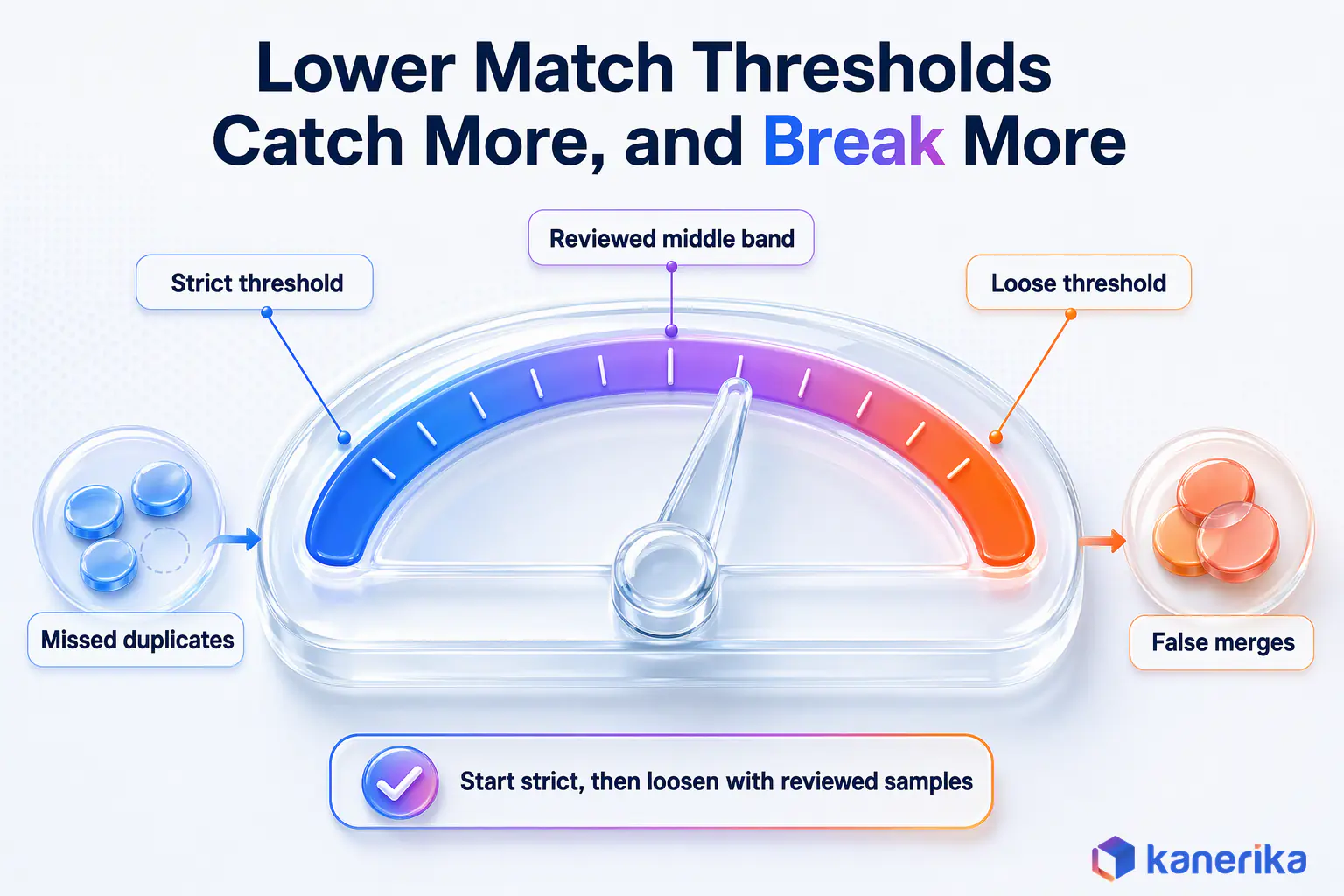
False Merges and Overly Aggressive Standardization
Two people can share an address, and “Acme LLC” and “ACME” may be different legal entities. So start strict and loosen only after review, which is why the OpenRefine manual ranks fingerprinting as the method least prone to false positives. In Power Query, raise the similarity threshold above the 0.80 default for names that carry legal or financial weight.
Guessed Fill-Ins
Trimming whitespace is safe because nothing is lost. Inventing a missing birth date, or reading 03/04/2026 without a known locale, is a guess dressed up as a fix. Leave the gap and flag it instead, because a blank that everyone can see does less harm than a confident wrong value.
Keep Every Change Traceable and Reversible
- Keep raw values beside the cleansed ones.
- Log the rule version behind each change.
- Quarantine failed rows instead of dropping them.
- Send merges above a set risk level to a data steward.
- Test the rollback path before you need it.
Kanerika’s data quality framework places these controls inside the wider operating model, with owners for each rule.
How Kanerika Helps You Cleanse Data That Stays Clean
So where does Kanerika come in? Cleansing that lasts is an engineering job with owners, which is why a one-time spreadsheet sprint rarely holds. Kanerika’s IMPACT framework, as its data integration services page puts it, guides the work “from initial discovery through go-live”. Its data governance services apply the same method, “focusing on measurable outcomes at each phase from assessment to deployment”.
That’s where Kanerika, your trusted partner, helps most. Together you define a correct record and set match thresholds and survivorship rules. Then the fixes move into pipelines, with a named steward for each rule.
Migrations: Cleanse Before the Move, Prove It After
If a platform move is on your roadmap, cleansing can travel with it. FLIP flags quality problems in flight, and Kanerika’s guide to data migration cleansing covers the steps around it. Klarity360, Kanerika’s data validation agent, then checks source against target with plain-language business rules and logs every match and mismatch.
Its product page lists 60% faster data reconciliation and 50% fewer engineering hours.
Pitfalls That Undo Good Cleansing Work
If your last cleanup faded, one of three habits is usually why. Teams fix the report instead of the source, so the error keeps coming back. They overwrite raw values, so no merge can be undone, and they leave rules in one analyst’s workbook.
On Microsoft Fabric, the remedy is to keep analyst-level steps in Power Query or Dataflow Gen2 and heavier rules in notebooks, so every fix sits on one platform next to the reports that depend on it.
Case Study
Informatica to Microsoft Fabric with Automated Data Validation
Klarity 360 validated 400M+ rows across 350+ tables in an Informatica PowerCenter and Oracle move to Microsoft Fabric, cutting manual validation effort by 60%.
Read the Case Study →Finding the Data Cleansing Tools That Fit Your Records
You probably finished this post with one mess in mind, like a CRM full of Acmes or a file someone fixes by hand. The tools follow the data, so start with the group that fits your records. Then pilot two or three on your own files and count the false merges before you buy.
If that sounds familiar, you’re in the same spot as many teams who call Kanerika. The first cleanup went fine, but months later the duplicates were back because the rules never left one laptop. That’s why starting small works, with one source, agreed rules and a steward who signs off.
A partner who has done this before saves you that second cleanup, and Kanerika is a Microsoft Solutions Partner for Data and AI. For Fortegra, its automated matching brought 99% accuracy in data extraction and an 85% reduction in reconciliation time. Its data engineering services build rules like yours into pipelines with data quality and observability frameworks, so the fixes keep running.
If you want the wider numbers first, the State of Enterprise Data Platform Migrations 2026 report is a good next read. Then bring one messy export, a CRM extract or that monthly file, to a working session with Kanerika. We’ll look at which tool group fits your errors and how to pilot a shortlist on your own records.
Frequently Asked Questions
What are data cleansing tools?
Data cleansing tools are software that fix records rather than only flag them. They standardize formats, correct invalid values, find and remove duplicates, verify addresses and merge conflicting copies into one trusted record. Data scrubbing tools and data cleaning tools are other names for the same category, and the goal is data that reports, CRMs and AI models can trust.
What is the best data cleansing tool?
No single tool wins for every team, because the best choice depends on the data you need to fix. OpenRefine and Power Query suit spreadsheets, Melissa and Data Ladder suit customer records, and Informatica or Qlik Talend Cloud suit enterprise pipelines. Engineering teams often prefer Splink or SQL rules, so pilot two or three tools on your own records first.
Are there free or open-source data cleansing tools?
Yes. OpenRefine is free under the BSD-3-Clause license, while Splink, dedupe and RapidFuzz are open source under the MIT license. Power Query is already included in Excel and Power BI. Talend Open Studio was retired in January 2024, so it is no longer an option, and every free tool still costs setup, rule writing and review time.
Can Excel clean data?
Yes. Power Query inside Excel records cleanup steps such as trimming, splitting and replacing values, then replays them each time the data refreshes. Its fuzzy merge matches near-duplicate text across tables with a default similarity threshold of 0.80. The Cluster values feature works only in Power Query Online, and large shared jobs fit better in Dataflow Gen2.
Which tools clean Salesforce and CRM data?
Start with Salesforce’s own matching rules and duplicate rules, which alert or block reps before a duplicate is created. Validity DemandTools then merges existing duplicates, runs mass updates and standardizes fields inside Salesforce. Melissa Clean Suite verifies addresses and contacts in Salesforce and Dynamics, while Data Ladder or WinPure match records across the CRM and other systems.
What tool allows you to discover, cleanse and transform data?
Data preparation tools do all three in one place. Alteryx Designer Cloud, which carries the former Trifacta technology, profiles data, suggests transformations and cleans it in a visual workflow. OpenRefine and Power Query also let you explore values, fix them and reshape tables, although they suit smaller, analyst-led jobs better than large enterprise pipelines.
What is the difference between data cleansing and data quality tools?
Data cleansing tools change records by standardizing, correcting, deduplicating and merging them. Data quality tools profile data, test it against rules, monitor it over time and score how fit it is for use, but they do not repair it. Most enterprises need both, with quality checks finding problems and cleansing tools fixing them at the source.
Can AI clean enterprise data automatically?
AI can speed up the routine steps, such as profiling columns, suggesting transformations and proposing duplicate matches. It should not decide alone on merges below a reviewed threshold, on guessed values for missing fields or on changes that leave no log. The safest setup lets AI suggest fixes while a person or a tested rule approves them.
What are B2B data cleansing tools?
B2B data cleansing tools fix company and contact records used in sales and marketing. They standardize company names, remove duplicate accounts and contacts, verify addresses and emails, and merge records into one account view. Data Ladder, WinPure, Melissa and Validity DemandTools are common examples, often paired with native CRM duplicate rules to stop new errors at entry.
Is SQL a data cleaning tool?
Yes. SQL can trim, standardize, deduplicate and validate data directly in a warehouse or lakehouse. Databricks pipeline expectations attach rules that warn, drop rows or fail an update, and Microsoft Fabric notebooks run the same logic with Spark SQL. Sending failed rows to a quarantine table keeps bad data out of reports without silently losing it.