
TL;DR
Data lake tools are the storage services, ingestion tools, open table formats, catalogs and query engines that store, load, organize, govern and analyze raw data in a data lake. AWS-first teams usually start with Amazon S3, Lake Formation and Athena, while Microsoft-first teams start with OneLake inside Microsoft Fabric. Teams that want open, multi-engine access pair Apache Iceberg with an open catalog and an engine such as Trino, Starburst or Dremio. Spark and machine learning heavy teams often choose Databricks, since it pairs Delta Lake with Unity Catalog. No single tool covers every layer, so find the layer your lake is missing before you compare products. Then prove the shortlist in a proof of concept on your own data, not in a vendor demo.
Key Takeaways
- A data lake is assembled from layers, but most data lake tools cover only one of them.
- Lakehouse platforms such as Databricks, Microsoft Fabric, Snowflake and Cloudera bundle several layers behind one control plane.
- Open table formats like Apache Iceberg and Delta Lake make files behave like tables, but engine support still needs testing.
- A catalog that shows data does not enforce access by itself, so check where each policy actually runs.
- Judge cost by its drivers, such as data scanned, compute, connector usage and engineering time, rather than list price.
- A short proof of concept on representative data catches most tool failures before they reach production.
The Myth of the One-Tool Data Lake
Ask five data leaders to name the best data lake tool, and you will hear Amazon S3, Databricks, Fivetran, Apache Iceberg and Trino. At first, each answer sounds like a rival to the others. In fact, those five products do five different jobs inside the same lake.
The myth is that a data lake is one product you buy and then switch on. In reality, a working lake is assembled from layers, and storage alone only holds files that nobody can query safely. So teams that shop on the myth often pay for two overlapping tools while a whole layer stays empty.
The better question is which layer your lake is missing, and which tool fills it for your cloud, your workloads and your team. This guide sorts 20 data lake tools by layer, from storage to query engines, and says who each one fits.
What Are Data Lake Tools?
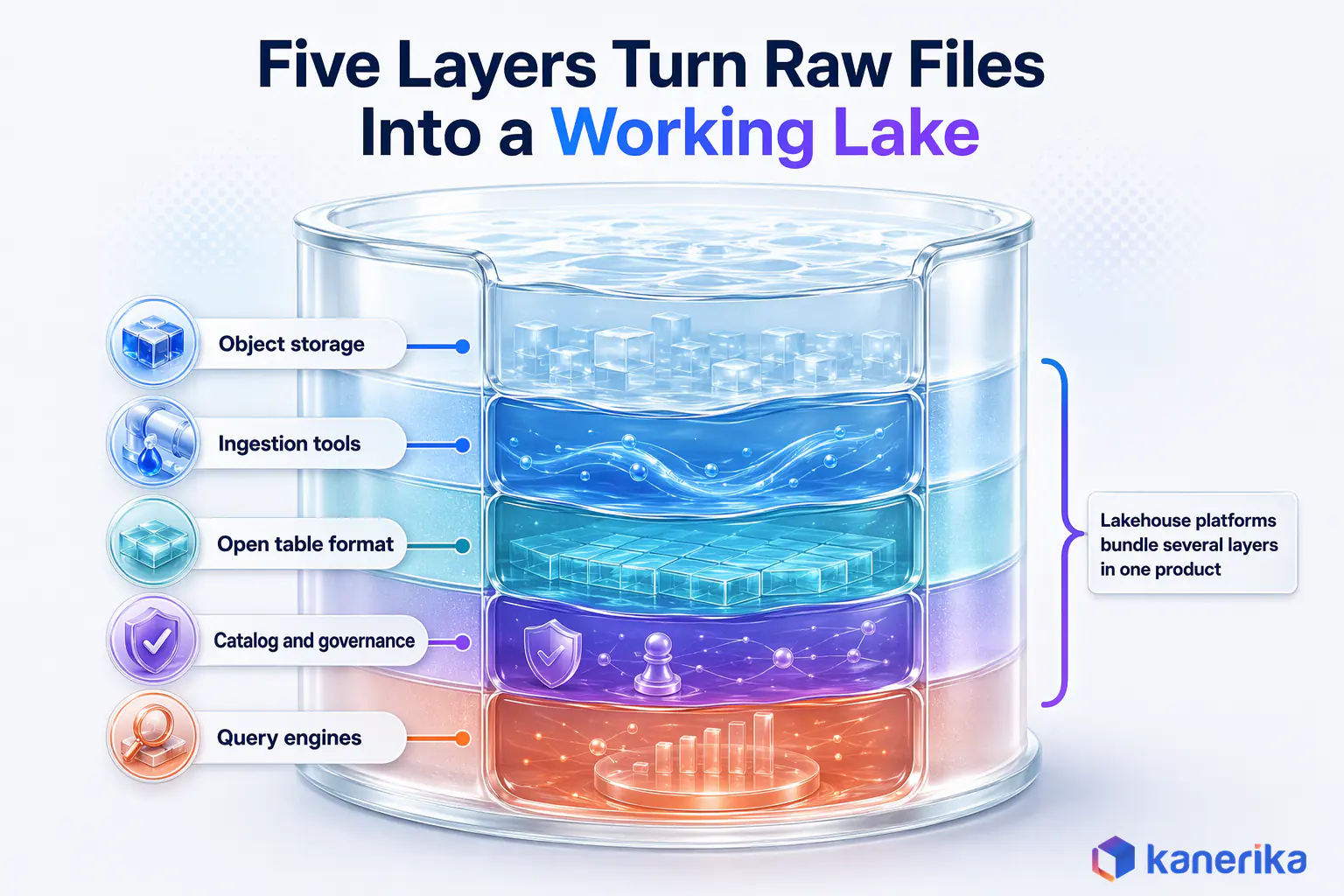
Data lake tools are the software and cloud services that store, load, organize, govern and query the raw data held in a data lake. Each one covers a layer, so most lakes need several. For example, a storage service keeps the files, an ingestion tool moves data in, and a query engine turns those files into answers.
The layers matter more than any single product once AI enters the plan. Kanerika’s State of Enterprise AI & Data Modernization 2026 report draws on 161 documented client engagements. It found that the data foundation, rather than the model, decides whether AI reaches production. Teams that modernized the foundation first shipped AI faster and cheaper, while teams that chased models first spent the following year on rework.
How a Data Lake Works, Layer by Layer
First, data enters through ingestion tools and lands as files in cloud object storage. An open table format then organizes those files into tables with a schema and a history. After that, a catalog records what each table holds and who may read it.
Finally, query and processing engines read the tables for dashboards, data science and AI. Lakehouse platforms package several of these layers into one product, which is why they appear on almost every list of data lake tools. For reference designs that show the layers in real deployments, Kanerika’s data lake examples walk through several architectures.
Files, Table Formats and Engines Are Different Things
A Parquet file stores columns of data efficiently, but it knows nothing about the table it belongs to. A table format such as Apache Iceberg adds that missing record, tracking which files make up a table, its schema and its snapshots. An engine such as Trino then reads the table and runs the SQL.
Mixing these up is a common shortlist error. Comparing Iceberg with Trino is like comparing a filing system with the person who reads the files. Both are needed, because neither replaces the other.
Data Lake Tools vs Databases and Data Warehouse Tools
A data lake is an architecture, so it is neither a single tool nor a database. It keeps raw files of any shape in low-cost object storage and applies structure when the data is read. A database or warehouse, by contrast, applies a schema when data is written and controls its own storage and engine. In SQL Server or Snowflake, a table rejects a row that breaks its schema on write. A lake instead keeps the raw JSON file and lets Trino or Athena apply the schema when the file is read.
Kanerika’s data lake glossary entry covers the definition, and the guide to data warehouse tools covers warehouse products, which this list leaves out on purpose. If you are still sorting databases from lakes, the overview of types of databases maps each data model to the workload it suits.
Data Lake Tools at a Glance: 20 Options Compared
Before the details, the tables list all 20 data lake tools by layer, with their main job, how they are delivered and how they charge. Roles are simplified, though, and a shared row does not promise that two tools work together. Managed platforms also span more than one layer, so read the layer column as each tool’s home base.
Tools 1 to 10: Storage, Lakehouse Platforms and Ingestion
The first ten tools hold the data, bundle the layers or move data into the lake.
| Tool | Layer | Primary Role | Delivery and Pricing | Best For |
|---|---|---|---|---|
| 1. Amazon S3 | Storage | Object storage for lake files, plus managed Iceberg tables | Managed by AWS; usage-based, such as storage, requests and transfer | AWS-first lakes |
| 2. Azure Data Lake Storage | Storage | Blob Storage with a hierarchical namespace | Managed by Azure; usage-based, such as capacity and transactions | Azure and Fabric estates |
| 3. Google Cloud Storage with Lakehouse for Apache Iceberg | Storage | Object storage plus managed Iceberg tables | Managed by Google Cloud; usage-based | Google Cloud and BigQuery teams |
| 4. Databricks | Lakehouse platform | Spark, Delta Lake, ML and governance in one platform | Managed, built on open source; DBUs plus cloud infrastructure | Spark and ML-heavy teams |
| 5. Microsoft Fabric with OneLake | Lakehouse platform | SaaS analytics on one lake per tenant | Managed SaaS; capacity-based | Microsoft-first enterprises |
| 6. Snowflake | Lakehouse platform | SQL engine with Iceberg tables on managed or external storage | Managed; credits plus storage | SQL-first teams adding lake data |
| 7. Cloudera | Lakehouse platform | Hybrid Iceberg lakehouse across cloud and on premises | Managed or self-managed; subscription | Regulated hybrid estates |
| 8. Fivetran | Ingestion | Managed ELT connectors | Managed; consumption-based | Low-upkeep SaaS and database ingestion |
| 9. Airbyte | Ingestion | Open-source connector platform | Free open source plus infrastructure, or cloud usage | Teams that want control as well as custom connectors |
| 10. Apache Kafka | Ingestion (streaming) | Event streaming with Kafka Connect sinks | Free open source plus infrastructure, or a managed service | Real-time event feeds |
Tools 11 to 20: Table Formats, Catalogs and Query Engines
The other ten organize, govern and query what the first group stores.
| Tool | Layer | Primary Role | Delivery and Pricing | Best For |
|---|---|---|---|---|
| 11. Apache Iceberg | Table format | Multi-engine table format | Free open source; pay for engines and storage | Open, multi-engine lakes |
| 12. Delta Lake | Table format | ACID tables with time travel | Free open source; pay for engines and storage | Databricks and Fabric users |
| 13. Apache Hudi | Table format | Incremental, upsert-heavy tables | Free open source; pay for engines and storage | CDC and update-heavy tables |
| 14. AWS Lake Formation with the Glue Data Catalog | Catalog and governance | Metadata catalog plus fine-grained permissions | Managed by AWS; Glue catalog and crawler charges | Governed AWS lakes |
| 15. Databricks Unity Catalog | Catalog and governance | Access control, lineage and audit for data and AI | Part of Databricks; open-source edition free | Databricks estates and Iceberg REST clients |
| 16. Microsoft Purview | Catalog and governance | Data Map, catalog and classification across the estate | Managed by Azure; consumption billing, governance features retiring | Existing Purview estates planning a move |
| 17. Apache Spark | Processing | Batch, streaming and ML processing | Free open source plus compute, or managed runtimes | Heavy transformation and ML prep |
| 18. Trino and Starburst | Query | Distributed SQL and federation | Trino free open source; Starburst managed subscription | SQL across many sources |
| 19. Amazon Athena | Query | Serverless SQL on S3 | Managed by AWS; per data scanned or reserved capacity | Ad hoc SQL on AWS lakes |
| 20. Dremio | Query | Iceberg lakehouse SQL with query acceleration | Managed and self-managed editions; subscription or usage | BI dashboards on Iceberg |
Why Pricing Models Beat List Prices
Pricing models matter more than list prices at this stage. A usage-billed engine rewards tidy, compressed data, while a capacity-billed platform rewards steady workloads that keep the capacity busy. So the same workload can be cheap on one tool and costly on another.
Kanerika Service
Data Architecture Consulting
Kanerika maps your sources and workloads to the lake layers you actually need, then designs a target architecture and a tool shortlist your team can run.
Explore Data Architecture ServicesStorage Layer: Where the Lake’s Data Lives
Every data lake rests on cloud object storage. These services are low cost per gigabyte and very durable, so they happily hold files in any format. On their own, though, they give you no tables, no schema and no SQL.
The watch-out all three share is location. Moving data between clouds or regions adds egress charges and slows queries, so keep compute close to the storage it reads.
1. Amazon S3
Amazon S3 is the default home for data lakes on AWS, and it is the storage most other tools can read. AWS designs S3 storage classes for 99.999999999% durability and stores data across at least three Availability Zones by default.
S3 has also moved up the stack. S3 Tables store tabular data as fully managed Apache Iceberg tables, with automatic compaction and table maintenance. That removes a chore many teams once scripted by hand.
- Best for: AWS-first teams, especially lakes that many engines must read.
- Watch out for: request and egress charges, plus small-file sprawl that slows queries.
- Pairs with: Lake Formation, the Glue Data Catalog, Athena and Iceberg.
2. Azure Data Lake Storage
Azure Data Lake Storage is a set of analytics capabilities built on Azure Blob Storage, rather than a separate service. Once you turn on the hierarchical namespace, it adds real directories, Hadoop-compatible access and a finer-grained security model.
It matters beyond Azure-native lakes too, because Microsoft OneLake is built on it. Teams moving to Microsoft Fabric often keep existing ADLS data where it is and reach it through shortcuts instead of copying it.
Cost can tip the decision, too. Kanerika moved a steel mill services firm’s data to Azure Data Lake, and storage expenses fell 25%, as the steel case study reports. Pay-as-you-go billing replaced a costly legacy system, and multi-factor authentication now guards the stored data.
- Best for: Azure estates and teams adopting Microsoft Fabric.
- Watch out for: access-control design across deep folder trees, and transaction costs from many small files.
- Pairs with: Microsoft Fabric, Azure Databricks and Azure Data Factory.
3. Google Cloud Storage With Lakehouse for Apache Iceberg
On Google Cloud, Cloud Storage holds the lake’s files. Google has also renamed BigLake, and its product page now reads Lakehouse for Apache Iceberg (formerly BigLake), with managed Iceberg storage, governance and performance tuning.
The rename also shows where Google is heading. Lake data lives as open Iceberg tables that BigQuery and other engines can share. That suits teams that want Google’s analytics tools without locking data into one engine’s private format.
- Best for: Google Cloud teams, especially those that already use BigQuery.
- Watch out for: older docs and scripts that still say BigLake, so check names against current pages.
- Pairs with: BigQuery, Dataproc for Spark, and Iceberg.
Lakehouse Platforms: Data Lake Tools That Bundle the Layers
Lakehouse platforms bundle storage access, table formats, governance and engines behind one control plane. Fewer seams also mean fewer integration jobs and one place to set permissions. The trade-off is deeper dependence on one vendor, even when the data itself sits in open formats.
Four platforms show up on nearly every shortlist. They grew out of different products, and it still shows, so each one is strongest at a different job.
4. Databricks
Databricks describes its data lakehouse as underpinned by open-source Apache Spark, Delta Lake and MLflow. It gives one toolset for Python and SQL, batch and streaming, and it runs on all major clouds with Unity Catalog governance built in.
That makes it the natural pick when data engineering and machine learning share one team. Notebooks, jobs, SQL warehouses and model serving live in one workspace, so pipelines and models read the same governed tables. Kanerika’s Databricks services and its guide to Databricks lakehouse architecture cover the design choices in more depth.
- Best for: Spark and ML-heavy teams, particularly those that want one governed workspace.
- Watch out for: DBU consumption, cluster sprawl and jobs left running on all-purpose compute.
- Pairs with: S3, ADLS or Google Cloud Storage, Delta Lake, Unity Catalog and Power BI.
5. Microsoft Fabric With OneLake
Microsoft Fabric is a SaaS analytics platform, and OneLake is the single data lake behind it. Every Fabric tenant includes one automatically. OneLake is built on Azure Data Lake Storage and stores tables in Delta Parquet or Iceberg format.
Shortcuts are the part most teams notice first. They reference data in Amazon S3, ADLS, other OneLake workspaces, Dataverse and on-premises sources without copying it. So teams can query an existing lake on day one.
In a Microsoft customer story, FoodPharma worked with Kanerika to build a Fabric foundation layer. It brought NetSuite, RedZone, Parity Factory, UpKeep, Paychex and Outlook data into one place, with automated daily loads through Data Pipelines and Dataflow Gen2. Cross-functional reporting stopped depending on manual extraction, and FoodPharma now has a foundation ready for enterprise AI use cases.
Other teams start from scattered databases rather than an existing lake. In the pharma Fabric case study, Kanerika’s single Fabric Data Lakehouse cut data-related errors by 78% for a US drugmaker. Its Model N, SQL Server and SAP data now sits in one place, and data processing runs 41% faster.
- Best for: Microsoft-first enterprises that want engineering, storage and Power BI on one platform.
- Watch out for: capacity sizing, because a busy capacity slows every workload that shares it.
- Pairs with: ADLS, Power BI, Azure Data Factory and the OneLake catalog.
Kanerika’s Microsoft Fabric services team builds and migrates these foundations when an enterprise already runs on Microsoft.
6. Snowflake
Snowflake began as a cloud data warehouse, and it now reads and writes lake data through Apache Iceberg tables. Those tables can sit in Snowflake-managed storage, or in an external volume on Amazon S3, Google Cloud Storage or Azure that you manage yourself.
So is Snowflake a data lake or a warehouse? It is a warehouse engine that also works as a lakehouse platform when you keep data in Iceberg. That suits SQL-first teams that want lake files other engines can also read, and Kanerika’s Snowflake services help teams set up that split.
- Best for: SQL-first teams adding open lake data to an existing Snowflake account.
- Watch out for: who protects external Iceberg storage, since Fail-safe covers only Snowflake-managed storage.
- Pairs with: S3, Azure Storage or Google Cloud Storage, Fivetran and Power BI.
7. Cloudera
Cloudera positions its open data lakehouse on Apache Iceberg inside a hybrid data and AI platform. It also runs across public clouds and on premises, with catalog, lineage and observability modules.
That hybrid reach is its main draw, especially in regulated industries. Banks, insurers and public bodies with large on-premises estates can modernize without moving every dataset to one public cloud first. Many of them also still run older Hadoop clusters, and Cloudera gives those clusters a path forward without a full rebuild.
- Best for: regulated firms, particularly those with data that must stay on premises.
- Watch out for: platform skills and upgrade planning across many components.
- Pairs with: Iceberg, Spark and existing on-premises storage.
Ingestion Tools: Getting Data Into the Lake
Ingestion tools move data from applications, databases and event streams into the lake. The hard part, however, is everything that happens after a source changes. Schemas drift, rows get deleted and jobs fail halfway, so recovery behavior matters as much as connector count.
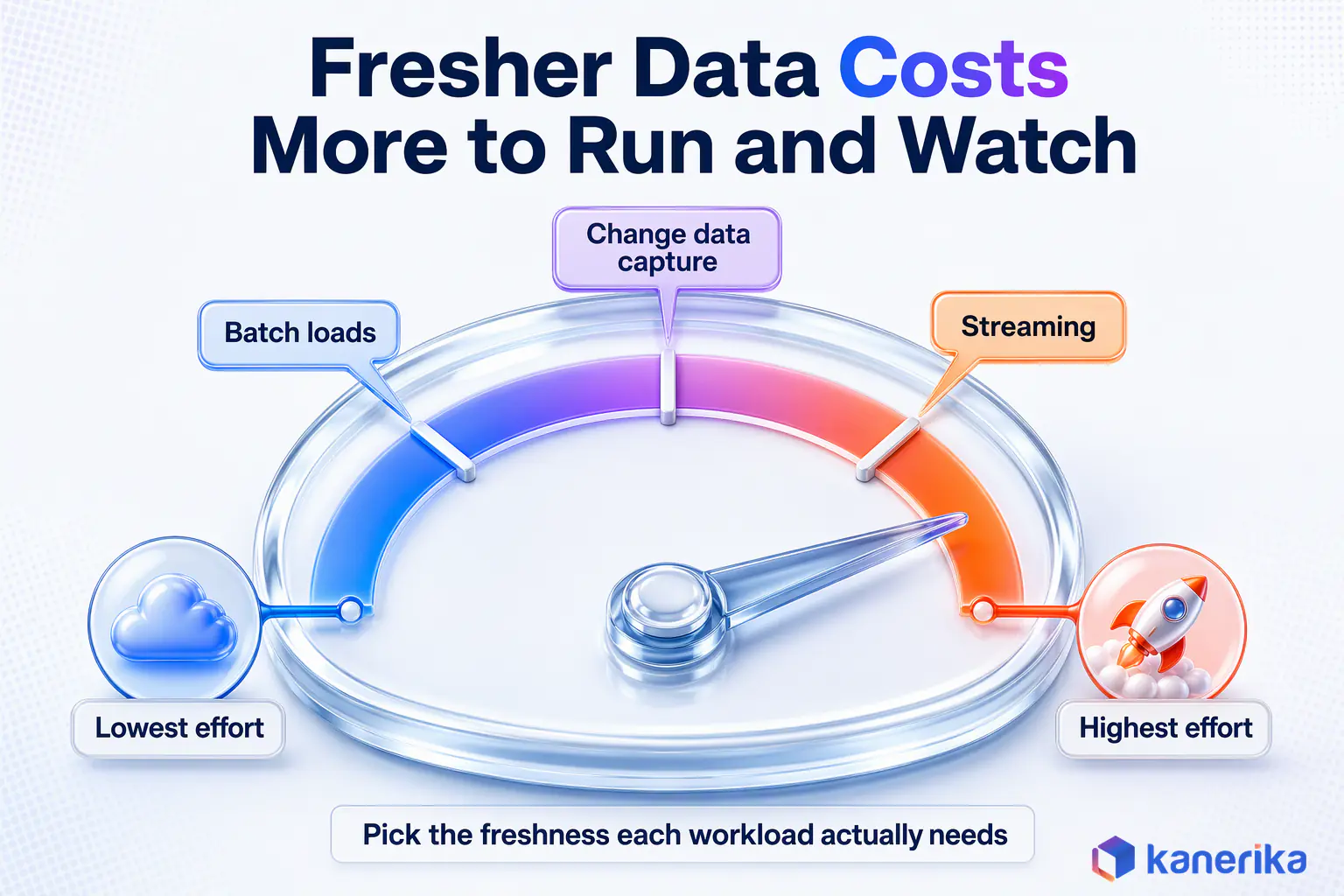
Freshness is also a trade-off to settle early. Batch loads are simple and cheap. Change data capture keeps tables close to the source, while streaming lands events in seconds at the highest operating effort.
Customer data is the usual stress test, because it arrives from CRM, billing and support systems at once. Kanerika’s guide to customer data integration shows how those sources come together before they reach the lake.
8. Fivetran
Fivetran runs pre-built ELT pipelines that replicate data into a warehouse or a lake. Its connector catalog lists more than 750 sources, and data lakes are one of its listed destinations. Fivetran also merged with dbt Labs in June 2026, so one vendor now stands behind both loading and dbt-based transformation.
Kanerika used Fivetran in a Snowflake migration for a North American beverage manufacturer and distributor. Fivetran automated ingestion from ERP and third-party systems, which replaced slow hourly refreshes with near real-time analytics, as the Snowflake migration case study describes.
- Best for: teams that would rather not maintain SaaS and database connectors themselves.
- Watch out for: consumption costs that rise with frequently changing tables.
- Pairs with: S3, ADLS, Snowflake and Databricks.
9. Airbyte
Airbyte is an open-source data movement platform with more than 700 connectors in its catalog. It supports incremental sync with built-in handling for schema changes, and you can self-host it or use Airbyte’s cloud.
Self-hosting gives full control, as well as a path to build custom connectors. It also hands your team the upgrades, scaling and on-call duty that a managed service would absorb.
- Best for: teams with engineers who want control, or niche sources that need custom connectors.
- Watch out for: operating effort when self-hosted, and uneven maturity across community connectors.
- Pairs with: S3, Iceberg, Snowflake and Databricks.
10. Apache Kafka
Apache Kafka is an open-source distributed event streaming platform, and its project site says more than 80% of Fortune 100 companies use it. Kafka Connect, its integration framework, can then sink event streams into lake storage.
Kafka is a backbone for real-time feeds rather than a turnkey lake loader. You still need sink connectors, a table format and compaction, so that a stream of small files becomes tables people can query.
- Best for: event and change streams that must land within seconds rather than hours.
- Watch out for: cluster operations, partition planning and small files in the lake.
- Pairs with: Spark Structured Streaming, Flink, Iceberg and Hudi.
Cloud-Native Data Lake ETL Tools Worth Knowing
Each cloud also ships its own loaders. AWS Glue runs serverless ETL jobs, while Azure Data Factory and Fabric Data Factory orchestrate pipelines in the Microsoft stack. Google Datastream also replicates database changes into Google Cloud.
Apache NiFi suits flow-based routing across many systems, especially on premises. In practice, a lake project often begins by deciding which of these loaders to keep and which to retire. That consolidation is the kind of work Kanerika’s data integration services handle.
Best CDC Tools for Streaming Database Changes to a Data Lake
Change data capture, or CDC, copies inserts, updates and deletes from a source database as they happen, so lake tables stay close to the source. Several tools on this list handle it, and the right one depends on how fresh the data must be.
| Tool | How It Handles Changes | Best Fit |
|---|---|---|
| Apache Kafka with Kafka Connect | Streams change events, then sinks them into lake storage | Changes that must land within seconds |
| Google Datastream | Replicates database changes into Google Cloud | Google Cloud lakes |
| Fivetran | Managed connectors; consumption rises with frequently changing tables | Teams that would rather not maintain connectors |
| Airbyte | Incremental sync with built-in schema change handling | Teams that want control or custom sources |
| Apache Hudi (landing tables) | Merge-on-Read tables absorb frequent upserts | Update-heavy CDC targets |
Pair the capture tool with a table format that handles row-level changes, such as Hudi or Iceberg. Then run the source-deletes test below, because a missed delete leaves rows the source no longer has.
Ingestion Checklist: What Must Survive a Failure
Before you sign, run each candidate through six failure tests on one real, messy source.
- Schema changes: downstream tables keep working when a column is added or renamed.
- Duplicate delivery: rows are never double-counted, even if a batch arrives twice.
- Source deletes: once a record is deleted at the source, the lake flags or removes it.
- Retries: a failed job resumes cleanly instead of starting from zero.
- Checkpoint recovery: a stream restarts from the last committed offset when it crashes.
- Backfills: reloading a year of history runs while daily loads continue.
When a tool passes all six on one messy source, it will usually handle the rest. One that fails two of them will cost more in support tickets than it saves in license fees.
Case Study
Zero-Downtime Databricks Migration for Retail Analytics
One of the largest US retail corporations moved its full PostgreSQL and Cassandra history into Delta Lake tables under Unity Catalog with Kanerika, keeping sources live through incremental sync until each system was verified.
Read the Case Study →Open Table Formats: Making Lake Files Behave Like Tables
Open table formats turn a folder of Parquet files into tables with transactions, schema history and snapshots. They are open specifications, so the format itself costs nothing. Instead, you pay for the engines and storage around it, plus the upkeep of compaction and snapshot cleanup.
Extra conversion steps between raw files and usable tables have a visible cost. A global packaging client of Kanerika ran an intermediate Parquet conversion process inside its Azure Data Factory and Synapse workflows. That step caused latency and failures, and it delayed ingestion.
Kanerika migrated those workloads to Microsoft Fabric, where OneLake stores tables in open Delta or Iceberg format. A direct SAP C4C to Fabric integration then removed the redundant processing layers. The ADF to Fabric migration case study reports a 50% data pipeline improvement and 30% lower cloud and data costs.
11. Apache Iceberg
Apache Iceberg calls itself a high-performance format for huge analytic tables. Its central promise is that engines such as Spark, Trino, Flink, Presto, Hive and Impala can safely share the same tables at once.
Because of that promise, Iceberg has become the common exchange format of the lake. For example, S3 Tables, Google’s lakehouse, Snowflake and OneLake all speak it. Schema and partition evolution also let tables change shape without rewriting the data.
- Best for: open lakes, especially when several engines read and write the same tables.
- Watch out for: catalog choice, and uneven engine support for newer spec features.
- Pairs with: S3 Tables, Snowflake, Trino, Dremio, Spark and Unity Catalog.
12. Delta Lake
Delta Lake is an open-source storage framework with ACID transactions, scalable metadata for petabyte-scale tables and time travel. It is also an independent project that joined the Linux Foundation in 2019.
Delta is native to Databricks and to Microsoft Fabric, so teams on either platform get it by default. Time travel also makes it easy to reproduce the exact table a report or a model used last quarter.
- Best for: Databricks and Microsoft Fabric users, since both use it natively.
- Watch out for: write support in other engines, which varies, so test writes as well as reads.
- Pairs with: Databricks, Fabric, Spark and Unity Catalog.
13. Apache Hudi
Apache Hudi is an open data lakehouse platform built on an open table format, with an incremental processing framework for minute-level analytics. It introduced two table types, Copy-on-Write and Merge-on-Read.
Copy-on-Write rewrites base files on every update, so reads stay fast. Merge-on-Read writes changes to log files and merges them during compaction, so it balances write and read cost for update-heavy tables.
- Best for: change data capture feeds, as well as tables with frequent upserts.
- Watch out for: compaction scheduling and tuning, which need a named owner.
- Pairs with: Spark, Flink, Kafka and the Hive metastore or Glue.
Iceberg vs Delta Lake vs Hudi at a Glance
The three formats overlap more each year, but each still has a home turf. The table below shows where each one is strongest.
| Format | Best At | Write Pattern | Strongest Engine Support | Catalog Options |
|---|---|---|---|---|
| Apache Iceberg | Sharing tables across many engines; schema and partition evolution | Appends plus row-level updates and deletes | Spark, Trino, Flink, Snowflake, Dremio | REST catalogs such as Apache Polaris and Unity Catalog; Glue |
| Delta Lake | ACID tables and time travel inside Databricks and Fabric | Appends, merges and updates | Databricks, Microsoft Fabric, Spark | Unity Catalog; Hive metastore |
| Apache Hudi | Incremental processing and frequent upserts | Copy-on-Write or Merge-on-Read | Spark, Flink | Hive metastore; Glue |
Still, none of the three wins everywhere. Pick the format your main writing engine handles best, then confirm that every reading engine supports the features you plan to use.
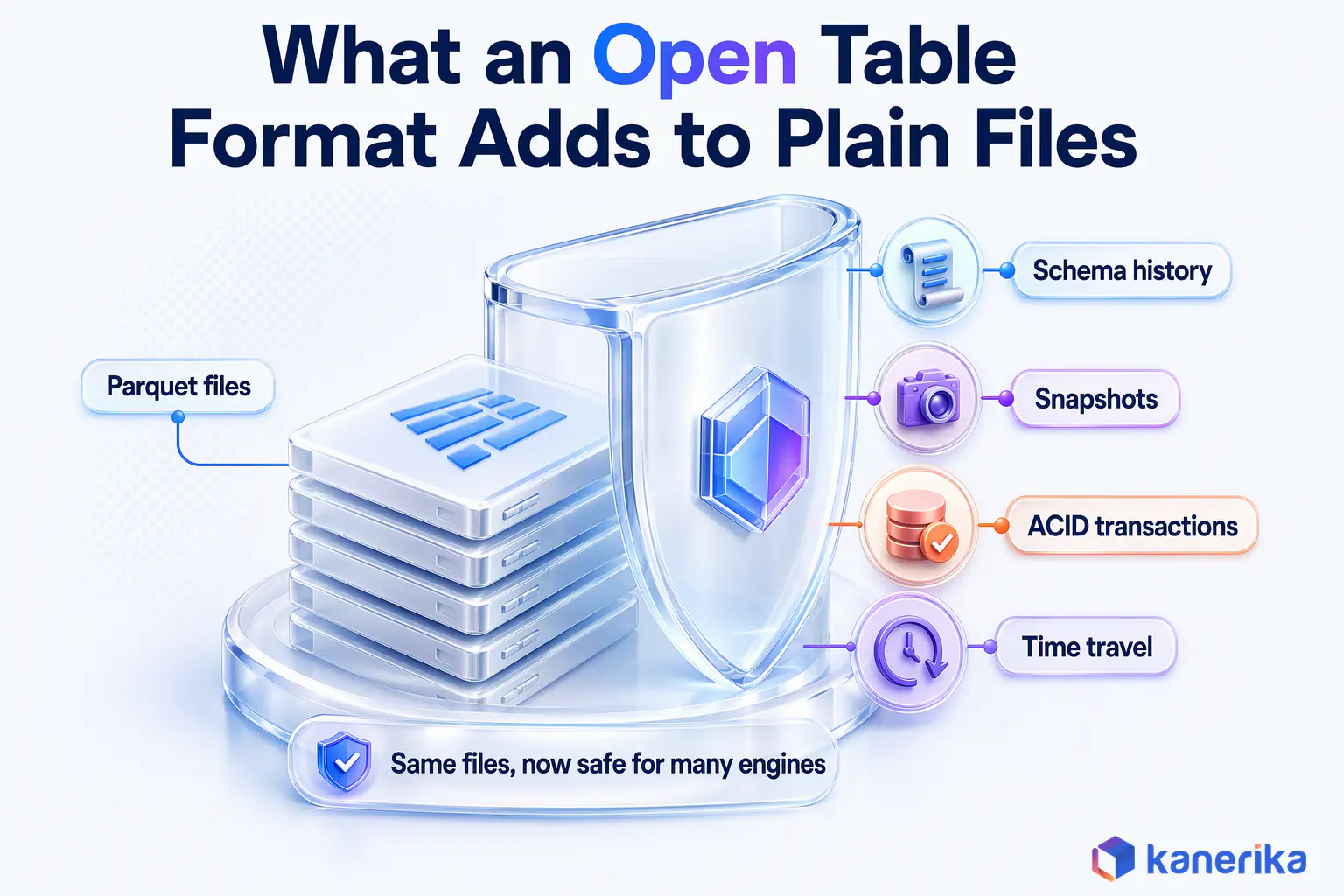
After that, four ownership questions decide whether a format stays healthy once it goes live.
- Writer ownership: which engine may write each table, so two writers never collide.
- Deletes and updates: how row-level changes are written and then read.
- Snapshot retention: how long old snapshots stay before they expire.
- Compaction: who merges small files, and how often, before queries slow down.
Catalog and Governance Tools: Finding and Controlling Lake Data
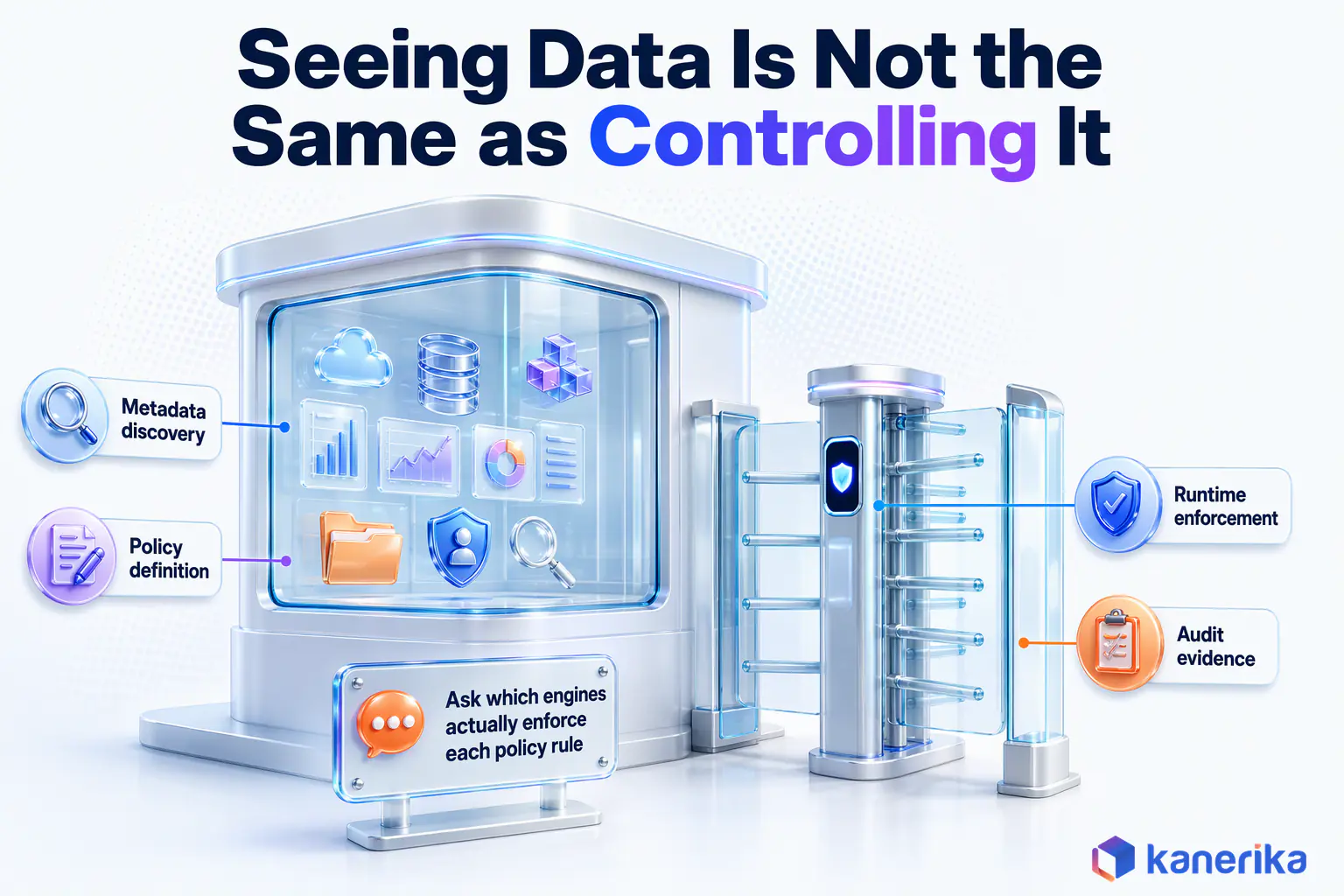
A catalog answers two questions, what data exists and who may use it. Discovery tools usually handle the first one, but the second is harder. It only gets answered where an engine checks the policy at query time. That gap is where many lake governance plans break.
Good metadata is the raw material here, and Kanerika’s guide to metadata management covers how to keep it current. Trust in a catalog also depends on the data behind it, which the roundup of data quality tools covers tool by tool. For standalone catalogs beyond the three below, the list of data catalog tools compares more options.
14. AWS Lake Formation With the Glue Data Catalog
AWS Lake Formation centrally manages fine-grained access permissions for databases and tables in the Glue Data Catalog, including attribute-based permissions. The Glue Data Catalog holds the metadata, such as location, schema and runtime metrics, and crawlers can populate it automatically.
Together, they also form the default governance layer for S3 lakes. Permissions set once apply across integrated AWS engines such as Athena, so analysts see only the rows and columns they are allowed to see.
- Best for: AWS lakes that need table, column and row permissions in one place.
- Watch out for: mixing older bucket-level IAM policies with Lake Formation permissions, which leaves confusing gaps.
- Pairs with: S3, Athena, Amazon EMR and Redshift Spectrum.
15. Databricks Unity Catalog
Unity Catalog is the governance layer built into Databricks. It enforces access control when a table is queried or a model is called, tracks lineage and logs activity for audits.
There is also an open-source Unity Catalog project that governs tables, functions and models across Delta Lake and Apache Iceberg. It exposes an Iceberg REST catalog API, and version 0.7 added native Iceberg tables, so other engines can use it as their catalog too. Kanerika’s Unity Catalog guide also walks through setup and permissions.
- Best for: Databricks estates, as well as open lakes that want one catalog for data and AI assets.
- Watch out for: differences between the managed Databricks service and the open-source edition, so check which features you need.
- Pairs with: Delta Lake, Iceberg, Databricks SQL and MLflow.
16. Microsoft Purview
Microsoft Purview governs data through two parts, the Data Map and the Unified Catalog, using a federated approach across the estate. It also classifies sensitive data and traces lineage from source systems into the lake.
There is a big change to plan for, though. Microsoft is retiring Purview’s data governance capabilities, and the Unified Catalog documentation confirms that new data governance accounts can no longer be created. Support ends on November 12, 2027, as governance moves into the Fabric OneLake catalog, while Purview’s data security and compliance tools continue.
Existing Purview estates keep working until then, and the work done in them carries over. Kanerika’s Purview rollout for a global bank automated discovery and classification across SAP, Dynamics 365, Oracle, Netezza and a central lakehouse. Lineage was traced from each source through every lakehouse layer, as the Purview banking case study describes.
- Best for: organizations that already run Purview and need a governed bridge to Fabric.
- Watch out for: the November 2027 support end, so new governance work should plan for the OneLake catalog.
- Pairs with: Microsoft Fabric, ADLS, Power BI and the OneLake catalog.
For teams planning that move, Kanerika’s guide to the Microsoft Fabric OneLake catalog explains what it covers today. Kanerika’s Microsoft Purview practice and its data governance services also help existing Purview customers plan the transition.
Data Lake Security Tools: Discovery Is Not Enforcement
Governance in a lake happens in four separate steps, while different tools own each one.
| Governance Step | What It Proves | Example Tools | Usual Owner |
|---|---|---|---|
| Metadata discovery | The data exists, where it lives and what shape it has | Glue crawlers, Purview Data Map, Unity Catalog | Data platform team |
| Policy definition | Who may see which tables, columns and rows | Lake Formation permissions, Unity Catalog grants | Data owners with security |
| Runtime enforcement | The engine applies the rule on every query | Engines integrated with Lake Formation; Databricks compute under Unity Catalog | Platform engineering |
| Audit evidence | Who accessed what, and when | Unity Catalog audit logs, cloud audit logs | Security and compliance |
Because of that split, a tool can handle the first step well and the third step not at all. So ask each vendor which engines enforce its policies, and then test one engine they do not list.
Data Lake Analytics Tools: Query and Processing Engines
Query and processing engines are where lake data turns into reports, features and answers. Some run heavy transformations, some serve interactive SQL, and a few do both. Because each workload favors a different engine, most enterprise lakes end up running two or more.
17. Apache Spark
Apache Spark is a multi-language engine for data engineering, data science and machine learning, on one machine or a cluster. It unifies batch and streaming, while Spark SQL adapts query plans at runtime through Adaptive Query Execution.
Spark is also where many legacy ETL estates land. Kanerika moved a healthcare provider’s Informatica workflows to Azure Databricks with its migration accelerator. The pipelines were re-architected in Databricks, whose runtime is built on Spark. The healthcare Databricks migration case study shows the gains in reporting accuracy and decision speed. Kanerika’s Informatica to Databricks migration guide walks through the method.
Older Hadoop and Hive stacks belong in the same conversation. Few new lakes start on Hadoop clusters today, although the Hive metastore lives on as a catalog interface that many engines still read. Spark’s GraphX library is also marked deprecated, which matters if graph jobs still run on it.
- Best for: heavy transformation, streaming and ML data preparation.
- Watch out for: shuffle-heavy jobs and cluster cost when nobody owns tuning.
- Pairs with: Delta Lake, Iceberg, Hudi and Kafka.
Kanerika’s data engineering services team also builds and tunes these Spark pipelines on Databricks and Fabric.
18. Trino and Starburst
Trino is a fast distributed SQL query engine for big data analytics. It reads lake tables as well as many other sources, then joins them in one query.
Starburst is built on Trino by Trino’s creators. It queries Snowflake, Databricks, Athena, Redshift, PostgreSQL and more than 50 other sources in one SQL statement without copying data. It also runs in cloud, on-premises and hybrid setups.
- Best for: federated SQL across the lake and existing databases.
- Watch out for: cross-source joins, which run only as fast as the slowest source.
- Pairs with: Iceberg, REST catalogs or the Hive metastore, Power BI and Tableau.
19. Amazon Athena
Amazon Athena runs serverless SQL over data in S3, billed on the data each query scans or on reserved capacity. In AWS’s own pricing example, a query that scans 3 TB at $5 per TB costs $15.
The same example also shows why file layout matters. Once the data was compressed and stored in a columnar format, the scan fell to 0.25 TB and the query cost $1.25 instead. Prices vary by region, so check the rate for yours.
- Best for: ad hoc SQL on AWS lakes with no servers to manage.
- Watch out for: unpartitioned or uncompressed data, which multiplies the bytes scanned and the bill.
- Pairs with: S3, the Glue Data Catalog, Lake Formation and Iceberg.
20. Dremio
Dremio, now part of SAP, is an Iceberg lakehouse platform with an open catalog powered by Apache Polaris, and Apache Arrow under the hood. It also ships a built-in AI agent and a semantic layer.
Kanerika Service
Data Engineering Services
Kanerika builds and runs lake pipelines and query engines on Databricks, Microsoft Fabric and Snowflake, tuned for cost per query and dependable daily loads.
Explore Data Engineering ServicesIts Autonomous Reflections watch query patterns, then speed up repeat queries without manual tuning. That makes it a strong fit for BI dashboards that read the lake directly instead of a copied warehouse.
- Best for: BI teams that want fast dashboards straight on Iceberg.
- Watch out for: how reflections refresh, what they cost to store, and roadmap or packaging changes after the SAP acquisition.
- Pairs with: Iceberg, Apache Polaris, Power BI and Tableau.
Match the Engine to the Workload
Start from the workload, then test the engines that suit it. This table pairs common lake workloads with what to measure first.
| Workload | What to Test | Engines to Try First |
|---|---|---|
| Ad hoc SQL on S3 | Cost per query at real data sizes | Athena, Trino |
| BI dashboards with many users | Concurrency and refresh times | Dremio, Starburst, Databricks SQL, Microsoft Fabric |
| Heavy transformation | Job runtime and cost per run | Spark on Databricks, Fabric or Amazon EMR |
| ML and AI training data | Reproducible snapshots and feature freshness | Spark with Delta Lake or Iceberg |
| Federation across sources | Cross-source join speed | Trino, Starburst |
Existing BI tools connect through these engines rather than to raw files. Power BI and Tableau both reach lake data through SQL endpoints such as Databricks SQL, Athena, Trino or Fabric. So test refresh times with your real reports.
How to Choose Data Lake Tools for Your Enterprise
Choosing data lake tools starts with an inventory, long before any demo. Kanerika’s State of Enterprise Data Platform Migrations 2026 report compiles industry research that links inadequate technical discovery to 68% of failed migration projects. A lake build carries the same risk, so list your sources, workloads, contracts and skills before you shortlist anything.
Checklist
Enterprise Data Modernization Checklist
Inventory sources, workloads and skills before you choose a target platform, so the shortlist starts from what your estate actually needs.
Get the Checklist →Best Data Lake Tools for AWS, Azure and Multi-Cloud Stacks
Your main cloud and your heaviest workload narrow the field faster than any feature list. The matrix gives a sensible starting stack for six common situations.
| Situation | Starting Stack | Check First |
|---|---|---|
| AWS-first | S3 with S3 Tables or Iceberg, Lake Formation and Glue, Athena | Athena scan costs and permissions across engines |
| Microsoft-first | OneLake in Microsoft Fabric, Delta tables, the OneLake catalog | Capacity sizing and the Purview governance retirement |
| Multi-cloud or open | Iceberg, an open REST catalog such as Unity Catalog or Apache Polaris, then Trino, Starburst or Dremio | Catalog compatibility across every engine |
| Spark and ML heavy | Databricks with Delta Lake and Unity Catalog | DBU spend and cluster ownership |
| Small data team | One lakehouse platform plus Fivetran | Connector consumption and lock-in |
| Regulated hybrid estate | Cloudera, or a lakehouse that reaches on-premises data through shortcuts | Data residency rules and upgrade effort |
Treat each row as a starting point rather than a verdict. A Microsoft-first company with a large Spark team, for example, may still run Databricks next to Fabric.
Score the Shortlist on Evidence, Not Demos
Demos show the best path through a product. A scorecard instead forces each vendor to prove the paths your team will actually walk.
| Criterion | Evidence to Ask For |
|---|---|
| Operating burden | Who patches, scales and monitors it, and how many hours a week that takes |
| Cost predictability | A bill estimate built from your own query and load patterns |
| Skills | How many of your engineers can run it today |
Compatibility, security and recoverability are better proven hands-on, so the proof-of-concept scorecard below tests them on your own data.
Give each criterion a weight before any vendor presents, since weights differ by company. Weights agreed afterwards tend to favor whichever demo came last.
Judge Total Cost by Its Drivers
List prices rarely predict the bill. The real drivers are storage and requests, data scanned or compute hours, connector consumption, egress between clouds, catalog and support fees, and engineering time. Athena’s pricing example above shows how far file layout alone can move that bill.

“The goal is spending that is authorized, explainable, and justified by the work it produces. That responsibility starts with system design.”
Amit Kumar Jena, Head of AI Development, Kanerika
From his byline in Cybersecurity Insiders, October 18, 2026
Engineering time, however, is the driver teams forget most often. A free open-source tool that needs two engineers to run it can cost more than a managed service with a monthly bill. Count on-call hours, upgrades and security patching as part of that time.
Free and Open Source Data Lake Tools: What You Still Pay For
Plenty of good data lake tools are free to download. Iceberg, Delta Lake and Hudi are open specifications, while Spark, Trino, Kafka and Airbyte are open-source projects. Unity Catalog has an open-source edition too, but free covers the license, not the running cost.
- Table formats: you pay for the engines and storage around them, plus compaction and snapshot cleanup.
- Engines and loaders: you pay for infrastructure, or for a managed version such as Databricks DBUs, a Starburst subscription or Airbyte cloud usage.
- Catalogs: the open-source Unity Catalog edition is free, while the managed Databricks service adds features of its own.
That’s why open source tends to pay off for teams that already run clusters well. For everyone else, a managed edition of the same open project keeps the portability and hands the on-call work to the vendor.
Check Fit for AI Workloads
AI raises the bar for every layer of the lake. For instance, training data must be reproducible, which table-format snapshots and time travel provide. Features also need incremental updates, documents need provenance, and retrieval for AI assistants must follow the same access rules as dashboards.
A lake is also not a vector database. Embeddings for semantic search usually live in a vector index next to the lake, built from governed lake tables. So plan that link as part of the design.
Before You Buy: Failure Modes and Proof-of-Concept Tests
Lake problems tend to surface after go-live, when real data and real users arrive. The State of Enterprise Data Platform Migrations 2026 report shows post-go-live remediation on 10% of Kanerika projects, compared to a 65% industry average. Those figures come from Kanerika’s delivery data for 2019 to 2025. Much of that gap comes from testing failure modes before launch instead of after it.
Build a Proof-of-Concept Scorecard
Five failures account for much of the trouble after go-live: schema drift, small-file build-up, unreadable table features, policy gaps between engines and backfills that double-count rows. A short proof of concept turns each of them into a number. Run it on representative data, with the people who will own the lake in the room.
Small files deserve extra attention because they grow quietly. A lake can pass every test in week one, then slow down month after month as unmerged files pile up.

| Test | What to Measure | Owner |
|---|---|---|
| Schema change | Time to detect and recover | Data engineering |
| Small files | Query time before and after compaction | Platform team |
| Cross-engine read | Identical results from each engine | Architecture |
| Policy enforcement | Blocked access in every engine | Security |
| Backfill | Rows loaded against rows expected, with no duplicates | Data engineering |
| Cost | The bill for one week of real workload | Finance with the platform team |
Set a pass threshold for each test, and write it down before the test starts. A threshold set after the results arrive becomes a negotiation rather than a test.
Where Data Lake Tools Are Heading in 2026
Storage services now manage tables themselves. S3 Tables and Google’s Lakehouse for Apache Iceberg both run Iceberg maintenance inside the storage layer, so compaction becomes a setting instead of a job.
Catalogs are opening up as well. The open-source Unity Catalog exposes an Iceberg REST API, and Dremio builds its catalog on Apache Polaris, so one catalog can serve several engines.
Zero-copy access is spreading too. OneLake shortcuts and Starburst federation query data where it already sits, so fewer copies drift apart.
Governance, meanwhile, is moving into the platforms. Microsoft is folding data governance into the Fabric OneLake catalog. Dremio now ships a built-in AI agent, so access rules increasingly decide what AI can see.
How Kanerika Helps You Choose and Run Data Lake Tools
So where does Kanerika, your trusted partner on lake projects, fit in? Its data integration work follows the IMPACT framework, which guides each engagement “from initial discovery through go-live,” with business outcomes ahead of technical milestones. Kanerika guides Microsoft Fabric adoption in three steps. First comes a free consultation to assess your current setup, then a proof of concept that shows results before you commit, then full implementation.
For migrations, Kanerika’s FLIP accelerator automates discovery, conversion and validation across 24 supported paths. The State of Enterprise Data Platform Migrations 2026 report lists FLIP’s Azure to Microsoft Fabric path at 75% automation and a 60% shorter timeline. Both figures come from Kanerika’s own delivery records. That speed matters most when a lake replaces an older warehouse or Hadoop cluster under a contract deadline.
Talk to Kanerika
Shortlisting Data Lake Tools?
Kanerika reviews your current stack and runs a proof of concept on your own data, so the tool decision rests on evidence.
Talk to Kanerika →And governance gets the same discipline: Kanerika applies IMPACT to every data governance implementation, with “measurable outcomes at each phase from assessment to deployment.” On a lake, that means catalog ownership, Unity Catalog or OneLake catalog policies and lineage, all settled before users arrive. Runbooks and training follow, and Kanerika’s data architecture services and its guide to data lake implementation cover that build in detail.
Kanerika is a Microsoft Solutions Partner for Data and AI, a Databricks Consulting Partner and a Snowflake Select Tier Partner. But whatever the platform, three mistakes are common on lake projects. Teams buy a platform before naming the layer they lack, roll out a catalog without enforcement, and leave small files and compaction without an owner.
Start With the Missing Layer, Then Pick Your Data Lake Tools
By now you probably have a shortlist forming, or a lake that isn’t earning its keep. Here’s the thing to hold on to: data lake tools rarely fail alone, but the seams between them often do. So name the missing layer first, and the shortlist shrinks fast, to S3, Lake Formation and Athena on AWS or OneLake in Fabric on Microsoft.
If that sounds familiar, you’re in good company, and it rarely means someone chose badly. A stalled lake often traces back to a platform bought before the gap was named, or a catalog that never enforces access. The good news is that a short proof of concept on one messy source surfaces those problems while they’re still cheap to fix.
That’s exactly the work Kanerika’s data architecture team takes on, backed by its Microsoft Solutions Partner for Data and AI status and ISO 27001 certification. In the State of Enterprise Data Platform Migrations 2026 report, only 10% of Kanerika projects needed post-go-live remediation, against a 65% industry average. So bring one messy source and your current shortlist, and Kanerika will map the missing layer and the proof-of-concept tests worth running first.
You don’t need a finished plan to bring Kanerika in as your partner, because a rough shortlist and an honest question are plenty. And if you’d like more evidence first, the State of Enterprise AI & Data Modernization 2026 report is a good next read.
Frequently Asked Questions
What are data lake tools?
Data lake tools are the services that store, load, organize, govern and analyze raw data in a data lake. They include object storage such as Amazon S3, ingestion tools such as Fivetran, open table formats such as Apache Iceberg, catalogs such as Unity Catalog and query engines such as Trino. Most tools cover one layer, so a working lake combines several.
Is a data lake a database?
No. A data lake is an architecture that keeps raw files of any format in low-cost object storage and applies structure when the data is read. A database applies a schema when data is written and runs its own storage engine. Open table formats and query engines let a lake behave like a database for analytics.
How does a data lake work?
Ingestion tools load data from applications, databases and streams into cloud object storage as files. A table format such as Iceberg or Delta Lake organizes those files into tables with schemas and snapshots. A catalog records what each table holds and who may use it, and query engines read the tables for reports, data science and AI.
What is a data lake used for?
Enterprises use data lakes to keep large volumes of raw and historical data in one place at low cost. Typical uses include analytics and BI on combined sources, preparing training data for machine learning, storing logs and event streams, and keeping documents for AI retrieval. The lake becomes the shared foundation that several teams and engines read.
Which free and open source data lake tools are best?
The best free option depends on the layer you need. Apache Iceberg, Delta Lake and Apache Hudi are open table formats, Apache Spark and Trino handle processing and SQL, Apache Kafka streams events and Airbyte provides open-source connectors. Unity Catalog has an open-source edition too. All are free to license, but infrastructure and engineering time still cost money.
Which ETL tools are best for data lake ingestion?
Fivetran suits teams that want managed connectors with little upkeep, while Airbyte suits teams that want open-source control and custom connectors. Apache Kafka handles real-time event streams. Cloud-native loaders such as AWS Glue, Azure Data Factory and Fabric Data Factory fit single-cloud lakes. Test each one on schema changes, deletes and backfills before you sign.
Which data lake tools are best for AWS and Azure?
On AWS, the usual starting stack is Amazon S3 for storage, Lake Formation with the Glue Data Catalog for permissions, and Athena for serverless SQL. On Azure, it is Azure Data Lake Storage or OneLake inside Microsoft Fabric, with Azure Databricks for heavy Spark work. Purview governance users should plan for the move to the OneLake catalog.
Is Snowflake a data lake or a data warehouse?
Snowflake started as a cloud data warehouse and still runs as one. It can also act as a lakehouse platform through Apache Iceberg tables, which can sit in Snowflake-managed storage or in your own Amazon S3, Google Cloud Storage or Azure storage. That lets other engines read the same Iceberg data Snowflake uses.
What is the difference between data lake tools and data warehouse tools?
Data lake tools work on open files in object storage and split storage, table format, catalog and engine into separate layers. Data warehouse tools usually bundle storage and compute in one product with a fixed schema. Lakehouse platforms such as Databricks, Microsoft Fabric and Snowflake now blur the line by running warehouse-style SQL on open lake tables.
How much do data lake tools cost?
Costs depend on usage drivers more than list prices. Storage, requests, data scanned, compute hours, connector consumption, egress between clouds and engineering time all add up. Open-source tools have no license fee but need people to run them. Model your own workloads, then compare bills from a one-week proof of concept on real data.
Can data lake tools work with existing BI tools?
Yes. BI tools such as Power BI and Tableau connect to lake data through SQL engines rather than raw files. Common routes include Databricks SQL, Amazon Athena, Trino, Starburst, Dremio and Microsoft Fabric. Test dashboard refresh times and concurrency on real reports, because performance depends on the engine and on how the files are laid out.