

TL;DR
For Microsoft Fabric Copilot and agents, use Copilot to build and a data agent to answer business questions. Use an operations agent to watch live data and suggest actions. Outside AI assistants reach Fabric through official Microsoft connectors called MCP servers. A data agent only reads data, and people see only what they can already open. An operations agent asks a person in Teams before it acts. All of them run on paid Fabric capacity, so start with one small pilot and test its answers first.
Key Takeaways
- Copilot in Fabric is a preconfigured assistant for builders, while a data agent takes your instructions and example queries, which suits governed self-serve answers.
- Fabric data agents are generally available, read up to five sources and never create, update or delete data.
- Operations agents act only after a person approves in Teams, and they act with the creator’s delegated identity.
- The Fabric Core MCP Server and the Fabric IQ MCP Server reached general availability in September 2026, so outside agents can work in Fabric with the caller’s permissions.
- Copilot and data agents need a paid F2 or larger capacity or a Premium P SKU, and trial capacities do not run Copilot.
- A pilot that counts measures CU per question, answer accuracy on a written test set and time saved before anything scales out.
A Late-Shipment Question Typed Into Teams
Picture a supply chain lead on a Monday morning. She opens Microsoft Teams and types one question: why did on-time delivery fall in the Southeast last month? (An illustrative scenario, not a named client.)
Within a minute she has an answer. It names the carriers and lanes behind the drop, shows the figures and includes the DAX query that produced them. She never opened a report, and no analyst had to write that query for her.
That answer passed through several Microsoft Fabric Copilot and agents layers on its way to her screen. Teams was the front door, so she never left her chat. Behind it, a Fabric data agent picked the logistics semantic model and wrote a read-only query. It then ran that query with her own permissions, so she saw only the regions she is cleared to see.
Getting there takes more than switching a feature on. Data leaders first have to decide which layer handles which job. They also have to pay for the capacity each one uses and govern what each one can read or do. This guide takes those choices in order, starting with what each layer is and ending with a staged rollout plan.
What Microsoft Fabric Copilot and Agents Are, and How They Differ
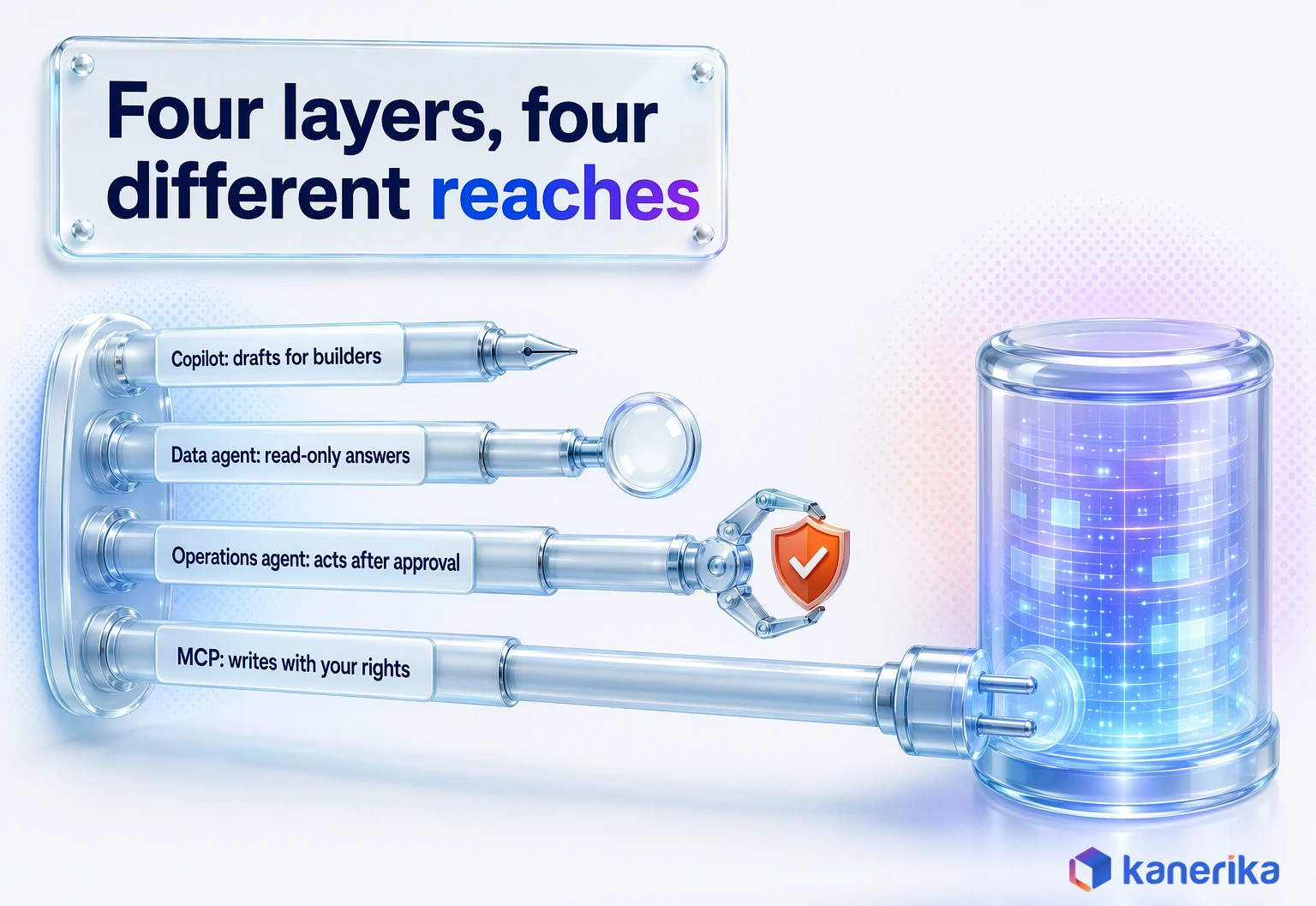
Microsoft Fabric now carries four kinds of AI help, and each one serves a different person with a different need. Copilot, first of all, helps the people who build things in Fabric. Data agents, by contrast, answer business questions over governed data. Operations agents watch live data and suggest actions, while MCP servers let AI tools outside Fabric reach in.
The split matters because the layers differ in setup, risk and cost. Copilot arrives ready to use, whereas a data agent is something your team configures, tests and owns. That ownership is what separates a helpful assistant from one of the enterprise AI agents a security team will sign off on.
Copilot in Fabric: The Preconfigured Assistant Inside Each Workload
Copilot in Fabric lives inside the tools people already use. For example, in a notebook it helps write and explain code, and in a warehouse it helps with queries. In Power BI it also helps build report pages and summaries. Unlike a data agent, nobody writes instructions for it or picks its data sources.
That is why it is the fastest layer to start with. According to Microsoft’s Copilot in Fabric overview, Copilot is on by default for paid F2 or larger capacities and does not run on trial SKUs. Engineers who use it in notebooks and pipelines get an early taste of agentic AI in data engineering, though a person still decides what ships.
Copilot’s reach stays inside the item you have open. Report-level features are covered in our Power BI Copilot guide, and setup detail sits in our post on Fabric Copilot requirements and rollout.
Fabric Data Agents: Configurable, Read-Only Q&A Over Your Data
A Fabric data agent is a question-answering item that your team builds and publishes. Before publishing, you give it instructions, example queries and up to five data sources. Those sources can mix lakehouses, warehouses, KQL databases, Power BI semantic models, ontologies and Microsoft Graph.
When a user asks something, the agent writes SQL, DAX or KQL and runs it. Per Microsoft’s data agent documentation, it generates read queries only, so it cannot create, update or delete anything. It also cannot read unstructured files such as PDFs, Word documents or plain text.
Documents therefore need a different pattern, usually agentic RAG over a search index. Data agents are generally available, and they are the layer most business users will actually meet. Build steps live in our guide to building Fabric data agents, so this post stays on when to use one.
AI Assessment
How Ready Is Your Data for Fabric Agents?
Score your AI maturity across data, governance and skills, and see which Fabric AI layer your team can run well today and which needs groundwork first.
Start Your AI Assessment →Operations Agents: Watch Real-Time Data and Recommend Actions
Operations agents belong to Real-Time Intelligence. An operations agent watches an eventhouse or an ontology for the conditions you set. When one is met, it recommends an action instead of waiting for someone to notice a dashboard.
By default it sends a Teams message to the person who created it. It can also run a Fabric notebook or a Power Automate flow, according to Microsoft’s page on operations agent actions. Even then, it acts only after the recipient approves. That approval step carries most of the safety model, and the governance section returns to it.
First, though, operations agents need a Fabric-enabled capacity, an eventhouse or ontology, a Teams account and admin settings for Copilot and Azure OpenAI. They also do not run on trial capacities.
The core item carries no clear GA or preview label. What’s New, however, lists operations agents for Pipelines, the performance view and Investigator insights as preview. The platform underneath is covered in our guide to Real-Time Intelligence in Microsoft Fabric.
MCP Servers and Skills for Fabric: How Outside AI Agents Reach Fabric
The fourth layer faces outward. Put simply, the Model Context Protocol gives AI tools a standard way to call tools and read context. Fabric now exposes several MCP servers built on it.
The Fabric Core MCP Server reached general availability in September 2026. It is a remote endpoint that signs users in with Entra ID OAuth, works within the caller’s own Fabric permissions and audit-logs each operation. The Fabric IQ MCP Server is read-only and runs DAX against Power BI semantic models, again with the caller’s permissions.
Servers for Data Warehouse, eventhouse, Activator and Data Factory were still in preview as of November 2026. A separate Power BI model authoring MCP server lets AI tools edit semantic models, and its tenant setting was also labeled preview. Microsoft also publishes Skills for Fabric on GitHub under the MIT license. It packages agent skills and MCP setup for GitHub Copilot CLI, and it ships config files for Claude, Cursor and Windsurf.
Browser-based agents need the same kind of door into a website, and that is a separate pattern. Our WebMCP implementation guide shows how a site exposes tools to them in the same spirit.
On-Demand Webinar
Model Context Protocol (MCP): The Key to Building Context-Aware AI Agents
An on-demand session on how MCP connects AI agents to tools and data, useful grounding before you open Fabric’s MCP servers to outside agents.
Watch the Webinar →The Four Layers Side by Side
Seen side by side, the column that matters most is “Reads or acts”, because it sets the governance work each layer needs. Release status is as of November 2026.
| Layer | Who configures it | Reads or acts | Data it uses | Where users meet it | Status (Nov 2026) |
|---|---|---|---|---|---|
| Copilot in Fabric | Microsoft, preconfigured | Drafts and explains; a person applies changes | The item open in the workload | Notebooks, warehouses, Power BI | On by default for paid F2+; not on trial |
| Fabric data agent | Your data team | Reads only (SQL, DAX, KQL) | Up to five sources | Fabric, and Teams through Copilot Studio | Generally available |
| Operations agent | Your operations or data team | Recommends; acts only after approval | An eventhouse or ontology | Teams messages | Core item unlabeled; several features in preview |
| MCP servers | Your platform team | Core: reads and writes within caller RBAC; IQ: read-only | Fabric items and semantic models | Outside agents and coding tools | Core and IQ GA (Sept 2026); four others in preview |
What Changed for Microsoft Fabric Copilot and Agents in 2026
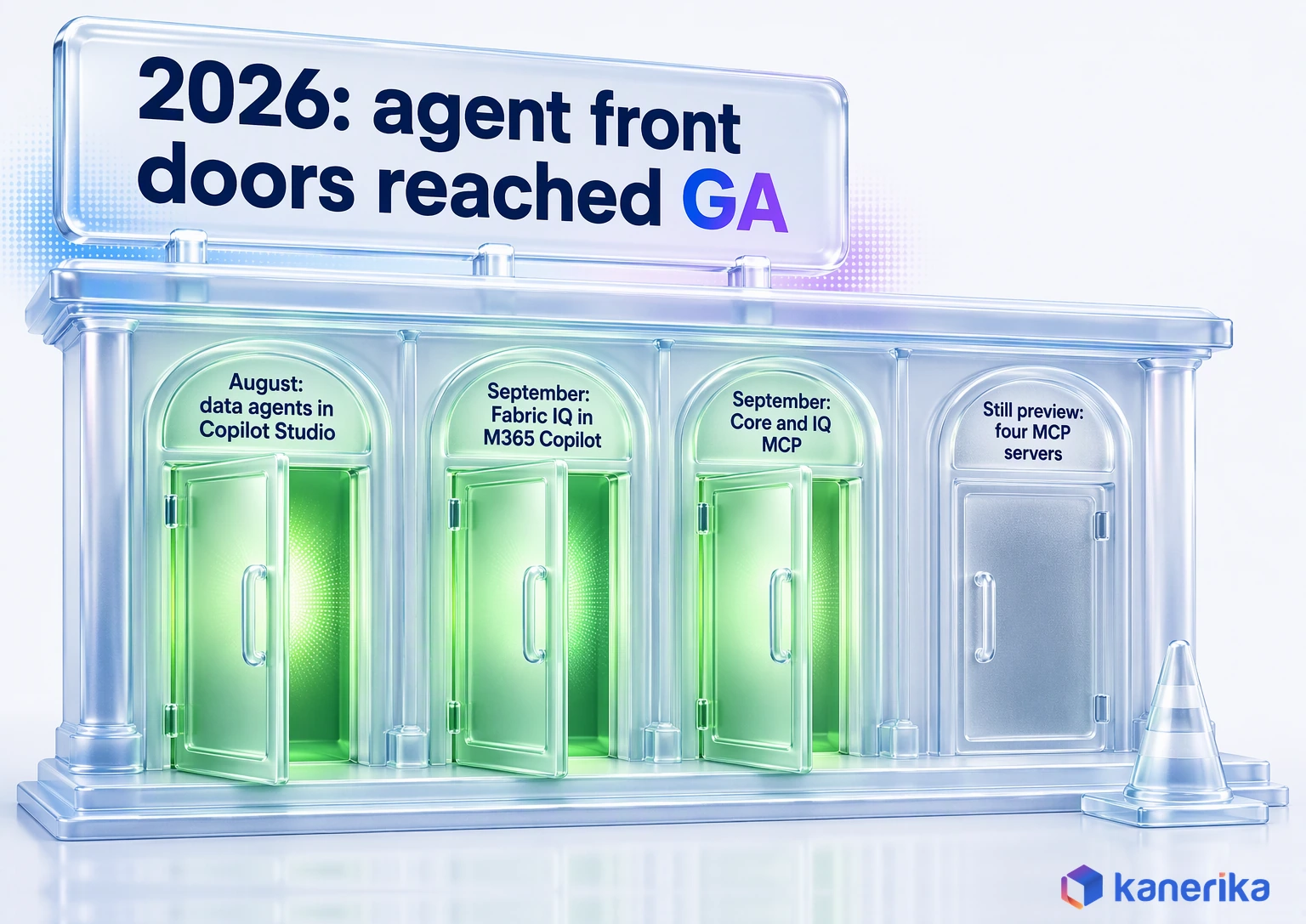
The pieces that bring agents to users and outside tools reached general availability between August and September 2026. Much of the rest, including the Fabric IQ workload and four MCP servers, is still in preview. That split decides what an enterprise can safely put into production, so the dates below come straight from Microsoft’s Fabric What’s New page.
The platform had momentum before the agents arrived. Microsoft’s FY25 annual report called Fabric its “fastest-growing analytics product ever, with 25,000 paid customers.” Those customers are therefore the audience for every release below.
| Feature | Status | Month | Source |
|---|---|---|---|
| Plan in Fabric IQ (a planning tool, not an agent) | GA | July 2026 | Fabric What’s New |
| Fabric data agent in Copilot Studio | GA | August 2026 | Fabric What’s New |
| Data source routing in data agents | GA | August 2026 | Fabric What’s New |
| Data agent visualizations | GA | September 2026 | Fabric What’s New |
| Data agent MCP tasks | GA | September 2026 | Fabric What’s New |
| Fabric IQ in Microsoft 365 Copilot | GA | September 2026 | Fabric What’s New |
| Fabric Core MCP Server | GA | September 2026 | Fabric What’s New |
| Fabric IQ MCP Server | GA | September 2026 | Fabric What’s New |
| Advanced DAX generation for data agents | Preview | As of November 2026 | Fabric What’s New |
| Fabric IQ workload | Preview | As of November 2026 | Fabric What’s New |
| Data Warehouse, eventhouse, Activator and Data Factory MCP servers | Preview | As of November 2026 | Fabric What’s New |
Two patterns stand out. First, the features that bring agents to business users, through Copilot Studio and Microsoft 365 Copilot, reached GA first. The outward-facing Core and IQ MCP servers followed a month later.
Servers for warehouse, eventhouse, Activator and Data Factory stay in preview. Plan production on the GA list, then pilot the rest. For a wider roundup across the platform, see Microsoft Fabric’s latest updates.
How the Pieces Work Together: Identity, Data and Evidence
Every layer follows the same three rules: it runs as the person asking, it reads governed data and it shows its work. Understanding that chain is what lets a security team say yes to a pilot.
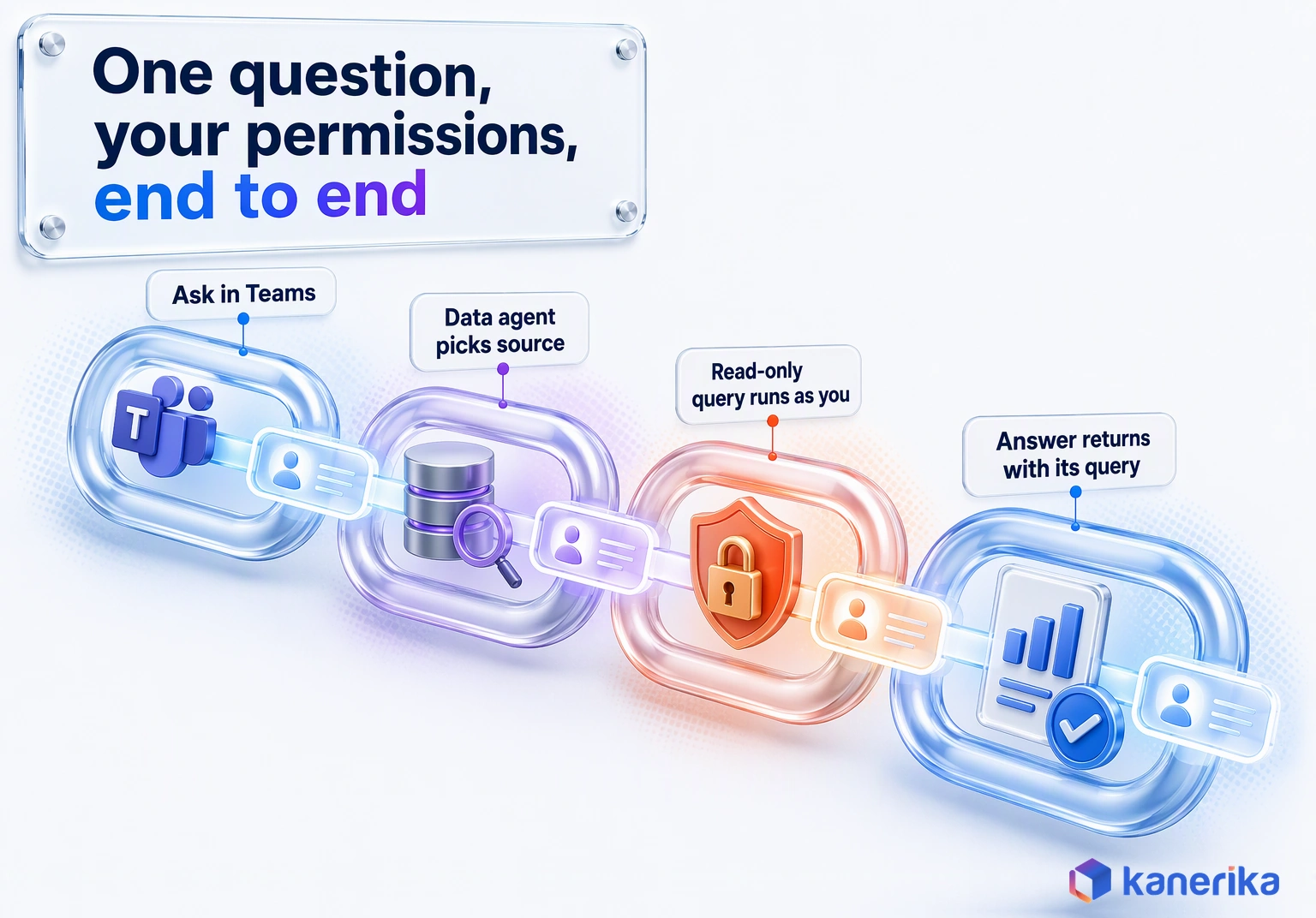
Follow One Request From Teams to OneLake and Back
Take the supply chain lead’s delivery question from the opening, then trace it step by step.
- She asks in Teams, signed in with her own Entra ID account.
- The front door, a Copilot Studio agent published to Teams, passes the question to a published Fabric data agent as an MCP tool.
- The data agent uses data source routing to pick the right source among its five.
- It writes a read-only DAX, SQL or KQL query for that source.
- The query runs with her permissions, so row-level security and Purview policies apply as usual.
- The answer returns with the query that produced it, which she or an analyst can check.
Step six is the one people skip in demos. An answer without its query asks the reader to trust the agent. With the query attached, however, an analyst can check it in a minute. Keep that habit even when the numbers look right, because it is how errors get caught early.
Nothing in that chain borrows a shared service account. That is the main difference from many homegrown chatbots, since those often read data through one powerful identity. Teams designing their own open-source agent architecture can copy the same principle.
Copilot Studio and Microsoft 365 Copilot as the Front Door
Most business users will never open Fabric itself. They meet agents in Teams, Outlook or Microsoft 365 Copilot, so that is where the front door belongs.
Since August 2026, Copilot Studio can add a Fabric data agent as a Fabric IQ Data MCP tool. Source permissions carry through, but the data agent must be published and must sit in the same tenant. Microsoft has, however, validated that setup only in Teams, and it is not supported in Microsoft 365 Copilot.
Builders also need a Microsoft 365 Copilot license, and Copilot Studio responses may leave Fabric’s compliance boundary. Inside Microsoft 365 Copilot itself, the route is Fabric IQ in Microsoft 365 Copilot, GA since September 2026. It lets Copilot Chat and Copilot Cowork answer from governed Power BI reports and semantic models.
Copilot Studio is the right front door when one agent has to span several systems, which is a classic case for AI agent orchestration. Our Copilot Studio overview covers authoring, and the wider design choices sit in our guide to conversational AI.
Fabric IQ and the Ontology: One Business Meaning for Every Agent
Agents answer well only when the data means one thing. Fabric IQ adds an ontology, a shared model of business entities such as customers, products and plants, and of how they relate. A data agent can use an ontology as one of its sources, while an operations agent can watch one.
The payoff, in short, is consistency. If on-time delivery is defined once in the ontology, Copilot, the data agent and Microsoft 365 Copilot all use the same definition. This is context engineering done in the data layer rather than in each prompt.
The Fabric IQ workload was still in preview as of November 2026, while Plan in Fabric IQ reached GA in July 2026. The Kanerika case later in this guide shows what an ontology-first approach looks like at enterprise scale.
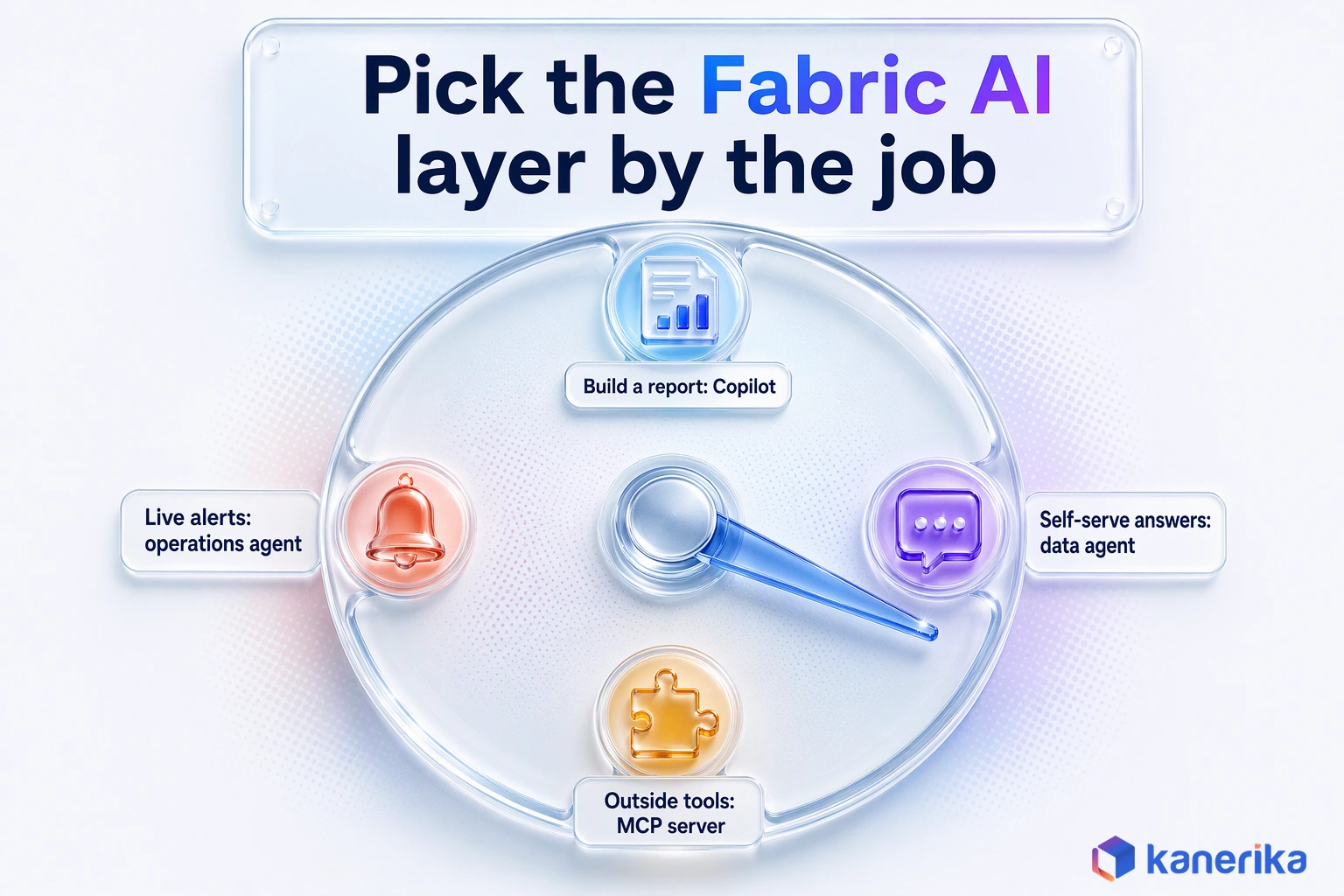
Decision Framework: Which Fabric AI Layer Fits Which Job
The simplest way to choose is to start from the job, not the product. Ask who is asking, whether the answer has to be governed and whether anything should change in the real world as a result.
Starting from the job also exposes the upgrade path most teams take. The table below maps common jobs to the layer that fits, with one business example each. Its last row covers adding a data agent to a Copilot-only setup.
| Job | Example | Best-fit layer | Why it fits |
|---|---|---|---|
| Report and model authoring help | A BI developer drafts a sales report page | Copilot in Fabric | No setup; the builder reviews every draft |
| Self-serve business Q&A | A logistics manager asks about late shipments by region | Fabric data agent | Custom instructions, read-only, user’s own permissions |
| Live operations monitoring | A plant team watches sensor or order streams | Operations agent | Watches an eventhouse and asks before acting |
| Outside coding or orchestration agents | An engineer’s coding agent inspects workspaces | Core MCP Server or Fabric IQ MCP Server | Caller’s permissions, audit-logged; Core can also write |
| Multi-system workflows in Teams | Sales asks about pipeline and contract status together | Copilot Studio plus a data agent | One front door, several governed tools |
| When to add a data agent to a Copilot-only setup | Business users keep asking the same governed questions | Data agent alongside Copilot | Instructions fix repeat questions on any source |
Five Go/No-Go Questions Before You Commit
A no that surfaces months later can sink a pilot, so settle these five before any build starts.
- Is the data the agent needs already in OneLake or reachable from Fabric? If not, an Azure to Fabric migration comes first.
- Is there one agreed definition for each metric the agent will answer about?
- Can the job be answered from five sources or fewer, or does it need splitting across agents?
- Does anyone need the agent to change data or trigger work? If yes, an operations agent with approval fits triggered work, and the Core MCP Server fits workspace changes under least-privilege roles.
- Do you have a paid F2 or larger capacity in a region that meets your data-residency rules?
A no on the first or second question should pause the project until it is fixed. The other three shape the design, but they rarely block it outright.
Worked Example: Answering “Why Did On-Time Delivery Fall?”
Go back to the supply chain lead. Her question looks simple, yet answering it well uses three layers and one human decision. (An illustrative walk-through with no client figures.)
The data agent handles the first question on its own. It routes to the logistics semantic model and writes a DAX query for on-time rate by region and carrier. It then returns the Southeast figures with the query attached, and because it runs as her, she sees only the regions she is cleared for.
Had she asked for every late order, she would have seen at most 25 rows, because answers are capped at 25 rows and 25 columns.
A follow-up goes deeper: was the drop driven by one carrier or by a warehouse backlog? An analyst opens the same model in Power BI, and Copilot helps build a report page that splits the change. The analyst checks the logic before sharing it, because Copilot drafts rather than decides.
The team then wants early warning next time. An operations agent watching an eventhouse of shipment events can flag when late shipments on a lane cross an agreed threshold. It messages the logistics owner in Teams, who approves or rejects a Power Automate flow that alerts customer service.
Notice what each layer did not do. The data agent did not reroute a shipment, and Copilot did not publish the report by itself. Likewise, the operations agent sent no alert until the logistics owner said yes. Each of those boundaries is a setting someone chose on purpose, and each one can be tested before launch.
No layer did everything, and no layer acted alone. That split of work, with the only action gated by a person, is the pattern worth copying into any agentic BI rollout.
What Microsoft Fabric Copilot and Agents Cost: Capacity, CU Use and Delivery Effort
Copilot and agents in Fabric bill through capacity meters. They consume capacity units (CUs) from a Fabric capacity you already pay for. So the real cost question is which capacity they draw from and how many CUs each question uses.
That also makes cost a design choice as much as a budget line. A busy agent pilot running on the same capacity as month-end refreshes can slow both down.
Capacity Prerequisites, Trial Limits and the Fabric Copilot Capacity
Check these conditions before any pilot starts.
- Copilot needs a paid F2 or larger capacity or a P SKU, and it is on by default for paid F2 or larger capacities.
- Trial SKUs do not run Copilot, and operations agents do not support trial capacities either.
- Data agents need a paid F2 or larger capacity, or Power BI Premium P1 or larger with Fabric enabled.
- Azure OpenAI for Fabric Copilot runs in US datacenters and inside the EU data boundary. Tenants in other regions must allow cross-geo processing.
- A Fabric Copilot capacity bills Copilot and data agent use for a chosen group of users to one designated capacity. It needs F2 or P1 at minimum and works in the home region only.
A Fabric Copilot capacity keeps AI usage away from production jobs only in part. For Fabric workloads and data agents, it applies only where the workspace capacity is smaller than F64. On F64 or larger, therefore, size that capacity with headroom for agent load. Either way, settle the choice before the pilot starts, so the first slow refresh never happens.
Checklist
Microsoft Fabric Checklist
A step-by-step checklist for planning and running Microsoft Fabric, handy for confirming capacity, security and governance before a Copilot or agent pilot.
Get the Checklist →Pay-As-You-Go Arithmetic and What to Measure in a Pilot
Microsoft’s Fabric pricing lists pay-as-you-go capacity at $0.18 per CU hour in East US. Agent work also shows up under its own meters in the Azure retail price list, each at that same rate. Operations agents bill to “Operations Agents Compute” and “Operations Agents Autonomous Reasoning”, and ontology work to “Ontology Logic and Operations”.
All of them, in other words, draw from the same CU pool. Capacity overage reached GA in September 2026 and is on by default for F SKUs, billed at $0.54 per CU hour. That is three times the base rate, so an overrun pilot pays a premium.
The smallest paid capacity, an F2, has 2 CUs. At list rate that is 2 times $0.18, or $0.36 an hour. Over a 730-hour month it comes to about $263, before any reservation discount.
A pilot, therefore, has to find out how many CUs a typical question uses, because that number times expected questions decides the capacity size. Copilot-only costs, with a worked example, sit in our guide to Copilot in Microsoft Fabric.
| Item | Value or method |
|---|---|
| Pay-as-you-go rate (East US, list) | $0.18 per CU hour |
| F2 per hour | 2 CU x $0.18 = $0.36 |
| F2 per 730-hour month | About $263 at list rate, before reservations |
| Operations agent and ontology meters | $0.18 per CU hour each |
| Capacity overage meter (on by default) | $0.54 per CU hour |
| Pilot metric: CU per question | CU used by the agent during the pilot, divided by questions answered |
| Pilot metric: answer accuracy | Share of test-set questions answered correctly |
| Pilot metric: time saved | Minutes per question before and after, measured with real users |
Delivery effort is the cost no meter shows. Its size depends on how clean the semantic layer already is, so estimate it after a readiness review rather than before one.
Governance and Risk Controls Before Production
Governance for Fabric agents comes down to three questions. What can each layer read, how do you know its answers are right, and who approved anything it did? Each one needs a control in place before the first user asks a question.
Fabric already does much of the access work for you. The harder parts are therefore answer quality and actions, which depend on your own process and on AI governance best practices you probably apply elsewhere.
Access: The User’s Own Permissions, Purview and DLP
A data agent runs with the requesting user’s credentials. Workspace roles, row-level security and object permissions apply exactly as they would if she queried the source herself.
Microsoft Purview also adds a policy layer on top. Purview DLP and access policies apply to data agents. Purview risk discovery and Data Security Posture Management for agents, on the other hand, were in preview as of November 2026. Our guide to Fabric data governance explains which controls Fabric covers and which need Purview.
Least privilege still matters, because an agent makes it easier to find whatever a user can already see. Old, broad workspace grants surface quickly once people can ask questions in plain English. Review data warehouse security in Microsoft Fabric before you open a pilot to a wider group.
Checklist
AI Governance Checklist
Turn the access, answer-quality and approval controls in this section into a checklist your security and data owners can review and sign off.
Get the Checklist →Answer Quality: Test Sets, Diagnostics and Git-Based ALM
An agent that answers fast but wrong is worse than no agent at all. Quality comes from a disciplined loop that you run before launch and after every change.
- Write a test set of real questions with agreed answers before you build, taken from reports people already trust.
- Add instructions for the questions the agent gets wrong, then re-run the full set. Example queries help on lakehouse, warehouse and KQL sources, but Power BI semantic model sources do not support them.
- Use the data agent’s built-in diagnostics to see which source it chose and which query it wrote.
- Store agent configurations in Git and promote them from dev to test to prod, just as you would a semantic model.
- Re-run the test set after every change to sources, instructions or the model underneath.
None of this is new: it is ordinary AI agent lifecycle management applied to Fabric. What matters is that the test set exists in writing before the first demo.
Actions: Approvals and Whose Identity an Operations Agent Uses
Two layers can change something in Fabric, and they differ in what starts them. Operations agents are the only layer that acts on its own trigger, and they wait for a recipient to approve. The Core MCP Server can create or delete workspaces and items and grant roles, using the caller’s own rights.
Microsoft warns that autonomous or misconfigured MCP clients may perform destructive actions. So give MCP clients least-privilege roles and turn on approval in the client before any write.
For operations agents, the weak point is identity. Each one now gets its own Microsoft Entra Agent ID, and its actions are attributed to that identity in audit. It still runs with its creator’s permissions through an On-Behalf-Of flow, so the log shows the agent while its reach equals the creator’s rights.
So create operations agents from accounts scoped to the job, and limit each flow to one bounded action. The same thinking runs through our AI agent guardrails specs and our permission control framework for agentic AI. Investigator insights, which help explain an alert, were in preview as of November 2026.
Mistakes That Make Pilots Look Better Than Production
Pilots that shine in a demo still fail in production for predictable reasons. These seven show up again and again.
- Expecting full lists. Data agent answers are capped at 25 rows and 25 columns, so “show every late order” returns a partial list.
- Sources in another region. A source whose capacity sits in a different region from the agent’s fails, and the agent works only in English.
- Too many sources. Each extra source is another place for the agent to pick wrongly, so start with one or two.
- Ignoring the five-source cap. A design that needs eight sources needs two agents and a front door, not one agent.
- Copilot billed to the wrong capacity. Without a Fabric Copilot capacity, AI load can land on the capacity that runs production refreshes. On F64 or larger, a Copilot capacity does not cover data agents, so plan headroom.
- No owner for the ontology. Definitions drift when nobody approves changes to them.
- Approving actions without scope. A one-click approval on a flow with broad rights is not a control.
Every one of these is cheap to fix in a pilot and expensive after rollout. Checking for all seven takes an afternoon, which is far less than one wrong number in a board pack costs.
How Kanerika Rolls Out Copilot and Agents on Fabric
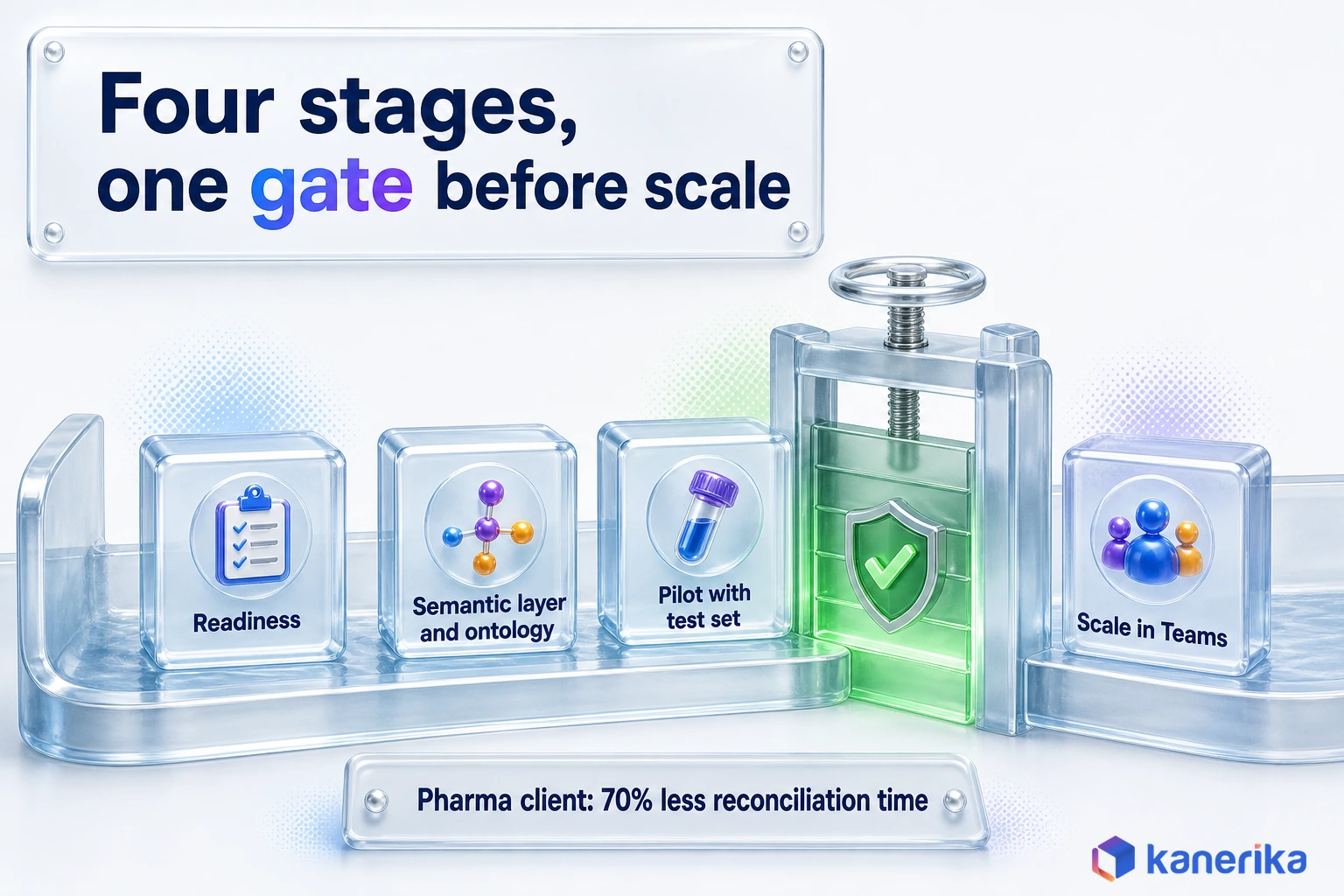
Kanerika runs Fabric AI rollouts in four stages, each with an exit test, so scale comes only after the evidence. The stages map directly onto the cost and governance controls above. None of them is skipped, even when a client already has a mature Power BI estate.
- Readiness. Confirm capacity and region, set tenant settings for Copilot and agents, and apply sensitivity labels with Microsoft Purview.
- Semantic layer and ontology. Agree metric definitions, fix the semantic model and, where it helps, model the business in Fabric IQ.
- Governed pilot. Build one data agent for one domain, write the test set first, track CU per question and set a pass mark before launch.
- Scale. Publish data agents to Teams through Copilot Studio, add operations agents where live data justifies them and keep the test set running.
The work sits within Kanerika’s Microsoft Fabric services and its agentic AI services, so data engineering and agent design stay with one team. That matters most at stage two, where a modeling shortcut turns into wrong answers later. A readiness review should end with a short list of fixes and one chosen pilot domain.
Karl and a Governed Ontology in Practice
For teams that want a ready-made agent, Karl is Kanerika’s data insights agent, available as a Fabric workload. It runs inside the client’s own tenant, so data stays where it is governed. At one manufacturer, Karl delivered 30% faster inventory reconciliation and a 50% reduction in time-to-insight.
The ontology stage often decides the outcome. A global pharmaceutical enterprise worked with Kanerika to build one governed Fabric IQ ontology. It spans more than 40 entities and relationships and over 85 governed KPIs. Investigation and reconciliation time fell by 70%, and the same ontology was then extended into Fabric AI and Copilot.
The order mattered there. Because the definitions were settled first, the AI layer answered from the same numbers the business already trusted. Nobody had to argue about whose figure was right when the agent replied.
Pilots surface questions nobody predicted, and each miss becomes a fix. Say a planner asks about “late orders” and the agent counts late shipments, while the business means late deliveries (an illustrative case). That miss then becomes one instruction defining “late” and one new test question. Teams can reuse the sequence by widening access one domain at a time while the test set shows the agent still answers well.
Verdict: What Enterprise Teams Should Do Next
Pick the layer by the job, because each Fabric AI layer is built for one kind of work. Copilot suits builders, and a data agent suits governed business answers. An operations agent handles live monitoring with approval, and MCP servers serve outside AI tools. Many enterprises will end up running all four, but not on day one.
Case Study
70% Less Investigation Time with One Governed Ontology on Fabric
A global pharmaceutical enterprise unified 85+ governed KPIs and 40+ entities in one Fabric IQ ontology, cut investigation and reconciliation time by 70% and extended it into Fabric AI and Copilot.
Read the Case Study →Start where the answer matters most and the data is cleanest. For most teams that means one data agent on one well-modeled domain, tested against written questions. Bill it to a Fabric Copilot capacity where the workspace sits below F64. Copilot can be switched on alongside it with little extra work.
Add operations agents once a live data stream and a named owner exist. Open the MCP servers to outside agents once your platform team can review their access like any other integration. Then track progress against your wider Microsoft Fabric adoption plan.
Through all of it, keep the three rules from the architecture section: run as the user, read governed data and show the query. So which of the Microsoft Fabric Copilot and agents layers fits your job? The one whose reach matches the job, and no further.
Frequently Asked Questions
What are the latest Copilot and agent enhancements in Microsoft Fabric?
Between August and September 2026, the pieces that bring Fabric agents to users and outside tools became generally available. They include data agents in Copilot Studio, data source routing, Fabric IQ in Microsoft 365 Copilot and the Core and Fabric IQ MCP servers. Advanced DAX generation, the Fabric IQ workload and four other MCP servers stayed in preview.
What is the difference between Fabric data agents and operations agents?
A data agent answers questions. It reads up to five sources with read-only SQL, DAX or KQL and runs with the asking user’s permissions. An operations agent watches an eventhouse or ontology for conditions you set, then messages a person in Teams. It can run a notebook or Power Automate flow, but only after that person approves.
How much does Copilot in Microsoft Fabric cost?
Copilot in Fabric draws capacity units from your Fabric capacity through a meter named Copilot and AI Capacity Usage CU. Pay-as-you-go list price is $0.18 per CU hour in East US. The smallest paid capacity, an F2, costs about $0.36 an hour, or roughly $263 for a 730-hour month, before any reservation discount is applied.
Can Fabric data agents change or write data?
No. A Fabric data agent generates read queries only, in SQL, DAX or KQL, so it cannot create, update or delete data. It also cannot read unstructured files such as PDFs or Word documents. When a workflow needs an action, an operations agent with human approval, or a separate governed flow, is the right tool instead.
Can Claude, ChatGPT or other outside AI agents connect to Microsoft Fabric?
Agents that support MCP can connect through Fabric’s MCP servers. The Fabric Core MCP Server became generally available in September 2026, with Entra ID sign-in, the caller’s own permissions and audit logging. It can also create or delete workspaces and items, so scope its roles tightly. The read-only Fabric IQ MCP Server runs DAX against semantic models.
How do you test a Fabric data agent's accuracy before rollout?
Write a test set of real business questions with agreed answers, taken from reports people already trust. Run it, use the built-in diagnostics to see which source and query the agent chose, then add instructions for the misses. Semantic model sources do not take example queries. Re-run the full set after every change and set a pass mark.
What is Fabric IQ and how does it help AI agents?
Fabric IQ adds an ontology to Fabric, a shared model of business entities and how they relate. Data agents can use an ontology as a source and operations agents can watch one, so every agent uses the same definitions. The Fabric IQ workload was in preview as of November 2026, while Plan in Fabric IQ reached GA in July 2026.
Is Copilot in Fabric generally available?
Copilot in Fabric is turned on by default for paid F2 or larger capacities and also works on P SKUs. It does not run on trial SKUs. Individual Copilot experiences and related tools carry their own release labels, and the Power BI model authoring MCP is still preview, so check the Microsoft Learn page for each workload before planning production.
What can the Power BI modeling MCP server do?
The Power BI model authoring MCP server lets AI tools work on Power BI semantic models, including edits to the model itself. Its tenant setting was labeled preview as of November 2026, so treat it as a pilot tool. Enable it for a small group, review changes through Git and keep production models behind your normal release checks.
What is Skills for Fabric?
Skills for Fabric is an open-source Microsoft repository on GitHub, published under the MIT license. It packages skills and MCP server setup so GitHub Copilot CLI and compatible AI coding tools can work with Fabric. It also ships configuration files for Claude, Cursor and Windsurf, which shortens setup for teams that already use those tools.
How do operations agents work in Fabric Real-Time Intelligence?
An operations agent watches data in an eventhouse, or an ontology, for the conditions you define. When one is met, it sends a Teams message to its creator by default. It can also run a Fabric notebook or a Power Automate flow after the recipient approves, and it then acts with the creator’s delegated identity, so scope that account carefully.
Can Fabric data agents work in Microsoft Teams?
Yes. Since August 2026, Copilot Studio can add a published Fabric data agent as a Fabric IQ Data MCP tool, and that Copilot Studio agent can then reach users in Teams. Source permissions carry through, so each user sees only data they are allowed to see. The data agent must sit in the same tenant as the Copilot Studio agent.
What governance controls do teams need before deploying Fabric agents?
Start with least-privilege access, because data agents run with each user’s own permissions. Apply Purview sensitivity labels, DLP and access policies. Write a test set of real questions with agreed answers and re-run it after every change. Keep agent configurations in Git. For operations agents, scope the creator’s account tightly and limit each approved flow to one action.
What is the difference between Copilot in Fabric and a Fabric data agent?
Copilot in Fabric is a preconfigured assistant that helps builders inside notebooks, warehouses and Power BI. A data agent is something your team configures with instructions, example queries and up to five sources. It answers business questions with read-only queries and can be used in Teams through a Copilot Studio agent, not only inside Fabric itself.
What Fabric capacity do Copilot and data agents need?
Both need a paid capacity. Copilot needs F2 or larger, or a P SKU, while data agents need F2 or larger, or Power BI Premium P1 or larger with Fabric enabled. Trial capacities do not run Copilot, and operations agents do not support trial either. Tenants outside the US and EU data boundary must also allow cross-geo processing.