
TL;DR
A Teradata to Databricks migration moves four things: the data, the SQL and BTEQ code, the scheduled load jobs, and the reports and users that depend on them. Start with an inventory of the Teradata estate, then plan the move in waves of related workloads. Convert Teradata SQL, BTEQ scripts and stored procedures with a tool such as Genie Migrate, Lakebridge or Kanerika’s FLIP, and have engineers review what the tool flags. Load history from Teradata exports into Delta tables, and keep data current with source-system CDC or Lakeflow Connect. Test Teradata-specific behavior, such as SET-table duplicates and case-insensitive comparisons, along with counts and totals. Run both platforms in parallel until reports match, then retire Teradata.
Key Takeaways
- A Teradata migration covers four layers: data, code, load jobs, and the reports and users that consume them.
- SET tables, primary indexes and TASM rules have no direct Databricks equivalent, so each needs a design decision during conversion.
- QUALIFY, temporary tables, SQL procedures and case-insensitive collations now exist in Databricks, which shortens SQL conversion.
- Genie Migrate became generally available in November 2026, and Lakeflow Connect’s Teradata connector reached general availability in May 2026.
- Databricks doesn’t enforce primary keys, so Teradata uniqueness rules need checks in the load pipeline.
- Keep Teradata running until reports match on both platforms during a parallel run.
What a Teradata to Databricks Migration Involves
On November 12, 2026, Databricks made Genie Migrate generally available, and Teradata is one of the seven data warehouses it converts SQL from. Six months earlier, Lakeflow Connect added a generally available connector that reads from Teradata. For teams that run reporting and data pipelines on Teradata, both code conversion and data movement now have supported Databricks tools.
A Teradata to Databricks migration moves an enterprise data warehouse from Teradata’s MPP database to the Databricks lakehouse, where tables sit in Delta Lake on cloud storage and compute runs separately. The tools do much of the conversion. The decisions that shape the result still sit with your team: how to replace primary indexes, how to keep SET-table uniqueness, how to split TASM workloads across SQL warehouses, and when each report is ready to switch.
This guide covers how the two platforms differ, which Teradata objects need converting and where they land, the six steps of the migration, and the pitfalls that cause rework. If you’re comparing several legacy sources, our overview of legacy systems to Databricks migration covers Teradata, Oracle and SQL Server side by side.
The Four Layers That Move
- Data: tables, their history, and the incremental loads that keep them current.
- Code: Teradata SQL, BTEQ scripts, stored procedures, macros and views.
- Jobs: load utilities such as FastLoad, MultiLoad and TPT, plus the scheduler chains in Control-M or Autosys that run them.
- Consumers: BI reports, extracts, downstream file feeds, and the users and roles that query the warehouse.
Teams usually plan the first two layers in detail and discover the last two late. BTEQ exports that feed other systems and reports that query Teradata directly are the most common surprises.
Why Teradata Teams Are Moving to Databricks
- Renewal and refresh decisions: a Teradata contract renewal or hardware refresh commits capacity for years, which makes it a natural point to reconsider the platform.
- AI on the same data: Databricks runs SQL, Python, machine learning and AI workloads against the same Delta tables, so teams stop copying warehouse data into separate environments.
- Open formats: Delta Lake stores data as Parquet files with a transaction log, so other engines can read it too.
- Separate storage and compute: each workload gets compute sized for it, and you pay for the compute you run.
If you’re still choosing a target platform, our Databricks vs Snowflake comparison covers cost, AI and governance differences.
Choosing an Approach for Each Workload
Decide the approach per workload during assessment:
- Migrate with minimal change: stable reporting marts whose SQL converts cleanly. Convert, load, validate and switch.
- Redesign during the move: workloads with heavy BTEQ logic, slow data models, or tables that will feed AI use cases. Rebuild them in a medallion layout.
- Keep federated for now: low-use data that must stay queryable. Lakehouse Federation lets Databricks query Teradata tables without copying them, so these tables can move last or retire in place.
- Retire: tables and reports nobody has queried in months. Teradata’s query logs show which ones.
How Teradata and Databricks Differ in Architecture
Teradata is a shared-nothing MPP database. It spreads each table’s rows across parallel units called AMPs by hashing the primary index, and the same system provides both storage and compute. Databricks stores tables as Delta Lake files in cloud object storage and runs separate clusters and SQL warehouses against them. That difference drives most of the redesign work.
| Area | Teradata | Databricks |
|---|---|---|
| Storage | Tables on AMP-managed disks | Delta Lake tables (Parquet files plus a transaction log) in cloud storage |
| Data distribution | Rows hashed across AMPs by the primary index | Files organized by liquid clustering keys, which can change without rewriting data |
| Compute | Fixed capacity per system | Clusters and SQL warehouses that scale and stop independently |
| Workload management | TASM rulesets, throttles and priorities | A SQL warehouse per workload class, with serverless scaling |
| Procedural logic | Stored procedures, macros and BTEQ scripts | SQL scripting, SQL procedures, SQL functions and Python notebooks |
| Bulk loading | FastLoad, MultiLoad, TPump and TPT | Auto Loader, COPY INTO and Lakeflow Connect |
| Orchestration | External schedulers such as Control-M or Autosys | Lakeflow Jobs, or the existing scheduler triggering Databricks jobs |
| Governance | Database roles and grants | Unity Catalog access control, lineage and auditing |
| Pricing | License and capacity based | Pay for compute used (DBUs) plus cloud storage |
Primary indexes: a Teradata primary index decides both where rows live and how fast single-row lookups run. Delta tables have no distribution key. Liquid clustering is the closest replacement, and Databricks recommends it for all new tables. Clustering keys can change later without rewriting data, so pick them from the columns queries filter on most and adjust after go-live.
Workload management: Teradata Active System Management (TASM) prioritizes workloads with rulesets and throttles. On Databricks, the usual design gives each workload class its own SQL warehouse, so a batch load never competes with an executive dashboard for the same compute.
Security: Teradata roles and grants map to Unity Catalog, which handles access control, lineage and auditing. Plan the catalog and schema structure before converting grants, because every grant refers to it. Our Unity Catalog migration playbook covers that setup.
Teradata to Databricks Migration
Plan Your Teradata to Databricks Migration With Kanerika
FLIP converts supported Teradata SQL into PySpark notebooks, deploys them to your Databricks workspace, and validates each workload before sign-off.
Explore the ServiceTeradata Objects That Need Converting and Where They Land
Teradata SQL follows ANSI SQL closely, so a large part of a typical code base converts with little change, as Databricks notes in its Teradata migration guide. The work concentrates in a smaller set of Teradata-specific objects and behaviors. The table below lists them with their Databricks targets and what to check.
| Teradata object | Databricks target | What to check |
|---|---|---|
| BTEQ scripts | SQL logic in Python notebooks or SQL files, run as Lakeflow Jobs tasks | IMPORT, EXPORT, RUN and IF commands need their own mapping |
| Stored procedures | SQL procedures (Runtime 17.0+) or SQL scripting | Cursors, error handlers and dynamic SQL |
| Macros | SQL functions, or procedures when a macro runs several DML statements | Parameter handling |
| FastLoad, MultiLoad, TPump and TPT jobs | COPY INTO, Auto Loader and MERGE INTO | Upsert and delete logic inside MultiLoad scripts |
| SET tables | Delta tables plus deduplication in the load | Delta doesn’t reject duplicate rows |
| Primary index and partitioned primary index | Liquid clustering | Keys chosen from real query filters |
| Unique primary index and unique constraints | Informational constraints plus data quality checks | Databricks doesn’t enforce primary or unique keys |
| Join indexes | Materialized views or persisted Delta tables | Refresh schedule |
| Volatile tables | Temporary tables (CREATE TEMP TABLE) or temporary views | Session scope inside jobs |
| QUALIFY | QUALIFY, supported natively | Usually no change |
| UPDATE with a join | MERGE INTO | Duplicate matches in the source |
| COLLECT STATISTICS | Predictive optimization or ANALYZE TABLE | Old statistics jobs that no longer need to run |
| NOT CASESPECIFIC columns | UTF8_LCASE collation (Runtime 16.1+) | Joins and filters that depend on case |
| BYTEINT, NUMBER, TIME and PERIOD types | Integer, DECIMAL and TIMESTAMP types, or two-column ranges | Unbounded NUMBER and TIME columns |
Several of these targets are recent. QUALIFY runs natively in Databricks SQL, temporary tables replace most volatile tables, and collations handle case-insensitive comparison. Older migration guides often rewrite these by hand.
Three rows deserve extra attention because they change results without raising errors: SET tables that silently dropped duplicates on Teradata, string comparisons that relied on case-insensitive columns, and uniqueness the database used to enforce. Converted code will run, return rows and still differ from Teradata. Plan an explicit test for each in Step 5.
Step 1: Assess the Teradata Estate
A Teradata to Databricks migration runs in six steps, and each step ends with a check before the next one starts. Steps 3 and 4 usually overlap within a wave, because converted code needs migrated data to test against.
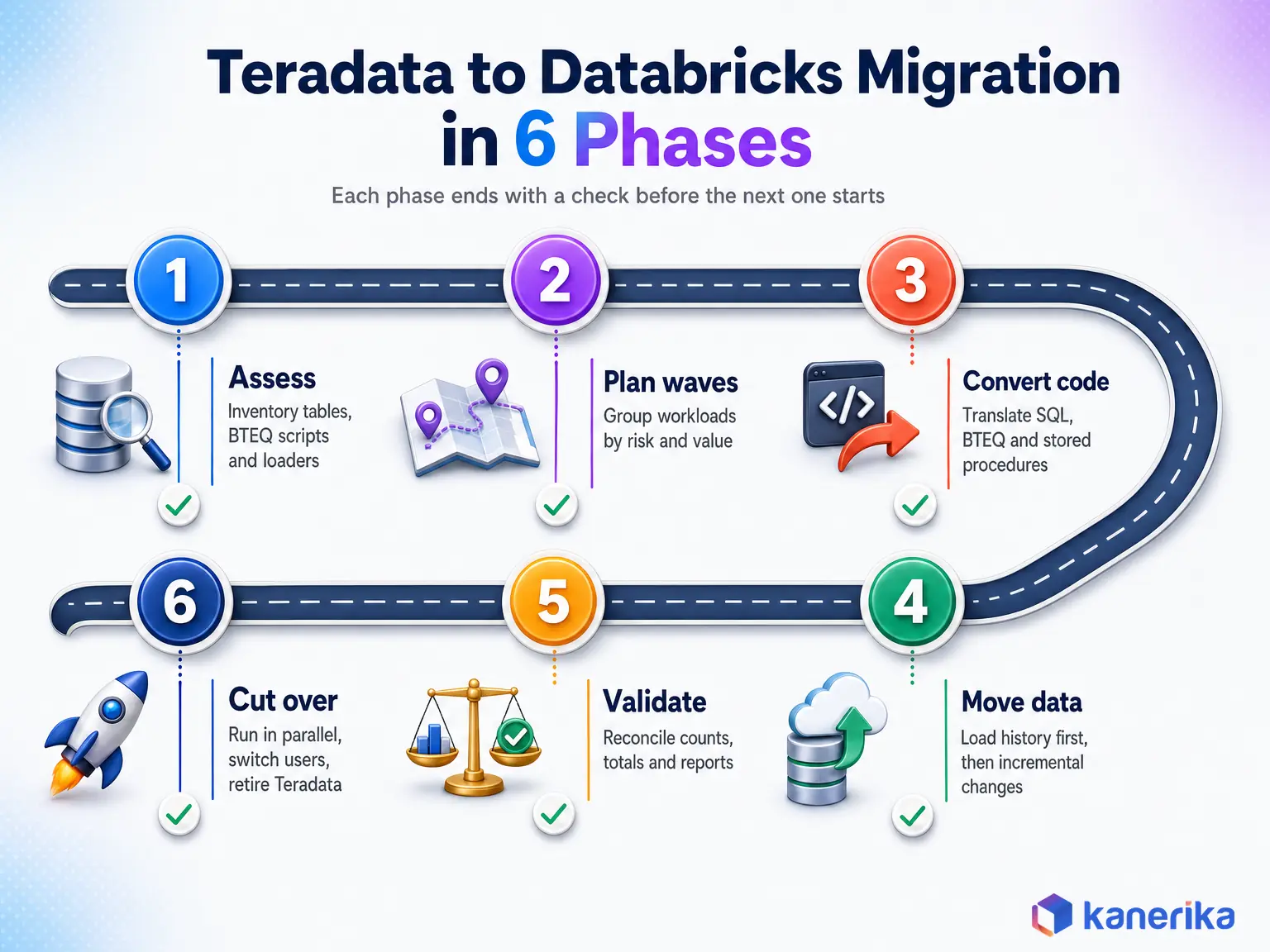
Assessment produces three things: an inventory of what exists, an estimate of the conversion effort, and a wave plan. Every later step depends on them.
Build the Inventory From System Tables and Query Logs
Teradata’s data dictionary lists databases, tables, views, macros and procedures. Its query logs show which objects are actually used, by whom, and how often. Databricks’ Teradata profiler reads the system tables and PDCR (Performance Data Collection and Reporting) data to size the estate and forecast Databricks compute, as described in Databricks’ Teradata migration blog. For each object, record its size, row count, last access date, owning team and the jobs that load it.
Trace Schedulers, BTEQ Exports and File Feeds
Code inventories miss what happens outside the database. Pull the job chains from Control-M, Autosys or cron, and list every BTEQ script with an export step. Those exports often feed finance systems, partners or other databases, and each one needs a new home on Databricks before Teradata can be switched off.
Size the Conversion Effort
Code analyzers count scripts, statements and Teradata-specific constructs, and flag what will need manual work. Lakebridge, Databricks Labs’ migration toolkit, has a profiler and an analyzer that both support Teradata. Genie Migrate also starts with an assessment stage inside the Databricks workspace. Use the results to sort workloads into migrate, redesign, federate or retire, and to group related workloads into waves. Our data migration checklist has go/no-go checks for each phase.
Step 2: Plan Waves and Design the Databricks Target
In a Teradata to Databricks migration, a wave is a group of related workloads that move, validate and switch together, such as one subject area with its loads, tables and reports. Start with a wave that matters to the business but has few dependencies, so the team proves the method before it tackles the most connected data.
Medallion Layers and the Unity Catalog Structure
Databricks recommends a medallion layout when re-modeling a Teradata warehouse: Bronze for landed data, Silver for conformed data, and Gold for the presentation layer. Map each Teradata database to a Unity Catalog catalog or schema in that layout, and fix the naming before conversion starts, because every converted query references it. Our guide to Databricks lakehouse architecture covers the layer design choices.
Listen on Spotify
Why Data Platform Migration Succeeds or Fails | Manisha Chowdari, Head – Business Analysis
Decide Three Rules Before Converting Code
- Case sensitivity: Databricks compares strings by their binary value by default. The UTF8_LCASE collation, available in Databricks SQL and Runtime 16.1 and above, makes comparisons case-insensitive. Set it on the tables and columns where Teradata comparisons were case-insensitive, so converted joins keep matching the same rows.
- Time zones: agree whether Databricks stores timestamps in UTC and converts at query time, then test values around midnight and daylight saving changes against Teradata.
- Uniqueness: Databricks primary key and unique constraints are informational and not enforced. Where Teradata relied on a unique primary index or a SET table, add deduplication to the load and a data quality check that fails the job on duplicates. Identity columns work on BIGINT only and can skip values, so don’t use them where processes expect gap-free keys.
Size SQL Warehouses Around Workload Classes
List the TASM workload definitions and their priorities, then assign each class, such as dashboards, ad hoc analysis and batch transformation, to its own SQL warehouse. Databricks recommends serverless SQL warehouses where available; they scale through intelligent workload management. Our Databricks readiness checklist lists 18 setup actions across compute, Unity Catalog, storage, pipelines and security.
Step 3: Convert Teradata SQL, BTEQ Scripts, Procedures and Jobs
Code conversion is where automation saves the most time in a Teradata to Databricks migration. Most programs combine an automated converter with engineer review, and the tool choice depends on how much BTEQ and procedural code the estate holds.
Automated Conversion Tools in 2026
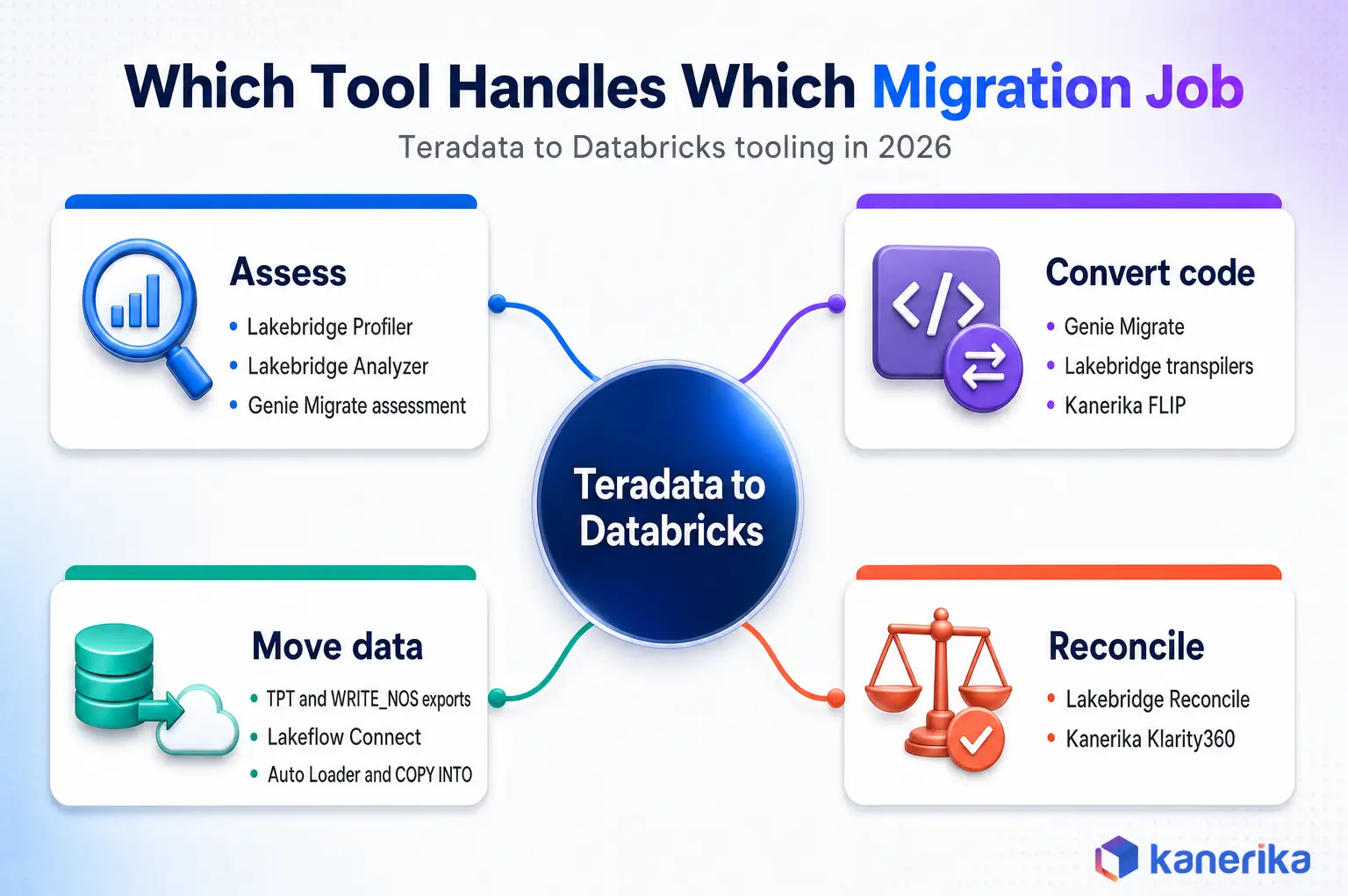
- Genie Migrate: Databricks’ in-workspace migration tool, built on the Genie Code agent. It assesses source code, converts SQL to Databricks SQL or notebooks, checks its own output, and shows source and result side by side for review. Teradata is a supported source, and the notebook output is in Beta. Our guide to Databricks Genie Code explains the agent underneath it.
- Lakebridge: a free Databricks Labs toolkit with a profiler, analyzer, transpilers and a reconciliation module. For Teradata, its BladeBridge transpiler converts code to Databricks SQL, and its LLM-based Switch transpiler can produce Spark SQL on an experimental basis. See our Databricks Lakebridge guide for setup.
- Partner accelerators: Kanerika’s FLIP converts supported Teradata SQL into PySpark notebooks and deploys them to a chosen Databricks workspace. Its Teradata accelerator also covers BTEQ workloads, with assessment and validation steps built in. Our FLIP vs LeapLogic comparison sets out how it differs from other accelerators.
Run a pilot on your own code before committing to a tool. Include BTEQ scripts with control logic, procedures with cursors and error handlers, and queries that depend on case-insensitive comparisons. Genie Migrate’s documentation lists the Teradata SQL dialect but doesn’t describe BTEQ command handling, so test that directly.
Converting BTEQ Scripts
BTEQ (Basic Teradata Query) runs SQL, imports and exports data and produces reports, interactively or in batch, according to Teradata’s documentation. Databricks recommends converting each script into SQL logic wrapped in a Python notebook. The common commands map as follows:
- .IMPORT becomes COPY INTO from cloud storage.
- .EXPORT becomes INSERT OVERWRITE DIRECTORY, or a file write from the notebook.
- .RUN becomes dbutils.notebook.run or a separate job task.
- .IF ERRORCODE and .GOTO become Python if and else blocks, or branching in Lakeflow Jobs.
Logon, session and output-formatting commands usually drop out, because the workspace and job configuration replace them.
FLIP Datasheet
Automate Teradata BTEQ Conversion With FLIP
See how FLIP assesses, converts and validates BTEQ workloads and Teradata SQL for Databricks, including environment setup.
Get the DatasheetStored Procedures and Macros
Teradata stored procedures combine procedural control statements with SQL. Databricks now has two native targets for them: SQL scripting, with variables, loops, conditions and handlers, in Databricks SQL and Runtime 16.3 and above, and CREATE PROCEDURE, which stores procedures in Unity Catalog, in Databricks SQL and Runtime 17.0 and above. Before these existed, teams rewrote each procedure as a notebook. Procedures that call external programs or depend on Teradata system objects still need a redesign. Databricks’ guide converts macros to SQL functions; a macro that runs several DML statements fits a procedure better.
Load Jobs and Orchestration
FastLoad, MultiLoad, TPump and TPT scripts don’t run on Databricks and have to be rewritten in SQL or PySpark. MultiLoad and TPump jobs that apply inserts, updates and deletes become MERGE INTO statements on Delta tables. FastLoad jobs that fill empty staging tables become COPY INTO or Auto Loader loads.
Rebuild Control-M or Autosys chains in Lakeflow Jobs, Databricks’ orchestration service, formerly called Workflows, or keep the existing scheduler and let it trigger Databricks jobs. Declarative transformations can move to Lakeflow pipelines, formerly Delta Live Tables. Our Databricks Lakeflow guide explains how the pieces fit, and estates that load Teradata through Informatica can follow our Informatica to Databricks migration plan.
Where Engineers Still Review the Output
- Dynamic SQL assembled from strings at run time.
- Procedures with cursors, error handlers and transaction control.
- Queries tuned around primary index access paths.
- Fixed-format output files that other systems consume.
- Business rules buried in BTEQ conditional logic.
Track every converted object with its status (converted, reviewed, tested), so each wave’s sign-off has evidence behind it.
Step 4: Move Historical and Incremental Data
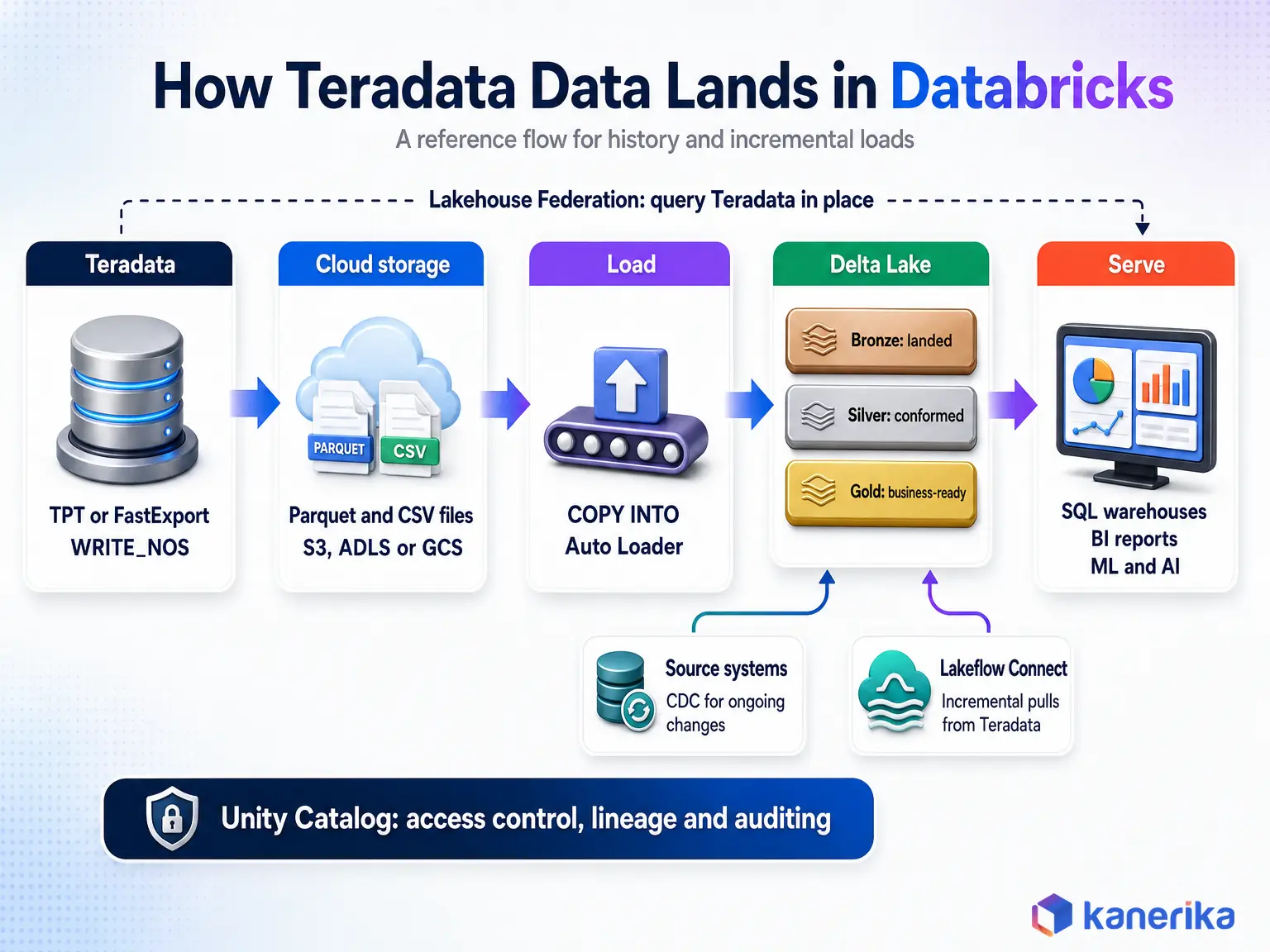
Data movement in a Teradata to Databricks migration has two parts: a one-time load of history, and a repeating load that keeps Databricks current until cutover. The usual path lands Teradata exports in cloud storage and loads them from there into Delta tables.
Load History From Teradata Exports
Teradata Parallel Transporter (TPT), which replaced the older standalone utilities, extracts tables in parallel to files. Databricks’ Teradata guide also describes FastExport, Azure Data Factory over JDBC, and Teradata’s WRITE_NOS command, which writes Parquet or CSV files straight to cloud storage. WRITE_NOS uses all AMPs, so the guide recommends running no more than two to four commands at a time.
Once files land, COPY INTO loads them into Delta tables and skips files it has already loaded, so a failed batch can be re-run safely. Auto Loader does the same job continuously as new files arrive; our Auto Loader guide covers schema evolution in production.
Keep Data Current Until Cutover
Databricks recommends taking incremental loads from the original source systems, usually through CDC tools, so the new pipelines stop depending on Teradata. When a source can’t be reached directly, Lakeflow Connect’s query-based connector for Teradata pulls new and changed rows using a cursor column, such as a last-updated timestamp. It queries Teradata on every run, so schedule it outside peak reporting hours.
Query Teradata From Databricks During the Transition
Lakehouse Federation lets Databricks query Teradata tables through a Unity Catalog foreign catalog without copying them. It helps in two places: Gold tables can join to data that hasn’t moved yet, and validation queries can compare both platforms from one notebook. Check the limits first: only TD2 authentication is supported, unbounded NUMBER columns can’t be read, and TIME values arrive as timestamps. Our guide to Databricks Lakehouse Federation covers setup and performance.
| Method | Best for | Load on Teradata | What to watch |
|---|---|---|---|
| TPT or FastExport to files | Large one-time history loads | High during the export window | Staging space and file transfer time |
| WRITE_NOS to cloud storage | History loads straight to Parquet | Uses all AMPs | Two to four parallel commands at most |
| Source-system CDC | Ongoing changes after the history load | None | Needs access to the original sources |
| Lakeflow Connect query-based connector | Incremental loads when sources are out of reach | Moderate, on each run | Needs a reliable cursor column |
| Lakehouse Federation | Low-use tables and validation queries | Per query | TD2 authentication only, type limits |
Step 5: Validate the Data Against Teradata
Validation in a Teradata to Databricks migration proves that the migrated data and the converted logic give the same answers as Teradata. Start with the most critical tables, as Databricks’ guide advises, and automate the checks so they rerun after every load.
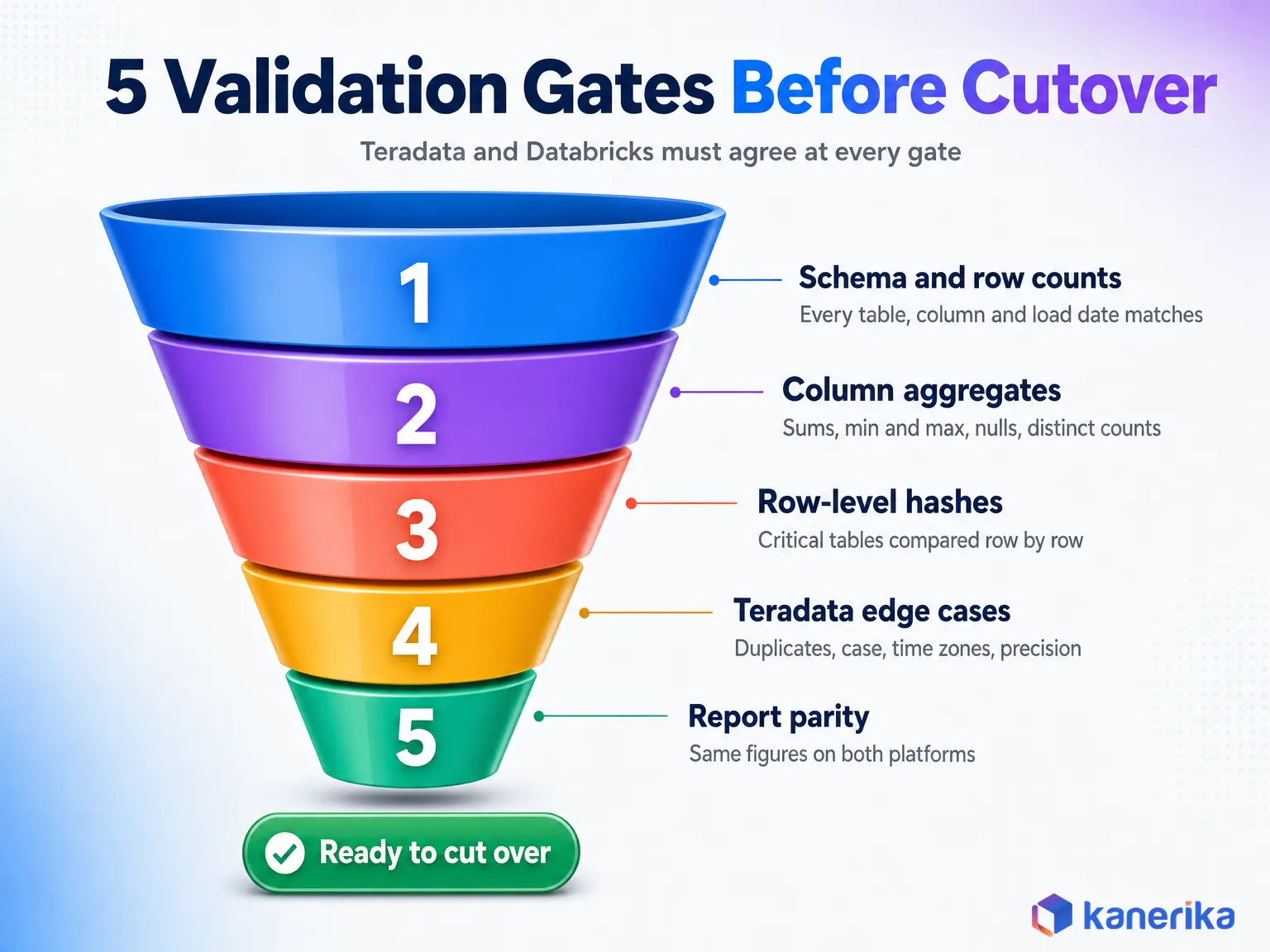
- Schema and row counts: every table and column exists with the agreed data types, and row counts match per table and per load date.
- Aggregates: sums, averages, minimums and maximums on numeric columns, minimums and maximums on dates and strings, null counts and distinct counts.
- Row-level hashes: a full row comparison on high-risk tables.
- Teradata edge cases: duplicates in former SET tables, joins on text columns that relied on case-insensitive matching, TIME and time zone values, and decimal precision from NUMBER columns.
- Report parity: the same dashboards and extracts show the same figures on both platforms.
Lakebridge’s Reconcile module supports Teradata for schema checks out of the box. Row-hash comparisons need a hash UDF installed on Teradata, because Teradata has no portable cryptographic hash in plain SQL, so agree that change with your Teradata DBAs early. Kanerika’s Klarity360 automates data validation between the source and target platforms. For test design and tool selection, see our guides to data migration testing and data reconciliation tools.
Step 6: Run in Parallel, Cut Over and Retire Teradata
The parallel run is the last safety check in the migration. It keeps Teradata and Databricks loading the same data for a fixed period while users compare outputs. Set the length and exit criteria in advance, for example two month-end closes for finance data, so the run has a clear end.
Switch Reports With a Rename
Databricks describes a simple way to repoint BI reports: build and test the new tables and views under a temporary suffix, then rename the Teradata objects with a suffix such as _td and give the Databricks objects the current names. Reports then switch with minimal change. Where the data model changed, publish adjusted views as new data sources and update the reports that use them.
Retire Teradata in Stages
Switch users wave by wave, keep Teradata read-only for an agreed period, then archive what regulations require and decommission the system. Delta Lake time travel can restore an earlier table version after a bad load, but Databricks advises using only the last seven days unless retention settings are raised, and not treating table history as an archive. Keep a proper backup and a retained copy of any Teradata data you must hold.
Case Study
Zero-Downtime Databricks Migration for Retail Analytics
A large US retailer moved distributed on-premises databases to Delta Lake under Unity Catalog, with a parallel run and app-by-app cutover. The result: zero downtime and 100% of legacy infrastructure decommissioned.
Read the Case StudyCommon Teradata to Databricks Migration Pitfalls
Each of these problems traces back to a difference between the two platforms, and each has a known fix:
- Duplicates after SET tables: Delta accepts duplicate rows that Teradata rejected. Add deduplication and a duplicate check to every former SET table load.
- Join rows lost to case sensitivity: joins that matched ‘ABC’ to ‘abc’ on Teradata stop matching. Apply the UTF8_LCASE collation or normalize keys during the load.
- Primary indexes copied into partitions: turning every partitioned primary index into Delta partitions creates many small files. Start with liquid clustering instead.
- Unbounded NUMBER and TIME columns: define explicit DECIMAL precision and timestamp handling, then test boundary values.
- Hidden BTEQ exports: file feeds nobody listed break downstream systems at cutover. Inventory every export step during assessment.
- One warehouse for every workload: without TASM-style separation, a heavy batch job slows executive dashboards. Give each workload class its own SQL warehouse.
- Statistics jobs carried over: COLLECT STATISTICS jobs converted line by line add cost for little benefit. Predictive optimization runs ANALYZE automatically on Unity Catalog managed tables.
- Gap-free keys assumed: identity columns can skip values, so processes that expect consecutive keys need another approach.
Broader migration risks, from scope creep to access controls, are covered in our guide to data migration challenges.
What Drives the Cost and Timeline of a Teradata Migration
Published figures for Teradata to Databricks migration cost and duration rarely come with a verifiable source, and real programs vary widely. These factors decide the size of yours:
- Code volume and mix: the number of scripts and objects, and the share that is BTEQ or stored procedure logic.
- Data volume and network path: how many terabytes move, and the bandwidth between the Teradata site and the cloud region.
- Parallel-run length: every extra month means running and paying for both platforms.
- BI estate: the number of reports, extracts and file feeds to repoint and test.
- Governance rebuild: the roles, grants and audit requirements to recreate in Unity Catalog.
- Team skills: experience with Spark, Python and Databricks SQL on the team that will run the platform.
After cutover, Databricks costs depend heavily on warehouse sizing and job design. Serverless SQL warehouses, Photon, which speeds up SQL without code changes, and the practices in our Databricks cost optimization guide keep run costs predictable. Databricks also funds part of some migration and proof-of-concept projects through partners.
Databricks Funding
Reduce Databricks Migration Costs With Funding Support
Learn how Databricks funding routes, such as DCIF and Marketplace transactions, can offset the cost of migration and proof-of-concept projects.
Get the DatasheetHow Kanerika Approaches Teradata to Databricks Migration
Kanerika is a certified Databricks partner. Our Teradata migrations follow the six steps in this guide, with FLIP, our migration automation platform, doing the repetitive work:
- Assess: FLIP analyzes Teradata SQL workloads to size the effort and flag what needs manual work.
- Design: the Unity Catalog structure, medallion layers and SQL warehouse sizing are agreed before conversion starts.
- Convert and deploy: FLIP converts supported Teradata SQL into PySpark notebooks, handles BTEQ workloads, and deploys the output to your Databricks workspace. Engineers review the flagged logic.
- Validate: automated reconciliation with Klarity360 and a planned parallel run.
- Cut over: wave by wave, with Teradata retired only after sign-off.
In a healthcare engagement, Kanerika moved Informatica workloads to Azure Databricks with its migration accelerator. The results included 71% higher reporting accuracy, a 38% reduction in data handling costs and 64% faster decision-making. The source there was Informatica, and the same conversion, validation and cutover method applies to Teradata. To scope your own estate, see our Teradata to Databricks migration service.
Conclusion
A Teradata to Databricks migration is a sequence of waves: assess, plan, convert, move data, validate and cut over. The 2026 tooling, including Genie Migrate, Lakebridge, Lakeflow Connect and accelerators such as FLIP, handles much of the SQL conversion and data movement. The outcome still depends on decisions the tools leave to your team: how to replace primary indexes and SET-table rules, how to split workloads across SQL warehouses, and when each report is ready to switch. Settle those rules early, test Teradata-specific behavior directly, and keep Teradata running until the reports match.
Talk to Kanerika
Planning a Teradata to Databricks Migration?
Kanerika’s Databricks team assesses your Teradata estate, converts SQL and BTEQ workloads with FLIP, and validates every wave before cutover. Book a session to scope your migration.
Schedule a DemoFrequently Asked Questions
Is Teradata like Databricks?
Both run large-scale SQL analytics, but they’re built differently. Teradata is an MPP database where storage and compute sit together and rows are spread across AMPs by the primary index. Databricks is a lakehouse platform that keeps data in open Delta Lake files on cloud storage and runs separate compute for SQL, data engineering, machine learning and AI.
Is Teradata obsolete?
No. Teradata is still supported, runs in the cloud and on premises, and handles critical workloads for many large enterprises. Teams move to Databricks for other reasons: to run AI and machine learning on the same data as reporting, to keep data in open formats, to size compute per workload, and to avoid capacity-based renewals.
How do you migrate data from Teradata to Databricks?
Export history with Teradata Parallel Transporter, FastExport or WRITE_NOS into cloud storage, then load the files into Delta tables with COPY INTO or Auto Loader. Keep data current with CDC from the original source systems or with Lakeflow Connect’s Teradata connector. Reconcile counts and totals against Teradata before switching any report to Databricks.
Can Teradata SQL be converted to Databricks SQL automatically?
Much of it can. Genie Migrate, Lakebridge and partner accelerators such as Kanerika’s FLIP convert Teradata SQL to Databricks SQL or PySpark. Standard queries and QUALIFY clauses usually convert cleanly. Dynamic SQL, complex procedures, BTEQ control logic and case-sensitive comparisons still need engineer review, so pilot any tool on your own code first.
What happens to BTEQ scripts during a Databricks migration?
BTEQ doesn’t run on Databricks, so each script becomes SQL logic inside a Python notebook or SQL file, scheduled as a Lakeflow Jobs task. Imports become COPY INTO, exports become directory or file writes, and error checks become Python conditions or job branching. Inventory every export first, because those files often feed other systems.
How are Teradata stored procedures and macros migrated to Databricks?
Stored procedures can move to Databricks SQL scripting or to CREATE PROCEDURE, which stores procedures in Unity Catalog on Databricks SQL and Runtime 17.0 and above. Simple macros become SQL functions, and macros with several DML statements fit procedures better. Procedures with cursors, dynamic SQL or Teradata system calls usually need a partial rewrite.
How are SET and MULTISET tables handled in Databricks?
Delta tables behave like MULTISET tables because they accept duplicate rows. To keep SET-table behavior, deduplicate during the load, for example with MERGE INTO or a ROW_NUMBER filter using QUALIFY, and add a data quality check that flags duplicates. Primary key constraints in Databricks are informational, so they won’t block duplicates on their own.
How do Teradata data types map to Databricks?
Through Lakehouse Federation, BYTEINT, SMALLINT and INTEGER arrive as integers, BIGINT as a long integer, NUMBER with set precision as DECIMAL, VARCHAR as STRING, and TIME and TIMESTAMP as timestamps. Unbounded NUMBER isn’t supported, so give it an explicit precision. PERIOD and INTERVAL types need replacement columns or logic in the converted code.
What tools are used for Teradata to Databricks migration?
Databricks provides Genie Migrate for assessment and conversion inside the workspace, and Lakebridge, a free Databricks Labs toolkit for profiling, code conversion and reconciliation. Teradata TPT and WRITE_NOS handle exports, while Lakeflow Connect, Auto Loader and COPY INTO load the data. Partner accelerators such as Kanerika’s FLIP add BTEQ conversion, deployment and validation.
Can Databricks query Teradata without migrating the data first?
Yes. Lakehouse Federation lets Databricks query Teradata tables through a Unity Catalog foreign catalog without copying them. It suits low-use tables and validation queries during a phased migration. It needs Databricks Runtime 16.1 or above or a pro or serverless SQL warehouse, supports only TD2 authentication, and can’t read unbounded NUMBER columns.
How do you validate data after migrating from Teradata to Databricks?
Compare schemas, row counts and column aggregates such as sums, minimums, maximums, null counts and distinct counts on both platforms. Compare row hashes on critical tables, test Teradata edge cases such as SET-table duplicates and case-insensitive joins, and run reports on both systems during a parallel run. Lakebridge Reconcile and Klarity360 automate these checks.
How long does a Teradata to Databricks migration take?
It depends on the estate. The main factors are the number of scripts and objects, the share of BTEQ and stored procedure logic, data volume and network bandwidth, the number of reports to repoint, and the length of the parallel run. Moving in waves lets the first workloads go live while later ones are still being converted.
Is Databricks cheaper than Teradata?
It can be, depending on how the platform is run. Databricks charges for the compute you use, so costs follow warehouse sizing, job schedules and idle settings. Savings come from right-sizing SQL warehouses, stopping idle compute and retiring Teradata on schedule, while a long parallel run adds cost. Databricks migration funding can offset part of the project.
How can I migrate data from Teradata to AWS?
Run Databricks on AWS and export Teradata tables with TPT or WRITE_NOS into Amazon S3. Load the files into Delta tables with COPY INTO or Auto Loader, govern them in Unity Catalog, and keep them current with CDC or Lakeflow Connect until cutover. The same steps apply when Databricks runs on Azure or Google Cloud.