TL;DR
Databricks Lakebridge is a free, open-source migration tool that assesses legacy warehouses and ETL pipelines, converts their code, and validates results before cutover. Databricks reports up to 80% task automation and up to 2x faster implementation than manual migration across 10+ source platforms including Teradata, Snowflake, Oracle, and Informatica. It handles straightforward SQL and warehouse migrations well. Complex ETL logic, custom business rules, and validation sign-off still require engineering judgment the tool does not supply on its own.
In June 2025, Databricks released Lakebridge, a free, open-source migration tool from Databricks Labs that assesses legacy data warehouses and ETL pipelines, converts their code, and validates output before cutover. The release effectively commoditized a category of paid migration accelerators built to do exactly that job.
For a data engineer staring at a Teradata or PowerCenter estate, the free price tag raises a real question. What does Lakebridge automate on its own, and where does a free tool stop being enough for an enterprise migration?
This article breaks down what Lakebridge does, how it works end to end, which source systems it currently supports, how it compares to manual and partner-led migration, and where its limits show up in practice.
Key Takeaways
- Lakebridge has three components, an Analyzer for assessment, a Converter for code translation, and a Validator for reconciliation
- Databricks reports up to 80% task automation and up to 2x faster implementation versus manual migration
- Source support spans 10+ platforms, but assessment coverage and conversion coverage are not the same list
- Lakebridge’s converted output is built only for Databricks, worth knowing for teams keeping a multi-platform strategy
- Complex Informatica PowerCenter logic, custom UDFs, and validation criteria still require manual engineering review
- The assessment tools can produce early cost and effort estimates before any code conversion begins
Evaluating a Migration to Databricks?
Kanerika is a Databricks Consulting Partner with production migrations from Teradata, Informatica, and Snowflake with full Unity Catalog governance.
 Explore Our Databricks Practice
What Is Databricks Lakebridge?
Databricks Lakebridge is a free migration toolkit built by Databricks Labs to move legacy data warehouses and ETL pipelines onto the Databricks Lakehouse. It came out of Data+AI Summit 2025, aimed at a problem every migration project runs into. Years of undocumented SQL and stored procedure logic sit inside a platform the business wants to retire.
In practice, that adds up to thousands of views, stored procedures, and ETL jobs built up over a decade by different teams, with little documentation left behind. Lakebridge’s Analyzer scans the exported code from that environment and generates a multi-tab report listing every object that needs to move.
Lakebridge doesn’t replace a migration project. It handles the mechanical parts, scanning the source environment, converting code, and checking the output against the original, so engineers spend their time on the logic that needs a human decision. Databricks positions the tool as extensible, letting partners contribute features as new migration patterns show up in the field.
That split of work happens across four steps, each building on the one before it.
Source: Databricks
How Databricks Lakebridge Works
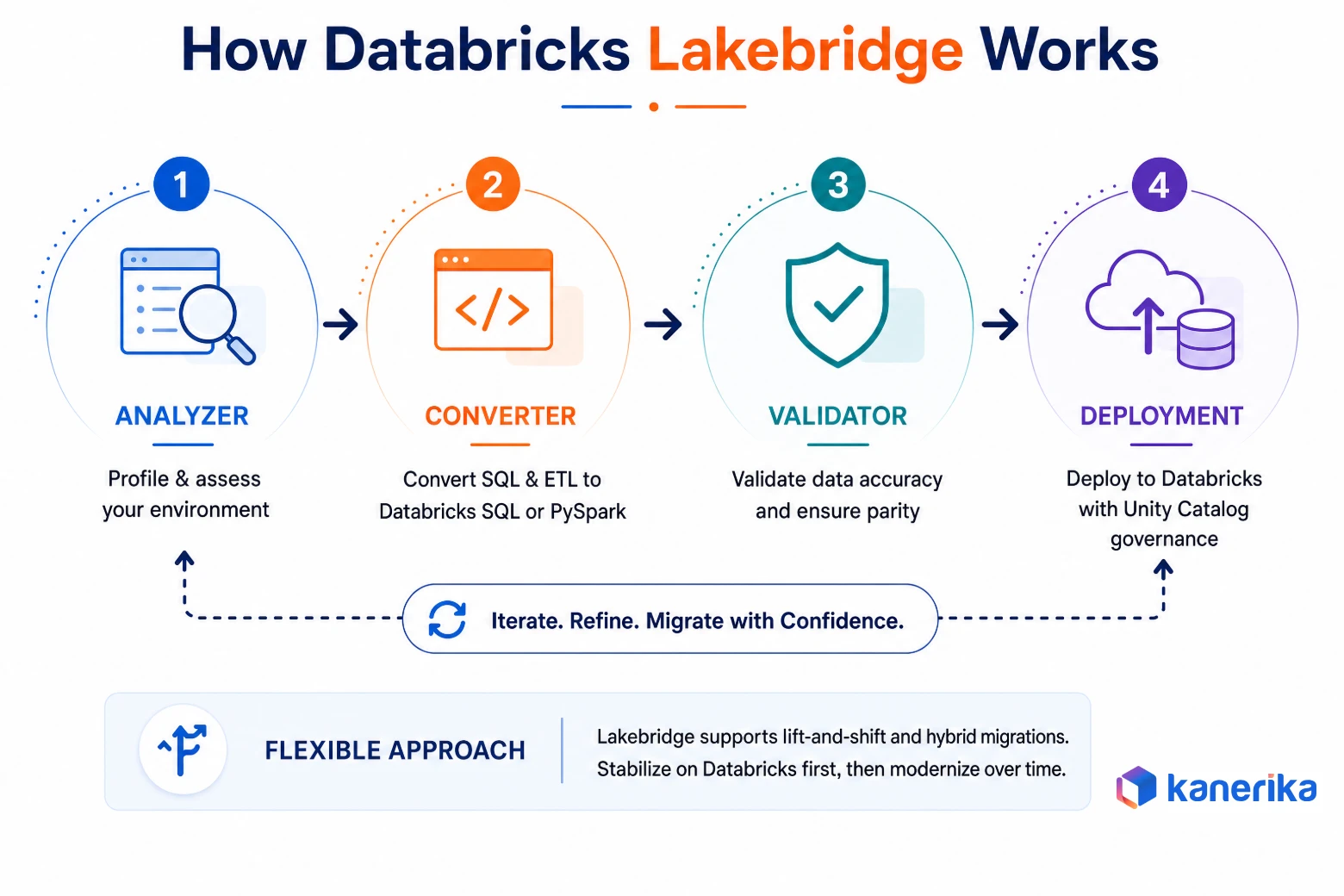
Lakebridge runs as a four-step pipeline, with three named components handling the first three steps and deployment closing the loop.
1. Analyzer
Assessment runs through two tools. The Profiler connects to the source system and measures workload size, usage, and running costs. The Analyzer scans the exported SQL and ETL code, lists tables, views, ETL jobs, and stored procedures, and rates each one from low to very high complexity. That rating is what lets a team scope the project before committing to a timeline.
2. Converter
The Converter translates the profiled SQL and ETL logic into Databricks SQL or PySpark. It runs through one of three transpilers, BladeBridge, Morpheus, or Switch.
BladeBridge is Lakebridge’s mature engine with the widest dialect coverage. Morpheus is newer, with a narrower dialect set and experimental dbt support. Switch is an LLM-based transpiler for more complex conversions. It’s still experimental, and it runs on paid model calls. Separately, Databricks offers an agentic code converter inside the Databricks workspace, currently in Beta. It’s powered by Genie Code and uses subagents that convert files at the same time and retry any section that fails validation.
3. Validator
The Validator reconciles source and target data by comparing schema, rows, and column values after conversion. This is where a team catches a transformation that converted syntactically but changed the result.
4. Deployment
Validated workloads deploy into the target Databricks workspace, where they run alongside Unity Catalog governance and the rest of the Lakehouse. Nothing here forces a full cutover in one move. Lakebridge supports lift-and-shift and hybrid approaches, so a team can stabilize on Databricks first and modernize workloads afterward.
Which of those four steps carries the most weight depends entirely on what kind of migration is running.
Where Databricks Lakebridge Fits
Lakebridge is built for a specific range of projects, and knowing which one applies saves time before evaluation even starts.
1. Legacy Warehouse and Platform Migration
Teams moving SQL-heavy workloads off Teradata, Oracle, Snowflake, or Synapse into Databricks SQL get the most direct value here. The Analyzer profiles the estate, the Converter handles dialect translation, and the business ends its dependence on aging infrastructure without a manual rewrite.
2. SQL and ETL Modernization
Organizations keeping their broader architecture but converting individual SQL scripts, stored procedures, and ETL jobs use Lakebridge for the code-conversion piece on its own, without a full platform swap attached. The Converter handles this independently of the Analyzer’s estate-wide profiling.
Read More: Databricks Lakeflow: What It Is and How Teams Use It
3. Large-Scale, Complexity-Sorted Migrations
Enterprises with thousands of legacy objects use the Analyzer’s complexity classification to sequence the project, moving simple workloads first and holding complex ones for closer review. That sequencing is the difference between a predictable rollout and a stalled one.
4. Early Cost and Effort Estimates
Teams that need a defensible budget number before a project gets approved can run the assessment tools early. The Profiler estimates what the workloads would cost to run on Databricks, and the Analyzer’s complexity ratings feed an effort estimate. Both support planning conversations with finance and leadership before any code gets converted.
None of those use cases work if the source platform isn’t on Lakebridge’s supported list yet.
Databricks Lakebridge Supported Sources
Lakebridge’s source coverage isn’t one list. Assessment support and code conversion support come from different components and don’t line up exactly, which is worth checking before scoping a project.
The Profiler, which connects to live systems, covers Synapse, SQL Server, Teradata, Snowflake, Oracle, BigQuery, Redshift, and Legacy SQL DW. The Analyzer, which scans exported code, covers a much wider set of about 30 SQL, ETL, and orchestration platforms. The Converter handles SQL Server, Synapse, Oracle, Teradata, Netezza, Snowflake, DataStage, and Informatica PowerCenter and Cloud, with Redshift and SSIS in experimental support. Reconciliation covers Oracle, Snowflake, SQL Server, Redshift, Teradata, BigQuery, and Databricks.
Databricks Lakebridge Supported Sources by Component
| Capability | Currently Covers |
|---|
| Assessment (Profiler) | Synapse, SQL Server, Teradata, Snowflake, Oracle, BigQuery, Redshift, Legacy SQL DW |
| Assessment (Analyzer) | About 30 platforms, including Teradata, Oracle, Snowflake, SQL Server, DataStage, SSIS, Talend, Alteryx, Ab Initio, and SAS |
| Code conversion (Converter) | SQL Server, Synapse, Oracle, Teradata, Netezza, Snowflake, DataStage, Informatica (PowerCenter and Cloud). Redshift and SSIS in experimental support |
| Reconciliation (Validator) | Oracle, Snowflake, SQL Server, Redshift, Teradata, BigQuery, Databricks |
Check the current documentation before scoping, not a blog post from last year. Lakebridge ships new source support on a rolling basis, and a source that wasn’t covered six months ago may be now.
Knowing what’s supported only answers half the planning question. The other half is what happens at each stage of the project.
Databricks Lakebridge Migration Process
A Lakebridge project generally moves through eight stages, and the tool contributes different amounts of automation at each one. Teams not ready to commit to a full migration yet sometimes look at Lakehouse Federation instead, which queries data across platforms without moving it, though that is a different problem than the one Lakebridge solves.
Databricks Lakebridge Migration Process: Stage by Stage
| Stage | What the Team Does | What Lakebridge Contributes |
|---|
| Assess | Define scope, source systems, and success criteria | Profiler measures the environment and Analyzer rates code complexity |
| Convert | Route flagged workloads to the right transpiler | Converter translates supported dialects automatically |
| Remediate | Rework logic the transpiler couldn’t handle | Flags unsupported syntax during conversion |
| Validate | Set pass and fail criteria for reconciliation | Validator generates schema and row-level comparison reports |
| Test | Run performance and business logic checks on Databricks | No direct role, output feeds into team-led testing |
| Deploy | Approve cutover and manage rollback plans | Supports lift-and-shift and hybrid deployment paths |
| Optimize | Tune clusters, storage, and query performance post-migration | No direct role, this happens after the tool’s job ends |
The gap between “what Lakebridge does” and “what the team does” in that table is where a project’s real risk sits. Automation covers the assessment, conversion, and reconciliation reporting. Everything involving a judgment call, remediation priorities, test criteria, rollback authority, still sits with the engineering team.
The Optimize stage is entirely team-led, and it usually involves applying Databricks performance features like liquid clustering that Lakebridge itself doesn’t configure. That is exactly the split the next comparison makes explicit.
Databricks Lakebridge vs Manual vs Partner-Led Migration
The real choice for most teams isn’t Lakebridge versus nothing. It’s Lakebridge alone versus Lakebridge paired with a consulting partner who handles what the tool can’t automate.
Databricks Lakebridge vs Manual vs Partner-Led Migration
| Factor | Manual Migration | Lakebridge Alone | Lakebridge + Partner-Led |
|---|
| Workload discovery | Manual inventory | Automated via Profiler and Analyzer | Automated, plus dependency mapping across hidden integrations |
| Code conversion | Rewritten from scratch | Automated where dialect is supported | Automated, with manual remediation on flagged sections |
| Complex ETL logic (custom UDFs, nested procedures) | Fully manual | Flagged, not resolved | Redesigned by engineers with source-platform experience |
| Validation sign-off | Custom-built per project | Reconciliation reports generated | Reports reviewed against business-defined pass criteria |
| Architecture decisions | Team-dependent | Not addressed | Part of the engagement |
No row in that table is a surprise once a team has scoped the workload. The differences show up in execution, not in a spec sheet.
1. What Lakebridge Handles Well
Dialect translation, schema mapping, and reconciliation reporting are exactly what an automated tool should own. Lakebridge does that part reliably for supported sources, and doing it manually would waste engineering hours on work a script does faster. Where the conversion lands also counts. Converted SQL runs on Databricks SQL and its Photon engine, which is a large part of why teams make the move in the first place.
2. Where Human Judgment Is Still Required
A tool can convert syntax, but it can’t decide whether a PowerCenter Lookup should become a broadcast join or whether a Sequence Generator needs redesigning for distributed execution. It won’t set the business rules for what counts as a passing reconciliation either.
Kanerika’s own migration work through FLIP runs into this same 80/20 pattern. Automation handles the bulk conversion, and engineers spend their time on the redesign decisions the tool flags but doesn’t make.
3. Where Lakebridge Sits Among Other Migration Tools
Lakebridge isn’t the only accelerator in this category, and the broader Databricks competitor and tooling landscape is worth a look before committing to one path. Informatica’s own CLAIRE Modernization Agent routes through IDMC first, a different path than a direct-to-Databricks conversion. Kanerika’s FLIP and tools like LeapLogic cover both PowerCenter and BDM/DEI repositories, which is broader than Lakebridge’s current Informatica coverage.
Tool selection carries more weight than most teams realize going in, and picking the wrong one for a given repository type costs weeks of rework later.
Best Practices for a Databricks Lakebridge Migration
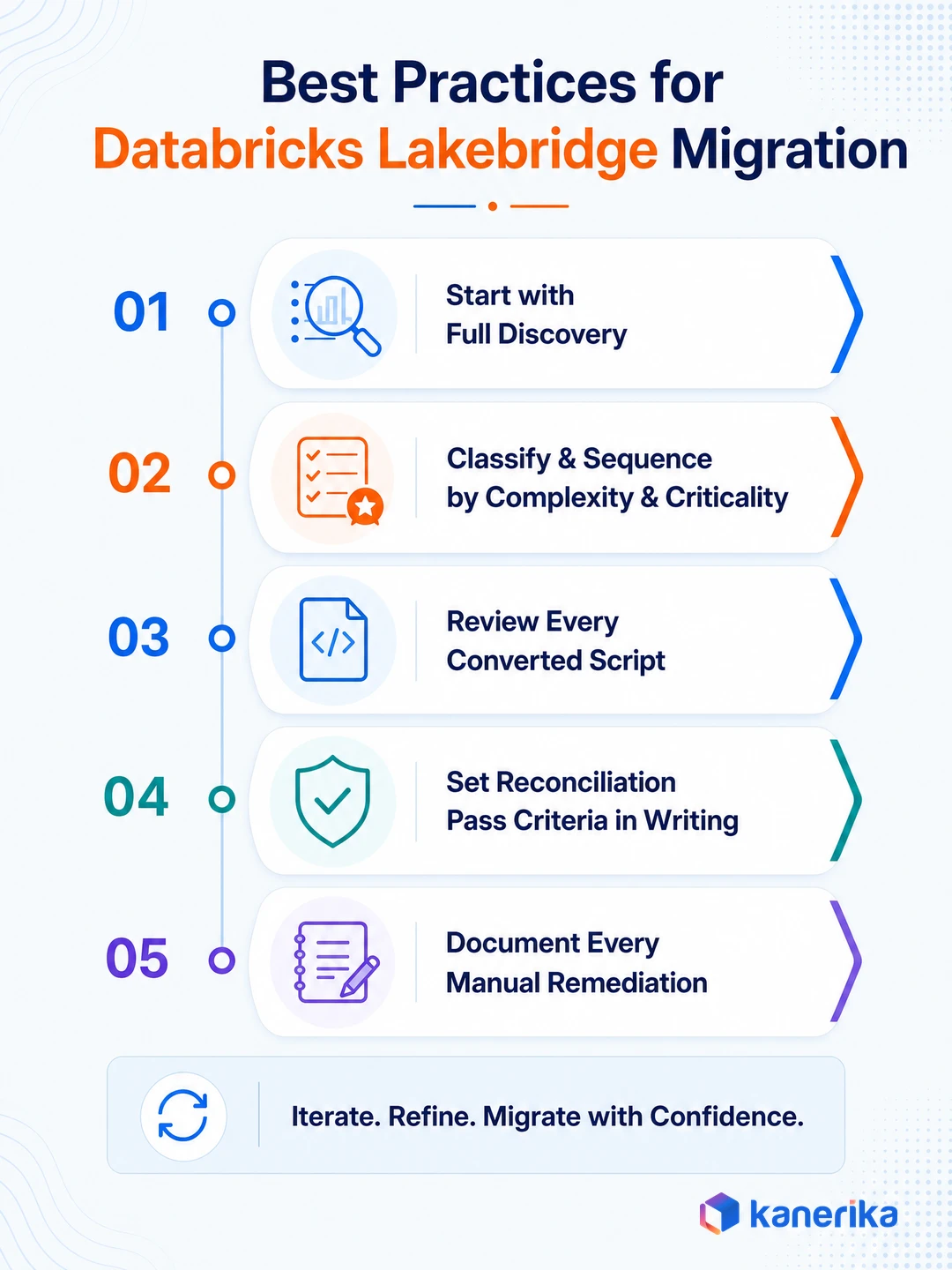
Five practices consistently keep Lakebridge migrations on schedule.
1. Start With Full Discovery:
Run the Analyzer on the full estate before touching any conversion settings, not on a sample. Skipping this step is what causes the dependency surprises and complexity spikes that derail timelines mid-project. It is the same discipline Kanerika applies across its data engineering work generally.
2. Classify and Sequence by Complexity and Criticality Together:
Complexity alone is the wrong sequencing filter. A simple workload feeding a critical daily report deserves earlier attention than a complex one nobody depends on.
3. Review Every Converted Script Before Production:
Check even the workloads the tool marks as fully converted. Automated conversion reduces manual work, it does not remove the need for a second set of eyes on business-critical logic.
4. Set Reconciliation Pass Criteria in Writing First:
Define what counts as an acceptable discrepancy before conversion starts, not after the Validator flags something unexpected. Teams that skip this step end up arguing judgment calls under deadline pressure instead of checking against an agreed standard.
5. Document Every Manual Remediation:
Each fix a team makes outside the tool becomes the pattern library for the next migration. Skip this step and the same edge case gets solved twice, by two different people, on two different projects.
Even with all five practices in place, the tool itself has limits worth knowing before they show up mid-project.
Challenges and Limitations of Databricks Lakebridge
A free tool is still worth scrutinizing before a project depends on it.
1. Transpiler Coverage Varies by Dialect
BladeBridge carries the widest dialect support, Morpheus is newer with a smaller set of supported dialects, and Switch handles complex cases through an LLM rather than fixed rules, though it’s still experimental and adds model usage costs. Picking the right transpiler for a source system isn’t automatic, and getting it wrong produces incomplete conversion output.
Converting an Informatica repository, for example, requires specifying the exact source dialect on the command line so the tool selects the right transpiler. Get that specification wrong, and part of the workload can fall outside what gets converted.
2. Complex Business Logic Needs Manual Remediation
Nested PowerCenter mappings, custom transformation expressions, and pre-session shell scripts commonly fall outside what any transpiler converts cleanly. Kanerika’s own FLIP migrations flag the same categories, Lookup transformations, Sequence Generators, and pre-session scripts, as the 20% that needs engineering redesign rather than automated translation.
3. Output Is Built Only for Databricks
Third-party migration comparisons note that Lakebridge’s converted output is built for Databricks, not for multiple target platforms. That’s a reasonable design choice for a Databricks-native tool, but it’s worth knowing for a team still weighing platforms.
4. Reconciliation Still Needs Human-Defined Criteria
The Validator produces schema and row-level comparison reports, but someone has to decide what counts as an acceptable discrepancy. A tool can flag a mismatch. It doesn’t indicate whether that mismatch is a rounding difference or a business-critical error.
Databricks Migration With FLIP: How Kanerika Accelerates the Move
Kanerika is a Databricks Consulting Partner with production migrations across manufacturing, retail, financial services, and healthcare. Every engagement opens with a discovery scan that scores the full source estate by conversion complexity before any build work starts, giving the project plan a foundation in actual effort rather than a flat estimate.
FLIP, Kanerika’s proprietary migration accelerator on the Databricks Marketplace, automates up to 80% of migration work and delivers programs up to 5x faster than manual rebuilds. FLIP covers seven source platforms with platform-specific parsing, transformation mapping, and output validation built into each path:
- Datastage to Databricks: Parses jobs, sequences, and stages into PySpark or Scala notebooks with lookups, joins, aggregations, and data quality rules carried through as equivalent Spark operations
- SSIS to Databricks: Reads the SSIS catalog, converts packages, Control Flow, and Data Flow tasks into Databricks notebooks with derived columns, conditional splits, and merge joins intact. SQL Server 2016 reached end of extended support on July 14, 2026
- Talend to Databricks: Converts jobs, joblets, tMaps, and context variables into optimized notebooks. Talend 7.3 reached end of life in November 2024, and paid extended support runs only through December 2026. Talend Open Studio was discontinued by Qlik in January 2024
- Netezza to Databricks: Translates NZSQL, stored procedures, and Netezza-specific functions into Spark SQL and PySpark, cross-checked with Lakebridge. All Netezza appliance models are past IBM end of support with no extension available
- Teradata (BTEQ) to Databricks: Converts BTEQ scripts, macros, stored procedures, and Teradata SQL objects into Databricks notebooks and SQL, cross-validated using Lakebridge’s native Teradata connector
- Synapse to Databricks: Moves dedicated SQL pool procedures, serverless SQL, Spark notebooks, and Data Factory pipelines together in one migration pass rather than four separate workstreams, using Lakebridge’s Synapse tooling alongside FLIP
- Alteryx to Databricks: Reads workflows, macros, and tool configurations from Designer and Server and converts joins, filters, transformations, and formula tools into Spark operations, replacing per-seat licensing with capacity-based Databricks pricing
What automated conversion flags for manual review, complex transformation logic, custom business rules, and production validation sign-off, is where Kanerika’s engineering team steps in. Migrated pipelines run against source system output before cutover so discrepancies surface before go-live. Unity Catalog governance, access controls, lineage tracking, and data quality checks are configured at the platform layer before any workload runs, not after the first incident.
Kanerika holds ISO 27001, ISO 27701, ISO 9001, SOC II Type II, and CMMI Level 3 certifications across 100+ enterprise clients with a 98% retention rate.
Case Study: Informatica to Databricks Migration for a Healthcare Provider
A healthcare provider running clinical, diagnostic, and billing workloads across multiple facilities needed to move its Informatica pipelines to Azure Databricks without losing reporting accuracy during cutover. Rising patient volumes and reporting complexity had made the existing batch-heavy pipelines a bottleneck for audits and operational reporting.
Kanerika’s assessment surfaced hidden dependencies across clinical, claims, and billing systems before conversion started. FLIP then handled the bulk of the workflow conversion to Azure Databricks, preserving business logic while engineers re-architected pipelines for distributed processing and a unified analytical path across departments.
Results:
- 71% higher reporting accuracy across clinical and financial reports
- 38% reduction in data handling costs through optimized compute
- 64% faster decision-making for clinical and administrative teams
Wrapping Up
Databricks Lakebridge is a genuinely useful free tool for warehouse and SQL migrations onto Databricks, and it automates the mechanical work well. Its limits show up exactly where every migration tool’s limits show up, in complex business logic, validation judgment calls, and architecture decisions a script can’t make.
Teams running a straightforward migration should start with Lakebridge before paying for anything else. Teams facing a complex Informatica estate or a governance-heavy rollout get more value pairing it with a partner who’s already done the redesign work.
Ready to Move Your Data Warehouse to Databricks?
Kanerika delivers Databricks migrations with Unity Catalog governance and zero production downtime as standard delivery outcomes.
Book a Meeting
FAQs
1. What is Databricks Lakebridge?
Databricks Lakebridge is a free, open-source migration toolkit from Databricks Labs that assesses, converts, and validates legacy data warehouse and ETL workloads on their way to Databricks. It runs through three components, an Analyzer, a Converter, and a Validator, and automates a large share of the mechanical migration work for supported source systems.
2. Is Databricks Lakebridge free to use?
Yes. Lakebridge is free and open source, distributed through Databricks Labs on GitHub. There are a few costs to plan for. Switch, the LLM-based transpiler, uses paid model calls. Compute on Databricks and engineering time on complex conversion or validation work also add to a project’s real cost. As a Databricks Labs project, Lakebridge also comes without formal support SLAs.
3. What data sources does Lakebridge support?
It depends on the component. The Profiler covers Synapse, SQL Server, Teradata, Snowflake, Oracle, BigQuery, Redshift, and Legacy SQL DW. The Analyzer covers about 30 SQL, ETL, and orchestration platforms. Code conversion covers SQL Server, Synapse, Oracle, Teradata, Netezza, Snowflake, DataStage, and Informatica PowerCenter and Cloud. Reconciliation covers Oracle, Snowflake, SQL Server, Redshift, Teradata, BigQuery, and Databricks. Source coverage updates on a rolling basis, so check the current documentation before scoping.
4. What is the difference between Lakebridge and BladeBridge?
BladeBridge is one of three transpilers Lakebridge uses internally for code conversion, alongside Morpheus and Switch. BladeBridge carries the widest dialect coverage of the three and handles the bulk of ETL and SQL translation work, while Morpheus and Switch cover newer or more complex conversion cases inside the same toolkit.
5. Can Lakebridge migrate Informatica PowerCenter workloads?
Yes, Lakebridge’s Converter supports both Informatica PowerCenter and Informatica Cloud as source dialects, converting mappings and workflows into Databricks-ready code. Complex PowerCenter logic, including custom transformation expressions, Sequence Generators, and pre-session shell scripts, commonly still needs manual review after automated conversion runs.
6. How much of a migration can Lakebridge automate?
Databricks reports up to 80% automation of migration tasks and up to 2x faster implementation compared to manual conversion. That figure applies to the mechanical translation and validation work. The remaining share is typically the complex logic and architecture decisions that need engineering judgment.
7. Does Lakebridge replace the need for a migration consulting partner?
For straightforward SQL and warehouse migrations, often yes, since the mechanical conversion work is exactly what the tool is built to automate. For complex Informatica ETL, governance-heavy environments, or projects without an existing validation framework, a partner adds the practitioner judgment the tool doesn’t provide on its own.
8. What happens after Lakebridge converts a workload?
Converted workloads go through the Validator for reconciliation before deployment, comparing schema, rows, and column values against the source. Teams review anything flagged, remediate it, then deploy validated workloads into the target Databricks workspace under Unity Catalog governance.














