
TL;DR
An Azure Synapse to Databricks migration moves dedicated SQL pools, serverless SQL, Spark pools and pipelines onto Azure Databricks, usually on the same ADLS Gen2 storage. Microsoft has not announced a retirement date for Synapse, but it calls Fabric its strategic platform for new analytics work, and several Synapse features have already changed. Start by profiling the workspace, then govern the existing lake with Unity Catalog. Convert dedicated pool T-SQL with Lakebridge, Genie Migrate or an accelerator such as Kanerika’s FLIP, and test the behaviors that change results, such as case-insensitive collation. Port Spark notebooks, repoint pipelines and Power BI, and keep Synapse readable through Lakehouse Federation during the waves. Pause the dedicated pool after cutover and delete it only after an agreed exit check.
Key Takeaways
- A Synapse migration covers four workloads: dedicated SQL pools, serverless SQL, Spark pools and pipelines, plus the Power BI reports on top.
- The ADLS Gen2 storage usually stays where it is; Unity Catalog governs the same files through external locations.
- Dedicated pools take most of the effort, because distribution, indexes, collation and procedural T-SQL all need decisions.
- Genie Migrate and Lakebridge both cover Synapse T-SQL in 2026; neither converts Synapse pipelines.
- Lakehouse Federation reads Synapse during the transition, but it doesn’t push down joins or window functions.
- Pause the dedicated pool after cutover as a fallback, and delete it only after the exit check passes.
What Moves in an Azure Synapse to Databricks Migration
On November 12, 2026, Databricks made Genie Migrate generally available, and Azure Synapse is one of the seven warehouse sources it converts. That gives Synapse teams a Databricks-native way to convert T-SQL, alongside Lakebridge and partner accelerators.
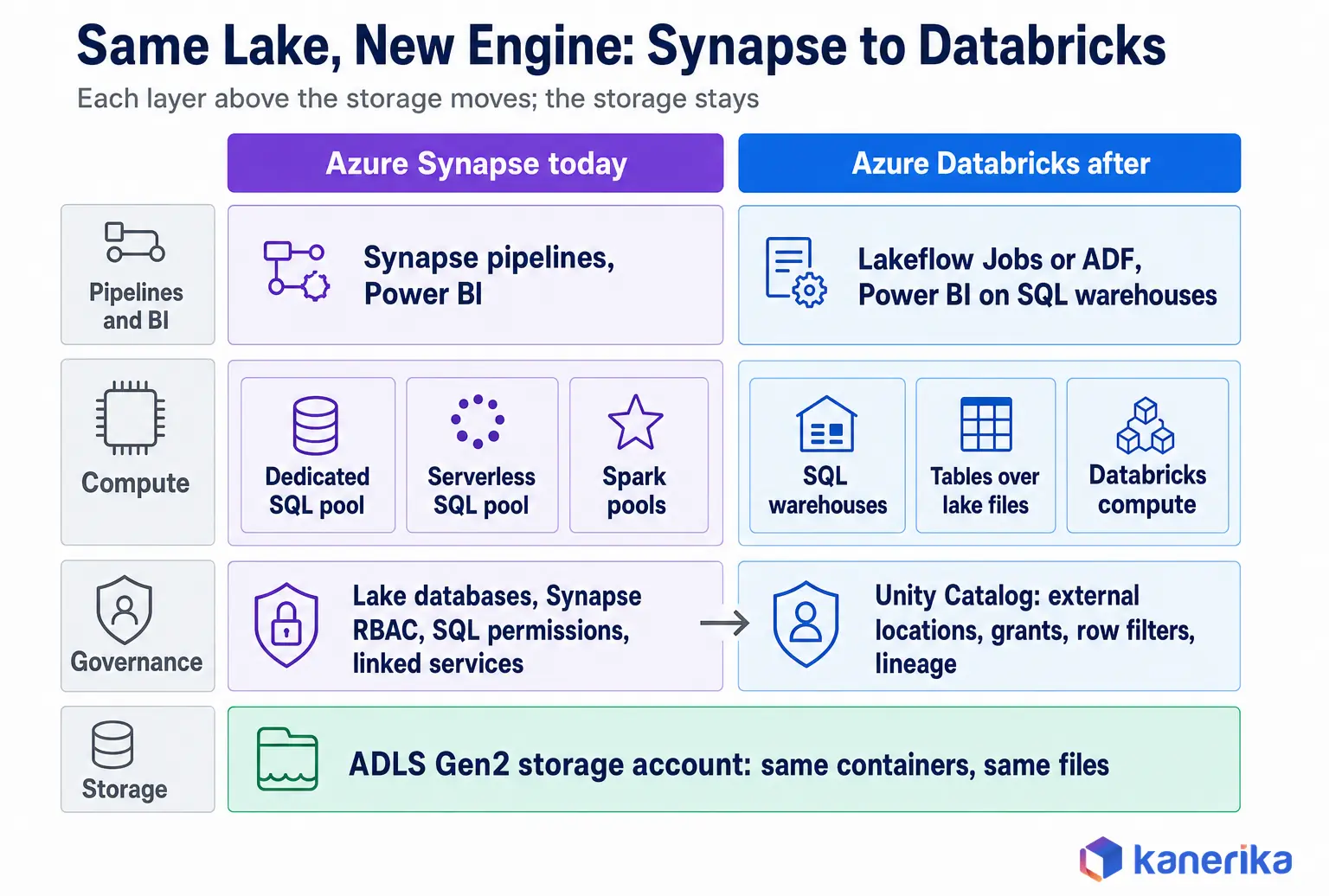
An Azure Synapse to Databricks migration moves the workloads that run in a Synapse workspace onto Azure Databricks. In most estates the data already sits in ADLS Gen2, so the move is mostly about compute, code, orchestration and governance. Delta tables, Unity Catalog and SQL warehouses take over from the Synapse pools, and the storage account stays.
This guide explains what Microsoft has said about Synapse, how each Synapse component maps to Databricks, and the seven steps of the migration. If you’re still choosing a platform, our Azure Synapse vs Databricks comparison covers the differences, and our overview of legacy systems to Databricks migration compares Synapse with other sources.
Four Workloads Under One Synapse Name
- Dedicated SQL pools: the MPP data warehouse, sized in Data Warehouse Units, with distributed tables and T-SQL procedures.
- Serverless SQL pool: pay-per-query T-SQL over files in the lake, billed by data processed.
- Spark pools: managed Apache Spark with Synapse notebooks and Microsoft Spark Utilities (mssparkutils).
- Pipelines and data flows: built on the Azure Data Factory engine, with linked services, triggers and integration runtimes.
Around these sit Synapse RBAC and SQL permissions, the managed virtual network, and the Power BI reports that query the dedicated pool. Each needs an owner in the plan.
The Layer That Stays Put: Your ADLS Gen2 Account
Unity Catalog governs existing ADLS Gen2 paths with two objects: a storage credential backed by an Azure managed identity, and an external location that ties a path to that credential. Databricks reads the same containers and files that Synapse used, so there’s no bulk copy just to change engines.
Where the Effort Concentrates
Databricks’ own Synapse migration playbook says most of the effort goes into dedicated SQL pools, serverless pools are simpler, and Spark pools are the simplest to move. Plan staffing around that split, and treat Power BI as its own workstream, because every report needs retesting.
What Microsoft Says About the Future of Azure Synapse
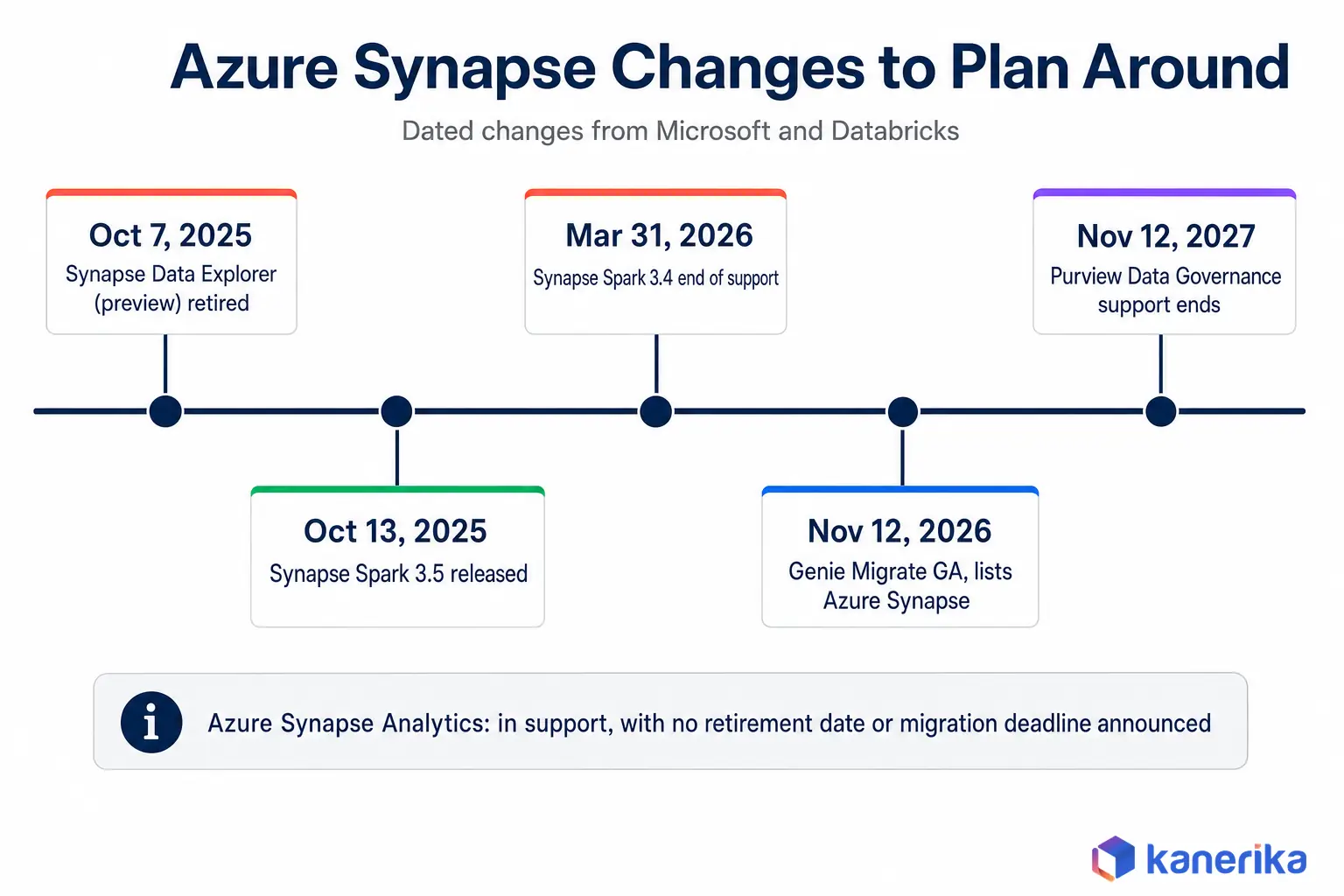
Microsoft has not announced a retirement date or a required migration deadline for Azure Synapse Analytics, and its lifecycle page lists the service as in support. Microsoft also calls Fabric its strategic platform for new analytics innovation, and the dedicated SQL pool overview now points new data warehousing users to Fabric Data Warehouse.
Synapse Changes Already in Effect
- Synapse Data Explorer (preview) retired on October 7, 2025, with Microsoft recommending Eventhouse in Fabric.
- Synapse Runtime for Apache Spark 3.4 reached end of support on March 31, 2026. Spark 3.5 is now the only generally available Synapse Spark runtime.
- Microsoft now points Azure Synapse Link for SQL and Synapse Link for Cosmos DB users to Fabric mirroring.
- Support for Purview Data Governance ends on November 12, 2027, as Microsoft moves data governance into Fabric.
Databricks or Microsoft Fabric for a Synapse Estate
Microsoft’s Fabric Migration Assistant copies a dedicated pool’s metadata and data into Fabric Data Warehouse, which suits teams that want to stay on T-SQL inside Microsoft’s stack. Our Fabric vs Synapse guide covers that route.
Databricks suits teams that want data engineering, BI and AI on open Delta tables with Unity Catalog governance. The two can also work together: Fabric can mirror Azure Databricks Unity Catalog so Fabric workloads read the same tables in place.
How Synapse Components Map to Databricks
Every Synapse object needs a Databricks target. The diagram shows the layers, and the table lists the components that come up in most estates.
Dedicated SQL Pools to Delta Tables and SQL Warehouses
A dedicated pool stores every distributed table across 60 distributions using hash or round-robin placement, with replicated tables copied to every node. Databricks has no distribution setting. Databricks advises dropping the HASH, ROUND_ROBIN, REPLICATE and columnstore directives, and using liquid clustering instead of copying hash keys into partition columns.
Query compute moves to Databricks SQL warehouses. Serverless warehouses queue and scale queries with Intelligent Workload Management, the closest match to dedicated pool workload groups, and Photon is the default engine on every warehouse. See our guide to Databricks SQL warehouse sizing.
Serverless SQL Pools to Tables Over the Same Files
Serverless SQL queries files with OPENROWSET. On Databricks, the same files become Unity Catalog external tables, or managed Delta tables after conversion, queried from a SQL warehouse. CONVERT TO DELTA turns an existing Parquet directory into a Delta table in place, without copying data.
Spark Pools, Pipelines, Security and Power BI
Spark pool notebooks move to Databricks notebooks with modest changes. Pipelines can keep running in Azure Data Factory while logic moves, and Synapse RBAC and SQL permissions become Unity Catalog grants, row filters and column masks. Power BI connects to Databricks SQL warehouses directly.
| Synapse component | Databricks target | What changes |
|---|---|---|
| Dedicated pool tables (columnstore, 60 distributions) | Delta tables in Unity Catalog | Storage layout and table options |
| DWU sizing, pause and resume | SQL warehouse size, auto stop, serverless | Billing model |
| Hash, round-robin and replicated distribution | None; liquid clustering and broadcast joins | Drop the WITH clause |
| Table partitioning | Liquid clustering | No partition switching |
| Workload groups and classifiers | Separate SQL warehouses per workload class | No classifier object |
| Materialized views | Databricks materialized views | Queried by name and refreshed |
| Result set caching | SQL warehouse result cache | Per warehouse |
| CTAS, COPY and PolyBase external tables | CTAS, COPY INTO, Auto Loader and external tables | Load syntax |
| Serverless SQL with OPENROWSET | Unity Catalog tables or read_files() | Per-TB billing becomes compute billing |
| Spark pools and notebooks | Databricks compute and notebooks | mssparkutils becomes dbutils |
| Lake database tables | Tables registered in Unity Catalog | Re-registration |
| Pipelines and mapping data flows | Lakeflow Jobs, or ADF calling Databricks | Data flows rebuilt in code |
| Linked services and managed identity | Unity Catalog connections, credentials and secrets | Credential setup |
| Synapse RBAC and SQL permissions | Unity Catalog grants, row filters and column masks | Permission model |
| Managed virtual network | VNet injection and Private Link | Network design |
| Power BI on the dedicated pool | Power BI on SQL warehouses | Connection and model retesting |
Synapse to Databricks Migration
Plan Your Azure Synapse to Databricks Migration With Kanerika
FLIP converts supported Synapse SQL artifacts into PySpark notebooks and deploys them to your Databricks workspace, ready for review and validation.
Step 1: Assess the Synapse Estate and Plan the Waves
An Azure Synapse to Databricks migration runs in seven steps: assess, build the foundation, move data, convert SQL pool code, port Spark notebooks, repoint pipelines, then repoint Power BI and cut over. Assessment decides the scope of each step.
Profile the Workspace With Lakebridge
Lakebridge, the free Databricks Labs migration toolkit, lists Synapse for all four of its components: profiler, analyzer, converter and reconcile. It has two Synapse profilers, one for a full Synapse workspace (dedicated pools, serverless SQL, Spark pools and the control plane) and one for standalone dedicated pools. The profiler is marked experimental, so treat its output as a starting inventory and confirm it with workload owners.
Grade T-SQL, Pipelines and Reports
The Lakebridge analyzer grades T-SQL complexity and also reads Azure Data Factory pipelines, its only coverage for pipelines. Genie Migrate can analyze a migration project inside the workspace as well. Inventory Power BI datasets and DirectQuery reports separately, with their owners, because they decide when users notice the change. Our data migration checklist has go/no-go checks for each phase.
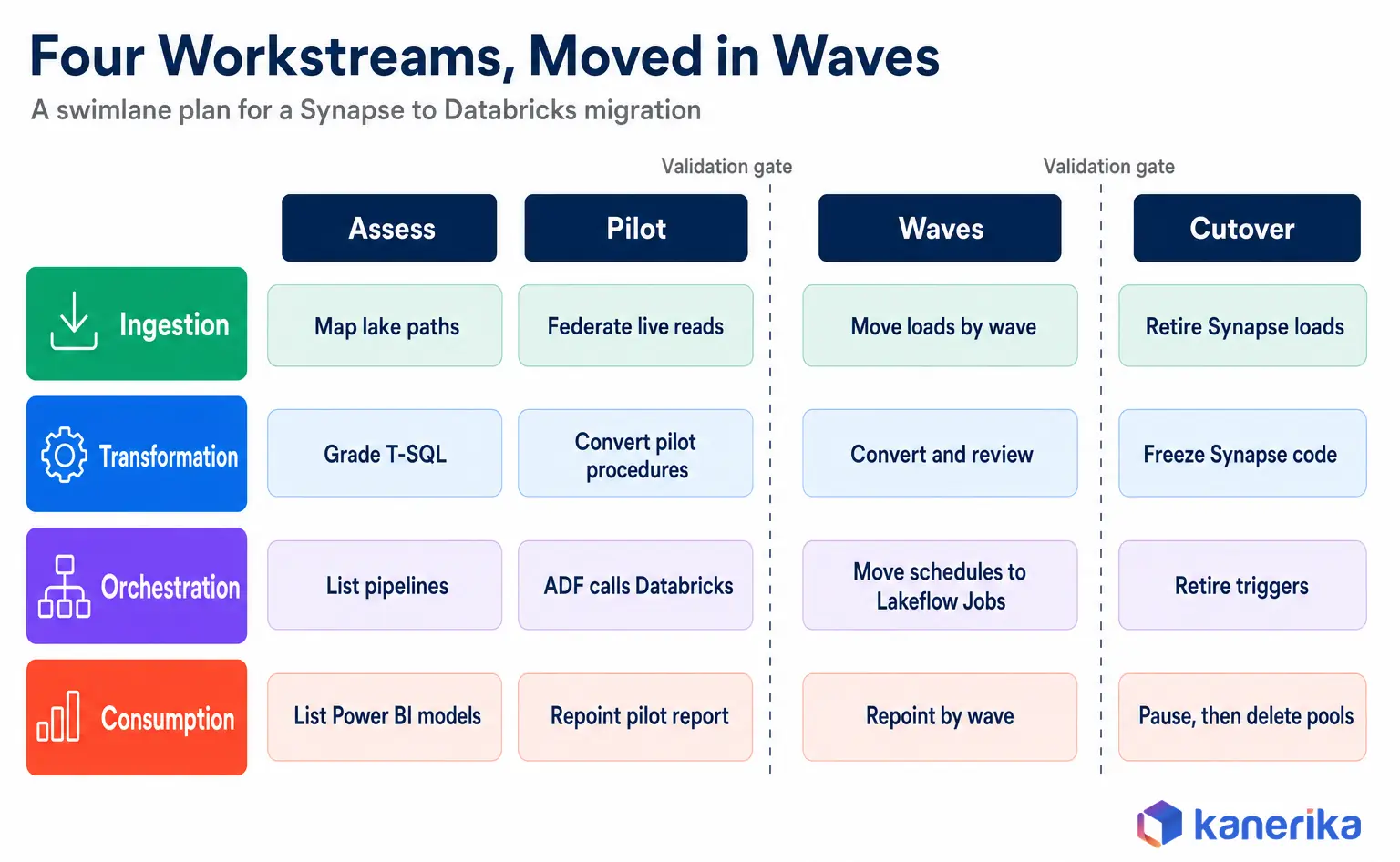
Choose a Pilot and Move Four Workstreams in Waves
Databricks recommends running four workstreams in parallel: ingestion, transformation, orchestration and consumption. Pick a pilot that touches all four, such as one subject area with its loads, a procedure that uses temp tables and case-insensitive joins, and the Power BI report on top.
Step 2: Build the Databricks Foundation on Azure
Unity Catalog Over the Existing ADLS Gen2 Account
Create an Access Connector for Azure Databricks, a storage credential and external locations for the containers Synapse uses. Decide which tables become Unity Catalog managed tables: predictive optimization runs OPTIMIZE, VACUUM and ANALYZE automatically, but only on managed tables. See our Unity Catalog guide for the rollout.
SQL Warehouses Sized Around Today’s Workload Groups
List the dedicated pool’s workload groups and classifiers, then give each major workload class its own SQL warehouse, such as executive dashboards, ad hoc analysis and batch transformation. Only serverless warehouses have Intelligent Workload Management, so prefer them where available.
Identity, Networking and Access Rules
Automatic identity management brings Entra ID users, service principals and groups into Azure Databricks. Synapse’s managed virtual network gives way to VNet injection and Private Link, and Synapse row-level security and dynamic data masking become row filters and column masks. Our Databricks readiness checklist lists 18 setup actions across compute, governance, storage and security.
Step 3: Move the Data and Keep Synapse Readable
Data movement in an Azure Synapse to Databricks migration is lighter than in most warehouse moves, because the lake files are already in place. The work is getting dedicated pool tables out, registering lake data in Unity Catalog, and keeping Synapse readable until consumers switch.
Listen on Spotify
AI-Ready Data Migration: The 90-Day FLIP Blueprint
Bulk History With CETAS, Then COPY INTO or Auto Loader
CETAS exports the result of a SELECT from a dedicated pool to files in ADLS Gen2 in parallel, and Microsoft calls it the most cost-effective way to extract dedicated pool data. COPY INTO then loads those files into Delta tables and skips files it has already loaded, so reruns are safe. Auto Loader does the same continuously; see our Auto Loader guide.
Register or Convert Data Already in the Lake
Parquet folders that serverless SQL or Spark pools already use can become Delta tables in place with CONVERT TO DELTA. Avoid DBFS mounts, which some forum answers still suggest for reading the Synapse storage account: mounts are deprecated and don’t work with Unity Catalog or serverless compute.
Lakehouse Federation for the Transition Period
Lakehouse Federation has an Azure Synapse connector that exposes a Synapse database as a Unity Catalog foreign catalog. It is read-only, and it pushes down filters, projections, limits and aggregates but not joins or window functions, so joins between large federated tables pull the data into Databricks first. Lakeflow Connect’s query-based connectors can also ingest incrementally from a federated Synapse catalog using a cursor column. Our guide to Lakehouse Federation covers setup.
| Method | Best for | What Synapse needs | Watch for |
|---|---|---|---|
| CETAS export plus COPY INTO or Auto Loader | Dedicated pool tables | Write access to an ADLS path | Export windows on busy pools |
| Register existing Delta or CONVERT TO DELTA | Parquet and Delta already in the lake | Nothing; files stay in place | Confirm Delta compatibility in a test |
| ADF or Synapse Copy activity | Sources outside the lake | An integration runtime | Copy costs and run times |
| Lakehouse Federation | Live reads during the waves | Network access to Synapse | Read-only; no join pushdown |
| Lakeflow Connect query-based ingestion | Incremental loads from a federated catalog | A cursor column and primary keys | Query load on the pool |
Step 4: Convert Dedicated SQL Pool Code
Dedicated pool DDL, views and stored procedures hold most of the conversion work. Start with the physical directives, then test the behaviors that change results.
Remove Distribution and Index Clauses, Then Re-Tune
Dedicated pool DDL carries distribution and index options in a WITH clause. Drop them, create the table as Delta, and add liquid clustering keys based on how the table is queried, or let Databricks choose with CLUSTER BY AUTO. Columns typed nvarchar(max) become STRING.
-- Azure Synapse dedicated SQL pool
CREATE TABLE dbo.FactSales
WITH (DISTRIBUTION = HASH(CustomerKey), CLUSTERED COLUMNSTORE INDEX)
AS SELECT * FROM stg.Sales;

-- Databricks SQL
CREATE TABLE sales.gold.fact_sales
CLUSTER BY AUTO
AS SELECT * FROM sales.silver.sales;| T-SQL in Synapse | Databricks SQL |
|---|---|
| CTAS with WITH (DISTRIBUTION …) | CREATE TABLE AS SELECT with CLUSTER BY |
| SELECT … INTO | CREATE TABLE AS SELECT |
| #temp tables | CREATE TEMP TABLE |
| IDENTITY(1,1) | GENERATED … AS IDENTITY, or hash-based keys |
| GETDATE() | current_timestamp() |
| ISNULL(a, b) | coalesce(a, b) |
| TOP n | LIMIT n |
| CONVERT(type, value) | CAST(value AS type) |
| [bracketed names] | `backtick names` |
| TRY … CATCH | Condition handlers in SQL scripting |
| BEGIN TRAN … COMMIT | BEGIN TRANSACTION … COMMIT on Unity Catalog managed tables |
| sys.dm_pdw_* views | Query history and system tables |
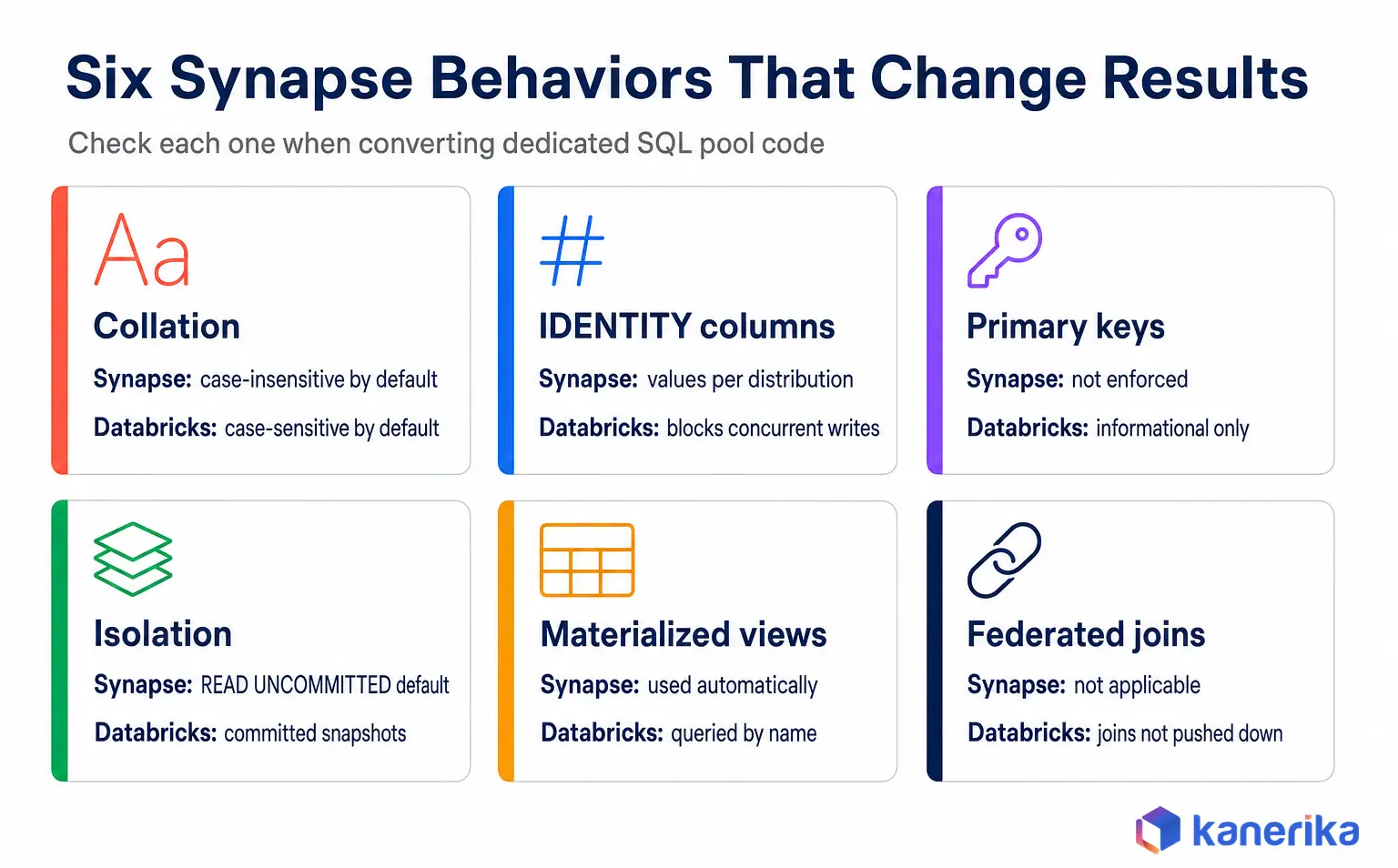
Six Behaviors That Change Results
Converted code can run cleanly and still return different numbers. The default dedicated pool collation, SQL_Latin1_General_CP1_CI_AS, is case-insensitive, while Databricks compares strings as binary by default; the UTF8_LCASE collation restores case-insensitive matching. Primary keys were never enforced in Synapse and are informational on Databricks, so neither side guarantees uniqueness.
Stored Procedures, Temp Tables and Error Handling
Procedures now have native targets: CREATE PROCEDURE in Unity Catalog, SQL scripting with variables, loops and condition handlers, session temporary tables, and multi-statement transactions on Unity Catalog managed tables. Row-by-row loops still deserve a rewrite as set-based SQL, which runs far better on Spark.
What Lakebridge, Genie Migrate and Partner Accelerators Convert
- Lakebridge: converts Synapse dedicated pool code with its BladeBridge and Morpheus transpilers to Databricks SQL, and with the experimental, LLM-based Switch to notebooks. Its transpile documentation lists the options. See our Lakebridge guide.
- Genie Migrate: converts Synapse as T-SQL into Databricks SQL by default. Its Lakeflow pipelines target covers T-SQL from Synapse dedicated pools and needs a preview setting. It doesn’t convert pipelines or move data. Databricks reports more than 90% of files converted correctly on its own benchmarks.
- Partner accelerators: Kanerika’s FLIP converts supported Synapse SQL artifacts into PySpark notebooks and deploys them to a chosen Databricks workspace, as the demo at the top of this guide shows.
Databricks says automated tools typically handle around 80 to 90% of Synapse code translation, with procedural logic left to engineers. Pilot any tool on your own procedures before committing.
FLIP Datasheet
Automate Synapse SQL Conversion With FLIP
See how FLIP assesses Synapse workloads, converts supported SQL into Databricks-ready notebooks and validates the migrated code.
Step 5: Port Spark Pool Notebooks
Match the Spark Version Before Upgrading It
Synapse Spark 3.5 maps most closely to Databricks Runtime 16.4 LTS, which runs Apache Spark 3.5.2. Move notebooks there first, prove the results match, then upgrade to a newer LTS runtime. Pools still on Spark 3.4 should move early, since that runtime is out of support.
Replace mssparkutils, Credentials and Mounts
Synapse notebooks use mssparkutils for files, notebook chaining and secrets, including linked-service credentials. On Databricks, Databricks Utilities (dbutils) cover files, secrets and notebook workflows, and Unity Catalog external locations and volumes replace credential lookups and mounts.
Libraries and Lake Database Tables
Workspace and pool packages become compute-scoped or notebook-scoped libraries, kept in workspace files or Unity Catalog volumes. Lake database tables need to be registered in Unity Catalog so notebooks and SQL warehouses see the same names. Our comparison of Apache Spark and Databricks covers what changes for Spark developers.
Step 6: Repoint or Rebuild Pipelines
Keep Azure Data Factory in Charge During the Waves
Synapse pipelines run on the Azure Data Factory engine, and ADF can run Databricks notebooks or trigger whole Databricks jobs with the Azure Databricks Job activity. That lets the existing scheduler keep running while logic moves wave by wave. Set a date for moving schedules off it, so the two orchestrators don’t run side by side for good. Our Azure Data Factory vs Databricks guide covers the trade-offs.
Move Schedules and Dependencies to Lakeflow Jobs
Schedule, file arrival and table update triggers in Lakeflow Jobs replace pipeline triggers, and tumbling-window logic can be rebuilt with job parameters. Declarative Automation Bundles keep jobs and pipelines in source control for CI/CD across environments.
Rebuild Mapping Data Flows and SCD Logic
Mapping data flows are visual transformations that no tool converts to Databricks today, so rebuild them in Spark SQL or Lakeflow pipelines. Slowly changing dimensions move to MERGE INTO or AUTO CDC, which computes SCD Type 1 and Type 2 in Lakeflow pipelines. Our Databricks Lakeflow guide explains how the pieces fit.
Step 7: Repoint Power BI, Validate and Cut Over
Power BI on Databricks SQL Warehouses
Power BI connects to Databricks SQL warehouses, and Azure Databricks can publish datasets straight to the Power BI service. For each semantic model, change the source, refresh, and compare the numbers with the report owner before switching users.
Reconciliation Checks for Synapse Sources
Databricks says validation often takes more effort than the migration itself. Check these after every wave:
- Counts and control totals: row counts and key financial totals per table.
- Row hashes: Lakebridge Reconcile supports Synapse through its SQL Server dialect. It doesn’t handle collation or case-insensitive matching, so fold the case of key columns explicitly.
- Duplicate keys: neither platform enforced primary keys, so test uniqueness directly.
- Precision: money, decimal and datetime values after type mapping.
- Materialized view results: report numbers that relied on views the Synapse optimizer used automatically.
- Report parity: the same dashboards show the same figures on both platforms.
- Run times: refresh and query times against agreed service levels.
Kanerika’s Klarity360 automates data validation between source and target. For test design, see our guides to data migration testing and data reconciliation tools.
Parallel Run, Cutover and a Paused-Pool Fallback
Run both platforms in parallel for critical workloads and switch consumers wave by wave. After cutover, pause the dedicated pool: compute charges stop while storage stays, which keeps a low-cost rollback option. Delete the pool only after an exit check you agreed in advance, such as a clean month-end close.
Case Study
Zero-Downtime Databricks Migration for Retail Analytics
A large US retailer moved distributed on-premises databases to Delta Lake under Unity Catalog, with a parallel run and app-by-app cutover. The result: zero downtime and 100% of legacy infrastructure decommissioned.
Common Azure Synapse to Databricks Migration Mistakes
Each of these comes from a specific Synapse behavior, and each has a known fix:
- Copying hash keys into partition columns: use liquid clustering instead, as Databricks advises.
- Trusting case-insensitive joins to behave the same: apply UTF8_LCASE or normalize keys, then test row counts.
- Assuming IDENTITY or primary keys guaranteed uniqueness: Synapse IDENTITY values are generated per distribution and keys were never enforced.
- Building dashboards on federated joins: federation doesn’t push joins down to Synapse, so large joins are slow.
- Leaving external tables without maintenance: predictive optimization only covers managed tables.
- Porting notebooks with mssparkutils and mounts intact: replace them with dbutils and Unity Catalog paths.
- Deleting the dedicated pool too early: pause it and keep it until the exit check passes.
Broader migration risks are covered in our guide to data migration challenges.
What Drives the Cost and Timeline of a Synapse Migration
Every Synapse estate is different, so estimates should come from your own assessment. These factors decide the size of the work:
- T-SQL volume: the number of procedures, and how much of the code is procedural.
- Pipelines and data flows: mapping data flows need a rebuild.
- Power BI models: each one needs repointing and retesting with its owner.
- Data volume: how much dedicated pool data needs exporting.
- Parallel-run length: both platforms run, and a paused pool still bills for storage.
- Team skills: Spark and Databricks SQL experience on the team that will run the platform.
Compare running costs with real numbers. Synapse bills by DWU for dedicated pools and by data processed for serverless SQL, and Databricks usage is queryable in the system.billing.usage system table during the parallel run. Our Databricks cost optimization guide covers the main levers, and Databricks also funds part of some migration projects through partners.
Databricks Funding
Reduce Databricks Migration Costs With Funding Support
Learn how Databricks funding routes, such as DCIF and Marketplace transactions, can offset the cost of migration and proof-of-concept projects.
How Kanerika Runs Synapse to Databricks Migrations
Kanerika is a certified Databricks partner, and FLIP, our migration automation platform, includes a Synapse to Databricks path. Our Synapse migrations follow the steps in this guide:
- Assess: inventory Synapse SQL artifacts, dependencies, pipelines and reports, using Lakebridge profiling where it helps.
- Convert and deploy: FLIP converts supported Synapse SQL artifacts into PySpark notebooks and deploys them to your Databricks workspace. Engineers handle procedures with cursors or dynamic SQL.
- Design and orchestrate: Unity Catalog on your existing ADLS account, SQL warehouses sized by workload, and Lakeflow Jobs or ADF during the waves.
- Validate: automated checks with Klarity360 and a parallel run against Synapse results.
- Cut over: wave by wave, with the dedicated pool paused as a fallback.
For a global packaging company, Kanerika moved scattered Azure Data Factory and Synapse workflows to Microsoft Fabric with its migration utilities. That project reported 30% lower cloud and data costs, a 50% improvement in data pipelines and 80% faster business insights. On Azure Databricks, Kanerika moved a healthcare provider’s Informatica workflows with its migration accelerator, with 71% higher reporting accuracy, 38% lower data handling costs and 64% faster decision-making. To scope your own estate, see our Synapse to Databricks migration service.
Conclusion
An Azure Synapse to Databricks migration is mostly a change of engine on the same lake. The storage stays in ADLS Gen2, Unity Catalog governs it, and the dedicated pool, serverless queries, Spark notebooks and pipelines move in waves. Tools such as Genie Migrate, Lakebridge and FLIP handle much of the T-SQL. The result still depends on decisions about collation, keys, clustering and Power BI, and on validation that proves the numbers match. Keep Synapse readable during the waves, pause the dedicated pool at cutover, and retire it once the exit check passes.
Talk to Kanerika
Planning an Azure Synapse to Databricks Migration?
Kanerika’s Databricks team assesses your Synapse workspace, converts SQL with FLIP, and validates every wave before cutover. Book a session to scope your migration.
Frequently Asked Questions
Is Azure Synapse being retired or replaced by Microsoft Fabric?
Microsoft has not announced a retirement date or a required migration deadline for Azure Synapse Analytics, which remains in support. Microsoft does call Fabric its strategic platform for new analytics innovation, and some Synapse features have changed, such as the retirement of Synapse Data Explorer and the end of Spark 3.4 support.
Which Synapse workloads are hardest to move to Databricks?
Dedicated SQL pools take the most effort, according to Databricks’ own migration guidance. Distribution and index clauses, case-insensitive collation, procedural T-SQL, materialized views and workload management all need decisions. Serverless SQL is simpler, Spark pools are the simplest, and Power BI reports need retesting whichever workload they sit on.
Can Synapse T-SQL be converted to Databricks SQL automatically?
Most of it can. Genie Migrate and Lakebridge both convert Synapse dedicated pool T-SQL, and accelerators such as Kanerika’s FLIP convert supported SQL artifacts into PySpark notebooks. Databricks says tools typically handle around 80 to 90% of the translation. Procedures with cursors, dynamic SQL or collation-dependent logic still need engineers.
Does Genie Migrate support Azure Synapse?
Yes. Genie Migrate, generally available since November 12, 2026, lists Azure Synapse among its seven warehouse sources and converts it as T-SQL into Databricks SQL. Its Lakeflow pipelines target also covers Synapse dedicated pool scripts and needs a preview setting. It doesn’t convert Synapse pipelines or move data.
Does Lakebridge support Azure Synapse?
Yes. Lakebridge lists Synapse for its profiler, analyzer, converter and reconcile components. It has two Synapse profilers, converts dedicated pool code with BladeBridge, Morpheus or the experimental Switch, and reconciles through its SQL Server dialect. Reconcile doesn’t handle case-insensitive collation, so key columns need explicit case folding.
Can Databricks query Azure Synapse without migrating the data?
Yes. Lakehouse Federation has an Azure Synapse connector that exposes a Synapse database as a Unity Catalog foreign catalog. It is read-only and pushes down filters and aggregates, but not joins or window functions. It suits validation queries and live reads during the transition more than heavy dashboard joins.
Do we have to copy data out of ADLS Gen2 to use Databricks?
Usually not. Unity Catalog governs existing ADLS Gen2 paths through a storage credential and external locations, and CONVERT TO DELTA turns Parquet folders into Delta tables in place. Only dedicated pool tables need exporting, typically with CETAS. Avoid DBFS mounts, which are deprecated and don’t work with Unity Catalog.
What replaces hash distribution and columnstore indexes on Databricks?
Nothing directly. Databricks advises dropping the HASH, ROUND_ROBIN, REPLICATE and columnstore directives and using liquid clustering on the columns queries filter on, or CLUSTER BY AUTO. Predictive optimization then maintains Unity Catalog managed tables automatically. Don’t turn hash keys into partition columns, which Databricks specifically warns against.
How do Synapse Spark notebooks move to Databricks?
Move them to Databricks Runtime 16.4 LTS first, which runs Spark 3.5.2, the closest match to Synapse Spark 3.5. Replace mssparkutils calls with dbutils, swap linked-service credentials and mounts for Unity Catalog external locations and volumes, and reinstall libraries per compute or notebook before upgrading runtimes.
Can Azure Data Factory or Synapse pipelines keep running after the move?
Yes, for a while. Synapse pipelines run on the Data Factory engine, and Data Factory can run Databricks notebooks or trigger whole Databricks jobs. Many teams keep it as the scheduler during the waves, then move schedules to Lakeflow Jobs. Mapping data flows still need rebuilding in Spark SQL or Lakeflow pipelines.
Will Power BI reports keep working after moving from Synapse to Databricks?
They will once each one is repointed. Power BI connects to Databricks SQL warehouses, and Azure Databricks can publish datasets to the Power BI service. Change each semantic model’s source, refresh it, and compare the figures with the report owner. Fabric can also mirror Unity Catalog for reports on Fabric capacity.
How do you validate a Synapse to Databricks migration?
Compare row counts, control totals and row hashes after every wave; Lakebridge Reconcile supports Synapse through its SQL Server dialect. Add tests for case-insensitive keys, duplicate keys, money and datetime precision, and numbers that relied on materialized views. Then run critical reports on both platforms in parallel.
Is Databricks cheaper than Azure Synapse?
It depends on the workload. Synapse bills dedicated pools by DWU and serverless SQL by data processed, while Databricks bills for compute used. Measure both during the parallel run, using Synapse billing history and Databricks’ system.billing.usage table, and size SQL warehouses by workload class before comparing totals.
Should Synapse be deleted right after cutover?
No. Pause the dedicated pool after cutover: compute charges stop while storage stays, which gives a low-cost rollback option. Databricks recommends keeping Synapse available this way. Delete the pool only after an exit check agreed in advance, such as a clean month-end close on Databricks.