TL;DR
An SSIS to Databricks migration rebuilds SQL Server Integration Services packages on Databricks: data flows become Spark code or Lakeflow pipelines, and control flow becomes Lakeflow Jobs. Start by listing every package in SSISDB and retiring the ones nobody runs. Map each component with care, because SSIS behaviors such as first-match Lookups, transactions and checkpoints have no one-to-one equivalent. Convert standard packages with Lakebridge or an accelerator such as Kanerika’s FLIP, and plan to rewrite Script Task code by hand, since Lakebridge’s SSIS support is experimental and Genie Migrate doesn’t cover SSIS yet. Move SQL Server data with the Lakeflow Connect SQL Server connector or JDBC reads. Run both platforms in parallel until outputs match, then retire the packages.
Key Takeaways
- An SSIS estate has five layers to move: control flow, data flow, T-SQL, configuration, and the schedules and consumers around each run.
- SSIS packages don’t run on Databricks, so each one is converted, rebuilt, parked or retired.
- Lakebridge converts SSIS experimentally and leaves Script Task code to engineers; Genie Migrate converts T-SQL but not SSIS packages.
- SSIS Lookups return the first match, while Spark joins return every match, so converted Lookups need row-count tests.
- SQL Server 2025 removed the Attunity CDC components; the Lakeflow Connect SQL Server connector reads change tracking and CDC directly.
- Keep SSIS running until outputs match during a parallel run, then retire packages wave by wave.
What an SSIS to Databricks Migration Involves
SQL Server 2016 left extended support in July 2026, and SQL Server 2017 extended support ends in October 2027. For many teams, those dates force a decision about the SSIS packages running on those servers: upgrade them in place, move them to another Microsoft service, or rebuild the pipelines on a platform such as Databricks.
An SSIS to Databricks migration takes SQL Server Integration Services packages and rebuilds their logic on Databricks. Data flows become PySpark, Spark SQL or Lakeflow pipelines, control flow becomes Lakeflow Jobs, and the data lands in Delta tables governed by Unity Catalog. Databricks’ ETL migration guidance notes that pipelines defined outside SQL or Spark might need to be heavily refactored, which includes SSIS packages.
This guide covers how SSIS components map to Databricks, what today’s conversion tools handle, how to move SQL Server data, and how to validate the result. If you’re moving several legacy platforms, our overview of legacy systems to Databricks migration compares the paths. If your target is Microsoft Fabric, start with our SSIS to Fabric migration guide.
The Five Layers Inside an SSIS Estate
- Control flow: tasks, containers and precedence constraints that decide what runs and in which order.
- Data flow: sources, transformations and destinations inside each Data Flow task.
- T-SQL: statements in Execute SQL tasks and the stored procedures they call.
- Configuration: connection managers, project and package parameters, and SSISDB environments.
- Operations: SQL Server Agent schedules, logging, alerts, and the reports and files that depend on each run.
The T-SQL layer usually moves most easily, since Databricks says SQL workloads from other systems usually need very little refactoring. The package graph around it is where most of the work sits.
Why SSIS Estates Are Under Review in 2026
- Support dates: SQL Server 2016 extended support ended in July 2026, and SQL Server 2017 follows in October 2027.
- SSIS 2025 changes: SSIS still ships with SQL Server 2025, but that release removed the Attunity CDC components, the Microsoft Connector for Oracle and the Hadoop tasks, and deprecated 32-bit mode and the legacy Integration Services Service. Packages that use them need changes even to stay on SSIS.
- Scale: an SSIS data flow runs on the machine that executes the package. Databricks spreads work across Spark compute and keeps data in tables that BI, data science and AI teams share.
- Consolidation: teams already running Databricks want pipelines, governance and lineage in one place, without a separate SQL Server ETL estate to maintain.
Retire, Park, Convert or Rebuild: Choosing a Path per Package
Decide the path for each package from its SSISDB execution history and the components it uses:
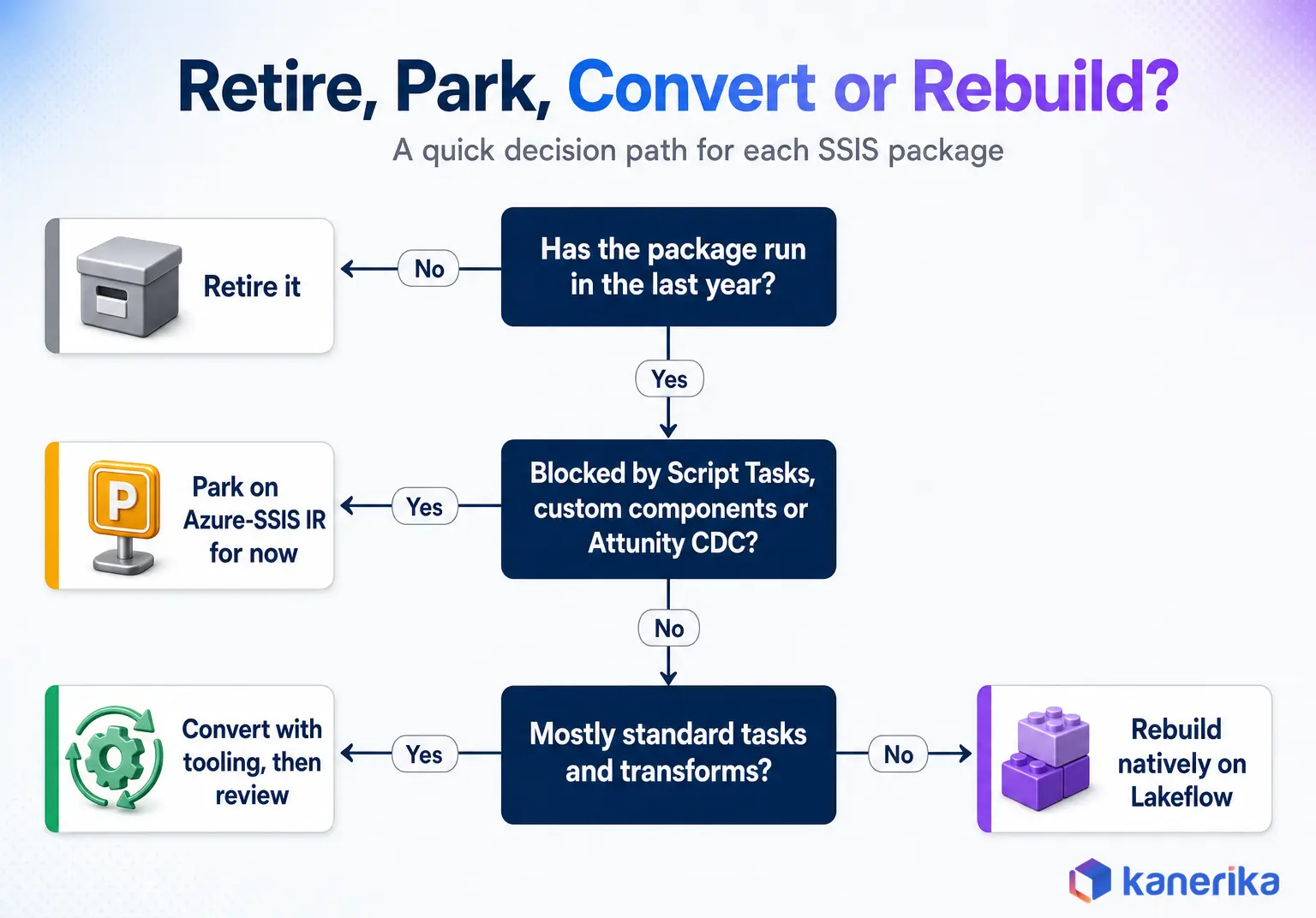
- Retire: packages that haven’t run in months, or whose outputs nobody uses.
- Park: packages blocked by Script Tasks, custom components or Attunity CDC that must keep running. Azure Data Factory’s Azure-SSIS Integration Runtime runs existing packages in Azure as they are, which buys time while the rest converts.
- Convert: packages built mostly from standard tasks and transformations. Use conversion tooling, then review the output.
- Rebuild: packages with heavy custom logic or designs that no longer fit. Rebuild them natively as Lakeflow pipelines and jobs.
How SSIS and Databricks Differ
SSIS runs packages built in a visual designer and stored in the SSIS catalog (SSISDB), usually on the same SQL Server estate it loads. Databricks runs code, notebooks and declarative pipelines on distributed Spark compute, with Lakeflow Jobs for orchestration and Unity Catalog for governance.
| Area | SSIS | Databricks |
|---|---|---|
| Execution engine | SSIS data flow engine on the server that runs the package | Distributed Spark clusters and serverless compute |
| Authoring | Visual designer in Visual Studio (SSDT), packages saved as .dtsx | Notebooks, SQL files and Lakeflow pipelines in Python or SQL |
| Orchestration | Control flow inside packages, parent and child packages | Lakeflow Jobs with dependencies, branches and loops |
| Scheduling | SQL Server Agent | Job schedules plus file arrival and table update triggers |
| Configuration | Connection managers, parameters and SSISDB environments | Job parameters, Unity Catalog connections and secrets |
| Run history | SSISDB catalog views and log providers | Job run history and the system.lakeflow system tables |
| Deployment | .ispac projects deployed to SSISDB | Declarative Automation Bundles in source control |
| Governance | SQL Server and SSISDB permissions | Unity Catalog access control, auditing and column-level lineage |
| Cost model | SQL Server licenses and servers | Pay for compute used plus cloud storage |
How SSIS Components Map to Databricks
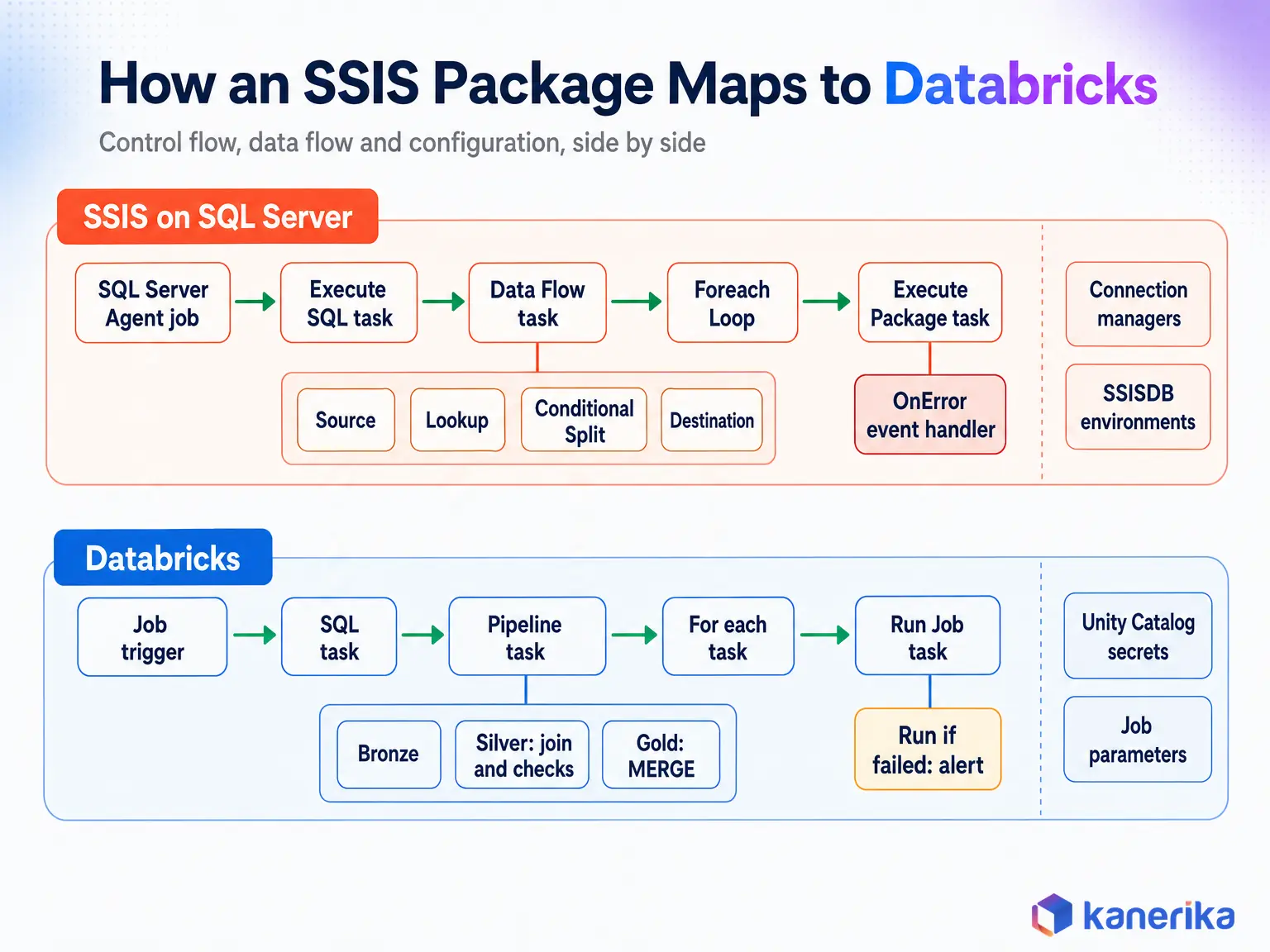
Every SSIS construct needs a Databricks target. The diagram shows the overall shape of a converted package, and the table below lists the components that come up most often.
Control Flow: Tasks, Containers and Precedence Constraints
A package’s control flow becomes a Lakeflow Job. Execute SQL tasks become SQL tasks or notebook cells, Data Flow tasks become notebook or pipeline tasks, and Execute Package tasks become Run Job tasks. Precedence constraints map to Run if dependencies, which start a task when upstream tasks succeed, fail or finish, and expression-based constraints map to If/else condition tasks. Foreach Loop containers map to For each tasks.
Two limits matter for deep SSIS designs: a For each task can’t contain another For each task, and Databricks doesn’t support nesting more than three Run Job tasks. Our guide to Lakeflow Jobs covers triggers, dependencies and job design.
Data Flow: Sources, Transformations and Destinations
Data Flow tasks become DataFrame code, Spark SQL or Lakeflow pipelines. Sources become JDBC or file reads, and Derived Column and Conditional Split become expressions and filters. The Slowly Changing Dimension transformation becomes MERGE INTO, or AUTO CDC in Lakeflow pipelines, which computes SCD Type 1 and Type 2 from a change feed. Error outputs that redirect bad rows map to pipeline expectations, which can warn, drop invalid records or fail the update.
Lookups Need Extra Care
The SSIS Lookup transformation returns only the first match when the reference data has several. A Spark join returns every match, so a converted Lookup can multiply rows. Matching rules differ too: a Lookup in Full cache mode compares case-sensitively, while No cache and Partial cache modes follow the SQL Server column’s collation, which is often case-insensitive. Databricks compares strings as binary values by default.
Deduplicate the reference data before the join, and apply a case-insensitive collation where the original match was case-insensitive. A simple pattern:
SELECT o.*, c.customer_key
FROM silver.orders AS o
LEFT JOIN (
  SELECT customer_code, customer_key
  FROM silver.customers
  QUALIFY ROW_NUMBER() OVER (
    PARTITION BY customer_code ORDER BY updated_at DESC) = 1
) AS c
  ON o.customer_code = c.customer_code;
Configuration, Logging, Checkpoints and Transactions
Connection managers and their stored passwords move to Databricks secrets and Unity Catalog connections, which take credentials through the secret() function. Project parameters and SSISDB environments become job parameters, with values per environment kept in Declarative Automation Bundles. Variables passed between tasks become task values, and SSISDB run history gives way to job run history in the system.lakeflow tables.
Checkpoints and transactions have no direct equivalent. Design each task so it can safely rerun, for example by writing each table with MERGE or by overwriting a single partition, so a failed run can be retried without duplicating data.
| SSIS component | Databricks target | What to watch |
|---|---|---|
| Data Flow task | Notebook, SQL task or Lakeflow pipeline | Row-by-row logic inside the flow |
| Execute SQL task | SQL task or notebook cell | T-SQL syntax differences |
| Execute Package task | Run Job task | No more than three nested Run Job levels |
| Foreach Loop container | For each task, or a wildcard file read | No For each inside a For each |
| Sequence container | A group of tasks with shared dependencies | Container-level transactions |
| Precedence constraint (success, failure, completion) | Run if dependency | Combined AND and OR conditions |
| Precedence constraint with an expression | If/else condition task | Expressions rewritten against parameters or task values |
| Variables | Task values and job parameters | Variables changed mid-package |
| Parameters and SSISDB environments | Job parameters and bundle targets | Sensitive values |
| Connection managers | Unity Catalog connections and secrets | Stored passwords and protection levels |
| OLE DB and ADO.NET sources | JDBC reads or Lakeflow Connect | Query load on busy servers |
| Flat File source | Auto Loader or COPY INTO from a volume | Code pages and delimiters |
| Lookup | Join on deduplicated reference data | First-match and collation rules |
| Merge Join and Sort | Spark join | Sorting no longer required |
| Slowly Changing Dimension | MERGE INTO or AUTO CDC | Type 2 history continuity |
| OLE DB Command | Set-based MERGE or UPDATE | Row-by-row calls |
| Error outputs | Pipeline expectations or quarantine tables | Rows silently dropped |
| Script Task and Script Component | Python code or PySpark custom data sources | Manual rewrite of C# or VB.NET |
| Event handlers (OnError) | Tasks that run on failure, plus notifications | Cleanup steps |
| SQL Server Agent job | Job schedule or trigger | Time zones and calendars |
SSIS to Databricks Migration
Plan Your SSIS to Databricks Migration With Kanerika
FLIP reads your SSIS packages, converts supported logic into PySpark notebooks, and deploys them to your Databricks workspace for review and validation.
Step 1: Assess the SSIS Estate
An SSIS to Databricks migration runs in six steps: assess, design the target, move data, convert packages, rebuild orchestration, and validate with a parallel run. Assessment sets the scope for every step after it.
Inventory Packages From SSISDB, msdb and the File System
Packages can live in three places: the SSISDB catalog for projects using the project deployment model, and msdb or the file system for the older package deployment model. List every package with its connections, parameters, the tables it reads and writes, and the Agent job that runs it.
Retire What Nobody Runs
SSISDB keeps operational history for every execution. Use it to find packages that haven’t run in months, and confirm with their owners before retiring them. Every retired package is one less to convert, test and support.
Flag the Components That Slow Conversion
- Script Tasks and Script Components with C# or VB.NET code.
- Third-party and custom components.
- Attunity CDC components, which SQL Server 2025 no longer includes.
- Send Mail, FTP, Web Service, XML and Bulk Insert tasks, which Lakebridge lists as unsupported.
- Packages that depend on 32-bit drivers.
Lakebridge’s analyzer supports SSIS and can produce much of this inventory; its profiler doesn’t cover SSIS. Our data migration checklist has go/no-go checks for each phase.
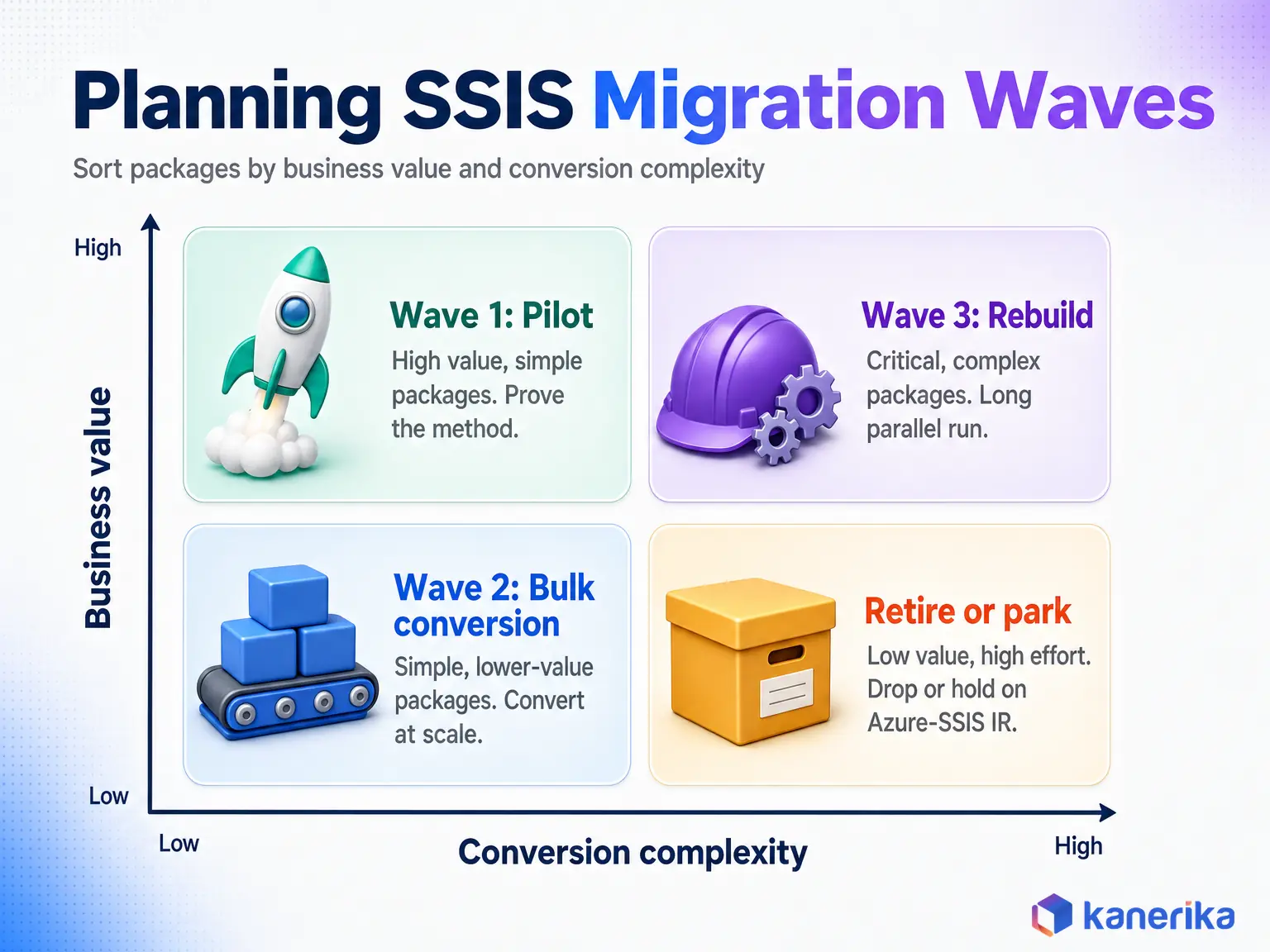
Group Packages Into Waves
Score each package on business value and conversion complexity, then group packages into waves. A pilot wave of high-value, simple packages proves the method, and critical, complex packages go last with the longest parallel run.
Step 2: Design the Databricks Target
In an SSIS to Databricks migration, staging, cleansing and warehouse loads each need a home in the new design before any package is converted.
Medallion Layers, Unity Catalog and Volumes
Databricks recommends a medallion design: bronze for raw data, silver for validated data, and gold for enriched, business-ready tables. SSIS staging tables usually map to bronze, cleansing steps to silver, and warehouse loads to gold. Flat files that SSIS picked up from network shares should land in Unity Catalog volumes, which govern files in cloud storage. See our Unity Catalog guide for the rollout.
Settle Collation, Keys and Uniqueness Early
- Collation: many SQL Server databases use case-insensitive collations, and SQL Server ignores trailing spaces when comparing strings with an equals sign. Databricks compares strings as binary values by default. The UTF8_LCASE collation with the RTRIM modifier, available in Databricks SQL and Runtime 16.1 and above, reproduces that behavior.
- Uniqueness: Databricks primary key and unique constraints are informational and not enforced, so keep duplicate checks in the pipeline.
- Surrogate keys: identity columns work on BIGINT only and can skip values, so don’t rely on gap-free keys.
Connectivity to SQL Server and File Shares
Lakeflow Connect reaches on-premises SQL Server over Azure ExpressRoute or AWS Direct Connect, and reads only from primary instances. Plan network access, firewall rules and service accounts during design, because the first pipeline can’t run without them. Our Databricks readiness checklist lists 18 setup actions across compute, governance, storage and security.
Listen on Spotify
How to Master the Data Migration Life Cycle? Step-By-Step Guide
Step 3: Move Historical and Incremental Data
SQL Server is usually both the source and the target of SSIS packages, so the data plan for an SSIS to Databricks migration covers two jobs: loading history into Delta tables, and keeping them current until the packages switch over.
Incremental Loads With the Lakeflow Connect SQL Server Connector
The SQL Server connector, generally available since August 2025, reads SQL Server change tracking or CDC and can keep SCD Type 2 history. Databricks recommends change tracking for tables with a primary key, because it puts less load on the source. It also replaces SSIS CDC packages built on the Attunity components.
Plan for two limits: the connector reads only primary instances, and with change tracking an Availability Group failover requires a full refresh of every table in the pipeline. For sources without change tracking or CDC, the query-based connector, generally available since May 2026, pulls new rows using a cursor column such as a last-modified timestamp.
Bulk History and Files
For one-time history loads, JDBC reads from Databricks suit moderate volumes. For very large tables, export to files and load them with COPY INTO, which skips files it has already loaded, or with Auto Loader. Our Auto Loader guide covers schema evolution, and our SQL Server data migration guide covers source-side preparation.
Keep SQL Server Queryable With Lakehouse Federation
Lakehouse Federation queries SQL Server in place, read-only, through a Unity Catalog connection. During the parallel run, it lets one notebook compare SSIS-loaded tables with their Databricks versions. Our guide to Lakehouse Federation covers setup.
| Method | Best for | What SQL Server needs | Watch for |
|---|---|---|---|
| Lakeflow Connect with change tracking | Ongoing changes on tables with primary keys | Change tracking on a primary instance | Full refresh after an Availability Group failover |
| Lakeflow Connect with CDC | Tables without primary keys | CDC enabled (Enterprise Edition before SQL Server 2016) | Version and edition requirements |
| Query-based connector | Sources without change tracking or CDC | A reliable cursor column | Hard deletes need a separate check |
| JDBC batch read | One-time history loads | Read access and a network path | Long queries on busy servers |
| File export plus COPY INTO or Auto Loader | Very large tables | Export jobs and staging storage | File formats and encodings |
| Lakehouse Federation | Comparisons during the parallel run | A Unity Catalog connection | Read-only access |
Step 4: Convert Packages, T-SQL and Script Tasks
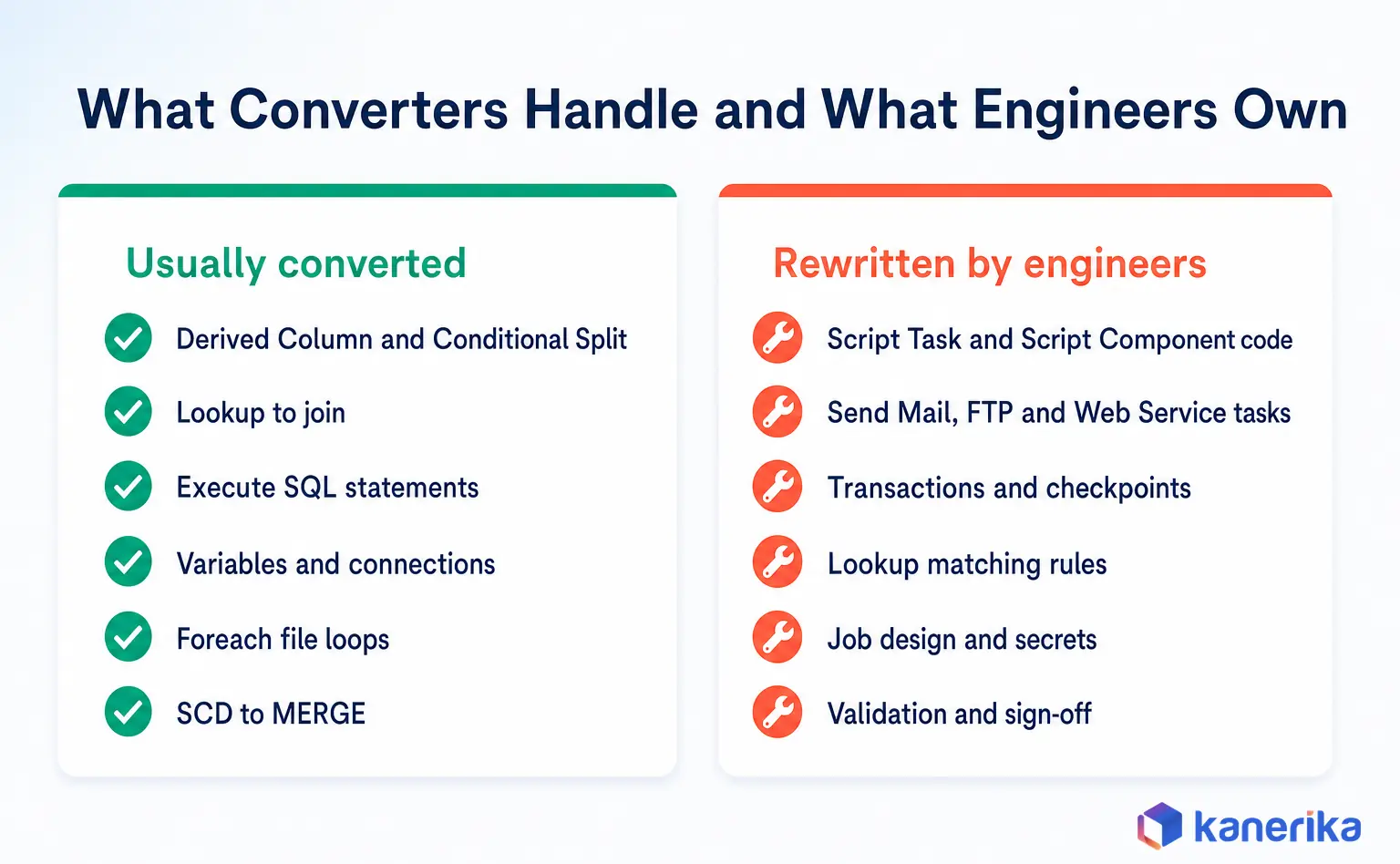
Code conversion is where tooling saves the most time in an SSIS to Databricks migration, and also where its limits show. The usual split looks like this:
What Lakebridge Converts Today
Lakebridge, the free Databricks Labs migration toolkit, converts SSIS packages to Spark SQL notebooks with its BladeBridge transpiler. Its SSIS documentation marks the conversion as experimental and lists packages from SQL Server 2012 through 2022 and from the Azure-SSIS Integration Runtime; SSIS 2025 isn’t listed. Its LLM-based Switch transpiler, also experimental, targets Lakeflow pipelines.
Lakebridge maps Lookups to left joins, Execute Package tasks to dbutils.notebook.run() and the Slowly Changing Dimension transformation to Delta MERGE. Because a left join returns every match, check row counts on each converted Lookup. Its supported components page lists tasks it doesn’t convert, including Send Mail, FTP, Web Service, XML, Bulk Insert and Analysis Services tasks, and it keeps the structure of Script Tasks while the C# or VB.NET code has to be rewritten. Our Lakebridge guide covers setup.
Where Genie Migrate Fits
Genie Migrate, which Databricks made generally available on November 12, 2026, doesn’t list SSIS as a source. Its SQL dialects include T-SQL, and its only ETL source today is Informatica PowerCenter, in Beta; Databricks says more ETL sources are coming. It can still convert the T-SQL inside Execute SQL tasks and stored procedures, including into Lakeflow pipelines, a target that is in Beta.
Partner Accelerators
Kanerika’s FLIP reads SSIS packages, converts supported package logic into PySpark notebooks, and deploys them to a Databricks workspace, as the demo at the top of this guide shows. Other accelerators, such as LeapLogic, also target this path; our FLIP vs LeapLogic comparison covers the differences.
| Tool | What it reads | Output | SSIS status | Gaps |
|---|---|---|---|---|
| Lakebridge (BladeBridge) | .dtsx packages from SQL Server 2012 to 2022 and Azure-SSIS IR | Spark SQL notebooks | Experimental | Script code and several task types |
| Lakebridge (Switch) | .dtsx packages | Lakeflow pipelines | Experimental, LLM-based | Generated code needs close review |
| Genie Migrate | T-SQL scripts and procedures | Databricks SQL, notebooks, Lakeflow pipelines (Beta) | SSIS packages not supported | Package graph and data flows |
| Kanerika FLIP | SSIS packages, connections and dependencies | PySpark notebooks deployed to the workspace | Supported path | Unsupported components handled by engineers |
| Manual or AI-assisted rewrite | Any package | Code written and reviewed by engineers | Always possible | Slowest path |
Rewriting Script Tasks and Script Components
Script code is usually the largest manual item. Rewrite Script Task logic as Python tasks in the job, replace Send Mail tasks with job notifications to email, Slack or Microsoft Teams, and replace custom source components with PySpark custom data sources, available on Runtime 15.4 LTS and above. Move transformation logic from Script Components into Spark SQL expressions where possible, so it runs set-based. For AI-assisted rewrites inside the workspace, see our guide to Databricks Genie Code.
FLIP Datasheet
Automate SSIS to Databricks Conversion With FLIP
See how FLIP analyzes SSIS packages, converts workflows into Databricks-ready assets, configures target environments and validates the migrated pipelines.
Step 5: Rebuild Orchestration and Scheduling
In an SSIS to Databricks migration, SQL Server Agent jobs and parent packages become Lakeflow Jobs, and the logic that SSIS kept in precedence constraints moves into task dependencies.
SQL Server Agent Schedules to Job Triggers
Each SQL Server Agent job becomes a Lakeflow Job with a schedule or trigger. File arrival triggers start a job when new files land in a volume or external location, checking about once a minute, which replaces Foreach File loops that polled a folder on a timer. Table update triggers start downstream jobs when an upstream table changes.
Parent and Child Packages, Branches and Alerts
Parent packages that call children become jobs with Run Job tasks, within the three-level nesting limit. OnError handlers become tasks set to run when an upstream task fails, plus notifications to email, Slack, Teams or PagerDuty. Run history for every job and task is queryable in the system.lakeflow system tables, which replaces SSISDB execution reports. Our Databricks Lakeflow guide explains how jobs, pipelines and connectors fit together.
Step 6: Validate, Run in Parallel and Cut Over
Databricks’ SQL Server migration guidance recommends comparing row counts and aggregates with automated tools and running pipelines in parallel during the transition. For an SSIS to Databricks migration, add tests for the behaviors that change without raising errors:
- Counts and aggregates: per table and per load date.
- Row hashes: on critical tables. Lakebridge Reconcile supports SQL Server for schema, row and data comparisons.
- Lookup results: duplicate matches, and rows that found no match.
- Key comparisons: case and trailing-space behavior on join keys.
- SCD history: no gaps or overlaps in Type 2 effective dates.
- Precision: MONEY, DECIMAL and DATETIME values.
- Run times: against SLAs, since small packages can run slower on a cluster than on SQL Server.
Kanerika’s Klarity360 automates data validation between source and target. For test design, see our guides to data migration testing and data reconciliation tools.
Running SSIS and Databricks Side by Side
Keep SSIS loading production while Databricks loads its own tables, and compare both after every run. For finance data, run through at least one month-end close. Lakehouse Federation lets the comparison query SQL Server directly from Databricks.
Repointing Consumers and Retiring SSIS
Switch reports, extracts and downstream jobs wave by wave. Disable the matching Agent jobs first, keep the packages and SSISDB history for audit, and decommission servers once every package in the wave is retired.
Case Study
Zero-Downtime Databricks Migration for Retail Analytics
A large US retailer moved distributed on-premises databases to Delta Lake under Unity Catalog, with a parallel run and app-by-app cutover. The result: zero downtime and 100% of legacy infrastructure decommissioned.
Common SSIS to Databricks Migration Pitfalls
Each of these SSIS to Databricks migration pitfalls traces back to a specific SSIS behavior, and each has a known fix:
- Lookups that change row counts: a join returns every match where the Lookup returned one. Deduplicate reference data and test counts.
- Row-by-row logic carried into Spark: OLE DB Command transformations, cursors and per-row script code are slow on distributed compute. Rewrite them as set-based MERGE or SQL.
- Undocumented Script Task side effects: scripts often move files, upload to FTP, send emails or call APIs. List every side effect before rewriting.
- Assuming transactions and checkpoints still exist: design each task to rerun safely instead.
- CDC packages built on Attunity components: SQL Server 2025 removed them. Move these loads to the Lakeflow Connect SQL Server connector.
- Parent and child chains deeper than Run Job allows: flatten them, since Databricks supports at most three nested Run Job levels.
- Small packages that run slower on a cluster: benchmark them in the pilot, and consider serverless compute to avoid waiting for a cluster to start.
Broader migration risks are covered in our guide to data migration challenges.
What Drives the Cost and Timeline of an SSIS Migration
Every SSIS estate is different, so estimates for an SSIS to Databricks migration should come from your own assessment. These factors decide the size of the work:
- Package count after retirement: the packages that still need to move.
- Script Tasks and custom components: the share that needs a manual rewrite.
- CDC and incremental load design: especially packages built on Attunity components.
- T-SQL volume: statements in Execute SQL tasks and stored procedures.
- Data volume and network path: how much data moves, and the bandwidth to SQL Server.
- Parallel-run length: every extra month means running both platforms.
- Team skills: PySpark and Databricks experience on the team that will run the platform.
After cutover, Databricks costs follow compute choices: warehouse and cluster sizing, schedules and idle settings. Our Databricks cost optimization guide covers the main levers. Databricks also funds part of some migration and proof-of-concept projects through partners.
Databricks Funding
Reduce Databricks Migration Costs With Funding Support
Learn how Databricks funding routes, such as DCIF and Marketplace transactions, can offset the cost of migration and proof-of-concept projects.
How Kanerika Runs SSIS to Databricks Migrations
Kanerika is a certified Databricks partner, and FLIP, our migration automation platform, lists SSIS to Databricks among its supported paths. Our SSIS migrations follow the steps in this guide:
- Assess: FLIP reads .dtsx packages, connections, transformations and dependencies to size the work and flag what needs manual effort.
- Convert and deploy: FLIP converts supported package logic into PySpark notebooks and deploys them to your Databricks workspace. Engineers rewrite Script Tasks and unsupported components.
- Orchestrate: Lakeflow Jobs with triggers, retries and alerts, designed with your team.
- Validate: automated checks with Klarity360 and a parallel run against SSIS outputs.
- Cut over: wave by wave, with SSIS retired after sign-off.
Kanerika has also migrated SSIS pipelines for a large enterprise, with Microsoft Fabric as the target. That project reported 30% faster data processing, 40% lower operational costs and 25% less manual maintenance, and automated testing kept data integrity at 99.9% during the migration. On Databricks, Kanerika moved a healthcare provider’s Informatica workflows to Azure Databricks with its migration accelerator, with 71% higher reporting accuracy, 38% lower data handling costs and 64% faster decision-making. To scope your own estate, see our SSIS to Databricks migration service.
Conclusion
An SSIS to Databricks migration works best as a series of waves: assess, design, move data, convert, rebuild orchestration, and validate before cutover. Tools such as Lakebridge and FLIP handle much of the standard package logic, and Genie Migrate can take on the T-SQL. The result still depends on the parts that need judgment: Lookup matching rules, Script Task code, CDC design and the tests that prove outputs match. Settle those early, keep SSIS running until the numbers agree, and retire packages one wave at a time.
Talk to Kanerika
Planning an SSIS to Databricks Migration?
Kanerika’s Databricks team assesses your SSIS estate, converts packages with FLIP, and validates every wave before cutover. Book a session to scope your migration.
Frequently Asked Questions
Can SSIS packages run directly on Databricks?
No. Databricks doesn’t execute .dtsx packages. Each package is converted into notebooks, SQL or Lakeflow pipelines and orchestrated with Lakeflow Jobs. Packages that must keep running unchanged for a while can move to Azure Data Factory’s Azure-SSIS Integration Runtime, which runs SSIS packages in Azure as they are.
Is SSIS obsolete?
No. SSIS still ships with SQL Server 2025 and gets updates. That release did remove some components, including the Attunity CDC components, the Microsoft Connector for Oracle and the Hadoop tasks, and it deprecated 32-bit mode. Teams that move to Databricks usually do it for scale, governance and AI on the same data.
What is Microsoft replacing SSIS with?
Microsoft still ships SSIS with SQL Server 2025. Its cloud options are Azure Data Factory, where the Azure-SSIS Integration Runtime runs existing packages, and Microsoft Fabric Data Factory, which has an Invoke SSIS Package activity in preview. Databricks is a separate option for teams that want to rebuild pipelines on Spark.
Can SSIS packages be converted to PySpark automatically?
Partly. Lakebridge converts SSIS packages to Spark SQL notebooks on an experimental basis, and accelerators such as Kanerika’s FLIP convert supported package logic into PySpark notebooks. Script Task and Script Component code, several task types and Lookup behavior still need engineer review, so test any tool on your own packages first.
Does Databricks Lakebridge support SSIS?
Yes, experimentally. Lakebridge’s analyzer and converter support SSIS packages from SQL Server 2012 through 2022 and the Azure-SSIS Integration Runtime, and its BladeBridge transpiler produces Spark SQL notebooks. Lakebridge doesn’t profile or reconcile SSIS itself, and it doesn’t convert C# or VB.NET script code or tasks such as Send Mail and FTP.
Does Genie Migrate support SSIS?
Not yet. Genie Migrate, generally available since November 12, 2026, lists T-SQL among its SQL dialects and Informatica PowerCenter, in Beta, as its only ETL source. Databricks says more ETL sources are coming. Teams can still use it to convert the T-SQL inside Execute SQL tasks and stored procedures.
What happens to Script Tasks written in C# or VB.NET?
They’re rewritten. Conversion tools keep the structure but can’t translate the .NET code. Script Task logic usually becomes Python tasks in a Lakeflow Job, email steps become job notifications, and custom sources become PySpark custom data sources. Document what each script does first, including the files, emails and APIs it touches.
What replaces SQL Server Agent schedules in Databricks?
Lakeflow Jobs. Each Agent job becomes a job with a time-based schedule or an event trigger, such as file arrival or a table update. Run if dependencies handle success and failure paths, notifications replace operator alerts, and run history is available in the system.lakeflow system tables for reporting and audits.
How do you move SSIS CDC and incremental loads to Databricks?
Use the Lakeflow Connect SQL Server connector, which reads change tracking or CDC and can keep SCD Type 2 history. Databricks recommends change tracking for tables with primary keys. For sources without either, the query-based connector reads new rows by a cursor column. This also replaces Attunity CDC components removed in SSIS 2025.
Should SSIS move to Azure Data Factory, Microsoft Fabric or Databricks?
It depends on the goal. The Azure-SSIS Integration Runtime runs packages unchanged, which suits a quick exit from servers. Fabric suits teams standardizing on Microsoft’s analytics stack. Databricks suits teams that want Spark scale, open Delta tables and one governed platform for engineering, BI and AI. Some estates use more than one.
Can SSIS and Databricks run side by side during migration?
Yes, and they should. Keep SSIS loading production while Databricks loads its own tables, and compare outputs after each run. Lakehouse Federation can query SQL Server from Databricks for those comparisons. Switch consumers wave by wave, and disable each Agent job only after its outputs match the Databricks results.
How do you validate data after migrating SSIS packages?
Compare row counts, aggregates and row hashes between SQL Server and Databricks; Lakebridge Reconcile supports SQL Server for these checks. Then add SSIS-specific tests for Lookup duplicates and misses, case and trailing-space behavior on keys, SCD history and numeric precision, and run the same reports on both platforms.
Why can migrated SSIS jobs run slower on Databricks?
Usually because row-by-row logic was carried over. OLE DB Command transformations, cursors and per-row script code don’t suit distributed Spark, so rewrite them as set-based MERGE or SQL. Very small packages can also lose time waiting for a cluster to start, so benchmark them in the pilot and consider serverless compute.
How long does an SSIS to Databricks migration take?
It depends on the estate: the packages left after retirement, the share with Script Tasks or custom components, CDC design, T-SQL volume, data volume and the length of the parallel run. Moving in waves lets the first packages go live while the rest are still being converted, tested and validated.