TL;DR
Pick data reconciliation tools by the type of move: AWS DMS or Google DVT for databases, QuerySurge or Datagaps for ETL and BI. Whatever you choose, it must check the values inside each row. A changed data type can shift totals while every row is still there. Good tools compare counts, totals, row fingerprints, single rows, table structure and report figures. Great Expectations, dbt and Deequ need extra setup to compare two systems, and BlackLine is built for finance teams. Before you buy, test your top two tools for two weeks on your biggest and messiest tables.
Key Takeaways
- Data reconciliation tools compare a source system with its target and prove that records and values arrived intact, not only that row counts agree.
- Counts, aggregates, row hashes, key-based diffs, schema checks and report totals each catch a different kind of migration defect.
- Native validators such as AWS DMS and Google DVT suit database moves, while testing platforms such as QuerySurge and Datagaps suit ETL and BI rewrites.
- Great Expectations, dbt tests and Deequ test data against rules and can be adapted for source-versus-target checks with extra setup.
- Keys and money need exact matches, while floats and derived fields need tolerances agreed with the data owner before testing starts.
- A two-week proof of concept on your hardest tables shows more about a tool than any feature list.
Watch on YouTube
What Do Companies Miss Before Starting a Data Migration?
Kanerika covers what companies tend to overlook before a data migration begins, and why those gaps tend to surface only after cutover.
The Cutover Weekend Where Every Count Matched
Picture a Sunday night cutover. The new warehouse is loaded and the validation script reports the same 1,000,000 order rows on both sides.
The team signs off and goes home. Two days later, finance runs the month-end revenue report, but the number is wrong by a few thousand dollars. Worse, nobody can say which rows caused it.
Nothing was lost. Instead, a column had been defined with two decimal places rather than four, and a timestamp had shifted time zones on the way in. Row counts alone could never have caught either problem, because neither one dropped a row.
That gap between “the rows arrived” and “the numbers are right” is what data reconciliation tools exist to close. This guide explains the checks they run, compares the main options and shows how to choose one before your own cutover.
What Are Data Reconciliation Tools?
Data reconciliation tools are software that compares data in a source system with the same data in a target system and reports every difference. They check counts, totals, individual rows and field values, then list the exceptions for someone to fix. In a migration, their output then becomes the evidence that the move worked.
The simplest way to think about them is as an automated second reviewer. A person could export both tables to a spreadsheet and compare them, and many teams still do. A tool, however, does the same comparison at full volume, repeats it on every load and keeps a record of what it found.
Reconciliation sits next to two related practices that often get confused with it. Each one answers a different question, so a migration usually needs all three.
Reconciliation vs Validation vs Data Quality Monitoring
Validation asks whether data follows its rules, such as a required field being filled or a date falling in range. Reconciliation instead asks whether two systems agree with each other. Monitoring keeps watching quality after go-live, and our guide to data observability vs data quality covers that run-time side.
| Practice | Question it answers | When it runs | Example check |
|---|
| Data validation | Does this dataset follow its rules? | During loads and inside pipelines | Customer email is never empty |
| Data reconciliation | Do source and target hold the same records and values? | After each migration load, before sign-off | Invoice totals match for every month |
| Data quality monitoring | Is the data still healthy over time? | Continuously in production | Daily row volume falls far below normal |
For that reason, a passing validation check does not prove reconciliation. A target table can satisfy every rule and still be missing the rows that failed to load. For the definitions behind these terms, see data integrity vs data quality.
Data Migration Reconciliation vs Financial Reconciliation Tools
When you search for reconciliation software, half the results are finance tools. Products such as BlackLine focus on the financial close, account reconciliations and transaction matching. They answer an accountant’s question: does the bank statement agree with the ledger?
A platform migration asks an engineering question instead. Did every table and every value move from the old database to the new one without change? Answering that takes a tool that connects to both systems, pushes queries down to them and compares the results at scale.
| Dimension | Financial reconciliation tools | Data migration reconciliation tools |
|---|
| Main job | Match transactions and balances for the financial close | Prove that source and target data agree after a move |
| Typical data | Bank feeds, subledgers and the general ledger | Database tables, files, warehouse tables and report outputs |
| Who runs it | Accounting and finance teams | Data engineers, testers and migration leads |
| Output | Reconciled accounts ready for close | Exception lists of missing or mismatched rows |
| Fit for a warehouse move | Poor | Strong |
So if your project moves a data platform, start with the right-hand column. Finance tools still matter once the new platform feeds the ledger, but they will not tell you whether the migration itself was clean.
Migration ROI Calculator
What Will Your Platform Migration Return?
Estimate the cost and time savings of moving off a legacy data platform before you set the budget.
Calculate Migration ROI →
Manual vs Automated Reconciliation
Manual reconciliation means someone writes SQL against both systems, pastes the results into a spreadsheet and scans for differences. That approach works well when there are only a handful of tables. It breaks down when the same checks must run after every incremental load, across hundreds of tables, with an audit trail.
Automated reconciliation, on the other hand, turns those checks into saved, scheduled comparisons, much as data warehouse automation does for loads. The difference shows up in four places:
- Repeatability: the same check runs the same way on every load, so results stay comparable.
- Coverage: every row can be compared instead of a sample.
- Triage speed: failed rows come back with their keys, so engineers fix causes instead of hunting for them.
- Evidence: results are stored with timestamps and owners, ready for sign-off.
The payoff is time. Checks are written once and rerun on every load, so engineers stop rebuilding the same spreadsheet comparisons by hand.
Case Study
60% Less Manual Reconciliation via Snowflake Migration
A North American beverage manufacturer and distributor moved legacy SSAS and hybrid systems to Snowflake, cutting manual data reconciliation by 60% and making data reporting cycles 40% faster.
Read the Case Study →
Why Row Counts Alone Cannot Prove a Migration Worked
A row count tells you how many records arrived. It says nothing about what is inside them, though, and that is where most migration defects hide.
Here is an illustrative example, not a client case. A sales table holds 1,000,000 orders, with amounts stored to four decimal places and timestamps stored in UTC. During the move, two small things change.
First, the target column is defined with two decimal places and truncates the rest. Assume 400,000 rows carry a fraction of a cent that averages half a cent. Truncation then removes 400,000 × $0.005, or $2,000, from total revenue.
Second, the load converts order timestamps to US Eastern time before taking the date. Orders placed between midnight and 4 a.m. UTC on April 1 now land on March 31. In this example, that moves $96,300 of revenue from April into March, while the grand total stays the same.
| Check | Source | Target | Result |
|---|
| Row count | 1,000,000 | 1,000,000 | Match |
| Distinct order IDs | 1,000,000 | 1,000,000 | Match |
| Sum of amount | Baseline total | $2,000.00 lower | Mismatch |
| Revenue by month | March and April as booked | $96,300 moved from April to March | Mismatch |
Both count checks pass, so a count-only process would have signed off. The sum check catches the precision loss, but not the time zone shift. Only a grouped aggregate, revenue by month, catches the time zone shift, because the overall total does not move at all.
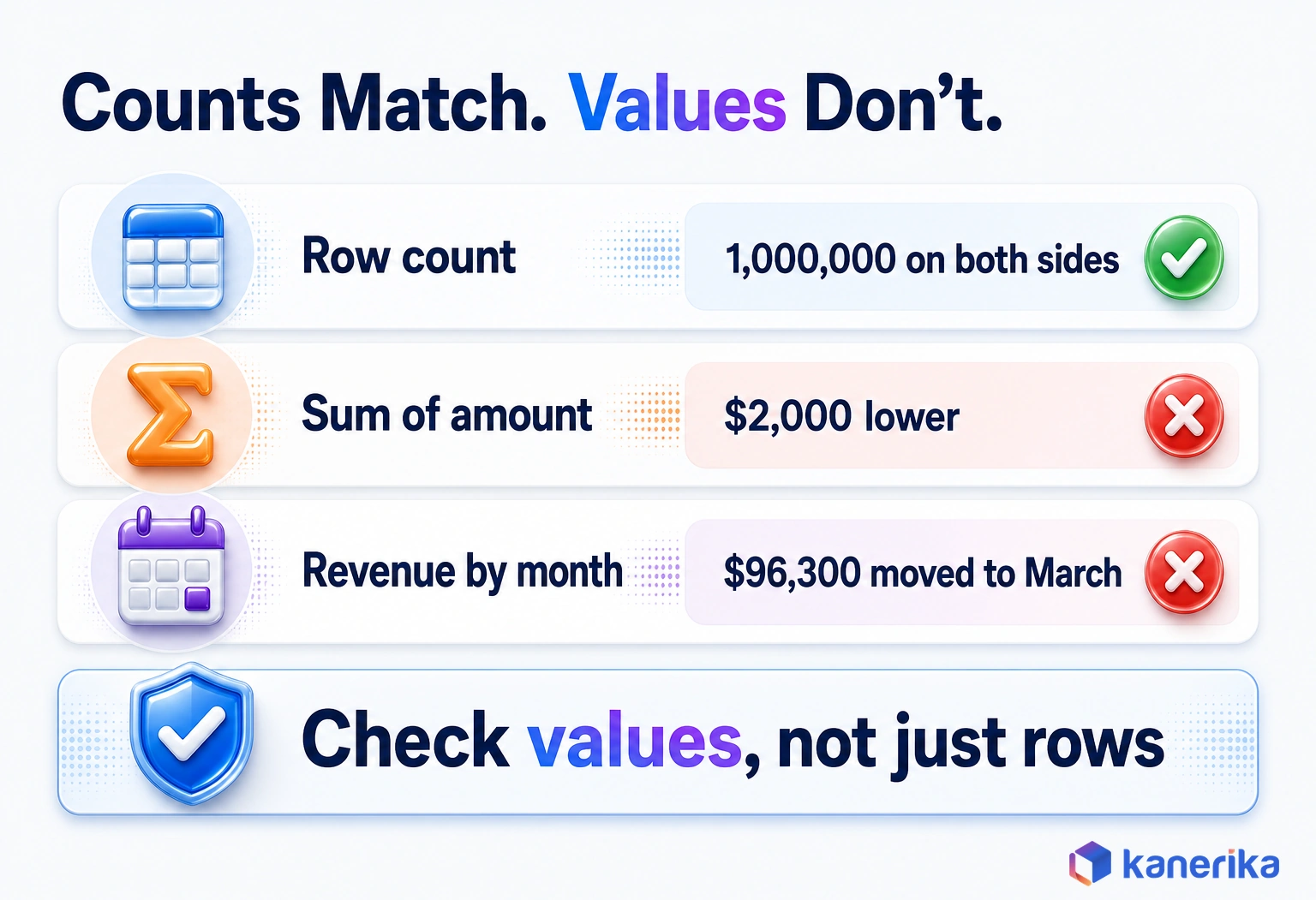
That is the case for layered checks. Counts prove completeness and aggregates prove totals, while a row-level comparison shows exactly which records changed.
The Reconciliation Checks a Tool Must Run
A good reconciliation run works like a funnel. Cheap checks run first across everything, and expensive row-by-row comparisons then run where the cheap checks point.
The five checks below cover most migrations when they run together. Each one catches a different kind of defect, so dropping one leaves a blind spot.
- Count and completeness checks: compare row counts per table and per partition to catch missing or duplicated loads.
- Column aggregates and checksums: compare sums, minimums, maximums, distinct counts and hashes to catch changed values.
- Row-level and field-level comparison: join on the business key and compare each field to name the exact rows that differ.
- Schema checks: compare column names, types, precision and nullability to catch silent type changes.
- Business-rule and report checks: compare the numbers people use, such as a Power BI total against its source.
Count and Completeness Checks
Counts are the first gate because they are fast and cheap. Run them per table and then per partition, such as day or region, so a missing day does not hide inside a large total.
Watch for duplicates too. For example, a retry that loads one batch twice can offset a batch that failed, which leaves the overall count looking perfect.
Column Aggregates and Checksums
Aggregates compare what the data adds up to, rather than how many rows exist. For example, sum, minimum, maximum, average and distinct count per column catch truncation, overflow and lost precision.
Hashes go a step further. A hash of each row’s business columns turns the whole row into one short fingerprint, so any changed character changes the fingerprint. The generic SQL below shows both ideas.
-- 1) Aggregate fingerprint: run on source and target, then compare the outputs
SELECT
  COUNT(*)                  AS row_count,
  COUNT(DISTINCT order_id)  AS distinct_keys,
  SUM(amount)               AS total_amount,
  MIN(amount)               AS min_amount,
  MAX(amount)               AS max_amount
FROM sales.orders
WHERE order_date >= '2026-03-01' AND order_date < '2026-04-01';

-- 2) Row hashes: one fingerprint per key, then diff the two outputs by order_id
-- Cast to identical types and formats on both sides before hashing.
-- MD5 and CONCAT_WS exist in many engines; swap in your platform's equivalents.
SELECT
  order_id,
  MD5(CONCAT_WS('|',
      customer_id,
      CAST(amount AS DECIMAL(18,4)),
      status)) AS row_hash
FROM sales.orders;
Run the first query on both systems, then compare the two result rows. For the second, store the hashes by key on each side, join them and keep the rows where the hashes differ. Cast values to the same type and format before hashing, or identical data will hash differently.
Row-Level and Field-Level Comparison
When an aggregate fails, the next question is which rows. A key-based diff joins source and target on the business key. It reports rows only in the source, rows only in the target, and matched rows whose fields differ.
Unlike the earlier checks, this one gives engineers something specific to fix. It is also the most expensive one, so tools that push the work down to the databases matter at scale. Comparing hashed blocks of rows before single rows saves time as well.
Schema Checks
Schema checks compare structure rather than content. They confirm that column names, data types, precision, scale and nullability match the agreed mapping.
In the earlier example, a schema check would have flagged the change from four decimal places to two before any data moved. That makes it the cheapest fix in the whole list, since nothing has to be reloaded.
Business-Rule and Report-Level Checks
The last layer checks the numbers people actually use. Revenue by region, open orders, headcount by department and the totals on a Power BI page should all match their source equivalents.
These checks catch problems the lower layers miss, such as a join rewritten during an ETL to ELT switch or a lost report filter. They also give business owners a result they can verify and sign.
Every one of these checks belongs in the test plan before any data moves, with an owner and a pass rule for each.
Checklist
Data Migration Checklist
Plan every migration step in one place, from source profiling and mapping to validation, cutover and sign-off, so reconciliation checks are scheduled before the first table moves.
Get the Checklist →
How Data Reconciliation Works During a Migration
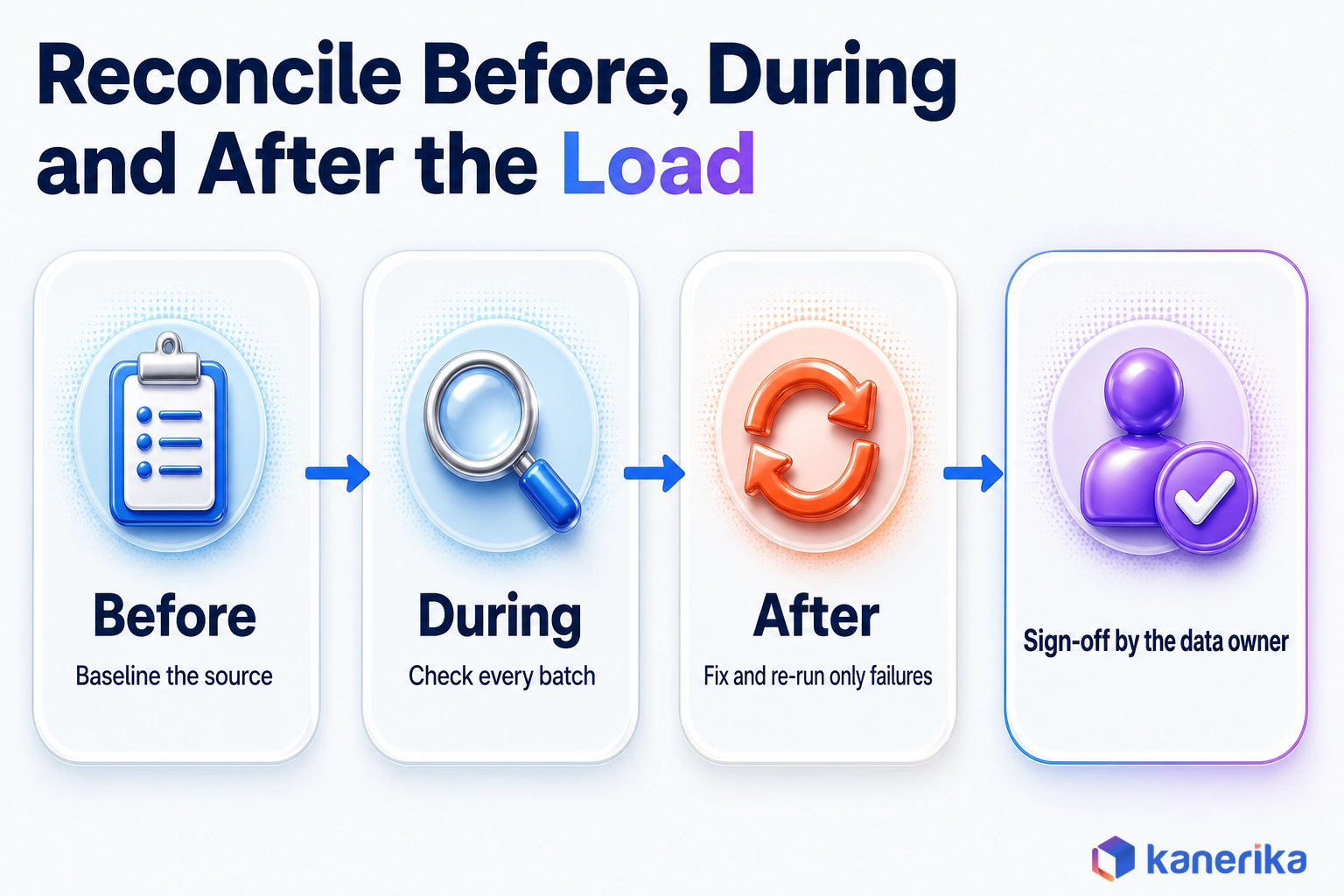
Reconciliation runs from the first profiling query to the day the data owner signs off on the new platform.
Teams that save it for the cutover weekend meet the classic data migration risks when they are most expensive to fix. The six stages below spread the work across the project instead.
- Baseline the source. Profile row counts, totals, null rates and distinct values before migration, so you know what correct looks like.
- Map source to target. Document each table and column mapping, including type changes, renamed fields and transformation rules.
- Check in flight. Reconcile each batch or change stream as it lands, including CDC changes on live sources.
- Reconcile after the load. Run counts, aggregates, row diffs, schema checks and report checks on the full target.
- Triage and re-run. Trace each exception to its cause, fix it and re-run only the failed tables or partitions.
- Sign off. The data owner reviews the results, accepts any agreed tolerances and signs the reconciliation report.
In practice, stages three and five carry most of the effort. In-flight checks stop a small error from spreading through later loads, while targeted re-runs keep one bad table from forcing a full reload.
The mapping document from stage two does double duty. It defines what the tool should compare, and later it becomes part of the audit evidence at sign-off.
Reconciliation is one part of wider data migration testing and one workstream among many in a migration. The data migration checklist shows where these stages fit in the wider plan, from scoping to cutover.
Data Reconciliation Tools Compared (2026)
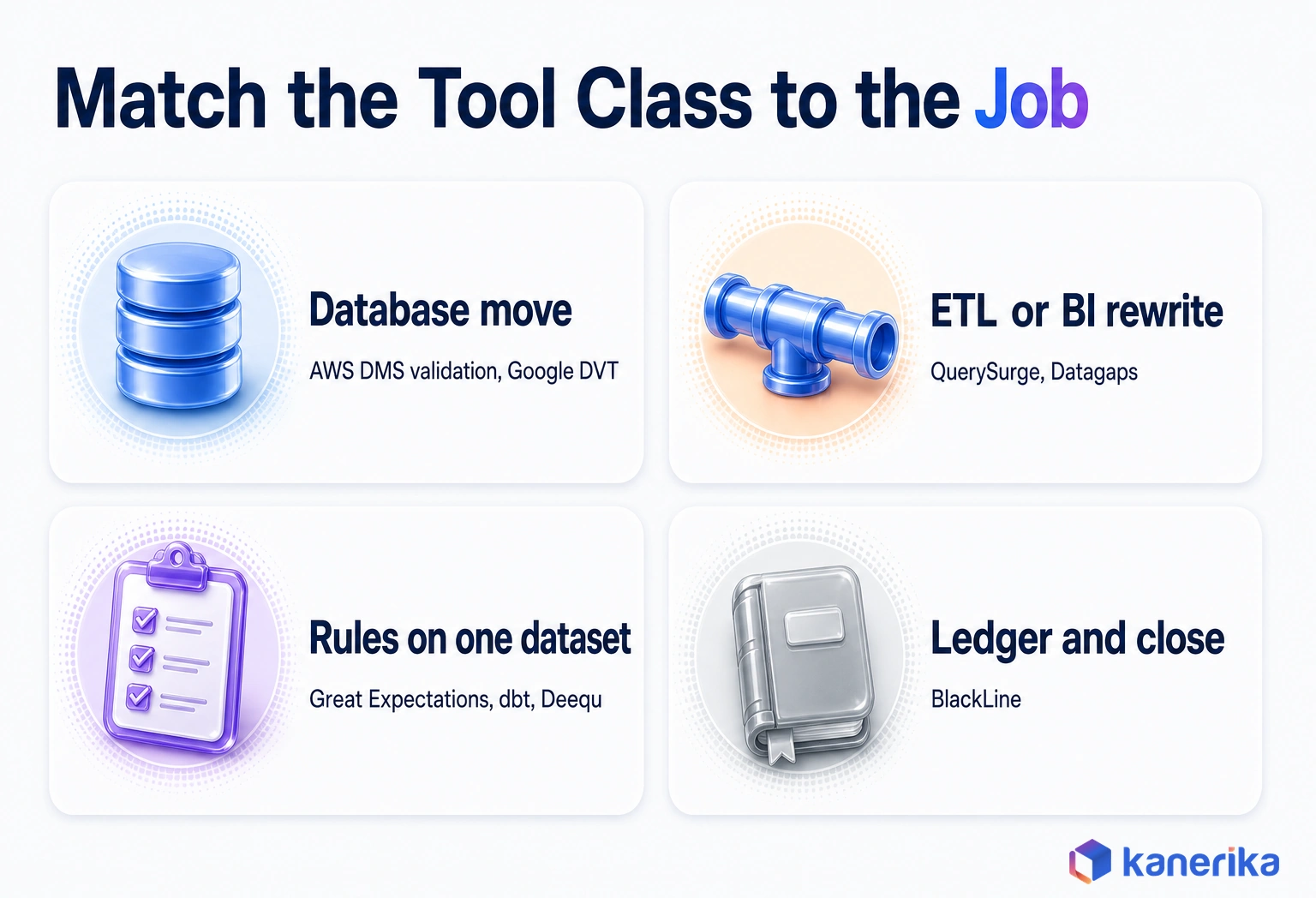
Data reconciliation tools fall into a few classes, and the class matters more than the brand. A migration service’s built-in validator, a dedicated testing platform and an open-source rule library each solve a different part of the problem.
The Main Options at a Glance
The table below summarizes the main options before each class is covered in turn. Each claim comes from the vendor’s own documentation or repository, checked in October 2026. None of it includes pricing, because prices change too often to print.
| Tool | Class | What it checks | Deployment and license | Best for |
|---|
| QuerySurge | Migration and ETL testing platform | Data warehouse and ETL data, BI reports, data migrations, big data and ERP data | Commercial platform with a DevOps for Data option | Repeatable test suites across ETL and BI migrations |
| Datagaps ETL Validator | Migration and ETL testing platform | Missing, mismatched, orphan and duplicate rows | Commercial platform | Migration testing with row-level reconciliation |
| AWS DMS data validation | Native migration validator | Each source row against its target row, including CDC changes | Built into AWS Database Migration Service | Database moves that already run on AWS DMS |
| Google Data Validation Tool (DVT) | Open-source migration validator | Column aggregates, rows, schema and custom queries | Open source, not an officially supported Google product | Cross-database moves, including BigQuery and Snowflake targets |
| Great Expectations | Open-source data quality framework | Rule-based expectations on one dataset | Open-source Python library | Rule tests that can be extended to source-versus-target checks |
| dbt data tests | Open-source data quality framework | not_null, unique, accepted values, relationships and custom SQL | Built into dbt | Teams that already model the target in dbt |
| Deequ | Open-source data quality framework | Constraints, profiling and metric anomalies on Spark data | Library on Apache Spark | Very large Spark and lakehouse datasets |
| BlackLine | Financial close tool | Account reconciliations and transaction matching | Commercial finance platform | Ledgers and the close, not data migrations |
| Datafold data-diff (open source) | Archived diff tool | No longer maintained | Support ended May 17, 2024; repository archived | Avoid for new projects |
Migration and ETL Testing Platforms
On an ETL rewrite, where the transformation logic itself changes, QuerySurge validates source-to-target data and checks that logic. Its modules also cover BI reports, data migrations, big data and ERP data. A DevOps for Data option runs those tests from delivery pipelines, so the suite can rerun on every wave.
Datagaps ETL Validator takes a similar angle, especially for migrations. Its data migration testing and data reconciliation features find missing, mismatched, orphan and duplicate rows between systems.
Platforms like these suit programs with many tables, several waves and a need for repeatable test suites, such as an Informatica to Databricks migration. They take more setup than a script, but the saved tests pay back on every later wave.
Native and Open-Source Migration Validators
If you move databases with AWS Database Migration Service, its data validation feature is the obvious first check. It compares each source row with its target row and then reports mismatches. Validation starts after the full load, and changes captured through CDC are validated as they occur.
As of October 2026, the AWS documentation lists two limits that still matter. A table with no primary key cannot be validated, and validation consumes extra source, target and network resources, which adds time to the migration.
On an Oracle-to-BigQuery or Teradata-to-Snowflake move, Google’s Data Validation Tool runs aggregate, grouped, row and schema checks on both sides. That is the layered funnel described earlier, in one open-source command-line tool. Its connectors include BigQuery, Snowflake, Oracle, Teradata, SQL Server, Postgres and Redshift, among others.
Once the source and target connections exist, a DVT run takes two commands. The sketch below follows the syntax in the tool’s README, with placeholder connection, table and column names.
# 1) Grouped aggregates: COUNT(*) runs by default, plus a daily sum
data-validation validate column \
  -sc oracle_src -tc snowflake_tgt \
  -tbls sales.orders=sales.orders \
  --grouped-columns order_date \
  --sum amount \
  --threshold 0.0

# 2) Row check: hash every column, joined on the business key
data-validation validate row \
  -sc oracle_src -tc snowflake_tgt \
  -tbls sales.orders=sales.orders \
  --primary-keys order_id \
  --hash '*'
The --threshold flag sets the largest percentage difference that still passes, and its default is 0.0. Running data-validation validate --dry-run prints the SQL for each side instead, so you can review pushdown before the first full pass.
Its own documentation, as of October 2026, states that it is not an officially supported Google product. That is fine for many teams, but plan to own support yourself.
Open-Source Data Quality Frameworks
Great Expectations, dbt tests and Deequ are strong at one job: testing a single dataset against rules. However, none of them was designed as a two-system diff. To use them for reconciliation, capture the source metrics first, then assert that the target matches them.
Great Expectations is an open-source Python library, and release 1.24.1 was published on October 22, 2026. Teams write expectations such as a row count or a column sum, and the expected value can be one captured from the source system.
dbt data tests include built-in not_null, unique, accepted values and relationships tests, and custom tests are plain SQL. A custom test that compares a target model’s totals with a source snapshot puts reconciliation inside the same project.
Deequ is a library on Apache Spark that its authors describe as unit tests for data. It profiles data, suggests constraints and detects anomalies in quality metrics over time, so it suits very large tables in a data lake or lakehouse.
Two Tools to Leave Off a Migration Shortlist
Older articles still recommend Datafold’s open-source data-diff for table comparisons. Datafold ended support on May 17, 2024, and as of October 2026 the data-diff repository remains archived. A new migration should not take a dependency on unmaintained code, so pick from the classes above instead.
Finance-close tools such as BlackLine are the second to leave off, because they answer the accountant’s question rather than the engineer’s. They are built around accounts and transactions rather than database tables, so keep them for the ledger once the new platform starts feeding it.
Talk to Kanerika
Not Sure Which Tool Class Fits Your Migration?
Kanerika’s migration engineers can review your sources, targets and volumes, then recommend the reconciliation checks and tools that fit, before you commit to a license.
Schedule a Demo →
How to Choose a Data Reconciliation Tool: 8 Criteria
Choosing a tool comes down to matching it to your sources, your volumes and the way your team works. A feature list will not show how a tool behaves on your worst table, so the criteria below focus on behavior you can test.
- Source and target coverage: native connectors for every system in scope, including the target platform.
- Comparison depth: row-level and field-level diffs, not only counts and aggregates.
- Scale and pushdown: queries run inside the databases instead of pulling all the data into the tool.
- Keyless tables: a plan for tables with no primary key, such as composite keys or hashed row groups.
- CDC support: the ability to reconcile live sources while changes keep arriving.
- Exception workflow: failed rows shown with their keys, and re-runs limited to the parts that failed.
- CI and automation: checks that run from a data pipeline or scheduler and return a clear pass or fail.
- Audit evidence and security: stored results, named owners, access controls and retention rules.
Total effort also cuts across all eight. A free tool that needs weeks of custom code can cost more than a licensed one, and the reverse is also true.
Score the Shortlist With a Weighted Matrix
A simple weighted matrix keeps the choice honest. Score each shortlisted tool from 1 to 5 per criterion, multiply by the weight and add up the results.
| Criterion | Suggested weight | What a 5 looks like | What a 1 looks like |
|---|
| Source and target coverage | 20% | Native connectors for every system in scope | Exports to files before comparing |
| Comparison depth | 20% | Field-level diff by key | Counts only |
| Scale and pushdown | 15% | Queries run inside each database | Pulls full tables into the tool |
| Keyless tables | 10% | Composite keys or hashed row groups | Skips the table |
| CDC support | 10% | Validates changes as they land | Needs a full freeze |
| Exception workflow | 10% | Lists failed rows and re-runs only those | Pass or fail per table |
| CI and automation | 5% | Runs from the pipeline with a pass or fail result | Manual runs only |
| Audit evidence and security | 10% | Stored, signed and access-controlled results | Screenshots and spreadsheets |
The weights add up to 100%, and they are a starting point rather than a rule. A CDC-heavy migration might move weight from CI to CDC support, for example.
Run a Two-Week Proof of Concept
Once the matrix produces a shortlist, test the top two tools in a two-week proof of concept. Use your largest table, your messiest table and one table with no primary key.
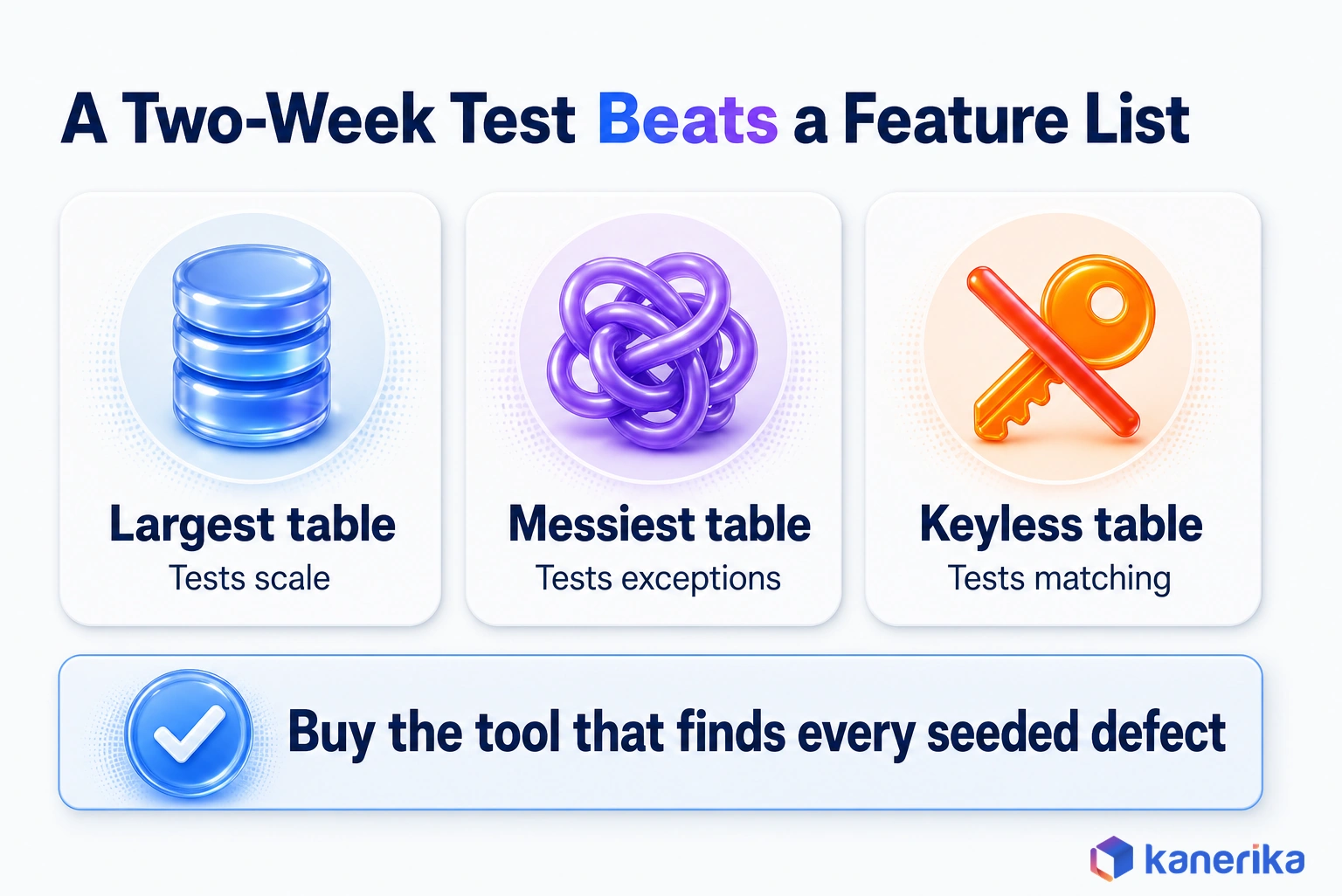
Seed a few known defects, such as a truncated decimal or a deleted row. Then see whether each tool finds them, explains them and re-runs only what failed.
The tool that finds every seeded defect on your own data is the one to buy. Feature lists rarely separate the finalists, but a short test on real tables almost always does.
Which Data Reconciliation Tool Fits Which Migration?
The right tool depends on what you are moving. A database copy, a warehouse rebuild and a report migration fail in different ways, so each one needs a different first check.
| Migration type | What must reconcile | Start with |
|---|
| Database to database, such as Oracle to Postgres | Every row and field by key | AWS DMS validation if DMS moves the data, Google DVT otherwise |
| On-premises warehouse to Snowflake, Fabric or Databricks | Aggregates per partition, then row diffs where they fail | Google DVT where its connectors fit, a testing platform or SQL script for the rest |
| BI report migration, such as SSRS to Power BI | Report totals and filtered views | QuerySurge BI report testing, or scripted totals against the source |
| ETL rewrite, such as SSIS to Microsoft Fabric | Transformation outputs, joins and business rules | QuerySurge or Datagaps, with dbt tests on the new models |
| Incremental or CDC loads | Changes inside each load window | AWS DMS CDC validation, or watermark-based checks per window |
Cloud warehouse and lakehouse targets, as in a legacy systems to Databricks migration, especially deserve a closer look. Check connector coverage for your exact target during the proof of concept, because support differs by tool and version. Where a connector is missing, the generic SQL shown earlier runs on both sides and still gives you aggregate and hash checks. When a partition fails, data lineage traces the field back through each transformation to its source, which turns a mismatch into a specific fix.
Reconciliation Beyond Migration
Reconciliation also runs outside migrations. Finance teams reconcile subledgers with the general ledger, and healthcare analytics teams match claims with clinical records across systems. Supply chain teams compare inventory between ERP and warehouse systems, applying the same checks to a running process instead of a one-time move.
For a migration, though, the type of move is still the best starting filter. Pick the row in the table that matches your project, then shortlist two tools from the class it names.
Tolerances, CDC and Audit Evidence
Every reconciliation needs rules for what counts as a match. Without them, teams argue over each difference at the worst possible time, during cutover.
Set tolerances by data type and agree them with the data owner before testing starts. In general, exact matching is right for anything a person will count or pay. Small tolerances belong only where the platforms compute differently by design.
| Data | Match rule | Why |
|---|
| Primary and business keys | Exact | A missing key is a missing record |
| Money and quantities | Exact, to the cent or unit | Small rounding errors add up across millions of rows |
| Floats and derived ratios | Agreed tolerance, for example a relative difference below 0.0001%, written into the test plan by the data owner | Engines can round floating-point math differently |
| Timestamps | Exact after converting both sides to one time zone | Hidden time zone shifts move records across days |
| Text | Exact after agreed trimming and encoding rules | Whitespace and character sets change silently |
Reconciling Live Sources During CDC
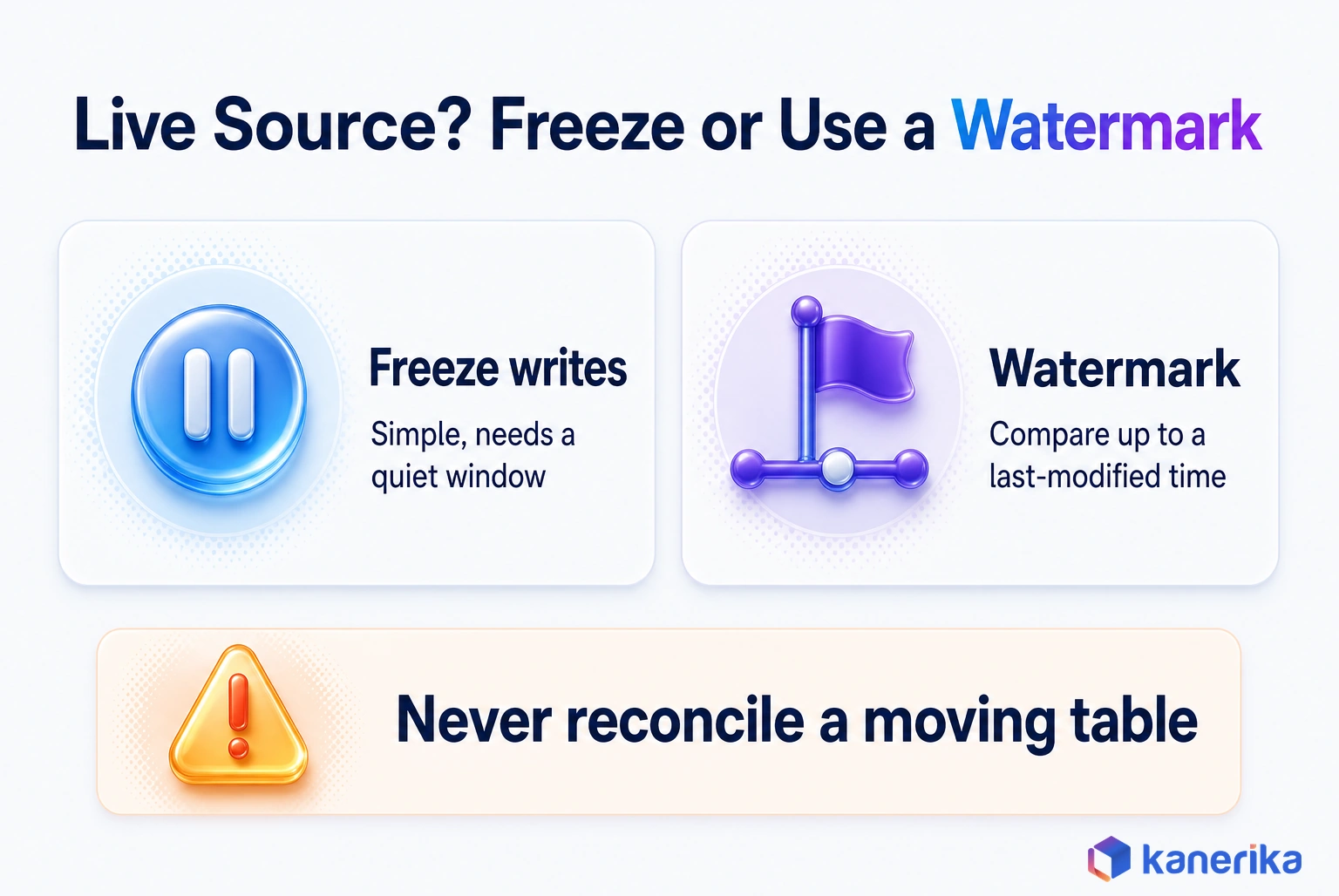
Live sources add one more problem. If the source keeps changing during the check, the numbers never line up.
There are two ways out. You can freeze writes for the reconciliation window. Otherwise, compare only records up to a watermark, such as a last-modified time, then catch later changes in the next window. AWS DMS covers part of this by validating CDC changes as they occur.
What the Reconciliation Report Must Contain
The reconciliation report is the evidence that the move worked, and the same record supports compliance automation and audits. Auditors and data owners should be able to read it without asking the engineering team for context, so it should contain these parts:
- Scope: the systems, tables and load window covered.
- Checks: each check that ran, with its match rule and tolerance.
- Results: pass or fail per table, with counts and totals.
- Exceptions: every failed row or group, its cause and its fix.
- Owner and sign-off: who reviewed the results and when they approved them.
- Retention: where the report is stored and for how long, as set by your data governance framework.
Once the report is signed, ongoing checks move into production monitoring, which our guide to data observability explains in more depth.
Common Reconciliation Mistakes
The same few habits sit behind many failed reconciliations. Each one looks harmless on a project plan, but it costs real money after go-live.
- Checking counts only. Counts pass while values drift, as the earlier example showed.
- Sampling money tables. A small sample can miss the rows that matter, so compare financial tables in full.
- No plan for keyless tables. Decide early whether to build a composite key or compare hashed groups.
- No owner for sign-off. Without a named owner, exceptions stay open and nobody can declare the migration done.
- Reconciling once. A single check at cutover misses defects from later incremental loads, so reconcile every load.
Each of these mistakes lets bad records into the new platform, where they are far harder to remove. The cost of bad data quality grows with every report and model built on top of them.
How Kanerika Builds Reconciliation Into Migrations
Kanerika treats reconciliation as part of the migration design rather than a test added at the end. Our data modernization services plan the checks alongside the mappings, so every table has a pass rule before it moves.
In practice, delivery follows the stages described above. We baseline the source, document the source-to-target mapping and run automated checks on every load. Each wave then closes with a sign-off report that the data owner approves.
A North American beverage manufacturer and distributor shows the payoff. Its legacy SSAS and hybrid systems moved to Snowflake, with Fivetran ingesting data from ERP and third-party systems and Power BI reporting on Snowflake.
| Metric | Result |
|---|
| Manual data reconciliation | 60% reduction |
| Data reporting cycles | 40% faster |
| Analytics delivery | 3X quicker |
| License and maintenance costs | $130K annual savings |
Once reporting ran on one Snowflake platform, teams spent far less time reconciling numbers by hand. The full story is in the Snowflake migration case study.
Where a migration converts ETL jobs or reports, FLIP, Kanerika’s migration accelerator, automates parts of the conversion. Reconciliation then proves that the converted output matches the original.
If your own migration is coming up, the same approach applies at any scale. Our migration and modernization team can help you pick the checks, set the tolerances and run the proof of concept.
Kanerika Service
Data Modernization Services
Kanerika plans and runs data platform migrations with reconciliation built in, from source baselines and mappings to automated checks on every load and a signed report at the end.
Explore Data Modernization
Bottom Line: Choosing a Data Reconciliation Tool Before You Migrate
Let the type of migration drive the choice. For database moves, start with AWS DMS validation or Google DVT, since both compare rows directly. For ETL and BI rewrites, a testing platform such as QuerySurge or Datagaps earns its setup cost. Finance tools such as BlackLine stay with the ledger.
Whatever you pick, insist on value-level checks, agreed tolerances and a signed report, and write them into your data migration checklist. Shortlist by migration type, then buy the tool that finds every seeded defect in a two-week test on your hardest tables.
Frequently Asked Questions
What are data reconciliation tools?
Data reconciliation tools compare data in a source system with the same data in a target system and report every difference. They check row counts, column totals, individual rows and field values, then list the exceptions for someone to fix. In a migration, their results become the evidence that the move worked and that nothing was lost or changed.
What is an example of data reconciliation?
A team moves 1,000,000 order rows to a new warehouse and both sides show the same count. Reconciliation then compares the sum of order amounts and revenue by month. It finds that a column lost two decimal places and a time zone change shifted orders between months, so the team fixes both before sign-off.
How should enterprises choose a data reconciliation tool?
Enterprises should score candidates on source and target coverage, comparison depth, scale and pushdown, handling of keyless tables, CDC support, exception workflow, automation and audit evidence. Weight the criteria to the project, shortlist two tools and run a two-week proof of concept with seeded defects on the largest and messiest tables.
What should a data reconciliation checklist include?
A useful checklist covers the scope of systems and tables, the source baseline, the source-to-target mapping and the match rule for each data type. It lists the checks to run per load, the owner for each table and the tolerance agreements. It ends with exception handling, re-run rules, sign-off and report retention.
How do data reconciliation tools support compliance and audits?
They produce a stored record of what was compared, when, by which rule and with what result. A good reconciliation report lists the scope, the checks, pass or fail results, every exception with its fix and the person who signed off. That record lets auditors confirm data integrity without rebuilding the analysis themselves.
Can data reconciliation tools handle large data volumes?
Yes, when they push work down to the databases instead of pulling whole tables into the tool. Large-scale reconciliation usually runs aggregates per partition first, then row-level diffs only where aggregates disagree. Hashing blocks of rows before single rows cuts the work further, and Spark-based libraries such as Deequ suit very large lakehouse tables.
Is SQL enough for data reconciliation?
SQL is enough for a small migration with a few tables. Teams can compare counts, sums and row hashes with queries run on both systems. As table counts, load frequency and audit needs grow, hand-written SQL becomes hard to repeat and track, so scheduled tools with stored results and exception lists become the better option.
How do you reconcile tables that have no primary key?
Build a key from a set of columns that together identify a row, or compare hashed groups of rows instead of single rows. Some tools cannot validate keyless tables at all, and AWS DMS reports them in a no primary key state. Plan for these tables early, because they often need custom checks.
What is an acceptable data reconciliation tolerance?
Keys, money and quantities should match exactly, with zero tolerance. Floating-point values and derived ratios can use a small relative tolerance, because different engines round differently. Timestamps should match exactly after both sides are converted to one time zone. Agree every tolerance with the data owner in writing before testing starts, not during cutover.
What is the best data reconciliation software?
There is no single best product, because the right choice depends on the migration. AWS DMS validation and Google DVT suit database moves, QuerySurge and Datagaps suit ETL and BI rewrites, and BlackLine suits finance close work. Shortlist two tools from the right class and test them on your hardest tables before you buy.
What is the difference between data reconciliation and data validation?
Data validation checks whether one dataset follows its rules, such as no empty required fields or dates within range. Data reconciliation checks whether two systems agree, comparing source and target records and values. A target table can pass every validation rule and still be missing rows that never loaded, so migrations need both kinds of checks.
How do you perform data reconciliation step by step?
Start by profiling the source to record counts and totals. Next, document how each source table and column maps to the target. Reconcile each batch as it lands, then run counts, aggregates, row diffs, schema checks and report checks on the full load. Fix and re-run failures, and finish with a signed reconciliation report.
What is data reconciliation in ETL?
In ETL, data reconciliation confirms that what the pipeline loaded matches what it extracted after every transformation. Teams compare row counts, totals and key business figures between the source and the target tables for each run. When a rewritten job changes a join or drops a filter, reconciliation shows the difference before reports reach users.
What are the different types of data reconciliation?
The main types are count reconciliation, aggregate reconciliation, row-level reconciliation, schema reconciliation and business-rule reconciliation. Count checks prove completeness, aggregates and hashes prove totals and values, and row-level diffs name the exact records that differ. Schema checks compare structure, while business-rule checks compare the report figures people actually use for decisions.
What types of checks do data reconciliation tools perform?
Most tools run row counts per table and partition, column aggregates such as sum, minimum, maximum and distinct count, and row hashes. Stronger tools add key-based diffs that list missing, extra and changed rows, plus schema comparisons. Testing platforms can also compare report totals, such as a Power BI figure against its source query.
Are data reconciliation tools used only after migration?
No. Good teams use them before, during and after a migration. Before the move they baseline the source, during it they check each batch and change stream, and after it they reconcile the full load. Many organizations also keep reconciliation running for finance, healthcare and supply chain processes long after the migration is finished.
Why are data reconciliation tools important in data migration?
They prove that the new platform holds the same data as the old one. Row counts alone can match while values drift through truncated decimals, time zone shifts or rewritten joins. Reconciliation tools catch those defects before cutover, show exactly which rows changed and produce the signed evidence that auditors and data owners need.














