
TL;DR
The Databricks CLI is a single, dependency-free command-line tool that wraps the Databricks REST API, so you can manage workspaces, jobs, clusters, files and Unity Catalog objects from a terminal, a script or a CI pipeline. It has been generally available since version 1.0.0 in May 2026 and ships new releases roughly every week. Install it with Homebrew on macOS or Linux, WinGet on Windows, or the install script on servers, then run databricks auth login to sign in with OAuth. Use service principals or OIDC federation for automation, since Databricks now treats personal access tokens as a legacy option. For scripts, add -o json and parse the output, and move repeatable deployments into bundles run from CI.
Key Takeaways
- The current Databricks CLI is version 1.x; the old pip package (0.18 and below) is unsupported.
- Homebrew now needs a brew trust step before the install, and WinGet is the simplest route on Windows.
- Interactive OAuth login is the default for people; service principals and OIDC federation suit automation.
- Since 1.0, OAuth tokens live in the operating system’s secure store, so re-run auth login after upgrading.
- Profiles in .databrickscfg let one machine work with many workspaces through the -p flag.
- Scripts should use JSON output, –no-wait for long runs and a pinned CLI version in CI.
What the Databricks CLI Does and Which Version You Need
The Databricks CLI lets you work with the Databricks platform from a local terminal or from automation scripts. It wraps the Databricks REST API, so almost anything you can click in the workspace, such as starting a cluster, running a job or granting a permission, has a command. You can also run it inside a workspace through the web terminal, where it comes preinstalled and signed in as you.
Teams usually meet the CLI in three places: an engineer’s laptop, a build agent in CI, and scripts that run admin tasks on a schedule. This guide covers installing it, signing in safely, the commands teams use every week, and how to automate with it. If you’re new to the platform itself, start with our Databricks overview, and for the API-level view see our Databricks API guide.
Workspace Commands and Account Commands
Workspace-level commands act on a single workspace: clusters, jobs, notebooks, files and Unity Catalog objects. Account-level operations, such as identity, metastores, billing and OAuth federation policies, sit under databricks account and need an account-level login. You need to configure authentication before either kind of command will run.
Legacy CLI vs the Current CLI
Databricks shipped two very different tools under the same name. The legacy CLI was a Python package installed with pip, and Databricks no longer supports it. The current CLI is a single binary with no Python dependency, and several command groups changed along the way.
| Area | Legacy CLI | Current CLI |
|---|---|---|
| Versions | 0.18 and below | 1.0.0 and above (GA); 0.205 to 0.299 were Public Preview |
| Install | pip install databricks-cli | Homebrew, WinGet, install script or a release zip |
| Python needed | Yes | No |
| Sign-in options | Personal access tokens | OAuth, service principals, OIDC federation, tokens |
| Support | Unsupported, no new features | Supported, weekly releases |
| Job runs | databricks runs … | databricks jobs get-run, list-runs, cancel-run |
| Unity Catalog | databricks unity-catalog … | catalogs, schemas, tables, grants |
| The -o flag | OAuth in the configure command | Output format (text or json) |
Version Status in Late 2026
Databricks made the CLI generally available on May 21, 2026, with version 1.0.0, and it now follows semantic versioning: stable commands and flags don’t break within a major version. The 0.299.x line still gets security-critical patches until May 20, 2027, and older pre-1.0 versions get none. At the time of writing, the latest release is v1.28.0, published on November 24, 2026.
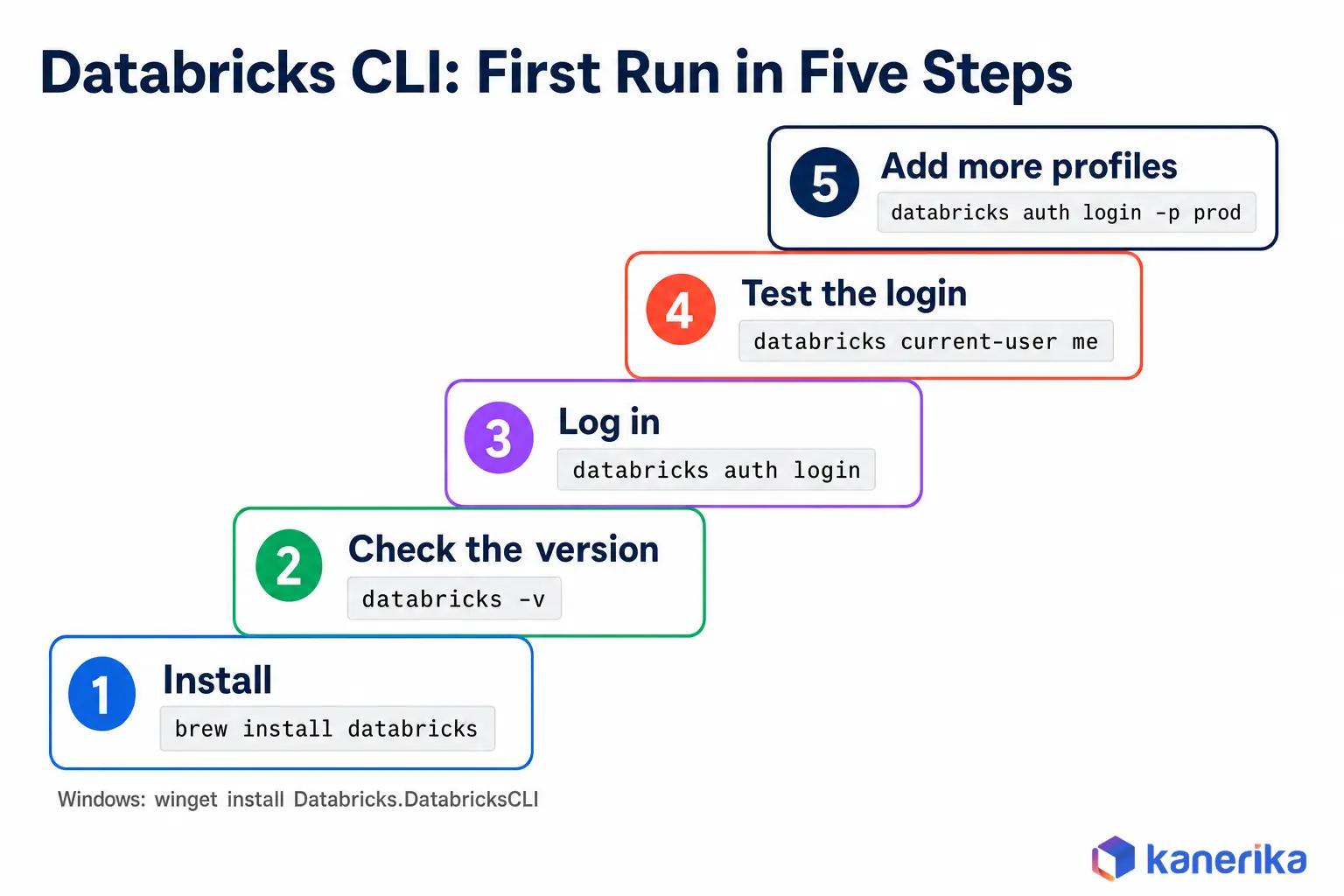
How to Install the Databricks CLI on macOS, Windows and Linux
The Databricks CLI install page lists Homebrew for macOS, WinGet for Windows, and an install script or manual download for Linux and servers.
macOS and Linux With Homebrew
Add the Databricks tap, trust it, then install. The trust step is required from Homebrew 6.0.0, including for anyone who added the tap before upgrading.
brew tap databricks/tap
brew trust databricks/tap
brew install databricks
Windows With WinGet
Install with WinGet, then restart the Command Prompt so the new path is picked up. A Chocolatey package also exists, but Databricks marks it experimental, and it recommends Windows Subsystem for Linux if you prefer the install script.
winget install Databricks.DatabricksCLIServers, CI Runners and Containers
On Linux servers and build agents, the install script from the setup-cli repository puts the binary in /usr/local/bin. Replace main with a release tag to pin a version, which keeps builds repeatable.
curl -fsSL https://raw.githubusercontent.com/databricks/setup-cli/main/install.sh | shYou can also download a zip for your operating system and architecture from GitHub Releases and check it against the published SHA256SUMS file, or run the Docker image at ghcr.io/databricks/cli for containerized or air-gapped jobs.
Check the Version, Update and Remove the Legacy CLI
databricks -v
brew upgrade databricks
winget upgrade Databricks.DatabricksCLI
If the legacy CLI is still installed, it can shadow the new one on your PATH. Run which -a databricks on macOS or Linux, or where databricks on Windows, then remove the old package with pip uninstall databricks-cli.
Databricks Services
Set Up Databricks for Your Team With Kanerika
Kanerika’s Databricks team sets up workspaces, identity, Unity Catalog and automation so engineers can work from the CLI and CI safely.
How to Authenticate the Databricks CLI and Manage Profiles
The CLI supports several authentication methods. Pick one per use case: interactive OAuth for people, and service principals for anything that runs unattended.
Interactive Login With OAuth
For your own work, sign in through the browser. The CLI saves a configuration profile and refreshes the one-hour access tokens for you. For account-level commands, add the account console URL and your account ID.
databricks auth login --host https://<workspace-url>
databricks auth login --host <account-console-url> --account-id <account-id>
Since version 1.0.0, these tokens are stored in the operating system’s secure store (Keychain on macOS, Credential Manager on Windows, Secret Service on Linux), and .databrickscfg keeps only non-secret settings. Tokens cached by older versions aren’t migrated, so run databricks auth login again for each profile after upgrading. On headless hosts without a secure store, set DATABRICKS_AUTH_STORAGE=plaintext to fall back to file storage.
Service Principals With OAuth Machine-to-Machine
Unattended jobs should run as a service principal. Create an OAuth secret for it, which can last up to 730 days, and put the client ID and secret in a profile. The CLI exchanges them for access tokens that are valid for one hour.
[ci-bot]
host          = https://<workspace-url>
client_id     = <service-principal-application-id>
client_secret = <oauth-secret>
Workload Identity Federation for Pipelines
OAuth token federation removes stored Databricks secrets altogether. You create a federation policy on the service principal, and the CLI exchanges the CI system’s own identity token, such as a GitHub Actions or Azure DevOps OIDC token, for a Databricks token at run time. The CI section below shows the setup.
Azure Databricks Options
On Azure Databricks, the CLI can also use the Azure CLI (sign in with az login and keep only the host in the profile), a managed identity on an Azure VM, or a Microsoft Entra ID service principal with a tenant ID, client ID and client secret.
Personal Access Tokens, Now a Legacy Option
Databricks labels personal access tokens legacy and recommends OAuth where possible. Each token works in one workspace, unused tokens are revoked after 90 days, and tokens can’t automate account-level functions. If you still need one, databricks configure creates a token-based profile. Our guide to Databricks security covers least-privilege service principals.
| Method | Best for | What you configure | Stored secret? |
|---|---|---|---|
| OAuth user-to-machine | People on their own machines | databricks auth login | No; tokens in the OS store |
| OAuth machine-to-machine | Scheduled scripts, self-hosted runners | Service principal client ID and secret | Yes, up to 730 days |
| Workload identity federation | GitHub Actions, Azure DevOps | Federation policy and auth type | No |
| Azure CLI, managed identity, Entra ID | Azure-only setups | az login, VM identity or Entra app | Depends on method |
| Personal access token | Legacy scripts | databricks configure | Yes |
Profiles, Defaults and Environment Variables
Every login is saved as a profile in .databrickscfg, in your home folder (or %USERPROFILE% on Windows). Pick one with -p, or set a default:
databricks auth profiles
databricks auth switch --profile prod
databricks auth describe -p ci-bot
databricks current-user me
The CLI looks for settings in a fixed order: bundle settings, then environment variables, then profiles, and the first match wins. A DATABRICKS_TOKEN set in your shell therefore beats any profile, which is a common source of confusion. Without --profile, the CLI uses DATABRICKS_CONFIG_PROFILE, then the default set by auth switch, then the profile named DEFAULT. The older databricks auth env command is deprecated; use auth describe instead.
How Databricks CLI Commands Are Structured
Every command follows the same pattern: a command group, a command and its arguments, then flags. Help is available at each level, so you rarely need to leave the terminal.
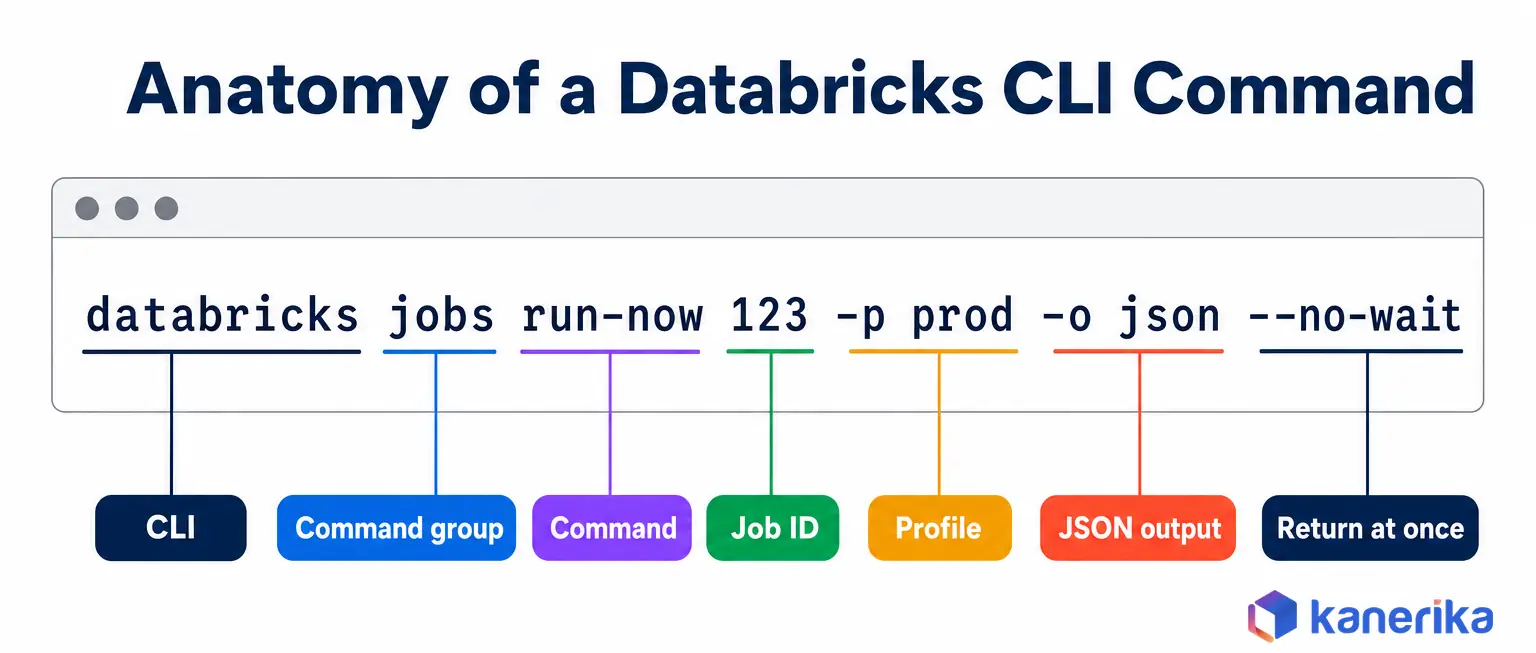
databricks <command-group> <command-name> [arguments] [flags]
databricks clusters -h
databricks clusters list -h
A handful of global flags matter in daily use:
-por--profile: picks the workspace profile.-o json: returns JSON, which scripts can parse.-tor--target: picks a bundle target such as dev or prod.--debug: prints debug logs, the same as--log-level debug.
Many commands also accept --json with an inline payload or @file.json, for fields that aren’t exposed as flags. Use single quotes around inline JSON on macOS and Linux, and escaped double quotes on Windows. Pipe JSON output to jq to pull out one field:
databricks clusters get <cluster-id> -o json | jq -r .cluster_nameDatabricks CLI Command Groups by Area
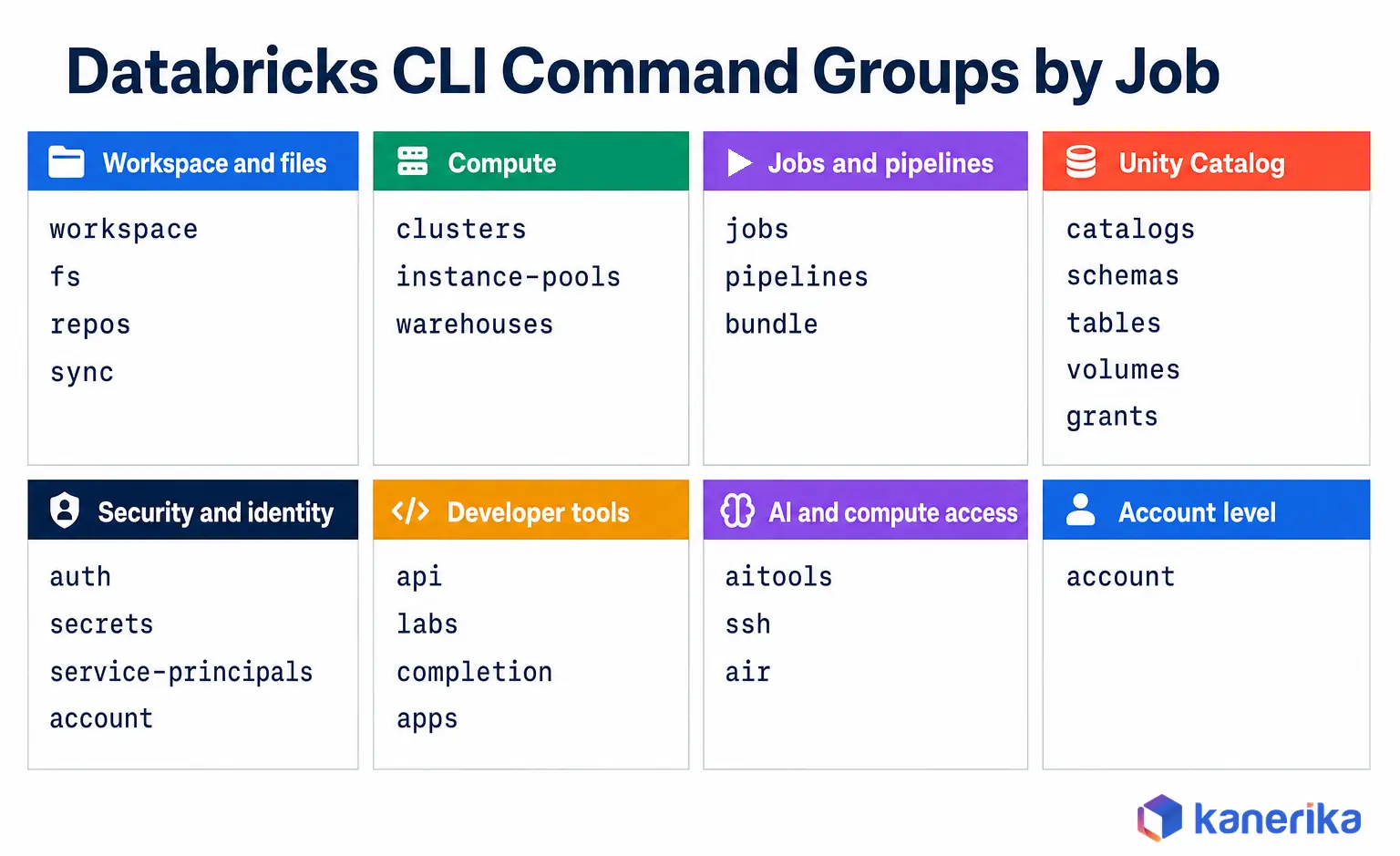
The CLI has dozens of command groups, and the command reference lists them all. In practice they fall into a few areas, shown below.
These groups map to parts of the platform you already know: jobs to Lakeflow Jobs, pipelines to Lakeflow pipelines, apps to Databricks Apps, and bundle to Declarative Automation Bundles. The databricks api command calls any REST endpoint with your CLI login, which covers features that don’t have a dedicated command yet.
Everyday Databricks CLI Tasks With Exact Commands
Start Clusters and SQL Warehouses
clusters list shows pinned and active clusters plus those terminated in the last 30 days. Start commands wait until the resource is running, unless you add --no-wait.
databricks clusters list
databricks clusters start <cluster-id>
databricks warehouses start <warehouse-id>
Stopping idle compute from scheduled scripts is one of the simplest savings; our Databricks cost optimization guide covers the rest.
Run a Job and Check the Run
By default, run-now waits for the run to finish, with a 20-minute timeout. In scripts, start the run without waiting and poll it instead.
databricks jobs run-now <job-id> --no-wait
databricks jobs get-run <run-id>
databricks jobs list-runs --job-id <job-id>
Start a Lakeflow Pipeline Update
start-update starts a pipeline update; --full-refresh resets the tables and --validate-only checks the code. It fails if an update is already running.
databricks pipelines start-update <pipeline-id> --full-refreshUpload Files to a Unity Catalog Volume
The fs commands work on Unity Catalog volumes, whose paths start with dbfs:/Volumes. Workspace files use the workspace commands instead. See our Unity Catalog guide for how volumes are governed.
databricks fs cp ./sales.csv dbfs:/Volumes/main/default/landing/ --overwriteCreate a Secret Scope and Store a Secret
put-secret prompts for the value, so it never lands in your shell history. A secret can hold up to 128 KB, and a scope up to 1,000 secrets. On Azure, scopes can also be backed by Azure Key Vault.
databricks secrets create-scope etl-secrets
databricks secrets put-secret etl-secrets jdbc-password
Export and Import Notebooks
Export a notebook as source code, or import a whole folder. Since 1.0, import-dir skips .git, .databricks and node_modules folders.
databricks workspace export /Workspace/Users/<you>/etl_notebook --format SOURCE --file etl_notebook.py
databricks workspace import-dir ./notebooks /Workspace/Shared/etl
Run SQL on a Warehouse
There’s no dedicated command for running a SQL statement, so call the Statement Execution API through databricks api. Our SQL warehouse guide covers sizing.
databricks api post /api/2.0/sql/statements --json '{"warehouse_id": "<warehouse-id>", "statement": "SELECT 1"}'Check Unity Catalog Grants
databricks grants get catalog main| Task | Command |
|---|---|
| Check the version | databricks -v |
| Log in | databricks auth login –host |
| List profiles | databricks auth profiles |
| Check who you are | databricks current-user me |
| List clusters | databricks clusters list |
| Start a cluster | databricks clusters start |
| Run a job now | databricks jobs run-now |
| Update a pipeline | databricks pipelines start-update |
| Upload to a volume | databricks fs cp |
| Create a secret scope | databricks secrets create-scope |
| Export a notebook | databricks workspace export |
| Start a SQL warehouse | databricks warehouses start |
| Check grants | databricks grants get catalog |
| Deploy a bundle | databricks bundle deploy -t |
Automating Databricks With the CLI: Scripts, Bundles and CI/CD
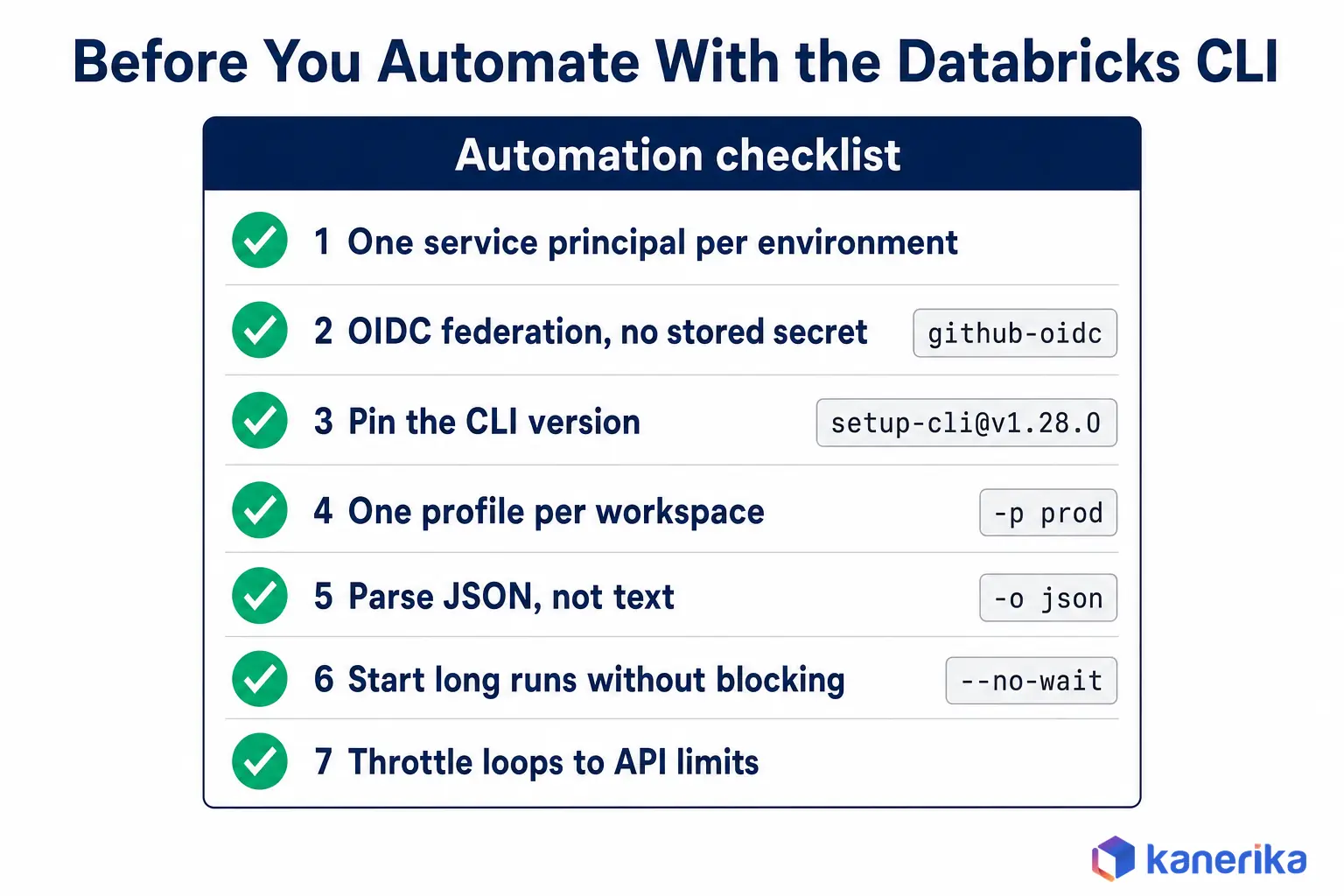
The Databricks CLI is built for automation: every command can run unattended as a service principal and return JSON. Check these points before you put it in a pipeline:
Scripting Patterns That Hold Up in Production
- Parse JSON: use
-o jsonand jq, since text output can change between versions. - Don’t block on long runs: start jobs with
--no-wait, then pollget-run. - One identity per environment: a separate service principal and profile for dev, test and prod.
- Respect API limits: run-now is limited to 20 requests per second per workspace, and workspace imports to 30, so throttle loops.
- Keep payloads in files:
--json @spec.jsonis easier to review than long inline JSON.
Deploying With Declarative Automation Bundles
Declarative Automation Bundles, formerly Databricks Asset Bundles, package jobs, pipelines and notebooks as code, and they run entirely through the CLI. Validate, deploy and run a target with three commands; bundle destroy permanently deletes what a bundle deployed, so keep it out of routine scripts.
databricks bundle validate -t dev
databricks bundle deploy -t dev
databricks bundle run -t dev <job-key>
Our Declarative Automation Bundles guide covers project layout, templates and environments in depth.
GitHub Actions With setup-cli and OIDC
The databricks/setup-cli action installs the CLI on a runner; pin it to a release. With a federation policy on the service principal, the job authenticates with GitHub’s OIDC token and stores no Databricks secret.
permissions:
  id-token: write
  contents: read
jobs:
  deploy:
    runs-on: ubuntu-latest
    env:
      DATABRICKS_AUTH_TYPE: github-oidc
      DATABRICKS_HOST: ${{ vars.DATABRICKS_HOST }}
      DATABRICKS_CLIENT_ID: ${{ vars.DATABRICKS_CLIENT_ID }}
    steps:
      - uses: actions/checkout@v4
      - uses: databricks/[email protected]
      - run: databricks bundle deploy -t prod
Azure DevOps Pipelines
In Azure DevOps, install the CLI with the install script step, then set DATABRICKS_AUTH_TYPE to azure-devops-oidc along with the host, the service principal’s client ID and SYSTEM_ACCESSTOKEN mapped from the pipeline’s access token. Our data engineering services include DataOps setup with CI/CD, testing and monitoring.
Case Study
Zero-Downtime Databricks Migration for Retail Analytics
A large US retailer moved distributed on-premises databases to Delta Lake under Unity Catalog, with a parallel run and app-by-app cutover. The result: zero downtime and 100% of legacy infrastructure decommissioned.
Newer Databricks CLI Tools: Sync, Labs, Completion and AI Tools
databricks sync: one-way, incremental sync of a local folder to a workspace folder; add--watchto keep syncing as you edit.databricks labs: installs Databricks Labs projects, such as Lakebridge withdatabricks labs install lakebridge.databricks completion: generates shell completion for bash, zsh, fish and PowerShell.databricks aitools: added in 1.0, installs Databricks skills and plugins into coding agents such as Claude Code, Cursor, Codex CLI and GitHub Copilot.databricks ssh: in Beta, opens SSH tunnels to Databricks compute.
databricks sync ./src /Workspace/Users/<you>/src --watch
source <(databricks completion bash)
databricks aitools install --agents claude-code
Inside the workspace, Databricks’ own AI assistant works differently from local agents; our guide to Databricks Genie Code explains it.
Listen on Spotify
What Is Databricks Genie Code?
Where the CLI Fits Next to the SDKs, Terraform and the IDE Extension
Databricks positions the CLI for terminal work, shell scripts, raw REST calls, local auth profiles and code sync. The Python, Java and Go SDKs suit applications and reuse the same profiles. Databricks recommends Terraform for cloud-level resources and admin actions, and bundles for jobs, pipelines and notebooks; see our Azure Terraform guide. The Databricks IDE extension for VS Code and Cursor connects to workspaces and deploys bundles from the editor.
Common Databricks CLI Errors and How to Fix Them
When a Databricks CLI command fails, turn on --debug first; most errors explain themselves once you see the request and the profile in use.
| Error or symptom | Likely cause | Fix |
|---|---|---|
| command not found | The binary isn’t on your PATH | Reinstall, or restart the terminal after WinGet |
| Old commands or flags behave strangely | The legacy CLI runs first on your PATH | which -a databricks, then pip uninstall databricks-cli |
| Stored credentials are no longer used | Upgraded to 1.x; old token cache not migrated | Run databricks auth login again per profile |
| Login fails over SSH or in a container | No OS secure store available | Set DATABRICKS_AUTH_STORAGE=plaintext on that host |
| A profile shows as invalid | Expired login or wrong host | databricks auth profiles, then log in again |
| Wrong workspace or identity | An environment variable overrides the profile | databricks auth describe, then unset the variable |
| HTTP 429 in loops | API rate limit reached | Throttle the loop and add retries |
| Terraform key expired on bundle deploy | An old CLI version | Upgrade the CLI |
| A list command seems to hang | Older versions loaded whole lists | Upgrade the CLI |
Our Databricks troubleshooting guide covers errors beyond the CLI.
How Kanerika Helps Teams Run Databricks as Code
Kanerika is a certified Databricks partner. When we set up or tidy a Databricks estate, the CLI and bundles are where automation starts, and we work through it in stages:
- Assess: list existing scripts, shared tokens and legacy CLI installs on build agents.
- Standardize identity: one service principal per environment, with OIDC federation where the CI system supports it.
- Build: bundles plus CLI steps in GitHub Actions or Azure DevOps, with pinned versions and validation gates.
- Govern: Unity Catalog grants and secret scopes managed as code, with changes audited through system tables.
- Enable: profiles, shell completion and AI tools set up for the team.
For a large US retailer, Kanerika moved distributed on-premises databases to Delta Lake under Unity Catalog with zero downtime and 100% of the legacy infrastructure decommissioned. For teams migrating from older platforms, our FLIP accelerator converts legacy code into Databricks notebooks. You can also hire Databricks developers from Kanerika to build and run the pipelines.
Conclusion
The Databricks CLI is now a stable, generally available tool, and the 2026 way to use it is simple. Install the current binary, sign in with OAuth, keep a profile per workspace, and let the operating system store your tokens. For automation, use service principals or OIDC federation, parse JSON output, and move repeatable deployments into bundles run from CI with a pinned CLI version. Our Databricks readiness checklist covers the rest of the setup.
Talk to Kanerika
Want Databricks Automation Set Up Right?
Kanerika’s Databricks team sets up identity, bundles and CI/CD so your workspaces are managed as code. Book a session to plan it with us.
Frequently Asked Questions
What is the Databricks CLI used for?
The Databricks CLI lets you manage the Databricks platform from a terminal or script. It wraps the REST API, so you can start clusters, run jobs, upload files to volumes, manage secrets and grants, sync code and deploy bundles. Teams use it on laptops, in scheduled admin scripts and in CI/CD pipelines.
How do I install the Databricks CLI on Windows?
Run winget install Databricks.DatabricksCLI, then restart the Command Prompt. A Chocolatey package also exists but is experimental. If you prefer the install script, Databricks recommends running it in Windows Subsystem for Linux. Check the install with databricks -v, then sign in with databricks auth login.
How do I install the Databricks CLI on a Mac?
Use Homebrew: run brew tap databricks/tap, then brew trust databricks/tap, then brew install databricks. The trust step is required from Homebrew 6.0.0, even if you added the tap earlier. Check the install with databricks -v, and update later with brew upgrade databricks.
How do I check my Databricks CLI version and update it?
Run databricks -v or databricks version. To update, use brew upgrade databricks on macOS, winget upgrade Databricks.DatabricksCLI on Windows, or delete the old binary and rerun the install script on Linux. After moving to 1.x, run databricks auth login again for each profile.
What is the latest version of the Databricks CLI?
At the time of writing, the latest release is v1.28.0, published on November 24, 2026. The CLI has been generally available since v1.0.0 in May 2026 and ships new releases roughly every week, so check the GitHub releases page for the current version before pinning one in CI.
Does the Databricks CLI need Python?
No. The current CLI is a single, dependency-free binary. Python was a requirement of the legacy CLI, the pip package numbered 0.18 and below, which Databricks no longer supports. If that package is still installed, remove it with pip uninstall databricks-cli so it doesn’t shadow the new one.
What is the difference between the legacy and the new Databricks CLI?
The legacy CLI was a Python package, supported only personal access tokens and is now unsupported. The new CLI is a binary with OAuth, service principals and OIDC federation. Several commands moved: runs commands now sit under jobs, unity-catalog commands lost their prefix, and permissions became grants.
How do I log in to the Databricks CLI without a personal access token?
Run databricks auth login –host followed by your workspace URL. It opens a browser sign-in and saves a profile, and the CLI refreshes the one-hour OAuth tokens itself. For automation, use a service principal with an OAuth secret, or workload identity federation in CI so no secret is stored.
How do I get a client ID and secret for Databricks CLI automation?
Create or pick a service principal, then generate an OAuth secret for it in the account or workspace admin settings. The service principal’s application ID is the client ID. Secrets can last up to 730 days. Put both in a .databrickscfg profile or in environment variables.
How do I use the Databricks CLI with multiple workspaces?
Create one profile per workspace with databricks auth login, then pick one with the -p flag on any command. Set a default with databricks auth switch, and list them with databricks auth profiles. Make sure no DATABRICKS_TOKEN or DATABRICKS_HOST variable is set, since environment variables override profiles.
Can I run the Databricks CLI in GitHub Actions or Azure DevOps?
Yes. In GitHub Actions, the databricks/setup-cli action installs the CLI, and github-oidc authentication uses the runner’s identity token with no stored secret. In Azure DevOps, install with the script and use azure-devops-oidc authentication. Pin the CLI version in both.
What are the Databricks bundle CLI commands?
Bundles run through the bundle command group: init creates a project, validate checks it, plan shows changes, deploy pushes it to a target, run starts a job or pipeline, and destroy permanently deletes what was deployed. Pick the target with -t, such as databricks bundle deploy -t prod.
Can I use the Databricks CLI inside a Databricks workspace?
Yes. The workspace web terminal has the CLI preinstalled, always on the latest version and already signed in as the current user. It needs compute on Databricks Runtime 15.0 or above. It suits quick checks; for repeatable work, run the CLI locally or in CI with profiles.