

TL;DR
Identity columns in Fabric Data Warehouse are generally available since August 2026, so new tables should use BIGINT IDENTITY and migrations should use IDENTITY_INSERT plus a RESEED. Only BIGINT is supported and you cannot set a seed or increment, so a copied INT IDENTITY(1,1) line fails. Values are unique but not sequential, because each ingestion task gets its own range of values and gaps can appear. IDENTITY_INSERT loads existing keys or sentinel rows such as -1 for Unknown, and DBCC CHECKIDENT with RESEED realigns the range afterward. Primary and foreign keys are not enforced, so every load still needs duplicate and orphan checks. IDENTITY works only in the Warehouse item, not the Lakehouse SQL analytics endpoint, and ALTER TABLE cannot add it to an existing table.
Key Takeaways
- IDENTITY columns in Fabric Warehouse reached general availability in August 2026, with IDENTITY_INSERT and reseed support for migrations.
- Declare every identity column as BIGINT IDENTITY with no seed or increment, because other types and IDENTITY(1,1) return an error.
- Values are unique but can arrive out of order and with gaps, so never use the key to infer load order.
- Load existing keys with IDENTITY_INSERT or COPY INTO, then run DBCC CHECKIDENT with RESEED on every table.
- Primary and foreign keys are metadata only, so duplicate and orphan checks belong in every load.
- Preserve source keys when facts and reports already use them, and regenerate keys when merging sources with colliding IDs.
The DimCustomer Script That Would Not Run
Picture a data team moving a sales warehouse from SQL Server to Microsoft Fabric. The first script they lift is DimCustomer, with CustomerKey INT IDENTITY(1,1) as its surrogate key. It has run unchanged for years, so nobody expects trouble.
Then the CREATE TABLE statement fails in the new warehouse. That happens because Fabric accepts only BIGINT for an IDENTITY column, and it takes no seed or increment.
Changing one line to CustomerKey BIGINT IDENTITY gets the table created. The harder part comes next. The team holds years of customer keys that fact tables already reference, and those keys must survive the move intact.
Loading them takes IDENTITY_INSERT, and the job is not finished until a RESEED tells Fabric where new keys may start. This guide therefore covers that whole path, from what Fabric promises about key values to a migration with no collisions or orphan rows.
What Identity Columns in Fabric Data Warehouse Do
An IDENTITY column is a numeric column that fills itself in. Each new row gets a system-generated value, so nobody writes key logic into the load. That value also makes a natural fit for a surrogate key on a dimension table.
Microsoft lists Warehouse IDENTITY columns as generally available in August 2026, with IDENTITY_INSERT and reseed operations for migration and controlled loads. Articles written during the preview describe explicit inserts as unsupported, so check the date on anything you read. For the other platform changes, see our roundup of Microsoft Fabric platform upgrades.
Fabric IDENTITY replaces the ROW_NUMBER and MAX(key) logic that teams once wrote by hand. Microsoft’s IDENTITY reference notes that system-generated keys perform better than manual approaches, because no extra query logic runs.
Scope matters too, because IDENTITY belongs only to the Fabric Warehouse item. The SQL analytics endpoint of a Lakehouse cannot create tables or run INSERT, UPDATE or DELETE, according to Microsoft’s T-SQL surface area reference. If you are still deciding where data should live, our comparison of data lake vs data warehouse explains the split.
Kanerika Service
Microsoft Fabric Services From Kanerika
Kanerika designs Fabric warehouses, builds the load pipelines and migrates existing SQL estates, with surrogate keys planned before the first table moves.
Explore Microsoft Fabric ServicesSurrogate Keys vs Natural Keys
A natural key comes from the source system and means something to the business. A surrogate key, on the other hand, is a number the warehouse assigns, with no meaning of its own. Keeping both lets the warehouse track history even when a source system reuses or changes its IDs. The Kimball Group’s dimensional modeling techniques make the same point, since a dimension that keeps history holds several rows for one natural key.
| Term | Meaning | Example |
|---|---|---|
| Natural key | Identifier from the source system, with business meaning | CustomerID CUST-104 from the CRM |
| Surrogate key | Warehouse-assigned number with no business meaning | CustomerKey 1045, generated by IDENTITY |
| Foreign key in a fact | The surrogate key copied onto each fact row | FactSales.CustomerKey = 1045 |
Facts then join on the compact surrogate key, the same pattern a star schema in Power BI uses for its relationships. The natural key stays on the dimension, where loads use it to look up the right surrogate value.
What IDENTITY Guarantees and What It Does Not
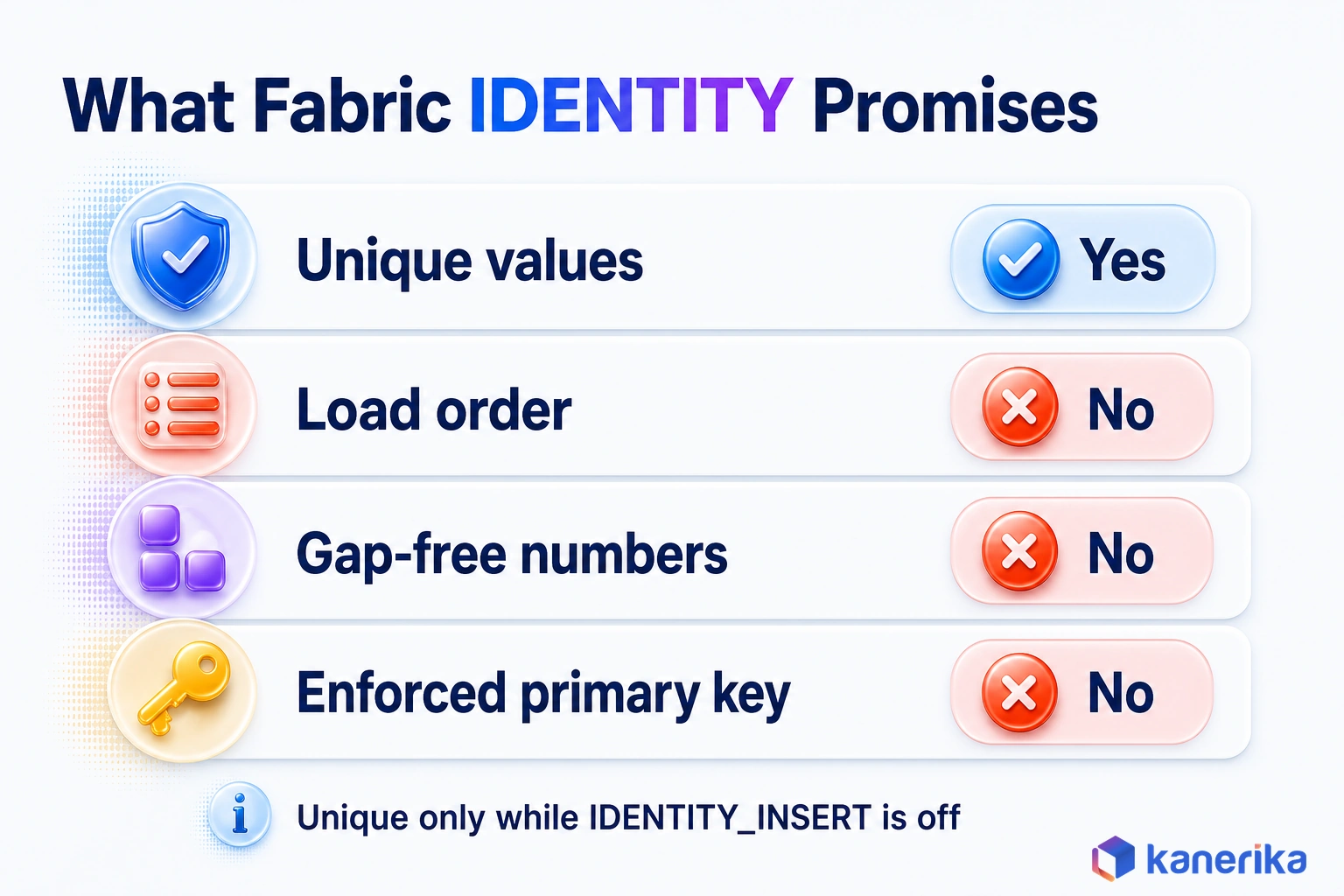
Fabric makes one firm promise about key values and declines several others. That promise is uniqueness, since every generated value stays unique for the life of the table unless IDENTITY_INSERT adds repeats. Values are also positive by default.
Order and gap-free numbers are not promised, because each ingestion task draws its own block of values, as the allocation section below explains. An enforced primary key is missing too, since key constraints exist only as NOT ENFORCED metadata.
Uniqueness is the only guarantee worth building on. Everything else should be checked rather than assumed.
Fabric IDENTITY vs SQL Server IDENTITY
Both platforms use the same keyword, which is why old scripts look portable when they are not. The real differences sit in a short list of behaviors. The table below sets them side by side so you can spot what a migrated script needs.
| Behavior | SQL Server | Fabric Data Warehouse |
|---|---|---|
| Data types | Several integer types, with INT the most common | BIGINT only; other types return an error |
| Seed and increment | IDENTITY(seed, increment), such as (1,1) | Not supported; the system manages values |
| Ordering and gaps | Values follow seed and increment; gaps can still appear after rollbacks or restarts | No guaranteed order; each ingestion task gets a range; gaps can occur |
| IDENTITY_INSERT | Supported | Supported since GA; column list required; one table per session |
| DBCC CHECKIDENT | RESEED with a custom value, or NORESEED | RESEED only; Fabric picks the next range |
| ALTER TABLE ADD IDENTITY | Can add a new identity column | Not supported; rebuild the table instead |
| sys.identity_columns | Shows seed, increment and last value | seed_value and increment_value are NULL; last_value is NULL, then -1 |
| Key constraints | PRIMARY KEY and FOREIGN KEY enforced | PRIMARY KEY NONCLUSTERED NOT ENFORCED; FOREIGN KEY NOT ENFORCED |
Three rows cause most failed first runs, namely the data type, the seed and the reseed options. A script that sets IDENTITY(1,1), or a runbook that passes a value to CHECKIDENT, needs editing before it runs.
The ordering row causes quieter trouble later. Reports that sort by the key, or jobs that read the highest key as the newest row, keep running and quietly give wrong answers. The next section explains why.
How Fabric Allocates Identity Values Across Compute Nodes
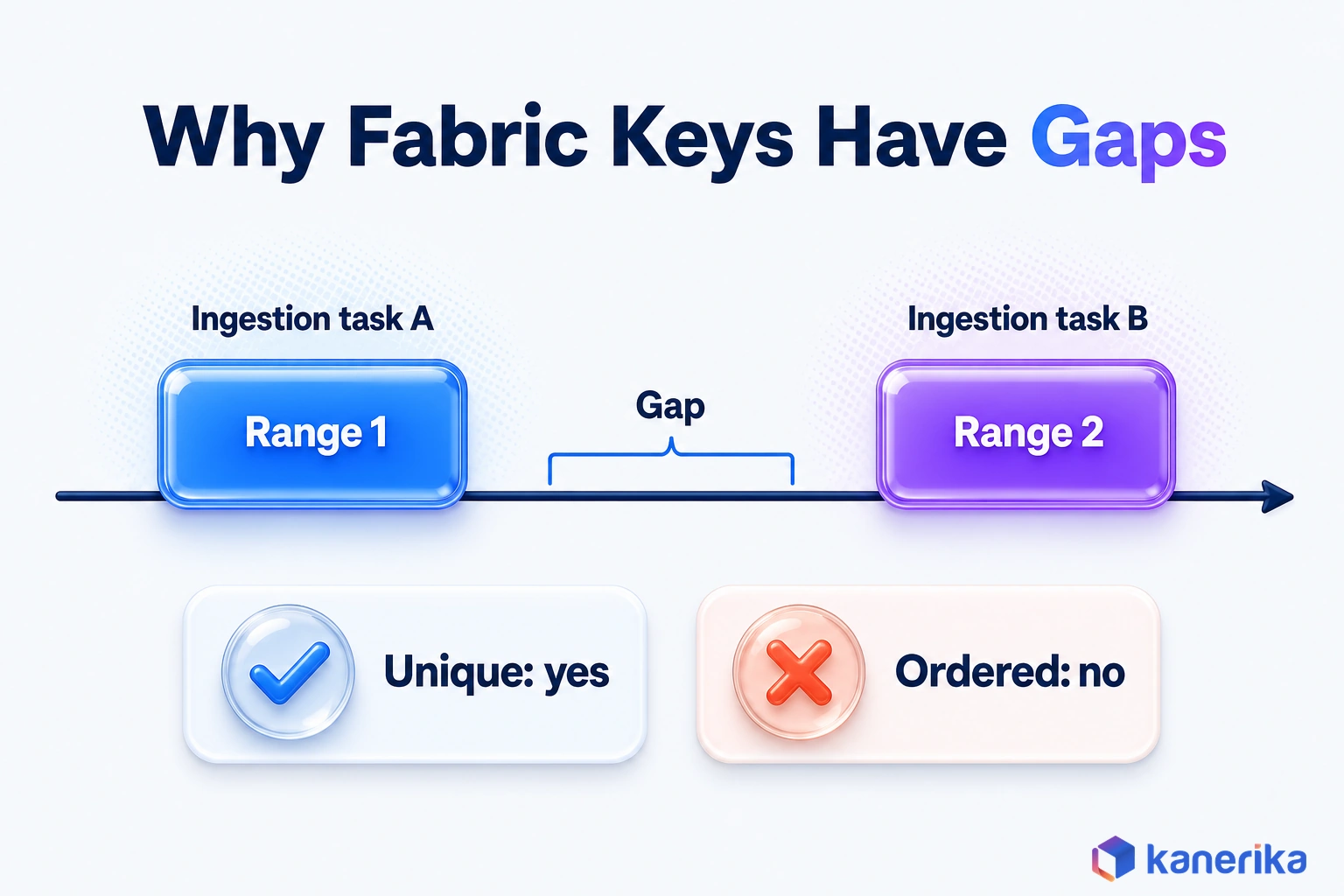
Fabric Warehouse spreads work across many compute nodes, and IDENTITY follows the same design. There is no single counter that every insert waits on. Each ingestion task draws its own range of values instead, which keeps loads fast but changes what the numbers can tell you. Our overview of Microsoft Fabric architecture covers the wider platform design.
Microsoft’s reference page shows the effect with two plain INSERT statements. Each adds four rows to the same table, and the second starts once the first finishes.
CREATE TABLE dbo.Table1 (
    Column1 BIGINT IDENTITY,
    Column2 VARCHAR(30) NULL
);

-- Ingestion task A
INSERT INTO dbo.Table1 VALUES (NULL), (NULL), (NULL), (NULL);

-- Ingestion task B
INSERT INTO dbo.Table1 VALUES (NULL), (NULL), (NULL), (NULL);

SELECT * FROM dbo.Table1;
The first four rows and the last four rows land in different key ranges, and a gap can sit between them. Nothing went wrong there, though. Each task received a block of values, used what it needed, and the next task started in a different block.
The same rule applies to every ingestion task, however large. Once IDENTITY_INSERT is out of the picture, the values stay unique for as long as the table exists, and Fabric never reuses one.
So treat the key as an identifier and nothing more. Never sort by the key to infer load order, and never read a gap as a missing row. If you need load order, store a load timestamp or batch ID in its own column.
IDENTITY Syntax and the BIGINT-Only Rule
The syntax is short because Fabric leaves the arithmetic to the engine. So you declare the column as BIGINT IDENTITY and put nothing in parentheses after it.
CREATE TABLE dbo.DimProduct (
    ProductID    VARCHAR(20)  NOT NULL,  -- natural key from the source
    ProductKey   BIGINT IDENTITY,        -- surrogate key, need not be first
    ProductName  VARCHAR(100),
    Category     VARCHAR(50)
);
The identity column does not need to be the first column, so you can keep the source’s column order. BIGINT also holds up to 9,223,372,036,854,775,807 positive values. No realistic dimension or fact table comes close to that ceiling, even though gaps appear between ranges.
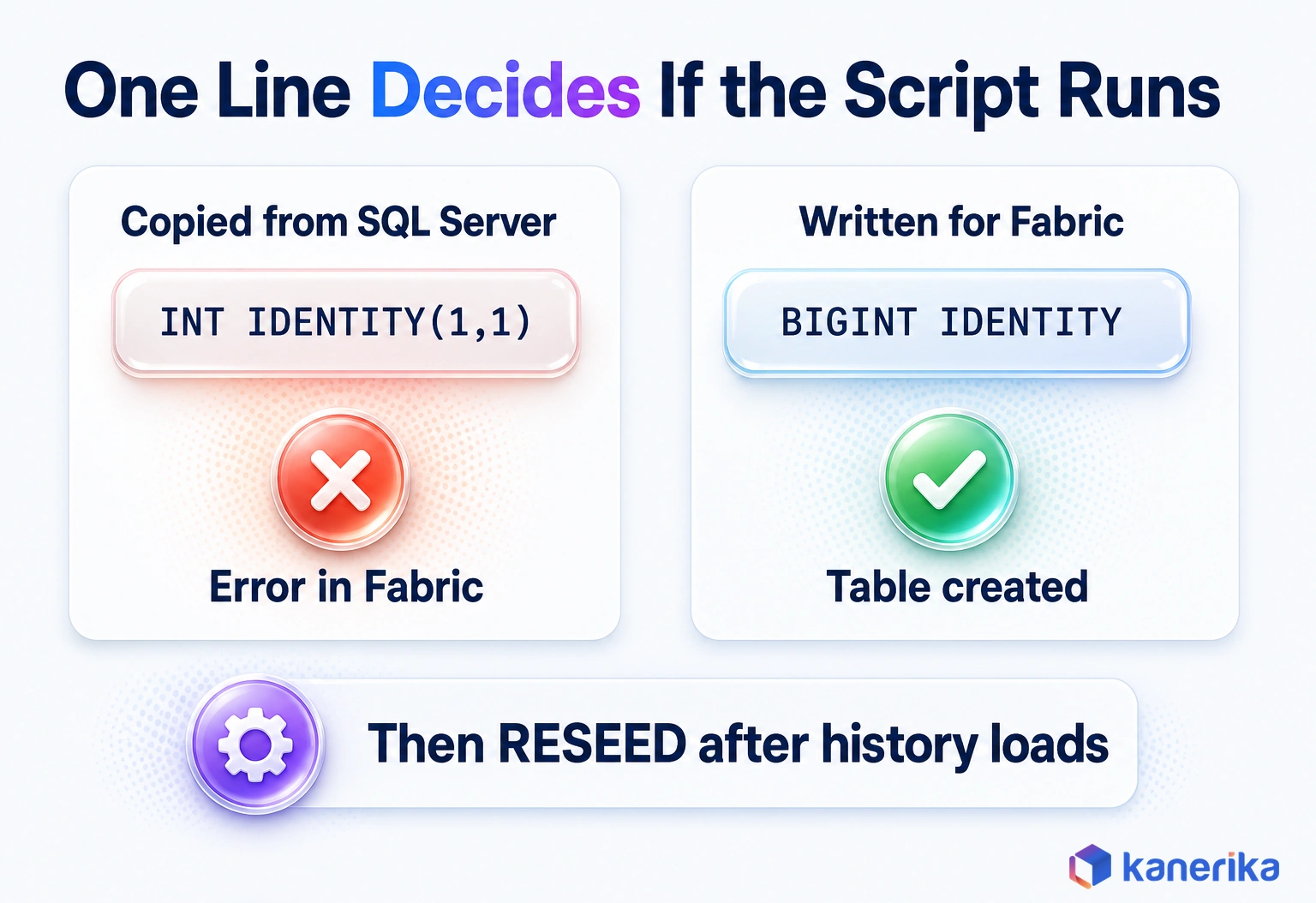
Watch for one copy-paste trap. A Microsoft training module on dimensional tables still shows INT IDENTITY(1,1) in its sample. The product reference, however, says only BIGINT is supported and that other data types result in an error.
Follow the reference instead. If a sample, a forum answer or an AI assistant hands you IDENTITY(1,1), change the type and drop the seed before you run it.
-- Copied from SQL Server: fails in a Fabric warehouse
CustomerKey INT IDENTITY(1,1)

-- Fabric version: BIGINT, no seed, no increment
CustomerKey BIGINT IDENTITY
For the most part, that single edit fixes scripts carried over in a SQL Server data migration. The rest of the work is in how you load the table.
Talk to Kanerika
Moving SQL Server Tables Into Fabric?
Bring one schema. Kanerika’s Fabric engineers will review its identity columns, flag scripts that will fail and outline a key-safe load and reseed plan.
Book a Fabric Review →How to Create Identity Columns in Fabric Data Warehouse, Step by Step
A working IDENTITY table takes five short moves, from CREATE TABLE to a metadata check. The examples below build one customer dimension and load it two ways, first with INSERT and then with COPY INTO. Each script runs in the warehouse query editor or in T-SQL notebooks in Microsoft Fabric, which connect directly to a warehouse.
1. Create the table with a BIGINT IDENTITY key. Keep the natural key and the history columns next to it, since later sections use them.
CREATE TABLE dbo.DimCustomer (
    CustomerKey   BIGINT IDENTITY,
    CustomerID    VARCHAR(20)  NOT NULL,
    CustomerName  VARCHAR(100),
    Segment       VARCHAR(20),
    ValidFrom     DATE,
    ValidTo       DATE,
    IsCurrent     BIT
);
2. Declare the primary key as metadata. Fabric accepts a primary key only as NONCLUSTERED and NOT ENFORCED, per the table constraints reference. The constraint documents intent for tools and readers, but it does not stop a duplicate.
ALTER TABLE dbo.DimCustomer
ADD CONSTRAINT PK_DimCustomer
PRIMARY KEY NONCLUSTERED (CustomerKey) NOT ENFORCED;
3. Insert rows without the key. Name every column you supply and leave the key out. The engine then fills CustomerKey for each new row.
INSERT INTO dbo.DimCustomer
    (CustomerID, CustomerName, Segment, ValidFrom, ValidTo, IsCurrent)
VALUES
    ('CUST-104', 'Contoso Ltd',  'Enterprise', '2026-01-01', '9999-12-31', 1),
    ('CUST-221', 'Fabrikam Inc', 'SMB',        '2026-01-01', '9999-12-31', 1);
4. Bulk load with COPY INTO and a column list. When a table has an IDENTITY column, COPY INTO needs a column list that maps each target column to the source data. Leave the key out of that list, and Fabric then generates it, as Microsoft’s IDENTITY tutorial shows.
COPY INTO dbo.DimCustomer
    (CustomerID 1, CustomerName 2, Segment 3, ValidFrom 4, ValidTo 5, IsCurrent 6)
FROM 'https://mystorageaccount.blob.core.windows.net/landing/customers/'
WITH (
    FILE_TYPE = 'CSV',
    FIRSTROW  = 2
);
5. Validate with sys.identity_columns. The catalog view confirms which tables carry IDENTITY. In Fabric, seed_value and increment_value return NULL instead. The last_value column stays NULL until the first explicit identity insert, then switches to -1 for good, so never read it as a counter.
SELECT s.name AS SchemaName,
       t.name AS TableName,
       c.name AS IdentityColumn,
       ic.last_value
FROM sys.identity_columns AS ic
JOIN sys.columns AS c ON ic.[object_id] = c.[object_id] AND ic.column_id = c.column_id
JOIN sys.tables  AS t ON ic.[object_id] = t.[object_id]
JOIN sys.schemas AS s ON t.[schema_id] = s.[schema_id]
ORDER BY s.name, t.name;
Adding an IDENTITY Column to an Existing Table
ALTER TABLE cannot add IDENTITY to a table that already exists in Fabric. The fix is a rebuild instead, which Microsoft frames as creating a copy of the table with the new key.
- Create a new table with the same columns plus a BIGINT IDENTITY key.
- Copy the rows with INSERT … SELECT, listing every column except the key.
- Compare row counts between the old and new tables.
- Point loads and views at the new table, then rename it into place and drop the old one.
CREATE TABLE dbo.DimStore_New (
    StoreKey   BIGINT IDENTITY,
    StoreID    VARCHAR(20) NOT NULL,
    StoreName  VARCHAR(100)
);

INSERT INTO dbo.DimStore_New (StoreID, StoreName)
SELECT StoreID, StoreName
FROM dbo.DimStore;
Talk to Kanerika
Rebuilding Fabric Tables Without Losing Keys
Kanerika’s engineers can plan a table rebuild that adds IDENTITY, keeps existing key values with IDENTITY_INSERT and proves every fact still joins before cutover.
Talk to a Fabric Engineer →Microsoft also points to CREATE TABLE AS SELECT and SELECT…INTO for copies. When the source table already has an IDENTITY column, the copy inherits the property, subject to the data type limits listed for SELECT INTO. That makes CTAS especially quick for cloning a keyed table.
IDENTITY_INSERT and DBCC CHECKIDENT: Explicit Values and Reseeding
Sometimes the key value has to be yours, not the engine’s. For example, migrations need old keys preserved, restores need rows put back exactly, and dimensions need fixed sentinel rows. With general availability, Fabric handles all three through IDENTITY_INSERT.
Sentinel rows are the everyday case. A fact row whose customer is missing should point at a known Unknown member rather than at NULL. Microsoft’s tutorial, for instance, uses -1 for Unknown and -2 for Not Applicable.
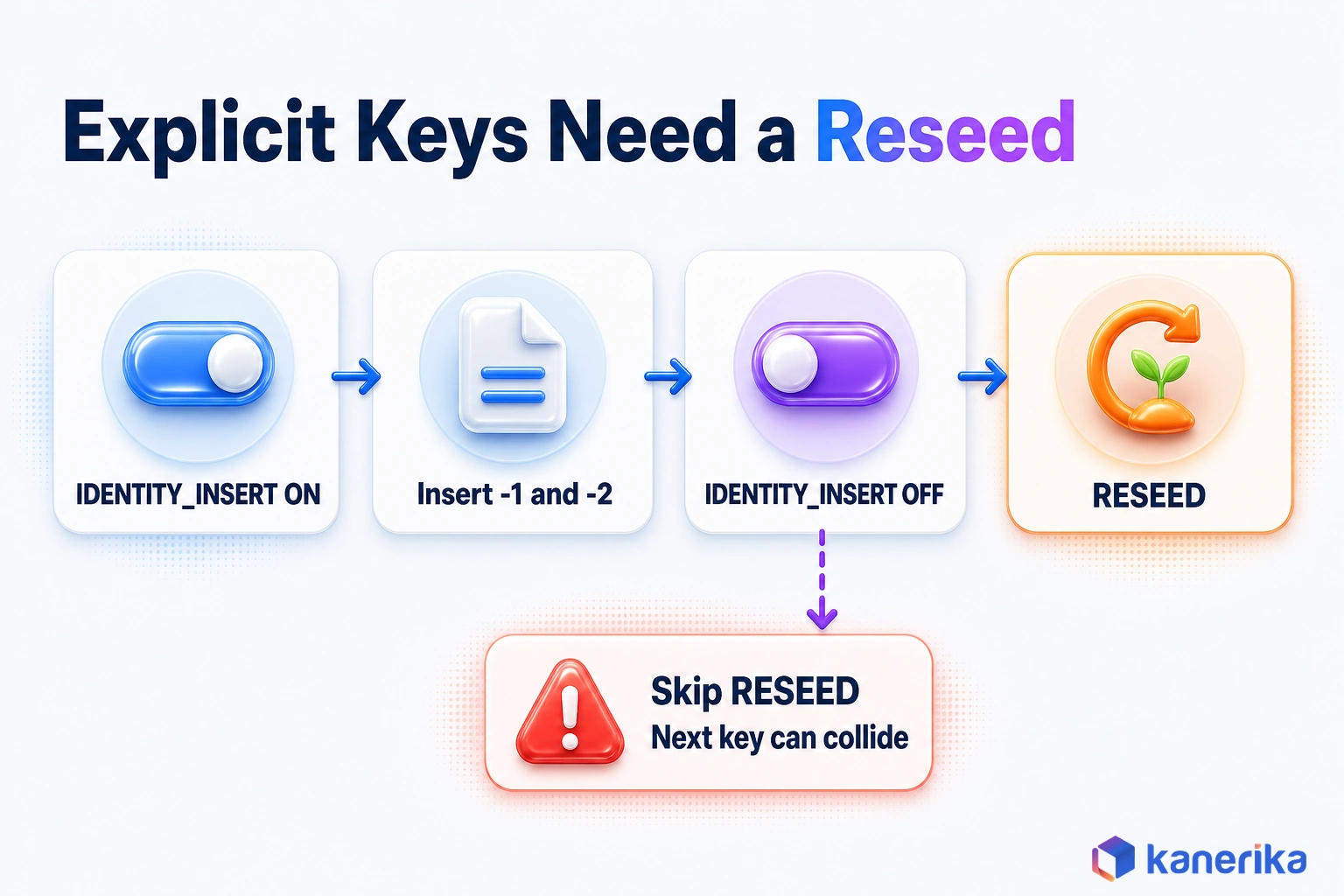
SET IDENTITY_INSERT dbo.DimCustomer ON;

INSERT INTO dbo.DimCustomer (CustomerKey, CustomerID, CustomerName, Segment)
VALUES (-1, 'UNKNOWN', 'Unknown',        'Sentinel'),
       (-2, 'N/A',     'Not Applicable', 'Sentinel');

SET IDENTITY_INSERT dbo.DimCustomer OFF;

DBCC CHECKIDENT('dbo.DimCustomer', RESEED);
Four rules apply while IDENTITY_INSERT is on. The last one matters most for data quality.
- The INSERT must carry a column list that includes the identity column.
- Only one table per session can have IDENTITY_INSERT set to ON at a time.
- COPY INTO has its own IDENTITY_INSERT = ‘ON’ option, which overrides the session setting.
- Uniqueness is guaranteed only while IDENTITY_INSERT is not in use.
That last rule is easy to miss. Once you supply values yourself, Fabric no longer vouches for their uniqueness, and the unenforced primary key will not catch a repeat. Run a duplicate query after every explicit load.
COPY INTO dbo.DimCustomer
    (CustomerKey 1, CustomerID 2, CustomerName 3, Segment 4, ValidFrom 5, ValidTo 6, IsCurrent 7)
FROM 'https://mystorageaccount.blob.core.windows.net/migration/dimcustomer/'
WITH (
    FILE_TYPE       = 'CSV',
    FIRSTROW        = 2,
    IDENTITY_INSERT = 'ON'
);

DBCC CHECKIDENT('dbo.DimCustomer', RESEED);
After any explicit insert, run DBCC CHECKIDENT with RESEED. The command then scans every used and reserved range across the compute nodes and moves the next values past them.
Fabric supports only that form. A script that calls CHECKIDENT(‘dbo.T’, RESEED, 5000) fails with the error “Specifying a custom seed in Fabric Data Warehouse is not supported.” NORESEED is not available either, so drop the number before the script runs.
Make the reseed a habit, not a judgment call. Run it every time IDENTITY_INSERT goes off, and once per table after a migration load. Otherwise, the next generated key is free to land on a value you just inserted.
Migrating IDENTITY Columns from SQL Server, Azure SQL or Synapse
A data warehouse migration moves keys that other tables already trust. Fact rows, reports and downstream extracts all point at those numbers, so they have to arrive unchanged. Microsoft’s guide to migrating IDENTITY columns sets out a four-part pattern for SQL Server, Azure SQL Database and Azure Synapse Analytics sources.
- Create targets: define each destination table with BIGINT IDENTITY, converting INT and seeded definitions.
- Load history: insert the original key values with IDENTITY_INSERT, using COPY INTO with IDENTITY_INSERT = ‘ON’ for large tables.
- Reseed: run DBCC CHECKIDENT with RESEED on every table you loaded.
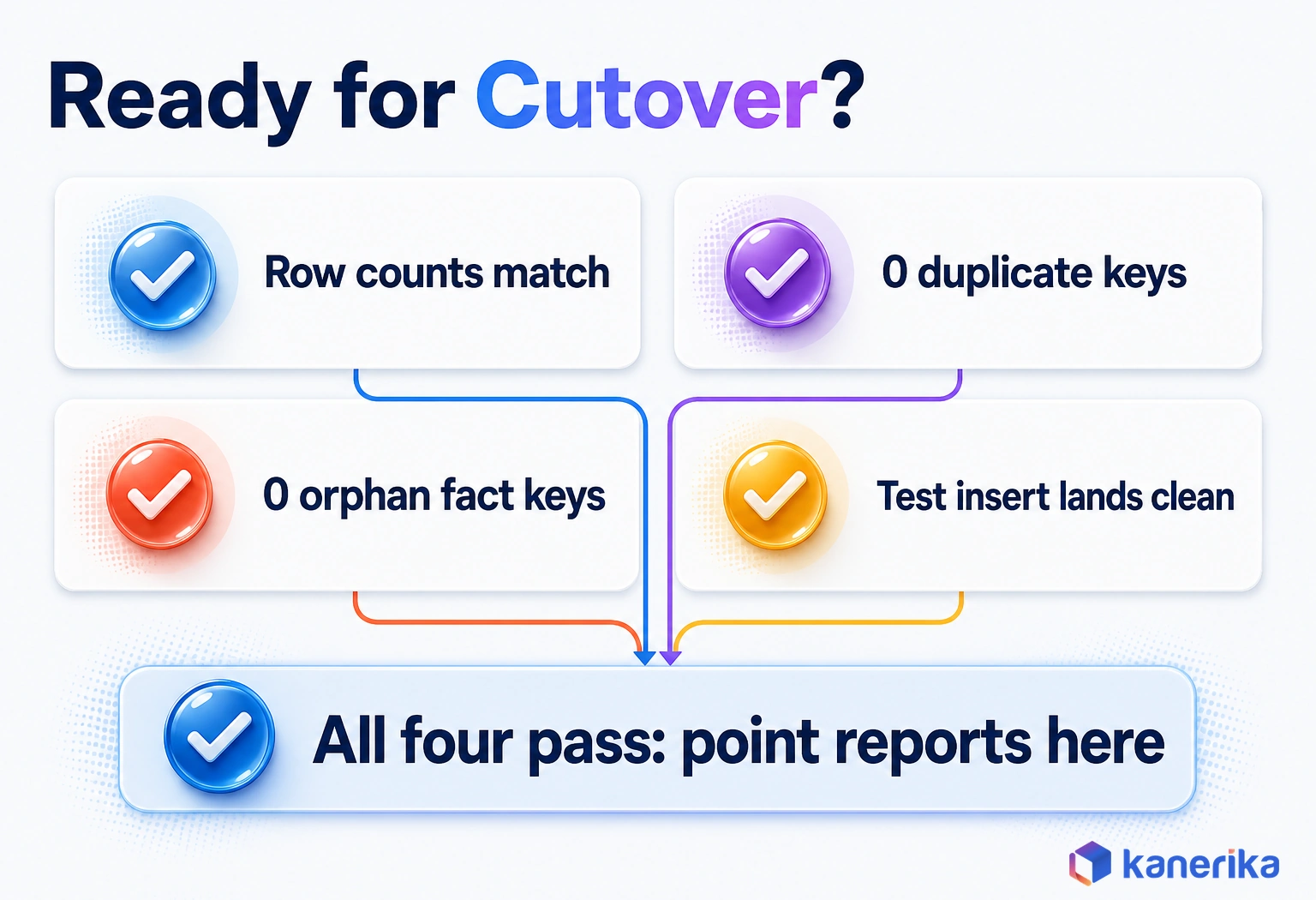
- Verify: check row counts, duplicate keys, orphan fact keys and one test insert per table.
Microsoft notes that COPY INTO with IDENTITY_INSERT performs better than row-by-row INSERT statements for bulk history. The verification queries stay short, and they should pass before any report points at the new warehouse.
-- Duplicate surrogate keys (expect no rows)
SELECT CustomerKey, COUNT(*) AS Copies
FROM dbo.DimCustomer
GROUP BY CustomerKey
HAVING COUNT(*) > 1;

-- Fact rows whose key has no dimension row (expect no rows)
SELECT f.CustomerKey, COUNT(*) AS OrphanRows
FROM dbo.FactSales AS f
LEFT JOIN dbo.DimCustomer AS d ON f.CustomerKey = d.CustomerKey
WHERE d.CustomerKey IS NULL
GROUP BY f.CustomerKey;

-- Test insert, then rerun the duplicate check
INSERT INTO dbo.DimCustomer (CustomerID, CustomerName, Segment)
VALUES ('TEST-001', 'Cutover test row', 'Test');
An empty result from both checks, together with a clean test row, means the table is ready. Delete the test row afterward so it never reaches a report. For larger estates, data reconciliation tools automate the same source-to-target row and key comparisons.
Preserve or Regenerate the Keys?
Not every key should survive the move, though. Preserving keys keeps facts and reports intact. Regenerating them is safer when several sources arrive with IDs that overlap.
| Situation | Choice | How |
|---|---|---|
| Facts, reports or exports already reference the keys | Preserve | Load with IDENTITY_INSERT, then RESEED |
| One clean source with no ID conflicts | Preserve | COPY INTO with IDENTITY_INSERT = ‘ON’ for large tables |
| Several sources whose IDs collide | Regenerate | New BIGINT IDENTITY keys plus a key map holding source system and old ID |
| Source keys carry business meaning | Regenerate | Keep the old value as an attribute column |
When keys are regenerated, every fact table needs remapping through the key map before it loads. Plan that lookup as a step in your Fabric data pipelines, not as a cleanup job afterward.
The pipeline side of the move is its own project, and our Azure to Fabric migration guide covers moves from other Azure services. Our guide to SSIS to Fabric migration covers packages and orchestration. For teams leaving Synapse, Fabric vs Synapse covers what changes on the platform.
Using IDENTITY Keys in Dimensional Models
Surrogate keys exist to make dimensional data models work. Whichever layout you pick in the star schema vs snowflake schema choice, facts join to dimensions on a compact surrogate key. The natural key still stays on the dimension for lookups.
Slowly changing dimensions are where IDENTITY earns its place. Under SCD Type 2, each change to a tracked attribute creates a new row with a new surrogate key. The natural key repeats across versions, while date columns and a current flag mark which version is live.
A fact load then looks up the surrogate key by natural key and date. For example, a sale from March joins to the customer version valid in March, not to the latest one. MERGE is also generally available in Fabric Warehouse, which helps with the expire-and-insert logic.
| SCD type | What happens on a change | Surrogate key behavior |
|---|---|---|
| Type 1 | The attribute is overwritten in place | The key stays the same |
| Type 2 | The old row is expired and a new version is inserted | Each version gets a new IDENTITY key; the natural key repeats |
Since Fabric does not enforce keys, the model relies on your load checks. SCD Type 2 adds one check of its own, for natural keys with more than one current row.
-- Natural keys with more than one current version (expect no rows)
SELECT CustomerID, COUNT(*) AS CurrentRows
FROM dbo.DimCustomer
WHERE IsCurrent = 1
GROUP BY CustomerID
HAVING COUNT(*) > 1;
Any row returned means an expire step failed, so facts can join to two versions of the same customer.
Kanerika Service
Data Modernization Services
Kanerika modernizes legacy warehouses onto Microsoft Fabric, rebuilding dimensional models, surrogate keys and load checks so reports stay correct after cutover.
Explore Data ModernizationIDENTITY vs ROW_NUMBER, Hash Keys, GUIDs and Key Maps
IDENTITY is not the only way to make a surrogate key, and pipelines built before GA may use something else. Each method also trades stability, collision risk and join size in its own way. We found no published benchmark that compares them in Fabric, so the comparison below stays qualitative.
ROW_NUMBER plus the current maximum key is the classic workaround. It needs extra query logic, and two loads running at the same time can hand out the same number. Hash keys, common in Data Vault modeling, compute the same value from the same natural key on every run.
GUIDs are unique without any coordination, but they are wide and random. That makes joins and storage heavier than a BIGINT. A key map table stores natural-to-surrogate pairs for every source, and it often sits alongside IDENTITY when sources merge.
| Method | Stable across reruns | Collision risk | Join cost | Use when |
|---|---|---|---|---|
| BIGINT IDENTITY | Yes once assigned; a full reload issues new values | None unless IDENTITY_INSERT adds repeats | Low, an 8-byte integer | The default for Fabric Warehouse dimensions |
| ROW_NUMBER plus max key | No, it depends on sort order and timing | Higher under concurrent loads | Low | Older pipelines, until you move them to IDENTITY |
| Hash of the natural key | Yes, the same input gives the same value | Low but not zero | Higher, with wider values | Data Vault, or keys shared across systems |
| GUID | Yes once stored | Very low | Highest, 16-byte random values | Keys created outside the warehouse |
| Key map table | Yes, by design | None if maintained | Adds a lookup join | Merging sources whose IDs collide |
For most Fabric Warehouse dimensions, IDENTITY is the simplest choice, and Microsoft says it performs better than manual approaches. Hash keys earn their place when keys must match across systems without a shared lookup.
Common Mistakes and Limitations to Plan Around
The mistakes below come from habits carried over from SQL Server, and each one has a simple fix. Most of them never raise an error. They surface weeks later as a wrong count or a broken join.
Permissions are a separate topic, covered in our guide to securing a Fabric data warehouse. This list sticks to keys.
| Mistake | What happens | Fix |
|---|---|---|
| Copying INT IDENTITY(1,1) from SQL Server | CREATE TABLE returns an error | Use BIGINT IDENTITY with no seed |
| Omitting the column list in COPY INTO | The load fails or maps columns wrongly | List every target column with its source position |
| Forgetting RESEED after explicit inserts | New keys can collide with loaded ones | Run DBCC CHECKIDENT with RESEED every time |
| Using keys as gap-free invoice numbers | Gaps appear and auditors ask why | Generate business numbers in their own column |
| Ordering by the key to find the newest rows | Results look right but are wrong | Store a load timestamp or batch ID |
| Relying on the primary key to block duplicates | Duplicates load without any error | Run a duplicate check after each load |
| Trying ALTER TABLE ADD IDENTITY | The statement is not supported | Rebuild with a new table and INSERT … SELECT |
| Expecting IDENTITY on a Lakehouse SQL endpoint | The endpoint cannot create tables | Create keyed tables in a Warehouse item |
Two of these rows deserve a second look. Gap-free numbering and load order are business requirements, but IDENTITY was never designed to meet them. Give each its own column, and the key can then stay a plain identifier.
How Kanerika Handles Surrogate Keys in Fabric Migrations
Kanerika treats surrogate keys as a cutover risk, not a detail for the final week. In Fabric migrations, our engineers plan keys in three passes before any history moves.
- Inventory: list every source table with an identity column, its data type and seed, and the facts that reference it.
- Decide: mark each table preserve or regenerate, and design key maps wherever sources collide.
- Prove: write IDENTITY_INSERT loads, RESEED calls and orphan checks into the cutover runbook, with a test insert per table.
That discipline matters most when data arrives from many regions and systems at once. For example, a global consumer electronics brand ran high-volume product, order, sales and inventory flows from regions that applied different rules. Kanerika moved its Informatica workloads to Microsoft Fabric with FLIP, its migration accelerator, and set one shared rule set for data structure and KPIs.
- 60% improvement in data processing speed
- 42% reduction in infrastructure costs
- 76% faster time-to-insights
Multi-source, multi-region loads like these are especially sensitive to weak key planning and skipped reseeds. Read the full Informatica to Fabric migration case study, and see how Kanerika delivers Microsoft Fabric services and broader data modernization programs.
Case Study
60% Better Data Processing Speed With Informatica to Fabric Migration
A global consumer electronics brand moved high-volume, multi-region data flows from Informatica to Microsoft Fabric with FLIP, achieving a 60% improvement in data processing speed, 42% lower infrastructure costs and 76% faster time-to-insights.
Read the Case Study →Getting Fabric IDENTITY Right the First Time
Everything in this guide comes down to three habits. Declare keys as BIGINT IDENTITY with no seed. Load existing or sentinel values with IDENTITY_INSERT, and follow every explicit load with a RESEED.
Keep the scope in mind as well, since IDENTITY is a warehouse feature for analytical tables. Microsoft describes SQL database in Fabric as the home in Fabric for OLTP workloads, built on the Azure SQL Database engine. If an operational app needs a transactional store, our guide to SQL database in Microsoft Fabric explains that option.
Finally, prove the result with duplicate and orphan checks, because Fabric will not enforce the keys for you. Keep those three habits, and identity columns in Fabric Data Warehouse will give you stable, unique surrogate keys from the very first load.
Frequently Asked Questions
Why are IDENTITY columns used in Fabric Data Warehouse?
IDENTITY columns generate surrogate keys automatically, so loads no longer need ROW_NUMBER or MAX(key) logic to number new rows. Each dimension row gets a unique BIGINT that facts can join on, while the natural key stays available for lookups. Microsoft also notes that system-generated keys perform better than manual approaches, because no extra query logic runs.
How do IDENTITY columns work in Fabric Data Warehouse?
When a row is inserted, Fabric assigns a value from a range held by that ingestion task. Because the warehouse spreads work across compute nodes, separate tasks receive separate ranges. The values are always positive and stay unique while IDENTITY_INSERT is not used, but they can arrive out of order, and gaps can appear between ranges.
How do I reseed an identity column in Fabric Warehouse?
Run DBCC CHECKIDENT with the table name and the RESEED option, for example DBCC CHECKIDENT(‘dbo.DimCustomer’, RESEED). Fabric scans every used and reserved range across compute nodes and sets the next values past them. You cannot pass a custom reseed value or use NORESEED. Run it after every IDENTITY_INSERT load and after each migrated table.
Can I add an IDENTITY column to an existing Fabric table?
Not with ALTER TABLE, which does not support adding an IDENTITY column. Create a new table with a BIGINT IDENTITY key, copy the rows with INSERT … SELECT while leaving the key out, compare row counts, then swap the tables. CTAS and SELECT…INTO also work for copies, and they keep an IDENTITY property the source already has.
Can I use identity columns in a Fabric Lakehouse?
Not through the Lakehouse SQL analytics endpoint. That endpoint cannot create tables or run INSERT, UPDATE or DELETE statements, so it cannot define or fill an IDENTITY column. Create tables that need system-generated surrogate keys in a Warehouse item instead, then load Lakehouse data into those keyed tables with INSERT … SELECT or a pipeline.
Can identity columns be used for SCD Type 2 dimensions?
Yes, and it is one of their best uses. Each new version of a dimension row receives a fresh IDENTITY key, while the natural key repeats across versions. Fact loads look up the key that was valid on the transaction date. Because Fabric does not enforce keys, check for duplicate current rows and orphan fact keys after each load.
Is the IDENTITY column feature generally available in Fabric?
Yes. Microsoft’s What’s new page lists Warehouse IDENTITY columns as generally available in August 2026. That release brought IDENTITY_INSERT and reseed operations for migrations and controlled loads, and explicit inserts were not supported during the earlier preview. Articles that describe IDENTITY as a preview feature, or say explicit values cannot be inserted, are out of date.
Are identity values always sequential in Fabric Data Warehouse?
No. Fabric guarantees unique values, not sequential or gap-free ones. Each ingestion task gets its own range, so two loads run back to back can land in separate ranges with a gap between them. Never sort by the key to find load order, and never use IDENTITY for invoice numbers that must be gap-free.
What data type is supported for IDENTITY columns in Fabric Data Warehouse?
Only BIGINT is supported. Microsoft’s reference states that other data types result in an error, so INT, SMALLINT or DECIMAL identity columns copied from SQL Server must be changed. BIGINT holds up to 9,223,372,036,854,775,807 positive values, which is far more than any dimension or fact table will need over its lifetime.
Can we manually insert values into an IDENTITY column in Fabric?
Yes, since general availability in August 2026. Turn on SET IDENTITY_INSERT for the table, insert with a column list that includes the key, then turn it off. For bulk loads, COPY INTO accepts IDENTITY_INSERT = ‘ON’ as an option. Always run DBCC CHECKIDENT with RESEED afterward so new keys cannot collide with inserted values.
How are identity columns different from SQL Server identity columns?
Fabric allows only BIGINT and takes no seed or increment, while SQL Server accepts IDENTITY(1,1) on several integer types. Fabric values are unique but not ordered, because each ingestion task draws its own range. DBCC CHECKIDENT supports only RESEED, ALTER TABLE cannot add an identity column, and primary keys are not enforced in Fabric.
What are surrogate keys and why are they important?
A surrogate key is a number the warehouse assigns to each dimension row, with no business meaning. It keeps joins compact and stable even when source systems reuse or change their own IDs. It also lets one natural key hold several historical versions, which slowly changing dimensions need. IDENTITY columns generate these keys automatically in Fabric.
When should you use IDENTITY columns in Fabric Data Warehouse?
Use them for surrogate keys on dimension tables, sentinel rows and any table that needs a unique row identifier the warehouse controls. They suit migrations too, because IDENTITY_INSERT can preserve existing keys. Avoid them where values must be gap-free or ordered, and prefer hash keys when separate systems must compute matching keys without a lookup.
Do identity columns improve performance in Fabric Data Warehouse?
Microsoft says IDENTITY columns perform better than manual key approaches, because unique values are generated automatically without extra query logic. The engine allocates ranges across compute nodes, so key generation does not hold up parallel loads. Joins on a BIGINT surrogate key are also compact. No published benchmark measures the gain, so test with your own workload.
Can I use IDENTITY(1,1) in Microsoft Fabric Warehouse?
No. Fabric does not support a seed or increment, and it accepts only the BIGINT data type. A definition such as CustomerKey INT IDENTITY(1,1) returns an error, so write CustomerKey BIGINT IDENTITY instead. Some Microsoft training samples still show the INT version, but the product reference is clear that other types and seeds are not supported.