
TL;DR
ETL modernization is the work of replacing legacy extract, transform and load tools such as Informatica PowerCenter, SSIS and Talend with cloud pipelines that the business can change quickly. For Microsoft shops the usual target is Fabric Data Factory on OneLake. A sound program sorts every job into retain, retire, convert or redesign, automates the convert step, and proves each output matches before cutover. Delivery data from Kanerika shows 75% automation on both the Informatica to Fabric and SSIS to Fabric paths with FLIP accelerators.
Key Takeaways
- ETL modernization changes how pipelines are built and run. A straight copy of old jobs into a new tool keeps the old problems.
- Informatica’s own download page lists end of support for PowerCenter 10.5.x as 31 March 2026, which moves many teams from planning to acting.
- Sorting jobs into retain, retire, convert and redesign before any code moves keeps the budget on work that matters.
- Automation coverage, effort reduction, speed and cost are four different measures. Ask any vendor which one a number refers to.
- A parallel run with automated validation is what makes cutover safe, and it also carries a real cost that belongs in the ROI model.
The Nightly Load Nobody Dares Touch
Every large data team has one. A legacy job that runs at 2 a.m., feeds six reports, and was last edited by someone who left in 2019. It still works, so it stays. Then the licence renewal arrives, the batch window shrinks, and a new AI project needs the same data by morning instead of next week.
That is the moment ETL modernization stops being an IT wish list item. This guide explains what the work involves, how to decide what to move, how legacy ETL to Microsoft Fabric migration works in practice, and what the numbers look like when automation does most of the conversion. It builds on our guides to ETL migration and data modernization, and goes further on the decision framework and the ROI math.
What ETL Modernization Means
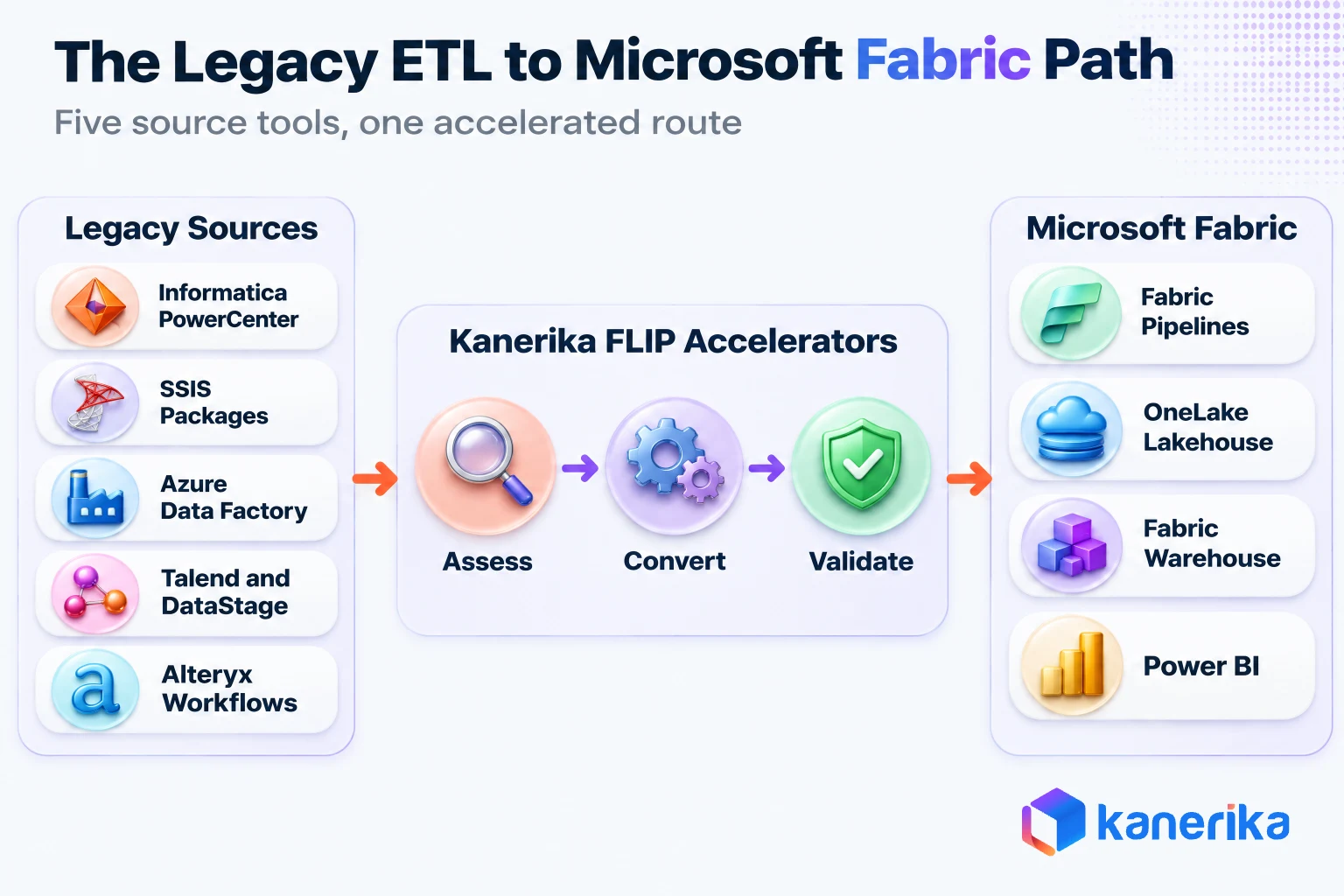
ETL modernization is the process of replacing or rebuilding legacy data integration jobs so they run on a current platform, with current practices for testing, monitoring and change. The tools in scope include Informatica PowerCenter, SSIS, DataStage, Talend, Alteryx workflows and hand-written stored procedures that act as pipelines.
Three terms get mixed up. ETL migration is the act of moving jobs from one tool to another. Legacy system modernization covers the wider application estate. ETL modernization sits between them, because it includes the move and also the redesign of patterns that no longer fit, such as nightly full reloads or logic buried in one giant mapping.
The shift from ETL to ELT is part of this. Cloud platforms make it cheap to land raw data first and shape it later, so many converted jobs change their order of operations. The guide to ETL and ELT covers when each pattern fits.
Why Legacy ETL Is Getting Harder to Keep
Four pressures show up in almost every assessment.
- Vendor support dates. Informatica’s download page states that PowerCenter 10.5.x reaches end of support on 31 March 2026. Teams on that version should confirm their own position in the Informatica Product Lifecycle Guide.
- Batch windows. Data volumes grow every year while the overnight window stays the same length, so reports land later each quarter.
- Skills. Engineers who know PowerCenter or DataStage internals are getting harder to hire, and newer staff prefer Spark, SQL and Python.
- AI readiness. Models and agents need fresh, governed data. A pipeline that refreshes once a day limits what they can do.
Migration projects also carry their own risk. The State of Enterprise Data Platform Migrations 2026 report from Kanerika compiles industry research showing that 73% of enterprise data migration projects miss their objectives and 80% exceed budget by 150% or more. Those figures come from published industry research that the report collects. The report names inadequate technical discovery, manual processes and platform inexperience as the leading causes, which is why the framework below starts with discovery.
Why Microsoft Fabric Is a Common Target
Fabric puts pipelines, notebooks, a warehouse, a lakehouse and Power BI on one capacity and one storage layer, OneLake. For a company that already runs Microsoft 365, Azure and Power BI, that removes a set of integration seams. The guides to Fabric architecture and the Fabric Data Warehouse cover the components in depth.
Microsoft has also built a path in for existing Azure Data Factory users. Microsoft Learn describes an assessment-first upgrade experience that checks pipeline readiness and migrates supported pipelines, along with a PowerShell module and the option to mount an existing factory inside a Fabric workspace. For SSIS, the same page says the practical route today is to run packages on an SSIS integration runtime in ADF and call them from a pipeline, so a full SSIS rebuild is a separate decision.
Not every team should land on Fabric. Companies standardised on Databricks have a strong case for staying there, and our guide to Informatica to Databricks migration covers that route. The framework in the next section works for either target.
The Retain, Retire, Convert or Redesign Framework
Most legacy estates hold more jobs than anyone can list. A discovery scan usually finds duplicates, jobs with no downstream consumer, and logic that depends on server settings nobody documented. Treating all of it as a conversion backlog is the most common way to overspend.
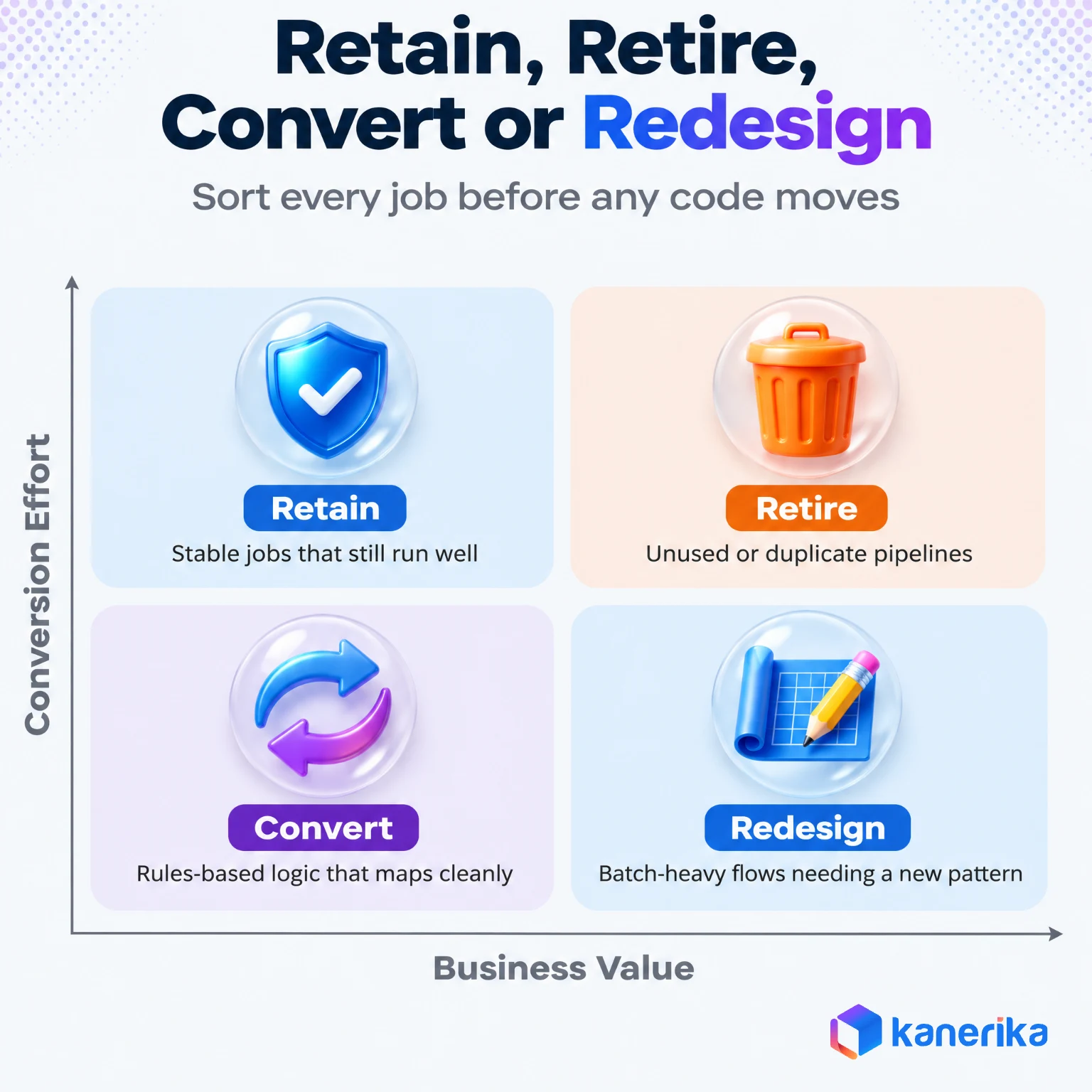
Sort every job on two axes, business value and conversion effort, then apply the rule for its quadrant.
Table 1: Workload classification rules
| Class | How to recognise it | Action | Typical examples |
|---|---|---|---|
| Retain | Stable, rarely changed, low risk, still meets its service level | Leave in place for now and schedule a later review | Small reference-data loads, vendor-managed feeds |
| Retire | No active consumer, duplicate output, or replaced by another source | Switch off after a confirmed no-reader period | Reports nobody opens, copies of the same extract |
| Convert | Rules-based logic that maps cleanly to the target | Automate the conversion and validate output | Joins, filters, lookups, standard aggregations |
| Redesign | Batch-heavy, deeply nested or tied to old platform features | Rebuild with a new pattern such as incremental loads | Nightly full reloads, one-mapping-does-everything jobs |
The classification also sets the budget. Retire jobs cost almost nothing to move because they do not move. Convert jobs are where accelerators earn their keep. Redesign jobs need senior engineers, so they should be few and chosen on purpose.
A short list of questions makes the sorting faster.
- Who reads the output, and when did they last open it?
- Does the job contain business rules that exist nowhere else in writing?
- Does it rely on a feature the target platform handles differently, such as a custom component or a server-side script?
- What breaks downstream if it runs an hour late?
Teams that answer these before conversion starts tend to find that a meaningful share of jobs falls into retire or retain. That is where the cost of a program drops before any tool is bought. The data migration strategy guide covers the wider planning steps.
Legacy ETL Source to Fabric Target Mapping
The table below shows typical landing spots. Each team’s final choice depends on volumes, latency needs and skills, so treat it as a starting point for design sessions.
Table 2: Typical landing spots for legacy ETL assets in Fabric
| Legacy asset | Typical Fabric target | Watch for |
|---|---|---|
| Informatica PowerCenter mapping and workflow | Fabric pipelines for orchestration, Dataflow Gen2 or Spark notebooks for the logic | Reusable mapplets, parameter files, session-level settings |
| SSIS package | Packages run through an SSIS runtime in ADF and called from a pipeline, then rebuilt in pipelines and notebooks over time | Script tasks, custom components, package configurations |
| Azure Data Factory pipeline | Fabric Data Factory pipeline through the upgrade experience or PowerShell module | Activity parity, global parameters, mapping data flows |
| Talend or DataStage job | Pipelines plus notebooks, with logic rebuilt where no direct equivalent exists | Custom routines, job-level context variables |
| Alteryx workflow | Dataflow Gen2 or notebooks, with outputs landed in the lakehouse | Macros, spatial tools, analytic apps |
Detailed path guides exist for Informatica to Fabric and SSIS to Fabric. Dedicated migration services cover Informatica to Microsoft Fabric, SSIS to Microsoft Fabric and Azure Data Factory to Fabric.
Kanerika and Microsoft Collaborate on Legacy ETL Migration to Fabric
Kanerika is a Microsoft Solutions Partner for Data and AI with the Analytics specialization, and a Featured Fabric Migration Partner. In October 2026 the company announced an official collaboration with Microsoft focused on legacy ETL migration to Microsoft Fabric. The newsroom announcement describes three parts for Microsoft fiscal year 2027, which are joint go-to-market planning, co-sell alignment with Microsoft field teams, and technical collaboration on Fabric migrations.
For a buyer, the practical effect is that Microsoft sellers and Kanerika engineers work from the same plan when a customer moves legacy ETL to Fabric. Account teams can line up Fabric licensing, migration scope and delivery together, so the commercial and technical conversations do not run in separate tracks.
Kanerika ETL to Fabric Accelerators and How They Work
Kanerika’s migration accelerators sit inside FLIP, the company’s platform for automating data platform migrations. Accelerators exist for Informatica to Fabric, SSIS to Fabric and Azure Data Factory to Fabric, among other paths. At FabCon in March 2026, Kanerika announced that its Azure to Fabric Migration Accelerator and Karl became available as native Fabric workloads, reachable from a Fabric workspace.
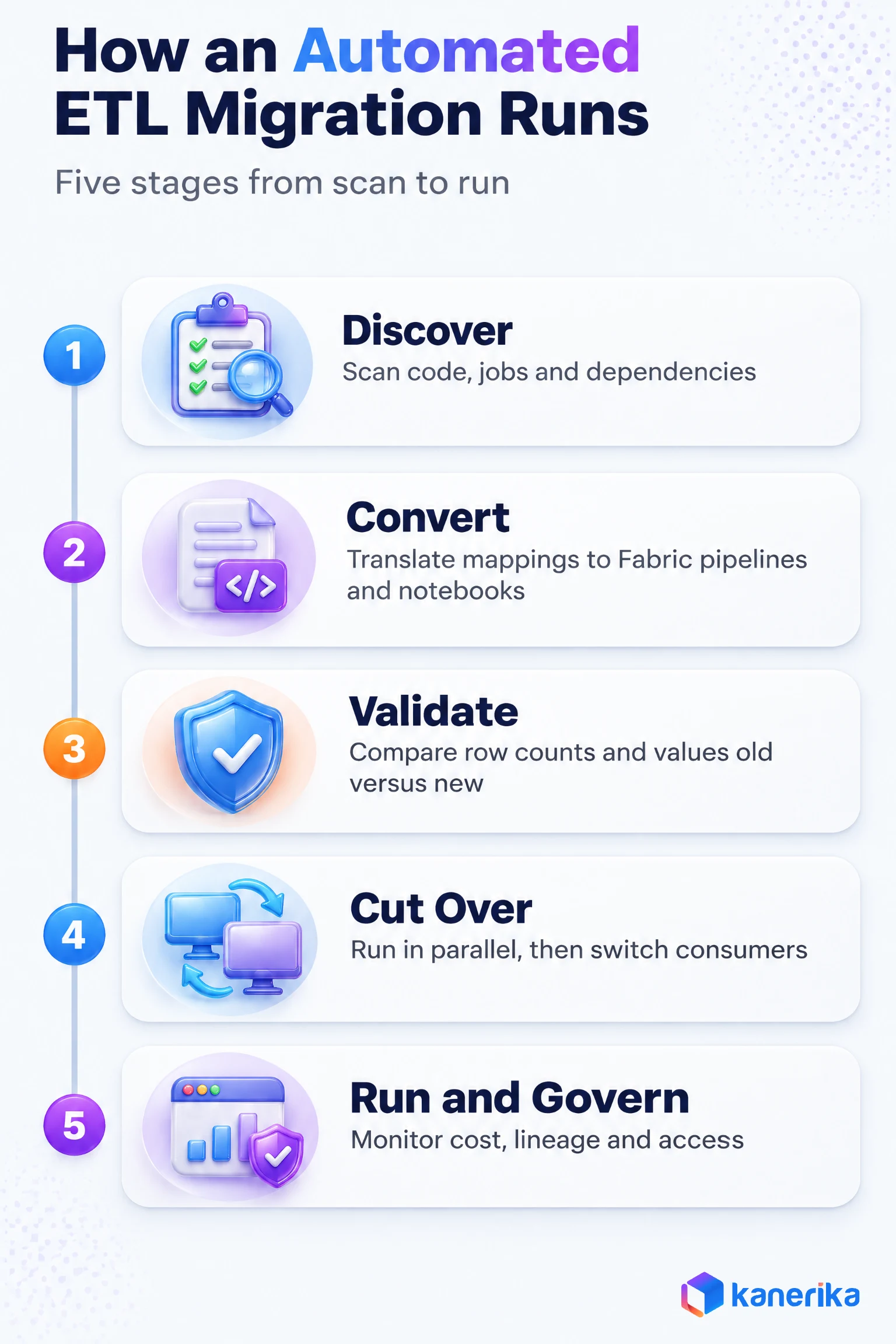
The work moves through five stages.
- Discover. The accelerator scans code, jobs, schedules and dependencies, and flags what can be automated and what needs a person. This stage feeds the classification in Table 1.
- Convert. Mappings, packages and workflows are translated into Fabric pipelines and notebooks. Logic that has no direct equivalent is flagged for redesign, not guessed at.
- Validate. Row counts, values and keys are compared between the old and new outputs. The Informatica to Fabric validation case study shows automated validation running at scale with Klarity 360.
- Cut over. Old and new pipelines run side by side until outputs match, then consumers switch.
- Run and govern. Monitoring, lineage and access rules go live with the pipelines. The migrations report states that governance planned at assessment is the strongest predictor of good post go-live outcomes.
Automation does not replace engineers. It changes where they spend time, because conversion of routine logic is handled by the accelerator while people focus on redesign items, validation results and cutover decisions. A post on the role of automation in migration explains what to automate at each stage, and the data pipeline automation guide covers the run side.
ETL Modernization ROI and What FLIP Delivers
ROI claims for migration projects are hard to compare because four different measures get quoted as if they were one. The table separates them.
Table 3: Four measures that vendors blur together
| Measure | What it tells you | Question to ask |
|---|---|---|
| Automation coverage | Share of conversion steps done by tooling | Is this by job count, by code lines or by effort? |
| Effort reduction | Engineering hours saved against a manual baseline | What was the baseline, and who estimated it? |
| Timeline reduction | Calendar time from kickoff to cutover | Does it include discovery, validation and parallel run? |
| Cost saving | Lower total spend on the migration or the run state | Does it include Fabric capacity and the parallel run? |
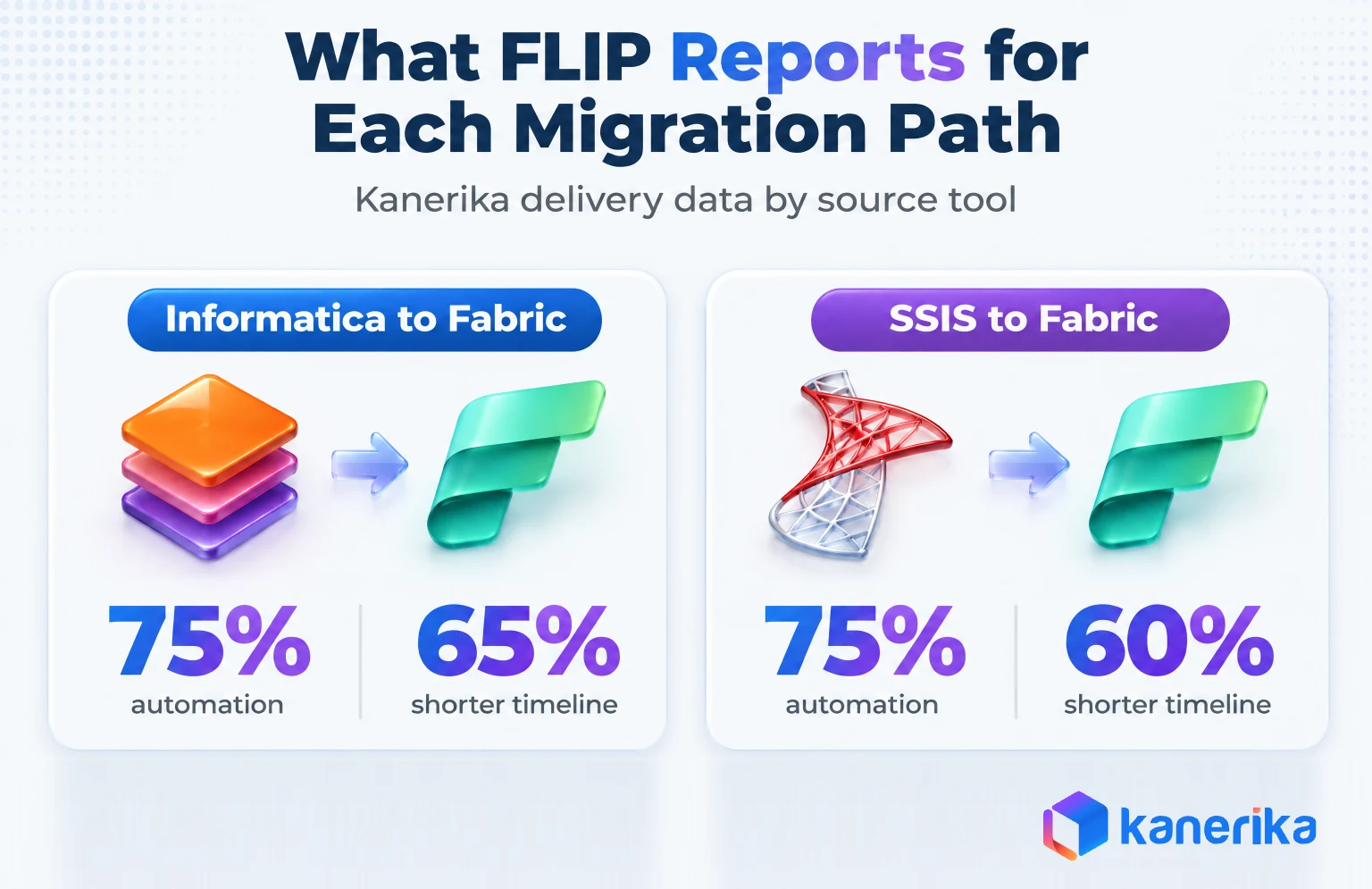
With that split in mind, here is what Kanerika reports. In the Exhibit 3 data of the State of Enterprise Data Platform Migrations 2026 report, which draws on Kanerika delivery data, the Informatica to Fabric path shows 75% automation and a 65% shorter timeline, with a reported cost saving range of USD 300,000 to 600,000. The SSIS to Fabric path shows 75% automation, a 60% shorter timeline and a range of USD 200,000 to 400,000. These are ranges from Kanerika’s own engagements and they depend on scope, so they set expectations and do not promise a result.
The same report estimates that a fully manual migration of 500 Informatica mappings plus a large report estate can run into the millions of dollars over 12 to 18 months at typical consulting rates, and that automating 70 to 80% of conversion steps brings delivery down to weeks. Treat that as the report’s own scenario and run your numbers against it.
Datasheet
Automate Informatica to Microsoft Fabric Migration with FLIP
A two-page summary of the conversion scope, validation approach and delivery model for the Informatica to Fabric path.
A Simple ROI Model You Can Fill In
Payback comes from comparing one-time migration cost against the yearly savings it creates. Gather these inputs from finance and engineering before any vendor meeting.
Table 4: ROI model inputs
| Input | Where it comes from |
|---|---|
| Annual legacy licence and extended support fees | Contracts and renewal quotes |
| Infrastructure and hosting for the legacy servers | Infrastructure budget |
| Engineering hours spent on pipeline maintenance and incident fixes | Ticket history and time records |
| One-time migration cost | Partner estimate plus internal effort |
| Parallel run cost | Fabric capacity plus legacy run costs during overlap |
| New run cost on Fabric | Capacity sizing and monitoring estimate |
Payback in months equals one-time migration cost plus parallel run cost, divided by monthly savings on licences, infrastructure and maintenance, less the new Fabric run cost. Two items teams often leave out are Fabric capacity during the overlap period and the engineering time to review validation results. Including them gives a number finance will trust. A Migration ROI Calculator on the Kanerika site walks through similar inputs.
Case Study on Informatica to Fabric for a Consumer Electronics Brand
A global consumer electronics brand ran daily Informatica refresh cycles that slowed as product launches and order volumes grew. Sales planning and inventory visibility lagged behind, and data from different regions followed different business rules and KPI definitions. After moving to Microsoft Fabric with Kanerika, the published results were a 60% gain in data processing speed, 42% lower infrastructure cost and 76% faster time to insights.
Case Study
Informatica to Fabric Migration, 76% Faster Insights
How a global consumer electronics brand moved batch-heavy Informatica processing to Fabric and cut infrastructure cost by 42%.
A second published example covers SSIS pipelines moved to Microsoft Fabric, where the page reports a 40% cut in infrastructure and maintenance cost and 99.9% data integrity checked through automated validation.
Validation and Cutover Without Surprises
Most migration incidents appear after go-live, when a number in a report no longer matches the old one. Avoiding that needs three habits. First, compare outputs at row and value level, not only totals, because offsetting errors hide in totals. Second, run old and new pipelines in parallel for a full business cycle, including month end. Third, record lineage so a mismatch can be traced to the exact step that caused it.
The guides on automated data validation and data lineage explain the techniques. Governance work is easier when it starts during assessment, because lineage and access rules are mapped before architecture choices are fixed.
Listen on Spotify
What Should You Assess Before Migrating Alteryx to Microsoft Fabric?
Risks and Limits to Plan For
- Feature parity. Microsoft’s assessment guide says some results point to features still in progress or out of scope, and recommends choosing between existing tools and waiting for support. Run the assessment early.
- Preview features. The upgrade path for pipelines that contain mapping data flows has been documented as a preview. Check its status before building a plan around it.
- SSIS custom code. Script tasks and third-party components rarely convert one to one, so budget redesign time for them.
- Capacity cost. Fabric is billed on capacity, and the parallel run raises it for a period. Size it before the project, not after the first invoice.
- Undocumented logic. The business rules that live only in a retired engineer’s head are found by discovery scans and by comparing outputs, not by reading documentation.
The Microsoft migration best practices guide is a useful second opinion on sequencing and parity.
Industry Report
State of Enterprise Data Platform Migrations 2026
Failure causes, per-path automation ranges and a five-point partner evaluation framework from Kanerika’s delivery data.
Common Mistakes in ETL Modernization Programs
Patterns repeat across programs, and most of them can be spotted in the first month.
- Converting before classifying. Teams that start conversion on day one end up paying to move jobs that nobody reads. The classification in Table 1 takes days and saves months.
- Treating the first pilot as proof of the whole estate. A pilot on clean, well-documented jobs flatters the plan. Pick a domain that includes at least one ugly job on purpose.
- Skipping the business owners. Engineers can convert logic, but only the report owner can say whether a changed rounding rule is acceptable. Put owners in the validation sign-off.
- Moving the batch pattern as is. A nightly full reload that took six hours on a legacy server will take just as long in a notebook. Redesign it as an incremental load while the code is open anyway.
- Ignoring the run state. Monitoring, alerting and cost tracking need an owner before cutover. Without one, the first failed overnight load becomes a support ticket nobody can route.
- Leaving the old platform on. Licences and servers that stay on after cutover erase the savings in the ROI model. Put a decommission date in the plan and defend it.
Kanerika Service
Data Platform Migration Services
Accelerated migrations to Fabric, Databricks and Power BI from Informatica, SSIS, Alteryx and other legacy tools.
What Changes in Day to Day Operations After Cutover
The people who run pipelines notice the difference first. Failures surface in one monitoring view instead of three, schedules live next to the data they feed, and a change to a pipeline goes through version control and review instead of a manual deployment. Analysts see fresher data because incremental loads replace the single overnight run, and engineers spend less time on server patching and more on new data products.
Fabric capacity needs a different kind of attention than a fixed legacy server. Usage rises and falls with workloads, so someone has to watch consumption, schedule heavy jobs outside peak hours and size capacity to the real pattern. Teams that plan for this in the assessment avoid a surprise at the first invoice, and the ROI model above already includes the line for it.
A Phased Roadmap With Exit Criteria
Table 5: Roadmap phases and what ends each one
| Phase | Main work | Exit criterion |
|---|---|---|
| Assess | Scan code, jobs and dependencies, classify workloads, size Fabric capacity | Every job has a class and an owner |
| Pilot | Convert one representative domain end to end and validate it | Outputs match the legacy results in a full parallel cycle |
| Scale | Convert remaining jobs in waves, with automation first and redesign in parallel | Validation passes for each wave |
| Cut over | Switch consumers, freeze legacy changes, monitor closely | No open data quality issues from consumers |
| Decommission | Retire legacy servers and licences, archive code and lineage | Licences ended and archive verified |
Choosing a partner follows the same logic. The same report offers a five-point test, which asks about technical discovery method, platform-specific automation rate per source and target path, when governance starts, documented references for the same platform pair, and whether pricing is fixed or outcome based. A partner who cannot answer the second and fourth points with numbers and names has not done the path before.
Talk to Kanerika
Planning a Legacy ETL to Fabric Migration?
Bring a job list or a PowerCenter export. The team will show how an assessment sorts it into retain, retire, convert and redesign.
Wrapping Up
ETL modernization pays back when it starts with discovery, sorts work honestly, automates the repeatable conversion, and proves every output before cutover. Informatica’s published support date has given many teams a deadline, and the Microsoft and Kanerika collaboration gives Fabric-bound teams a joint route to follow. Start with a classification of your jobs, because that one exercise sets scope, cost and timeline for everything after it.
Frequently Asked Questions
What is ETL modernization?
ETL modernization is the process of replacing or rebuilding legacy extract, transform and load jobs so they run on a current cloud platform with modern testing, monitoring and change control. It covers moving jobs and also redesigning patterns that no longer fit, such as nightly full reloads.
How is ETL modernization different from ETL migration?
ETL migration moves jobs from one tool to another. ETL modernization includes that move and adds a decision on every job, which is to keep it, retire it, convert it or redesign it. That decision keeps the project from copying old problems into a new platform.
Why move legacy ETL to Microsoft Fabric?
Fabric combines pipelines, notebooks, a warehouse, a lakehouse and Power BI on one capacity and storage layer called OneLake. Companies already on Azure and Microsoft 365 avoid several integration points, and Microsoft provides upgrade tooling for Azure Data Factory pipelines.
Can SSIS packages run in Microsoft Fabric?
Microsoft Learn currently describes running SSIS packages through an SSIS integration runtime in Azure Data Factory and calling them from a pipeline. Rebuilding packages as native Fabric pipelines and notebooks is a separate step that many teams phase in over time.
When does Informatica PowerCenter support end?
Informatica states on its download page that PowerCenter 10.5.x reaches end of support on 31 March 2026. Teams should check their exact version and extended support options in the Informatica Product Lifecycle Guide.
What do Kanerika FLIP accelerators automate?
FLIP accelerators scan legacy code and dependencies, convert mappings and packages into Fabric pipelines and notebooks, flag logic that needs redesign, and support validation of the converted output. Kanerika reports 75% automation on the Informatica to Fabric and SSIS to Fabric paths.
How long does a legacy ETL to Fabric migration take?
It depends on job count, complexity and how much logic needs redesign. Kanerika delivery data cited in its 2026 migrations report shows a range from six weeks to six months, against 12 to 18 months for industry averages. Scope sets where a project falls in that range.
How do you calculate the ROI of ETL modernization?
Add one-time migration cost to the parallel run cost, then divide by monthly savings on licences, infrastructure and maintenance after subtracting the new Fabric run cost. Include Fabric capacity during the overlap and the time spent reviewing validation results.
What does the Kanerika and Microsoft collaboration cover?
The announced collaboration covers Microsoft fiscal year 2027 and includes joint go-to-market planning, co-sell alignment with Microsoft field teams and technical collaboration on legacy ETL migration to Microsoft Fabric.
What are the main risks in an ETL modernization project?
The main risks are feature gaps between the legacy tool and the target, custom code that does not convert directly, undocumented business logic, unexpected capacity cost during the parallel run, and weak validation before cutover.