TL;DR
Document intelligence is software that reads documents, understands what they say, and turns that content into data or direct answers. It combines OCR, layout analysis, language models, and search in one workflow. AI document intelligence adds large language models, so people can ask questions in plain language and get answers tied to source passages. Common uses include invoice processing, contract review, claims handling, and policy lookup. The ten tools below fall into two groups, extraction-first platforms and question-answering agents, and many teams end up needing one of each. Test any tool on your own messy files before you buy.
Key Takeaways
- Document intelligence reads, understands, and answers from documents, which goes well beyond the character recognition that OCR does.
- Most systems run five stages, which are ingestion, extraction, understanding, retrieval, and validation.
- The hardest problems are scattered files, variable layouts, access control, and the rising cost of manual review.
- Extraction-first platforms suit high-volume forms, while question-answering agents such as KlarityIQ suit teams that need answers from policies, contracts, and reports.
- Vendor accuracy claims come from vendor-chosen samples, so build a scorecard from your own documents.
- Kanerika’s document pipeline work for a sales intelligence platform reported 80% faster document processing and 95% better metadata accuracy.
Watch on YouTube
KlarityIQ, Kanerika’s Document Intelligence AI Agent
A short walkthrough of how KlarityIQ answers questions from enterprise documents.
Paper Forms Still Cost the US Government Over $38 Billion a Year
A 2022 US Chamber of Commerce report put US government paper-form costs at over $38 billion a year, according to SAS. Private companies carry the same burden in smaller pieces. Invoices wait in inboxes, contracts sit in shared drives, and policy answers hide inside PDFs that nobody can find.
Keyword search returns a list of files, and a person still has to read each one. Document intelligence changes that by letting software read the files and answer from them. The harder question is which kind of tool fits the documents you have.
What Is Document Intelligence?
Document intelligence is software that reads documents the way a person would and returns something usable. That might be a set of extracted fields, a classified file, or a direct answer to a question. The input can be a scanned form, a PDF contract, a spreadsheet, or a long report.
Under the hood, it combines optical character recognition (OCR), computer vision, natural language processing, and more recently large language models. SAS describes the current generation as multimodal systems that join computer vision, OCR, and LLMs to pull structured data out of document images. The goal is to make the content of a file as easy to use as a database row.
What Types of Documents Can It Process?
Documents fall into three rough groups, from structured forms with fixed fields to invoices that vary in layout and contracts that are mostly free text. The harder the group, the more a tool depends on language understanding rather than templates.
Most platforms handle PDFs, scanned images, Word files, spreadsheets, and email attachments. UiPath’s Document Understanding guide lists images, PDFs, handwriting, signatures, checkboxes, and tables. Video is rarer, and KlarityIQ lists it among its supported content.
Document Intelligence vs OCR vs Intelligent Document Processing
These three terms overlap, and vendors use them loosely. The table separates them by the job each one does.
| Aspect |
OCR |
Intelligent Document Processing |
Document Intelligence |
| Main job |
Turn images of text into machine-readable text |
Classify documents, extract fields, validate, and route them |
Extract, understand, search, and answer from document content |
| Understands meaning |
No |
Partly, at field level |
Yes, across passages and whole documents |
| Typical output |
Plain text |
Structured data sent to ERP or workflow tools |
Structured data, summaries, and cited answers |
| Core technology |
Character recognition |
OCR, machine learning, and business rules |
OCR, machine learning, LLMs, and retrieval |
| Typical use |
Digitizing scans and archives |
Invoice, claims, and onboarding forms |
Contract review, policy lookup, and research across files |
Intelligent document processing (IDP) and document intelligence overlap heavily, and several vendors use both names for the same product. Our guide to intelligent document processing covers the IDP workflow in more depth. Here, document intelligence also includes question answering and search across documents, which is where large language models have changed buying decisions.
OCR is still the first step in most pipelines. Without it, a scanned page is only an image. With it, the page becomes text that later stages can analyze, and good data extraction depends on that text being clean.
Kanerika Service
Trade Document Processing with FLIP
Kanerika’s FLIP platform has a dedicated trade document processing offering for teams that move high volumes of shipping and trade paperwork.
Explore Trade Document Processing
How Does Document Intelligence Work?
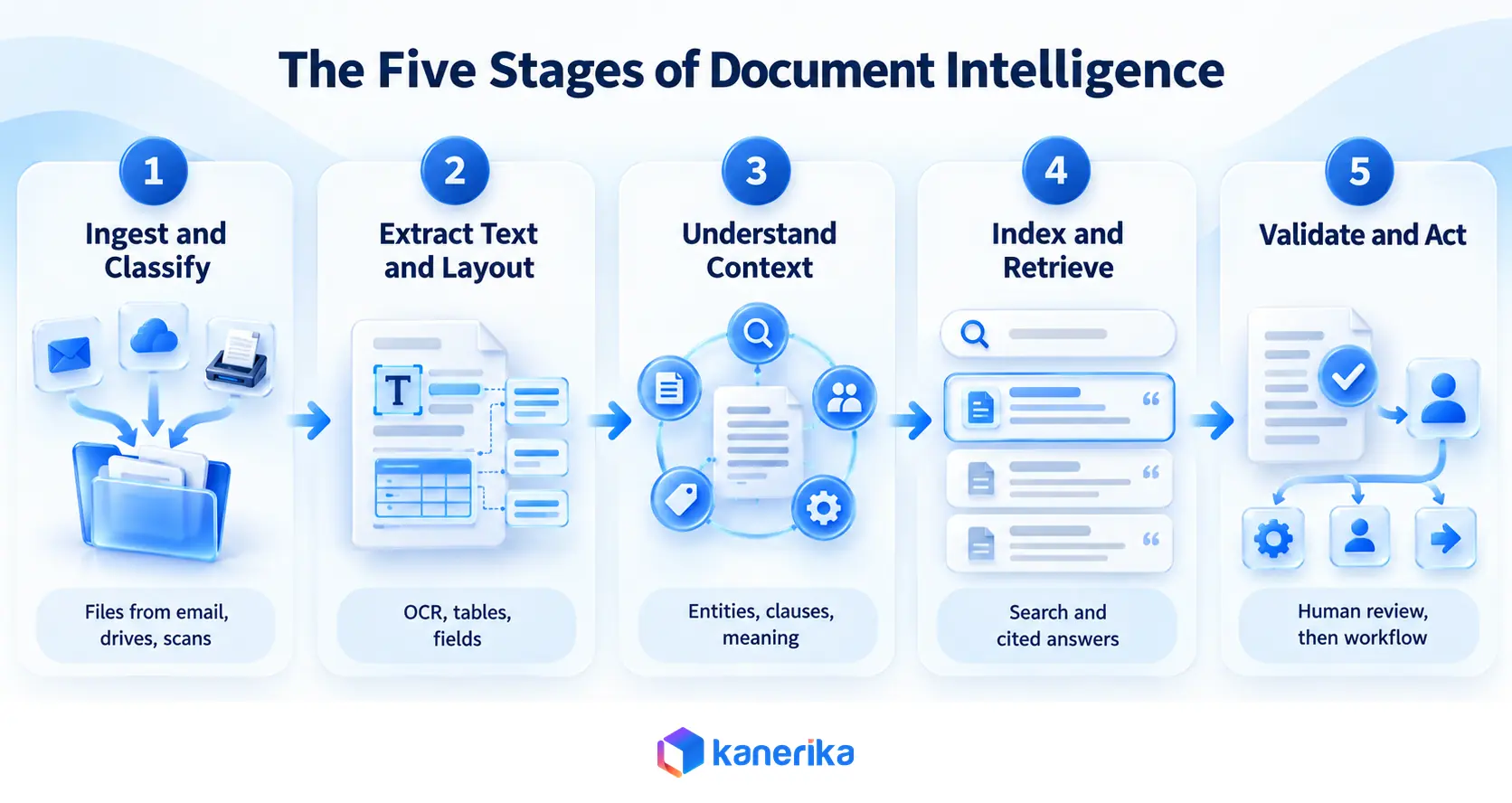
Most systems follow five stages. Google Cloud’s Document AI overview describes the same core pattern. It gets raw text from a document and then extracts the specific values the business needs.
Step 1: Ingestion and Classification
Files arrive from email, shared drives, scanners, or business applications. The system identifies the format and sorts each file by type, such as invoice, contract, or ID. The type decides which models run next.
Step 2: Text, Table, and Layout Extraction
OCR turns images into text, and layout analysis finds headings, columns, tables, and key-value pairs. Amazon Textract, for example, detects typed and handwritten text and extracts forms and tables, according to the AWS developer guide. Clean preparation here, such as the steps in our data preprocessing guide, pays off in every later stage.
Step 3: Contextual Understanding
Language models read the extracted text and identify entities, clauses, dates, amounts, and the links between them. This is where a model can tell a payment term from a notice period even when the wording differs. Vision-capable models can also read charts and layouts directly.
Step 4: Indexing and Retrieval
To answer questions, the system splits documents into passages and stores them in a searchable index. When someone asks, it retrieves the most relevant passages and hands them to a language model as context. This pattern is called retrieval augmented generation, and our RAG pipeline guide covers how each stage is built and tuned.
Step 5: Validation, Review, and Action
Confidence scores flag uncertain fields, and a person reviews those cases. Approved data then flows into ERP, CRM, or workflow tools. UiPath’s guide describes validating extracted information with human-in-the-loop components before anything acts on it.
Critical Challenges in Enterprise Document Management
Six problems come up again and again when teams start working with documents at scale.
1. Information Spread Across Disconnected Systems
The same policy lives in a shared drive, an email thread, and a SharePoint site, each at a different version. Employees pick whichever copy they find first. Nobody can say with confidence which one is current, and AI knowledge management programs often start from this exact problem.
2. Slow, Error-Prone Manual Review
Finance staff retype invoice totals. Legal teams read contracts line by line to find a renewal date. Every handoff is a chance for a typo, and the work grows with volume.
3. Variable Layouts and Unstructured Content
Two suppliers send invoices with the same fields in different places, and contracts bury key terms in dense paragraphs. Template-based tools break when the layout changes. SAS notes that language models can struggle with raw OCR output, so the extraction layer still needs engineering.
4. Sensitive Data and Access Control
Documents contain personal data, pricing, and legal terms. A search tool that ignores permissions can show an HR file to the wrong person. Any system that reads documents has to respect who may see what, which is the territory of data access governance and AI access control.
5. Weak Traceability
An answer without a source is hard to trust. Auditors, lawyers, and regulators ask where a number came from. Systems need to point back to the page and passage, not just return a confident sentence.
6. Rising Volume and Cost
Document volume grows with the business, and review capacity rarely keeps pace. Teams add temporary staff or accept longer cycle times. Neither option scales well, and the backlog of ungoverned unstructured data keeps growing.
Document Intelligence Use Cases Across Enterprise Functions
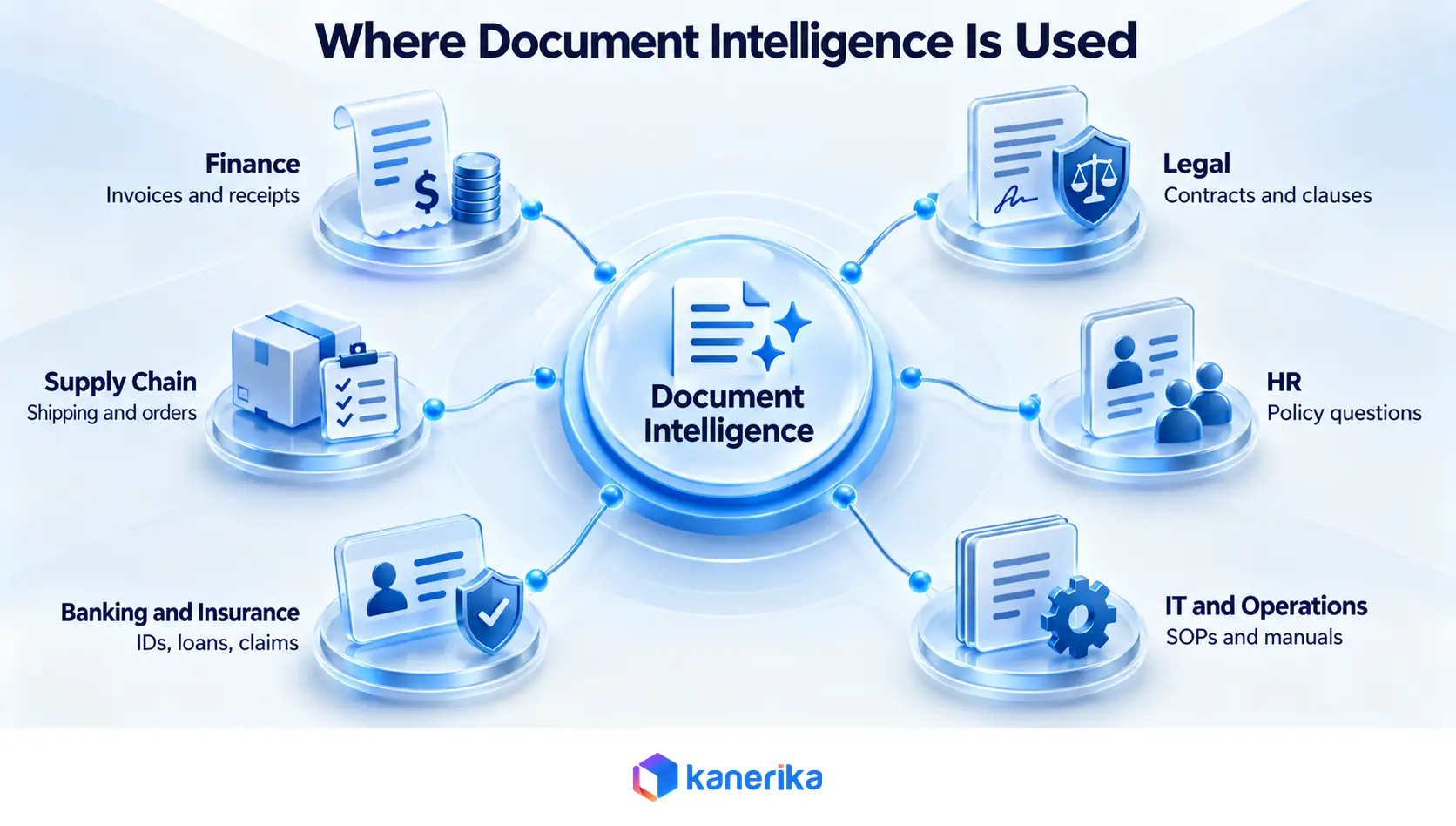
Every function that handles documents has a version of the same problem. The matrix below maps each one to its documents, its manual pain point, and what document intelligence does about it.
| Function |
Typical Documents |
Manual Pain Point |
What the AI Does |
| Finance |
Invoices, receipts, purchase orders |
Retyping totals and matching orders |
Extracts fields, matches records, flags exceptions |
| Legal |
Contracts, NDAs, policies |
Reading clause by clause |
Finds clauses, compares to a playbook, suggests redlines |
| HR |
Policies, onboarding packs, records |
Repeated policy questions |
Answers from approved policy files with permissions |
| IT and Operations |
SOPs, manuals, change records |
Hunting across repositories |
Answers in natural language with source links |
| Banking and Insurance |
IDs, applications, claims |
Slow verification and triage |
Reads IDs and forms, routes claims for review |
| Supply Chain |
Bills of lading, supplier agreements |
Keying shipment and order data |
Captures shipment fields and checks them against orders |
Finance and Accounting
Invoice work is the classic starting point. Amazon Textract has a dedicated API for invoices and receipts, and platforms such as Rossum validate extracted data against ERP records. Our posts on accounts payable automation and AI agents in finance go deeper on what works.
Legal and Compliance
Legal teams use document intelligence to find clauses, track renewal dates, and compare agreements against a standard. Our guides to AI contract analysis and AI contract policy compliance show how those checks run. A separate roundup covers the best AI legal document summarizer tools.
Watch on YouTube
AI Contract Review, Catch Risky Clauses Before Approval
See Klara review a contract against a playbook and flag risky clauses.
Human Resources
Employees ask the same policy questions every week. An agent that answers from the current handbook, and respects who may see which file, removes a steady stream of tickets. KlarityIQ lists HR policy questions among its use cases.
IT and Enterprise Operations
Runbooks, technical manuals, and change records pile up fast. Natural language questions across those files cut the time spent hunting for the right procedure. Our enterprise AI use cases list shows how this pattern repeats across functions.
Banking and Insurance
Lending packets, ID documents, and claim files arrive in mixed formats. Textract, for instance, has operations for ID documents and for mortgage loan packages. For claims, see our post on AI agents for insurance claims processing.
Manufacturing and Supply Chain
Bills of lading, supplier agreements, quality records, and purchase orders all carry data that other systems need. Rossum lists bills of lading and sales orders among its supported document types. Getting those fields into planning systems removes a daily source of delay.
Benefits of AI Document Intelligence for Enterprises
The benefits depend on the document type and the tool, so treat any single percentage from a vendor as a claim to test. The sections below describe where gains usually appear.
Less Manual Handling
Extraction and classification remove the retyping and sorting that fill a clerk’s day. People move to exception review, which needs judgment.
One SAS case description reports a deployment processing over 10 million pages a day for a US health provider. It also says more than 350 full-time staff moved to higher-value work, and both figures are vendor-reported.
Faster Access to Answers
Conversational search replaces the habit of opening five files to find one clause. The answer arrives in seconds with a link to the source. That speed matters most for support, sales, and legal teams who answer questions all day.
Better Data Quality
Validation rules catch totals that do not add up and dates that make no sense. Standardized extraction produces the same field names every time. Downstream reports then stop disagreeing with each other.
Stronger Control and Compliance
Access rules, masking, and audit trails give security and compliance teams something to inspect. Consistent handling also makes audits easier.
Reuse of Enterprise Knowledge
Contracts, reports, and internal records hold answers that teams pay to rediscover. Once those files are searchable by meaning, the knowledge stops depending on whoever remembers where it lives.
Essential Features of a Document Intelligence Platform
Use this list as a filter before you book demos.
- Multi-format support. The tool should read PDFs, scans, Word, Excel, and email attachments, plus video if your knowledge lives there.
- Extraction with confidence scores. Each field should carry a score so low-confidence values go to a person automatically.
- Cited question answering. Answers should link back to the source passage so users can verify them.
- Permission-aware access. Search results and answers should follow existing role-based access rules, with masking for sensitive fields.
- Human review workflow. Reviewers need a clear queue, an edit screen, and a way to feed corrections back to the model.
- Integrations. Look for connectors to your ERP, CRM, and collaboration tools, plus an API for the rest.
- Deployment choice. Some regulated teams need private cloud or on-premises options.
- Audit trail. Every query and every extraction should be logged.
Top 10 Document Intelligence Tools in 2026
This list covers ten tools in two groups. Extraction-first platforms turn documents into structured data for downstream systems. Question-answering agents let people ask questions across a document set.
The order is not a scored ranking. KlarityIQ is first because it is Kanerika’s own agent, so weigh that when you read its entry.
Descriptions come from each vendor’s public documentation. Pricing is left out because it changes, so confirm current pricing with each vendor.
1. KlarityIQ
KlarityIQ is Kanerika’s document intelligence AI agent. Users ask questions in plain language, and it answers from enterprise documents including Word, PDF, Excel, and video files. It works in Microsoft Teams and WhatsApp, supports multiple languages, and can show answers as tables or charts.
Role-based access, data masking, and an audit trail apply to queries. Its page lists customer support, sales, HR policy, legal research, and onboarding as use cases. When information is missing from connected systems, it says so and suggests other search terms, and it needs an internet connection to run.
Its published description centers on question answering and summaries. Teams with high-volume form extraction will likely pair it with an extraction platform from the list below.
Kanerika Service
KlarityIQ, Your Document Intelligence AI Agent
Ask questions in plain language and get answers from Word, PDF, Excel, and video files, with role-based access and data masking applied to every query.
Explore KlarityIQ
2. Azure Document Intelligence in Foundry Tools
Microsoft describes it as a cloud-based service for building intelligent document processing solutions, with document analysis, prebuilt, and custom models. The current API is version 4.0, and Microsoft’s overview page lists version 3.0 as retiring on March 30, 2029.
It sits within Azure Content Understanding capabilities. Document Intelligence handles deterministic extraction from structured documents, while Content Understanding adds LLM-powered analyzers for complex, unstructured, and multimodal content. It suits teams on Azure with developers who can build around an API.
3. Google Cloud Document AI
Google’s overview names digitizing books, medical intake forms, receipts and invoices, ID cards, tax forms, and contracts as example workflows. It follows the two-step pattern of raw text first and targeted extraction second. It fits teams already building on Google Cloud.
4. Amazon Textract
The AWS developer guide says Textract detects typed and handwritten text, extracts forms and tables, and answers targeted questions through its Queries feature. Separate operations cover invoices and receipts, US government ID documents, and mortgage loan packages. It suits AWS teams building their own applications.
5. ABBYY Vantage
It is an IDP platform with a low-code and no-code skill designer. ABBYY says it has pre-trained skills for more than 150 use cases, including an ID reading skill that covers over 10,000 document types. It claims about 90% accuracy at the start, improving with human review, which is a vendor claim to test.
Deployment runs in ABBYY Cloud in Europe, the USA, or Australia, or on-premises or private cloud on Azure. It connects to Microsoft Power Automate, Blue Prism, UiPath, and Automation Anywhere.
Talk to Kanerika
Which Document Problem Costs You the Most?
Bring a sample of your own files. Kanerika’s team will help you sort the work into extraction, question answering, or both.
Book a Working Session →
6. UiPath Document Understanding
UiPath says Document Understanding uses a combination of robotic process automation and AI to process documents. It collects documents, extracts data from images, PDFs, handwriting, signatures, checkboxes, and tables, validates with human-in-the-loop components, and then acts on the result.
It suits teams already running UiPath bots. If you are weighing RPA platforms, our Blue Prism vs UiPath comparison may help.
7. Instabase
Instabase presents itself as an agentic automation platform built around AI Hub and Deep Document Understanding. Its packet-aware agents validate across documents in a packet using multi-step business rules. Customers can control where data is stored and processed, including connecting their own cloud storage.
The site names financial services, insurance, healthcare, and the public sector as its industries. A notice on the site says Instabase is now SuperApp and that AI Hub continues to be supported. Confirm the current product naming during evaluation.
8. Hyperscience
Hyperscience says it turns unstructured content into structured data on a machine learning architecture. It claims 99.5% accuracy rates, which is a vendor figure, and states that it is FedRAMP High authorized. It also supports labeling documents to create training data and fine-tuning LLMs on proprietary data.
9. Rossum
Rossum focuses on transactional documents such as invoices, bills of lading, and sales orders. It cross-checks extracted data against master data, ERPs, and business rules, and tracks straight-through processing rates and exceptions. Named integrations include SAP, Coupa, NetSuite, Workday, and Microsoft Dynamics.
10. Nanonets
Nanonets describes AI agents for processes that start with unstructured data, such as accounts payable, claims, order management, and cash application. Confidence scores decide when an agent acts alone and when it asks a person. Listed support includes SOC 2 Type II, GDPR, ISO 27001, and HIPAA, with a BAA on enterprise plans and VPC, single-tenant, or on-premises deployment.
Datasheet
Klara, the Document Intelligence and Compliance Agent
See how Klara checks contracts against enterprise playbooks, flags compliance risks, and suggests redlines with human oversight.
View the Klara Datasheet →
| Tool |
Primary Type |
Best Fit |
Worth Checking |
| KlarityIQ |
Question-answering agent |
Answers from policies, contracts, and reports |
No form-extraction pipeline described |
| Azure Document Intelligence |
Cloud extraction API |
Azure teams with developers |
Product naming has changed |
| Google Cloud Document AI |
Cloud extraction API |
Google Cloud teams |
Needs build effort |
| Amazon Textract |
Cloud extraction API |
AWS teams, IDs, lending packets |
Needs build effort |
| ABBYY Vantage |
IDP platform |
Mixed document types, low-code teams |
Test the 90% starting accuracy claim |
| UiPath Document Understanding |
RPA plus AI |
Existing UiPath estates |
Fit outside UiPath bots |
| Instabase |
Agentic platform |
Multi-document packets |
Product naming transition |
| Hyperscience |
ML extraction platform |
Regulated and public sector work |
Test the 99.5% accuracy claim |
| Rossum |
Transactional document AI |
Invoices, orders, shipping documents |
Narrower document scope |
| Nanonets |
Process agents |
AP, claims, and order workflows |
Confirm plan-level security terms |
No tool on this list wins on every document type. Cloud APIs give developers control at the cost of build time, while platforms ship faster with less flexibility. Run the same sample through two or three before you commit.
How to Choose a Document Intelligence Platform
Start from your documents, not from a demo. Gather a sample that includes poor scans, odd layouts, and the contracts that always cause trouble. Then score each vendor on the same sample.
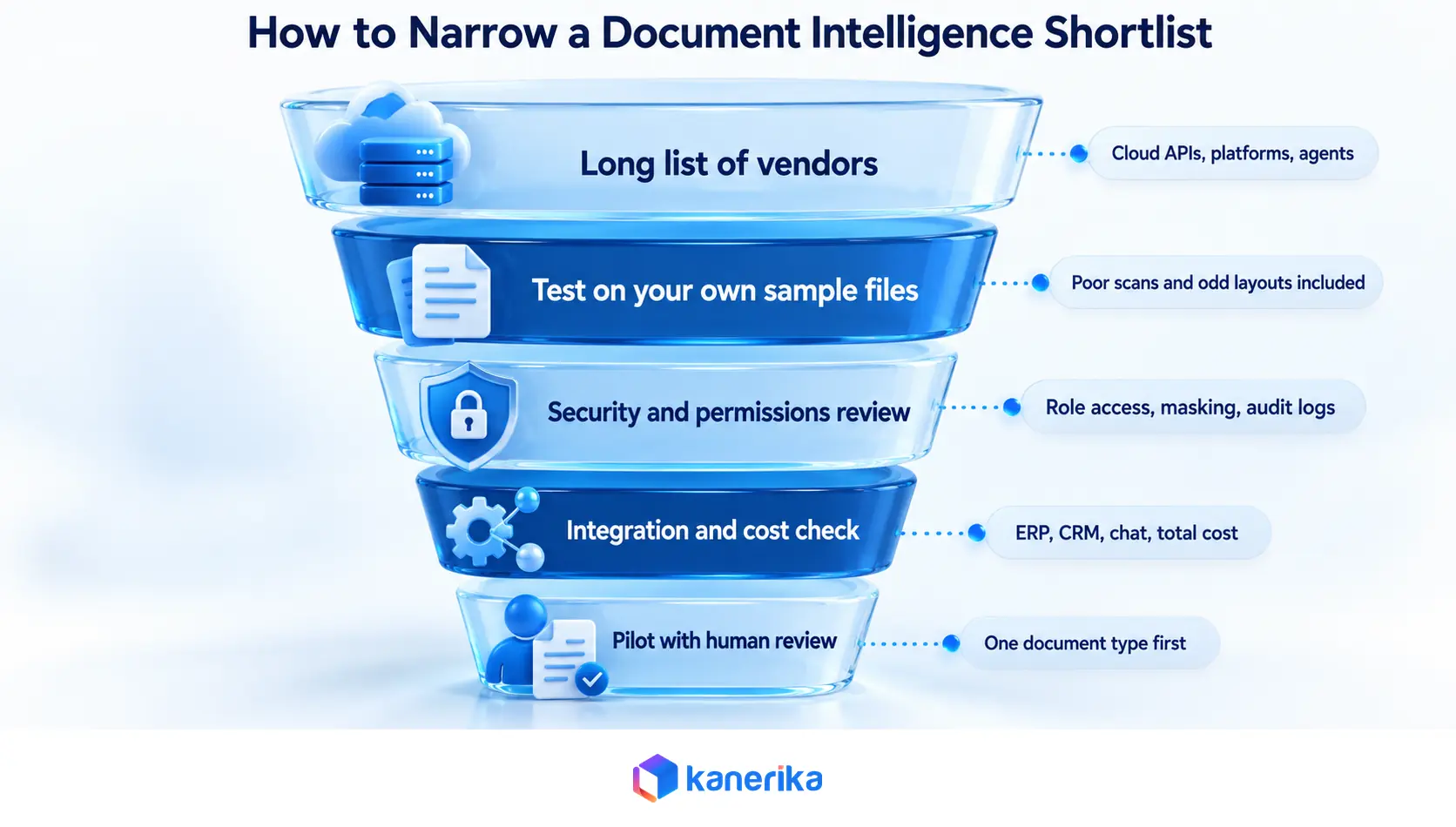
| Criterion |
What to Test |
Warning Sign |
| Accuracy on your files |
Field-level accuracy on your worst scans and layouts |
Vendor will only demo its own samples |
| Answer quality |
Cited answers to questions you already know |
Answers with no source passage |
| Security |
Role-based access, masking, audit logs, data location |
Permissions bolted on after search |
| Integration |
Connectors to your ERP, CRM, and chat tools |
Everything needs custom code |
| Review workflow |
Exception queue and correction feedback |
No way to learn from edits |
| Total cost |
License, usage, build, and review labor |
Price quoted without your volumes |
Weight the criteria by what your documents demand. A bank may put security first, and an AP team may put straight-through rate first. Write the weights down before the demos start so the loudest salesperson does not set them.
Build vs Buy for Document Intelligence
Building on a cloud API gives you control over models, data flow, and cost. It also means your team owns evaluation, review screens, monitoring, and every change in the vendor’s API. That trade works when you have engineers and unusual requirements.
Buying a platform gets a pilot running sooner and brings prebuilt review workflows. The cost is less control and a license that grows with volume. Many enterprises land on a hybrid, with a platform for common documents and custom work where the edge cases live.
If you build, our guide to building AI agents covers the design choices.
Document Intelligence Implementation Steps
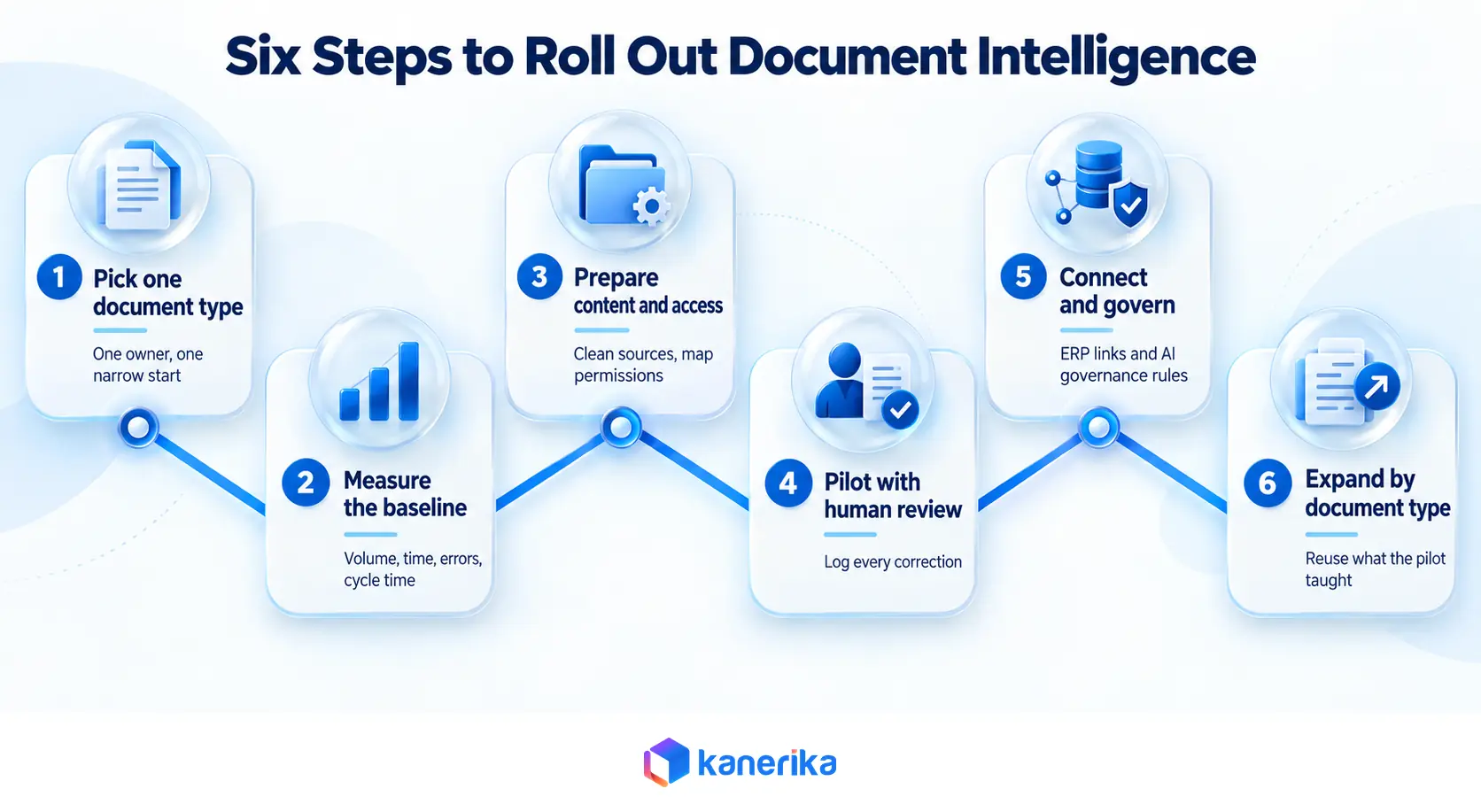
- Pick one document type and one owner. A narrow start, such as supplier invoices or NDAs, keeps the pilot measurable.
- Measure the baseline. Record volume, handling time, error rate, and cycle time before any automation.
- Prepare content and permissions. Clean the sources, remove duplicates, and map who may see what.
- Run a pilot with human review. Keep a person in the loop and log every correction.
- Connect and govern. Integrate with downstream systems and set rules from your AI governance framework.
- Expand document type by document type. Reuse what the pilot taught you about review and exceptions.
People issues slow more projects than models do. Our post on AI change management explains why, and it is worth reading before the pilot starts.
How to Measure Document Intelligence ROI
A simple model multiplies documents per year by minutes saved per document, converts that to hours, and multiplies by loaded hourly cost. Subtract license, usage, and review labor. Add the avoided cost of errors where you can document it.
Track a few operating metrics alongside the formula. Field-level accuracy shows extraction quality, and straight-through processing rate shows how often no human touch is needed. Rossum reports straight-through processing and exception rates on its platform for this reason.
Cycle time and time to answer show what users feel. Review those two numbers monthly, since they move first when document quality or volume changes.
Security and Compliance Considerations
Documents hold the most sensitive data a company has. Treat a document intelligence project as a data security project from day one. Ask where files are stored, who can query them, and whether prompts and outputs are logged.
Masking matters for personal data, and Kanerika’s Susan agent handles PII redaction and sensitive data masking for that purpose. Our guides to generative AI security, AI privacy risks, and GDPR and CCPA compliance cover the controls auditors ask about.
Common Mistakes to Avoid
Teams test on clean sample files and then meet real scans in production. They skip human review in the pilot and miss systematic errors. They connect search to a repository without carrying over permissions.
Another common error is buying the wrong category. Extraction tools do not answer questions across a policy library, and question-answering agents do not replace a form-extraction pipeline. Measure agent quality with the methods in our post on AI agent evaluation.
What Comes Next for Document Intelligence
The line between extraction and understanding is blurring. Microsoft already pairs deterministic extraction with LLM-powered analyzers for multimodal content, and Instabase describes agents that validate across whole document packets. Our overview of multimodal models explains the models behind that shift.
Expect more agents that act on document content, such as filing a claim or flagging a clause, with people approving the result. That makes evaluation and access control more important, not less.
How Kanerika Approaches Document Intelligence
Kanerika builds document intelligence as a set of purpose-built agents on top of a shared data foundation. KlarityIQ answers questions from enterprise documents. Klara checks contracts against an enterprise playbook, flags compliance risks, and suggests redlines with human oversight.
Alan summarizes legal documents and analyzes clauses. Susan redacts PII and masks sensitive data, and Mike proofreads arithmetic and cross-section consistency inside a document. For transaction-heavy work, Kanerika’s FLIP platform has pages for trade document processing and claims processing automation.
A typical engagement starts with an assessment of document types, volumes, and permission models. The team then builds extraction and retrieval for one document type, pilots it with human review, and scales from there. Kanerika holds ISO 27001 and ISO 27701 certifications and is SOC II Type II compliant, which matters when the documents are contracts and personal records.
For a sales intelligence platform, Kanerika moved document workflows from legacy JavaScript to Python on Databricks and connected sources that had been separate. The published results were 80% faster document processing, 95% improved metadata accuracy, and 45% faster time-to-insight, as stated in the case study. The page does not publish baselines or measurement periods.
Case Study
80% Faster Document Processing with Databricks Workflows
Kanerika re-architected document workflows for a sales intelligence platform on Databricks, reporting 80% faster document processing and 95% improved metadata accuracy.
Read the Case Study →
Teams that want help can explore Kanerika’s AI application development, RAG development, and related services.
Wrapping Up
Document intelligence turns files into data and answers, and the right tool depends on whether your pain is volume extraction, question answering, or both. Start with one document type, measure a baseline, and test vendors on your own files. Keep a person in the loop until the corrections taper off.
If you want a second opinion on which category fits your documents, you can book a working session with Kanerika.
Frequently Asked Questions
What is document intelligence?
Document intelligence is software that reads documents, understands their content, and turns it into structured data or direct answers. It combines OCR, layout analysis, natural language processing, and large language models. Teams use it for invoices, contracts, claims, and policy lookup, where people would otherwise read and retype information by hand.
What is AI document intelligence?
AI document intelligence uses machine learning and language models to read documents instead of relying on fixed templates. It can handle varied layouts, classify files, extract fields, and answer questions in plain language with links to source passages. Accuracy depends on document quality, so teams test it on their own files before rollout.
How is document intelligence different from OCR?
OCR converts images of text into machine-readable characters and stops there. Document intelligence goes further by classifying documents, finding fields and tables, understanding clauses and context, and answering questions. Most document intelligence pipelines still run OCR first, then add language models and retrieval on top of the recognized text. The difference is understanding, not just recognition.
Is document intelligence the same as intelligent document processing?
The two overlap heavily, and vendors often use both names for the same product. Intelligent document processing usually means classifying, extracting, validating, and routing documents. Document intelligence also covers search and question answering across document content, which large language models have made practical for contracts, policies, and reports. Check how each vendor defines the term.
What is Azure Document Intelligence used for?
Azure Document Intelligence in Foundry Tools is a Microsoft cloud service for building document processing solutions. Developers use its prebuilt and custom models to pull text, tables, and fields from forms and files. Microsoft places it within Azure Content Understanding capabilities, which add LLM-powered analyzers for unstructured and multimodal content.
How accurate is document intelligence?
Accuracy varies by tool, document type, and scan quality. Vendors publish figures, such as ABBYY’s claim of about 90% at the start and Hyperscience’s claim of 99.5%, but those come from vendor-chosen conditions. Run each candidate on your own sample, measure field-level accuracy, and keep human review for low-confidence results.
What types of documents can document intelligence process?
Most tools handle PDFs, scanned images, Word files, spreadsheets, and email attachments. Many also read tables, handwriting, signatures, and checkboxes. Common targets include invoices, contracts, ID documents, claims, and shipping papers. Some agents, such as KlarityIQ, also answer questions from video files, which most extraction platforms do not cover. Always confirm format support in a test.
How much does a document intelligence platform cost?
Pricing models vary by vendor. Major cloud APIs usually bill per page processed, while enterprise platforms often quote by volume, modules, and deployment type. Prices change, so request current quotes against your real page counts. Add build effort, integration work, and review labor to the vendor price when you compare total cost.
How long does it take to implement document intelligence?
Timelines depend on document variety, integrations, security review, and how much human review the process needs. A common approach is a pilot on one document type, followed by expansion one type at a time. Set the timeline after you measure a baseline and test candidate tools on your own files.
Is document intelligence secure for confidential files?
It can be, if the platform enforces role-based access, masks sensitive fields, logs queries, and lets you control where data is stored and processed. Ask each vendor how permissions carry over from source systems and whether prompts and outputs are retained. Regulated teams should also check certifications and private deployment options.
Can document intelligence answer questions across many documents?
Yes. Question-answering agents index document content, retrieve the most relevant passages for each question, and generate an answer from them. Good ones show the source so users can verify. Extraction-first platforms focus on pulling fields into other systems, so check which type of tool a vendor actually sells. Test this with questions you already know.
What is KlarityIQ?
KlarityIQ is Kanerika’s document intelligence AI agent. Users ask questions in plain language and get answers from enterprise documents such as Word, PDF, Excel, and video files. It works in Microsoft Teams and WhatsApp, supports multiple languages, and applies role-based access, data masking, and an audit trail to queries. It also summarizes long documents.














