TL;DR
Enterprise AI use cases are specific business tasks where AI makes a measurable difference, such as processing invoices, forecasting demand, answering customer questions or reviewing contracts. The most common ones sit in finance, supply chain, customer service, sales, HR, IT and compliance. Each one runs on a different technique, from predictive machine learning to document AI, computer vision, generative AI and AI agents.
The best first choices have clean data, a clear owner and a number you can measure before and after. Score every candidate on business impact and on feasibility, then start where both scores are high. This guide lists more than 40 use cases with the data, effort and success metric each one needs.
Key Takeaways
- Enterprise AI use cases work best when they start from a business problem with an owner and a baseline, not from a model looking for a job.
- Six techniques cover most of the catalog, namely predictive ML, document AI, computer vision, conversational AI, generative AI and agentic AI.
- Invoice processing, demand forecasting, predictive maintenance and support self-service are the most proven starting points across industries.
- An impact and feasibility score, weighted for your context, separates quick wins from strategic bets before any budget is spent.
- The level of human oversight should match the cost of an error, which differs sharply between IT operations and clinical documentation.
- Kanerika delivers these use cases on governed data platforms with ready AI agents such as Karl, Alan and Susan, and documents results in its own case studies.
Watch on YouTube
What Are the Top 3 GenAI Solutions Enterprises Are Choosing in 2026?
Kanerika’s Bhupendra Chopra breaks down which AI solutions enterprises are actually funding right now, and why those use cases get picked first.
Why the Use Case Decides the Outcome
Stanford’s Digital Economy Lab recently studied 51 enterprise AI deployments that actually worked. In its Enterprise AI Playbook, 77% of the hardest challenges teams reported were change management, data quality and process redesign. In other words, the model itself was rarely the problem.
That finding also changes how you should read a catalog like this. Similar use cases took weeks at one company and years at another, and the researchers traced the gap to sponsorship, existing processes and user willingness. So picking the right use case, with the right data and owner behind it, is most of the battle.
So this guide does more than list ideas. For that reason, every use case below comes with its value driver, the data it needs, the technique behind it, the effort involved and the number that proves it worked.
What Counts as an Enterprise AI Use Case?
An enterprise AI use case is a specific, repeatable business task where an AI system changes the result in a measurable way. It also has a named owner, a defined input, an output someone acts on and a metric that moves. “Use AI in finance” is a theme, while “extract line items from supplier invoices and match them to purchase orders” is a use case.
Scale and consequence are what make it enterprise, because the same task runs thousands of times, touches systems of record, carries compliance weight and has to keep working after the project team moves on. The enterprise AI adoption guide covers the program view, while this page goes deep on the use cases themselves.
Use Case vs. Pilot vs. Automation Script
A pilot tests whether a use case is possible, usually on a sample of data and a small group of users. A use case, by contrast, is the production version, wired into the real workflow with monitoring, support and a budget line. Many organizations run dozens of pilots but very few use cases, which is why the distinction matters.
Automation scripts are different again, however. Rules-based bots follow fixed instructions and break when inputs change, while AI handles variation in documents, language or patterns. Most mature programs therefore blend the two, with intelligent automation passing the predictable steps to rules and the judgment steps to models.
The Six AI Techniques Behind Enterprise Use Cases
Nearly every use case in this catalog runs on one of six techniques, or else a combination of them. As a result, knowing which one sits underneath tells you what data you need and what can go wrong.
- Predictive machine learning learns from historical, structured data to forecast a number or classify a case, such as demand, churn, fraud or equipment failure.
- Document AI, also called intelligent document processing, reads invoices, contracts, claims and forms and turns them into structured fields.
- Computer vision interprets images and video for tasks such as defect detection, shelf monitoring and safety compliance.
- Conversational AI understands and responds to natural language in chat or voice, from support bots to internal help desks.
- Generative AI drafts, summarizes and answers questions over enterprise content, and it is usually grounded in company data through retrieval so answers stay current.
- Agentic AI plans and executes multi-step tasks across systems, calling tools and handing off to humans when confidence is low.
The difference between these families matters more than any single model choice, because each one fails in its own way and needs its own kind of data.
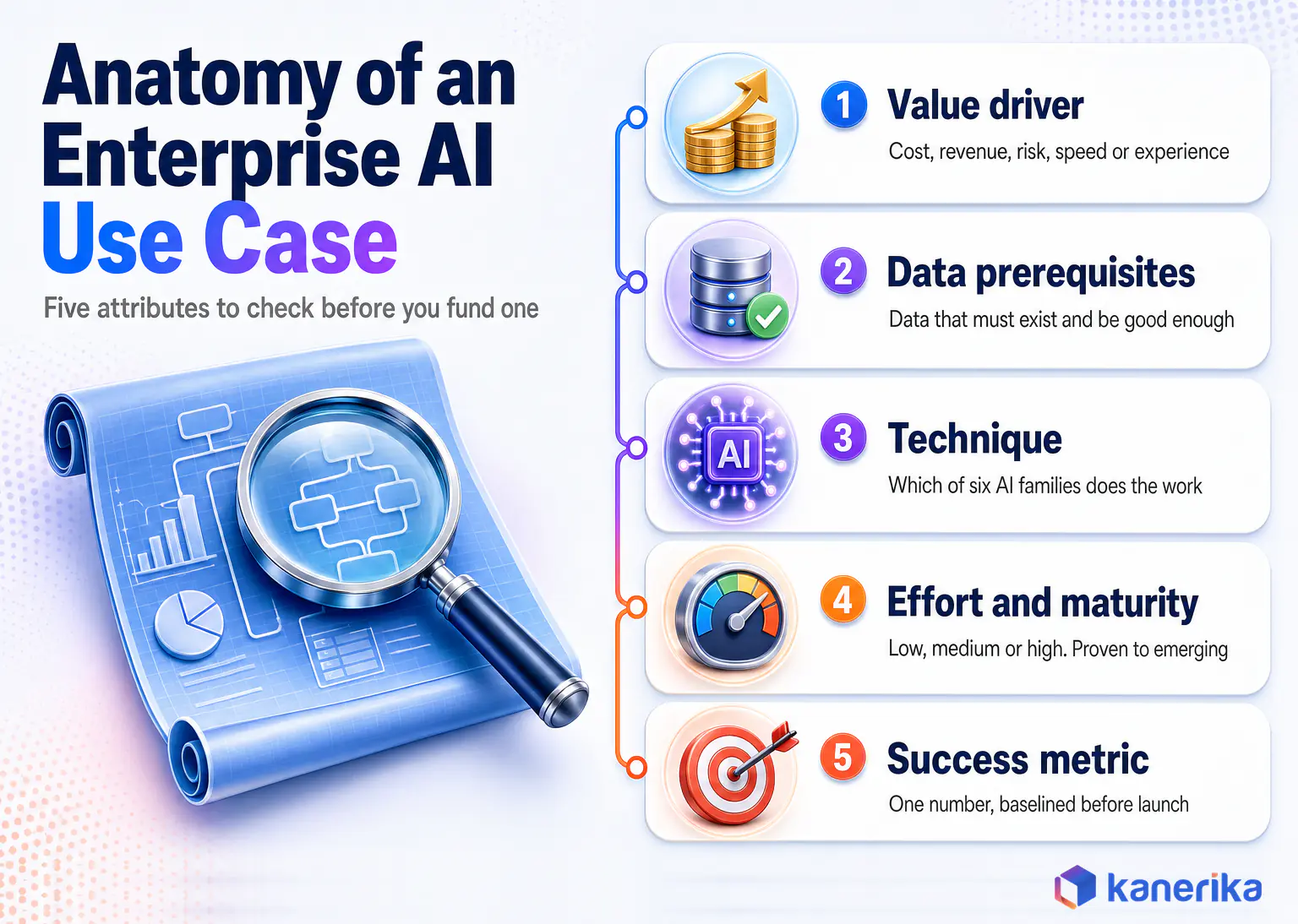
How to Read This Catalog: Five Attributes Per Use Case
Published lists usually stop at the name of a use case. That is not enough to decide whether it fits your organization, so this guide describes every entry with five attributes.
- Value driver. The business lever it moves, such as cost, revenue, risk, speed or customer experience.
- Data prerequisites. The data that must exist, be accessible and be good enough before work starts.
- Technique. Which of the six AI families does the heavy lifting.
- Effort and maturity. Low, medium or high effort, and whether the pattern is proven, established or emerging.
- Success metric. The one number you baseline before launch and track afterward.
Maturity labels also follow a simple rule. Proven means the pattern has run in production across many enterprises for years, established means it is widely deployed but still maturing, and emerging means early production with a higher failure rate.
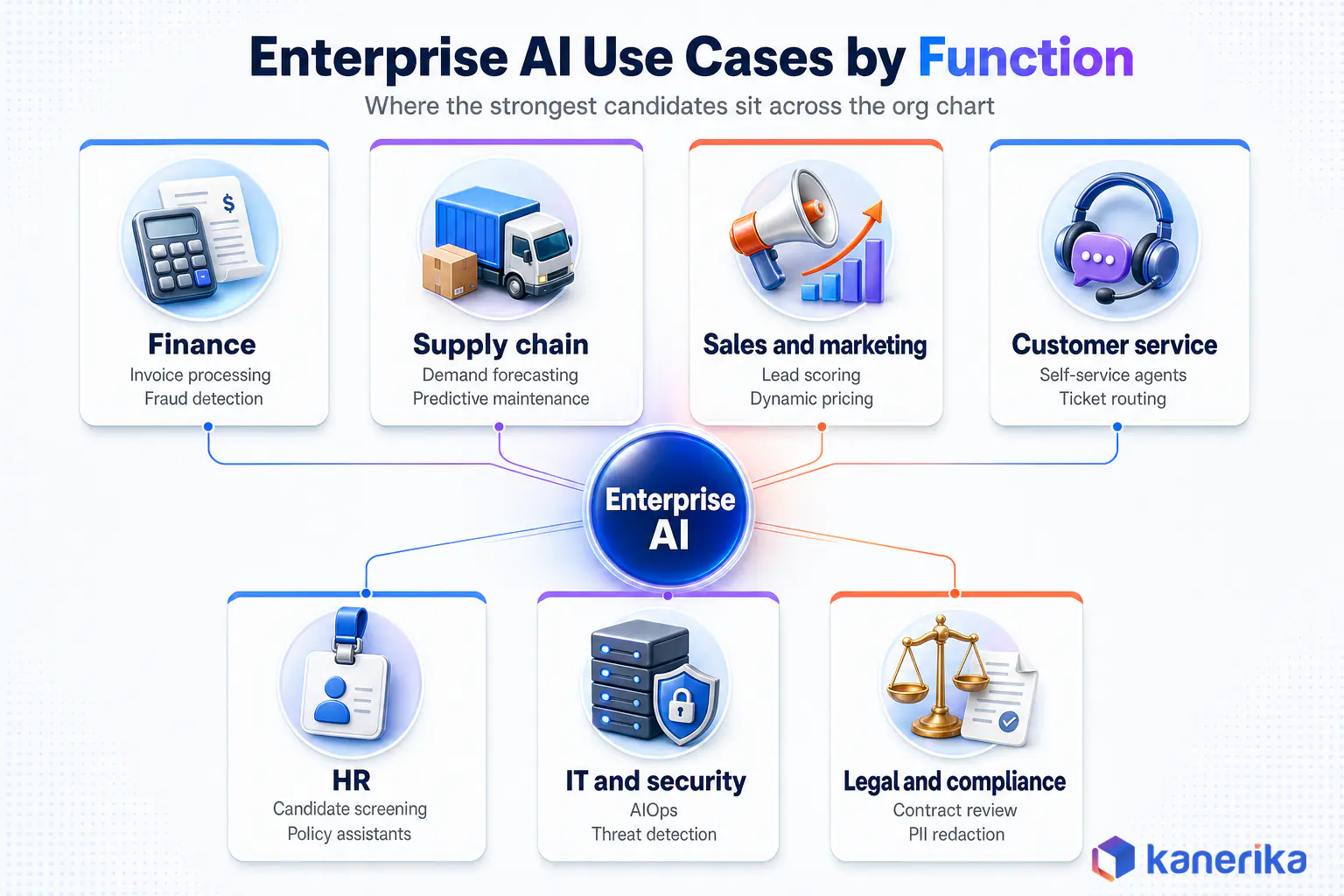
Enterprise AI Use Cases by Business Function
Organizing use cases by function makes sense because it mirrors how most enterprises assign budgets and owners. Each function below therefore lists its strongest candidates with their attributes in plain language.
A theme also runs across all of them. The use cases that reach production fastest replace a high-volume, well-documented manual task, while the ones that stall try to automate a judgment nobody has written down.
Finance and Accounting
Invoice and accounts payable processing is the most proven finance use case. First, document AI extracts header and line-item data from invoices, then it matches them to purchase orders and receipts and routes exceptions for review. It needs invoice images, the vendor master, open purchase orders and ERP access, takes low to medium effort, and teams track it through straight-through processing rate and cost per invoice.
Fraud and anomaly detection, by contrast, uses predictive ML on transaction history to flag unusual payments, duplicate invoices and expense abuse. It needs labeled past incidents and clean transaction data, sits at medium effort and proven maturity, and teams should judge it on detection rate and false positive rate together. Tracking only detection floods reviewers with noise, so both numbers belong on the same dashboard.
Cash flow and revenue forecasting then combines ledger history, receivables aging and pipeline data to predict short-term cash positions. It is medium effort and established, and the metric is forecast error against actuals over a rolling window. Our guide to AI performance metrics covers how to track whether a use case is paying off.
Close and reconciliation support also applies ML matching to bank statements, intercompany entries and subledgers, with generative AI drafting variance explanations. It needs consistent account mappings, and once those exist it pays off in fewer days to close and a higher auto-match rate.
FP&A analyst assistants let finance teams ask questions of governed data in plain language instead of waiting on report requests. These run on generative or agentic AI over a certified semantic model, remain emerging, and the metrics that matter are time to answer and repeat usage. If an agent is on your shortlist, this guide to AI agent development cost breaks down build and run budgets.
Case Study
90% Less Manual Work in Accounts Payable
A fuel distributor paired AI-driven invoice extraction with human review of exceptions, saving more than 400 manual hours a month and reaching error-free ERP entries.
Read the Case Study →
Operations and Supply Chain
Planning, Inventory and Suppliers
Demand forecasting is the anchor use case for operations. Predictive ML blends sales history, promotions, seasonality and external signals such as weather, so it can forecast demand by product and location. It needs at least two years of clean sales history and takes medium effort, so most teams track forecast accuracy, stockouts and inventory turns from the first month.
The AI demand forecasting guide compares the model options for teams choosing between statistical and machine learning approaches.
Inventory optimization sets reorder points and safety stock from forecast uncertainty rather than fixed rules. It depends on the forecast above, so it usually comes second, and then it pays off in working capital released without new stockouts.
Supplier risk monitoring, meanwhile, combines ML scoring of delivery performance with language models that scan news and filings for disruption signals. The pattern is established, and the metric is how many early warnings the team acts on before a shortage hits.
Assets, Quality and Delivery
Predictive maintenance reads sensor data, maintenance logs and asset records to predict failures before they happen. It is medium to high effort because sensor coverage is often patchy, and the scorecard is unplanned downtime and maintenance cost. Kanerika’s breakdown of AI in predictive maintenance covers which failure modes are worth modeling first.
Visual quality inspection uses computer vision on production lines to catch defects that tired eyes miss, especially on fast lines. It needs labeled images of good and bad parts plus stable lighting, carries medium to high effort, and success shows up in defect escape rate and false reject rate.
Delivery and ETA prediction similarly estimates arrival times from traffic, weather, route and carrier data. It is medium effort and proven in logistics, so prediction accuracy and failed-delivery rate are the natural metrics. The wider AI in supply chain picture shows how these connect into one planning loop.
Customer Service
Self-service support agents answer routine questions in chat or voice because they can retrieve answers from knowledge bases and ticket history. They need a current, well-structured knowledge base and carry medium effort, while containment rate and customer satisfaction show whether they work.
Agent assist, meanwhile, sits beside human agents, suggesting answers, surfacing policies and summarizing the case so far. It is lower risk than full automation because a person approves every response, so handle time and first-contact resolution are the numbers to watch.
Ticket classification and routing reads incoming emails and tickets, then sends them to the right queue with a priority. It is low effort and proven, so misroute rate is the metric to watch.
Sentiment and churn signals analyze conversations for frustration and risk markers, then alert account teams before the customer leaves. They need linked interaction and account data, and they also pay off in retention of flagged accounts.
Knowledge search lets agents and customers ask questions in natural language over manuals and policies using retrieval-augmented generation. Answer accuracy against a test set is the metric, because a fluent wrong answer is worse than none. The analysis of why conversational AI deployments stall explains the common traps.
Case Study
65% Self-Service Resolution With an AI Member Support Agent
An AI agent connected to knowledge bases and Zendesk now resolves 65% of member queries instantly and routes low-confidence cases to live executives.
Read the Case Study →
Sales and Marketing
Lead and opportunity scoring first ranks prospects by likelihood to convert using CRM history, engagement data and firmographics. It is low to medium effort and proven, and conversion rate by score band is the metric that matters.
Personalization and next-best offer recommends products or content for each customer from behavior and purchase history. Recommendation engines are proven in retail and media, and the metric is lift in conversion or basket size against a control group.
Dynamic pricing adjusts prices using demand, competitor and inventory signals, but only within guardrails the pricing team sets. It is medium to high effort because governance around price changes is strict, and teams track margin and price-change cycle time.
Sales call and meeting intelligence uses generative AI to summarize calls, update CRM fields and draft follow-ups. It needs call recordings with consent and a clean CRM, and it then pays off in selling time recovered per rep. Kanerika’s review of AI sales agents compares the tools.
Marketing content generation drafts copy variants, product descriptions and campaign assets within brand rules. It is low effort to start and high effort to govern well, so the generative AI for marketing playbook puts review workflows first.
HR and Workforce
Candidate screening and document verification matches applicants to role requirements and checks credentials and documents. It needs structured job profiles and careful bias testing, so it carries medium effort, and teams track time to shortlist and verification error rate.
Employee policy and benefits assistants answer HR questions from handbooks and policy documents, especially during open enrollment. They are established and low to medium effort, and ticket deflection plus answer accuracy tell you if they work.
Attrition risk prediction flags teams and roles with rising exit risk from engagement, tenure and compensation data. It is sensitive, so access controls and explainability matter as much as accuracy.
Workforce demand planning forecasts staffing needs from volume drivers such as orders, tickets or patient census. It uses the same predictive ML patterns as demand forecasting, then shows its value in fewer overtime and understaffing hours.
IT and Security
AIOps and incident prediction correlates logs, metrics and alerts to spot incidents early and cut alert noise. It is established, and teams track mean time to detect and resolve. The AIOps tools comparison covers the platforms.
Threat detection models normal user and network behavior, then flags deviations that rules miss. It needs broad log coverage and tuning, and security teams judge it on detection rate and analyst hours per true incident.
Code and engineering assistants similarly generate, explain and test code inside developer tools. They are established and low effort to start, and the metric is cycle time for comparable work, not lines of code.
Service desk automation resolves password resets, access requests and common fixes through a conversational agent tied to IT systems. Generative AI for IT operations extends this into runbook execution.
Access review and anomaly checks flag unusual permissions and unused entitlements before auditors do. With AI agents now requesting access themselves, AI access control has become a use case and a prerequisite at the same time.
Legal, Risk and Compliance
Contract review and summarization extracts clauses, obligations and renewal dates, then flags deviations from standard terms. It runs on document AI plus generative AI and carries medium effort, while review time per contract shows the payoff. Kanerika’s guide to AI contract analysis covers clause libraries in detail.
PII detection and redaction finds and masks personal data in documents, transcripts and datasets before they are shared or used for training. It is proven and low to medium effort, and teams check recall on a labeled test set. Sensitive data discovery is the upstream step.
Regulatory change monitoring tracks new rules and guidance, then maps them to internal policies and controls. It is established, and the metric is the time from publication to impact assessment.
Compliance screening and vetting researches people and counterparties across news, records and internal data, then produces a cited summary against defined criteria. It is a strong fit for agentic AI because the task has clear rules and many sources.
Audit evidence preparation finally gathers and summarizes control evidence across systems ahead of audits. It is still emerging, so teams track preparation hours per control.
The Function Catalog at a Glance
The table below condenses the function catalog into one view for planning sessions.
Table 1: Enterprise AI Use Cases by Function at a Glance
| Use Case | Function | Technique | Data Prerequisites | Effort / Maturity | Success Metric |
|---|
| Invoice and AP processing | Finance | Document AI | Invoices, POs, vendor master, ERP | Low-medium / Proven | Straight-through processing rate |
| Fraud and anomaly detection | Finance | Predictive ML | Transactions, labeled incidents | Medium / Proven | Detection and false positive rates |
| Demand forecasting | Supply chain | Predictive ML | 2+ years sales, promotions, external signals | Medium / Proven | Forecast accuracy, stockouts |
| Predictive maintenance | Operations | Predictive ML | Sensor data, maintenance logs | Medium-high / Proven | Unplanned downtime |
| Visual quality inspection | Operations | Computer vision | Labeled defect images | Medium-high / Established | Defect escape rate |
| Lead scoring | Sales | Predictive ML | CRM history, engagement data | Low-medium / Proven | Conversion by score band |
| Call summaries and CRM updates | Sales | Generative AI | Recordings with consent, CRM | Low / Established | Selling time recovered |
| Self-service support agent | Customer service | Conversational + generative AI | Knowledge base, ticket history | Medium / Established | Containment rate, CSAT |
| Ticket routing | Customer service | NLP classification | Historical tickets with queues | Low / Proven | Misroute rate |
| Candidate screening | HR | ML + document AI | Job profiles, applicant documents | Medium / Established | Time to shortlist |
| AIOps incident prediction | IT | Predictive ML | Logs, metrics, alert history | Medium / Established | Mean time to detect |
| Contract review | Legal | Document AI + generative AI | Contract repository, clause library | Medium / Established | Review time per contract |
| PII detection and redaction | Compliance | NLP + document AI | Documents, transcripts, datasets | Low-medium / Proven | Recall on labeled test set |
| Compliance screening | Risk | Agentic AI | Internal records, external sources | Medium / Emerging | Vetting turnaround time |
Enterprise AI Use Cases by Industry
Functions tell you where AI fits inside any company, while industry tells you where the money is concentrated. For example, the same technique carries very different value depending on what an error costs and what data the sector already collects.
Deloitte’s AI Dossier tags more than 135 use cases by industry, function and AI type for the same reason. The sections below therefore focus on the use cases each sector tends to fund first.
Manufacturing
Manufacturing has the richest sensor and production data of any sector, which makes predictive maintenance, visual inspection and production scheduling natural first moves. Energy optimization and scrap reduction follow once the plant centralizes its data.
Watch on YouTube
Transforming Manufacturing with AI, Automation and Data
See how manufacturers apply AI and automation to production, maintenance and supply chain decisions, from plant data to day-to-day operations.
AI-powered digital twins sit at the strategic end, simulating lines and equipment to test changes before making them. They are high effort, so they pay off most for multi-site manufacturers with standardized equipment.
Engineering knowledge assistants are a quieter win, though. Technicians ask questions of manuals, work orders and past fixes in plain language instead of searching shared drives.
Banking, Financial Services and Insurance
Financial services runs on documents and risk, so fraud detection, anti-money-laundering monitoring and credit risk modeling are the established core. Document AI for onboarding and know-your-customer checks then follows closely.
Insurance also adds claims triage, damage assessment from photos and underwriting support that summarizes submissions. The automation in insurance guide maps these across the policy lifecycle.
Agentic AI is moving fastest in operations-heavy banking work such as exception handling and dispute resolution. Agentic AI in banking shows where it holds up and where regulators expect a human in the loop.
Healthcare and Pharma
Healthcare use cases cluster around documentation and operations rather than diagnosis. Clinical note drafting, medical coding support, prior authorization and patient scheduling reduce administrative load while leaving clinical judgment with clinicians.
Pharma leans on document-heavy regulated work, including adverse event intake, regulatory submission drafting and clinical trial data review. AI in clinical data management covers the validation rules that make these deployable.
Both sectors also carry the highest oversight requirements in this catalog. Every AI-generated clinical note still needs physician sign-off, which shapes the business case from the start.
Retail and Consumer Goods
Retail is the most mature sector for customer-facing AI. Recommendations, personalization, demand forecasting and markdown optimization are proven, and machine learning in retail documents the patterns in depth.
Newer retail use cases also include clienteling assistants for store associates, shelf monitoring with computer vision and generative product content at catalog scale. Predictive analytics in retail covers the forecasting side.
Logistics and Transportation
Logistics runs on timing, so route optimization, delivery prediction and fleet maintenance lead the list. Warehouse slotting, labor planning and pick-path optimization then follow inside the four walls.
AI in warehouse management covers the inside-the-building use cases. Shipment risk prediction and automated freight audit round out the list on the finance side.
Case Study
87% More Accurate Delivery Forecasts for a Logistics Provider
Kanerika built an AI forecasting system on real-time traffic and weather data that cut failed deliveries and automated delivery schedules and routes.
Read the Case Study →
The industry comparison below shows where each sector usually starts and what shapes the risk.
Table 2: Where Each Industry Starts With Enterprise AI
| Industry | Typical First Use Case | Main Data Source | Dominant Technique | Regulatory Weight | Strategic Bet |
|---|
| Manufacturing | Predictive maintenance | Sensors, MES, maintenance logs | Predictive ML, computer vision | Moderate | Digital twins |
| Banking and financial services | Fraud detection | Transactions, customer records | Predictive ML, document AI | High | Agentic operations |
| Insurance | Claims triage | Claims files, photos, policies | Document AI, computer vision | High | Automated underwriting support |
| Healthcare and pharma | Documentation and coding support | Clinical notes, trial data | Generative AI, document AI | Very high | Regulatory submission drafting |
| Retail and consumer goods | Demand forecasting | POS, e-commerce, loyalty data | Predictive ML, recommendations | Low to moderate | Dynamic pricing |
| Logistics | Delivery and ETA prediction | Telematics, orders, traffic | Predictive ML, optimization | Moderate | Autonomous planning agents |
Predictive ML, Document AI, Generative AI or Agentic AI? Matching Technique to Problem
Choosing the technique is a design decision, and the wrong one is a common reason use cases disappoint. For instance, a generative model asked to forecast inventory will produce confident prose instead of a calibrated number.
The simplest test, however, is the shape of the output. If the answer is a number or a category, start with predictive ML, and if the input is a document, start with document AI. Reach for generative AI when the output is language, and for agentic AI only when the task needs several steps across systems.
Talk to Kanerika
Not Sure Which Technique Fits Your Use Case?
Kanerika’s AI team reviews your shortlist and the data behind it, then recommends the technique, oversight model and success metric for each use case in a short working session.
Book a Working Session →
Table 3: Choosing the Technique for an Enterprise AI Use Case
| Technique | Best Fit | Data Type | Typical Maturity | Main Risk |
|---|
| Predictive ML | Forecasts, scores, classifications | Structured history | Proven | Drift when conditions change |
| Document AI | Extracting fields from forms and files | Scans, PDFs, emails | Proven | Layout variation, low-quality scans |
| Computer vision | Inspection, counting, monitoring | Images, video | Established | Lighting and camera changes |
| Conversational AI | Routine questions in chat or voice | Knowledge bases, transcripts | Established | Stale or conflicting content |
| Generative AI | Drafting, summarizing, answering | Unstructured text | Established | Fluent but wrong answers |
| Agentic AI | Multi-step tasks across systems | Mixed, plus tool access | Emerging | Actions taken on bad reasoning |
Where Agentic and Generative AI Need Extra Care
Agentic AI deserves the most caution. Gartner predicts that over 40% of agentic AI projects will be canceled by the end of 2027 because of rising costs, unclear value or weak risk controls.
Still, the upside is real when the fit is right. Stanford’s researchers found agentic deployments delivered a 71% median productivity gain, yet they made up only 20% of the cases studied. The AI agent frameworks comparison helps teams pick tooling once a use case clears the bar.
Generative use cases also carry their own failure mode. Models state wrong facts with confidence when retrieval is weak, a problem covered in the guide to LLM hallucination on enterprise data. The platform and data architecture that sits under all six techniques is a separate subject, and the teams that scale fastest settle it once and reuse it for every new use case.
Match Human Oversight to the Use Case
Every use case needs a decision about how much a person reviews before the AI’s output takes effect. Getting that level right therefore affects both safety and payback.
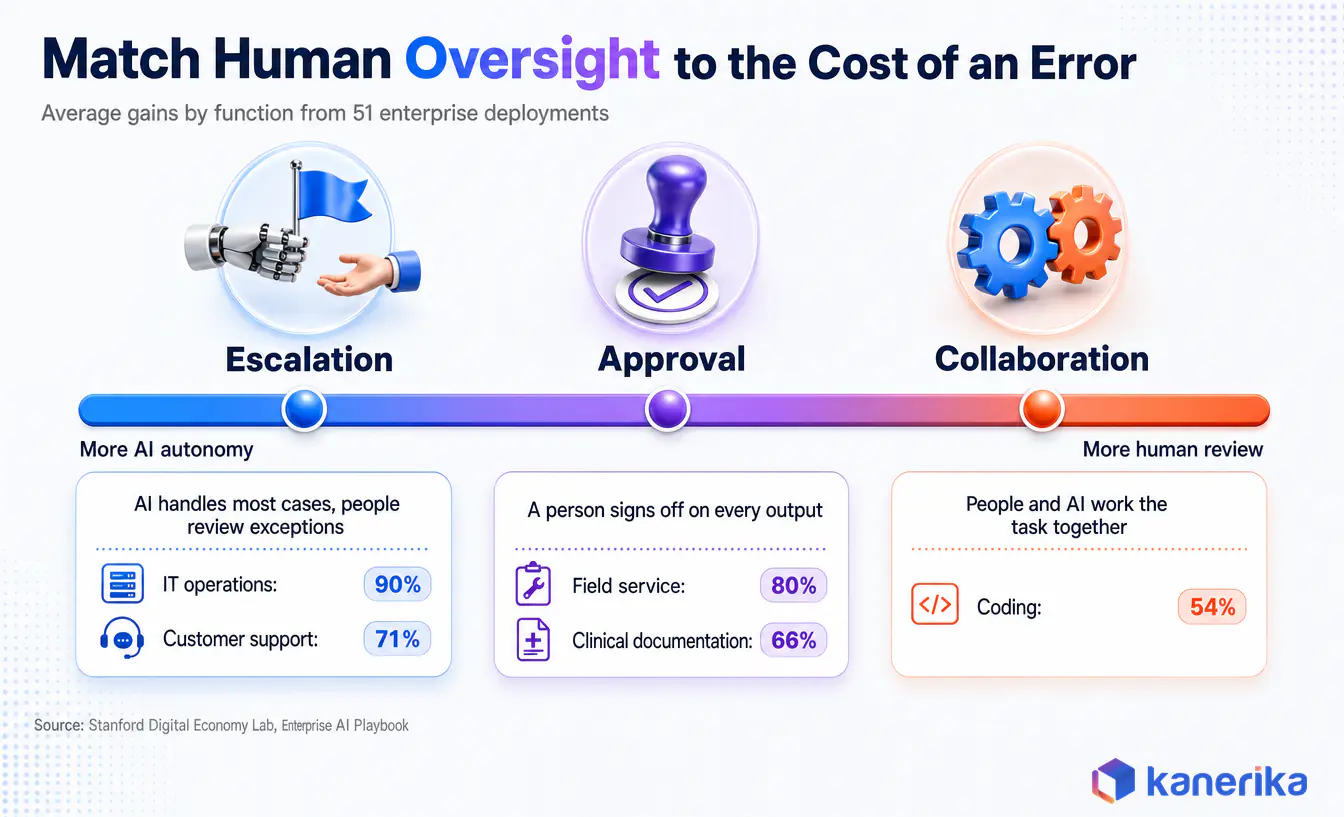
The Stanford playbook describes three operating models, and each suits a different level of risk. Escalation lets AI handle most cases and sends exceptions to people, approval has a person sign off on every output, and collaboration has people and AI working the task together.
The right model depends on the function, too. Stanford recorded escalation in IT operations with a 90% average gain and in customer support with 71%, approval in field service with 80% and clinical documentation with 66%, and collaboration in coding with 54%.
Escalation models delivered a 71% median productivity gain against 30% for approval models, though the researchers note the tasks themselves differed. The practical lesson is to design oversight around the cost of an error, then move toward escalation as confidence builds.
Governance frameworks then make this repeatable. The NIST AI Risk Management Framework gives a common vocabulary for mapping and managing risk per use case, and Kanerika’s guide to AI governance, risk and compliance turns it into an operating model.
How to Prioritize Enterprise AI Use Cases: Impact and Feasibility Scoring
A long list is only useful if it becomes a short, ordered one. Impact and feasibility scoring does that with numbers the business and IT can both argue about.
Score each candidate from 1 to 5 on four impact criteria and four feasibility criteria. Next, weight them for your context, add them up, and plot the results on two axes.
Scoring Impact
Impact asks how much the use case matters if it works, so it looks at the business case first. Score cost reduction, revenue effect, risk reduction and customer or employee experience, weighting whichever your leadership actually tracks.
Be strict about the baseline, however. A use case that saves 20 minutes a day for three people is a pleasant tool, while one that removes a step from 50,000 monthly transactions changes the cost base.
Scoring Feasibility
Feasibility, on the other hand, asks how likely the use case is to reach production. Score data readiness, process maturity, integration complexity and governance requirements, where a higher score means easier.
In most organizations, data readiness deserves the heaviest weight. A use case that needs data scattered across five legacy systems will spend its first six months on plumbing, which is why data modernization so often comes before the second wave of AI.
Quick Wins, Strategic Bets, Fill-Ins and Traps
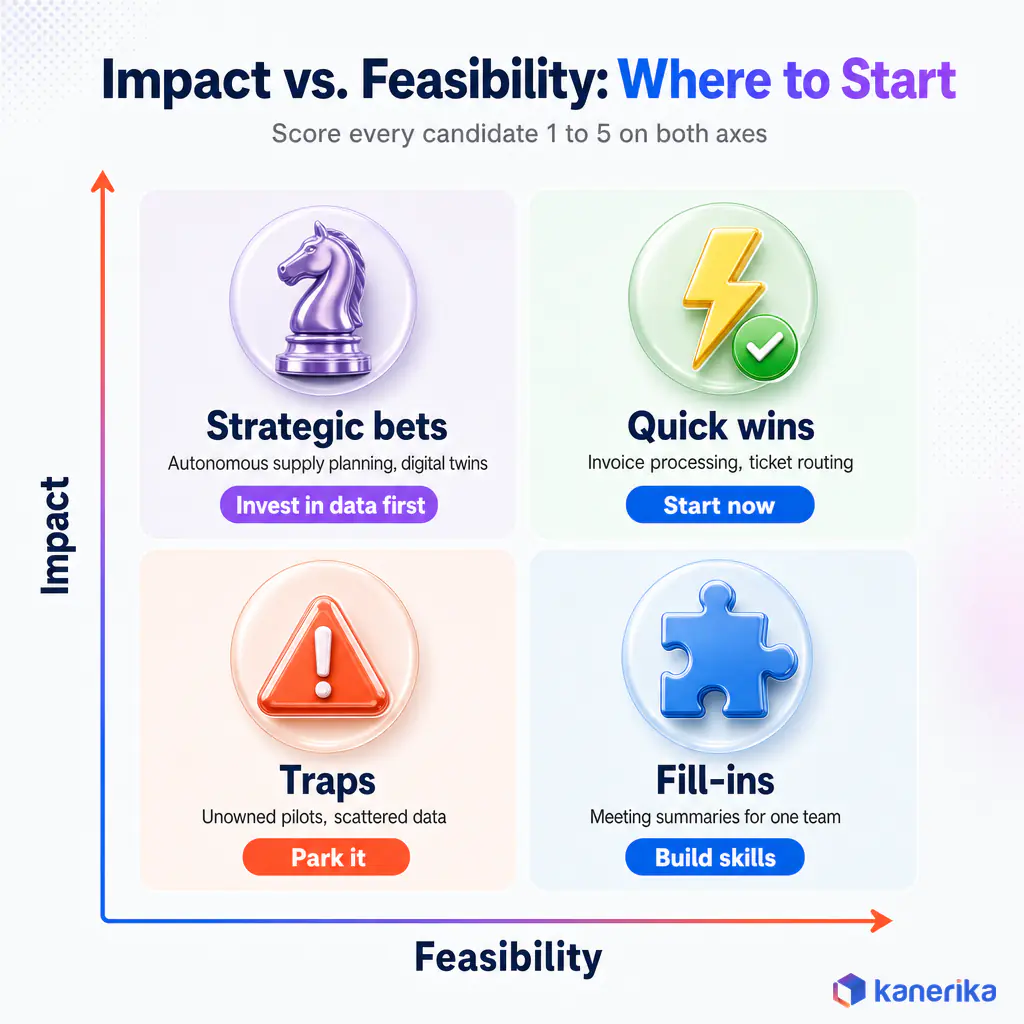
Plotting the scores produces four groups. Quick wins such as invoice processing and ticket routing score high on both axes and should start now, while strategic bets such as autonomous supply planning and digital twins have high impact but low feasibility and need a data or process investment first.
Fill-ins are easy but minor, such as meeting summaries for a single team, and they build skills without a large budget. Traps score low on both, like a pilot with no owner and data scattered across legacy systems, and should be parked however exciting the demo looked.
For example, the worked scorecard below compares a quick win with a strategic bet for a mid-sized manufacturer.
Table 4: Weighted Scorecard for Two Candidate Use Cases
| Criterion | Weight | Invoice Processing (1-5) | Autonomous Supply Planning (1-5) |
|---|
| Cost reduction | 15% | 4 | 5 |
| Revenue effect | 10% | 1 | 4 |
| Risk reduction | 10% | 3 | 3 |
| Experience | 5% | 3 | 3 |
| Data readiness | 25% | 4 | 2 |
| Process maturity | 15% | 5 | 2 |
| Integration complexity | 10% | 4 | 1 |
| Governance requirements | 10% | 4 | 2 |
| Weighted total | 100% | 3.8 (quick win) | 2.6 (strategic bet) |
The weights are illustrative, so replace them with the priorities your leadership has actually committed to. What matters, above all, is that everyone scores against the same criteria before the budget conversation starts.
AI Assessment
Where Does Your Organization Score on AI Readiness?
Kanerika’s AI Maturity Assessment scores your data, governance and skills so you can see which use cases are feasible today and which need groundwork first.
Start Your AI Assessment →
Why Good Use Cases Stall Before Production
A well-chosen use case can still die between pilot and production. Fortunately, the causes are predictable enough to check for before work begins.
- No business owner. IT sponsors a pilot, but nobody in the business commits to changing the process when it works.
- Data that only worked for the demo. The pilot used a clean extract, but the production feed turns out to be late, partial or inconsistent.
- No place in the workflow. The output lands in a separate tool, so users have to remember to open it.
- Governance added at the end. Security and legal reviews start after the build, then send it back.
- No baseline. Nobody measured the old process, so the new one cannot prove its value.
Organization size also matters. The McKinsey State of AI 2026 survey found 54% of respondents from organizations with at least $1 billion in revenue report scaling AI across the enterprise, compared with one-third of those from smaller organizations.
The full pilot-to-production playbook, however, lives in the enterprise AI guide. For budgeting, the breakdown of AI development cost shows where the money actually goes.
How to Measure Success for Each Use Case
Measurement starts before the build. Capture a baseline for the old process over at least a full business cycle, because a month-end spike or seasonal peak will distort anything shorter.
Then track two kinds of numbers. Leading indicators such as usage, override rate and model accuracy tell you early whether the use case is healthy, while lagging indicators such as cost, revenue and risk show whether it paid off.
- Operational use cases track time saved per transaction, straight-through processing rate, error rate and cost per unit.
- Revenue use cases track conversion lift, basket size, retention and win rate against a control group.
- Risk use cases track losses prevented, false positive rate, audit findings and time to detect.
Finally, attribute carefully when several changes land at once. A holdout group or phased rollout is the cleanest way to show the AI caused the improvement rather than a new process or a good quarter.
A 90-Day Path From First Use Case to a Portfolio
Ninety days is usually enough to take one well-chosen use case into production and set up the next two. The sequence below assumes the data platform already exists, and it takes longer if that foundation needs work first. Before scaling past a pilot, map each use case onto a shared enterprise AI architecture.
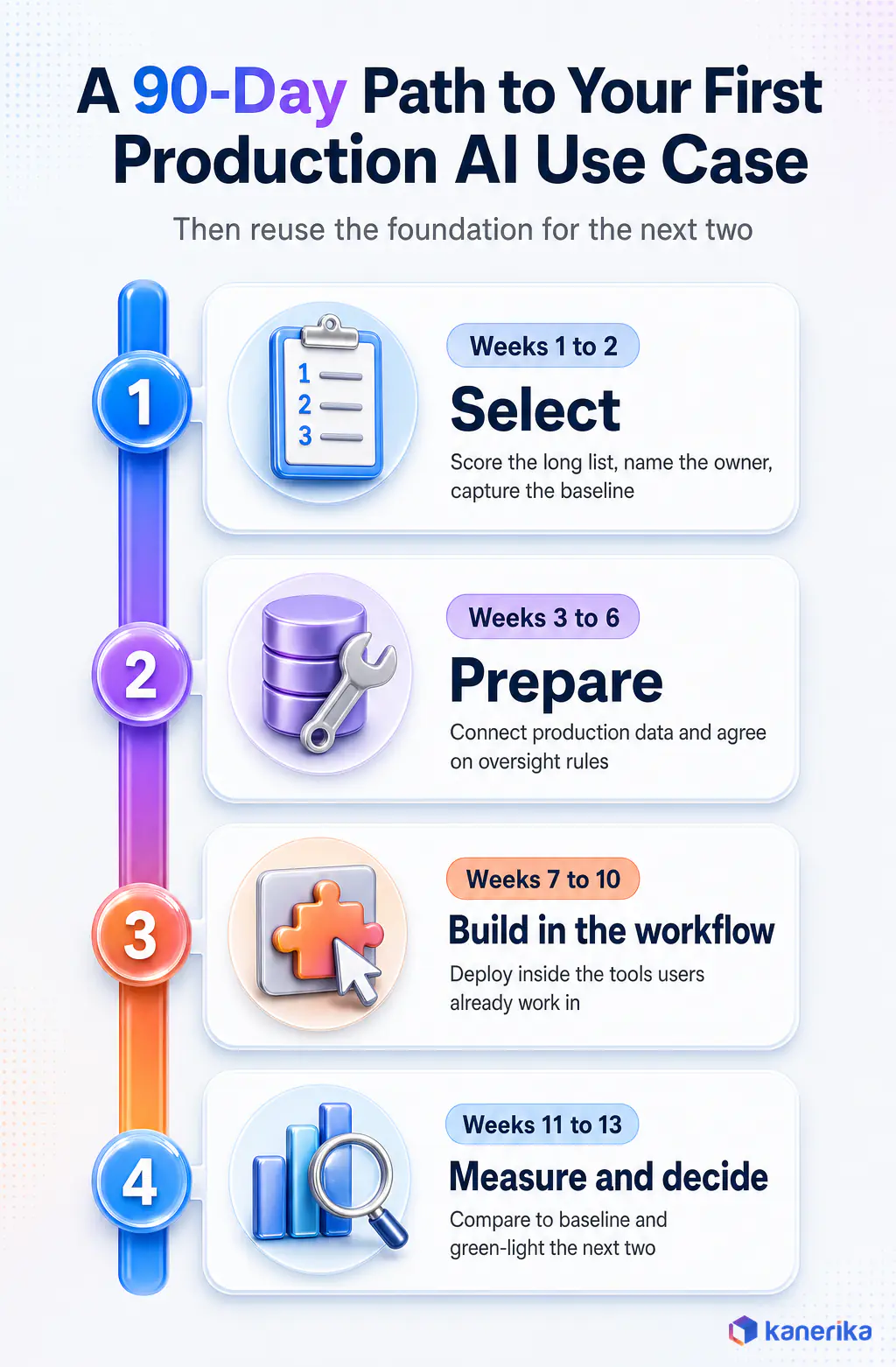
- Weeks 1 to 2, select. Score the long list, pick one quick win, name the business owner and capture the baseline.
- Weeks 3 to 6, prepare. Connect production data, fix the quality gaps that matter, and agree on oversight and governance rules.
- Weeks 7 to 10, build in the workflow. Deploy inside the tool users already work in, with monitoring and a fallback path.
- Weeks 11 to 13, measure and decide. Compare against baseline, publish the result and green-light the next two use cases from the scored list.
After that, the second and third use cases move faster because they reuse the data pipelines, governance patterns and monitoring built for the first. That compounding effect is the real payoff of starting small.
How Kanerika Takes Enterprise AI Use Cases to Production
Kanerika works with enterprises at every point in this catalog, from scoring the first long list to running AI agents in production. The approach follows five stages, and each one ties to a deliverable the business can review.
- Assess. Score candidate use cases on impact and feasibility, and check data readiness with the AI Maturity Assessment.
- Design. Define the workflow change, the oversight model and the success metric with the business owner.
- Build. Prepare governed data on Microsoft Fabric, Databricks or Snowflake, then deploy the model or agent inside the existing workflow.
- Govern. Apply access controls, audit trails and data protection from day one, with security certifications including SOC 2, ISO 27001 and ISO 27701 behind the delivery.
- Scale. Reuse the pipelines and patterns for the next use cases on the scored list.
Ready-Built AI Agents for Common Use Cases
Several use cases in this catalog also map to ready-built Kanerika AI agents. Karl answers business questions over enterprise data, Alan summarizes legal documents, Susan redacts personal data, and Klara checks contracts against a compliance playbook. FLIP handles invoice and accounts payable automation.
Results From Kanerika Case Studies
Results from Kanerika’s own case studies show what these use cases deliver when they reach production. A logistics provider reached 87% more accurate delivery forecasts, an AI member support agent now resolves 65% of queries through self-service, and a supply chain demand forecasting program cut stockouts by 30%.
Similarly, in finance, an accounts payable automation for a fuel distributor saved more than 400 manual hours a month. In compliance, an AI agent made expert vetting three times faster by automating research and producing cited reports.
Kanerika’s teams also watch for the same pitfalls on every engagement. The most common is a use case scoped around a demo dataset, so production data is always profiled in week one, and the second is an oversight model decided after launch rather than before.
Kanerika Service
Enterprise AI Services, From Use Case to Production
Kanerika scores your use-case list, prepares governed data on Microsoft Fabric, Databricks or Snowflake, and deploys AI models and agents inside the workflows your teams already use. For GenAI use cases specifically, see our enterprise generative AI consulting services.
Explore AI Services
Wrapping Up
Enterprise AI use cases pay off when they are chosen with the same discipline as any other investment. The catalog above gives you the options, while the scoring model tells you where to begin.
So start with one quick win that has clean data, an owner and a baseline. Put it inside the workflow, match the oversight to the risk, measure it honestly, and let each success fund the next use case on the list.
Frequently Asked Questions
What are enterprise AI use cases?
Enterprise AI use cases are specific business tasks where AI changes the result in a measurable way at company scale. Examples include invoice processing, demand forecasting, fraud detection, customer support agents and contract review. Each one has an owner, a defined input and output, the data it depends on and a metric that shows whether it worked.
What are 5 common use cases for AI in business?
Five of the most common are invoice and document processing, demand forecasting, customer service agents and chatbots, fraud and anomaly detection, and predictive maintenance. They are common because the data already exists in most companies, the tasks are high volume, and the results are easy to measure against the old process.
What is the 30% rule in AI?
There is no single official 30% rule. The phrase is used informally, most often to suggest automating roughly 30% of a task first while people keep the rest, then expanding as accuracy is proven. Treat it as a rule of thumb for starting small and building trust, not as an industry standard.
How do companies identify the right AI use cases?
Start with business problems that have an owner, a baseline and high volume, not with a model looking for a job. List candidates by function, then describe each one by value driver, data prerequisites, technique, effort and success metric. That makes it clear which ideas are realistic before any budget is committed.
How should enterprises prioritize AI use cases?
Score each candidate from 1 to 5 on impact criteria such as cost, revenue, risk and experience, and on feasibility criteria such as data readiness, process maturity, integration and governance. Weight the criteria, plot the totals, and start with quick wins that score high on both before funding larger strategic bets.
What is the difference between enterprise AI and generative AI?
Enterprise AI is the umbrella for any AI running inside business processes, including predictive machine learning, document AI, computer vision and AI agents. Generative AI is one technique within it that drafts, summarizes and answers questions. Many high-value enterprise use cases, like forecasting and fraud detection, do not use generative AI at all.
What data do enterprise AI use cases need?
It depends on the technique. Predictive use cases need clean historical records, document AI needs sample files with labeled fields, computer vision needs labeled images, and generative AI needs current, well-organized content to retrieve from. In every case the data must be accessible in production, not just in a one-time extract for a pilot.
How long does it take to implement an enterprise AI use case?
A well-scoped use case on an existing data platform can reach production in about 90 days, covering selection, data preparation, a build inside the workflow and measurement. Timelines stretch when data sits across legacy systems or governance reviews start late. Later use cases move faster because they reuse the same pipelines and controls.
How do you measure the ROI of an enterprise AI use case?
Baseline the old process over a full business cycle, then track leading indicators such as usage and accuracy alongside lagging ones such as cost, revenue and risk. Match the metric to the value driver, for example straight-through processing rate for invoices. Use a holdout group or phased rollout to prove the AI caused the gain.
What are examples of agentic AI use cases in enterprises?
Agentic AI fits multi-step tasks across systems, such as compliance screening that researches sources and writes a cited report, IT service desk requests that reset access, and exception handling in finance or banking operations. Because agents take actions, they need clear rules, confidence thresholds and a handoff to people when the case is uncertain.
Which business functions benefit most from AI?
Finance, supply chain and customer service usually see the fastest returns because they combine high volumes with structured data and clear metrics. IT operations and security follow closely. HR and legal benefit too, though sensitive data and regulation mean they need stronger governance, explainability and human review before AI outputs take effect.
What are the biggest risks in enterprise AI use cases?
The most common risks are poor production data, no business owner, outputs that sit outside the real workflow, governance added too late and no baseline to prove value. Technique-specific risks include model drift in forecasting, fluent but wrong answers from generative AI, and agents taking actions based on flawed reasoning.














