TL;DR
Databricks ETL runs across three layers: Delta Lake for storage, Lakeflow for orchestration, and Unity Catalog for governance. ELT is the dominant pattern in 2026 because cloud storage is cheap and Databricks compute scales on demand. ETL applies when data needs anonymization or validation before it reaches the lakehouse. This guide covers the medallion architecture, native and third-party tooling, best practices including Liquid Clustering and idempotent writes, and what legacy ETL migration into Databricks looks like in practice.
Databricks ETL has changed considerably in the last two years. Lakeflow now handles declarative batch and streaming orchestration from a single interface. Delta Lake covers ACID transactions, schema enforcement, and time travel at the storage layer. Unity Catalog governs lineage, access, and classification across the full data estate. The stack is more capable than it was, and more involved to configure correctly.
This guide covers how Databricks ETL works end to end, the ETL versus ELT decision, native and third-party tooling, pipeline architecture patterns, best practices for 2026, and what migration from legacy platforms like Informatica, Talend, and Teradata looks like in practice.
Key Takeaways
- Databricks ETL pipelines run on Delta Lake for storage, Lakeflow for orchestration, and Unity Catalog for governance. Getting all three right from day one is what separates reliable production pipelines from ones that accumulate technical debt
- ELT has become the dominant pattern on Databricks because cloud storage is cheap and Databricks compute scales on demand. ETL still applies when data must be anonymized, aggregated, or validated before it reaches the lakehouse
- Gartner projects that 60% of AI projects will be abandoned by 2026 because they are not supported by AI-ready data. Pipeline quality is the variable that separates organizations that capture AI value from those that do not
- The highest-impact pipeline optimizations in 2026 are Liquid Clustering over static partitioning, incremental load patterns over full refresh, and idempotent writes that make pipelines safe to rerun without manual cleanup
- Migrating from legacy ETL platforms like Informatica, Talend, Datastage, or SSIS to Databricks requires more than code conversion. Transformation logic, business rules, and validation sign-off all require engineering judgment that automated tools surface but cannot resolve
Building Databricks ETL Pipelines That Need to Hold Up in Production?
Kanerika configures Delta Lake, Lakeflow, Unity Catalog, and dbt as an integrated stack from day one.
 See Our Databricks Practice
What Is Databricks ETL?
Databricks ETL refers to the process of extracting data from source systems, transforming it into clean, structured, queryable formats, and loading it into Databricks Lakehouse storage for analytics, machine learning, and AI workloads. On Databricks, that process runs across three layers that work together: Delta Lake as the storage format, Lakeflow as the pipeline orchestration layer, and Unity Catalog as the governance and lineage layer.
The ETL process on Databricks differs from traditional ETL in one important architectural way. Traditional ETL transforms data before it lands in the destination, which made sense when storage was expensive and compute was the bottleneck. Databricks inverts that economics: storage in Delta Lake is cheap, and compute scales on demand.
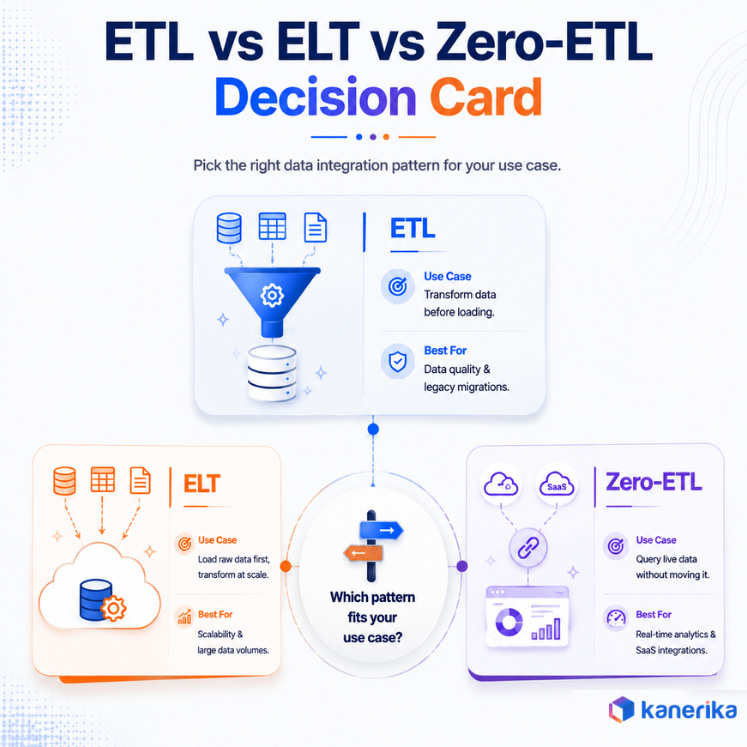
This makes ELT, extract, load, then transform in place using Databricks compute, the more common pattern for cloud-native workloads. Both approaches are valid, and the right choice depends on whether data needs to be cleaned or anonymized before it reaches the lakehouse.
Source: Databricks
ETL vs ELT on Databricks: Which Pattern Fits Your Workload
The ETL versus ELT decision on Databricks comes down to two factors: data sensitivity and transformation complexity.
Use ETL when:
- Data contains sensitive or regulated information that must be anonymized, masked, or aggregated before landing in the lakehouse, such as healthcare PHI or financial PII
- Transformation logic is simple enough to run efficiently before load without adding noticeable latency
- Downstream consumers cannot work with raw data and require pre-processed, structured output from the pipeline
Use ELT when:
- Source data can land in raw or semi-structured form and be transformed in place using Databricks compute
- Transformation logic is complex, involves joins across multiple sources, or benefits from Databricks SQL’s optimization capabilities
- The team wants to preserve raw data in the bronze layer for auditing, reprocessing, or future use cases not yet defined
The Zero-ETL pattern:
Zero-ETL eliminates the movement step by federating queries directly across source systems without ingesting data first. Databricks supports this through external table definitions and query federation. It reduces pipeline complexity at the cost of query performance, making it suitable for low-frequency analytical queries against source systems rather than high-throughput production pipelines.
The Databricks Lakehouse ETL Architecture
1. The Medallion Architecture: Bronze, Silver, Gold
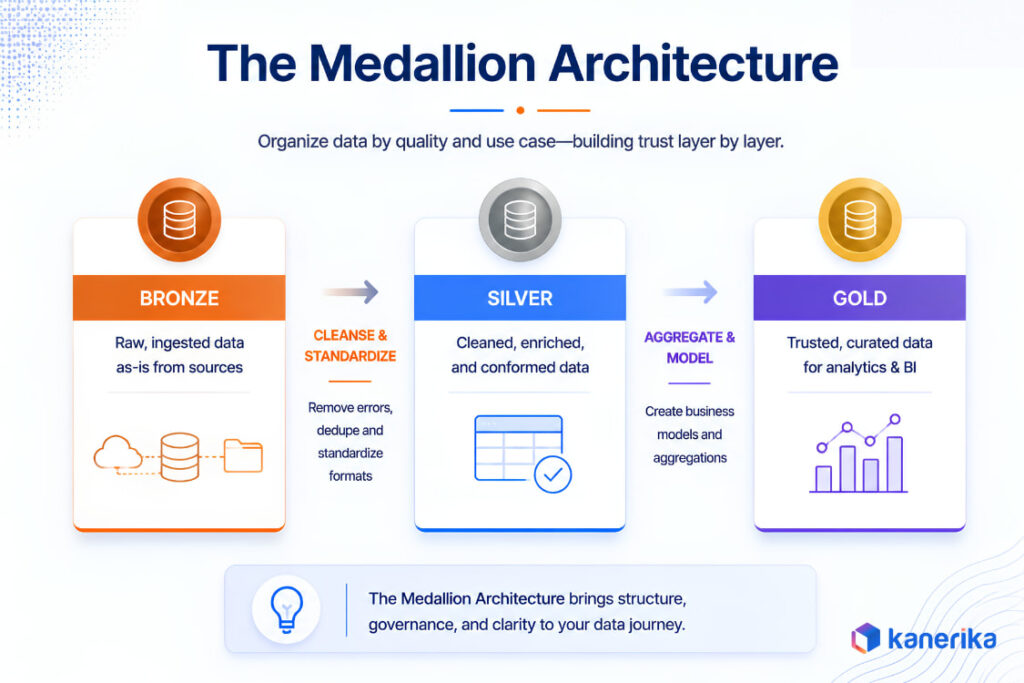
The medallion architecture is the standard layering pattern for Databricks ETL pipelines. It organizes data into three tiers based on processing state and quality level.
Bronze: Raw, unprocessed data lands here directly from source systems. Ingestion pipelines write to the bronze layer with minimal transformation, preserving the original data exactly as it arrived. Bronze tables serve as the audit and reprocessing layer: when a transformation error surfaces downstream, engineers reprocess from bronze rather than re-ingesting from the source system.
Silver: Cleaned, validated, and conformed data lives in the silver layer. Pipelines read from bronze, apply schema enforcement, deduplication, type casting, and business rule validation, and write the result to silver. Silver is the primary layer for data science, machine learning feature pipelines, and downstream analytics that need consistent, validated data.
Gold: Business-level aggregations and domain-specific data products live in the gold layer. Gold tables serve BI dashboards, executive reporting, and API endpoints that power operational applications. These tables are optimized for read performance and represent the highest level of data quality in the pipeline.
2. Delta Lake as the Storage Foundation
Delta Lake is the storage layer that makes Databricks ETL reliable at scale. Every table written through a Databricks ETL pipeline is a Delta table by default in 2026, and Delta provides four capabilities that distinguish it from raw Parquet or CSV storage:
- ACID transactions: Writes to Delta tables are atomic. A pipeline failure mid-write does not leave a table in a partially updated state, which eliminates an entire category of data quality incidents that plagued pre-Delta Databricks deployments
- Schema enforcement: Delta rejects writes that do not match the table schema, catching transformation errors at the pipeline level rather than letting incorrect data propagate to downstream consumers
- Time travel: Delta retains historical versions of every table, allowing engineers to query a table as it existed at any point in time. This is the mechanism behind point-in-time recovery, audit queries, and reproducible ML training datasets
- Change Data Feed: Delta can emit a log of row-level changes (inserts, updates, deletes) that downstream pipelines consume for incremental processing rather than full table scans
3. Lakeflow as the Orchestration Layer
Lakeflow is Databricks’ native pipeline orchestration framework, covering both batch and streaming workloads from a unified interface. Lakeflow Declarative Pipelines is the current name for what was Delta Live Tables, folded into the broader Lakeflow brand at the 2025 Data + AI Summit. Existing DLT code keeps running without a rebuild.
Lakeflow Declarative Pipelines let engineers define pipeline logic in SQL or Python and declare the expected output schema and quality expectations. The runtime handles execution, dependency resolution, and automatic retry. Quality expectations are enforced at the pipeline level: rows that fail validation are quarantined, flagged, or dropped depending on the expectation configuration, giving data teams visibility into quality issues without manual monitoring.
4. Unity Catalog as the Governance Layer
Unity Catalog is the metadata and governance layer that sits across all Databricks ETL workloads. It provides a three-level namespace (catalog, schema, table) for organizing assets, column-level access controls for restricting which users can see which fields, data lineage tracking that traces every table to its upstream sources, and automated data classification for identifying sensitive data types including PII and PHI.
For enterprise ETL programs, Unity Catalog is not optional. Without it, access controls are managed at the cluster level rather than the data level, lineage is invisible, and compliance evidence for GDPR, HIPAA, and SOC 2 requires manual documentation rather than automated lineage reports.
ETL Tools for Databricks in 2026
1. Lakeflow Connect (Native)
Lakeflow Connect is Databricks’ native ingestion tool, providing managed connectors for databases, SaaS platforms, and streaming sources directly into Delta Lake. It handles schema drift, manages incremental load patterns automatically, and runs inside the Databricks environment without external orchestration infrastructure. For teams standardizing on Databricks as their primary data platform, Lakeflow Connect is the lowest-overhead ingestion path.
2. dbt on Databricks
dbt is the standard transformation layer for SQL-centric teams. It runs SQL transformations as modular, version-controlled models, handles dependency resolution, and integrates natively with Databricks SQL warehouses and Lakeflow. dbt’s test framework validates transformation output against defined expectations, and its documentation layer generates data dictionaries from model definitions. In 2026, dbt and Databricks is the most common combination for ELT transformation work in enterprise data teams.
3. Apache Spark (PySpark and Scala)
Spark is the compute engine underneath Databricks, and PySpark gives engineers direct access to that engine for complex transformations that SQL cannot handle. Large-scale joins, custom aggregation logic, ML feature engineering, and streaming pipeline logic all run through Spark APIs. For teams with complex transformation requirements that exceed what dbt or Lakeflow Declarative Pipelines support natively, PySpark is the primary tool.
4. Fivetran
Fivetran provides managed connectors for ingesting data from SaaS applications, databases, and operational systems into Databricks. It handles schema drift, connector maintenance, and incremental sync automatically.
Following its June 2026 merger with dbt Labs, Fivetran now covers the full ELT pipeline from ingestion through transformation in a single platform. It suits teams with a broad SaaS source mix that want low-maintenance ingestion without custom pipeline code.
5. Airbyte
Airbyte is the open-source alternative to Fivetran, offering a large connector library with self-hosted deployment options for teams with data residency requirements. It integrates with Databricks as a destination and supports both batch and CDC ingestion patterns. For teams that cannot use managed SaaS connectors due to compliance constraints, Airbyte provides a path to similar ingestion capability on self-managed infrastructure.
6. Informatica IDMC
Informatica’s Intelligent Data Management Cloud provides enterprise-grade ETL, data quality, and governance capabilities with Databricks integration. It is the most common tool in legacy enterprise ETL estates being migrated to Databricks, and its complexity is one of the primary drivers of Informatica-to-Databricks migration programs.
For organizations already on Informatica, IDMC integration with Databricks provides a bridge during migration. For new programs, the cost and complexity rarely justify it over native Databricks tooling.
Databricks ETL Best Practices for 2026
1. Use Liquid Clustering Over Static Partitioning
Static partitioning, dividing tables into fixed partitions by date or region, was the standard optimization pattern in earlier Databricks deployments. Liquid Clustering has been generally available since May 2024, and Databricks has continued extending it through 2026 with automatic clustering key selection.
It replaces static partitions with a dynamic clustering approach that reorganizes data in the background based on actual query patterns. It eliminates partition skew, handles cardinality changes automatically, and outperforms static partitioning for most analytical query patterns, all without requiring engineers to predict partition keys at table creation time.
2. Enforce Idempotent Writes
An idempotent pipeline produces the same output when run once or multiple times against the same input. In practice, this involves using MERGE rather than INSERT for writes that could produce duplicate rows, managing pipeline state so reruns do not reprocess already-processed data, and writing to staging tables before overwriting production targets. Idempotent pipelines are safe to rerun after a failure without requiring manual cleanup, which is the difference between a 10-minute recovery and a multi-hour incident.
3. Load Incrementally, Not in Full
Full refresh pipelines read every row from the source on every run, which is correct for small tables and catastrophically expensive for large ones. Incremental load patterns read only the rows that changed since the last successful run, using watermark columns (updated_at, created_at, or event timestamps) to define the incremental boundary. Delta Lake’s Change Data Feed makes incremental processing reliable by providing a row-level changelog rather than requiring engineers to infer changes from timestamp comparisons.
4. Modularize Transformation Logic
Transformation logic packed into a single notebook or SQL file becomes impossible to test, debug, or reuse as pipeline complexity grows. Modular pipelines break transformation logic into discrete steps: one model per transformation concern, with explicit inputs and outputs between steps.
dbt’s model dependency graph is the most common implementation of this pattern in SQL-centric pipelines. For PySpark pipelines, Python modules with unit tests provide equivalent modularity.
5. Build Observability From the Start
A pipeline without monitoring is a pipeline that fails silently. Databricks provides pipeline-level metrics through Lakeflow’s event log, query history through the SQL warehouse interface, and cluster-level metrics through Ganglia and the Databricks monitoring stack.
The metrics worth tracking for ETL pipelines are rows processed per run, processing time per stage, data quality expectation failure rates, and how much cluster capacity a job uses against what it’s provisioned for. Setting alert thresholds on these metrics before a pipeline goes to production catches degradation before it surfaces as a downstream report failure.
6. Configure Unity Catalog Before Any Data Lands
Access controls, data classification, and lineage tracking configured after data has landed in a lakehouse require retroactive remediation work that consistently takes longer than the original setup would have. Unity Catalog configuration is a pre-production step, not a post-go-live project. Defining the catalog hierarchy, column-level access policies, and automated classification rules before the first production pipeline runs so every table the pipeline produces arrives already governed.
Migrating From Legacy ETL Platforms to Databricks
Legacy ETL platforms including Informatica, Talend, Datastage, SSIS, Netezza, and Teradata BTEQ represent a substantial engineering migration challenge when moving to Databricks. Code conversion tools automate a meaningful portion of the work, but the complexity that remains after automated conversion, complex transformation logic, custom business rules, and validation sign-off, is where migration programs lose time and budget.
1. What Automated Migration Tools Handle
Automated migration tools like Databricks Lakebridge parse legacy SQL and ETL workflow definitions, convert them to Databricks-compatible formats, and validate output parity against the source system. Databricks reports up to 80% task automation for straightforward SQL and warehouse migrations. The 20% that remains is typically the work that required the most engineering judgment in the original system: custom business rules, exception handling logic, and transformations that relied on platform-specific behavior the target system does not replicate automatically.
2. What Requires Engineering Judgment
Complex ETL logic that references multiple source systems, applies conditional transformation rules based on business domain context, or embeds error handling for edge cases the original developers never documented requires an engineer to understand the business intent before it can be rewritten correctly for Databricks. Source system behavior differences, particularly between mainframe-era platforms like Teradata BTEQ and Databricks SQL, require testing against production data volumes to catch issues that unit tests on sample data miss.
3. The Validation Phase
Output validation is the phase that most migration timelines underestimate. Confirming that the Databricks pipeline produces identical output to the legacy system, across the full range of input conditions, requires running both systems in parallel against live data and comparing results at the row and aggregate level.
Edge cases that appear only under specific data conditions surface during parallel run, not during development. Building the validation infrastructure before parallel run begins, rather than treating it as a final step, is the difference between a 90-day migration and a six-month one.
How Kanerika Delivers Databricks ETL Programs
Kanerika is a Databricks Consulting Partner with production ETL implementations across manufacturing, retail, financial services, and healthcare. Every engagement starts with a pipeline assessment that maps the current ETL estate, source systems, transformation logic, downstream consumers, and governance requirements before any build work begins.
FLIP, Kanerika’s proprietary migration accelerator available on the Databricks Marketplace, automates up to 80% of migration work and delivers migrations up to 5x faster than manual rebuilds. FLIP runs a pre-migration discovery scan that scores every object by conversion complexity before any conversion work starts, so the project plan reflects actual effort rather than a flat per-object estimate. Every migration ships with documented code, logs, test coverage, and a migration report.
FLIP covers seven source platforms to Databricks, each with platform-specific conversion logic:
- Datastage to Databricks: Parses DataStage jobs, sequences, and stages and auto-generates PySpark or Scala notebooks with lookups, joins, aggregations, and data quality rules preserved as equivalent Spark operations
- SSIS to Databricks: Connects to the SSIS catalog, parses packages, Control Flow, and Data Flow tasks, and converts them into Databricks notebooks with every lookup, derived column, conditional split, and merge join carried through intact. SQL Server 2016 reached end of extended support on July 14, 2026, making this migration time-sensitive for a large share of production SSIS environments
- Talend to Databricks: Parses Talend jobs, joblets, tMaps, and context variables and converts them into optimized notebooks. Talend 7.3 loses its last support window in December 2026, and Talend Open Studio was discontinued by Qlik in January 2024
- Netezza to Databricks: Converts NZSQL, stored procedures, and Netezza-specific functions into Spark SQL and PySpark, cross-checked using Lakebridge for an added layer of accuracy. Every Netezza appliance model is past IBM’s end of support date with no extended support option
- Teradata (BTEQ) to Databricks: Parses BTEQ scripts, macros, stored procedures, and Teradata SQL objects and converts them into Databricks notebooks and SQL, cross-checked using Lakebridge’s native Teradata connector. Teradata charges by node and by terabyte, so migrating to Databricks elastic compute decouples cost from data growth
- Synapse to Databricks: Migrates dedicated SQL pool procedures, serverless SQL, Spark notebooks, and Data Factory pipelines in a single pass rather than as four separate projects, working alongside Lakebridge’s purpose-built Synapse tooling
- Alteryx to Databricks: Parses workflows, macros, and tool configurations from Designer and Server and converts joins, filters, transformations, and formula tools into equivalent Spark operations. Removes the per-seat licensing model that scales cost with every analyst added
After automated conversion, the work that remains, complex ETL logic, custom business rules, and production validation sign-off, is where Kanerika’s engineering team takes over. Migrated pipelines run against source system output automatically before cutover, surfacing discrepancies before go-live. Unity Catalog governance, Liquid Clustering configuration, incremental load patterns, and pipeline observability are configured before any workload goes to production. Kanerika stays on after go-live for hypercare, performance tuning, and knowledge transfer.
Kanerika holds ISO 27001, ISO 27701, ISO 9001, SOC II Type II, and CMMI Level 3 certifications across 100+ enterprise clients with a 98% retention rate. Talk to our team about your Databricks ETL program.
A large US retail corporation was running business-critical applications across distributed on-premise PostgreSQL and Cassandra databases with no centralized governance, no consistent lineage, and data fragmented across business units. ETL and data science workloads had no reliable foundation because the engineering layer was not production-grade.
Challenge
The organization needed to migrate off on-premise infrastructure without taking any application offline. Distributed databases created data silos with no consistent lineage, and production application dependencies made a standard cutover approach too risky. ETL and AI workloads were blocked behind infrastructure that could not support them.
Solution
Kanerika designed and executed a three-phase migration to Databricks using PySpark notebooks and Spark connectors to move full historical data from PostgreSQL and Cassandra into Delta Lake tables under Unity Catalog-managed schemas. Continuous incremental synchronization using timestamp-based CDC logic kept source databases live throughout the transition.
Results
- Zero production downtime across the full migration
- 100% of legacy infrastructure decommissioned
- 100% centralized governance, lineage, and data access through Unity Catalog
Wrapping Up
Databricks ETL in 2026 is a mature, well-tooled discipline with a clear set of patterns that separate reliable production pipelines from ones that accumulate technical debt. The medallion architecture, Delta Lake storage, Lakeflow orchestration, and Unity Catalog governance are the four components every enterprise ETL program on Databricks needs to get right. The tooling has improved considerably in the last two years.
The judgment required to configure it correctly for a specific organization’s data, compliance, and business requirements has not changed. Talk to Kanerika’s team about the right ETL architecture for your Databricks program.
Migrating From Informatica, Talend, SSIS, or Teradata to Databricks?
Kanerika’s FLIP accelerator covers seven source platforms and reduces manual migration effort by 50 to 60%.
Book a Meeting
FAQs
1. What is Databricks ETL?
Databricks ETL refers to extracting data from source systems, transforming it into clean, structured, queryable formats, and loading it into Databricks Lakehouse storage for analytics, machine learning, and AI workloads. On Databricks, ETL runs across three layers: Delta Lake for storage, Lakeflow for pipeline orchestration, and Unity Catalog for governance and lineage. Both traditional ETL and ELT patterns are supported, with ELT being more common for cloud-native workloads because Databricks compute scales on demand.
2. What is the difference between ETL and ELT on Databricks?
ETL transforms data before loading it into the destination, which applies when data must be anonymized or validated before reaching the lakehouse. ELT loads raw data first and transforms it in place using Databricks compute, which is more efficient for cloud-native workloads where storage is cheap and compute scales dynamically. Most modern Databricks pipelines use ELT, with ETL applied selectively for sensitive data types requiring pre-load processing.
3. What is the medallion architecture in Databricks ETL?
The medallion architecture organizes Databricks data into three tiers: bronze (raw, unprocessed data from source systems), silver (cleaned, validated, and conformed data), and gold (business-level aggregations and data products for BI and reporting). Each tier serves different consumers and represents a different level of data quality. Pipelines flow from bronze to silver to gold, with each stage applying progressively more transformation and quality control.
4. What is Lakeflow and how does it relate to Databricks ETL?
Lakeflow is Databricks’ native pipeline orchestration framework, covering both batch and streaming workloads from a unified interface. It includes Lakeflow Declarative Pipelines, the current name for Delta Live Tables, where engineers define pipeline logic in SQL or Python and declare quality expectations.
The Lakeflow runtime handles execution, dependency resolution, and automatic retry on its own. It is the primary orchestration layer for ETL pipelines built natively on Databricks.
5. What ETL tools work best with Databricks in 2026?
The strongest combinations in 2026 are Lakeflow Connect for native ingestion, dbt for SQL transformation, and Fivetran or Airbyte for SaaS source ingestion. For complex transformation requiring custom logic, PySpark is the primary tool, and Informatica IDMC still fits organizations already invested in that platform. The right tool depends on source system complexity, team skill set, and governance requirements.
6. What is Liquid Clustering and why does it replace static partitioning?
Liquid Clustering is Databricks’ dynamic clustering approach that reorganizes table data in the background based on actual query patterns, replacing static partitioning which required engineers to predict partition keys at table creation time. It eliminates partition skew, handles cardinality changes automatically, and outperforms static partitioning for most analytical query patterns without requiring manual partition management as data volumes and query patterns evolve.
7. How long does a Databricks ETL migration from legacy platforms take?
A focused migration from a single legacy platform with a defined scope can complete in 8 to 12 weeks with the right tooling and engineering team. Complex migrations spanning multiple source systems, large transformation estates, and parallel run validation typically run 12 to 20 weeks. Organizations using migration accelerators like FLIP compress the automated conversion phase by 50 to 60%, with the remaining timeline driven by complex ETL logic, business rule validation, and production sign-off.
8. What Unity Catalog configuration does a Databricks ETL program require?
Unity Catalog configuration for an ETL program covers four areas: catalog and schema hierarchy that maps the organizational structure of the data estate, column-level access controls that restrict which users and service principals can read sensitive fields, automated data classification that identifies PII, PHI, and other regulated data types, and lineage tracking that traces every table to its upstream sources. All four should be configured before the first production pipeline runs, not after the first compliance inquiry.














