
TL;DR
In the Perplexity vs ChatGPT choice of an AI assistant for your team, pick Perplexity for sourced research and current facts, and pick ChatGPT for writing, coding, data analysis and voice or image work. Perplexity is a search-first answer engine that cites every answer, while ChatGPT is a general assistant that searches only when a question needs it. As of 3 Nov 2026, ChatGPT Plus costs $20 a month and Perplexity Pro costs $17 a month billed annually. For company use, confirm training, retention, SSO and audit terms in the enterprise contract before buying a single seat. Many teams get the most from both tools: find and verify in Perplexity, then draft and analyze in ChatGPT, under one data policy. Run a 30-day pilot on your own tasks and choose by cost per accepted task, not by seat price.
Key Takeaways
- Perplexity searches first and attaches inline citations to every answer, so it suits research where each claim needs a source.
- ChatGPT starts from the model and calls search when it needs fresh facts, so it leads on drafting, coding, data analysis and file work.
- Perplexity routes each query across models from several labs, including OpenAI, Google, Anthropic and NVIDIA, while ChatGPT runs OpenAI’s own GPT-6 family.
- As of 3 Nov 2026, the main paid plans cost $20 a month for ChatGPT Plus and $17 a month billed annually for Perplexity Pro.
- ChatGPT Business lists $20 per user a month billed annually, while ChatGPT Enterprise and Perplexity’s enterprise plans are quote-based, so security terms, retention and admin controls should decide the contract.
- A 30-day pilot with a five-task test set and weighted scoring gives your team a defensible answer instead of a hunch.
One Research Question, Two Very Different Workflows
Picture an analyst at a consulting firm on a Tuesday afternoon. A client memo is due on Friday, so she needs three sourced figures on the European heat pump market. Her manager also wants a working link behind every number.
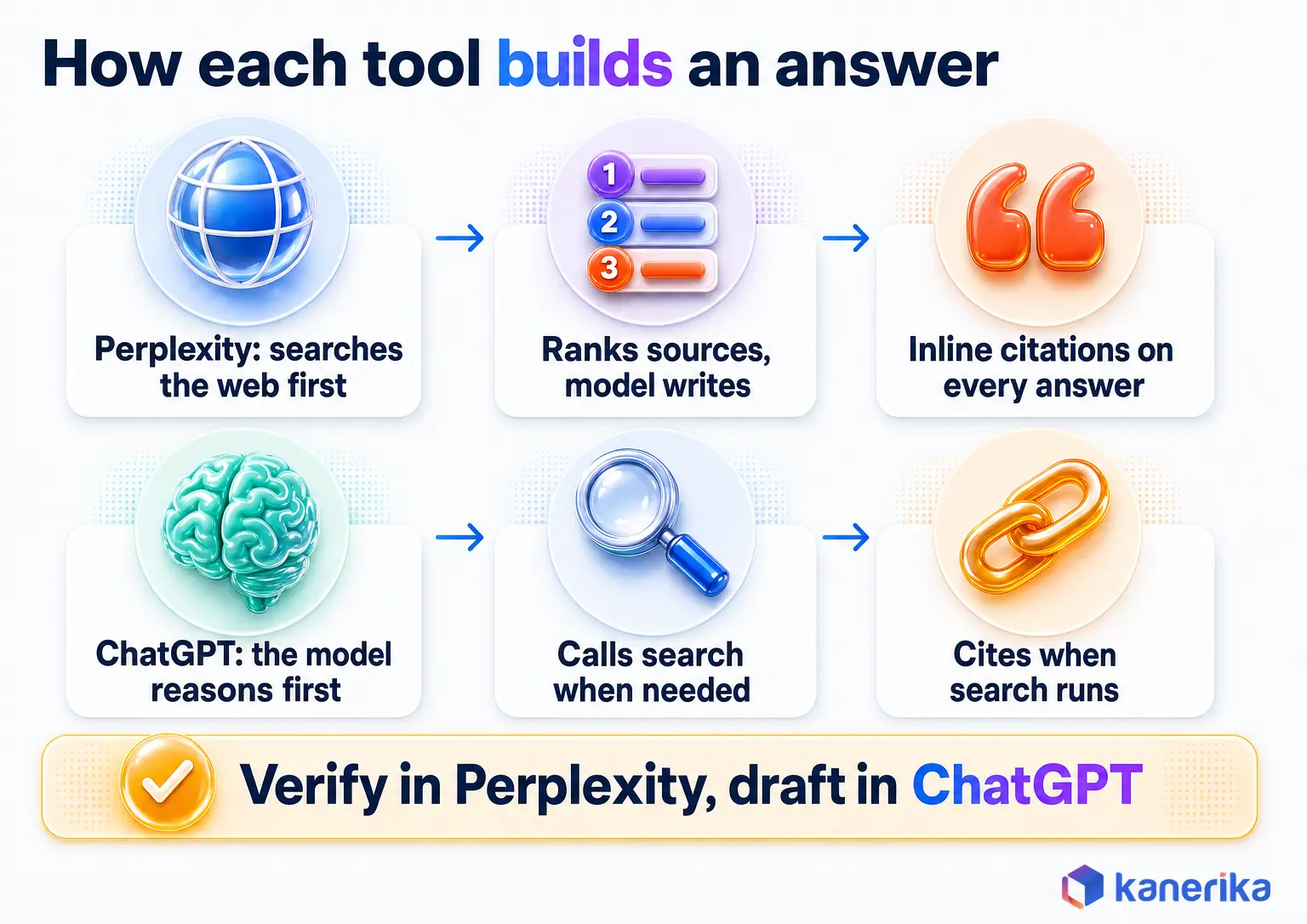
In Perplexity, she types the question and the tool searches before it writes anything. It reads a set of web pages, then drafts a short answer and pins a numbered citation to each claim. Her job then becomes checking those sources, one link at a time.
In ChatGPT, the same question starts with the model instead. The model decides whether the question needs fresh data, calls its search tool when it does, and cites the pages it used. Once the facts are in place, she can ask for a memo, a table or a chart in the same chat.
Neither path is wrong. One tool is built around finding and citing, while the other is built around reasoning and making. That structural split drives almost every row in the Perplexity vs ChatGPT comparison below.
Is Perplexity Better Than ChatGPT? The Short Verdict
Perplexity is better for research you have to cite. ChatGPT is better for most of what you make: drafts, code, analysis, and voice or image work. That is the short Perplexity vs ChatGPT verdict, and it holds for most teams in late 2026.
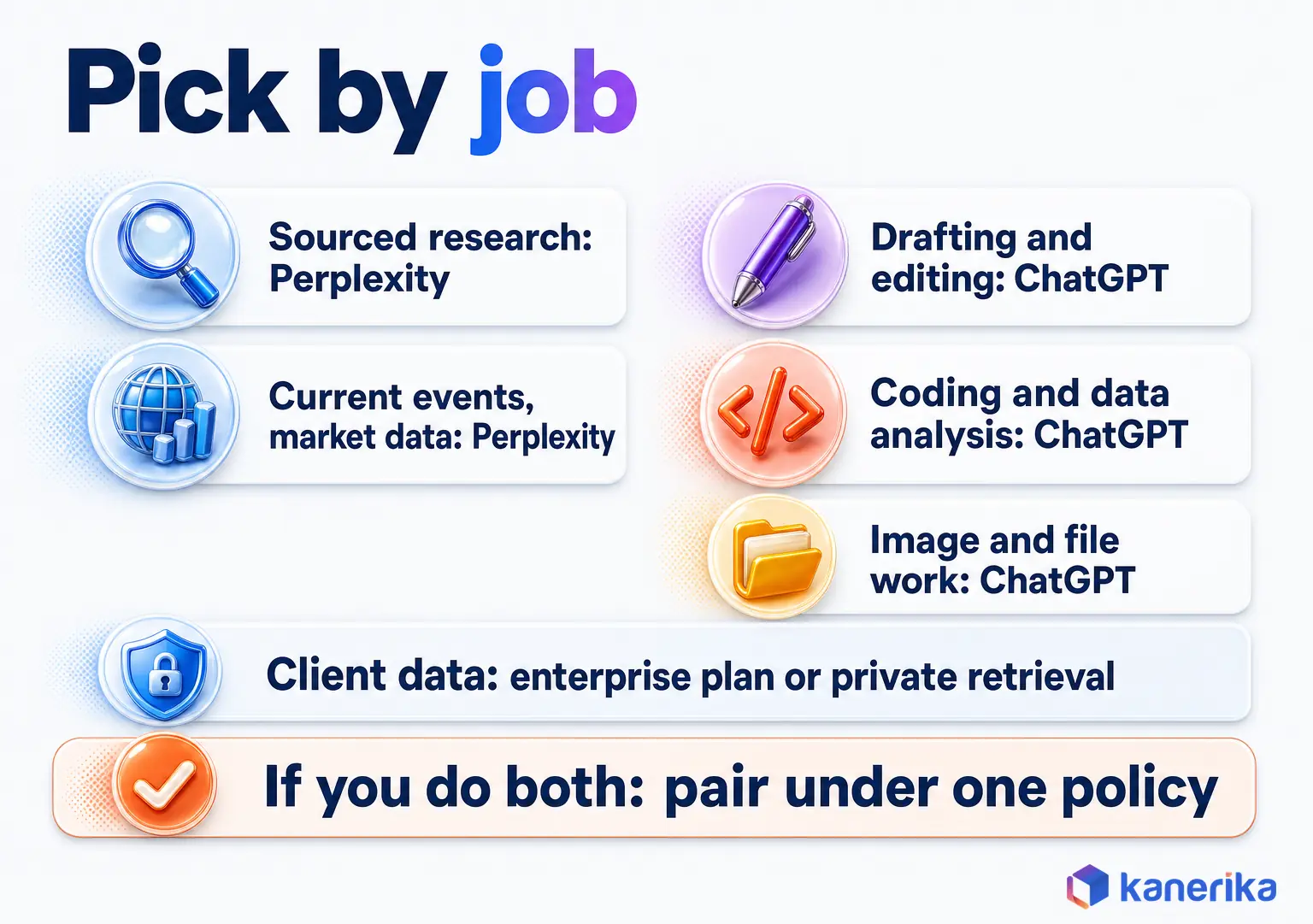
Pick Perplexity if most of your team’s day goes to finding, checking and sourcing facts. Pick ChatGPT if most of the day goes to writing, coding or working with files. If your team does both, buy both under one data policy and route each job to the tool that fits it.
The reason is structural. Perplexity starts from the web and then adds a model to write the answer. ChatGPT starts from the model and adds the web when it helps. Price rarely settles the question, because the entry plans sit a few dollars apart.
ChatGPT vs Perplexity: Decision Table by Use Case
The table maps the jobs teams ask about to the stronger tool. Prices are as of 3 Nov 2026 and come from each vendor’s own pages.
| Use case | Perplexity | ChatGPT | Pick |
|---|---|---|---|
| Research with citations | Searches first and cites every answer; PitchBook, Statista and S&P Capital IQ on Pro and Max | Cites sources when its search tool runs; may answer from training data | Perplexity |
| Fact checks and current events | Reads fresh pages before it answers | Searches when the model decides a question needs it | Perplexity |
| Writing | Short, sourced summaries | Long drafts, rewrites and tone control across many revisions | ChatGPT |
| Coding | Looks up current docs, errors and library changes | Writes, explains and debugs code; Codex on web, CLI, IDE and iOS from Plus | ChatGPT |
| Data analysis | Finds outside benchmarks and market data | Runs calculations and charts on uploaded spreadsheets | ChatGPT |
| Voice and multimodal | Voice assistant in its mobile apps; file uploads within plan limits | ChatGPT Voice, image and document input, image generation and editing (not on Free) | ChatGPT |
| Agents and automation | Perplexity Computer runs multi-step tasks on credits; 400+ app connectors | Apps inside ChatGPT; Codex as a coding agent | Perplexity for research hand-offs, ChatGPT for code |
| Models | Routes across OpenAI, Google, Anthropic, NVIDIA and others | OpenAI only: GPT-6.1 Sol and GPT-6 Luna on Plus | Perplexity for choice, ChatGPT for consistency |
| Pricing tiers (as of 3 Nov 2026) | Free; Pro $17/month and Max $167/month, both billed annually | Free; Go $8/month; Plus $20/month; Pro from $100/month ($100, $200 or $500) | Close at entry; judge by cost per accepted task |
| API | Agent API across labs; Search API at $5 per 1k requests | OpenAI API; GPT-6.1 Sol at $2 / $10 per 1M tokens; web search tool at $10 per 1k calls | Perplexity to buy search, OpenAI to build on a model |
| Enterprise controls | SOC 2 Type II, SSO, SCIM, audit logs, no training on enterprise data, file deletion down to 1 day (vendor claims) | Business: SAML SSO, no training on business data by default; Enterprise adds SCIM, Compliance API audit logs, retention and residency controls | Both, on enterprise plans; decide in the contract |
How to Read the Table
Read the table by job rather than by feature count, and count the picks that match your team’s week. For example, a team that mostly gathers and checks facts will feel the citation row every day. A team that mostly writes, codes or crunches spreadsheets will feel the writing, coding and analysis rows instead.
What Is Perplexity and How Does It Build an Answer?
Perplexity is an answer engine: you ask a question, it searches the web, and it replies with a written answer and numbered sources. It behaves more like a research librarian than a chat partner. The search step comes first, so the model works from what the search returns.
Ask it which countries changed their data residency rules in the past quarter, and it will not answer from memory. It runs a search, ranks the pages it finds, and then has a language model write a summary tied to those pages. After that, each sentence that rests on a source carries a small citation you can click.
Search First, Model Second
The order matters because it changes what the model sees. In Perplexity, the model writes from a fresh set of retrieved pages, so the answer reflects what the web says at the moment you ask. The citations are a by-product of that design rather than an add-on.
Perplexity also chooses the model for you. Its pricing page says it orchestrates models including ChatGPT, Google Gemini, Anthropic Claude and NVIDIA Nemotron, then picks one for each query. Pro and Max subscribers can set a preferred model when they want more control.
The practical effect is that answer quality depends on two things at once. The search layer decides which pages the model reads, while the model decides how well it summarizes them. A weak source list produces a weak answer, however good the model is.
Plans in Brief
As of 3 Nov 2026, Perplexity Free costs $0 and gives limited usage, basic models and citations in every answer. Pro costs $17 a month billed annually and adds Deep Research as well as a choice of top models. It also adds premium sources such as PitchBook and Statista, 400+ app connectors and 4,000 bonus Computer credits.
Max costs $167 a month billed annually and adds 10,000 monthly credits plus 35,000 bonus credits. It also raises Deep Research and upload limits, and includes several Model Council runs a month and advanced reasoning models.
Perplexity’s page lists annual-billing prices, so check the monthly price at checkout before you budget. For most knowledge workers, Pro is the plan to test, since Max only makes sense for heavy research users.
What Is ChatGPT and Where Does It Fit in Late 2026?
ChatGPT is OpenAI’s general-purpose assistant: it writes, reasons, codes and works with files, and web search is one of the tools it can call. While Perplexity is built to find things, ChatGPT is built to make things, from a project plan to a working Python script.
That makes ChatGPT closer to a capable colleague than a search box. You can hand it a messy brief, ask follow-up questions and then keep refining one document across a long conversation. If you want to understand where assistants end and autonomous agents begin, our guide to AI agents vs AI assistants draws that line clearly.
ChatGPT also connects to outside services through apps that run inside the chat. Our overview of apps in ChatGPT covers what is available and how teams use them in practice.
Models Behind ChatGPT Plans
As of November 2026, ChatGPT Plus gives access to GPT-6.1 Sol and GPT-6 Luna. Sol is the stronger general model, and OpenAI published it on 29 Sep 2026. Luna, on the other hand, is the lighter, faster option for quick everyday tasks.
For developers, the API figures show how capable Sol is. It accepts a context window of 1,050,000 tokens and also returns up to 128,000 output tokens. That is enough to hold a long contract set or a large codebase in a single request.
OpenAI is also retiring older models. Per OpenAI’s API notices, gpt-5, o3 and o3-pro retire on 11 Dec 2026, and the remaining GPT-4o and GPT-4.1 snapshots follow on 14 Jan 2027. Teams with integrations built on those models should plan their migration before those dates.
A Note on AI Browsers
AI browsers are a separate decision from the assistant itself. OpenAI shut down its Atlas browser in August 2026, while Perplexity still ships Comet with its assistant built in. A browser agent can also see logged-in pages, so it needs its own security rules. This guide stays with the assistants. For the browser question, read our guide to the top agentic browsers.
Which AI Models Run Inside Each Tool?
The model question has a simple answer: Perplexity routes across models from several labs, and ChatGPT runs OpenAI’s own models. That difference shapes who controls quality, as well as how much choice a user really has.
Think of Perplexity as a dispatcher. It sends each query to whichever model it judges best for that job, then wraps the result in its own search and citation layer. ChatGPT works more like a single expert team, because every answer comes from the same family of OpenAI models.
| Tool | Model families (November 2026) | Who picks the model |
|---|---|---|
| Perplexity | Models from OpenAI, Google Gemini, Anthropic Claude and NVIDIA Nemotron, plus advanced reasoning models on Max | Perplexity picks per query; Pro and Max users can set a preferred model |
| ChatGPT | OpenAI’s GPT-6.1 Sol and GPT-6 Luna on Plus | The user chooses within OpenAI’s lineup for the plan |
Routing is useful when you want one bill and several model styles. A single fixed vendor is useful when you want predictable behavior, a single set of usage policies and one support contact.
Does Perplexity Use ChatGPT? Same Model, Different Answer
Perplexity’s own pricing page lists ChatGPT among the models it orchestrates, so in part, yes. But Perplexity is a separate product, and it wraps every model in its own search and citation layer. A common surprise is that the same model can give different answers when it runs in the two tools. Running an OpenAI model inside Perplexity does not turn Perplexity into ChatGPT, because four layers sit between the model and the answer you read.
- Retrieval layer: Perplexity feeds the model a fresh set of search results, while ChatGPT may answer from training data unless it calls search.
- System prompt: each vendor writes its own hidden instructions, which shape tone and length as well as how hard the model leans on sources.
- Reasoning settings: how long the model is allowed to think before it answers changes depth and speed.
- Tool access: code execution, file reading and connectors decide what the model can actually do once it has your request.
For this reason, the surrounding context often matters as much as the model name. Our explainer on context engineering vs prompt engineering goes deeper on how that context gets built.
Research, Citations and Accuracy: Which Tool Is More Reliable?
Reliability comes down to whether you can trace a claim back to its source and then confirm it. On that test, the Perplexity vs ChatGPT gap is real, because Perplexity was designed around citations and ChatGPT adds them when it searches.
Neither tool is immune to error. Language models can still produce confident statements that no source supports, a failure covered in depth in our guide to AI hallucinations. The difference is how easy each tool makes it to catch one before it spreads.
How Each Tool Cites
Perplexity attaches inline citations to every answer, and Pro and Max add premium sources such as PitchBook, Statista and S&P Capital IQ. You see a numbered marker after a sentence, so you can open the page behind it in one click. That pattern is a form of retrieval-augmented generation, where the model writes from documents it fetched moments before.
ChatGPT cites sources when its search tool runs. If a question can be answered from training data, the model may skip search, and then there is no link to check. You can ask it to search and cite, and it will, but the habit has to come from the user.
Deep Research Modes
Both tools also have a slower, multi-step research mode for bigger questions. Perplexity’s Deep Research is included in Pro and has higher limits on Max. ChatGPT can also plan a research task, run several searches and return a longer report.
These modes help most when a question has many parts, such as a market scan across five regions. They take longer and produce more text, so they also produce more claims to check. So treat a deep research report as a strong first draft, never as a finished deliverable.
A Four-Step Check Before a Cited Claim Reaches a Client
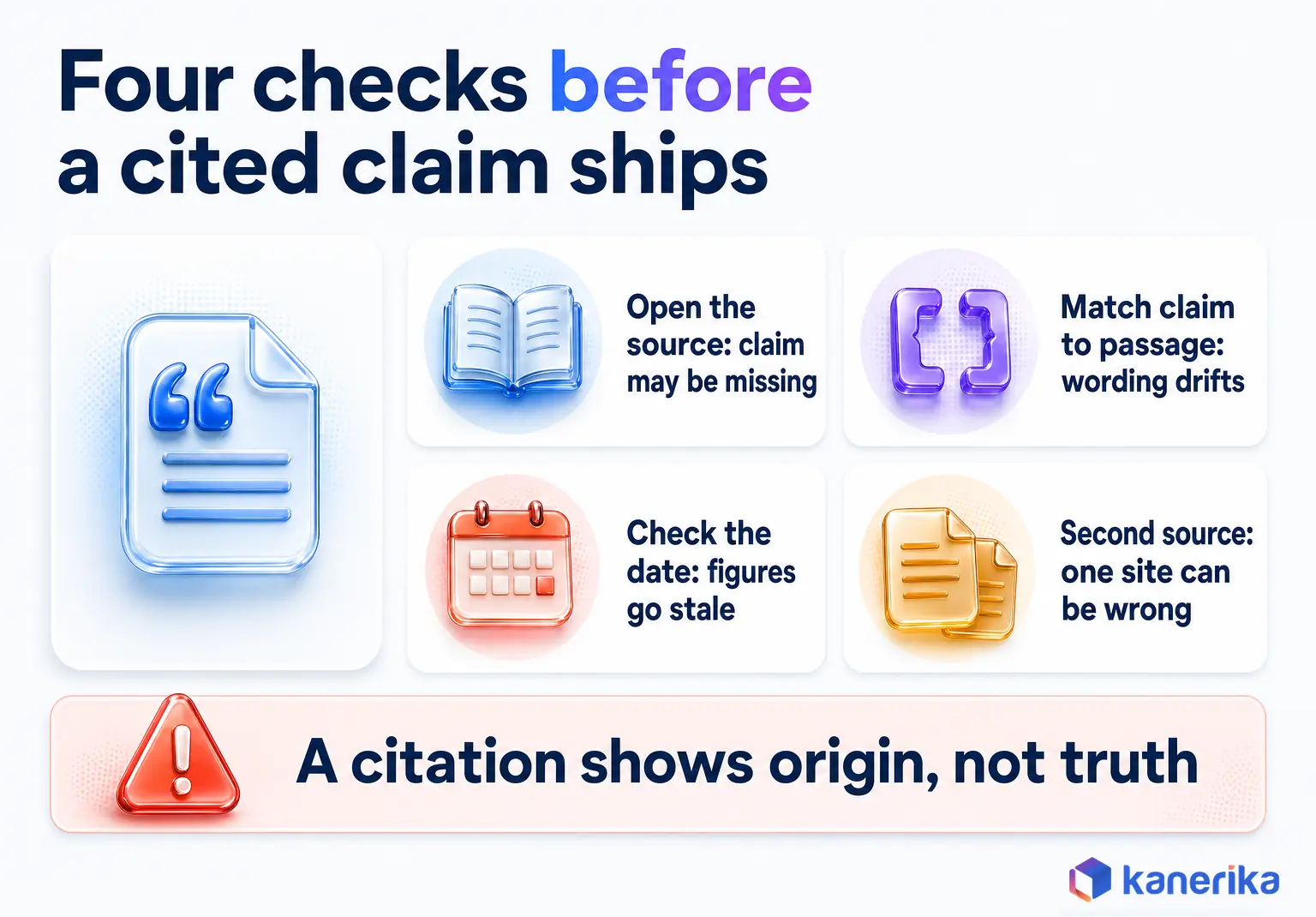
A citation tells you where a claim came from, but it does not prove the claim is right. Use these four checks on every figure that goes into a client memo, board pack or published post.
- Open the source. Click the link and confirm the page exists and loads, because a cited page may have moved or never said what the answer implies.
- Match the claim to a passage. Find the exact sentence or table that supports the number, since summaries often round or reword a figure.
- Check the date. Confirm when the page was published or updated, because market figures and prices go stale quickly.
- Confirm with a second source. Look for an independent page that agrees, since one site can be wrong or out of date.
The checks take a few minutes per claim, and they also work the same way in either tool. Perplexity simply makes step one faster, because the link is already sitting next to the sentence.
Writing, Coding and Data Analysis Compared
Once the facts are gathered, the work usually shifts to making something, and this is where ChatGPT pulls ahead. It is built to hold a long conversation, follow detailed instructions and work with files, so it suits drafting, code and analysis.
Writing
ChatGPT handles long-form drafting well. You can give it a brief, an outline and a sample of your house style. Then ask for a full draft and several rounds of edits. It keeps context across the conversation, so the fifth revision still knows what the first one said.
Perplexity instead writes clear, short answers tied to sources. That works for a research summary or a fact box, but it works less well for a 2,000-word proposal with a specific voice. Many writers use Perplexity to gather the facts and ChatGPT to shape them.
Coding
ChatGPT can write a function, explain an error, refactor a file and suggest tests in one thread. That makes it a practical pair programmer, especially for everyday tasks. Teams doing heavier work in the terminal often move to dedicated coding agents, which we compare in Gemini CLI vs Claude Code.
Perplexity is still useful for the lookup side of coding. It can find the current docs for a library, explain a new error message or check whether an API changed since your last release. It is a good second tab, while ChatGPT is the better place to write the code itself.
Data Analysis
ChatGPT can read an uploaded spreadsheet, run calculations and draw charts inside the chat. In practice, that turns a CSV export into a summary table in a few prompts. It also accepts images and documents as input, a capability explained in our guide to multimodal models.
Perplexity is stronger at finding the outside data that gives your numbers context, such as industry benchmarks or public market figures. For analysis on internal company data, a governed agent is often safer than either public tool. Kanerika’s Karl data insights agent is one example of that approach.
| Task | Stronger tool | Why |
|---|---|---|
| Long-form drafting and editing | ChatGPT | Holds context and style across many revisions |
| Sourced research summary | Perplexity | Every claim arrives with a citation |
| Writing and debugging code | ChatGPT | Writes, explains and tests code in one thread |
| Looking up current docs and errors | Perplexity | Searches first, so answers reflect current pages |
| Spreadsheet analysis and charts | ChatGPT | Runs calculations on uploaded files |
| External benchmarks and market data | Perplexity | Premium sources on Pro and Max |
Overall, the pattern is consistent across tasks. When the job is to find and prove, Perplexity is the better fit, and when the job is to build and refine, ChatGPT is.
Kanerika Service
Need Cited Answers from Your Own Documents?
Kanerika builds private generative AI assistants that answer from your documents and data with citations and role-based access, so sensitive work stays out of public tools.
Explore Generative AI ServicesPerplexity vs ChatGPT Pricing (as of 3 Nov 2026)
On price alone, the two tools sit close together at the entry paid tier and far apart at the top. The real cost question, though, is how much useful work each seat produces.
The table lists individual plans as published on 3 Nov 2026. Perplexity’s prices come from the same pricing page linked above and assume annual billing, the only billing the page lists.
| Tool | Plan | Price (as of 3 Nov 2026) | What it includes |
|---|---|---|---|
| ChatGPT | Free | $0 | Basic access with usage limits |
| ChatGPT | Go | $8/month | Low-cost paid tier |
| ChatGPT | Plus | $20/month | GPT-6.1 Sol and GPT-6 Luna |
| ChatGPT | Pro | From $100/month ($100, $200 or $500) | Top individual tier at three price points |
| ChatGPT | Business | $20/user/month billed annually, or $25 billed monthly (2+ users) | Dedicated workspace, admin controls, SAML SSO, no training on business data by default |
| Perplexity | Free | $0 | Limited usage, basic models, citations in every answer |
| Perplexity | Pro | $17/month billed annually | Deep Research, model choice, premium sources, 400+ connectors, 4,000 bonus Computer credits |
| Perplexity | Max | $167/month billed annually | 10,000 monthly credits plus 35,000 bonus, higher limits, Model Council runs, advanced reasoning models |
Perplexity’s Computer credits pay for Perplexity Computer, its agent that carries out multi-step tasks when you hand them off. If autonomous work is the real goal, compare it in our review of Claude Cowork, Perplexity Computer, OpenClaw and Manus AI.
Team seats work differently. As of 3 Nov 2026, OpenAI’s plan pricing page lists ChatGPT Business at $20 per user a month billed annually. ChatGPT Enterprise is sold through sales, and Perplexity’s pricing page shows no enterprise prices. For any large team, get a written quote, then confirm in the contract which models, limits and admin features each seat includes.
Perplexity Pro vs ChatGPT Plus
Most individual buyers compare these two plans first. ChatGPT Plus costs $20 a month and gives GPT-6.1 Sol, GPT-6 Luna and Codex for coding. Perplexity Pro costs $17 a month billed annually and adds Deep Research, model choice across labs, premium sources and 4,000 bonus Computer credits. Plus suits people who make things, and Pro suits people who research them.
Measure Cost per Accepted Task
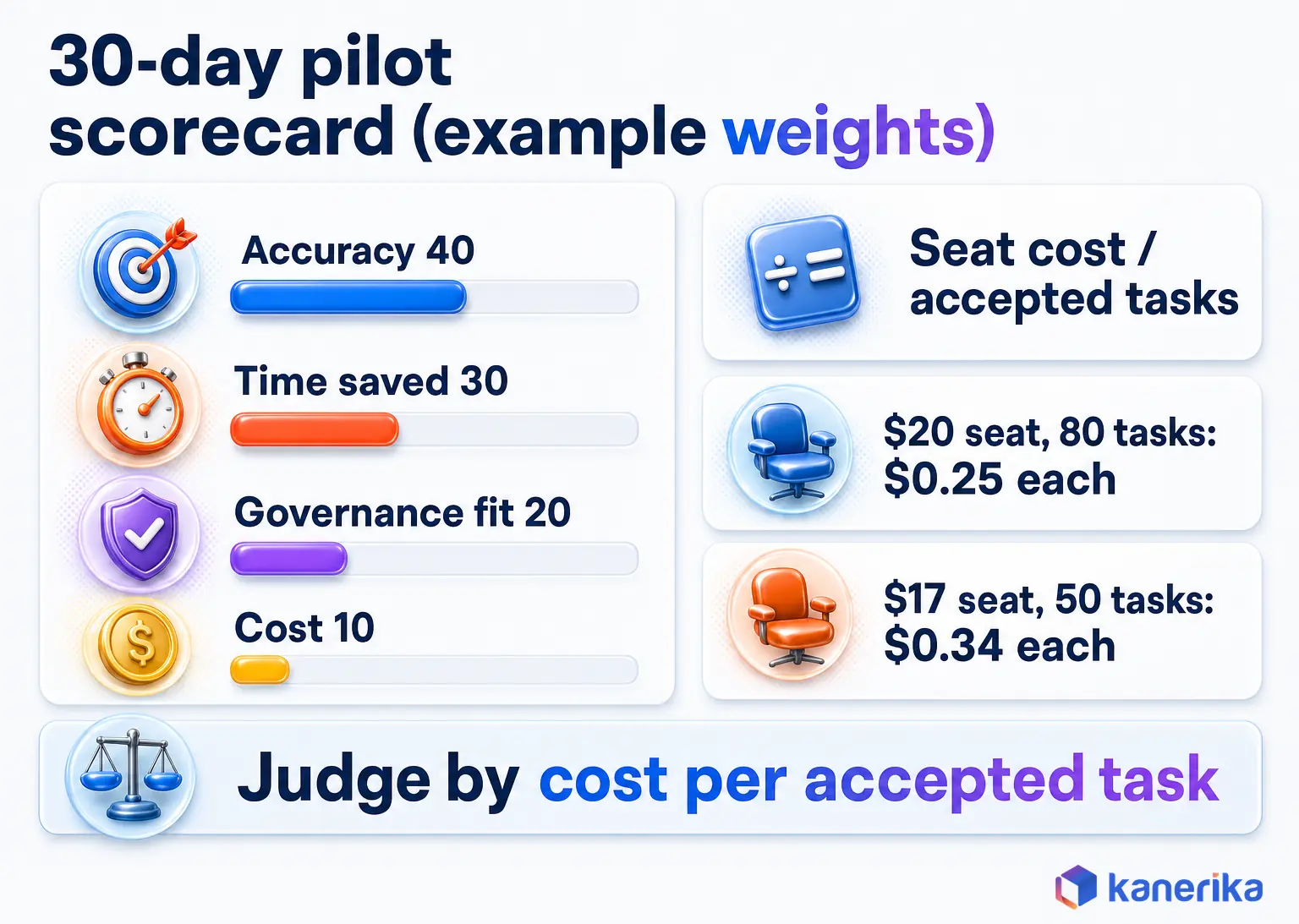
Seat price hides the number that matters. A better measure is cost per accepted task. That is the monthly seat cost divided by the number of tasks a person accepted without rework.
Here is a simple example, with assumed numbers so the math is easy to follow. A $20 Plus seat that produces 80 accepted tasks in a month costs $0.25 per accepted task. A $17 Pro seat that produces 50 accepted tasks costs $0.34, so the cheaper seat is the more expensive tool in that case.
Your own figures will differ, and that is the point. Track accepted tasks during the pilot described later, and the pricing decision usually makes itself.
Enterprise Security, Privacy and Governance
For an IT or security team, the deciding question is which tool you can control. For example, a personal plan on a company laptop can send client data to a vendor with no contract, audit trail or retention limit.
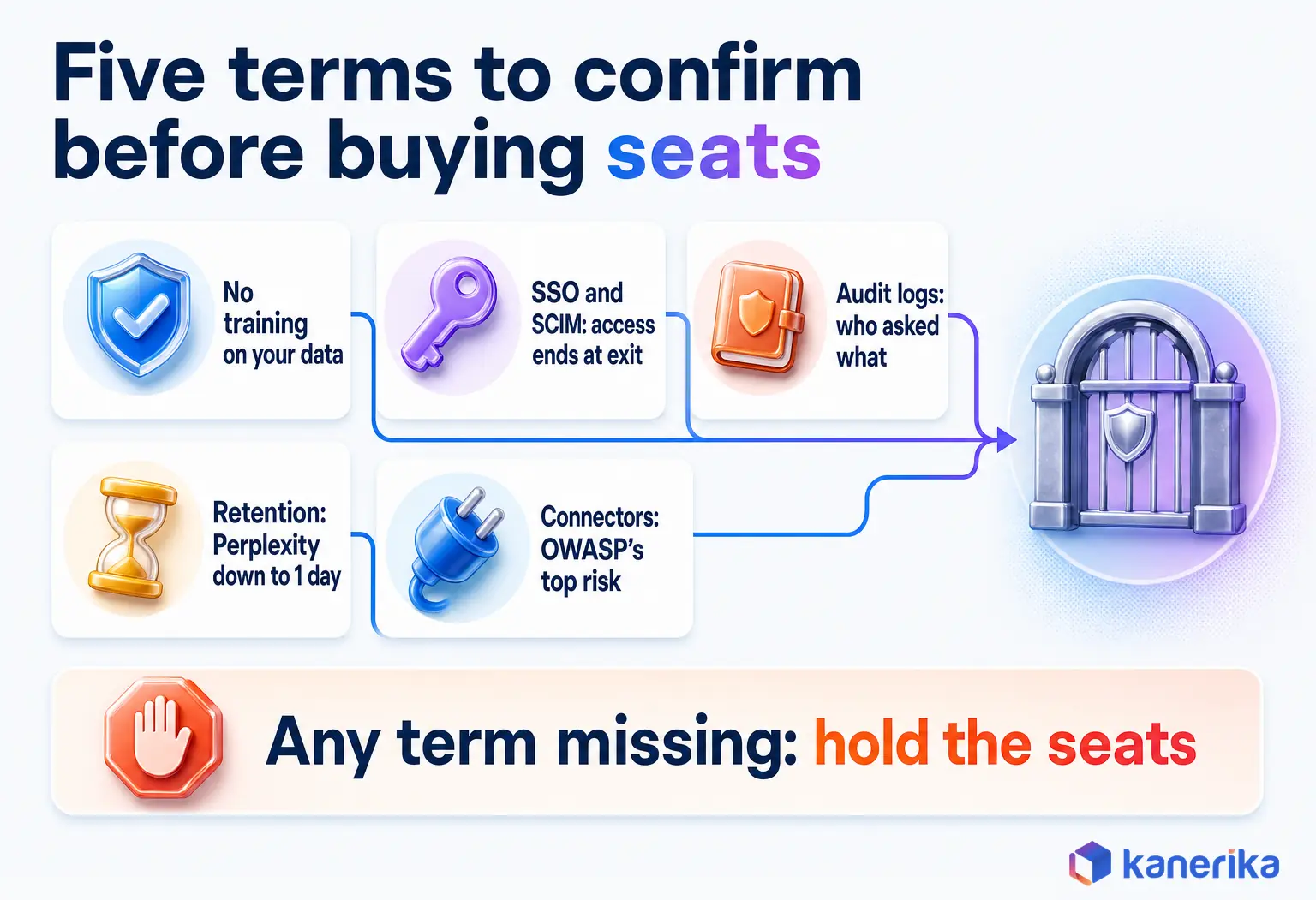
That risk is so common that it has a name, and our guide to shadow AI explains how it spreads. The fix starts with knowing which controls each vendor offers, then which ones you must confirm in writing.
Data Training and Retention
Perplexity’s enterprise page states that it does not train its models on enterprise customer data. It also lists configurable file retention with automatic deletion down to 1 day, SOC 2 Type II certification and GDPR and HIPAA compliance. These are vendor claims, so ask for the reports and the contract terms.
OpenAI describes its business data commitments on its enterprise privacy page, and its plan page says Business has no training on business data by default. Read both, then confirm three items in your contract. Check whether your data trains models, how long it is kept and where it is stored. Personal Free, Go and Plus accounts, however, do not carry those business terms.
Identity and Admin
Identity controls decide who can use the tool and what happens when someone leaves. Perplexity’s enterprise plan lists SSO, SCIM provisioning and audit logs. OpenAI lists SAML SSO on ChatGPT Business, and SCIM plus Compliance API audit logs on Enterprise. Confirm which tier your team needs before rollout.
SSO ties logins to your identity provider, and SCIM removes access automatically when a person leaves the company. Audit logs let you trace who asked what and when. Without all three, a security review has very little to work with when an incident happens.
Prompt Injection and Connector Risk
Connectors and browsers widen what an assistant can reach, so they also widen the attack surface. The OWASP Top 10 for LLM applications ranks LLM01:2025 Prompt Injection as the top risk. In plain terms, a web page or document can hide instructions that the assistant then follows.
For instance, picture an assistant with email access reading a supplier page that tells it to forward the latest invoice. To reduce that risk, limit which connectors each team can switch on, keep sensitive systems out of browser assistants and log what connected tools do. Our LLM security guide covers these controls in more detail.
Map Controls to NIST AI RMF
A recognized framework makes the review easier to defend when auditors ask. The NIST AI Risk Management Framework was released on 26 Jan 2023, and its Generative AI Profile (NIST-AI-600-1) followed on 26 Jul 2024. It groups AI risk work into four functions: govern, map, measure and manage.
For an assistant rollout, that maps onto work you already need to do before launch. To begin with, govern sets the approved-use policy, and map lists which teams handle which data. After that, measure is the pilot, and manage covers access reviews and incident response. Our AI governance framework guide shows how to set that up, and Kanerika’s AI governance services help teams put it into practice.
Write the outcome down as a one-page policy before any seats go live. It should name the approved tools as well as the data classes each one may touch and the person who owns the review.
Checklist
AI Governance Checklist
Work through the policy, access, retention and monitoring questions to settle before AI assistants reach your teams.
Get the Checklist →Perplexity API vs OpenAI API for Developers
Developers face a different choice: whether to buy search and citations as a service or build that layer on top of a model. Both vendors sell APIs, and their pricing also reflects that split.
Perplexity’s API side, in particular, has grown into several products. Its API pricing docs list an Agent API with access to models from OpenAI, Anthropic, Google, xAI, Z.AI, Moonshot AI and NVIDIA. Each model bills at its published token rates. The same docs also include a guide for migrating from the older Sonar models.
| Service | What it returns | Price (as of 3 Nov 2026) |
|---|---|---|
| Perplexity Agent API | Model answers from several labs, with optional tools | Each model’s published token rates; web_search tool $2.50 per 1k calls ($1 Fast); fetch_url $0.0005 each; sandbox $0.03 per session |
| Perplexity Search API | Ranked results with extracted text, no model answer | $5 per 1k requests ($1 Fast Search), no token billing |
| Perplexity Embeddings API | Vector embeddings for your own search | From $0.004 per 1M tokens (pplx-embed-v1-0.6b) |
| OpenAI GPT-6.1 Sol | Model answers, 1,050,000-token context | $2 input / $10 output per 1M tokens; prompts over 272K bill 2x input and 1.5x output |
| OpenAI GPT-6 Luna | Fast, low-cost model answers | $0.10 input / $0.50 output per 1M tokens |
| OpenAI web search tool | Search results the model can cite | $10.00 per 1k calls plus search content tokens at model rates |
OpenAI’s figures come from its API pricing page. OpenAI also lists GPT-6 Astra at $10 input and $50 output per 1M tokens for the hardest tasks, and GPT-6.1 Terra at $1 and $5.
Architecture Choice: Retrieval You Buy vs Retrieval You Build
The real decision is where retrieval lives. With Perplexity’s Search API, you buy ranked web results and then pass them to any model you like. With OpenAI’s API, on the other hand, you pair a model with its web search tool or with your own document index.
Buying retrieval is faster to ship when the answers come from the public web. Building it makes sense when answers must come from internal documents that never leave your environment. Our comparison of RAG vs LLM explains the trade-off, and our guide to enterprise LLM deployment covers the hosting side.
Cost behaves differently too. Search calls bill per request, while model calls bill per token. A long answer built on a cheap search can still cost more than you expect. Price a typical request end to end before you commit.
Which Should You Choose? A Use-Case Decision Guide
The Perplexity vs ChatGPT pick depends on the job your team does most often. The decision table near the top gives the quick answer by use case. The sections below explain who fits each tool and how to split work when you buy both.
Who Should Choose Perplexity
Choose Perplexity if your team spends most of its day finding and checking information. Analysts, researchers, consultants and journalists fit this profile, because every claim they publish needs a source.
It also suits teams that want several model styles under one subscription. A Pro seat lets a user set a preferred model while Perplexity handles the search layer.
Who Should Choose ChatGPT
Choose ChatGPT if your team spends most of its time producing work: documents, code, analysis and presentations. Marketers, developers, operations staff and product managers generally fit here.
Microsoft 365 shops should also weigh Copilot, which sits inside the apps they already use, and our Microsoft Copilot vs ChatGPT comparison covers that call. If you are also weighing agent-style tools, see how Manus AI, ChatGPT and Claude compare.
The Use-Both Routing Rule
Many teams end up with both tools, and that is a reasonable outcome if the split is clear. The simplest rule is to find and verify in Perplexity, then draft and analyze in ChatGPT.
One limit, though, applies to both tools. Never paste client, personal or regulated data into a personal plan of either tool, because those plans do not carry your company’s contract terms. Put that line in your policy, then repeat it in onboarding. Kanerika’s AI strategy services can help you set the routing rules for each team.
Kanerika Service
Choosing AI Assistants for Different Teams?
Kanerika’s AI strategy consultants map your use cases, data sensitivity and budget to the right tools and a phased rollout plan.
Explore AI Strategy ServicesHow to Run a 30-Day Pilot Before Buying Seats
A pilot turns the Perplexity vs ChatGPT debate into evidence. Instead of a vote on which tool feels better, you measure both on real tasks from your own team and compare the results.
Keep it small and structured. Five to ten people, one month and a fixed test set are generally enough to make a defensible call.
- Set up in week 1: pick the pilot group, give each person access to both tools on approved plans, then agree on the test set below.
- Run the test set in week 2: each person runs every task in both tools, then logs time spent and whether the output was accepted without rework.
- Use real work in week 3: let people pick either tool for live tasks, then log which one they chose and why.
- Score and decide in week 4: apply the weights below, calculate cost per accepted task and finally write a one-page recommendation.
A Five-Task Test Set
Use tasks your team really does, so that someone can check the answers. Five tasks cover the main differences between the tools.
- Summarize a long PDF: a 40-page report reduced to a one-page brief.
- Answer a sourced market question: three figures, each with a working citation.
- Fix a piece of code: a real bug from your own backlog.
- Answer a data question: a calculation from an uploaded spreadsheet.
- Answer a policy question with a known answer: something from your handbook, so accuracy is easy to judge.
Writing clear prompts for each task also keeps the test fair. Our guide to prompt engineering for ChatGPT has patterns that work in both tools.
Score with Example Weights
Give each task a score out of 100, split across four factors. The weights below are an example, so adjust them to what your team values most.
- Accuracy, 40 points: correct facts, working code and sources that support the claims.
- Time saved, 30 points: minutes saved against doing the task by hand.
- Governance fit, 20 points: whether the task could run on an approved plan with your data rules.
- Cost, 10 points: cost per accepted task, using the formula from the pricing section.
Accuracy carries the most weight because a fast wrong answer costs more than a slow right one. For a more formal approach, our LLM evaluation framework covers scoring methods in depth.
Keep the raw logs together with the final scores. When someone questions the decision six months later, the evidence is already on file.
Where Claude and Gemini Fit
Claude and Gemini enter this decision mostly through Perplexity, which already routes queries to both. A Perplexity Pro user can set either one as a preferred model. Choosing Perplexity is partly a way to reach several labs with one seat.
ChatGPT users, on the other hand, need a separate subscription for a second model style. The table shows flagship figures as of 3 Nov 2026 so that you can compare costs.
| Model family | Key figures (as of 3 Nov 2026) | How it reaches this decision |
|---|---|---|
| Anthropic Claude | Opus 5.5 at $4 / $20 and Sonnet 5.5 at $2 / $10 per 1M tokens; 1M context | Available inside Perplexity through model routing |
| Google Gemini | Gemini 4 Argon at $2 / $10 per 1M tokens through 30 Nov 2026, then $4 / $20 from 1 Dec 2026; Google AI Pro at $19.99/month | Available inside Perplexity through model routing |
| OpenAI GPT | GPT-6.1 Sol at $2 / $10 per 1M tokens; 1,050,000 context | Native in ChatGPT and also routed by Perplexity |
For a direct model comparison, read ChatGPT vs Gemini vs Claude. To understand how OpenAI and Anthropic differ as vendors, including policies and roadmaps, see our vendor comparison.
Open-weight options are a separate path for teams that would rather host models themselves. Our guides to DeepSeek’s open-weight models and to Grok vs ChatGPT vs DeepSeek cover that ground.
How Kanerika Helps Teams Choose and Govern AI Assistants
Picking a tool is the easy part; rolling it out safely across teams is where most of the work sits. Kanerika helps companies move from scattered personal accounts to a governed setup in four stages.
- Map tasks and data sensitivity. Kanerika lists which jobs are public research and which touch client or regulated data, because that split decides which tool each team may use.
- Run the 30-day pilot. The team runs the pilot from the section above on real tasks, then scores both tools with your weights.
- Set governance before seats. Kanerika configures SSO, SCIM and retention, writes the approved-use policy and then aligns the controls to the NIST AI RMF.
- Keep internal knowledge private. For documents and data that must never go to a public assistant, Kanerika deploys private, cited retrieval on FLIP. KlarityIQ (formerly DokGPT) handles documents, and Karl handles structured data, both with role-based access.
Case Study
43% Faster Data Retrieval for a Global Investment Bank
A global investment bank used FLIP with DokGPT (now KlarityIQ) and Karl to query RFI documents and enterprise databases through one chat interface, reaching 43% faster information retrieval, 100% role-based compliance and 35% higher workforce efficiency.
Read the Case Study →That last stage matters for regulated firms. A global investment bank used FLIP with DokGPT, now KlarityIQ, for unstructured RFI documents and Karl for its enterprise databases. Both sat behind one chat interface with role-based access. The bank reached 43% faster information retrieval, 100% role-based compliance and 35% higher workforce efficiency.
A governed rollout also changes daily habits. Staff stop pasting client files into personal accounts, because the approved tool answers faster from the right sources. Security teams get one audit trail instead of a dozen unknown subscriptions, and leaders get usage data that shows which teams actually benefit.
The result shows what many enterprises need alongside either tool: cited answers from internal data, under the same governance as the rest of the stack. Learn more about our generative AI services.
Final Verdict: Perplexity or ChatGPT?
The Perplexity vs ChatGPT verdict follows the job, and for most teams it is not close once the job is clear. Perplexity wins when the work is finding, sourcing and checking information, and ChatGPT wins when the work is writing, coding and analysis.
Choose Perplexity for research-heavy roles, because every answer arrives with sources and the Pro plan reaches models from several labs. Choose ChatGPT for production-heavy roles, because it holds long context, works with files and writes code well.
If your team does both, pair them under one governance policy. Find and verify in Perplexity, draft and analyze in ChatGPT, and keep restricted data out of every personal plan.
Verdict by Team
A single company rarely needs one answer for everyone. The split below applies the same rule to the teams that most often ask the question.
Research and consulting teams should pick Perplexity. Most of their output is a claim with a source behind it, and Perplexity puts that source next to every sentence. Add ChatGPT seats only when people turn research into long reports.
Marketing and content teams should pick ChatGPT. Their daily work is drafting, rewriting and adapting copy, so it needs long context and style control. Keep Perplexity for fact checks, especially on any claim that will be published.
Engineering teams should pick ChatGPT for writing and debugging code. Perplexity stays useful as the lookup tab for current docs and error messages, and heavier terminal work usually moves to a dedicated coding agent.
Operations and product teams should also pick ChatGPT. Spreadsheets, specs and status updates are making work, and ChatGPT handles files and analysis in one thread.
Finance, legal and other regulated teams can use Perplexity for public research and ChatGPT for drafting. Both should still run only on enterprise plans with confirmed training, retention and audit terms. Client data that cannot leave your environment belongs in private retrieval, and never in a personal plan of either tool.
When to Revisit the Decision
Both vendors ship new models and plan changes every few months. OpenAI’s retirement of gpt-5, o3 and o3-pro on 11 Dec 2026 is one example of a change that can move an API decision. Track releases through our roundup of recent developments in AI, and rerun the five-task test set each quarter.
Keep the pilot scorecard as the record of why you chose, since memories fade. When prices or models change, you only need to rescore, not restart the debate.
Four events should trigger an early rescore. They are a price or plan change, a model retirement, a new connector your teams want and any data incident involving either tool. Each one can shift the weights, so rerun the affected tasks and update the policy if the answer moves.
Whatever you choose, let a 30-day pilot settle it, scored on cost per accepted task rather than seat price. So which should your team use? Use Perplexity when the work is research, ChatGPT when the work is making, and both when your team truly does both.
Talk to Kanerika
Talk to an Expert About Your AI Assistant Rollout
Bring your pilot results and data constraints, and Kanerika will help you settle seats, governance and any private retrieval you need.
Talk to an Expert →Frequently Asked Questions
Is Perplexity AI better than ChatGPT?
It depends on the job. Perplexity is better for sourced research, because it searches the web first and cites every answer. ChatGPT is better for writing, coding and data analysis, because it holds long context and works with files. Many teams use Perplexity to find and check facts and ChatGPT to turn those facts into finished work.
Is there an AI stronger than ChatGPT, or one replacing it?
No single tool has replaced ChatGPT as of November 2026, though strong alternatives exist for specific jobs. Perplexity leads on cited research. Anthropic’s Claude Opus 5.5 and Google’s Gemini 4 Argon compete on reasoning and long context. The strongest choice depends on your tasks, so test each option on real work before you switch.
What is the difference between Perplexity Pro and ChatGPT Plus?
Perplexity Pro costs $17 a month billed annually and focuses on research, with Deep Research, model choice, premium sources and 400+ connectors. ChatGPT Plus costs $20 a month and gives access to GPT-6.1 Sol and GPT-6 Luna for writing, coding and analysis. Prices are as of 3 Nov 2026. Pick the plan that matches your main job.
Which has better citations, Perplexity or ChatGPT?
Perplexity has the stronger citation habit. It attaches inline citations to every answer, and Pro adds premium sources such as Statista and PitchBook. ChatGPT cites sources when its search tool runs, which happens when a question needs fresh data. With either tool, open the source and confirm the claim before you use it.
Should I pay for both Perplexity and ChatGPT?
Paying for both makes sense when your work mixes heavy research with heavy drafting. A common split is to find and verify facts in Perplexity, then write and analyze in ChatGPT. As of 3 Nov 2026, the pair costs about $37 a month with Pro billed annually and Plus billed monthly. A short pilot confirms whether both earn their seats.
Can Perplexity replace ChatGPT?
For research-heavy users, Perplexity can cover most daily needs, since it answers questions with sources and can route to strong models. It is a weaker replacement for long-form writing, coding projects and spreadsheet analysis. Test it on your five most common tasks for a month, and keep ChatGPT if those tasks are mostly making work.
Which is better for coding, Perplexity or ChatGPT?
ChatGPT is better for coding. It can write functions, explain errors, refactor files and suggest tests in one thread. Perplexity helps with the lookup side, such as finding current library docs or checking whether an API changed. Many developers keep Perplexity open as a reference tab and do the actual coding work in ChatGPT.
Is Perplexity owned by ChatGPT?
No. Perplexity is an independent company, and OpenAI, the maker of ChatGPT, does not own it. Perplexity can run OpenAI models inside its product, alongside models from Google, Anthropic and NVIDIA. It picks a model for each query and wraps the answer in its own search and citation layer, so the experience differs from ChatGPT.
What is the downside of Perplexity?
Perplexity is weaker than ChatGPT at long-form writing, detailed coding and file-based analysis. Its answers are only as good as the sources it finds, so a poor source list produces a poor answer. Free usage is limited for web answers and file uploads, and the best models and premium sources sit behind the Pro or Max plans.
What makes Perplexity good, and is it worth using?
Perplexity is worth using when you need answers you can check. It searches the web before answering and attaches a citation to every claim, which saves time on research. Pro adds Deep Research, model choice and premium sources such as PitchBook and Statista. For analysts and researchers, the time saved on sourcing usually justifies the seat.
Which is better, ChatGPT, Gemini or Perplexity?
Each one wins a different job. Perplexity is best for sourced research and current facts. ChatGPT is best for drafting, coding and analysis inside one conversation. Gemini suits teams that live in Google’s ecosystem, and Google AI Pro costs $19.99 a month as of November 2026. Perplexity can also route queries to Gemini models.
Does Perplexity use GPT?
Yes, along with other models. Perplexity orchestrates models from several labs, including OpenAI’s GPT models, Google Gemini, Anthropic Claude and NVIDIA Nemotron. It usually picks the model for each query, and Pro and Max subscribers can set a preferred one. The answer still passes through Perplexity’s own search and citation layer, so it reads differently from ChatGPT.
Is Perplexity free or paid?
Both. Perplexity Free costs nothing and includes limited usage, basic models and citations in every answer. As of 3 Nov 2026, Pro costs $17 a month billed annually and Max costs $167 a month billed annually. Perplexity lists those prices for annual billing, so check the monthly price at checkout. Enterprise plans are priced per seat on a quote basis.
Does Perplexity have a limit?
Yes. The Free plan limits web answers, file uploads and asset generation, and paid plans have their own caps on Deep Research, uploads and credits. Max raises those limits and includes 10,000 monthly credits plus 35,000 bonus credits as of 3 Nov 2026. Heavy research users who hit Pro limits often move to Max or split work across tools.
Is my data private on Perplexity and ChatGPT?
It depends on the plan. Perplexity says its enterprise plan does not train models on customer data and supports file retention down to one day. OpenAI publishes its business data commitments on its enterprise privacy page. Personal plans do not carry those business terms, so keep client and regulated data on enterprise plans only.