TLDR
BigQuery and Snowflake are both strong cloud data warehouses, but they target different situations. BigQuery is serverless, charges per terabyte scanned ($6.25/TiB on-demand), and is the natural choice for GCP-first teams who want simplicity. Snowflake separates storage and compute with granular virtual warehouse control, supports true multi-cloud deployment across AWS, Azure, and GCP, and charges per compute credit. In 2026, both have added serious AI layers. Your cloud alignment, workload type, team expertise, and budget predictability are the factors that determine the right platform. There is no universal winner.
Two platforms dominate the cloud data warehouse shortlist in 2026: BigQuery and Snowflake. Both are production-proven at petabyte scale. Both have added native AI capabilities. And both will give you a bill that looks very different depending on how your team uses them.
The comparison comes down to three things: architecture, cloud alignment, and AI strategy. BigQuery is serverless and GCP-native. Snowflake separates storage from compute and runs across all three major clouds. Which one fits depends on your workload, your existing cloud commitments, and what you plan to build on top of the warehouse layer.
In this article, we’ll cover architecture, pricing, AI capabilities, security, performance, integrations, and when to choose each platform based on your cloud strategy and workload profile.
Key Takeaways
- BigQuery is serverless and charges by data scanned. Snowflake gives you virtual warehouse control and charges by compute time.
- Both platforms now offer native AI capabilities inside the warehouse, with BigQuery using Gemini and Snowflake using Cortex AI with multi-model support.
- Snowflake runs natively on AWS, Azure, and GCP. BigQuery Omni extends cross-cloud coverage, but BigQuery’s native home is GCP.
- Data governance, security, and compliance depth differ in meaningful ways. Snowflake’s Business Critical and Virtual Private editions offer stricter isolation; BigQuery leans on Google’s existing IAM and VPC infrastructure.
- Migration from a legacy warehouse to either platform involves more than a lift-and-shift. Workload mapping, cost modeling, and schema re-engineering drive project timelines more than raw data volume.
How BigQuery and Snowflake Are Architected
Architecture is the most consequential difference between these two platforms. It explains why they behave differently under load, why they cost what they cost, and why one fits certain workloads better than the other.
1. BigQuery: Serverless by Design
BigQuery is fully serverless. You write SQL, Google allocates the compute, and you pay for what you use. There are no clusters to size and no infrastructure to manage between queries.
On-demand pricing works like this:
- $6.25 per TiB of data scanned, with the first 1 TiB free each month
- Storage at $0.02/GB/month active, dropping to $0.01/GB after 90 days unchanged
- Cost driver is how much data your queries read, not how long compute runs
- A single SELECT * on an unpartitioned 10 TB table costs $62.50 in one execution
For high-volume teams, Google’s Editions model offers slot-based capacity pricing from $0.04/slot-hour. Teams scanning more than 10 to 15 TiB per month consistently save 40 to 60% by switching from on-demand to Editions.
2. Snowflake: Compute Control with Virtual Warehouses
Snowflake physically separates storage and compute. Data lives in cloud object storage (S3, Azure Blob, or GCS). Compute runs in virtual warehouses you size and pay for only when active. The Snowflake data warehouse model eliminates the need to buy peak capacity and watch it idle.
Key pricing details for 2026:
Snowflake rewards teams who actively manage compute. Set auto-suspend aggressively, right-size warehouses per workload type, and costs stay predictable. Leave warehouses on and oversized, and credits drain fast.
3. Storage and Data Format Support
Both platforms store data in columnar format. Understanding data warehouse architecture principles helps explain why columnar storage underlies both platforms’ query performance. Where they diverge is how they handle semi-structured data:
- Snowflake VARIANT: ingests JSON, Avro, Parquet, ORC, and XML natively in the same warehouse, queryable with standard SQL and no pre-processing
- BigQuery: handles semi-structured data through native JSON columns and nested/repeated schema fields, integrating cleanly with Google’s event-driven pipeline tooling
Snowflake’s VARIANT approach is more flexible for deeply nested or schema-less data. BigQuery’s schema-first model is tighter but works better with structured Google Analytics and Pub/Sub data.
Evaluating BigQuery or Snowflake for Your Enterprise?
Kanerika helps enterprises assess and migrate to the right cloud data warehouse. Book a call for a workload-fit recommendation.
Schedule a Meeting →
BigQuery vs Snowflake at a Glance
The table below compares both platforms across the dimensions that matter most in production for any cloud data warehouse selection: architecture, pricing model, AI capabilities, multi-cloud support, and workload fit. Use it as a reference alongside the detailed sections that follow.
| Dimension | BigQuery | Snowflake |
|---|
| Architecture | Fully serverless; shared compute pool managed by Google | Separated storage and compute; user-managed virtual warehouses |
| Native AI (2026) | Gemini in BigQuery Studio; AI.GENERATE, AI.EMBED SQL functions; BQML; Vertex AI integration | Cortex AI with Gemini 3 Pro, Gemini 2.5 Flash, Claude, Llama, Mistral, OpenAI via SQL functions |
| Multi-Cloud | GCP-native; BigQuery Omni extends to AWS and Azure (with some latency trade-offs) | Full native deployment on AWS, Azure, and GCP; cross-cloud data sharing without movement |
| Workload Isolation | Slot reservations via Editions; shared pool otherwise | Independent virtual warehouses per team or workload type |
| Semi-Structured Data | Native JSON columns and nested/repeated fields | VARIANT type for JSON, Avro, Parquet, ORC, XML in same warehouse |
| Data Sharing | Analytics Hub for sharing datasets within GCP | Snowflake Data Marketplace; cross-cloud sharing without data movement |
| Security and Compliance | Google IAM, VPC Service Controls, CMEK; HIPAA-compliant conversational analytics (2026) | Business Critical edition for HIPAA/PCI/SOC; Virtual Private Snowflake for full isolation |
| Best Fit | GCP-native teams, ad hoc analytics, ML-integrated workloads, variable query volumes | Multi-cloud teams, workload isolation needs, structured BI workloads, data product sharing |
How BigQuery and Snowflake Handle In-Warehouse AI
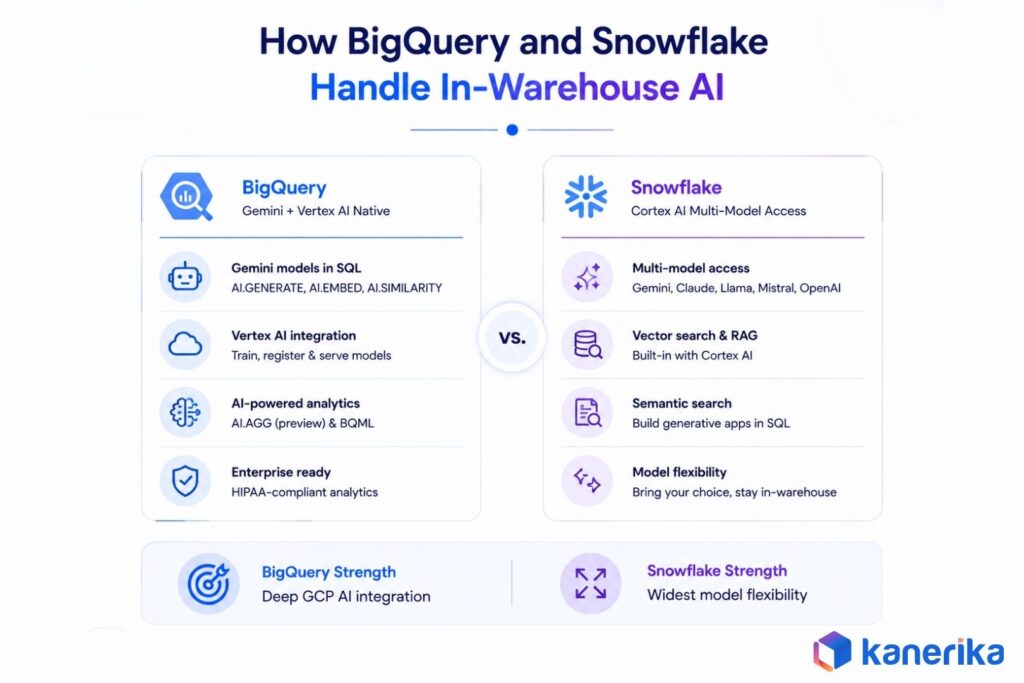
The fastest-moving part of the BigQuery vs Snowflake comparison in 2026 is the AI layer. Both platforms have moved aggressively to embed AI directly into the warehouse, so data teams can run inference and generate embeddings without exporting data to a separate model serving environment.
1. BigQuery: Gemini and Vertex AI Native Integration
Google has integrated Gemini directly into BigQuery through a suite of SQL functions released in early 2026. The AI layer now gives data teams direct access to foundation models without leaving the warehouse. Key capabilities include:
- AI.GENERATE, AI.EMBED, and AI.SIMILARITY callable from standard SQL, with access to Gemini 3.1 Pro and Flash
- Claude, Mistral, and Llama available through Google-managed Vertex AI partner model endpoints
- AI.AGG function (preview) for aggregated AI summarization across result sets
- BQML for in-warehouse model training, with direct bridges to Vertex AI for registration and serving
- Gemini in BigQuery Studio (updated March 2026) generates advanced SQL from natural language and understands your specific data environment
- Conversational analytics now supports HIPAA compliance for regulated healthcare workloads
BigQuery, Vertex AI, Dataform, and Looker operate as a coordinated system. Kanerika’s AI strategy consulting practice helps enterprises map these AI infrastructure choices to warehouse selection before committing.
2. Snowflake: Cortex AI with Multi-Model Access
Snowflake Cortex AI gives enterprises SQL-level access to a wider range of foundation models than any single cloud provider offers natively. In January 2026, Snowflake expanded its collaboration with Google Cloud, bringing Gemini 3 Pro and Gemini 2.5 Flash natively into Cortex AI. What the model roster looks like today:
- Gemini 3 Pro and Gemini 2.5 Flash (Google Cloud, native since January 2026)
- Claude (Anthropic), Llama (Meta), Mistral, and OpenAI models via SQL functions
- Vector search and document intelligence through Cortex AI for RAG pipelines
- Generative AI semantic search applications buildable directly in the warehouse without data movement
The trade-off is depth vs flexibility. Snowflake’s model-agnostic approach works well for teams not committed to one cloud AI stack. But Vertex AI for custom model training and the broader GCP AI platform remain BigQuery’s home-field advantage.
Pricing in Practice: What Your Bill Actually Looks Like
Both platforms can appear cheap at small scale and expensive at enterprise scale. The difference lies in which lever drives cost growth: data scanned in BigQuery, or warehouse runtime in Snowflake.
| Cost Dimension | BigQuery | Snowflake |
|---|
| Pricing model | Pay per TiB scanned (on-demand) or per slot-hour (Editions) | Pay per credit consumed by virtual warehouses, billed per second |
| Compute cost (2026) | $6.25/TiB on-demand; $0.04–$0.10/slot-hour (Editions) | ~$2/credit (Standard), ~$3 (Enterprise), ~$4 (Business Critical) |
| Storage cost (2026) | $0.02/GB active; $0.01/GB long-term (90+ days unchanged) | ~$23/TB/month (compressed); Time Travel data billed on top |
| Minimum commitment | None on on-demand; 60-second minimum on Flex Slots | 60-second minimum per warehouse resume; no monthly minimum |
| Free tier | 1 TiB queries + 10 GB storage/month, permanent, no card required | $400 trial credits, 30-day window only; no permanent free tier |
| Key cost driver | Bytes scanned per query; unpartitioned large tables are expensive | Warehouse size × runtime; idle warehouses left on burn credits |
| Volume discounts | Editions (slot commitments) save 40–60% over on-demand at scale | Annual capacity commitments reduce per-credit cost by 25–45% |
| Hidden costs to watch | Cross-region egress, streaming inserts, Storage API reads | Snowpipe, auto-clustering, cross-cloud egress ($90–$155/TB) |
1. When BigQuery Is Cheaper
For intermittent or unpredictable workloads, BigQuery’s on-demand model is hard to beat. A team scanning 5 TiB per month pays roughly $25. There is no minimum commitment, no cluster sizing to get wrong, and idle time costs nothing. Development and testing environments, data science exploration workloads, and teams with seasonal query spikes all benefit from this structure. For teams planning a data warehouse implementation, this flexibility reduces upfront commitment risk.
The break-even against Editions (slot-based pricing) sits around 10 to 15 TiB/month. Teams below that threshold consistently come out ahead on on-demand. Above it, switching to Enterprise Edition slots reduces compute spend by 40 to 60%, according to Modern DataTools’ verified 2026 pricing analysis.
BigQuery also offers a permanent free tier with 1 TiB of queries and 10 GB of storage monthly, with no credit card required. For experimentation, prototyping, and small teams, this lowers the evaluation barrier considerably compared to Snowflake, which provides a 30-day trial with $400 in credits but has no ongoing free tier.
2. When Snowflake Is Cheaper
Snowflake’s cost model rewards teams with regular, predictable workloads and disciplined compute management. A medium warehouse running 8 hours per weekday costs around 32 credits. At $3/credit Enterprise pricing, that is roughly $96/day for the compute layer. Paired with active auto-suspend (idle warehouses pause in seconds), teams pay only for actual query execution time.
The critical insight is compression. Snowflake compresses data at roughly 3:1 in typical workloads, so 30 TB of raw data bills as approximately 10 TB at around $230/month, meaningfully less than many estimates suggest. The hidden costs to watch are serverless feature consumption (Snowpipe, automatic clustering, materialized view maintenance), data transfer fees between regions ($90 to $155/TB for cross-cloud egress), and Time Travel storage accumulation for large, frequently changing datasets.
For enterprises running concurrent heavy workloads across multiple business functions, Snowflake’s workload isolation through separate virtual warehouses prevents resource contention that costs time and money in shared environments. Annual capacity commitments with volume discounts of 25 to 45% make the math more favorable for larger deployments.
3. The Real Cost Driver: Data Architecture Decisions
On either platform, the biggest cost lever is not the pricing model. It is how well the data is structured. Partitioning and clustering in BigQuery can reduce data scanned per query by 60 to 90%. Right-sizing virtual warehouses and setting tight auto-suspend thresholds in Snowflake prevents the largest single source of overspend. Teams that treat either platform as a lift-and-shift from an on-premise data warehouse typically see higher-than-expected costs in the first 90 days, before optimization takes hold.
Query Performance and Resource Management Compared
Performance in a cloud data warehouse is not a single number. It depends on query type, data volume, concurrency patterns, and how well the platform is tuned for the specific workload. The two platforms perform differently across these dimensions.
1. BigQuery: Built for Massive Parallel Scans
BigQuery shines on large batch scans and unpredictable concurrency. Google allocates compute dynamically from a shared slot pool, so a single query against a petabyte-scale table gets more resources than most teams could afford to reserve privately. Where it performs well:
- Large batch analytical queries that need to scan full datasets fast
- Streaming inserts at scale without additional infrastructure
- Variable concurrency where the shared pool absorbs demand spikes gracefully
- Cross-cloud query capability via BigQuery Omni against AWS and Azure data stores
The limitation is workload isolation. Two high-volume teams sharing the same project without reserved slots can block each other during peak periods. Editions-based slot reservations address this, but require capacity commitment upfront.
2. Snowflake: Workload Isolation as a First Principle
Snowflake’s virtual warehouse architecture makes workload isolation a first-class concept. Teams evaluating Snowflake alternatives often find no other platform matches this isolation model at the same operational simplicity. Isolation benefits in practice:
- Analytics, data engineering, and BI dashboards each run in separate warehouses with no resource contention
- Heavy ETL jobs no longer degrade reporting dashboard performance
- Multi-cluster warehouses scale horizontally when concurrency demand exceeds a single cluster, then wind down automatically
- High-concurrency BI environments with many simultaneous users get a more predictable performance profile than BigQuery’s shared pool under load
A widely cited 2025 independent test found Snowflake roughly 58% faster on certain SQL workloads compared to Databricks. Teams assessing all three can explore the Databricks vs Snowflake vs Fabric comparison for a full three-way view.
3. Where Both Platforms Converge
Tool compatibility is no longer a differentiator. Both platforms support the full modern data integration stack on equal footing. What this means in practice:
- dbt-bigquery and dbt-snowflake are both first-class adapters with nearly identical project structure
- Fivetran, Airbyte, Tableau, Power BI, Looker, Monte Carlo, and Atlan all support both platforms natively
- Switching transformation or BI tools does not constrain platform selection
The divergence is platform depth within their respective clouds. Teams evaluating a broader set of data warehouse tools will find cloud alignment and AI platform fit are the two decisions that actually matter.
Snowflake Consulting and Migration Services
Kanerika is a Snowflake Select Tier Partner with hands-on migration delivery. The team has cut manual reconciliation effort by 60% for distributed enterprise clients.
Explore Snowflake Services →
How Each Platform Fits the Modern Data Stack
Neither platform is an island. What surrounds them, including BI tools, transformation layers, data catalogs, orchestration tools, and AI development environments, shapes how much value organizations extract from the warehouse layer.
1. BigQuery Inside the Google Cloud Stack
BigQuery’s strongest advantage is cohesion within Google Cloud. Announced at Google Next 2026, the Agentic Data Cloud architecture treats BigQuery, Gemini, and Looker as a coordinated system rather than loosely coupled products. What that means for GCP-first teams:
- Looker, Vertex AI, Dataform, Pub/Sub, and Dataflow operate as native components, not integrations
- BI can evolve from reporting into acting, triggering workflows and supporting AI agent interactions against warehouse data
- GA4 (Google Analytics 4) exports directly to BigQuery at no extra cost for GA4 360 users, with daily export for standard accounts
- Marketing and analytics stack data arrives natively, with no ETL tool required to replicate what Snowflake needs
For teams already committed to GCP, this integration depth is hard for Snowflake to replicate on Google Cloud without additional tooling.
2. Snowflake’s Cross-Cloud and Marketplace Reach
Snowflake’s advantage is breadth and cloud neutrality. Where it stands out relative to BigQuery:
- Snowflake Data Marketplace provides access to hundreds of third-party datasets, including financial risk data, consumer data, and geospatial data, queryable live without copying into your account
- Cross-cloud data sharing across AWS, Azure, and GCP with no physical data movement required
- A team on AWS can share live data with a partner on Azure through Snowflake’s sharing primitive, something BigQuery cannot replicate natively
- FLIP migration accelerator, backed by Kanerika’s Select Tier Partner status, supports Snowflake as a migration destination for complex multi-system legacy warehouses
For fintech, e-commerce, and financial services teams that rely on external data enrichment, the Marketplace alone is a meaningful reason to evaluate Snowflake first.
3. What Both Platforms Share
Tool compatibility is a non-issue in 2026. The modern data stack is fully certified on both platforms, so this dimension should not drive platform selection. What is shared:
- Fivetran, Airbyte, dbt, Tableau, Power BI, and Looker all support both natively
- Monte Carlo for observability, Atlan and Alation for data catalogs: identical coverage on both
- dbt project structure is nearly identical across both platforms; switching requires mostly SQL dialect adjustments
Teams on modern data analytics infrastructure should focus the decision on cloud alignment and AI platform fit, not on tooling compatibility.
Security Controls and Regulated Industry Fit
For regulated industries such as financial services, healthcare, and government, the choice between BigQuery and Snowflake often comes down to compliance architecture and how tightly data can be isolated from external infrastructure.
1. BigQuery Security Model
BigQuery runs within Google Cloud’s security infrastructure. For most enterprises, IAM and VPC Service Controls are sufficient. Key security controls available:
- Google IAM for identity and access management with column-level security and row-level access policies
- VPC Service Controls to restrict BigQuery access to specific network perimeters and prevent data exfiltration
- Customer-Managed Encryption Keys (CMEK) for teams that need to control their own key lifecycle
- HIPAA compliance for conversational analytics in BigQuery Studio, added in 2026
The caveat for regulated industries is that BigQuery data lives on Google’s shared infrastructure by default. A compliance conversation about shared tenancy is required before committing to the platform for the most sensitive workloads.
2. Snowflake Security Tiers
Snowflake’s security model scales with edition, giving regulated industries more flexibility to choose the isolation level they need. What each tier provides:
- Standard and Enterprise: encryption at rest and in transit, MFA, standard RBAC
- Business Critical: enhanced encryption, HIPAA/PCI DSS/SOC 2 Type II support, AWS PrivateLink and Azure Private Link for off-public-internet connectivity
- Virtual Private Snowflake (VPS): dedicated hardware, isolated metadata stores, strictest tenant separation available in any major cloud data warehouse
Snowflake’s data governance controls, including column-level masking policies, row access policies, and object tagging, integrate with third-party catalog tools. For enterprises with strong AI governance requirements, Snowflake’s controls are generally regarded as more granular than BigQuery’s out-of-the-box offering.
3. Data Residency and Cross-Cloud Compliance
Cloud boundaries matter differently for each platform. Here is how they compare on data residency and cross-cloud access:
- Snowflake: can deploy entirely within a single cloud and region with no data crossing cloud boundaries, while still sharing data with cross-cloud partners via the Data Marketplace without physical data movement
- BigQuery: data residency controls are strong within GCP, but cross-cloud access relies on BigQuery Omni, which runs queries against externally stored data and carries additional egress costs and latency
For regulated industries where data must remain on a specific cloud provider’s infrastructure, Snowflake’s native multi-cloud isolation is a meaningful advantage.
Which Platform Should You Choose?
The honest 2026 answer is that BigQuery and Snowflake serve different strategic situations. Neither platform has a universal advantage. The decision comes down to cloud alignment, workload patterns, team structure, and long-term AI strategy.
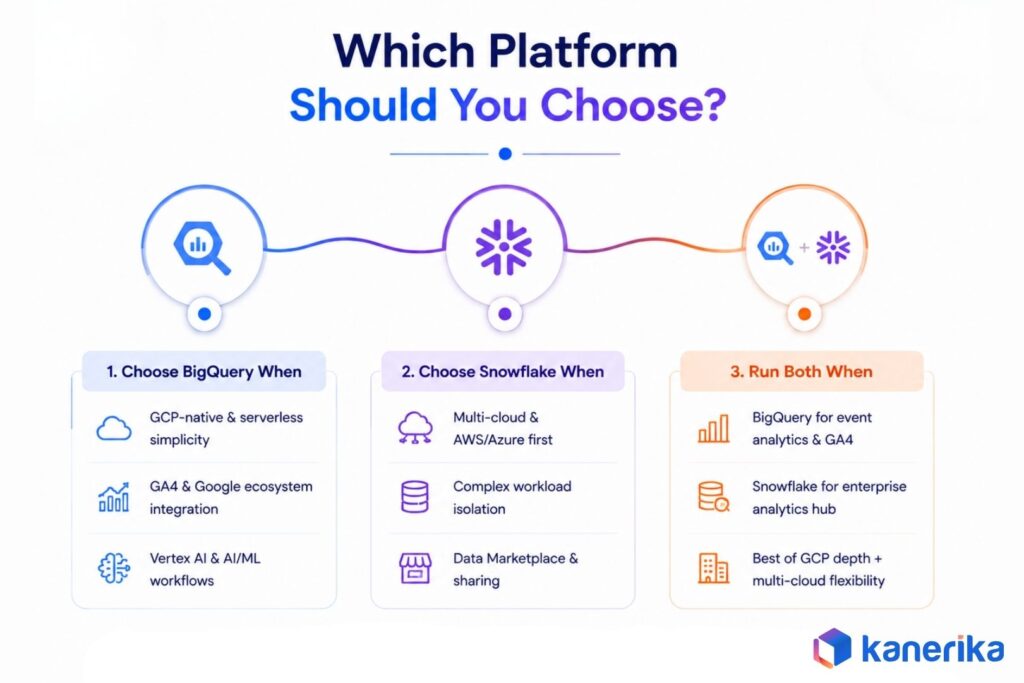
1. Choose BigQuery When
BigQuery is the right default when your organization is already committed to Google Cloud and wants the lowest operational overhead. Specific scenarios where BigQuery wins:
Read More: AWS vs Azure vs Google Cloud: Which Fits Your Stack in 2026?
- GCP-native data teams who want serverless simplicity without cluster management
- Google Analytics heavy users where GA4 native export removes ETL overhead
- Organizations running workloads on Vertex AI and Google’s marketing cloud
- Teams with highly variable query volumes where Snowflake’s warehouse management adds complexity without equivalent cost savings
- Data scientists and ML engineers building models in AI and ML workflows who want to train and serve through Vertex AI without separate infrastructure
2. Choose Snowflake When
Snowflake is the stronger choice for multi-cloud or AWS/Azure-first enterprises that do not want to anchor their data strategy to a single cloud provider. Specific scenarios where Snowflake wins:
- Multi-cloud or AWS/Azure-primary organizations that need native deployment across all three major clouds
- Enterprises with complex workload isolation needs: separate compute for ETL, analytics, and BI across different business units
- Financial services, insurance, and retail teams that rely on Snowflake Data Marketplace for third-party data enrichment
- Teams considering a data migration from on-premise warehouses where multi-cloud neutrality reduces lock-in risk
- Teams evaluating Azure Databricks vs Snowflake and needing stronger governance and data sharing primitives
Organizations comparing a broader shortlist can also review Databricks alternatives including Snowflake and BigQuery for a fuller view of the cloud data warehouse market.
3. When to Run Both
Many large enterprises run both platforms for different purposes. A common bi-modal pattern:
- BigQuery for event analytics, GA4 data, and Google marketing stack workloads where native integration removes ETL overhead
- Snowflake as the enterprise analytics hub and cross-cloud data sharing layer for partner data exchange
- This architecture costs more to operate but eliminates the trade-off between GCP platform depth and multi-cloud flexibility
Data strategy consulting teams increasingly encounter this pattern in organizations that grew through acquisition and inherited multiple cloud environments. The Snowflake vs BigQuery vs Azure Synapse comparison covers the three-platform architecture in more detail.
How Kanerika Helps With Cloud Data Warehouse Decisions
Kanerika is an AI-first data and analytics consulting firm recognized as a Snowflake Select Tier Partner, Microsoft Solutions Partner for Data and AI with Analytics Specialization, and Databricks Consulting Partner. With 100+ enterprise clients and a 98% retention rate over 10+ years, the team brings cross-platform delivery experience rather than loyalty to a single vendor. Certifications and credentials include:
- Snowflake Select Tier Partner
- Microsoft Solutions Partner for Data and AI, Analytics Specialization
- Databricks Consulting Partner
- ISO 27001 and SOC II Type II certified
- 520+ KPIs delivered across financial services, healthcare, retail, manufacturing, and logistics
Platform evaluations start with workload analysis before any recommendation is made. Amit Chandak, Kanerika’s Chief Analytics Officer and Microsoft MVP in Power BI, leads the methodology, mapping query patterns, concurrency profiles, data sharing requirements, and cloud commitments to identify which platform’s cost model delivers lower TCO at the team’s specific scale.
Kanerika’s FLIP migration accelerator handles complex legacy data engineering ETL conversions with a 50 to 60% reduction in migration effort and 2 to 8-week delivery timelines for most workloads. Post-migration support covers cost optimization, compute tuning, governance, and integration of Cortex AI or BigQuery Gemini functions. The team also operates practices for Microsoft Fabric and Databricks, allowing multi-warehouse architecture recommendations for enterprises running both platforms.
Ready to Make the Right Platform Decision?
Kanerika helps enterprises select, migrate to, and optimize BigQuery and Snowflake environments. Book a call to get started.
Schedule a Meeting →
Case Study: Enabling Real-Time Insights Across Distributed Operations with Snowflake Migration
The client is a leading manufacturer and distributor in the beverage industry, supporting bottling and distribution operations for multiple shareholder-owned facilities across North America. The company aimed to drive operational efficiency, transparency, and real-time decision-making across production and supply chain functions by transitioning from a legacy, multi-system environment to a cloud-first, unified data platform.
Challenges
- Legacy SSAS and hybrid data systems caused frequent outages, high maintenance overhead, and limited scalability
- Slow, hourly data refresh cycles restricted real-time visibility and delayed business decisions
- Multiple licenses and replication tools increased operational costs and created system dependencies
Solutions
- Migrated from SSAS to a unified Snowflake architecture, enhancing scalability and system reliability
- Enabled near real-time analytics through automated data ingestion from ERP and third-party systems using Fivetran
- Integrated Power BI directly with Snowflake to simplify reporting, cut maintenance costs, and deliver faster insights
Results
- $130K Annual savings from license and maintenance cost reduction
- 40% Faster data reporting cycles
- 3X Quicker analytics delivery
- 60% Reduction in manual data reconciliation
Wrapping Up
BigQuery and Snowflake are both strong platforms in 2026, but they serve different situations. The AI layer on both has matured a great deal this year, shifting the decision from basic warehouse features toward which AI platform fits the organization’s longer-term direction. The clearest signals for each:
- Choose BigQuery if your team is GCP-committed and wants serverless simplicity with native Google AI and analytics integration
- Choose Snowflake if you need multi-cloud deployment, granular workload isolation, or cross-cloud data sharing without data movement
- Run both if you have inherited cloud environments or separate use cases that align more naturally with each platform
A workload analysis, honest cost modeling, and a review of cloud strategy commitments are better guides than vendor benchmarks. Start there before committing.
FAQs
1. What Is the Main Difference Between BigQuery and Snowflake?
BigQuery is serverless. Google manages all compute allocation automatically and charges per terabyte of data scanned. Snowflake separates storage from compute and gives teams direct control over virtual warehouses, charging per second of compute runtime. The practical difference is that BigQuery requires less operational management but offers less workload isolation, while Snowflake rewards active compute management with more granular cost and performance control.
2. Is BigQuery Cheaper Than Snowflake in 2026?
It depends on workload patterns. BigQuery’s on-demand pricing at $6.25/TiB scanned is very competitive for intermittent or low-volume workloads, and the free tier (1 TiB/month) lowers evaluation costs to zero. Snowflake storage at $23/TB/month (compressed) and credit-based compute can be cheaper for predictable, high-volume workloads when auto-suspend is tuned aggressively and virtual warehouses are right-sized. Neither is universally cheaper across all workload profiles.
3. Which Platform Has Better AI Capabilities?
Both have strong AI layers. BigQuery integrates natively with Vertex AI and offers Gemini-powered SQL functions (AI.GENERATE, AI.EMBED) alongside BQML for in-warehouse model training, making it the stronger choice for teams building within Google’s AI ecosystem. Snowflake Cortex AI supports more model providers, including Gemini 3, Claude, Llama, Mistral, and OpenAI, within the same SQL interface, giving teams more flexibility without data movement. The right choice depends on whether you want Google’s AI depth or multi-model flexibility.
4. Does Snowflake Support Multi-Cloud and BigQuery Does Not?
Snowflake runs natively on AWS, Azure, and GCP, making it genuinely multi-cloud. BigQuery is GCP-native, but BigQuery Omni allows it to query data stored in AWS S3 and Azure Blob Storage without copying it, extending BigQuery’s reach across cloud environments. BigQuery Omni is not equivalent to Snowflake’s native multi-cloud deployment, particularly for compliance scenarios where data must remain on a specific cloud provider’s infrastructure.
5. How Do BigQuery and Snowflake Handle Data Governance?
Both platforms offer column-level security, row-level access policies, and role-based access control. Snowflake’s Business Critical and Virtual Private Snowflake editions provide stronger physical isolation for regulated industries, including dedicated hardware and stricter tenant separation. BigQuery operates within Google’s shared infrastructure with VPC Service Controls and CMEK available for additional isolation. As of 2026, BigQuery’s conversational analytics features support HIPAA compliance for healthcare analytics workloads.
6. Can I Migrate from BigQuery to Snowflake or Vice Versa?
Migration between the two platforms is technically feasible but requires more than a data copy. SQL dialect differences (particularly around date arithmetic, array handling, and semi-structured data access), pipeline logic baked into platform-native features, and BI layer metadata all need to be accounted for. dbt minimizes transformation layer migration effort since both platforms are first-class adapters. For teams migrating from legacy Oracle environments specifically, the Oracle to Snowflake migration guide covers the additional SQL translation considerations with nearly identical project structure. Specialist migration tools and accelerators, like Kanerika’s FLIP platform, reduce migration timelines significantly for complex multi-pipeline environments.
7. What Is the Best Platform for a Data Team New to Cloud Warehousing?
BigQuery’s permanent free tier (1 TiB/month, 10 GB storage, no credit card required) makes it the lower-friction starting point for teams new to cloud data warehousing. Snowflake provides $400 in trial credits, which covers meaningful evaluation but expires after 30 days. Teams already using Google Workspace or Google Analytics have natural reasons to start with BigQuery, while AWS or Azure shops may find Snowflake’s multi-cloud native model easier to integrate with their existing infrastructure.
8. How Should Enterprises Decide Between BigQuery and Snowflake?
The decision framework starts with cloud strategy: GCP-primary organizations with Google AI and marketing tooling should default to BigQuery. Multi-cloud or AWS/Azure-primary organizations should lean toward Snowflake. From there, workload type matters. High-concurrency BI environments with multiple business unit teams benefit more from Snowflake’s workload isolation, while variable or ad hoc analytics workloads fit BigQuery’s on-demand model. A workload audit, cost model simulation, and compliance review across both platforms before committing is the approach enterprises that avoid regret consistently follow. Kanerika’s AI Maturity Assessment can also help frame readiness for in-warehouse AI features on either platform.














