TL;DR
For an SSIS to Fabric migration, rebuild high-value packages as Fabric-native pipelines, run simple cloud-only packages in the preview Invoke SSIS Package activity, and keep blocked packages on Azure-SSIS IR. SSIS is not discontinued, but SSIS 2025 removed the Attunity CDC components, the Microsoft Connector for Oracle and the Hadoop tasks. The Invoke SSIS Package activity runs .dtsx files from OneLake inside a Fabric pipeline, yet in preview it cannot reach on-premises sources, private endpoints or custom components. Azure-SSIS IR in Azure Data Factory stays the bridge for those packages, because Fabric has no SSIS integration runtime of its own. Native rebuilds put most of the effort into Script Tasks and complex Data Flows, so score every package before you assign it a path. Then move in waves and prove parity with row counts, checksums and a parallel run before you switch off the SQL Server Agent jobs.
Key Takeaways
- SSIS is not discontinued, and SSIS 2025 reached general availability on November 18, 2025, but it dropped several older components.
- Moving SSIS to Fabric means moving more than .dtsx files, because schedules, connections, environments and logging all need a new home.
- The Invoke SSIS Package activity (preview) runs packages from OneLake with no on-premises, private-endpoint or custom-component support.
- Azure-SSIS IR in Azure Data Factory remains the bridge for packages with on-premises or third-party dependencies.
- Native rebuilds give the best long-term fit, with Script Tasks and complex Data Flows carrying most of the effort.
- Score every package, migrate in waves and prove parity before you retire SQL Server Agent jobs.
Watch on YouTube
Microsoft Fabric Migration: Move Off Informatica, Alteryx & SSIS
Kanerika explains how teams move ETL workloads from SSIS, Informatica and Alteryx into Microsoft Fabric, and what changes once pipelines run on Fabric capacity.
When an SSIS Upgrade Forces the Fabric Question
The Nightly Job That Failed After the Upgrade
Picture a data team that upgrades its ETL server to SQL Server 2025 over a weekend. On Monday the sales dashboard is empty, because the nightly SQL Server Agent job failed at its first package.
The cause sits in one Data Flow that reads an Oracle source through the Microsoft Connector for Oracle. Microsoft ended support for that connector in July 2025, and SSIS 2025 removed it along with the Attunity CDC components.
The team now faces a real choice. It can swap the connector for ADO.NET and stay on premises, lift the package to Azure-SSIS IR, or rebuild it in Fabric. Running it unchanged in Fabric is off the table, because the source sits on premises.
This guide answers that SSIS to Fabric migration choice package by package. It maps what moves and compares four paths, then shows how to score an estate and prove parity.
What SSIS to Fabric Migration Actually Moves
An SSIS package looks like one file, but it runs inside a web of other objects. The .dtsx file holds the control flow and the data flows. Around it sit the store that holds the package, the schedule that starts it and the settings that tell it where to connect.
Microsoft’s SSIS migration guidance names four storage types for packages: the SSISDB catalog, the file system, the msdb database and the SSIS package store. Each one keeps configuration in a different place, so an inventory has to look in all four.
Think of a monthly finance load, for example. The package may be simple, but an Agent job starts it on the third business day and an SSISDB environment supplies the server name. A log table also records each run. Move only the .dtsx file, and that load never runs again.
A full scope list therefore covers these items:
- Packages and projects (.dtsx and .ispac files), including parent and child package chains
- Package storage in SSISDB, msdb, the file system or the package store
- SQL Server Agent jobs, schedules and the job steps that call packages
- Connection managers, credentials and package protection levels
- Configurations, project parameters and SSISDB environments
- Logging and error tables, alerts and email notifications
- Linked servers and file shares, plus the drivers each package needs when it runs
Anything left off this list turns into a surprise during cutover, which is the most expensive time to find it.
Why SSIS Estates Are Under Review in 2026
SSIS is still a supported product, and that point gets lost in a lot of migration talk. What changed is the platform around it. Microsoft shipped SSIS 2025 alongside SQL Server 2025, with general availability on November 18, 2025.
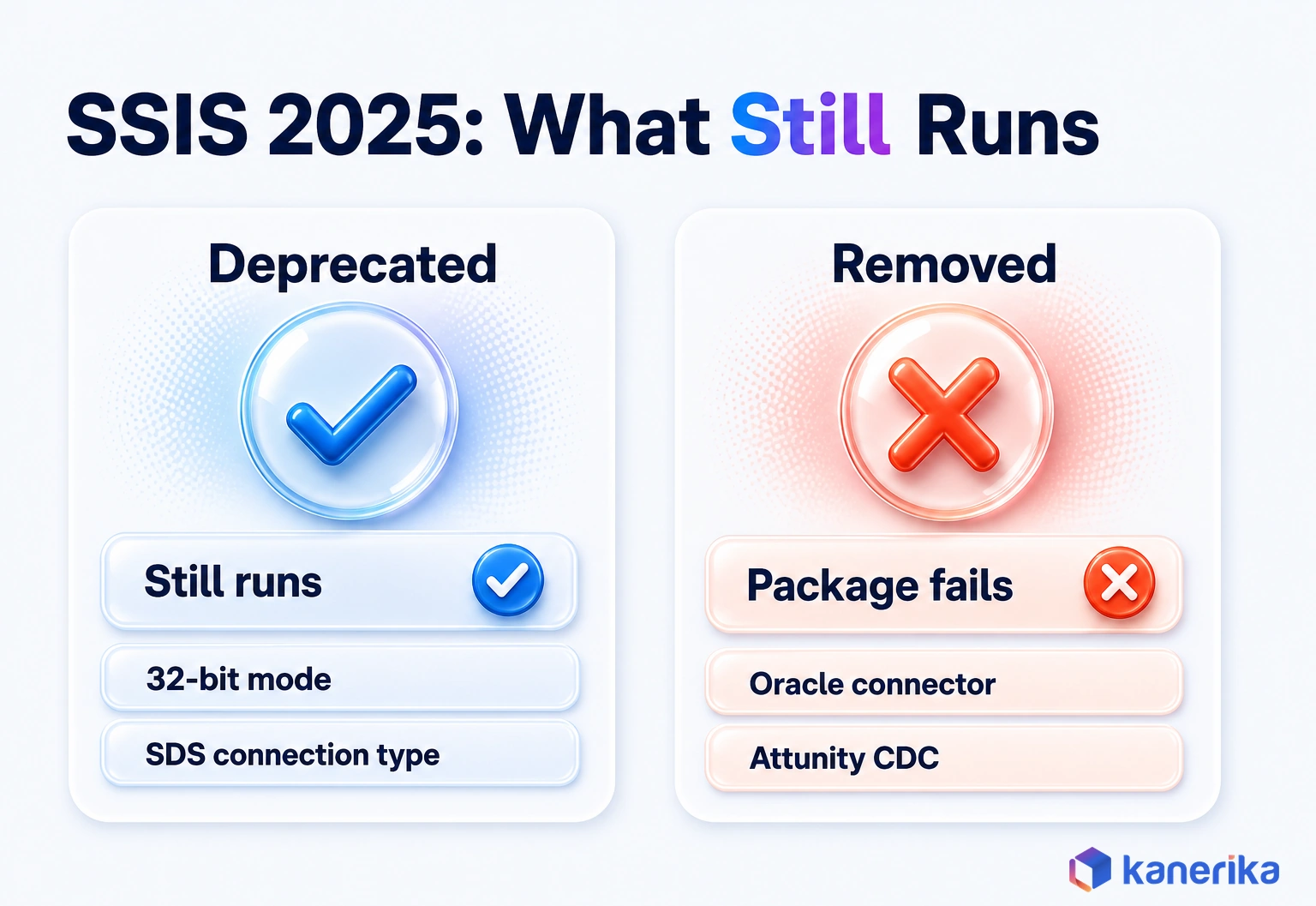
The release splits old features into two groups. Deprecated features still work but are on their way out. Removed features are gone, so a package that uses one stops running after an upgrade. Microsoft’s page on what’s new in SSIS 2025 lists both groups.
| Deprecated in SSIS 2025 (still runs) | Removed in SSIS 2025 (stops running) |
|---|
| Legacy Integration Services Service in SQL Server Management Studio | Attunity CDC components and the CDC service for Oracle |
| Integration Services 32-bit mode | Microsoft Connector for Oracle |
| SqlClient Data Provider (SDS) connection type | Hadoop Hive Task, Hadoop Pig Task and Hadoop File System Task |
The Oracle row is the one most teams feel first. Microsoft’s Oracle connector deprecation notice ended support in July 2025 and pointed teams to ADO.NET sources and destinations instead. The release also brings a welcome change, since the ADO.NET connection manager now supports the Microsoft SqlClient Data Provider. Projects that call the Microsoft.SqlServer.Dts.Runtime .NET API need updated references and a rebuild.
Then there is the older operational pain. SSIS scales by adding server capacity, so a team that outgrows one ETL box buys a bigger one or splits packages across servers. Patching, Agent job babysitting and log cleanup all fall on the same small team.
An upgrade to SSIS 2025 forces a review of every package anyway. That review is a natural moment to decide where each package should run next.
SSIS vs Fabric Data Factory: What Changes for Your Team
Moving from SSIS to Fabric changes how your team runs the work day to day. SSIS runs on a server you own and patch. Microsoft Fabric runs Data Factory as a SaaS service on capacity you buy. Because of that, the questions shift from server sizing to capacity units and workspace design.
Scheduling is a good example. In SSIS, SQL Server Agent starts packages and SSISDB keeps the run history. In Fabric, each pipeline carries its own schedule, and the Monitoring hub shows runs across the workspace. Teams used to Agent job history need a new habit, plus new alert rules.
The design style also moves. SSIS grew up as a tool that transforms rows in flight before it loads them. Fabric favors landing data in OneLake first and transforming it there, a shift our guide to ETL vs ELT explains in depth. For a tour of pipelines and Dataflow Gen2 themselves, see our overview of Data Factory in Microsoft Fabric.
| Area | SSIS | Fabric Data Factory |
|---|
| Runtime | SSIS service on a Windows server you manage | SaaS service on Fabric capacity |
| Design tool | Visual Studio with SSIS projects | Browser-based pipeline and dataflow editors |
| Scheduling | SQL Server Agent jobs | Pipeline schedules and triggers |
| Run history | SSISDB reports and log tables | Monitoring hub and activity output |
| Configuration | Project parameters and SSISDB environments | Pipeline parameters and variable libraries |
| Connectivity | Connection managers on the server network | Fabric connections plus on-premises and VNet data gateways |
| Cost model | SQL Server license plus server and support costs | Capacity units (CU) consumed by each workload |
| Scaling | Bigger servers, then more servers | A larger capacity or workloads spread across capacities |
SSIS to Fabric Is Not the Same as an ADF to Fabric Upgrade
Teams that already run Azure Data Factory get a gentler route, which our Azure to Fabric migration guide covers. Microsoft’s ADF to Fabric upgrade guidance covers mounting existing ADF items in Fabric, a built-in upgrade experience and PowerShell conversion. SSIS packages are a different case, because none of those tools converts a .dtsx file. Every SSIS package needs one of the four paths described below.
Datasheet
Automating SQL Server Pipeline Migration to Microsoft Fabric
See how Kanerika’s accelerator extracts SSIS package logic and rebuilds it as Fabric pipelines and Dataflow Gen2, with validation built into each step.
View the Datasheet →
How SSIS Components Map to Microsoft Fabric
Most SSIS objects have a clear home in Fabric, though a few have no direct twin. Knowing which is which turns a vague rebuild into a list of specific tasks. The control flow becomes a pipeline, while each data flow becomes a copy step, a dataflow or a notebook, depending on how much it transforms.
Consider a typical customer load. A Foreach Loop walks a folder of CSV files, and a Data Flow cleans each file and looks up a region code. Then an Execute SQL Task merges the result into a dimension.
In Fabric, a ForEach activity walks the folder while a Dataflow Gen2 or a notebook handles the cleaning and the join. A SQL script activity or a Stored procedure activity then runs the merge.
The SSIS to Fabric Migration Component Map
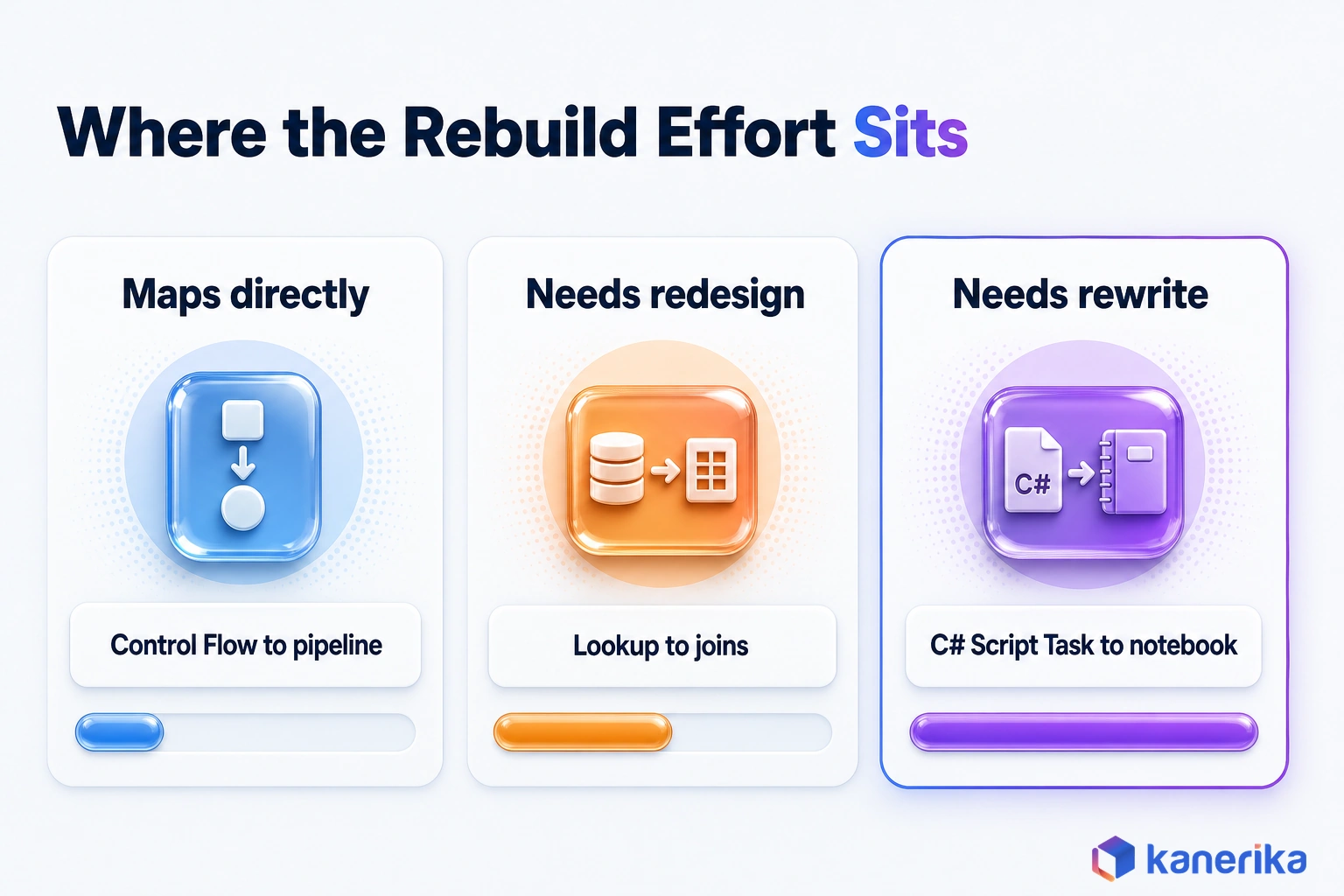
Two rows in the table below cause most of the trouble. Script Tasks written in C# do not port automatically, so they need a rewrite in a notebook or a Functions activity.
The SSIS Lookup transform also has no row-level twin. That is because the pipeline Lookup activity returns a small result set instead of joining rows. Microsoft’s pipeline activity overview lists the full set.
| SSIS item | Fabric equivalent | Note |
|---|
| Control Flow | Pipeline | In simple packages, activities replace tasks one for one |
| Data Flow Task | Copy data, Copy job, Dataflow Gen2 or notebook | Pick one based on transformation depth and data volume |
| Execute SQL Task | SQL script activity or Stored procedure activity | T-SQL usually moves with light edits |
| Script Task (C#) | Notebook or Functions activity | Rewrite required, since no automatic port exists |
| Foreach Loop Container | ForEach activity | Feed it from Get metadata output, then loop over the items |
| Precedence constraints and event handlers | On-success and on-fail paths, plus the Fail activity | Rebuild error handling explicitly, because it does not port |
| Execute Package Task | Invoke pipeline activity | Parent and child chains then become pipeline calls |
| Lookup transform | Joins in Dataflow Gen2 or a notebook | The pipeline Lookup activity returns rows to the pipeline instead |
| SQL Server Agent job | Pipeline schedule | Recreate every schedule and its alerts |
| Project and package parameters, SSISDB environments | Pipeline parameters and a variable library | Per-stage values then live in the library |
| Connection managers | Fabric connections and data gateways | Credentials also move out of the packages |
Where SSISDB Environments and Other SQL Server Components Go
The variable library deserves a note of its own. Microsoft describes the Fabric variable library as a workspace item that holds value sets per stage, such as dev, test and production. Pipelines then read their values from it. It also works with Git integration and deployment pipelines, which makes it the closest match to SSISDB environments.
SSIS rarely travels alone, since many estates also run SSAS models and SSRS reports on the same servers. Those components follow their own routes, covered in our guides to SSAS to Microsoft Fabric migration and SSRS to Power BI migration.
Four Ways to Move SSIS Packages to Fabric
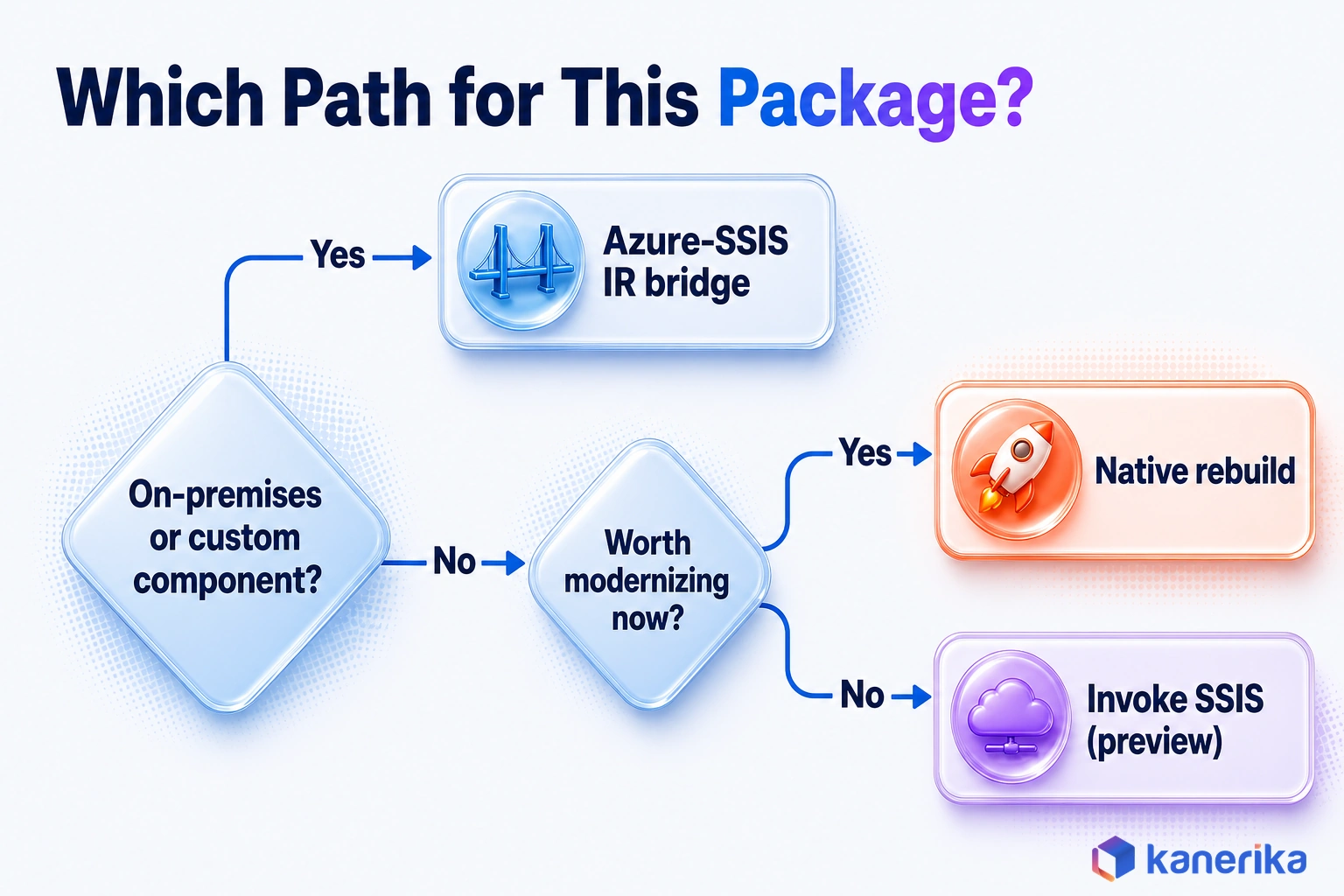
The right route for a package depends on what it touches. A package that copies files between cloud stores can run in Fabric as of October 2026. A package that reads an on-premises Oracle server through a third-party driver cannot, at least not yet.
Microsoft and Azure offer four workable routes. Most estates end up using more than one, so the real decision happens at package level rather than estate level. The sections below cover each path, and a table then compares them side by side.
Path 1: Run Packages in Fabric With the Invoke SSIS Package Activity (Preview)
The Invoke SSIS Package activity, still in preview as of October 2026, runs an existing .dtsx file inside a Fabric pipeline with no conversion. The package must sit in OneLake, and Fabric starts a managed SSIS runtime to execute it. Setup takes six steps.
- Upload the .dtsx file, plus any .dtsConfig file, to the Files section of a lakehouse through the Fabric portal or OneLake file explorer.
- Create or open a pipeline, then add the Invoke SSIS Package activity from the Activities pane.
- On the Settings tab, browse to the package path, add the configuration path if one exists and turn on logging.
- Supply runtime values on the Connection Managers or Property Overrides tabs, including credentials for packages saved with DontSaveSensitive.
- Save the pipeline, then run it or attach a schedule.
- Watch the run in the Output tab or the Monitoring hub, and read detailed logs from the OneLake logging path.
Property overrides accept expressions, so one package can serve every environment. The example below sets a package variable from a pipeline parameter.
Property path:  \Package.Variables[User::LoadDate].Value
Value:          @pipeline().parameters.LoadDate
A package run this way can still load data into Fabric itself. Microsoft’s Invoke SSIS Package documentation walks through three Fabric targets. A package connects to SQL database in Microsoft Fabric through the OLE DB connection manager, using Microsoft Entra service principal authentication.
Loads into a Fabric Data Warehouse switch authentication to Microsoft Entra ID and ingest with the COPY INTO command. Files that a package writes to ADLS Gen2 also surface in OneLake through a lakehouse shortcut, with no package changes required.
Preview Limits and Billing for Path 1
The preview limits decide which packages can use this path at all. Check each package against the table before you plan around it.
| Preview limit | What it means for a package |
|---|
| Storage | The package must be stored in OneLake before it runs |
| Connectivity | No on-premises sources or destinations, so local servers are out of reach |
| Networking | No private endpoints or VNet-injected resources |
| Components | No custom or third-party components, so packages that use them need another path |
| Compute | 4 vCores per workspace, fixed while the activity is in preview |
| Idle time | The runtime stays up for a 30-minute TTL after the last run, and the TTL is not configurable |
| Billing | 1.35 CU hours per vCore of SSIS uptime, plus the pipeline and OneLake meters |
Here is how the meter adds up, assuming all four vCores bill while the runtime is up. One hour of uptime costs 4 x 1.35 = 5.4 CU hours.
For example, a nightly batch that runs for one hour keeps the runtime alive for 90 minutes once the TTL is added. That comes to 8.1 CU hours a night. Over 30 nights that is 243 CU hours, before pipeline and storage charges.
Path 2: Keep Packages on Azure-SSIS IR in Azure Data Factory
The Azure-SSIS Integration Runtime is the long-standing lift-and-shift route. Packages keep running on a managed SSIS cluster in Azure Data Factory, while SSISDB moves to Azure SQL Database or Azure SQL Managed Instance.
This path suits the packages that the Fabric preview cannot handle yet. A package that reads an on-premises file share, calls a third-party SFTP component or needs a private network can keep running here with few or no code changes. The IR needs a custom setup to install the third-party component, and a virtual network join or a self-hosted IR proxy to reach on-premises data. Fabric itself offers no Azure-SSIS IR, so the package stays outside Fabric while a pipeline picks up its output. Treat this path as a bridge with an end date.
Path 3: Rebuild as Fabric-Native Pipelines, Dataflows and Notebooks
A native rebuild replaces each package with Fabric items. A pipeline handles orchestration, Copy activities or Copy jobs move the data, and Dataflow Gen2 or notebooks do the transformation. The SSIS runtime disappears entirely, so there is no separate engine to patch, license or watch.
Still, the effort concentrates in two places. Script Tasks need rewriting in Python or PySpark, and Data Flows with many transforms need a careful redesign. A package with ten simple copy steps converts quickly, while one with three C# Script Tasks and a slowly changing dimension needs real design time. Even so, this path gives the best long-term fit, because the result uses Fabric’s own monitoring, Git integration and capacity model.
Path 4: Hybrid, Package Wave by Package Wave
Most large estates end up on the hybrid route. Simple cloud-only packages run in Fabric through the preview activity, blocked packages stay on Azure-SSIS IR, and the team rebuilds natively in priority order.
The waves matter because each one is small enough to test and roll back. A first wave might take twenty low-risk packages that feed one report. Once those prove out, the next wave tackles the Script Task packages while the bridge keeps the rest running.
| Path | Best for | Blockers | Long-term fit |
|---|
| 1. Invoke SSIS Package activity (preview) | Cloud-only packages with standard components | On-premises sources, private endpoints, custom components, preview status | Medium, since the code is still SSIS |
| 2. Azure-SSIS IR in Azure Data Factory | Packages with on-premises or third-party dependencies | Runs outside Fabric with its own runtime cost | Low, as a bridge rather than an end state |
| 3. Native rebuild | High-value loads worth modernizing | Script Tasks, complex Data Flows, test effort | High, fully Fabric-native |
| 4. Hybrid waves | Large mixed estates with some blocked packages | Coordination across two or three runtimes | High once the last wave lands |
If you need one rule, rebuild what matters, run what is simple and bridge what is blocked. Every package in the estate falls into one of those three groups.
Assess Your SSIS Estate Before You Move Anything
An assessment turns a pile of packages into a plan with named owners and waves. It answers three questions: what exists, what depends on what, and how hard each package will be to move.
Start with the inventory before anything else. Pull packages from all four storage types, then match each one to the Agent jobs that call it. Packages that no job has run for months are candidates for retirement instead of migration.
Microsoft’s Data Migration Assistant once helped here, but its SSIS migration guidance lists the tool as deprecated as of October 2026. So most teams script the inventory against SSISDB and msdb, or they use a partner tool.
Next, map the dependencies. Parent packages call child packages, jobs chain into other jobs, and linked servers or file shares hide in connection strings. A package that writes a file another team collects at 6 a.m. carries a dependency nobody wrote down.
Score Each Package for Complexity
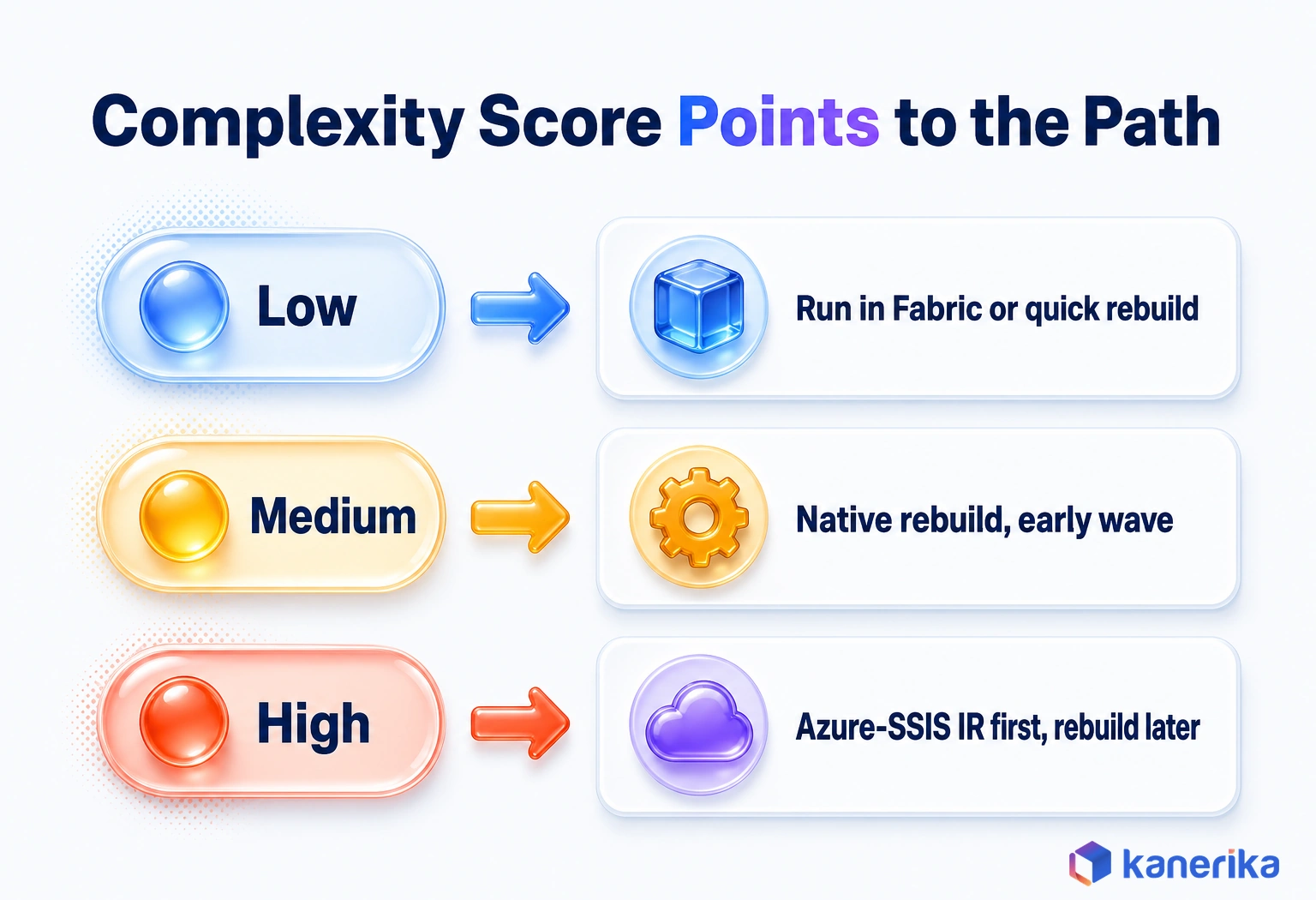
Score complexity with a simple rubric that everyone applies the same way. The thresholds below are a starting point, so adjust them to your estate.
| Factor | Low | Medium | High |
|---|
| Tasks per package | Fewer than 10 | 10 to 30 | More than 30 |
| Script Tasks | None | One simple task | Several, or complex C# |
| Custom or third-party components | None | One with a known replacement | Several, or no replacement |
| On-premises endpoints | None | Reachable through a gateway | Private network only |
| Transformations per Data Flow | Fewer than 5 | 5 to 15 | More than 15 |
| Usual path | Invoke SSIS in Fabric or a quick native rebuild | Native rebuild in an early wave | Azure-SSIS IR bridge, then a planned rebuild |
A low score with an on-premises source still lands on the bridge, because connectivity is a hard blocker in the preview.
Step-by-Step SSIS to Fabric Migration Plan
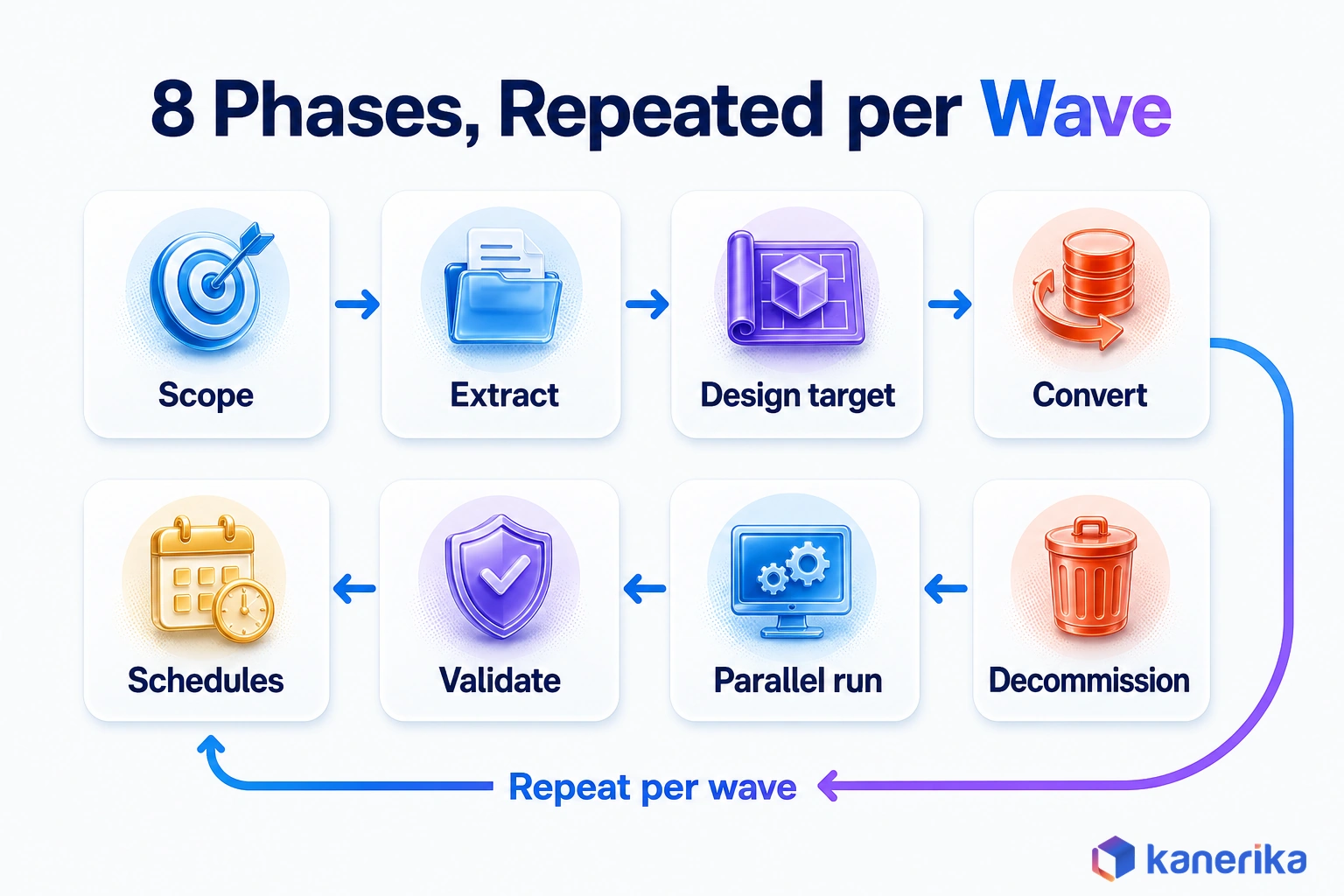
A good plan moves packages through a fixed order of phases, so nothing depends on memory. The eight phases below run per wave, and most teams repeat phases 4 to 7 several times. For a broader list that covers non-SSIS work too, see our data migration checklist.
- Scope and objectives. Agree which packages move and which retire, and define success for each wave in terms of run time and data parity.
- Extract metadata. Pull package definitions, connection managers and parameters, and Agent schedules into one inventory.
- Design the Fabric target. Pick a lakehouse or warehouse target for each data set, set up workspaces and capacity, and install a gateway for on-premises sources. Plan surrogate keys early, since IDENTITY columns in Fabric Data Warehouse behave differently from SQL Server.
- Convert in waves. Run, bridge or rebuild each package according to its score, so low-risk packages go first.
- Rebuild schedules, alerts and error handling. Recreate every Agent job as a pipeline schedule, and rebuild failure paths with on-fail branches and Fail activities.
- Validate. Compare SSIS and Fabric outputs with counts, checksums and business-rule tests.
- Run in parallel and cut over. Feed both systems the same inputs, then switch consumers once the results match.
- Monitor and decommission. Watch the Monitoring hub for a few cycles, then disable the Agent jobs and retire the SSIS servers.
Phase 3 is where many plans slip. Choosing the target storage late forces rework in every converted package, so settle it before wave one starts.
Phase 5 is the other quiet risk. SSIS packages often carry error handling in event handlers that nobody documented, and those handlers only show up when something fails.
Validate, Run in Parallel and Cut Over
Validation is how you prove the new pipelines produce the same data as the old packages. Without that proof, every odd number in a report after go-live turns into a debate about the migration.
Good parity evidence works at several levels. Row counts catch missing loads, while checksums or hash totals catch silent value changes. Business-rule tests confirm that logic such as currency conversion and status mapping still behaves. Slowly changing dimensions and late-arriving rows need their own tests, because they only break under specific timing.
| Check | What it proves | When to run it |
|---|
| Row counts by table and load date | No rows lost or duplicated | Every run in the parallel period |
| Checksums or hash totals on key columns | Values and counts match | Every run in the parallel period |
| Business-rule tests | Mappings and conversions survived | Each wave, before the parallel run |
| SCD and late-arriving row tests | History and timing logic hold | Each wave, on prepared test data |
| Error-path tests | Failures alert, then stop cleanly | Before cutover |
| Run time against the SLA | Loads finish before the batch window closes | Throughout the parallel run |
Automated comparison saves a lot of late nights here. Our review of data reconciliation tools covers options for matching large tables, and our guide to data migration testing goes deeper on test design.
Plan the rollback before cutover, not after. Keep the SSIS packages and Agent jobs disabled but intact for at least one full business cycle, such as a month-end close. That way the team can switch back quickly if a gap appears.
Checklist
Microsoft Fabric Checklist
Work through capacity, workspaces, gateways, security and validation in one list before your first SSIS wave moves to Fabric.
Get the Checklist →
Cost, Effort and Timeline Drivers
An SSIS to Fabric migration has two separate cost meters, and budgets go wrong when teams merge them. One is the one-time conversion effort. The other is the ongoing capacity your new pipelines consume every month.
Conversion effort depends on the estate more than the tool. Package count matters, but the share of Script Tasks and custom components matters more, because those need human rewriting. Connectivity work and test depth add to the bill too, since every on-premises source needs a gateway and every wave needs parity evidence.
| Driver | Why it moves cost | How to reduce it |
|---|
| Package count | More units to convert, then test | Retire unused packages before converting anything |
| Script Task share | Manual rewrites in notebooks or functions | Rewrite shared logic once and reuse it |
| Custom and third-party components | Each needs a replacement before it can move | Find Fabric-native equivalents early, during the assessment |
| On-premises connectivity | Gateways, network approvals and security reviews | Set up gateways during target design |
| Test depth | Parity evidence for each wave | Automate counts and checksums |
| SSIS runtime uptime (Path 1) | 1.35 CU hours per vCore while the runtime is up | Group runs so they share one TTL window |
Ongoing cost, on the other hand, follows Fabric capacity. Native pipelines and dataflows consume CUs as they run, and the preview SSIS runtime adds its own uptime meter on top. Grouping SSIS runs into one window stops the TTL from adding idle time after each run.
How the Drivers Play Out in a 100-Package Estate
To see how the drivers combine, take an illustrative estate of 100 packages. Suppose scoring puts 50 in the low band, 35 in the medium band and 15 in the high band. The low band suits the Fabric preview activity or a quick rebuild in wave one, while the medium band becomes the core rebuild waves. The high band goes to the Azure-SSIS IR bridge first and gets a dedicated rebuild later.
That split is an assumption for illustration, not a benchmark. Still, it shows why scoring comes before any estimate, because the high band drives most of the cost. Funding can also offset part of the conversion bill, as our guide on how to reduce Microsoft Fabric migration costs with Microsoft funding explains.
Upcoming Webinar – November 12, 2026
SSIS to Fabric Data Factory: Automating the Rebuild With FLIP
Join Kanerika on November 12, 2026 to see SSIS packages converted into Fabric Data Factory pipelines and dataflows, from package upload to validated output.
Register for the Webinar →
Security, Connectivity and Governance
Security work in this migration is mostly about where credentials and network paths end up. In SSIS, both often live inside packages and server settings. In Fabric, they move to managed connections, gateways and workspace roles.
Start with connectivity. The self-hosted integration runtime that ADF users know maps to the on-premises data gateway in Fabric. Similarly, a VNet data gateway serves sources on private networks. Each on-premises source therefore needs a gateway plan, an owner and a network review before its packages move.
- Use Microsoft Entra ID for authentication whenever the source supports it.
- In SSIS 2025, move connections to the ADO.NET connection manager with the Microsoft SqlClient Data Provider, since the SDS connection type is deprecated.
- Take secrets out of package configurations and store them in Fabric connections, so no password sits in a .dtsConfig file.
- Assign workspace roles by job, with Contributor access for builders and Viewer access for report readers.
- Use lineage view to trace each migrated pipeline to the reports it feeds once it is live.
Governance also gets easier to audit after the move. A pipeline’s runs, owners and downstream items sit in one place, whereas SSIS spread the same facts across Agent history, SSISDB and server logs.
Talk to Kanerika
Planning Your SSIS Move to Fabric?
Share a sample of your packages. Kanerika’s Fabric engineers will score them, flag on-premises and Script Task blockers and suggest a path for each wave.
Book an SSIS Assessment →
Common SSIS Migration Mistakes
The same mistakes show up across SSIS projects, and most come from treating packages as simpler than they are. Each one below is avoidable with a single check in the plan. Our guide to risks in data migration covers the wider list.
- Treating Script Tasks as auto-convertible. C# code still needs a human rewrite in a notebook or a Functions activity.
- Forgetting SQL Server Agent schedules. A converted package that nothing triggers is a silent failure.
- Assuming the Invoke SSIS Package activity reaches on-premises data. In preview it does not, so check connectivity before choosing Path 1.
- Running a big-bang cutover. Moving every package in one weekend leaves no room to learn from early mistakes before everything is live.
- Skipping parity evidence. Without counts and checksums, nobody can prove the new data is right.
- Porting dead packages. Packages that no job has run for months should be retired, not converted.
- Ignoring 32-bit-only drivers. 32-bit mode is deprecated in SSIS 2025, so packages that rely on old 32-bit drivers need a 64-bit replacement first.
Most of these trace back to a skipped assessment. That is why scoring belongs at the start of every plan, before anyone opens a pipeline editor.
How Kanerika Migrates SSIS Estates to Fabric
Kanerika moves SSIS estates to Microsoft Fabric with FLIP, its migration accelerator, which converts package logic instead of re-hosting it. The work follows the same assessment-first approach described above, with automation doing the repetitive conversion.
FLIP’s SSIS flow runs in four steps, as set out on Kanerika’s SSIS to Microsoft Fabric migration service page.
- Upload packages. Teams upload SSIS .dtsx files as a ZIP, choose migration options and set connection settings.
- Extract metadata. FLIP reads the package metadata and converts the logic into Power Query.
- Generate the model and template. FLIP creates a semantic model and a Power Query template in the Fabric workspace.
- Produce and validate dataflows. FLIP generates Dataflow Gen2 items that replicate the SSIS logic, then checks that structures, connections and data flows are intact.
In this guide’s terms, FLIP speeds up Path 3. It produces Fabric-native Dataflow Gen2 items rather than re-hosting the .dtsx file, so the package scores still decide which waves go through it first.
One engagement shows the approach in practice. A large enterprise with complex pipelines faced heavy manual SSIS upkeep, costly on-premises infrastructure and growing data volumes.
Kanerika built an automated framework to extract, analyze and migrate its pipelines. The team used PySpark notebooks and Power Query (M) for transformations, plus role-based access, encryption and monitoring.
- 30% faster data processing
- 40% lower infrastructure and maintenance costs
- 25% less manual maintenance effort
- 99.9% data integrity during migration
Those results came from treating the migration as an engineering program, with assessment, automated conversion and validation in one flow.
Case Study
40% Lower Costs: SSIS to Microsoft Fabric Migration
A large enterprise moved complex SSIS pipelines to Microsoft Fabric with an automated framework, gaining 30% faster processing, 40% lower infrastructure and maintenance costs and 99.9% data integrity.
Read the Case Study →
Choosing Your SSIS to Fabric Migration Path
Moving SSIS to Fabric is decided one package at a time. Rebuild the packages that carry business value as Fabric-native pipelines, dataflows and notebooks.
Next, run simple cloud-only packages through the Invoke SSIS Package activity while it is in preview. Keep blocked packages on Azure-SSIS IR until their rebuild wave arrives.
Score the estate first, move in waves and prove parity before each cutover. Done that way, the four paths add up to one answer. The packages that matter run natively, and simple ones use the Invoke SSIS Package activity until a rebuild pays off. Either way, a planned SSIS to Fabric migration ends with every package running inside Fabric.
Frequently Asked Questions
Is SSIS being discontinued?
No. Microsoft released SSIS 2025 with SQL Server 2025, and it reached general availability on November 18, 2025. The release did remove some components, including the Attunity CDC components, the Microsoft Connector for Oracle and the Hadoop tasks. Packages that use those components stop running after an upgrade, so each one needs a replacement or a migration plan.
Is SSIS still in demand in 2026?
Yes. Many enterprises still run large SSIS estates on SQL Server, and those packages need people who can maintain, upgrade and migrate them. Demand is shifting toward engineers who know SSIS and Microsoft Fabric together, because migration projects need both skills. Someone who can read an old package and rebuild it as a Fabric pipeline is especially useful.
How do you handle data integration and transformation in Microsoft Fabric?
Use pipelines to orchestrate each load, with schedules, parameters and failure paths. Move data with Copy activities or Copy jobs, then transform it with Dataflow Gen2 for low-code work or notebooks for Python and Spark. Store results in a lakehouse or warehouse, and keep per-environment values such as server names in a variable library.
Does Fabric replace SQL Server?
Not for transactional applications. SQL Server still runs operational databases, and SSIS ships with SQL Server 2025. Fabric replaces parts of the analytics stack, such as ETL servers, reporting warehouses and some SSAS and SSRS workloads. Many organizations keep SQL Server for applications and move analytics and data integration into Fabric, linked through gateways or replication.
Can you use SQL in Microsoft Fabric?
Yes. Fabric Data Warehouse supports T-SQL for creating tables, loading data and querying, and lakehouses expose a SQL analytics endpoint for read queries. Pipelines can run SQL through the SQL script activity or call stored procedures. That makes Execute SQL Tasks from SSIS one of the easier parts of a migration, usually needing light edits.
How do you connect on-premises SQL Server to Fabric?
Install the on-premises data gateway on a machine that can reach the SQL Server, then create a Fabric connection that uses it. Pipelines and dataflows read through the gateway. For sources on private Azure networks, use a VNet data gateway instead. The preview Invoke SSIS Package activity cannot reach on-premises systems at all.
Can I migrate SSIS packages without rewriting them?
Partly. Packages that use only cloud sources and standard components can run unchanged through the Invoke SSIS Package activity in preview. Packages with on-premises sources or third-party components can run on Azure-SSIS IR with few or no code changes, given a custom setup and network access. A full move to Fabric-native pipelines needs a rebuild, especially for C# Script Tasks.
What happens to SSIS Script Tasks during migration?
Script Tasks hold custom C# code, and no tool converts them automatically into Fabric items. Each one needs review and a rewrite, usually in a Python or PySpark notebook, or in a Functions activity for small pieces of logic. Shared code across many packages should be rewritten once and reused, which keeps the effort under control.
How do I migrate SQL Server Agent jobs to Fabric?
List every Agent job that calls a package, with its schedule, steps, retries and alerts. Recreate each schedule on the Fabric pipeline that replaces the package, and chain dependent jobs with Invoke pipeline activities. Rebuild alerts with on-fail paths and notifications. Keep the old jobs disabled but intact until the parallel run proves the new schedules.
How do I validate SSIS packages after migration?
Run the SSIS package and the Fabric pipeline on the same inputs and compare outputs. Check row counts by table and load date, then checksums or hash totals on key columns. Add business-rule tests, slowly changing dimension tests and error-path tests. Keep the parallel run going for at least one full business cycle before cutover.
How much does SSIS to Fabric migration cost?
Cost has two parts. One-time conversion effort depends on package count, the share of Script Tasks, custom components, on-premises connectivity and test depth. Ongoing cost is Fabric capacity, plus 1.35 CU hours per vCore of uptime if you use the preview SSIS activity. Score your packages first, because complexity bands drive the estimate more than raw counts.
How long does SSIS to Fabric migration take?
Duration depends on the estate. Package count, Script Task share, custom components, connectivity approvals and validation depth all change the timeline. A small cloud-only estate can move in a few waves, while a large estate with on-premises dependencies needs a bridge and more waves. Build the schedule from scored packages instead of a generic estimate.
What is replacing SSIS?
For cloud work, Microsoft points SSIS users toward Data Factory in Microsoft Fabric and Azure Data Factory. Fabric Data Factory uses pipelines for orchestration, with Copy activities, Dataflow Gen2 and notebooks for movement and transformation. SSIS remains available in SQL Server 2025, so teams can move gradually, one package wave at a time, while older packages keep running on premises.
What are the biggest risks of migrating SSIS to Fabric?
The biggest risks are hidden dependencies, untested parity and missed schedules. Packages often depend on file shares, linked servers or other jobs that nobody documented. C# Script Tasks can hide business logic. A converted package that no schedule triggers fails silently. Inventory first, migrate in waves and prove every wave with counts and checksums before cutover.
What tools automate SSIS to Fabric migration?
Microsoft provides the Invoke SSIS Package activity in preview for running packages as they are, and Azure-SSIS IR for hosting them in Azure Data Factory. For conversion, partner accelerators such as Kanerika’s FLIP extract package metadata and generate Fabric dataflows. Every tool still needs an inventory, manual work on Script Tasks and parity testing.
What happens to SSAS and SSRS when SSIS moves to Fabric?
They follow separate paths. SSAS tabular and multidimensional models usually move to Fabric semantic models, and SSRS reports move to Power BI paginated or interactive reports. Plan them together with SSIS, because migrated pipelines feed those models and reports. Sequence the waves so each report keeps a working data source throughout the move.
How does Kanerika's FLIP convert SSIS packages, and what do you get?
Teams upload SSIS .dtsx files to FLIP as a ZIP and set connection options. FLIP extracts package metadata, converts the logic into Power Query and generates a semantic model and Power Query template in the Fabric workspace. It then produces Dataflow Gen2 items that replicate the SSIS logic and validates structures, connections and data flows.
Can you run SSIS packages in Microsoft Fabric?
Yes, through the Invoke SSIS Package activity, which is in preview. You upload the .dtsx file to OneLake, add the activity to a Fabric pipeline and run or schedule it. During preview the activity cannot reach on-premises sources, private endpoints or custom components, so check each package against those limits before you plan around this option.
What is the Invoke SSIS Package activity in Fabric?
It is a pipeline activity, still in preview, that runs an existing SSIS package inside Microsoft Fabric without converting it. Packages must be stored in OneLake. Each workspace gets 4 vCores for the SSIS runtime, and billing runs at 1.35 CU hours per vCore of uptime, with a fixed 30-minute idle window after the last run.
What is the difference between Azure-SSIS IR and SSIS in Fabric?
Azure-SSIS IR is a managed SSIS cluster in Azure Data Factory, with SSISDB hosted in Azure SQL Database or Managed Instance. It supports on-premises connectivity and custom components through configuration. The Fabric option is the Invoke SSIS Package activity in preview, which runs packages from OneLake with fixed compute and no on-premises or custom-component support yet.
Does Azure Data Factory replace SSIS?
Azure Data Factory can replace SSIS for cloud data integration, and its Azure-SSIS Integration Runtime can run packages with few or no code changes. Many teams use it as a bridge, keeping packages on the runtime while they rebuild them as native pipelines. Teams moving to Microsoft Fabric often skip that step and rebuild directly in Fabric Data Factory instead.
What is the difference between Fabric and SSIS?
SSIS is an ETL engine that runs on a SQL Server you manage, scheduled by SQL Server Agent. Microsoft Fabric is a SaaS analytics platform where Data Factory pipelines, lakehouses, warehouses and Power BI share OneLake storage and capacity. Fabric charges by capacity units consumed, while SSIS costs come from server licenses, hardware and the team that runs it.
What are the disadvantages of SSIS?
SSIS scales by adding server capacity, so growing volumes mean bigger or more servers. Teams must patch servers, watch Agent jobs and clean up logs themselves. Package logic in C# Script Tasks is hard to review and test. Some components, such as the Microsoft Connector for Oracle, are gone from SSIS 2025, which forces rework during upgrades.
Is Microsoft Fabric an ETL tool?
Fabric is a full analytics platform, and its Data Factory workload covers ETL and ELT. Pipelines orchestrate work, Copy activities and Copy jobs move data, and Dataflow Gen2 or notebooks transform it. Lakehouses and warehouses store the results, and Power BI reports on them, so data integration is one part of a wider platform in Fabric.














