TL;DR
OpenClaw is a free, open-source AI agent you host yourself: pilot it for internal, reversible work, and keep it away from payments and regulated data. It is a runtime, not a model, so it links chat apps such as Slack or Telegram to the model you pick and to tools that act. The MIT-licensed project began in November 2025, moved to a foundation in February 2026 and, as of September 2026, underpins Microsoft Autopilot. The license costs nothing, but model tokens, hosting, engineer time and security review do. Skills from ClawHub run with the agent’s own permissions, and Bitdefender flagged about 17% of the skills it analyzed in early February 2026 as malicious. Start with a sandbox, a dedicated account, one channel and human approval before any change that touches production.
Key Takeaways
- OpenClaw is an open-source, self-hosted agent runtime under the MIT license that connects messaging apps, a model of your choice and tools.
- The project started as Warelay in November 2025, took its final name in January 2026 and then moved to an independent foundation in February 2026.
- One Gateway process runs on your own machine, but prompts still leave it whenever the model is a cloud API.
- Skills inherit the agent’s permissions, so vetting them and keeping tools narrow matters more than any feature.
- OpenClaw Enterprise added a control plane and multi-tenancy in September 2026, although it is pre-1.0 and meant for internal pilots.
- Pilot it when a task is frequent, reversible and easy to review; wait when the task moves money, deletes data or touches regulated records.
The 7 a.m. Slack Message About Last Night’s Pipeline
At 7:02 a.m., a data lead types a short question into Slack: why did last night’s pipeline fail? A chatbot can answer in general terms, listing the usual suspects from schema drift to an expired credential.
An agent with tools does something else. It opens the orchestrator logs, finds the failed task and reads the error. Then it drafts an incident ticket with the stack trace attached. Before restarting the job, it asks the lead for approval in the same thread.
That gap between explaining and doing is what OpenClaw is about. This guide covers what it is, how it works and how to install it safely, and ends with a readiness test for your team.
What Is OpenClaw?
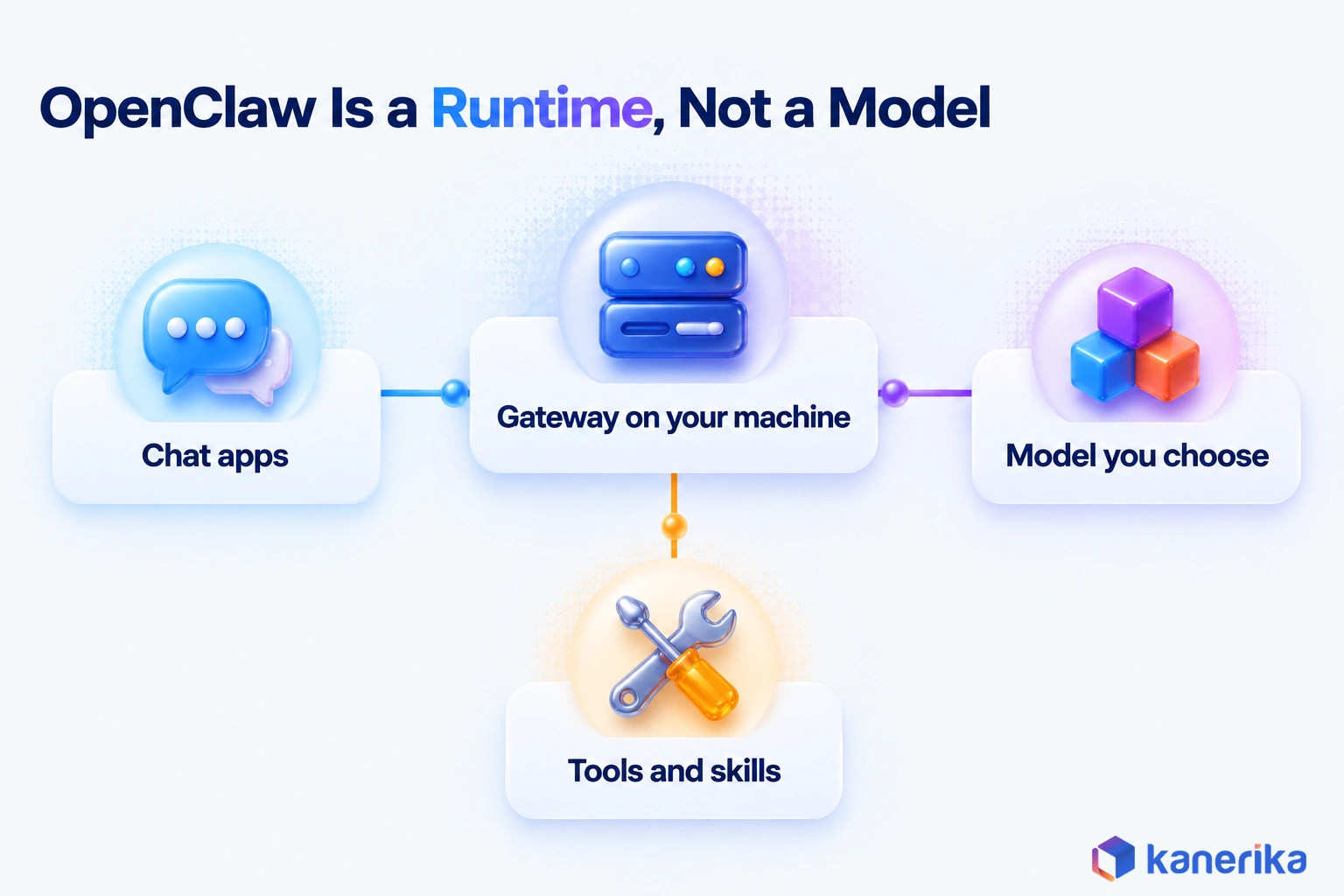
OpenClaw is an open-source program that turns a large language model into an assistant that can act rather than just talk. You install it on a laptop, a server or a cloud VM. Then you message it from apps you already use, such as Slack, Telegram or Discord.
It is not a model. Instead, it is the runtime around one: it routes your messages, keeps session memory, calls tools and returns results. The reasoning comes from whichever model you connect. That can be a hosted API, an existing ChatGPT or Claude subscription, or a model on your own hardware.
The code is public on GitHub under the MIT license, so anyone can read, change and run it. The repository had about 393,000 stars as of October 2026, which shows how fast developer interest grew.
A side-by-side view makes the difference from a chat assistant clear:
| Question | Chat assistant | OpenClaw agent |
|---|
| Where it runs | The vendor’s cloud app | Your laptop, server or VM |
| What it can do | Answer and draft, but not act | Call tools, edit files and run jobs while you sleep |
| Memory | Chat history held by the vendor | Session and memory files on your Gateway host |
| Where you talk to it | One web or desktop app | Chat apps you connect, such as Slack |
| Who controls the data | The vendor’s policies | You, unless prompts go to a cloud model |
That last row matters most to security teams. Hosting the agent yourself decides where it runs, but it does not decide where every prompt goes. The architecture section below makes that point concrete.
Who Runs OpenClaw Now
Stewardship changed early. On February 14, 2026, creator Peter Steinberger announced that he was joining OpenAI. He added that the project would move to a foundation and stay open and independent.
By September 2026, large vendors were building on it as well.The OpenClaw blog reports that Microsoft Autopilot, the new name for Microsoft Scout, is built on OpenClaw. Microsoft also said Autopilot would expand to private preview at the end of September 2026.
From Warelay to OpenClaw: A Short Timeline
The project is younger than its fame suggests, and its name changed four times in its first ten weeks. Older articles often say it launched in January 2026. According to the project’s public history, though, the code base started on November 24, 2025, as Warelay, which matches the GitHub repository’s creation date.
That same history says the Clawd in Clawdbot was a nod to Anthropic’s Claude. The project settled on OpenClaw on January 30, 2026, and the name has held since. So when a search turns up one of the older names, it usually describes the same software.
| Date | Milestone |
|---|
| Nov 24, 2025 | Project starts as Warelay |
| Dec 3, 2025 | Renamed CLAWDIS |
| Jan 2, 2026 | Renamed Clawdbot |
| Jan 27, 2026 | Renamed Moltbot |
| Jan 30, 2026 | Renamed OpenClaw, the name used since |
| Feb 14, 2026 | Creator joins OpenAI, then the project moves to a foundation |
| Aug 30, 2026 | OpenClaw 2.0 ships after 106 releases in 230 days |
| Sep 25, 2026 | Microsoft Autopilot, built on OpenClaw, is announced |
| Sep 29, 2026 | OpenClaw Enterprise announced while still pre-1.0 |
| Oct 29, 2026 | Release v2026.10.9 |
One lesson stands out for anyone planning a pilot. Because releases arrive this often, pin the version you test and upgrade on a schedule you control.
How OpenClaw Works
OpenClaw has four moving parts: a Gateway, the channels that feed it, the agents and sessions it runs, and the model providers it calls. Once you see how one request travels through them, the security advice later in this guide makes sense.
The Gateway
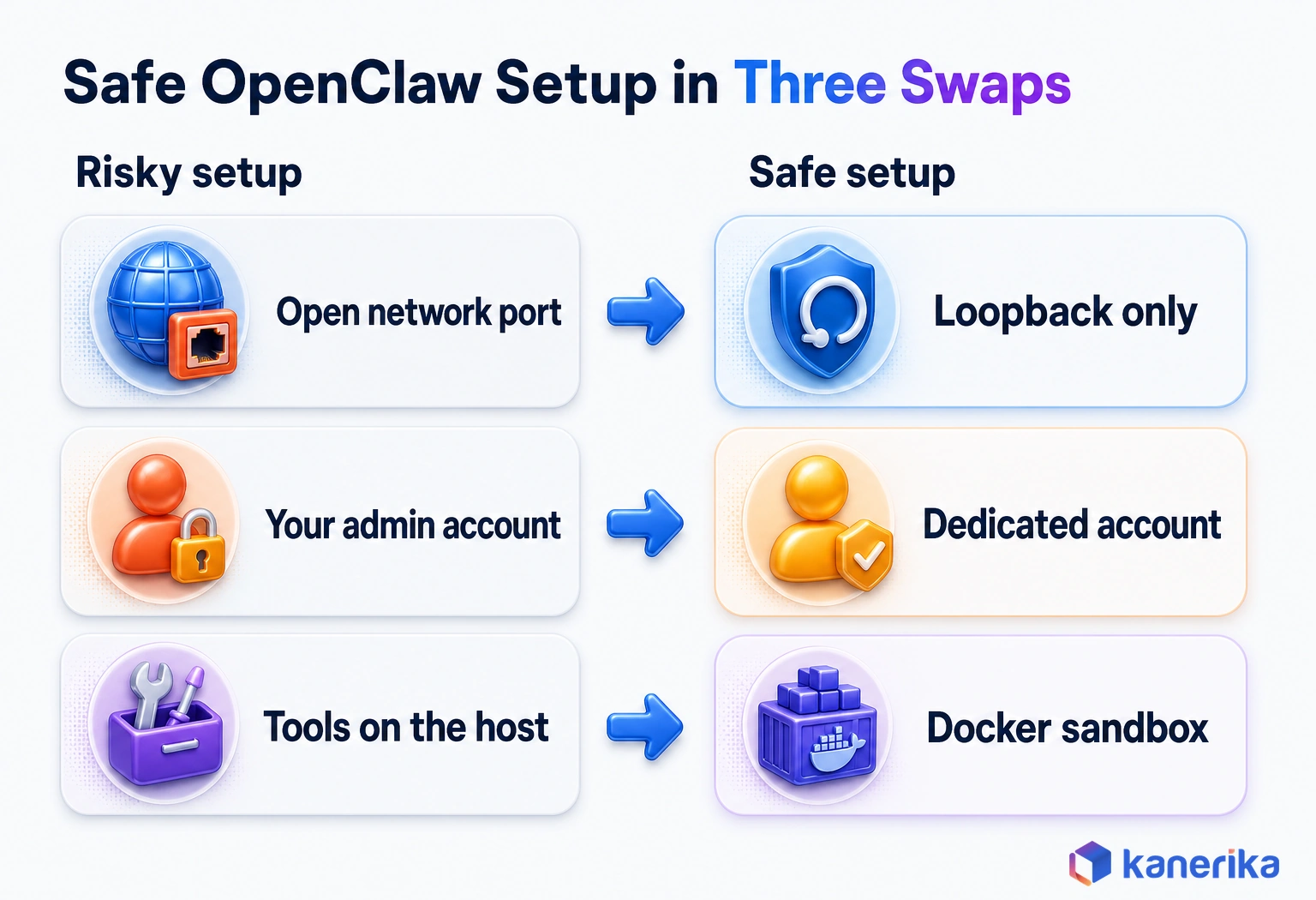
The Gateway is one always-on process that holds everything together. It serves a WebSocket control channel and HTTP APIs on a single multiplexed port, and the docs use 18789 as the example. By default it binds to loopback, so only the same machine can reach it. Inside a detected container, though, the default becomes auto, which resolves to 0.0.0.0. Set the bind explicitly when you run it in Docker.
Keep loopback unless you have a strong reason to change it. Once a Gateway is exposed on a network, a personal assistant becomes a remote control for every tool it holds. Loopback is necessary but not sufficient. The CVE in the security section below worked even against loopback-only installs, which is why patching on schedule matters.
Talk to Kanerika
Planning an OpenClaw Pilot?
Bring one workflow and your security requirements. Kanerika will help scope the tools, permissions, sandboxing and approval gates before an agent touches production.
Schedule a Demo →
Channels, Agents and Sessions
Channels are the messaging apps you connect. Each incoming message is routed to an agent, while each conversation becomes a persistent session.
Agents keep memory in files on the Gateway host. Those files shape what the agent sees on its next turn, which makes them a practical case of context engineering. A bloated or stale memory file produces confused answers, so someone should own its upkeep. In practice, treat it like configuration rather than a scratch pad.
Model Providers
The runtime can call hosted model APIs, reuse an existing ChatGPT or Claude subscription, or run a local model. That one choice drives cost, answer quality and data exposure all at once.
Here is the point many teams miss. Self-hosting the Gateway does not keep data local when the model is a cloud API. Every prompt, file excerpt and tool result the agent reasons over goes to that provider. So if data must stay inside your network, the model has to stay there too.
Choosing and Switching Models
Models are named as provider/model pairs, such as anthropic/claude-sonnet-4-6. The models documentation sets the main model in agents.defaults.model.primary and lists backups, tried in order, under agents.defaults.model.fallbacks. A model picked with the /model chat command is strict, so the reply fails rather than falling back if that model is unreachable.
From the terminal, openclaw models list shows what is available, and openclaw models set changes the default. Local inference servers such as Ollama or vLLM plug in the same way, with refs like ollama/gemma4:26b. For a pilot, an allow-list in agents.defaults.modelPolicy.allow limits which models the agent may switch to.
What Happens When You Send a Request
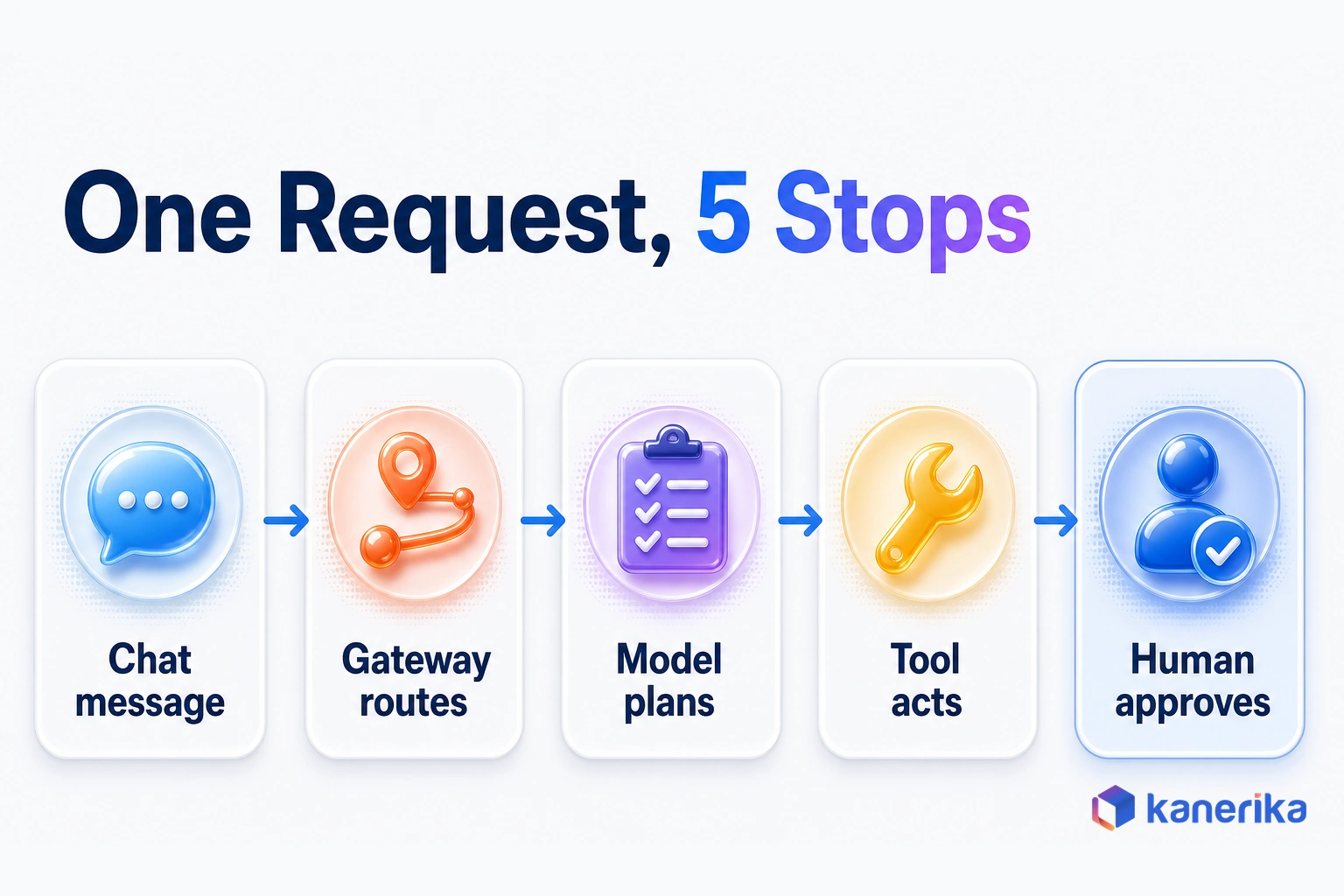
Take the pipeline failure from the opening. Here is the path that request follows from Slack to a fixed job:
- The data lead asks in Slack why last night’s pipeline failed.
- Slack passes the message to the Gateway, which routes it to the operations agent.
- Then the agent loads its session history and memory files.
- Once the model reads the request, it plans the steps: check the logs, find the error, draft a ticket.
- The agent calls a log-reading tool and gets the failed task’s error.
- It drafts the incident ticket with the error attached and also posts a summary in Slack.
- It proposes a restart and waits, because restarts require human approval.
- When the lead approves, the agent restarts the job and the session log records the action.
Steps 7 and 8 are the design choice that matters. The model could try to restart the job on its own, but your tool design and approval rules decide whether it may.
Skills, Plugins and ClawHub
On its own the runtime does little; skills and plugins are what give it abilities. That is also where much of its risk enters, because every add-on runs with the access you granted the agent.
A skill is a packaged set of instructions, often with scripts, that teaches the agent a task such as summarizing a repository. A plugin extends the runtime itself, for example by adding a channel. Tools, by comparison, are single actions the model can call, like reading a file. ClawHub is the public registry where people share skills and plugins. The skills documentation puts the rule plainly: “Treat third-party skills as untrusted code.”
| Add-on | What it is | What to check before installing |
|---|
| Skill | Instructions and scripts for one task | Hidden commands, especially downloads |
| Plugin | Code that extends the runtime | Who wrote it and what it can access |
| Tool | One callable action | How much it can read, write or delete |
Skills inherit the agent’s permissions. So a skill that claims to format notes can still run any command the agent is allowed to run. Bitdefender Labs analyzed OpenClaw skills in the first week of February 2026 and flagged about 17% as malicious. Crypto-themed skills made up 54% of the malicious set, while some delivered the AMOS Stealer to macOS users.
The project has answered with review. ClawScan checks skills and plugins uploaded to ClawHub, and Tencent AIG joined that effort on October 2, 2026. Scanning lowers the odds of a bad install, but it does not replace your own review. Our guide to OpenClaw security risks covers the supply-chain threat in depth.
What Teams Use OpenClaw For
The agent fits work that is frequent, spread across several tools and easy to check afterward. The examples below show where it earns its keep, and also where it should not be trusted yet.
Personal Productivity
A product manager forwards a 60-message thread and asks for the three open decisions. The agent replies in Telegram with each decision, its owner and its due date. People also use it to sort inboxes, track to-dos and prepare meeting notes. The value is speed on low-stakes work, because a wrong summary costs a minute rather than a customer.
Developer and IT Operations
Engineers point it at repositories, logs and ticket queues. Picture a build that goes red at 2 a.m. The agent reads the failing test, finds the commit that changed it and drafts a ticket for its author.
Other jobs follow the same pattern, from triaging noisy alerts to posting a status summary in the team channel. Scheduled runs make it useful overnight, so the first message of the day is a report on what broke instead of an open question.
Case Study
80% Ticket Auto-Response with an LLM Support Agent
A B2B SaaS provider serving SMB clients in 40+ countries put an LLM-driven ticket response agent on its support queue: 80% of tickets answered automatically, 70% lower staffing cost and 50% faster resolution.
Read the Case Study →
Data and Analytics Operations
A finance lead asks why yesterday’s revenue tile dropped 12%. The agent compares row counts between source and target and finds a partition that loaded late. Whether to backfill stays a person’s decision.
That is the pattern for data work:the agent gathers the evidence, and a person makes the call. The split keeps humans in charge of anything that changes production data.
Tasks You Should Not Hand to It
Some work should stay with people or with tightly controlled systems, at least until your controls are proven. Keep these off the agent’s list:
- Payments, refunds and any transfer of money.
- Deleting or overwriting production data, even if a backup exists.
- Processing regulated records such as patient, card or tax data.
- Hiring, firing or performance decisions about people.
- Changing access rights or security settings unless a person signs off.
The common thread is reversibility. When a mistake cannot be undone cheaply, a person should approve the action, and a log should show who did.
How to Install OpenClaw Safely
Installing OpenClaw takes minutes, while installing it safely takes a little planning first. Decide where it will run and what it may touch before you paste the first command.
| Requirement | What to use |
|---|
| Operating system | macOS or Linux, while Windows uses the PowerShell installer |
| Node.js | Node 24.16+ or 26.1+, with Node 26 recommended |
| Model access | An API key, a ChatGPT or Claude subscription, or a local model |
| Account | A dedicated, non-admin account rather than your own |
With those in place, follow the steps from the official install guide:
- Create a dedicated user account or VM, so the agent cannot read your personal files.
- Run the installer for your platform, or install the npm package globally instead.
- Run onboarding with the daemon flag, so the Gateway starts as a background service.
- Verify with
openclaw --version, openclaw doctor and openclaw gateway status.
# macOS and Linux
curl -fsSL https://openclaw.ai/install.sh | bash

# Windows (PowerShell)
iwr -useb https://openclaw.ai/install.ps1 | iex

# Or install with npm (npm 11.16+ or 12; omit the flag on npm 11.15 and earlier)
npm install -g openclaw@latest --allow-scripts=openclaw

# Then run guided setup and install the background service
openclaw onboard --install-daemon

# Check the install and the Gateway
openclaw --version
openclaw doctor
openclaw gateway status
If a step fails, check the Node version first, because an older Node release is a common cause. The docs also strongly recommend Node 24.22.1+ or 26.12.1+ for security.
Use Docker as a Sandbox for Tools
The installer and npm paths run without Docker, so it is optional. Still, it is the simplest way to put a wall between the agent’s tools and the host. If a skill misbehaves inside a container, the damage stays in a disposable file system instead of your home directory.
Connect One Channel First
Start with a single channel and a small group of testers. Telegram works well for a personal test with a bot account. Discord suits a team sandbox server, while Slack fits a workplace pilot once IT approves the app. Add a second channel only after the first one has run cleanly for a week or two.
What OpenClaw Costs to Run
The software is free under the MIT license, but running it is not. Budget for four cost lines, and expect the license to be the smallest of them.
| Cost line | What drives it | How to control it |
|---|
| Model tokens | Task count, context size and retries when tools fail | Smaller models for routine steps, short memory files, daily caps |
| Hosting | An always-on Gateway, sandboxes and storage | One modest VM per pilot, with sandboxes shut down when idle |
| Engineer time | Setup, skills and upgrades on a fast release cycle | Pin versions, then upgrade on a schedule |
| Security review | Skill vetting, access design and audits | Approve skills before anyone installs them |
Token spend is the line that surprises teams. An agent that reads a long log file on every run, or retries a failing tool, multiplies the cost of each request. Local models remove the per-token bill, but they add hardware and tuning work.
The fairest measure is cost per successful task. Add every line above for one month, then divide by the tasks the agent finished without rework. A cheap agent that needs a person to redo half its output costs more than it looks.
AI Assessment
Estimate the ROI of an AI Agent Pilot
Enter your own task volumes and costs to estimate whether an agentic AI pilot pays back before you commit engineering time to it.
Open the ROI Calculator →
OpenClaw vs Workflow Tools and Other Agents
Choosing OpenClaw is really a choice about who owns the steps. It could be a fixed flow you design, an agent that plans them, or a vendor that runs the agent for you. The table below compares fit rather than price.
| Option | Best for | Control model |
|---|
| OpenClaw | Tasks whose steps change, such as incident triage | You host it, so you configure everything |
| Workflow engine (n8n-style) | Fixed sequences, such as form-to-CRM syncs | Visual flows with set branches |
| Managed desktop agents (Claude Cowork and similar) | Desktop knowledge work when you want vendor support | Vendor-managed app and policies |
| Hermes Agent | Teams comparing self-hosted runtimes on the same pilot task | Self-hosted and community-built |
A workflow engine wins when the steps are known in advance. OpenClaw wins when the steps change with each request, as in the pipeline example. Many teams run both, letting agentic automation handle judgment calls while fixed flows handle the rest.
For a feature-by-feature view, read our comparison of Claude Cowork, Perplexity Computer, OpenClaw and Manus AI. The Hermes Agent guide and our roundup of open-source AI agents also cover the wider field.
Security and Governance Essentials
An agent that can act is only as safe as the access you give it. Two public findings show why that is more than theory.
The first is CVE-2026-25253, rated 8.8 (High). Before version 2026.1.29, the Control UI took a gatewayUrl value from a link’s query string and connected to it automatically. As a result, it leaked the Gateway token to whoever crafted the link.
The second is an independent Trail of Bits audit, run through OpenAI’s Patch the Planet program. It produced 24 severity-rated reports: none Critical, 2 High, 16 Medium and 6 Low.
Patches fix known bugs, while controls limit the damage from the next one. These six controls cover what every pilot needs before real data is involved:
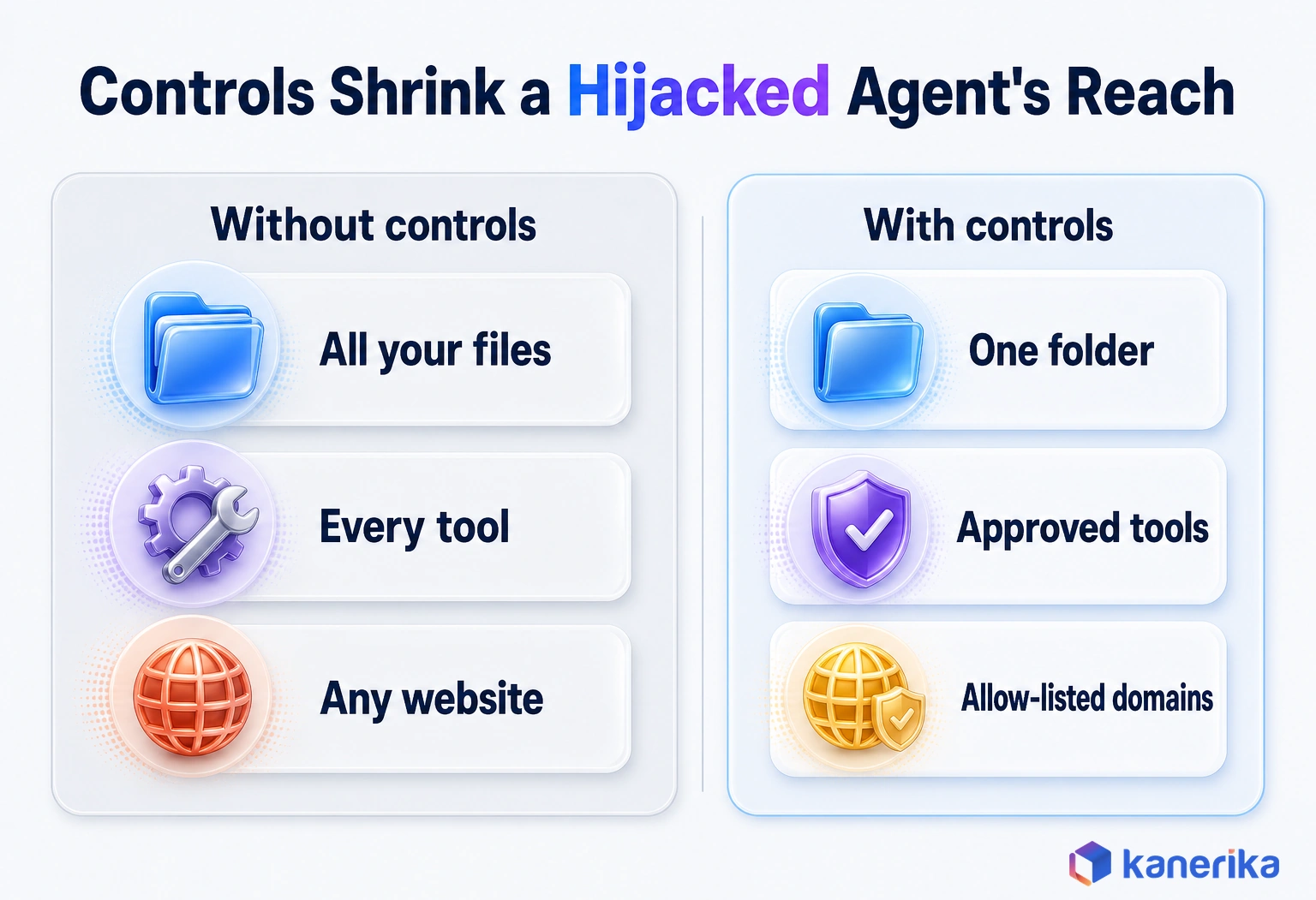
- Least-privilege tools. Give each agent only the tools and folders its task needs, so a mistake stays small.
- Sandboxed execution. Run tools in a container or VM rather than on a personal workstation.
- Skill vetting. Install only skills your team has read and approved, then pin each to a version.
- Egress allow-list. Let the agent reach only the domains its tasks require.
- Secrets out of prompts. Keep keys in a secrets store instead of memory files or chat.
- Audit logs and human approval. Log every tool call, and require sign-off before irreversible actions.
Prompt injection ties these together. A web page or email the agent reads can carry hidden instructions, and the model may follow them. Narrow tools and approval gates limit what a hijacked agent can reach, even when the injection succeeds.
Our guide to LLM security risks explains how these attacks work. The OpenClaw security risks article then walks through five specific threats and safer setups.
Seeing What Your Agent Does: ClawMetry and NemoClaw
Agents do their work out of sight, and that is the hardest part to govern. A chat reply shows the answer but not the tool calls, memory edits or token bill behind it. Without that record, nobody can explain why the agent acted as it did.
ClawMetry was built to close that gap. It is an open source observability dashboard for OpenClaw agents that reads directly from OpenClaw’s session files and provides real-time visibility into every active session, including tool calls, token costs, memory file changes, cron job status, and sub-agent trees, all without changing how OpenClaw runs.
According to its GitHub repository, the project is MIT-licensed and covers observability and governance for 30 AI agent runtimes. For a wider survey of the category, see our guide to AI observability tools.
NVIDIA NemoClaw and OpenShell
Observability shows what happened, while runtime controls decide what may happen. NVIDIA NemoClaw is a set of open agent blueprints, and for OpenClaw it adds OpenShell policy controls, lifecycle management and sandboxing. OpenShell enforces what the agent can access at runtime, so a hijacked prompt cannot widen it.
Watch on YouTube
NVIDIA’s Answer to Secure AI agents Is Here!
A short Kanerika explainer on NemoClaw, NVIDIA’s approach to running AI agents inside policy and sandbox controls.
Pairing the two gives security teams both halves of the picture. A policy layer limits what the agent can do, and a dashboard shows what it did. Neither one removes the need for the six controls above, but together they make an agent auditable.
OpenClaw Enterprise and the 2026 Releases
A personal project grew into a platform with an enterprise edition in under a year. Two releases mark that shift.
OpenClaw 2.0 shipped on August 30, 2026. It was built by 933 contributors, 569 of them first-timers, and drew on more than 16,000 pull requests. The update touched installation, messaging, memory and skills.
OpenClaw Enterprise, announced on September 29, 2026, adds a control plane for agents. It brings multi-tenancy, hard security boundaries and standardized agent building blocks. Its execution layer, model and sandbox can each be swapped for third-party or internal options. The project calls it pre-1.0 and fit for internal pilot workloads, which is also the honest framing for buyers.
Releases keep coming quickly. The latest as of October 2026,v2026.10.9, landed on October 29, 2026.
| Aspect | OpenClaw | OpenClaw Enterprise |
|---|
| Built for | One person or a small team | Many users across an organization |
| Tenancy | One Gateway owner | Multi-tenant |
| Security boundaries | Only what your setup adds | Hard boundaries built in |
| Governance | Logs, plus observability add-ons | Control plane with lifecycle auditability |
| Maturity | Frequent releases, so pin versions | Pre-1.0, for internal pilots |
Multi-tenancy is one of the things the enterprise edition adds, which tells you the standard Gateway was not designed for it. Treat a shared Gateway like shared credentials, because anyone who can message it can use every tool it holds.
Should Your Team Pilot OpenClaw?
The decision comes down to eight questions about value, risk and ownership. Answer them for one specific task rather than for agents in general.
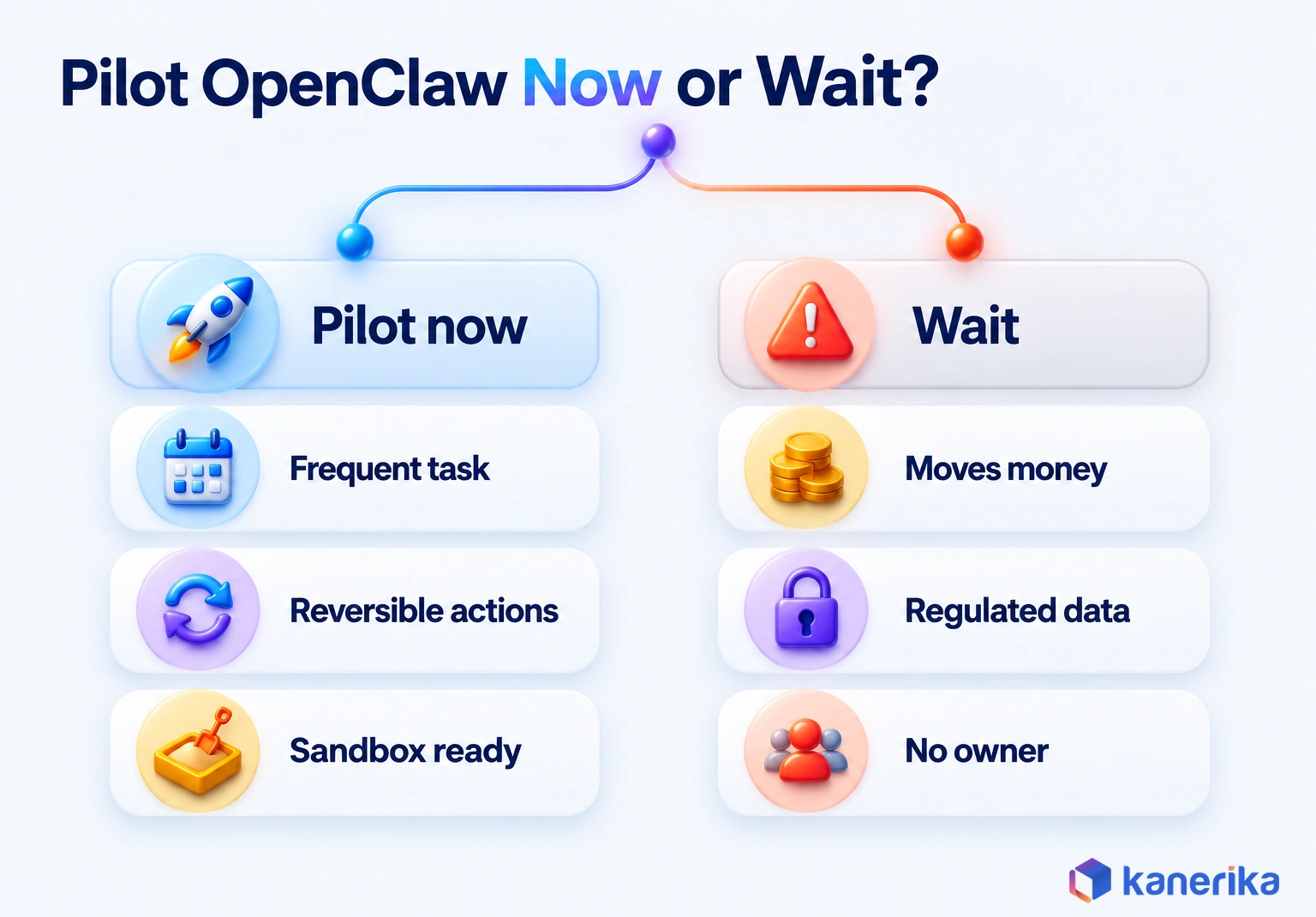
Three of the eight rows are hard stops, not votes: data access, execution rights and isolation.
| Question | Pilot now if | Wait if |
|---|
| Value: is the task frequent and costly? | It runs daily or weekly, so hours add up | It happens a few times a year |
| Task fit: do the steps vary each time? | Yes, so a fixed flow cannot cope | No, so a fixed workflow would do |
| Data access: what must it read? | Internal, non-regulated data | Patient, card or other regulated data |
| Execution rights: what can it change? | Drafts, tickets and read-only queries | Payments, deletes or access rights |
| Isolation: can it run in a sandbox? | A container or VM is ready | Not until a sandbox exists |
| Reviewability: can a person check the output? | Yes, in minutes | Not unless someone investigates for hours |
| Economics: do you know the cost per task? | You have a baseline and a target | Not until someone measures today’s cost |
| Owner: who runs the agent? | A named person with time for it | Nobody, or a whole committee |
Five or more answers in the pilot column make a strong case for a four- to six-week trial on one task. A wait answer on data access, execution rights or isolation is a stop sign, whatever the other rows say.
A good first pilot often looks like the opening example. The agent gets read-only access to logs, drafts tickets and asks a person before every restart. If that runs cleanly for a month, then widen the scope one tool at a time.
How Kanerika Helps Enterprises Run AI Agents Safely
Kanerika helps enterprises take agents like OpenClaw from a sandbox experiment to a governed production service. Our agentic AI consulting and agent development work follows four steps.
We start with a use-case and readiness check that scores the task against questions like the eight above. Next, we design an isolated architecture where each agent gets least-privilege tools, its own sandbox and a narrow network path. Then we evaluate and red-team the agent against real failure cases, including prompt injection. Finally, we roll out in stages, with monitoring and human approval gates on any action that cannot be undone.
That method comes from production work. For a B2B SaaS company serving SMB clients in more than 40 countries, Kanerika built an LLM-driven ticket response agent. The results were 80% of tickets answered automatically, 70% lower staffing cost and a 50% cut in resolution time.
Kanerika Service
Agentic AI Consulting and Agent Development
Kanerika designs, builds and runs AI agents with least-privilege tools, sandboxed execution, evaluation and human approval gates, from use-case selection to monitored production rollout.
Explore Agentic AI Services
That agent was not built on OpenClaw, but the same discipline carries over: narrow access, measured output and people in the loop. So if you are weighing an OpenClaw pilot, we can help you choose the first task, set the guardrails and prove whether it pays off.
Wrapping Up
If you are deciding on OpenClaw, pick one frequent, reversible task and run it in a sandbox with approval gates. Measure cost per successful task for a month before you widen the scope.
OpenClaw is a runtime that connects chat apps, models and tools, it is stewarded by a foundation, and it sits underneath Microsoft Autopilot. It is also young, fast-moving and only as safe as its setup. So when should you use OpenClaw? Use it for frequent, reversible, reviewable work inside a sandbox, and wait on anything that moves money, deletes data or touches regulated records.
Frequently Asked Questions
Is OpenClaw safe to use for work?
OpenClaw can be safe for internal, reversible work when you set it up carefully. Run it under a dedicated account or VM, sandbox its tools, install only vetted skills and require human approval for irreversible actions. Keep it away from payments, production deletes and regulated data until those controls are proven, because prompt injection and malicious skills are real risks.
How is OpenClaw different from ChatGPT?
ChatGPT is a chat assistant running in OpenAI’s app, while OpenClaw is a self-hosted agent runtime. OpenClaw does not include its own model. It connects a model you choose, including a ChatGPT subscription, to your chat apps and tools, so it can read files, run commands and complete tasks on your machine instead of only answering questions.
What are OpenClaw skills and ClawHub?
Skills are packaged instructions, often with scripts, that teach an OpenClaw agent a task. ClawHub is the public registry where people share skills and plugins. Skills run with the agent’s own permissions, and Bitdefender flagged about 17% of skills it analyzed in early February 2026 as malicious, so install only reviewed, version-pinned skills.
Can several employees share one OpenClaw Gateway?
It is risky. Anyone who can message a shared Gateway can use every tool and credential it holds, so sharing it works like sharing a password. Multi-tenancy and hard security boundaries are what OpenClaw Enterprise adds, which shows the standard Gateway was not designed for it. Give each person or team its own isolated instance instead.
What is OpenClaw Enterprise?
OpenClaw Enterprise, announced on September 29, 2026, adds an enterprise control plane to OpenClaw with multi-tenancy, hard security boundaries, standardized agent building blocks and lifecycle auditability. Its execution layer, model and sandbox can be swapped for third-party or internal options. It is pre-1.0, and the project describes it as suitable for internal pilot workloads only.
How can I see what an OpenClaw agent is doing?
Start with OpenClaw’s own session logs and record every tool call. Dedicated observability dashboards can read session files and show tool calls, token costs and memory changes in real time. For enforcement rather than visibility, NVIDIA’s NemoClaw blueprint adds OpenShell policy controls and sandboxing. Use both alongside least-privilege tools and human approval for risky actions.
Who maintains OpenClaw now?
OpenClaw is maintained by its open-source community under an independent foundation. Creator Peter Steinberger announced on February 14, 2026, that he was joining OpenAI and that the project would move to a foundation and stay open and independent. OpenClaw 2.0 in August 2026 was built by 933 contributors, including 569 first-time contributors.
Do you need to be a developer to use OpenClaw?
You do not need to write code, but you need to be comfortable with a terminal. Installation runs through a one-line installer or npm, followed by a guided onboarding step. Safe use also means managing a dedicated account, Node.js, API keys and sandboxing. Nontechnical users usually do better with a managed agent product or an IT-run pilot.
Why did OpenClaw change its name so many times?
According to the project’s public history, it started as Warelay in November 2025, then became CLAWDIS, Clawdbot and Moltbot before settling on OpenClaw on January 30, 2026. The Clawd name was a nod to Anthropic’s Claude. The changes happened in the first ten weeks, so older articles under those names usually describe the same software.
Is OpenClaw free, or what does it cost to run?
The software is free under the MIT license, but running it costs money. Expect four cost lines: model tokens or local hardware, hosting for the always-on Gateway and sandboxes, engineer time for setup and upgrades, and security review. The best way to judge value is cost per successful task, counting only work finished without rework.
What is OpenClaw and how does it work?
OpenClaw is an open-source AI agent runtime that you host yourself. A single Gateway process receives messages from apps such as Slack, Telegram or Discord and routes them to agents with persistent sessions and memory files. The agent sends the request to the model you chose, calls tools to act, and returns results to the same chat.
Is OpenClaw open source?
Yes. OpenClaw is open source under the MIT license, one of the most permissive licenses available. You can read, modify and run the code from its public GitHub repository, including for commercial use. The project is stewarded by an independent foundation, which its creator announced in February 2026 when he joined OpenAI, so it stays open and independent.
How do I install OpenClaw?
On macOS or Linux, run the official installer with curl; on Windows, use the PowerShell installer. You can also install the npm package globally. Then run openclaw onboard with the install-daemon flag to start the Gateway as a background service. You need Node 24.16+ or 26.1+, and a dedicated user account or VM is strongly advised.
Does OpenClaw need Docker?
No. The installer and npm paths run OpenClaw directly on macOS, Linux or Windows without Docker. Docker is still worth using as a sandbox for tool execution, though. If a skill or command misbehaves inside a container, the damage stays in a disposable file system instead of reaching your home directory, credentials or other projects on the host.
Which AI models work with OpenClaw, and can it run fully local?
OpenClaw works with hosted model APIs, existing ChatGPT or Claude subscriptions, and local models. It can run fully local only when the model also runs on your own hardware. If the model is a cloud API, every prompt, file excerpt and tool result the agent reasons over goes to that provider, even though the Gateway stays on your machine.




