TL;DR
High-performing retail data analytics teams start from a decision, not a dashboard, and they judge every model by margin gained, not units sold. They agree on one definition of a sale, a return and an active customer before building anything. For weekly planning they use batch data, and they pay for live feeds only where a decision runs hourly, such as replenishment. They rank use cases by value and data readiness, then prove lift against holdout stores before scaling. Results flow into the replenishment, pricing and CRM tools people already use, with customer consent tracked from day one. Teams that skip these habits end up with more dashboards and the same decisions.
Key Takeaways
- Retail data analytics turns POS, ecommerce, inventory and loyalty data into decisions, such as what to stock, where and at what price.
- US ecommerce reached 17.1% of retail sales in Q2 2026, so analytics that sees only one channel misreads demand.
- The data grain, such as SKU-store-day, decides which questions a model can answer, so set it before you build pipelines.
- Match data freshness to decision speed: batch for planning, change data capture for inventory and streaming only when minutes matter.
- Prove value with test and control stores, and report incremental gross margin rather than unit lift.
- A 90-day pilot on one decision is enough to decide whether to scale or stop, provided that it includes a holdout test.
Three Weekend Sales Numbers and One Promotion
The trading meeting starts at 9 a.m. on Monday, and it has three versions of the weekend.
Ecommerce reports sales from the order system, net of cancellations. Stores report POS takings, with gift cards included. Finance reports sales after returns, so its number is the smallest of the three. The first twenty minutes then go to arguing about which one is right.
Then the promotion review starts. A weekend denim discount moved far more units than the week before, so the category team calls it a win. Finance points out that gross margin fell, because many of those shoppers would have paid full price anyway.
Neither problem is a software gap. Both are practice gaps, since nobody shared a definition of a sale and nobody set a baseline for the promotion. The teams that get real value from retail data analytics close those gaps first, and the seven habits below show how.
What Is Retail Data Analytics?
Retail data analytics is the practice of turning sales, inventory, customer and operations data into business decisions. Those decisions cover what to stock, where to put it and what to charge, as well as whom to target.
Take a chain selling winter jackets, for example. Its POS shows what sold yesterday in each store. Analytics then explains why one size ran out in a downtown store while it sat on the shelf in a suburban one. After that, it predicts next week’s demand from the weather and the promotion calendar, and it recommends a transfer before the weekend.
The difference from plain reporting is the decision at the end. A report tells a buyer that sell-through on jackets was 62%. Analytics instead tells her which stores to move stock to and what that move is worth.
The Four Types, Asked as Retail Questions
Analysts group the work into four types, and each one answers a question a retail team asks every week. The table phrases them in those terms, together with an example of each.
| Type | Question | Retail example | Output |
|---|
| Descriptive | What happened? | Weekend sales by store, channel and category | Reports and dashboards, such as the Monday sales pack |
| Diagnostic | Why did it happen? | Denim sales fell in one region once a competitor cut prices | Root-cause analysis, especially variance by store |
| Predictive | What is likely to happen next? | Next week’s demand for rain jackets in each store, given the weather forecast | Forecasts and scores, such as churn risk |
| Prescriptive | What should we do? | Move 300 units from overstocked stores, then mark down the rest in week 6 | A recommended action, together with its expected value |
Value grows as the work moves down the table, because each row sits closer to an action someone takes. Descriptive work is still the base, since a diagnosis is only as good as the numbers it starts from.
Retail Data Analytics vs Retail Business Intelligence
The two terms overlap, so the clearest line between them is the question each one answers. Business intelligence reports performance against plan. Analytics then explains the result and recommends what to change. Our guide to retail business intelligence covers dashboards and BI tools as well as the wider KPI set.
| Dimension | Retail business intelligence | Retail data analytics |
|---|
| Question answered | What happened, and are we on plan? | Why did it happen, and what should we do next? |
| Main users | Store, regional and category managers | Planning and pricing teams, as well as data scientists |
| Typical output | Dashboards and scheduled reports, such as a weekly sales pack | Forecasts, tests and alerts, especially inside operational tools |
Both usually run on the same data platform, and both tend to sit inside a wider push toward digital transformation in retail. In practice, a trusted BI layer is often the first sign that the foundation for deeper analytics is ready.
Checklist
Data Analytics Checklist
A step-by-step checklist for scoping, building and governing an analytics program, from defining the decision to proving its value.
Get the Checklist →
Why Retail Data Analytics Matters in 2026
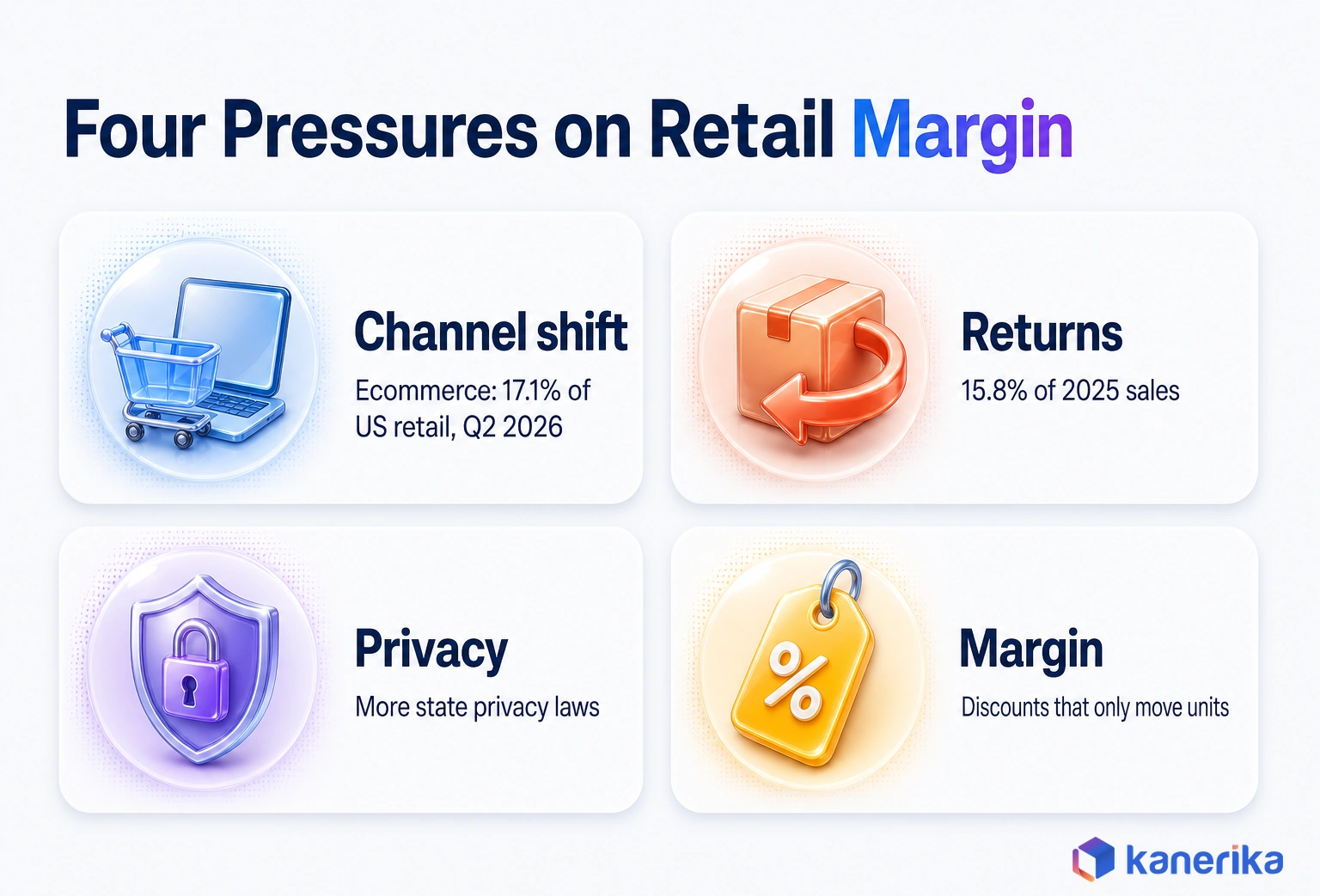
Retail data analytics matters more in 2026 because four pressures are squeezing margin at once. Each one shows up in the data before it shows up in the quarterly results.
Channel Shift and Returns
The first is channel shift. In Q2 2026, the latest quarter published as of October 2026, US ecommerce sales reached an estimated $340.2 billion. That was 17.1% of total retail sales, according to the US Census Bureau. Ecommerce grew 12.2% from a year earlier, while total retail grew 6.7%. So a forecast built only on store sales misses a growing share of demand.
Returns are the second pressure. The National Retail Federation and Happy Returns projected that shoppers would return $849.9 billion of merchandise in 2025. Based on retailer estimates, that is 15.8% of annual sales. Online orders also come back at a higher rate of 19.3%, and retailers estimate that 9% of all returns are fraudulent.
Privacy Rules and Margin Pressure
The third is privacy. In April 2025, Google said it would keep the existing third-party cookie choice in Chrome. It also said it would not roll out a standalone cookie prompt, according to its Privacy Sandbox update. In October 2025, Google kept that cookie choice and retired several Privacy Sandbox technologies.
Cookies stayed, but state law kept moving. The IAPP state privacy legislation tracker, last updated in September 2026, lists a growing number of states with consumer privacy laws. First-party data collected with clear consent is therefore the safer base for customer analytics.
The fourth is margin, since discounts often buy extra units on sales that would have happened anyway. Spending on analytics is rising in response. Fortune Business Insights estimates the retail analytics market at $11.96 billion in 2026, rising to $37.18 billion by 2034 at a 15.2% compound annual rate. That spending only pays back when it changes price, stock and promotion decisions.
What Retailers Gain From Getting It Right
Follow the denim promotion from the Monday meeting to see the gains. The illustrative holdout test in habit 5 shows that it lost margin, so next season’s budget moves to keeping core sizes in stock. Return data then shows which sizes come back for poor fit. Consented loyalty data also shows who bought denim at full price, so the next offer reaches them without third-party tracking.
The Retail Data Sources That Feed Analytics
Every retail decision draws on a handful of systems, so knowing what each one records tells you which questions it can answer. A stock transfer, for example, needs POS sales, inventory positions and transfer costs, while a loyalty offer needs purchase history and consent status.
| Source | What it records | Decisions it supports |
|---|
| POS | Line items by store and time, as well as tender and discount | Store demand and promotion results, such as basket size |
| Ecommerce platform | Orders, sessions, searches and cart events, such as abandoned carts | Online demand, conversion and site merchandising |
| ERP | Purchase orders, costs and invoices, together with product master data | Margin, open-to-buy and supplier terms |
| Inventory and WMS | Stock by location, as well as receipts, transfers and picks | Replenishment and allocation, especially for fast sellers |
| CRM and loyalty | Customer profiles and purchase history, together with consent | Segmentation, lifetime value and churn offers |
| Marketing platforms | Campaigns and spend, as well as email and ad responses | Promotion planning and attribution |
| Store operations | Footfall, labor schedules, shrink and task logs | Staffing and loss prevention, especially at peak hours |
| External data | Weather, local events and competitor prices, such as a rival’s markdowns | Demand adjustment and pricing, especially markdown timing |
No single source answers a merchandising question on its own. Sell-through, for instance, needs POS and inventory together, while margin needs ERP costs on top of both.
Agree the Data Grain Before You Build
The grain is the level of detail at which a table stores one row, so it quietly decides what your analytics can do. A model trained on weekly sales by region cannot say which store will run out of a size on Saturday. A table at SKU-store-day can, though.
Pick the grain from the decision, then store data at that grain or finer. Rolling numbers up later is easy, while splitting a regional total back into stores and days is guesswork.
| Grain | Example row | Used for |
|---|
| Transaction line | One item on one receipt | Basket analysis, as well as return and fraud checks |
| SKU-store-day | Units and revenue for one SKU in one store on one day | Forecasting and replenishment, especially for core lines |
| Customer-channel | One customer’s activity in one channel over a period | Segmentation and lifetime value, such as channel preference |
| Promo-SKU-store | One promoted SKU in one store during one promotion | Promotion lift and markdown planning, such as cannibalization checks |
| Inventory-location-time | Stock on hand for one SKU at one site at a point in time | In-stock rate and transfers, as well as fulfillment routing |
Most retailers need several grains at once. The point is to choose them on purpose and document them, so that two teams never compare a daily figure with a weekly one.
Kanerika Service
Retail and FMCG Data Solutions
Kanerika connects POS, ecommerce, inventory and loyalty data into shared retail models that planning, pricing and store teams can trust.
Explore Retail Solutions
What High-Performing Retail Analytics Teams Do Differently
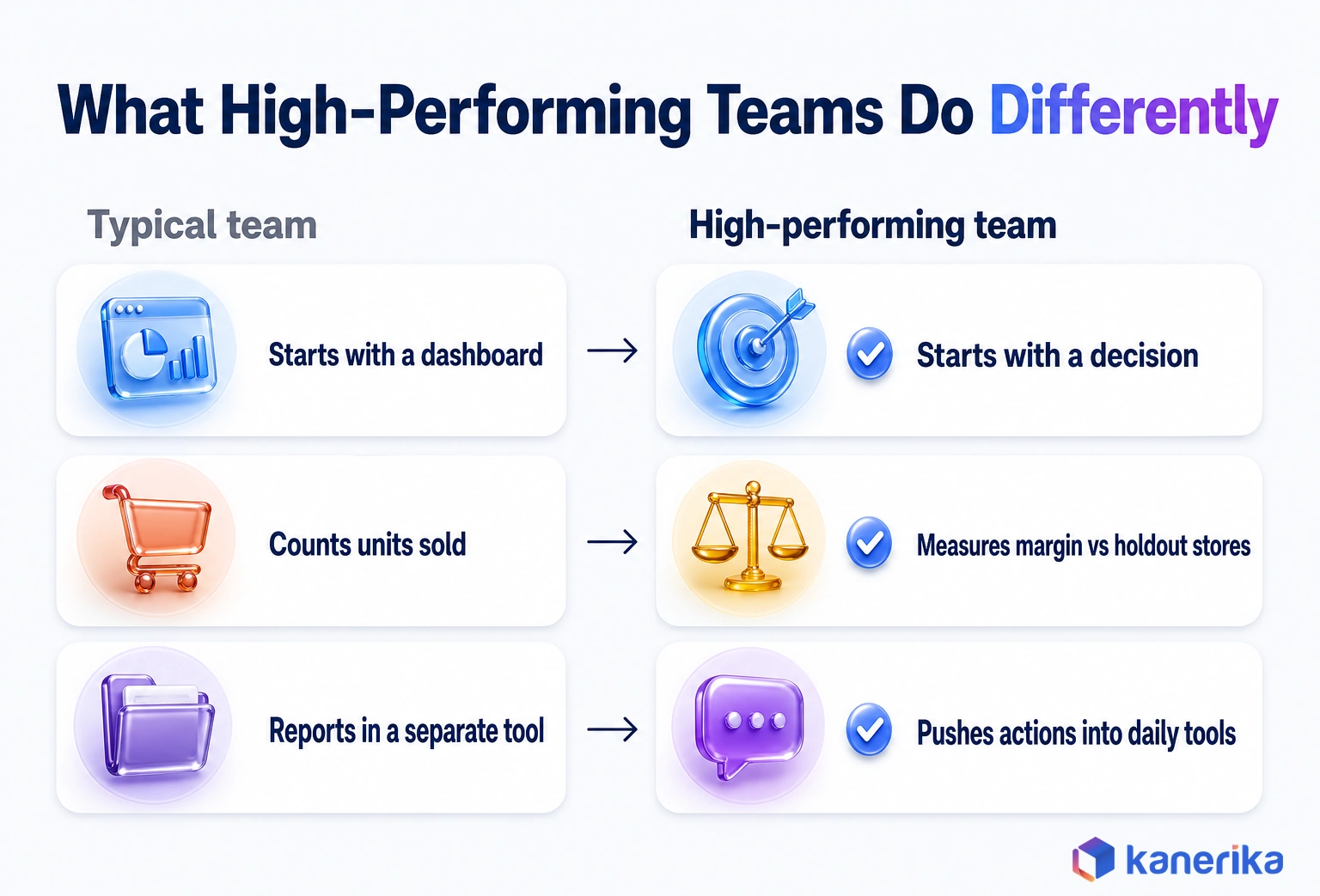
Strong retail analytics teams share seven working habits that tie data to the decisions people make every week. They start from a decision, run one data model, match freshness to decision speed and rank use cases by value. Then they prove lift, push results into daily tools and govern customer data from day one.
Each is simple to state but hard to keep. Together they explain why two retailers on the same platform can get very different returns.
1. They Start From a Decision Rather Than a Dashboard
A dashboard request says what someone wants to see. A decision request says what someone will do differently, so that is where strong teams begin.
Before building anything, they write down four things: the decision, its owner, how often it is made and the action it triggers. For store replenishment, the four lines might read like this.
- Decision: daily order quantities for core SKUs
- Owner: the replenishment lead
- Cadence: every morning before 8 a.m.
- Action: purchase orders raised in the ERP
Any request that does not change one of those lines is a nice-to-have. That single filter cuts the report backlog, so the team spends its time on work that moves money.
2. They Run One Product, Store and Customer Model
Remember the three weekend numbers from the Monday meeting. They came from three teams defining a sale three ways, so no amount of dashboard polish could fix them.
Strong teams agree on shared definitions and publish them in one place. One retailer’s set might say that a sale is net of cancellations and counted at dispatch or pickup. A return is then booked against the original order and channel, while an active customer has bought in the last 12 months.
The same goes for the product hierarchy and store attributes, as well as the retail calendar. When merchandising and finance use different fiscal weeks, every year-over-year comparison starts an argument.
3. They Match Data Freshness to Decision Speed
Real-time data costs more to build and run, yet many retail decisions do not need it. So the refresh rate should follow how fast the decision is made, not what the platform can do.
A weekly assortment review runs well on nightly batch loads. Store replenishment needs inventory changes within the hour, while online pricing and fraud checks may need events within seconds.
| Pattern | How it works | Best retail use | Trade-off |
|---|
| Batch | Scheduled loads, often nightly | Planning and assortment, as well as financial reporting | Cheapest and simplest, although data can be a day old |
| Change data capture (CDC) | Copies inserts and updates from source databases when they happen | Inventory positions and order status, especially for replenishment | Near real time without rebuilding sources, but it needs log access and monitoring |
| Streaming | Processes events continuously while they arrive | Online pricing and fraud checks, such as return screening | Latency in seconds, but at the highest build and running cost |
| Edge | Processes data on devices inside the store | Shelf cameras and self-checkout loss alerts | Keeps working when the network drops, but is harder to manage at scale |
Mixing patterns is normal. A common setup runs batch loads for most data, then adds CDC only for the inventory and order feeds behind daily decisions.
On Microsoft Fabric, mirroring can play the CDC role. It continuously replicates sources such as SQL Server, Oracle and SAP into OneLake. Changes can be published as often as every 15 seconds, according to Microsoft’s mirroring overview.
4. They Rank Use Cases by Value and Data Readiness
Every retailer has more ideas than capacity. The way through is to score each candidate on two axes: the money at stake and how ready the data is today.
A markdown model for seasonal apparel may score high on both, since POS and inventory data already exist at the right grain. A customer lifetime value model may promise more, but it can stall for months if loyalty and ecommerce IDs are not linked.
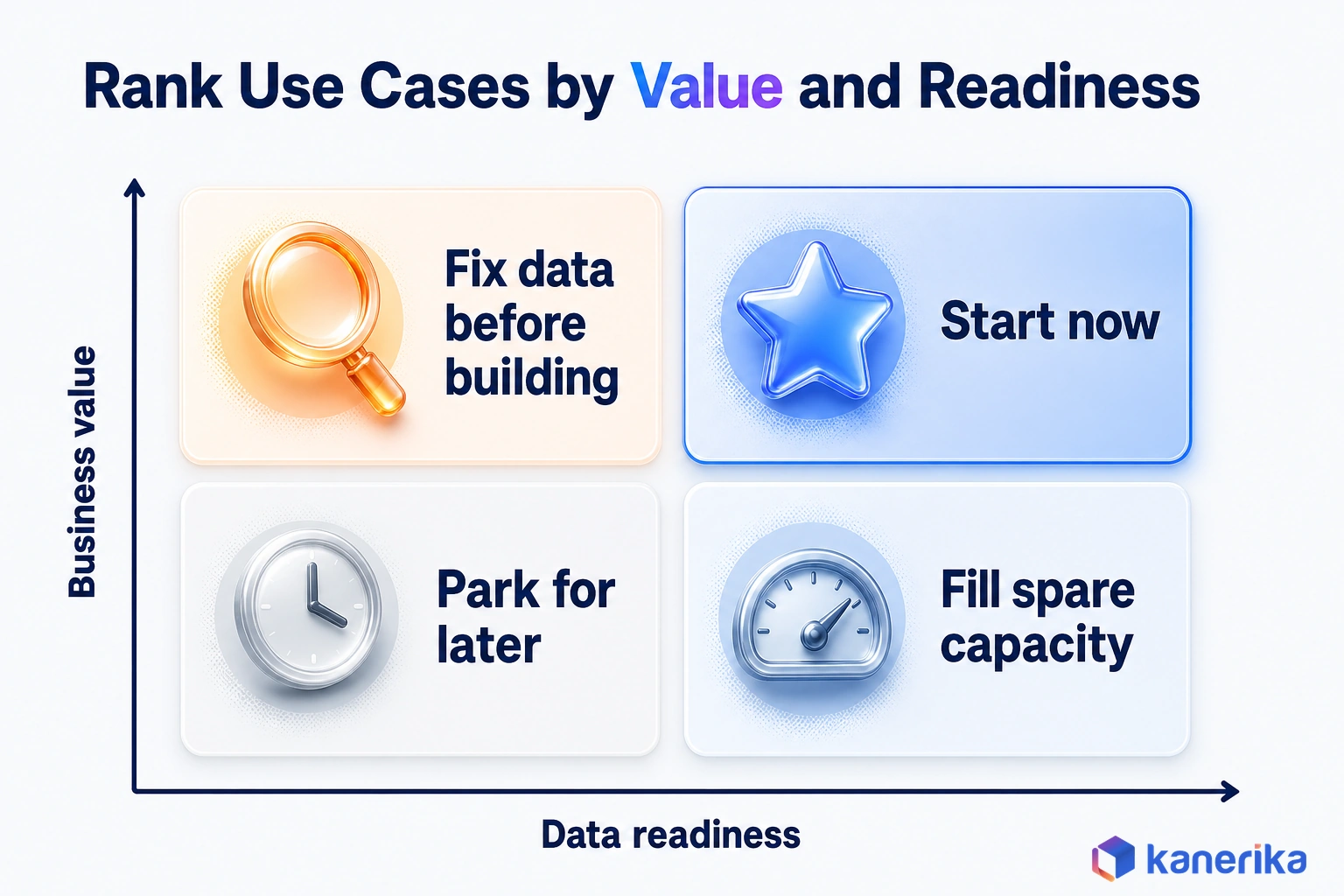
The scores then turn into an order of work. Start with the use cases that are high on both axes. Fix the data for high-value, low-readiness ones at the same time, and park the rest.
5. They Prove Lift With Baselines and Holdout Stores
A forecast or a promotion creates value only if the result beats what would have happened anyway. Measuring that difference takes a control group, and it has to happen before anything scales.
For store tests, they pair stores with similar sales, size and customer mix. One store in each pair gets the change while the other does not, so the gap between the groups is the lift.
Here is an illustrative case, with numbers chosen to show the arithmetic. Jeans sell for $70 and cost $45, so each full-price pair earns $25 of gross margin. A 10% discount cuts the price to $63, which leaves $18 per pair.
The promotion runs in 10 test stores, while 10 matched control stores stay at full price. Assume both groups sold the same before the test.
Test stores then sell 1,200 units at $18 of gross margin each, or $21,600. Control stores sell 1,000 units at $25 each, or $25,000. So units rose 20%, but gross margin fell by $3,400.
Forecasts get the same treatment, with two numbers. Weighted absolute percentage error (WAPE) shows how far off the forecast runs, while bias shows whether it leans high or low. A forecast with low error but steady over-forecasting still fills the stockroom.
6. They Push Insights Into the Tools People Already Use
An insight that lives only in a dashboard depends on someone remembering to open it. The better route sends output to where the work already happens.
Recommended order quantities go into the replenishment system as suggested orders. Price changes then go to the pricing tool for approval. Customer scores sync back to the CRM through reverse ETL. That pattern copies modeled data from the warehouse into business applications, and our guide to reverse ETL explains it.
Alerts work the same way. Instead of a daily report on 2,000 SKUs, a store manager gets a short list of exceptions. For example, it might flag five lines likely to sell out before the next delivery.
7. They Govern Customer Data From Day One
Customer data is the most useful input to retail analytics, but it is also the riskiest. So governance belongs in the first pipeline, not in a fix after an audit.
That means storing consent with every customer record, then using data only for the purposes a customer agreed to. It also means role-based access, so a store manager sees store totals while a data scientist works with pseudonymized IDs. Our data governance guide covers the operating model.
In Power BI, that access rule is row-level security, set as DAX filters inside roles, such as [Region] = “West”. A dynamic rule that matches USERPRINCIPALNAME() to a user-mapping table lets one role serve every store manager. RLS only restricts users with Viewer permissions, so workspace admins, members and contributors still see every row, according to Microsoft Learn.
Good governance speeds delivery as well. When access rules and definitions are already in place, a new use case does not stall in review.
Case Study
39% Faster Price Changes for Luxury Retail
Kanerika built an ML pricing engine with what-if simulations in Karl and a FLIP analytics layer for a global luxury fashion retailer. Reported results: 24% higher profit margins on top SKUs, a 39% faster price change cycle and 100% auditability of pricing decisions.
Read the Case Study →
High-Value Retail Data Analytics Use Cases
Use cases are where the habits above earn money, and the strongest ones each map to a single recurring decision. The table lists the main ones, together with the KPI that proves each and the data it needs.
Nine Use Cases at a Glance
| Use case | Decision | Primary KPI | Data needed |
|---|
| Demand forecasting | How much of each SKU each store or channel will sell | Forecast WAPE and bias | POS and ecommerce sales, as well as promotions and weather |
| Allocation and replenishment | How much stock to send where, and when | In-stock rate | Forecasts and lead times, together with inventory by location |
| Pricing and markdown | What to charge, and when to discount | Gross margin | Price history and elasticity, as well as competitor prices |
| Promotion lift | Which promotions to repeat rather than drop | Incremental gross margin | Promotion calendar and POS, together with control store data |
| Segmentation and CLV | Which customers to invest in | Customer lifetime value | Loyalty and CRM history, as well as consent |
| Personalization | Which product or offer each customer sees | Conversion and order value | Behavior events and product data, together with consent |
| Omnichannel fulfillment | Which location ships each online order | Cost per order and promise met | Orders and shipping rates, as well as inventory by site |
| Store labor | How many staff each store needs by hour | Sales per labor hour | Footfall and transactions, together with schedules |
| Returns, fraud and shrink | Which returns to flag, and where loss occurs | Return rate and shrink rate | Returns and receipts, as well as stock counts |
Demand, Stock and Price Use Cases
Forecasting, allocation and pricing share the same SKU-store-day data, so retailers usually build them in that order. The forecast sets each store’s jacket needs, and allocation turns that into transfers. Markdown timing then decides what is left in week 6, so a forecast error flows into both.
Our guide to AI demand forecasting compares the model families, while our roundup of predictive analytics use cases in retail goes deeper on ten applications.
Customer, Fulfillment and Returns Use Cases
Customer use cases depend on linked identities and consent. Once those exist, segmentation and AI personalization reuse the same customer model, so offers and recommendations stay consistent across channels.
Fulfillment is where store and online data meet. Choosing whether a store or a warehouse ships an online order is a cost and promise decision. Our guide to AI in logistics covers the network side. Ship-from-store also changes last-mile cost, which turns route planning into a version of the vehicle routing problem.
Returns and fraud close the loop. Since retailers estimate that 9% of returns are fraudulent, a model that scores each return at the counter protects real margin. Our guide to AI in fraud detection covers that scoring.
Retail Analytics KPIs That Tie to Outcomes
A KPI earns its place when someone owns it and a decision changes when it moves. The six below link analytics work to margin, stock and customers. Our retail BI guide also lists the store and channel KPIs that sit around them.
| KPI | Formula | Owner | Decision it drives |
|---|
| Gross margin return on inventory (GMROI) | Gross margin ÷ average inventory at cost | Merchandising | Assortment depth, as well as buy quantities |
| Sell-through rate | Units sold ÷ units received, over a period | Merchandising and planning | Markdown timing, especially for seasonal lines |
| In-stock rate | SKU-store-days with stock ÷ total SKU-store-days | Replenishment | Order quantities, together with safety stock |
| Forecast WAPE | Sum of absolute forecast errors ÷ sum of actual sales | Demand planning | Model changes, such as new demand drivers |
| Customer lifetime value (CLV) | Expected margin from a customer over a set period | CRM and marketing | Acquisition spend, as well as retention offers |
| Return rate | Units or value returned ÷ units or value sold | Ecommerce and finance | Size guidance and fraud rules, such as return limits |
Pair each KPI with a guardrail. A rising sell-through rate looks good until the in-stock rate falls with it. Similarly, a lower return rate means little when conversion drops at the same time.
Building a Modern Retail Data Analytics Stack
Before any analysis is possible, data from disparate retail systems needs to be collected and unified. This integration layer connects POS systems, ecommerce platforms, ERPs, CRM systems, loyalty databases, and marketing tools into a single, consistent data flow. In practice, ecommerce and store operations often determine how well that flow works across teams. The quality of everything downstream depends on how well this layer is built.
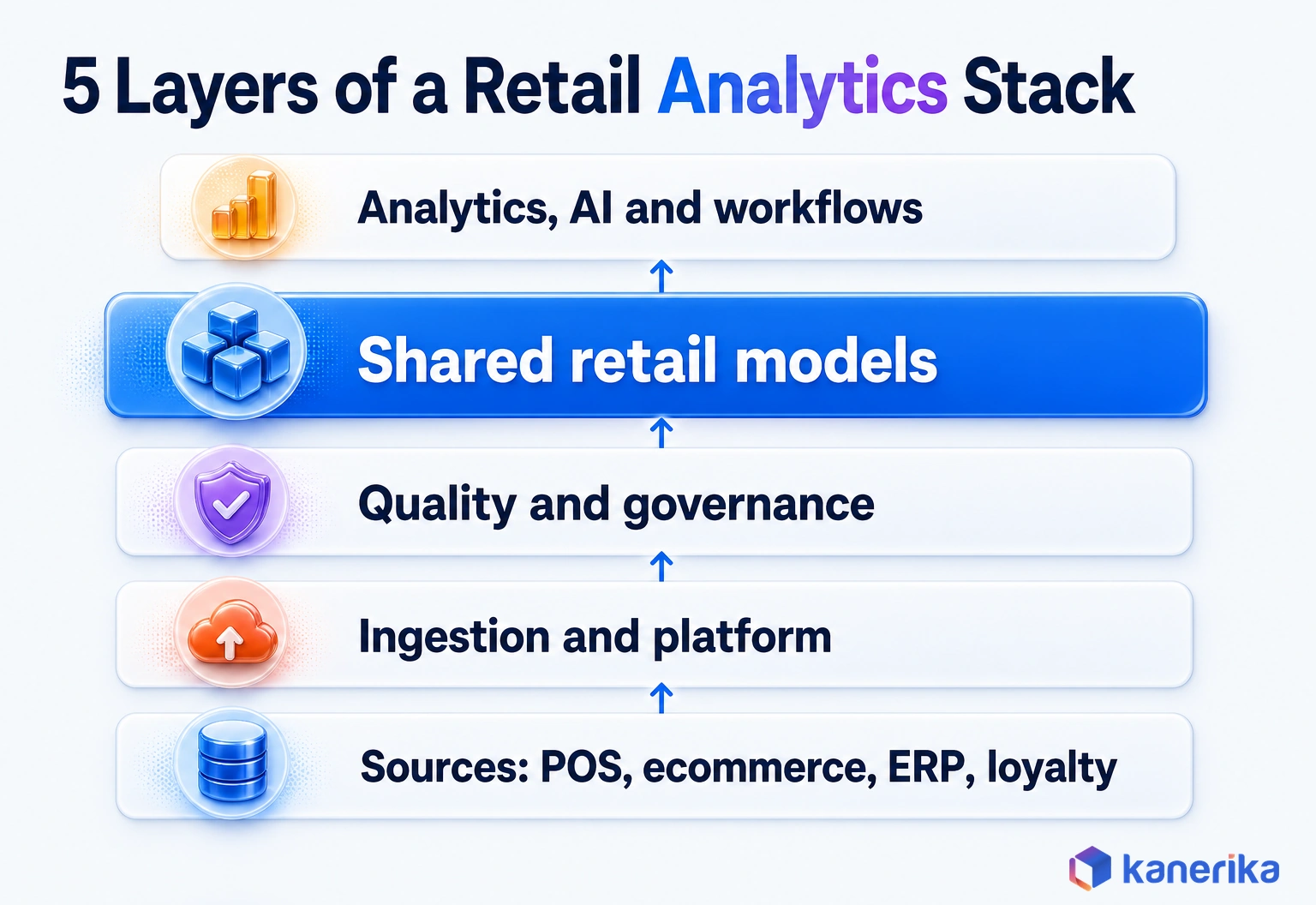
A modern stack adds several layers on top of that integration work, and each layer has one job. So when a number looks wrong, the team can trace it to the layer that caused it.
Sources feed ingestion, which lands data on a central platform. Quality and governance checks run next, followed by shared retail models for product, store, customer and calendar. Analytics and AI then use those models, while workflows deliver the results. Finally, outcomes are measured against the baseline.
Warehouse, Lakehouse or Both?
A warehouse stores structured, modeled data for fast SQL and reporting. A lakehouse, by comparison, keeps raw and semi-structured data, such as clickstreams and images, in open file formats while still supporting SQL. Our comparison of data lake vs data warehouse covers the architecture in detail.
| Option | Best fit | Trade-off |
|---|
| Warehouse | Sales reporting and KPIs, especially on clean structured data | Less suited to raw clickstreams, images and feature work |
| Lakehouse | Clickstream and image data, as well as models trained on long history | Needs stronger engineering discipline so that tables stay clean |
| Both on one platform | Retailers with reporting and machine learning needs side by side | Two patterns to govern, so shared definitions matter even more |
Choosing Retail Analytics Tools: Fabric, Databricks or Snowflake
All three platforms can run retail analytics well. The choice usually follows the estate you already have, as well as the work you expect to do most often. For head-to-head detail, see our comparisons of Databricks vs Snowflake and Microsoft Fabric vs Databricks. Our data analytics tools roundup widens the list.
Microsoft Fabric suits retailers already invested in Azure and Power BI. Its OneLake is a single, tenant-wide store that every Fabric workload uses, built on Azure Data Lake Storage Gen2, according to Microsoft’s Fabric overview. Its Real-Time Intelligence workload also analyzes data as it arrives, such as clickstreams and IoT signals.
Databricks suits teams that build models in code. Its lakehouse combines Apache Spark with Delta, and its notebooks run Python, R, Scala and SQL, according to the Databricks introduction.
Snowflake suits sharing data with suppliers. Its secure data sharing reaches consumers across regions and cloud platforms through replication.
| Decision factor | Leans toward | Why |
|---|
| Azure, Microsoft 365 and Power BI already in place | Microsoft Fabric | One SaaS platform, together with OneLake and Power BI |
| Heavy machine learning and data engineering in Python and Spark | Databricks | A lakehouse platform built around Spark, notebooks and ML tooling |
| Data sharing with suppliers and partners across clouds | Snowflake | A SQL-first platform that also has built-in data sharing |
| No strong pull either way | A short proof of concept | Test one real use case, such as replenishment, on two platforms with your own data |
Checklist
Microsoft Fabric Checklist
Plan a Microsoft Fabric rollout step by step, from workspace and OneLake setup to governance and the first analytics workloads.
Get the Checklist →
Build, Buy or Extend, and What Drives Cost
Few retailers need to build an analytics stack from scratch. Instead, the real choice is between buying a packaged retail analytics application, building on a cloud data platform and extending the tools already in place.
Buying is fastest for standard needs, such as store reporting. Building suits retailers whose pricing, assortment or customer data is the competitive edge. Extending often wins when a capable ERP or BI layer already holds most of the data.
Cost depends less on the vendor than on six drivers.
- Source systems: how many must be connected and cleaned
- History: how many seasons to load, since forecasting needs several
- Freshness: how current the data must be, because streaming costs more than batch
- Models: how many to build, monitor and retrain
- Users: how many people query the data, especially at peak times
- Governance: which security rules apply, such as consent for customer data
Estimate each driver per use case rather than for the whole program. A phased plan then funds the next use case from the proven value of the last one.
Where AI Fits in Retail Data Analytics
AI fits into retail data analytics in three places, and each one depends on the habits above. Machine learning forecasts demand and sets prices from many signals at once. Natural-language querying also lets a buyer ask a question in plain English instead of waiting for a report.
The third is AI agents that watch for exceptions, such as a replenishment order that looks wrong. They then flag each one for a person to approve. Our guide to retail automation covers where those agents sit in store and supply chain work.
Returns show how far adoption has already gone. In the NRF and Happy Returns study, 85% of retailers said they use AI to detect or prevent return fraud.
AI does not fix weak foundations, though. An assistant that reads three definitions of sales still gives three answers, only faster. The shared model and the agreed grain therefore decide whether anyone can trust what the AI says.
Watch on YouTube
Microsoft Fabric + Karl: Instant Retail Insights With AI
See how Karl, Kanerika’s data insights agent, answers retail questions in plain English on top of Microsoft Fabric data.
Retail Data Analytics Trends to Watch
Three shifts are changing how retail teams reach and use their data. Each one rewards the habits above.
The first is plain-English access to governed data. As of October 2026, Microsoft lists the Fabric data agent as generally available. It turns a question into read-only SQL, DAX or KQL over data in OneLake, using the asking user’s own permissions.
The second is fresher operational data with fewer pipelines, such as the mirroring described in habit 3. The third is consent-first customer data, since state privacy laws keep spreading even though Chrome kept cookies. Our data analytics trends roundup covers the wider market.
Common Retail Analytics Challenges and How to Fix Them
Retail analytics programs stall for predictable reasons, and each one has a symptom you can spot early. The six below are the most common, each with the warning sign as well as the fix.
1. Siloed Systems
The symptom is the habit 2 problem: each channel reports its own numbers. Start smaller than a new platform, with a shared retail calendar and one product master, before anyone builds a model.
2. Poor Data Quality
Watch for duplicate SKUs, missing costs and stores that closed in real life but stay open in the data. Automated checks on every load catch these before they reach a model. Our guide to data observability vs data quality explains which checks to run. Name an owner for each critical table, so that fixes do not sit in a queue.
3. Data That Arrives Too Late
Habit 3 covers freshness. The usual failure is quiet: a CDC job stalls, and nobody notices for days because the dashboard still loads. Stores then reorder stock that already arrived, so alert when a critical feed goes stale. Data pipeline monitoring tools can raise that alert.
4. Privacy and Governance Gaps
Habit 7 sets the rules, but gaps usually surface by accident. A marketing export includes opted-out customers, or an access review finds customer data in spreadsheets. Close them with consent flags on every record and role-based access, as well as a register of approved uses for each dataset.
5. Skills Gaps
Many retailers have analysts who know the business and engineers who know the platform, but few people who know both. Pair them on each use case. A short data literacy program also teaches planners to read forecast error and bias on their own.
6. Low Adoption
A model nobody trusts shows up as overrides, with planners editing every suggested order by hand. Show the reason behind each recommendation, and track how often people override it. Then review the largest overrides with the planners each week, because they often reveal a data problem the model cannot see.
A 90-Day Plan to Start
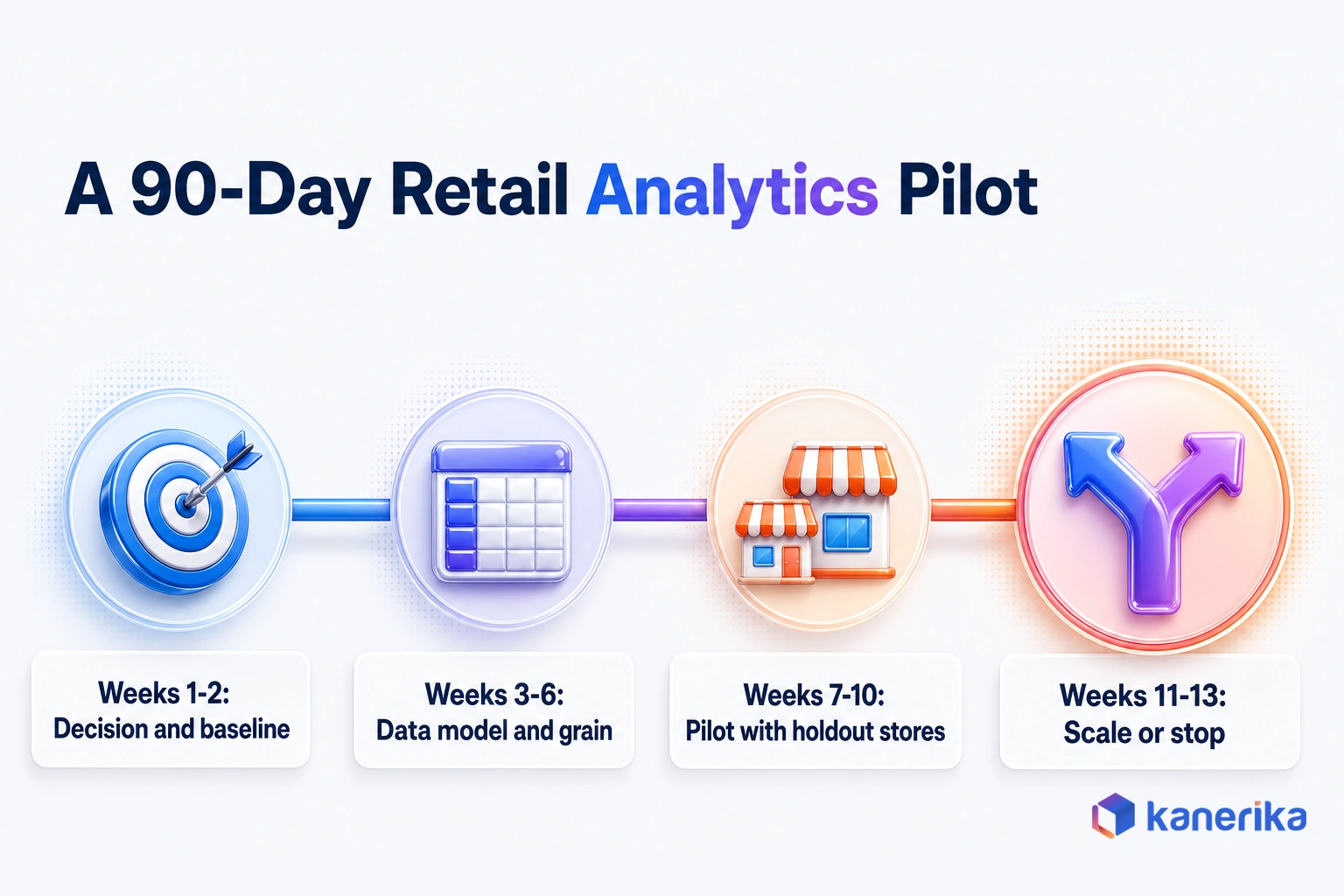
A first retail analytics project should prove one decision in about a quarter. The plan below keeps the scope tight enough to finish, so the result can be measured.
- Decision and baseline (weeks 1-2): pick one decision, then record current performance, such as in-stock rate or markdown margin.
- Data model and grain (weeks 3-6): connect the sources the decision needs, then build tables at the right grain.
- Pilot with holdout stores (weeks 7-10): run the model in test stores while matched control stores stay unchanged.
- Scale or stop (weeks 11-13): compare incremental margin, then roll out, adjust or end the pilot.
An Illustrative Example: A 40-Store Apparel Retailer
Picture a 40-store apparel retailer with an online store, used here only to show how the plan runs. Its chosen decision, for example, is size-level replenishment for 300 core SKUs, made twice a week by the replenishment lead.
In weeks 1-2 the team records the current in-stock rate on those SKUs. During weeks 3-6 it builds a SKU-store-day table from POS, ecommerce and warehouse data. For weeks 7-10, 10 stores use model-suggested orders while 10 matched stores keep the old process, and the other 20 carry on as usual.
In weeks 11-13 the team then compares in-stock rate and margin between the test and control stores. If the gap holds after adjusting for differences before the test, the model rolls out to all 40 stores. Otherwise, the team has spent one quarter rather than a year learning why.
How Kanerika Helps Retailers Build Analytics That Change Decisions
Kanerika works with retailers on the full path from scattered data to decisions that move margin. Our data analytics services follow the same order as the habits in this guide.
Each engagement starts by assessing the decisions that matter and the data behind them. We then build a connected data foundation, deliver one priority use case and validate its lift against a baseline. Only after that do we scale it to more stores, categories or channels.
A global luxury fashion retailer shows the approach in practice. The retailer manages a large SKU portfolio across regions, but its prices were inconsistent between markets and repricing was manual. Those slow cycles also held back its response to competitor moves and shifts in demand.
Kanerika built a machine learning pricing engine that combines customer demand, competitor data and customer lifetime value. Pricing managers then use Karl, Kanerika’s data insights agent, to run what-if price simulations in real time. A FLIP analytics layer records how each price was set, so every decision can be traced and audited.
| Metric | Reported result |
|---|
| Profit margins on top SKUs | 24% increase |
| Price change cycle time | 39% faster |
| Auditability of pricing decisions | 100% |
The project reflects habits 1 and 6. It started from one decision, how to price each SKU across markets, and it put recommendations inside the pricing managers’ own workflow through Karl. Margin on top SKUs was the measure of success. Read the full luxury retail pricing case study, or see how we support AI in retail, retail and FMCG and predictive analytics programs.
Talk to Kanerika
Planning a Retail Analytics Pilot?
Talk to Kanerika about choosing the first decision, building the data model behind it and proving lift against holdout stores.
Schedule a Demo →
The Bottom Line
High-performing retail data analytics teams treat every analysis as a decision to test rather than a report to read. They start from a decision, run one data model and match freshness to decision speed. They also rank use cases, prove lift against holdout stores, push results into daily tools and govern customer data from day one.
Pick one decision your team makes every week and run the 90-day plan against it, because that habit is what sets high-performing teams apart. If you want a partner for that first pilot, talk to Kanerika.
Frequently Asked Questions
What is retail data analytics?
Retail data analytics is the practice of turning sales, inventory, customer and operations data into business decisions. It covers what to stock, where to place it, what to charge and which customers to target. Unlike plain reporting, it explains why results happened, predicts what comes next and recommends an action, such as a stock transfer or a markdown.
How do retailers use data analytics?
Retailers use data analytics to forecast demand by store and channel, set replenishment orders, plan prices and markdowns, and test which promotions add margin. They also use it to segment customers, personalize offers, route online orders to the best location, schedule store staff and flag suspicious returns. Each use works best when tied to one recurring decision.
How can retailers use data analytics for demand forecasting?
Retailers build forecasts at SKU-store-day level from POS and ecommerce sales, promotions, the retail calendar and weather. Machine learning models learn how these drivers move demand for each product and location. Teams track weighted absolute percentage error and bias, then feed the forecast into replenishment and allocation so it changes orders, not just reports.
How is AI used in retail data analytics?
AI shows up in three main places. Machine learning forecasts demand and sets prices from many signals at once, while natural-language tools let buyers ask questions in plain English. AI agents watch for exceptions, such as an unusual replenishment order, and flag them for approval. NRF reports that 85% of retailers use AI against return fraud.
How do retailers measure the ROI of data analytics?
Measure each use case against a baseline. Run the change in test stores, keep matched control stores unchanged, and compare incremental gross margin rather than units sold. Subtract the cost of data work, platform and people for that use case. A promotion can lift units while lowering margin, so margin is the number that decides ROI.
How can retailers protect customer data when using analytics?
Store consent with every customer record and use data only for the purposes customers agreed to. Apply role-based access so most users see aggregates, and give data scientists pseudonymized IDs. Keep a register of approved uses for each dataset and review state privacy laws regularly, since the number of states with consumer privacy laws keeps growing.
How long does it take to implement a retail analytics platform?
A focused first use case can be proven in about 90 days. Spend weeks 1-2 choosing the decision and baseline, weeks 3-6 building the data model at the right grain, weeks 7-10 piloting with holdout stores and weeks 11-13 deciding to scale or stop. A full platform grows use case by use case after that.
Why is retail data analytics important for retailers?
Margins face several pressures at once. Ecommerce reached 17.1% of US retail sales in Q2 2026, retailers estimate returns at 15.8% of 2025 sales, and state privacy laws keep expanding. Analytics shows where demand, returns and discounts are moving before those shifts reach the quarterly results, so teams can adjust stock, prices and offers earlier.
What are the benefits of retail data analytics?
The main benefits are fewer stockouts and less excess inventory from better forecasts, higher margins from tested pricing and promotions, and lower return losses from separating fit problems from fraud. Customer analytics built on consented first-party data also supports relevant offers. The size of each gain varies, so measure it against holdout stores before scaling.
What are the 5 KPIs in retail?
Five widely used retail KPIs are gross margin return on inventory, sell-through rate, in-stock rate, customer lifetime value and return rate. Together they track whether inventory earns its keep, how fast stock sells, whether shelves stay full, what customers are worth over time and how much revenue comes back. Teams often add forecast accuracy as a sixth.
What types of data are used in retail data analytics?
Retail analytics draws on POS transactions, ecommerce orders and sessions, ERP costs and purchase orders, inventory and warehouse records, and CRM and loyalty data with consent status. Marketing responses, store operations data such as footfall and labor schedules, and external signals like weather, local events and competitor prices complete the picture for most retail decisions.
How does retail data analytics improve customer experience?
It keeps the right sizes and products in stock where customers shop, which removes the most common source of frustration. It also routes online orders to the location that can deliver fastest and tailors offers to past purchases. Return data shows which products run small or large, so size guidance improves and fewer orders come back.
What are the four types of retail data analytics?
The four types are descriptive, diagnostic, predictive and prescriptive analytics. Descriptive shows what happened, such as weekend sales by store. Diagnostic explains why, such as a sales drop after a competitor price cut. Predictive estimates what comes next, like demand for next week. Prescriptive recommends an action, such as a transfer or markdown.
What is the difference between retail analytics and retail business intelligence?
Retail business intelligence reports what happened and whether the business is on plan, usually through dashboards for store and category managers. Retail analytics goes further by explaining causes, forecasting outcomes and recommending actions, often delivered as forecasts, tests and alerts inside planning and pricing tools. Both usually run on the same data platform and definitions.
Which tools are used for retail data analytics?
Retail analytics typically runs on a cloud data platform such as Microsoft Fabric, Databricks or Snowflake, with Power BI or a similar tool for reporting. Python and SQL handle modeling, while change data capture and streaming tools move fresh data. The right mix depends on your existing estate, team skills and how fast each decision runs.














