TL;DR
Data warehouse automation pays off when your sources change often or you keep a lot of history. The software reads facts about your data and writes the tables, load code, tests and documents. When a source changes, you edit the model and the tool rebuilds the code. Big warehouses with many sources need a dedicated suite, such as WhereScape or VaultSpeed. One SQL team on one cloud platform can often use dbt and built-in platform features instead. Either way, start with one subject area, compare old and new results, and grow once they match.
Key Takeaways
- Data warehouse automation generates warehouse tables, load code, tests and documentation from metadata, then regenerates them when a source changes.
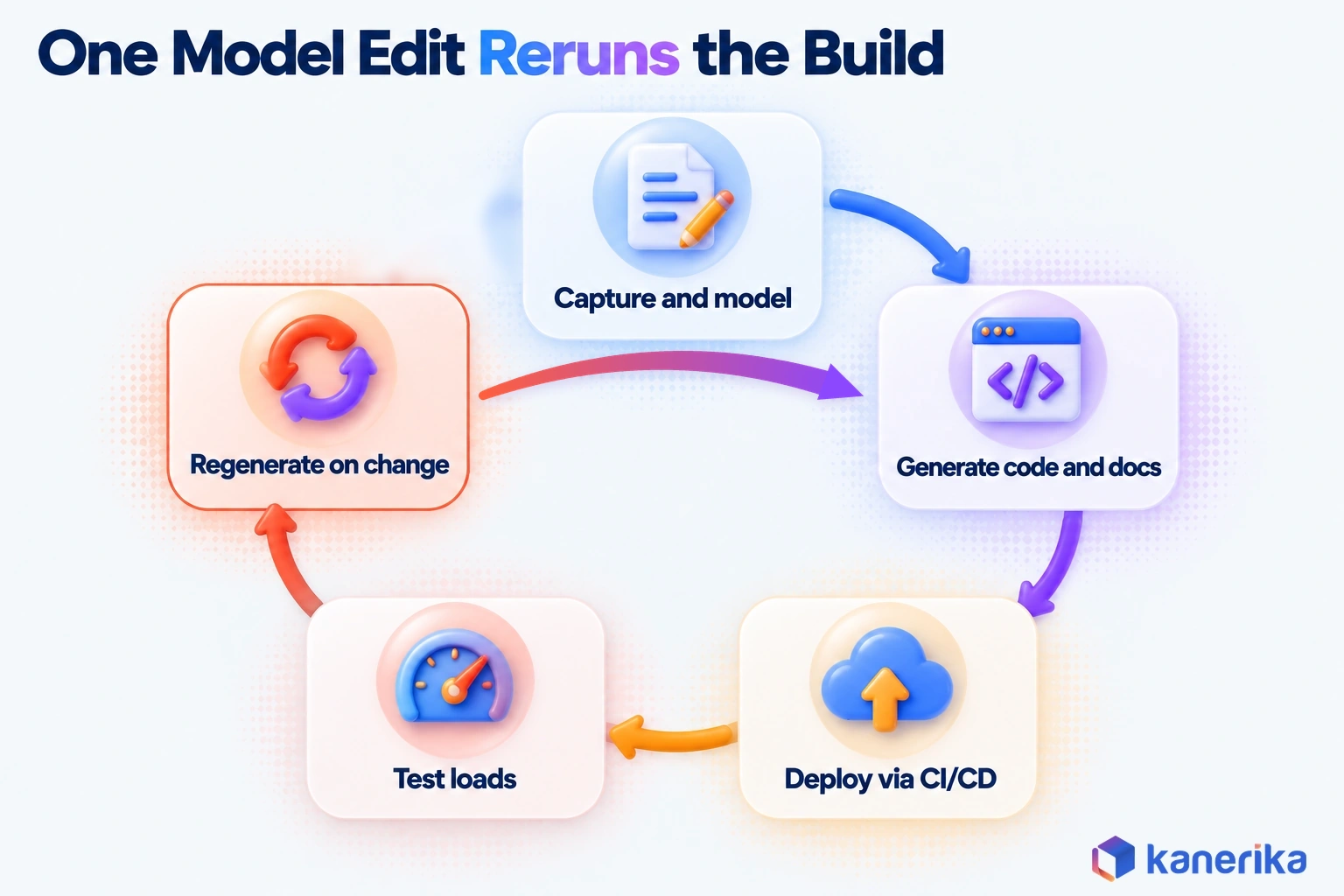
- It works as a six-stage loop: capture metadata, model, generate, deploy through CI/CD, test the loads, then regenerate on change.
- Automate repetitive work with stable rules first, such as staging loads, history dimensions and the Data Vault raw layer.
- Metadata-driven suites suit many sources and Data Vault, while code-first tools and platform-native features suit one SQL-first team on one platform.
- Treat vendor savings figures as claims, and baseline your own delivery time, change lead time and failed loads before a pilot.
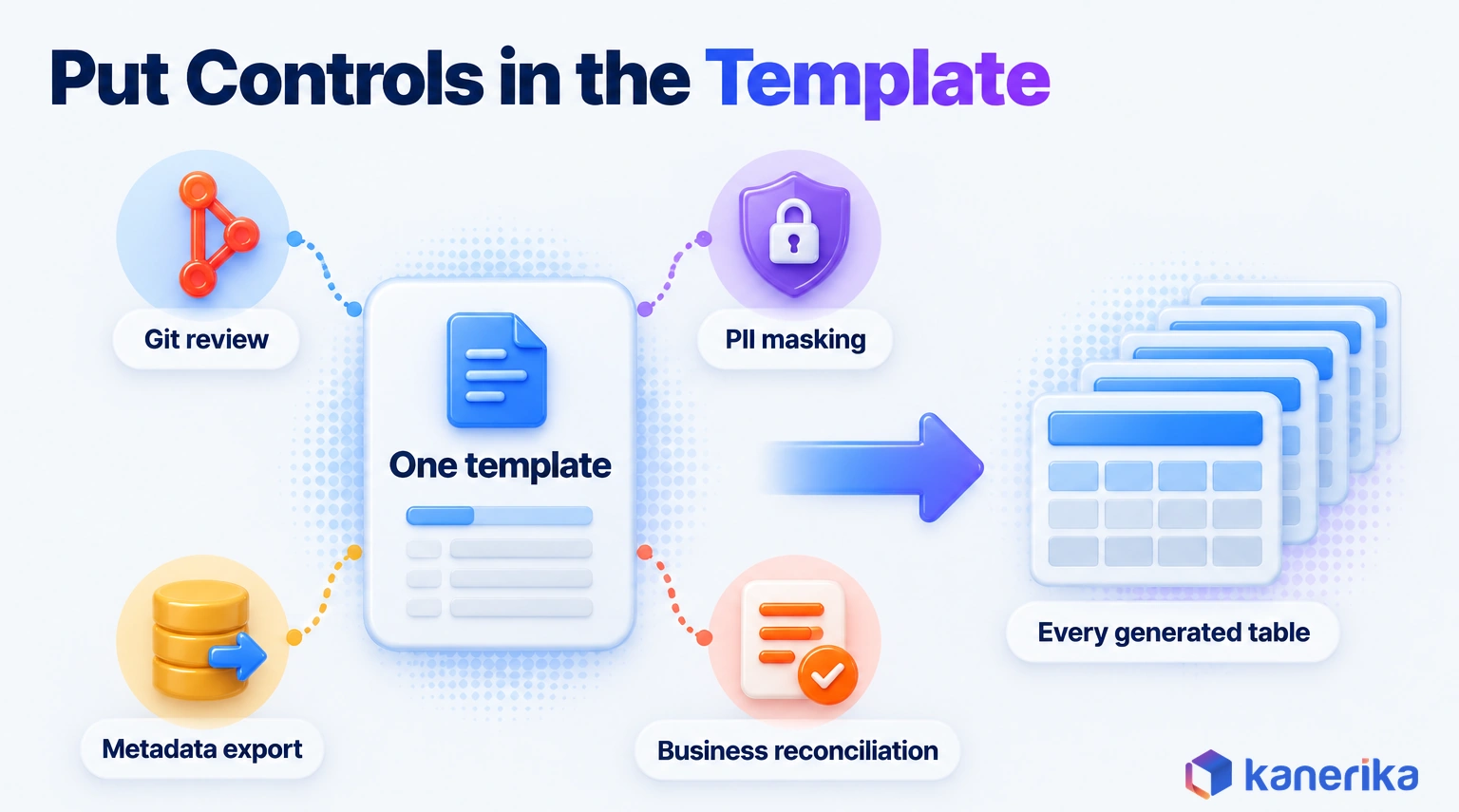
- Put review, masking and reconciliation controls inside the templates, because one template defect repeats in every generated table.
Why Warehouse Builds Still Take Months
A warehouse team’s calendar fills up with the same small change, repeated across dozens of hand-written scripts. The genuinely hard modeling problems take only a small share of it.
A New CRM Source and Forty Procedures to Edit
Picture a sales team that switches to a new CRM and wants pipeline numbers in the sales mart by quarter end. The data engineering team estimates six weeks.
The data itself is not the problem. Rather, 40 hand-written load procedures still read from the old CRM tables, each with its own column names and history logic. So every one needs editing, testing and fresh documentation.
In a metadata-driven build, an engineer registers the new source, maps its columns to the customer model and runs the generator. Staging tables, history loads, tests and lineage then come out of one run, and only the mapping review and sign-off are left.
That gap between six weeks of edits and one model change is what data warehouse automation is for.
What Is Data Warehouse Automation?
Data warehouse automation (DWA) is software that uses metadata and templates to design, generate, deploy, test and document warehouse structures and load code. When a source changes, it regenerates those objects instead of waiting for someone to edit them by hand. It also works inside whatever data warehouse architecture you already chose, so it changes how layers are built rather than which layers exist.
Metadata here simply means facts about your data. For example, it records which source table feeds which target, which column is the business key and how history is kept. Templates hold your team’s rules for turning those facts into SQL, such as naming, audit columns and error handling.
How DWA Differs From ETL Tools and Schedulers
You will also hear the practice called automated data warehousing. The label matters less than the scope. An ETL tool moves and transforms data, while a scheduler runs jobs in the right order. A DWA tool covers the whole build, from the model to the documentation, and keeps every layer in step when something changes. If the line between ETL and wider integration is still blurry, our explainer on data integration vs ETL separates the two.
The table below shows what each kind of tooling takes off your plate, as well as what it leaves behind.
| Approach | What it automates | What stays manual |
|---|
| Hand-coded warehouse | Only what the team scripts itself | Every table, load, test and document |
| ETL tool | Data movement and the transformations you design | Model design, table DDL, history logic, documentation |
| Orchestrator or scheduler | Job order, retries and alerts | Everything inside the jobs |
| DWA tool | DDL, load code, history handling, tests, documentation and lineage | Grain, business rules, shared definitions and sign-off |
Getting data out of source systems is a separate job with its own failure modes, covered in our guide to automated data integration. DWA then picks up where that ends, at the point where raw data has to become a modeled, tested warehouse.
What Still Needs People
Automation writes code from decisions, but it does not make the decisions for you. Someone still has to choose the grain of each fact table, for example one row per order line or one row per shipment. Microsoft’s star schema guidance stresses that fact tables should always load at a consistent grain.
Business rules need an owner too, such as the rule for when a customer counts as active. Shared definitions matter even more, because they cross teams. When finance and sales define revenue differently, a generator will faithfully build two tables that disagree.
The same holds for the semantic layer that analysts query, and also for the final sign-off that a number is right. So plan for these as design work in your data modeling process, each with a named owner.
How Data Warehouse Automation Works
Every DWA tool runs the same basic loop, even when the screens look different. Facts about sources go in, generated objects come out, and then any change to the facts sends the loop around again.
Take the CRM example from the opening, for instance. The new source is registered once, and the tool reads its tables and columns from the source catalog. Once an engineer maps them to the sales model, the generator writes the staging, history and mart loads in one pass. Tests and documentation come out of the same run, so they never fall behind the code.
- Capture source metadata: such as tables, columns, data types, keys and relationships, read from the source catalog.
- Model the target: a dimensional star schema, a Data Vault, or both when you want separate layers.
- Generate code and docs: table DDL, load procedures or SQL models, as well as documentation, all from templates.
- Deploy through Git and CI/CD: generated code is versioned and reviewed like hand-written code, then promoted across environments. It is the same discipline DataOps brings to any pipeline.
- Orchestrate and test loads: row counts, key uniqueness, referential checks and freshness run during every load.
- Regenerate on change: when a new column or source arrives, the model, code and lineage update together.
Stage six is where the payoff sits. A hand-built warehouse treats each source change as new work. An automated one, however, treats it as a model edit, followed by a rerun of stages three to five.
The templates should encode the ETL best practices your team already trusts, such as idempotent loads, audit columns and clear reject handling. After all, a generator repeats whatever the template says, good habits and bad ones alike.
Checklist
Data Engineering Checklist
Kanerika’s Data Engineering Checklist covers the standards your templates should encode, so settle naming, testing and deployment practices before generating the first table.
Get the Checklist →
What the Generator Produces: Star Schema and Data Vault
The fastest way to judge a generator is to read its output. Picture one metadata row with three values. In this case the source table is crm.customer, the business key is customer_id, and history is kept as SCD Type 2.
SCD stands for slowly changing dimension. In the Kimball Group definition, a Type 2 change adds a new row with the updated values. Every past version stays, along with its valid dates. From that one metadata row, a dimensional template writes a customer dimension and a load that closes old versions and inserts new ones.
A Data Vault template, on the other hand, writes three kinds of objects from the same facts. A hub holds the business key, a satellite holds the attributes that change over time, and a link joins hubs together. The Databricks Data Vault glossary describes the same split: hubs for core business concepts, links for relationships and satellites for descriptive detail.
| Pattern | Generated objects | What a reviewer checks |
|---|
| SCD Type 2 dimension | Dimension table, staging view, close-and-insert load, row-hash column | Change-detection columns, valid-from and valid-to dates, one current row per key |
| SCD Type 1 dimension | Dimension table and a merge load | Which columns overwrite, and that no history is expected |
| Data Vault hub | Hub table, hash key, load from staging | Business key choice and the hashing rule |
| Data Vault satellite | Satellite table, hash-diff column, insert-only load | Attribute grouping, load date and record source |
| Data Vault link | Link table holding the hash keys of joined hubs | Relationship grain and unit of work |
Reading the Generated Code
The snippet below shows what a generated Type 2 load can look like. It is illustrative, generic SQL, since real templates also add audit columns, error handling and engine-specific syntax.
-- Illustrative: generated from one metadata row (crm.customer, key customer_id, SCD 2)
UPDATE dw.dim_customer
SET    is_current = 0, valid_to = s.load_ts
FROM   stg.customer s
WHERE  dw.dim_customer.customer_id = s.customer_id
  AND  dw.dim_customer.is_current = 1
  AND  dw.dim_customer.row_hash <> s.row_hash;
INSERT INTO dw.dim_customer (customer_id, name, segment, row_hash, valid_from, is_current)
SELECT s.customer_id, s.name, s.segment, s.row_hash, s.load_ts, 1
FROM   stg.customer s
LEFT JOIN dw.dim_customer d ON d.customer_id = s.customer_id AND d.is_current = 1
WHERE  d.customer_id IS NULL;
The update closes the current row for any customer whose attributes changed. The insert then adds a fresh current row for changed and brand-new customers alike.
A reviewer reads this logic once per template, not once per table. So if the template is right, the hundredth dimension is as correct as the first. If it is wrong, every table carries the same bug, which is why template review matters more than table review.
Benefits of Data Warehouse Automation You Can Measure
A benefit only counts if you can show it on a chart. So each one below is tied to a number you can collect before a pilot and again after it.
Vendors publish bold figures. WhereScape, for example, says on its DWA solution page that teams can “automate up to 95% of coding”. Treat that as the vendor’s own claim rather than a result you should expect. In practice, your number depends on how repetitive your loads are and how much of the logic is business rules.
The gains compound for one reason: a single model edit flows into the code, the tests and the documentation at once. A schema change shows how that plays out.
When a source adds a column, an engineer adds it to the model and regenerates. The load, the history logic, the test and the lineage document then update together in one pull request, not four separate tasks. The table lists all five benefits worth tracking, each with a metric and a way to baseline it.
| Benefit | Metric | How to baseline it |
|---|
| Faster delivery | Days from source request to data in a mart | Average the last five source requests |
| Faster change | Lead time for a schema change | Time the last three column additions end to end |
| Fewer failures | Failed loads per month | Count them from scheduler logs over 90 days |
| Current documentation | Share of tables whose docs match the code | Sample 20 tables and compare docs with code |
| Faster onboarding | Weeks until a new engineer ships a change | Ask your last two hires |
Collect the baseline before you buy anything. Otherwise, a pilot can only produce opinions, and opinions rarely survive a budget review.
Which Warehouse Work to Automate First
The best first targets are tasks that repeat often and follow rules that rarely change. Those are the places where one template replaces dozens of hand-written jobs.
Staging loads are the classic example, because the pattern barely varies. A team with 200 source tables writes nearly the same load 200 times, so a template pays back quickly. A complex revenue allocation, by comparison, is the opposite case. It runs as one job, and since its rules shift every quarter, generating it saves very little.
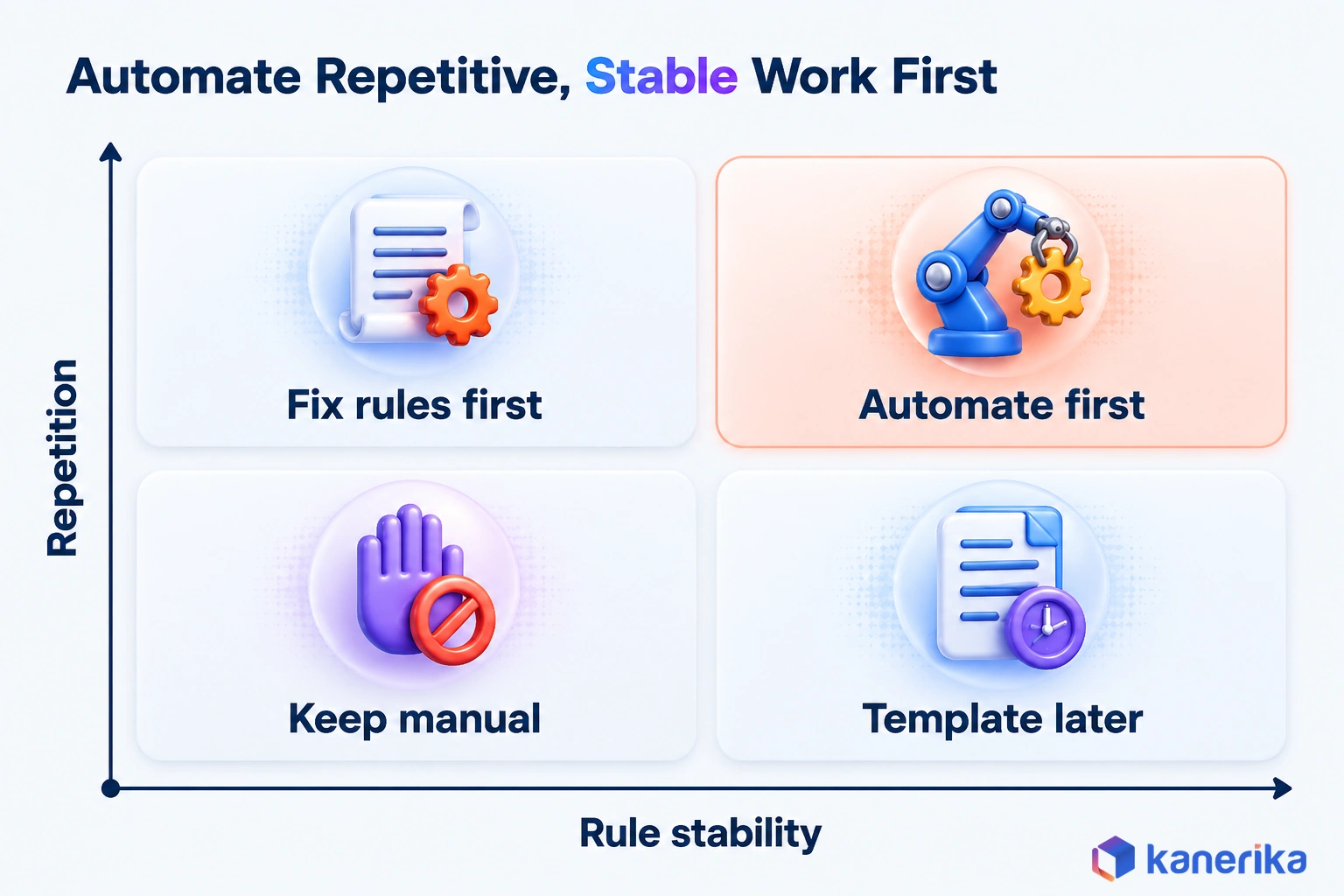
Then score your own backlog the same way. Rate each item from one to five for repetition and again for rule stability, then multiply the two. Items that score 16 or more are strong pilot candidates, while items under 6 can stay hand-built.
| Work item | Repetition | Rule stability | Verdict |
|---|
| Staging and landing loads | High | High | Automate first |
| SCD history dimensions | High | High | Automate first |
| Data Vault raw layer | High | High | Automate first |
| Standard data quality tests | High | Medium | Generate the common checks |
| Fact table loads | Medium | Medium | Template after the pilot |
| Business-rule marts | Low | Low | Keep manual and document well |
In short, the pattern behind the table is simple. Repetition decides how much a template saves, and rule stability decides how long those savings last before the template needs rework.
Signs You Need Automation
Some signals show up long before anyone writes a business case. When three or more of these sound familiar, the warehouse has outgrown hand-coding.
- Source requests wait weeks in a backlog before anyone starts.
- A schema change at a source often breaks downstream loads, so fixes eat the sprint.
- Documentation lags the code by months, when it exists at all.
- A platform migration is planned, so thousands of objects must move.
- One engineer is the only person who understands the load procedures.
- Auditors ask for column-level lineage, but nobody can produce it quickly.
Common Use Cases
Each common use case pairs with one metric that proves it worked. Start with the row that matches your loudest pain, since that win is easiest to show.
| Use case | What is automated | First metric |
|---|
| Staging and history loads | Landing tables, delta logic and SCD handling | Days per new source |
| Data Vault raw layer | Hubs, links, satellites and their loads | Objects delivered per sprint |
| SCD dimensions | Close-and-insert or merge loads | Defects per release |
| Legacy migration conversion | Translating old mappings and procedures to the new platform | Share of objects converted without rework |
| Test and reconciliation generation | Row-count, checksum and key tests for every table | Tables covered by automated tests |
Legacy migration is the use case that surprises teams most. When an old platform holds thousands of mappings, converting them by hand is often the slowest part of the move. Our roundup of data migration tools compares the conversion options. A conversion tool reads the old mappings as metadata and writes code for the new platform, which is the same loop applied once at scale.
Datasheet
FLIP Migration Accelerators
A short overview of FLIP’s migration accelerators for legacy ETL and BI platforms, useful when your first automation target is converting existing warehouse code.
View the Datasheet →
Data Warehouse Automation Approaches: Metadata-Driven, Code-First, Platform-Native and Custom
There are four broad ways to automate a warehouse, and they differ mainly in where your rules live. That choice shapes your lock-in, your hiring and how easily you can change course later.
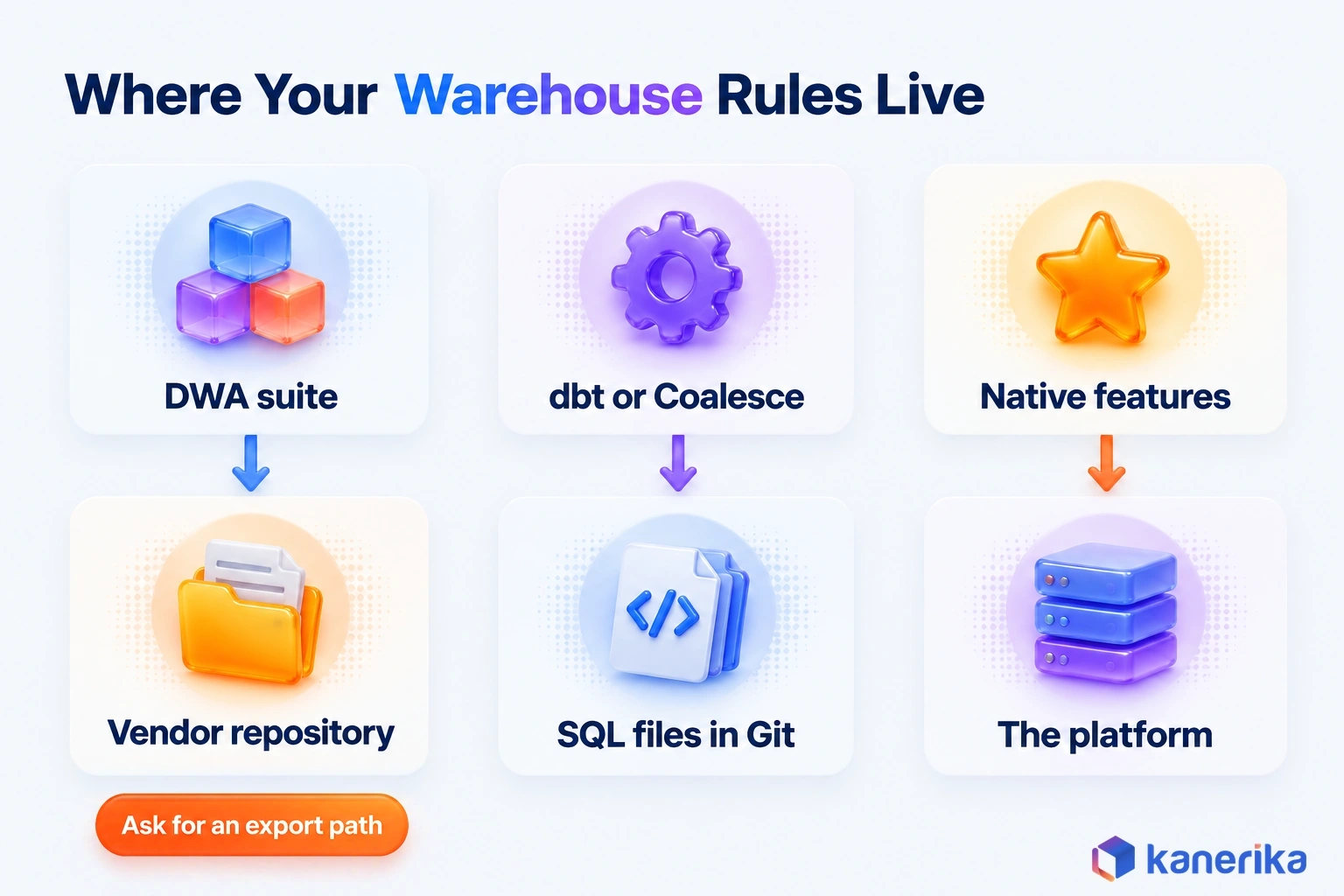
In a metadata-driven suite, the rules live in the tool’s own repository, whereas a code-first tool keeps them as SQL files in Git. On a platform they live in native features, while a custom ETL framework keeps them in code your own team wrote.
As of October 2026, platform-native features cover a good share of the build, particularly for refreshes and pipelines. Snowflake Dynamic Tables let you declare the result you want, then Snowflake schedules refreshes to meet a target lag you set. On Databricks, similarly, Lakeflow pipelines are built on Apache Spark Declarative Pipelines and handle batch and streaming in SQL or Python.
| Approach | How it works | Best fit | Lock-in risk |
|---|
| Metadata-driven suite | Model in a repository, generate code for the target platform | Many sources, heavy history tracking, Data Vault, audit-grade documentation | Medium to high; ask for a metadata export |
| Code-first (dbt, Coalesce) | SQL models in Git, compiled, tested and documented by the tool | SQL-first teams and analytics engineering | Low; the code stays readable SQL |
| Platform-native | Declarative tables and pipelines inside one platform | One cloud platform and simple history needs | Tied to that platform |
| Custom framework | In-house templates driven by a metadata table | Unusual patterns and a strong platform team | Low vendor risk, high key-person risk |
When Native Features Are Enough
Say you run one platform, your team writes SQL comfortably and you skip Data Vault. In that case, native features plus a code-first tool usually cover the build. Our guides to the Fabric data warehouse and the Snowflake data warehouse show how far each platform goes on its own.
A suite earns its license when the count of sources, history patterns and audit demands grows faster than the team. That is the point where one model driving every layer beats many hand-tuned files.
Data Warehouse Automation Software: Tools to Evaluate in 2026
Comparing tool categories is more useful than comparing product names. A metadata-driven suite and a SQL modeling tool solve different problems, so a feature checklist across both misleads more than it helps.
The groups below follow the same approaches. Each product below gets one line on what its vendor documents, and the order is not a ranking.
| Category | Examples | What it generates | Watch for |
|---|
| Metadata-driven DWA suite | WhereScape, VaultSpeed, TimeXtender, Qlik Compose | Model, DDL, load code, docs and lineage | Proprietary metadata format |
| SQL-first transformation and modeling | dbt, Coalesce | Compiled SQL models, tests and docs | History and Data Vault need packages or templates |
| Platform-native features | Fabric Data Warehouse, Snowflake Dynamic Tables, Databricks Lakeflow | Managed refresh, pipelines, AI-drafted SQL | One-platform scope |
Metadata-Driven DWA Suites
These products keep the model in their own repository and generate code for your target platform. They especially suit warehouses with many sources and strict history or audit needs.
- WhereScape, part of the Idera product family, offers WhereScape RED and WhereScape 3D as well as Data Vault Express.
- VaultSpeed specializes in Data Vault automation, generating hub, link and satellite code and then committing it to Git.
- TimeXtender describes a metadata-driven approach that separates business logic from storage and then generates the code.
- Qlik Compose automates data lake and data warehouse projects through one interface.
What they share matters more than how they differ. Each one owns the model, so leaving later means exporting that model, which is why the export test below comes first.
SQL-First Transformation and Modeling
Code-first tools take a different route. According to the dbt documentation, dbt turns SQL select statements into modular models. It also brings version control, testing, CI/CD and documentation to analytics code.
That puts dbt in the transform step of ELT, where raw data lands first and gets modeled in the warehouse. Our ETL vs ELT guide covers when that order fits.
Coalesce supports Databricks, Fabric, Snowflake and Google BigQuery, with Amazon Redshift in private preview as of October 2026. Both tools automate the code around a modeling decision rather than the decision itself, which suits teams that already think in SQL.
History tracking shows the difference in effort. In dbt, the Type 2 load shown earlier becomes a snapshot, and the dbt snapshots documentation gives the YAML form for dbt v1.9 and later. This sketch assumes the source table carries an updated_at column:
# snapshots/customer_snapshot.yml (dbt v1.9 and later)
snapshots:
  - name: customer_snapshot
    relation: source('crm', 'customer')
    config:
      schema: snapshots
      unique_key: customer_id
      strategy: timestamp
      updated_at: updated_at
On each run, dbt closes changed rows and inserts new versions, adding dbt_valid_from and dbt_valid_to columns. So a few lines of config replace the update-and-insert pair, which makes the snapshot a code-first version of a template.
Platform-Native Options
If the cloud data warehouse is already chosen, list what it automates before buying anything else. Fabric Data Warehouse is built with T-SQL and supports multi-table transactions, stored procedures and materialized views. Its data is also replicated to OneLake.
On Snowflake, a Dynamic Table can stand in for a hand-built chain of scheduled MERGE tasks. You write the query and set a target lag, and Snowflake decides when to refresh.
-- Illustrative: a revenue mart kept within one hour of its sources
CREATE OR REPLACE DYNAMIC TABLE mart.daily_revenue
  TARGET_LAG = '1 hour'
  WAREHOUSE = transform_wh
  AS
    SELECT order_date, region, SUM(amount) AS revenue
    FROM stg.orders
    GROUP BY order_date, region;
Snowflake’s CREATE DYNAMIC TABLE reference lists the warehouse as required and sets a 60-second minimum for the target lag. On Databricks, a Lakeflow pipeline declares its batch and streaming tables in SQL or Python. That replaces separately scheduled jobs that someone had to order by hand. On any of the three platforms, native features can carry a single-platform warehouse a long way before a suite is needed.
Five Tests Before You Buy
Demos run on tidy sample data, so test any shortlist on your own. These five checks expose most of the gaps that slides hide, so run all of them.
- Generate from your own metadata, so the proof of concept runs on one real subject area rather than the vendor’s sample.
- Read the generated code, since your engineers must debug it at 2 a.m. without the vendor.
- Check the exit path by asking how the model and code export, then testing that export before you sign.
- Fit CI/CD and Git, so generated code flows through your branches, reviews and release pipeline.
- Inspect lineage and docs to confirm both update whenever the code regenerates.
For an independent listing, BARC also publishes a 2026 comparison of DWA tools. Use it to widen the shortlist, then let the five tests decide.
How to Choose an Approach: Decision Framework and Worked Example
Choosing an approach comes down to four questions. How complex is the warehouse, what does your team write well, how many platforms do you run, and how do you model history?
Once you answer them honestly, the table below points to a starting approach. Treat it as a starting point, because two teams with the same answers can still differ on budget and skills.
| If your situation is | Lean toward |
|---|
| Many sources, heavy history tracking or Data Vault | Metadata-driven suite |
| One platform, SQL-first team, star schemas | Code-first tool plus native platform features |
| Mostly streaming or near-real-time marts | Platform-native pipelines |
| Unusual patterns and a strong platform team | Custom framework, with strict export discipline |
| Leaving a legacy ETL platform | Conversion tool first, then one of the rows above |
When a migration is driving the decision, settle the target platform first. Our Informatica vs Databricks comparison covers one common version of that choice.
Worked Example: An 80-Pipeline Sales Warehouse
The numbers in this example are illustrative assumptions rather than benchmarks. Picture a sales warehouse with 80 pipelines on Snowflake, run by four SQL engineers. It builds star schemas, keeps Type 2 history on 12 dimensions and also adds about six new sources a quarter.
Assume a hand-built source takes 10 engineer-days from request to mart, while a templated one takes 3. Six sources a quarter then saves 6 × 7 = 42 engineer-days a quarter, or 168 a year.
This team has one platform, strong SQL and no Data Vault. So the decision table points to a code-first tool plus Dynamic Tables, rather than a separate suite. If an audit later required a Data Vault raw layer across 30 more sources, the same arithmetic would tip toward a metadata-driven suite.
Talk to Kanerika
Not Sure Which Approach Fits Your Warehouse?
Kanerika can review your sources, modeling style and platform, then recommend whether a metadata-driven suite, a code-first tool or native features fit your first pilot.
Schedule a Demo →
How to Implement Data Warehouse Automation Step by Step
Implementation works best as a pilot that earns the right to scale. Each step below carries an exit criterion, so nobody argues later about whether the pilot worked.
- Assess: inventory sources, procedures and mappings, then baseline the metrics from the benefits table. Exit when the backlog is scored.
- Pick a pilot subject area: choose one with high repetition and stable rules, such as customer or product. Exit once its business owner signs off the scope.
- Set standards: agree naming, templates, history rules and governance controls before generating anything. Exit when templates are reviewed and versioned.
- Generate and deploy: produce the objects, then promote them through CI/CD to a test environment. Exit when Git deploys cleanly.
- Run in parallel: load old and new side by side, then reconcile the results. Exit when counts and checksums match for two full cycles.
- Expand by domain: add subject areas one at a time, each with the same exit criteria. Exit when the old loads are retired.
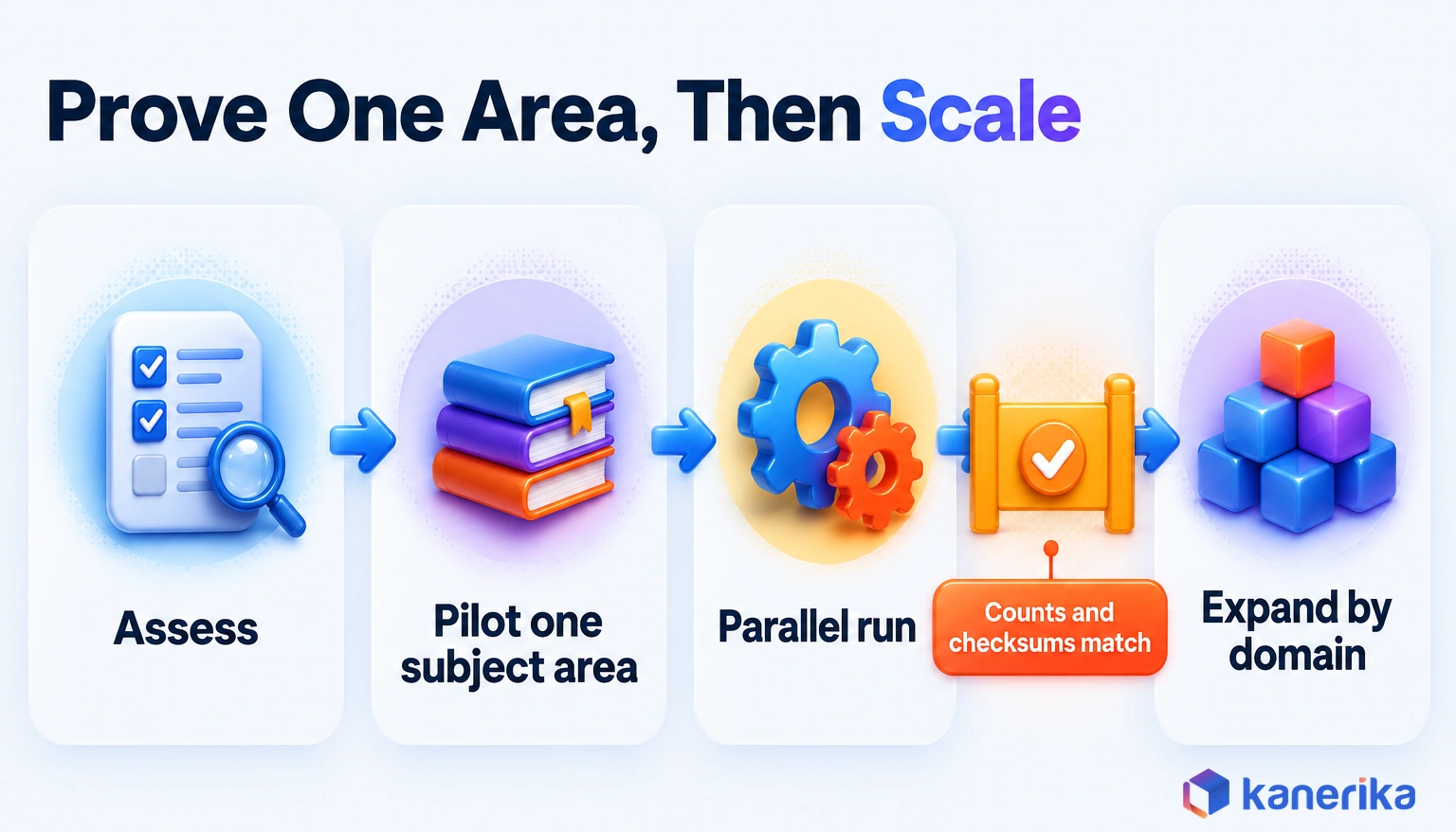
Step five is the one teams are tempted to skip, even though it is the one that builds trust. During the parallel run, compare row counts for every table on every load. Then compare checksums, which are sums or hashes over key columns that must match between old and new.
When a checksum differs, trace it to a mapping or a rule, fix the template and regenerate. Fixing the generated table by hand defeats the purpose, because the next regeneration would overwrite the fix.
Cost, ROI and When Automation Is Not Worth It
The license is only one line in the cost of automation. Engineering time, training and migrating existing code can each match it, so budget for all of them from the start.
Vendors rarely publish prices consistently, so the table lists cost drivers rather than amounts. So ask each vendor to price your actual environment count and object volume.
| Cost component | What drives it | Notes |
|---|
| Licenses | Users, environments or object counts | Request a quote per environment |
| Platform compute | Load frequency and data volume | Generated code still runs on your warehouse |
| Engineering time | Templates, model setup and reviews | Heaviest during the pilot |
| Training | New modeling tool and Git workflow | Budget for the whole team, not one champion |
| Migration of existing code | Number of procedures and mappings | Conversion tools cut manual rework |
| Run cost | Monitoring, upgrades and support | Recurs every year |
Worked ROI and Break-Even Threshold
ROI is the yearly value of time saved minus the yearly tool and upkeep cost, divided by that cost. To illustrate, continue the worked example with an assumed loaded cost of $600 per engineer-day. Then 168 saved days are worth $100,800 a year.
So if the tool and its upkeep cost $60,000 a year, the return is $40,800, or 68% of the cost. Faster delivery to the business adds value on top, but keep it out of the formula unless finance agrees how to price it.
The same assumptions also give a break-even threshold. At $600 per engineer-day, a $60,000 yearly cost equals 100 engineer-days. With 7 days saved per source, the tool pays back at about 15 new sources a year, roughly four a quarter.
Below that volume, a $60,000-a-year tool cannot earn back its cost, so lighter code-first tooling and native features are the safer pick. Above it, a license can pay back, but fit still comes from the decision table. That is why the 80-pipeline team, at 24 new sources a year, still leans code-first.
Still, automation is not worth it everywhere. A small warehouse with a handful of stable sources gains little, and neither do one-off reports. A team without modeling standards should write those standards first, because a generator only repeats the rules it is given.
Migration ROI Calculator
Estimate the ROI of Automating Your Migration
Use Kanerika’s Migration ROI Calculator to size the effort and savings of converting legacy warehouse code with automation instead of by hand.
Calculate Migration ROI →
Governance and Risks of Generated Warehouse Code
Generated code fails differently from hand-written code. One bad template spreads a defect to every table, while one good control protects them all at once.
So governance has to sit somewhere different. Instead of reviewing hundreds of tables, review a few templates closely and build the controls into them. The table pairs each risk with the symptom you would notice, as well as the control that prevents it.
| Risk | Symptom | Control |
|---|
| Unreviewed generated code | A template bug appears in every table at once | All generated code goes through Git pull requests |
| Lock-in to a proprietary model | Leaving means rebuilding from scratch | Contract and test a metadata and code export |
| Unmasked personal data | PII lands in marts that analysts can query | Masking rules defined inside the templates |
| Automating a bad process | Wrong numbers arrive faster | Fix rules and definitions before generating |
| Skipped change management | Engineers keep hand-editing generated tables | Training, ownership and a no-hand-edit rule |
| Over-trusted generated tests | Tests pass but business totals are wrong | Add business reconciliation checks with data owners |
The last row needs the most care. Generated tests check structure, such as unique keys and non-null columns, and data observability tools watch freshness and volume. Neither can tell you that revenue is wrong, so pair them with a few business totals that a data owner signs off each month.
Where AI Fits in Warehouse Automation
AI adds a drafting layer on top of the generator. It proposes code and models faster, while the review path built for generated code stays the same.
For example, Microsoft’s Copilot in Fabric Data Warehouse, in preview as of October 2026, generates T-SQL from metadata. It uses table, view and column names along with primary and foreign keys, but not the data in your tables. That design matters for governance, because the assistant drafts against structure rather than reading sensitive rows.
Because generated code already flows through Git pull requests, an AI-drafted model or mapping can go through the same review as anything a template produces. AI helps most in four places:
- Drafting SQL from table and key metadata, so engineers start from a draft.
- Suggesting source-to-target mappings as well as candidate business keys.
- Drafting documentation and standard test cases.
- Explaining unfamiliar generated or legacy code before a reviewer signs off.
Even so, grain, business rules and shared definitions should stay with people. Expect assistants to keep moving into modeling tools, while the human role shifts from writing code to approving it. For the ingestion side of the same shift, see our guide to AI data pipelines.
How to Measure Whether Warehouse Automation Is Working
Measurement closes the loop that the baseline opened. When the numbers from the benefits table do not move within a quarter, something in the setup needs attention.
So keep the scorecard small. Four or five metrics, reviewed monthly by the data lead and one business owner, beat a dashboard nobody opens.
Reuse the baselines you collected for the benefits table rather than measuring them again. Schema change lead time borrows from DORA change lead time, the time a change takes from commit to deployment in production. The scorecard adds what the benefits table leaves out: the direction each number should move, where it comes from and who watches it.
| Metric | Target direction | Source | Owner |
|---|
| Days per new source | Down | Ticket system | Business owner |
| Schema change lead time | Down | Git and ticket history | Data lead |
| Failed loads per month | Down | Scheduler logs | Data lead |
| Tables with current docs and lineage | Up | Generated documentation | Data lead |
| Share of code that is generated (starts at zero) | Up | Repository count | Data lead |
What to Review at 30, 60 and 90 Days
Each checkpoint asks one question, moving from setup to delivery to scale. If a checkpoint is missed, hold the next phase and fix the gap first, because scaling a shaky setup only spreads the problem.
- Day 30: is the setup right? Templates are reviewed, the pilot area is generated and the parallel run has started.
- Day 60: does it deliver? Reconciliation passes, the first schema change has shipped through regeneration and the docs are current.
- Day 90: is it ready to scale? Old loads are retired for the pilot, the scorecard is compared with the baseline and the next domain is chosen.
How Kanerika Automates Data Warehouse Builds and Migrations
Kanerika’s data engineering teams treat a warehouse build or migration as the same metadata loop shown above. The work starts with an assessment of legacy mappings, procedures and workflows, which become the metadata for everything that follows.
Case Study
70% Less Migration Effort: Informatica to Talend
A global building-materials manufacturer moved its Informatica PowerCenter estate to Talend. FLIP converted the mappings, workflows and logic, and FIRE automated validation, cutting manual migration effort by 70%.
Read the Case Study →
Conversion then runs through FLIP, Kanerika’s automated conversion tool, which translates existing mappings and logic for the target platform. Validation runs through FIRE, Kanerika’s repository export tool, which automates the checks instead of leaving them to manual testing. A parallel run with row-count and checksum reconciliation comes before any cutover. Once a pattern passes, it becomes a template for the next domain.
A leading global manufacturer of building materials and industrial products, operating across the US, Europe and Asia, shows how this works in practice. Until the move, it had run Informatica PowerCenter as its core ETL platform for over a decade. It faced high licensing and infrastructure costs, workflows that broke during manual migration, and no automated validation.
Using FLIP, Kanerika converted the Informatica mappings, workflows and logic into Talend, while FIRE handled automated validation. The published case study reports a 70% reduction in manual migration effort. It also reports 60% faster time-to-delivery and 45% lower total migration cost.
The same method also applies whether the target is Microsoft Fabric, Databricks or Snowflake. For teams that also need ingestion work, Kanerika’s data integration practice covers the flows that feed the warehouse.
Data Warehouse Automation: The Short Answer
Data warehouse automation turns warehouse building from repeated hand-coding into a loop. You capture metadata, model the target and generate code, tests and docs. You deploy through Git and regenerate whenever a source changes.
It pays off when sources change often, history rules repeat across many tables, or Data Vault is part of the design. In those cases, a metadata-driven suite such as WhereScape, VaultSpeed, TimeXtender or Qlik Compose is worth evaluating.
When one SQL-first team runs one platform, dbt or Coalesce plus native features in Fabric, Snowflake or Databricks usually do the job. Still, a small, stable warehouse may not need either.
Whichever side you land on, baseline first, pilot one subject area and reconcile old against new before you scale. Start by timing your last five source requests, because that number shows whether data warehouse automation fits your team and which tools deserve a trial.
Frequently Asked Questions
What is data warehouse automation?
Data warehouse automation is software that uses metadata and templates to build a warehouse. It designs, generates, deploys, tests and documents tables and load code. When a source changes, the team edits the model and regenerates the affected objects. This replaces most hand-written load procedures, while people still decide grain, business rules and shared definitions.
Is data warehouse automation the same as ETL?
No. ETL extracts, transforms and loads data along logic that someone designs. Data warehouse automation covers the whole build around that logic, including the model, table DDL, load code, tests, documentation and lineage. It often generates ETL or ELT code as one of its outputs, and then regenerates that code whenever a source or rule changes.
What is metadata-driven data warehouse automation?
It is an approach where a repository of metadata drives every layer of the warehouse. The metadata records sources, targets, business keys and history rules. Templates turn those facts into DDL, load code, tests and documentation. Because the model is the single source, one edit can regenerate every affected object and keep lineage accurate.
How much does data warehouse automation cost, and does it reduce costs?
Cost includes licenses, platform compute, engineering time, training, migration of existing code and yearly run cost. Vendors rarely publish prices, so request quotes for your own environments. Savings come mainly from engineering days no longer spent on repetitive code. Compare that yearly value with the full yearly cost before you decide it reduces spending.
Can Microsoft Fabric automate data warehouse processes?
Partly. Fabric Data Warehouse supports T-SQL, multi-table transactions, stored procedures and materialized views. Copilot in Fabric Data Warehouse, in preview, drafts T-SQL from table, column and key metadata without reading table data. That covers a lot of single-platform work, though teams with many sources or Data Vault may still add a dedicated automation tool.
Do Snowflake and Databricks support data warehouse automation?
Both offer native features that automate parts of the build. Snowflake Dynamic Tables let you declare a result and set a target lag, and Snowflake schedules the refreshes. Databricks Lakeflow pipelines run batch and streaming in SQL or Python on Spark Declarative Pipelines. Neither generates a full warehouse model, so complex builds may still need another tool.
Is dbt a data warehouse automation tool?
dbt is a code-first transformation tool that covers part of data warehouse automation. It turns SQL select statements into modular models and adds version control, testing, CI/CD and documentation. It does not capture source metadata or generate Data Vault structures on its own, though packages and templates can add those patterns.
What is Data Vault automation?
Data Vault automation generates the hubs, links and satellites of a Data Vault model from metadata. A hub stores business keys, a satellite stores changing attributes and a link joins hubs. Because these patterns repeat across every entity, templates suit them well. Tools such as VaultSpeed generate this code and commit it to Git.
Can AI automate data warehouse development?
AI can draft parts of it. Assistants can write SQL from table and key metadata, suggest mappings and business keys, and draft documentation and tests. Copilot in Fabric Data Warehouse is one example, in preview. People should still decide grain, business rules and definitions, and review AI output through the same Git process as other generated code.
What are the risks of automated data warehouse pipelines?
The main risk is scale, because one template defect repeats in every generated table. Other risks include lock-in to a proprietary metadata model, personal data left unmasked, and automating a broken process. Teams may also hand-edit generated code or trust structural tests too much. Template review, export rights and business reconciliation checks address these.
How does data warehouse automation work?
It runs as a loop with six stages. The tool captures source metadata and the team models the target as a star schema or Data Vault. Templates then generate DDL, load code and documentation. Code deploys through Git and CI/CD, loads are tested, and any source change triggers a regeneration with lineage updated.
What are the best data warehouse automation tools?
The best tool depends on your warehouse. Metadata-driven suites such as WhereScape, VaultSpeed, TimeXtender and Qlik Compose suit many sources and Data Vault. Code-first tools such as dbt and Coalesce suit SQL-first teams. Native features in Fabric, Snowflake and Databricks suit one-platform teams. Test any shortlist on your own metadata before you buy.
What are the benefits of data warehouse automation?
The main benefits are faster delivery of new sources, shorter lead time for schema changes and fewer failed loads. Documentation also stays current because the same run produces it. New engineers ramp up faster since one model explains the warehouse. Measure each benefit against a baseline, because vendor savings figures are claims rather than guarantees.
Does data warehouse automation replace data engineers?
No. It removes repetitive coding, but engineers still design the model, write and review templates, and decide grain and business rules. They also run reconciliation, handle unusual sources and own the CI/CD pipeline. In practice the role shifts from writing similar load scripts toward modeling, review and platform work that a generator cannot do.
How long does it take to implement data warehouse automation?
Timelines depend on source count, legacy code volume and how ready your modeling standards are. A sound plan proves one pilot subject area first, through templates, generation, deployment and a parallel run that reconciles for two full cycles. Later domains move faster because they reuse the approved templates instead of starting from a blank page.
What is the difference between data warehouse automation and a scheduler?
A scheduler runs jobs in the right order, retries failures and sends alerts. It does not write the jobs. Data warehouse automation generates the tables, load code, tests and documentation that the scheduler then runs. Many teams use both, with the automation tool producing the code and an orchestrator running it on a timetable.
What is automated data warehousing?
Automated data warehousing is another name for data warehouse automation. It means building and maintaining a warehouse from metadata and templates instead of hand-written scripts. The software generates structures, load code, tests and documentation, then regenerates them when sources change. The term sometimes also covers platform features that refresh tables automatically, such as Snowflake Dynamic Tables.
How do you automate a data warehouse?
Start by baselining delivery time, change lead time and failed loads. Pick one pilot subject area with repetitive, stable rules. Agree naming, templates and history rules, then generate the objects and deploy them through Git. Run old and new loads in parallel until counts and checksums match, and then expand one domain at a time.




