TL;DR
Snowflake Openflow is a managed, Snowflake-native version of Apache NiFi, built through the 2024 acquisition of Datavolo and made generally available on AWS in 2025. It splits into a Snowflake-managed control plane and a customer-run data plane, deployed via Bring Your Own Cloud or Snowpark Container Services, handling structured, semi-structured, and unstructured data in batch and streaming modes.
Openflow complements platforms like Fivetran more often than it replaces them, trading connector breadth for deeper customization. Its strongest fit is CDC replication, streaming ingestion, and unstructured data prep for Cortex AI pipelines, and most rollouts benefit from implementation support to get governance right early.
Snowflake has spent a decade selling itself as a place to store and query data, leaving data movement to specialized tools like Fivetran and Informatica. That changed in November 2024, when it acquired Datavolo, a startup founded by the original creators of Apache NiFi. The acquisition shipped the following June as Snowflake Openflow, unveiled at the 2025 Summit and made generally available on AWS by the end of the year.
Snowflake Openflow changes that math. Built on Apache NiFi and run from inside the Snowflake control plane, it gives data teams one visual canvas for structured, semi-structured, and unstructured data movement. The source can be a Kafka topic, a Postgres database, or a SharePoint folder.
This article breaks down how Openflow’s architecture works, where it beats or loses to Snowpipe and third-party ETL tools, and when it’s worth adopting.
Key Takeaways
- Snowflake Openflow is a managed, Snowflake-native version of Apache NiFi, built through the 2024 acquisition of Datavolo.
- It splits into a Snowflake-managed control plane and a customer-run data plane, deployed via Bring Your Own Cloud on AWS or Snowpark Container Services.
- Unlike Snowpipe and COPY, Openflow handles bidirectional movement of structured, semi-structured, and unstructured data in batch and streaming modes.
- It complements third-party ELT platforms like Fivetran more often than it replaces them, trading connector breadth for deeper customization.
- The strongest use cases are CDC replication, streaming ingestion, and unstructured data prep for Cortex AI pipelines.
- Enterprises with complex source systems typically need implementation support to get deployments, connectors, and governance right from day one.
What Is Snowflake Openflow?
Snowflake Openflow is a managed data integration service that connects data sources to destinations inside the Snowflake platform, handling structured, semi-structured, and unstructured data in both batch and streaming modes. Data engineers build pipelines visually instead of writing custom scripts, feeding data straight into the same Snowflake data warehouse architecture teams already query against.
1. From Datavolo to a Native Snowflake Service
Openflow traces back to Snowflake’s 2024 acquisition of Datavolo, a company founded by engineers who created Apache NiFi, the open-source flow-based engine originally developed inside the NSA. Snowflake introduced Openflow at Summit in June 2025, and made it generally available in AWS commercial regions with Bring Your Own Cloud deployment later that year. Azure and GCP support remains unannounced.
2. What Openflow Moves
Openflow processors cover databases, message queues, SaaS applications, and cloud storage, including Postgres, Kafka and Kinesis streams, and platforms such as Salesforce, Workday, and Slack. It also ingests unstructured files, including PDFs, images, and audio, directly from Google Drive, Box, or SharePoint.
Fivetran’s own comparison notes Snowflake documents around 20 Openflow connectors today, seven generally available and the rest in preview. Snowflake has also partnered directly with Oracle on a dedicated CDC connector, and teams mid-Oracle to Snowflake migration are natural first users once it exits preview.
Custom NiFi processors can extend a flow past Snowflake’s prebuilt catalog, at the cost of maintaining that customization internally.
Source: Snowflake
How Snowflake Openflow Architecture Works
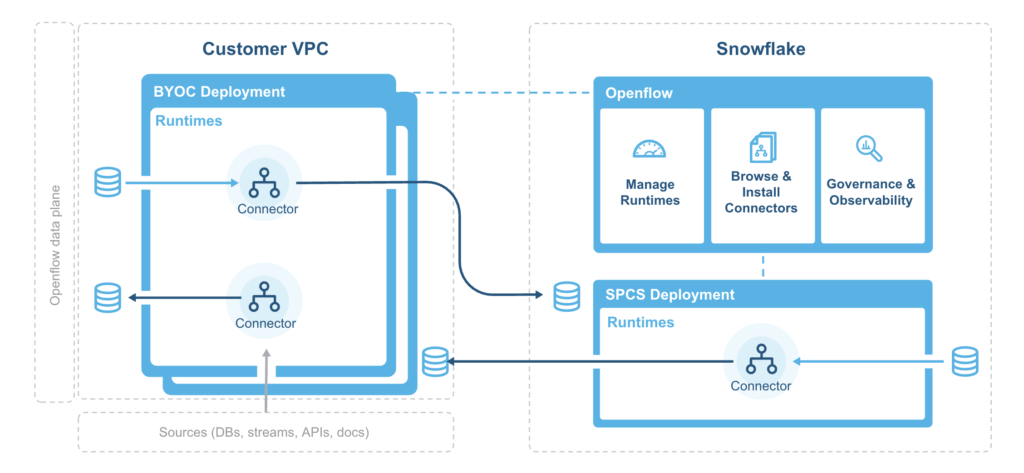
Openflow architecture splits into two layers, a control plane Snowflake manages and a data plane the customer runs, following the same shared-responsibility model as the rest of the Snowflake platform.
1. Control Plane and Data Plane
The control plane lives inside Snowflake, accessed through Snowsight. Teams use it to create deployments, browse connectors, and monitor flow performance, per Snowflake’s documentation.
The data plane is where NiFi runs, inside the customer’s own cloud account. Raw data in transit stays inside that infrastructure rather than passing through Snowflake-owned compute.
2. Deployments and Runtimes
A deployment is the AWS infrastructure boundary, with its own VPC, EKS cluster, and load balancers. Each deployment hosts multiple runtimes, the NiFi node clusters that execute flows, scaling node count horizontally as load grows.
3. BYOC vs Snowpark Container Services
Bring Your Own Cloud is the default deployment model and the only one generally available today, requiring an existing AWS VPC with public and private subnets the customer provisions and pays for directly.
Snowpark Container Services offers a fully Snowflake-managed alternative that removes the AWS provisioning step entirely. Implementation partners describe SPCS as still expanding, the option to watch rather than the default for most 2026 deployments.
Table 2: BYOC vs Snowpark Container Services
| Dimension | Bring Your Own Cloud (BYOC) | Snowpark Container Services (SPCS) |
|---|
| Availability | Generally available | Still expanding, less mature |
| Infrastructure owner | Customer provisions and pays for AWS VPC and EKS | Snowflake manages infrastructure end to end |
| Setup effort | CloudFormation stack, subnet planning, IAM roles | Minimal customer-side provisioning |
| Best fit | Teams with existing AWS platform engineering capacity | Teams that want to avoid owning cloud infrastructure |
Picking between the two comes down to whether a team already has AWS platform engineering capacity on staff, or would rather wait for broader SPCS availability.
4. Authentication and Monitoring
Runtimes authenticate to Snowflake using OAuth2, typically through a service user configured with key-pair authentication instead of a password. Teams with strict networking requirements can route control plane traffic over AWS PrivateLink rather than the public internet.
Flow health surfaces inside the Openflow control plane itself, with a monitoring view showing pipeline status, recent runs, and errors. NiFi’s own provenance logging tracks each step a piece of data passes through, useful for debugging a flow rather than just restarting it.
Once the infrastructure question is settled, the more practical question is what Openflow replaces, and what it leaves for other tools to handle.
 Source: Snowflake
Snowflake Openflow vs Snowpipe, COPY, and Third-Party ETL Tools
Openflow sits above Snowpipe and the COPY command rather than replacing them, a broader integration layer built for sources and formats outside their original scope.
1. Openflow vs Snowpipe and COPY
Snowpipe and COPY both assume the data already sits in a cloud storage stage. Openflow removes that assumption, connecting directly to databases, APIs, and message queues without a staging step in between. That distinction shows up most for teams already past the Snowflake vs Redshift decision and now solving the ingestion layer.
Table 1: Snowflake Openflow vs Snowpipe vs COPY
| Dimension | Snowflake Openflow | Snowpipe | COPY Command |
|---|
| Source types | Databases, APIs, message queues, SaaS apps, files | Cloud storage stages only | Cloud storage stages only |
| Data types | Structured, semi-structured, unstructured | Structured, semi-structured | Structured, semi-structured |
| Load mode | Batch, micro-batch, true streaming | Continuous micro-batch | Manual or scheduled batch |
| Compute | Customer-managed NiFi runtime (BYOC) | Snowflake-managed serverless | Customer-managed warehouse |
| Best fit | Multi-source or streaming pipelines | Files landing automatically in storage | One-off or simple scheduled loads |
2. Openflow vs Fivetran and Airbyte
Fivetran and Airbyte remain the faster path for standard SaaS and database connectors, with far more prebuilt integrations and infrastructure Snowflake customers never have to provision. Fivetran’s own comparison cites 700-plus supported sources against Openflow’s smaller, growing catalog, the same names that show up across the wider Snowflake alternatives field.
Openflow’s advantage shows up in unstructured data, streaming, and custom transformation logic, areas outside what conventional ELT connectors were designed to cover. Vendor-neutral analysis frames the two as complementary more often than competing. Where a team lands depends more on use case than raw source count.
Where Snowflake Openflow Fits in a Modern Data Stack
Openflow earns its place in two situations most tools handle poorly, continuous streaming ingestion and unstructured data destined for AI workloads.
1. Real-Time and Change Data Capture Pipelines
NiFi’s flow-based design was built for continuous data, not scheduled batch jobs. Openflow inherits that strength, polling or subscribing to sources like Kafka and replicating database changes as they happen. That makes the biggest difference for CDC, where a source database changes constantly and downstream reporting needs to reflect it within minutes. For change capture that stays inside Snowflake, Snowflake streams are the native option.
2. Unstructured Data for AI and Cortex Pipelines
A growing share of enterprise AI work depends on unstructured content such as contracts, support tickets, scanned documents, and product images. Openflow ingests that content directly from sources like Google Drive, Box, and SharePoint, preserving the metadata Snowflake Cortex needs for search and retrieval. Snowflake positions this as a core use case for Openflow, since Cortex-powered chat depends on that data reaching Snowflake in a usable form.
Matching Openflow to a use case is only half the decision. The other half is whether a team is ready to run it.
Table 3: Matching the Use Case to the Right Tool
| Use Case | Recommended Tool |
|---|
| Standard SaaS app to Snowflake (Salesforce, HubSpot) | Fivetran or Airbyte |
| Kafka or Kinesis streaming ingestion | Snowflake Openflow |
| Files already landing in cloud storage | Snowpipe |
| One-off or scheduled bulk load from a stage | COPY command |
| Unstructured files for Cortex search | Snowflake Openflow |
| Database CDC replication | Snowflake Openflow or Fivetran, depending on source coverage |
Most teams end up running a mix rather than standardizing on one row of this table, easier to manage on top of a well-planned Snowflake data engineering foundation.
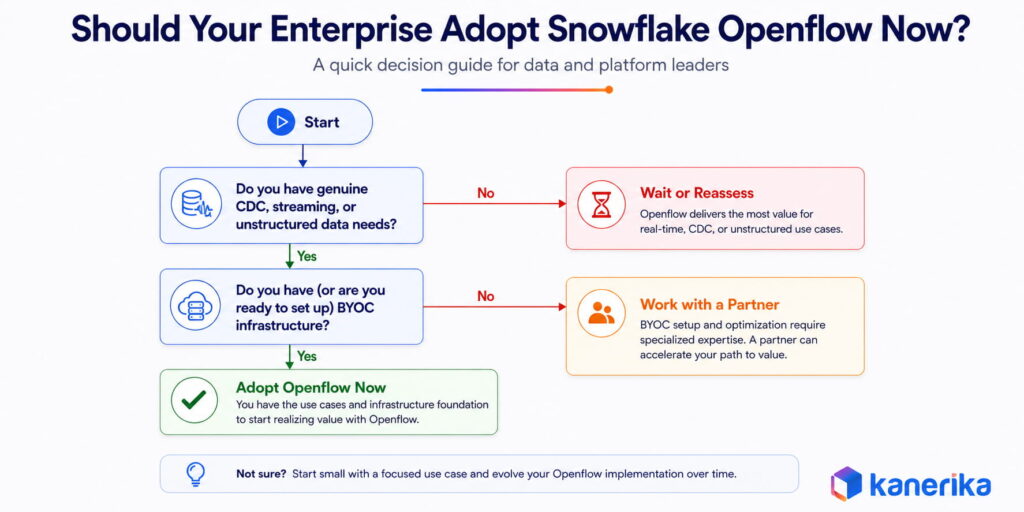
Should Your Enterprise Adopt Snowflake Openflow Now?
Openflow makes sense for enterprises already committed to Snowflake that need data movement beyond the reach of Snowpipe and COPY, and it’s a heavier lift for teams that just need standard SaaS connectors working quickly. The file-ingestion side of that comparison is explained in our guide to Snowflake Snowpipe.
1. When Openflow Is the Right Fit
Teams with genuine streaming or CDC requirements, multiple unstructured sources, or custom transformation logic mid-pipeline get the clearest return, especially if already comfortable owning AWS infrastructure, since BYOC remains the only generally available deployment path.
A useful test is counting how many target sources are already covered by an existing Fivetran or Airbyte connector. Openflow’s value shows up mainly in the sources those platforms handle poorly. A database-heavy mix of CDC needs, unstructured files, or event streams pushes Openflow toward the center of the stack instead.
Table 4: Openflow Readiness Checklist
| Readiness Factor | Ready | Needs Preparation |
|---|
| AWS account with VPC provisioning rights | In place | Requires cloud team involvement |
| Streaming or CDC use case defined | Clear requirement identified | Still evaluating batch vs streaming needs |
| Governance model for service accounts | Roles and secrets management planned | No plan yet for role scoping |
| Team familiar with NiFi or flow-based tools | Prior NiFi experience on team | No flow-based tooling experience |
Teams still weighing Snowflake against other platforms should settle that question first, since Openflow only becomes relevant once Snowflake is the confirmed destination. The Databricks, Snowflake, and Fabric comparison is a reasonable starting point.
2. Budgeting for Openflow Costs
Snowflake bills active runtime vCPU usage under a line item called Openflow Compute BYOC. That charge runs per second with a one-minute minimum, plus a smaller telemetry charge for logs and metrics sent back to Snowflake event tables. Idle runtimes bill nothing, which rewards scheduling flows tightly rather than leaving connectors running around the clock.
CDC connectors add a second cost layer. Snapshot and incremental loads still consume standard Snowflake warehouse credits on top of the runtime charge, so a CDC-heavy rollout should budget for both lines separately rather than treating Openflow compute as the full bill.
3. When Implementation Needs a Partner
Standing up a first deployment moves through a fixed sequence.
- Prepare the Snowflake account with the right privileges and an image repository
- Deploy AWS infrastructure through a Snowflake-generated CloudFormation template
- Create a runtime inside that deployment
- Install and configure the first connector
Each phase is documented, but the sequence still takes close to an hour of infrastructure provisioning before a single flow can run.
Getting the governance model right the first time, especially role scoping and secrets management, is where most self-led rollouts lose time.
Enterprises with multiple business units or hybrid Snowflake environments bring in implementation support for exactly this reason, since documented patterns still stay thin and a misconfigured deployment compounds across every downstream pipeline. Teams without in-house NiFi experience sometimes hire Snowflake developers directly, though that still leaves the enterprise owning long-term maintenance.
How Kanerika Configures Snowflake Openflow for Enterprise Teams
Kanerika is a Snowflake Select Tier Partner running a dedicated Snowflake practice alongside its Microsoft Fabric and Databricks work, and Openflow configuration fits inside that same practice rather than sitting as a separate offering.
Our work on Snowflake data integration engagements covers three areas where most self-led Openflow rollouts lose time:
- Architecture and deployment scoping: We assess whether BYOC or Snowpark Container Services fits the account, size the AWS footprint, and plan the VPC and EKS setup before a single deployment goes live.
- Connector and governance setup: We configure the connectors an engagement needs, set role scoping and secrets management for service accounts, and build the governance and cataloging trail a new integration layer requires from day one.
- Delivery tracked to outcomes: Every engagement runs through Kanerika’s own IMPACT delivery framework, tracking progress from discovery to go-live against business outcomes instead of technical milestones.
Kanerika holds ISO 27001/27701 and SOC II Type II certifications across 100+ enterprise clients with a 98% retention rate.
Case Study: Modernizing Snowflake Data Integration for a Beverage Manufacturer
A North American beverage manufacturer came to Kanerika running exactly the kind of fragmented setup an Openflow migration is built to fix.
Challenge
Legacy SSAS and hybrid systems spanned ERP, HR, and IoT sources with no consistent refresh cadence. Refresh cycles ran on an hourly delay, and a stack of separate licenses and replication tools kept driving up cost and system dependencies.
Solution
Kanerika rebuilt the environment on a unified Snowflake architecture and automated the pipelines feeding it, replacing manual reconciliation work with governed, automated data movement, the same pattern an Openflow rollout asks of a team.
Results
- 40% faster reporting cycles
- 3x quicker analytics delivery
- 60% drop in manual data reconciliation
- $130K in annual savings from retired licenses and maintenance contracts
Wrapping Up
Snowflake Openflow closes a real gap for teams stuck stitching together Snowpipe, custom scripts, and third-party ELT tools to handle streaming and unstructured data. Fivetran and Airbyte still cover more ground for standard connectors, and BYOC still asks a team to own real AWS infrastructure. For enterprises with genuine CDC, streaming, or unstructured AI use cases already committed to Snowflake, that tradeoff is usually worth it.
The clearest signal is simple. Count how many target sources already run through an existing connector, then weigh whether the rest justify owning a new integration layer at all. Getting the architecture, connectors, and governance right from the start is what decides whether Openflow becomes a long-term asset or another tool nobody fully trusts.
Ready to Implement Snowflake Openflow the Right Way?
Partner with Kanerika for Expert Snowflake Migration and Integration Services
 Explore Our Snowflake Page
FAQs
1. What is Snowflake Openflow?
Snowflake Openflow is a fully managed data integration service built on Apache NiFi 2.0 that connects any data source to any destination. It supports structured and unstructured data including text, images, audio, video, and sensor data in both batch and streaming modes. Announced in preview in May 2025 and generally available on AWS by September 2025, it is the first truly native ingestion framework built directly into Snowflake rather than requiring an external ETL tool.
2. What is Snowflake Openflow built on?
Openflow is built on Apache NiFi 2.0, an open-source data integration tool designed to automate the flow of data between systems. Snowflake manages the control plane while the data plane runs in the customer’s own cloud environment. Data engineers already familiar with NiFi can operate Openflow without relearning tooling. Those new to NiFi can use the visual flow builder without needing to understand the underlying framework.
3. How does Snowflake Openflow differ from Snowpipe?
Snowpipe handles continuous file ingestion from cloud storage: S3, Azure Blob, and GCS. Openflow is broader in scope. It supports any source including relational databases, message queues, SaaS APIs, unstructured file sources, and streaming systems, in both batch and streaming modes. Where Snowpipe moves files, Openflow acts as a flow-based orchestration engine that can process, route, and transform data while it is still in motion before it lands in a Snowflake table.
4. What are the two deployment models for Snowflake Openflow?
Openflow offers two deployment models. Snowflake Deployments run on Snowpark Container Services inside the Snowflake environment, available across AWS, Azure, and GCP commercial regions. BYOC (Bring Your Own Cloud) runs in the customer’s own AWS VPC, giving organizations with strict data residency or network security requirements full control over where data flows are processed while Snowflake manages the control plane.
5. What data sources does Snowflake Openflow support?
Openflow supports a wide range of source types through hundreds of pre-built processors. Structured sources include relational databases like PostgreSQL, MySQL, Oracle, and SQL Server via CDC. Streaming sources include Apache Kafka and Amazon Kinesis for real-time event ingestion. Unstructured sources include Google Drive, SharePoint, and Box for document and file ingestion. The full connector list is available in Snowflake documentation and continues to expand.
6. What is the difference between Snowflake Openflow and tools like Fivetran or Airbyte?
Fivetran and Airbyte are external SaaS connectors that sit outside Snowflake and move data into it. Openflow is native to Snowflake, governed by Snowflake’s built-in security and compliance layer, and operates as a flow-based orchestration engine rather than a simple connector. The key advantage of Openflow is that it can process and transform data in motion, route the same stream to multiple destinations simultaneously, and handle multimodal data including unstructured content that SQL-based tools cannot process natively.
7. How does Snowflake Openflow work with CDC?
Openflow supports change data capture from Oracle, SQL Server, and multi-database setups through dedicated CDC processors. Per-batch error counts and rows-inserted and rows-updated counters are available per processor, giving data engineers throughput visibility without custom monitoring. CDC SQL Server support includes keyset pagination improvements for busy change tables added in recent releases.
8. Is Snowflake Openflow generally available?
As of 2025, Snowflake Openflow BYOC deployments are generally available for all Snowflake accounts in AWS commercial regions. Snowflake Deployments, which run on Snowpark Container Services, began rolling out in preview to all accounts on September 17, 2025, and are available across AWS, Azure, and GCP commercial regions. Some features including specific connectors and processors remain in preview. Check the Openflow release notes for current availability status per feature.














