TL;DR
ClickHouse wins on raw query speed and cost for continuously running workloads. Snowflake wins on managed operations, governance, and mixed workload flexibility. Most mature data teams run both. This guide covers architecture, performance, cost, and the specific scenarios where each platform leads, so you can make the right call for your workload.
Engineering teams evaluating analytics infrastructure in 2026 tend to land on the same two names, ClickHouse and Snowflake. ClickHouse is the performance-first, open-source engine built for sub-second queries on billions of rows, with compression that keeps running costs low. Snowflake is the fully managed cloud platform that eliminates infrastructure overhead, scales elastically with consumption-based pricing, and ships enterprise features like cross-cloud data sharing, Time Travel, and built-in governance.
ClickHouse is newer to enterprise conversations and stays mostly in the hands of engineering teams solving a specific problem. Snowflake is the more established, broadly recognized platform most data programs are already built around. This guide walks through both, across architecture, performance, pricing, and governance, so the comparison stays grounded rather than picking a side.
Key Takeaways
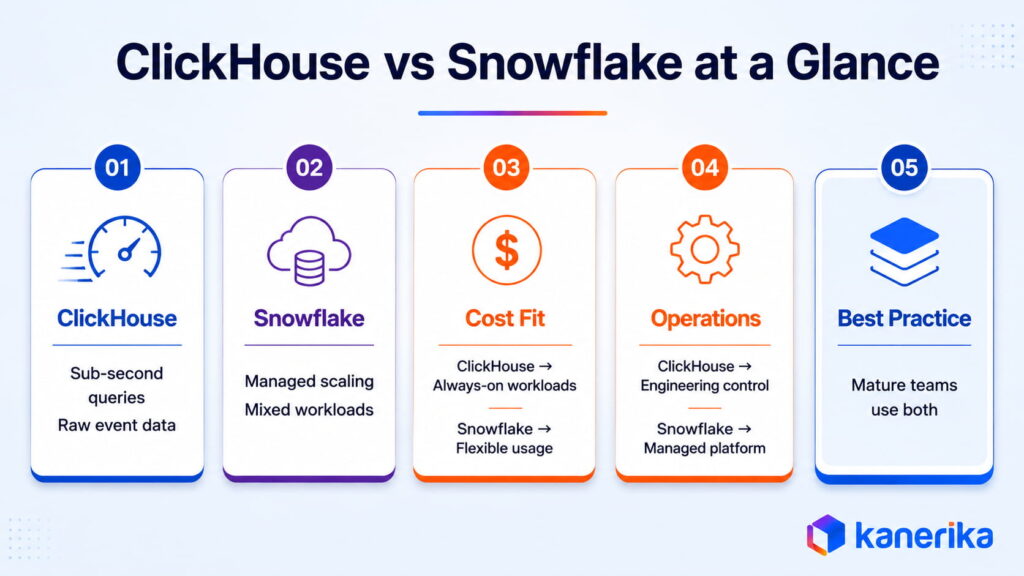
- ClickHouse delivers sub-second queries on raw event data, while Snowflake delivers elastic, fully managed scaling for mixed workloads.
- ClickHouse can cost less for workloads that run continuously around the clock, though that gap narrows quickly for anything intermittent, where Snowflake’s pause-on-idle billing keeps spend in check.
- ClickHouse demands ongoing engineering tuning. Snowflake absorbs that overhead as part of the managed service.
- ClickHouse fits real-time dashboards, log analytics, clickstream data, and IoT telemetry.
- Snowflake fits cross-org data sharing, ad-hoc BI, and governance-heavy environments.
- Most mature data teams run both, ClickHouse for the hot path and Snowflake for the governed warehouse.
Migrating to Snowflake or Evaluating a Platform Move?
Kanerika’s FLIP accelerator cuts migration effort by 50 to 60% and delivers complex platform migrations in approximately 90 days.
👉 See Our Migration Services
ClickHouse vs Snowflake: What Each Platform Was Designed to Solve
1. ClickHouse: Built for Speed on Raw Event Data
ClickHouse is an open-source columnar OLAP database, originally built inside Yandex to power Yandex.Metrica, its web analytics product, which today runs on more than 13 trillion records stored and upward of 20 billion events processed daily. It stores data in columns rather than rows, so a query reads only the columns it names and skips the rest.
The MergeTree storage engine sits at the center of ClickHouse’s speed. Data lands in parts, gets merged in the background, and the ordering key determines how it’s physically sorted on disk. Queries that filter on that ordering key skip large blocks of data through sparse indexing, and materialized views pre-aggregate data during ingestion to speed up common queries.
A few operational tradeoffs matter before committing to ClickHouse:
- Self-hosted ClickHouse is free under Apache 2.0, while ClickHouse Cloud’s Basic tier starts at $66.52 a month.
- Schema design around the ordering key is central to performance and is hard to revisit once data is loaded at scale.
- MergeTree tuning, replication management, and cluster sizing all demand ongoing engineering attention that a managed Snowflake warehouse handles automatically.
2. Snowflake: Built for Managed, Governed Warehousing
Snowflake’s defining architectural bet is separating storage from compute. Storage lives in cloud object storage (S3, Azure Blob, GCS), while compute runs on virtual warehouses that start, pause, and resize independently. A query that needs more horsepower gets a bigger warehouse, and an idle environment pays nothing for compute.
Snowflake’s core strength is completeness, spanning automatic clustering, automatic scaling, and a mature ecosystem where dbt, Airflow, Fivetran, Snowpark, and Horizon Catalog integrate out of the box. That completeness comes with a cost model that rewards close monitoring.
ClickHouse vs Snowflake: Architecture Comparison
| Dimension | ClickHouse | Snowflake |
|---|
| Storage model | Columnar, MergeTree engine | Columnar, cloud object storage |
| Compute model | Shared or separated, self-managed by default | Fully separated, auto-scaling warehouses |
| Deployment | Self-hosted, ClickHouse Cloud, or managed | Cloud only (AWS, Azure, GCP) |
| Query speed | Sub-second on billions of rows | Fast, with higher latency on real-time event data |
| Write concurrency | High read concurrency, tighter write limits | Strong multi-user write concurrency |
| Operational load | Higher (tuning, replication, schema design) | Lower (fully managed) |
| Licensing | Open source, Apache 2.0 | Proprietary |
| SQL dialect | ClickHouse SQL, with some extensions | Standard SQL, ANSI-compatible |
| Semi-structured data | Arrays and nested types, native JSON | VARIANT type, FLATTEN for arrays |
| Pricing model | Infrastructure cost or Cloud usage-based | Credit-based, per compute second |
This is a genuine architecture split rather than a feature checklist. ClickHouse’s shared-nothing design keeps compute close to storage for low latency, while Snowflake’s separation trades some latency for elastic, pay-per-second scaling. Kanerika’s data engineering teams run this same architecture-first evaluation whether the alternative on the table is ClickHouse, Databricks, or another platform entirely.
The Performance Gap: Real-Time Analytics vs Mixed Workloads
1. Real-Time Query Performance
ClickHouse tends to hold an edge on high-concurrency, real-time queries against raw event data, a narrow slice of what most enterprise data programs run day to day. For the dashboards, log analytics, and clickstream processing that do fall into that category, ClickHouse’s compression and sparse indexing produce faster response times, though closing that gap on Snowflake usually takes more compute spend.
Snowflake’s virtual warehouse model introduces cold-start latency when a suspended warehouse resumes. Dashboards that users hit sporadically through the day feel that delay directly. ClickHouse, running as a persistent cluster, answers immediately regardless of query frequency.
2. Complex SQL and Mixed Workloads
Snowflake handles complex SQL, window functions, CTEs, and multi-table joins against structured data more predictably than ClickHouse. ClickHouse runs its own SQL dialect with real differences from standard SQL, and some join patterns that are simple in Snowflake need careful rewriting in ClickHouse to avoid a performance hit.
Mixed workloads are the norm for most teams, with data science, BI analysts, and operations all querying the same platform at different patterns and concurrency levels. Snowflake’s auto-scaling and multi-cluster workload isolation tend to handle that variation more gracefully than a ClickHouse cluster sized for a single peak case.
3. Data Ingestion Speed
ClickHouse can ingest millions of rows per second and surface them for querying within seconds. Event-driven workloads, IoT sensor data, and high-volume log ingestion favor this continuous write model, a pattern Snowflake’s batch-oriented architecture struggles to match directly.
Snowpipe and Snowpipe Streaming give Snowflake near-real-time ingestion, best understood as continuous micro-batch rather than true streaming. Workloads that genuinely need sub-second data freshness are better served by ClickHouse’s ingestion model.
Cost Comparison: ClickHouse vs Snowflake
| Cost Factor | ClickHouse | Snowflake |
|---|
| Entry price | Free (self-hosted) or ~$66/month (Cloud Basic) | Custom quote, credit-based |
| Compute pricing | $0.22 to $0.39 per compute unit-hour on Cloud | $2 to $4 per credit by edition |
| Storage pricing | ~$25/TB per month on Cloud | ~$23/TB per month, US on-demand |
| Continuous workloads | Can cost less for steady, high-volume usage | Costs compound with always-on warehouses |
| Intermittent workloads | Requires always-on infrastructure to stay fast | Auto-suspend keeps costs close to actual usage |
| Hidden costs | Engineering time for tuning and cluster ops | Clustering, materialized views, idle warehouses |
Cost comparisons between the two platforms swing heavily on workload pattern. Continuously running analytics on ClickHouse cost a predictable, lower monthly figure, while the same query volume on Snowflake accumulates credits at a rate that compounds with scale.
That gap narrows considerably for intermittent workloads. Ad-hoc analytics, data science exploration, and infrequent batch reporting benefit from Snowflake’s auto-suspend behavior, which caps spend at the compute seconds queries consume. Teams with predictable Snowflake usage should model capacity commitment pricing before concluding the platform runs too expensive, since annual commitments meaningfully cut on-demand rates.
Self-hosted ClickHouse carries engineering costs that never show up on an infrastructure invoice. Cluster management, backup strategy, replication configuration, and capacity planning all demand ongoing attention from someone on the team. For organizations without dedicated infrastructure engineers, ClickHouse Cloud or Snowflake both avoid that overhead, at different price points.
Governance, Security, and Enterprise Features
Snowflake’s enterprise governance capabilities run considerably deeper than ClickHouse’s out of the box. Snowflake ships these natively, without additional tooling, and Kanerika’s data governance practice builds directly on top of them for regulated clients:
- Horizon Catalog: data discovery, lineage, and classification across the full data estate
- Dynamic data masking and row-level security: column and record-level protection enforced at query time
- Time Travel: point-in-time recovery for tables, schemas, and databases
- Cross-cloud data sharing: Snowflake Marketplace and private listings for sharing governed data across organizations
ClickHouse offers role-based access control and data masking through masking policies, though it lacks a built-in equivalent to Snowflake’s data catalog, Time Travel, or cross-organizational sharing. Organizations with audit obligations or cross-team data-sharing programs generally find Snowflake’s governance layer more complete out of the box.
Governance and Security Feature Comparison
| Capability | ClickHouse | Snowflake |
|---|
| Data catalog and lineage | Requires third-party tooling | Native, via Horizon Catalog |
| Dynamic data masking | Manual policy setup | Built in |
| Row-level security | Supported, manual configuration | Built in |
| Point-in-time recovery | Limited, engine-dependent | Native, via Time Travel |
| Cross-org data sharing | Requires custom pipelines | Native, via Marketplace |
| Compliance certifications | Depends on hosting environment | HIPAA, SOC 2 Type II, PCI DSS, and FedRAMP authorization available |
For regulated industries, Snowflake’s compliance certifications reduce the engineering lift needed to reach the same bar on a self-managed ClickHouse deployment. This carries the most weight for BFSI and healthcare organizations, where audit trails and data residency requirements are fixed from day one.
ClickHouse vs Snowflake: Use Case Decision Guide
| Use Case | Recommended Platform | Reason |
|---|
| Real-time user-facing dashboards | ClickHouse | Sub-second latency, high read concurrency |
| Log analytics and observability | ClickHouse | Fast ingestion, time-series optimization |
| Clickstream and event processing | ClickHouse | Millions of rows per second ingestion |
| IoT and sensor data | ClickHouse | High-cardinality time-series, MergeTree efficiency |
| Enterprise data warehouse | Snowflake | Managed operations, governance, ecosystem breadth |
| Ad-hoc analytics and BI | Snowflake | Standard SQL, easy BI tool integration |
| Data sharing across organizations | Snowflake | Snowflake Marketplace and private listings |
| Data science and ML workloads | Snowflake | Snowpark, native Python, Feature Store |
| Mixed workloads, multiple teams | Snowflake | Multi-cluster warehouses, workload isolation |
| Cost-sensitive, continuous analytics | ClickHouse | Meaningfully cheaper for always-on query volume |
| Regulated industry, compliance-first | Snowflake | HIPAA, SOC 2, PCI DSS, built-in governance |
Running Both Platforms Together
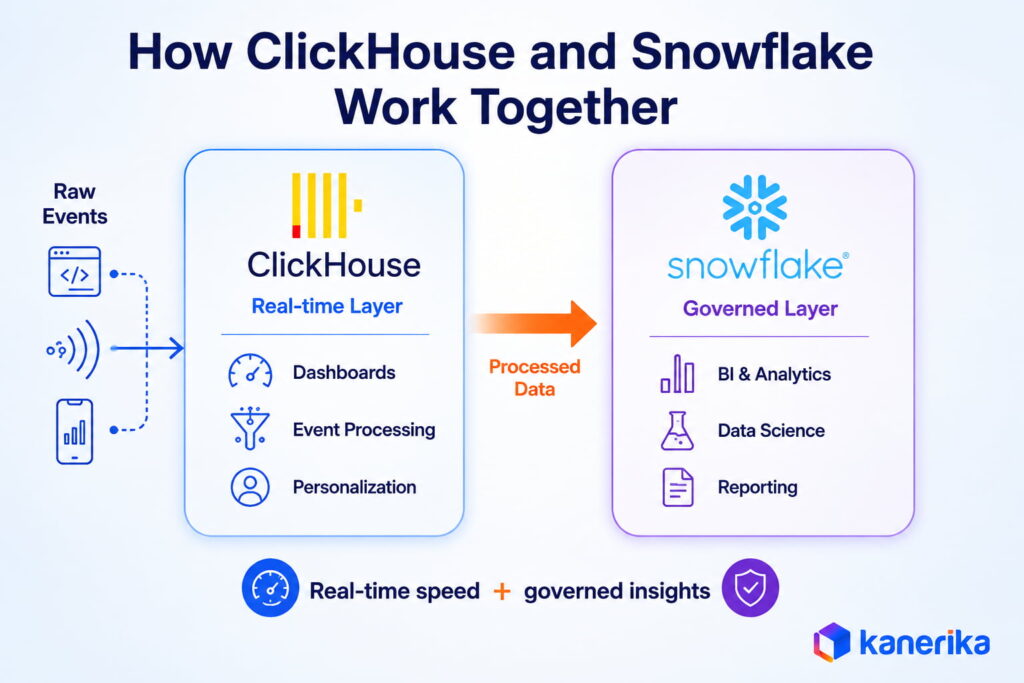
Most mature data teams end up running both. ClickHouse handles hot-path analytics where latency is the binding constraint, covering sub-second dashboards, event processing, and real-time personalization. Snowflake handles the governed data warehouse feeding business intelligence, data science, and cross-functional reporting.
In practice, raw events land in ClickHouse for real-time serving, while processed, enriched data flows into Snowflake for governed analytics, long-term storage, and cross-team access. The two platforms complement each other once the workload is partitioned correctly between them, a pattern Kanerika’s data engineering work reflects across enterprise clients. The platform question is rarely ClickHouse or Snowflake in isolation; it’s which workloads belong on which platform, and how data moves between them.
Migration Considerations
Most of Kanerika’s platform migration work maps to one of three paths, depending on which direction the workload is moving.
1. Moving From Snowflake to ClickHouse
The most common driver for a Snowflake-to-ClickHouse migration is cost at scale combined with latency requirements the warehouse model struggles to meet. The move has three distinct workstreams:
- Query rewriting: ClickHouse’s SQL dialect differs from standard SQL enough to require rewriting joins, aggregations, and some window function patterns.
- Schema redesign: the MergeTree ordering key sets physical sort order on disk and drives query performance, which requires modeling primary query patterns before loading data.
- Ingestion pipeline rebuild: ClickHouse’s insert model differs from Snowflake’s batch-oriented approach and needs a pipeline built specifically for it.
Kanerika’s FLIP platform accelerates the data-movement component of migrations like this, cutting migration effort by 50 to 60% and compressing complex timelines to roughly a 90-day delivery window.
2. Moving From ClickHouse to Snowflake
The typical driver for a ClickHouse-to-Snowflake migration is the operational load of managing a cluster at scale, paired with growing governance obligations that Snowflake’s native features address directly. This direction generally carries lower risk than the reverse, since Snowflake’s standard SQL accepts most analytical queries with minimal rewriting, and the managed platform absorbs the operational concerns that triggered the move.
3. Adding One Platform Alongside the Other
For teams running one platform and adding the other for specific workloads, the integration patterns are well established:
- Snowflake’s external tables can query data in object storage that also feeds ClickHouse, giving read access without duplicating data.
- Fivetran and Airbyte both support Snowflake as a destination and can feed parallel pipelines from the same source systems.
- The engineering work here is straightforward; the harder question is which system of record owns which data type once both platforms are live, and that design decision needs deliberate ownership from day one.
How Kanerika Helps With Platform Strategy and Snowflake Delivery
Kanerika is a Snowflake Select Tier Partner with data engineering delivery across Microsoft Fabric, Databricks, and Snowflake. Every platform engagement starts with a workload assessment that maps query patterns, concurrency requirements, data freshness needs, governance obligations, and team capacity against platform capabilities, before any technology commitment gets made.
The platform decision is an architecture decision first. Getting it wrong leads to a rebuild once the workload outgrows the choice. Getting it right compounds into years of efficiency on a foundation built for the data program.
Three areas where Kanerika’s platform work delivers directly:
- Workload assessment before platform selection: mapping the query patterns, ingestion volume, concurrency, and governance obligations of the program before recommending Snowflake, a complementary real-time layer, or a phased path between them.
- Migration execution: FLIP automates the data-movement component of platform moves, cutting manual migration effort by 50 to 60% and delivering complex migrations in roughly 90 days instead of multi-year timelines.
- Governance and data quality at the platform layer: configuring access controls, lineage tracking, masking policies, and data quality monitoring inside Snowflake before any analytics or AI workload runs against it.
Kanerika holds ISO 27001, ISO 27701, SOC 2 Type II, and CMMI Level 3 certifications, with 100+ enterprise clients and a 98% client retention rate.
A beverage manufacturer and distributor running bottling and distribution operations across multiple shareholder-owned facilities in North America ran analytics on a legacy SSAS and hybrid system setup. Hourly refresh cycles left teams working from outdated numbers, and scaling the environment got harder as data volume grew.
Challenge
Legacy SSAS and hybrid data systems caused frequent outages, high maintenance overhead, and limited scalability. Slow, hourly data refresh cycles restricted real-time visibility and delayed business decisions.
Solution
Kanerika migrated the environment from SSAS to a unified Snowflake architecture, improving scalability and system reliability. Automated data ingestion from ERP and third-party systems through Fivetran enabled near real-time analytics, and Power BI was integrated directly with Snowflake to simplify reporting and cut maintenance costs.
Results
- 3X quicker analytics delivery
- 60% reduction in manual data reconciliation
- 40% faster reporting across consolidated pipelines
- Quarterly reconciliation replaced by automated pipeline runs
Wrapping Up
ClickHouse and Snowflake serve genuinely different needs, and neither one is the default answer. ClickHouse can be faster and cheaper for continuously running, event-heavy workloads, but it stays a specialist tool most engineering teams reach for one problem at a time. Snowflake covers the far broader range of what enterprise data programs need day to day, from governance and ecosystem maturity to mixed workloads across teams.
The choice comes down to whether the primary constraint is query latency and cost, or managed convenience and governance maturity. For most enterprise data programs, the honest answer over time is both platforms working together, with ClickHouse handling the real-time serving layer and Snowflake handling the governed analytical warehouse.
Paying Too Much for Analytics at Scale?
Kanerika models your actual query workload against both platforms so the cost case is grounded in real numbers before you decide.
 Book a Meeting
FAQs
1. What is the main difference between ClickHouse and Snowflake?
ClickHouse is an open-source columnar OLAP database tuned for sub-second query performance on high-volume event data, and it requires engineering effort to operate well. Snowflake is a fully managed cloud data warehouse that handles diverse analytical workloads with minimal configuration, at a higher per-query compute price. ClickHouse prioritizes speed and cost efficiency; Snowflake prioritizes managed convenience and enterprise governance.
2. Is ClickHouse faster than Snowflake?
For real-time analytics on raw event data with high read concurrency, ClickHouse consistently delivers faster query times than Snowflake. On complex SQL with window functions, CTEs, and multi-table joins across structured data, the gap narrows and Snowflake handles the workload more predictably. The answer tracks the specific query pattern and data model, rather than a single universal benchmark.
3. Is ClickHouse cheaper than Snowflake?
For continuously running analytics workloads, ClickHouse runs roughly 4 times cheaper than Snowflake on comparable workloads, based on published benchmark data. That gap narrows considerably for intermittent workloads, where Snowflake warehouses pause between query bursts and self-hosted ClickHouse still carries hidden engineering costs. Snowflake’s capacity commitment pricing also cuts costs meaningfully relative to on-demand rates.
4. When should an enterprise choose Snowflake over ClickHouse?
Snowflake fits teams that value managed operations over raw cost optimization, workloads that mix BI reporting, data science, and ad-hoc analytics across multiple teams, and organizations that need cross-org data sharing or out-of-the-box compliance certifications like HIPAA and PCI DSS. It also fits teams where the engineering overhead of running a ClickHouse cluster would strain existing capacity.
5. When should an enterprise choose ClickHouse over Snowflake?
ClickHouse fits teams where query latency is the binding constraint, workloads involve real-time event data, log analytics, clickstream processing, or high-volume IoT telemetry, and continuous query execution would make Snowflake’s per-credit pricing expensive at scale. It also fits teams with the engineering capacity and appetite to tune and manage database infrastructure directly.
6. Can ClickHouse and Snowflake run together?
Yes, and most mature data teams end up running both. The standard pattern uses ClickHouse for hot-path analytics that need sub-second latency, and Snowflake for the governed data warehouse feeding business intelligence, data science, and cross-functional reporting. The two platforms complement each other once the workload is partitioned correctly between them.
7. What are the governance differences between ClickHouse and Snowflake?
Snowflake’s governance capabilities run considerably deeper out of the box. It ships Horizon Catalog for discovery and lineage, dynamic data masking, row-level security, Time Travel, and cross-cloud data sharing natively. ClickHouse offers role-based access control and masking policies but lacks a built-in equivalent to Snowflake’s catalog, Time Travel, or cross-organizational sharing, which carries the most weight for regulated industries with audit obligations.
8. How hard is a Snowflake-to-ClickHouse migration?
The migration involves rewriting queries for ClickHouse’s SQL dialect differences, redesigning the schema around MergeTree ordering keys for the primary query patterns, and building an ingestion pipeline that fits ClickHouse’s insert model. Tooling like FLIP accelerates the data-movement component, cutting migration effort by 50 to 60%. The schema and query rewriting work scales with the complexity of the existing data model.














