TL;DR
Snowflake Snowpipe is a serverless service that loads files into a table shortly after they land in cloud storage. It hears about new files from cloud event notifications, called auto-ingest, or from your own application through a REST API. Each pipe wraps one COPY INTO statement, and new rows are usually queryable within about a minute.
Since December 2025, every Snowflake edition pays a flat 0.0037 credits per GB loaded, with no warehouse or per-file charge. You watch it with SYSTEM$PIPE_STATUS, COPY_HISTORY and PIPE_USAGE_HISTORY. A scheduled COPY INTO is still the better pick when files arrive once a day or a warehouse is already running.
Key Takeaways
- Snowpipe loads files continuously on Snowflake-managed compute, so there is no warehouse to size, start or suspend.
- Auto-ingest reacts to S3, Google Cloud Storage or Azure events, while the REST API lets an application decide which files load and when.
- Billing is now a flat credit rate per GB, and compressed CSV or JSON is billed at its uncompressed size.
- A pipe remembers the files it loaded for 14 days, which blocks duplicates but also blocks reloading a fixed file under the same name.
- Production pipes need alerts on pending files, failed files, time since the last load and daily credits.
- Scheduled COPY INTO still wins for once-a-day drops, big historical backfills and loads that must succeed or fail as one transaction.
Watch on YouTube
Why Is Real-Time Data Important for Faster Decision-Making?
A short Kanerika take on when fresher data changes decisions, the question to answer before you switch a feed from scheduled loads to Snowpipe.
Why Not Just Run COPY INTO Every Five Minutes?
Why pay for a separate loading service when a Snowflake task can run COPY INTO every five minutes? For plenty of nightly feeds the honest answer is that you should not bother. But a scheduled COPY usually runs on a warehouse, and Snowflake bills a 60-second minimum every time a warehouse starts, whether one file arrived or none.
Run that schedule on an X-Small that suspends between runs and you pay for at least 288 minutes a day, or 4.8 credits. That holds even on a day when no file arrives. Snowflake Snowpipe turns the model around, because files load as they arrive and the bill follows the gigabytes instead of the clock. So the real decision comes down to how often your files arrive and how soon someone needs to query them.
What Is Snowflake Snowpipe?
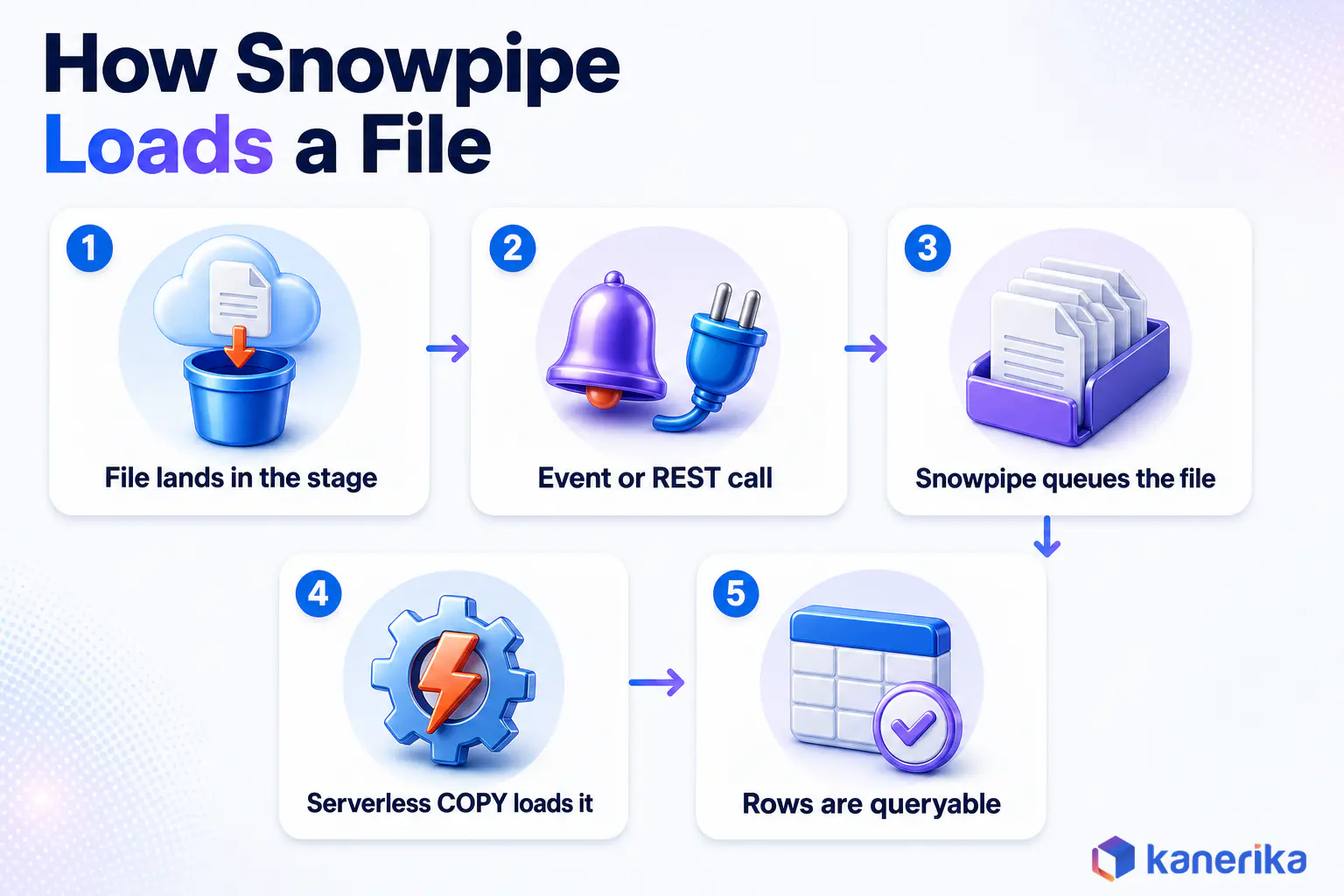
Snowflake Snowpipe is the platform’s continuous file-loading service, so you define a pipe once and stop scheduling loads. From then on, every new file that lands in its stage is queued and loaded on compute that Snowflake runs for you. The official Snowpipe overview describes new data as typically available within minutes, with most files loading within a minute of Snowpipe learning about them.
That makes Snowpipe a micro-batch tool rather than a streaming engine. It still works file by file, so the freshness you get depends on how often your source writes files. Our data ingestion guide maps the batch and real-time families, while the Snowflake data engineering overview shows where loading sits in a full pipeline.
Continuous File Loading on Serverless Compute
Serverless here means three practical things: no warehouse to pick, no load to schedule, and compute that scales with the number of queued files. You pay only for the data you load, which changes the economics for small, frequent feeds. Our Snowflake architecture explainer shows where this service layer sits.
Typical candidates include application logs written to S3 every minute and point-of-sale exports from hundreds of stores. Partner files that arrive at unpredictable hours fit too, as do IoT batches that a gateway flushes whenever its buffer fills. In each case the files already exist, they arrive continuously, and people want them in the warehouse soon after they land.
Case Study
40% Faster Reporting Cycles With Automated Ingestion Into Snowflake
A North American beverage manufacturer and distributor moved from SSAS to Snowflake with automated ERP ingestion, cutting manual reconciliation by 60%.
Read the Case Study →
When Scheduled COPY INTO Is the Better Answer
Snowpipe is the wrong tool for a single nightly extract, because one COPY on a warehouse you already pay for costs almost nothing extra. It also fits poorly when a load must succeed or fail as one unit. Bulk COPY runs in a single transaction and aborts on the first error by default, while Snowpipe skips bad files and keeps going.
Large historical backfills belong to bulk COPY too, since you control the warehouse size and can finish the job in one pass. And if the partner sending files is also on Snowflake, Snowflake data sharing can replace the file feed altogether, so nothing needs loading.
How Does Snowpipe Work, From File Landing to Queryable Rows?
Every pipe watches one location, which is the stage URL plus an optional path. When a file shows up there, Snowpipe queues it, runs the COPY on managed compute and commits the rows. It then records the file in the pipe’s load history, whether the load worked or not.
The Four Moving Parts: Stage, Pipe, Queue, Table
The stage points at the files, usually an external stage on S3, Google Cloud Storage or Azure with a storage integration for access. Our explainer on Snowflake external tables covers the same stage and integration objects from the query side. The pipe is a named schema object that holds exactly one COPY INTO statement, which sets the source, target, file format and transformations.
Snowflake manages the queue internally, so you never touch it. The target table is an ordinary table, and our guide to Snowflake CREATE TABLE explains which table type suits a landing zone. You cannot edit a pipe once it exists, so any change to its COPY statement means recreating it.
Load Metadata and the 14-Day Duplicate Guard
Each pipe keeps a record of every file it processed in the last 14 days, keyed on path and file name. Snowpipe ignores any staged file that matches that record, even if the file changed. Because failed files are recorded too, a corrected file staged again under the same name will quietly be skipped.
Bulk COPY keeps its own, separate history on the target table for 64 days. Neither method checks the other’s record. So loading one folder with both a pipe and a scheduled COPY reliably creates duplicate rows.
Load Order and Transactions
Snowpipe generally loads older files first, but several processes share one queue, so order is never guaranteed. If downstream logic depends on order, carry a timestamp in the data and sort on it. Snowflake streams can then pick up the new rows for later processing.
Snowpipe also combines or splits loads into one or more transactions, based on the number and size of rows in each file. Bulk COPY, by contrast, commits each statement as a single transaction.
Snowpipe vs Bulk COPY INTO: Which Should Load Your Files?
Both methods run the same COPY INTO logic, so the difference lies in who triggers the load, who supplies the compute and how errors behave. The table below sets them side by side for a typical file feed.
Table 1: Snowpipe vs scheduled bulk COPY INTO
| Factor | Snowflake Snowpipe | Scheduled COPY INTO |
|---|
| What starts a load | Cloud event notification or a REST API call | A user, a task or an orchestrator |
| Compute | Serverless, managed by Snowflake | A virtual warehouse you size and run |
| Billing | 0.0037 credits per GB loaded | Warehouse credits for running time, 60-second minimum per start |
| Typical freshness | About a minute after the file is detected | Whatever the schedule interval is |
| Bad file default | Skip the file, keep loading (SKIP_FILE) | Abort the statement (ABORT_STATEMENT) |
| Transactions | Split or combined across files | One transaction per statement |
| Duplicate guard | Pipe history, 14 days | Table history, 64 days |
| Best fit | Steady or unpredictable file arrivals | Daily drops, backfills, all-or-nothing loads |
When the source produces rows or events rather than files, Snowpipe Streaming writes rows straight into tables with latency as low as five seconds. Snowflake positions it as a complement to Snowpipe for sub-minute row feeds, while file feeds stay on classic Snowpipe. For managed connectors to databases and SaaS apps, see our Snowflake Openflow guide instead.
Kanerika Service
Data Integration Services
Kanerika designs ingestion for files, databases and SaaS sources, choosing between Snowpipe, scheduled loads and managed connectors feed by feed.
Explore Data Integration
Snowpipe Auto-Ingest vs the REST API
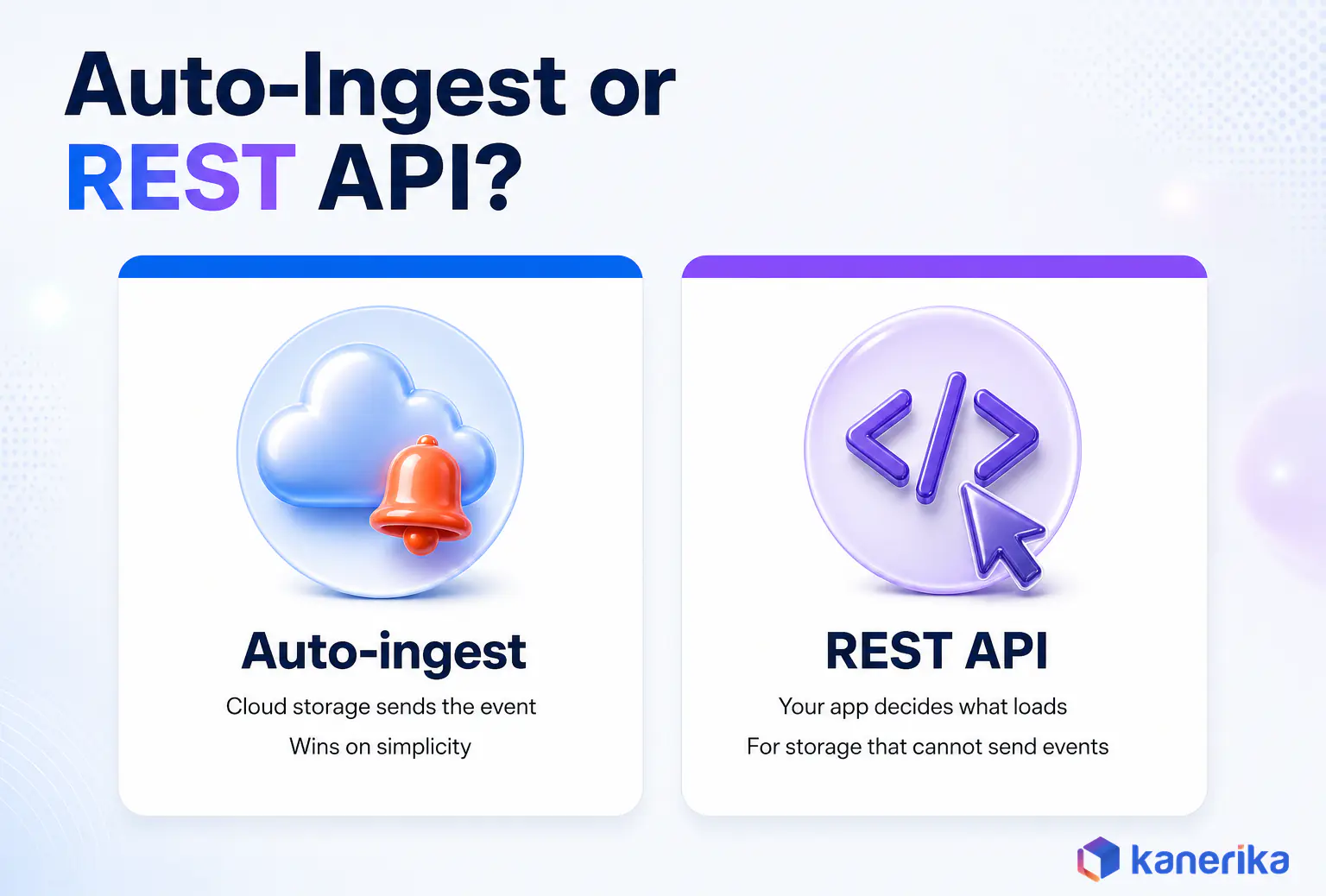
Snowpipe learns about new files in one of two ways. Either your cloud storage sends an event notification, or your application calls a REST endpoint with a list of file paths. Both feed the same queue and both bill the same way, so the choice comes down to control and setup.
Auto-Ingest Through Cloud Event Notifications
Auto-ingest is the default for files landing in external cloud storage, because it needs no code once the notification path is wired. You set AUTO_INGEST = TRUE on the pipe and point the storage service’s object-created events at Snowflake. The wiring differs by cloud, as the table shows.
Table 2: Auto-ingest notification path by cloud
| Storage | Notification service | Snowflake object involved |
|---|
| Amazon S3 | S3 event notifications to Amazon SQS, or via SNS or EventBridge | SQS queue that Snowflake creates and manages |
| Google Cloud Storage | Google Cloud Pub/Sub | Notification integration |
| Azure Blob or Data Lake Storage Gen2 | Azure Event Grid plus a storage queue | Notification integration |
On AWS, Snowflake creates the SQS queue itself, and the setup steps follow the standard Amazon S3 event notifications flow. Google and Azure need you to create the messaging resources first, following Pub/Sub notifications for Cloud Storage or the Azure Blob Storage Event Grid schema.
The REST API for Application-Controlled Loads
With the REST API, your application stages files and then tells a named pipe which ones to load. One call to insertFiles can queue up to 5,000 files. Authentication uses a key-pair JSON Web Token or workload identity federation, and Snowflake ships Java and Python ingest SDKs that build the requests for you.
Picking a Trigger
Choose the REST API when your storage cannot send events, for example S3-compatible storage or a bucket whose notification settings you cannot change. It also fits files sitting in a named internal stage or table stage. Automated loading from internal stages is still a preview limited to AWS-hosted accounts.
The REST API is also the safer choice when your application writes a file in several steps or validates a batch before releasing it. Auto-ingest loads a file the moment storage reports it, which can be too early. Otherwise, auto-ingest wins on simplicity.
How to Set Up Snowpipe Auto-Ingest on Amazon S3
The sequence below loads JSON order files from an S3 prefix into a raw table. Names are placeholders, and an administrator with CREATE INTEGRATION rights handles the first step.
Step 1: Create the Storage Integration and Stage
A storage integration lets Snowflake assume an IAM role, so no keys are stored in the stage. After you create it, DESC INTEGRATION shows the IAM user ARN and external ID that your AWS admin adds to the role’s trust policy.
CREATE STORAGE INTEGRATION s3_orders_int
  TYPE = EXTERNAL_STAGE
  STORAGE_PROVIDER = 'S3'
  ENABLED = TRUE
  STORAGE_AWS_ROLE_ARN = 'arn:aws:iam::123456789012:role/snowflake-orders'
  STORAGE_ALLOWED_LOCATIONS = ('s3://acme-landing/orders/');

DESC INTEGRATION s3_orders_int;   -- copy STORAGE_AWS_IAM_USER_ARN and STORAGE_AWS_EXTERNAL_ID

CREATE STAGE raw.orders_stage
  URL = 's3://acme-landing/orders/'
  STORAGE_INTEGRATION = s3_orders_int;
Step 2: Create the Target Table and File Format
Land raw data first and model it later, following the ELT approach. A VARIANT column plus a file-name column keeps the pipe simple and makes schema drift a downstream problem instead of a loading failure. Row timestamps record when each row actually committed, which Snowflake recommends over a CURRENT_TIMESTAMP default that can read hours early.
CREATE FILE FORMAT raw.json_ff TYPE = 'JSON' STRIP_OUTER_ARRAY = TRUE;

CREATE TABLE raw.orders (
  payload      VARIANT,
  file_name    STRING
) ROW_TIMESTAMP = TRUE;   -- per-row commit time, read as METADATA$ROW_LAST_COMMIT_TIME
Step 3: Create the Pipe With AUTO_INGEST = TRUE
The pipe wraps the COPY statement. METADATA$FILENAME records which file each row came from, which pays off later during troubleshooting.
CREATE PIPE raw.orders_pipe
  AUTO_INGEST = TRUE
AS
  COPY INTO raw.orders (payload, file_name)
  FROM (SELECT $1, METADATA$FILENAME FROM @raw.orders_stage)
  FILE_FORMAT = (FORMAT_NAME = 'raw.json_ff');

SHOW PIPES LIKE 'ORDERS_PIPE' IN SCHEMA raw;   -- note the notification_channel ARN
Step 4: Point S3 Events at the Pipe
In the S3 console, add an event notification on the bucket for object-created events under the orders/ prefix. Set the destination to the SQS queue ARN from the notification_channel column. Filter by prefix and suffix so that unrelated files never generate events, which Snowflake recommends to cut cost, noise and latency.
Step 5: Drop a Test File and Verify
Upload one small file, wait a minute, and then check the pipe and the table. A RUNNING state with a pending count of zero and a fresh row in COPY_HISTORY means the path works end to end.
SELECT SYSTEM$PIPE_STATUS('raw.orders_pipe');

SELECT file_name, status, row_count, first_error_message, last_load_time
FROM TABLE(INFORMATION_SCHEMA.COPY_HISTORY(
       TABLE_NAME => 'raw.orders',
       START_TIME => DATEADD('hour', -1, CURRENT_TIMESTAMP())));
Step 6: Lock Down the Roles
Give the role that owns the pipe USAGE on the database, schema, stage and named file format, plus SELECT and INSERT on the target table. Operators who only pause, resume or refresh the pipe need OPERATE, and monitoring roles need MONITOR. Our Snowflake security guide explains how to fit these grants into a wider role hierarchy.
Checklist
Snowflake Checklist
Review cost, performance, storage, security and governance across your Snowflake account, including the roles and grants behind your pipes.
Get the Checklist →
Loading Files With the Snowpipe REST API
The REST flow suits applications that own the moment a file is ready. Your service writes the file to the stage, calls insertFiles with its path, and Snowpipe queues it on the same serverless compute as auto-ingest.
curl --request POST \
  "https://myorg-myaccount.snowflakecomputing.com/v1/data/pipes/RAW.ORDERS_PIPE/insertFiles?requestId=$(uuidgen)" \
  --header "Authorization: Bearer ${JWT}" \
  --header "Content-Type: application/json" \
  --data '{"files": [{"path": "2026/10/09/orders_0001.json.gz"}]}'
Why a 200 Response Is Not a Load
A 200 from insertFiles only means Snowpipe accepted the file into its queue. The load can still fail on a parsing error, a missing column or a permissions problem. Teams that log the 200 as success end up with silent gaps, so treat the call as a hand-off and confirm the outcome separately.
Checking Results and Retrying Safely
Poll insertReport for files submitted in the last 10 minutes, since it returns up to the 10,000 most recent results. For older submissions, use loadHistoryScan with a narrow time range, because the endpoint is rate limited. COPY_HISTORY in SQL then gives the first error message for any failed file.
Retries are safe within the 14-day window, since the pipe ignores paths it has already processed. That same rule means a corrected file needs a new name before you resubmit it.
How Much Does Snowflake Snowpipe Cost?
Snowflake Snowpipe now charges a fixed number of credits for every gigabyte it loads. The December 8, 2025 release note sets that rate at 0.0037 credits per GB, with no warehouse charge and no per-file fee. Business Critical and VPS accounts moved to this model on August 1, 2025, and Standard and Enterprise followed in December.
Many ranking guides still describe the old formula of per-second compute plus 0.06 credits per 1,000 files. If you budget from those pages, you will overweight file counts and underweight data volume.
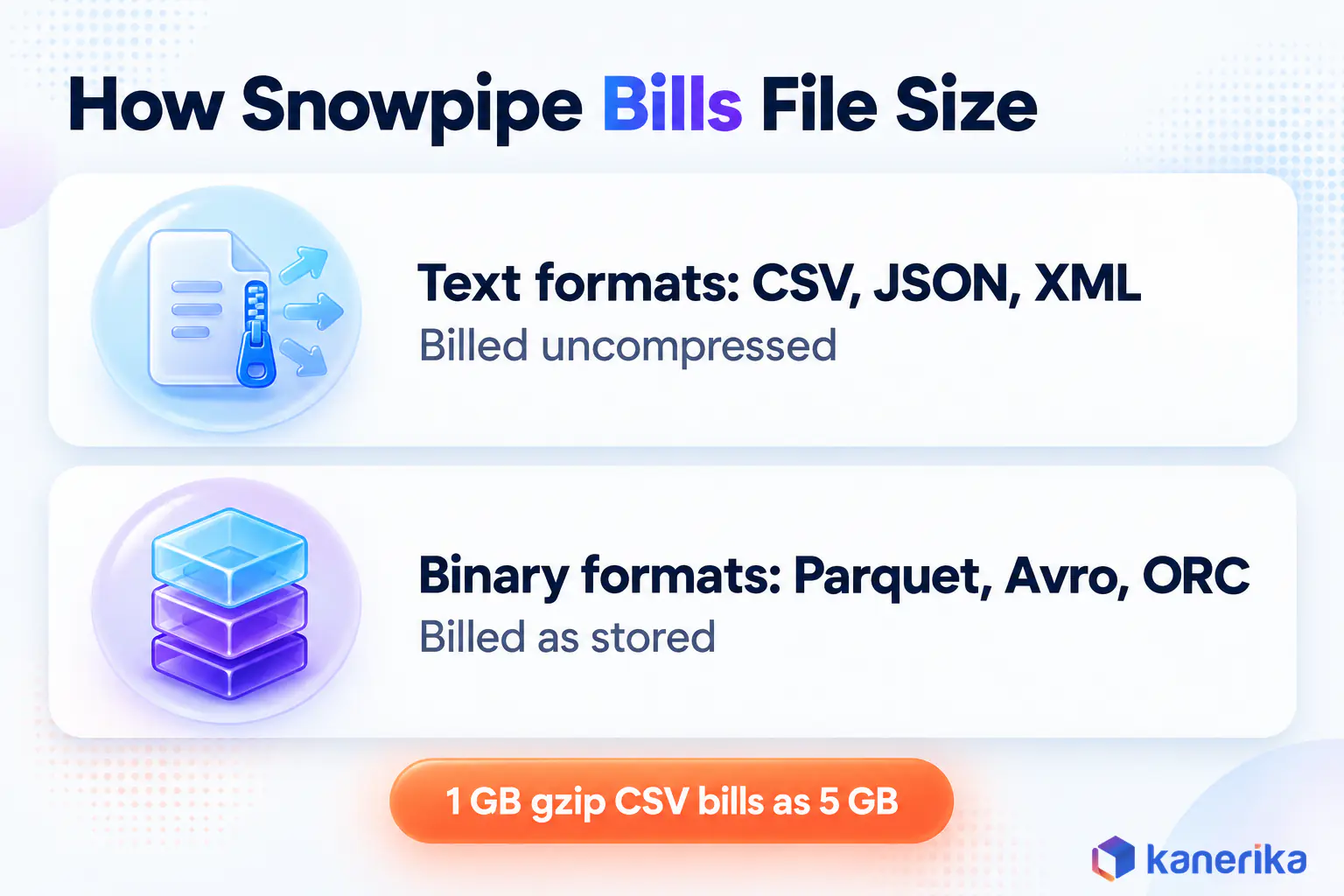
Why Compressed CSV Bills at Full Size
The billed size depends on the file type, because text formats such as CSV, JSON and XML bill at their uncompressed size. Binary formats such as Parquet, Avro and ORC bill at their size in storage instead. In the Snowpipe costs page example, a gzip CSV of 1 GB on disk and 5 GB uncompressed bills as 5 GB.
That rule makes file format a cost lever. Moving a high-volume feed from gzip CSV to Parquet can cut the billed bytes several times over, without touching the pipe.
Estimating a Monthly Bill
Add up the billed size of a typical day, multiply by the rate and then by your contract price per credit. Snowflake’s own worked example uses 200 GB of gzip CSV that expands to 1,000 GB, plus 100 GB of Parquet.
Table 3: Worked Snowpipe cost estimate (Snowflake’s sample workload)
| Input | Size in storage | Billed size | Credits per day |
|---|
| Gzip CSV files | 200 GB | 1,000 GB (uncompressed) | 3.70 |
| Parquet files | 100 GB | 100 GB (observed) | 0.37 |
| Total | 300 GB | 1,100 GB | 4.07 (about 122 per 30-day month) |
Now compare that with the hook’s five-minute schedule. An X-Small that resumes 288 times a day bills at least 4.8 credits, which buys roughly 1,300 billed GB of Snowpipe loading. For gzip CSV that expands five times, that is closer to 260 GB on disk. A serverless task avoids the warehouse minimum, though it still bills compute for every run. If your warehouse already runs all day for other work, the extra cost of a COPY is smaller, so check that before deciding. Our Snowflake cost optimization guide covers the warehouse side of that comparison.
Tracking Real Charges With PIPE_USAGE_HISTORY
The Account Usage view keeps 365 days of pipe usage and can lag by up to three hours. Group by pipe and day to see which feed drives spend.
SELECT pipe_name,
       DATE_TRUNC('day', start_time)             AS usage_day,
       SUM(credits_used)                         AS credits,
       SUM(bytes_billed) / POWER(1024, 3)        AS billed_gb
FROM SNOWFLAKE.ACCOUNT_USAGE.PIPE_USAGE_HISTORY
WHERE start_time >= DATEADD('day', -30, CURRENT_TIMESTAMP())
GROUP BY 1, 2
ORDER BY usage_day DESC, credits DESC;
When Snowpipe Costs More Than a Scheduled COPY
Snowpipe loses on cost when volumes are very large but freshness barely matters, such as a 5 TB daily dump that nobody reads before morning. It also loses when a warehouse is already warm all day for transformations. In those cases a scheduled COPY on the running warehouse adds little, while Snowpipe bills every gigabyte.
How to Monitor Snowpipe in Production
A pipe that worked on day one can stop loading quietly when someone edits the bucket’s events, rotates a role or drops a file format. Monitoring has to catch that within minutes, and Snowflake gives you three native signals for it. For the platform-wide view, our data pipeline monitoring tools comparison and the Datadog Snowflake integration walkthrough cover external dashboards.
Pipe Health With SYSTEM$PIPE_STATUS
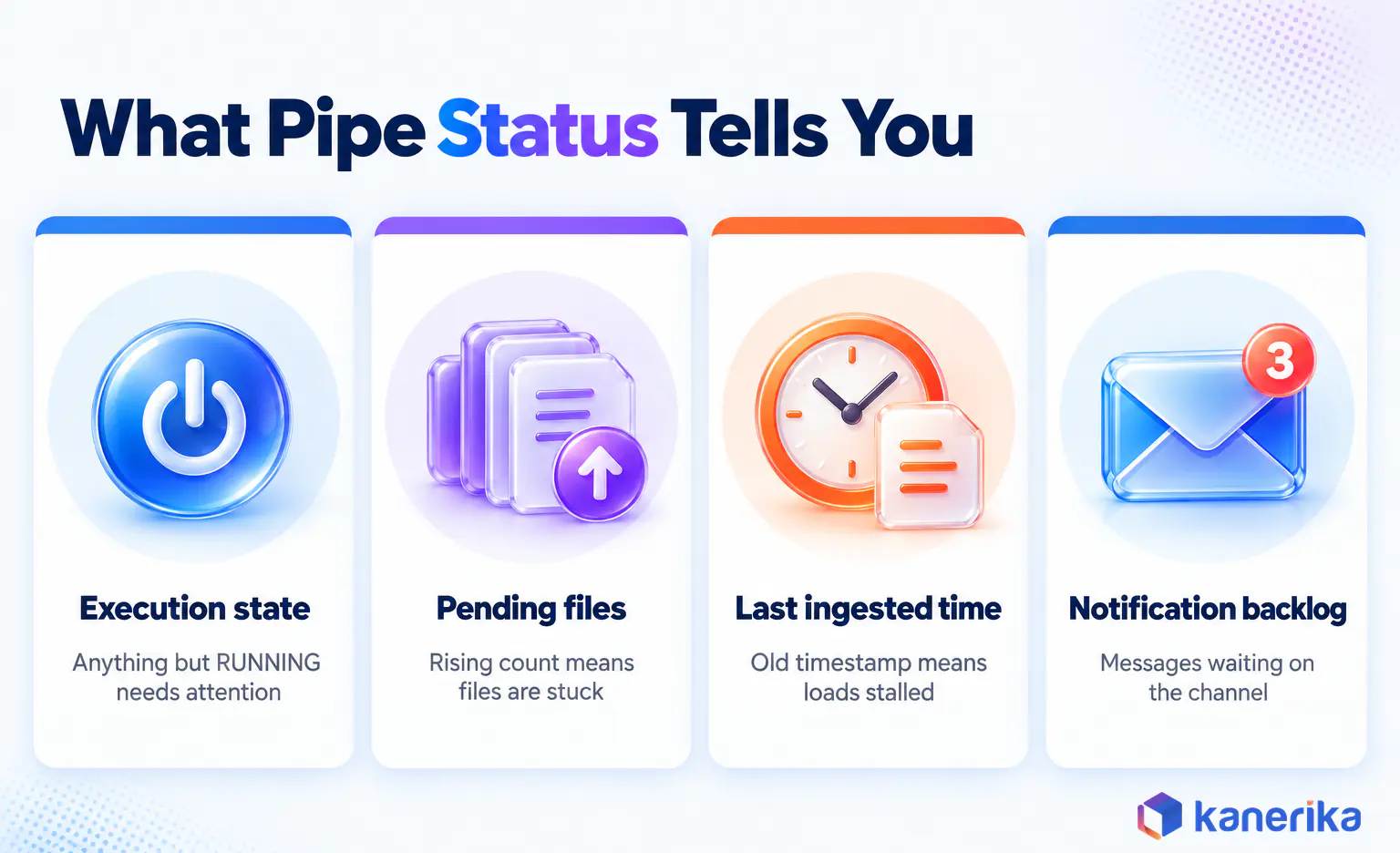
SYSTEM$PIPE_STATUS returns JSON with the execution state, the pending file count and the timestamp of the last ingested file. It also shows how many notification messages are waiting on the channel. Anything other than RUNNING needs attention, and states such as STOPPED_STAGE_ALTERED tell you exactly what broke.
A rising pendingFileCount with an old lastIngestedTimestamp means files are arriving but not loading. That answers the common question of how many files are queued, and it is usually the first alarm worth wiring.
File Outcomes With COPY_HISTORY
The COPY_HISTORY table function covers 14 days with low delay and needs a warehouse to query. The COPY_HISTORY view in Account Usage keeps 365 days but can run up to two hours behind. Use the function for alerts and the view for trend reports.
Error Notifications
Set ERROR_INTEGRATION on the pipe and Snowpipe publishes a notification whenever files fail to load. Route those messages to the same on-call channel as your other data alerts.
The topic must live on the cloud that hosts your Snowflake account, whatever cloud the files sit on. That means an SNS topic on AWS, a Pub/Sub topic on Google Cloud or an Event Grid custom topic on Azure. Notifications do not cover stalled pipes or files that never triggered an event, so keep the status checks below.
The Six Numbers Worth Alerting On
Table 4: Snowpipe production monitoring signals
| Signal | Where it comes from | Starting threshold to tune |
|---|
| Pipe state | SYSTEM$PIPE_STATUS executionState | Anything other than RUNNING |
| Pending files | pendingFileCount | Growing across three checks in a row |
| Time since last load | lastIngestedTimestamp | Longer than the feed’s normal gap |
| Failed files | COPY_HISTORY status = Load failed or Partially loaded | Any failure on a critical feed |
| End-to-end latency | METADATA$ROW_LAST_COMMIT_TIME minus the file’s landing time | Above your freshness promise |
| Daily credits | PIPE_USAGE_HISTORY | More than 30 percent above the trailing average |
Treat the thresholds as starting points and tune them to each feed’s rhythm, then fold them into your wider data observability setup. Pair them with row-level checks from our Snowflake data quality guide, because a file can load cleanly and still carry bad data.
Talk to Kanerika
Talk to a Snowflake Engineer About Your Pipes
Walk through your feeds, latency targets and Snowpipe spend with Kanerika’s Snowflake team and get a monitoring plan you can run.
Book a Session →
Troubleshooting Snowpipe When Files Stop Loading
When a file goes missing, resist the urge to recreate the pipe. Walk the file through each checkpoint instead, because the first failed check tells you where to fix it.
Walk the File Through Four Checkpoints
- Did the event fire? Check the bucket’s notification rules, prefix and suffix filters, and whether numOutstandingMessagesOnChannel moves when you upload a test file.
- Did the file reach the queue? Compare the stage path with the pipe’s FROM path, and confirm the role can still read the stage.
- Was a load attempted? Look for the file in COPY_HISTORY, and check that the pipe is not paused or stopped.
- Did it load cleanly? Read first_error_message for parsing, column or file-format errors, then fix the source or the format.
Most failures stop at the first or second checkpoint, usually after a bucket policy or event rule changed. Query-level detail for the COPY itself sits in Snowflake query history, which helps when the error message alone is vague.
Recovering Missed Files With ALTER PIPE REFRESH
ALTER PIPE … REFRESH queues staged files that the pipe has not loaded, checking both the pipe’s and the table’s load history. It only reaches files staged in the last seven days, and Snowflake says it is meant for short-term repair rather than routine use.
ALTER PIPE raw.orders_pipe REFRESH
  PREFIX = '2026/10/08/'
  MODIFIED_AFTER = '2026-10-08T00:00:00-07:00';
For anything older than seven days, run a one-off bulk COPY on a warehouse with an explicit file list or pattern. Then confirm the row counts before closing the incident.
Stale Pipes, Recreated Pipes and Reloads
A paused pipe holds queued files for up to 14 days, and after that it becomes stale and needs SYSTEM$PIPE_FORCE_RESUME. Recreating a pipe with CREATE OR REPLACE wipes its load history, so an unfiltered refresh afterwards can reload every file staged in the last seven days. To reload a single corrected file, stage it under a new name or load it once with bulk COPY.
Snowpipe Best Practices for Enterprise Teams
The setup steps get a pipe running. The habits below keep it boring in production, which is exactly what you want from a loader. Each one comes from a failure mode covered earlier, and our data pipeline optimization guide applies the same thinking across tools.
- Size files for throughput. Aim for roughly 100 to 250 MB compressed, and when data arrives slowly, write a file about once a minute. Smaller, more frequent files do not guarantee lower latency.
- Give each feed its own path and pipe. Overlapping paths let two pipes load the same file, and per-feed pipes make cost and errors easy to attribute.
- Filter events at the source. Prefix and suffix rules stop temporary or unrelated files from creating notifications.
- Clean up with REMOVE or lifecycle rules. Pipes cannot use PURGE, so expire loaded files with storage lifecycle rules after the 14-day window.
- Set alert thresholds before go-live. Agree on acceptable latency, backlog and failure rates with the people who consume the data.
- Review cost and format quarterly. A feed that grew from megabytes to terabytes may now be cheaper as Parquet, or on a scheduled COPY.
Settling formats before files reach a loader is often the cheapest fix. On a connected-vehicle telemetry platform, Kanerika extended FLIP to convert JSON, Excel and Kafka messages into the structures each customer needed. That message-translation work, not a Snowflake load, cut data integration time by 24%.
Case Study
24% Less Data Integration Time for a Telemetry Platform
FLIP translated JSON, Excel and Kafka messages into each customer’s format for a connected-vehicle platform, lifting operational efficiency by 27%.
Read the Case Study →
Common Snowpipe Mistakes to Avoid
The same handful of errors shows up across most Snowpipe incidents. Each one looks harmless in a test account and expensive in production.
- Loading one folder with both a pipe and a scheduled COPY, which creates duplicates.
- Logging a REST 200 as a completed load.
- Budgeting with the retired per-file pricing.
- Recreating a pipe and then refreshing it without checking which files it will reload.
- Watching row counts only, so a stalled pipe looks like a quiet day.
One more design point sits outside the pipe. Snowpipe should land raw data, and the shaping belongs downstream in Snowflake dynamic tables or SQL models, because pipe transformations cannot filter, join or aggregate.
How Kanerika Builds Continuous Ingestion on Snowflake
Kanerika is a Snowflake Select Tier Partner, and its data engineers treat ingestion as an operating problem as much as a build task. Engagements start with an inventory of every feed, covering arrival pattern, format, volume and how fresh each consumer really needs it. That inventory decides, feed by feed, whether Snowpipe, a scheduled COPY or a streaming path fits.
Next comes the design, which sets one pipe per feed with its own path, file formats chosen with billed bytes in mind, and least-privilege roles. The build then adds error integrations, the six monitoring signals and runbooks for refresh, reload and stale-pipe recovery. Finally, the team hands over dashboards that show credits and latency per feed, so owners can see when a feed outgrows its design.
For a beverage manufacturer and distributor in North America, Kanerika replaced a legacy SSAS setup with a unified Snowflake platform. The team also automated ingestion from ERP and third-party systems using Fivetran. The client reported 40% faster reporting cycles, 3X quicker analytics delivery and 60% less manual reconciliation, as described in the Snowflake migration case study.
Planning a new ingestion layer, or cleaning up one that grew by accident? Kanerika’s Snowflake services and data engineering services teams can review your feeds and recommend a design for each one.
Kanerika Service
Snowflake Consulting and Engineering
As a Snowflake Select Tier Partner, Kanerika plans, builds and runs ingestion, transformation and cost controls on Snowflake.
Explore Snowflake Services
Wrapping Up
Snowflake Snowpipe answers a narrow question well. When files land often and someone needs them soon, it loads them within about a minute, on compute you never manage.
Set it up with auto-ingest unless your application must control timing. Then watch the pipe status and copy history, and pick file formats with the bill in mind. And when files arrive once a day, or a warehouse is already running, a scheduled COPY INTO is still the cheaper and simpler answer.
Frequently Asked Questions
What is Snowpipe in Snowflake?
Snowpipe is Snowflake’s continuous file-loading service. You create a pipe that wraps one COPY INTO statement, and every new file that lands in the pipe’s stage is queued and loaded into a target table on compute Snowflake manages. New rows are usually queryable within about a minute, and there is no warehouse to size or schedule.
How does Snowflake Snowpipe work?
Snowpipe learns about a new file from a cloud storage event or a REST API call, adds it to the pipe’s queue, and runs the pipe’s COPY INTO statement on serverless compute. It then records the file in a 14-day load history, which stops the same path and file name from loading twice.
What is the difference between Snowpipe auto-ingest and the REST API?
Auto-ingest reacts to event notifications from Amazon S3, Google Cloud Storage or Azure, so no code is needed once it is wired. The REST API lets an application submit specific file paths when it decides they are ready, and it also works with named internal stages and storage that cannot send events.
How much does Snowpipe cost?
Snowpipe charges a fixed rate of 0.0037 credits per GB loaded in every edition, with no warehouse time and no per-file fee. Text files such as CSV and JSON bill at their uncompressed size, while Parquet, Avro and ORC bill at their stored size. Multiply billed gigabytes by the rate and your credit price.
How long does Snowpipe take to load data?
Snowpipe is designed to load a file within about a minute after it learns the file exists, although Snowflake does not guarantee latency. Very large files, heavy transformations or a backlog of queued files take longer. Writing files of roughly 100 to 250 MB compressed, or one file per minute for slow sources, keeps latency steady.
How do you check Snowpipe status and load history?
Run SYSTEM$PIPE_STATUS to see the execution state, pending file count and last ingested timestamp. Query the COPY_HISTORY table function for 14 days of file outcomes with error messages, or the COPY_HISTORY view for 365 days. PIPE_USAGE_HISTORY then shows credits and billed bytes per pipe, which helps with cost tracking and monthly reviews.
How do you reload missing or failed files in Snowpipe?
Use ALTER PIPE with REFRESH to queue files staged in the last seven days that the pipe has not loaded. For older files, run a one-off bulk COPY on a warehouse. A corrected file staged again under the same name is skipped because of the pipe’s 14-day history, so rename it before reloading.
What is the difference between Snowpipe and Snowpipe Streaming?
Snowpipe loads files that already sit in a stage, in micro-batches that usually land within a minute. Snowpipe Streaming writes rows directly from applications or connectors without staging files, with latency as low as five seconds. Pick file-based Snowpipe when data already arrives as files, and streaming only for sub-minute row feeds.
Can Snowpipe load files from an internal stage?
Yes, through the REST API, which works with named internal stages and table stages on any cloud. Automated loading from internal stages is still a preview feature available only for AWS-hosted accounts. Snowpipe cannot load from user stages or temporary stages, so use a named stage for any continuous feed you plan to run.
Why is my Snowpipe not loading files?
Check four points in order. Confirm the storage event fired, the file path matches the pipe’s stage path, a load was attempted in COPY_HISTORY, and the load had no parsing or column errors. Most failures trace back to a changed bucket event rule, a revoked role grant, or a paused or stale pipe.














