TL;DR
Enterprise AI architecture is the shared design that lets a company run many AI applications safely on one set of data, models, controls, and infrastructure. It usually has eight layers, from the data foundation up to the compute that runs the models. Two concerns cut across every layer, which are security and governance on one side and observability on the other.
Most teams pick one main pattern per workload, such as retrieval-augmented generation (RAG), fine-tuning, or agents. The best designs buy commodity parts like foundation models and build the parts that hold their own business context. Getting the shared layers right early is what lets the second and tenth AI use case ship faster than the first.
Key Takeaways
- Enterprise AI architecture is a reusable stack of eight layers that every AI use case shares.
- Security, governance, and observability run across every layer through a shared control plane.
- AI-ready data, with metadata, permissions, and lineage attached, decides most of the answer quality.
- RAG handles changing knowledge, fine-tuning handles style and format, and agents handle multi-step work.
- Buy foundation models and GPU capacity, and build the retrieval, workflows, and evaluation sets that carry your context.
- A phased roadmap that turns the first use case into shared services is what makes AI scale.
Watch on YouTube
Can LLM Gateways Make Enterprise AI Safer?
Kanerika explains how an LLM gateway sits in front of every model call to enforce identity, budgets, and policy, the control-plane idea this guide builds on.
The Pilot That Worked Until Everyone Else Showed Up
A product team builds a document assistant on a single foundation model API in six weeks. It answers questions about internal policies, the demo goes well, and the steering committee asks for a rollout to the whole company.
Then the real questions arrive. For example, security wants to know which employee can see which document through the assistant, and finance wants to know why the monthly model bill tripled after the rollout. Meanwhile, three other teams have started their own assistants on different models with different vector stores, and nobody can say which answer came from which source.
None of those problems live in the model. Instead, they live in the parts around it, and that surrounding design is what enterprise AI architecture means in practice.
What Is Enterprise AI Architecture?
Enterprise AI architecture is the blueprint for how an organization’s data, models, retrieval systems, agents, integrations, controls, and infrastructure fit together so AI applications can be built and run at scale. It defines shared layers and standards that every AI use case reuses, instead of each team wiring its own stack. Kanerika’s enterprise AI guide covers the adoption and ROI side, and this guide covers the design.
The easiest way to understand it is by what it is not. It is not a single product, because an enterprise AI platform is something you buy, while the architecture is the design that decides where that platform sits and what surrounds it. It is also broader than AI agent architecture, which covers the internals of one agent, such as its planner, memory, and tools. The runtime that hosts those agents is covered separately in our guide to AI agent infrastructure.
Traditional enterprise architecture, the discipline behind frameworks such as TOGAF, maps business capabilities to applications, data, and technology. However, enterprise AI architecture sits inside that discipline and adds what classic EA never had to handle. For example, that includes probabilistic outputs, models that change underneath you, token-based costs, and software that can take actions on its own. For the generative AI side, including the request lifecycle and the four patterns, see our guide to generative AI architecture.
The Enterprise AI Reference Architecture: Eight Layers, Two Planes
A reference architecture is a template that repeats across use cases. Therefore, the version below merges what AWS, Microsoft, and the other leading references describe with what holds up in Kanerika’s delivery work, and it has eight layers. For a function-by-function view of where these patterns pay off, see our guide to enterprise AI use cases.
- Data foundation. Pipelines, storage, quality checks, lineage, and the semantic context that turns raw tables and documents into AI-ready data.
- Model layer. Foundation models, small language models, and domain models, plus the routing that decides which one handles a request.
- Retrieval and knowledge. Indexes, vector and keyword search, rerankers, and knowledge graphs that ground answers in company data.
- Orchestration and agents. The logic that plans multi-step work, calls tools, and decides when a human must approve.
- Integration. APIs, events, and connectors that let AI read from and write to ERP, CRM, ticketing, and data platforms.
- Security and governance. Identity, data protection, guardrails, policy, and audit evidence.
- Observability and LLMOps. Tracing, evaluation, cost tracking, and the release process for prompts, models, and indexes.
- Infrastructure and compute. GPUs, CPUs, serving engines, networking, and the cloud or on-premises estate underneath it all.
The Data Plane and the Control Plane
In the diagram below, layers six and seven appear as vertical rails because they touch every other layer.
The layers split into two planes. On one side, the data plane does the work, meaning pipelines, indexes, and model inference. On the other side, the control plane governs the work, meaning the AI gateway, identity, policy, and telemetry that every request passes through no matter which application sent it.
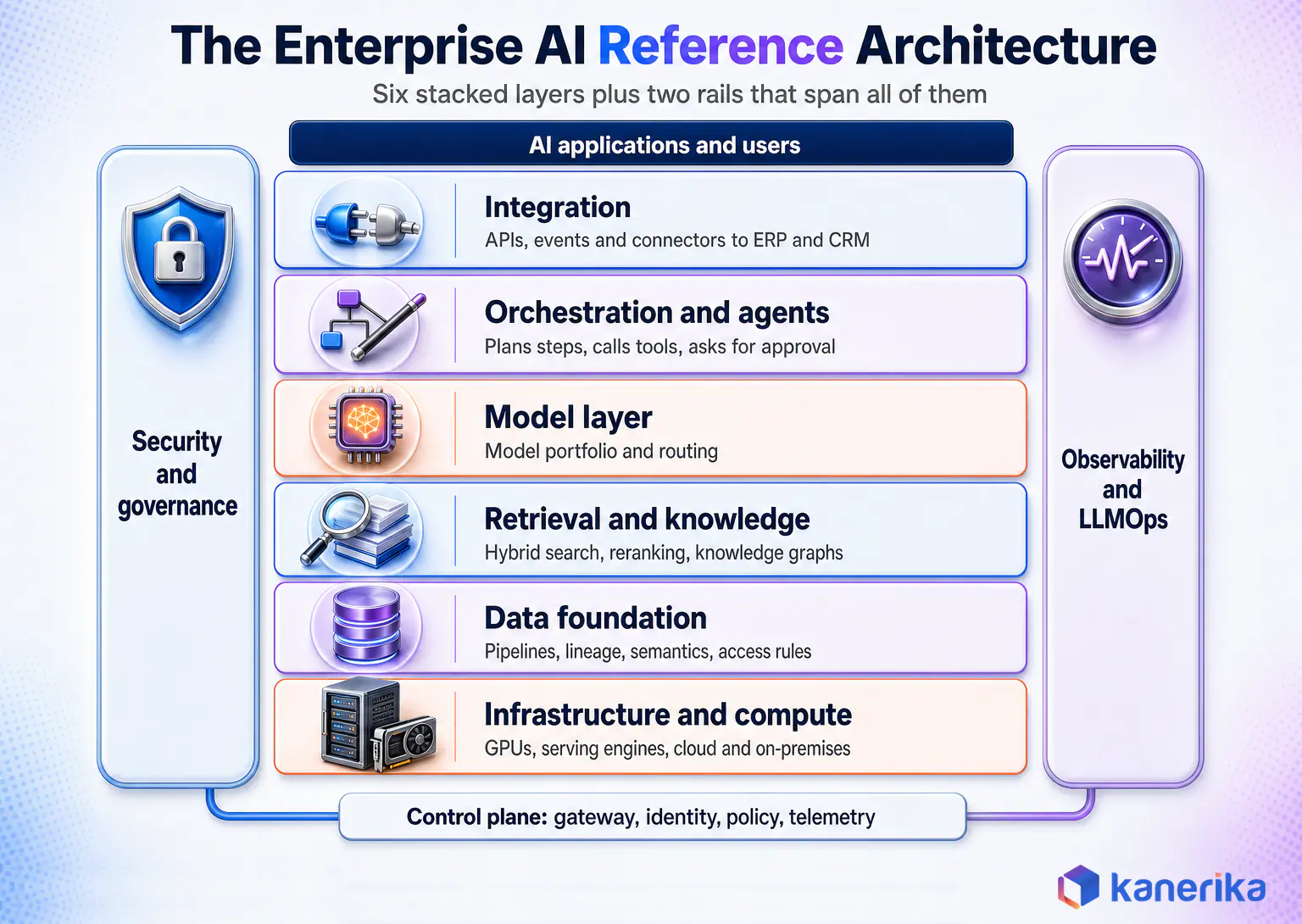
The two-plane split is the single most useful design idea in the whole stack. When a new team launches an assistant, it reuses the control plane as a service, so security, cost limits, and logging come with it on day one. On the other hand, when controls are rebuilt inside each application, you get the situation from the opening scene.
What Changes From a Classic Data Architecture
Classic data architecture ends at the dashboard. AI architecture adds unstructured content at scale and a retrieval layer that must respect permissions at query time. It also adds outputs that must be evaluated, because a model generates them instead of calculating them.
Those three additions explain why many firms find their existing data lakehouse is necessary but not sufficient. In practice, the lakehouse still holds the governed tables, and the AI layers sit on top of it and next to it.
How a Single Request Moves Through the Stack
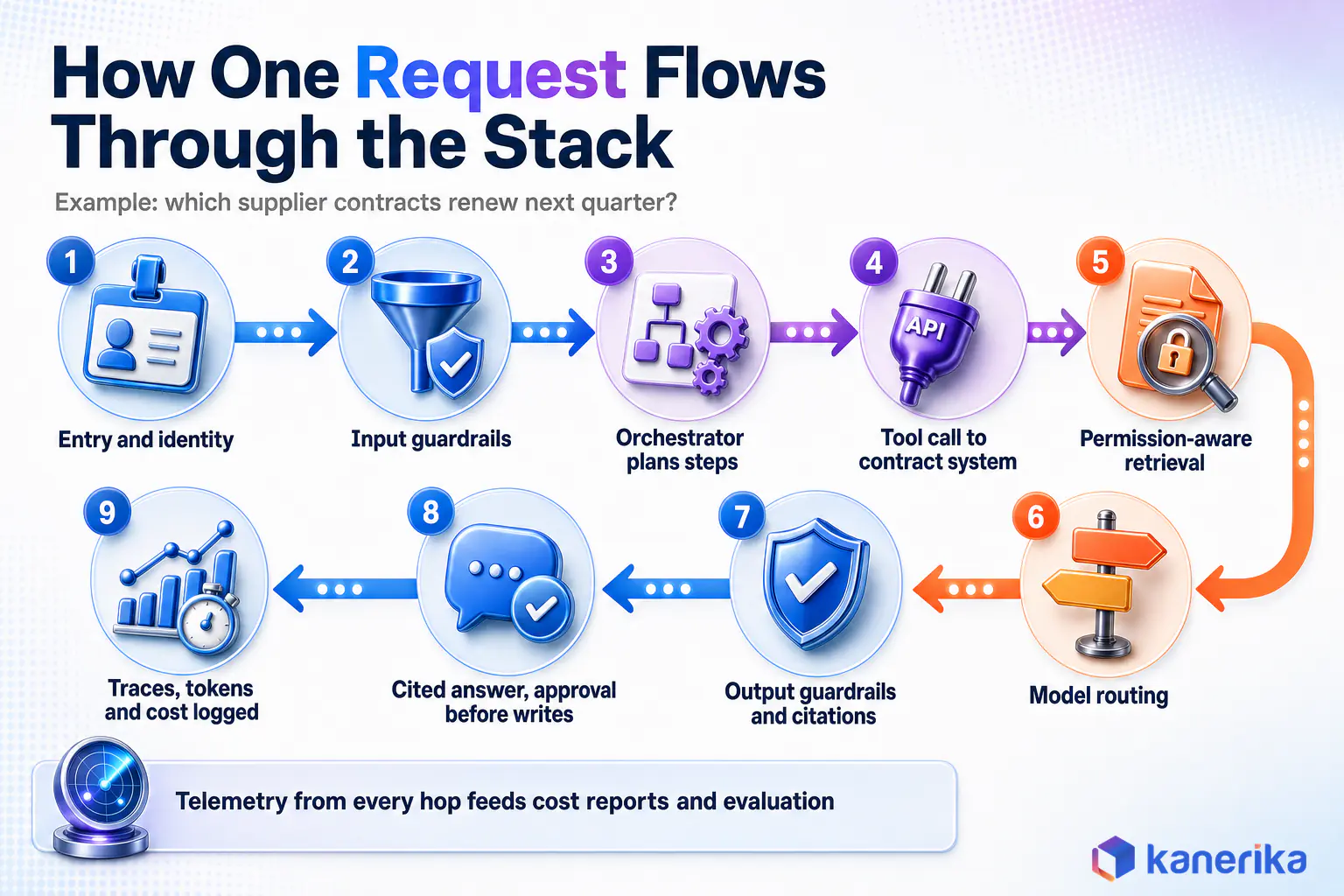
Architecture diagrams show boxes, but the design only makes sense when you follow one request end to end. Take an employee asking an internal assistant, “Which of our supplier contracts renew next quarter and have price-escalation clauses?”
- Entry and identity. First, the request arrives through a chat app or an API and passes through the AI gateway, which checks the user’s identity and applies rate limits and budget rules.
- Input guardrails. Next, the gateway screens for prompt injection, blocked topics, and sensitive data in the question itself.
- Orchestration. Then the orchestrator decides this needs two steps, which are a structured lookup for renewal dates and a document search for clause language.
- Tool call. After that, it uses the integration layer to query the contract system’s API for contracts renewing next quarter with the user’s own permissions.
- Permission-aware retrieval. At the same time, the retrieval layer searches the indexed contract text, filtered to documents this user may read, and a reranker keeps the most relevant clauses.
- Model routing. Once the context is ready, the model router sends the assembled context to a model sized for the task, which is often a mid-sized model rather than the largest one.
- Output guardrails. Before anything is shown, the answer is checked for grounding against the retrieved clauses, with citations attached and sensitive fields masked if needed.
- Response and action. Finally, the user gets a cited answer, and the orchestrator can offer to create review tasks, which needs explicit approval before any write.
- Telemetry. Meanwhile, every hop emits a trace with tokens used, latency, retrieved sources, and guardrail results, which feeds cost reports and evaluation.
What the Walkthrough Reveals
Every one of those nine steps belongs to a layer, and seven of them run through shared services rather than application code. As a result, that ratio is a good test for any design review. If most of the steps live inside a single application, the organization has built an app and still has no architecture.
Layer 1: The Data Foundation
AI quality is capped by the data it can reach. Gartner found that 63% of organizations either do not have or are unsure if they have the right data management practices for AI. It also predicts that through 2026, organizations will abandon 60% of AI projects unsupported by AI-ready data, according to its 2025 research on AI-ready data.
That is why this guide starts at the bottom of the stack. After all, a model upgrade rarely fixes an answer built on a stale or unpermissioned document.
AI-Ready Data Is a Different Standard
Analytics-ready data is clean, modeled, and aggregated for reporting. AI-ready data must also be retrievable in small pieces and carry its access rules with it. It has to record where it came from and stay fresh enough that an answer is still true when someone reads it.
In practice, that means document pipelines that parse PDFs, emails, and tickets into text with structure preserved. It also means chunk-level metadata such as owner, date, source system, and sensitivity label. Teams that monitor pipeline health catch stale sources before users see a wrong answer.
The Knowledge Layer: Metadata, Semantics, and Ontologies
Models do not know what “active customer” or “net revenue” means inside your company, because nobody told them. A semantic layer or ontology supplies those definitions, so an agent that asks for revenue gets the finance team’s number and not a guess assembled from raw tables.
Also, the difference between the two is covered in Kanerika’s guide to ontology vs semantic layer. For agents in particular, a shared business vocabulary is one of the cheapest ways to reduce LLM hallucination on enterprise data. Teams planning an agent layer can size build and run spend with this breakdown of AI agent development cost.
Data Design Decisions That Shape Everything Above
Four decisions made at this layer ripple upward, so it pays to settle them early. The first is centralized versus federated ownership, where a data fabric approach can connect domains without moving everything into one store.
Next comes lakehouse versus warehouse for structured data, and the third is batch versus streaming for freshness. Finally, the fourth decision is often skipped. It is whether unstructured content gets its own governed pipeline or is scraped into a vector store on the side, and only the first option survives an audit.
Datasheet
Build a Modern Data and AI Foundation With Databricks
How Kanerika sets up governed pipelines, lineage, and AI-ready data on Databricks so retrieval and models sit on data that can pass an audit.
View the Datasheet →
Layer 2: The Model Layer and Model Routing
The model layer is a portfolio of models with a router in front. Mature estates mix frontier models through APIs, open-weight models they host themselves, and small language models for narrow, high-volume tasks. Routing logic sends each request to the right one.
Model Routing and the AI Gateway
Routing is where cost and quality meet. For instance, a classification step, a short ticket summary, or a form extraction rarely needs the largest model. As a result, small language models often handle those tasks at a fraction of the cost and latency.
For this reason, the router usually lives in an AI gateway, which is the control-plane component that fronts every model. Kanerika’s explainer on the LLM gateway covers the pattern, and the Databricks Unity AI Gateway is one concrete implementation of it.
Comparing Model Sourcing Options
Table 1: Model Sourcing Options in an Enterprise AI Architecture
| Option | Best Fit | Data Exposure | Cost Profile | Control Level |
|---|
| Frontier model via API | Complex reasoning, broad knowledge tasks | Prompts leave your boundary under provider terms | Pay per token, no hardware | Low, provider controls versions |
| Open-weight model, self-hosted | Sensitive data, predictable high volume | Stays inside your network | GPU capacity plus operations team | High, you pin versions |
| Small language model | Classification, extraction, routing, edge | Can run fully private | Lowest per request | High |
| Fine-tuned model | Fixed format, tone, or domain vocabulary | Training data must be curated and governed | Training runs plus hosting | High, but retraining needed for new facts |
| Custom-trained model | Proprietary signals such as forecasting or vision | Fully internal | Highest, needs ML team | Full |
In short, the table shows why a portfolio wins. Firms with strict data rules often pair private LLMs for regulated workloads with API models for everything else, and the gateway makes that split invisible to application teams.
Kanerika Service
LLM Development Services
Kanerika selects, hosts, routes, and tunes the right mix of API and private models for each workload, with the gateway and evaluation built in from the start.
Explore LLM Development
Layer 3: Retrieval and RAG
Retrieval-augmented generation grounds a model’s answer in documents fetched at query time. The idea first appeared in a 2020 research paper by Lewis and colleagues, and it has become the default way to connect language models to enterprise knowledge that changes every day.
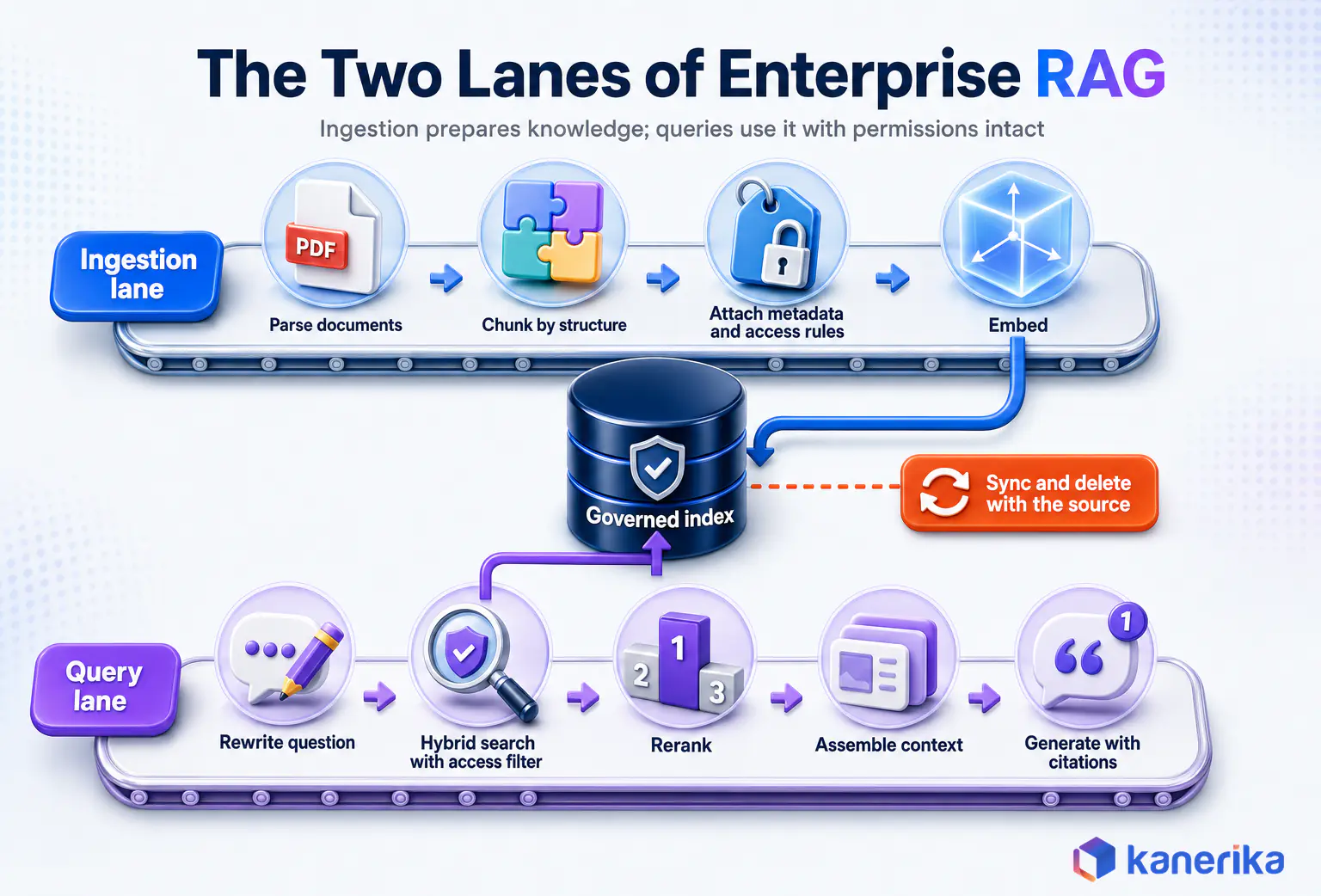
In production, a RAG system has two lanes. First, the ingestion lane parses, chunks, enriches, embeds, and indexes content. Then the query lane rewrites the question, retrieves candidates, reranks them, assembles context, generates, and cites.
Retrieval Design Decisions
In general, hybrid search, which combines keyword and vector matching, beats vector-only search on enterprise content full of product codes, clause numbers, and acronyms. Similarly, chunk size and overlap should follow the document type, so a contract is split by clause while a support article is split by heading.
Also, the index itself is a choice with long-term cost, and Kanerika’s vector database comparison walks through the trade-offs. Rerankers also add a small latency cost and usually repay it in answer quality.
Permission-Aware Retrieval Is an Architecture Requirement
However, the most damaging RAG failure in enterprises is usually a security failure. Access rules must be copied onto every chunk at ingestion and enforced as a filter at query time. Otherwise, the assistant can quote a document the user was never allowed to open.
Freshness, by contrast, is the second quiet failure. For this reason, each index needs a sync schedule tied to its source system, plus deletion handling, so a withdrawn policy stops being quoted the day it is withdrawn.
Beyond the basic pipeline, advanced RAG patterns add query decomposition, graph-based retrieval, and multi-index routing. When retrieval itself needs to plan several searches, the design moves toward agentic RAG.
Prompting, RAG, Fine-Tuning, or Agents: Choosing the Pattern
Every AI workload needs a primary pattern, and the choice follows what must change between requests. So if the knowledge changes, retrieve it, and if the behavior or format must change, tune it. If the task needs several steps across systems, orchestrate it.
Kanerika’s deeper comparison of RAG vs fine-tuning covers the two most debated options. The table below adds prompting and agents so the whole decision sits in one place.
Table 2: Enterprise AI Architecture Patterns Compared
| Pattern | What It Changes | Handles Fresh Knowledge | Relative Cost to Run | Governance Burden | Best For |
|---|
| Prompt engineering | Instructions only | No | Lowest | Low | Drafting, summarizing, simple Q&A on supplied text |
| RAG | The context the model sees | Yes, at query time | Moderate, adds retrieval and index costs | Medium, permissions on every chunk | Knowledge assistants, policy and contract search |
| Fine-tuning | The model’s weights | No, facts go stale until retrained | High upfront, then moderate | Medium, training data lineage | Fixed output formats, domain tone, narrow classifiers |
| Agentic workflow | What the system does next | Yes, through tools and retrieval | Highest, many calls per task | High, actions need approval and audit | Multi-step processes across several systems |
Combining Patterns in One System
Real systems combine them. A claims assistant might retrieve policy terms with RAG and use a small fine-tuned model to classify the claim type. An agentic step can then open a case in the claims system once a human approves it.
Good prompt design still applies inside every pattern. It is the cheapest lever and the first one to pull before adding infrastructure.
Checklist
Agentic AI Readiness Checklist
Before choosing agents as the pattern, check data access, tool permissions, approval steps, and monitoring against Kanerika’s readiness checklist.
Get the Checklist →
Layer 4: Orchestration and Agents
The orchestration layer decides the order of work, which tools to call, and when to stop and ask a person. Gartner predicts that over 40% of agentic AI projects will be canceled by the end of 2027. It names escalating costs, unclear business value, and inadequate risk controls as the causes in its June 2025 forecast.
In other words, all three of those causes are architecture problems. Costs escalate when agents loop without budgets, value stays unclear when nothing is measured, and risk controls fail when agents hold broad credentials.
Four Orchestration Patterns in Enterprise Use
First, the simplest pattern is a deterministic workflow with AI steps inside it, where code fixes the sequence and the model handles judgment calls. This covers a large share of enterprise value with the least risk.
Second comes a single agent with a bounded toolset. Third, a set of cooperating agents can be coordinated by a supervisor, which Kanerika covers in its guide to multi-agent AI systems. Finally, the fourth is event-driven agents that wake up on a business event, such as a new invoice or a failed shipment, rather than on a chat message.
Whatever the pattern, the architecture should also give it three shared services. Those are a tool registry with per-tool permissions, a memory and state store, and a confidence threshold that routes low-confidence cases to a human. Kanerika’s guide to AI agent orchestration goes deeper on the coordination logic itself.
Layer 5: Integration With Enterprise Systems
An AI answer that cannot reach ERP, CRM, or the ticketing system stays a chat window. The integration layer turns AI into part of the business process by giving it governed read access and, where approved, write access.
In general, three styles cover most needs. For example, synchronous APIs suit lookups inside a conversation. Asynchronous workflows, on the other hand, suit long jobs such as reconciling a month of invoices, while event streams suit agents that react to changes in real time.
The Model Context Protocol specification has become a common way to expose tools and data to models in a standard format. Kanerika’s overview of the Model Context Protocol explains where it fits and where a plain API remains the better choice.
Above all, the design rule that matters most here is identity propagation. Every tool call should carry the end user’s identity, or a narrowly scoped service identity. That way, the source system enforces its own permissions instead of trusting the AI layer to do it.
On-Demand Webinar
Model Context Protocol (MCP): The Key to Building Context-Aware AI Agents
An on-demand session on exposing enterprise tools and data to models through MCP, and where it fits in an integration layer.
Watch the Webinar →
Layer 6: Security and Governance, Placed in the Architecture
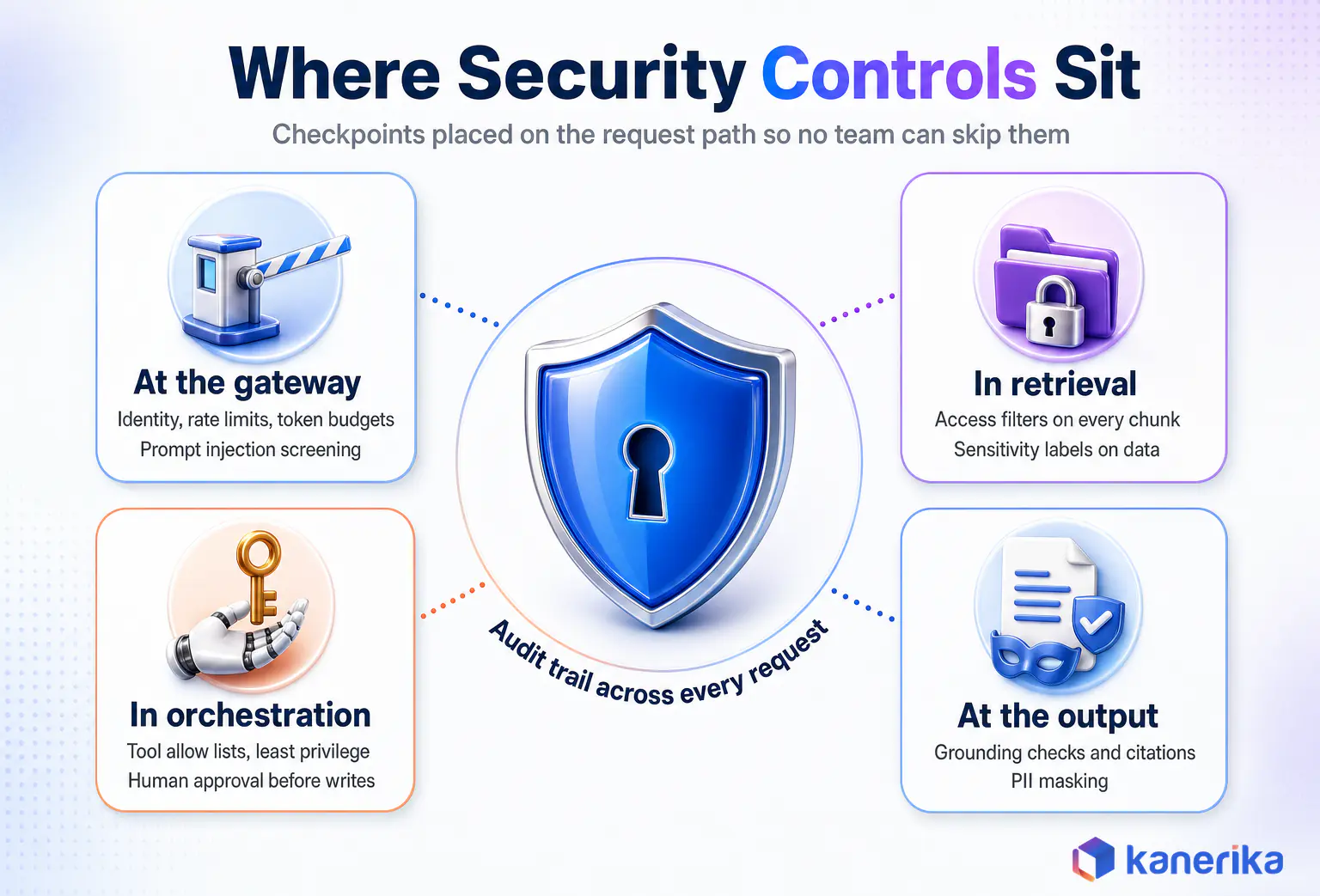
Security and governance work best as controls placed at specific points on the request path. Therefore, the architecture’s job is to make those points impossible to skip.
Fortunately, the threats are well documented. The OWASP Top 10 for LLM applications lists prompt injection, sensitive information disclosure, and excessive agency among the most serious risks, and each one maps to a layer in the reference architecture.
Where Each Control Sits
- At the gateway. First come authentication, rate limits, token budgets, input screening for injection, and data loss prevention on prompts.
- In retrieval. Next come access-control filters on every chunk and sensitivity labels that decide what may be sent to external models.
- In orchestration. Then come tool allow lists, least-privilege credentials, spending caps per task, and human approval before any write or payment.
- At the output. After generation come grounding checks, PII masking, and citation requirements before a response is shown.
- Across everything. Above all, an audit trail that links each answer to the user, model version, prompt version, and sources used.
On top of that, frameworks give this structure. The NIST AI Risk Management Framework organizes risk work into govern, map, measure, and manage functions, and the EU AI Act adds legal obligations for high-risk uses in its scope.
Still, this guide only covers where the controls sit. For the full control design, including policy engines and evidence for regulators, see Kanerika’s unified AI governance architecture blueprint, the AI governance framework guide, and the LLM security guide.
Read More: AI Governance: What It Is and How It Works in Enterprises
Layer 7: Observability, Evaluation, and LLMOps
AI systems fail quietly. A retrieval index goes stale, a provider updates a model, or a prompt edit shifts tone, and nothing throws an error. The architecture needs a way to see answer quality as well as uptime.
Observability therefore starts with traces that follow each request across the gateway, retrieval, model, and tools. The OpenTelemetry semantic conventions for generative AI give teams a standard way to record model calls, token counts, and latency, which keeps telemetry portable across vendors. Our guide to AI performance metrics shows how to score each layer once it is live.
What to Measure and How to Release Changes
Specifically, useful signals fall into four groups. Quality covers groundedness, retrieval hit rate, and user feedback, while performance covers latency per step. Similarly, cost covers tokens and GPU time per request and per use case, and safety covers guardrail triggers and escalations to humans.
Evaluation then turns those signals into a release gate. For example, each use case keeps a test set of real questions with expected answers. Any change to a prompt, model version, or index is scored against it before release, as described in Kanerika’s LLM evaluation framework.
The discipline that manages all of this is LLMOps. Kanerika’s guide to LLMOps observability covers the tooling, and the roundup of AI observability tools compares the options.
Layer 8: Infrastructure and Compute
Infrastructure decisions follow the model portfolio, so they come after the model choices. API models need almost no compute of your own, while self-hosted models need GPU capacity, a serving engine, and autoscaling that matches traffic.
Because of this, the biggest sizing mistake is planning for training when the workload is inference. After all, enterprises rarely train large models, but they serve them every second of the day, a split explained in Kanerika’s piece on AI inference vs training.
Serving engines such as vLLM raise throughput on the same GPUs through batching and memory management. CPU capacity still matters too, since embedding jobs, rerankers, and small models often run well without GPUs.
Cloud, Hybrid, and Multi-Cloud: Where Each Component Runs
Placement is decided one component at a time, rather than for the whole stack. For example, a single architecture can keep regulated documents on premises, run embeddings in a private cloud network, and call a frontier model in a public region. That works as long as the control plane spans all three.
Generally, public cloud suits fast experiments and managed services. By contrast, hybrid suits firms whose most sensitive data must stay inside their own boundary, and multi-cloud usually appears for data residency or to avoid depending on one model provider.
AI Assessment
Find the Gaps in Your AI Architecture
Kanerika’s free AI maturity assessment scores your data, platforms, governance, and operating model, so you know which layers to build next.
Start Your AI Assessment →
Placement Decisions by Component
Table 3: Component Placement Decisions Across Cloud, Hybrid, and Multi-Cloud Estates
| Component | Typical Placement | Main Deciding Factor | Common Mistake |
|---|
| Source data and documents | Where they already live, governed in place | Residency and ownership rules | Copying everything into a new AI store |
| Embeddings and indexes | Same boundary as the source data | Embeddings can leak source content | Hosting indexes of restricted data in a public tool |
| Foundation model inference | Public API region or private hosting by sensitivity tier | Data classification of the prompt | One model policy for every data class |
| AI gateway and policy | Central, reachable from every environment | Must see every request | A separate gateway per cloud with different rules |
| Traces and audit logs | One central store with retention rules | Audit and cost reporting | Logs scattered across provider consoles |
| Agent tools and connectors | Close to the systems they call | Latency and network access | Opening broad network paths for convenience |
Overall, the pattern behind the table is simple. Data and its indexes stay where they are governed, and the control plane is the one thing that must be everywhere. Open-weight models are what make private placement practical for the most sensitive tiers.
Build, Buy, or Customize: A Layer-by-Layer Decision Guide
Build-versus-buy works best as eight small decisions, one per layer, and the product-level choices inside each one are covered in our generative AI tech stack selection guide. As a rule of thumb, buy what is commodity and fast-moving, and build what encodes your own data, process, and judgment.
For example, foundation models, GPU infrastructure, and generic observability tooling improve faster than any in-house team can match, so buying them is almost always right. In contrast, retrieval pipelines over your documents, business workflows, and evaluation sets built from your own cases are where differentiation lives, and nobody can sell those to you.
Watch on YouTube
Custom AI vs Off-the-Shelf Solutions
Kanerika’s experts walk through when to buy an AI capability, when to build it, and when to customize, the same decision this section applies layer by layer.
The Decision, Layer by Layer
Table 4: Build, Buy, or Customize by Architecture Layer
| Layer | Usual Decision | Why | Watch Out For |
|---|
| Data foundation | Buy the platform, build the pipelines | Platforms are mature, your data logic is unique | Pipelines that skip permissions and lineage |
| Model layer | Buy models, customize with prompts or light tuning | Training frontier models is rarely justified | Lock-in to one provider’s API format |
| Retrieval and RAG | Build on bought components | Chunking and ranking depend on your documents | Treating RAG as only a vector database purchase |
| Orchestration and agents | Customize a framework | Workflows mirror your processes | Agent sprawl with no shared tool registry |
| Integration | Buy connectors, build business logic | Standard protocols cover the plumbing | Service accounts with broad write access |
| Security and governance | Buy tooling, build policies | Controls are standard, rules are yours | Policies that exist only in documents |
| Observability and LLMOps | Buy tooling, build evaluation sets | Test sets need real company cases | Monitoring uptime but not answer quality |
| Infrastructure | Buy or rent | Capacity is a commodity | Buying GPUs for training you will not do |
The comparison of platform categories and vendors belongs in a buying guide. Even so, the architecture decision comes first, because it tells you which platform gaps you will have to fill yourself.
Architecture Anti-Patterns That Fail in Production
The same handful of design mistakes show up in almost every stalled AI program. Gartner predicted that at least 30% of generative AI projects would be abandoned after proof of concept by the end of 2025. Its 2024 prediction named poor data quality, inadequate risk controls, escalating costs, and unclear business value as the reasons.
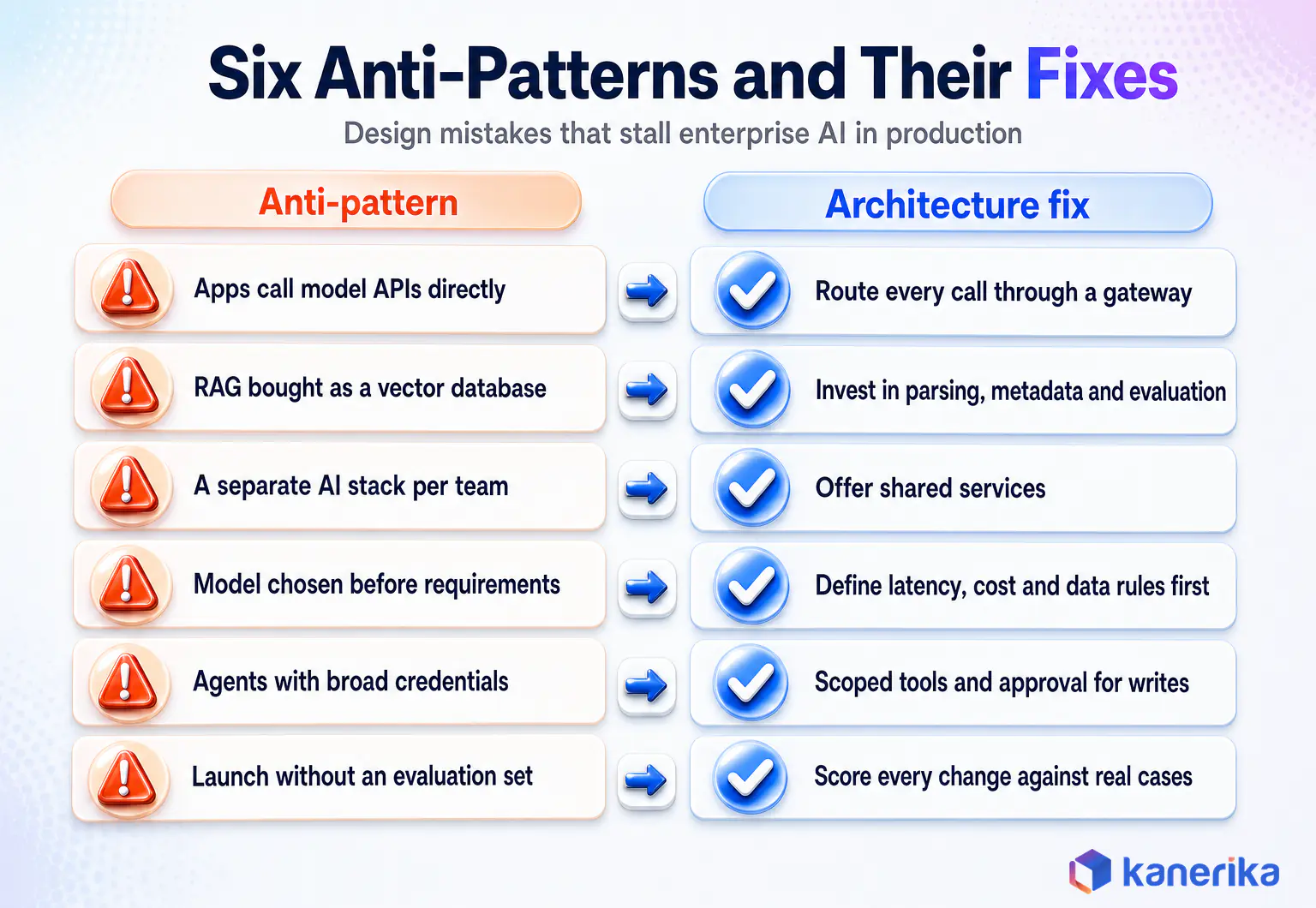
- Applications calling model APIs directly. Every team handles keys, limits, and logging differently, so nobody can see total cost or switch providers. Instead, route everything through a gateway.
- RAG treated as a vector database purchase. In reality, answer quality depends on parsing, metadata, permissions, and evaluation far more than on the index product.
- A separate AI stack for every team. Duplicate indexes and models multiply cost and create inconsistent security. For that reason, offer shared services instead.
- Models chosen before requirements. Picking the model first locks in latency, cost, and data exposure before anyone has defined them, so write the requirements first.
- Agents with broad credentials. An agent that can write anywhere turns one prompt injection into an incident. Therefore, scope tools and require approval for writes.
- Launching without an evaluation set. Without a baseline, however, nobody can tell whether the next model or prompt change made answers better or worse.
In each case, the fix is a shared architectural service rather than extra work inside one application. That is the practical case for designing the layers before the second use case arrives.
From First Use Case to Shared Platform: A Phased Roadmap
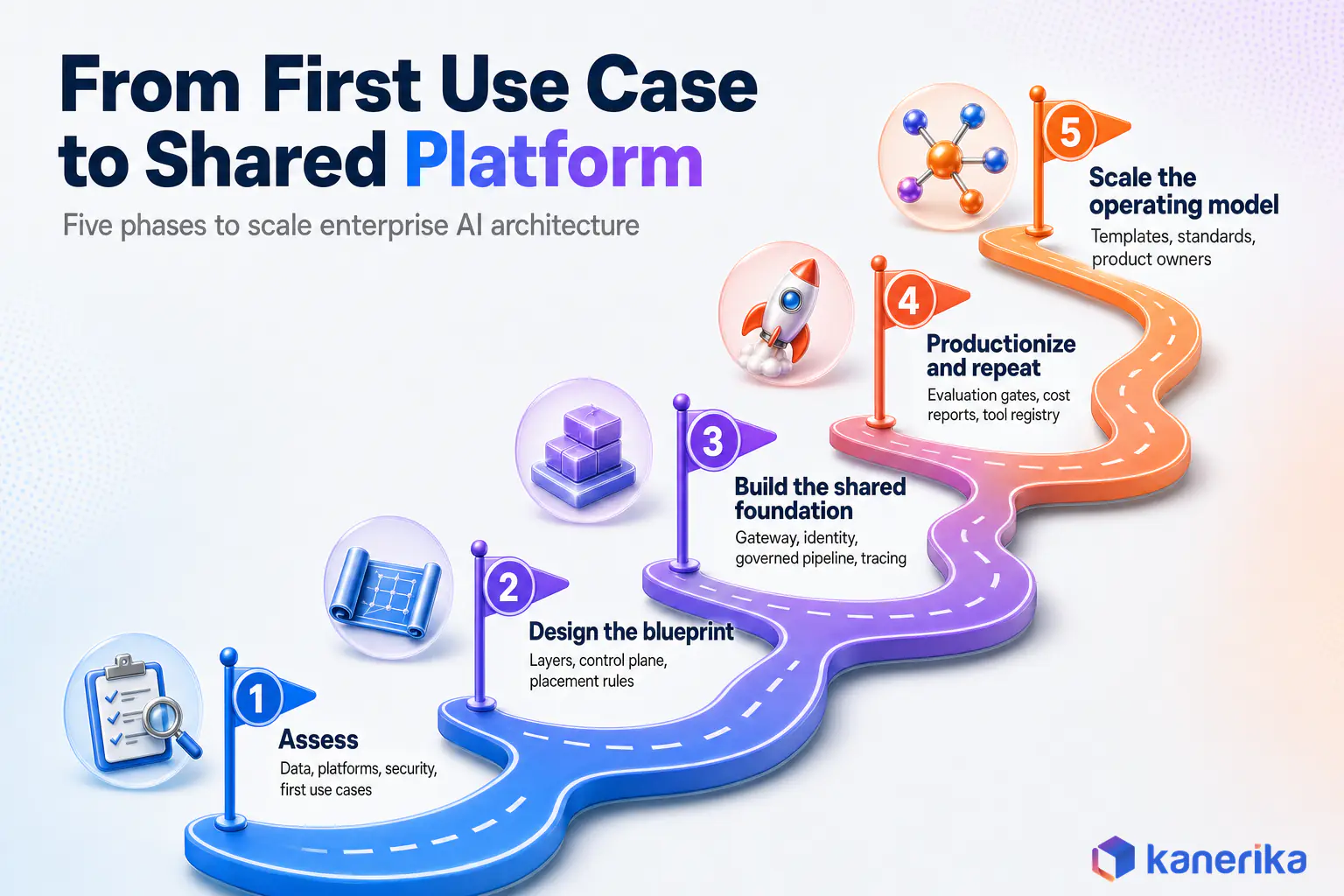
Nobody builds all eight layers before shipping anything, and nobody should, because the first use case teaches too much. Instead, the practical path is to build the first use case on components that are designed to be shared. Then turn them into services as the second and third use cases arrive.
- Assess. First, inventory data sources, existing platforms, security requirements, and the first two or three use cases, then score readiness with a model such as Kanerika’s AI maturity model.
- Design the blueprint. Next, decide the eight layers, the control plane, placement rules, and which pattern each use case needs.
- Build the shared foundation. Then stand up the gateway, identity integration, one governed document pipeline, and tracing, then ship the first use case on top.
- Productionize and repeat. After that, add evaluation gates, cost reporting, and a tool registry, and onboard the next use cases onto the same services.
- Scale the operating model. Finally, publish reusable templates, set standards for new teams, and run AI like a product with owners and service levels.
Kanerika’s AI implementation roadmap covers the program side of this journey, including funding and change management.
How to Tell the Architecture Is Working
Three signals matter more than any single model score. First, time to launch a new use case should fall with each one, and cost per request should be visible and stable. Every answer should also be traceable to a user, a model version, and a source.
Conversely, if the fifth assistant takes as long to ship as the first, the layers exist on paper only. The same is true if a security review has to start from scratch each time.
How Kanerika Designs and Builds Enterprise AI Architecture
Kanerika is an AI-first data and AI consulting firm that designs and delivers these architectures on Microsoft, Databricks, and Snowflake estates. It is a Microsoft Solutions Partner for Data and AI, a Databricks Consulting Partner, a Snowflake Select Tier Partner, and an OpenAI Select Partner. It holds ISO 27001, ISO 27701, and SOC 2 certifications.
In practice, the delivery approach follows the same layers described above. It is usually run in five stages, each with a concrete output rather than a slide deck.
- Assess. First comes a readiness review of data, platforms, security, and candidate use cases through AI strategy consulting.
- Design. Next comes a reference architecture for the client’s own estate, with placement rules, the control plane, and the pattern for each use case.
- Build the foundation. Then come governed pipelines and semantic context on the client’s data platform, delivered through data engineering services.
- Ship use cases. After that, RAG assistants, agents, and integrations built through RAG development and agentic AI services.
- Operate and govern. Finally, evaluation, monitoring, and release processes through MLOps consulting and AI governance services.
What This Looks Like in Delivered Work
A global expert-network firm needed to match niche survey requests to the right experts across three disconnected systems with poor search. Kanerika built a context-aware AI agent that used semantic search across skills and domains, then validated shortlists against participation history and compliance data. As a result, the client saw an 80% decrease in mismatch tickets, a 40% increase in mapping accuracy, and 22% bandwidth savings.
For the same client’s member-success team, Kanerika delivered an AI member support agent connected to the knowledge base and Zendesk. It resolves 65% of member queries through self-service and routes low-confidence cases to live executives. In addition, the published outcomes include a 42% reduction in ticket volume and a 31% decrease in cost per ticket.
Together, both projects show the layers at work. Retrieval and integration did the heavy lifting, while a confidence threshold in orchestration kept humans in the loop where the model was unsure.
Case Study
90% Faster Vendor Selection With LLM Agreement Processing
A real estate developer used Kanerika’s LLM-based agreement processing to cut manual processing time by 82% and speed up vendor selection by 90%.
Read the Case Study →
Kanerika also ships pre-built agents that plug into this kind of stack. For example, Karl, its AI data insights agent, runs as a native Microsoft Fabric workload. It has delivered 65% time savings on data analysis across deployments, according to Kanerika’s FabCon 2026 announcement.
Pitfalls Kanerika Teams Watch For
Three issues come up on almost every engagement. Permissions get dropped when documents are chunked, and gateways get added after teams have already hard-coded model calls. Evaluation sets also get written by engineers instead of the people who know the right answers.
However, each is cheap to prevent in the design phase and expensive to fix after launch. That is why the architecture work comes before the first model is chosen.
Wrapping Up
Enterprise AI architecture decides whether AI stays a set of impressive pilots or becomes a capability the whole company can build on. The eight layers give every team the same foundation, and the control plane gives security, cost, and quality a single place to live.
So start with AI-ready data, pick the pattern each workload needs, and buy what is commodity while building what carries your context. Then make the second use case faster than the first, and let that speed be the test of the design.
Frequently Asked Questions
What is enterprise AI architecture?
Enterprise AI architecture is the shared design that connects an organization’s data, models, retrieval systems, agents, integrations, security controls, and infrastructure so many AI applications can run on one foundation. It defines reusable layers and standards, so each new use case plugs into existing services for identity, cost control, logging, and evaluation instead of building its own stack.
What are the main layers of an enterprise AI architecture?
A practical reference architecture has eight layers. They are the data foundation, the model layer, retrieval and knowledge, orchestration and agents, integration, security and governance, observability and LLMOps, and infrastructure and compute. Security, governance, and observability run across all the other layers through a shared control plane built around an AI gateway.
What is an enterprise AI reference architecture?
An enterprise AI reference architecture is a reusable template that shows which components every AI workload needs and how they connect. Teams use it to make consistent choices about data pipelines, model access, retrieval, controls, and monitoring. It speeds up delivery because each new project starts from agreed patterns rather than a blank page.
How is enterprise AI architecture different from traditional enterprise architecture?
Traditional enterprise architecture maps business capabilities to applications, data, and technology. Enterprise AI architecture works inside that discipline but adds concerns classic EA never handled, such as probabilistic outputs, models that change over time, token-based costs, permission-aware retrieval, output evaluation, and software agents that can take actions in business systems.
Should enterprises use RAG, fine-tuning, or AI agents?
Choose by what must change between requests. Use RAG when answers depend on knowledge that changes often, fine-tuning when you need a fixed format, tone, or narrow classification, and agents when a task needs several steps across systems. Many production systems combine all three, with RAG as the default starting point for knowledge work.
What architecture do enterprise AI agents need?
Agents need an orchestration layer with a tool registry, per-tool permissions, state and memory storage, spending limits, and a confidence threshold that sends uncertain cases to a person. They also need integration through governed APIs that carry the user’s identity, plus tracing and audit logs so every action can be reviewed after the fact.
What is an AI gateway and why does it matter?
An AI gateway is a control point that sits between applications and models. It handles authentication, rate limits, token budgets, prompt screening, model routing, and logging for every request. Routing all model calls through one gateway gives security and finance teams a single place to enforce policy, and lets engineers switch models without code changes.
How do you secure an enterprise AI architecture?
Place controls at fixed points on the request path. Screen inputs and enforce identity at the gateway, filter retrieval by the user’s access rights, give agents least-privilege tools with approval before writes, and check outputs for grounding and sensitive data. Keep an audit trail that links each answer to its user, model, prompt version, and sources.
Should enterprise AI run in the cloud, on premises, or in a hybrid setup?
Decide placement per component rather than for the whole stack. Keep source data and its vector indexes inside the boundary where they are governed, send prompts to external models only for data classes that allow it, and run the gateway and audit logs centrally. Hybrid and multi-cloud designs work well when one control plane spans every environment.
Should enterprises build or buy their AI stack?
Decide per layer. Buy commodity, fast-moving parts such as foundation models, GPU capacity, and observability tooling. Build or customize the parts that carry your own context, such as document pipelines, retrieval tuning, business workflows, and evaluation sets built from real company cases. Those parts are where differentiation lives and cannot be bought.
What does an enterprise AI architect do?
An enterprise AI architect designs the shared layers, standards, and guardrails that AI teams build on. The role covers data readiness, model and platform choices, retrieval and agent patterns, security placement, cost control, and the release process for prompts and models. The architect also reviews new use cases so they reuse shared services instead of duplicating them.
How do companies move AI from pilot to production?
Treat the first use case as the start of shared services. Put a gateway, identity integration, a governed data pipeline, tracing, and an evaluation set in place early, then onboard later use cases onto the same components. Measure time to launch, cost per request, and answer quality so each new AI application ships faster than the last.














