TL;DR
AI agent development cost depends mostly on how much the agent is allowed to do. A single-task agent can take a small team a few weeks, while a multi-agent system can take a larger team several months. Building the agent is only the first budget.
The second budget is what it costs to run every month, and that grows with task volume, model choice and the number of steps each task takes. Integrations, retrieval, guardrails, evaluation, security and human review drive most of the build cost. Price both budgets from one real workflow, then compare cost per completed task with what that work costs today.
Key Takeaways
- AI agent development cost rises with autonomy, from single-task agents to tool-using, multi-step and multi-agent systems.
- Every agent needs two budgets, a one-time build budget and a monthly run budget that scales with usage.
- Integrations, memory, guardrails, evaluation, identity controls and human review usually cost more than the model itself.
- Agent loops multiply token spend, so price cost per completed task, not cost per model call.
- Model routing, prompt caching, batch processing and loop limits can cut run costs without weakening the agent.
- Start with one workflow, measure its current cost, and set a payback target before approving the build.
Watch on YouTube
Why Most Enterprise AI Initiatives Fail: Adoption, Trust and Business Impact
A look at why AI programs stall after launch, from weak adoption to unclear business impact, and what teams change so the investment actually pays back.
The Bill That Arrived After the Demo
A support agent sails through its demo. It answers ten scripted tickets, pulls order history from the CRM and drafts replies the team lead would have written herself. Because of that, everyone signs off.
Six weeks after launch, the finance partner forwards the first full month of model charges with one question. So why does each ticket cost this much?
The logs hold the answer. It turns out that real customers ask messier questions than the demo script did, so the agent loops, retrieves more documents, retries failed tool calls and resends a longer context on every pass.
Nothing was broken. Instead, the budget had been built for the demo instead of the daily workload, and that gap is where most AI agent cost surprises begin.
How Much Does It Cost to Develop an AI Agent?
AI agent development cost falls in a wide range because “AI agent” covers very different systems. For example, a bounded agent that classifies requests and drafts replies is a different build from an agent that plans, calls five business systems and acts on its own. Cost guides published by development firms in 2026 put simple agents in the low five figures and enterprise multi-agent systems well into six figures.
However, those ranges only help once you know which tier you are building and what surrounds it. The model is rarely the biggest line item. Instead, the work around the model is, meaning the integrations, retrieval pipelines, evaluation suites, permissions and review steps that make an agent safe enough to run in production.
Why Quotes and Bills Vary So Widely
Run cost varies just as much. McKinsey research reported by Business Insider in September 2026 found that completion costs can differ by as much as 30 times between agents. In other words, agents take different routes to the same goal, and each route has its own bill.
The same research found that about one in five organizations say AI spending has started to constrain operating costs.
So the useful question has two parts. What will it cost to build this agent, and what will it cost every month to run it at real volume?
The general AI development cost guide covers budgets for models, analytics and generative AI projects. This guide, by contrast, stays on agents, where the run budget behaves differently.
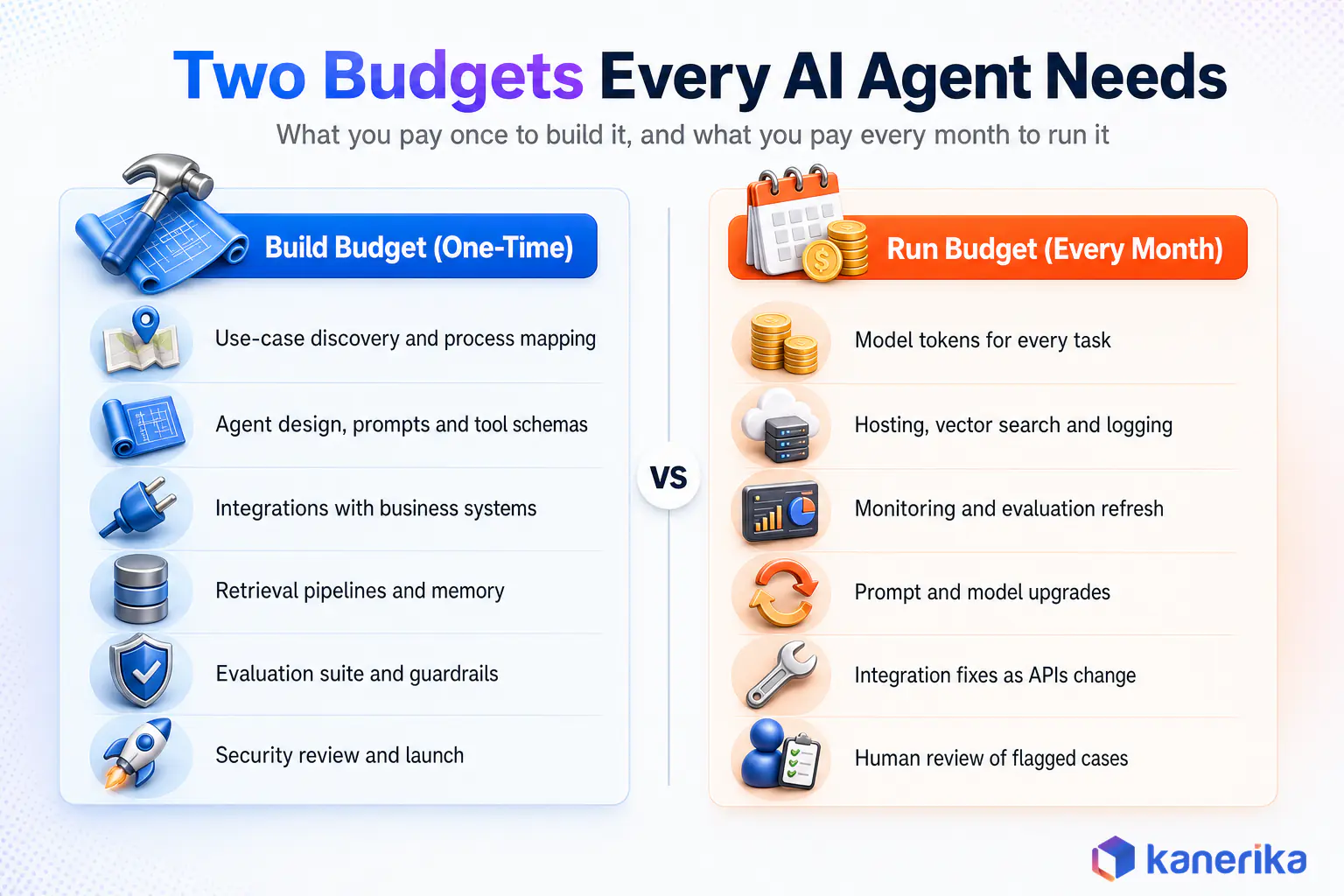
The Two Budgets Every Agent Needs
The build budget covers discovery, design, integrations, retrieval, evaluation and a security review before launch. The run budget covers tokens, hosting, monitoring, upgrades, integration fixes and the people who review flagged cases. As a result, most failed estimates price the first column carefully and guess at the second.
AI Agent Development Cost by Complexity Tier
Complexity tiers are the fastest way to size a project. Each tier adds a capability, and each capability also adds engineering, testing and oversight work. The types of AI agents in use today map onto four practical cost tiers.
Tier 1: Single-Task and Rule-Bounded Agents
These agents do one job inside a fixed path. Typical examples are an internal FAQ assistant, a document classifier or an intake agent that routes requests to the right queue. In most cases, they read from one or two sources, make limited decisions and rarely write back to business systems.
Cost stays low mainly because the testing surface is small. Instead, the main spend goes to preparing the knowledge source, writing and testing prompts, and wiring the agent into a single channel such as Teams or a web widget.
Tier 2: Tool-Using Agents
Tool-using agents call APIs to look things up and take actions, such as checking an order, updating a CRM record or creating a ticket. In addition, each tool needs a schema, authentication, error handling and tests for the cases where the tool returns something unexpected.
This is the tier where integration work starts to dominate. For instance, an agent that touches three systems needs three sets of credentials, three failure modes and a clear rule for what it may change without asking. Most enterprise projects start here because the value comes from actions as well as answers.
Tier 3: Autonomous Multi-Step Agents
Autonomous agents plan a sequence of steps, pick tools as they go and recover from errors without a person steering each move. Research agents, operations agents that reconcile records across systems and agents that prepare a case file for review all sit here.
Build cost rises, first of all, because behavior is harder to predict. As a result, teams need scenario-based evaluation, step limits, stronger guardrails and human checkpoints for risky actions. Run cost also rises, since every extra reasoning step is another model call.
Tier 4: Multi-Agent Systems
Multi-agent systems split work across specialized agents coordinated by a supervisor or orchestrator. For example, one agent gathers data, another checks policy, a third drafts the output and a fourth validates it.
This tier carries the highest build and run cost. Because agents pass context to each other, token use compounds, and failures can cascade across the chain. Shared memory, AI agent orchestration and end-to-end tracing become separate workstreams with their own budgets.
Case Study
65% Self-Service Resolution With an AI Support Agent
A tool-using support agent connected to knowledge bases and Zendesk cut ticket volume by 42% and cost per ticket by 31%, while routing low-confidence cases to live executives.
Read the Case Study →
Comparing the Four Tiers Side by Side
Table 1: AI Agent Cost by Complexity Tier (Planning View)
| Tier | What It Does | Integrations | Illustrative Build Effort | Run-Cost Profile |
|---|
| 1. Single-task | Answers, classifies or routes inside a fixed path | One or two read-only sources | 1 to 2 people for 3 to 6 weeks | Low and predictable, one or two model calls per task |
| 2. Tool-using | Looks up data and takes defined actions | Two to five systems with write access | 2 to 4 people for 6 to 12 weeks | Moderate, grows with tool calls and retries |
| 3. Autonomous multi-step | Plans, acts and recovers across several steps | Many systems plus retrieval and memory | 3 to 6 people for 3 to 6 months | High and variable, many calls per task |
| 4. Multi-agent | Specialized agents coordinated by an orchestrator | Enterprise-wide, shared memory and tracing | 5 to 10 people for 6 months or more | Highest, token use compounds between agents |
The effort column is an estimation method, not a quote. To use it, multiply the team size by the weeks and by your blended weekly rate, then adjust for how ready your data and systems are. Still, treat the tier boundaries as guides, since a Tier 2 agent with strict compliance needs can cost more than a loosely governed Tier 3 prototype.
When an Agent Is the Wrong Tool
One more tier decision deserves a moment before any build. In fact, some workflows do not need an agent at all, and a deterministic automation or a simple assistant will do the job at a fraction of the run cost. The difference between agentic AI and AI agents matters here, because autonomy you do not need is autonomy you still pay for.
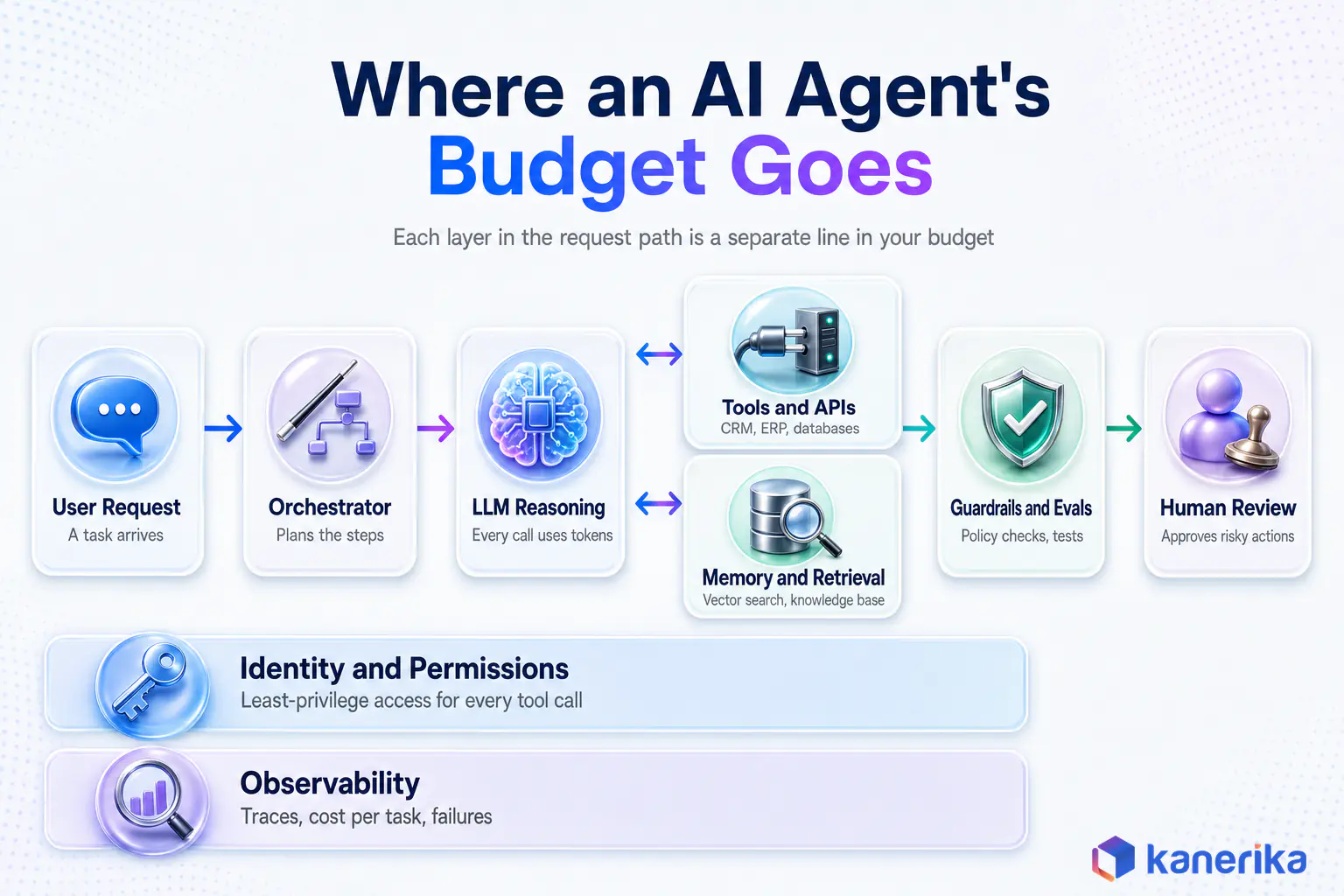
Where the Money Goes: Eight Agent-Specific Cost Drivers
Agent budgets break down differently from ordinary software budgets. The model is one component, while seven others surround it, each with its own build effort and monthly bill.
1. Model Choice and Token Spend
Frontier reasoning models cost several times more per token than smaller, faster models. Anthropic’s published API pricing, checked in September 2026, lists Claude Sonnet 4.6 at $3 per million input tokens and $15 per million output tokens. Claude Haiku 4.5 lists at $1 and $5.
That threefold gap therefore compounds quickly at volume.
Model choice, moreover, is a design decision. Many teams now pair a large model for planning with smaller language models for routine steps, which is one of the cheapest ways to hold run costs down.
2. Tool and API Integrations
Integrations, in most projects, are the largest single build cost. Each tool needs a clear schema, authentication, rate-limit handling, error recovery and tests. Standards such as the Model Context Protocol reduce repeat work, and the MCP guide for context-aware agents explains where it helps and where custom connectors are still needed.
Legacy systems also raise the bill further. For instance, an ERP with no modern API may need a middleware layer before the agent can touch it safely.
3. Memory and Retrieval
Most useful agents need company knowledge, which means a retrieval pipeline. First, documents must be cleaned, chunked, embedded, indexed and kept current, and retrieval augmented generation quality depends heavily on that preparation.
Run costs follow as well. Vector search, embedding refreshes and larger context windows all add monthly spend, and poor retrieval pushes the agent into extra loops that cost more tokens.
4. Orchestration Frameworks
Open-source frameworks such as LangGraph, AutoGen and Semantic Kernel carry no license fee, yet they still cost engineering time to learn, configure and maintain. Comparisons like LangChain vs LangGraph and Semantic Kernel vs LangChain help teams pick one that suits their stack instead of rebuilding later.
Similarly, the wider set of AI agent frameworks also shapes hiring, since a framework your team already knows is cheaper than a better one nobody has used.
5. Guardrails and Evaluation
Evaluation is the line item teams most often underfund. For example, a production agent needs test sets for normal cases, edge cases and adversarial inputs, plus automated checks that run before every prompt or model change. The AI agent evaluation guide covers what to test and how often.
Guardrails then add another layer. Input filters, output checks and policy rules catch LLM hallucinations and unsafe actions before they reach a customer or a system of record.
6. Observability
You cannot control what you cannot see, so tracing comes first. Tracing every step, tool call and token count therefore lets teams find expensive loops, failed calls and slow paths. AI agent observability tooling carries its own subscription or hosting cost, and it pays for itself the first time it exposes a runaway loop.
7. Security and Identity for Agents
An agent that can call tools holds real permissions, and those permissions need the same care as a new employee’s access. The OWASP guidance on excessive agency lists over-broad functionality, permissions and autonomy as a top risk for LLM applications.
Therefore, budget for scoped service identities, least-privilege access per tool, secrets management, audit logging and a security review. The LLM security guide and agentic AI governance practices shape how much of this work a given agent needs.
On-Demand Webinar
LLM Security Risks and Their Financial Impact
An on-demand session on the security risks that come with LLM applications, what they cost when they go wrong, and the controls that reduce them.
Watch the Webinar →
8. Human-in-the-Loop Review
Review, however, is a cost that rarely appears in a quote. After all, someone must approve risky actions, handle escalations and check a sample of outputs, and that time comes from real people.
The design choice is where to put the checkpoints. Reviewing every action erases the savings, whereas reviewing none raises the risk. Consequently, most teams route only low-confidence or high-impact cases to people, which keeps review time proportional to risk.
Worked Example: What an AI Agent Costs to Run Each Month
Run cost is easier to reason about with a formula. The version below works for any model, as long as you use that model’s current list prices.
Monthly model cost = tasks per month x model calls per task x ((input tokens per call x input price) + (output tokens per call x output price))
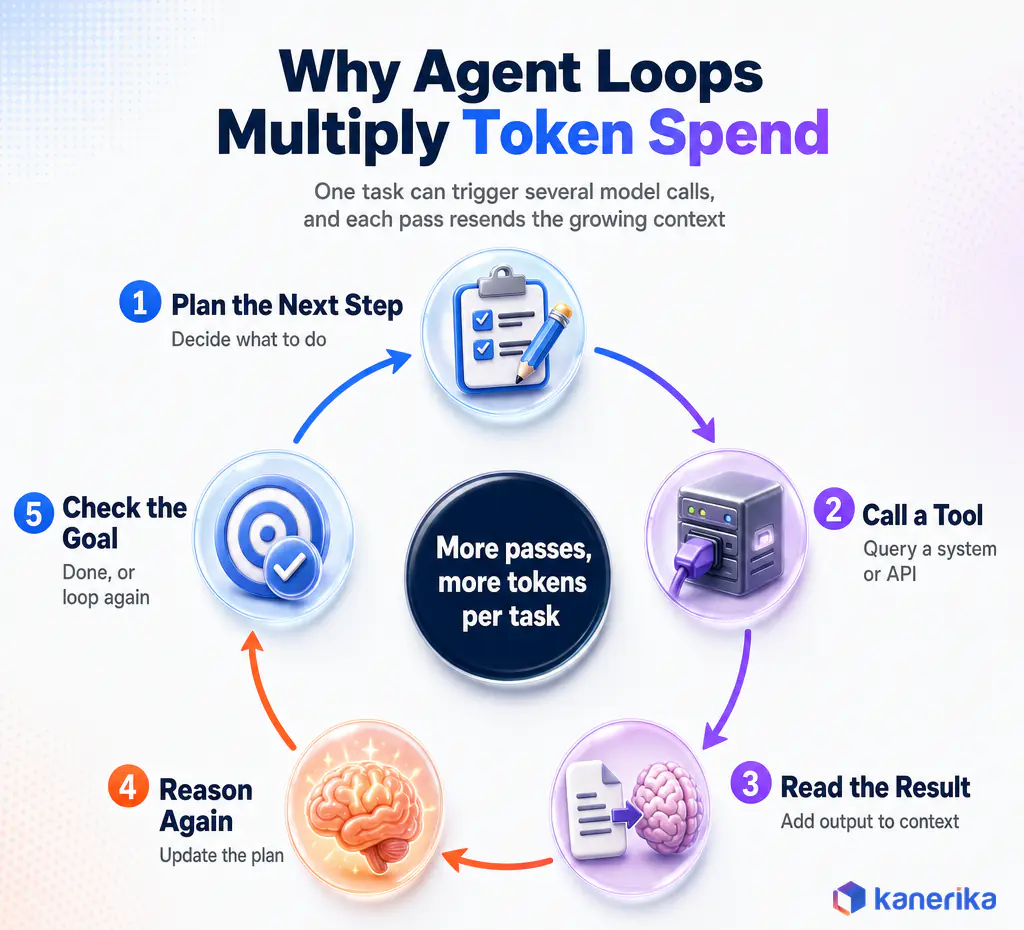
The middle term, however, is the one most estimates miss. For example, a chatbot makes one call per question, while an agent may make six, and each pass resends a context that keeps growing as tool results pile up.
Table 2: Token Cost Worksheet With a Worked Example
| Input Variable | How to Get It | Example Value | Your Estimate |
|---|
| Tasks per month | Current ticket, case or request volume | 20,000 | |
| Model calls per task | Trace a pilot run and count steps | 6 | |
| Input tokens per call | System prompt, tool definitions, retrieved context, history | 4,000 | |
| Output tokens per call | Average response and tool-call length | 400 | |
| Input and output price | Provider list price per million tokens | $3 and $15 (Claude Sonnet 4.6) | |
| Monthly model cost | Apply the formula above | $1,440 input + $720 output = $2,160 | |
| Cost per completed task | Monthly cost divided by tasks that succeed | $2,160 / 17,000 = about $0.13 at an 85% success rate | |
What the Worked Example Shows
The example values are illustrative assumptions, not benchmarks. Then swap in your own volume, step count and model prices, and the worksheet gives a defensible first number.
The same workload as a single-call chatbot would cost about $360 a month, one sixth of the agent’s bill. That multiplier explains most of the gap between a pilot estimate and the first real invoice.
Routing, however, changes the picture quickly. Suppose four of the six calls go to Claude Haiku 4.5, and only planning and final drafting stay on Sonnet 4.6. The same month then drops to about $1,200, a saving of roughly 44% before any other change.
Finally, two more details belong in the estimate. Cost per completed task matters more than cost per call, because failed attempts still consume tokens. Model spend is also only part of the run bill, since hosting, vector search, monitoring and review time sit on top of it.
Build vs Buy vs Platform: Which Approach Costs Less?
There are three ways to get an agent into production, and each shifts cost between the build budget and the run budget. The right choice depends on how unique the workflow is and how much control you need over data and behavior.
Custom Build
A custom agent built on your own infrastructure gives full control over models, data, tools and guardrails. Although it carries the highest upfront cost and needs a team to maintain it, it avoids per-seat or per-message fees and fits workflows no product covers.
In general, custom builds make sense for core processes that differentiate the business, strict data residency needs or deep integration with proprietary systems. The guide to AI agent development companies covers how to evaluate a partner if you do not build in-house.
Agent Platforms
Agent platforms lower the build cost with visual builders, prebuilt connectors and hosted runtimes. Microsoft’s Copilot Studio, Databricks Agent Bricks and Snowflake Cortex Agents sit close to the data many enterprises already run.
The trade, however, is a consumption bill. Microsoft’s Copilot Studio billing documentation meters agent usage in Copilot Credits and offers an agent usage estimator for forecasting, so run cost tracks message volume and the actions each agent takes. Platforms also set limits on custom logic, which can consequently force a rebuild if requirements outgrow them.
Prebuilt Agents
Prebuilt agents target one job and deploy fastest. They therefore suit common, well-defined tasks such as data questions, document summarization or PII redaction, where building from scratch buys little.
As a rule, the cost pattern is a subscription or usage fee with light configuration. Customization is limited, though, so the question is whether the agent’s fixed workflow matches yours closely enough.
Watch on YouTube
Karl AI Agent: Can It Replace Your BI Team?
See what a prebuilt agent looks like in practice. This walkthrough of Kanerika’s Karl data insights agent shows the analysis work it takes on and where people stay in the loop.
Table 3: Build vs Buy vs Platform Cost Comparison
| Approach | Best Fit | Upfront Cost Pattern | Ongoing Cost Pattern | Customization | Time to Production |
|---|
| Custom build | Differentiating, complex or regulated workflows | Highest, full engineering team | Tokens and hosting you control, plus a maintenance team | Full | Slowest |
| Agent platform | Standard workflows close to an existing data or productivity stack | Moderate, configuration plus some custom tools | Consumption or credit billing that scales with usage | Medium, within platform limits | Faster |
| Prebuilt agent | Common, well-defined tasks | Lowest, setup and configuration | Subscription or usage fee | Low | Fastest |
In practice, many enterprises end up with a mix. A prebuilt agent handles a common task, a platform agent covers standard workflows in a familiar tool, and one or two custom agents run the processes that set the business apart.
Meanwhile, tooling from model providers blurs the lines further. OpenAI AgentKit and other AI agent builder tools cut early build time, though the run bill still follows the underlying model prices.
Ongoing Run Costs After Launch
Once an agent is live, the monthly bill has six parts. Model inference is the most visible, and it scales with volume, steps per task and model choice.
Infrastructure comes next, including hosting, vector databases, logging and any LLM gateway that sits between the agent and its models. Monitoring and evaluation follow, since test suites have to rerun whenever prompts, tools or models change.
Finally, the last three are people costs. For example, engineers tune prompts and fix broken integrations, product owners review performance, and reviewers handle escalations. Teams that budget only for tokens tend to discover these costs in the second quarter.
For that reason, a rule of thumb helps with planning. Treat the first year of run cost as a separate approval from the build, with its own owner and its own monthly report, so it never hides inside a general cloud bill.
Hidden AI Agent Development Costs Most Budgets Miss
Hidden costs are the main reason agent projects stall. Gartner predicted in June 2025 that over 40% of agentic AI projects will be canceled by the end of 2027, due to escalating costs, unclear business value or inadequate risk controls.
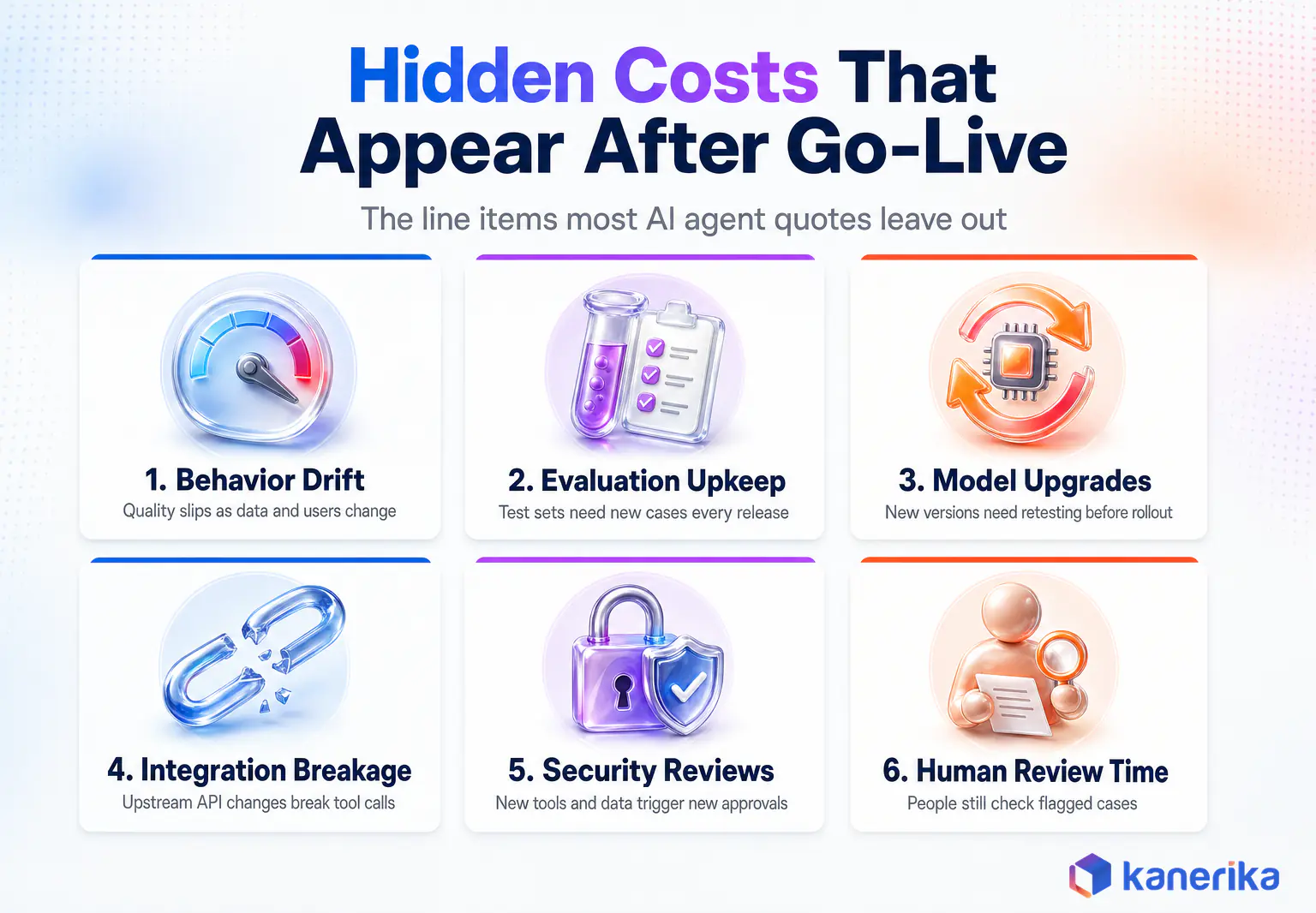
Six Costs That Surface After Go-Live
Six costs appear most often after go-live, and none of them is visible in a demo.
- Behavior drift. Output quality slips as data, users and upstream systems change.
- Evaluation upkeep. Test sets need new cases every release, especially for new failure types.
- Model upgrades. Providers retire and replace models, and each new version needs retesting.
- Integration breakage. An upstream API change can break a tool call overnight.
- Security reviews. New tools and new data sources trigger new approvals.
- Human review time. People still check flagged cases, and volume grows with adoption.
Change management also belongs on this list. For instance, staff need training, workflows need redesign and someone has to own adoption, or the agent runs at a fraction of the planned volume and the cost per task stays high.
Governance, Adoption and Red Teaming
Governance work adds a final layer. Frameworks such as the NIST AI Risk Management Framework expect documented risk assessment and monitoring across the AI lifecycle. An AI governance framework turns that into routine work rather than a one-time audit.
Agents with real autonomy add one more item. AI red teaming before launch, and again after major changes, is far cheaper than cleaning up after an agent that took an action it should not have.
How to Estimate AI Agent Development Cost Step by Step
A reliable estimate starts from one workflow, not a platform vision. These seven steps turn a use case into build and run numbers you can defend in a budget review. This catalog of enterprise AI use cases helps rank which agent to fund first.
- Define the process. Pick one workflow with a clear start, a clear end and an owner.
- Measure today’s cost. Record hours spent, monthly volume, error rate and cycle time.
- Set the autonomy level. Decide whether the agent suggests, acts with approval or acts alone.
- Map the integrations. List every system the agent reads from or writes to.
- Size data and security needs. Scope retrieval sources, permissions and compliance reviews.
- Price build and run. Estimate team-weeks for the build and monthly tokens, hosting and review time for the run.
- Set the ROI target. Agree the payback period the business will accept before work starts.
Where Budget Estimates Usually Go Wrong
Steps two and seven do most of the work. Without a measured baseline, for example, no one can say whether the agent paid off, and without an agreed target, projects drift until the budget runs out.
Step three, in particular, has the biggest effect on cost. An agent that drafts actions for approval needs lighter guardrails and fewer tests than one that acts alone, and it can move to more autonomy later once the evaluation data supports it. Our guide to AI performance metrics lists what to measure once the agent is in production.
Pilot numbers also need a reality check, so test them early. In particular, run the pilot on real, messy inputs, trace every task and use those traces for the step count and token sizes in the worksheet above.
Checklist
Enterprise Agentic AI Checklist
Work through readiness, data, security, evaluation and governance items before an agent build starts, so the estimate reflects what production really needs.
Get the Checklist →
How to Reduce AI Agent Costs Without Weakening the Agent
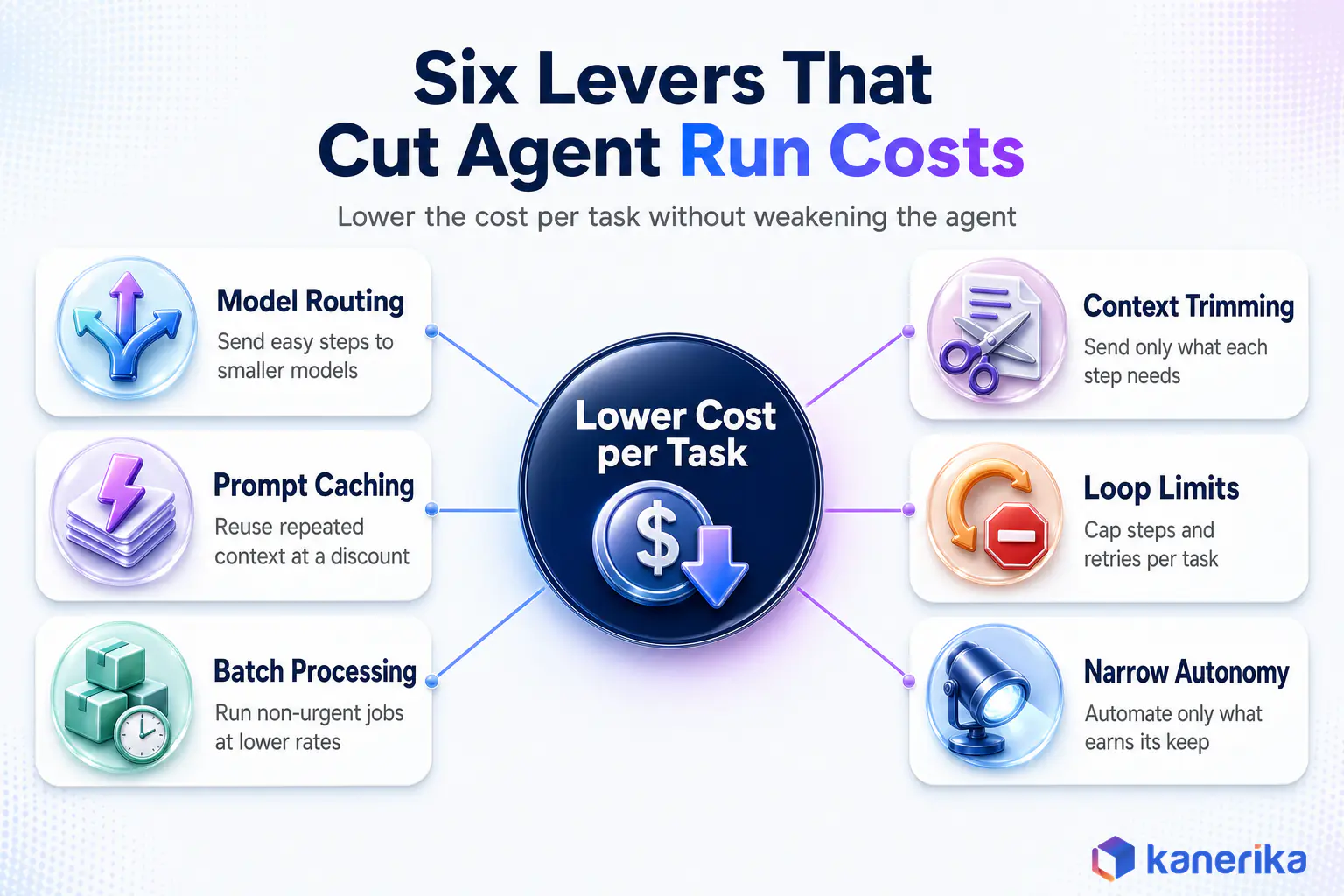
Most run-cost savings come from design choices rather than cheaper vendors. Six levers do the heavy lifting.
Levers That Cut Cost per Call
Model routing. Send routine steps such as classification, extraction and formatting to smaller models, and keep the large model for planning and hard reasoning. The worked example above shows how much this alone can save.
Prompt caching. Agents, for example, resend the same system prompt and tool definitions on every call. Anthropic’s prompt caching documentation prices cache reads at 10% of the base input token price, which cuts the cost of that repeated context sharply.
Batch processing. Likewise, work that does not need an instant answer can run in batches. Both Anthropic and OpenAI’s Batch API offer a 50% discount for asynchronous jobs, with OpenAI committing to a 24-hour turnaround.
Context trimming. Similarly, send each step only the context it needs. Better retrieval and context engineering reduce input tokens and often improve accuracy at the same time.
Levers That Cut Calls per Task
Loop limits. Cap the number of steps and retries per task, and then escalate to a person when the cap is hit. After all, runaway loops are the most common cause of a surprise bill.
Narrow autonomy. In short, automate the part of the workflow that earns its keep and leave rare, complex edge cases to people. As a result, a narrower agent is cheaper to build, test and run.
In addition, private hosting can change the math at high volume. Private LLMs trade per-token fees for infrastructure and operations cost, which only pays off when volume is high and steady.
Measuring AI Agent ROI and Payback Period
An agent pays off when the value of the work it does exceeds the full cost of running it. The formula is simple, and the hard part is measuring the inputs honestly.
ROI (%) = (annual business value - annual agent cost) / annual agent cost x 100
To begin with, annual agent cost should include amortized build cost plus a full year of run cost. Meanwhile, annual business value comes from hours saved, faster cycle times, fewer errors and any revenue the agent protects or creates.
Table 4: AI Agent ROI Worksheet
| Metric | Measure Before Launch | Measure After Launch | Annual Value Formula |
|---|
| Labor hours | Hours per task times monthly volume | Hours still spent, including review | Hours saved x loaded hourly cost x 12 |
| Cost per task | Total process cost divided by volume | Agent run cost plus review cost per task | (Old cost – new cost) x annual volume |
| Cycle time | Average time from request to resolution | Same measure after launch | Value of faster delivery or avoided delay |
| Error rate | Rework, escalations or compliance misses | Same measure after launch | Errors avoided x average cost per error |
Payback Period and Cost per Task
Payback period is the build cost divided by the monthly net saving. So if that number is longer than the agent’s likely useful life before a major rebuild, the scope needs another look.
AI Assessment
Is Your Organization Ready to Run AI Agents?
Kanerika’s AI Maturity Assessment scores your data foundations, generative AI and agent readiness, and returns recommendations you can use to scope a first agent.
Start Your AI Assessment →
Cost per task is the metric that ties both budgets together.
Kanerika’s AI member support agent for a global expert network resolves 65% of member queries through self-service. The client recorded a 42% reduction in ticket volume and a 31% decrease in cost per ticket. Even so, low-confidence cases still route to live executives, so the savings did not come from removing oversight.
Broader research points the same way.
McKinsey’s work on agentic AI, cited in the same Business Insider report, found agents can cut time spent on some transformation-office tasks by 35% to 40%. The firm also stressed that companies must check whether that value justifies the cost. The ROI of generative AI follows the same discipline of measuring before and after.
How Kanerika Scopes and Builds Cost-Controlled AI Agents
Kanerika builds agents with both budgets in view from the first workshop. The approach runs in five stages, and each one exists to stop a cost surprise before it happens.
- Workflow and cost baseline. The team maps one process, measures its current cost and volume, and agrees the payback target with the business owner.
- Tier and autonomy decision. Engineers choose the lowest tier that delivers the value, and set which actions need approval.
- Build on governed data. Retrieval and tools connect to data already governed on Microsoft Fabric, Databricks or Snowflake, which cuts integration and security rework.
- Guardrails, evaluation and identity from day one. Test sets, least-privilege tool access and tracing ship with the first release rather than after the first incident.
- Operate on cost per task. Dashboards track tokens, success rate and review time per task, so routing and caching decisions rest on real numbers.
Kanerika Service
Agentic AI Services, Scoped to Your Budget
Kanerika designs, builds and operates AI agents on governed data, with evaluation, identity controls and cost-per-task tracking built in from the first release.
Explore Agentic AI Services
Custom Builds and Prebuilt Agents
Kanerika’s agentic AI services and AI application development practice cover custom builds, while prebuilt agents shorten the path for common tasks. Karl, the AI data insights agent, lets business users query enterprise data in plain language and is available as a native Microsoft Fabric workload. Across deployments, moreover, Karl has delivered 65% time savings on data analysis, 5X faster delivery of business insights and a 78% increase in team efficiency, according to Kanerika’s FabCon 2026 announcement.
Other agents, by contrast, cover narrower jobs. Alan summarizes legal documents, Susan redacts PII before data reaches a model, and Klara checks documents against a compliance playbook.
Results From Delivered Agents
Custom work has its own track record. A real-time compliance agent made expert vetting 3x faster and cut backlog cases by 70%. An LLM-driven ticket response system for a B2B SaaS company auto-responds to 80% of tickets, reduced staffing cost by 70% and halved resolution time.
Kanerika builds on both Anthropic’s Claude and OpenAI models and is an OpenAI Select Partner. As a result, model choice follows each task’s cost and accuracy needs rather than a vendor commitment. Delivery runs under ISO 9001:2015, ISO 27001 and ISO 27701:2019 certifications, SOC 2 Type II compliance and a CMMI Level 3 appraisal.
Above all, the pitfalls the team watches for are consistent across projects. Scoping the agent before measuring the workflow, pricing tokens per call instead of per completed task, and deferring evaluation until after launch cause most of the overruns Kanerika is asked to fix.
Talk to Kanerika
Want a Build and Run Estimate for Your Agent?
Bring one workflow. Kanerika’s AI team will map the tier, integrations and review points, then size both the build budget and the monthly run cost with you.
Book a Working Session →
Wrapping Up
AI agent development cost is two numbers, and the second one decides whether the project survives. The build budget depends on tier, integrations, retrieval, guardrails and security. Where the agent sits in your wider enterprise AI architecture has a large effect on integration cost.
The run budget depends on volume, steps per task, model choice and the people who keep the agent honest. Price both from one real workflow, measure cost per completed task, and use routing, caching, batching and loop limits to keep the monthly bill in line with the value the agent delivers. Teams that do this approve agents on evidence instead of on a demo.
Frequently Asked Questions
How much does it cost to build an AI agent?
Cost depends on the agent’s tier. A single-task agent can take one or two people a few weeks, while a tool-using agent often needs a small team for two to three months. Autonomous and multi-agent systems take larger teams several months. Multiply team-weeks by your blended rate, then add integration, security and evaluation work.
How much does an AI agent cost per month to run?
Monthly run cost is task volume times model calls per task times the token cost of each call, plus hosting, monitoring and review time. A worked example of 20,000 tasks with six calls each on Claude Sonnet 4.6 list prices comes to about $2,160 in model spend alone. Your volume and step count change it.
What factors affect AI agent development cost the most?
The biggest drivers are the agent’s autonomy level, the number of systems it integrates with, the retrieval pipeline behind it, and the evaluation, guardrail and security work needed for production. Model choice matters more for run cost than build cost. Compliance requirements and human review design can also raise both budgets.
Is it cheaper to build an AI agent or buy one?
Buying is usually cheaper upfront. Prebuilt agents and agent platforms cut build time, but they add subscription or consumption fees and limit customization. Custom builds cost more at the start and need a team to maintain them, yet they avoid per-message fees and fit workflows that products do not cover.
Why do AI agents cost more to run than chatbots?
A chatbot usually makes one model call per question. An agent plans, calls tools, reads results and reasons again, so a single task can trigger several model calls. Each pass resends a context that keeps growing, which multiplies token spend. Loop limits, routing and caching keep that multiplier under control.
How long does it take to build an AI agent?
A single-task agent can reach production in three to six weeks. Tool-using agents typically take six to twelve weeks, and autonomous or multi-agent systems take three to six months or longer. Data readiness, integration complexity and the depth of security review move these timelines more than the model choice does.
Is it free to build an AI agent?
Open-source frameworks such as LangGraph and AutoGen are free to use, and some platforms offer free tiers for experiments. A production agent is never free, though, even when every tool in the stack is open source. Model tokens, hosting, integrations, evaluation, security review and the people who maintain and review the agent all carry real and recurring costs.
How much does a multi-agent AI system cost?
Multi-agent systems sit at the top of the cost range. They need orchestration, shared memory, tracing across agents and more testing, so build effort often runs to several months for a larger team. Run costs are also highest, because agents pass context to each other and token use compounds with every handoff.
What does a RAG-based AI agent cost?
A retrieval-based agent adds document preparation, embedding, indexing and a vector database to the build. Run costs include vector search, embedding refreshes and larger prompts. The cost depends on how many sources you connect, how often content changes and how well retrieval quality is tested before the agent goes live.
How can companies reduce AI agent operating costs?
Route routine steps to smaller models, cache repeated context, batch non-urgent work, trim the context each step receives and cap loops and retries. Anthropic prices cache reads at 10% of base input cost, and both Anthropic and OpenAI discount batch jobs by 50%. Narrow autonomy also keeps build and run costs lower.
Should we build AI agents in-house or hire a development partner?
Build in-house if you already have engineers with agent, retrieval and evaluation experience and the workflow is core to your business. Hire a partner when you need to reach production quickly, lack those skills, or want proven patterns for security and evaluation. Many teams combine a partner-led first build with internal ownership afterward.
How do you calculate ROI for an AI agent?
Subtract the annual agent cost, including amortized build and a full year of run cost, from the annual business value, then divide by the agent cost. Value comes from hours saved, lower cost per task, faster cycle times and fewer errors. Measure the baseline before launch so the comparison holds up.














