TL;DR
A Snowflake materialized view stores the precomputed result of a query instead of recalculating it on every access, refreshed automatically whenever the base table changes. It supports only a single table with no joins, unlike dynamic tables, which handle multi-table pipelines with joins and unions. Materialized views require Enterprise Edition and bill compute at a 2x multiplier versus standard rates, roughly $6 per compute-hour at standard AWS Enterprise pricing. They earn their cost on single-table queries that run often against data that rarely changes.
A dashboard that takes eight seconds to load feels broken, even if the query behind it is doing exactly what it should. The usual fix is to throw more compute at the problem, which raises the warehouse bill without solving the root cause. Snowflake materialized views target that root cause directly, storing the result of an expensive query instead of recomputing it every time someone opens a report.
Teams that adopt them well see faster dashboards and lower repeat-query costs. Teams that adopt them without a plan pay for storage and maintenance on views nobody queries often enough to justify the expense. This article breaks down what Snowflake materialized views are, how they compare to regular views and dynamic tables, and when one earns its keep.
Key Takeaways
- A Snowflake materialized view stores the precomputed result of a query instead of running that query on every access.
- Materialized views only support a single source table, so joins and self-joins are not allowed.
- Snowflake automatically keeps materialized views current and can even rewrite queries to use them without being asked.
- Dynamic tables cover multi-table pipelines that materialized views cannot, since dynamic tables support joins and unions.
- Materialized views require Snowflake Enterprise Edition and bill separately for storage and background maintenance.
- The right call depends on how often the base table changes relative to how often the view gets queried.
Work With a Snowflake Select Tier Partner!
Partner with Kanerika for Expert Snowflake Implementation Services
 Explore Our Snowflake Page
What Is a Snowflake Materialized View?
A Snowflake materialized view is a database object that stores the output of a query rather than only the query definition. A regular view re-runs its underlying SQL every time someone selects from it. A materialized view runs that SQL once, saves the result, and serves future requests from that stored copy.
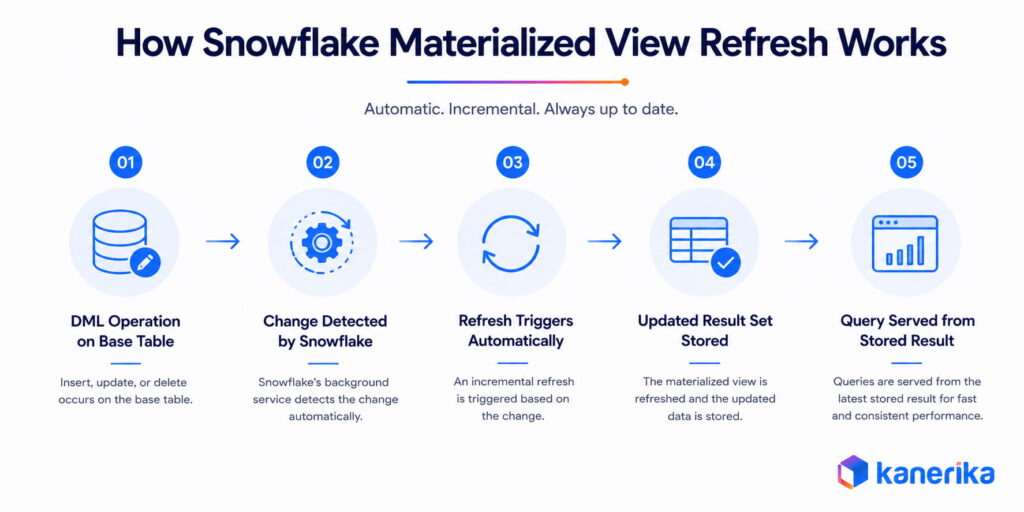
Snowflake keeps the stored result current through a background service that refreshes affected rows automatically whenever the base table changes.
Nobody has to write a scheduling job or manage a pipeline to keep the data fresh. That automatic handling is different from how most other cloud warehouses treat precomputed results, as Snowflake’s own documentation explains.
Materialized Views vs Regular Views in Snowflake
Both objects return the result of a stored query and can be queried like a table. The difference comes down to when the computation happens and what it costs to keep the result available.
1. How Query Execution Differs
A regular view recalculates its result on every query, pulling live data straight from the base table. A materialized view skips that recalculation and reads from its own stored copy instead. That stored copy is why materialized views typically answer faster on large, expensive queries, but it also requires an active refresh process.
2. Storage and Compute Cost Differences
Regular views cost nothing to store beyond the query text itself. Materialized views consume storage for the result set and compute credits whenever the background service refreshes them after a base table change.
A view that gets queried constantly but rarely changes tends to justify that cost. A view on a table that changes every few minutes usually does not.
Table 1: Snowflake Materialized View vs Regular View
| Factor | Materialized View | Regular View |
|---|
| Result storage | Stored physically | Not stored |
| Query execution | Reads precomputed result | Recomputed on every query |
| Source tables | Single table only, no joins | Multiple tables, joins allowed |
| Compute cost | Charged on base table refresh | Charged on each query |
| Storage cost | Yes | No |
| Best fit | Frequent reads, infrequent changes | Frequently changing or rarely queried data |
A materialized view earns its cost when a query runs often against data that barely moves. A regular view stays the better default everywhere else, since it adds no storage overhead and always reflects the live base table.
Materialized Views vs Dynamic Tables in Snowflake
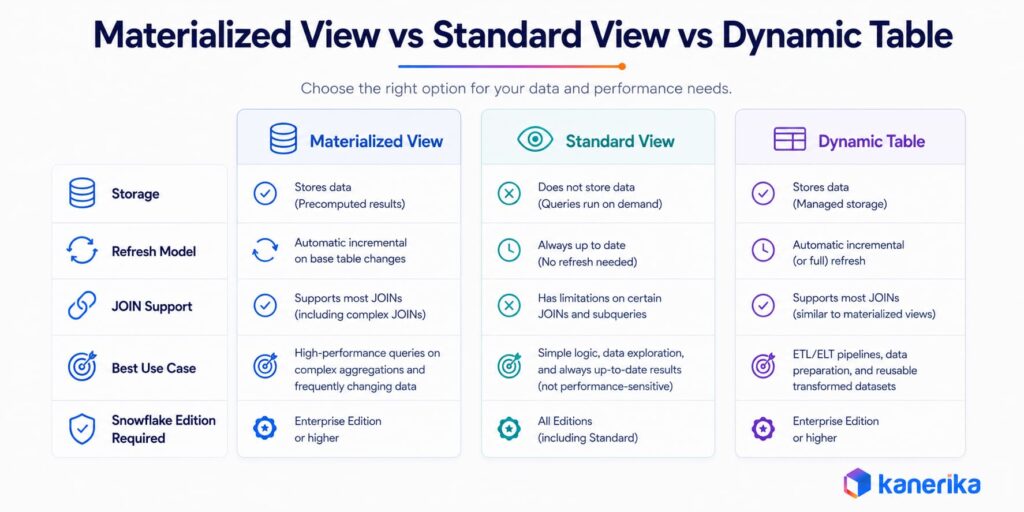
Snowflake introduced dynamic tables after materialized views, and the two get confused constantly because both promise fresh, precomputed results without a hand-built pipeline. The dividing line is query complexity.
Materialized views only accept a single source table. Dynamic tables support joins, unions, and multi-table transformations, a difference covered in Kanerika’s guide to Snowflake dynamic tables.
1. Refresh Mechanism and Query Complexity
A materialized view refreshes through Snowflake’s background maintenance service and stays current with the base table at all times. A dynamic table refreshes on a schedule set by a TARGET_LAG parameter, which has a one-minute minimum, according to Snowflake’s decision guide for dynamic tables. That scheduled refresh lets dynamic tables handle complex, multi-table logic a materialized view cannot.
2. Choosing Between the Two
Pick a materialized view when the goal is pure read performance on a single table and the data needs to be current down to the second. Pick a dynamic table when the pipeline involves joins, aggregations across sources, or a multi-step transformation chain.
Table 2: Materialized Views vs Dynamic Tables
| Factor | Materialized View | Dynamic Table |
|---|
| Source tables | Single table only | Multiple tables, joins and unions supported |
| Refresh model | Continuous background maintenance | Scheduled, based on target lag |
| Data freshness | Always current | Bounded by target lag setting (1 minute minimum) |
| Query optimizer rewrite | Automatic, transparent | Not applicable |
| Best fit | Read-heavy queries on one table | Multi-table pipelines and transformations |
Teams standardizing on one Snowflake performance pattern across a data platform usually end up using both. Materialized views handle narrow, high-frequency lookups, while dynamic tables handle the broader transformation layer.
Choosing Between a Materialized View and the Alternatives
The decision comes down to one ratio: how often the underlying data changes versus how often the view gets queried. A materialized view makes sense when queries are frequent and refreshes are infrequent. When that ratio flips, the maintenance credits accumulate faster than the query savings justify.
Conditions where a materialized view fits:
- The base table changes infrequently but the query against it runs constantly throughout the day
- The query is computationally expensive: heavy aggregations, semi-structured data analysis, or queries against external tables that are among the slowest on the warehouse
- The same query pattern repeats often enough that storing the result costs less in compute than recomputing it on every request
Conditions where a regular view or dynamic table is the better choice:
- The base table changes constantly, making refresh credits outpace query savings
- The query runs rarely, so recomputation cost is negligible and storage overhead adds nothing
- The logic requires joins across multiple tables, which materialized views do not support; dynamic tables handle this case
| Situation | Recommended Approach |
|---|
| Single table, expensive aggregation, infrequent changes | Materialized view |
| Single table, changes constantly | Regular view |
| Multiple tables, joins required | Dynamic table |
| Rarely queried, regardless of change frequency | Regular view |
| Geospatial or time-series lookups queried often | Materialized view |
Getting this decision wrong shows up on the bill either way. Under-using leaves expensive queries recomputing from scratch on every call. Over-using adds maintenance credits on tables that nobody reads frequently enough to justify the storage overhead.
How to Create a Materialized View in Snowflake
Creating a materialized view follows the same basic pattern as a regular view, with one addition to the syntax.
1. Basic Syntax and Example
The CREATE MATERIALIZED VIEW statement defines the view name and the query it stores. A common pattern aggregates a large transactional table into a smaller, faster summary.
sql
CREATE MATERIALIZED VIEW mv_daily_order_totals AS
SELECT
  order_date,
  region,
  SUM(order_amount) AS total_sales
FROM orders
GROUP BY order_date, region;
Once created, the view gets queried exactly like a table.
sql
SELECT * FROM mv_daily_order_totals
WHERE order_date = CURRENT_DATE();
Snowflake performs the equivalent of a full table build the first time the view is created, per the official CREATE MATERIALIZED VIEW reference. That initial creation can take longer than setting up a comparable regular view.
2. Privileges and Edition Requirements
Materialized views require Snowflake Enterprise Edition or higher. Creating one requires the CREATE MATERIALIZED VIEW privilege on the target schema. Querying one requires an explicit SELECT grant, since materialized views do not automatically inherit privileges from their base table.
Materialized views also support the same SECURE option available for regular views, hiding the view definition from users who only have query access, with the same access control model as secure regular views.
The Limits of a Snowflake Materialized View
The single-table restriction is the limitation most teams hit first, but it is far from the only limitation worth knowing before committing to a design.
1. Query and Function Restrictions
A materialized view cannot include window functions, HAVING clauses, ORDER BY, LIMIT, or nested subqueries. Only a limited set of aggregate functions is supported, including SUM, COUNT, MIN, MAX, and AVG, none of them nestable inside another aggregate. Every function used in the view definition must also be deterministic, ruling out anything referencing the current time or session-level parameters.
2. Operational Restrictions
Standard DML operations, including INSERT, UPDATE, DELETE, and MERGE, are not allowed directly against a materialized view. Materialized views also cannot query another materialized view, a regular view, a hybrid table, or a dynamic table as their source. They cannot use Time Travel to query historical data, either.
Table 4: Materialized View Restrictions at a Glance
| Not Allowed | Allowed |
|---|
| Joins or self-joins | Single-table SELECT |
| Window functions, HAVING, ORDER BY, LIMIT | GROUP BY with supported aggregates |
| Querying another materialized or regular view | Querying a base table directly |
| Direct INSERT, UPDATE, DELETE, MERGE | SELECT queries against the view |
| Time Travel queries | Standard current-state queries |
None of these restrictions make materialized views less useful. The feature is purpose-built for narrow, single-table performance problems, not general-purpose pipeline logic.
Materialized View Cost and Maintenance in Snowflake
Materialized views bill differently from almost everything else in Snowflake, a detail teams often overlook when they first adopt the feature.
1. How Snowflake Bills for Maintenance
Storage costs accrue for the result set itself, on top of whatever the base table already costs to store. Compute costs accrue separately, billed as a serverless feature with a 2x multiplier on the standard compute rate, versus a 1x multiplier for regular warehouse compute, per Snowflake’s Service Consumption Table.
At the standard AWS US East Enterprise Edition rate of $3.00 per credit, that multiplier works out to roughly $6 per compute-hour of background maintenance before storage costs. Pricing varies by region, cloud provider, and edition. Billing is calculated in one-second increments, and Snowflake provides no built-in tool to estimate these costs before creating a view, per the official documentation.
A materialized view on a table that changes constantly can end up costing more to maintain than it saves in query time.
2. Ways to Control the Cost
Filtering the view to fewer rows and columns keeps the storage footprint and refresh cost down, since only the selected data has to be maintained. Batching insert and update operations on the base table, rather than running them continuously, reduces how often the background service has to refresh the view.
Snowflake tracks the actual credits burned in a dedicated warehouse called MATERIALIZED_VIEW_MAINTENANCE, queryable through the MATERIALIZED_VIEW_REFRESH_HISTORY function for a real per-view, per-day cost breakdown. Teams already tracking Snowflake spend through a cost optimization practice should pull that data before scaling materialized view usage, not after.
How Kanerika Helps Enterprises Optimize Snowflake Performance
Deciding where a materialized view belongs in a Snowflake environment takes more than reading the documentation. It takes visibility into which queries are genuinely expensive, which objects are worth optimizing, and how those tradeoffs show up on the monthly bill.
As a Snowflake Select Tier Partner, Kanerika works with enterprise data teams on this kind of Snowflake performance and cost tuning, alongside broader Snowflake data engineering and migration work. That includes auditing query patterns and choosing the right performance feature for the job, whether that is a materialized view, a dynamic table, or a warehouse resizing decision. It also covers building the governance to keep compute spend under control as the platform grows.
Case Study: From Fragmented Data to Real-Time Reporting on Snowflake
A multi-facility beverage manufacturer running production and distribution across several shareholder-owned sites in North America came to Kanerika with a familiar problem. Data was spread across ERP, HR, and IoT systems on a legacy, hybrid architecture. Every attempt to get a unified view of operations turned into a manual reconciliation exercise.
Kanerika migrated the environment to a unified Snowflake architecture and connected Power BI directly to it, replacing a patchwork of disconnected reporting tools. Automated ingestion from ERP and third-party systems replaced manual data pulls entirely.
The results, drawn from the published case study:
- 60% reduction in manual data reconciliation
- 40% faster data reporting cycles
- 3x quicker analytics delivery
- $130K in annual savings from license and maintenance cost reduction
Wrapping Up
Snowflake materialized views solve one problem well, speeding up expensive, repeated queries against a single table that barely changes. They are not a general-purpose pipeline tool, and forcing multi-table logic into one is the fastest way to hit their limits.
Dynamic tables cover that broader case, while regular views remain the right default for anything that changes too often to justify materialization. The teams that get the most value treat the decision as an ongoing cost tradeoff, not a one-time setup task. They revisit it as query patterns and data volumes shift.
Get More ROI From Your Snowflake Investment!
Partner with Kanerika for Expert Snowflake Cost & Performance Consulting
Book a Meeting
FAQs
1. What is a Snowflake materialized view?
A Snowflake materialized view is a pre-computed dataset derived from a query and stored as a table-like structure for later use. Unlike a standard view, which reruns the underlying query every time it is called, a materialized view stores the result set physically and serves it directly to queries. This makes it significantly faster for complex aggregations, projections, and selection operations that run frequently or against large datasets.
2. How is a materialized view different from a standard view in Snowflake?
A standard view in Snowflake is a virtual table that executes its underlying query every time it is queried. It consumes no storage but can be slow for complex or frequently run queries. A materialized view stores the pre-computed result set physically, consuming storage but returning results faster. Snowflake automatically refreshes materialized views whenever the underlying base table changes, keeping the stored data current without manual intervention.
3. How does Snowflake refresh materialized views?
Snowflake refreshes materialized views automatically in the background using a serverless compute service whenever DML operations such as INSERT, UPDATE, DELETE, or MERGE are performed on the base table. Refresh credits appear as Serverless Credits and scale with the base table update frequency and the complexity of the SELECT statement. Teams can inspect refresh history and credit consumption using the MATERIALIZED_VIEW_REFRESH_HISTORY table function.
4. What are the SQL restrictions for Snowflake materialized views?
Snowflake materialized views have several SELECT statement restrictions. JOINs are not supported: only SELECT from a single base table is allowed. Subqueries, window functions using the OVER clause, HAVING, ORDER BY, and LIMIT are also not permitted. These restrictions exist because Snowflake needs to incrementally refresh the view when the base table changes, which requires a query structure it can process differentially rather than recomputing from scratch.
5. When should you use a Snowflake materialized view?
Materialized views work best when queries are run frequently against large datasets, the results have a small number of rows or columns relative to the base table, the underlying query involves significant computation such as heavy aggregations, and the base table does not change frequently. They are particularly effective for BI dashboard queries and reporting workloads where the same aggregations are queried repeatedly throughout the day.
6. When should you avoid using a Snowflake materialized view?
Avoid materialized views on rapidly changing or very large base tables where refresh costs outweigh query performance benefits. If a table receives frequent DML updates, the background refresh service runs continuously, generating Serverless Credits that can become costly. Materialized views are also the wrong choice when the query requires JOINs, window functions, or subqueries, since these are not supported in the view definition.
7. What Snowflake edition is required for materialized views?
Materialized views require Snowflake Enterprise Edition or above. They are not available on Standard Edition accounts. Organizations on Standard Edition that need pre-computed query results can consider alternatives such as dynamic tables, which have fewer SQL restrictions and are available at lower editions, though they use a different refresh model.
8. How do Snowflake materialized views affect storage and cost?
Materialized views consume additional storage because they physically store the pre-computed result set alongside the base table. Refresh operations incur Serverless Credits charged separately from standard virtual warehouse compute. The cost model means materialized views are economical when the query savings from fast lookups outweigh the refresh credit consumption. For frequently updated base tables, validating cost-effectiveness before creating a materialized view is strongly recommended, using MATERIALIZED_VIEW_REFRESH_HISTORY to model expected credit usage before committing.














