TL;DR
Snowflake zero copy cloning creates a database, schema, or table that shares the source’s micro-partitions, no data duplicated, near-zero storage cost at creation. Once either side is modified, Snowflake creates new micro-partitions and bills only for those. The catch: clones inherit Time Travel retention settings, which can turn 1 TB of active data into 9 TB of billable storage. Tasks suspend on clone creation and stream records do not transfer. Use clones for dev environments, ETL validation, migration rehearsals, and sandbox analytics. Use a regular copy when you need physical isolation, a different schema structure, or export outside Snowflake.
In 2025, a Michelin engineering team traced unexpected Snowflake storage costs to zero-copy clones no one had cleaned up. Snowflake never deletes a byte unless you ask it to.
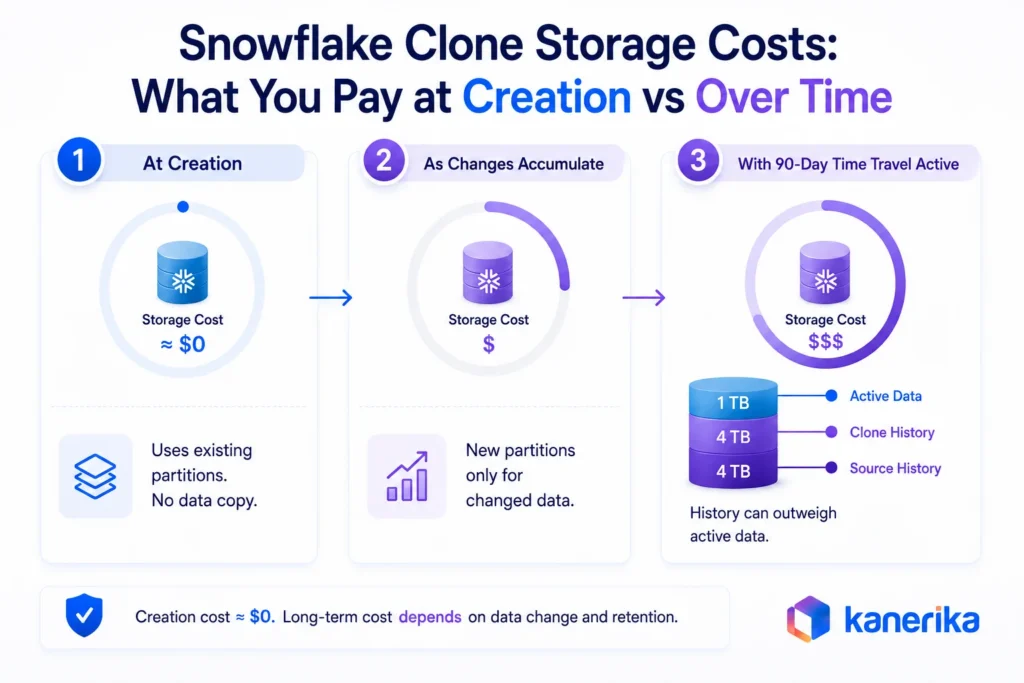
That incident captures the feature well. A 10 TB schema clones in seconds with no upfront storage cost. Most teams still making full copies are paying for the same data twice. But a high-change-rate table on 90-day Time Travel can accumulate 9 TB of historical storage on a 1 TB active table, a 10x cost multiplier. Free to create does not mean free to keep.
This article covers how zero copy cloning works, what it costs over time, the SQL to run it, enterprise use cases, access control gotchas, and when a regular copy is the better choice.
Key Takeaways
- Zero copy cloning creates a metadata reference to existing micro-partitions rather than physically copying data. That is why clones are instantaneous regardless of source size.
- Modifying either side starts the storage clock. Snowflake creates new micro-partitions for changed data using copy-on-write semantics.
- Cloning suspends all tasks and drops unconsumed stream records Both are common operational surprises.
- The most practical enterprise use cases are dev/test environment branching, ETL validation, migration rehearsal, and historical debugging with Time Travel.
- Cloned objects do not automatically inherit access privileges from the source. An ACCOUNTADMIN or object owner must explicitly grant permissions on the clone.
- Clone governance matters at scale. Without naming standards and lifecycle rules, abandoned clones quietly accumulate storage costs that surface in billing audits.
Planning a Snowflake Migration or DataOps Buildout?
Kanerika is a Snowflake Select Tier Partner with hands-on implementation experience
 Book a Meeting
What Is Zero Copy Cloning in Snowflake?
Zero copy cloning creates a new database, schema, or table that shares the source’s underlying storage. No data is duplicate. Snowflake writes new metadata entries pointing to the same micro-partitions the source already occupies.
That is why the term “zero copy” is accurate at creation but requires qualification. The clone has zero additional storage cost when first created.
Modifying either side creates new micro-partitions, owned exclusively by whichever object changed. That is where storage costs begin.
What “Zero Copy” Means
The clone is independent at creation. Writes to either side do not affect the other. Both sides share the original micro-partitions until one of them modifies that data.
A 1 TB table cloned today costs no additional storage in the clone. That same clone, after a full rewrite of the data inside it, costs roughly another 1 TB in new micro-partitions, but only for the modified data.
How It Differs from Traditional Database Copies
| Method | Creation Time | Storage at Creation | Data Independence | Cost Model |
|---|
| Zero Copy Clone | Seconds | Near-zero | Immediate (on write) | Pay only for divergence |
| Physical Copy | Minutes to hours | Full duplication | Immediate | Full storage from the start |
| Backup and Restore | Hours | Full duplication | Full | Full storage at restore |
| Snapshot (some platforms) | Seconds to minutes | Metadata-based | Depends on platform | Varies |
The operational difference is significant at enterprise scale. Zero copy cloning turns an eight-hour, 10 TB database copy into a sub-minute operation. For teams running daily test refreshes or pre-migration rehearsals, that difference changes what is practical.
How Snowflake Zero Copy Cloning Works Under the Hood
The mechanism behind Snowflake zero copy cloning is micro-partition architecture. Understanding it removes the mystery from both the speed of cloning and the cost behavior afterward.
What Are Snowflake Micro-Partitions?
All Snowflake table data is divided into micro-partitions, contiguous units of storage that each hold between 50 and 500 MB of uncompressed data. Snowflake compresses this data before storing it, so actual stored sizes are smaller.
Every micro-partition is immutable. Once created, it cannot be altered.
That immutability is central to both cloning and Time Travel. Snowflake never overwrites data in place. When data changes, it creates new micro-partitions and retains the old ones until they fall outside the retention window.
How Cloning Uses Metadata Instead of Copying Data
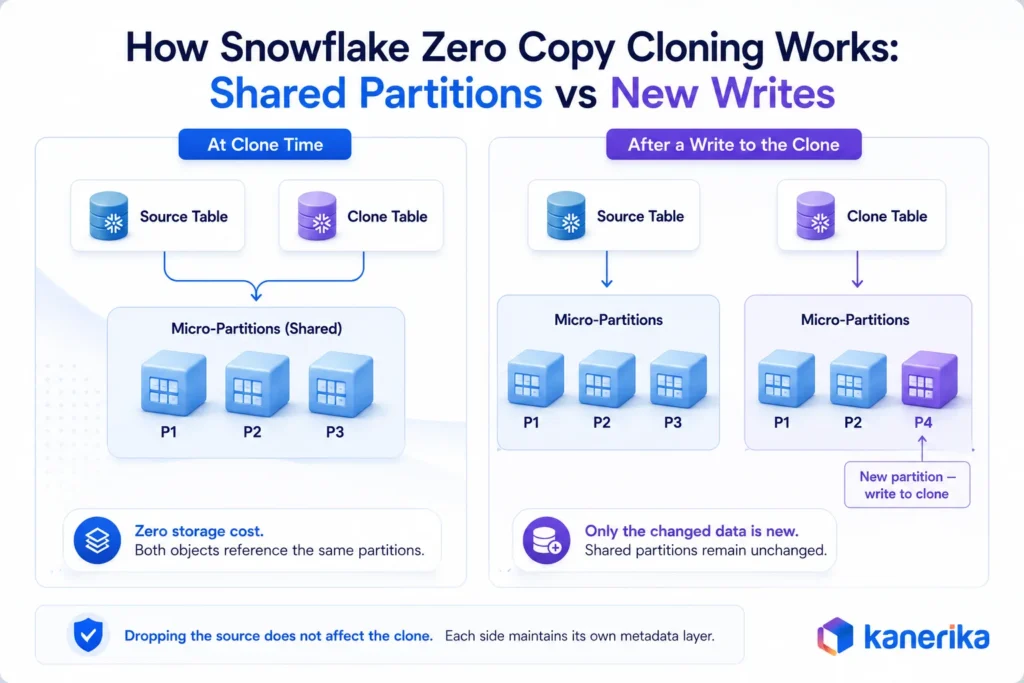
Each Snowflake table maintains a metadata layer that maps the table to its micro-partitions. When a clone is created, Snowflake creates a new metadata layer for the cloned object that points to the exact same micro-partitions as the source.
No data moves. No files are copied. The operation is entirely a metadata write.
That is why cloning a 100 TB database takes roughly the same wall time as cloning a 100 GB table. The source size is irrelevant to clone creation time. Only the metadata volume matters.
How Copy-on-Write Works in Snowflake Clones
When a row is updated or deleted in the clone, Snowflake creates a new micro-partition for the changed data and assigns it to the clone. The original micro-partition stays, still referenced by the source. Neither side overwrites the other.
Copy-on-write semantics explains the cost curve. The clone diverges from the source exactly in proportion to how much data changes.
A clone used only for read-only analysis costs nothing beyond creation. A clone used for large-scale data transformations builds up its own storage footprint.
Why Changes to a Clone Don’t Affect the Source
Because both source and clone maintain their own metadata layers, updates to one side do not propagate to the other. The clone points to new micro-partitions for its own changes.
The source continues to reference its own versions. They share only the original, unmodified partitions, and that shared reference shrinks as each side diverges.
Snowflake Zero Copy Cloning Cost: What You Actually Pay
Teams frequently assume Snowflake zero copy cloning is free. It is free at creation. The actual cost profile depends on what happens after the clone exists.
Storage Cost at Clone Creation
At creation, the clone adds almost no measurable storage cost. The only write operation is creating new metadata entries. The micro-partitions themselves are already stored and paid for by the source object.
On a table with a monthly storage charge of $500, creating a clone of that table adds nothing to that month’s bill on day one.
Compute Costs When Using a Snowflake Clone
Clone creation itself uses minimal compute and typically needs no running warehouse. Queries against the clone are billed normally. Two cost buckets to plan for:
- Creation: near-zero compute, no warehouse required
- Ongoing queries: normal warehouse compute billed per second
How Clone Storage Costs Grow Over Time
Storage charges are proportional to how much data changed, not the full clone size. A 1 TB table clone where only 100 GB changes costs storage for those 100 GB of new micro-partitions.
Operations that generate the most divergence:
- Full data rewrites
- Large backfills
- Bulk deletes
Monitoring clone-level storage via STORAGE_USAGE or Snowflake’s cost management views is the right habit to build early. Data observability frameworks can extend this visibility across the full pipeline.
Time Travel and Fail-Safe Cost Impact
Snowflake’s Time Travel feature retains historical versions of data for up to 90 days (depending on edition and configuration). Fail-safe extends that for an additional seven days in a non-queryable recovery layer. After cloning, source and clone each maintain their own Time Travel window.
If a table’s DATA_RETENTION_TIME_IN_DAYS is set to 14 days, the clone inherits that setting and maintains 14 days of its own history going forward. That history storage is billed separately for each object. For large tables with long retention windows, this can double the effective storage cost across source and clone.
How to Keep Snowflake Clone Costs Under Control
Four controls keep clone costs contained:
- Drop clones when their purpose is complete
- Set shorter
DATA_RETENTION_TIME_IN_DAYS on short-lived test clones
- Tag each clone with owner and creation date for automated cleanup
- Monitor storage via cost management views on a monthly cadence
Snowflake Clone SQL Syntax: Commands and Examples
The SQL for cloning is straightforward. The CLONE keyword works consistently across supported object types.
Snowflake CREATE CLONE Syntax
The pattern follows this form:
CREATE [object_type] [new_name] CLONE [source_name];
No additional parameters are required for a default clone at the current state of the source.
Cloning a Table
CREATE TABLE orders_test CLONE orders;
This creates a clone of the orders table in the current schema context. The clone immediately has the same columns, clustering, constraints, and data state as the source. Kanerika’s dedicated guide to cloning tables in Snowflake covers the permissions, billing, and rollback patterns that come up once this pattern reaches production.
Cloning a Schema
CREATE SCHEMA analytics_dev CLONE analytics_prod;
Cloning a schema clones all tables, views, stored procedures, sequences, and other supported objects within it.
Key behaviour to know: tasks inside the cloned schema are suspended by default. Scheduled jobs will not run until explicitly resumed.
Cloning a Database
CREATE DATABASE reporting_dev CLONE reporting_prod;
A database clone includes all schemas and their objects.
Read More: Azure Cosmos DB: What It Is & How to Build at Scale
- Privileges granted at clone time are copied
- Future grants on the source do not propagate to the clone
- Both sides are independent from the moment the clone exists
Cloning Dynamic Tables
CREATE DYNAMIC TABLE orders_summary_dev
  TARGET_LAG = '1 hour'
  WAREHOUSE = compute_wh
  CLONE orders_summary_prod;
Cloning a dynamic table creates an independent copy with its own refresh schedule. The clone starts in a suspended state and must be explicitly resumed before its first refresh runs.
Cloning a Snowflake Table at a Point in Time Using Time Travel
The AT and BEFORE clauses let teams clone an object as it existed at a specific timestamp or before a specific statement ran. Two common patterns:
-- Clone a table as it existed 24 hours ago
CREATE TABLE orders_yesterday
CLONE orders
AT (TIMESTAMP => DATEADD('hour', -24, CURRENT_TIMESTAMP()));
-- Clone before a specific query ran (useful after an accidental bulk delete)
CREATE TABLE orders_restored
CLONE orders
BEFORE (STATEMENT => '<query_id>');
- Inspect data as it existed before a bad ETL run, without touching the live table
- Restore a pre-statement state after an accidental bulk delete
The point in time must fall within the source object’s DATA_RETENTION_TIME_IN_DAYS window.
6 Enterprise Use Cases for Zero Copy Cloning
Zero copy cloning changes what is practical for data teams. For teams evaluating Databricks vs Snowflake, it is one of the features that most distinguishes Snowflake in day-to-day engineering workflows.
1. Development and Test Environment Branching
A production schema clone lands in seconds. Teams refresh dev environments at the start of each sprint without significant cost or coordination. Compare that to traditional full-copy approaches:
- Wait hours for a copy to complete
- Pay for full duplicate storage from day one
- Run infrequently because the overhead discourages it
The practical effect is that engineers work against production-scale data in development instead of against small sample datasets that miss edge cases. Test coverage improves because the environment is realistic.
2. ETL and Data Pipeline Validation
Engineers clone the target tables into a data migration testing environment and run the pipeline against the clone. If it fails, production is unaffected. Drop the clone, fix the issue, and repeat.
Teams that previously worked with synthetic datasets and relied on data reconciliation after the fact can now validate against production-scale data before any row in production changes.
3. Migration Rehearsal and Upgrade Testing
Platform migrations carry real execution risk, whether the move is from an on-premises warehouse to Snowflake or from one Snowflake schema structure to another. A missed dependency, an untested data type, or an undocumented stored procedure can block cutover in any enterprise data migration.
Clone the source schema, run the full migration against it, find the failures, fix them, and rehearse again. All without touching production. A structured data migration framework includes clone-based rehearsal as a standard stage before any cutover.
In Kanerika’s Snowflake engagements, the most common cutover blockers found during rehearsal are tasks and streams that behave differently in a cloned environment than in production:
- Tasks suspend on clone creation and must be explicitly rebuilt for the clone environment
- Streams lose unconsumed CDC records. Stream state at clone time is not transferred
Teams that find this during rehearsal can rebuild and reset before go-live. Teams that skip rehearsal find it mid-cutover.
4. Disaster Recovery Practice
Recovery procedures that are never tested fail under pressure. With cloning, teams practice against a production-identical environment without touching live data:
- Clone the production database
- Apply a simulated failure scenario to the clone
- Run the full recovery process against it
- Verify the outcome without any production risk
5. Analytics Sandbox Environments
Analysts often need to reshape, annotate, or aggregate datasets in ways that would disrupt shared production schemas. A sandbox clone gives each team real data in an isolated environment, with no coordination overhead.
When a refreshed view is needed, drop the clone and create a new one. This works particularly well for quarterly reporting cycles that need a stable period-end snapshot.
6. Data Science and Model Validation
Feature engineering and model training often require modifying source tables, including adding labels, creating derived columns, and joining in external signals. Running those operations on production creates data quality risks. A cloned table matches production structure and volume without touching the source.
Snowflake Cloning: Privileges, Limitations, and Gotchas
Cloning has specific behaviors around privileges and object support that differ from what teams expect when they first use the feature.
1. Required Privileges for Cloning
The privilege required to clone an object depends on the object type. Tables require the SELECT privilege on the source. Pipelines, streams, and tasks require OWNERSHIP.
Most other object types require the USAGE privilege at minimum. The role creating the clone must hold the required privilege on the source object.
2. Access Control Behaviour on Cloned Objects
Privileges granted on child objects in the source are copied to the clone at the moment of cloning. Only what exists at clone time is copied. Future grants on the source do not propagate.
Masking policies and row access policies are copied to the clone along with the objects they are attached to. This is usually the correct behavior for test environments.
The clone enforces the same security policies as the source. But teams building analyst sandboxes sometimes expect the clone to have relaxed access controls, which requires explicit policy removal after cloning.
The role that creates the clone must already hold the required privilege on the source. The owner of the cloned object must then explicitly grant any additional access.
3. Objects Supported for Cloning
Snowflake supports cloning for the following object types:
- Databases, schemas, tables, external tables
- Streams, tasks, dynamic tables, pipes
- Sequences, external named stages, file formats
Note: internal named stages cannot be cloned. The supported list may expand with new Snowflake releases.
4. Objects That Cannot Be Cloned
Account-level objects cannot be cloned:
- Account roles, users, virtual warehouses
- Resource monitors, storage integrations, grants
If a cloned schema contains objects that depend on account-level resources (a pipe referencing a storage integration, for example), those dependencies must be rebuilt manually.
5. Common Snowflake Cloning Mistakes to Avoid
Three mistakes show up consistently across Snowflake teams:
- Task schedules: tasks are suspended on clone creation and must be explicitly resumed or redesigned
- Stream records: unconsumed stream records are not accessible in the clone. Stream state at clone time is not transferred
- Storage growth: teams underestimate how fast storage accumulates when clones undergo heavy writes, and miss the window to catch costs early
Snowflake Data Engineering and Implementation
Kanerika’s Snowflake team covers migrations, DataOps buildouts, and platform governance.
Explore Snowflake Services
Snowflake Clone Governance: Lifecycle, Cost Control, and When to Use a Regular Copy
Snowflake zero copy cloning is fast and low-cost to create, which makes it easy to over-use. Without discipline, cloud environments accumulate dozens of abandoned clones. Strong data governance best practices prevent this from becoming a long-term cost problem.
Snowflake Clone Naming Conventions
A consistent naming convention is one of the foundational data governance pillars for any Snowflake team. Four elements in the object name:
Read More: 12 AI Governance Best Practices for Enterprise Teams in 2026
- Source schema or database name
- Environment type:
dev, qa, sandbox, test
- Owner or team name
- Creation date
Example: analytics_prod_dev_engineering_20260723. Automated cleanup jobs can sort by age, and schema browsers stay readable when multiple clones coexist.
Managing Snowflake Clone Lifecycle and Expiration
Set a documented expiration expectation at creation. Snowflake does not natively enforce it, so lifecycle management runs through external scheduling or data governance automation tooling.
- ETL validation clones: hours or days
- Sprint dev environments: one to two weeks
- Analyst sandboxes: periodic review, not open-ended
How to Monitor Snowflake Clone Storage Usage
Two system views for clone tracking:
A monthly report sorted by total bytes billed catches abandoned clones before costs compound.
Snowflake Clone Security and Compliance in Regulated Environments
In regulated environments, cloning production data into a dev schema can create compliance exposure. What Snowflake transfers automatically, and what teams must verify:
- Transferred at clone time: masking policies and row access policies attached to source objects
- Must be verified: that inherited policies are correctly applied after cloning. Teams should confirm this for each deployment rather than assuming the transfer is complete
- Optional adjustment: dynamic data masking can be applied to the clone differently from the source, letting engineers work with masked or anonymized data in test environments without altering production policies
A formal data governance framework should document these verification steps for any clone touching regulated data.
Snowflake Clone vs Regular Copy: When to Use Each
| Decision Factor | Zero Copy Clone | Regular Copy (CREATE TABLE AS SELECT) |
|---|
| Speed of creation | Seconds, regardless of size | Proportional to data volume |
| Storage at creation | Near-zero | Full immediate cost |
| Independence | Yes, from first write | Yes, from creation |
| Schema matches source | Yes, exactly | Only if explicitly matched |
| Different clustering needed | No | Yes |
| Cross-platform export needed | No (Snowflake-internal only) | Yes |
| Compliance-driven physical separation | No | Yes |
| Recommended for test environments | Yes | No |
| Recommended for permanent duplicates | No | Yes |
The rule is simple. If the answer to “do I need an independent physical copy?” is no, use a clone. Use a regular copy when the destination needs a different structure, must be physically isolated for compliance, needs to be exported outside Snowflake, or requires a permanent full-cost duplicate for archival or disaster recovery purposes.
Zero Copy Cloning in Snowflake: How Kanerika Handles It at Scale
Zero copy cloning decisions compound. Retention settings, privilege inheritance, lifecycle automation, and DataOps integration all interact. Getting those decisions right from the start is far easier than untangling clone sprawl later.
Kanerika is a Snowflake Select Tier Partner with implementation experience across migrations, DataOps buildouts, and data engineering modernization for enterprise clients in manufacturing and logistics. Kanerika’s Snowflake engagements typically include:
- Clone-based migration rehearsals as a standard pre-cutover stage, surfacing task and CDC pipeline issues before go-live
- Clone governance frameworks as part of the post-migration DataOps handoff: naming standards, lifecycle automation, and storage monitoring dashboards
- FLIP, Kanerika’s DataOps platform, which reduces migration effort by 50 to 60% for teams migrating into or within Snowflake
- Karl, Kanerika’s AI data insights agent, which teams activate post-migration to query Snowflake through natural language, delivering 65% time savings on data analysis and 5x faster business insight delivery
For enterprises evaluating Snowflake as part of a broader cloud migration, Kanerika’s experience across Snowflake, Microsoft Fabric, and Databricks brings the comparative context that shapes architecture decisions beyond any single platform.
Snowflake Migration in Action: A Kanerika Case Study
A globally distributed manufacturing and logistics enterprise needed to migrate to Snowflake without risking their live environment. Kanerika used zero copy cloning to make it safe.
Challenge
- Production environment contained tasks and CDC pipelines with no safe way to validate migration without risking the live system
- No reliable pre-cutover testing path for a globally distributed team
Solution
- Used zero copy cloning to run multiple full migration rehearsals against fresh production clones
- Clone-based rehearsal surfaced suspended tasks and stream state issues before go-live
- Each issue was resolved and re-tested against a new clone before the next rehearsal run
Results
- Clean cutover with zero production downtime
- 60% reduction in manual reconciliation effort across distributed teams post-migration
- Tasks and stream dependencies fully resolved before go-live, with no mid-cutover surprises
Wrapping Up
Zero copy cloning changes how data teams work day to day. Fast branching, no upfront storage cost, a direct path to safer development and migration workflows. The mental model to keep is “instant branch, not free forever.” Creation costs almost nothing. Divergence is what costs.
Teams that build clone governance habits early (naming, lifecycle rules, storage monitoring) avoid the billing surprises that catch organizations treating cloning as permanently free. For enterprises running Snowflake at scale, it is a foundation for faster development cycles and more confident data operations.
Get Expert Guidance on Snowflake Implementation
Kanerika’s team turns Snowflake features into operational outcomes, from clone governance to full migrations
Book a Meeting
Frequently Asked Questions
Is zero copy cloning in Snowflake really free?
At creation, a clone costs almost nothing. It references existing micro-partitions rather than duplicating them. Costs begin the moment either side is modified. Snowflake creates new micro-partitions for changed data and bills them to the object that owns them. A read-only clone stays cheap. A clone that undergoes heavy writes builds its own storage footprint.
Does modifying a clone affect the original data?
No. Each side writes to its own micro-partitions. Changes to the clone stay in the clone. Changes to the source stay in the source. They only share the original, unmodified partitions, and that shared reference shrinks as each side diverges.
Can a production database be cloned safely?
Yes. The clone operation is read-only against the source. No data moves. The clone starts as an independent copy of the production state at that point in time.
The main consideration is privileges. The team working in the clone must hold the required privileges on it. Masking policies on sensitive columns transfer at clone time, which is usually the correct behavior for dev and test environments.
How does cloning work with Snowflake Time Travel?
Use the AT and BEFORE clauses on CREATE … CLONE. A clone can reflect the state of any object at any timestamp within its retention window. Standard debugging pattern: clone the table as it existed before the bad transformation ran, inspect it, drop the clone. Each clone gets its own Time Travel window from creation.
What happens to a clone if the original object is deleted?
Nothing. The clone is fully independent. It maintains its own metadata and continues to reference the original micro-partitions independently. Dropping the source moves it into Snowflake’s fail-safe period but the clone stays queryable. The shared micro-partitions remain in storage until all objects that reference them are dropped and their retention windows expire.
Which Snowflake objects cannot be cloned?
Account-level objects cannot be cloned. This includes account roles, users, virtual warehouses, resource monitors, and storage integrations. Internal named stages cannot be cloned. Dependencies that reference account-level objects (pipes, tasks) must be rebuilt manually in the clone. The official Snowflake docs maintain the current supported list.
How should enterprise teams manage clone lifecycle?
Three core practices keep clone environments under control:
- Naming: include source name, environment type, owner, and creation date in every clone name
- Retention expectations: set a documented expiration at creation time (hours for ETL validation, weeks for dev environments)
- Automated cleanup: run scheduled procedures using
INFORMATION_SCHEMA.TABLE_STORAGE_METRICS to drop abandoned clones before costs compound
Without these habits, clone sprawl builds quietly. See data lake vs data swamp for a familiar parallel.
When is a regular copy a better choice than a clone?
Use a regular copy when any of these apply:
- The destination needs a different clustering key or column structure
- Physical isolation is required for compliance
- The data needs to be exported outside Snowflake
- A permanent full-cost duplicate is needed for archival or disaster recovery
For testing, development, pipeline validation, migration rehearsal, and sandbox analytics, zero copy cloning is faster and cheaper.
Both source and clone carry their own Time Travel and Fail-safe windows after the clone is created.
- Time Travel: up to 90 days of queryable history, billed for each object independently
Fail-safe: additional seven days, non-queryable recovery layer
A clone that inherits a 14-day data retention window builds its own 14-day history separately from the source. For large tables with long data retention settings, this can double effective storage cost.














