TL;DR
An AI data pipeline prepares and delivers the data a model or AI assistant consumes, and the safest build extends your governed lakehouse instead of starting a separate AI stack. Forecasting and churn models usually need only nightly batch with point-in-time training sets. Fraud scoring and live offers, in contrast, need streaming features served from the same definitions used in training. RAG and generative AI call for a document pipeline that parses, chunks, embeds and re-indexes content, then filters results by user permissions. In every case, add data contracts, quality checks, column lineage and drift alerts that can trigger retraining. Start with one use case end to end, then reuse the same layers for the next model.
Key Takeaways
- An AI data pipeline delivers training sets, inference-time features, retrieval documents and embeddings, so its main consumer is a model rather than a report.
- A model can pass validation and still fail in production when features arrive late, differ between training and serving, or come from a stale index.
- Point-in-time joins and one shared feature definition keep training and serving consistent, so a model sees the same inputs in both.
- RAG pipelines also need parsing, chunking, embedding versions, delete sync and permission-aware retrieval.
- Match freshness to the decision: nightly batch for forecasts, streaming for fraud and live offers, and event-driven re-indexing when documents change.
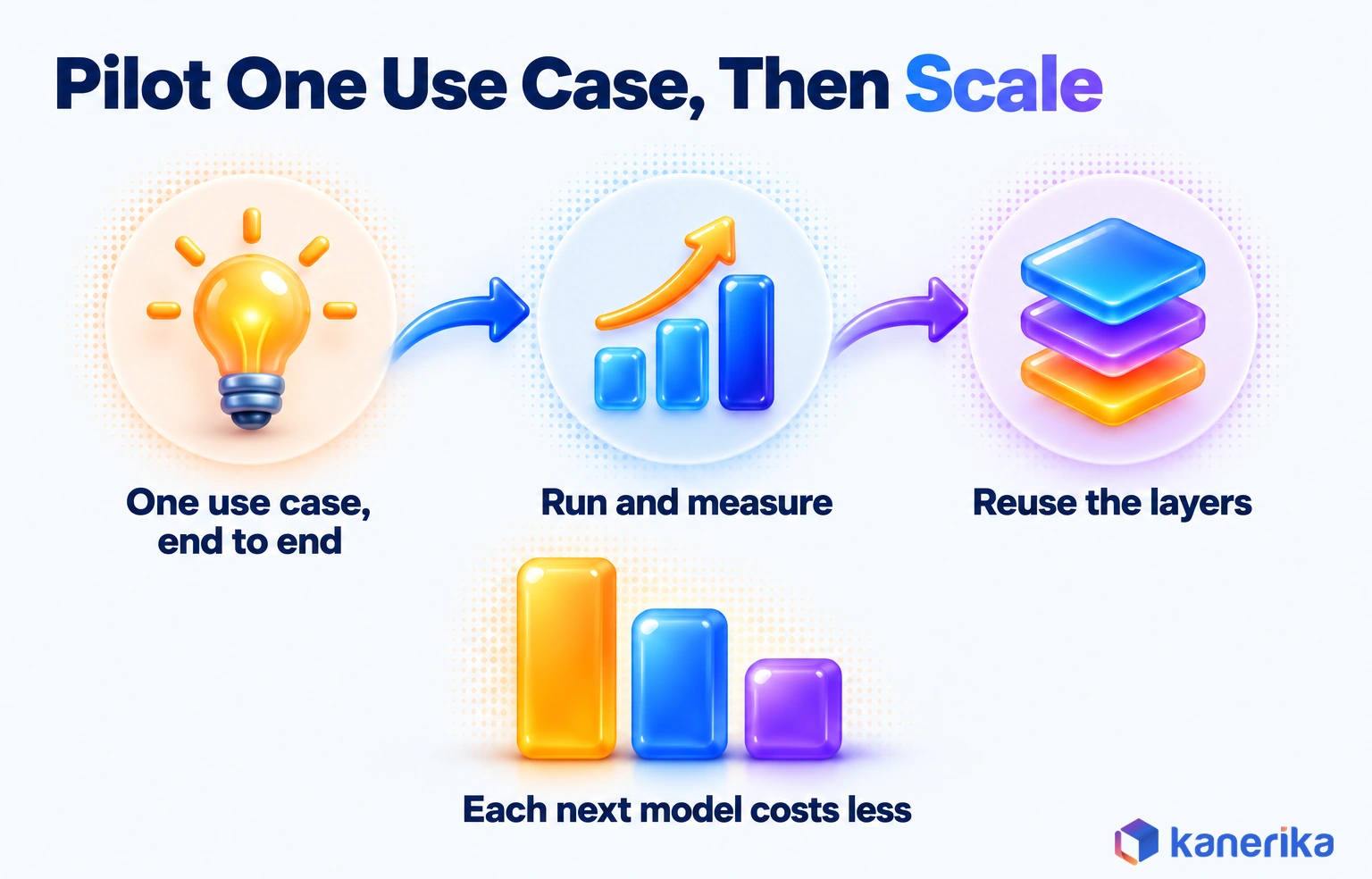
- Build one use case end to end on a governed lakehouse, then reuse its layers for the next model.
Watch on YouTube
Your AI Models Are a Commodity. Your Data Isn’t.
A Kanerika video on why the data behind a model, more than the model itself, decides whether enterprise AI pays off, the same argument this guide applies to pipeline design.
When the Model Is Right and the Data Is Late
Picture a card-fraud model that passed every validation test. Its precision looked strong on the holdout set, so the risk team signed off, and it went live on a Monday.
By Wednesday, however, the model was declining good customers while a ring of small test charges went through. Nothing in the model code had changed, and the weights were still the ones the team had validated.
One Feature, Two Answers
The cause was a single input called chargebacks in the last 30 days. During training, a nightly batch job computed it from a settled ledger. At scoring time, though, the same number came from a live event stream that also counted pending disputes.
So the model saw one version of the feature while learning and another while deciding. Data scientists call this training-serving skew. It is not a modeling problem, so no amount of tuning would have fixed it.
The fix sat in the pipeline rather than the model. The team needed one feature definition, computed the same way for training and serving. Training rows also had to join to the values that existed at each transaction’s own timestamp.
That design is what separates an AI data pipeline from a reporting pipeline. The rest of this guide walks through it layer by layer, from architecture to a build plan you can follow.
What Is an AI Data Pipeline?
An AI data pipeline is the set of processes that prepares and delivers the data an AI system consumes. Snowflake’s guide to AI pipelines lists four inputs: training data sets, features at inference, documents prepared for retrieval and embeddings in a vector index.
That definition matters because the consumer changes everything downstream. A dashboard tolerates a late refresh, but a fraud model scoring a payment in milliseconds does not. A report also needs current totals, while a training set needs history exactly as it looked on each past date.
Before going further, you may want a refresher on how ordinary pipelines move data in our guide to data pipeline basics. The comparison below then shows where an AI pipeline sits next to the two things people most often confuse it with.
| Dimension | Traditional ETL/ELT pipeline | AI data pipeline | ML pipeline |
|---|
| Main consumer | Reports, dashboards and business apps | Models in training and at inference, plus retrieval systems | Model training, evaluation and deployment jobs |
| Freshness need | Hourly or daily is usually fine | Set by the decision, such as daily or sub-second | Set by the retraining cadence |
| History needs | Current state, plus snapshots when needed | Each value as it stood at each past timestamp | Versioned training sets |
| Typical outputs | Tables, marts and aggregates | Feature tables, training sets, chunks and embeddings | Trained models, metrics and registry entries |
| Cost of a silent error | A wrong number on a report | Wrong decisions at scale, often unnoticed until outcomes drop | A weaker model that may still ship |
The ML pipeline and the data pipeline meet at the training set. The data side builds that set and keeps it reproducible, while the ML side trains, evaluates and deploys the model that reads it.
Checklist
Data Engineering Checklist
Review ingestion, quality, storage and operations step by step before your pipelines start feeding production models.
Get the Checklist →
AI-Ready Pipelines vs AI-Powered Pipelines
People use the term in two ways, so it helps to separate them early. An AI-ready pipeline feeds AI: it delivers clean, governed, point-in-time data to models and retrieval systems. An AI-powered pipeline, in contrast, uses AI inside the pipeline itself.
Teams usually need both patterns, but in a fixed order: make the data AI-ready first, then add AI steps on top. A pipeline that calls a model on dirty, ungoverned rows only produces wrong answers faster.
In the AI-powered pattern, for example, a step might call a language model to classify tickets or pull invoice fields as rows flow through. Databricks AI Functions, Snowflake Cortex AI Functions and Microsoft Fabric AI functions all ship this capability. The tools table later in this guide names the main ones. Some functions are in preview or limited to certain regions, so check each one’s status before you design around it.
| Pattern | What it does | Example | Typical building blocks |
|---|
| AI-ready pipeline | Feeds models and retrieval with governed, point-in-time data | Nightly churn features; document chunks for a support assistant | Feature stores, vector indexes, lineage |
| AI-powered pipeline | Calls a model during a pipeline step | Classifying tickets, extracting invoice fields, summarizing call notes | Databricks AI Functions, Snowflake Cortex AI Functions, Fabric AI functions |
| Both together | Uses AI functions first, then feeds the result to another model | Extracting contract terms, then embedding them for RAG | AI functions, then an embedding model and vector index |
Why AI Workloads Break Traditional Data Pipelines
A pipeline built for reporting usually works fine until the first model depends on it. In October 2025, Cloudera and Harvard Business Review Analytic Services surveyed more than 230 HBR audience members for a report published in March 2026. Only 7% said their data was completely ready for AI, and 73% said AI data quality deserves more priority than it gets. Gartner predicts that through 2026, organizations will abandon 60% of AI projects unsupported by AI-ready data. Models are easy to buy, so the pipeline is where AI projects win or fail.
AI Assessment
How Ready Is Your Data for AI?
Score your organization’s data, governance and skills readiness for AI, and see which pipeline gaps to close before the next model goes live.
Start Your AI Assessment →
Four Differences That Do the Damage
Those numbers make sense once you look at what changes when a model becomes the consumer. In practice, four differences do most of the damage.
- The consumer is a model. A person spots an odd number on a dashboard, but a model acts on it silently, thousands of times, until someone notices.
- Training needs history as it was known then. Reporting tables often overwrite yesterday’s values, while a training set needs each value as it stood at each past moment. Otherwise, the model learns from information it would never have had.
- Training and serving take two physical paths. Training reads large historical batches, while serving reads one entity in milliseconds. Two code paths drift apart unless one definition feeds both.
- Outcomes feed back. Labels arrive later, as a chargeback, a churned customer or a returned order. The pipeline then has to capture them and join them to the original prediction.
None of this means throwing out existing pipelines. Instead, it means adding the controls that a model needs and a report never did.
AI Pipeline Architecture: The Reference Layers
An AI pipeline architecture is easiest to read as a stack of layers, each with one job and one owner. Data enters at the bottom, then gets cleaned and shaped in the middle before it leaves through serving systems built for models. A governance plane runs across every layer, because lineage and access rules only work when they cover the whole path.
Most reference designs share six layers. Sources hold operational data, events and documents, such as orders, clicks and contracts. Ingestion then moves that data in by batch, stream or change capture, and a lakehouse stores it in raw, cleaned and curated zones.
Above the curated zone, two serving systems do the AI-specific work. A feature store holds model inputs and serves them during both training and inference. A vector index, by comparison, holds embeddings for retrieval. Training and serving jobs read from those two, and a monitoring layer watches quality, drift and outcomes before feeding results back for retraining.
The curated layer is also where existing work pays off. Teams that already practice automating warehouse builds can point the same tested models at feature tables instead of starting over.
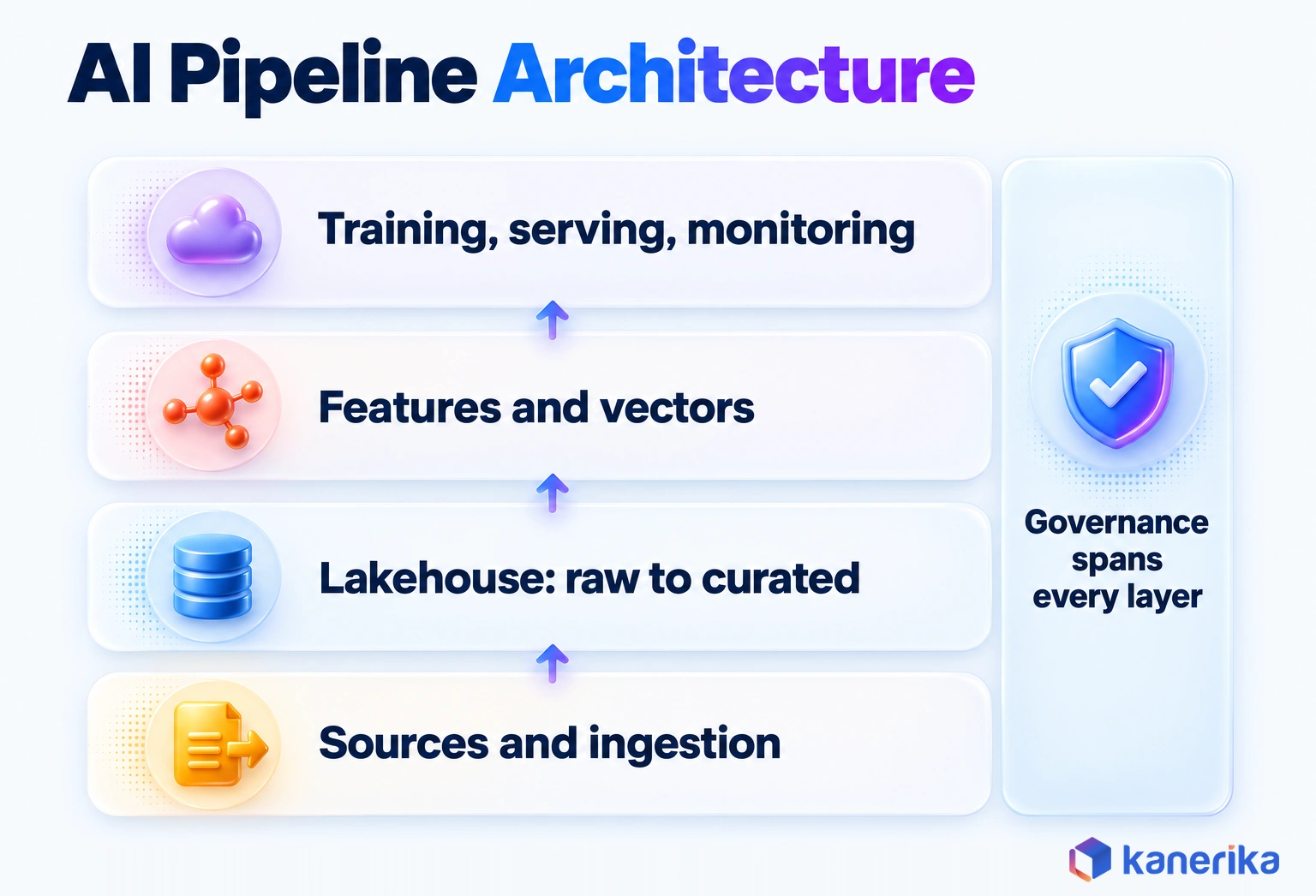
A lakehouse is a common foundation for this stack, though not a requirement. What matters is that raw data is kept, curated tables carry timestamps, and every layer can be rebuilt from the one below it.
Where Feature Stores, Vector Indexes and Lakehouses Fit
These three components are often lumped together, although they store different things and answer different questions. A feature store answers what a model should know about an entity at a given moment, such as a customer’s spend over 30 days. A vector index, on the other hand, answers which passages are closest in meaning to a question.
| Component | What it stores | What it serves | Example technology |
|---|
| Lakehouse | Raw, cleaned and curated tables with history | Batch reads for training and analytics | Lakehouse tables on Databricks, Microsoft Fabric or Snowflake |
| Feature store | Feature definitions and computed values per entity | Point-in-time training sets and low-latency online lookups | Databricks Feature Store, Snowflake Feature Store, open source Feast |
| Vector index | Embeddings of text chunks together with metadata | Similarity and hybrid keyword search for retrieval | Databricks AI Search, Azure AI Search |
In the fraud story that opened this guide, a feature store is what would have kept chargebacks_30d identical in training and scoring. One definition feeds both the point-in-time training set and the online lookup, so the model sees the same number in both places. Databricks ties its feature store to Unity Catalog for governance, lineage and point-in-time joins, and publishes features to an Online Feature Store. Snowflake’s Feature Store handles batch and streaming features and builds point-in-time correct training sets with ASOF JOIN.
The 7 Stages of an AI Data Pipeline
Every AI data pipeline, whatever the platform, moves through the same seven stages. Each stage has a purpose and one quality check that should stop bad data from moving on. The summary table comes first, followed by what each stage looks like in practice.
| Stage | Purpose | Quality check that blocks | Typical tools |
|---|
| 1. Ingestion | Bring source data in by batch, stream or change capture | Schema and row count match the source contract before loading | Connectors, CDC tools, Spark Declarative Pipelines, Dataflow Gen2 |
| 2. Validation and quality | Catch nulls, duplicates, out-of-range values and late data | Failing rows go to quarantine instead of downstream | Expectations in pipeline code, data quality tools |
| 3. Transformation and features | Clean, join and compute model inputs | Feature definitions are versioned and tested | SQL, PySpark, feature stores |
| 4. Labeling and enrichment | Attach outcomes, human labels or AI-extracted fields | Label coverage and reviewer agreement | AI functions, labeling tools |
| 5. Storage and versioning | Store curated data and snapshot training sets | Every training set has a version ID | Lakehouse tables, data versioning tools |
| 6. Serving | Deliver features and documents to models | Online values match offline values on samples | Online feature store, vector index |
| 7. Monitoring and feedback | Track quality, drift and outcomes | Alerts route to named owners when thresholds break | Observability tools, MLflow |
1. Ingestion
Ingestion sets the ceiling on freshness for everything downstream. A churn model fed by a nightly CRM extract can never react faster than once a day, however clever its features are.
Choose the method per source, such as batch for files and slow-moving systems of record, streams for clickstreams and change capture for databases. The trade-off is easy to see with one order. A nightly extract of the orders database picks up a 2 p.m. cancellation only at the next run, while change capture delivers it within minutes. For a model that scores returns or fraud, those lost hours mean decisions made on orders that no longer exist.
Our guide to automated data integration covers connector and CDC choices in depth. On Databricks, Spark Declarative Pipelines on Lakeflow let teams define batch and streaming ingestion in SQL or Python.
2. Validation and Quality Checks
A model will not complain about bad data; instead, it will simply learn from it. That is why validation belongs right after ingestion, before any feature is computed.
Typical rules check for problems such as nulls in required columns, duplicate entity IDs, out-of-range values and late data. Rows that fail then go to a quarantine table with the rule they broke, so engineers can fix the source instead of patching the model. For the difference between integrity rules and fitness-for-use checks, see our explainer on data quality checks.
Kanerika Service
Data Engineering Services
Kanerika designs and runs governed data pipelines on Microsoft Fabric and Databricks, with validation, lineage and monitoring built in from the first release.
Explore Data Engineering
3. Transformation and Feature Engineering
Here raw records become the inputs a model actually reads. A retail team might turn a year of transactions into average basket size, days since last purchase and return rate per category.
Each feature should have one written definition, stored in version control and tested like application code. The definition also needs an entity key and a timestamp. Without both, the feature cannot be joined correctly to past events, so the gap often turns into skew.
4. Labeling and Enrichment
Supervised models need labels, but labels rarely arrive with the data. Some come from later events, such as a confirmed chargeback or a canceled subscription. Others come from people tagging images or support tickets.
AI functions can also take on part of this work. For example, an extraction step can pull contract dates or invoice totals from documents at scale. A sample still needs human review, though, because extraction errors become training errors.
5. Storage and Versioning
Once data is curated, two habits make it trustworthy for AI. Keep raw data so any layer can be rebuilt when a business rule changes. Then snapshot every training set with a version ID, so you can say exactly which rows trained which model.
That question comes up in audits, in incident reviews and whenever a retrained model performs worse than the last one. Data versioning tools and table time travel both work, so long as the version is recorded next to the model.
6. Serving
Serving is where training and production meet, so it is also where they most often disagree. Predictive models read features from an online store with millisecond lookups, while generative AI applications read chunks from a vector index.
Both must still use the same definitions as training. Sample live requests daily, then compare online feature values with offline recomputation for the same entity and time.
7. Monitoring and Feedback
The last stage closes the loop. It tracks the health of the data, the drift of inputs and predictions, and the outcomes that eventually arrive.
Those outcomes then become the next round of labels. A pipeline that never captures them leaves the model learning from an older and older picture of the world. That is why monitoring gets its own section below.
Batch, Streaming or Hybrid: Match Freshness to the Decision
The right processing pattern depends on how fast the decision has to happen, rather than on which technology sounds most modern. A weekly demand forecast gains nothing from sub-second features. A fraud check at the card terminal, in contrast, is useless without them.
Start from the decision latency and work backward. Ask how stale an input can be before the decision gets worse, then pick the cheapest pattern that meets that bound. Many teams end up with a hybrid: batch features for history-heavy signals and a few streaming features where seconds matter.
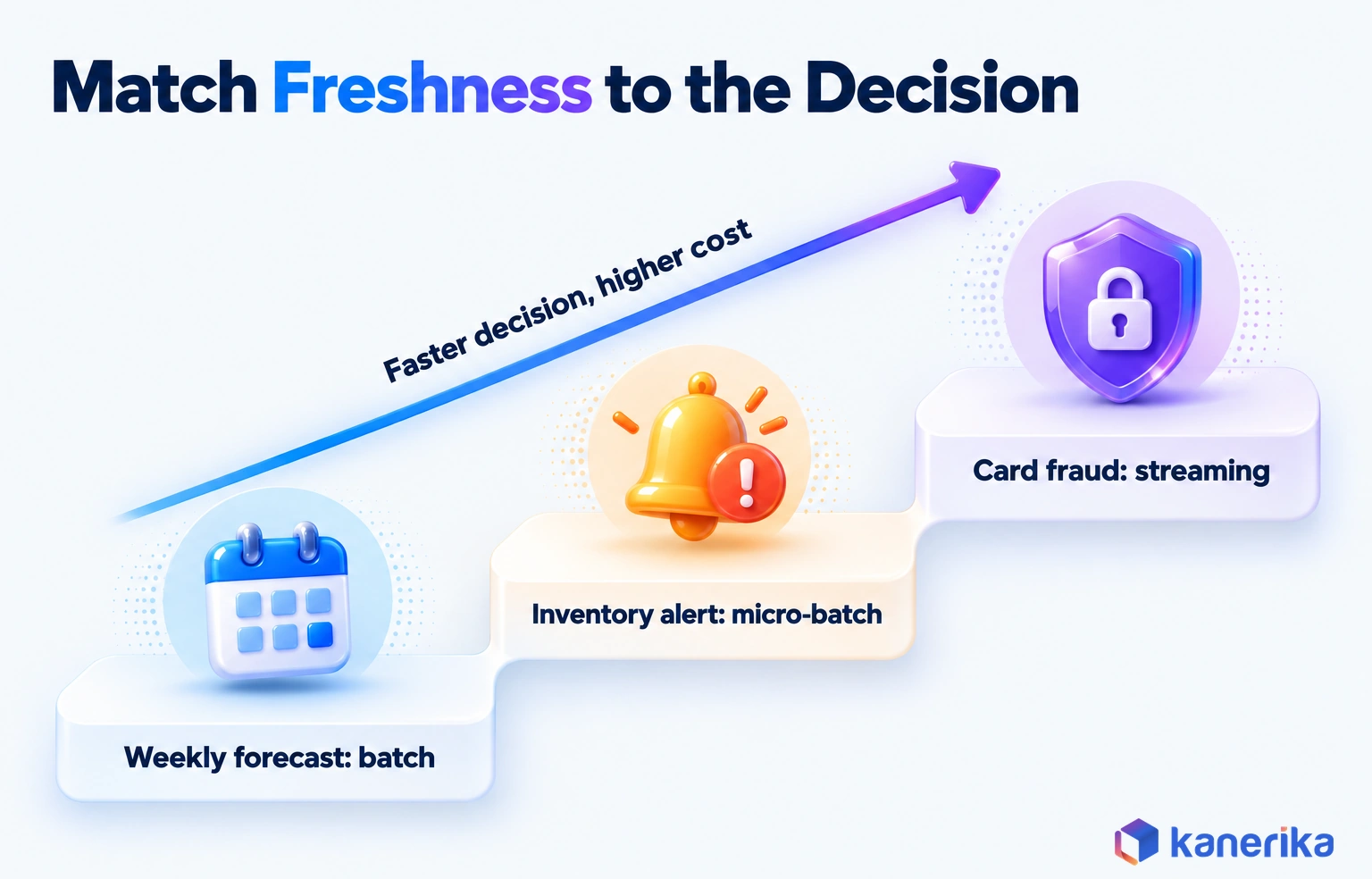
A useful test is to ask what a one-hour delay would cost. For a weekly forecast it costs nothing, whereas for a payment authorization the fraud has already happened by then. Most use cases fall somewhere between those poles.
| Pattern | Typical freshness | AI example | Relative cost to run |
|---|
| Batch | Hours to a day | Demand forecasting, churn scoring, credit limit reviews | Lowest |
| Micro-batch | Minutes | Inventory alerts, marketing triggers | Moderate |
| Streaming | Seconds or less | Card fraud scoring, live personalization | Highest, with always-on compute and on-call |
| Hybrid | Mixed by feature | Fraud model with nightly history plus live velocity counts | Moderate to high |
| Event-driven re-indexing | Minutes, once a document changes | RAG assistant over policies and contracts | Low to moderate |
Batch design patterns such as incremental loads and safe reruns are covered in our ETL best practices guide. This guide stays focused on what changes when a model is the consumer.
Keeping Training and Serving Consistent
Training-serving skew is the gap between the data a model learned from and the data it sees in production. It is also what caused the fraud failure at the top of this guide. Skew is hard to spot because each path looks correct on its own.
The defense is a set of pipeline controls owned by data engineering, rather than a modeling trick. Above all, it relies on the point-in-time join. As the Feast documentation explains, each training row should only see feature values created at or before its own timestamp. That rule keeps backfilled values out of training data, even when they were loaded later.
Here is an illustrative version in SQL. It uses the ASOF JOIN form that Snowflake supports for point-in-time feature retrieval, though the idea is portable. Other engines instead express the same logic with a window function or a feature store’s training-set API.
-- Illustrative only: a point-in-time correct training set
-- Each labeled transaction sees the latest feature value at or before its own time
SELECT l.transaction_id,
       l.event_ts,
       l.is_fraud,
       f.chargebacks_30d
FROM fraud_labels AS l
ASOF JOIN card_features AS f
  MATCH_CONDITION (l.event_ts >= f.feature_ts)
  ON l.card_id = f.card_id;
A plain join on card_id would attach the current value of chargebacks_30d to a transaction from last March. The model would then train on information from the future, look excellent in validation and disappoint in production.
Four Controls That Keep Both Paths Aligned
Each control below closes one of the gaps that skew slips through.
- Use point-in-time joins for every training set. Never join labels to the current value of a feature table, since that leaks the future.
- Keep one feature definition for both paths. Compute online and offline values from the same code, so they cannot drift apart.
- Version every training set. Record the data version, feature versions and code commit next to each model in the registry, so any result can be reproduced.
- Test parity in production. Compare a daily sample of online values with offline recomputation, and alert when they diverge beyond a set tolerance.
Teams that already run MLOps will recognize these controls, especially the registry. The difference is ownership: the controls live in the data pipeline, so data engineers can enforce them before a model ever trains.
Data Pipelines for RAG and Generative AI
Retrieval-augmented generation, or RAG, changes what the pipeline delivers. Instead of rows and features, it delivers passages of text that a language model reads before it answers. The quality of those passages caps the quality of the answers, so the document pipeline deserves the same rigor as a feature pipeline.
The path runs from source documents to answers in five moves: parse, chunk, embed, index and retrieve. Each move can also quietly degrade results. A table split across two chunks, a stale embedding or a withdrawn policy that is still searchable will all produce confident, wrong answers.
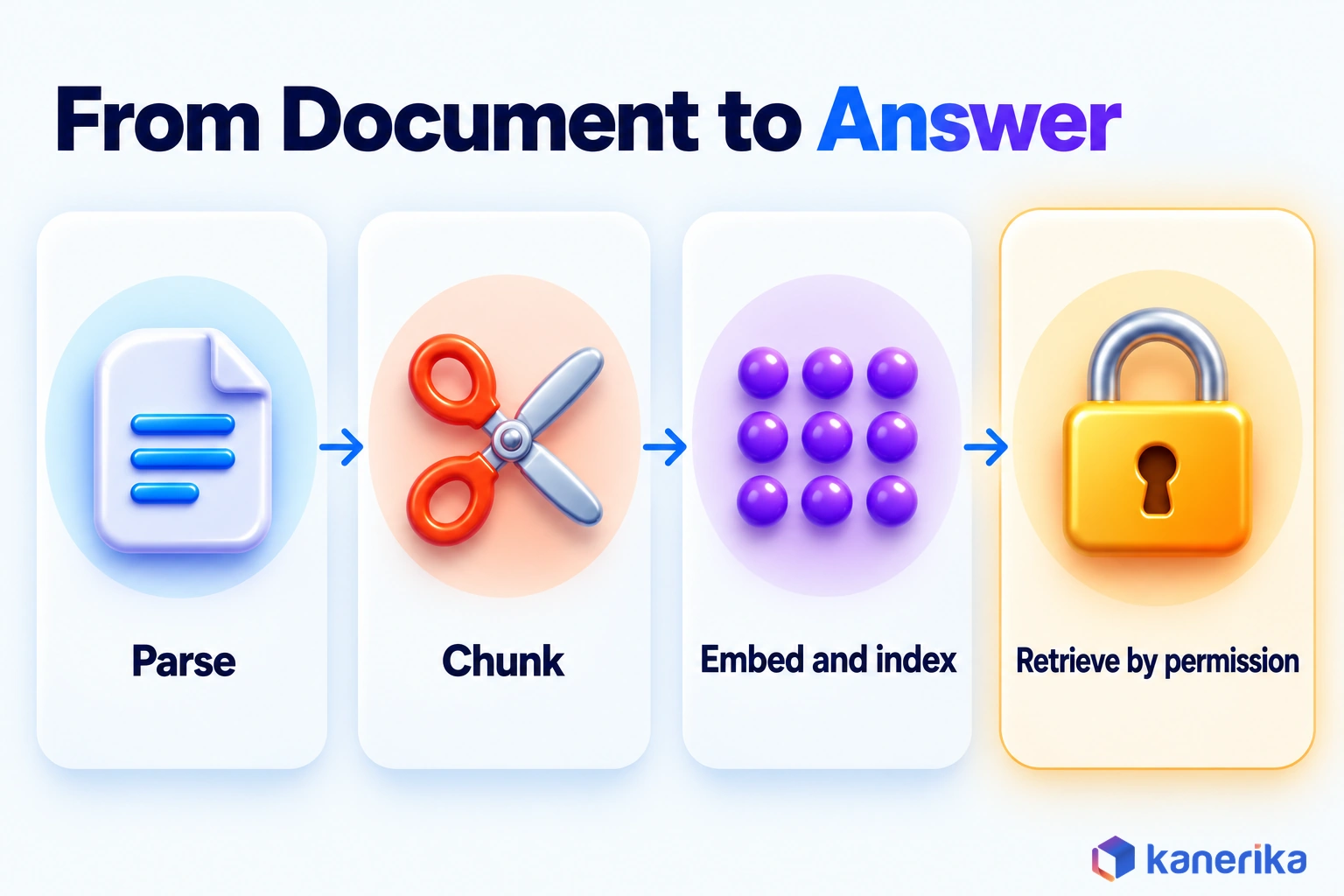
When answers depend on relationships between many entities, a knowledge graph RAG design adds structure that plain vector search lacks.
Parsing and Chunking Documents
Parsing turns PDFs, slides and scanned forms into clean text with structure intact. Headings, tables and page numbers should survive, because they carry meaning a model needs. Databricks lists ai_parse_document among its AI functions for this step, while Snowflake and Fabric also include extraction functions.
Chunking then splits the text into passages small enough to embed and retrieve. Split on document structure, such as sections or clauses, instead of a fixed character count. Keep the source, section title and effective date as metadata on every chunk, so retrieval can filter and answers can cite their source.
Test the split rules against real questions before you scale them. Take twenty questions that users actually ask and check whether the passage answering each one lands inside a single chunk. When answers keep straddling two chunks, adjust the boundaries and run the test again.
Embedding Versions and Index Freshness
Every embedding belongs to the model that produced it. When you change embedding models, old and new vectors are not comparable, so the whole index needs re-embedding. Record the embedding model and version on each vector, and plan re-embedding as part of the upgrade rather than after it.
Freshness is the other half of the job. When a policy changes, its chunks must be re-embedded, and when it is withdrawn, they must be deleted from the index. Deletes, in particular, are the part teams forget.
Managed services also help here. The Delta Sync index in Databricks AI Search, formerly Databricks Vector Search, stays synced as its source table updates. Keeping the source table current keeps the index current, and the service also supports hybrid keyword-similarity search.
Permission-Aware Retrieval
A RAG assistant must never show users a passage they could not open in the source system. The pipeline enforces this by carrying access metadata, such as the groups allowed to read each document, onto every chunk. At query time, retrieval filters results by the caller’s identity before the model sees anything.
Azure AI Search documents two approaches: built-in document-level access control lists, or a security filter that trims results by user or group identity. Whichever you choose, test it with real accounts from different departments before launch. One leaked salary table is enough to end a pilot.
Permission tests are only one part of launch readiness. Our generative AI checklist covers the wider questions to settle before an assistant goes live.
Kanerika Service
RAG Development Services
Kanerika builds retrieval pipelines that parse, chunk, embed and index enterprise documents, with permission-aware retrieval and index freshness designed in.
Explore RAG Development
Monitoring an AI Data Pipeline: Quality, Drift and Retraining Triggers
Monitoring tells you when the data feeding a model has changed enough to matter, and who has to act. A pipeline can finish every run on time while the data inside it drifts. For example, customer behavior shifts, a source system adds a product code, or an upstream team changes a unit from dollars to cents.
Useful monitoring ties each signal to a threshold, an action and an owner. Without the owner, alerts simply pile up until nobody reads them. The example thresholds below are starting points to tune rather than standards.
| Signal | Example threshold | Action | Owner |
|---|
| Freshness | Feature table 2 hours past its SLA | Page the on-call, then hold scoring on stale inputs | Data engineering |
| Volume | Row count 30% below the same weekday average | Quarantine the batch, then check the source | Data engineering |
| Schema | Any unexpected column, type or unit change | Block the load until the contract is updated | Source system owner |
| Feature drift | Population stability index above 0.2 on a top feature | Investigate, then consider retraining | Data science |
| Prediction drift | Share of high-risk scores doubles week over week | Review recent inputs and model behavior | Data science |
| Outcome performance | Precision falls below the agreed floor on labeled outcomes | Retrain, or roll back to the prior model | Model owner |
| Index freshness | Changed documents not re-indexed within 24 hours | Rerun embedding and sync jobs | AI platform team |
When to Retrain
Retraining should follow evidence rather than the calendar alone. A schedule is a sensible floor, but drift alerts and outcome drops should be able to trigger a run earlier.
A simple policy shows how the rows in the table above fit together. Retrain weekly as the floor. When the population stability index on a top feature rises above 0.2, start an early run instead of waiting for the schedule. The new model goes live only if it beats the current one on recent labeled outcomes. Otherwise, the team keeps the current model or rolls back to the prior one.
For tooling, see our reviews of AI observability tools and data pipeline monitoring tools. MLflow, an open source project backed by the Linux Foundation, covers experiment tracking and a model registry. It also handles evaluation and observability for LLM and agent workloads.
Governance, Lineage and Regulation for AI Data
Governance for AI data means being able to prove where training data came from, who could see it and how it changed. Reporting governance asks similar questions, but the stakes rise when a model makes decisions about people at scale.
“The pipeline question is always the first question,” says Amit Chandak, CAO and Microsoft Data Platform MVP at Kanerika. “If data isn’t governed and traceable when it hits the model, the sophistication of the model is irrelevant.”
Lineage is the backbone. Unity Catalog captures lineage automatically for queries run on Databricks, down to the column level and across workspaces on the same metastore. With column lineage, a team can then trace a suspicious feature back to its source field, as well as every model that used it.
Privacy controls have to sit early in the flow. Mask or tokenize personal data before it reaches a training set, and again before documents are chunked and indexed. Once a name or account number lands in an embedding, it is hard to remove.
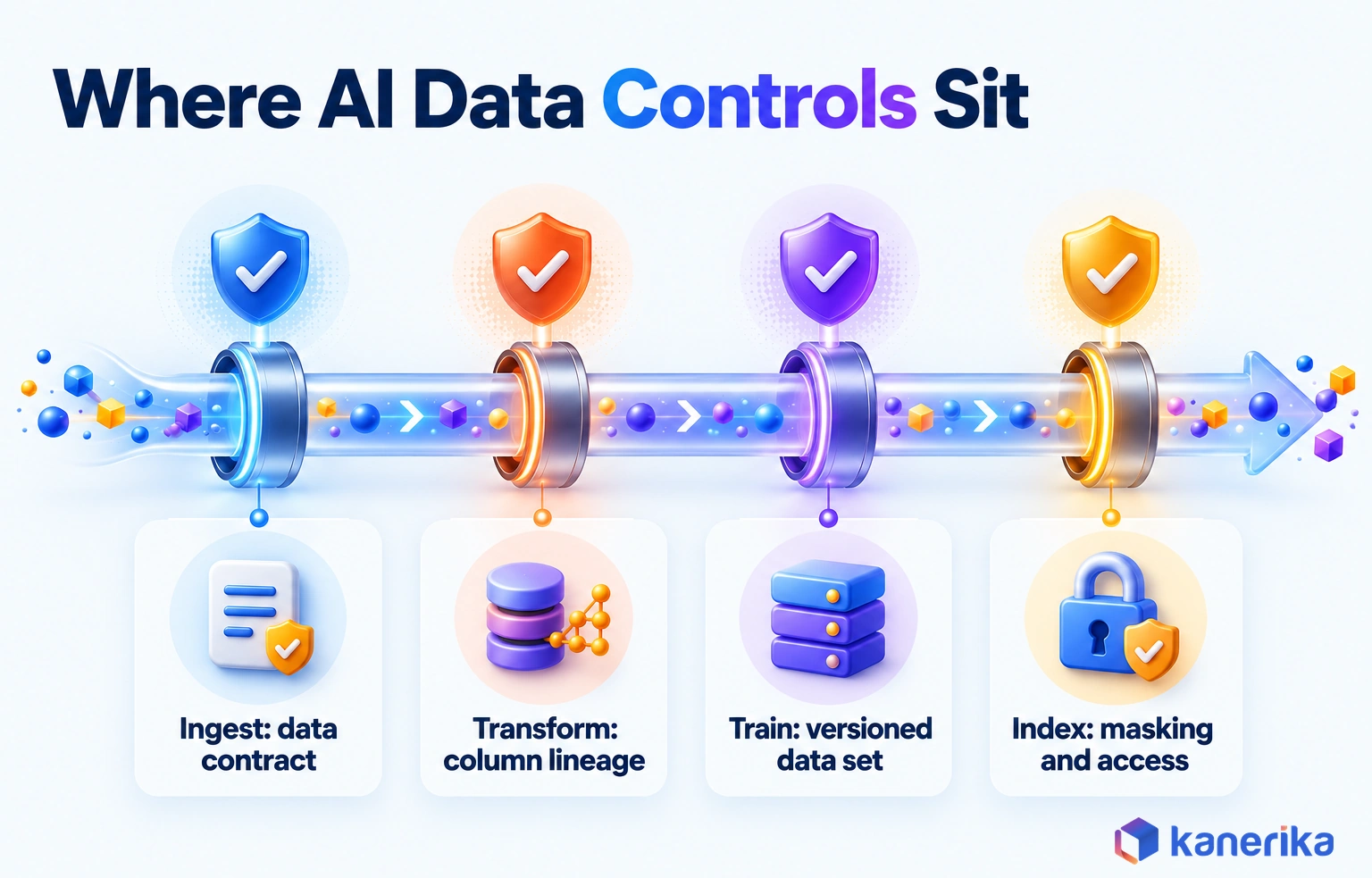
What the EU AI Act Asks of Training Data
Regulation sets a firm bar for high-risk systems in the EU. Article 10 of the EU AI Act requires the training, validation and testing data sets of such systems to follow data-governance practices. In particular, those practices cover design choices, collection processes and data origin, a suitability assessment and an examination for possible biases.
Even outside the EU, these duties make a useful checklist for any model that affects customers or employees. The table maps each control to what it proves.
| Control | What it proves | Tool example |
|---|
| Column-level lineage | Which sources and transforms produced each feature | Unity Catalog lineage |
| Dataset versioning | Exactly which data trained each model | Table versions together with the MLflow registry |
| PII masking before training and indexing | Personal data stayed out of models and embeddings | Masking policies, tokenization |
| Access control on chunks | Users only retrieve what they may read | Azure AI Search security trimming |
| Bias and suitability review | Data was examined for gaps and bias before training | A documented review per data set |
| Data contracts | Sources agreed to schema, freshness and meaning | Contract files checked in CI before each release |
None of these controls is exotic. The hard part is applying them across every pipeline, so they belong in shared templates rather than in each team’s memory. Our AI governance checklist is one place to start.
Tools and Platforms for AI Data Pipelines in 2026
Most enterprise tooling for AI data pipelines comes from three platforms or from a composable open source stack. The practical default is to build on the lakehouse or data cloud you already run, since moving data is the costliest part of any switch.
The table then maps each option to the stages above, using only what each vendor documents. Product names change often, so confirm current names and preview status in the docs before you commit.
| Capability | Microsoft Fabric | Databricks | Snowflake | Composable open source |
|---|
| Pipelines | Dataflow Gen2 and notebooks in pandas or PySpark | Spark Declarative Pipelines on Lakeflow, batch and streaming, SQL or Python | Dynamic Tables for incremental pipelines; Feature Views for features | Apache Spark Declarative Pipelines |
| Features | Lakehouse tables used as feature tables | Unity Catalog-governed Feature Store, plus an Online Feature Store | ASOF JOIN builds point-in-time sets in its Feature Store | Feast, with point-in-time joins |
| Vectors and retrieval | ai.embed creates embeddings for a vector index | Databricks AI Search with Delta Sync and hybrid search | AI_EMBED (text) or AI_MULTI_EMBED (multimodal) creates embeddings | Open source vector databases |
| AI functions in the pipeline | ai.classify, ai.extract, ai.summarize, ai.translate and more | ai_query, ai_parse_document, ai_extract | AI_COMPLETE, AI_CLASSIFY, AI_EXTRACT, AI_SUMMARIZE | Model calls from Python code |
| ML lifecycle | ML experiments and models tracked with MLflow | Unity Catalog column lineage; MLflow | Snowflake Model Registry | MLflow tracking, registry and LLM evaluation |
| Licensing and status notes | AI functions need paid F2+ or P capacity | Check each function’s preview status | Some Cortex functions are in preview or select regions | You own upgrades, security and on-call |
For a deeper comparison of two common choices, read Informatica vs Databricks. Teams building on Databricks can also go further with our guide to Databricks MLOps.
Checklist
Data Modernization Checklist
Before you pick a platform, review your data estate, pipelines, governance and migration readiness in one structured pass.
Get the Checklist →
Seven Questions Before You Choose a Platform
Product lists rarely decide the outcome. These seven questions usually do, and most of them are about your data and people rather than the vendor.
- Where does most of your governed data already live?
- What decision latency does your first use case need, such as daily, minutes or seconds?
- Do you need predictive features, document retrieval, or both?
- Which catalog will hold lineage and access rules across the whole pipeline?
- Are the AI functions you plan to use generally available in your region?
- Who will run the platform on call, and do they know it already?
- How will costs grow as you add embeddings, online serving and retraining runs?
How to Build an AI Data Pipeline Step by Step
Building an AI data pipeline goes best as one narrow use case delivered end to end, then widened. A pilot that touches every layer once teaches more than a platform rollout that touches none of them deeply. The eight steps below follow that order.
- Pick one use case and write its data SLAs. Name the decision, the model or assistant and how fresh each input must be, as well as the cost of a wrong answer.
- Reuse what already works. Map existing pipelines and warehouse models to the inputs you need, and extend tested tables before writing new ones. Also keep your ETL framework conventions for logging and retries.
- Set up ingestion by latency. Use batch when hours are fine and streams only when seconds change the outcome.
- Add validation, then build features. Put quality rules right after ingestion, then define each feature once with an entity key and a timestamp.
- Prepare data for the model type. For predictive models, build point-in-time training sets. For RAG, instead, parse, chunk, embed and index documents together with access metadata.
- Design for failure. Make every load safe to rerun, add retries with backoff and quarantine bad records under a named owner.
- Test the data, not only the code. Run data quality tests, a point-in-time leakage test and permission tests with real accounts before go-live.
- Deploy, monitor and expand. Go live with freshness, drift and outcome alerts, then reuse the same layers for the next use case.
The order matters more than the tools. Skipping step 2 tends to rebuild pipelines a team already had, while skipping step 7 means leakage is found only after launch.
Worked Example: Retail Demand Forecast Pipeline
Consider a retailer forecasting daily demand for each product in each store. The numbers here are illustrative, chosen to show scale and design choices rather than to describe a real client.
With 400 stores and 20,000 active products, the pipeline produces 8 million store-product rows per day. Two years of daily history, or 730 days, therefore comes to 5.84 billion rows. That is why the training set lives in lakehouse tables rather than in a notebook’s memory.
Sales arrive nightly from point-of-sale systems, so batch ingestion is enough. Promotions and price changes come from a merchandising system through change capture, because a price cut announced at noon should shape the next day’s forecast. Weather and holiday calendars land as small daily files.
Features include trailing 7-day and 28-day sales, days to the next holiday and whether the item was on promotion. Each training row is joined point-in-time, so a forecast for March 3 only sees promotions known by March 2. The model retrains weekly, although a drift alert on a top feature can trigger an earlier run.
A second use case, such as markdown planning, can then reuse almost all of that pipeline. That reuse is where the first build really pays for itself.
What an AI Data Pipeline Costs: The Main Drivers
The cost of an AI pipeline depends less on any single tool than on a handful of design choices. Two teams on the same platform can see very different bills, especially if one recomputes features, re-embeds documents or retrains models far more often.
Vendor prices change too often to quote here. Instead, the table names each cost driver and the lever that usually brings it down.
| Cost driver | What moves it | Lever |
|---|
| Transformation compute | Data volume, full versus incremental processing | Process only changed data and right-size compute |
| Feature serving | Online store size, request rate, latency target | Serve online only the features that need seconds |
| Embedding and re-embedding | Document volume, chunk size, model changes | Re-embed only changed documents; plan model upgrades |
| Vector storage | Number of chunks, vector dimensions, replicas | Remove stale chunks before they pile up |
| Retraining cadence | How often models retrain and on how much history | Retrain on evidence rather than a fixed schedule alone |
| Monitoring | Number of checks and how often they run | Monitor especially the features that matter most |
| People | On-call, data quality triage, platform upkeep | Shared templates and clear ownership |
Streaming deserves a separate look. Always-on compute and a round-the-clock on-call rotation cost far more than a nightly batch, so keep it for the decisions that truly need seconds.
Talk to Kanerika
Plan Your First AI Data Pipeline
Talk to Kanerika about one use case, its data SLAs and the leanest pipeline pattern that meets them, before you commit to streaming or a new platform.
Schedule a Demo →
AI Data Pipeline Use Cases by Industry
The same building blocks show up across industries, although freshness needs and risks differ. The table pairs common use cases with the data pattern each one needs, as well as the risk that most often goes wrong.
| Industry | Use case | Data pattern | Main risk |
|---|
| Banking | Card fraud scoring | Streaming features plus nightly history | Training-serving skew on velocity features |
| Insurance | Claims document triage | Document parsing, extraction and RAG | Extraction errors entering training data |
| Retail | Store-level demand forecasting | Nightly batch with point-in-time joins | Leakage from promotions known only later |
| Manufacturing | Predictive maintenance | Sensor streams aggregated into time windows | Sensor drift mistaken for machine wear |
| Healthcare | Clinical documentation assistant | Permission-aware RAG over notes and policies | Patient data exposed across roles |
| Logistics | Delivery time estimates | Hybrid batch and streaming | Late GPS events skewing features |
| Software and SaaS | Churn prediction | Batch product-usage features | Labels defined differently across teams |
| Sales intelligence | Account research from documents | Document ingestion and classification | Poor metadata on unstructured input |
Predictive maintenance shows why the risk column matters as much as the pattern. A vibration sensor that drifts out of calibration produces readings that look like machine wear. The model then raises false alarms or learns the wrong pattern. The pipeline has to carry calibration metadata with each reading and compute windowed aggregates per sensor, such as hourly averages, before features are built. With that context, the model can tell a failing machine from a failing sensor.
Across these rows, the pattern changes far more than the platform does. A bank and a retailer can run on the same lakehouse and still need very different freshness, retention and access rules.
How Kanerika Builds AI-Ready Data Pipelines
Kanerika’s data engineering teams build AI pipelines on the platforms clients already run, especially Microsoft Fabric and Databricks. The work follows a fixed sequence, because the order is what keeps a first AI project from turning into a platform rebuild.
It starts with an assessment of the target use case, the data it needs and the gaps in quality, lineage and access. After that comes the governed foundation on Microsoft Fabric or Databricks, with a catalog, lakehouse zones and data contracts. Then one AI pipeline goes live end to end, from ingestion to monitoring.
The team runs that pipeline, measures it and only then expands to the next use case. The trade-off call, though, comes early. When existing ETL already produces clean, timestamped history, Kanerika extends it instead of rebuilding.
When legacy ETL overwrites history or hides logic in older tools, a migration pays off. FLIP, Kanerika’s migration platform, automates much of that conversion from tools such as Informatica.
Many of these projects start with unstructured input, such as PDFs and scraped web pages. One client, an AI-powered sales intelligence platform, ran its data engine on web scraping and document ingestion spread across MongoDB, Postgres and legacy JavaScript. Kanerika then moved PDF ingestion, metadata and classification into Python on Databricks and unified the pipelines.
The reported results were 80% faster document processing, 95% improved metadata accuracy and 45% accelerated time-to-insight. Those gains came from pipeline work rather than model work. That is the point of this guide: unstructured input quality is an AI pipeline problem.
Case Study
80% Faster Document Processing with Databricks Workflows
An AI-powered sales intelligence platform moved PDF ingestion, metadata and classification into Python on Databricks, with 95% improved metadata accuracy and 45% accelerated time-to-insight.
Read the Case Study →
AI Data Pipeline Production Readiness Checklist
Before a pipeline feeds a model in production, it should pass a short readiness review. Each item below is a yes-or-no check that a data engineer and a model owner can answer together before launch.
- The use case has written SLAs for freshness, accuracy and the cost of an error.
- Every source has a data contract covering schema, freshness and meaning.
- Raw data is retained, so every layer can be rebuilt.
- Quality rules run right after ingestion, so failing rows go to quarantine.
- Each feature has one versioned definition with an entity key and a timestamp.
- Training sets are built with point-in-time joins and carry a version ID.
- Online and offline feature values are compared on a daily sample.
- Every document chunk carries source, date and access metadata.
- Embeddings record their model version, and deletes reach the index soon after the source changes.
- Personal data is masked before training and before indexing.
- Column-level lineage links each feature to its sources and its models.
- Freshness, drift and outcome alerts each have a named owner and an action.
A pipeline that passes all twelve checks is ready to carry a model into production. The method stays the same each time: get the architecture layers right, run the seven stages with a check between each, and grow one governed use case at a time.
Frequently Asked Questions
What is an AI data pipeline?
An AI data pipeline is the set of processes that prepares and delivers the data an AI system consumes. That includes training data sets, features served at inference time, documents prepared for retrieval and embeddings stored in a vector index. Unlike a reporting pipeline, its main consumer is a model, so freshness, history and consistency matter more.
Why is an AI data pipeline important?
Models act on whatever data they receive, silently and at scale. A pipeline that delivers late, inconsistent or ungoverned data makes even a well-built model fail in production. Gartner predicts that through 2026, organizations will abandon 60% of AI projects unsupported by AI-ready data, which makes the pipeline the first thing to get right.
Can existing ETL pipelines support AI models?
Often, yes, if they already produce clean, timestamped history and run reliably. Extend them with validation, feature definitions, point-in-time training sets and monitoring instead of rebuilding. Existing ETL struggles when it overwrites history, hides business logic in legacy tools or cannot meet the freshness the model needs. In those cases, a migration usually pays off.
Does an AI data pipeline need real-time processing?
Not always, because freshness should match the decision. Weekly demand forecasts and churn scores work well on nightly batch. Card fraud scoring and live personalization need streaming features measured in seconds. Many teams run a hybrid, with batch features for history-heavy signals and a few streaming features. Streaming costs more, so reserve it for decisions that need it.
What is the difference between a feature store and a vector database?
A feature store holds structured model inputs per entity, such as a customer’s 30-day spend, and serves them for point-in-time training and low-latency inference. A vector database or index holds embeddings of text chunks and returns the passages closest in meaning to a query. Predictive models mostly use feature stores, while RAG applications rely on vector indexes.
How do AI data pipelines support RAG and generative AI?
For RAG, the pipeline parses documents, splits them into chunks, creates embeddings and loads them into a vector index with metadata. It must re-embed content when documents or embedding models change, delete withdrawn content from the index, and carry access rights onto every chunk, so retrieval only returns passages each user is allowed to read.
What is training-serving skew, and how do you prevent it?
Training-serving skew is the gap between the data a model learned from and the data it receives in production. It often happens when training and serving compute the same feature through different code. Prevent it with one shared feature definition, point-in-time joins for training sets, versioned training data and daily parity checks between online and offline values.
How do you monitor an AI data pipeline and decide when to retrain?
Monitor freshness, volume, schema, feature drift, prediction drift and outcome performance, and give each signal a threshold, an action and an owner. Keep a retraining schedule as a floor, but let evidence trigger earlier runs, such as a population stability index above an agreed level on a top feature, or precision falling below the agreed floor.
How do you secure sensitive data in an AI data pipeline?
Mask or tokenize personal data before it reaches training sets, and again before documents are chunked and embedded, because removing data from an embedding later is hard. Apply access controls in the catalog and track column-level lineage. Carry document permissions onto every chunk, so retrieval filters results by each user’s identity before a model sees them.
How much does an AI data pipeline cost?
Cost depends more on design choices than on any single tool. The main drivers are transformation compute, online feature serving, embedding and re-embedding, vector storage, retraining cadence, monitoring and the people who run the platform. Incremental processing, streaming only where needed and re-embedding only changed documents are the levers that usually bring the bill down.
How long does it take to implement an AI data pipeline?
Timelines depend on data readiness more than on tooling. When governed, timestamped data already sits in a lakehouse, a first use case moves to production much faster than when sources still need contracts, cleanup or migration. Scoping one use case end to end, then reusing its layers for the next one, keeps every later pipeline shorter.
What are the main components and stages of an AI data pipeline?
The main components are sources, ingestion, a lakehouse with raw, cleaned and curated zones, a feature store, a vector index, training and serving jobs, and monitoring, with governance across all of them. Data moves through seven stages: ingestion, validation, transformation and features, labeling, storage and versioning, serving, and monitoring with feedback.
What is the difference between a data pipeline and an AI data pipeline?
A traditional data pipeline feeds reports and dashboards, where current state and hourly or daily refreshes are usually enough. An AI data pipeline feeds models and retrieval systems. It must keep history as it was known at each past moment, serve the same feature definitions to training and inference, and capture outcomes for retraining.
How is an AI data pipeline different from an ML pipeline?
The AI data pipeline prepares the data. It ingests, validates and transforms sources into features, training sets, chunks and embeddings. The ML pipeline consumes that data to train, evaluate, register and deploy models. They meet at the training set, which the data pipeline must keep versioned and reproducible so every model result can be traced.
How do you build an AI data pipeline?
Start with one use case and write its data SLAs. Reuse existing pipelines where they already produce clean, timestamped history. Set up ingestion by latency, add validation, then define features once. Build point-in-time training sets or document chunks, design for reruns and retries, test for leakage and permissions, then deploy with monitoring and expand.
What tools and platforms are used to build AI data pipelines?
Most teams build on Microsoft Fabric, Databricks or Snowflake, or on a composable open source stack. Typical pieces include declarative pipelines such as Spark Declarative Pipelines on Lakeflow, feature stores from Databricks, Snowflake or Feast, vector search such as Databricks AI Search, in-pipeline AI functions, and MLflow for experiment tracking and the model registry.
What are the biggest challenges in managing an AI data pipeline?
The hardest problems are training-serving skew, leakage of future data into training sets, stale or unsynced vector indexes, and drift that nobody owns. Governance adds work too, because teams must prove lineage, mask personal data and control who can retrieve which documents. Many of these failures look fine on dashboards until model outcomes drop.
What are the best practices for optimizing an AI data pipeline?
Match freshness to the decision, so you only stream where seconds matter. Process changed data incrementally, define each feature once and use point-in-time joins for every training set. Re-embed only documents that changed, remove stale chunks and retrain on drift evidence rather than a fixed calendar alone. Give every alert a named owner and action.
What does a good AI pipeline architecture look like?
A good AI pipeline architecture is layered. Sources feed ingestion, which lands data in a lakehouse with raw, cleaned and curated zones. A feature store and a vector index serve training and inference. Monitoring watches quality, drift and outcomes and feeds results back, while a governance plane covers lineage and access across every layer.














