TL;DR
ETL automation testing tools, such as QuerySurge, Datagaps ETL Validator, iCEDQ, and open-source frameworks like Great Expectations and dbt tests, automatically verify that data moved correctly between source and target systems instead of relying on manual SQL spot checks. The right pick depends on your data stack, your team’s skills, and whether you need no-code authoring or tests that live in code alongside your pipelines.
Key Takeaways
- ETL automation testing tools replace manual, one-off SQL checks with repeatable validation of every source-to-target data movement.
- The strongest options in 2026 span commercial platforms like QuerySurge, Datagaps ETL Validator, and iCEDQ, alongside open-source frameworks like Great Expectations and dbt tests.
- No-code platforms suit QA-led teams, while code-based frameworks suit engineering teams that already version-control their pipelines.
- Automated testing matters most during a data migration, where one missed reconciliation error can corrupt reporting for months.
- A sound evaluation process runs a proof of concept on one routine pipeline and one high-risk pipeline before any contract is signed.
- Kanerika builds reusable reconciliation testing directly into its Databricks, Snowflake, and Microsoft Fabric migration accelerators.
Watch on YouTube
Validate & Reconcile Data in Minutes with FLIP
Kanerika’s FLIP platform automates source-to-target data validation and reconciliation, the exact checks this guide walks through, so mismatches surface in minutes instead of after a business user notices.
A $12.9 Million Reason to Stop Trusting Spot Checks
Gartner’s 2020 research puts the average annual cost of poor data quality at $12.9 million per organization. A good share of that traces back to small, overlooked failures.
A transformation rule silently drops rows. A schema change goes untested. A migration cutover looks clean until finance closes the books and the numbers do not match.
Manual SQL spot checks catch the errors someone thought to look for. They miss the ones nobody expects, which is exactly what breaks a report three weeks after go-live. As a result, automated ETL testing closes that gap by checking every row, every transformation, and every load the same way, every time.
What Counts as an ETL Automation Testing Tool
An ETL automation testing tool verifies that data moved correctly. It extracts from a source, passes through a transformation layer, and lands in a target warehouse or lakehouse, and the tool confirms what landed still matches what left.
That is a different job from an ETL development tool, which builds the pipeline. It is different again from a data observability platform, which watches production tables after they are already live, tracking drift, freshness, and volume anomalies that only surface once real traffic hits the system.
Testing happens before a release ships. Observability happens after. Consequently, a good ETL pipeline needs both, and a team with only one of the two is flying half blind.
It helps to place testing against the rest of the ETL framework a team already runs. Testing tools sit downstream of pipeline development and upstream of data observability tools. Confusing the three is a common reason teams end up buying the wrong product, since a platform built to monitor production tables rarely doubles as a pre-release regression suite.
Manual testing usually means an analyst writes a handful of SQL queries and eyeballs a few hundred rows. That works fine on one small, stable pipeline. However, it stops working once a team runs dozens of pipelines with frequent schema changes, because nobody has time to rewrite those checks by hand every time a mapping shifts.
Automated tools solve this by turning source-to-target mappings into reusable, parameterized test cases. Those tests run on every load, every deployment, or on a fixed schedule. A mismatch gets flagged the moment it happens, not weeks later when a business user notices the numbers look off.
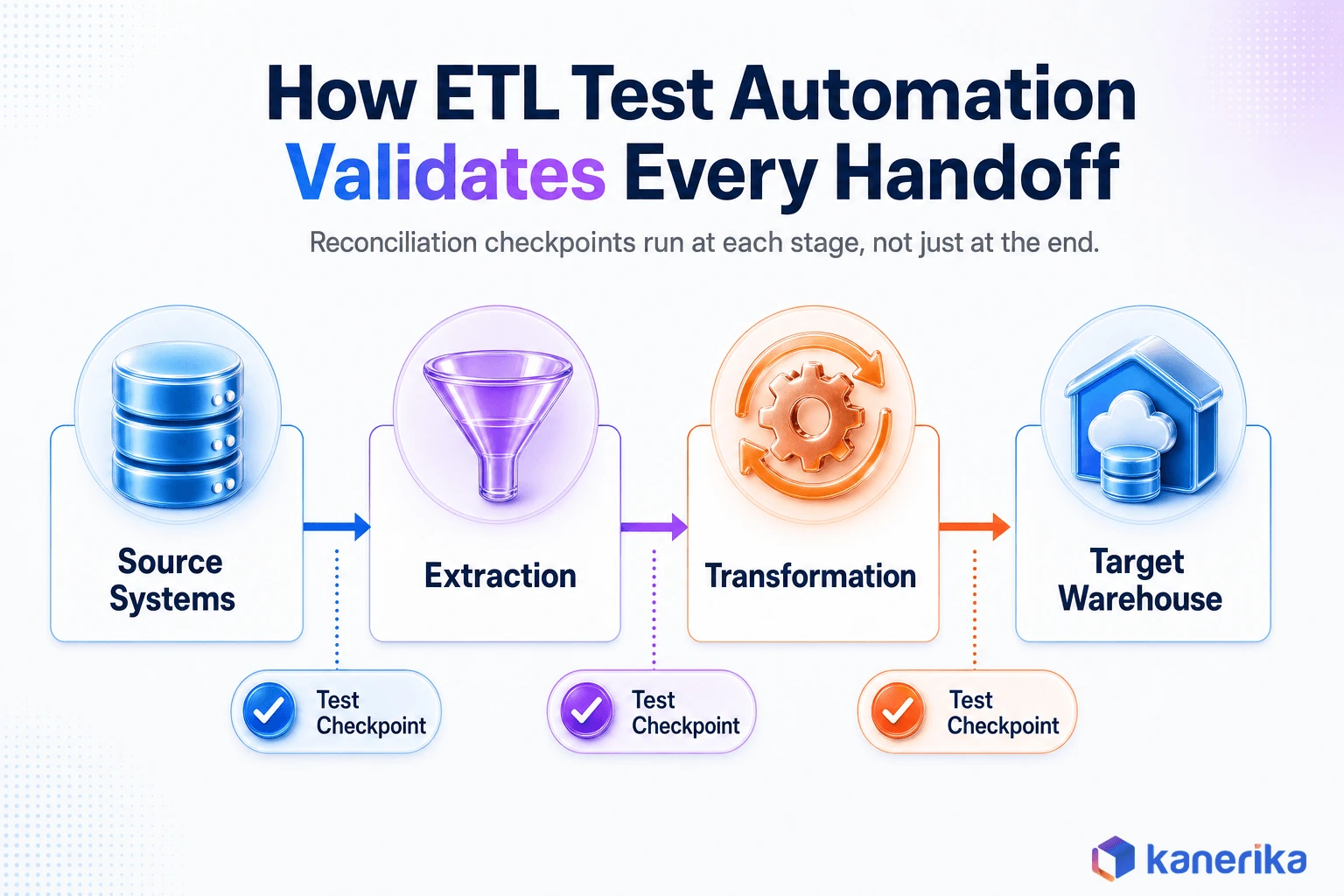 ETL automation testing tools validate every handoff from source systems through extraction, transformation, and target warehouse with a test checkpoint at each stage” class=”wp-image-163615″ loading=”lazy” style=”max-width:825px;width:100%;height:auto;border-radius:0 !important”/>
What ETL Test Automation Should Actually Validate
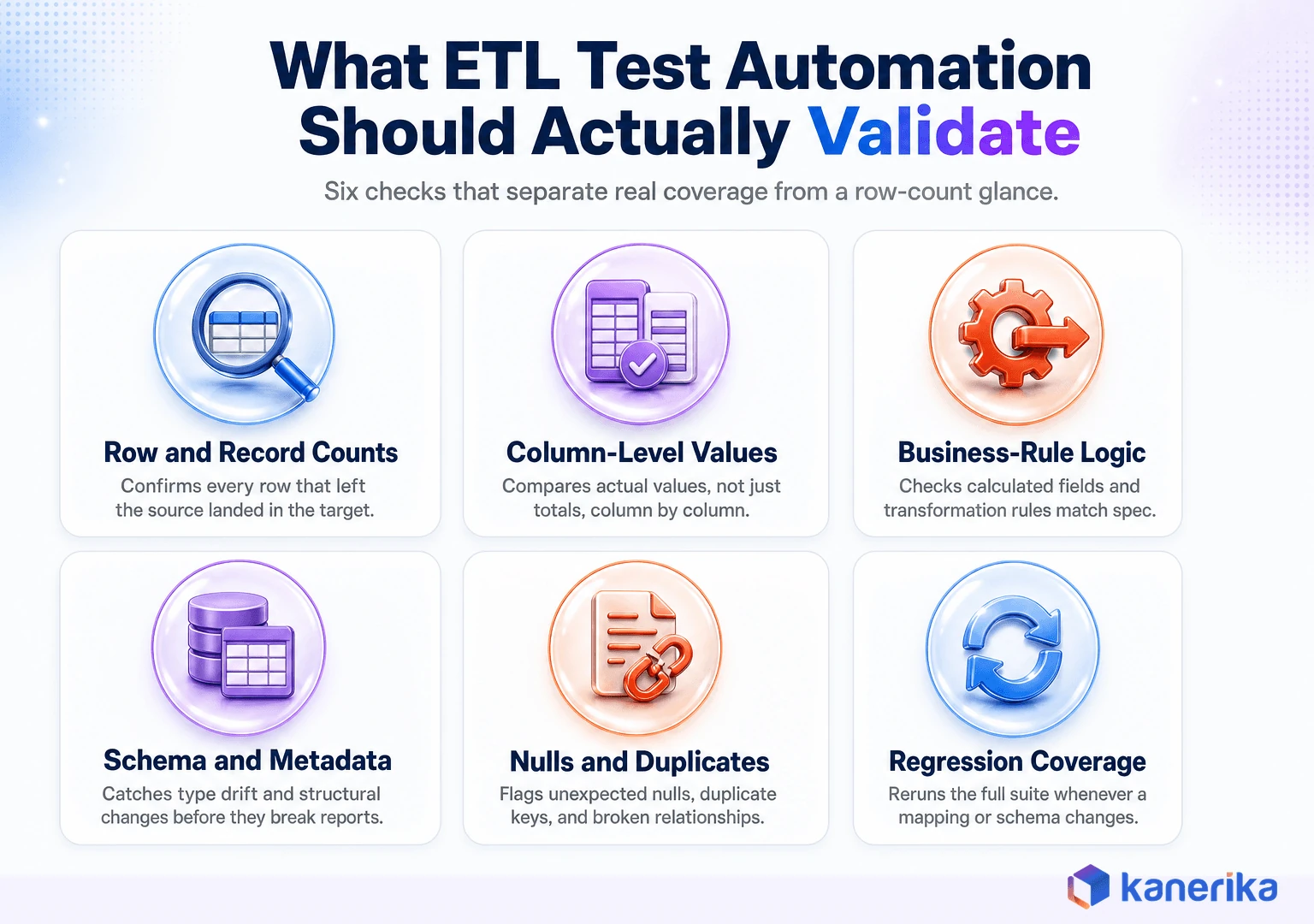
A tool is only as useful as the checks it runs. Most enterprise pipelines need automated coverage across the following areas.
- Row and record-count reconciliation. Confirming the number of rows that left the source matches the number that landed in the target, accounting for intentional filters.
- Column-level data comparison. Comparing actual values, not just counts, between source and target for every mapped column.
- Transformation and business-rule validation. Verifying calculated fields, currency conversions, and derived measures match the documented logic.
- Schema and metadata checks. Catching data-type drift, renamed columns, and structural changes before they break downstream reports.
- Null, duplicate, and referential-integrity checks. Flagging unexpected nulls, duplicate keys, and orphaned foreign-key relationships.
- Aggregate validation. Confirming totals, balances, and calculated summaries tie out between source and target.
- Incremental-load and change-data-capture testing. Testing that updates, deletes, and late-arriving records are captured correctly, not just full loads.
- Regression testing. Re-running the full suite whenever a mapping, schema, or transformation changes, so a fix in one place cannot break another without anyone noticing.
Most manual testing covers the first two items on that list and stops there. That gap, between “the counts match” and “the business logic is actually correct,” is where a lot of costly bad data quality starts.
This is also where two related ideas get blurred. Data integrity and data quality are not the same thing. Similarly, neither is quite the same as the ongoing checks inside a mature data quality framework.
A testing tool validates one pipeline at one point in time. Snowflake’s own data metric functions documentation describes its checks as continuously measuring data health against defined expectations. That is closer to ongoing observability than to release testing, even though the two share a lot of the same underlying checks.
ETL vs ELT Testing, and Why the Approach Changes
Classic ETL transforms data before it ever reaches the warehouse, so tests can validate a transformation step in isolation, on a staging server, before anything touches the target. In contrast, ELT flips that order. Raw data lands first, and the warehouse or lakehouse does the transformation work itself.
That shift changes what a test actually needs to do. Instead of checking a transformation server, the test has to push comparison logic down into Snowflake, Databricks, Microsoft Fabric, BigQuery, or Redshift, running the same SQL logic the platform itself will run in production.
Lakehouse teams add another wrinkle. A pipeline built on Fabric or Snowflake data engineering patterns often moves data through Bronze, Silver, and Gold medallion layers, and each hop deserves its own reconciliation check rather than one comparison at the very end. A bug introduced in Silver can look fine in Gold if nobody tests the layer where it actually happened.
Streaming and event-driven pipelines add a third variable, since batch-style row counts do not translate cleanly to a continuous stream. Modern ELT teams increasingly rely on code-based tests, sitting next to the transformation logic itself, backed by an independent reconciliation pass that does not trust the same system to grade its own work.
Do You Need a Commercial Tool, or Will Open-Source Frameworks Cover It?
Not every team needs to buy a platform. If pipelines already run through dbt, open-source ETL tools like dbt tests can validate uniqueness, null constraints, accepted values, and referential relationships inside the same project. No new tooling required, just SQL the team already understands.
Great Expectations takes a similar approach for Python-centric teams. Engineers define “expectations” about what a dataset should look like, and the library checks new data against them on every run. That fits engineering teams comfortable maintaining code.
Where open-source frameworks tend to fall short is independent, cross-system reconciliation at scale. Comparing millions of rows across two different platforms is one example, and generating audit-ready evidence for a compliance review is another.
Giving a non-technical QA team a no-code way to author tests is a third gap. This is where commercial platforms like QuerySurge, Datagaps ETL Validator, and iCEDQ earn their license fee.
In fact, many enterprise teams end up running both. They use dbt tests or Great Expectations for fast, in-pipeline checks close to the code. They add a dedicated reconciliation platform for the source-to-target validation a migration or a regulated dataset actually demands.
Case Study
Cognos to Power BI: Faster, More Reliable Reporting
A reporting migration only pays off if the numbers still reconcile afterward. See how Kanerika validated the move from Cognos to Power BI without breaking existing reports.
Read the Case Study →
The 10 Best ETL Automation Testing Tools for Enterprise Data Pipelines
The list below spans no-code enterprise platforms and code-first open-source frameworks. None of them is universally best. The right one depends on your stack, your team, and the evaluation criteria further down this guide.
A useful shortcut while reading through the list is to ask who will actually author the tests day to day. A QA analyst without SQL background needs a genuinely no-code tool, not a platform that markets itself as low-code but still expects comfort writing queries. An engineering team that already lives in Git and pull requests will usually be faster with a code-based option, even if it takes longer to set up on day one.
1. QuerySurge
QuerySurge specializes in automated source-to-target testing for data warehouses and big data platforms. It runs comparisons across large volumes in parallel rather than one query at a time, which fits enterprise teams running frequent, large-scale reconciliation across heterogeneous databases.
2. Datagaps ETL Validator
Datagaps ETL Validator is a no-code platform built specifically for ETL, data warehouse, and migration testing. Its connector library spans databases, files, APIs, and BI reports, which suits teams that want business analysts, not just engineers, authoring test cases.
3. iCEDQ (iceDQ)
iCEDQ is a rules-based DataOps platform covering both pre-release testing and production data monitoring from the same rule set. That overlap reduces duplicate work between QA and operations. It supports 50-plus connectors and often appeals to teams that want one platform instead of two.
4. Informatica Data Validation
Informatica Data Validation, formerly Data Validation Option, integrates directly with Informatica PowerCenter and Cloud Data Integration. Developers define validation rules alongside the mappings they already build, which makes it a natural fit for teams already standardized on Informatica.
5. RightData
RightData is a no-code reconciliation and business-rule validation platform aimed at QA and business teams. It compares data across databases, files, and APIs without requiring SQL, which shortens the gap between “we need a new test” and “the test is running.”
Watch on YouTube
Snowflake Cortex for Data Quality: What ETL Tools Can’t Do
A closer look at how Snowflake Cortex handles data-quality checks natively inside the warehouse, and where that still falls short of a dedicated ETL testing tool.
6. BiG EVAL
BiG EVAL takes a metadata-driven approach, generating and maintaining test cases straight from the data model. Tests stay current as schemas evolve, across both cloud and on-premises platforms, which saves teams from manually rewriting checks every time a table changes shape.
7. Talend Data Quality
Talend Data Quality profiles and validates data inside Talend-based pipelines. Standardization, matching, and validation rules live in the same design environment used to build the ETL job, so testing stays close to development rather than becoming a separate workflow.
8. Great Expectations
Great Expectations is an open-source Python library for defining data-quality expectations and validating new data against them. Results can feed dashboards or fail a pipeline run, which fits engineering-led teams that prefer version-controlled code over a separate GUI tool.
9. dbt Tests
dbt ships four built-in generic tests, unique, not_null, accepted_values, and relationships, plus support for custom SQL-based tests. They live in the same YAML files that document your models. For any team already on dbt, this is often the fastest path to real data validation coverage with nothing new to license.
10. Custom SQL, Python, and pytest Frameworks
Some teams build a lightweight framework using SQL comparison scripts, Python, and pytest. This suits simple pipelines, tight budgets, or requirements that do not map cleanly onto an off-the-shelf product. It offers full control, at the cost of maintenance a vendor would otherwise carry.
ETL Automation Testing Tools Compared at a Glance
| Tool | Test Authoring | Deployment | Best Fit |
|---|
| QuerySurge | Low-code | SaaS / on-premises | Large-scale enterprise reconciliation |
| Datagaps ETL Validator | No-code | SaaS / on-premises | ETL, warehouse, and migration testing |
| iCEDQ | Rules-based, low-code | SaaS / on-premises | Combined testing and production monitoring |
| Informatica Data Validation | Low-code | Cloud / on-premises | Existing Informatica environments |
| RightData | No-code | SaaS | Self-service QA and business teams |
| BiG EVAL | Metadata-driven | Cloud / on-premises | Auto-generated, schema-aware tests |
| Talend Data Quality | Low-code | Cloud / on-premises | Existing Talend pipelines |
| Great Expectations | Code (Python) | Self-hosted / cloud | Engineering-led teams |
| dbt Tests | Code (SQL/YAML) | Wherever dbt runs | Teams already standardized on dbt |
| Custom SQL/Python/pytest | Code | Self-managed | Simple pipelines, tight budgets |
Case Study
Modernizing Reporting with SSRS to Power BI Migration
Legacy SSRS reports carry years of business logic that has to survive a migration intact. See how Kanerika reconciled and modernized reporting in a real SSRS to Power BI move.
Read the Case Study →
How to Choose the Right ETL Testing Tool for Your Data Stack
Feature checklists make every vendor look capable. However, a short evaluation process tells you which one actually fits.
- Start with pipeline risk. A finance reconciliation feed needs stronger controls than an internal reporting dashboard.
- Confirm the tool supports every source, target, and intermediate layer in your stack, not just the popular ones.
- Check whether it can validate complex joins, calculations, and business rules, not only row counts.
- Measure how execution time compares against your actual release and batch windows.
- Ask how the tool handles billions of rows without copying sensitive data out of your environment.
- Confirm CI/CD compatibility with Git, Azure DevOps, GitHub Actions, or Jenkins, whichever you already run.
- Review role-based access, encryption, and data masking, especially for pipelines touching regulated data.
- Run a proof of concept on one routine pipeline and one genuinely high-risk one before signing anything.
Don’t Skip Data Sensitivity or Platform Fit
Data sensitivity deserves its own line on that checklist. Indeed, a test environment that copies production data verbatim can turn a testing tool into a compliance problem.
Confirm the platform supports masking or synthetic data before real customer records ever touch a lower environment. Teams already using data masking tools or sensitive data discovery tools for production access should expect their testing tool to respect the same boundaries. A platform’s data access governance posture is worth checking alongside its feature list, not after signing.
The platform question matters too. Some tools are built for a specific ecosystem, and forcing a mismatch wastes months of implementation time.
| Your Primary Platform | Look For |
|---|
| Microsoft Fabric or Azure Data Factory | Native connectors and pushdown testing support for Fabric pipelines |
| Databricks lakehouse | A tool that can test medallion-architecture layers, from Bronze through Silver to Gold |
| Snowflake ELT pipelines | A tool that pushes comparisons down into Snowflake rather than extracting data out |
| dbt-centered analytics engineering | dbt tests first, with a dedicated platform layered on for cross-system reconciliation |
| Legacy Informatica or on-premises warehouses | Native integration with your existing ETL tool rather than a bolt-on |
On-Demand Webinar
Cloud Migration Strategies: Accelerate Your Business Outcomes
A practical walkthrough of how enterprise teams plan and validate a cloud migration end to end, from readiness assessment through cutover.
Watch the Webinar →
Bringing ETL Test Automation Into Your CI/CD Pipeline
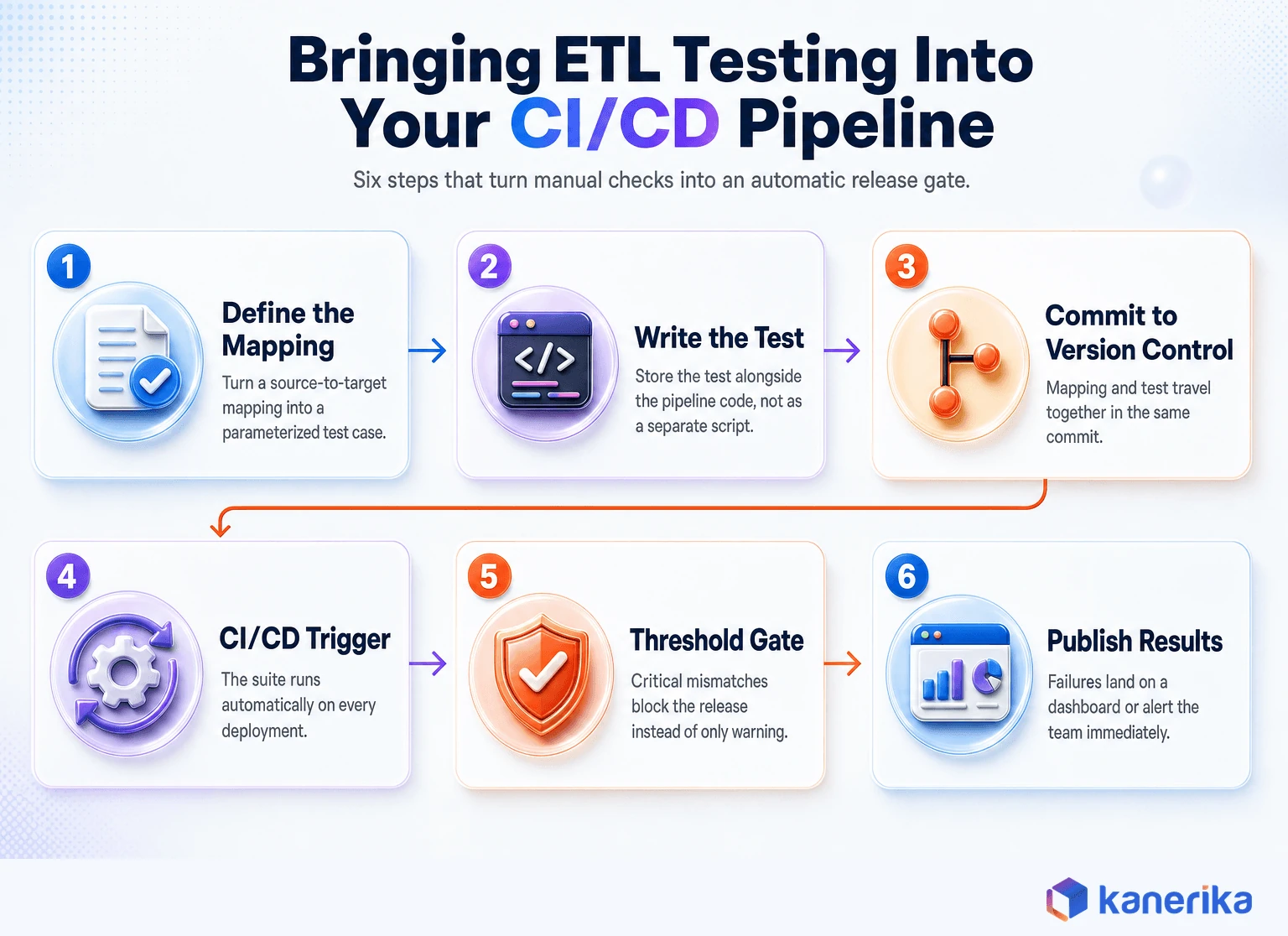
A tool that only runs when someone remembers to click it will eventually get skipped under deadline pressure. Automation only works if testing happens whether anyone remembers or not.
Start by converting source-to-target mappings into reusable, parameterized test cases, not one-off scripts tied to a specific date or environment. Store those tests in version control alongside pipeline code, so a mapping change and its test travel together in the same commit.
Trigger the regression suite automatically through data pipeline automation and CI/CD whenever a pipeline changes. Additionally, set thresholds so critical reconciliation failures block the deployment, rather than just logging a warning and letting the release through.
Reserve full, row-level reconciliation for high-risk tables. Use statistically sound sampling for lower-risk ones, so the test suite never becomes slower than the pipeline it is protecting.
Publish results somewhere the team actually looks, whether that is a dashboard, a Slack alert, or a Jira ticket, and retain the evidence. Auditors and compliance reviewers will eventually ask for it.
Pre-release testing and post-release monitoring should feed each other, not run in isolation. Databricks describes its own lakehouse monitoring as computing profiling metrics over time so teams can track historical trends.
A mature CI/CD setup reuses that same signal to decide which tables need the strictest pre-release checks next time. The pipelines that drifted last month deserve the hardest testing this month.
Why ETL Testing Matters Most During a Data Migration
Everyday pipeline testing catches drift over time. Migration testing has a harder job. It has to prove years of history moved correctly in one shot, with no second chance once the old system is decommissioned.
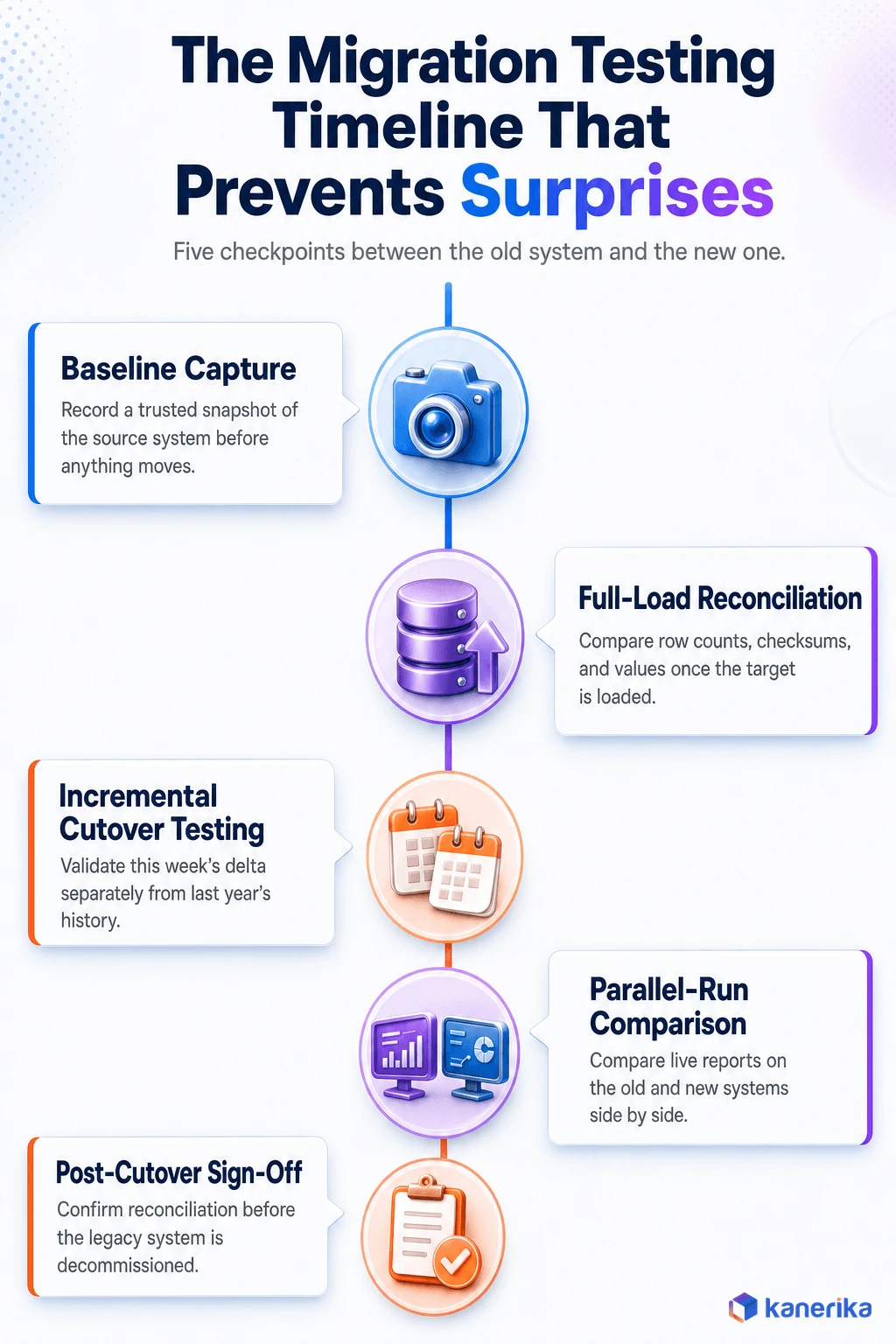
A sound data migration testing approach starts with a trusted baseline in the source system before anything moves. Once the target is loaded, the team reconciles full-load row counts, checksums, and column-level values against it.
Historical loads and incremental cutover batches both need separate validation. A migration that works cleanly for last year’s data can still break on this week’s incremental delta.
Stored procedures, calculations, and business logic need re-validation after conversion too. A formula that ran correctly on the old platform does not automatically produce the same result on a new one.
The safest migrations compare live reports and KPIs between the legacy and target systems, side by side, before anyone decommissions the old platform. They also keep a rollback and post-cutover reconciliation plan ready in case something does not tie out.
A written data migration checklist earns its keep here, mostly by forcing reconciliation to happen before sign-off instead of after a business user spots a problem. Meanwhile, the data migration technique in play, whether a big-bang cutover or a phased wave-by-wave approach, changes how much parallel-run testing is realistic.
Any data cleansing done ahead of the move should itself be tested. A cleansing rule with a bug just moves bad data into the new platform faster than before.
Teams that skip this step tend to find out the same way most data migration horror stories start. A finance or operations team catches a number that does not match, weeks after everyone assumed the enterprise data migration project was finished.
How to Tell if ETL Test Automation Is Actually Working
Most teams can say they automated their ETL testing. Fewer can say whether it moved a real business number, which is the question a budget owner eventually asks.
A handful of metrics answer it cleanly. Track the percentage of pipelines with repeatable automated coverage, not just the ones someone tested once. In addition, track defects caught before deployment against defects that escaped into production and had to be corrected after the fact.
Regression-testing time before and after automation is another useful pair of numbers, alongside how long it takes to pinpoint the exact mismatched records once a test fails. A tool that flags “something is wrong” without pointing at which rows saves far less time than one that hands an engineer the exact diff.
For a migration specifically, validation time per object and per migration wave is worth tracking on its own. It tends to shrink fast once the first few waves establish reusable test patterns, which is a good sign the investment in automation is paying for itself rather than just moving effort around.
Common ETL Test Automation Mistakes to Avoid
Automation does not fix a weak testing strategy by itself. It just runs the same mistakes faster. These are the patterns worth watching for.
- Automating weak manual test cases instead of improving what gets tested in the first place.
- Checking row counts while ignoring whether the transformation logic is actually correct.
- Testing small samples that miss the rare, expensive defects hiding in the long tail of the data.
- Comparing values without accounting for rounding, time zones, or how nulls behave across systems.
- Testing only the final warehouse table and skipping every intermediate staging layer.
- Hard-coding environment names, dates, and credentials into tests that break the moment anything changes.
- Choosing a tool before defining which data controls actually matter to the business.
- Treating production data observability as a substitute for pre-release testing, rather than a complement to it.
Most of these mistakes share a root cause. A team bought or built a tool before deciding what “correct” actually means for its own data, then discovered the gap once something important slipped through. In short, defining the business-critical checks first, and only then choosing how to automate them, avoids most of the list above.
Checklist
Data Migration Checklist for Enterprise Teams
A structured checklist for planning and validating an enterprise data migration, covering the reconciliation steps this guide recommends testing before sign-off.
Get the Checklist →
How Kanerika Automates ETL and Migration Testing for Enterprise Teams
Kanerika treats ETL testing as part of the migration or modernization project itself, not a bolt-on step tacked onto the end. The engagement typically moves through four stages.
It starts with assessing pipeline risk and current test coverage against the source-to-target mappings that actually matter to the business. From there, the team selects the right mix of commercial, open-source, and custom testing components for the target stack, rather than defaulting to whatever a previous vendor happened to use.
The third stage builds reusable reconciliation rules for Databricks, Snowflake, and Microsoft Fabric targets, wired directly into the client’s CI/CD controls. The fourth hands over release dashboards and audit-ready test evidence the internal team can run on its own once Kanerika steps back.
This is where Kanerika’s own migration accelerators come in. Automated conversion and validation are built into paths like Informatica to Databricks, SSIS to Microsoft Fabric, and Informatica to Talend. Reconciliation testing runs as part of the migration itself, built into the same conversion scripts rather than added afterward.
A Recent Snowflake Migration Shows the Payoff
A recent engagement shows what that looks like in practice. A North American beverage manufacturer and distributor was running analytics on a legacy SSAS environment across multiple facilities. Hourly refresh cycles were slowing decisions, and licensing and maintenance costs kept climbing.
Kanerika migrated the platform to a unified Snowflake architecture, added near real-time ingestion through Fivetran, and connected Power BI directly to Snowflake for reporting. The resulting case study reports a 60 percent reduction in manual data reconciliation, 40 percent faster reporting cycles, three times quicker analytics delivery, and $130,000 in annual savings from retired licenses and infrastructure.
That reconciliation number is the part worth noticing. It came directly from automating the exact source-to-target validation this guide has been describing, not from a separate data-quality initiative running on the side.
Talk to Kanerika
Get Reconciliation Testing Built Into Your Next Migration
Talk to Kanerika about building reusable ETL and migration test automation into your Databricks, Snowflake, or Microsoft Fabric project from day one.
Schedule a Demo →
Wrapping Up
Manual ETL testing works until it does not, usually right when a pipeline grows too large or a migration deadline gets too close to double-check everything by hand. Automated tools exist to make that failure mode structurally harder to hit, whether that means a no-code platform like Datagaps or RightData, a rules-based system like iCEDQ, or an open-source framework like dbt tests.
Start with what your pipelines actually need to validate. Run a proof of concept before committing to anything, and treat migration testing as a distinct, higher-stakes problem from everyday pipeline testing. Ultimately, the tools in this guide span lightweight to enterprise-grade, and the right one is the one that matches your stack and your team, not the one with the longest feature list.
Frequently Asked Questions
What are ETL automation testing tools?
They are software platforms or frameworks that automatically verify data moved correctly from a source system, through transformation logic, into a target warehouse or lakehouse. They replace manual SQL spot checks with repeatable tests covering row counts, column values, business rules, and schema changes.
Which tool is best for ETL automation testing?
There is no single best tool, because the right choice depends on your stack and your team. QuerySurge and Datagaps ETL Validator suit large-scale enterprise reconciliation, iCEDQ combines testing with production monitoring, and dbt tests or Great Expectations suit engineering teams that prefer code-based tests to a separate platform. Run a proof of concept before deciding.
Can Selenium be used for ETL testing?
Selenium automates browser and UI interactions, not backend data validation, so it is a poor fit for comparing millions of database rows. Teams occasionally use it to test a reporting tool’s front end, but the actual data comparison still needs a dedicated ETL testing tool or a SQL-based framework.
Can ETL testing be automated with SQL and Python?
Yes. Many teams build custom frameworks using SQL comparison queries, Python, and pytest, especially for simpler pipelines with a small number of sources. It offers full control over exactly what gets tested and how, at the cost of maintaining the framework yourself instead of relying on a vendor’s connectors, support, and prebuilt reporting.
What is the difference between ETL testing and data quality testing?
ETL testing verifies that a specific pipeline moved and transformed data correctly between two systems, usually as part of a release. Data quality testing is broader and often continuous, checking completeness, accuracy, and freshness across a dataset regardless of which pipeline produced it.
How do you automate source-to-target data validation?
Convert your mappings into parameterized test cases covering row counts, column values, and transformation logic. Run them automatically on every load or deployment through your CI/CD system, and set failure thresholds so a critical mismatch blocks the release instead of only generating a warning.
Which ETL testing tools support Snowflake, Databricks, and Microsoft Fabric?
QuerySurge, Datagaps ETL Validator, iCEDQ, and BiG EVAL all offer native connectors across these platforms, and each can push comparison logic down into the warehouse itself rather than extracting data out. dbt tests run natively wherever dbt executes, including all three, which makes it a common first layer of testing for teams already standardized on those stacks.
How should an enterprise run a proof of concept for an ETL testing tool?
Pick one routine, low-risk pipeline and one genuinely high-risk one. Run both through the candidate tool with real data volumes and your actual CI/CD workflow, then score the results against a weighted checklist of your real requirements, not the vendor’s feature list.














