TL;DR
Most enterprise data migrations fail because execution breaks down, not the platforms themselves. Kanerika’s State of Enterprise Data Platform Migration 2026 report finds 73% of projects fail to meet their stated objectives, 80% exceed original budgets by 150% or more, and timelines stretch eighteen months beyond plan.
The top causes are inadequate technical discovery, platform inexperience billed as expertise, governance treated as a final phase, and manual code conversion. Governance integrated from day one, not bolted on at the end, is the single strongest predictor of post-go-live outcomes. AI-first automation changes the model by handling 60 to 85% of migration tasks; Kanerika’s FLIP platform has delivered a 95% project success rate across 100+ enterprise engagements.
Thousands of enterprises are tackling enterprise data migration right now, and most will fail. Industry research puts the failure rate at 73%, with 80% of projects blowing past budgets by 150% or more and timelines stretching eighteen months beyond initial plans.
The platforms work. The failure sits in execution. Manual code conversion, business-level scoping, governance treated as a final step, and vendor teams billing their learning curves as expertise. These patterns have produced the same outcomes for a decade.
Kanerika’s newly published State of Enterprise Data Platform Migration 2026 report examines what is driving failure and where AI-first automation is producing a different result. In this article, we’ll cover the research findings, the failure patterns, and what a better approach looks like.
Key Takeaways
- Governance integrated from day one, not bolted on at the end, is the single strongest predictor of post-go-live outcomes
- 73% of enterprise data migration projects fail to meet their stated objectives
- 80% of projects that proceed exceed original budgets by 150% or more
- The top causes are poor technical discovery, platform inexperience, late governance, and manual processes
- AI-first automation handles 60 to 85% of migration tasks, cutting cost and timeline
- Kanerika’s FLIP platform has delivered a 95% project success rate across 100+ enterprise engagements
The State of Enterprise Data Platform Migration 2026
The full research on why migrations fail and what changes with AI-first automation.
 Download the Report
What Is Enterprise Data Migration?
Enterprise data migration is the planned move of large, business-critical data sets, and the logic around them, from one platform to another. It spans many source systems at once, keeps regulated data compliant, and ends only when the old platform is retired.
Picture a manufacturer moving its on-premises SQL Server warehouse, SSIS jobs and Crystal Reports to a cloud lakehouse. The tables are only part of the job, because every pipeline, report and access rule built on them has to move too.
How Enterprise Data Migration Differs From a Routine Data Move
A routine data move copies one table or database to a new place, and one engineer can often finish it in a day. An enterprise program is a different kind of work. It carries years of business logic, many consumers and a legacy system that must eventually be switched off.
Five markers usually separate the two. There are many source systems, often dozens, each with its own owners. Business rules also sit inside ETL mappings, stored procedures and report formulas that nobody has documented for years.
Some of the data is regulated, so finance, health or privacy rules travel with it. Downstream consumers such as dashboards, APIs and partner feeds expect the same numbers on day one. Finally, the legacy platform has a retirement date, which puts a hard deadline on the whole program.
What Triggers a Large-Scale Data Migration
A migration program usually starts with a forcing event. Four triggers come up again and again.
- End-of-support deadlines. Vendor support dates, such as the PowerCenter 10.5.x deadline covered below, leave teams running unpatched integration software.
- Cloud consolidation and license cost. Paying for two warehouses, several ETL tools and on-premises hardware often costs more than one consolidated cloud platform.
- Mergers and acquisitions. Two companies that combine need one customer list, one chart of accounts and one reporting layer.
- AI and analytics readiness. AI agents need clean, governed data on a current platform, a point the Agentic AI Requirement section below explains.
These triggers rarely arrive alone, and each one sets off a different kind of migration. The types below show what each kind moves and where its risk sits.
Types of Enterprise Data Migration
Data migration comes in five common types, and most enterprise programs combine two or three of them. Knowing which type you are running tells you where the risk sits and who needs to be in the room.
A move from SQL Server to Azure, for example, is a database migration and a cloud migration at once. A Crystal Reports to Power BI project is an application migration that also changes the report logic people use every day. So the table below is a starting map, and a real program will usually tick more than one row.
| Type | What moves | Enterprise example | Main risk |
|---|
| Storage | Files and blocks to new hardware or storage tiers | Archiving cold data from a SAN to cloud object storage | Broken file paths and permissions |
| Database | Tables, schemas and stored procedures to a new engine or version | SQL Server to Azure | Data type and SQL dialect mismatches |
| Application | An application’s data and built-in logic to a new system | Crystal Reports to Power BI, or an ERP upgrade | Lost business rules and report logic |
| Cloud | On-premises workloads to a cloud platform | Informatica pipelines to Databricks | Gaps in cost control, security and network design |
| Business process | The data behind a whole function, often after a merger | Two finance teams moving onto one ERP | Conflicting definitions and unclear owners |
Data center migration is a combined variant that moves storage, databases and applications together when a facility closes. Our guide to the types of data migration covers each one in more depth. The three market forces below explain why so many of these programs are starting at the same time.
3 Market Forces Pushing Enterprises to Migrate Now
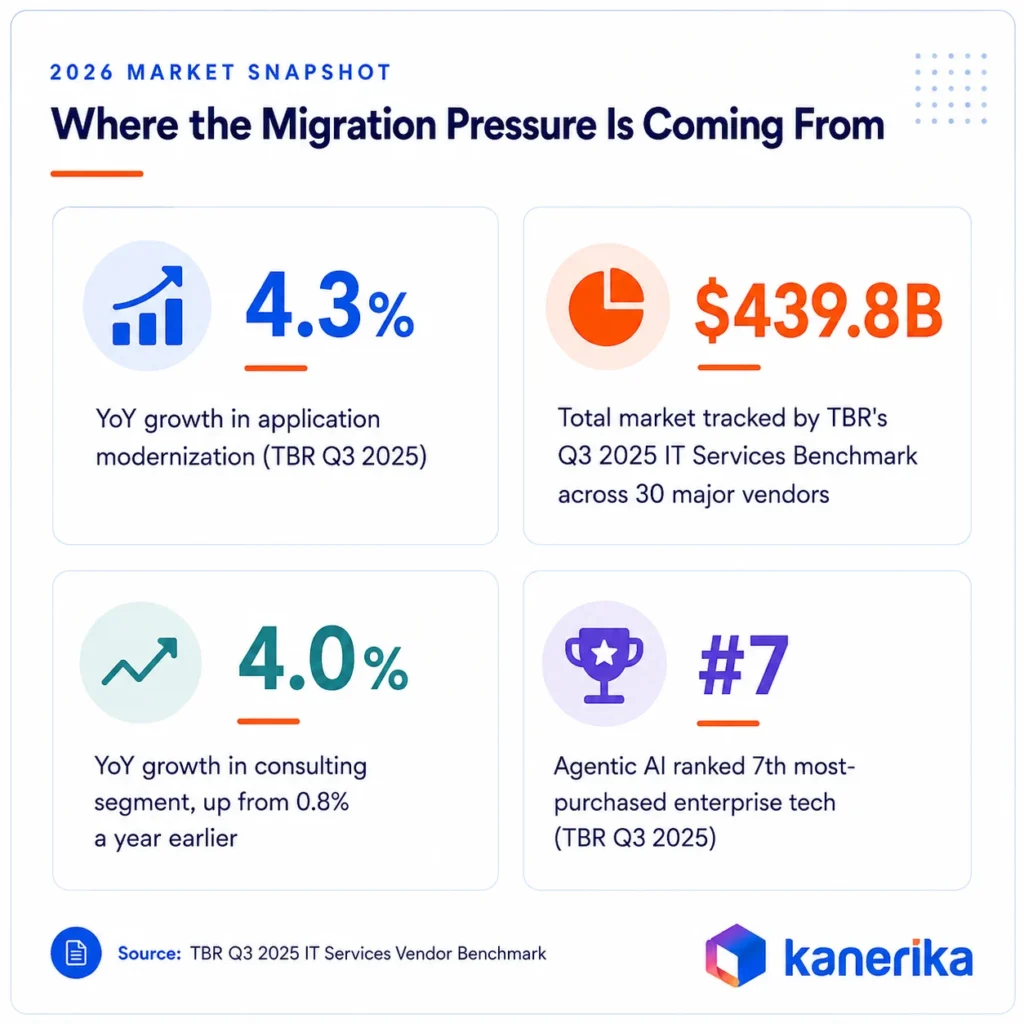
The IT services market grew 2 to 3% overall in 2025. Within that, enterprise data migration and application modernization outperformed every other segment at 4.3% year-over-year growth, according to TBR’s Q3 2025 IT Services Vendor Benchmark covering 30 major vendors across a $439.8 billion market. That gap between modernization and everything else is the signal.
3 forces are converging to explain the acceleration.
1. The Informatica Deadline
Informatica ended support for PowerCenter 10.5.x on March 31, 2026. Enterprises that built data integration infrastructure around PowerCenter over the past decade face a hard deadline. Staying on unsupported, unpatched infrastructure carries security and compliance risk that compounds over time. Thousands of enterprises are now in active migration evaluation.
2. The Agentic AI Requirement
TBR’s benchmark ranked agentic AI as the seventh most-purchased enterprise technology despite being newly available. Enterprises moving toward agentic AI workforces need modern, structured, accessible data infrastructure. Legacy platforms built around Informatica, SSIS, Crystal Reports, and SSAS cannot support the data pipelines agentic AI requires. Migration comes before AI adoption. There is no workaround.
3. The Post-Deferral Wave
Capital budgets were constrained through 2023 and into 2024. Modernization projects were evaluated, approved in principle, and deferred. Those deferrals are ending. CFOs now face an accumulated cost of further delay that exceeds the cost of execution. The consulting segment feeding this work grew 4.0% year-over-year in Q3 2025, after posting only 0.8% growth a year earlier. The release is visible in the numbers.
Why Enterprise Data Migration Projects Fail
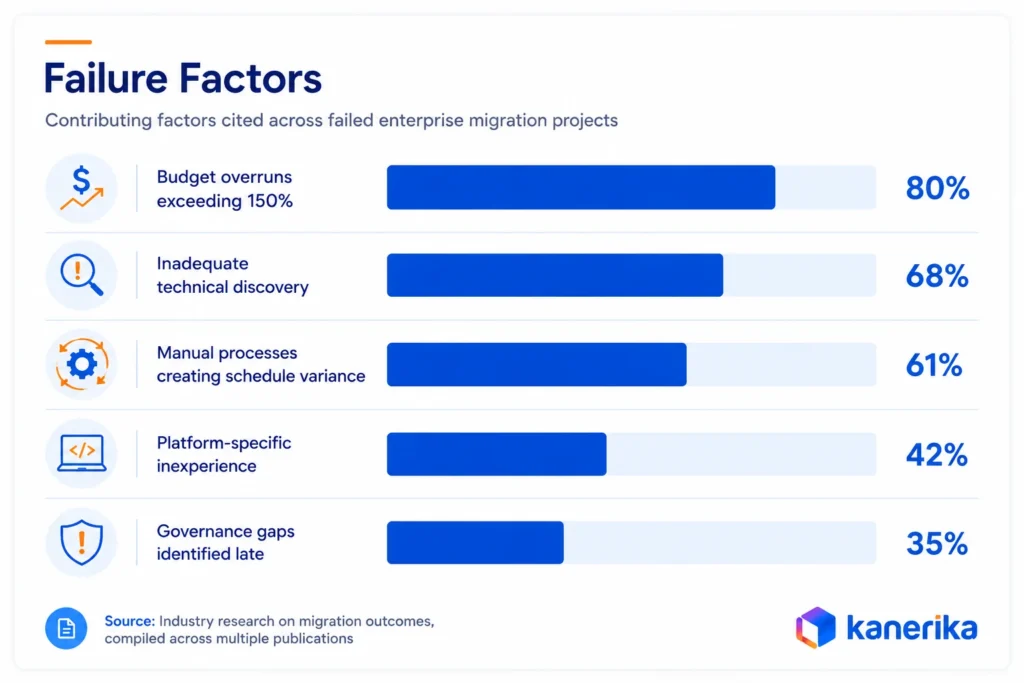
The 73% enterprise data migration failure rate traces back to a consistent structural mismatch between how projects are sold and how they are delivered. Industry research has identified five contributing factors that appear consistently across failed projects.
1. Inadequate Technical Discovery
The most commonly reported cause is insufficient technical assessment before work begins. Vendors conduct a business-level scoping exercise that documents high-level data flows, counts source tables, and catalogs report names. The engineering-level analysis of the actual environment gets skipped. Sixty-eight percent of failed migration projects cite this as a primary contributing factor.
“Most enterprises don’t fail at migration because the technology doesn’t work, they fail because the project was scoped before anyone looked at the actual environment,” says Amit Chandak, Chief Analytics Officer at Kanerika.
Read More: Kanerika vs Tiger Analytics: Which Data Partner Fits?
When the engineering-level analysis gets skipped, complexity surfaces during execution instead of before it. The downstream costs are consistent:
- Undocumented dependencies surface mid-project and require rework
- Data quality issues missed in scoping need remediation mid-flight
- Business logic buried in legacy transformations has to be reverse-engineered on the clock
- Each discovery adds time and cost that was never in the original estimate
2. Platform Inexperience Billed as Expertise
Large global systems integrators are built around fungible labor. A developer certified in a new platform is treated as equivalent to a developer with years of production experience. Both carry the same billing rate. The difference in delivery outcomes is substantial. Review data from G2, Gartner Peer Insights, and PeerSpot consistently surfaces the same complaint from enterprise buyers: paying for vendor learning curves rather than outcomes.
The downstream effects go beyond slower delivery. Platform inexperience leaves a trail:
- Query patterns that worked in the legacy system perform poorly in the target environment
- Data models pass technical review but create performance problems at scale
- These issues typically surface six to twelve months after go-live
- The remediation cost was never in the original budget
3. Governance Treated as a Final Phase
Most migration methodologies treat data governance as a downstream activity, scoped, estimated, and staffed after the core migration work is already designed. That sequencing consistently produces the same problems:
- Governance requirements not factored into architecture decisions force rework after the fact
- Compliance gaps discovered in the final weeks trigger delays of months
- Security policies not integrated into migration design require retrofit before go-live
- Audit exposure and regulatory risk accumulate throughout a project that was never governed from the start
Froedtert Health and the Medical College of Wisconsin underwent a fifteen-month Collibra implementation after a failed 2017 attempt. The root cause was governance complexity that was never addressed at the architecture stage.
4. The Economics of Manual Migration
Manual enterprise data migration scales cost with complexity. Developer teams write conversion scripts, recreate report logic by hand, and test transformation outputs individually. In enterprise environments, complexity is always higher than initial estimates. The numbers reflect this:
- A large enterprise with 500 Informatica PowerCenter mappings and 200 Crystal Reports adds up to tens of thousands of hours of manual work
- At blended vendor rates of $150 to $250 per hour, that scope runs $3 to $8 million
- Timeline: twelve to eighteen months, before scope surprises
- The same migration at 70 to 80% automation runs in weeks and at a fraction of the cost
The automation tools exist. The gap is whether vendors are willing to build and maintain them. Most are not, because longer manual engagements are what their billing model depends on.
What successful migrations have in common is the reverse of these failure patterns. They start with an engineering-level assessment before any timeline is set. They bring governance into architecture decisions from the first sprint, not the final phase. And they use automation to handle conversion work that manual teams consistently underprice. The vendor market shows why these practices remain rare.
5. The Enterprise Data Migration Vendor Market
TBR’s Q3 2025 benchmark covers 30 major vendors across a $439.8 billion market. The headline numbers are worth reading carefully before choosing a migration partner.
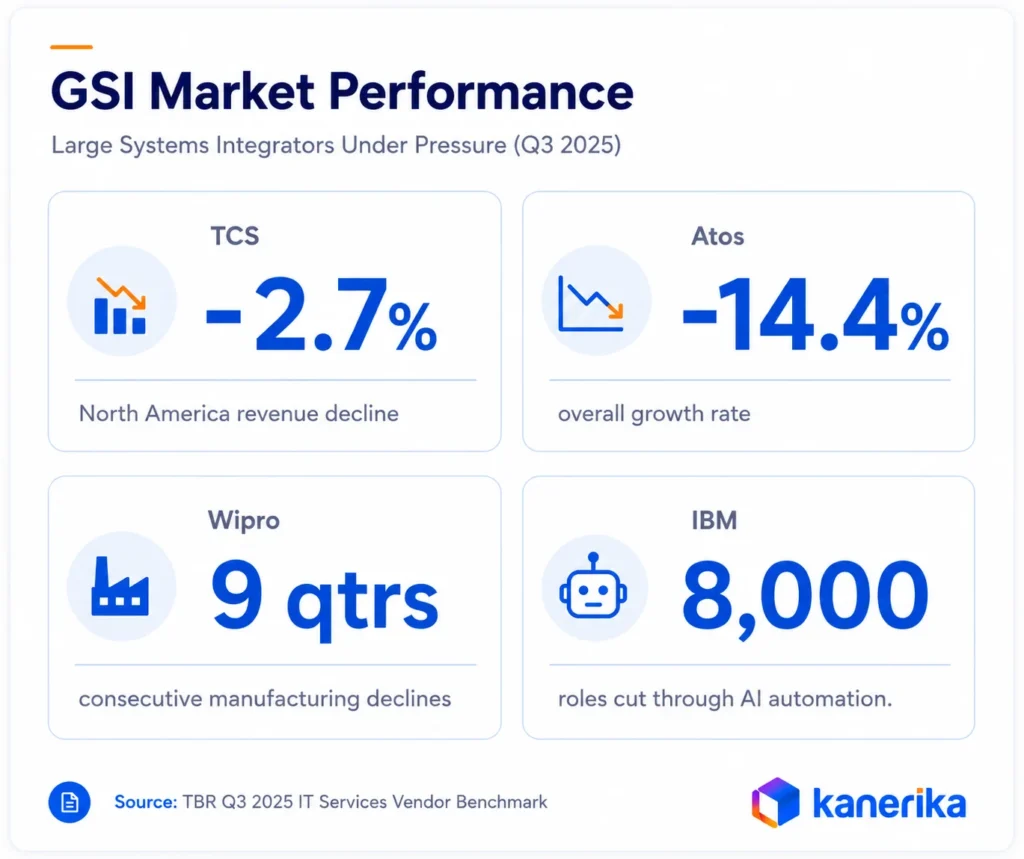
The large GSIs (Accenture, IBM Consulting, Capgemini, TCS, Infosys, Wipro, Cognizant) dominate by revenue. Their Q3 2025 results tell a more complicated story:
- TCS posted -2.7% growth in North America, its largest market
- Wipro’s manufacturing segment declined for the ninth consecutive quarter
- Atos Group reported -14.4% growth amid ongoing financial instability
- Capgemini faces significant exposure to European automotive weakness
- IBM cut 8,000 roles through AI automation, the same AI that compresses the manual labor their billing model depends on
The structural issue is that these firms built their economics around labor arbitrage. Longer engagements, larger teams, hourly billing. AI-first migration directly erodes that model, which gives them limited incentive to fully automate what they currently bill by the hour.
The mid-market gap is the most structurally significant finding. Companies with $500 million to $5 billion in revenue, data infrastructure built over ten to fifteen years, real modernization urgency, and fixed budget constraints are the fastest-growing segment of migration demand in 2026. They are also the least well-served by traditional vendor economics.
How to Select Data Migration Tools and Partners
Choosing the tools and the partner shapes cost and risk more than almost any later decision, so it deserves its own scorecard. The failure patterns and vendor economics above show exactly what to screen for.
Start with your own estate instead of a vendor’s feature list. A team moving, say, 400 Informatica mappings and 150 SSRS reports needs proof on those exact objects. That proof should come from a sample of its own code, measured the same way for every bidder.
Use the seven criteria below as a shared checklist for tools and service partners alike.
| Criterion | What to check | Red flag |
|---|
| Source and target coverage | Proven support for your exact versions, such as PowerCenter 10.5 or SSAS Tabular | “All major platforms” with no named versions |
| Share of conversion automated | The percentage automated on a sample of your code, and how it was measured | One headline automation figure with no sample or method |
| Validation evidence | Reconciliation reports at row, column and report level | Testing described only as user acceptance |
| Online and CDC migration | Full load plus change data capture for systems that cannot go offline | A long outage window assumed for every system |
| Security and data residency | Certifications such as ISO 27001 and SOC 2, and where data sits in transit | Production data copied into unmanaged test environments |
| References of similar size | Two or three clients with comparable volume and source count | Case studies only from small, single-system moves |
| Rollback and post-go-live ownership | A rehearsed rollback plan and named hypercare owners | Support that ends on cutover day |
Score every candidate on the same sample so the numbers are comparable. The guide to data migration tools compares the main tool categories. For conversion work handled by AI agents, see the companion piece on AI-powered data migration.
Questions to Ask a Migration Partner
Ask these six questions in the first meeting, and ask for the answers in writing. Vague replies here tend to become change requests later.
- Will you run an engineering-level assessment of our actual environment before you quote?
- What share of our code will be converted automatically, and how did you measure it?
- Which reconciliation reports will we receive at each stage?
- How do you keep the source and target in sync during cutover?
- Who on your team has delivered this exact source-to-target path before?
- If we need to roll back, what happens and who pays for it?
A partner that answers all six with specifics from your own environment has already done part of the discovery work.
How AI-First Automation Changes the Migration Model
Most AI-powered migration offerings in the market layer AI tooling on top of fundamentally manual processes. Developers still write the migration logic, and AI assists with documentation or testing. The underlying cost structure, where labor hours scale to complexity, remains unchanged.
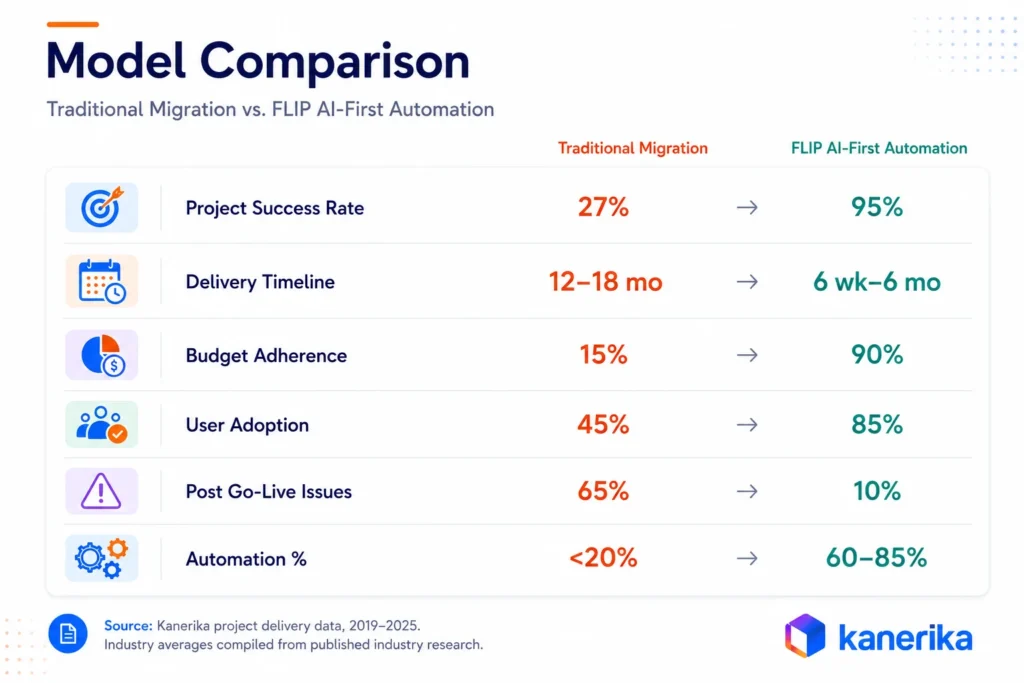
FLIP inverts this architecture for enterprise data migration. The platform’s AI agents perform the analysis, conversion, and validation work that traditionally requires development teams. Human engineers direct and review. The ratio of automated to manual work in a FLIP-powered migration runs 60 to 85%, depending on the platform combination and source environment complexity.
How FLIP Works
What separates AI-first migration from the typical “AI-assisted” label is where the automation sits. In FLIP, multiple agents work in parallel on tasks that would otherwise require sequential developer effort, the analysis, conversion, and validation happen concurrently, not in a queue. The core capabilities that make this work:
- Intelligent pattern recognition: FLIP analyzes source systems (Informatica mappings, SSIS packages, Crystal Reports, Cognos Framework Manager models) in days. A developer team takes weeks for the same analysis.
- Automated code generation: FLIP generates target-platform code directly from its analysis. An Informatica mapping becomes a Databricks Delta Live Table. A Crystal Report becomes a Power BI report with preserved calculations and layout. Engineers review and validate the output. They do not write it.
- Real-time error detection: Data quality issues, referential integrity problems, and transformation errors are caught during migration. Issues found mid-process cost a fraction of what they cost post-go-live.
- FLIP Copilot: A generative AI assistant embedded in the platform. Technical and business stakeholders can query migration status, data lineage, and transformation logic in plain language throughout the project.
Performance Across 12 Migration Paths
Kanerika has built and deployed FLIP-powered accelerators across 12 distinct migration paths. These are not projected outcomes. They are documented results from the project portfolio, covering the most common enterprise data migration scenarios in 2025 and 2026.
Source: Kanerika project delivery data 2019–2025. All figures reflect documented project outcomes, not modeled projections.
Read More: Informatica vs Azure Data Factory vs Talend: Compared
The SSAS to Microsoft Fabric path stands out for one specific reason. Query performance improvements of 12x have been documented in production. SSAS cube migration to Fabric semantic models is technically complex and rarely automated elsewhere. FLIP converts cube definitions, transforms MDX calculations to DAX, and migrates dimensions and measures at 80% automation, the highest rate across any migration path in the portfolio.
Governance as an Enterprise Data Migration Foundation
Failed migrations consistently reveal the same pattern: governance requirements discovered too late. Teams scope compliance frameworks, data lineage, access controls, and audit trails as final-phase work, then hit them mid-project as architectural blockers they never designed around.
Kanerika builds governance in from day one. KanGovern, KanGuard, and KanComply connect into FLIP-powered migrations at the initial technical assessment, not the end. That sequencing is what separates projects that stay on track from ones that stall in the final weeks.
- KanGovern: Sets up governance infrastructure in the target environment before data lands there. Policy management, data classification, and stewardship workflows are in place on arrival, not added after.
- KanGuard: Manages data security and access control throughout migration. Handles sensitive data discovery, masking, encryption, and permission inheritance during the period when access patterns are actively changing.
- KanComply: Generates regulatory compliance documentation as a built-in output. Covers SOX, FCA, Basel III, HIPAA, and FDA data integrity requirements automatically. Audit trails are produced during migration, not assembled after it.
Projects that incorporate all three from the initial assessment phase achieve 100% regulatory compliance maintenance throughout migration, zero security incidents during or after implementation, and automated audit trail generation. Projects treating governance as a final phase rarely achieve any of these outcomes.
Enterprise Data Migration Strategy: Big Bang vs Phased vs Trickle
The migration strategy decides how data and users move to the new platform, and how long old and new run side by side. There are three main patterns, and each one trades downtime against risk and coordination effort.
Take a retailer with one regional sales database and a weekend maintenance window. It can probably cut over in one go. A bank with forty source systems and round-the-clock payments has no such window, so it needs a slower pattern.
Big Bang Migration
A big bang migration moves everything in one planned cutover window, often a weekend. It is the simplest plan to run, because there is only one switch and no period of dual operation. The catch is that any failure hits every user at once.
It suits modest data volumes, simple dependencies and an outage the business can tolerate.
Phased Migration
A phased migration moves the estate in waves, grouped by business domain, region or source system. Each wave is validated and signed off before the next one starts, so problems stay small and lessons carry forward. This is the default for multi-system estates, although it takes longer and costs more in dual running.
Trickle Migration With Change Data Capture
Trickle migration runs a full load first, then streams every new source change to the target until cutover. AWS Database Migration Service, for instance, supports full load plus change data capture and reads those changes from the source engine’s transaction logs. Microsoft calls the same idea online migration with minimal downtime in Azure Database Migration Service.
Because both systems stay live in parallel, this pattern gives the lowest downtime. It also demands the most coordination, since teams must watch replication lag, schema changes and two groups of users at once.
| Approach | Downtime | Risk | Cost | Best fit |
|---|
| Big bang | Highest, one planned outage window | High, every user exposed at once | Lowest | Small estates with simple dependencies |
| Phased | Low for each wave | Medium, contained to one wave | Medium, some dual running | Multi-system and multi-region estates |
| Trickle with CDC | Lowest, a short final switchover | Lower data risk, higher operational load | Highest, two live platforms plus replication | Systems that cannot go offline, such as payments or order capture |
How to Choose the Right Enterprise Data Migration Strategy
Five questions usually settle the choice. Work through them with the business owners, because downtime tolerance is a business call before it is a technical one.
- Downtime tolerance. If the business accepts a planned weekend outage, big bang stays on the table.
- Data volume. Very large tables can take longer to copy than an outage window allows, which points to trickle or phased.
- Dependency count. Many upstream feeds and downstream reports favor phased waves, so each group can be tested alone.
- Regulatory sign-off. Where auditors approve each data domain separately, phased waves match their review cycle.
- Team capacity. Trickle and phased plans need people to run two platforms at once, so confirm that team exists before you commit.
Many enterprises end up with a hybrid that runs phased waves and adds CDC only for the few systems that cannot stop. The data platform migration decision framework walks through the same choice at platform level.
The Enterprise Data Migration Process in 7 Steps
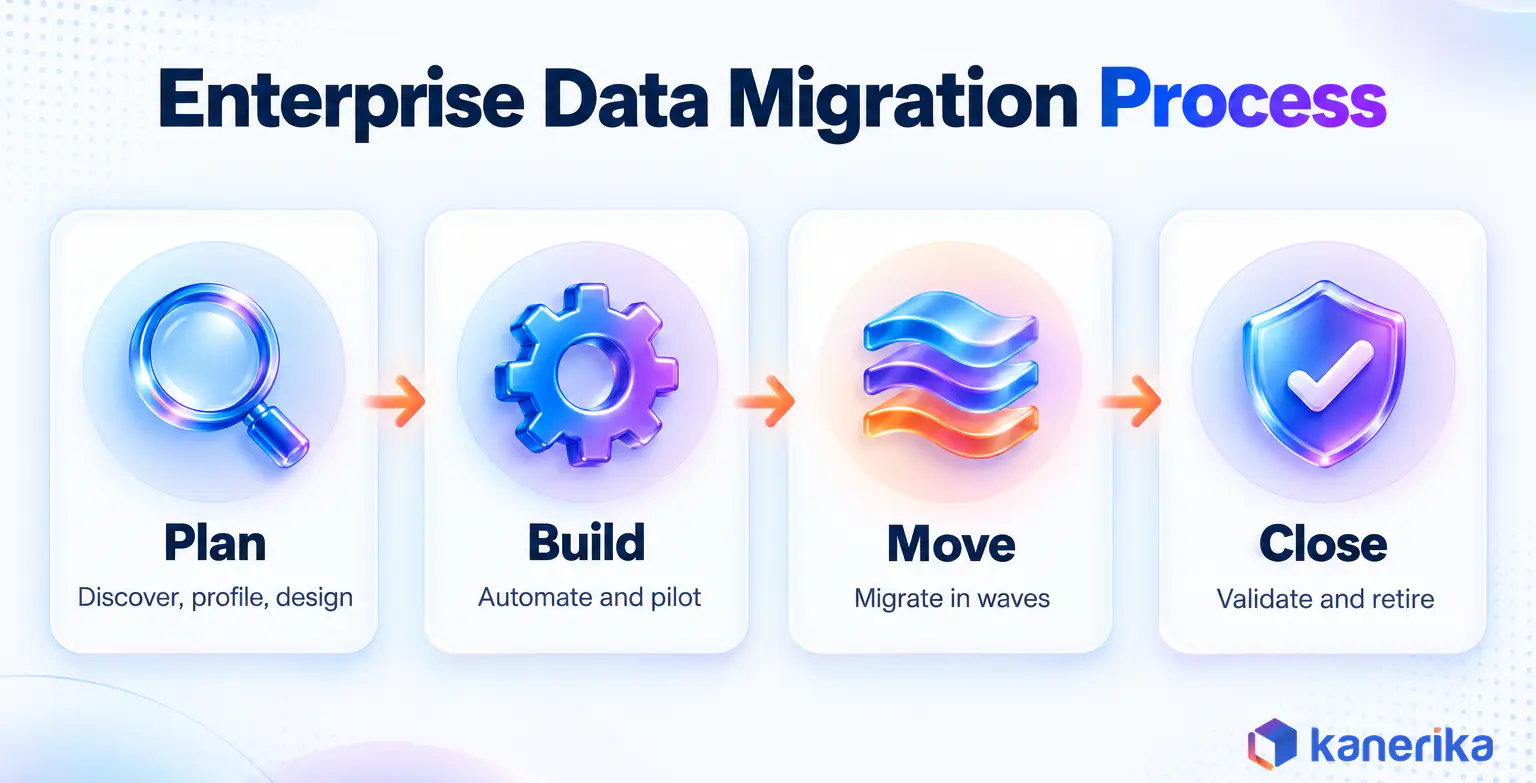
A repeatable process turns a large migration into a series of smaller steps that can each be checked. The seven steps below follow a wave-based order that suits multi-system estates. They group into four phases: plan (steps one to three), build (four and five), move (six) and close (seven). In a phased plan, steps four to six simply repeat for every wave.
1. Discover and Inventory the Estate
Start with an engineering-level inventory of every source, pipeline, report, schedule and consumer. Skipped technical discovery is the top failure cause in the research above, cited in 68% of failed projects. So this step needs code analysis, and its output is a dependency map with a complexity score for each object.
2. Profile and Cleanse the Data
Profile each source for null rates, duplicates, broken keys and out-of-range values. Fix what you can at the source and log the rest as known exceptions, so nobody mistakes an old defect for a migration bug.
3. Design the Target and Map Schemas and Business Rules
Design the target model, then map every source field and rule to it. Pay most attention to logic hidden in ETL mappings, stored procedures and report formulas, because that is where silent differences start. Business owners then sign the mapping document.
4. Build and Automate the Migration Pipelines
Build the load, conversion and validation pipelines as code, so every run can be repeated exactly. Automate code conversion wherever tools do it reliably, and keep manual effort for rules that need human judgment.
5. Run a Pilot on a Representative Workload
Pick one workload that contains your hardest patterns, such as a large fact table, a complex report and a regulated data set. The pilot proves the approach and gives a real throughput figure. That figure makes the estimate for the full program far more reliable.
6. Migrate in Waves and Cut Over
Move the estate wave by wave, using the strategy chosen earlier. Each wave ends with validation, a go or no-go decision and the cutover of its users. Start with a lower-risk domain, such as one region’s sales reporting, so the team learns the cutover routine before finance goes live.
7. Validate, Support and Decommission
After go-live, run a hypercare period in which the migration team fixes issues quickly and watches performance. Train users on the new reports, then hand operations to the run team with written runbooks. Switch off the legacy platform only after sign-off, because that is when the license savings finally arrive.
Each step maps to a phase of the wider data migration life cycle, which also covers smaller, single-system moves.
Testing and Validating the Migrated Data
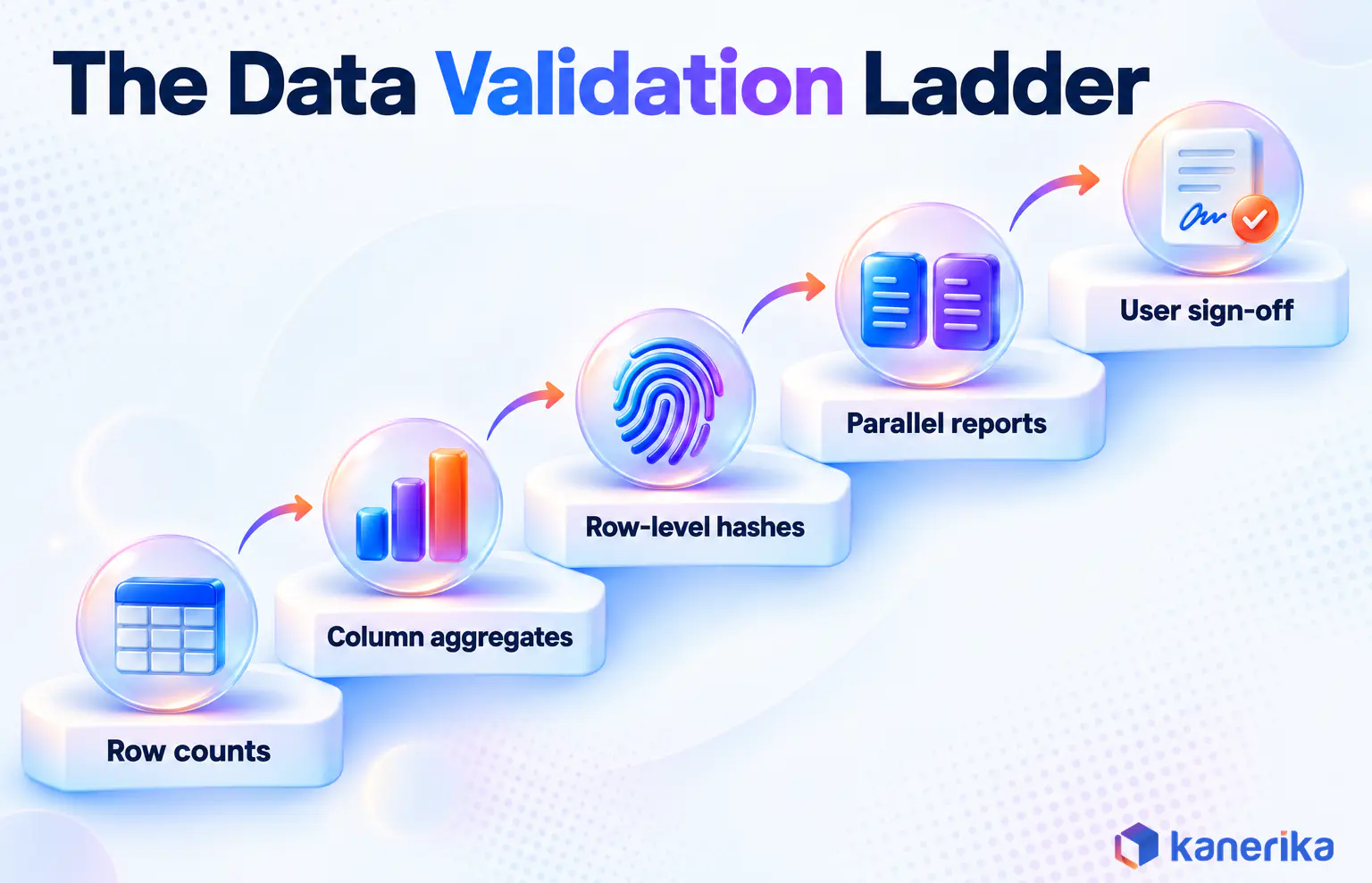
Validation proves that the data in the new platform matches the old one, and that the business trusts it. It works best as a ladder of checks, where each level catches problems the one before it missed.
Google’s open-source Data Validation Tool is a useful reference for these levels, since it supports column, row and schema validation. Start with a schema check that column names, data types and nullability match the target design. A finance team would then climb every level below on its general ledger before its first month-end close on the new platform.
- Row counts. Compare the number of rows in each table after every load.
- Column aggregates. Compare count, sum, average, minimum, maximum and standard deviation for each column, both overall and grouped by business dimension.
- Row-level hash comparison. Hash each row on both sides to catch silent changes, such as truncated text or rounded decimals.
- Parallel run of business reports. Run the same reports on both platforms for a full business cycle and compare the totals.
- User acceptance sign-off. Business owners confirm the numbers in writing before the source is retired.
Automate the schema check and the first three levels so they run after every load. The last two need people, and they are the checks auditors most often ask to see. The guides to data migration testing and data reconciliation go further into test design and tooling.
Cutover and Rollback Planning
Cutover is the moment users move to the new platform, and it needs a plan as detailed as the build itself. Rehearse it at least once on a copy of production, so the timings in the plan are real.
- Go or no-go criteria. Agree in advance which validation results must be green before the switch.
- Freeze window. Stop changes to the source during cutover, or capture them with CDC.
- Rehearsed rollback. Write down how to point users back to the old system, and test that path.
- Read-only source. Keep the legacy platform running in read-only mode until business sign-off.
Once the business signs off, the source moves into the decommission step described in the process above.
Data Migration Risk Register: Risks and Mitigations
A risk register lists what could go wrong across the program, who watches for it and what happens when it appears. It sits alongside the failure causes covered earlier and turns them into owned, tracked actions.
Review it at every steering meeting, and give every risk a named owner. The early warning column matters most, since it tells the team when to act while a fix is still cheap.
| Risk | Early warning sign | Mitigation | Owner |
|---|
| Data loss or truncation | Row counts or hashes drift between test loads | Automated reconciliation after every load, and a wave stop on any mismatch | Data engineering lead |
| Extended downtime | A rehearsal cutover runs past its window | Phased or trickle cutover, rehearsed timings and a fixed rollback point | Migration program manager |
| Hidden dependencies | New feeds or reports keep appearing after discovery | Engineering-level discovery, lineage scanning and a freeze on new feeds | Solution architect |
| Scope creep | Requests to redesign reports or add features mid-wave | A like-for-like rule for each wave, with new requests logged for a later release | Product owner |
| Security or compliance breach in transit | Sensitive data found in test environments or unencrypted transfers | Masking, encryption in transit and access reviews before each wave | Security and compliance lead |
| Performance regression after go-live | Slower queries or refresh failures during the pilot | Performance tests on production-size data and tuning before cutover | Platform engineering lead |
| Key-person and vendor dependency | One person or one vendor holds knowledge nobody else has | Written runbooks, paired work and knowledge transfer in the contract | Executive sponsor |
The guide to risks in data migration covers the technical side of each risk in more detail.
What Drives Enterprise Data Migration Cost
Migration cost comes from a small set of drivers, and most of them can be measured before the project starts. Budgets tend to overrun when teams guess at those drivers during scoping.
- Data volume and source count. More systems mean more mappings, more tests and more cutover events.
- Code and report conversion. Manual rewriting of ETL jobs and reports is usually the largest labor line, so the automated share moves the total most.
- Data quality remediation. Defects found late get fixed under time pressure, at the highest rates.
- Validation and parallel running. Both platforms are paid for while teams compare results, so a long parallel run adds up.
- Downtime cost to the business. Lost orders or a delayed month-end close during cutover belong in the budget too.
- Licenses and replication tools. Expect license costs on both sides during the overlap, plus any CDC or replication tooling.
- Skills and partner rates. The manual conversion example earlier, at $150 to $250 an hour, shows how quickly labor comes to dominate the total.
Put a figure on each driver during discovery, then revisit every figure after the pilot. The drivers also pull on each other. In the manual example earlier, 500 PowerCenter mappings and 200 Crystal Reports came to $3 to $8 million in labor. Every month cut from that conversion work also shortens the period in which both platforms are licensed.
How One Migration Cut License Costs
One Kanerika engagement shows how far the license line can fall. A North American beverage manufacturer and distributor moved from legacy SSAS and hybrid systems to Snowflake, with Fivetran ingestion and Power BI on Snowflake. Removing redundant systems and licenses saved $130K a year in license and maintenance costs. Manual data reconciliation fell 60% and reporting cycles ran 40% faster, as the case study 60% Less Manual Reconciliation via Snowflake Migration reports.
Data Migration Best Practices Checklist
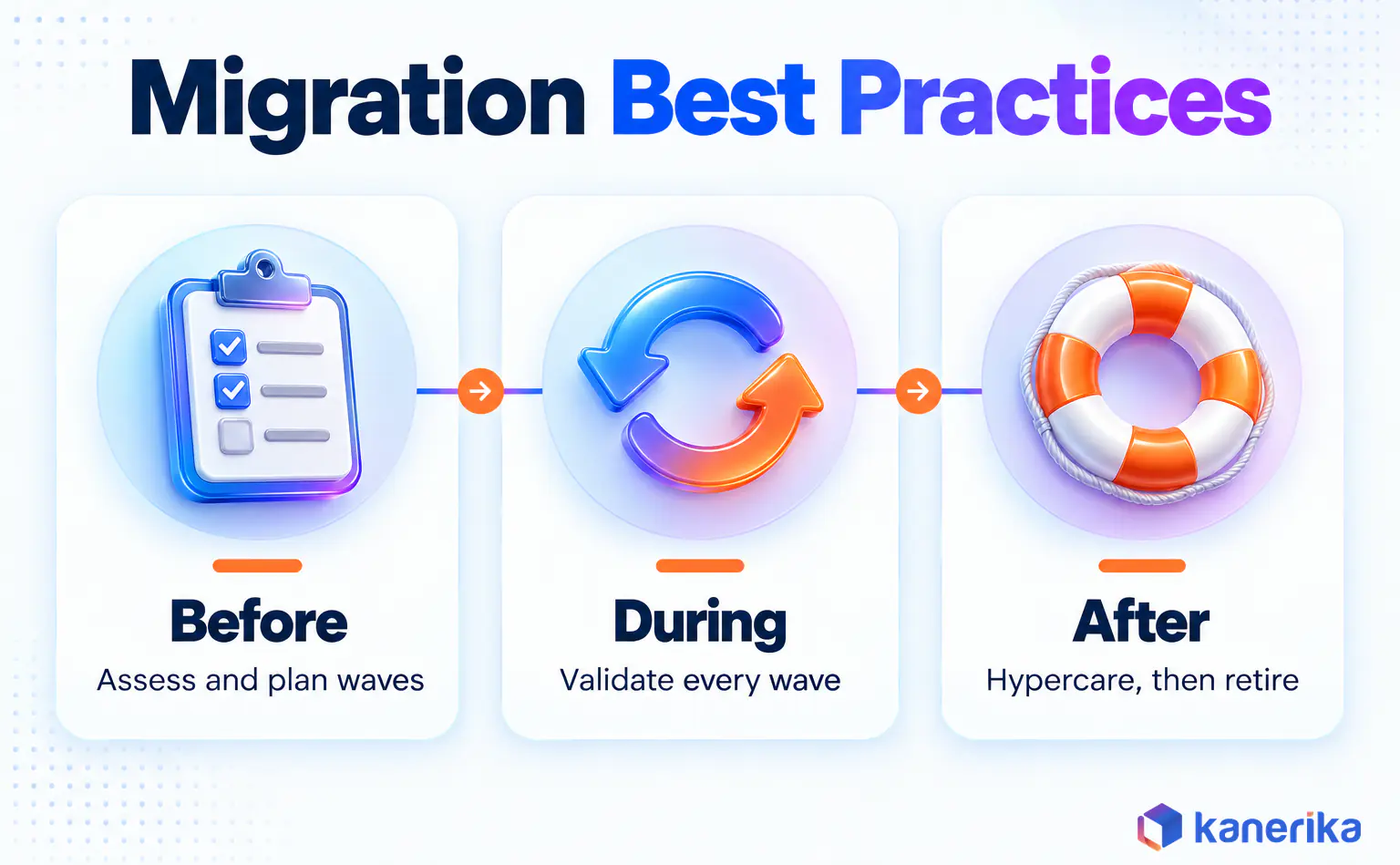
Late in a program, the small steps are the ones that slip, such as keeping the source read-only until sign-off. A checklist keeps those basics in view when the team is under pressure. Use the three lists below at the start, middle and end of each wave, and adapt them to your own estate.
Before Migration
- Run an engineering-level assessment of every source, pipeline and report.
- Agree the strategy, wave plan and downtime limits with business owners.
- Profile data quality and log the known defects.
- Build governance, access rules and masking into the target design.
- Set measurable exit criteria for each wave.
During Migration
- Automate loads, conversion and reconciliation so every run repeats exactly.
- Validate each wave at row, column and report level.
- Track risks weekly against named owners.
- Hold scope to like-for-like and park new requests for later.
- Rehearse cutover and rollback before each go-live.
After Go-Live
- Run a hypercare period with fast fixes and daily health checks.
- Train users on the new reports and workflows.
- Hand operations to the run team with runbooks and alerts.
- Keep the source read-only until sign-off, then decommission it.
- Compare actual cost and timeline with the plan, and record the lessons.
For more items in each phase, see the full data migration checklist.
How Kanerika Approaches This
A few facts worth knowing before evaluating Kanerika as a migration partner:
- Microsoft Solutions Partner with Analytics Specialization and Microsoft Fabric Featured Partner status
- Databricks Consulting Partner and Snowflake Select Tier Partner
- Certified ISO 27001, ISO 27701, SOC 2 Type II, CMMI Level 3, and GDPR compliant
- 10+ years, 100+ enterprise clients, 98% client retention across financial services, healthcare, manufacturing, logistics, pharmaceuticals, and insurance
FLIP powers all 12 migration accelerator paths and has delivered a 95% project success rate across the portfolio. FoodPharma, a food and pharmaceutical manufacturer, consolidated six operational systems on Microsoft Fabric in a seven-week implementation, cutting cross-functional reporting cycles from two business days to ninety minutes. That project is a verified Microsoft Customer Story.
The research behind the State of Enterprise Data Platform Migration 2026 report draws on Kanerika’s internal project delivery data from 2019 to 2025, TBR’s Q3 2025 IT Services Vendor Benchmark, and multiple published industry research sources. All performance metrics reflect documented project outcomes rather than modeled projections.
Case Study: SSRS to Power BI Migration
A global enterprise running SQL Server Reporting Services needed to move to Power BI without losing paginated report functionality, subscription workflows, or parameter logic. FLIP automated 75% of the conversion work and cut the timeline by 65% versus manual baseline.
Challenges
- Static SSRS layouts needed a full redesign for Power BI’s responsive interface
- Complex queries and stored procedures required DAX-based rewrites
- Security and access control gaps blocked centralized governance
- Subscription workflows and report parameters had to migrate without disrupting live reporting
Solutions
- FLIP automated SSRS to Power BI (.pbix) conversions with layouts, filters, and logic preserved
- Structured deployment phases kept downtime minimal during cutover
- Role-based access and audit governance configured in Power BI Service
- Power BI integrated with Microsoft Fabric for unified data modeling post-migration
Results
- 75% of migration tasks automated by FLIP
- 65% reduction in delivery timeline versus manual baseline
- $100K–$250K in project cost savings
- Zero report logic lost in conversion
Wrapping Up
Enterprise data migration has a 73% failure rate. The platforms work. The execution model keeps breaking. When 80% of budgets exceed original estimates by 150% or more and timelines overrun by an average of eighteen months, the issue is structural: manual processes scaled to complexity, governance discovered late, and platform inexperience billed at expert rates.
AI-first automation changes this equation by inverting the ratio of automated to manual work. When intelligent agents handle 60 to 85% of migration tasks, costs drop, timelines compress, and governance fits in from day one. Read the full report to understand the research, the vendor market, and what a better migration framework looks like in 2026.
Ready to Move Off Legacy Infrastructure?
Get a technical assessment of your migration scope before committing to a vendor.
Schedule a Conversation
Frequently Asked Questions
What is the current failure rate for enterprise data migration projects?
Industry research places the failure rate at 73%. Of projects that do proceed, 80% exceed original budgets by 150% or more, and timeline overruns stretch an average of eighteen months beyond initial plans. The failure rate reflects structural problems in how migrations are sold and delivered, not individual project bad luck.
What are the main causes of enterprise data migration failure?
Five factors appear consistently across failed projects: budget overruns exceeding 150% (80% of failures), inadequate technical discovery (68%), manual processes creating schedule variance (61%), platform-specific inexperience (42%), and governance gaps identified too late in the project (35%). Most of these are predictable and preventable with the right methodology.
Should we choose a big bang or phased enterprise data migration?
Choose big bang when the data set is modest, dependencies are simple and the business can accept a planned outage window. Choose phased migration when many systems, teams or regions are involved and downtime is costly. Most large enterprises use phased waves, sometimes with change data capture to keep source and target in sync.
How long does an enterprise data migration take?
Duration depends on data volume, the number of source systems, code that needs conversion and how much validation regulators require. A single database move can finish in weeks. A multi-platform program with hundreds of ETL jobs and reports often runs for many months. A short pilot on one representative workload gives the most reliable estimate.
How do you validate data after an enterprise data migration?
Validation compares source and target at several levels. Teams check row counts per table first. They then compare column aggregates such as sums, minimums and maximums. Row-level hash checks catch silent changes. Finally, business users run their own reports on both systems in parallel and sign off before the old platform is switched off.
Can an enterprise migrate data without downtime?
Near-zero downtime is possible for most database workloads. The usual pattern is a full load followed by change data capture, which streams source changes to the target until cutover. AWS DMS supports this, and Azure Database Migration Service offers it for SQL Managed Instance and SQL Server on Azure VMs. A short final switchover is still needed.
What criteria should you use to select an enterprise data migration vendor?
Check source and target coverage for your exact platforms first. Then look at how much conversion is automated, how validation evidence is produced, and security certifications. Ask for references on migrations of similar size. Confirm who owns rollback planning and post-go-live support. A paid assessment of your real environment beats a slide-deck estimate.
Why is the Informatica PowerCenter end-of-support deadline significant?
Informatica ended support for PowerCenter 10.5.x on March 31, 2026. Enterprises that built data integration infrastructure around PowerCenter over the past decade now face a hard migration decision. Staying on unsupported, unpatched infrastructure creates security, compliance, and operational risk. Scoping and vendor selection for a complex migration takes two to three months, so organizations beginning evaluation in mid-2026 are likely to operate on unsupported infrastructure through at least some portion of 2027.
How does AI-first automation change migration economics?
In a manual migration, labor hours scale directly with complexity, and enterprise environments are always more complex than initial estimates. A fully manual migration of 500 Informatica mappings and 200 Crystal Reports can run $3 to $8 million over twelve to eighteen months. When 60 to 85% of conversion steps are automated, the same scope runs in weeks rather than months at a fraction of the cost. The cost structure changes because automated work does not scale with complexity the way manual work does.
What is FLIP and how does it work?
FLIP is Kanerika’s AI-powered migration accelerator. Multiple intelligent agents work in coordination to analyze source systems, generate target-platform code, detect errors in real time, and validate transformations. Human engineers direct and review. FLIP supports 12 migration paths covering Informatica, SSIS, SSAS, Crystal Reports, Tableau, Cognos, SSRS, and legacy ETL systems migrating to Microsoft Fabric, Power BI, Databricks, Azure, and Talend.
What migration paths does Kanerika support?
Kanerika has built FLIP-powered accelerators across 12 migration paths, including Azure to Microsoft Fabric, SSIS to Fabric, Informatica to Fabric, SSAS to Fabric, Crystal Reports to Power BI, Tableau to Power BI, Cognos to Power BI, SSRS to Power BI, Informatica to Databricks, Informatica to Talend, SQL Server to Azure, and legacy ETL to cloud platforms. Automation rates range from 60% to 85% depending on the source-target combination.
What is the mid-market gap in enterprise data migration?
Companies with $500 million to $5 billion in revenue represent the fastest-growing segment of migration demand in 2026 and the segment least well-served by traditional vendor economics. Large GSI engagements bring overhead and billing structures built for much larger projects. Platform vendor certifications reveal little about actual delivery track records. Mid-market enterprises need expert migration capability at economics that match their scale.
Where can I read the full State of Enterprise Data Platform Migration 2026 report?
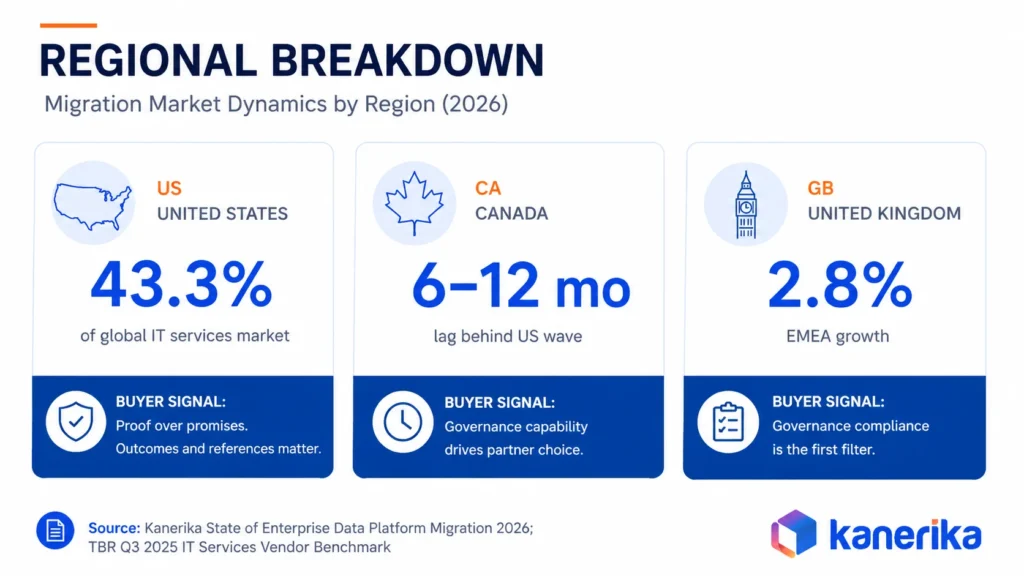
The full report is available at kanerika.com. It covers the structural causes of migration failure, the market dynamics driving urgency in 2026, a detailed breakdown of FLIP performance across all 12 migration paths, regional market dynamics for the US, Canada, and UK, a vendor evaluation checklist, and Kanerika’s recommendations for enterprise data leaders preparing for migration.
What is enterprise data migration?
Enterprise data migration is the planned move of large, business-critical data sets from one platform to another. A typical example is an on-premises warehouse moving to a cloud lakehouse. It covers many source systems, compliance rules and dependent reports at once. Success means the data arrives complete, accurate and usable, and the old system can be retired.
What are the main types of enterprise data migration?
The five common types are storage, database, application, cloud and business process migration. Storage moves data to new hardware or tiers. Database migration changes the engine or version. Application migration moves a system such as an ERP. Cloud migration shifts workloads off premises. Business process migration moves whole functions after a merger or reorganization.














