TL;DR
GPT models are OpenAI’s family of large language models, sold through the API by the token and through ChatGPT by the seat. The current family is GPT-6.1 Sol, GPT-6.1 Terra, GPT-6 Astra and GPT-6 Luna, plus the earlier GPT-6 Sol. Start on GPT-6.1 Sol for most work, use GPT-6 Luna for routine volume, and move to Astra only where Sol fails your own test. List prices run from $0.10 to $10 per million input tokens, so the tier you pick can change the bill a hundredfold. Older models such as gpt-5, o3 and o3-pro retire on December 11, 2026, and GPT-4o and GPT-4.1 snapshots follow on January 14, 2027. Choose by cost per completed task on your own data, rather than by price per token alone.
Key Takeaways
- GPT-6.1 Sol, at $2 input and $10 output per million tokens with a 1,050,000-token context window, is the sensible default for most enterprise work.
- GPT-6 Luna costs $0.10 input and $0.50 output, which makes it the tier for classification, routing and other high-volume jobs.
- Prompts above 272K tokens on Sol and Terra cost 2x input and 1.5x output, while Batch and Flex cut Sol and Terra prices by 50%.
- GPT-6 Astra costs five times as much as Sol, so reserve it for tasks where Sol fails a test you ran on your own data.
- gpt-4-turbo, o1 and o3-mini retired on October 23, 2026, and gpt-5, o3 and o3-pro follow on December 11, 2026.
- Routing 80% of requests to Luna and 20% to Sol costs about a quarter of an all-Sol setup at list price.
Why Picking a GPT Model Got Harder in 2026
Picture a support team that shipped a GPT-powered help bot in 2025. The bot answers billing questions, drafts replies and tags tickets, and nobody has touched its settings since launch. Then an engineer checks OpenAI’s deprecation list and finds the exact model id the bot calls, with a shutdown date only weeks away.
Now the team has three questions at once. Which current GPT tier should replace the old model, what will it cost per ticket, and how will they prove the answers stay as good? Because OpenAI now sells four priced tiers, “use the newest model” does not settle any of them.
This guide answers those questions in order. It explains what GPT models are, then walks through the November 2026 lineup with prices and context windows. After that come decision rules by workload, cost arithmetic, the retirement calendar and a migration plan you can run.
What Are GPT Models?
GPT models are the large language models that OpenAI builds and sells, and they power both ChatGPT and a long list of business applications.
What GPT Stands For
A GPT (Generative Pre-trained Transformer) model is a type of artificial intelligence that uses deep learning to process and generate human-like text. These models are trained on vast amounts of text data to understand patterns in language and context.
Each word in the name describes part of how the model works. Generative means it produces new text, so it can write an answer instead of only picking a label. Pre-trained means it first learns from a very large body of general text, before anyone adapts it to a single task.
Transformer is the neural network design described in the 2017 research paper linked above. It lets the model weigh every word in a passage against every other word, which is how it keeps track of meaning across long documents.
That design is why one GPT model can summarize a contract, write a SQL query and answer a support ticket. It needs no separate training for each job.
GPT Models vs ChatGPT
GPT is the model family, and ChatGPT is one product built on top of it. ChatGPT adds a chat interface, file uploads, memory and built-in tools, and people pay for it with a subscription plan. The OpenAI API, by contrast, lets developers call a specific model by its id from their own software and pay for each token used.
This split matters when you plan a deployment. A sales team in ChatGPT and an engineering team with an API support bot are both GPT users. Yet they buy, govern and measure it in different ways.
Model availability also differs. OpenAI can change which model answers inside ChatGPT without any action from you. On the API, your code names an exact model id that keeps working until OpenAI retires it.
How a GPT Model Turns a Prompt Into an Answer
Every GPT model starts by splitting your text into tokens, which are small chunks of words. OpenAI prices every request by the number of tokens going in and coming out.
The context window is the largest number of tokens the model can consider in one request. It has to hold your instructions, any documents you attach, the conversation so far and the answer itself. For the current GPT-6.1 tiers that limit is 1,050,000 tokens, with up to 128,000 tokens of output.
Newer GPT models can also spend extra effort reasoning before they answer. That hidden work produces more output tokens, so it raises both quality on hard problems and the cost of each call. Since output tokens cost five times as much as input tokens on every current tier, long answers and heavy reasoning drive most of the bill.
Because each token is a prediction rather than a lookup, a GPT model can also state something false with confidence, so production systems need checks. Our guide to how a large language model is put together, from embeddings to decoder layers, goes deeper.
Watch on YouTube
LLM Hallucination in Enterprise Data: The Semantic Layer Fix
A Kanerika video on why GPT answers drift from the facts in enterprise data, and how a governed semantic layer keeps them grounded.
The Current GPT Lineup at a Glance (November 2026)
OpenAI’s current GPT lineup has four main tiers, each sold at its own price point rather than ranked by a single version number. The table below lists every current tier with its API id, list price, context window and the work it suits best.
Model lineup and prices checked November 2, 2026. The ids and limits come from OpenAI’s models page, and the prices come from its API pricing page. Check both before you sign off a budget, because prices and limits can change between releases.
| Model | API id | Input / cached / output per 1M tokens | Context / max output | Start here for |
|---|
| GPT-6.1 Sol | gpt-6.1-sol | $2 / $0.10 / $10 | 1,050,000 / 128,000 | Most enterprise work, RAG, agents and coding |
| GPT-6.1 Terra | gpt-6.1-terra | $1 / $0.05 / $5 | 1,050,000 / 128,000 | Drafting, simple lookups and small code fixes |
| GPT-6 Astra | gpt-6-astra | $10 / $1.00 / $50 | 1.05M / 128K | The hardest reasoning, once Sol fails your test |
| GPT-6 Luna | gpt-6-luna | $0.10 / $0.01 / $0.50 | 1.05M / 128K | Classification, routing and extraction at volume |
| GPT-6 Sol (6.0) | gpt-6-sol | $2 / $0.20 / $10 | Context not stated | Existing apps already pinned to it |
How to Read the Lineup Table
Read the table from the middle out. Sol sits at the center on price, Terra costs half as much, Luna costs a twentieth of Sol, and Astra costs five times more. Because output is five times the input price on every tier, the ratio between tiers holds whether your workload is prompt-heavy or answer-heavy.
If you want to compare these tiers against models from other vendors, our ranking of the top LLMs covers the wider market. The rest of this section stays with OpenAI and explains when to use each tier.
Kanerika Service
LLM Development Services
Kanerika designs, tests and builds GPT applications on your own workloads and data, from the first use case to production.
Explore LLM Development
GPT-6.1 Sol: The Default for Most Work
GPT-6.1 Sol is the tier to try first for nearly any enterprise job. OpenAI’s safety hub published it on September 29, 2026, as part of the 6.1 point release. It costs $2 per million input tokens, $0.10 for cached input and $10 for output, with a 1,050,000-token context window.
Sol is strong enough for coding agents, enterprise search and multi-step workflows, yet cheap enough to run at real volume. Step down to Terra or Luna when a task is simple and repetitive.
GPT-6.1 Terra: Half the Price of Sol
GPT-6.1 Terra costs $1 input, $0.05 cached and $5 output per million tokens, which is exactly half of Sol. It shares Sol’s 1,050,000-token window and 128,000-token output limit, so it can read the same long documents.
Terra suits drafting, summaries, simple lookups and small code fixes, where the task is clear and mistakes are cheap to catch.
GPT-6 Astra: The Premium Tier
GPT-6 Astra is OpenAI’s premium tier, at $10 input, $1.00 cached and $50 output per million tokens. Its context window is 1.05 million tokens, with 128K tokens of output.
At five times Sol’s price, Astra needs a clear reason on every workload it touches. Typical candidates are long multi-step reasoning, large refactors across a repository, or analysis where one wrong step ruins the result.
GPT-6 Luna: The Volume Tier
GPT-6 Luna is the cheapest current GPT tier, at $0.10 input, $0.01 cached and $0.50 output per million tokens. It still carries a 1.05-million-token window and 128K tokens of output, so the trade you make is on capability for harder tasks.
Luna fits work that is high in volume and narrow in scope. Typical examples are tagging tickets, routing requests, extracting fields from standard forms or checking whether a reply follows a template.
Because it costs a twentieth of Sol, Luna can run as the first stop in a routing setup. Harder cases then go to Sol when Luna’s confidence is low.
GPT-6 Sol: The Earlier 6.0 Version
GPT-6 Sol, id gpt-6-sol, is the 6.0 version of Sol and is not the newest Sol. It charges the same $2 input and $10 output as GPT-6.1 Sol, but its cached input costs $0.20, twice the 6.1 rate. OpenAI’s pricing page does not state its context window, so do not assume it matches 6.1.
If an application already calls gpt-6-sol, plan a tested move to gpt-6.1-sol. You keep the same base price, pay less for cached input and gain the documented 1,050,000-token window. Run your own test set first, because even a point release can change output style and formatting.
How GPT Models Evolved, From GPT-1 to GPT-6.1
GPT models went from a research experiment to a priced product family. Knowing that history explains why today’s lineup is split into tiers and why older model ids keep reaching retirement dates.
The Research Years: GPT-1 to GPT-3
OpenAI released GPT-1 to test a simple idea. A model learns general language from a large body of text, then a little extra training adapts it to a task. That idea still sits under every GPT model today.
GPT-2 and GPT-3 followed, each much larger than the one before. With GPT-3, developers found they could often steer the model with examples in the prompt, instead of retraining it. That shift turned GPT from a research result into something product teams could build on.
The ChatGPT Years: GPT-3.5, GPT-4 and GPT-4o
ChatGPT launched on GPT-3.5, and it put a GPT model in front of the general public for the first time.
GPT-4 followed and raised the bar on reasoning and following instructions. Then GPT-4o arrived, built to handle text, images and audio in one model.
Assistants built in that period often still call GPT-4o snapshots. Those snapshots retire on January 14, 2027, so many teams face a migration from them.
Reasoning Models and GPT-5
OpenAI then added the o-series, starting with o1 and later o3. These reasoning models spent extra computation working through a problem before they answered. GPT-5 then brought that reasoning approach into the main GPT line.
The o1 and o3-mini models retired on October 23, 2026, while gpt-5, o3 and o3-pro retire on December 11, 2026. If any of those ids appear in your code, the retirement section later in this guide gives you a plan.
The Tiered GPT-6 Family
The GPT-6 family changed how OpenAI names and sells its models. Instead of one flagship with a few smaller variants, it now sells four priced tiers: Sol, Terra, Astra and Luna. Each tier carries its own price, so the useful question becomes which tier fits each task.
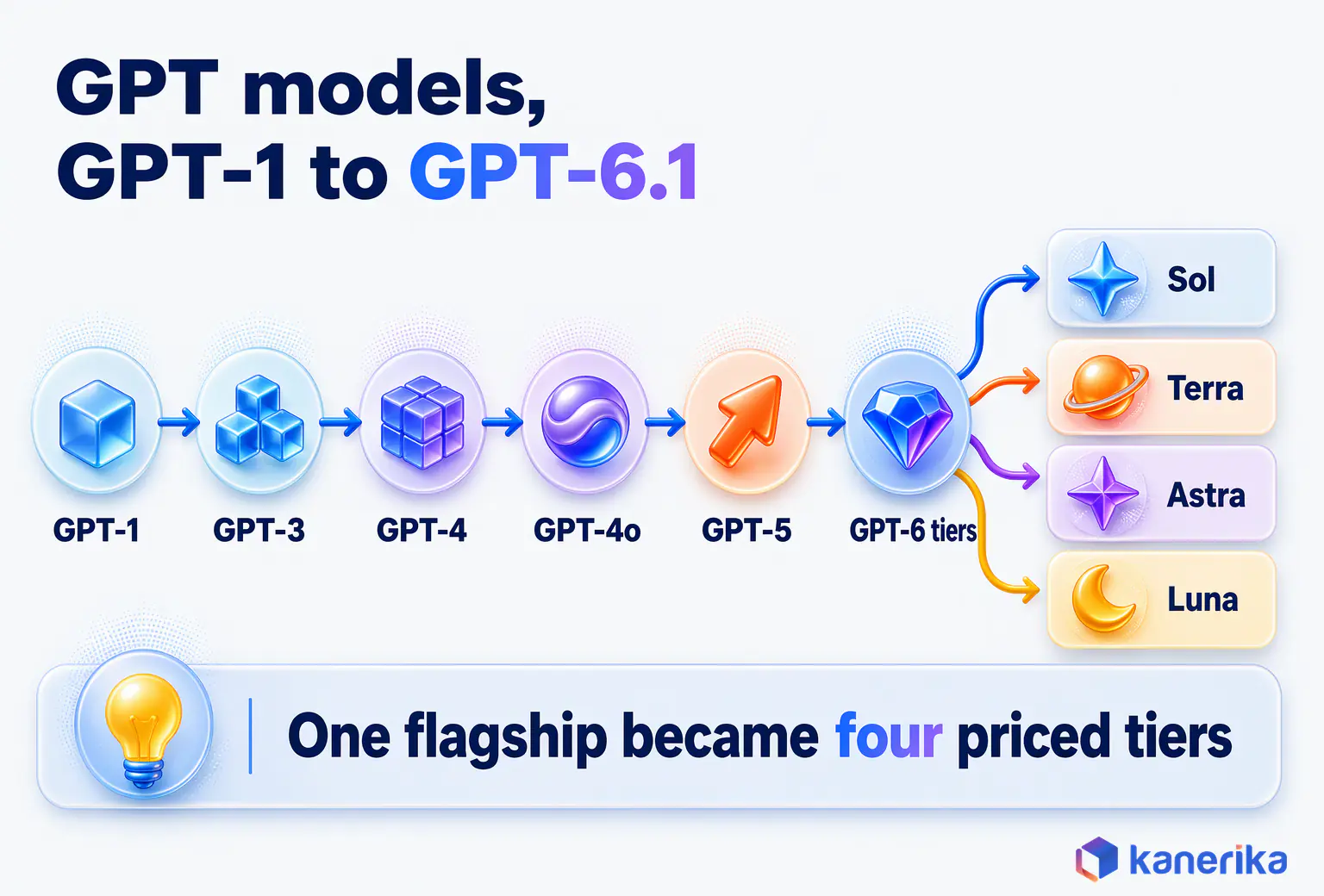
The 6.1 point release added GPT-6.1 Sol and GPT-6.1 Terra, while Astra and Luna kept their GPT-6 ids. For buyers, this means one vendor now covers a hundredfold price range, from Luna at $0.10 to Astra at $10 per million input tokens.
How to Read OpenAI Model Names
OpenAI model names carry three pieces of information. The number (6 or 6.1) gives the generation and point release, and the tier word (Sol, Terra, Astra or Luna) gives the price level. A date suffix, as in gpt-4o-2024-05-13, shows a dated snapshot that does not change after release.
In production, pin a dated snapshot or an exact id wherever OpenAI provides one. A test you ran last month then still describes what users see today. The cost is that every snapshot has a retirement date, so keep a calendar that tells you when to test the next version.
ChatGPT Plans vs the OpenAI API: Two Ways to Use GPT
Companies buy GPT in two ways: as ChatGPT seats for people, or as metered API calls for software. The right mix depends on whether the main user is a person typing questions or an application doing work in the background.
ChatGPT Plan Prices
ChatGPT’s published plans, as listed on OpenAI’s ChatGPT help and plans site, are as follows.
- Free at $0, the entry plan for trying ChatGPT.
- Go at $8, a low-cost step up from Free.
- Plus at $20, which includes GPT-6.1 Sol and GPT-6 Luna.
- Pro from $100, with tiers at $100, $200 and $500 for heavy individual use.
- Business, the plan built for teams. Check its current price with OpenAI directly.
Seats or API: How to Decide
Seats make sense when people use GPT as a daily assistant for writing, research and analysis. The cost is predictable per person, and you get the interface, file handling and admin tools without building anything.
The API makes sense when GPT runs inside your own product or process, such as a support bot, a document pipeline or a coding agent. You pay per token, so cost scales with usage, and you choose the exact model id and settings. Most enterprises end up with both, so they need separate budgets and controls for each.
The controls differ as well. Seats are governed through user accounts, so access ends when someone leaves the company and admins can see who uses the tool.
API usage is governed through keys and projects, so each application needs its own key, its own spending limit and its own owner. When one shared key serves every team, nobody can tell which application caused a spike in cost.
A simple test settles most cases. If a person reads every answer before it matters, a seat is usually enough.
If software acts on the answer, or the volume is too large to read, the work belongs on the API. There it needs logging and tests.
If you are weighing ChatGPT against rival assistants for staff, our ChatGPT vs Gemini vs Claude comparison covers that choice. Teams already deep in Microsoft 365 should also read Microsoft Copilot vs ChatGPT before buying seats.
Which GPT Model Should You Use? Decision Rules by Workload
The best GPT model for a job is the cheapest tier that passes a test built from that job’s real inputs. Picking the most capable tier for everything wastes money, while picking the cheapest for everything creates rework that people then fix by hand.
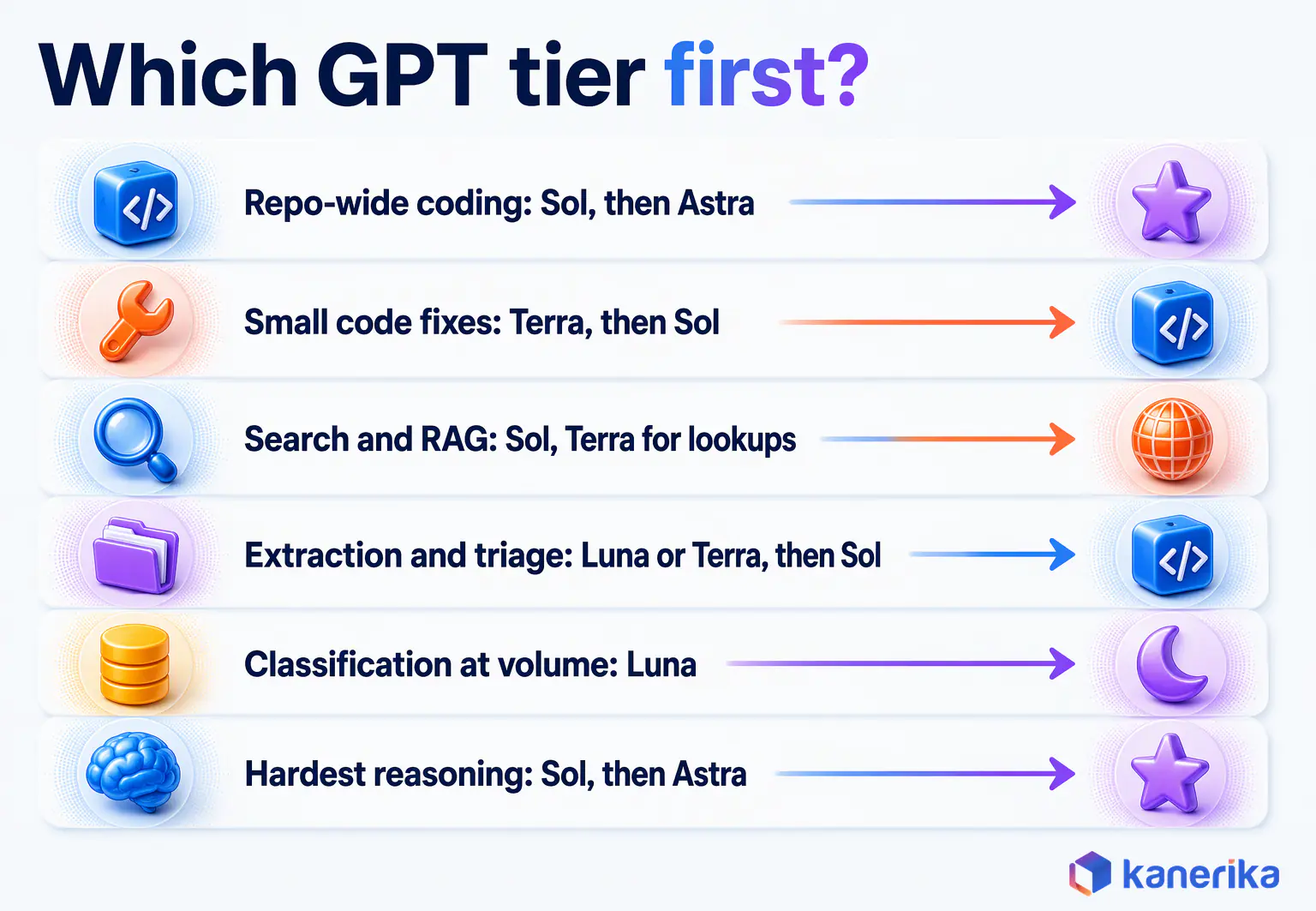
Starting Tiers for Six Common Workloads
The table below turns that logic into starting points for six common workloads. Treat each row as a hypothesis to test on your data, since none of these are measured results.
| Workload | Start with | Escalate to | Why |
|---|
| Coding agents on whole repositories | GPT-6.1 Sol | GPT-6 Astra | Long context and multi-step edits; Astra only where Sol fails your tests |
| Small code fixes and drafting | GPT-6.1 Terra | GPT-6.1 Sol | Clear tasks with quick review; Sol when Terra misses edge cases |
| Enterprise search and RAG | GPT-6.1 Sol | Sol, with Terra for simple lookups | Answers must follow retrieved sources closely |
| Document extraction and ticket triage | GPT-6 Luna or GPT-6.1 Terra | GPT-6.1 Sol on low confidence | Fixed fields and formats; escalate only the unclear cases |
| Classification and routing at volume | GPT-6 Luna | GPT-6.1 Sol for exceptions | Narrow labels and high volume favor the lowest unit price |
| Hardest multi-step reasoning | GPT-6.1 Sol | GPT-6 Astra | Pay the premium only after Sol fails your test |
Two patterns run through the table. Every row starts one tier below where teams usually start, because a test on real data is cheap and an oversized default is expensive. Escalation is tied to a check you can measure, such as a failed test or a low confidence score.
Coding and Software Agents
Small code fixes, such as a failing unit test, are clear and easy to verify, so Terra is a sensible first tier. Repository-wide refactors need a lot of code in view and several planned steps, so start those on Sol. Feed the agent only the files that matter, since a prompt past 272K tokens pays a higher rate.
For more, see our guide to AI coding agents and our GPT Codex vs Claude Code comparison.
Enterprise Search and RAG
Enterprise search usually runs as retrieval-augmented generation, where the system finds relevant passages and the model answers from them with citations. Sol is the right starting tier, because an answer that drifts from the source is worse than no answer. Terra can handle simple lookups, such as a policy date from one document.
Most quality gains in search, however, come from better retrieval rather than a pricier model. Our guide to advanced RAG covers reranking, query rewriting and other retrieval fixes worth trying before you upgrade the tier.
Document Extraction and Support Tickets
Extraction pulls fixed fields such as invoice numbers, dates and totals out of documents, and ticket triage assigns a category, a priority and an owner. Both have a clear right answer, so every output can be checked automatically against a schema.
That checkability makes Luna or Terra a good first tier. Run it on everything, validate each output and send only failed or low-confidence cases to Sol. For the wider pattern of reading and checking business documents, see our guide to document intelligence.
Datasheet
KlarityIQ: Your Document Intelligence Agent
See how Kanerika’s KlarityIQ agent reads, extracts and checks data from business documents at scale.
View the Datasheet →
High-Volume Classification and Routing
Classification labels an input with one of a small set of categories, such as language, intent or sentiment. Routing then uses that label to decide where the request goes next. These jobs run on every request, so unit price matters more than peak capability.
Luna is the default here, at $0.10 input and $0.50 output per million tokens. Some teams also test a small open model for this step, and our comparison of SLMs vs LLMs explains when a small model is enough.
Hard Multi-Step Reasoning
Start long multi-step work, such as a financial model with many linked assumptions, on Sol with higher reasoning effort, and test it on past cases with known answers. Only when Sol fails a clear share of those cases should you try Astra on the same set. If Astra fixes the failures, route just that class of task to it, and keep everything else on Sol.
Start Cheap, Escalate on Low Confidence
Send each request to the cheapest tier that can handle it, and escalate only when a check fails. Here is a routing rule you can adapt.
- Classify the request. Use Luna, or simple rules, to label each request by type and difficulty before any expensive call runs.
- Send routine work to Luna. Requests labeled simple, such as tagging or field extraction, go straight to the cheapest tier.
- Escalate on a failed check. If the output fails a schema check, falls below a confidence threshold or trips a business rule, resend it to Sol.
- Reserve Astra for named cases. Only workloads where Sol failed your test set should reach Astra, and each one needs an owner who approved the cost.
- Log every escalation. Record the request type, the tier that failed and the tier that succeeded, so you can tune thresholds each month.
A routing layer such as an LLM gateway is the usual place to run this logic. It sits between your applications and OpenAI, applies the rules and tracks spend per model id. It also makes it easy to switch tiers when prices or retirements change.
The snippet below shows the shape of such a rule. It is an illustrative example, not a Kanerika deliverable, and the threshold comes from your own test set.
# Illustrative routing config (example only)
routes:
  default:
    model: gpt-6-luna
    checks: [json_schema, confidence]
    min_confidence: <set-from-your-test-set>
  escalate:
    on: [schema_fail, low_confidence]
    model: gpt-6.1-sol
  reserved:
    model: gpt-6-astra
    allow_only: [owner_approved_workloads]
log:
  fields: [request_type, failed_tier, final_tier, cost_usd]
Routing is not always worth it: at low volume, building and running the router can cost more than the tokens it saves. A tight latency budget is the other exception, since an escalated request makes a second call. In either case, pick the one tier that passes your test set and skip the router.
Context Windows, Reasoning Effort and Tool Use
Three settings shape what a GPT model does in one call. They are how much it reads, how hard it thinks and which tools it may use. Each one also changes the cost.
Context Windows
The current GPT-6.1 Sol and GPT-6.1 Terra tiers accept 1,050,000 tokens of context with up to 128,000 tokens of output. GPT-6 Astra and GPT-6 Luna list 1.05M tokens of context and 128K tokens of output.
A big window does not guarantee good answers, though. Models can miss a detail buried deep in a long prompt, and every extra token adds cost.
Put the right material in the window instead of all of it, with clear instructions and the most relevant passages first. That practice, often called context engineering, usually improves accuracy more than a larger window does.
Reasoning Effort
Reasoning effort controls how much internal work the model does before it answers. Higher effort helps on math, planning and code, but it produces more output tokens, which cost five times the input rate. So set effort per workload, with low effort for tagging and summaries and higher effort only where tests show it changes the result.
Tool Use and Structured Outputs
Tool use lets a GPT model call functions you define, such as a database lookup, a search API or a ticketing system. Structured outputs then force the reply into a JSON schema your code can check.
Together, they let a model act inside a business process, and a reply that breaks the schema can be retried or escalated.
Kanerika Service
Estimate the Return of a GPT Use Case Before You Build
Model the expected savings and payback of an AI use case before you commit budget to a model tier or a build.
Estimate Your ROI
GPT API Pricing and the Real Cost per Task
GPT API pricing looks simple on the price sheet. Yet the real cost of a workload depends on prompt length, caching, batching and how often a task has to be redone.
Price per Million Tokens
OpenAI charges separately for input tokens, cached input tokens and output tokens. Cached input is a repeated prompt prefix, such as a long system prompt or a reference document, that OpenAI has already processed. The table below lists each tier’s standard prices next to the two adjustments that change most bills.
| Model | Standard input / output per 1M | Cached input per 1M | Prompts over 272K tokens | Batch and Flex |
|---|
| GPT-6.1 Sol | $2 / $10 | $0.10 | 2x input and 1.5x output ($4 / $15) | 50% lower |
| GPT-6.1 Terra | $1 / $5 | $0.05 | 2x input and 1.5x output ($2 / $7.50) | 50% lower |
| GPT-6 Astra | $10 / $50 | $1.00 | Rule not listed for this tier | Not listed |
| GPT-6 Luna | $0.10 / $0.50 | $0.01 | Rule not listed for this tier | Not listed |
The long-prompt column applies to GPT-6.1 Sol and GPT-6.1 Terra only, and OpenAI does not state the rule for Astra or Luna. A 300K-token prompt on Sol pays the higher rate on the whole request. Trimming it below 272K, for example by retrieving only the relevant files, cuts the input bill by more than half.
Batch, Flex and Cached Input
Both Batch and Flex processing cut prices by 50% on Sol and Terra. Batch suits jobs that can wait, such as overnight document processing, bulk summaries or back-filling tags on old tickets.
Cached input is the other large saving. On Sol, cached tokens cost $0.10 per million, a twentieth of the standard $2 input rate.
Applications that send the same long instructions on every call should put that shared text at the start of the prompt, so it can be cached.
Worked Example: 100,000 Requests a Month
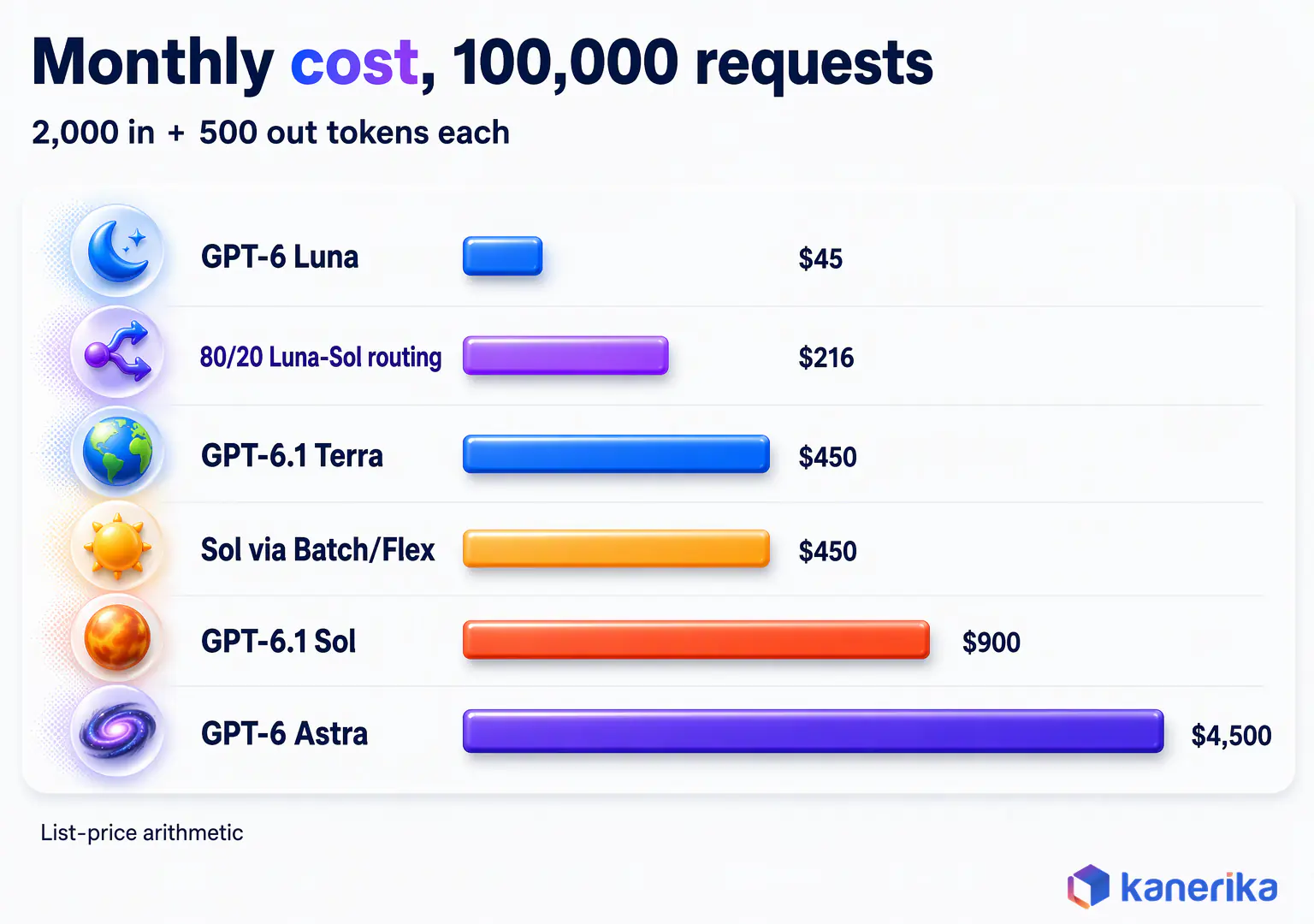
The numbers below are list-price arithmetic for illustration only, and they are not measured results. Assume 100,000 requests a month, each with 2,000 input tokens and 500 output tokens. That totals 200 million input tokens and 50 million output tokens.
- Luna only (GPT-6 Luna): 200 x $0.10 + 50 x $0.50 = $45 a month.
- Terra only (GPT-6.1 Terra): 200 x $1 + 50 x $5 = $450 a month.
- Sol only (GPT-6.1 Sol): 200 x $2 + 50 x $10 = $900 a month.
- Astra only (GPT-6 Astra): 200 x $10 + 50 x $50 = $4,500 a month.
- Sol through Batch or Flex (50% lower): $450 a month.
- Cached Sol, with 1,500 of each 2,000 input tokens served from cache: 150 x $0.10 + 50 x $2 + 50 x $10 = $615 a month.
- Routed mix, 80% of requests to Luna and 20% to GPT-6.1 Sol: 0.8 x $45 + 0.2 x $900 = $216 a month.
The spread from Luna to Astra is a hundredfold for the same traffic. The routed mix costs less than a quarter of all-Sol traffic, while hard cases still reach Sol. Caching saves about a third on Sol, and Batch halves it for jobs that can wait.
Cost per Completed Task
Price per token is only the start of the real cost. What the business pays for is a finished task, such as a resolved ticket, an accurate extraction or a merged pull request. So the better measure is cost per completed task, which adds every retry, every failed tool call and every minute of human review.
To compute it, add the model cost of all attempts, escalations and human fixes. Then divide by the number of tasks that finished correctly.
A cheap model that fails one task in five can cost more per finished task than a pricier one. That happens once a person has to fix each failure.
Benchmarks vs Your Own Evaluation
Public benchmarks show how a model did on someone else’s test, and your documents, code and tickets are a different test. Benchmarks help you build a shortlist, but they cannot pick your production model.
Why Vendor Scores Shift
Vendor scores shift between versions and settings. A result reported at high reasoning effort may not hold at the lower effort you plan to run. So the only score that answers your question is one you produce on your own data, with your own settings.
A Four-Test Evaluation Set
A practical evaluation set needs four tests, one for each common GPT workload. Build each from 50 to 200 real examples with known good answers.
Pull the examples from real traffic, including the awkward cases that cause trouble today. Write down the correct answer for each one before you run any model, so the grading cannot drift toward whatever the model produced.
- Document extraction. Run real documents through each tier and measure field-level accuracy, schema-pass rate and cost per document.
- RAG answers with sources. Ask real user questions against your knowledge base and score whether each answer is correct, cites the right source and admits when the sources do not cover it.
- Code generation with tests. Give each tier real tasks from your repositories and measure the share whose output passes your existing unit tests on the first try.
- Agent task completion. Run multi-step tasks end to end, with tools enabled, and measure the share completed correctly, the number of tool calls and the total tokens used.
Score every tier on the same set, then compare quality, latency and cost per completed task side by side. Re-run the set whenever OpenAI ships a new version or announces a retirement.
Grading and Recording Results
Fixed-answer tasks, such as extraction and code with tests, can be scored automatically. Open answers, such as RAG responses, need a written rubric that a human reviewer or a second model applies. When a model grades, spot-check a sample by hand.
Record latency and token counts for every run, since a tier that wins on quality may still miss your response-time target. For a fuller method, including how to grade open-ended answers, see our LLM evaluation framework.
GPT Model Retirements and Migration: October 23, December 11, January 14
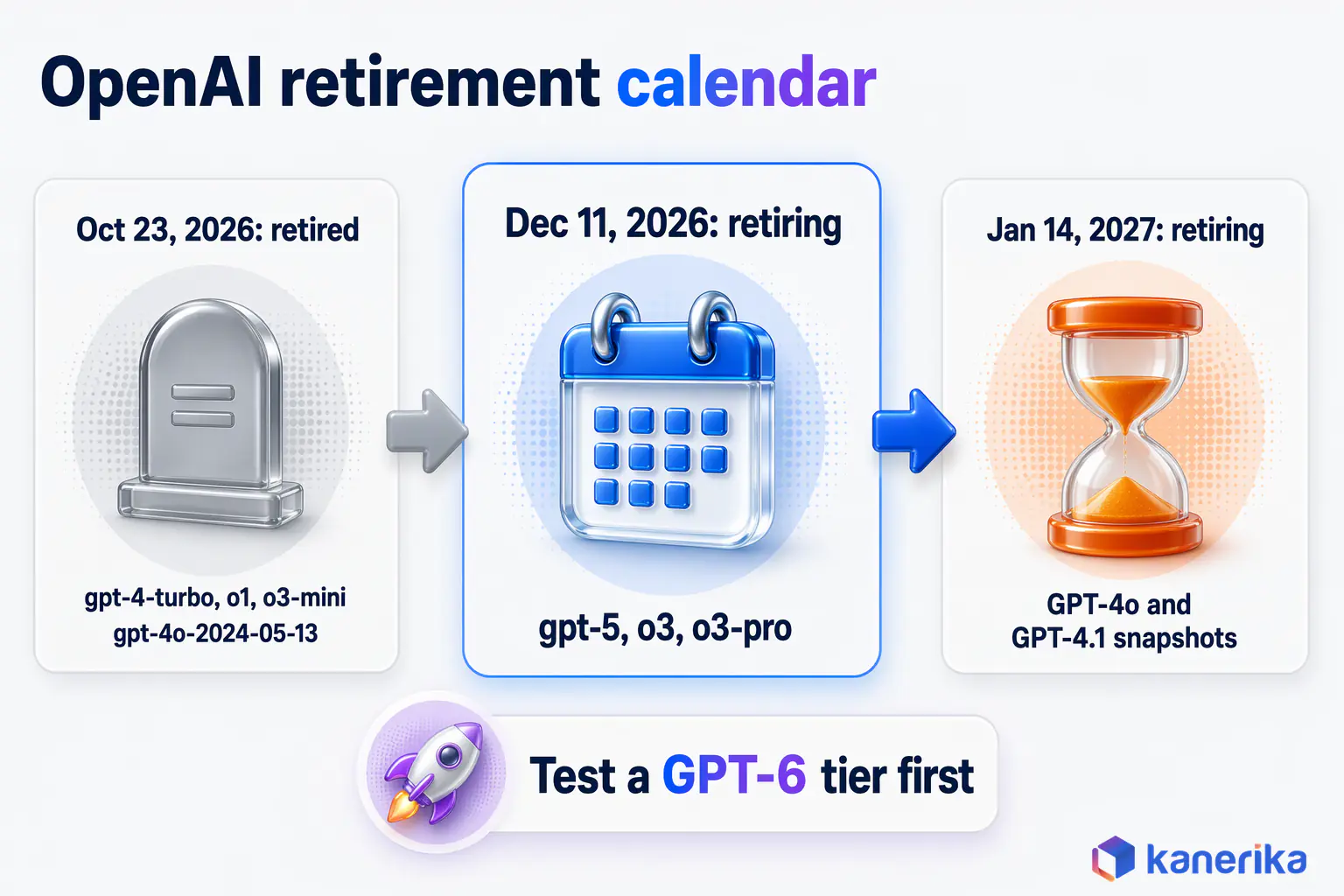
OpenAI retires older model ids on a published schedule, and any application still calling a retired id stops working on that date. Three dates matter for anyone running GPT models in production today.
The first wave, on October 23, 2026, has already passed, so any code still calling those ids is already failing. Two more waves follow, leaving only a few weeks to test and move. The table lists every id on the current schedule.
| Model id | Status | Date |
|---|
| gpt-4-turbo | Retired | October 23, 2026 |
| o1 | Retired | October 23, 2026 |
| o3-mini | Retired | October 23, 2026 |
| gpt-4o-2024-05-13 | Retired | October 23, 2026 |
| gpt-5 | Retiring | December 11, 2026 |
| o3 | Retiring | December 11, 2026 |
| o3-pro | Retiring | December 11, 2026 |
| GPT-4o snapshots | Retiring | January 14, 2027 |
| GPT-4.1 snapshots | Retiring | January 14, 2027 |
Retirements also touch places that are easy to miss. Model ids hide in environment variables, prompt templates, notebook cells, scheduled jobs and third-party tools that call OpenAI on your behalf. Searching only the main codebase often misses several of them.
A Phased Migration With Rollback
A safe migration treats the new model as a release, with tests, a staged rollout and a way back, whichever date applies.
- Inventory every model id. Search code, configuration, prompt stores and vendor tools for each id on the retirement list, and record the owner of each.
- Run your test set on the replacement tier. Use the four-test set from the evaluation section, and move to a current GPT-6 tier that passes your test.
- Compare cost per task and latency. Check that the new tier meets your budget and response-time targets, including any long-prompt surcharge.
- Shift a slice of traffic. Send 5% to 10% of real traffic to the new tier and compare quality and error rates with the old one.
- Keep rollback rules. Define in advance which error rate or quality drop sends traffic back, and keep the old path ready until the retirement date.
- Record approvals. Log who approved the switch, the test results behind it and the date, so audits and future migrations have a record.
Most of this work happens in the code that calls the OpenAI API. So a single shared client that reads the model id from configuration makes the next migration far easier. Teams that hard-code ids in many places repeat this whole exercise for every retirement.
Azure OpenAI vs the OpenAI API
Enterprises can reach GPT models in two main ways: directly through OpenAI’s API, or through Microsoft’s Azure cloud. Both serve OpenAI models, but they differ in how you control access, networks and compliance.
Where Azure Fits Best
Azure suits organizations that already run on Microsoft and want GPT inside the same controls as the rest of their cloud estate. You can use your existing identity system for access and keep traffic on private networks.
For a bank or a hospital group with strict data rules, that fit with existing policy is often the deciding factor.
On Azure, OpenAI models sit inside Azure AI Foundry, Microsoft’s wider platform that also hosts models from other vendors.
The direct OpenAI API suits teams with fewer constraints on network design. Many enterprises use both, prototyping on the direct API and moving regulated workloads to Azure once the tested model is available there.
Before you commit, check that the exact tier and version you tested is available on the platform you plan to ship on.
Four Questions That Settle the Choice
A short set of questions usually settles the choice.
- Identity. Must every call use your existing corporate identity system and access rules?
- Network. Must traffic stay on private network paths with no public internet route?
- Region. Do your data rules require processing in a named geography?
- Setup effort. Would the team rather call one public API than configure cloud networking?
If the first three answers are yes, Azure is usually the better fit. If only the last one is yes, the direct API is often simpler.
Customizing GPT Models: Prompting, RAG or Fine-Tuning
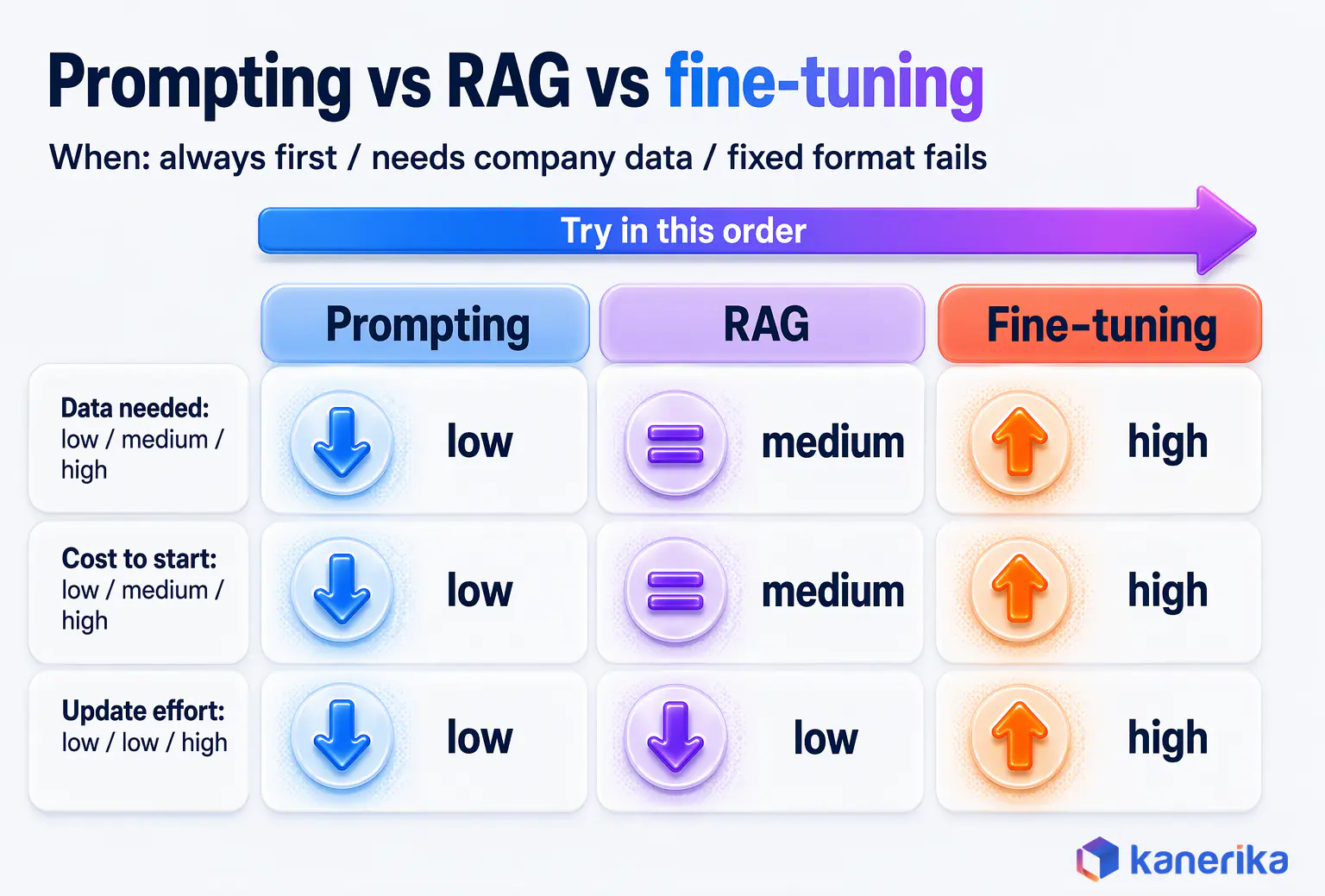
There are three ways to make a GPT model fit your business: better prompts, retrieval of your own data, or fine-tuning the model itself. They differ sharply in cost and effort, so the order in which you try them matters.
Take a legal team that wants GPT to answer questions about its own contracts. Better prompts can fix tone and format, but they cannot teach the model what is in last month’s agreements.
Retrieval can supply those agreements at question time. Fine-tuning would only help if the answers still came back in the wrong structure after both of the other steps.
Prompting and Context Engineering First
Prompting is the cheapest and fastest lever, because it needs no new infrastructure. A good system prompt states the task, the audience, the format, the rules and what to do when information is missing. Adding two or three worked examples often fixes formatting problems that look like model weakness.
Context engineering goes one step further. It decides which instructions, documents and history go into each request, and in what order. Many teams that plan to fine-tune find that a clearer prompt and better context solve the problem at no training cost.
Retrieval-Augmented Generation
Retrieval-augmented generation, or RAG, connects a GPT model to your company’s documents and data. When a user asks a question, the system searches your sources and passes the best passages to the model. It then asks the model to answer from them with citations.
Because the knowledge lives in your systems, you update an answer by updating the document, with no retraining. Access rules can also follow the source, so a user only gets answers drawn from documents they are allowed to open.
RAG is the standard answer when responses need current or private company information. It also reduces made-up answers, since the model has real text to quote and you can tell it to refuse when the sources are silent. Our guide to LLM hallucination explains why models invent facts and how grounding reduces that risk.
If you are deciding between the two main customization routes, our comparison of RAG vs fine-tuning sets out the trade-offs in more detail.
Fine-Tuning and When It Pays
Fine-tuning trains a model further on your own examples, so it learns a fixed format, style or decision pattern. It pays off when you need the same structure thousands of times a day and prompting still fails to produce it reliably. A typical case is a strict output format for a downstream system or a house style for regulated documents.
Fine-tuning has real costs, though. You need hundreds or thousands of clean, labeled examples, a training run and a new evaluation.
You also need a plan to repeat the work when the base model retires. Methods such as parameter-efficient fine-tuning lower the compute cost by training a small set of added weights, mostly on open models you host yourself.
Four Questions to Answer Before You Fine-Tune
Before you start a fine-tuning project, answer four questions in writing. What exact behavior should change, and how will you measure it? Have prompting and retrieval already been tried on the same test set?
Do you have enough clean examples, reviewed by someone who knows the domain? And who will retrain and retest the model when its base version reaches a retirement date?
If any answer is unclear, the project is not ready. A team that cannot measure the behavior it wants will not know whether the tuned model is better. It may even ship a model that is worse on cases the training set left out.
When fine-tuning does fit, keep the training set under version control next to your test set. Then every retrain uses known data, and every result can be traced back to the examples that produced it.
Building a GPT-Style Model From Scratch: Rarely Worth It
Training your own GPT-style model from scratch is possible, but it is rarely the right call for an enterprise. It needs three things at very large scale. First, you need a huge, cleaned and licensed text dataset.
Second, you need a large cluster of GPUs running for weeks or months of pre-training. Third, you need an evaluation and safety program to test the result before anyone uses it.
After pre-training, the model still needs instruction tuning and alignment before it behaves like an assistant. In practice, only model labs, very large technology firms and some research groups take this route.
Kanerika Service
RAG Development Services
Kanerika builds retrieval pipelines that ground GPT answers in your governed company data, with source citations users can check.
Explore RAG Development
For nearly every business, adapting an existing GPT or open model works better. Prompting, RAG and occasional fine-tuning reach a stronger result at a small fraction of the cost.
Security, Privacy and Governance for Enterprise GPT Deployments
Putting GPT models into production means handling company data, giving software the power to act and keeping track of which model does what. Each of those needs its own controls, set before launch rather than after the first incident.
Data Handling and Retention
OpenAI states that it does not use API data to train its models by default. Retention rules, however, vary by feature, such as stored conversations, files and certain tools.
Read OpenAI’s enterprise privacy page and its developer guide on how your data is handled for the current terms. Then map each feature you use to your own data rules.
In practice, classify the data each GPT application will see. Public and internal data may go to the API with standard terms.
Regulated data, by contrast, may need extra contract terms, a specific region or a private network path. Write that mapping down, because auditors will ask for it.
Also check what your own systems keep. Logs, prompt stores and evaluation sets often hold copies of sensitive text long after the API call ends. Apply the same retention and access rules to them as to the source data.
Prompt Injection and Agent Permissions
Prompt injection happens when text inside a document, email or web page tries to give the model new instructions. A support agent that reads customer emails, for example, could meet a message telling it to reveal account details or issue a refund. The risk grows as agents gain tools, because a hijacked agent can act instead of only talking.
The defense is layered. Give each agent only the tools and data it needs, and require human approval for actions such as payments or deletions. Also screen inputs and outputs for policy breaks.
Prompt injection is LLM01 in the OWASP Top 10 for LLM applications, which recommends the same controls: least-privilege access and human approval for high-risk actions.
Our guides to AI guardrails and the wider LLM security guide cover these controls in detail.
On-Demand Webinar
Strategies to Reduce LLM Security Risks
A Kanerika session on prompt injection, data leakage and access controls for GPT and other LLM applications in production.
Watch the Webinar →
Governance Across Several Model Versions
Most enterprises soon run several GPT tiers and versions at once, often alongside models from other vendors. Governance keeps that manageable. Start with a model inventory that lists every model id in use, the application that calls it, the owner and the retirement date.
Next, define approved uses per data class, so a team knows which tier may see customer data and which may not. Finally, log prompts, outputs, model ids and costs in a form you can search during an audit. A written AI governance framework ties these pieces together into policy that people can follow.
Running GPT Models in Production: Monitoring, Drift and Cost Control
Once a GPT application is live, quality, speed and cost all drift over time. Prompts change, data changes, traffic grows and OpenAI releases new versions, so you need a small set of signals you check every week.
Six Signals to Track
Track all six signals below, since each one catches something the others miss.
- Latency. Track median and p95 response times per model id, since users feel the slowest requests most.
- Error and schema-failure rate. Count API errors, timeouts and outputs that fail your JSON schema, because a rise here often comes before user complaints.
- Token spend per model id. Report input, cached and output tokens by tier and application, so finance sees where the money goes.
- Escalation rate. Measure the share of requests that move from Luna or Terra up to Sol or Astra, since a rising rate erodes the savings from routing. A sudden jump often points to a change in the inputs.
- Answer quality samples. Review a small random sample of real answers each week against your test rubric, so slow quality drift is caught early.
- Retirement-date alerts. Set alerts 90, 60 and 30 days before each model id’s retirement, tied to the inventory in your governance records.
Good LLM observability tooling collects these signals in one place and links each to the prompt, model id and user session behind it.
Cost Control and Drift
Cost control works the same way as quality control. Give every application its own budget and spending alert, so a runaway loop or a prompt that suddenly grows shows up the same day.
Review cache hit rates monthly, because a small change to a system prompt can stop caching and quietly raise the input bill. Also watch prompt length against the 272K threshold on Sol and Terra, since crossing it raises the rate for the whole request.
Drift needs a schedule too. Re-run your test set monthly on live prompts, and compare the results with the scores from launch.
When quality falls, check the data and prompts first, because those change far more often than the model does.
Finally, give each signal an owner and a threshold. A dashboard nobody reads catches nothing, while a named engineer who gets paged when the schema-failure rate doubles will fix the cause the same week.
Checklist
AI Governance Checklist
Work through the policy, data, access and monitoring checks to settle before a GPT application goes live.
Get the Checklist →
GPT vs Claude vs Gemini: Short Enterprise Comparison
Many enterprises compare GPT models with Anthropic’s Claude and Google’s Gemini before they commit. Through November 30, 2026, Sol, Sonnet 5.5 and Gemini 4 Argon all list at $2 / $10; Argon moves to $4 / $20 on December 1. So the choice usually comes down to results on your own tests and the data terms each vendor gives you.
| Model | Vendor | Input / output per 1M tokens | Note |
|---|
| GPT-6.1 Sol | OpenAI | $2 / $10 | 1,050,000-token context |
| GPT-6 Astra | OpenAI | $10 / $50 | OpenAI’s premium tier |
| Claude Sonnet 5.5 | Anthropic | $2 / $10 | 1M context, 128K output |
| Claude Opus 5.5 | Anthropic | $4 / $20 | 1M context, announced September 22, 2026 |
| Gemini 4 Argon | Google | $2 / $10 through November 30, 2026, then $4 / $20 from December 1, 2026 | Live, up to 1M combined context |
Prices come from Anthropic’s pricing page and Google’s Gemini API pricing page. Budgets set in November need updating for Argon’s December 1 price.
Choose by workload first: run the same four-test set on each candidate and compare cost per completed task. Then compare data handling, regions and contract terms, since those often rule options in or out. For the full assistant-by-assistant view, read our ChatGPT vs Gemini vs Claude comparison.
Our ranking of top LLMs covers more vendors, and our guide to open-source LLMs covers models you can host yourself. Finally, OpenAI vs Anthropic compares the two companies.
Case Study
31% Lower Cost per Ticket With an AI Member Support Agent
A global expert-network company lowered cost per ticket by 31% with an AI member support agent that hands low-confidence cases to live executives.
Read the Case Study →
How Kanerika Helps Enterprises Choose and Run GPT Models
Choosing a GPT tier is a short decision, while running it well for years takes a process. Kanerika is an OpenAI Select Partner, and its teams help enterprises pick the right GPT model for each workload. They then prove it on the client’s own data and keep it working through price changes and retirements.
Case Study: Cutting Cost per Ticket by 31%
For a global expert-network company, Kanerika built an AI member support agent on the knowledge base and Zendesk. It resolves routine queries itself and hands low-confidence cases to live executives, the escalate-on-low-confidence rule described earlier. Cost per ticket fell 31%, the cost-per-completed-task view this guide recommends.
The client’s Member Success team serves a network of over one million subject-matter experts, with requests arriving by email, phone, chat and Zendesk. Many follow standard patterns, such as account setup, profile updates and basic compliance checks. Executives used to resolve each one by hand, searching the knowledge base and past tickets.
The agent now resolves 65% of member queries itself, across chat and voice. For each case it routes to a person, it writes a ticket summary with suggested next steps, so the executive starts with context.
Five Stages From Shortlist to Production
Kanerika builds on both OpenAI’s GPT models and Anthropic’s Claude, so it recommends the right model per use case instead of defaulting to one vendor. Its LLM development services follow Kanerika’s own five-stage method.
- Workload inventory and data readiness. List every candidate use case, the data each one needs and whether that data is clean, current and permitted for AI use.
- Evaluation on the client’s own test set. Build the four-test set from real documents, tickets and code, then score each GPT tier on quality, latency and cost.
- Routing design and a cost model. Send routine work to the cheapest tier that passes, escalate on low confidence and model the cost per completed task.
- Grounding with RAG on governed data. Connect GPT to company data through retrieval, with access rules that match the source systems.
- Production monitoring and a model-version calendar. Track the six production signals and tie every model id to OpenAI’s retirement dates.
Data, Agents and Governance
The data side often decides whether a GPT project works. FLIP, Kanerika’s DataOps platform, prepares and moves the data that GPT applications retrieve.
Kanerika’s own agents apply the same patterns, with KlarityIQ handling document intelligence and KARL answering questions on business data. For control, kanGovern and kanGuard are governance services that Kanerika delivers on Microsoft Purview, backed by its AI governance services.
Talk to Kanerika
Choosing a GPT Tier for Production?
Talk to Kanerika about testing GPT tiers on your own data, with a routing rule and a cost model in place before you commit.
Talk to an Expert →
Final Thoughts: What to Plan for Beyond 2026
GPT models will keep changing, and the tiers, prices and ids in this guide will not stay fixed for long. Three habits keep that change manageable.
Design applications so the model id lives in configuration, behind one shared client or gateway. Keep a test set from your own data and run it on every new version before you switch. Hold a retirement calendar that names every id you use and the date it stops working.
Finally, report cost per completed task alongside token spend, so business and engineering judge each tier by the same number. Teams that build these habits can move to the next GPT release in days instead of scrambling when a deprecation notice lands.
Frequently Asked Questions
What are GPT models?
GPT models are large language models built by OpenAI. They read text, split it into tokens and predict the next token to write an answer. Businesses use them for writing, search, coding, document extraction and support. The current family includes GPT-6.1 Sol, GPT-6.1 Terra, GPT-6 Astra and GPT-6 Luna, each priced for different kinds of work.
What does GPT stand for?
GPT stands for Generative Pre-trained Transformer. Generative means the model writes new text instead of only labeling it. Pre-trained means it first learns from a very large body of general text before any task-specific work. Transformer is the neural network design that lets the model weigh every word against every other word, and it comes from a 2017 research paper.
What context window do current GPT models support?
GPT-6.1 Sol and GPT-6.1 Terra accept 1,050,000 tokens of context with up to 128,000 output tokens. GPT-6 Astra and GPT-6 Luna list 1.05 million tokens of context and 128K output tokens. OpenAI does not state a window for the earlier GPT-6 Sol. A large window still needs well-chosen content to produce accurate answers.
What is the difference between GPT and ChatGPT?
GPT is the family of models, and ChatGPT is an app built on them. ChatGPT adds a chat interface, file uploads and tools, and people pay through plans such as Free, Go, Plus and Pro. Developers use GPT models directly through the API instead. They pay per token and choose the exact model id their software calls.
Is ChatGPT an LLM or generative AI?
ChatGPT is a generative AI product that runs on large language models. The LLM is the engine, and ChatGPT is the application built around it, so both labels apply. Generative AI is the wider category of systems that create new content. Large language models are the text-focused part of that category, and GPT models belong to it.
What is the difference between an LLM and GPT?
An LLM is any large language model trained on large amounts of text to understand and write language. GPT is one specific family of LLMs, made by OpenAI. Other LLM families come from vendors such as Anthropic and Google, and from open-source projects. Every GPT model is an LLM, while many LLMs come from other makers.
Is GPT a deep learning or NLP model?
GPT is both. It is a deep learning model, because it uses a large neural network based on the transformer design. It is also a natural language processing model, because its job is to read and write human language. Natural language processing names the task area, and deep learning names the method used to build the model.
What is the difference between GPT-5 and GPT-6?
GPT-5 brought reasoning into the main GPT line. GPT-6 is the current family, sold as four priced tiers named Sol, Terra, Astra and Luna. The gpt-5 model id retires on December 11, 2026. Applications that still call it should test a current GPT-6 tier and move before that date.
What is the difference between GPT-4 and GPT-4o?
GPT-4 improved reasoning and instruction following over earlier models such as GPT-3. GPT-4o followed and was built to handle text, images and audio in one model. GPT-4o snapshots retire on January 14, 2027, so new projects should start on a current GPT-6 tier instead.
Are GPT-4 Turbo, o1 and GPT-4o still available?
GPT-4 Turbo and o1 are no longer available, since both retired on October 23, 2026, along with o3-mini and the gpt-4o-2024-05-13 snapshot. Other GPT-4o snapshots and GPT-4.1 snapshots remain until January 14, 2027. The gpt-5, o3 and o3-pro ids retire on December 11, 2026. Test a current GPT-6 tier before each date.
Can GPT models be used with private enterprise data?
Yes, with the right controls in place. OpenAI states that API data is not used for training by default, though retention rules vary by feature. Most enterprises connect GPT to private data through retrieval-augmented generation, with access rules copied from source systems. Classify your data first, and check contract, region and network needs before regulated data reaches a model.
Should you choose GPT models or open-source LLMs?
Choose by workload, data rules and cost per completed task. GPT models are quick to start and cover a wide price range through the API. Open-source LLMs can run on your own infrastructure, which helps when data must stay inside your network. Many enterprises use both, and they test each candidate on the same task set.
Who makes GPT models?
OpenAI makes GPT models, and the same company built ChatGPT on top of them. Developers reach the models through the OpenAI API, and many enterprises also use them through Microsoft Azure. The current GPT-6 family is sold in four priced tiers for different workloads.
What is the latest GPT model in November 2026?
The latest GPT models come from the 6.1 point release, which covers GPT-6.1 Sol and GPT-6.1 Terra. OpenAI’s safety hub published GPT-6.1 Sol on September 29, 2026. Sol costs $2 input and $10 output per million tokens with a 1,050,000-token window. GPT-6 Astra and GPT-6 Luna remain the premium and volume tiers.
How many types of GPT models are there?
OpenAI’s current text lineup has four main tiers. GPT-6.1 Sol is the default, GPT-6.1 Terra is the lower-cost option, GPT-6 Astra is the premium tier and GPT-6 Luna is the volume tier. The earlier GPT-6 Sol is still listed as well.
What is the difference between GPT-6.1 Sol and GPT-6.1 Terra?
GPT-6.1 Terra costs half as much as GPT-6.1 Sol. Terra charges $1 input and $5 output per million tokens, while Sol charges $2 and $10. Both have a 1,050,000-token context window and up to 128,000 tokens of output. Use Terra for drafting and simple lookups, and move work to Sol when Terra misses details.
Which GPT model is best for most enterprise applications?
GPT-6.1 Sol is the best starting point for most enterprise applications. It handles RAG, coding and agent work at $2 input and $10 output per million tokens. Test it on your own data before you commit. Move a workload to GPT-6 Astra only where Sol fails that test, because Astra costs five times as much.
Which GPT model is best for coding?
For coding agents that work across whole repositories, start with GPT-6.1 Sol and its 1,050,000-token context window. For small fixes and drafting, GPT-6.1 Terra is often enough at half the price. Try GPT-6 Astra only on tasks where Sol fails your own tests. Judge every tier by the share of outputs that pass your unit tests.
Which GPT model is the cheapest to use?
GPT-6 Luna is the cheapest current GPT model. It costs $0.10 per million input tokens, $0.01 for cached input and $0.50 per million output tokens. It still has a 1.05 million token context window. Luna suits classification, routing and simple extraction at high volume, with harder cases sent on to GPT-6.1 Sol.
How much do GPT models cost through the API?
API prices run from $0.10 to $10 per million input tokens. GPT-6 Luna costs $0.10 and $0.50, GPT-6.1 Terra $1 and $5, GPT-6.1 Sol $2 and $10, and GPT-6 Astra $10 and $50 for input and output. Batch and Flex cut Sol and Terra prices by 50%. Prompts over 272K tokens cost more on Sol and Terra.




